Permission a use case(权限管理用例)
Use case permissions only manage the permission of use case metadata.
Metadata
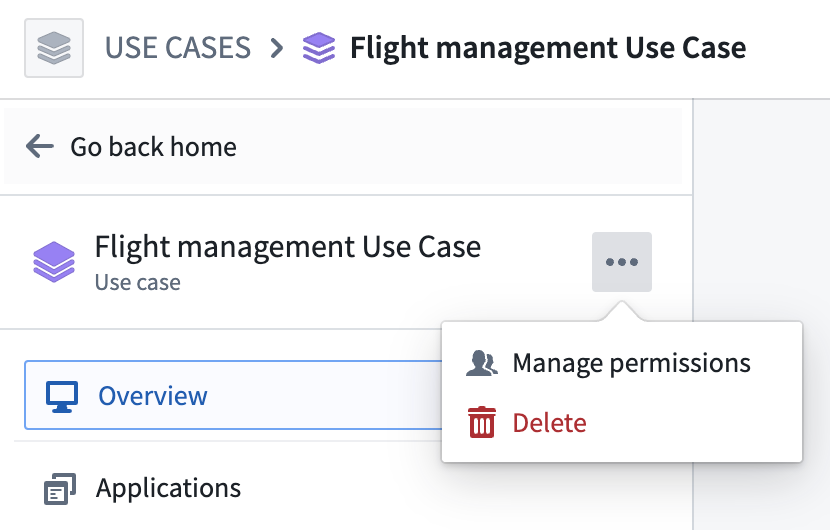
The permission of the use case metadata is managed through the Roles panel. In the use case overview page, select the ... option in the left sidebar or on the top right side of the overview page and select Manage permissions.
You can use the Roles panel to add or remove users or groups to the use case and assign them either the Use Case Owner or Use Case Editor role.
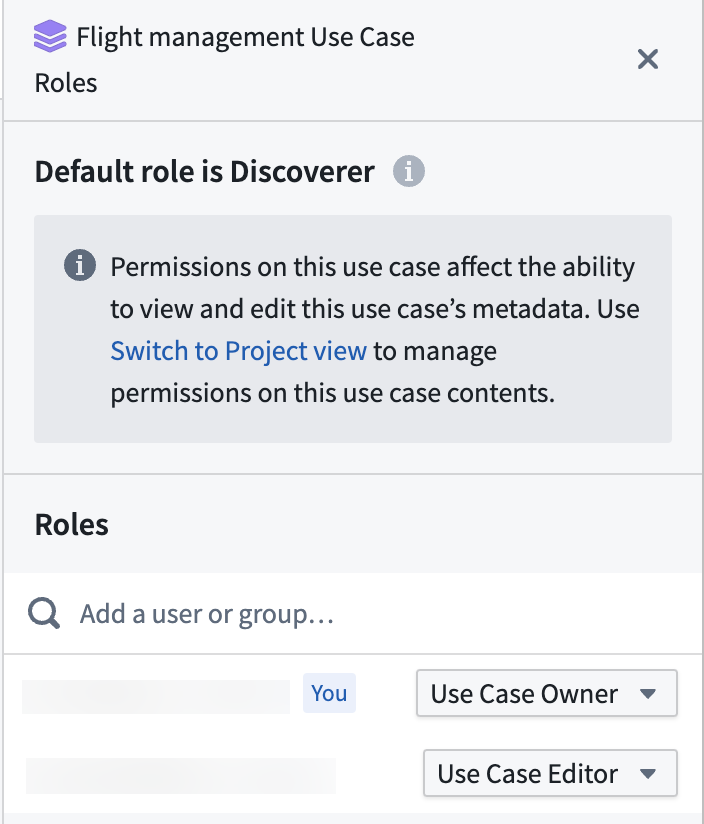
Use Case Owner: Users with Use Case Owner permissions can both manage the use case permissions and edit use case metadata.
Use Case Editor: Users with Use Case Editor permissions can only edit the use case metadata.
:::callout{theme="neutral"} By default, use case metadata is visible to everyone in the Organization, even if the users cannot view or edit the use case resources. :::
Resources
Permissions to the resources included in the use case are managed by the permission on the resource itself or the Project backing the use case. Learn more about managing Project and Ontology resource permissions.
中文翻译
权限管理用例
用例权限仅用于管理用例元数据的权限。
元数据
用例元数据的权限通过角色面板进行管理。在用例概览页面中,选择左侧边栏或概览页面右上角的...选项,然后选择管理权限。
您可以使用角色面板向用例添加或移除用户或群组,并为其分配用例所有者或用例编辑者角色。
用例所有者: 拥有用例所有者权限的用户可以管理用例权限并编辑用例元数据。
用例编辑者: 拥有用例编辑者权限的用户只能编辑用例元数据。
:::callout{theme="neutral"} 默认情况下,用例元数据对组织内的所有成员可见,即使这些用户无法查看或编辑用例资源。 :::