Alerting workflow(告警工作流(Alerting workflow))
Whether it’s detecting fraud or surfacing revenue opportunities, alerting workflows automatically surface issues to be reviewed by an end user, which they can make a decision on at a click of a button. These workflows enable teams to focus their attention on resolving the most pressing issues at hand rather than spending their time manually piecing data together.
Foundry’s Data Connection and Ontology allow organizations to implement this pattern in days instead of months and continue to implement, customize, and maintain it safely and efficiently.
Solution
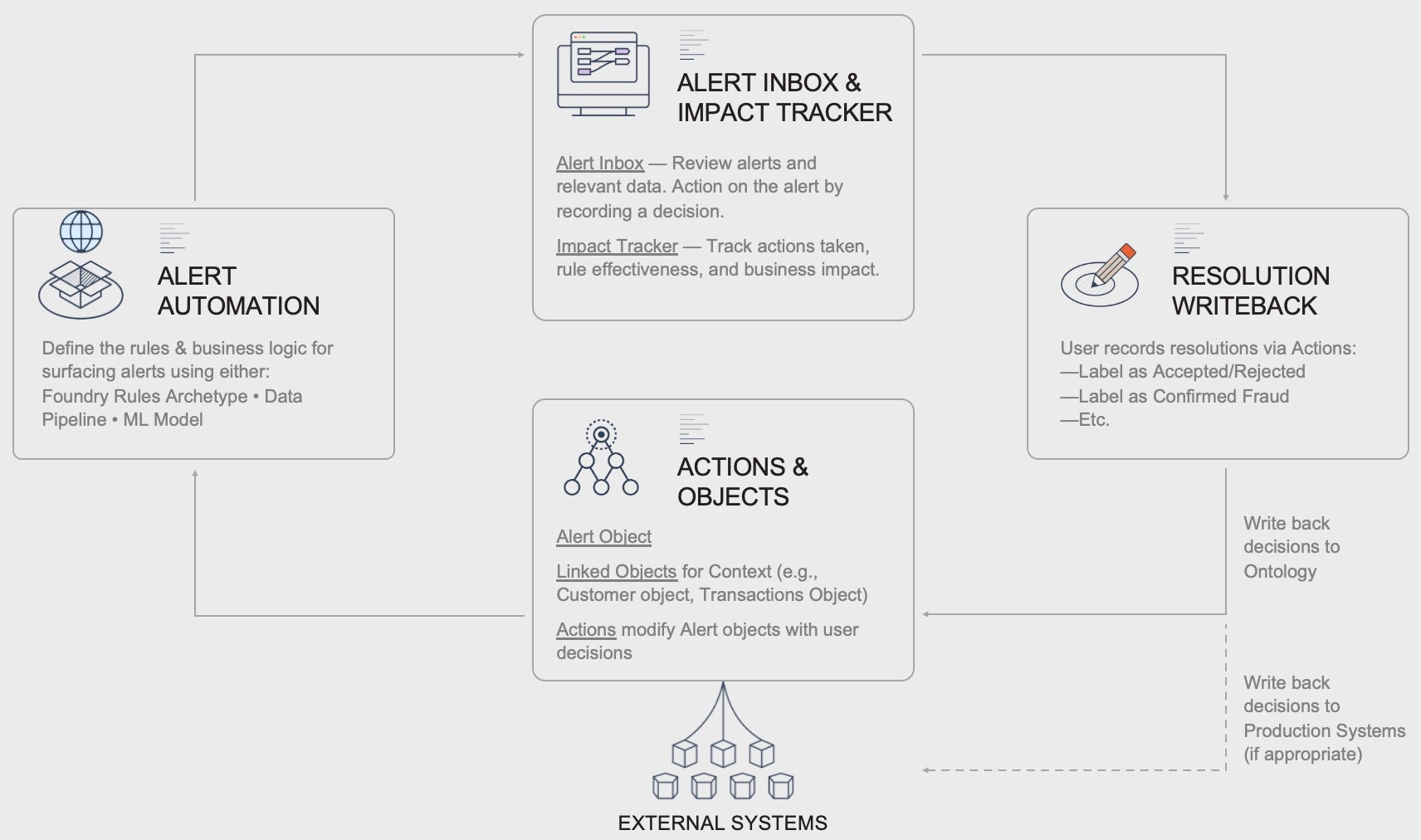
Alerting workflows are designed to automatically surface alerts (updates, issues, opportunities, etc.) for a user to review and make a decision on. Typically, the user is presented with prioritized alerts and relevant data associated with the alerts, which they will review to make a decision. Their decision is recorded using buttons that record their decision (write back) to Foundry data and sometimes production systems, if appropriate.
Using fraud detection as an example, users may receive a list of most to least likely fraud alerts to review. Clicking on an alert shows all the supporting information, based on which users can use a simple button to indicate if it is fraud or not.
Alerting frameworks are great solutions for users who spend significant time sifting through various data sources and manually piecing together data points to identify issues, with the end goal of making a decision about the issue found. Sometimes the end users have basic SQL queries that surface a portion of these issues, or the users do not sift through data at all since the work is too complex.
Alerts can be used for use cases from detecting fraud to surfacing revenue opportunities. The alerts can be generated through a data pipeline, a machine learning model, Foundry Rules, or any combination of these.
Key elements
User interfaces
The following is a list of interfaces related to the alerting workflow.
Alerting interface
The Alerting Interface is the main application users will leverage. From this interface, end users see all their alerts, the data relevant to helping them make a decision about the alert, and buttons they can use to record their decision.
An example interface is shown below, with the most frequently used components. This interface is typically built in Workshop.
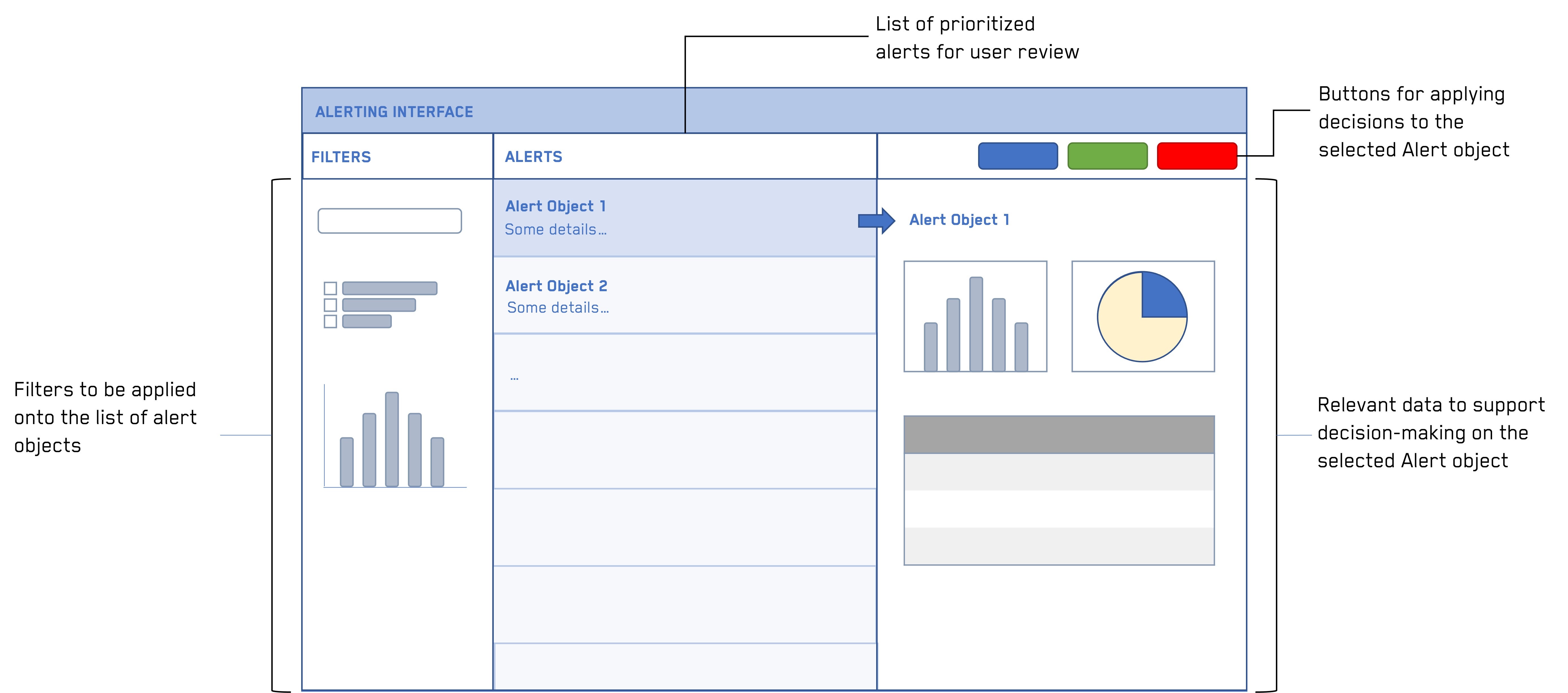
For example in fraud detection, the filters may be a fraud likelihood score, a specific type of fraud, etc. The alerts themselves are cases of fraud, and the relevant data may include historical payments and users profiles. The buttons typically might include Fraud/No Fraud, and prompt the user for an explanation.
Related products:
Impact Tracker
The Impact Tracker shows production and operations metrics associated with the Alerting Interface. The Tracker is typically used by managers to review metrics such as how many alerts have been resolved, what decisions are commonly being made in the Alert Interface, how close they are to reaching their target KPIs, etc.
An example Tracker is shown below, with the most frequently used components. This interface may be built in Quiver or Workshop.
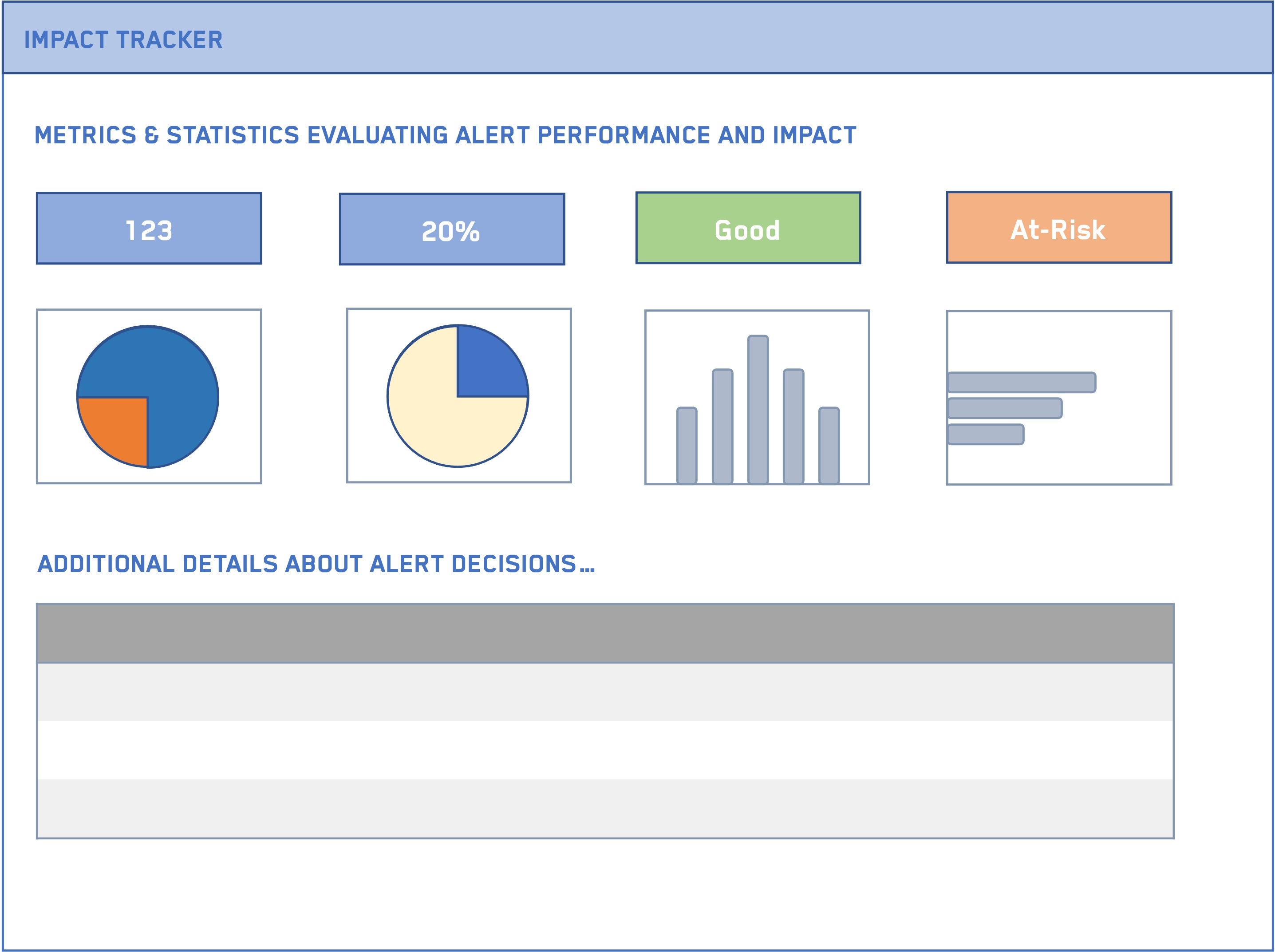
In fraud detection, this Impact tracker might show the percentage of fraud/non-fraud cases reviewed, key drivers and explanations of fraud populated by the users, the dollar impact saved by detecting early fraud, time to decision, etc.
Related products:
(Optional) Foundry Rules
Foundry Rules is a Foundry application that allows any user, regardless of coding background, to create and maintain rules on data using a user-friendly point-and-click interface for defining the criteria for any number of alerts. Each rule defined creates a type of alert. Implementation of Foundry Rules is detailed in the alert automation section below.
Related products:
Ontology
The following is a list of Ontology-related concepts that relate to the set-up of an alerting workflow.
Objects
The Alerting workflow will typically include an object type for the trigger (such as a customer, a financial transaction, a manufacturing process, or a service type) and a specific alert object that it is linked to (such as a potential fraud alert, revenue opportunity tied to a service type, or a process optimization opportunity tied to a manufacturing process).
Related products:
Actions
Actions are the crux of this workflow, as they record the end user’s decision. From the user’s perspective, these are buttons they click on. In the back-end, the buttons are powered by Ontology Actions that are configured to record what decision the user made. Typical Action fields include:
- The user ID
- The decision timestamp
- The alert object on which the decision was made
- The decision itself (True/False, Accept/Reject, etc.)
- (Option) An explanation for the decision (helpful for reviewing in the tracker)
In fraud detection, the actions would record if the case is determined to be fraud or not, the user who made the decision, when they made the decision, why they made that decision (the explanation), and the specific case ID reviewed.
Related products:
Writeback
Writeback is the Foundry term for recording a decision. Documentation can be found on the Writeback page. In essence, a copy of the alert object baking dataset is made through the Ontology application. Actions will record the fields defined in the Actions section in the copied (writeback) dataset. In fraud detection, the actions taken on a specific case would then update the ontology and associated datasets to account for the decisions taken (such as by setting whether alert identified fraud and the explanation of the results of the investigation).
In addition to writing back to Foundry, it is common to also write back to production systems such as SAP, Oracle, etc. This typically involves setting up a direct connection to the production system with read and write permissions and feeding the results of the writeback dataset through the connection. Speak with your Palantir team for more details.
Related products:
Alert automation
The following are Foundry topics related to automating alerts.
Foundry Rules
Foundry Rules is a set of components that allow users to create and maintain rules on data, regardless of their coding background or ability. Foundry Rules can be used to define various different types of alerts based on any desired condition. The output of Foundry Rules can then be converted into alert objects.
An example of the Foundry Rules interface is shown below.
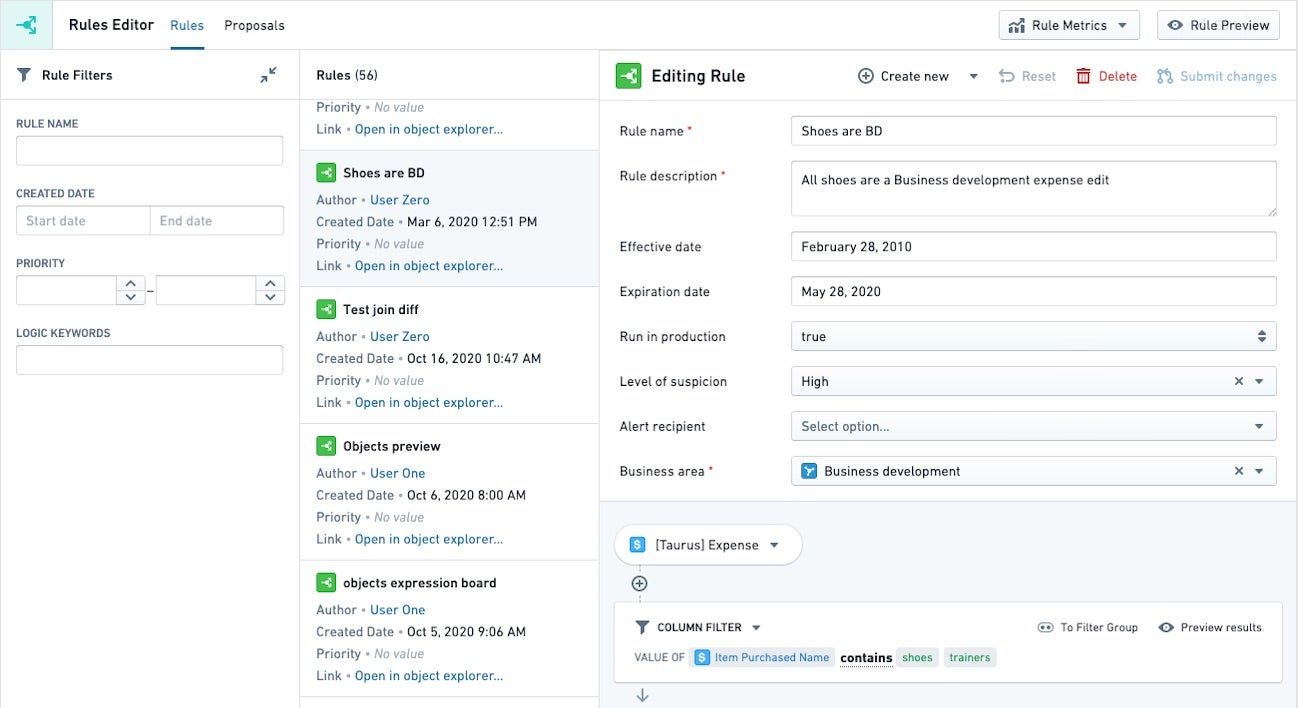
In fraud detection, some customers choose to use Foundry Rules to define a type of fraudulent activity and surface all the relevant cases where that applies. For example, a rule might be: whenever a customer has a charge over $10k or whenever a customer has two consecutive charges in the same day in two different cities.
Related products:
Data pipeline
At times, logic for creating alerts may be very prescriptive and involve complex rules that are best suited for coding in a data pipeline.
For example, an insurance company must pay claims according to the contract rates with a healthcare provider, which are reflected in their system as a set of codes. When the contract is renegotiated, a new set of codes should be recorded for the new timespan. In this case, it would be best to encode all the logic for determining which codes should be applied when, and create a proposal object in Foundry where the suggestion is to split the timespan with the new set of codes from the renegotiated contract.
Related products:
Requirements
Regardless of the pattern used, the underlying data foundation is constructed from pipelines and syncs to external source systems.
Data Integration Pipelines
Data integration pipelines, written in a variety of languages including SQL, Python, and Java, are used to integrate datasources into the subject matter Ontology.
Data connectors
Foundry can sync data from a wide array of sources, including FTP, JDBC, REST API, and S3. Syncing data from a variety of sources and compiling the most complete source of truth possible is key to enabling the highest value decisions.
Use cases implementing patterns
- Effectively adjusting sales and marketing pipelines on the fly
- Optimize claims & reduce spend through warranty analytics
- Preventing transformer failure via alerting and investigation support
- Public safety power shutoff (PSPS) scoping
- Reducing cost from health network providers through alerting and understanding provider performance
- Reducing over- and under-payments to health care providers
- Responding to global security incidents via an integrated alerting and triaging application
Want more information on this use case pattern or looking to implement something similar? Get started with Palantir ↗.
中文翻译
告警工作流(Alerting workflow)
无论是检测欺诈还是发现收入机会,告警工作流(Alerting workflow)都能自动将问题呈现给最终用户进行审核,用户只需点击按钮即可做出决策。这些工作流使团队能够专注于解决最紧迫的问题,而不是花费时间手动拼凑数据。
Foundry的数据连接(Data Connection)和本体论(Ontology)使组织能够在数天内(而非数月)实现这一模式,并持续安全高效地进行实施、定制和维护。
解决方案(Solution)
告警工作流(Alerting workflow)旨在自动呈现告警(更新、问题、机会等),供用户审核并做出决策。通常,用户会看到按优先级排序的告警及其相关数据,并据此做出决策。用户的决策通过按钮记录(写回)到Foundry数据,必要时也可写回生产系统。
以欺诈检测为例,用户可能会收到一份按可能性从高到低排列的欺诈告警列表。点击某个告警会显示所有支持信息,用户可根据这些信息使用简单的按钮来标记是否为欺诈。
告警框架(Alerting framework)非常适合那些需要花费大量时间筛选各种数据源、手动拼凑数据点以识别问题,并最终对发现的问题做出决策的用户。有时,最终用户会使用基本的SQL查询来发现部分问题,或者由于工作过于复杂而根本不进行数据筛选。
告警可用于从欺诈检测到发现收入机会等多种用例。告警可以通过数据管道(Data pipeline)、机器学习模型、Foundry规则(Foundry Rules)或这些方式的任意组合生成。
关键要素(Key elements)
用户界面(User interfaces)
以下是与告警工作流相关的界面列表。
告警界面(Alerting interface)
告警界面(Alerting Interface)是用户将使用的主要应用程序。在此界面中,最终用户可以看到所有告警、有助于他们做出决策的相关数据,以及用于记录决策的按钮。
下图展示了一个示例界面及其最常用的组件。该界面通常使用Workshop构建。
例如在欺诈检测中,筛选条件可能是欺诈可能性评分、特定欺诈类型等。告警本身是欺诈案例,相关数据可能包括历史支付记录和用户画像。按钮通常可能包括"欺诈/非欺诈",并提示用户提供解释。
相关产品:
影响追踪器(Impact Tracker)
影响追踪器(Impact Tracker)显示与告警界面相关的生产和运营指标。该追踪器通常由管理人员使用,用于查看已解决的告警数量、告警界面中常见的决策类型、与目标KPI的差距等指标。
下图展示了一个示例追踪器及其最常用的组件。该界面可使用Quiver或Workshop构建。
在欺诈检测中,影响追踪器可能显示已审核的欺诈/非欺诈案例百分比、用户填写的欺诈关键驱动因素和解释、通过早期欺诈检测节省的美元影响、决策时间等。
相关产品:
(可选)Foundry规则(Foundry Rules)
Foundry规则(Foundry Rules)是一款Foundry应用程序,允许任何用户(无论是否具备编程背景)通过用户友好的点击式界面创建和维护数据规则,以定义任意数量的告警条件。每条定义的规则都会创建一种告警类型。Foundry规则的实施将在下文告警自动化部分详细说明。
相关产品:
本体论(Ontology)
以下是与告警工作流设置相关的本体论概念列表。
对象(Objects)
告警工作流通常包含一个用于触发条件的对象类型(如客户、金融交易、制造流程或服务类型),以及一个与之关联的特定告警对象(如潜在欺诈告警、与服务类型相关的收入机会,或与制造流程相关的流程优化机会)。
相关产品:
操作(Actions)
操作(Actions)是此工作流的核心,因为它们记录了最终用户的决策。从用户的角度来看,这些是他们点击的按钮。在后端,这些按钮由本体论(Ontology)操作(Actions)驱动,这些操作被配置为记录用户所做的决策。典型的操作字段包括:
- 用户ID
- 决策时间戳
- 做出决策的告警对象
- 决策本身(是/否、接受/拒绝等)
- (可选)决策说明(有助于在追踪器中查看)
在欺诈检测中,操作将记录案例是否被判定为欺诈、做出决策的用户、决策时间、决策原因(说明)以及审核的具体案例ID。
相关产品:
写回(Writeback)
写回(Writeback)是Foundry中用于记录决策的术语。相关文档可在写回页面找到。本质上,通过本体论(Ontology)应用程序创建告警对象备份数据集的一个副本。操作将在复制的(写回)数据集中记录操作部分定义的字段。在欺诈检测中,对特定案例执行的操作将更新本体论和相关数据集,以反映所做的决策(例如,设置告警是否识别出欺诈以及调查结果的说明)。
除了写回Foundry,通常还需要写回生产系统,如SAP、Oracle等。这通常涉及设置与生产系统的直接连接(具有读写权限),并通过该连接馈送写回数据集的结果。详情请咨询您的Palantir团队。
相关产品:
告警自动化(Alert automation)
以下是与自动化告警相关的Foundry主题。
Foundry规则(Foundry Rules)
Foundry规则(Foundry Rules)是一组组件,允许用户创建和维护数据规则,无论其编程背景或能力如何。Foundry规则可用于根据任何所需条件定义各种不同类型的告警。Foundry规则的输出随后可转换为告警对象。
下图展示了Foundry规则界面的示例。
在欺诈检测中,一些客户选择使用Foundry规则来定义某种欺诈活动类型,并呈现所有相关案例。例如,规则可能是:当客户有一笔超过1万美元的收费,或者当客户在同一天在两个不同城市有连续两笔收费时触发。
相关产品:
数据管道(Data pipeline)
有时,创建告警的逻辑可能非常具体,涉及复杂的规则,最适合在数据管道(Data pipeline)中编码实现。
例如,一家保险公司必须根据与医疗服务提供商的合同费率支付索赔,这些费率在其系统中以一组代码的形式体现。当合同重新谈判时,应为新的时间段记录一组新代码。在这种情况下,最好将所有用于确定何时应用哪些代码的逻辑编码,并在Foundry中创建一个提案对象,建议使用重新谈判合同中的新代码集来拆分时间段。
相关产品:
要求(Requirements)
无论使用哪种模式,底层数据基础都是由管道和与外部源系统的同步构建而成。
数据集成管道(Data Integration Pipelines)
数据集成管道(Data integration pipelines)使用多种语言编写,包括SQL、Python和Java,用于将数据源集成到主题本体论中。
数据连接器(Data connectors)
Foundry可以从多种来源同步数据,包括FTP、JDBC、REST API和S3。从各种来源同步数据并编译尽可能完整的事实来源,是实现最高价值决策的关键。
实施模式的用例(Use cases implementing patterns)
- 实时有效调整销售和营销管道
- 通过保修分析优化索赔并减少支出
- 通过告警和调查支持防止变压器故障
- 公共安全断电(PSPS)范围界定
- 通过告警和了解提供商绩效降低健康网络提供商成本
- 减少对医疗保健提供者的超额和不足支付
- 通过集成告警和分类应用程序响应全球安全事件
想要了解更多关于此用例模式的信息,或希望实施类似方案?开始使用Palantir ↗。