Solution design(解决方案设计)
Defining functional requirements allows us the raw material to distill the components that we need to implement in our use case. This helps us understand what we’ll need to deliver to meet those requirements and gives us smaller pieces to carry forward into evaluating implementation options.
Extracting components from functional requirements
The next step of the solution design process is taking our functional requirements and mapping them to the components that can be implemented in Foundry and then weighing options for their configuration. This step may look different across use cases, though the following components are broadly useful:
- Object model: A sketch of the object model identifying core, derived, and use case object types and their link types.
- Lifecycle diagram: A state machine diagram of the Actions users will take to modify objects.
- Enrichments: A list of the data enrichments necessary to inform the decision inputs.
- Interface expectations: A breakdown of the different interfaces and their intent.
We can extract these components from our functional requirements. For example:
A route operations analyst (user type) reviews an alert inbox (interface) for their responsible routes and triages alerts (decision) based on priority, flight and route details, and organizational impact (decision inputs) to re-assign, resolve, or escalate (action) each alert.
- Alert inbox: We need a stand-alone interface for reviewing new alerts.
- their responsible routes: We need a concept in our data that reflects routes, users, and the relationship between them.
- triages alerts: We need an object that can go through different states and reflects the current assignee. We’ll also need to generate the alerts in some way.
- Priority, flight, and route details, and organizational impact: We need additional data related to the route based on flights, airlines, aircraft, and so on. We also need enrichments that reflect a concept of alert priority and organizational impact.
- Re-assign, resolve, or escalate: We need Actions that define a complete state machine for our
Alertobject type.
Repeating this process for the other functional requirements results in the following components:
Object model

This diagram represents an object model that contains the concepts embedded in our functional requirements. The circles represent object types, and the lines between them are link types. Depending on the level of details, consider identifying the primary key property for each object type and the cardinality (1:1, 1:N, or N:N) for each link type.
The colors help identify which object types are core to their Ontology - they map directly to a granularity of data coming from a source of truth - and which are derived and need to be created as an enrichment. Colors also identify use case object types that are actively edited through the operational workflows in the use case.
In our example, tracing back to our source system, we can identify systems of record for data about Flights, Aircraft, Airlines, and Airports. Our pipelines can then produce a core ontology that reflects those concepts.
However, we don’t have a source system with data about "routes". In our transform segment, we will derive a dataset with one row per route to reflect the concept of Routes in our ontology.
For the operational aspect of our use case, we need a data model that reflects our organization - hence the Team and Employee object types. We also need standard building block object types like a “ticket” object type for the alerts and related object types to capture comments and uploaded files.
Lifecycle diagram

This simplified diagram tracks the possible states for an alert ticket object and the actions that transition it between states. As the use case progresses, tracking can be refined further to include the metadata captured in each action as well as the validations that define when a given action is available and which users can perform it.
Enrichments
Through the functional requirements and the object modeling exercise, we can identify object level and property level enrichments. Object level enrichments are new, derived concepts that aren’t inherently reflected in our source data. These can match to external concepts, like our Route object type, or they can be an operational or use case specific concept like an Alert Ticket.
Property-level enrichments enhance existing object types with new data by applying organizational rules, aggregating lower granularity data, or running models. In our example, we’ll need to reflect a priority for each alert ticket and an estimation of the organizational impact.
Interface expectations and intent
Across our functional requirements, we can identify the different intents and corresponding interaction expectations that users will have. Identifying intents and expectations produces a list of actual implementations and corresponding tools.
In our example, we have the following:
- An operational user expects a guided, stand-alone experience to review only the necessary alerts with all the essential context immediately available. The intent is to take direct action.
- Our analyst expects to have a quick place to view all their
assignedandunder investigationalerts while easily moving into ad hoc data exploration and analysis and writing up the narrative of the investigation. The intent is to analyze and document. - Our executive user expects to have a dashboard view that presents the efficacy of the operational process and highlights how things are changing over time. The intent is to understand.
Implementation options
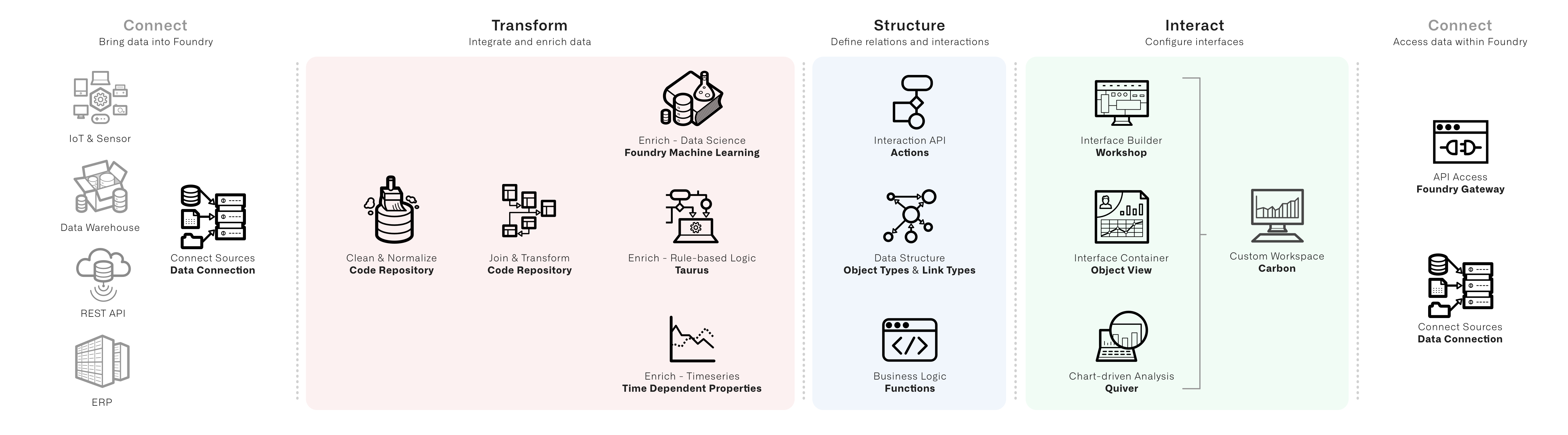
Having catalogued the components of the use case, the next decision is to implement each piece. The diagram above can help match the default option for common components.
For instance, the interface expectations from above break down like this:
A stand-alone inbox application is a Workshop project. Since many of the interactions are about a single ticket, the Object View for a given ticket should present a unified view of both relevant decision-making context and easy access to appropriate actions. An executive dashboard might start as a Quiver template. As the review and oversight process is refined, the template may evolve into another Workshop module and an additional set of use case object types to track and approve on a periodic basis. In most cases, a Carbon workspace brings together the subset of relevant object types for search and exploration alongside the custom interfaces into a polished, unified, and accessible experience across all potential user types.
There are more details on the considerations within these options in the Pipeline, Ontology, and App Building documentation. The following will focus on areas where implementation decisions bridge across these sections.
The foremost example is where to implement the identified enrichments.
Implementing enrichments
Consider the example of our Route object type enrichment and a set of metrics we might want to know about each route: the average flight time, the count of arrival delays longer than 30 minutes, and a measure of the variability in flight time.
One approach is to derive these within our applications. For instance, we can make a pivot table of our Flights object type grouped by the origin and destination airports and calculate an average flight time. If we first filtered to a set of flights with delays longer than 30 minutes, we could similarly plot a pivot table to show the routes with a count of delayed flights.
This approach has a number of drawbacks. Since the metrics are computed inside a specific interface, they can’t be re-used. They also need to evaluate when the page loads, which can lead to relatively slower performance. And since metrics are ephemeral, they can’t be used as part of further filtering or analysis. The benefit of this approach is since the calculations happen dynamically, they will update instantly to reflect any changes that result from new or updated values from Actions.
An oversimplified heuristic might be: If the enrichment doesn’t rely on data that can be changed by a user through an Action, create the enrichment in the data layer.
中文翻译
解决方案设计
定义功能需求为我们提供了提炼用例中需要实现的组件的原始材料。这有助于我们理解需要交付什么才能满足这些需求,并为我们提供更小的模块,以便进一步评估实现方案。
从功能需求中提取组件
解决方案设计流程的下一步是获取功能需求,将其映射到可以在 Foundry 中实现的组件,然后权衡其配置选项。这一步在不同用例中可能有所不同,但以下组件具有广泛的适用性:
- 对象模型(Object model): 识别核心(core)、派生(derived) 和用例(use case) 对象类型及其链接类型的对象模型草图。
- 生命周期图(Lifecycle diagram): 描述用户修改对象时将执行的操作的状态机图。
- 数据丰富(Enrichments): 为决策输入提供信息所需的数据丰富列表。
- 界面预期(Interface expectations): 不同界面及其意图的分解。
我们可以从功能需求中提取这些组件。例如:
一名航线运营分析师(route operations analyst)(用户类型)在其负责的航线中查看警报收件箱(alert inbox)(界面),并根据优先级、航班和航线详情以及组织影响(priority, flight and route details, and organizational impact)(决策输入)对警报进行分类处理(triages alerts)(决策),以重新分配、解决或升级(re-assign, resolve, or escalate)(操作)每条警报。
- 警报收件箱: 我们需要一个独立的界面来查看新警报。
- 其负责的航线: 我们需要在数据中体现航线、用户以及它们之间关系的概念。
- 分类处理警报: 我们需要一个可以经历不同状态并反映当前处理人的对象。我们还需要以某种方式生成警报。
- 优先级、航班和航线详情以及组织影响: 我们需要基于航班、航空公司、飞机等与航线相关的额外数据。我们还需要反映警报优先级和组织影响概念的数据丰富。
- 重新分配、解决或升级: 我们需要定义
Alert对象类型完整状态机的操作。
对其他功能需求重复此过程,将得到以下组件:
对象模型
此图表示一个包含功能需求中嵌入概念的对象模型。圆圈代表对象类型,圆圈之间的线是链接类型。根据详细程度,可以考虑为每个对象类型标识主键属性,并为每个链接类型标识基数(1:1、1:N 或 N:N)。
颜色有助于识别哪些对象类型是其本体论(Ontology)的核心——它们直接映射到来自数据源的数据粒度——以及哪些是派生的,需要作为数据丰富来创建。颜色还标识了用例对象类型,这些类型通过用例中的操作工作流被主动编辑。
在我们的示例中,追溯到源系统,我们可以识别出关于Flights、Aircraft、Airlines和Airports数据的记录系统。然后,我们的管道可以生成反映这些概念的核心本体论(Ontology)。
然而,我们没有包含"航线"数据的源系统。在我们的转换段中,我们将派生一个数据集,每条航线一行,以在我们的本体论(Ontology)中反映航线的概念。
对于用例的操作方面,我们需要一个反映我们组织的数据模型——因此有了Team和Employee对象类型。我们还需要标准的构建块对象类型,如用于警报的"工单(ticket)"对象类型,以及用于捕获评论和上传文件的相关对象类型。
生命周期图
这个简化的图追踪了警报工单对象的可能状态,以及使对象在状态之间转换的操作。随着用例的推进,可以进一步细化追踪,包括每个操作中捕获的元数据,以及定义给定操作何时可用以及哪些用户可以执行它的验证规则。
数据丰富
通过功能需求和对象建模练习,我们可以识别对象级别和属性级别的数据丰富。对象级别的数据丰富是新的、派生的概念,这些概念并非固有地反映在我们的源数据中。这些可以匹配外部概念,如我们的Route对象类型,也可以是操作或用例特定的概念,如Alert Ticket。
属性级别的数据丰富通过应用组织规则、聚合较低粒度的数据或运行模型,用新数据增强现有对象类型。在我们的示例中,我们需要为每个警报工单反映一个优先级,并估算组织影响。
界面预期与意图
在我们的功能需求中,我们可以识别用户将拥有的不同意图和相应的交互预期。识别意图和预期会产生一个实际实现和相应工具的列表。
在我们的示例中,我们有以下内容:
- 操作用户期望获得一个引导式的独立体验,以便仅查看必要的警报,并立即获得所有基本上下文。意图是直接采取行动。
- 我们的分析师期望有一个快速查看所有
assigned和under investigation警报的地方,同时能够轻松进入临时数据探索和分析,并撰写调查叙述。意图是分析和记录。 - 我们的高管用户期望有一个仪表板视图,展示操作流程的有效性,并突出显示随时间的变化情况。意图是理解。
实现方案
在编目了用例的组件之后,下一步是决定如何实现每个部分。上图可以帮助匹配常见组件的默认选项。
例如,上面的界面预期可以分解如下:
一个独立的收件箱应用程序是一个Workshop项目。由于许多交互都围绕单个工单,因此给定工单的Object View应呈现相关决策上下文的统一视图,并方便访问适当的操作。高管仪表板可能从Quiver模板开始。随着审查和监督流程的完善,该模板可能演变为另一个Workshop模块和一组额外的用例对象类型,用于定期追踪和审批。在大多数情况下,Carbon工作区将相关对象类型的子集(用于搜索和探索)与自定义界面整合在一起,为所有潜在用户类型提供精致、统一且可访问的体验。
有关这些方案中考虑因素的更多详细信息,请参阅Pipeline、Ontology和App Building文档。以下内容将重点关注实现决策跨越这些部分的领域。
最主要的例子是在哪里实现已识别的数据丰富。
实现数据丰富
考虑我们的Route对象类型数据丰富以及我们可能想知道的关于每条航线的一组指标:平均飞行时间、延误超过30分钟的到达次数以及飞行时间的变异性度量。
一种方法是在我们的应用程序中派生这些指标。例如,我们可以按出发和到达机场对Flights对象类型进行数据透视表分组,并计算平均飞行时间。如果我们首先筛选出延误超过30分钟的航班集,我们可以类似地绘制一个数据透视表来显示具有延误航班计数的航线。
这种方法有许多缺点。由于指标是在特定界面内计算的,因此无法重用。它们还需要在页面加载时进行评估,这可能导致相对较慢的性能。而且由于指标是临时的,它们不能用作进一步筛选或分析的一部分。这种方法的好处是,由于计算是动态进行的,它们会立即更新以反映因操作而产生的新值或更新值。
一个过于简化的启发式方法可能是:如果数据丰富不依赖于用户通过操作可以更改的数据,则在数据层创建数据丰富。