Walkthroughs(操作指南(Walkthroughs))
Walkthroughs enables users to generate custom, step-by-step tutorials that guide end-users through an application or workflow. With Walkthroughs you can provide custom on-demand resources that transform how your end-users learn, making it possible to leverage self-guided tutorials that are tailored to your organization's needs.
Key features
- Intuitive interface: Walkthroughs provides an intuitive setup interface that allows users to preview the end result at any time during walkthrough creation.
- Guidance across applications: Walkthroughs are not limited to one application; a walkthrough can guide users to complete workflows that span multiple applications on the Palantir platform.
- Shared learning: Walkthroughs can be shared across your organization, providing targeted on-demand support for workflows and use cases.
- Customizable content: Create tailored tutorials that address use cases and workflows that are specific to your operational needs.
- Accessible: Walkthroughs can be accessed using the workspace side panel, so learning resources are always available when needed.
- Rich media integration: Enhance your tutorials with images, videos, and interactive elements.
- Progress tracking: Walkthroughs tracks progress across steps, allowing users to come back later and continue where they left off.
Permissions
To access a walkthrough, users must have Viewer access to the walkthrough resource. If a user does not have permission to the resources referenced in the walkthrough, they will not be guided to that resource. Instead, they will see a message that there is a resource they do not have access to view.
Anyone with Editor permissions on a Project can create a walkthrough in that given Project.
Access a published walkthrough
When viewing a resource with an associated walkthrough, the Walkthroughs option will appear in the workspace sidebar.

To access the walkthrough, select the Walkthroughs option in the workspace sidebar. When selecting Next or Previous on any given step, the Walkthroughs panel will automatically redirect you to the appropriate resource. Select Learn more to access documentation attached to each step.
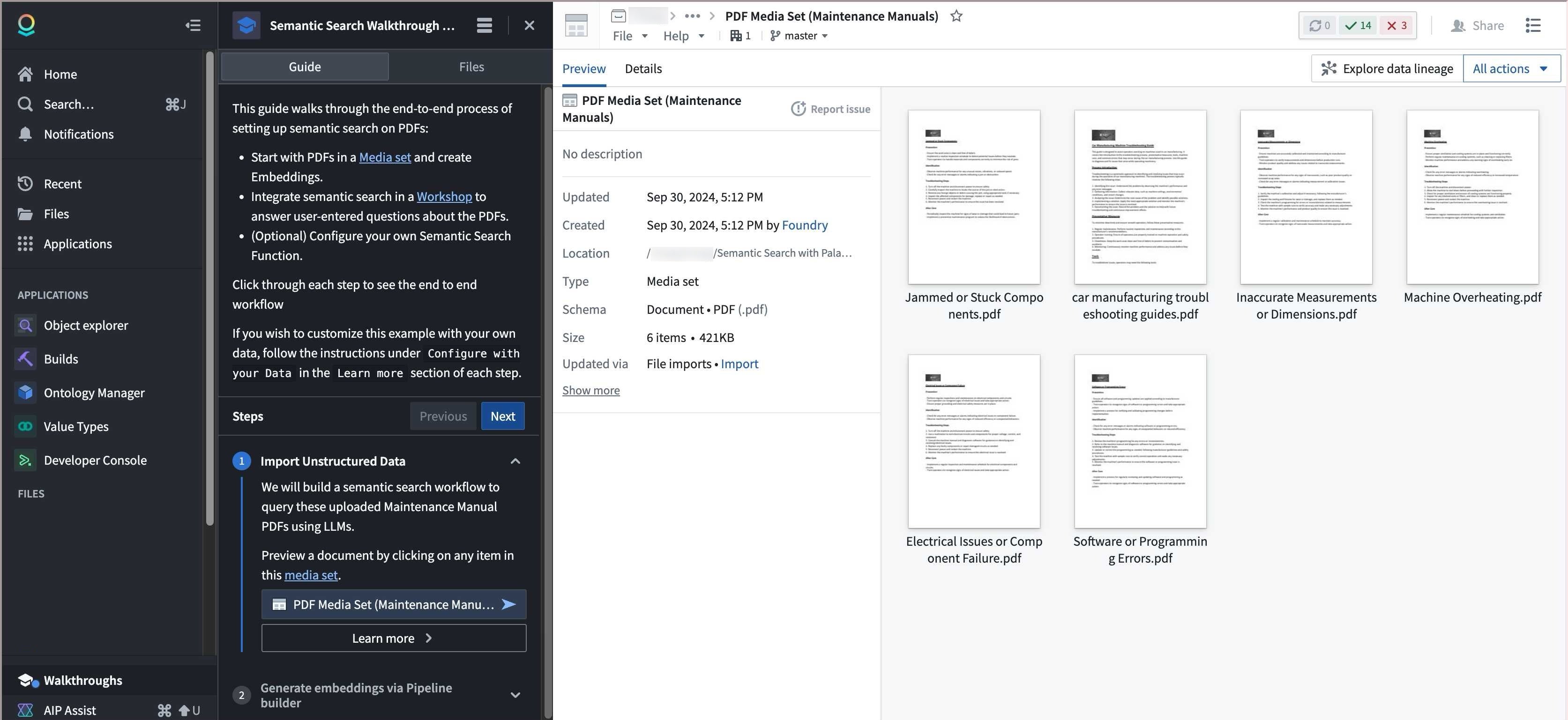
You can view all related walkthrough resources by selecting the Files tab, and see all recent or available walkthroughs in the top panel. To pause or resume a walkthrough, you can close or open the Walkthroughs panel when the relevant resource is open.
中文翻译
操作指南(Walkthroughs)
操作指南(Walkthroughs)使用户能够生成自定义的分步教程,引导最终用户完成应用程序或工作流程。借助操作指南,您可以提供按需定制的资源,改变最终用户的学习方式,从而利用符合组织需求的自主引导式教程。
主要功能
- 直观界面: 操作指南提供直观的设置界面,允许用户在创建过程中随时预览最终效果。
- 跨应用引导: 操作指南不局限于单个应用;它可以引导用户完成跨越 Palantir 平台上多个应用的工作流程。
- 共享学习: 操作指南可在组织内共享,为工作流程和用例提供针对性的按需支持。
- 可定制内容: 创建针对特定运营需求的用例和工作流程的定制教程。
- 便捷访问: 可通过工作区侧面板访问操作指南,确保学习资源随时可用。
- 富媒体集成: 通过图片、视频和交互元素增强教程效果。
- 进度追踪: 操作指南会追踪各步骤的进度,允许用户稍后返回并从中断处继续学习。
权限
要访问某个操作指南,用户必须对该操作指南资源拥有查看者(Viewer)权限。如果用户没有操作指南中引用资源的权限,系统将不会引导其访问该资源,而是显示一条消息,提示存在其无权查看的资源。
任何对项目拥有编辑者(Editor)权限的用户都可以在该项目中创建操作指南。
访问已发布的操作指南
当查看关联了操作指南的资源时,操作指南(Walkthroughs) 选项将出现在工作区侧边栏中。
要访问操作指南,请选择工作区侧边栏中的 操作指南(Walkthroughs) 选项。在任意步骤中选择 下一步(Next) 或 上一步(Previous) 时,操作指南(Walkthroughs) 面板将自动将您重定向到相应的资源。选择 了解更多(Learn more) 可访问每个步骤附带的文档。
您可以通过选择 文件(Files) 选项卡查看所有相关的操作指南资源,并在顶部面板中查看所有最近或可用的操作指南。要暂停或继续操作指南,您可以在相关资源打开时关闭或打开 操作指南(Walkthroughs) 面板。