Walkthrough metrics(操作指南指标)
Metrics for a given walkthrough are available in a dedicated metrics tab. This tab is accessible only to the owners of the walkthrough resource.
Aggregated metrics related to the walkthrough are always available and will be displayed on this tab.
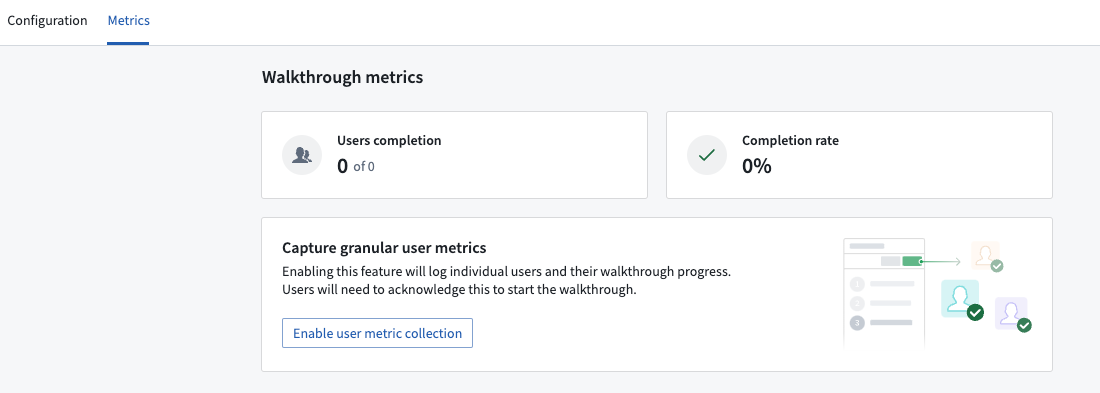
Granular metrics
To view specific, granular metrics at the individual user level, choose to Enable user metric collection on the Metrics page. Granular metrics are particularly useful if the walkthrough is used for compliance purposes, such as requiring users to complete a walkthrough before accessing a module. Consult your company's privacy officer to determine applicable laws regarding data collection before enabling this feature to ensure compliance with Data Protection and Governance standards.
Once enabled, you will be able to view and track the progress of individual users for a given walkthrough to ensure completion.
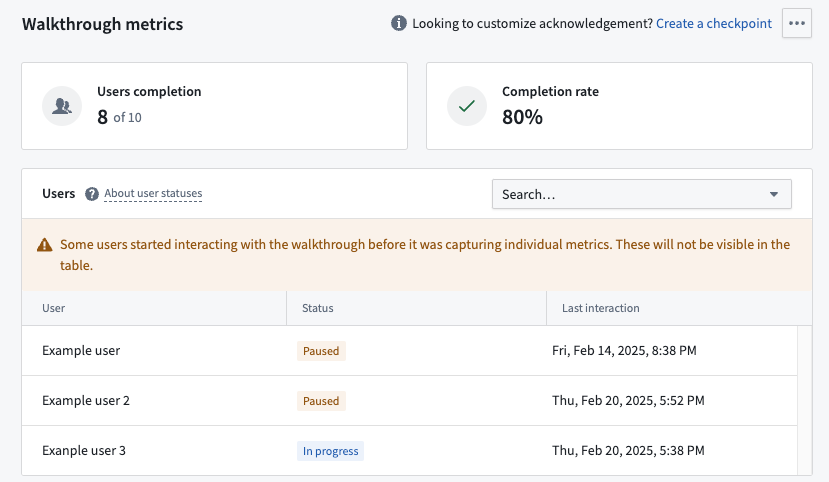
Users starting a walkthrough will see a confirmation dialog to acknowledge that their metrics will be visible to others.
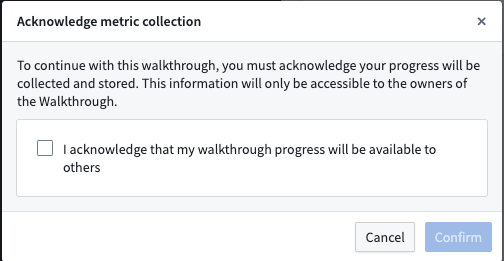
You can customize the content of this confirmation dialog by configuring a checkpoint for the walkthrough.
中文翻译
操作指南指标
每个操作指南的指标可在专属的指标标签页中查看。该标签页仅对操作指南资源的所有者开放。
与操作指南相关的汇总指标始终可用,并会显示在此标签页上。
细粒度指标
如需查看单个用户级别的具体细粒度指标,请在指标页面上选择启用用户指标收集。若操作指南用于合规目的(例如要求用户在访问某个模块前先完成操作指南),细粒度指标尤为实用。在启用此功能前,请咨询您所在公司的隐私官,以确定适用的数据收集相关法律,确保符合数据保护与治理标准。
启用后,您将能够查看和追踪特定操作指南中单个用户的进度,以确保其完成。
启动操作指南的用户将看到一个确认对话框,以确认其指标将对其他人可见。
您可以通过为操作指南配置检查点来自定义此确认对话框的内容。