Configure notifications(配置通知)
As a recipe author, you will be notified if your recipe experiences errors or exceptions while running. You will also receive a notification when the recipe is going to expire as a reminder to extend the expiration if the recipe is still useful. To configure which notifications you receive and how you receive them, navigate to your Foundry user settings from the bottom of the navigation sidebar.
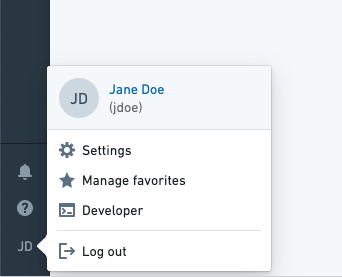
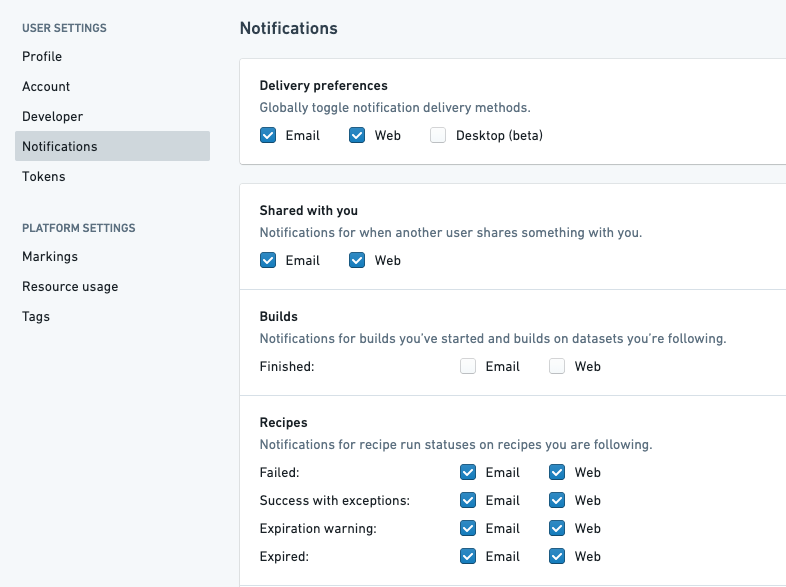
Click the Notifications tab under User settings, find the Recipes section, and choose whether you want to receive notifications by email, web, or none at all.
中文翻译
配置通知
作为配方(Recipe)作者,当您的配方在运行过程中出现错误或异常时,您将收到通知。此外,当配方即将过期时,您也会收到提醒通知,以便在配方仍有用的情况下延长其有效期。要配置您希望接收哪些通知以及以何种方式接收,请从导航侧边栏底部进入您的Foundry用户设置。
在用户设置(User settings)下点击通知(Notifications)选项卡,找到配方(Recipes)部分,然后选择您希望通过电子邮件(Email)、网页(Web)接收通知,还是完全不接收通知。