Announcements(公告)
Quiver: Announcing Quiver Dashboards
Date published: 2022-09-27
Analytics and insights, shared with ease
Quiver allows you to derive exploratory insights from your objects and leverage the Ontology for ad hoc as well as recurring analysis.
When deriving insights through Quiver, disseminating insights is just as critical as conducting the analysis. Now, with Quiver Dashboards, sharing those insights across Foundry products has become much easier.
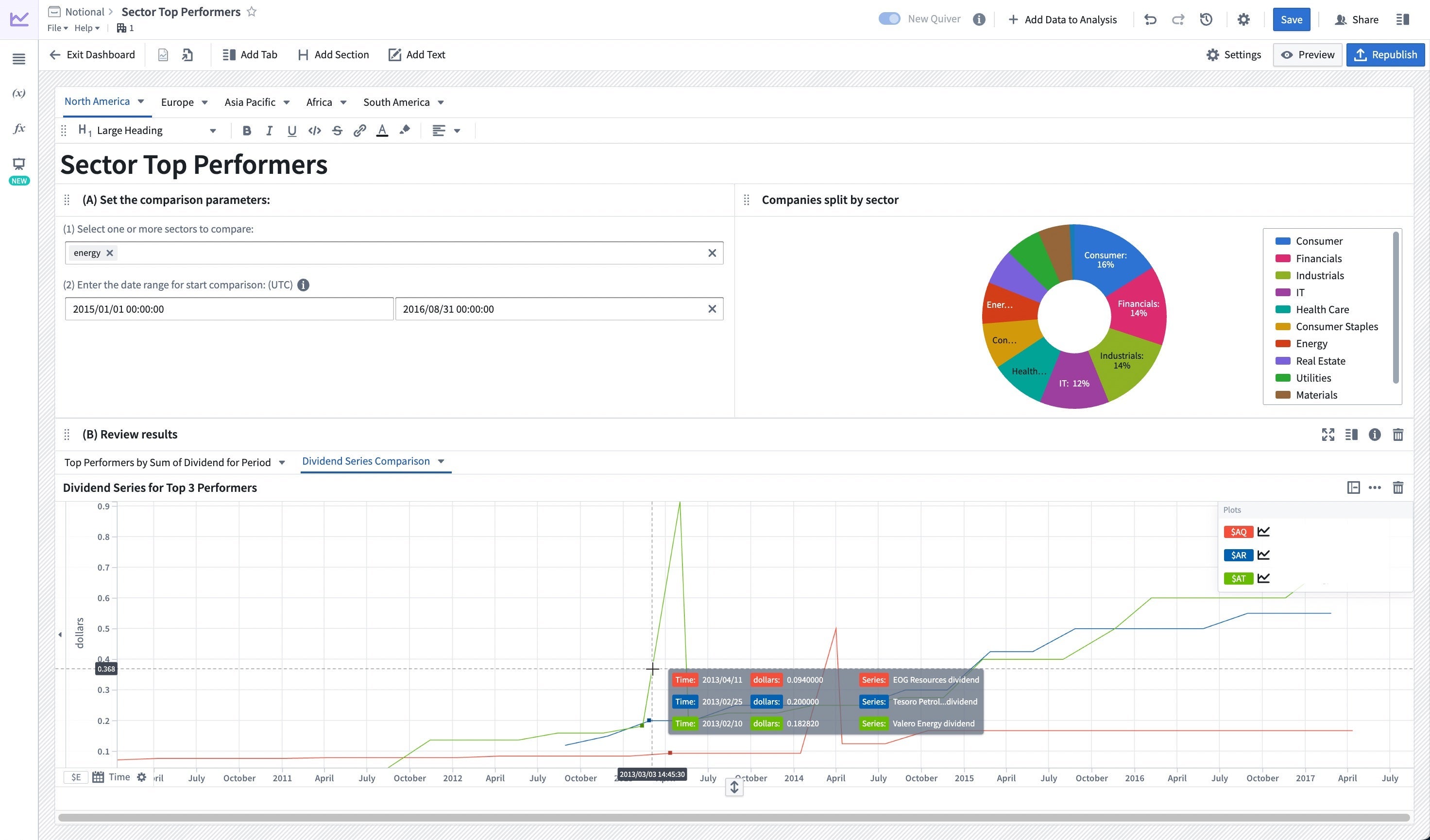
You can now create stand-alone dashboards to present insights from an analysis that can be embedded in other applications such as Object Views, Workshop, Notepad, and Carbon workspaces. Quiver dashboards support changes in object type input when updating the dashboard, multiple inputs, and input types.
Creating and sharing insights
You may already be familiar with Quiver Templates, which provided a robust workflow to build layouts and templates to easily consolidate and share insights throughout your domain. Quiver Dashboards iterates on that need by providing much improved tooling for flexible drag and drop creation, expanded options for styling, and powerful functionality on input types.
- Drag-and-drop content from the analysis into the dashboard using automated alignment and layout functionalities.
- Add tabs, sections, side panels, and text to structure and annotate content
- Create multiple dashboards per analysis.
- Configure multiple inputs per dashboard by passing in variables when embedding in other applications.
- Versioning functionality for historical reference.
- Choose from 3 different view styles to optimize for stand-alone usage or embedded content.
Note that templates will continue to be supported but the ability to create new templates will be deprecated. We recommend building Quiver dashboards for your existing and future workflows.
When should I use Quiver dashboards?
If you are looking to circulate read only analytics findings throughout Foundry applications, Quiver dashboards may fill the ask. Enrich Workshop modules and Object Views with advanced analytical metrics and charts. Display more complex pieces of analysis into an operational application by embedding Quiver dashboards into Workshop. Add objects and time series data to Notepad reports. However, for the following tasks, you might find alternative Foundry applications suitable:
- Application building: If you have a specific operational workflow followed by a group of users (for example, triaging through an inbox), Workshop will enable additional customization.
- Creating dashboards on tabular data: If your data is in dataset format instead in the Ontology, Contour will enable you to create a functional dashboard that enables data analysis on tables at scale.
For more information, check out the overview page for Quiver in the Foundry documentation.
Additional highlights
Analytics: Contour
Path tab previews | Hovering over a path tab will now display a preview of that path.

App Building | Workshop
Object Table: progressively loading Function-backed derived columns | Increased Object Table responsiveness by loading each individual function-backed derived column progressively instead of waiting for all Function-backed derived columns to load before displaying results.
Front-end Variable Transformations, v1 | Added a new front-end variable transformation system that enables Workshop builders to manipulate variables in a point-and-click UI. Example transformations include numerical operations, string concatenation, date comparisons, if / else statements, and more.

中文翻译
公告
Quiver:Quiver 仪表盘(Dashboards)发布
发布日期:2022-09-27
轻松共享分析与洞察
Quiver 允许您从对象中获取探索性洞察,并利用本体(Ontology)进行临时及周期性分析。
通过 Quiver 获取洞察时,传播洞察与分析本身同样重要。现在,借助 Quiver 仪表盘(Quiver Dashboards),在 Foundry 产品间共享这些洞察变得更加便捷。
您可以创建独立的仪表盘,用于展示分析结果,并将其嵌入到其他应用中,例如对象视图(Object Views)、Workshop、Notepad 和 Carbon 工作区(Carbon workspaces)。Quiver 仪表盘支持在更新仪表盘时更改对象类型输入,并支持多种输入和输入类型。
创建与共享洞察
您可能已经熟悉 Quiver 模板(Quiver Templates),它提供了强大的工作流来构建布局和模板,以便在整个领域内轻松整合和共享洞察。Quiver 仪表盘在此基础上进行了迭代,提供了大幅改进的工具,支持灵活的拖放创建、更丰富的样式选项以及强大的输入类型功能。
- 使用自动对齐和布局功能,通过拖放内容将分析内容添加到仪表盘。
- 添加标签页、分区、侧面板和文本,以结构化和注释内容。
- 每次分析可创建多个仪表盘。
- 通过在其他应用中嵌入时传递变量,为每个仪表盘配置多个输入。
- 版本控制功能,便于历史参考。
- 从 3 种不同的视图样式中选择,以优化独立使用或嵌入内容。
请注意,模板将继续得到支持,但创建新模板的功能将被弃用。我们建议为您现有和未来的工作流构建 Quiver 仪表盘。
何时应使用 Quiver 仪表盘?
如果您希望在 Foundry 应用中传播只读分析结果,Quiver 仪表盘可能满足您的需求。通过高级分析指标和图表丰富 Workshop 模块和对象视图。将 Quiver 仪表盘嵌入 Workshop,在运营应用中展示更复杂的分析内容。将对象和时间序列数据添加到 Notepad 报告中。然而,对于以下任务,您可能会发现其他 Foundry 应用更为合适:
- 应用构建:如果您有特定用户群体遵循的运营工作流(例如,收件箱分类处理),Workshop 将提供额外的自定义功能。
- 基于表格数据创建仪表盘:如果您的数据采用数据集(dataset)格式而非本体格式,Contour 将帮助您创建功能型仪表盘,实现对大规模表格的数据分析。
更多信息,请参阅 Foundry 文档中的 Quiver 概述页面。
其他亮点
分析 | Contour
路径标签页预览(Path tab previews) | 将鼠标悬停在路径标签页上,现在会显示该路径的预览。
应用构建 | Workshop
对象表格:逐步加载函数支持的派生列(Function-backed derived columns) | 通过逐步加载每个函数支持的派生列,而非等待所有函数支持的派生列加载完毕后再显示结果,提升了对象表格的响应速度。
前端变量转换(Front-end Variable Transformations),v1 | 新增了前端变量转换系统,使 Workshop 构建者能够通过点选式用户界面操作变量。示例转换包括数值运算、字符串拼接、日期比较、if/else 语句等。