Announcements(公告)
Introducing Action Log: Turn decisions into data
Date published: 2022-10-26
Automate decision capture
With the Action Log in Foundry, you can now store the state of the world when decisions are made, allowing you to track not just what is changing, but why.
When users make a decision in Foundry, known as "taking an Action", it modifies the Ontology a data layer that reflects the operational reality of your Organization. (Read more about the Foundry Ontology here.)

All changes to the Ontology can be stored in the Action Log in order to provide context for your decisions; these changes are available as data to analyze, investigate, and view in Foundry. The result is a network of fully contextualized intersecting workflows that detail how your Organization operates and what decisions are being made.
Automate your decision capture
When you create a new Action with logging enabled, Action Log object types are automatically created with every Action taken. A many-to-one is created between this object and all objects edited by the submitted action, enabling application builders to traverse the relationship between decisions and Ontology edits.

For example, if four tasks are completed at once, a single Action Log is generated and linked to all four tasks. Authorized users can then review the Action Log to see who performed the action and when it was completed. All of this is completed with just one toggle.
Review your world as it was
Action Log objects can store edited properties and unedited properties alike. By default, the Action Log stores a userID, timestamp, and other metadata. This allows application builders to capture the operational context when a decision is made. When you change an action’s logic, the schema of the Action Log object type automatically updates as well, allowing you to maintain iteration speed as you build new decision-based workflows. For example, when completing a task, you can store a newly edited “status” property alongside unchanged properties like "region". This information can help you answer questions such as “in what region do tasks take the longest time to complete?”
Analyze directly in Foundry
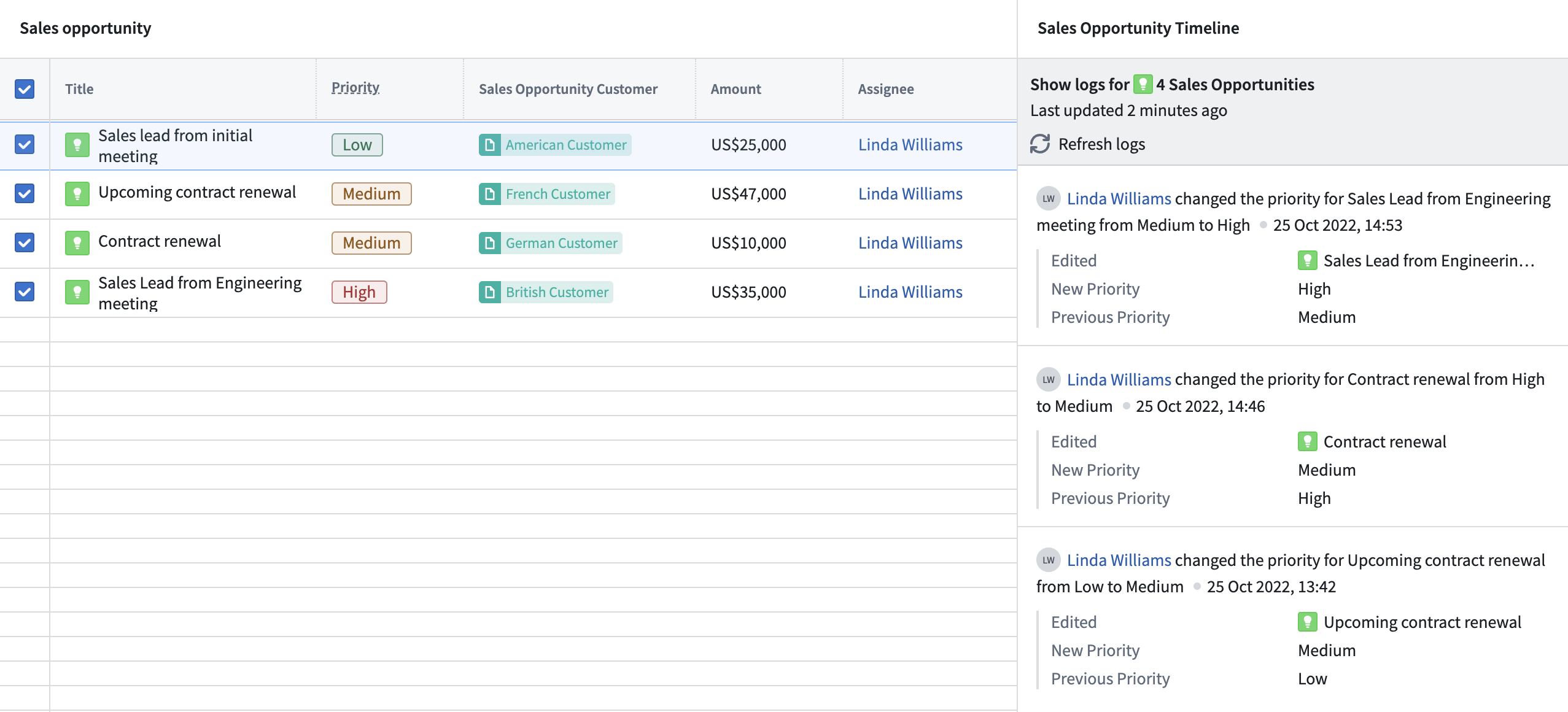
Use the Action Log widget in Workshop to display the change history for selected objects in a timeline view. Entries include configurable properties and parameterized text descriptions, so it’s easily comprehensible. Additionally, you may input Action Log objects into other Foundry applications for further analysis or as an input into transforms for more complex analysis pipelines.
What's next?
To learn more about how to enable Action Logs, view a full list of metadata stored in the object type, and find out how to integrate function-backed action types, you can read the Action Log documentation.
Additional highlights
Administration | Control Panel
Enrollment administrators can create and manage organizations in their enrollment. | Enrollment administrators can create and manage organizations in their enrollment. See cross-organization collaboration for information on how to create a new organization in Control Panel.
Analytics | Quiver
Add a simple measure transform | Released a new 'Object Measure' widget that simplifies the discovery and retrieval of time series data associated with a root object by surfacing available measures for a chosen root object type. Once a measure is selected, it is rendered as time series plot.

Open object sets in other applications | Added the ability to open an object set directly in other applications. Users are now able to open any object set created in Quiver directly in other applications without exporting or persisting the object set. This improvement streamlines cross-application workflows. Supported applications are modules published in Carbon such as Foundry maps, Workshop modules, Vertex, and Quiver dashboards.

App Building | Workshop
Create Workshop module from Pipeline Builder | In Pipeline Builder, users can now create a new Workshop Module directly from a selected object type. Doing so will open Workshop with a pre-populated inbox application created from the selected object type.
Add radio and checkbox display options to String Selector | The String Dropdown widget has now been renamed as the String Selector widget. New display options for the radio and checkbox buttons are now available.
Ontology | Vertex
Improved object search experience | The Add Objects dialog now loads much faster and has a more streamlined experience. Object type selection has moved to the left, and shows recently used object types at the top for quicker access to your most used objects. You can also filter these object types using the filter box. The Add Objects dialog will no longer show any results without either selecting an object type or entering a search term.

中文翻译
公告
引入操作日志(Action Log):将决策转化为数据
发布日期:2022-10-26
自动化决策捕获
借助 Foundry 中的操作日志(Action Log),您现在可以存储做出决策时的世界状态,从而不仅能够追踪正在变化的内容,还能了解变化的原因。
当用户在 Foundry 中做出决策(即"执行操作(Action)")时,它会修改本体论(Ontology)——一个反映您组织运营现实的数据层。(在此处了解更多关于 Foundry 本体论的信息。)
对本体的所有更改都可以存储在操作日志中,以便为您的决策提供上下文;这些更改可作为数据在 Foundry 中进行分析、调查和查看。其结果是一个完全上下文化的交叉工作流网络,详细描述了您的组织如何运作以及正在做出哪些决策。
自动化您的决策捕获
当您创建启用了日志记录的新操作时,每次执行操作都会自动创建操作日志对象类型(Action Log object types)。在此对象与提交操作所编辑的所有对象之间会建立多对一关系,使应用程序构建者能够遍历决策与本体编辑之间的关系。
例如,如果同时完成四项任务,则会生成一个操作日志并与所有四项任务关联。授权用户随后可以查看操作日志,了解谁执行了操作以及何时完成。所有这些只需切换一个开关即可完成。
回顾您的世界原貌
操作日志对象可以同时存储已编辑属性和未编辑属性。默认情况下,操作日志会存储用户ID、时间戳和其他元数据。这使得应用程序构建者能够在做出决策时捕获运营上下文。当您更改操作的逻辑时,操作日志对象类型的模式也会自动更新,从而在构建新的基于决策的工作流时保持迭代速度。例如,在完成任务时,您可以存储新编辑的"状态"属性以及未更改的属性(如"区域")。这些信息可以帮助您回答诸如"哪些区域的任务完成时间最长?"之类的问题。
直接在 Foundry 中分析
在 Workshop 中使用操作日志小部件(Action Log widget),以时间线视图显示所选对象的变更历史。条目包含可配置属性和参数化文本描述,因此易于理解。此外,您可以将操作日志对象输入到其他 Foundry 应用程序中进行进一步分析,或作为转换的输入用于更复杂的分析管道。
下一步是什么?
要了解如何启用操作日志、查看对象类型中存储的完整元数据列表,以及了解如何集成函数支持的操作类型(function-backed action types),您可以阅读操作日志文档。
其他亮点
管理 | 控制面板(Control Panel)
注册管理员可以在其注册中创建和管理组织。 | 注册管理员可以在其注册中创建和管理组织。请参阅跨组织协作了解如何在控制面板中创建新组织。
分析 | Quiver
添加简单度量转换 | 发布了新的"对象度量(Object Measure)"小部件,通过显示所选根对象类型的可用度量,简化了与根对象关联的时间序列数据的发现和检索。选择度量后,它会以时间序列图的形式呈现。
在其他应用中打开对象集 | 新增了在其他应用中直接打开对象集的功能。用户现在可以直接在其他应用中打开在 Quiver 中创建的任何对象集,而无需导出或持久化该对象集。这一改进简化了跨应用工作流。支持的应用程序包括在 Carbon 中发布的模块,如 Foundry 地图、Workshop 模块、Vertex 和 Quiver 仪表板。
应用构建 | Workshop
从 Pipeline Builder 创建 Workshop 模块 | 在 Pipeline Builder 中,用户现在可以直接从选定的对象类型创建新的 Workshop 模块。这样做将打开 Workshop,并预填充一个基于所选对象类型创建的收件箱应用程序。
为字符串选择器添加单选和复选框显示选项 | 字符串下拉小部件(String Dropdown widget)现已更名为字符串选择器小部件(String Selector widget)。新增了单选按钮和复选框按钮的显示选项。
本体论 | Vertex
改进的对象搜索体验 | 添加对象(Add Objects)对话框现在加载速度更快,体验更加流畅。对象类型选择已移至左侧,并在顶部显示最近使用的对象类型,以便更快地访问最常用的对象。您还可以使用筛选框筛选这些对象类型。添加对象对话框在未选择对象类型或输入搜索词时将不再显示任何结果。