Announcements(公告)
Control Panel: Self-service Foundry administration
Date published: 2022-12-13
Enroll and manage your Foundry environment
With Control Panel, Foundry’s full suite of governance and administration capabilities is now accessible from a unified self-service interface. This operational view enables platform administrators to oversee Foundry usage and easily configure security and access settings.
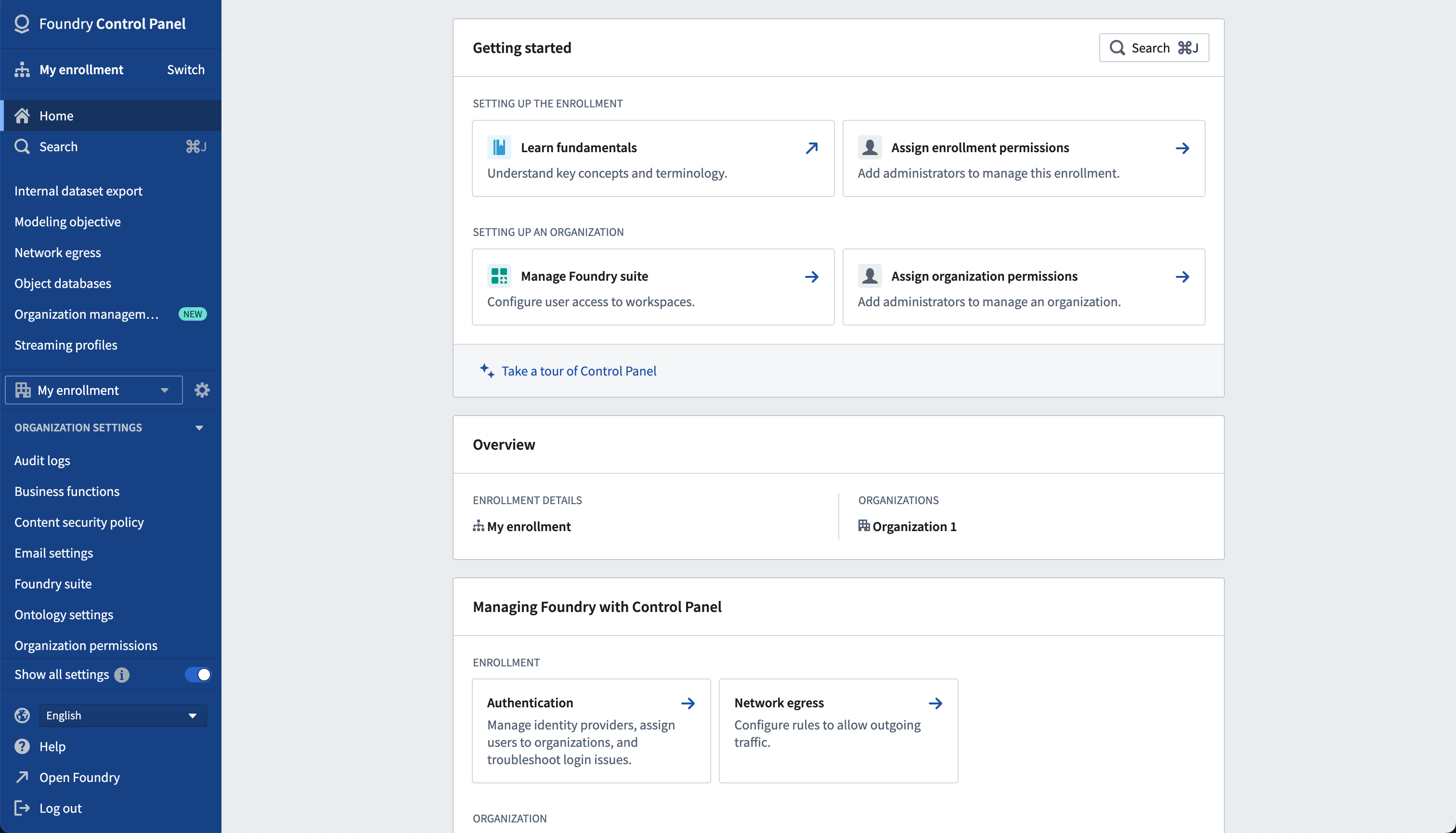
Control Panel enables administrators to:
- Configure a Foundry enrollment’s authentication, permissions, and application settings.
- Monitor usage metrics and manage resource profiles to administer a growing Foundry engagement.
- Help facilitate collaboration between users with Foundry’s robust access controls.

Configure security and settings at every level
Foundry's security controls are comprised of several components: enrollments, Organizations, user groups, and users. An enrollment represents an instance of Foundry and can contain one or more Organizations. Within a single Organization, administrators can control data access at either the user or user group level.
Settings are configured at both the enrollment and Organization level and can be initialized, scaled, and reviewed. These include:
- Enrollment level controls:
- User authentication
- Enrollment
- Organization permissions
- Contact information
- Notifications
- Trusted users
- Network egress policies
-
Object databases
-
Organization level controls:
- Audit logs
- Email settings
- Workspaces
- Usage metrics
- Third party management
- Resource limits
- Profiles
Set up sophisticated collaboration workflows
As your enrollment scales and partnership opportunities arise, Control Panel can be used to facilitate seamless cross-Organization collaboration. Additional Organizations can be added as collaborators, empowering users from outside entities to work together. If workflow requirements change, simply return to Control Panel to update user and group discovery settings, or review the list of collaborating Organizations to ensure appropriate information transfer.

Control Panel can also facilitate more sophisticated collaboration workflows through the management of settings and permissions at the enrollment and Organization level. For instance, administrators can draw access boundaries, govern joint collaboration, and configure a user’s ability to discover other users.
When should I use Control Panel?
Control Panel helps manage the security and configuration of your Foundry enrollment. Administrators can use Control Panel to access, review, and delegate permissions to specific users at both the enrollment and Organization level.
If you are an administrator for your Foundry platform, review the Control Panel documentation to ensure your configuration meets the day-to-day needs of your Foundry users.
Workshop: Output variables for Quiver embed widget
Date published: 2022-12-08
The Quiver Dashboard embed widget now supports output variables in Workshop! This enables greater interactivity and a shared state between an embedded Quiver Dashboard and its parent Workshop module and unlocks a huge potential for creative workflows that leverage Quiver's flexible visualization and transformation grammar inside the workflow-building power of Workshop.
Get started by following the guidance on how to embed a Quiver dashboard in a Workshop module.

Additional highlights
APIs
Get metadata for a specific Ontology | A new get Ontology endpoint is available to get metadata about a specific Ontology. Previously, the same metadata was available from the "list Ontologies" endpoint for all Ontologies.

Administration | Control Panel
Enable TPA for Org | Organization administrators can now use Control Panel to manage integrations with third-party applications on behalf of their organization.
Analytics | Contour
Implement tables in Contour dashboard text cells | Text cells in Contour Dashboards now support adding table layouts.

Analytics | Quiver
Quiver range selection | Users are now able to use a range selection in a time series chart in the analysis (for example, to interactively look at range statistics for different ranges).

Use new row selector for popouts | Popping out a time series cell from a transform table column now adds a time series chart that is controlled by a 'table row selector parameter' (visible in the parameter panel). Changing the row in the parameter will update the plotted time series from that column.

New Date/timestamp Boolean transforms | Added date and time Boolean comparisons that enable temporal filtering by timestamp of columns in a transform table.

Redesigned object-set and object cards that dramatically improve usability | This update improves the usability of the object set and object card types. For example, Time series properties in the object set card now render as a sparkline directly in the table. The object table display is also reformatted to provide more space for property values. Object properties, as well as available time series data linked to the object, can be added and removed directly from the card, improving the discoverability of time series data stored on the object in a time dependent property or on linked objects as measures. The new cards also simplify and shorten the drill-down process of going from an object set to a specific time series plot or property metric on a single object, via a 1-click pop out action. Object set rows can be popped out as object cards and all properties can be popped out as either a time series plot or an object property (metric) card.

App Building | Slate
Trigger print events in Slate | You can now trigger the browser print dialog via the new print action available via Slate events. Use the onPrint event to trigger actions following the print dialog. Note that Slate applications require added CSS and/or application layout choices to provide satisfactory printing results.

Redesign Slate header in editor view | Completely redesigned header in Slate's edit mode. An updated and reorganized view matches the behaviors and patterns as other resource types in Foundry.

Current value column in the variables panel | The Variables panel now shows a read-only view of the current value in addition to the editable default value.

Introduce events and actions | Events and their inputs and triggers, are now included in the dependency viewer alongside other application nodes.

App Building | Workshop
Waterfall Chart widget, v1 | Added new Waterfall Chart widget to enable visualization of a sequential series of numerical values in order to better understand their cumulative effect.
Data Integration | Build Schedules
Find all schedules in the build schedules overview page | Added the ability to search for all schedules that the user has permission to see in the build schedules overview page. To find all schedules, remove any applied search criteria. Schedules can then be filtered by name or pause status, as well as sorted.
Data Integration | Code Repositories
Python 3.9 is now supported in Transforms | Added support for Python 3.9 in Transforms. Benefits of Python 3.9 include new syntax features, including union operators added to dict, type hinting generics in standard collections, relaxed grammar restrictions on decorators and new built-in features, including string methods to remove prefixes and suffixes. For a full list of features, refer to the official Python 3.9 release notes ↗.
Improved UI for preview input configuration | Configuration of input datasets for preview in Code Repositories has been consolidated to a single dialog. For datasets with schema, you can select between running a preview using your original input, the most recent preview of the input from the same repository, another dataset, or the original input with custom filters applied. Inputs may be sampled in preview to improve iteration speed and ensure relevant data is included in the sample.
Data Integration | Data Connection
[DC] Introduce Asana Connector | Added integration capabilities for Asana. Syncs from Asana to Foundry datasets are now supported.
Ontology | Map
Export maps as images | Users can now copy the current state of a Map Template used within Workshop as an image directly to the clipboard, for pasting into other applications including Notepad, or to download as a PNG image file.

Ontology | Ontology Management
Property mapping performance improvement in OMA | Property mapping performance has been improved as one of the computations will now run twice as fast.
Support for datasource rid search in OMA | Enabled a search type in Ontology Manager based on datasource RID. This search type is useful if, for example, users want to find something referenced in an error message.

Ontology Usage is now Generally Available! | The Ontology Usage tab is now available. For a given Object Type, the Usage tab allows you to see the evolution of reads and writes over time, the number of active users over time, and the usage per application type. To learn how to activate this feature, see docs.

Security | Projects
Introduce namespace setting for project default roles | Administrators can now manage default roles applied to newly created projects within a project space. This value can be overridden on a per-project basis by the project owner. Namespace configuration is available, for platform administrators, through a button in the upper right of the Projects and files view.
Disable referencing from "Your files" into other projects | Previously, data pipelines located in a Project could rely on datasets located in an account-specific "Your files" location. Going forward, it will not be possible to reference datasets stored in "Your files" in other projects. This enforces recommended data governance and pipeline development practices and removes the possibility of production data pipeline failure when an account associated with a "Your files" location is disabled. Read more about this change.

中文翻译
公告
控制面板:自助式 Foundry 管理
发布日期:2022-12-13
注册并管理您的 Foundry 环境
借助控制面板(Control Panel),Foundry 全套治理与管理功能现可通过统一的自助式界面访问。此运营视图使平台管理员能够监控 Foundry 使用情况,并轻松配置安全与访问设置。
控制面板使管理员能够:
- 配置 Foundry 注册实例(enrollment)的身份验证、权限(permissions)和应用程序设置。
- 监控使用指标并管理资源配置文件,以管理不断增长的 Foundry 参与度。
- 借助 Foundry 强大的访问控制,促进用户(users)之间的协作。
在每一层级配置安全与设置
Foundry 的安全控制由多个组件构成:注册实例(enrollments)、组织(Organizations)、用户组(user groups)和用户(users)。一个注册实例代表一个 Foundry 实例,可包含一个或多个组织。在单个组织内,管理员可以在用户或用户组级别控制数据访问。
设置可在注册实例和组织两个层级进行配置,并可进行初始化、扩展和审查。这些设置包括:
- 注册实例级别控制:
- 用户身份验证
- 注册实例
- 组织权限
- 联系信息
- 通知
- 受信任用户
- 网络出站策略
-
对象数据库
-
组织级别控制:
- 审计日志(Audit logs)
- 电子邮件设置
- 工作空间(Workspaces)
- 使用指标(Usage metrics)
- 第三方管理(Third party management)
- 资源限制
- 配置文件
设置复杂的协作工作流
随着您的注册实例规模扩大和合作机会出现,控制面板可用于促进无缝的跨组织协作(cross-Organization collaboration)。可以添加其他组织作为协作者,使外部实体的用户能够协同工作。如果工作流需求发生变化,只需返回控制面板更新用户和组发现设置,或查看协作者组织列表以确保信息传输得当。
控制面板还可以通过在注册实例和组织级别管理设置和权限,促进更复杂的协作工作流。例如,管理员可以划定访问边界、管理联合协作,并配置用户发现其他用户的能力。
何时应使用控制面板?
控制面板有助于管理 Foundry 注册实例的安全和配置。管理员可以使用控制面板在注册实例和组织级别访问、审查并委派权限(delegate permissions)给特定用户。
如果您是 Foundry 平台的管理员,请查阅控制面板文档,确保您的配置满足 Foundry 用户的日常需求。
Workshop:Quiver 嵌入小部件的输出变量
发布日期:2022-12-08
Quiver 仪表盘嵌入小部件(Quiver Dashboard embed widget)现在支持 Workshop 中的输出变量!这实现了嵌入式 Quiver 仪表盘与其父级 Workshop 模块之间更强的交互性和共享状态,并为利用 Quiver 灵活的可视化和转换语法在 Workshop 工作流构建能力内创建创意工作流释放了巨大潜力。
请按照指南开始操作,了解如何将 Quiver 仪表盘嵌入到 Workshop 模块中。
其他亮点
API
获取特定本体(Ontology)的元数据 | 新增获取本体端点(get Ontology endpoint),用于获取特定本体的元数据。此前,相同元数据可通过"列出本体端点"(list Ontologies endpoint)获取所有本体的信息。
管理 | 控制面板
为组织启用 TPA | 组织管理员现在可以使用控制面板代表其组织管理与第三方应用程序(third-party applications)的集成。
分析 | Contour
在 Contour 仪表盘文本单元格中实现表格 | Contour 仪表盘中的文本单元格(Text cells)现在支持添加表格布局。
分析 | Quiver
Quiver 范围选择 | 用户现在可以在分析中的时间序列图表中使用范围选择(例如,交互式查看不同范围的范围统计信息)。
为弹出窗口使用新的行选择器 | 从转换表列中弹出一个时间序列单元格,现在会添加一个由"表行选择器参数"控制的时间序列图表(在参数面板(parameter panel)中可见)。更改参数中的行将更新该列绘制的时间序列。
新的日期/时间戳布尔转换 | 新增日期和时间布尔比较,支持按转换表中列的时间戳进行时间过滤。
重新设计的对象集和对象卡片,显著提升可用性 | 此更新改进了对象集和对象(object set and object)卡片类型的可用性。例如,对象集卡片中的时间序列属性现在直接以迷你图形式呈现在表格中。对象表格显示也进行了重新格式化,为属性值提供更多空间。对象属性以及链接到对象的可用时间序列数据可以直接从卡片中添加和删除,提高了存储在对象上的时间依赖属性或链接对象上作为度量值的时间序列数据的可发现性。新卡片还简化并缩短了从对象集深入到特定时间序列图或单个对象属性度量的过程,通过一键弹出操作即可实现。对象集行可以作为对象卡片弹出,所有属性可以作为时间序列图或对象属性(度量)卡片弹出。
应用构建 | Slate
在 Slate 中触发打印事件 | 您现在可以通过 Slate 事件中新增的 print 操作触发浏览器打印对话框。使用 onPrint 事件在打印对话框后触发操作。请注意,Slate 应用程序需要添加 CSS 和/或选择合适的应用布局,以获得满意的打印效果。
在编辑器视图中重新设计 Slate 头部 | Slate 编辑模式下的头部已完全重新设计。更新和重新组织的视图与 Foundry 中其他资源类型的行为和模式相匹配。
变量面板中的当前值列 | 变量(Variables)面板现在除了可编辑的默认值外,还显示当前值的只读视图。
引入事件和操作 | 事件(Events)及其输入和触发器,现在已包含在依赖关系查看器(dependency viewer)中,与其他应用程序节点并列。
应用构建 | Workshop
瀑布图小部件(Waterfall Chart widget),v1 | 新增瀑布图小部件,用于可视化一系列数值的累积效果,以便更好地理解其累积影响。
数据集成 | 构建计划
在构建计划概览页面查找所有计划 | 新增功能,可在构建计划概览(build schedules overview)页面搜索用户有权查看的所有计划。要查找所有计划,请移除任何已应用的搜索条件。然后可以按名称或暂停状态过滤计划(Schedules),并进行排序。
数据集成 | 代码仓库
Transforms 现在支持 Python 3.9 | Transforms 中新增对 Python 3.9 的支持。Python 3.9 的优势包括新的语法特性,例如添加到 dict 的联合运算符、标准集合中的类型提示泛型、放宽的装饰器语法限制以及新的内置特性,包括用于移除前缀和后缀的字符串方法。有关完整功能列表,请参阅官方 Python 3.9 发布说明 ↗。
改进预览输入配置的用户界面 | 代码仓库中预览输入数据集的配置已整合到单个对话框中。对于具有模式的数据集,您可以选择使用原始输入、同一仓库中输入的最新预览、另一个数据集或应用了自定义过滤器的原始输入来运行预览。预览中的输入可以进行采样,以提高迭代速度并确保样本中包含相关数据。
数据集成 | 数据连接
[DC] 引入 Asana 连接器 | 新增对 Asana 的集成能力。现在支持从 Asana 同步数据到 Foundry 数据集。
本体 | 地图
将地图导出为图像 | 用户现在可以将 Workshop 中使用的地图模板(Map Template)的当前状态直接复制到剪贴板作为图像,以便粘贴到其他应用程序(包括记事本(Notepad))中,或下载为 PNG 图像文件。
本体 | 本体管理
OMA 中属性映射性能改进 | 属性映射性能已得到改进,其中一项计算现在运行速度将提高一倍。
OMA 中支持数据源 RID 搜索 | 在本体管理器(Ontology Manager)中启用了基于数据源 RID 的搜索类型。例如,如果用户想在错误消息中查找引用的内容,此搜索类型非常有用。
本体使用情况现已正式发布! | 本体使用情况(Ontology Usage)选项卡现已可用。对于给定的对象类型(Object Type),使用情况选项卡允许您查看随时间变化的读写演变、随时间变化的活跃用户数以及按应用程序类型划分的使用情况。要了解如何激活此功能,请参阅文档。
安全 | 项目
为项目默认角色引入命名空间设置 | 管理员现在可以管理应用于项目空间(space)内新创建项目的默认角色。项目所有者可以按项目覆盖此值。平台管理员可通过项目和文件视图右上角的按钮进行命名空间配置。
禁止从"您的文件"引用到其他项目 | 以前,位于项目中的数据管道可能依赖于位于账户特定"您的文件"位置的数据集。今后,将无法引用存储在"您的文件"中的数据集到其他项目。这强制执行了推荐的数据治理和管道开发实践,并消除了当与"您的文件"位置关联的账户被禁用时生产数据管道失败的可能性。详细了解此更改。