Announcements(公告)
Object Monitoring: Automated workflows
Date published: 2023-01-26
Trigger automated workflows for changes in business data
The Object Monitoring application is designed to keep users informed and enable automated workflows or alerting based on organizational events revealed in updates to data.
Palantir Foundry users can now use the Object Monitoring application to set up automatic notifications or trigger Actions whenever there are defined object data changes in the Foundry Ontology. Object monitors track saved searches and objects for users, run on top of data and can be incorporated into Foundry applications as monitoring and alerting functionality.
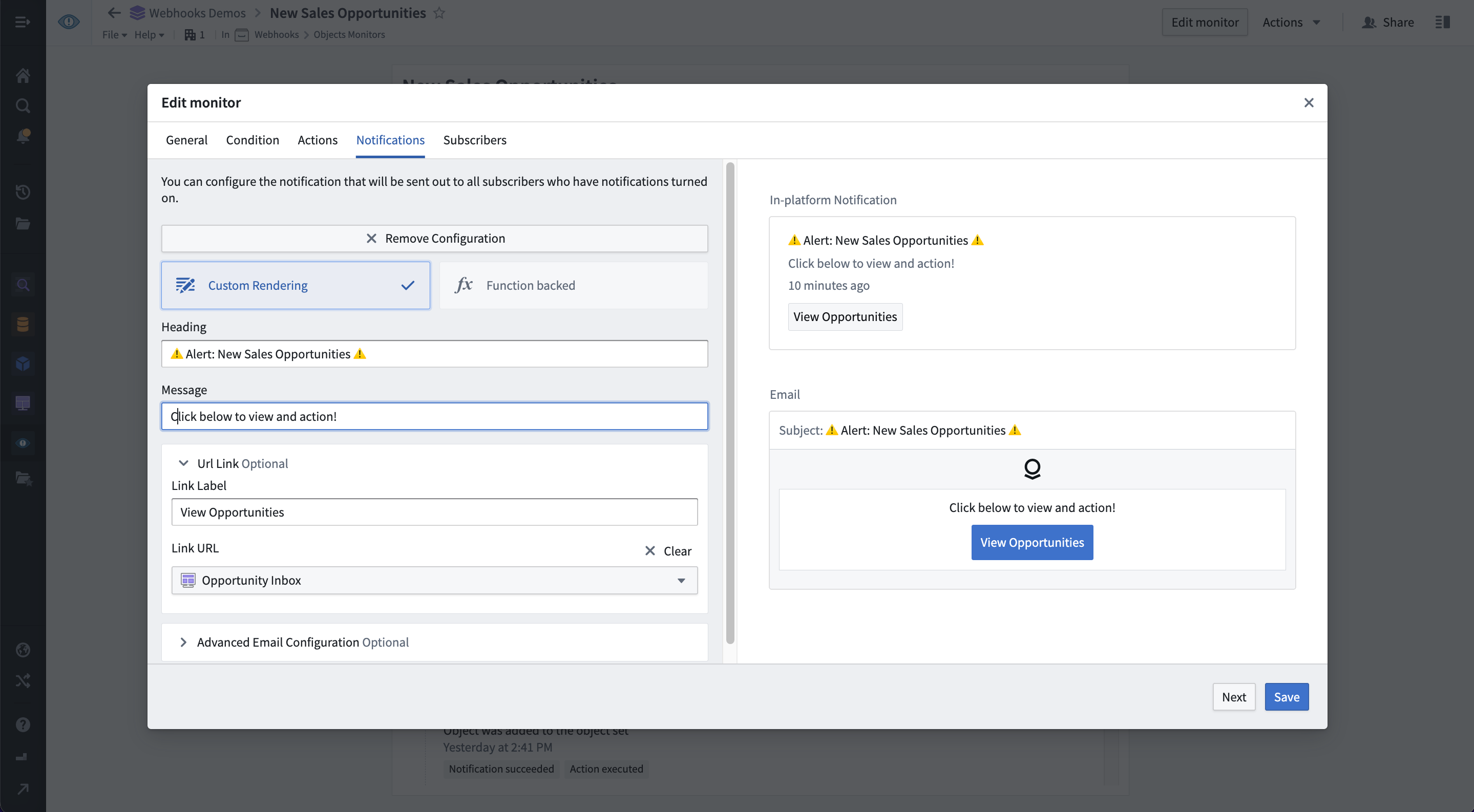
Set up and subscribe to notifications
By default, all users who can interact with Ontology data are able to configure monitors and subscribe users and groups to receive highly customizable notifications. These include customized HTML-based emails or pings on third-party platforms such as Slack, Twilio, Teams and more. Third-party notifications can be easily configured through an Action and a webhook.
Supported notification mediums include, but are not limited to:
- In-platform pop-up in the Foundry notifications center
- HTML-based email
- SMS via webhooks to a third-party service such as Twilio ↗
- Instant message via webhooks to a third-party service such as Slack ↗ or Microsoft Teams ↗
Automate your workflows with Actions
Object monitors may be set up to automatically perform Actions based on monitoring conditions. Actions may perform edits to data in Foundry Ontology or modify data in external systems via webhooks. Two example use cases for this are:
- Checking for data anomalies and automatically passing those objects into an Action with logic to remediate the issue.
- Automatically apply Actions when pre-configured event and time conditions are met. Actions can include making an API call to an external system via webhooks to apply a change directly in the external system.
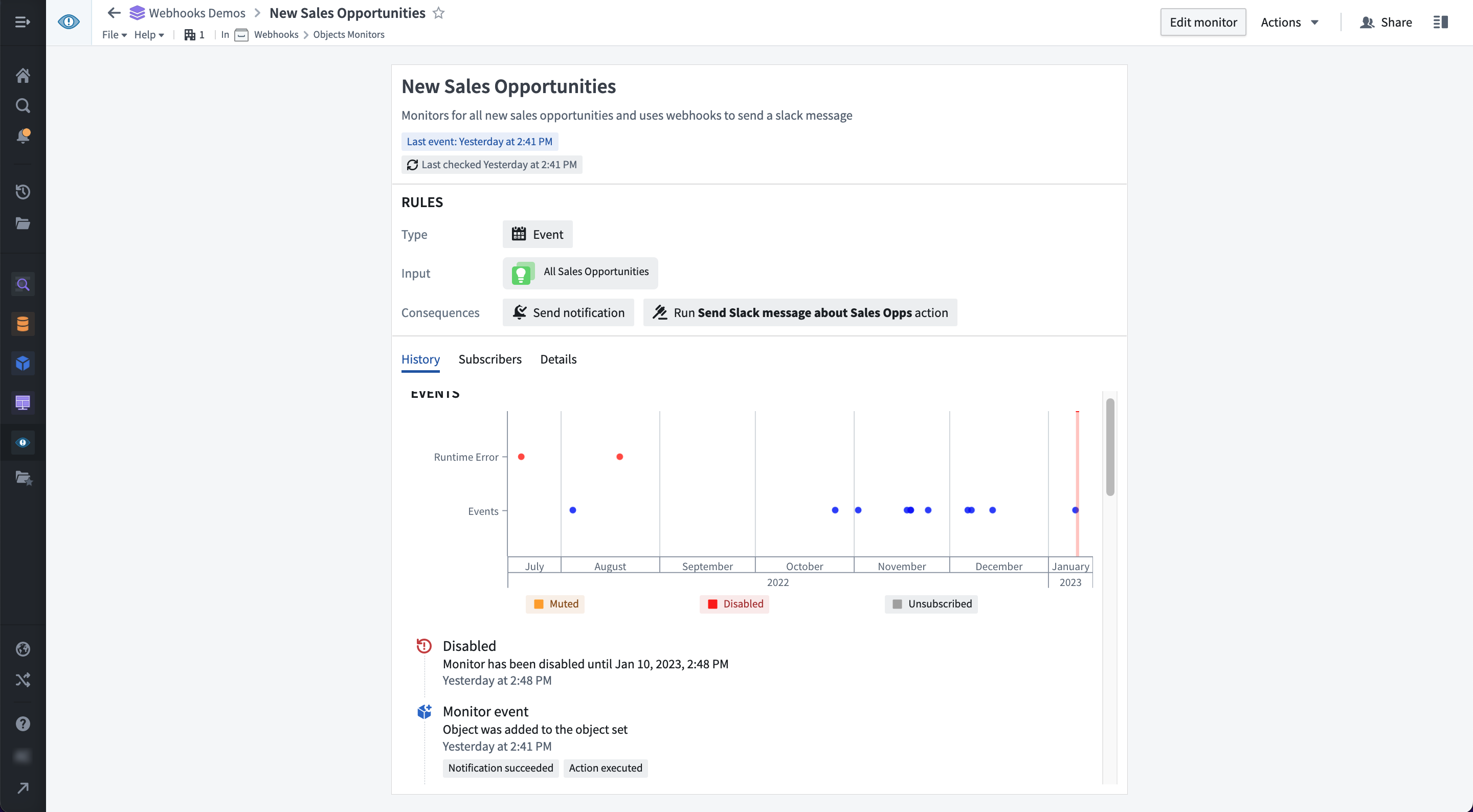
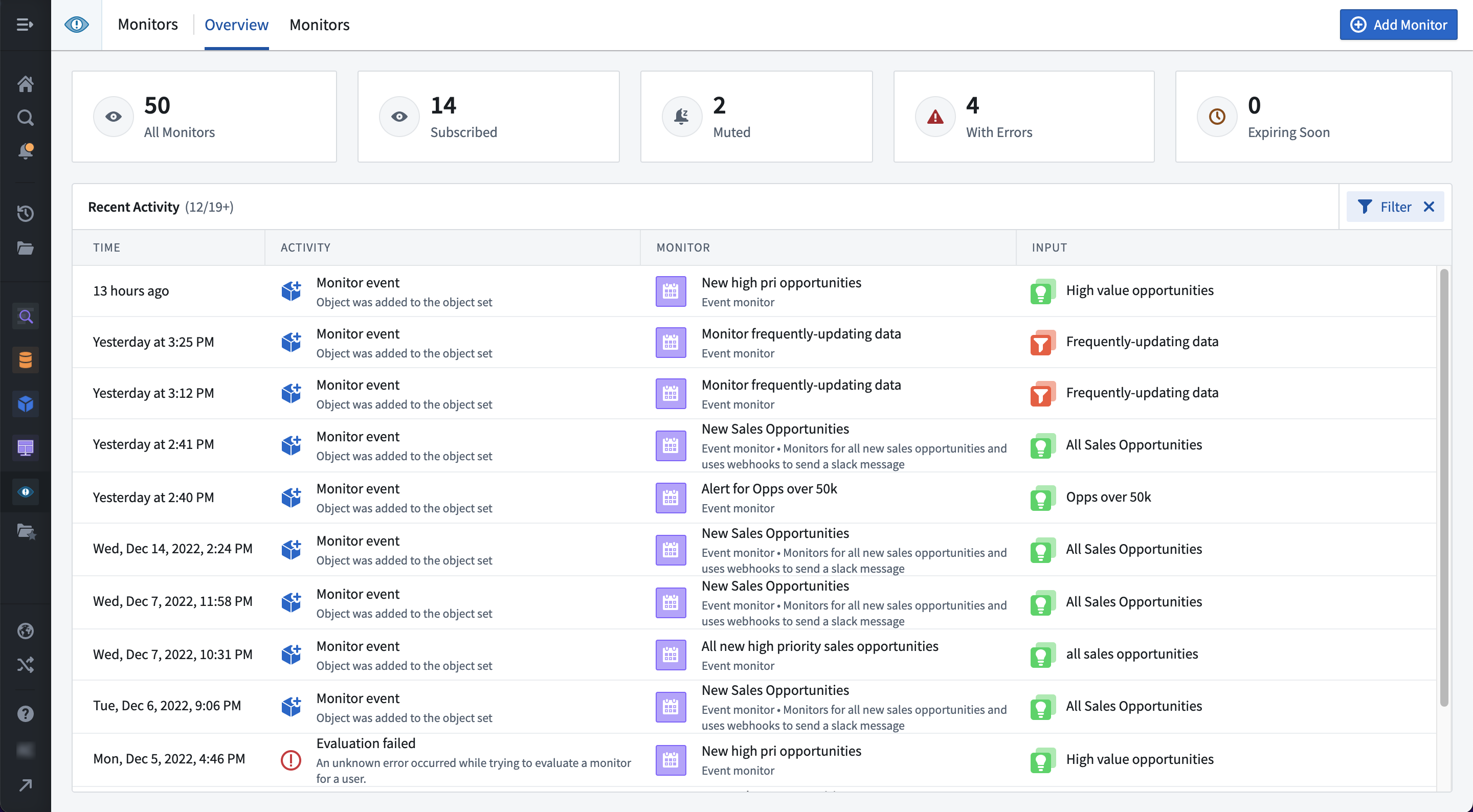
Manage object monitors in one dedicated application
The Object Monitoring application provides a consolidated single view across all monitors users are subscribed to. From here users can monitor configured workflows and respond to global events as needed. From the interface, you can:
- View a unified activity timeline to track events across all of your monitors.
- Manage your active object monitors.
- Configure advanced functionality including:
- Function-backed conditions
- Custom notification rendering
- Diagnose address issues as needed.
When should I use Object Monitors
Use object monitoring when Ontology data updates automatically via a pipeline and users wish to receive notifications or trigger Actions based on those changes. Object Monitoring can also be suitable for workflow automation, when the automation should be triggered by Ontology data changes and the desired effects may be performed by a Foundry Action.
If you have workflows that require fixed-schedule triggering, evaluation on a user-configured schedule, or observation of changes in time-series properties, Foundry’s Pipeline Builder, Code Repository, and Foundry Rules remain best suited for your needs.
To learn how to set up object monitors to automatically notify or trigger Actions, have a look at Object Monitors documentation.
Workshop: On-the-go with Mobile Apps
Date published: 2023-01-17
Access and capture data from the convenience of your phone
Workshop now features mobile support to help you harness object type data from the Ontology, anywhere, at anytime using hand-held devices — without the need to download an app. You can use Workshop’s familiar point-and-click interface to configure an application for usability on a touchscreen device and provide a seamless in-browser navigation experience when users launch the application on a dedicated mobile app launcher.

Known for its many interactive applications for desktop users, Workshop applications can now be optimized for access from anywhere — whether in a health clinic, at a customer site, or on the factory floor — enabling highly interactive, closed-loop workflows.

Unlock your field operations
In addition to serving as a flexible application builder with support for highly configurable layouts and widgets that enable a wide range of workflows, Workshop can provide a full spectrum of additional benefits for mobile users that include the following:
- Data from the Ontology surfaced in a wide variety of views such as text, lists, timelines, and more.
- A streamlined landing experience through the purpose-built mobile application launcher.
- Mobile-friendly interfaces, using built-in support for pages, drawers, and multiple page layout options.
- An intuitive navigation experience that conforms to iOS and Android design guidelines.
Physical data enrichment
Extending beyond traditional desktop features, mobile support makes it possible for on-the-go users to capture inputs directly from their physical environment. For instance, users can submit phone-captured images into Foundry, enable scanning QR codes with the QR Code Reader widget, or even set up geospatial awareness capabilities, such as surfacing nearby objects of interest from your enterprise data store.

When should I create mobile apps in Workshop?
To provide a uniform experience to users on any type of mobile device, Workshop applications can now be used through a mobile application wrapper that optimizes presentation and access from popular mobile web browsers. Consider creating mobile apps in Workshop for users who would benefit from the ability to access or update organizational data while traveling or working offsite in the course of their day-to-day roles. When enabled, remember to work with your IT organization to enable mobile browser access to applications.
Explore Foundry Documentation to learn how to build a Workshop application in mobile mode.
Slate: Calculate object aggregations
Date published: 2023-01-17
The Slate Platform tab now supports configuring aggregations on top of object set definitions. This removes the need to write aggregation logic in Typescript as a Foundry Function- though this remains a powerful and flexible approach - and makes it trivial to calculate simple metrics like sums and means without leaving Slate. Read more in the docs.

Pipeline Builder: Reuse logic with custom functions
Date published: 2023-01-17
Logic often needs to be repeated across a pipeline, but it’s hard to maintain one source of truth when the same logic is scattered in multiple locations. Copying and pasting leads to logic duplication and an increasing support burden over time. In addition, it can be challenging to accelerate cross-organization collaboration when much of business logic is saved as code that requires specialized knowledge to update.
Now, you can create your own suite of functions within a Builder pipeline and use them as first-class transforms in your pipeline. A function can be created from a single board or multiple boards in a path. These functions are composed of human-readable parts, increasing accessibility for non-technical users in your organization to engage with the logic. You can create a new function via the Custom functions button on the graph view, or by highlighting a set of transforms and clicking the + button within a transform path.

Introducing Foundry Streaming: Operate in real-time
Date published: 2023-01-01
Foundry Streaming refers to a set of capabilities for Foundry that spans multiple products and workflows to enable end to end low latency pipelines. From real time monitoring and alerting to critical business decision-making, Streaming provides all the same primitives and scalability expected of Foundry while maintaining consistent low latencies and high throughput. To see how all the pieces fit together, check out this short demo ↗ bringing together streaming sensor data for alerting, analytics, and operational applications.
Data connections to real-time sources
Streaming sources: The Data Connection application now supports a streamlined setup for connecting to Kafka streams.

Push-based sources: With streams, Foundry also supports push-based ingestion to support event-based workflows. Push-based record ingestion in Foundry follows the same principles as typical REST services. Through a series of REST endpoints, we expose a push-based API that can consume records and write them into streams and datasets. Find all the details to get started configuring these sources in the documentation.
Streaming transforms in Pipeline Builder
Authoring logic on top of streaming sources is typically complex and fragile, which prevents operational applications from taking advantage of these low-latency sources of truth. With Pipeline Builder support for streams production-grade pipelines are easy to configure and secure with an ever-growing list of available transformations, joins, and aggregations supporting streaming data. Streaming pipelines can be used to back time series as well as Ontology object types.

For streaming pipeline logic that cannot be expressed in Pipeline Builder, Foundry Authoring supports creating user-defined functions (UDFs).
Analyze and build with streaming data
Streams modeled as time series can be used in Quiver and Vertex for live analysis of real-time operational and IoT data. Foundry Rules supports building alerting and monitoring workflows on top of streaming time series. Modeling the streaming data as time series properties of Ontology object types brings streaming data to the operational edge and unlocks additional functionality in Workshop charts, maps, variables, and other application-building components. Putting these components together brings real-time data to operational decisions making; view an example in this short demo ↗.
What's next?
Foundry Streaming already unlocks the value of real-time sensor and other live data sources. The following is what we expect to be available by the end of 2023:
- Stateful streaming functions: stateful streaming is the most challenging form of streaming to build correctly. With that in mind we are spending an additional season to harden the APIs before rolling the capability out widely.
- Hitting external compute from streams: Often times you want low latency applications to reach out of Foundry and query external compute resources, like external models or lambdas. We are investing in the infrastructure for this capability and piloting with early adopters.
- More data connectors: Kafka is a good start but there are many more streaming sources that deserve a first-class data connector. If you have a need for a specific connector, reach out to a Palantir representative.
- Data export: To close the loop, streaming data sometimes needs to flow back into source systems after being enriched and transformed in Foundry. We have beta versions of a few of these export connectors and are investing in first-class export solutions.
Additional highlights
Administration | Resource Management
Overview tab | The new Overview tab in Resource Management allows users to understand their resource usage at a glance and drill down into areas of interest.
Analytics | Contour
Resources in analysis menu | When adding a new path to an analysis, there is now an additional option to select from "Datasets in this analysis". This can be used to quickly start a new path from a dataset already referenced elsewhere in the analysis.

Analytics | Quiver
Add toggles to disable our vega default injections | Added toggles to the Vega chart to disable default autoscale or style options and use the user-provided Vega spec instead for full control over the Vega chart appearance.

New string casting transforms | Added three new string casting transforms: string to number (in the Numeric menu), string to date (in the Date/Time menu), and string to Boolean (in the Boolean menu).

Updated Time Series Search (TSS) and Multi Time Series Search (MTSS) | Released improved single and multi time series search capabilities that visually display when certain conditions are met on one or more time series plots. Search results are displayed as events in an events plot. Run a single search which satisfies one or more conditions, or search across each row of a transform table (limited to 1,000 rows). To search over an object set, add a transform table from the object set and search over the transform table.

Time series columns in transform tables are now editable | The "create values" and "edit values" transforms now support the time series data type. Users are now able to swap a time series with data coming from another time series, or add a time series column that shows a specific time series by default.

Open chart plots as rows in a transform table | It is now possible to open time series from a chart as rows in a transform table, allowing for quick editing and transformation of time series data. Each time series plot shows up as one row in the table.

App Building | Slate
Customize filename in function export | When exporting a CSV in Slate using the .exportCsv action for a query or function, you can now specify the output filename by returning a string value in the event JavaScript like { fileName: <<custom_string>> }.
App Building | Workshop
Chart XY widget: support for cumulative sum series | The Chart XY widget now includes a front-end option to display a given series as a cumulative, rolling sum rather than as individual bucket values.
Data Integration | Data Connection
Snowflake source available for all enrollments | The dedicated Snowflake connector is now available for all Foundry enrollments.
Data Integration | Pipeline Builder
Enable changelog write mode | Builder now supports writing output datasets as changelogs for use in the Ontology and other places. This can be configured through the pipeline outputs panel by editing an output and selecting Configure changelog.
Model Integration | Modeling
Updated Modeling Objectives documentation | Released new documentation for the updated Modeling Objectives application and new model evaluation functionality. Updated content includes explanations of modeling objectives and model evaluation, revised tutorials, and code examples.
Ontology | Map
Shape measurements | Measurements, including the total shape perimeter, shape area, and per-segment length are now displayed when drawing a line or polygon on the map. The measurements units can be configured to imperial or metric.

中文翻译
公告
对象监控:自动化工作流
发布日期:2023-01-26
针对业务数据变更触发自动化工作流
对象监控(Object Monitoring)应用程序旨在让用户及时了解情况,并根据数据更新中揭示的组织事件,实现自动化工作流或告警。
Palantir Foundry 用户现在可以使用对象监控应用程序,在 Foundry 本体(Ontology)中定义的特定对象数据发生变化时,设置自动通知或触发操作(Actions)。对象监控器(Object monitors)会为用户跟踪已保存的搜索和对象,它们运行在数据之上,并可作为监控和告警功能集成到 Foundry 应用程序中。
设置并订阅通知
默认情况下,所有能够与本体数据交互的用户都可以配置监控器,并订阅高度可定制的通知,这些通知可以发送给用户或用户组。通知形式包括自定义的 HTML 格式电子邮件,或在 Slack、Twilio、Teams 等第三方平台上发送的推送消息。第三方通知可以通过一个操作(Action)和一个网络钩子(webhook)轻松配置。
支持的通知媒介包括但不限于:
- Foundry 通知中心内的平台内弹窗
- 基于 HTML 的电子邮件
- 通过网络钩子发送至第三方服务(如 Twilio ↗)的短信
- 通过网络钩子发送至第三方服务(如 Slack ↗ 或 Microsoft Teams ↗)的即时消息
使用操作(Actions)自动化工作流
对象监控器可以设置为根据监控条件自动执行操作。操作可以编辑 Foundry 本体中的数据,或通过网络钩子修改外部系统中的数据。两个示例用例包括:
- 检查数据异常,并自动将这些对象传递给一个包含修复逻辑的操作。
- 当预配置的事件和时间条件满足时,自动应用操作。操作可以包括通过网络钩子向外部系统发起 API 调用,以直接在外部系统中应用更改。
在专用应用程序中管理对象监控器
对象监控应用程序提供了一个统一的视图,汇总了用户订阅的所有监控器。用户可以在此监控已配置的工作流,并根据需要响应全局事件。通过该界面,您可以:
- 查看统一的活动时间线,以跟踪所有监控器的事件。
- 管理您活跃的对象监控器。
- 配置高级功能,包括:
- 基于函数(Function)的条件
- 自定义通知渲染
- 根据需要诊断和解决问题。
何时使用对象监控器
当本体数据通过管道(pipeline)自动更新,并且用户希望基于这些更改接收通知或触发操作时,请使用对象监控。当自动化工作流应由本体数据更改触发,且预期效果可由 Foundry 操作执行时,对象监控也适用于工作流自动化。
如果您的工作流需要固定时间表触发、按用户配置的时间表进行评估,或观察时间序列属性中的变化,那么 Foundry 的管道构建器(Pipeline Builder)、代码仓库(Code Repository)和 Foundry 规则(Foundry Rules)仍然是满足您需求的最佳选择。
要了解如何设置对象监控器以自动通知或触发操作,请参阅对象监控器文档。
Workshop:移动应用,随时随地
发布日期:2023-01-17
在手机上便捷地访问和捕获数据
Workshop 现在支持移动端,帮助您随时随地使用手持设备利用本体中的对象类型数据——无需下载应用程序。您可以使用 Workshop 熟悉的点击式界面,为触屏设备配置应用程序,并在用户通过专用移动应用启动器启动应用程序时,提供无缝的浏览器内导航体验。
Workshop 应用程序以其为桌面用户提供的众多交互式应用而闻名,现在可以优化为随时随地访问——无论是在诊所、客户现场还是工厂车间——从而实现高度交互的闭环工作流。
解锁现场业务能力
除了作为一个灵活的应用程序构建器,支持高度可配置的布局和小部件以实现广泛的工作流之外,Workshop 还可以为移动用户提供一系列额外优势,包括:
- 以文本、列表、时间线等多种视图形式呈现本体数据。
- 通过专门构建的移动应用启动器提供简化的登录体验。
- 利用内置的页面、抽屉和多种页面布局选项,提供移动友好的界面。
- 符合 iOS 和 Android 设计指南的直观导航体验。
物理数据丰富
超越传统的桌面功能,移动支持使得外勤用户能够直接从其物理环境中捕获输入。例如,用户可以将在手机上拍摄的图像提交到 Foundry,使用二维码阅读器(QR Code Reader)小部件扫描二维码,甚至设置地理空间感知能力,例如从企业数据存储中显示附近感兴趣的对象。
何时在 Workshop 中创建移动应用?
为了向任何类型移动设备上的用户提供统一的体验,Workshop 应用程序现在可以通过一个移动应用包装器来使用,该包装器优化了在主流移动网络浏览器上的呈现和访问。对于在日常工作中需要出差或在场外工作时访问或更新组织数据的用户,可以考虑在 Workshop 中创建移动应用。启用后,请记得与您的 IT 部门合作,启用应用程序的移动浏览器访问。
探索 Foundry 文档,了解如何在移动模式下构建 Workshop 应用程序。
Slate:计算对象聚合
发布日期:2023-01-17
Slate 的平台标签页现在支持在对象集定义之上配置聚合。这消除了在 TypeScript 中编写聚合逻辑作为 Foundry 函数 的需要——尽管这仍然是一种强大且灵活的方法——并且使得无需离开 Slate 即可轻松计算总和、平均值等简单指标。在文档中了解更多信息。
管道构建器:使用自定义函数重用逻辑
发布日期:2023-01-17
逻辑经常需要在管道中重复使用,但当相同的逻辑分散在多个位置时,很难维护单一事实来源。复制粘贴会导致逻辑重复,并随着时间的推移增加维护负担。此外,当大量业务逻辑保存为需要专业知识才能更新的代码时,加速跨组织协作可能具有挑战性。
现在,您可以在构建器管道中创建自己的函数套件,并将它们用作管道中的一等转换(first-class transforms)。函数可以从路径中的单个面板或多个面板创建。这些函数由人类可读的部分组成,提高了组织中非技术用户参与逻辑处理的可访问性。您可以通过图形视图上的自定义函数按钮创建新函数,或者通过高亮一组转换并点击转换路径中的 + 按钮来创建。
介绍 Foundry Streaming:实时操作
发布日期:2023-01-01
Foundry Streaming 指的是一套跨越多个产品和工作流的 Foundry 功能,用于实现端到端的低延迟管道。从实时监控和告警到关键业务决策,Streaming 提供了 Foundry 所期望的所有原语和可扩展性,同时保持一致的低延迟和高吞吐量。 要了解所有组件如何协同工作,请观看此简短演示 ↗,该演示整合了用于告警、分析和运营应用的流式传感器数据。
连接到实时源的数据连接
流式源: 数据连接(Data Connection)应用程序现在支持简化的设置,以连接到 Kafka 流。
基于推送的源: 通过流,Foundry 还支持基于推送的数据摄取,以支持基于事件的工作流。Foundry 中基于推送的记录摄取遵循与典型 REST 服务相同的原则。通过一系列 REST 端点,我们公开了一个基于推送的 API,该 API 可以消费记录并将其写入流和数据集中。在文档中查找开始配置这些源的所有详细信息。
管道构建器中的流式转换
在流式源之上编写逻辑通常复杂且脆弱,这阻碍了运营应用程序利用这些低延迟的事实来源。通过管道构建器对流式数据的支持,可以轻松配置生产级管道,并通过不断增长的可用转换、连接和聚合列表来支持流式数据,确保其安全性。流式管道可用于支持时间序列以及本体对象类型。
对于无法在管道构建器中表达的流式管道逻辑,Foundry Authoring 支持创建用户自定义函数(UDFs)。
使用流式数据进行分析和构建
建模为时间序列的流可以在 Quiver 和 Vertex 中使用,用于实时运营数据和物联网数据的实时分析。Foundry 规则支持在流式时间序列之上构建告警和监控工作流。将流式数据建模为本体对象类型的时间序列属性,可将流式数据带到运营边缘,并解锁 Workshop 图表、地图、变量和其他应用程序构建组件中的额外功能。 将这些组件组合在一起,可以将实时数据应用于运营决策;在此简短演示 ↗中查看示例。
下一步是什么?
Foundry Streaming 已经释放了实时传感器和其他实时数据源的价值。以下是我们在 2023 年底前预计可用的功能:
- 有状态流式函数: 有状态流式处理是构建正确的最具挑战性的流式处理形式。考虑到这一点,我们正在花费额外的时间来强化 API,然后再广泛推出该功能。
- 从流中访问外部计算: 通常,您希望低延迟应用程序能够访问 Foundry 外部并查询外部计算资源,例如外部模型或 lambda 函数。我们正在为此功能投资基础设施,并与早期采用者进行试点。
- 更多数据连接器: Kafka 是一个好的开始,但还有更多的流式源值得拥有一个一等数据连接器。如果您有特定连接器的需求,请联系 Palantir 代表。
- 数据导出: 为了形成闭环,流式数据有时需要在 Foundry 中丰富和转换后流回源系统。我们有几个此类导出连接器的测试版,并正在投资于一流的导出解决方案。
其他亮点
管理 | 资源管理
概览标签页 | 资源管理中的新概览标签页允许用户一目了然地了解其资源使用情况,并深入查看感兴趣的领域。
分析 | Contour
分析菜单中的资源 | 在向分析添加新路径时,现在有一个额外的选项可以从"此分析中的数据集"中选择。这可用于从分析中其他地方已引用的数据集快速启动新路径。
分析 | Quiver
添加开关以禁用我们的 vega 默认注入 | 为 Vega 图表添加了开关,以禁用默认的自动缩放或样式选项,并使用用户提供的 Vega 规范,从而完全控制 Vega 图表的外观。
新的字符串转换转换 | 添加了三个新的字符串转换转换:字符串转数字(在数字菜单中)、字符串转日期(在日期/时间菜单中)和字符串转布尔值(在布尔值菜单中)。
更新的时间序列搜索(TSS)和多时间序列搜索(MTSS) | 发布了改进的单时间序列和多时间序列搜索功能,可以在一个或多个时间序列图上直观地显示何时满足特定条件。搜索结果作为事件显示在事件图中。运行满足一个或多个条件的单个搜索,或跨转换表的每一行进行搜索(限制为 1,000 行)。要搜索对象集,请从对象集添加一个转换表,然后搜索该转换表。
转换表中的时间序列列现在可编辑 | "创建值"和"编辑值"转换现在支持时间序列数据类型。用户现在可以将一个时间序列与来自另一个时间序列的数据进行交换,或者添加一个默认显示特定时间序列的时间序列列。
将图表图作为转换表中的行打开 | 现在可以将图表中的时间序列作为转换表中的行打开,从而可以快速编辑和转换时间序列数据。每个时间序列图在表中显示为一行。
应用构建 | Slate
在函数导出中自定义文件名 | 在 Slate 中使用查询或函数的 .exportCsv 操作导出 CSV 时,您现在可以通过在事件 JavaScript 中返回一个字符串值来指定输出文件名,例如 { fileName: <<custom_string>> }。
应用构建 | Workshop
XY 图表小部件:支持累积和序列 | XY 图表小部件现在包含一个前端选项,可以将给定序列显示为累积滚动总和,而不是单个桶值。
数据集成 | 数据连接
Snowflake 源对所有注册可用 | 专用的 Snowflake 连接器现在对所有 Foundry 注册可用。
数据集成 | 管道构建器
启用变更日志写入模式 | 构建器现在支持将输出数据集写入为变更日志(changelogs),以便在本体和其他地方使用。这可以通过管道输出面板配置,方法是编辑一个输出并选择配置变更日志。
模型集成 | 建模
更新的建模目标文档 | 为更新的建模目标(Modeling Objectives)应用程序和新的模型评估功能发布了新文档。更新内容包括建模目标和模型评估的解释、修订后的教程和代码示例。
本体 | 地图
形状测量 | 在地图上绘制线条或多边形时,现在会显示测量值,包括形状总周长、形状面积和每段长度。测量单位可以配置为英制或公制。