Announcements(公告)
Checkpoints: Justifications for security changes
Date published: 2023-03-31
With Checkpoints, platform governance and administration teams may require additional justification for certain actions within Foundry. These details are then recorded for audit purposes. Over time, we're gradually increasing the number of user actions for which these justifications can be enabled.
Foundry now supports requiring these justifications for critical security changes such as updating members of groups, updating members with access to markings, granting roles on a project, and more. New Checkpoints types were introduced to make this possible.
Platform administrators may configure their organization settings to collect justifications for select security changes. For instance, administrators may decide that giving access to a marking must be justified – in which case a user attempting this will be prompted for a justification.

For all Checkpoint types, the justification prompt is fully customizable; an administrator may also decide which specific security changes require justification, customize the prompt title and content, etc.
Currently justifications are collected from the user making the change; in practice this is often an administrator with elevated permissions make a change on behalf of another user with restricted permissions. We are working on further functionality in Approvals - currently available for project access requests - to standardize this request-based flow for permissions changes.
Introducing Scoped Sessions: Sandbox data access
Date published: 2023-03-31
Scoped sessions enable a user to pick a subset of pre-defined Markings to access during their Foundry session to create a visual separation between different types of work. Scoped sessions function across both the Foundry file system and ontology workspaces.
Scoped sessions improve platform security by reducing the chances of accidental cross-pollination of work across different purposes in Foundry. For example, a user working across multiple healthcare research projects might be prohibited by regulation or best practice from using data from Project B in the context of Project A, even though they have permissions to view the data in both projects. With scoped sessions, the user chooses scope to work within when logging in and Foundry will display only the resources associated with the active scope.

By siloing a user’s session to the purpose they’re currently working on, the risk of cross-pollination is reduced and the user can work with greater confidence. For example, scoped sessions can help enable the following patterns and best practices:
- Ensure validity of work and avoid cross-pollination: Researchers may work across multiple research projects with distinct access to data and resources. In this case, scoped sessions can help prevent accidentally using research from another project, which would compromise the validity of the research at hand.
- Data Protection/Privacy Requirements: Foundry can be configured to comply with data protection regulations, such as GDPR and HIPAA, where scoped sessions provide an additional tool to enforce purpose limitation and data minimization to sensitive data.
- Limit users’ platform visibility: At large enterprises, a large amount of accessible data might be excessive to users trying to accomplish a specific goal. Scoped sessions can help a user focus on their primary objective given the restricted visibility.
Configuring scoped sessions
An administrator can configure scoped sessions for your Organization from within Control Panel. Scoped sessions should be configured carefully since they can affect all users who log into Foundry and may potentially lead to the display of a Foundry workspace banner. For this reason, scoped sessions are disabled by default. To get started reviewing your Markings configuration and enable scoped session, follow the guidance in the documentation and reach out to a Palantir support engineer with additional questions.
Slate: Public Applications
Date published: 2023-03-30
Reach your audience where most needed
Use Slate’s point-and-click features to build public Palantir Foundry applications for your partners, vendors, and customers that can be accessed without the requirement of a Palantir Foundry account.
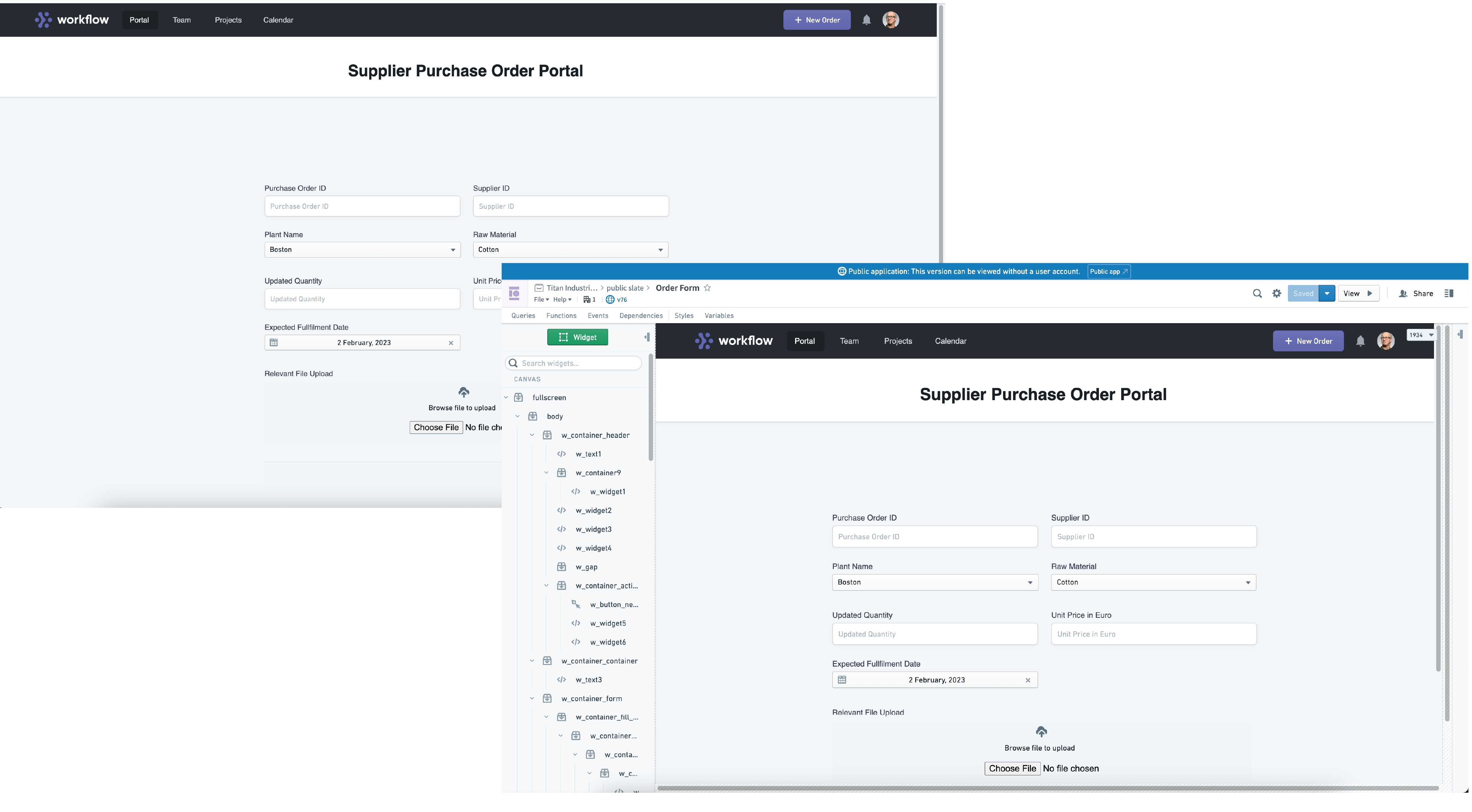
Application builders can directly build public apps via Slate that directly eliminates the overhead effort of onboarding and maintaining Foundry accounts for a given intended audience. Build a public application and benefit from dynamic resource scaling, Foundry’s security primitives, without needing to setting up specific data connection configurations for single-purpose applications.
Directly to your dataset, by your design
Typical applications made in Palantir Foundry require a Foundry account to be authenticated prior to access. Now, when an application is built specifically as a public application, anyone with the application’s URL can use it without the requirement of having had prior training nor onboarding to the Foundry platform. Public applications are suitable for collecting input from a wide group of users, with submissions or uploads directly piped into a Foundry dataset for transformations and further analysis in the Foundry application suite. For example, you can build robust surveys, onboard users, and accept data uploads, amongst the many possibilities.

Additionally, through Slate’s built-in support for cascading stylesheets (CSS), application builders can tailor the look and feel of the public application to match a company’s style guidelines giving users a seamless experience without even needing a Foundry account. The screenshot depicts a sample public Slate application that can be used for suppliers of a company to submit purchase orders, just one of many potential uses for the flexibility provided by Slate’s public application capability.
When should I create a Public application?
Consider building a public application powered by Slate when the audience for your website is the public and where you may have a need to directly pipe user-submitted information into your Foundry datasets.
As public applications are accessed directly by a URI, personalized URIs and metric tracking functionalities are not yet supported. We recommend building an integrated application in lieu if these requirements are important for your use case.
To start building a public application, review our documentation on how to build a public application and select Create new application > Public application in Slate.
Introducing Foundry Rules: Democratize business logic
Date published: 2023-03-13
Define the logic that runs your business
Foundry Rules provides a streamlined approach to codifying and managing business logic. With a point-and-click, low-code interface, users of all technical backgrounds are able to create and apply rules to relevant data. These rules can be applied to take action across relevant systems to power critical workflows.

Backed by Foundry’s core data primitives, including objects, time series, and streaming, we built Foundry Rules to automate what is often a time-consuming workflow, freeing up more time to focus on building and powering use cases such as equipment monitoring, anti-money laundering, and more.
Define business logic with scalable oversight
Complex enterprises comprised of cross-functional teams often run into the dislocation of expertise between those that understand an organization’s operational logic and those that can codify and implement that expertise. Foundry Rules aims to bridge that divide by both enabling users across operational units and IT teams alike.
IT teams are empowered to provide baselines with which users can interact, and set up, review, and run rules at scale, essentially equipping nontechnical users with tools that are typically restricted to software developers.
Simultaneously, end users now have the agency to:
- Take control of data driven processes with workflow automation
- Skip daily non-scalable spreadsheet based manual processes
- Power time-critical workflows with real-time streaming capabilities
Foundry Rules can expedite building and collaboration, saving both time and effort.
Complex logic, simple deployment
The streamlined experience of a single configuration page allows for rapid deployment of business logic by users from all technical levels. What formerly required technical support from engineers is now readily accessible, through an intuitive UI. Foundry Rules features:
- Simplified deployment: Deploy a new Foundry Rules workflow end-to-end in minutes, all through a single configuration page.
- Deploy to Pipelines: Foundry Rules can be run out of the box without interacting with pipeline code, however allows for flexibility to write custom code as needed.
- Real-Time Streaming: Native streaming support means Foundry Rules can support extremely time sensitive workflows.
- Painless modifications and maintenance: Robust versioning and descriptive debugging means any modifications to running rules can be made with ease.
When should I use Foundry Rules?
Use Foundry Rules to set up workflows based on expertise driven business logic such as Alerting, Categorization, and Task Generation. Foundry Rules can also improve collaboration between IT teams and end users across these workflows through defined guide rails.
For investigative workflows or experimental "what-if" workflows, we continue to recommend Quiver and Contour for an in-depth look at the dataset. Important insights gained from these workflows can still be codified as business logic in Foundry Rules at a later stage.
Set up some Foundry Rules today by visiting Foundry Rules documentation and learn more on our product page ↗.
Map Layers: Raster tiles
Date published: 2023-03-10
The Map Layer Editor now allows users to add raster tile data to layers via a point-and-click UI. Once configured, map layers are available for users in the Map application as well as the Map widget in Workshop.
This new UI removes the need to write complex and error-prone Mapbox JSON styles to add raster images to layers. Instead, configure a raster layer by pointing to a map tile server URL - note that it may be necessary for an admistrator to configure network ingress and egress for the server address range - and setting additional parameters with the sliders.
Use raster layers to visualize satellite imagery, weather radar, custom maps, or any other image-based data! Learn more about configuring map layers in the docs.

Palantir Learning
Date published: 2023-03-02
Learn Foundry, grow your skills, and get certified
Palantir Foundry is a powerful, operational decision-making platform. Through its use, our customers and partners are able to drive positive impact on the problems that matter most at organizations across the world. Palantir Learning ↗ is built for Foundry users of all technical skill levels to maximize their understanding of the many applications within Foundry. The self-paced training delivered through Palantir Learning is designed to take you from little or no Foundry knowledge to a strong, base-level understanding of the platform and its potential applications.
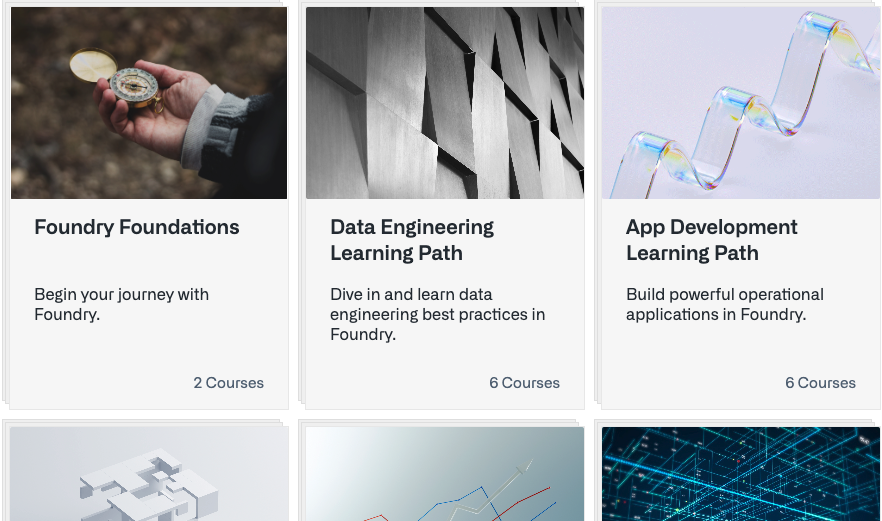
Course catalog
Role-based training tracks: Opt for one of multiple role-based training tracks ↗ which take you on a self-paced course with interactive tutorials, videos, knowledge checks, badges, and certifications. Currently, available role-based training tracks include Data Engineer ↗, Application Developer ↗, AI Engineer ↗, Data Scientist ↗, Frontend & OSDK Developer ↗, and Data Analyst ↗. These end-to-end paths train users for both foundational Foundry usage and recommended best practices for various use cases.
Course catalog & video library: Register to Palantir Learning to gain full access to our suite of courses via the Course Catalog ↗. Some courses are most useful when following along with a Foundry stack, however, all users have on-demand access to our full library of video content, including previously exclusive standalone material. The Foundry Foundations quiz can be completed by anyone regardless of access to a Foundry enrollment.
Earn badges and get certified
Badges: Many of our courses feature the opportunity to earn a Palantir Badge. Earn your first Palantir Badge by completing the Foundry Foundations course and quiz, without needing access to a Foundry enrollment. The Data Engineer and Application Developer training tracks, which have interactive elements requiring access to a Foundry enrollment, feature opportunities to pass ~60-minute quizzes consisting of realistic, scenario-based questions which will earn you Associate-level Badges to demonstrate your Foundry skill to the world.

Certifications: While Palantir badges signify your completion of our self-paced courses, Palantir Certifications are used to highlight and award your Foundry competency and are earned by passing a comprehensive assessment. We recommend 3-6 months of hands-on Foundry experience before attempting a Certification exam. When you are ready, review the Certification exam study guides ↗, then purchase and register for one of our Foundry role-based Certification exams.
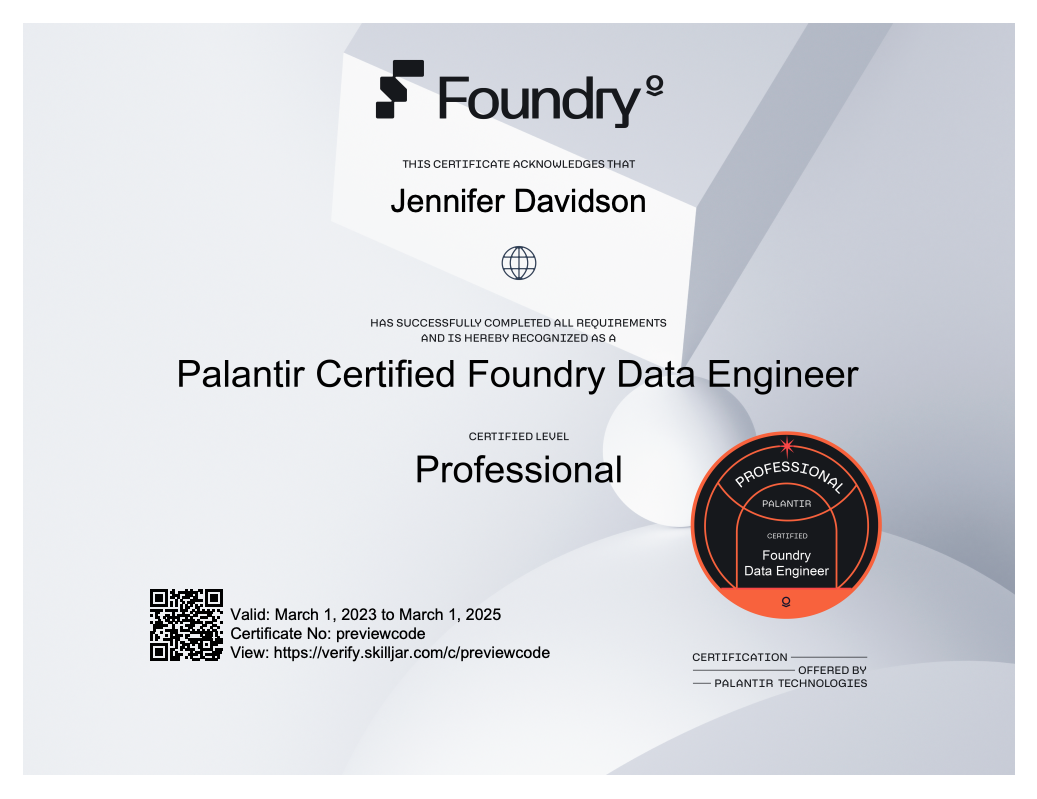
The Palantir Foundry Certification exams are accessed 24/7 via a secure online platform. The Certification exams require a 70% passing grade and consists of:
- Around 60 questions tailored to assess knowledge for the related role
- 120 minutes to complete the exam
Each Associate Badge and Professional Certification document issued by Palantir is marked with a validity date and a unique link that can be used to prove the document’s authenticity.
When should I use Palantir Learning?
Palantir Learning is for technical users of varying skill levels to build fundamental knowledge and skills for working in Foundry. Whether you are looking to grow your career, level up your technical skillset, or simply round out your knowledge, leverage readily-available learning materials at your pace. Earn badges for course completion. Achieve a professional Certification by putting your Foundry skills to the test and passing the comprehensive exam.
Get started on your learning journey today. Register and earn your first Palantir Badge on Palantir Learning ↗.
Additional highlights
Administration | Foundry Zero State Home App
Introducing Zero State New Builder home page | The new zero-state builder home page experience is now available in Control Panel. Read more about orientation and navigation.
Analytics | Contour
Mapbox V4 configuration | The Contour map board now supports the ability to configure Mapbox V4 choropleth layers.

Hide parameters from dashboard views | Parameters can now be hidden from dashboard views. To do so, edit the parameter, flip the "Do not display in dashboard" switch, and then save the parameter.

Export dashboards as PDFs | Contour Dashboards can now be exported as PDFs. To export a dashboard, select the Export dashboard option located in the header, then select Landscape or Portrait to set the PDF orientation.

Analytics | Quiver
Add filter by property action to object set table column header | It is now possible to filter an object set by property values directly from the property column header in the object set card, including quick options for exact match and null filtering. Selecting Add filter where... adds an object set filter card with that property selected as the input.

Show range description in selection | The Range Selection menu on a time series chart now also shows a formatted version of the duration of the range when time ranges (rather than value ranges) are selected in time series charts.

New object set card property picker | Improved the object set card property picker to simplify and shorten property selection and ordering. Added quick action buttons to show "All", "Prominent", or "Clear all" properties, added the ability to search by property name, streamlined adding multiple properties and added drag and drop re-ordering of properties. Lastly, the property picker was moved into the top right corner of the card and shows how many properties are visible out of the total properties on the object.

Header bar redesign | We have simplified the Quiver analysis header bar, streamlining the workspace and focusing the header more on adding data as opposed to showing all possible charts. We also removed other entry points for adding data in the workspace, such as from the analysis contents and the top resource header. It is still possible to search over all available cards using the "Search cards" button.

Action button fixes/improvements | The Action Button card now has a header like all cards that enables users to configure, hide, delete, or add to dashboard directly from the canvas.

Add usability improvements to default columns of transform table join | When configuring a transform table join, the "input" table in the Editor now has all columns imported by default, and both the "input" and "right" tables will display a red border around the selection box if no columns have been chosen. The number of columns available for selection is also presented. These improvements are intended to help remind users that columns need to be imported into the table before they can be selected, removed, or reordered through the column picker.

App Building | Slate
Paste widgets into container from the sidebar | Paste widgets previously copied into the clipboard directly into containers via the context menu in the sidebar.

App Building | Workshop
Pivot Table: User-configurable visibility for groupings and aggregations | Within the Pivot Table widget, builders can now configure row-level groupings and aggregations that are hidden by default. Users in View mode can then toggle visibility of any configured row-level grouping or aggregation.
Pivot Table: user-expandable groupings | Within the Pivot Table widget, builders can now configure hidden groupings that can be manually expanded by users in View mode. As an example, a Pivot Table could default to display state-level groupings; a user could then enter a selected state to reveal more specific, city-level groupings.
Chart XY: No-code chart series transforms | In the Chart XY widget, series can now be defined as set of transformations. For example, a series can be configured to show: SUM(prop_a) / AVG(prop_b) * 100. As a result of these new front-end options, builders should be less likely to require custom Typescript code and Function-backed series to achieve most common series transformations. In the example below, the blue line series displays the percentage (%) of loan amounts currently repaid through a sequence of chained transformations.

Data Integration | Pipeline Builder
New transform available: Apply to multiple columns | Pipeline development often requires applying the same operations to multiple columns, like normalizing all columns or casting data to a certain type. On top of this, the set of columns is often manually defined instead of automatically including relevant schema changes. This functionality is especially critical for data quality workflows, where multi-column parsing capabilities can greatly increase the speed of addressing common issues across an entire dataset. To support these development patterns, we have added two new transforms: Apply to multiple columns and Aggregate multiple columns. These are powerful "for loop" functions which let you shortcut the work above by applying an expression to any set of your input columns.

Foundry S3-compatible API
S3-compatible API for Foundry datasets | An S3-compatible API [Beta] for reading and writing files inside Foundry datasets is now available. The API is compatible with many standard S3 clients.

Ontology | Map
Measurements on Map annotations | Annotations in the Map application can now be configured to display measurements of their area, perimeter, or length.

Annotation improvements | Map annotations in the Map application now have enhanced functionality such as the ability to be assigned to groups where each group can have different styling parameters (color, opacity, size, et cetera). There is also a new annotation type, Line, that allows users to draw line annotations on the map.

Ontology | Ontology Management
Ontology Manager: Fast reloads after saving | A performance improvement to Ontology Manager was released. This improvement increases the reload speed of the Ontology after saving. Expect a 50% improvement in reload time with this update.
Object type groups now generally available | Introducing object type groups. Groups are labels that help categorize your object types and may be added or removed directly from the Ontology Manager metadata widget. Groups are searchable and filterable in the Ontology Manager, and are used in the Object Explorer overview page to categorize object types.

Ontology | Vertex
Edge drawing improvements | Improved the edge drawing experience on diagrams. Users can now see the edge as it is being drawn. In addition to the existing orthogonal lines, users can draw arbitrary connectors using fixed 30/60/90 degree angles.

Enable export to png | Added a button to the bottom left controls that exports the current sub-graph as a full-resolution PNG.

Security | Checkpoints
New Checkpoint Types for Group, Marking, Reference, and Role Management | Introduced new Checkpoint types for updating members of groups, members with access to markings, role grants, project references, and allowed markings in project constraints.

Security | Projects
Check access functionality is available to more users | The Check access panel is now available to more users. Previously this functionality was only available to administrative users.


Foundry SQL Server: Connectors
Public download links for SQL connectors for datasets | Drivers and connectors for Foundry datasets (JDBC, ODBC, and Tableau) are now available for public download from Connectivity: SQL & BI: Downloads. The previous downloads page within the Foundry platform is deprecated and will be removed.

中文翻译
公告
检查点(Checkpoints):安全变更的合理性说明
发布日期:2023-03-31
借助检查点,平台治理和管理团队可能需要对 Foundry 中的某些操作提供额外的合理性说明。这些详细信息随后会被记录,用于审计目的。随着时间的推移,我们正在逐步增加可启用此类合理性说明的用户操作数量。
Foundry 现在支持对关键安全变更(例如更新组成员、更新具有标记(Markings)访问权限的成员、授予项目角色等)要求提供合理性说明。为此,我们引入了新的检查点类型。
平台管理员可以配置其组织设置,以收集针对特定安全变更的合理性说明。例如,管理员可以决定授予对某个标记的访问权限必须提供合理性说明——在这种情况下,尝试此操作的用户将被提示输入理由。
对于所有检查点类型,合理性说明提示是完全可定制的;管理员还可以决定哪些特定的安全变更需要合理性说明,自定义提示标题和内容等。
目前,合理性说明是从进行变更的用户处收集的;在实践中,这通常是具有提升权限的管理员代表另一个具有受限权限的用户进行变更。我们正在审批(Approvals)(目前可用于项目访问请求)中开发更多功能,以标准化这种基于请求的权限变更流程。
引入作用域会话(Scoped Sessions):沙盒数据访问
发布日期:2023-03-31
作用域会话使用户能够在他们的 Foundry 会话中选择一个预定义的标记子集进行访问,从而在不同类型的工作之间创建视觉隔离。作用域会话在 Foundry 文件系统和本体(Ontology)工作区中均可使用。
作用域会话通过减少在 Foundry 中因不同目的而意外交叉污染工作的可能性,提高了平台安全性。例如,一个跨多个医疗研究项目工作的用户,可能因法规或最佳实践而被禁止在项目 A 的上下文中使用项目 B 的数据,即使他们拥有查看这两个项目数据的权限。使用作用域会话,用户在登录时选择其工作范围,Foundry 将仅显示与活动范围相关的资源。
通过将会话隔离到用户当前正在处理的目的,交叉污染的风险得以降低,用户可以更自信地工作。例如,作用域会话有助于实现以下模式和最佳实践:
- 确保工作有效性并避免交叉污染:研究人员可能跨多个研究项目工作,这些项目对数据和资源有不同的访问权限。在这种情况下,作用域会话有助于防止意外使用来自另一个项目的研究成果,这会损害当前研究的有效性。
- 数据保护/隐私要求:可以配置 Foundry 以符合数据保护法规(如 GDPR 和 HIPAA),其中作用域会话提供了额外的工具来对敏感数据强制执行目的限制和数据最小化。
- 限制用户的平台可见性:在大型企业中,大量可访问的数据对于试图完成特定目标的用户来说可能过于庞大。作用域会话可以帮助用户在受限的可见性下专注于其主要目标。
配置作用域会话
管理员可以在控制面板(Control Panel)中为您的组织配置作用域会话。应谨慎配置作用域会话,因为它们可能影响所有登录 Foundry 的用户,并可能导致显示 Foundry 工作区横幅。因此,作用域会话默认是禁用的。要开始审查您的标记配置并启用作用域会话,请遵循文档中的指导,如有其他问题,请联系 Palantir 支持工程师。
Slate:公共应用(Public Applications)
发布日期:2023-03-30
在最需要的地方触达您的受众
使用 Slate 的点击式功能,为您的合作伙伴、供应商和客户构建公共的 Palantir Foundry 应用,这些应用无需 Palantir Foundry 账户即可访问。
应用构建者可以直接通过 Slate 构建公共应用,从而直接省去为特定目标受众引入和维护 Foundry 账户的额外工作。构建一个公共应用,并受益于动态资源扩展和 Foundry 的安全原语,而无需为单一用途的应用设置特定的数据连接配置。
直接连接到您的数据集,按您的设计
通常在 Palantir Foundry 中制作的应用需要在访问前通过 Foundry 账户进行身份验证。现在,当一个应用被专门构建为公共应用时,任何拥有该应用 URL 的人都可以使用它,无需事先接受培训或接入 Foundry 平台。公共应用适用于从广泛的用户群体收集输入,提交或上传的数据会直接导入 Foundry 数据集,以便在 Foundry 应用套件中进行转换和进一步分析。例如,您可以构建强大的调查问卷、引入用户、接受数据上传等,可能性很多。
此外,通过 Slate 内置的对层叠样式表 (CSS) 的支持,应用构建者可以定制公共应用的外观和感觉,以匹配公司的样式指南,为用户提供无缝体验,甚至无需 Foundry 账户。屏幕截图展示了一个示例性的公共 Slate 应用,可用于公司的供应商提交采购订单,这只是 Slate 公共应用功能所提供的灵活性的众多潜在用途之一。
何时应创建公共应用?
当您的网站受众是公众,并且您可能需要将用户提交的信息直接导入您的 Foundry 数据集时,请考虑构建一个由 Slate 驱动的公共应用。
由于公共应用通过 URI 直接访问,因此尚不支持个性化 URI 和指标跟踪功能。如果这些要求对您的用例很重要,我们建议构建一个集成应用。
要开始构建公共应用,请查阅我们的文档,了解如何构建公共应用,并在 Slate 中选择 创建新应用 > 公共应用。
引入 Foundry Rules:民主化业务逻辑
发布日期:2023-03-13
定义驱动您业务的逻辑
Foundry Rules 提供了一种简化的方法来编码和管理业务逻辑。通过点击式、低代码的界面,所有技术背景的用户都能够创建规则并将其应用于相关数据。这些规则可用于在相关系统中采取行动,为关键工作流提供动力。
基于 Foundry 的核心数据原语,包括对象、时间序列和流式数据,我们构建了 Foundry Rules 来自动化通常耗时的流程,从而腾出更多时间来专注于构建和驱动用例,例如设备监控、反洗钱等。
以可扩展的监督定义业务逻辑
由跨职能团队组成的复杂企业经常遇到理解组织运营逻辑的专家与能够编码和实施该专业知识的人员之间的专业知识脱节问题。Foundry Rules 旨在通过同时赋能运营单位和 IT 团队的用户来弥合这一鸿沟。
IT 团队能够提供用户可与之交互的基线,并大规模设置、审查和运行规则,这实质上为不具备技术背景的用户提供了通常仅限于软件开发人员的工具。
同时,最终用户现在有能力:
- 通过工作流自动化控制数据驱动的流程
- 跳过每日不可扩展的、基于电子表格的手动流程
- 利用实时流式处理能力为时间关键型工作流提供动力
Foundry Rules 可以加速构建和协作,节省时间和精力。
复杂逻辑,简单部署
单一配置页面的简化体验允许所有技术水平的用户快速部署业务逻辑。以前需要工程师提供技术支持的工作,现在通过直观的用户界面即可轻松完成。Foundry Rules 的特点包括:
- 简化部署:通过一个单一的配置页面,在几分钟内端到端地部署一个新的 Foundry Rules 工作流。
- 部署到流水线(Pipelines):Foundry Rules 可以开箱即用,无需与流水线代码交互,但同时也允许根据需要灵活地编写自定义代码。
- 实时流式处理:原生流式支持意味着 Foundry Rules 可以支持极其时间敏感的工作流。
- 无痛修改和维护:强大的版本控制和描述性调试意味着可以轻松地对正在运行的规则进行任何修改。
何时应使用 Foundry Rules?
使用 Foundry Rules 来设置基于专业知识驱动的业务逻辑的工作流,例如告警、分类和任务生成。Foundry Rules 还可以通过定义的指导原则改善 IT 团队和最终用户在这些工作流中的协作。
对于调查性工作流或实验性的"假设分析"工作流,我们仍然推荐使用 Quiver 和 Contour 来深入查看数据集。从这些工作流中获得的重要见解仍然可以在后期阶段作为业务逻辑在 Foundry Rules 中进行编码。
立即访问 Foundry Rules 文档 设置一些 Foundry Rules,并在我们的产品页面上了解更多 ↗。
地图图层(Map Layers):栅格瓦片(Raster tiles)
发布日期:2023-03-10
地图图层编辑器现在允许用户通过点击式用户界面将栅格瓦片数据添加到图层。配置完成后,地图图层可供地图应用以及 Workshop 中的地图小部件的用户使用。
这个新的用户界面消除了编写复杂且容易出错的 Mapbox JSON 样式来将栅格图像添加到图层的需要。相反,通过指向地图瓦片服务器 URL 来配置栅格图层——请注意,管理员可能需要为服务器地址范围配置网络入站和出站规则——并使用滑块设置附加参数。
使用栅格图层来可视化卫星图像、天气雷达、自定义地图或任何其他基于图像的数据!在文档中了解有关配置地图图层的更多信息。
Palantir Learning
发布日期:2023-03-02
学习 Foundry,提升技能,获得认证
Palantir Foundry 是一个强大的、用于运营决策的平台。通过使用它,我们的客户和合作伙伴能够对全球组织中最重要的问题产生积极影响。Palantir Learning ↗ 是为所有技术水平的 Foundry 用户构建的,旨在最大化他们对 Foundry 中众多应用的理解。通过 Palantir Learning 提供的自定进度培训旨在将您从对 Foundry 知之甚少或一无所知,带到对平台及其潜在应用有扎实、基础的理解。
课程目录
基于角色的培训路径: 选择多个基于角色的培训路径 ↗之一,这些路径将带您完成自定进度的课程,包括交互式教程、视频、知识检查、徽章和认证。目前,可用的基于角色的培训路径包括数据工程师 ↗、应用开发者 ↗、AI 工程师 ↗、数据科学家 ↗、前端和 OSDK 开发者 ↗和数据分析师 ↗。这些端到端的路径为用户培训了基础的 Foundry 使用以及针对各种用例的推荐最佳实践。
课程目录和视频库: 注册 Palantir Learning,通过课程目录 ↗获得对我们全套课程的完全访问权限。有些课程在跟随 Foundry 堆栈学习时最有用,但是,所有用户都可以按需访问我们的完整视频内容库,包括以前独占的独立材料。任何人都可以完成 Foundry 基础测验,无论是否有权访问 Foundry 注册。
获得徽章和认证
徽章: 我们的许多课程都提供获得 Palantir 徽章的机会。通过完成 Foundry 基础课程和测验来获得您的第一个 Palantir 徽章,无需访问 Foundry 注册。数据工程师和应用开发者培训路径包含需要访问 Foundry 注册的交互式元素,它们提供了通过约 60 分钟测验的机会,测验包含现实的、基于场景的问题,通过后将获得助理级徽章,向世界展示您的 Foundry 技能。
认证: Palantir 徽章表示您完成了我们的自定进度课程,而 Palantir 认证则用于突出和奖励您的 Foundry 能力,并通过通过全面的评估来获得。我们建议在尝试认证考试之前拥有 3-6 个月的 Foundry 实践经验。当您准备好后,请查看认证考试学习指南 ↗,然后购买并注册我们的一项基于 Foundry 角色的认证考试。
Palantir Foundry 认证考试通过安全的在线平台全天候进行。认证考试要求达到 70% 的及格分数,包括:
- 约 60 个问题,旨在评估相关角色的知识
- 120 分钟完成考试
Palantir 颁发的每个助理级徽章和专业认证文件都标有有效期和一个可用于证明文件真实性的唯一链接。
何时应使用 Palantir Learning?
Palantir Learning 面向不同技术水平的技术用户,旨在建立使用 Foundry 的基础知识和技能。无论您是想发展职业生涯、提升技术技能,还是仅仅想完善您的知识,都可以按照自己的节奏利用随时可用的学习材料。完成课程获得徽章。通过将您的 Foundry 技能付诸实践并通过综合考试来获得专业认证。
立即开始您的学习之旅。在 Palantir Learning ↗ 上注册并获得您的第一个 Palantir 徽章。
其他亮点
管理 | Foundry 零状态首页应用
推出零状态新构建者首页 | 新的零状态构建者首页体验现已在控制面板中可用。阅读更多关于方向与导航的信息。
分析 | Contour
Mapbox V4 配置 | Contour 地图面板现在支持配置 Mapbox V4 等值区域图层。
从仪表板视图中隐藏参数 | 现在可以从仪表板视图中隐藏参数。为此,编辑参数,打开"不在仪表板中显示"开关,然后保存参数。
将仪表板导出为 PDF | Contour 仪表板现在可以导出为 PDF。要导出仪表板,选择位于标题中的导出仪表板选项,然后选择横向或纵向来设置 PDF 方向。
分析 | Quiver
向对象集表格列标题添加按属性筛选操作 | 现在可以直接从对象集卡片中的属性列标题按属性值筛选对象集,包括用于精确匹配和空值筛选的快速选项。选择添加筛选条件... 会添加一个对象集筛选卡片,并将该属性选为输入。
在选择中显示范围描述 | 时间序列图表上的范围选择菜单现在还在时间序列图表中选择时间范围(而非值范围)时,显示该范围持续时间的格式化版本。
新的对象集卡片属性选择器 | 改进了对象集卡片属性选择器,以简化和缩短属性选择和排序。添加了快速操作按钮以显示"全部"、"突出"或"清除所有"属性,添加了按属性名称搜索的功能,简化了添加多个属性的过程,并添加了拖放重新排序属性的功能。最后,属性选择器被移到了卡片的右上角,并显示对象上可见属性占总属性的数量。
标题栏重新设计 | 我们简化了 Quiver 分析标题栏,精简了工作区,并将标题栏更多地聚焦于添加数据,而不是显示所有可能的图表。我们还移除了工作区中添加数据的其他入口点,例如分析内容和顶部资源标题。仍然可以使用"搜索卡片"按钮搜索所有可用的卡片。
操作按钮修复/改进 | 操作按钮卡片现在像所有卡片一样有一个标题,使用户能够直接从画布配置、隐藏、删除或添加到仪表板。
为转换表连接的默认列添加可用性改进 | 在配置转换表连接时,编辑器中的"输入"表现在默认导入所有列,并且如果未选择任何列,"输入"和"右侧"表都将在选择框周围显示红色边框。还会显示可供选择的列数。这些改进旨在帮助提醒用户,在通过列选择器选择、移除或重新排序列之前,需要先将列导入到表中。
应用构建 | Slate
从侧边栏将小部件粘贴到容器中 | 通过侧边栏中的上下文菜单,将先前复制到剪贴板的小部件直接粘贴到容器中。
应用构建 | Workshop
数据透视表:用户可配置的分组和聚合可见性 | 在数据透视表小部件中,构建者现在可以配置默认隐藏的行级分组和聚合。处于查看模式的用户随后可以切换任何已配置的行级分组或聚合的可见性。
数据透视表:用户可展开的分组 | 在数据透视表小部件中,构建者现在可以配置隐藏的分组,处于查看模式的用户可以手动展开这些分组。例如,数据透视表可以默认显示州级分组;然后用户可以进入选定的州以显示更具体的城市级分组。
图表 XY:无代码图表系列转换 | 在图表 XY 小部件中,系列现在可以定义为一组转换。例如,可以将一个系列配置为显示:SUM(prop_a) / AVG(prop_b) * 100。由于这些新的前端选项,构建者应该不太需要自定义 Typescript 代码和函数支持的系列来实现最常见的系列转换。在下面的示例中,蓝色线条系列通过一系列链式转换显示了当前已偿还贷款金额的百分比 (%)。
数据集成 | 流水线构建器(Pipeline Builder)
新的转换可用:应用于多列 | 流水线开发通常需要对多个列应用相同的操作,例如标准化所有列或将数据转换为特定类型。除此之外,列集通常是手动定义的,而不是自动包含相关的模式更改。此功能对于数据质量工作流尤其关键,其中多列解析能力可以极大地提高处理整个数据集中常见问题的速度。为了支持这些开发模式,我们添加了两个新的转换:应用于多列和聚合多列。这些是强大的"for 循环"函数,允许您通过将表达式应用于输入列的任何集合来简化上述工作。
Foundry S3 兼容 API
用于 Foundry 数据集的 S3 兼容 API | 用于在 Foundry 数据集中读取和写入文件的 S3 兼容 API [Beta] 现已可用。该 API 与许多标准 S3 客户端兼容。
本体 | 地图
地图注释上的测量 | 地图应用中的注释现在可以配置为显示其面积、周长或长度的测量值。
注释改进 | 地图应用中的地图注释现在具有增强的功能,例如可以分配到组,每个组可以有不同的样式参数(颜色、不透明度、大小等)。还有一个新的注释类型,线,允许用户在地图上绘制线注释。
本体 | 本体管理
本体管理器:保存后快速重新加载 | 发布了本体管理器的性能改进。此改进提高了保存后本体的重新加载速度。预计此更新将使重新加载时间提升 50%。
对象类型组现已正式发布 | 引入对象类型组。组是帮助对您的对象类型进行分类的标签,可以直接从本体管理器元数据小部件中添加或移除。组在本体管理器中是可搜索和可筛选的,并用于对象资源管理器概览页面对对象类型进行分类。
本体 | Vertex
边绘制改进 | 改进了图表上的边绘制体验。用户现在可以在绘制边时看到它。除了现有的正交线之外,用户还可以使用固定的 30/60/90 度角绘制任意连接线。
启用导出为 png | 在左下角控件中添加了一个按钮,用于将当前子图导出为全分辨率 PNG。
安全 | 检查点
用于组、标记、引用和角色管理的新检查点类型 | 引入了新的检查点类型,用于更新组的成员、具有标记访问权限的成员、角色授予、项目引用以及项目约束中允许的标记。
安全 | 项目
检查访问功能对更多用户可用 | 检查访问面板现在对更多用户可用。以前此功能仅对管理用户可用。
Foundry SQL Server:连接器
用于数据集的 SQL 连接器的公共下载链接 | 用于 Foundry 数据集的驱动程序和连接器(JDBC、ODBC 和 Tableau)现在可以从连接性:SQL 和 BI:下载页面公开下载。Foundry 平台内以前的下载页面已弃用,并将被移除。