Announcements(公告)
Pipeline Builder: Features for rapid development
Date published: 2023-04-28
Earlier this year we announced Pipeline Builder ↗ as the next-generation approach to fast, flexible, and scalable data transformation. Since then, we've been hard at work to deliver powerful new features based on user feedback. Pipeline Builder has also added over 70 new transforms in the past 3 months, including Geometry functions, improved timestamp parsing, and complex join conditions. Continue reading to learn about some new Builder features you might have missed!
Custom functions centralize reusable logic
Re-use shared logic throughout a pipeline without copy/pasting. Select one or more boards and covert them into a custom transform with defined arguments, then re-use it as needed. Update the logic once and have it applied everywhere the function is used in the pipeline. Updated documentation coming soon!

For-loop-style functions shortcut repeated logic
Continuing the theme of reducing duplicative logic, Pipeline Builder now supports wrapping up set of operations or aggregations and applying them dynamically across multiple columns. This flexibility massively reduces the need for tedious, duplicative configuration for standard data cleaning and normalization logic and, when combined with the reusable functions described above, makes Pipeline Builder a fast, efficient, and maintainable tool for managing the often repetitive logic associated with preparing raw data for analysis and operations use.

Support incremental logic for faster, cheaper data pipelines
Incremental pipelines are the faster, cheaper, and more elegant solution when data transformations are only needed on top of the newest available data. However, managing the logic and complexity of these pipelines in code has been a barrier to reaping these benefits. Now, you can configure a pipeline as incremental in a single click in Pipeline Builder. In-app guidance clearly lays out the core concepts, and no additional configuration is required. Many of the previous challenges are addressed: Pipeline Builder will limit the logical transforms to only those applicable to incremental pipelines, as well as detect breaking changes and prompt the user to replay or revise their logic, eliminating surprise snapshots. These additions increase the accessibility of this powerful set of features. For more information, see an example of incremental computation in Pipeline Builder.

Start building fast with notional data in manual entry tables
It can take weeks or months to get the data required to start a pipeline. And even once the pipeline is built, ad-hoc changes may come in at any point. The pipeline development process needs to be flexible to account for your updated business requirements at any time. Now, you can add manual entry tables and flexibly generate notional data as temporary inputs to batch pipelines. Once production data is available, simply switch out the node with in the pipeline with a single click. Level up and use the notional data and associated pipeline to back a v0 of an ontology with multiple object types, and you can rapidly prototype operational applications and iterate on the schemas and data model without blocking on data access.

Object Monitors: Subscribe users and groups
Date Published: 2023-04-24
Object monitors run on top of your data and are designed to help users track individual searches and objects. Object monitors also serve as a tool for application builders to include monitoring and alerting functionality as part of applications built in Foundry.
When users set up health checks and monitors, they’re not always the only ones who care about getting alerted on failures. Especially in larger organizations where there is a support rotation or team dedicated to specific workflows. Now, builders configuring an operational don’t have to manually ask users to manually subscribe to alerts. Instead, individual users as well as groups can be added to an alert. This opens up a wealth of operational workflow possibilities, including the long-awaited ability to configure a shared inbox application and subscribe a group to receive alerts when a new object enters the object set populating the inbox.
Note that a user who doesn’t have access to the resource will still not see alerts even if a permissioned user subscribes them.

Configuration
In the manage subscriptions tab, you can add users and users groups and configure the level of criticality of alerts they can subscribe to. Depending on their Notifcations settings users will receive in-platform notifications as well as email notifications when a monitor triggers. Coming soon notifications will support a direct PagerDuty integration.
Workshop: Save and attach Maps and Graphs
Date Published: 2023-04-24
In the Vertex Workshop Widget, after generating a Graph from a template, a user can now save this graph directly from Workshop, without having to open up the full Vertex application. Likewise, using the Map application template widget, you can save a map generated from a template directly from Workshop.
In the widget configuration, the new resource identifier (RID) of the saved resource is captured as a string variable and can be added as a parameter to an Action configured to run whenever the user saves a new map or graph. With this pattern, you can represent maps and graphs within the ontology by saving the RID as a property and then show it to users of the application by using the new Override resource RID configuration in the Vertex and Map widgets in Workshop.
This general pattern of:
- Configure a template resource
- Configure a Workshop app where the workflow prompts users to duplicate the template, embeds the resulting resource in a widget, and allows the user to make modifications
- Capture the RID of the new resource as a property of an object type with an Action
fits into many operational workflows that involve a standard process. In addition to Vertex graphs and Map templates, Notepad templates work well for this pattern when users need to duplicate and then fill out a standard document. These features are available under the "Saving" heading of the "Capabilities" section of each widgets configuration. For more details, see the Vertex documentation and the Map application documentation respectively.

Quiver: More easily find and analyze data
Date published: 2023-04-18
Quiver is a powerful data analysis, reporting, and dashboard building application with a rich set of tools and capabilities. To make it more intuitive for experienced and new Foundry users alike, we are excited to announce a set of user interface changes that simplifies searching for data, improves the discoverability of interactions like transformations, joins, filters, and visualizations, and clarifies data type changes resulting from data transformations.
Next Actions menu improvements
We've reorganized the Next Actions menu - which now shows up when hovering over a card or time series plot - to make it easier to find what you're looking for. The new categories are grouped by what each card does rather than by its data type. All cards to interact with data are now accessible from the Next Actions menu or using the Search cards button at the top bar. Also, the Next Action bar is now searchable! Search for actions across all categories or within a specific category. Results will include matches from within the category and also highlight matches from other categories, so you don’t miss out any actions!

Transforming data is more intuitive
We’ve added a new category to the Next Action menu: the Transform category. This new category contains all the transformations applicable to Transform Tables that were previously only accessible after having added a Transform Table card to the Canvas or Graph. Adding a transformation from this category will automatically add a Transform Table and apply the selected transform, streamlining the analysis workflow.

Streamlined top bar menu focuses on adding data
We've simplified the analysis menu, with an emphasis on adding data. You can still search over all available cards using the Search cards button. This redesign also consolidates the experience of adding data across Quiver, so there's a familiar and consistent experience every time you bring data into your analysis.

Clarified representation of data type changes between cards
While the inputs for an analysis comes from Objects and Timeseries data, Quiver's powerful transformation cards allow you to manipulate and derive data of all types. To improve legibility while configuring an analysis, all cards now clearly show the data type they interact with in full name without abbreviations. This makes it clear when a card operation changes the data type and, as a result, the available actions on the output card. In addition, when choosing cards in the Next Action or Search selectors, the input and output types are displayed alongside the card name and description.

Control Panel: Configure network ingress
The ability to configure network ingress allowlists [1] is now available in the Network ingress tab of Control Panel, unblocking self-service configuration by Foundry administrators. Previously these allowlist configurations were managed in collaboration with a Palantir engineer; moving the configuration into Control Panel increases transparency and allows accounts with the Information Security Officer or Enrollment Administrator role manage the allowlist independent of Palantir support. The existing allowlist configuration has been automatically migrated for most Foundry enrollments.
If you have questions about this new capability, reach out to Palantir Support.

Resource Management: Currency
Date published: 2023-04-14
The Resource Management app app now displays resource usage across the platform as a currency value by default. This means that usage will be displayed as a local currency rather than technical dimensions, like GB-months or cpu-seconds. This simplifies the comparison of relative spend between different technical dimensions of the platform and makes it more intuitive to understand how resource usage translates into real-world cost.
Note that access to the Resource Management application is controlled with the Resource management viewer role, which can be managed in the Control Panel > Enrollment Permissions configuration. Currency-based views of resource usage may not be available to all Foundry enrollments - if you have any questions, contact a Palantir representative.

Slate: Introducing the Slate debugger
Date published: 2023-04-10
Building ambitious applications in Slate - made up of hundreds of widgets, queries, functions, and events - results in inevitable complexity. In these applications, if some unexpected behavior pops up, it's hard to trace through the web of dependencies and find the root cause in an edge case of a function or a some complex eventing logic.
With the new integrated debugger, the Dependency Graph is now a super-charged tool for investigating the inner workings of even the most complex Slate applications. It's now possible to set breakpoints in the execution of the dependency graph and understand intermediate stages as it resolves.
Read more about breakpoints and the debugger and best practices for investigating Slate apps in the docs.

Modeling Objectives: Model operations 2.0
Date published: 2023-04-04
End-to-end management for AI/ML models
Modeling Objectives is the Palantir Foundry application for managing ML/AI models as they progress through the ModelOps ↗ lifecycle in Foundry. Modeling Objectives has been updated to simplify the experience of managing, evaluating, and releasing models in Foundry to better help teams focus on prototyping, training, and integrating the best models for a problem.
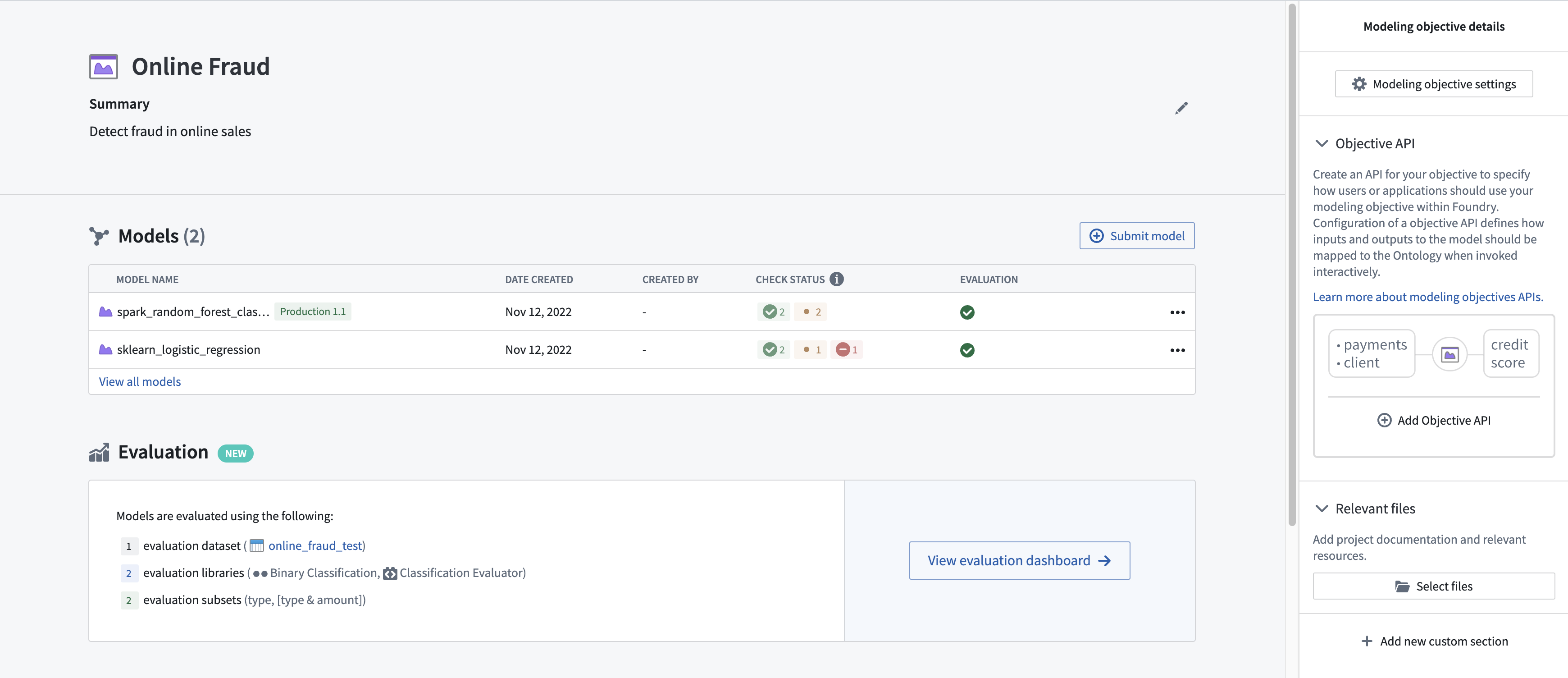
The Modeling Objectives application enables data science and engineering teams to:
- Collaborate on a modeling project
- Define and automate model evaluation pipelines
- Submit and track all candidate models, their performance metrics, and model reviews
- Easily deploy models into live interactive or batch deployment environments with first-class change control for model upgrades
No-code model evaluation or low-code evaluation libraries
The Modeling Objectives application can now be configured to automatically produce and build inference and metric pipelines for all model submissions without code. This is enabled using default evaluation libraries for common modeling problems including regression and binary classification.
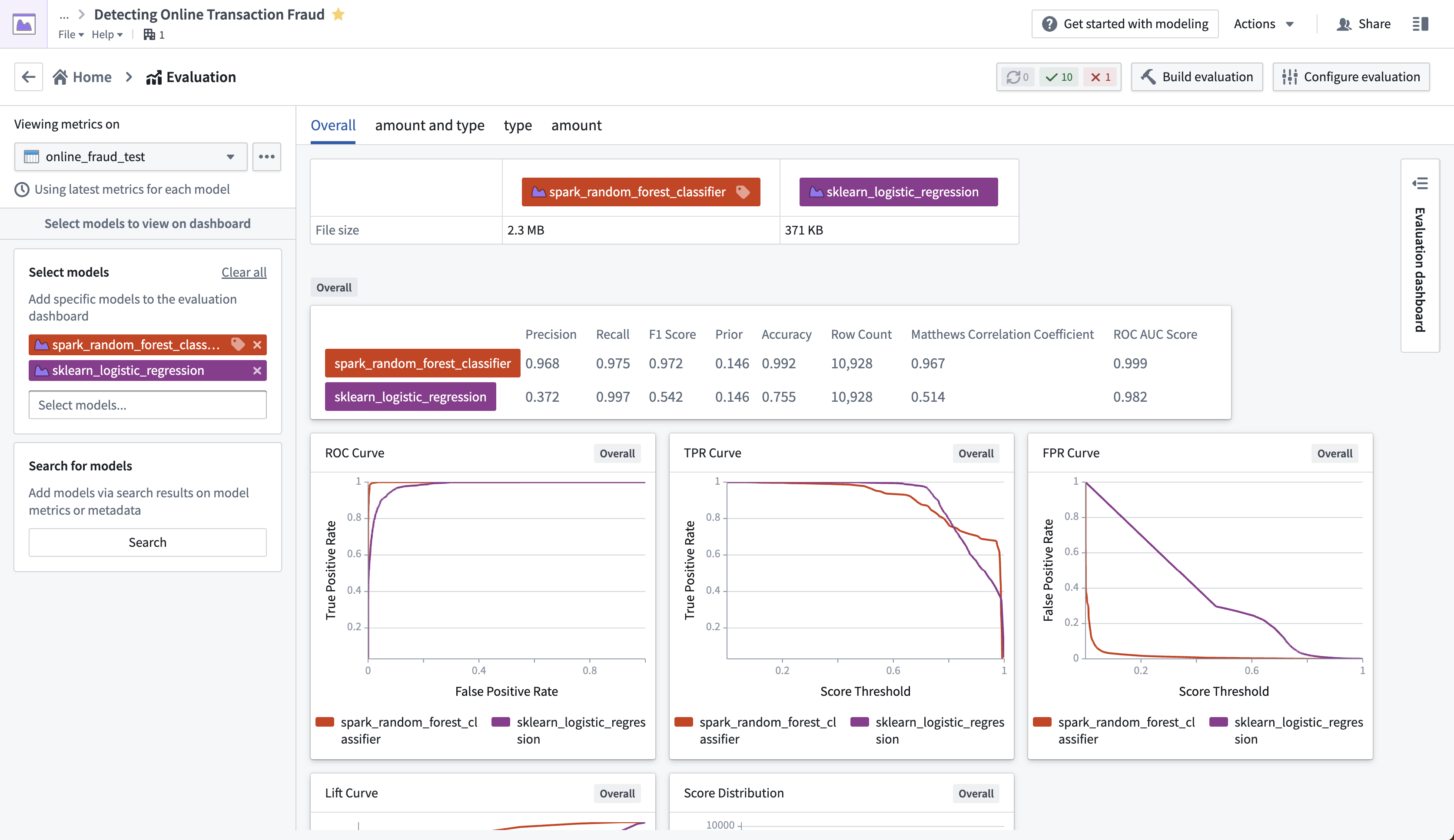
These libraries enable teams to define systematic model evaluation structures to ensure all models are evaluated and compared consistently, leading to accurate model comparisons and improved real-world results. With the introduction of model evaluation libraries, you can now create reusable and parametrizable evaluation libraries in Foundry. These libraries enable data science teams to leverage automatic model evaluation for other modeling domains or with custom metrics specific to the team, organization, or problem.
Compare granular model performances
Model Evaluation Subsets are being introduced in Modeling Objectives to powerfully extend evaluation metrics by allowing comparison between granular subsets of evaluation data.
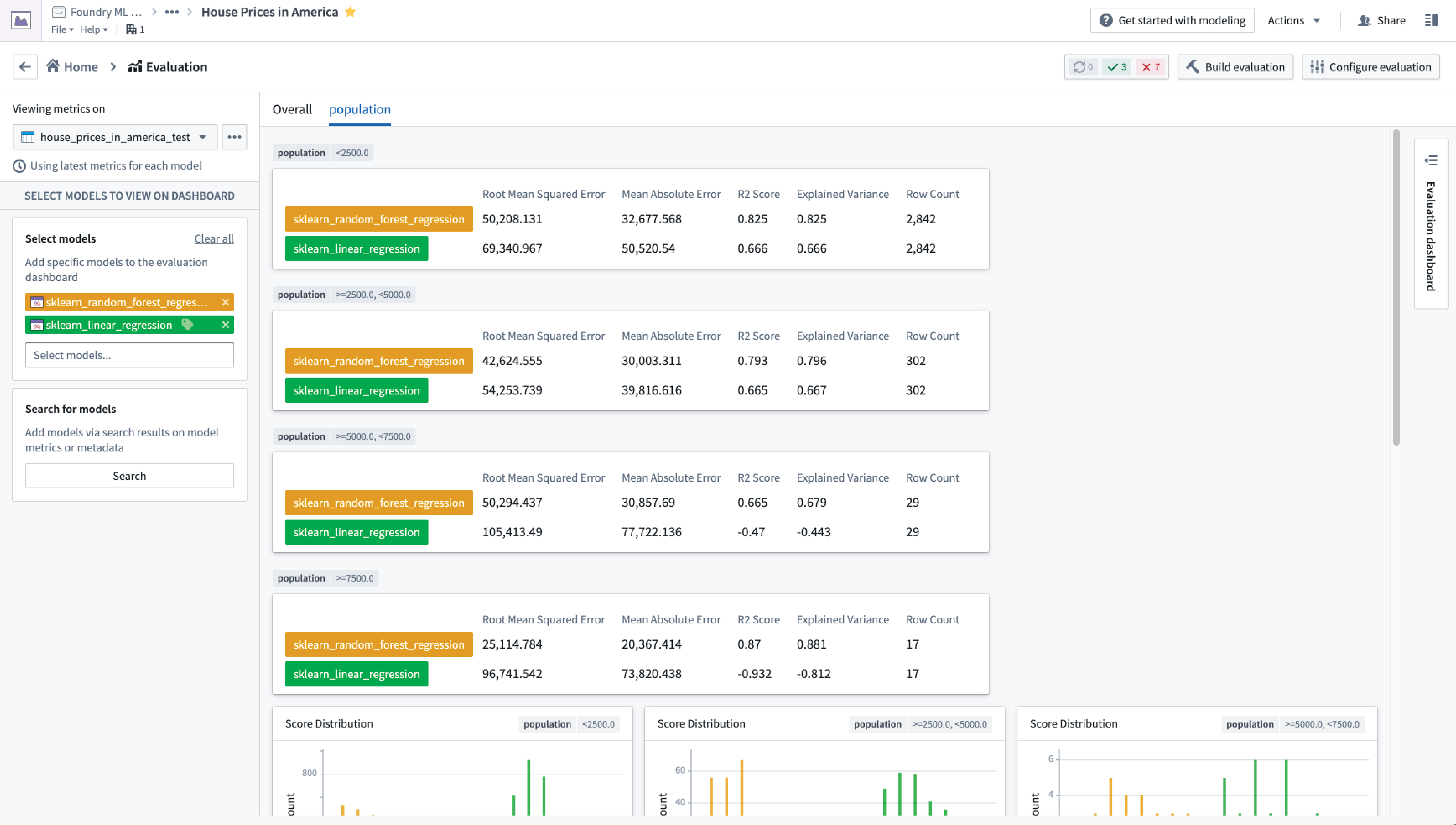
This enables a model developer to:
- Quickly determine where a model is performing poorly and focus development efforts
- Intelligently decide the operational or organizational settings where a model can be used
- Confirm and record that production models behave equitably on different classes of data
- Model Evaluation Subsets amplify model evaluation by providing a unique lens to the performance of models, while requiring no additional code
Modeling Objective Checks
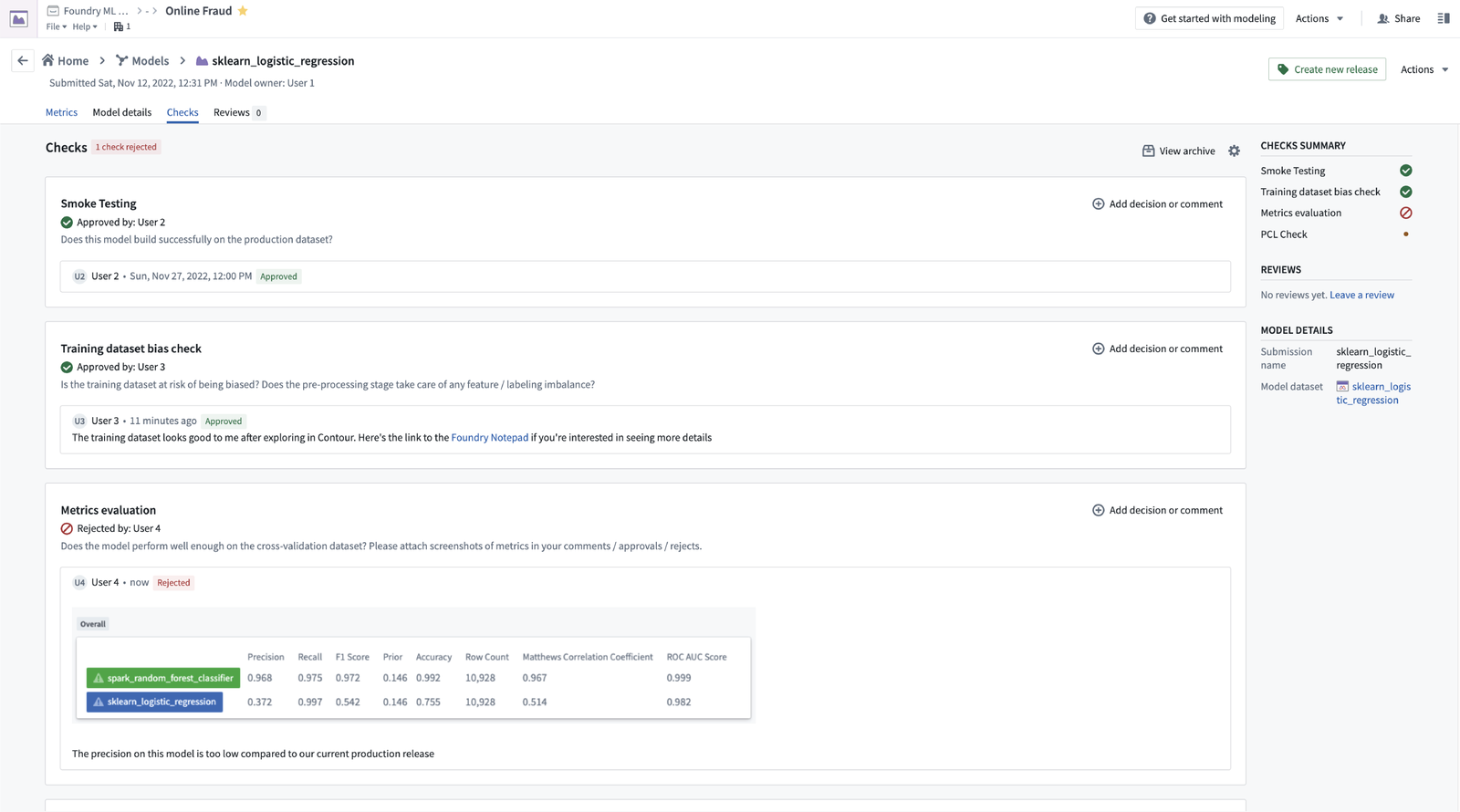
In recognition that not all model testing and evaluation is quantitative, Modeling Objective Checks can now be used to facilitate an integrated review process for your subject-matter experts and allow them to approve or reject the models prior to production.
When do I use Modeling Objectives?
Modeling Objectives makes it simple for data scientists, engineers, and their teams to turn ad-hoc model development into a production-ready, governed, and operational workflow.
To set up a modeling objective and learn how to evaluate and compare models consistently against metrics relevant to specific domains and use cases, read the documentation on model integration and review models.
Additional highlights
Administration | Control Panel
Configure Organization-level consent to third party application | By default, before a third-party application can access Foundry data on a user's behalf, the user is prompted to provide consent to the third-party application to do so. An Organization administrator with permissions to manage OAuth 2.0 clients can now provide such consent on behalf of all Organization users. This may be appropriate for architectures in which users are not expected to interact with Foundry directly. Read more about Foundry and third party applications, including how to configure Organization level consent.

Administration | Resource Management
Release currency to the fleet | The Resource Management app will now default to display resource usage as a currency. This means that usage will be displayed as a currency (USD, GBP, etc.) rather than technical dimensions (GB-months, CPU-seconds, etc.). Displaying usage as a currency makes comparing relative spend between technical dimensions possible. Foundry enrollments can now understand the breakdown of spend across the platform using a familiar common unit - cost.

Analytics | Contour
Enable new board ribbon everywhere | Redesigned the board ribbon to make search and discoverability of boards more prominent. Now when opening any category of the board ribbon users can search for boards and discover boards from other categories as well.

Analytics | Quiver
Improvements for Quiver transform tables | Introducing two improvements to dropdowns for selecting an input transform table: 1. Auto-Conversion: In addition to available transform tables in the analysis, we now also show all entities in the analysis contents that can be converted to transform tables. If any of these are selected, we auto-create a transform table from the selected entity and select that as the input. 2. Object Types: Also added an "Add object set" button that will allow users to inline-select an object type from the ontology to create an object set, and then also auto-create and select a transform table off of it. These changes are meant to help users who get stuck when transform tables are a required config input.

Update to Quiver Next Actions menu | We reorganized the Next Actions menu to make it easier to find cards. All cards that interact with data are now accessible from the Next Actions menu or using the "Search cards" button at the top bar. The new categories are grouped by what each card does rather than by its data type: Filter, Visualize, Calculate, Join, Transform, and Convert.

App Building | Slate
Discover Slate internal variables in the dependency graph | Internal Slate variables such as sl_user_storage and $global are now visible in the dependency graph.

Set custom window titles in Slate | You can now set a custom favicon by calling the slate.setFavicon action.

Add locale global variable | You can now access the language that the user set in their Foundry session by using the $global.locale variable.

Duplicate a Slate app with Viewer permissions | Duplicating Slate applications now only requires Viewer permissions. You can duplicate applications from the Actions dropdown in the top right corner.
Data Integration | Pipeline Builder
Markdown template can be added to proposals and branches settings rearranged | Pipeline owners can now add A markdown template for proposed changes. Once a template is set, each proposal request will include the template in the body field for users to fill out. Proposal templates can be viewed and edited in the new Proposal template tab in the Branches settings view.
Ontology | Foundry Rules
Wizard to assist the upgrade from Taurus to Foundry Rules | The V2 of the Rules archetype centralizes and simplifies configuration, making maintenance and updates to your Foundry Rules setup safer and quicker. This update introduces an upgrade assistant for migrating a V1 Rules, also known as Taurus, archetype deployment to the new V2 Rules archetype. Learn how to use it.

Foundry SQL Server: Connectors
MicroStrategy connector for Foundry datasets | Users of the MicroStrategy analytics platform can now use a MicroStrategy-certified connector for accessing Foundry datasets in reports and dossiers.

中文翻译
公告
Pipeline Builder:助力快速开发的功能
发布日期:2023-04-28
今年早些时候,我们发布了 Pipeline Builder ↗,作为实现快速、灵活且可扩展数据转换的下一代方法。此后,我们根据用户反馈,一直致力于提供强大的新功能。在过去的3个月里,Pipeline Builder 还新增了70多种转换(transform),包括几何函数、改进的时间戳解析和复杂的连接条件。继续阅读,了解一些您可能错过的 Builder 新功能!
自定义函数集中管理可复用逻辑
无需复制/粘贴即可在管道中复用共享逻辑。选择一个或多个面板(board),将其转换为带有已定义参数的自定义转换,然后根据需要重复使用。只需更新一次逻辑,即可将其应用于管道中使用该函数的所有位置。相关文档即将更新!
For 循环式函数简化重复逻辑
延续减少重复逻辑的主题,Pipeline Builder 现在支持将一组操作或聚合(aggregation)封装起来,并动态地应用于多个列。这种灵活性极大地减少了为标准数据清洗和规范化逻辑进行繁琐、重复配置的需求,并且与上述可复用函数结合使用时,使 Pipeline Builder 成为一个快速、高效且易于维护的工具,用于管理为分析和操作使用准备原始数据时通常涉及的重复性逻辑。
支持增量逻辑,实现更快、更省成本的数据管道
当数据转换仅需基于最新可用数据时,增量管道(incremental pipeline)是更快、更省成本且更优雅的解决方案。然而,在代码中管理这些管道的逻辑和复杂性一直是获得这些收益的障碍。 现在,您可以在 Pipeline Builder 中一键将管道配置为增量模式。应用内指南清晰地阐述了核心概念,无需额外配置。许多以前的挑战都得到了解决:Pipeline Builder 会将逻辑转换限制为仅适用于增量管道的那些转换,并检测破坏性变更,提示用户重放或修改其逻辑,从而消除意外的快照。这些新增功能提高了这一强大功能集的可访问性。有关更多信息,请参阅 Pipeline Builder 中的增量计算示例。
使用手动输入表中的模拟数据快速开始构建
获取启动管道所需的数据可能需要数周或数月。即使管道已构建完成,临时变更也可能随时出现。管道开发过程需要足够灵活,以随时适应您更新的业务需求。现在,您可以添加手动输入表(manual entry table),并灵活地生成模拟数据(notional data)作为批处理管道的临时输入。一旦生产数据可用,只需单击一下即可切换管道中的节点。 更进一步,您可以使用模拟数据和相关管道来支持具有多种对象类型的 v0 版本体(ontology),从而快速原型化操作应用程序,并在不因数据访问而受阻的情况下迭代模式和数据结构。
对象监视器:订阅用户和组
发布日期:2023-04-24
对象监视器 运行在您的数据之上,旨在帮助用户跟踪单个搜索和对象。对象监视器也可作为应用程序构建者的工具,将监控和告警功能作为在 Foundry 中构建的应用程序的一部分。
当用户设置健康检查和监视器时,他们并不总是唯一关心在失败时收到告警的人。尤其是在较大的组织中,存在支持轮换或专门负责特定工作流的团队。现在,配置操作应用程序的构建者无需手动要求用户手动订阅告警。相反,可以将单个用户以及组添加到告警中。这开启了丰富的操作工作流可能性,包括期待已久的功能:配置共享收件箱应用程序,并订阅一个组,以便在新对象进入填充收件箱的对象集时接收告警。
请注意,即使有权限的用户订阅了某个用户,如果该用户本身没有访问资源的权限,他仍然不会看到告警。
配置
在“管理订阅”选项卡中,您可以添加用户和用户组,并配置他们可以订阅的告警严重级别。根据他们的通知设置,当监视器触发时,用户将收到平台内通知以及电子邮件通知。即将支持直接与 PagerDuty 集成的通知功能。
Workshop:保存并附加地图和图表
发布日期:2023-04-24
在 Vertex Workshop 小部件中,从模板生成图表后,用户现在可以直接从 Workshop 保存此图表,而无需打开完整的 Vertex 应用程序。同样,使用地图应用程序模板小部件,您可以直接从 Workshop 保存从模板生成的地图。
在小部件配置中,已保存资源的新资源标识符(RID)会被捕获为字符串变量,并可以作为参数添加到配置为在用户保存新地图或图表时运行的操作中。通过这种模式,您可以通过将 RID 保存为属性来表示本体中的地图和图表,然后通过在 Workshop 的 Vertex 和 Map 小部件中使用新的“覆盖资源 RID”配置,将其展示给应用程序的用户。
这种通用模式:
- 配置模板资源
- 配置一个 Workshop 应用,其工作流提示用户复制模板,将生成的资源嵌入小部件,并允许用户进行修改
- 通过操作将新资源的 RID 捕获为对象类型的属性
适用于许多涉及标准流程的操作工作流。除了 Vertex 图表和地图模板外,当用户需要复制然后填写标准文档时,Notepad 模板也非常适合这种模式。 这些功能可在每个小部件配置的“功能”部分的“保存”标题下找到。有关更多详细信息,请分别参阅 Vertex 文档和地图应用程序文档。
Quiver:更轻松地查找和分析数据
发布日期:2023-04-18
Quiver 是一个强大的数据分析、报告和仪表板构建应用程序,拥有丰富的工具和功能。为了使其对经验丰富的和新手 Foundry 用户都更直观,我们很高兴地宣布一系列用户界面更改,这些更改简化了数据搜索,提高了转换、连接、过滤和可视化等交互的可发现性,并明确了数据转换导致的数据类型变化。
下一步操作菜单改进
我们重新组织了“下一步操作”菜单——现在当鼠标悬停在卡片或时间序列图上时会显示——使其更易于找到所需内容。新的类别根据每张卡片的功能而非其数据类型进行分组。所有与数据交互的卡片现在都可以从“下一步操作”菜单或使用顶部栏的“搜索卡片”按钮访问。 此外,“下一步操作”栏现在支持搜索!跨所有类别或在特定类别内搜索操作。结果将包括类别内的匹配项,并突出显示其他类别中的匹配项,这样您就不会错过任何操作!
数据转换更直观
我们在“下一步操作”菜单中添加了一个新类别:转换类别。此新类别包含所有适用于转换表的转换,这些转换以前只有在将转换表卡片添加到画布或图表后才能访问。从此类别添加转换将自动添加一个转换表并应用所选转换,从而简化分析工作流。
精简的顶部栏菜单专注于添加数据
我们简化了分析菜单,重点放在添加数据上。您仍然可以使用“搜索卡片”按钮搜索所有可用的卡片。此重新设计还整合了在 Quiver 中添加数据的体验,因此每次将数据带入分析时都能获得熟悉且一致的体验。
明确卡片间数据类型变化的表示
虽然分析的输入来自对象和时间序列数据,但 Quiver 强大的转换卡片允许您操作和派生所有类型的数据。为了提高配置分析时的可读性,所有卡片现在都清晰地显示它们交互的数据类型,使用全名且不带缩写。这使得当卡片操作更改数据类型以及因此更改输出卡片上的可用操作时,变得一目了然。 此外,在“下一步操作”或“搜索”选择器中选择卡片时,输入和输出类型会与卡片名称和描述一起显示。
控制面板:配置网络入口
现在可以在控制面板的“网络入口”选项卡中配置网络入口允许列表 [1],从而允许 Foundry 管理员进行自助服务配置。以前,这些允许列表配置需要与 Palantir 工程师协作管理;将配置移至控制面板提高了透明度,并允许具有信息安全官或注册管理员角色的账户独立于 Palantir 支持来管理允许列表。对于大多数 Foundry 注册实例,现有的允许列表配置已自动迁移。
如果您对此新功能有疑问,请联系 Palantir 支持。
资源管理:货币化
发布日期:2023-04-14
资源管理应用现在默认以货币值显示平台上的资源使用情况。这意味着使用量将以本地货币而非技术维度(如 GB-月 或 CPU-秒)显示。这简化了平台不同技术维度之间相对支出的比较,并使理解资源使用如何转化为实际成本变得更加直观。
请注意,对资源管理应用的访问由 资源管理查看者 角色控制,该角色可以在 控制面板 > 注册权限 配置中进行管理。基于货币的资源使用视图可能不适用于所有 Foundry 注册实例——如有任何疑问,请联系 Palantir 代表。
Slate:引入 Slate 调试器
发布日期:2023-04-10
在 Slate 中构建雄心勃勃的应用程序——由数百个小部件、查询、函数和事件组成——不可避免地会导致复杂性。在这些应用程序中,如果出现意外行为,很难通过依赖关系网络追踪并找到函数边缘情况或某些复杂事件逻辑中的根本原因。
借助新的集成调试器,依赖关系图现在成为一个超级强大的工具,用于研究即使是最复杂的 Slate 应用程序的内部工作原理。现在可以在依赖关系图执行过程中设置断点,并了解其解析过程中的中间阶段。
在文档中阅读更多关于断点、调试器以及调查 Slate 应用的最佳实践。
建模目标:模型操作 2.0
发布日期:2023-04-04
AI/ML 模型的端到端管理
建模目标(Modeling Objectives)是 Palantir Foundry 中用于管理 ML/AI 模型在 Foundry 中经历 ModelOps ↗ 生命周期的应用程序。建模目标已更新,以简化在 Foundry 中管理、评估和发布模型的体验,更好地帮助团队专注于为问题原型化、训练和集成最佳模型。
建模目标应用程序使数据科学和工程团队能够:
- 在建模项目上进行协作
- 定义和自动化模型评估管道
- 提交并跟踪所有候选模型、其性能指标和模型审查
- 轻松将模型部署到实时交互或批量部署环境中,并对模型升级进行一流的变更控制
无代码模型评估或低代码评估库
建模目标应用程序现在可以配置为自动生成和构建推理与指标管道,无需代码即可处理所有模型提交。这是通过使用针对常见建模问题(包括回归和二元分类)的默认评估库来实现的。
这些库使团队能够定义系统的模型评估结构,确保所有模型得到一致评估和比较,从而实现准确的模型比较和改进的实际结果。随着模型评估库的引入,您现在可以在 Foundry 中创建可重用和可参数化的评估库。这些库使数据科学团队能够将自动模型评估应用于其他建模领域,或使用团队、组织或问题特定的自定义指标。
比较细粒度模型性能
建模目标中引入了模型评估子集(Model Evaluation Subsets),通过允许比较评估数据的细粒度子集,有力地扩展了评估指标。
这使得模型开发人员能够:
- 快速确定模型表现不佳的地方,并集中开发工作
- 智能地决定可以使用模型的操作或组织设置
- 确认并记录生产模型在不同类别的数据上表现公平
- 模型评估子集通过为模型性能提供独特的视角来增强模型评估,同时无需额外代码
建模目标检查
认识到并非所有模型测试和评估都是定量的,现在可以使用建模目标检查来促进领域专家的集成审查流程,并允许他们在模型投入生产之前批准或拒绝模型。
何时使用建模目标?
建模目标使数据科学家、工程师及其团队能够轻松地将临时模型开发转变为生产就绪、受治理且可操作的工作流。
要设置建模目标并学习如何根据特定领域和用例相关的指标一致地评估和比较模型,请阅读关于模型集成和审查模型的文档。
其他亮点
管理 | 控制面板
配置组织级别对第三方应用的同意 | 默认情况下,在第三方应用代表用户访问 Foundry 数据之前,系统会提示用户向该第三方应用提供同意。现在,拥有管理 OAuth 2.0 客户端权限的组织管理员可以代表所有组织用户提供此类同意。这对于不期望用户直接与 Foundry 交互的架构可能适用。阅读更多关于 Foundry 和第三方应用的信息,包括如何配置组织级别同意。
管理 | 资源管理
向所有注册实例发布货币化功能 | 资源管理应用现在默认以货币形式显示资源使用情况。这意味着使用量将以货币(美元、英镑等)而非技术维度(GB-月、CPU-秒等)显示。以货币形式显示使用量使得比较不同技术维度之间的相对支出成为可能。Foundry 注册实例现在可以使用熟悉的通用单位——成本——来理解平台上的支出细分。
分析 | Contour
在所有地方启用新的面板功能区 | 重新设计了面板功能区,使面板的搜索和可发现性更加突出。现在,当打开面板功能区的任何类别时,用户可以搜索面板,并发现其他类别中的面板。
分析 | Quiver
Quiver 转换表的改进 | 为选择输入转换表的下拉菜单引入两项改进:1. 自动转换: 除了分析中可用的转换表外,我们现在还显示分析内容中所有可以转换为转换表的实体。如果选择了其中任何一个,我们会从所选实体自动创建一个转换表,并将其选为输入。2. 对象类型: 还添加了一个“添加对象集”按钮,允许用户从本体中内联选择一个对象类型来创建对象集,然后也自动创建并选择一个基于它的转换表。这些更改旨在帮助那些在转换表是必需配置输入时遇到困难的用户。
Quiver 下一步操作菜单更新 | 我们重新组织了“下一步操作”菜单,使其更易于找到卡片。所有与数据交互的卡片现在都可以从“下一步操作”菜单或使用顶部栏的“搜索卡片”按钮访问。新的类别根据每张卡片的功能而非其数据类型进行分组:过滤、可视化、计算、连接、转换和转换类型。
应用构建 | Slate
在依赖关系图中发现 Slate 内部变量 | 内部 Slate 变量,如 sl_user_storage 和 $global,现在在依赖关系图中可见。
在 Slate 中设置自定义窗口标题 | 您现在可以通过调用 slate.setFavicon 操作来设置自定义网站图标。
添加区域设置全局变量 | 您现在可以通过使用 $global.locale 变量访问用户在其 Foundry 会话中设置的语言。
使用查看者权限复制 Slate 应用 | 复制 Slate 应用程序现在只需要查看者权限。您可以从右上角的“操作”下拉菜单中复制应用程序。
数据集成 | Pipeline Builder
可以为提案添加 Markdown 模板,并重新排列分支设置 | 管道所有者现在可以为提议的更改添加 Markdown 模板。一旦设置了模板,每个提案请求都会在 body 字段中包含该模板,供用户填写。提案模板可以在分支设置视图中的新“提案模板”选项卡中查看和编辑。
本体 | Foundry Rules
协助从 Taurus 升级到 Foundry Rules 的向导 | V2 版本的 Rules 原型集中并简化了配置,使得对 Foundry Rules 设置的维护和更新更安全、更快捷。此更新引入了一个升级助手,用于将 V1 版本的 Rules(也称为 Taurus)原型部署迁移到新的 V2 Rules 原型。了解如何使用它。
Foundry SQL Server:连接器
用于 Foundry 数据集的 MicroStrategy 连接器 | MicroStrategy 分析平台的用户现在可以使用 MicroStrategy 认证的连接器 在报告和档案中访问 Foundry 数据集。