Announcements(公告)
Announcing REST API Source with support for Webhooks
Date published: 2023-05-26
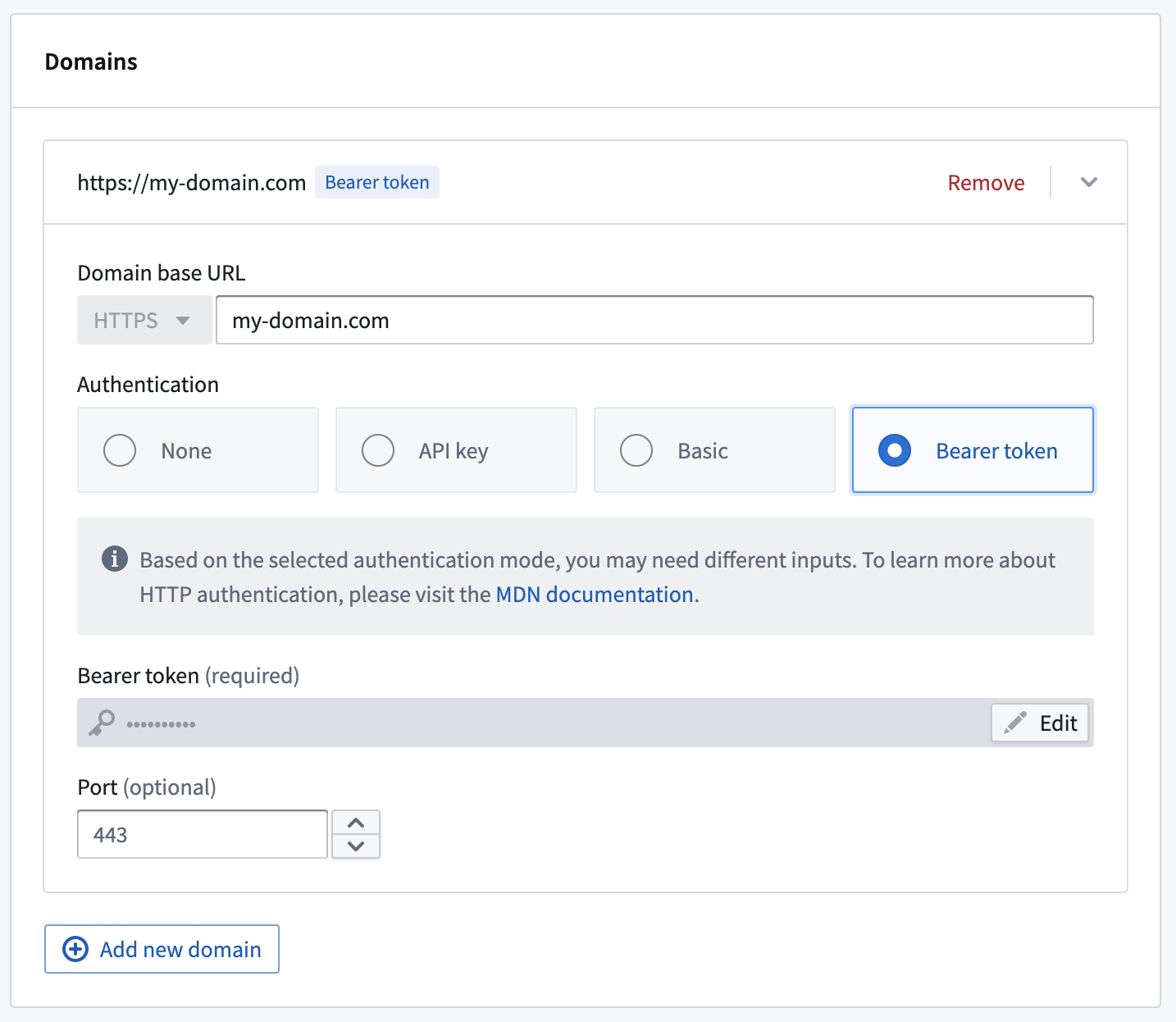
REST API webhooks are now generally available. You can now build webhooks using a direct cloud connection and with a dedicated user interface for building requests. Additionally, agents are also supported for REST API sources, and separately, you may specify multiple domains if you wish to construct chained webhook requests that are executed consecutively. The new source shows up as "REST API" on the Source Creation page and an in-platform tutorial explains how to use webhooks with this source type. The webhooks tutorial has been updated, along with a disambiguation page covering all options for REST connections.
Note that direct connection for the REST API source requires network egress management through Control Panel to be enabled on your environment. Contact your administrator for any questions regarding egress management for your environment.
Use REST API webhooks
To use a REST API webhook, start by creating a “REST API” source in Data Connection. Then, provide the base URL and auth mechanism, along with the egress or agent configuration. In addition to taking advantage of the new support for cloud runtime and direct connection, you may also consider using agents or as necessary, specify multiple domains to construct chained webhook requests that are executed consecutively.
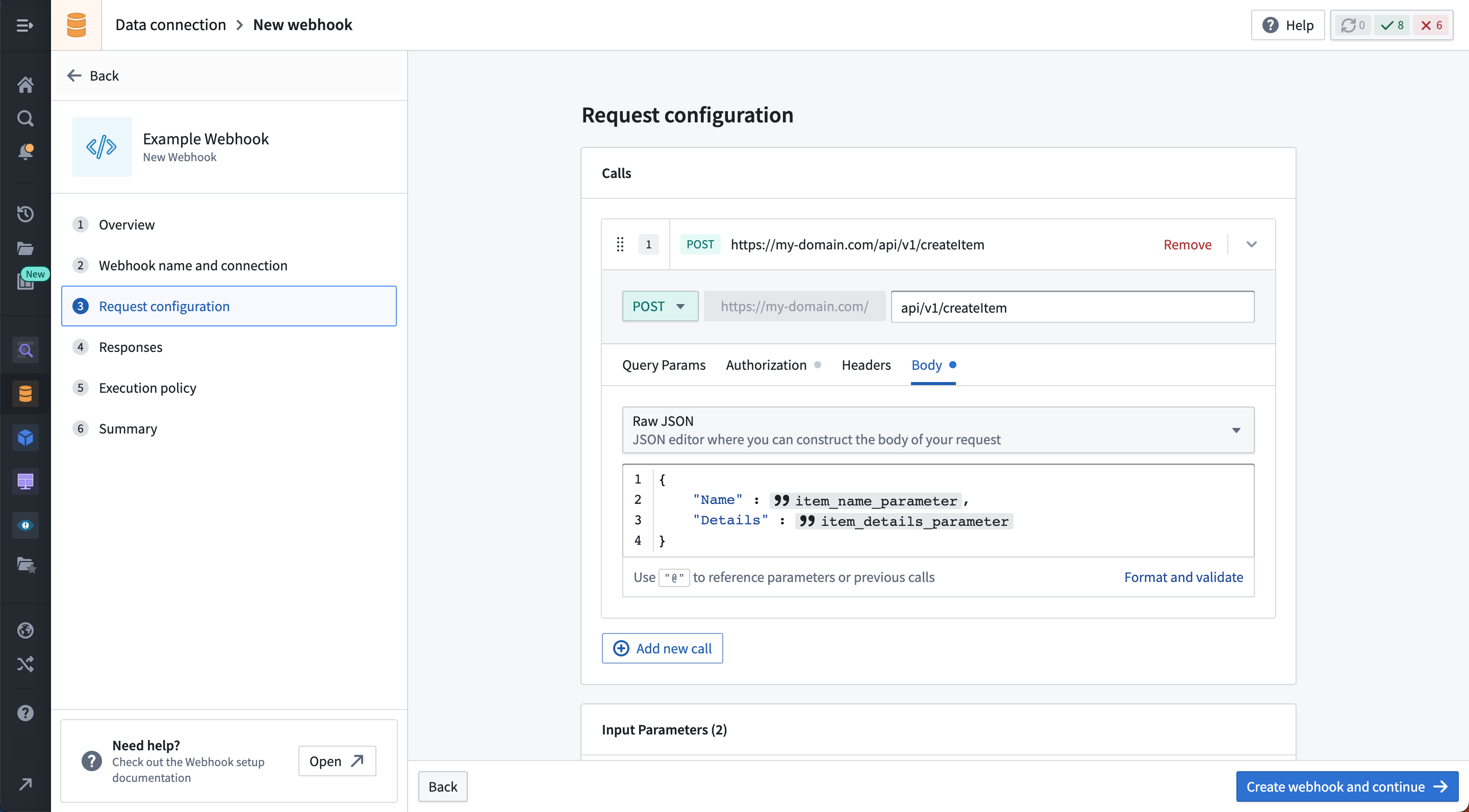
After creating a source, you can use the new request builder to construct webhooks, which can then be wired up to Actions or Workshop. The request builder supports:
- Parameterization of relative URL path, headers, query parameters, and body.
- Body provided as form input, form-url-encoded, raw JSON, or binary attachment.
- Test connections from the Data Connection UI.
- Chained requests, including extracting values from the response of a request to be used in subsequent requests.
- OAuth2 authorization using outbound apps. Contact your Palantir representative to enable.
Syncs, exports, and other capabilities that involve REST APIs
Currently, the REST API source type only supports webhooks. If you are using webhooks, you should use the new REST API source.
- For conducting syncs or exports to an Internet-accessible source, you should use External Transforms.
- Otherwise, for syncs or exports to an on-premise source, continue using magritte-rest-v2.
Code Workspaces: The power of Foundry, now accessible with third-party IDEs
Date published: 2023-05-26
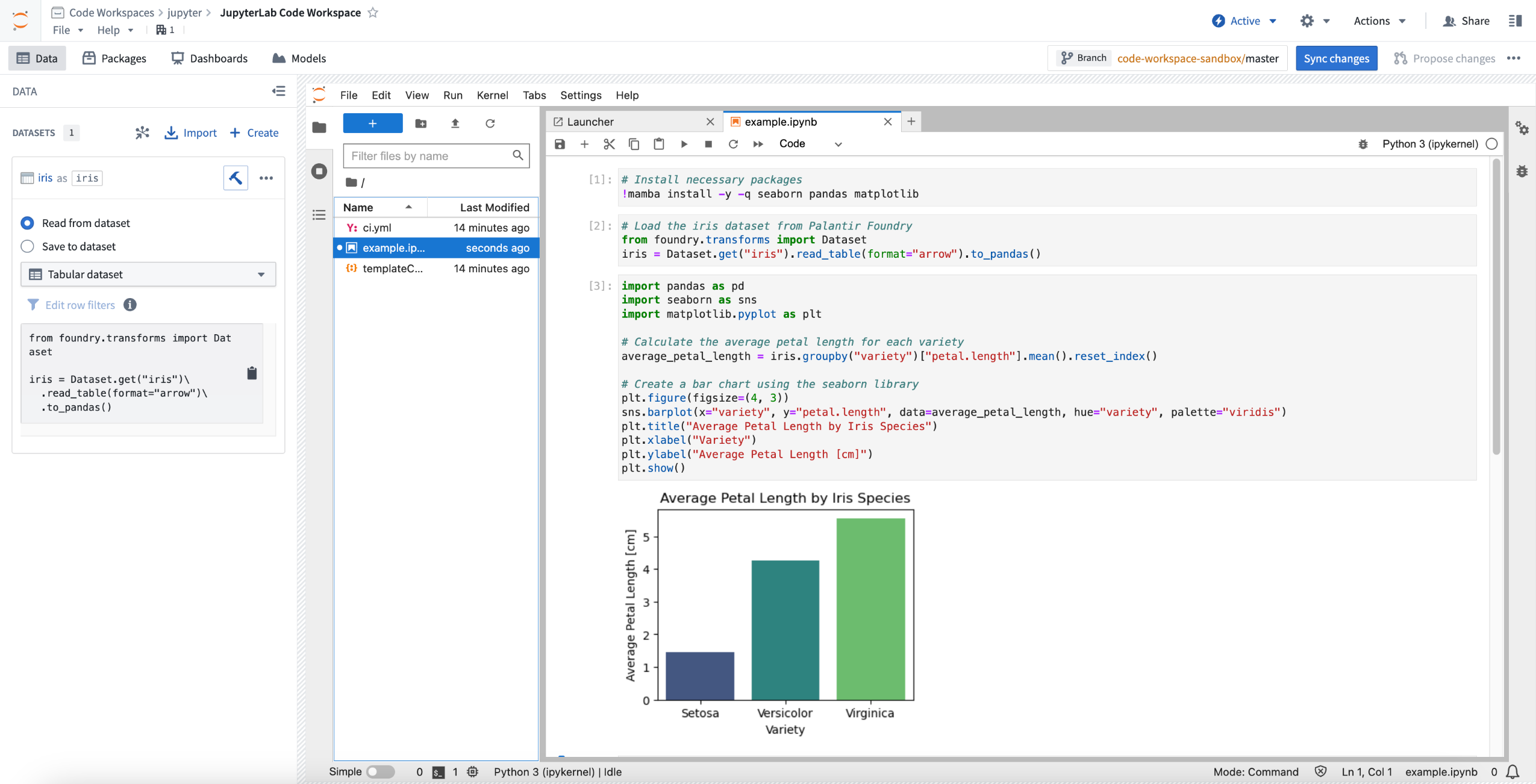
With Code Workspaces, data scientists, analysts, statisticians, and ML engineers can use the JupyterLab® and RStudio® Workbench IDEs in combination with the benefits of the Palantir Foundry platform. Code Workspaces brings the power of the Foundry Ontology and Palantir's first-class security, branching, and resource management capabilities to data science and machine-learning workflows.
Foundry security with familiar third-party IDEs
Code Workspaces creates an experience that is familiar for users while maintaining Foundry’s robust security features. Instead of downloading data to a local notebook or manually building connectors from a data lake to your HPC or SaaS ML platform, you can now work on your data directly in Foundry and decrease data transfer complexity and the risk of data spillage. The third-party IDEs supported by Foundry are bound to the core components of Foundry security: restricting access to a dataset in Foundry will restrict access for Code Workspaces IDEs as well, ensuring consistent permissions across tools.
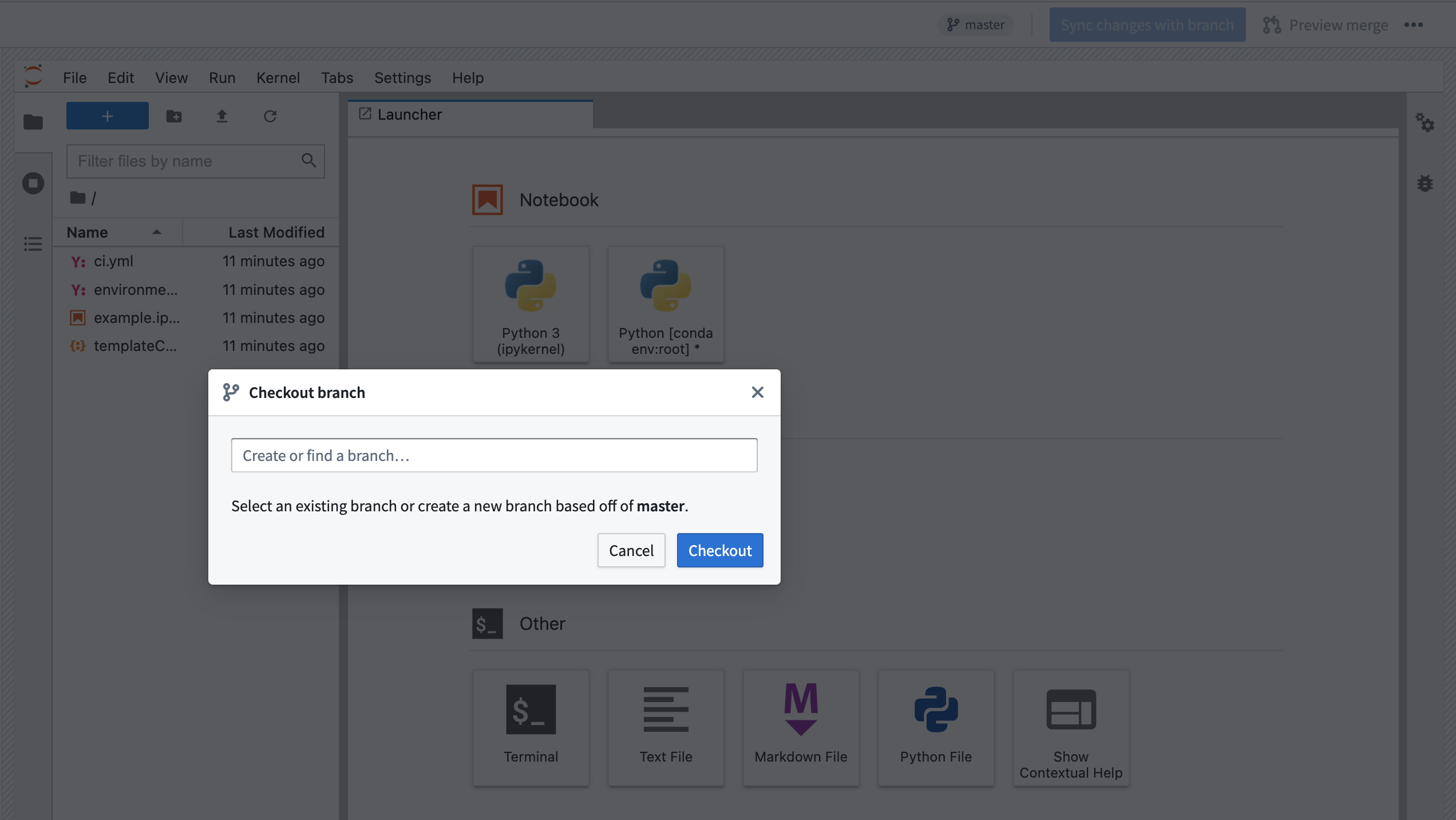
Foundry users can now read and write data from Foundry using JupyterLab® or RStudio® Workbench, install packages, and leverage version control. This integration enables data lineage and branching for dashboards along with purpose-built enterprise-level privacy and security features. Production and development workflows can now be performed in the same platform in isolation, accelerating operationalization: for instance, you can build a dashboard on one branch using that branch's data, and merge into the main branch once the dashboard has been properly validated.
Data science with the power of Foundry
Foundry users can use Code Workspaces to collaborate, iterate, and build faster to get to workflow operationalization. Code Workspaces also supports Python- and R-related dashboard and workflow building.
By hosting everything within Foundry, the collaboration experience is smooth for teams that may be working on one code base at any time. Similar to the Git workflow, users with various technical backgrounds can propose changes on branches based on permissions. All users can benefit from the data lineage for dashboards view and a polished edit-concurrency experience. Furthermore, data scientists can benefit from intuitive package and resource profile management in the unified Code Workspaces interface.
When should I use Code Workspaces?
Code Workspaces gives platform administrators an easily-deployed, fully-managed, secure, and production-ready way to provide JupyterLab® and RStudio® Workbench to users with Foundry’s data governance and compliance with FedRAMP, GxP, and other standards built in. With Code Workspaces, users can securely connect to existing internal systems and build analyses, models, dashboards, or entire workflows on data with Foundry’s access controls and data permissioning.
With the introduction of Code Workspaces, operationalization is just a step away. Using familiar IDEs, you can now consume and publish models to the Ontology, and build governance-compliant dashboards developed on branches that can be automatically refreshed when new data is available.
To start building, review the Code Workspaces documentation.
RStudio® and Shiny® are trademarks of Posit™.
Jupyter®, JupyterLab®, and the Jupyter® logos are trademarks or registered trademarks of NumFOCUS.
All third-party trademarks (including logos and icons) referenced remain the property of their respective owners. No affiliation or endorsement is implied.
Object Storage v2 is Generally Available
Date published: 2023-05-26
Palantir is proud to announce the general availability of Foundry's next generation ontology architecture. Object Storage v2 (OSv2) is a total re-architecting of the backend infrastructure that powers the Foundry Ontology. OSv2 is meant to replace the Object Storage V1 (Phonograph) architecture in the long term and provides flexibility to back object storage with multiple data storage types in parallel to unlock query patterns, performance, or scale considerations as Foundry evolves.
OSv2 brings many new features to Foundry along with significant improvements in scale and performance and an architecture to support ongoing growth and investment in the Foundry Ontology.
Scale, performance, and latency improvements
Object Storage v2 comes with a number of improvements to scale, performance, and latency in Foundry:
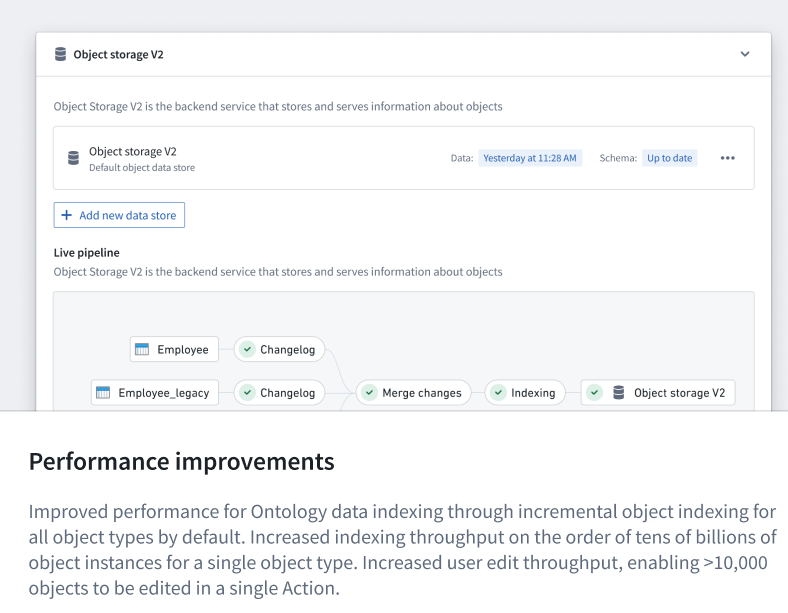
- Significantly improved performance for Ontology data indexing through incremental object indexing for all object types by default.
- Increased indexing scale on the order of tens of billions of object instances for a single object type.
- Increased user edit throughput, enabling up to 10,000 objects to be edited in a single Action. If you need to enable a higher limit, contact Palantir Support to create a change request for your enrollment.
- Reduced user edit latency, faster observation of user edits in frontend applications, and near real-time automated propagation of user edits to materialized object datasets.
New capabilities
New capabilities in OSv2 include:
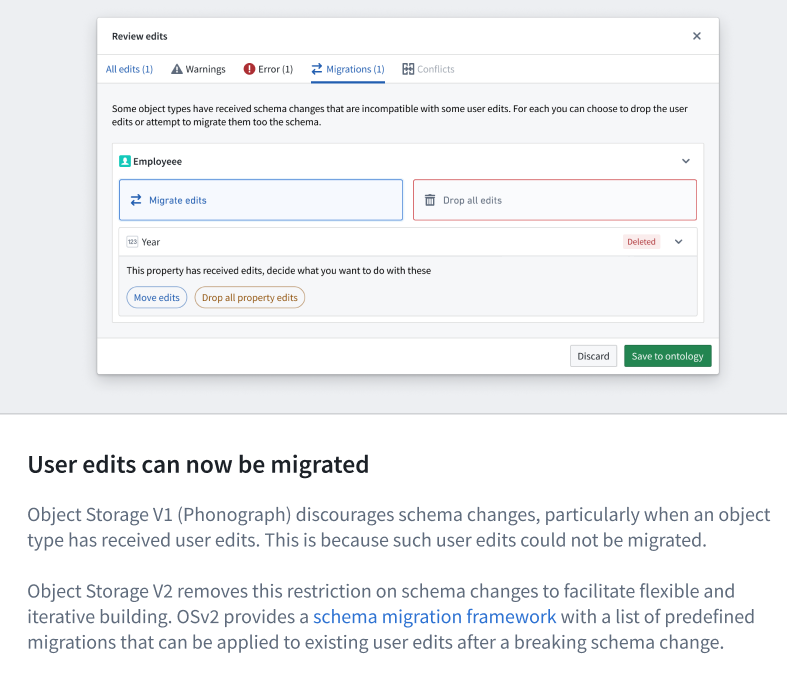
- The ability to migrate existing user edits after a breaking schema change in an object type definition.
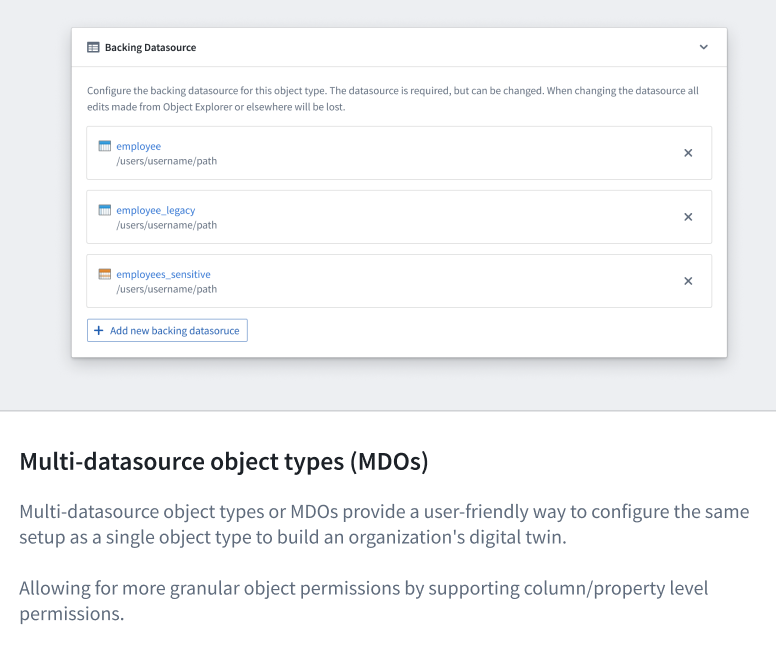
- More granular object permissions with multi-datasource object types, supporting column/property level permissions.
Other new capabilities include:
- Automated module refresh support in Workshop when explicitly configured object types receive new data or user edits.
- Limitless paging endpoints to enable Ontology consumers to load more than 10K objects, particularly valuable for application developers interacting with Foundry Ontology through APIs.
Migrating to OSv2
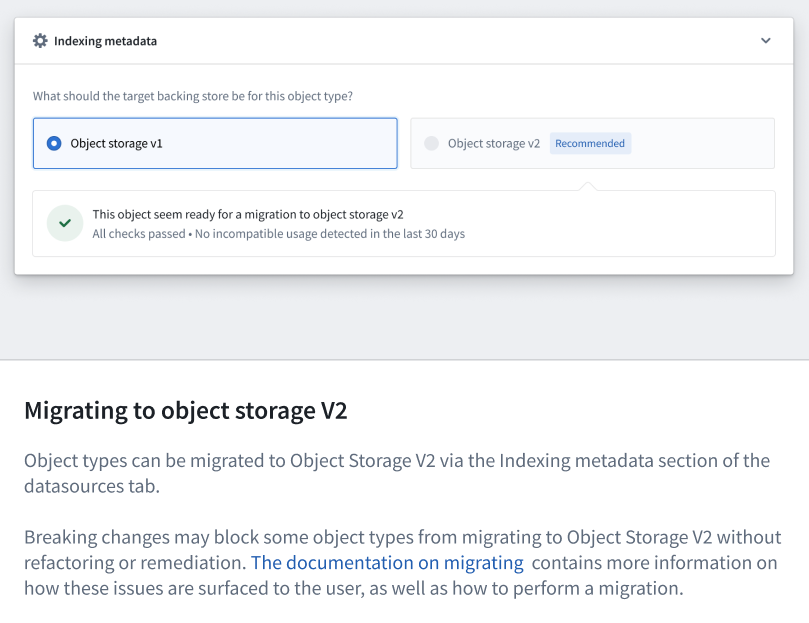
Foundry offers a robust self-service migration tooling in Ontology Manager for selectively migrating object types from Object Storage V1 (Phonograph) to OSv2 without any downtime. Object Storage V1 (Phonograph) is not deprecated or removed, though OSv2 is recommended for any new object types due to its superior feature set and long-term product roadmap.
Read more in the Object Storage v2 documentation.
Consumer-only mode for Foundry access
Date published: 2023-05-26
Configure a simplified experience for single-application users with Foundry's new consumer-only mode. Foundry now supports a robust configuration to constrain the experience of certain user groups to only the custom applications to which they've been given permission. In this restricted view, the navigational sidebar is not shown because those users are not meant to leave those particular applications.
In the Control Panel Foundry Suite configuration, there is now a configuration to Restrict platform access. By default, this configuration is set to "Everyone in this organization", which maintains the current behavior.
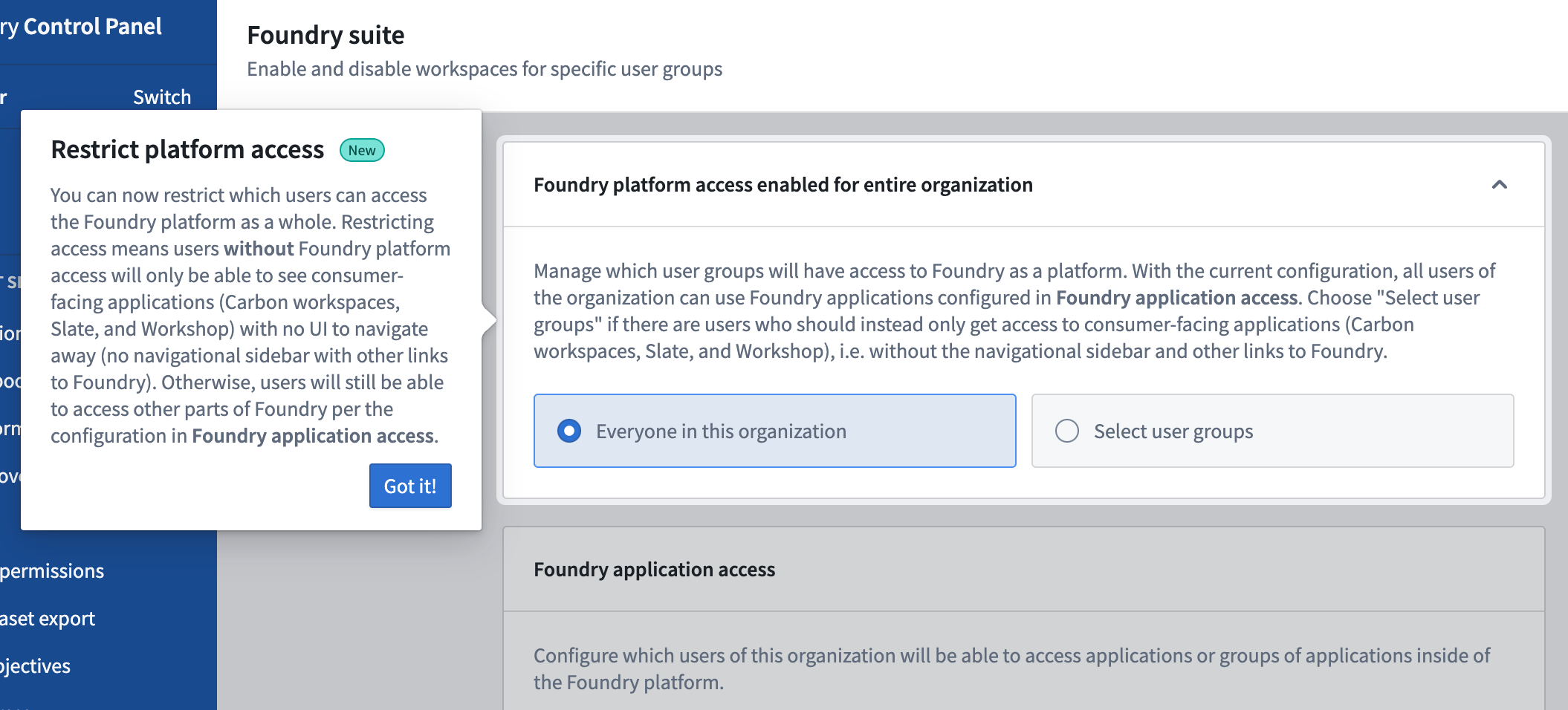
Alternatively, platform access can now be given only to specific groups leaving other users with access to only the consumer-facing applications built in Slate or Workshop to which they have explicitly been granted access. Without platform access, these users will no longer see a Foundry sidebar nor will they be able to navigate to other parts of Foundry.
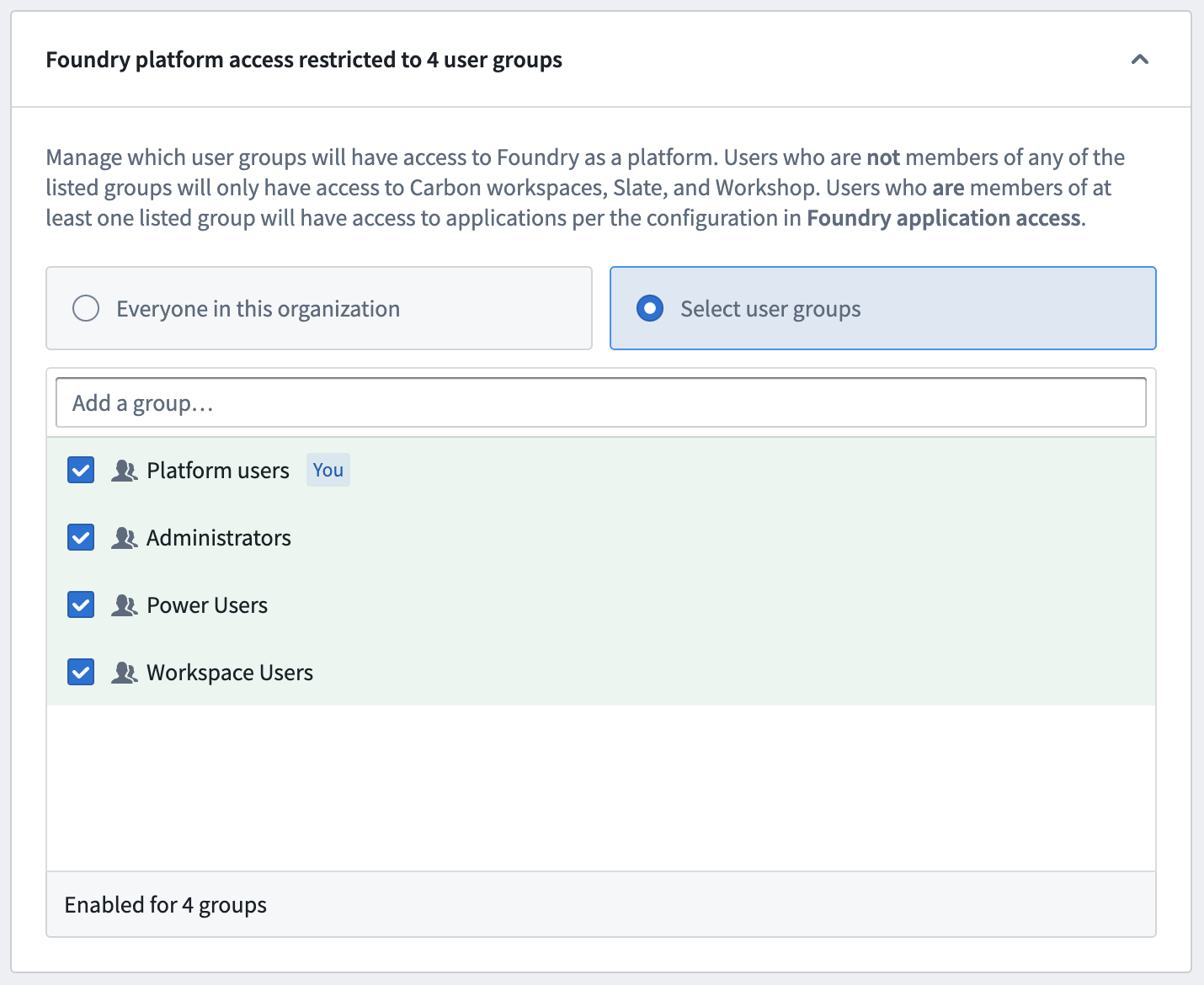
This configuration makes it possible to provide a truly stand-alone experience for custom applications for users who do not need to access the entirety of Foundry. For more information and guidance to configure this type of restricted access, review the Control Panel Workspaces documentation.
Introducing Quicksearch: Fast search and navigation
Date published: 2023-05-11
Quicksearch is a new tool for search, navigation, and discovery, built to make finding resources and navigating throughout Foundry fast and delightful. There are two new modes for Quicksearch interactions:
- Jump-to mode provides a short list of personalized results based on recent history to directly navigate Foundry and switch between platform applications, custom applications, objects, datasets, and other resources.
- Full results mode helps find content and discover what exists in Foundry. Perform searches of Foundry apps, objects, datasets, and other resources with advanced filters, rich metadata, and improved result ranking to highlight the most relevant results.

Jump-to mode
Navigate Foundry at the speed of thought without ever reaching for the mouse using Quicksearch keyboard shortcuts and jump-mode:
- Easy to access: Open Quicksearch by selecting Search... in the Foundry sidebar or with the keyboard shortcut
*Ctrl+J(Windows) orCmd + J(macOS). - Easy to access: To open Quicksearch, select Search... in the Foundry sidebar, or use
Ctrl + Jon Windows or⌘ + Jon macOS. - Navigation-focused: The initial dialog and dropdown are navigation-oriented. Start typing to receive suggestions. Use the keyboard to jump to any Foundry page in seconds.
- Search only on titles: Jump-to mode only searches on titles of apps, resources, and objects. To search additional fields and metadata, use the full results mode.
- Single click to full results: From the dialog and dropdown, press
Enter/Returnor filter by Apps, Objects, Datasets, or Files to move to advanced search mode. - Personalized results: Results in Quicksearch are personalized by your recently accessed or favorited resources, and more.

Full results view
Explore Foundry data, applications, and resources to uncover relevant work products:
- Discovery-focused: Designed for searching and discovering, users can compare multiple search results to find the resources most useful to them.
- Search on various fields: Search for descriptions, column names, file paths, and more. Additionally, filter by creator, tags, Projects, folders, and more.
- Tabs: The interface includes a top results tab and four tabs to filter by Apps, Objects, Datasets, or Files
- Metadata: Users can view information on each result to evaluate whether the resource is relevant to them. Search by keyword highlights, file path, view count, last updated time, key security metadata, and more.
- Ranking: Results are ranked based on an algorithm that contains text matching and other boost parameters.
- Filters: Filters are provided for advanced searches. Additionally, by selecting the filter tabs from the initial search dropdown, users can perform complex filter searches ( for example, “all reports under project X that were created by me”).
- Permissions: Quicksearch respects all existing permissions in Foundry. Content with
Discoverpermissions would open aRequest accessmessage. Users will not see content to which they do not have access.

Introducing Applications Portal
Date published: 2023-05-11
Applications Portal is a new tool for discovery and quick access to all apps in Foundry, including core Foundry platform apps and trusted custom apps promoted to the portal by platform administrators.
The Application Portal is launched from the Foundry sidebar and opens to a view of all applications, with additional categories for navigating both platform apps and promoted custom applications. Favoriting an application with a ⭐ will pin the application to the sidebar for quick access.

Curate the Applications Portal
The Applications Portal has two engagement modes:
- Basic (out-of-the-box): A tool to discover and learn about all Foundry platform applications. No admin work is required. The applications portal is an integral tool in the left sidebar, even without any promoted custom apps.
- Advanced (curation-based): An admin, Palantir representative, or customer governance team promotes all trusted custom apps to the Applications Portal.
For more details on the permissions and workflow for promoting applications, review the Applications Portal documentation.

Introducing Approvals: Platform change management
Date published: 2023-05-04
Approvals introduces new compliance, governance, and peer-review workflows in Foundry
Manage requests, approvals, and platform changes with the Approvals application. With a focus on increasing time-to-value, Approvals facilitates compliance, governance, and peer-review workflows for your organization by allowing you to set up a review process while providing an easily-accessible audit history.
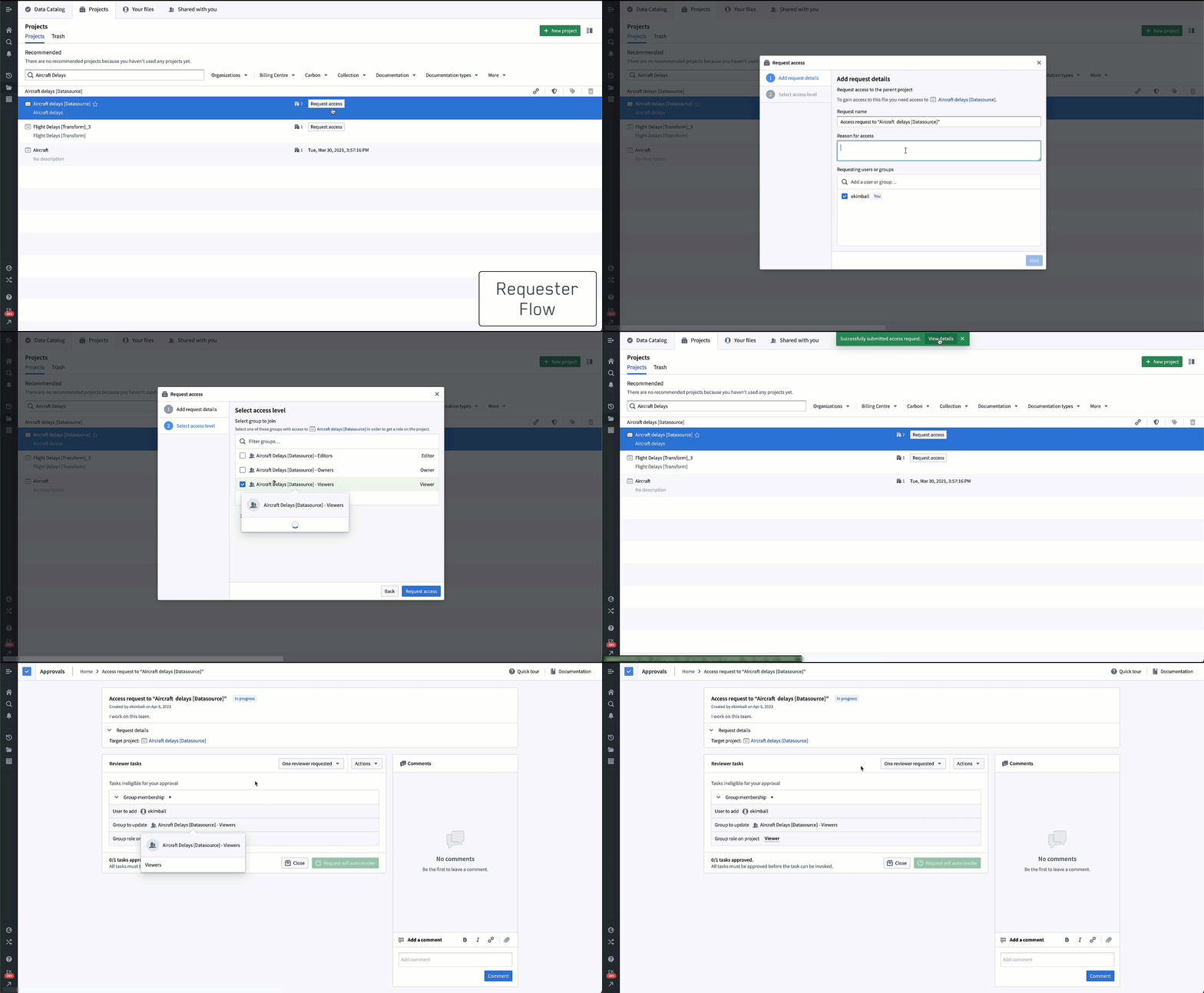
Manage requests for permission changes in one inbox
The Approvals application allows administrators to set up user requests consisting of one or multiple tasks (individual actions) in Foundry for review by respective approvers, all from a common inbox. Users can select from a list of tasks for approval by the appropriate reviewers. Additionally, users are encouraged to select an existing group to join when making a Project access request, optimizing for an administrator’s ability to centrally organize permissions management through Group settings under Platform settings.
Once all tasks under a request are approved, Foundry completes the request automatically, saving administrators the need to perform a manual adjustment to apply the decision and the effort required to verify the correct setting was completed.
Approvals not only addresses the specific issue of collecting and managing Project access requests, but also lays a foundation for centralizing other approval workflows for access and change management processes currently distributed throughout Foundry.

Contextual decisions from rich UI
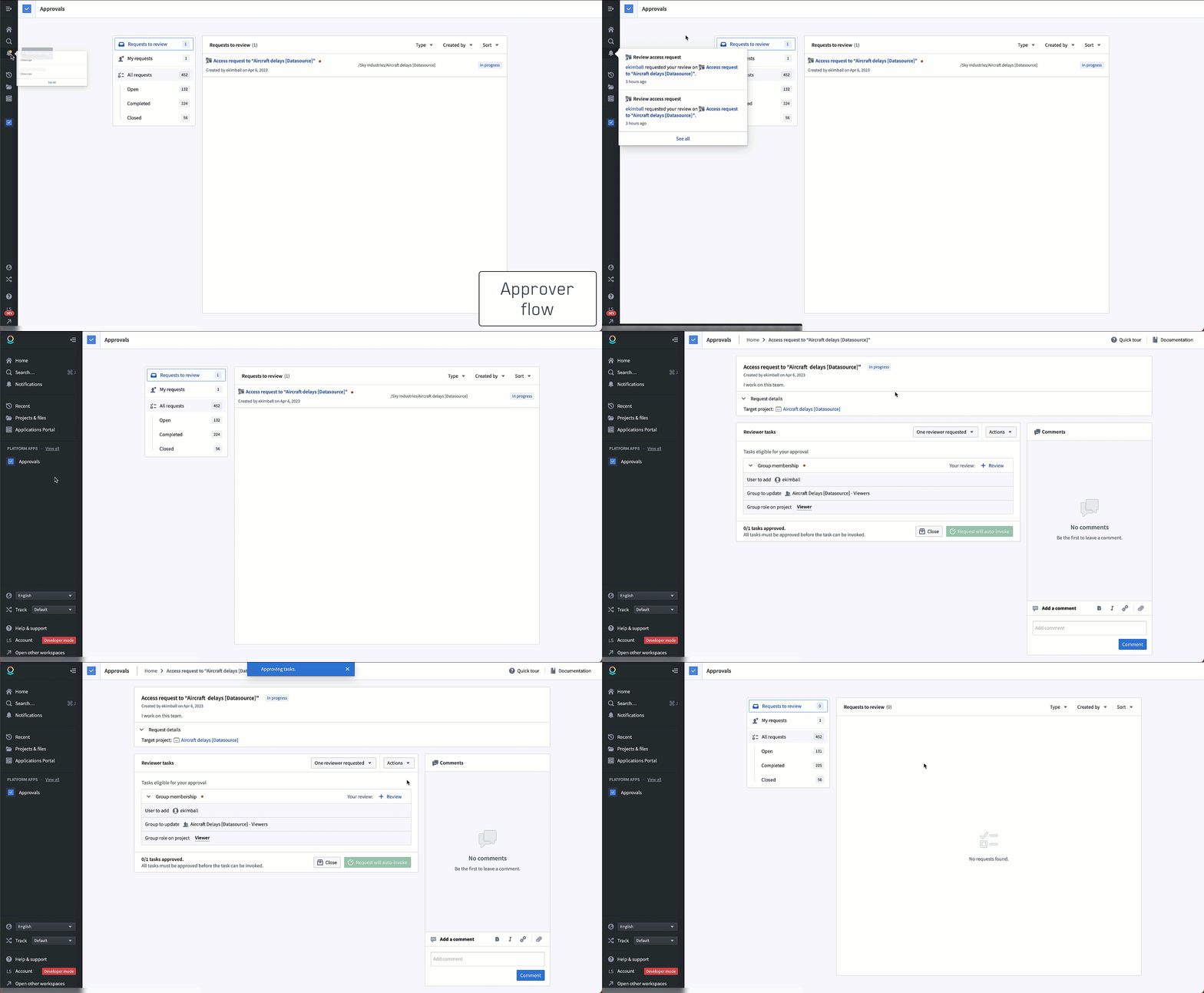
Using Approvals, Organizations obtain greater insight into the lineage for data access decisioning for audit purposes. Furthermore, reviewers, such as administrators and Project owners, can be assigned to specific tasks that relate to their area of oversight and responsibility.
When a request is filed by a user, in-platform notification and emails are automatically dispatched to the responsible reviewer. Requests are considered directly from within the Approvals user interface, and where necessary, reviewers can leave a comment or ask for clarification on specific tasks for a user’s response. Upon the approval of a request, Foundry enacts the change automatically without needing additional manual changes.
When should I use Approvals?
Approvals is designed for Organizations that require a clear process for users to obtain approval to resources with the permissions being automatically granted upon administrator or owner review. Additional Approvals request types such as Ontology proposals and reference additions are slated for future release.
The Approvals application is enabled on all stacks by default. Where custom workflows exist, we highly recommend adapting them to the Approvals application to take advantage of its improved workflow implementation.
Review the documentation on setting up approvals to get started.
Additional highlights
Analytics | Contour
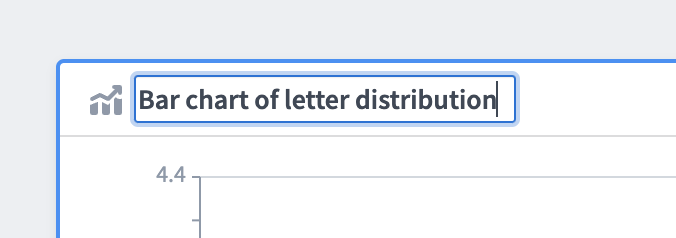
Board titles | You can now give Contour boards a title to help identify them.
Data Integration | Pipeline Builder
Introducing approvals in proposals | Users can now choose to protect production critical Main branches in Pipeline Builder by requiring user approval before adopting a change. To do so, pipeline owners can enable the setting in Branches setting for the selected pipeline. Following standard best practices, only editors that did not contribute to the proposal may approve the change.
中文翻译
公告
宣布推出支持 Webhook 的 REST API 数据源(REST API Source)
发布日期:2023-05-26
REST API webhook 现已全面可用。您现在可以通过直接云连接以及专用的请求构建用户界面来构建 webhook。此外,REST API 数据源也支持使用代理(agent),并且您可以单独指定多个域名,以构建按顺序执行的链式 webhook 请求。这个新数据源在“创建数据源”页面上显示为“REST API”,平台内教程会解释如何将此数据源类型与 webhook 结合使用。Webhook 教程 以及涵盖所有 REST 连接选项的消歧义页面均已更新。
请注意,REST API 数据源的直接连接需要通过控制面板(Control Panel)在您的环境中启用网络出站管理。有关您环境的出站管理问题,请联系您的管理员。
使用 REST API Webhook
要使用 REST API webhook,首先在数据连接(Data Connection)中创建一个“REST API”数据源。然后,提供基础 URL 和认证机制,以及出站或代理配置。 除了利用新的云运行时和直接连接支持外,您还可以考虑使用代理,或在必要时指定多个域名来构建按顺序执行的链式 webhook 请求。
创建数据源后,您可以使用新的请求构建器来构建 webhook,然后将其连接到操作(Actions)或 Workshop。请求构建器支持:
- 对相对 URL 路径、请求头、查询参数和请求体进行参数化。
- 请求体支持表单输入、表单 URL 编码、原始 JSON 或二进制附件。
- 从数据连接 UI 测试连接。
- 链式请求,包括从某个请求的响应中提取值,用于后续请求。
- 使用出站应用(outbound apps)进行 OAuth2 授权。请联系您的 Palantir 代表以启用此功能。
涉及 REST API 的同步、导出及其他功能
目前,REST API 数据源类型仅支持 webhook。如果您正在使用 webhook,则应使用新的 REST API 数据源。
- 如需对可访问互联网的数据源进行同步或导出,应使用外部转换(External Transforms)。
- 否则,如需对本地数据源进行同步或导出,请继续使用 magritte-rest-v2。
代码工作区(Code Workspaces):借助第三方 IDE 体验 Foundry 的强大功能
发布日期:2023-05-26
借助代码工作区,数据科学家、分析师、统计学家和机器学习工程师可以结合使用 JupyterLab® 和 RStudio® Workbench IDE 以及 Palantir Foundry 平台的优势。代码工作区将 Foundry 本体(Ontology)的强大功能以及 Palantir 一流的安全、分支和资源管理能力引入数据科学和机器学习工作流。
熟悉的第三方 IDE,搭配 Foundry 安全机制
代码工作区为用户提供了熟悉的体验,同时保持了 Foundry 强大的安全功能。您无需将数据下载到本地笔记本,也无需手动从数据湖构建连接到您的 HPC 或 SaaS 机器学习平台,现在可以直接在 Foundry 中处理数据,从而降低数据传输的复杂性和数据泄露的风险。Foundry 支持的第三方 IDE 与 Foundry 安全的核心组件绑定:限制对 Foundry 中数据集的访问,也将限制对代码工作区 IDE 的访问,确保跨工具权限一致。
Foundry 用户现在可以使用 JupyterLab® 或 RStudio® Workbench 从 Foundry 读写数据、安装包以及利用版本控制。此集成支持仪表板的数据沿袭(data lineage)和分支功能,以及专为企业级隐私和安全设计的功能。现在可以在同一平台上隔离地执行生产和开发工作流,加速运营化:例如,您可以在一个分支上使用该分支的数据构建仪表板,并在仪表板经过充分验证后合并到主分支。
借助 Foundry 强大功能的数据科学
Foundry 用户可以使用代码工作区进行协作、迭代和更快地构建,以实现工作流运营化。代码工作区还支持基于 Python 和 R 的仪表板和工作流构建。
通过将所有内容托管在 Foundry 内,对于可能随时在同一个代码库上工作的团队来说,协作体验非常流畅。与 Git 工作流类似,具有不同技术背景的用户可以根据权限在分支上提出更改。所有用户都可以受益于仪表板的数据沿袭视图和精良的编辑并发体验。此外,数据科学家可以在统一的代码工作区界面中受益于直观的包和资源配置文件管理。
何时应使用代码工作区?
代码工作区为平台管理员提供了一种易于部署、完全托管、安全且可用于生产环境的方式,向用户提供 JupyterLab® 和 RStudio® Workbench,同时内置了 Foundry 的数据治理以及对 FedRAMP、GxP 等标准的合规性。借助代码工作区,用户可以安全地连接到现有的内部系统,并利用 Foundry 的访问控制和数据权限,在数据上构建分析、模型、仪表板或整个工作流。
随着代码工作区的引入,运营化仅一步之遥。使用熟悉的 IDE,您现在可以消费模型并将其发布到本体,并构建在分支上开发的、符合治理要求的仪表板,这些仪表板可以在新数据可用时自动刷新。
要开始构建,请查阅代码工作区文档。
RStudio® 和 Shiny® 是 Posit™ 的商标。
Jupyter®、JupyterLab® 和 Jupyter® 徽标是 NumFOCUS 的商标或注册商标。
所有引用的第三方商标(包括徽标和图标)均为其各自所有者的财产。不暗示任何关联或认可。
对象存储 v2(Object Storage v2)正式可用
发布日期:2023-05-26
Palantir 自豪地宣布 Foundry 下一代本体架构正式可用。对象存储 v2 (OSv2) 是对支撑 Foundry 本体的后端基础设施的全面重新架构。OSv2 旨在长期取代对象存储 V1 (Phonograph) 架构,并提供灵活性,可同时使用多种数据存储类型来支持对象存储,以解锁查询模式、性能或规模方面的考量,满足 Foundry 的持续发展。
OSv2 为 Foundry 带来了许多新功能,以及在规模和性能方面的显著改进,并提供了一个支持 Foundry 本体持续增长和投资的架构。
规模、性能和延迟改进
对象存储 v2 在 Foundry 的规模、性能和延迟方面带来了一系列改进:
- 通过默认对所有对象类型进行增量对象索引,显著提高了本体数据索引的性能。
- 提高了索引规模,单个对象类型可支持数百亿个对象实例。
- 提高了用户编辑吞吐量,单个操作(Action)中最多可编辑 10,000 个对象。如果您需要启用更高的限制,请联系 Palantir 支持为您的注册创建变更请求。
- 降低了用户编辑延迟,在前端应用程序中更快地观察到用户编辑,并近乎实时地将用户编辑自动传播到物化对象数据集(materialized object datasets)。
新功能
OSv2 中的新功能包括:
- 能够在对象类型定义发生破坏性模式更改后迁移现有用户编辑。
- 通过多数据源对象类型(multi-datasource object types)实现更细粒度的对象权限,支持列/属性级别的权限。
其他新功能包括:
- 在 Workshop 中支持自动模块刷新,当明确配置的对象类型接收到新数据或用户编辑时。
- 无限分页端点,使本体消费者能够加载超过 10,000 个对象,这对于通过 API 与 Foundry 本体交互的应用程序开发者尤其有价值。
迁移到 OSv2
Foundry 在本体管理器(Ontology Manager)中提供了强大的自助迁移工具,用于选择性地将对象类型从对象存储 V1 (Phonograph) 迁移到 OSv2,且无需停机。对象存储 V1 (Phonograph) 并未弃用或移除,但由于 OSv2 具有卓越的功能集和长期产品路线图,建议所有新的对象类型使用 OSv2。
在对象存储 v2 文档中了解更多信息。
Foundry 访问的纯消费者模式(Consumer-only mode)
发布日期:2023-05-26
通过 Foundry 新的纯消费者模式,为单应用程序用户配置简化的体验。Foundry 现在支持强大的配置,可以将特定用户组的体验限制为仅访问他们已被授予权限的自定义应用程序。在此受限视图中,导航侧边栏不会显示,因为这些用户不应离开这些特定应用程序。
在控制面板的 Foundry 套件(Foundry Suite)配置中,现在有一个 限制平台访问(Restrict platform access) 的配置。默认情况下,此配置设置为“此组织中的所有人”,以保持当前行为。
或者,现在可以仅将平台访问权限授予特定组,而其他用户只能访问他们在 Slate 或 Workshop 中构建的、已被明确授予访问权限的面向消费者的应用程序。没有平台访问权限的用户将不再看到 Foundry 侧边栏,也无法导航到 Foundry 的其他部分。
此配置使得为不需要访问整个 Foundry 的用户提供真正独立的自定义应用程序体验成为可能。有关配置此类受限访问的更多信息和指导,请查阅控制面板的工作区(Workspaces)文档。
介绍快速搜索(Quicksearch):快速搜索和导航
发布日期:2023-05-11
快速搜索是一个用于搜索、导航和发现的新工具,旨在让在 Foundry 中查找资源和导航变得快速而愉悦。快速搜索交互有两种新模式:
- 跳转模式(Jump-to mode) 根据最近历史记录提供简短的个人化结果列表,用于直接导航 Foundry 并在平台应用程序、自定义应用程序、对象、数据集和其他资源之间切换。
- 完整结果模式(Full results mode) 帮助查找内容并发现 Foundry 中存在的内容。使用高级筛选器、丰富的元数据和改进的结果排名来突出显示最相关的结果,对 Foundry 应用、对象、数据集和其他资源执行搜索。
跳转模式
使用快速搜索键盘快捷键和跳转模式,无需鼠标即可快速导航 Foundry:
- 易于访问: 通过选择 Foundry 侧边栏中的 搜索... 或使用键盘快捷键
Ctrl+J(Windows) 或Cmd + J(macOS) 打开快速搜索。 - 易于访问: 要打开快速搜索,请选择 Foundry 侧边栏中的 搜索...,或在 Windows 上使用
Ctrl + J,在 macOS 上使用⌘ + J。 - 导航导向: 初始对话框和下拉菜单以导航为导向。开始输入以获取建议。使用键盘在几秒钟内跳转到任何 Foundry 页面。
- 仅搜索标题: 跳转模式仅搜索应用、资源和对象的标题。要搜索其他字段和元数据,请使用完整结果模式。
- 单击进入完整结果: 在对话框和下拉菜单中,按
Enter/Return或通过 应用、对象、数据集 或 文件 进行筛选,以进入高级搜索模式。 - 个性化结果: 快速搜索中的结果会根据您最近访问或收藏的资源等进行个性化设置。
完整结果视图
探索 Foundry 数据、应用程序和资源,以发现相关的工作成果:
- 发现导向: 专为搜索和发现而设计,用户可以比较多个搜索结果,以找到对他们最有用的资源。
- 搜索多个字段: 搜索描述、列名、文件路径等。此外,还可以按创建者、标签、项目、文件夹等进行筛选。
- 标签页: 界面包括一个“最佳结果”标签页和四个用于按 应用、对象、数据集 或 文件 进行筛选的标签页。
- 元数据: 用户可以查看每个结果的信息,以评估该资源是否与他们相关。按关键字高亮、文件路径、查看次数、最后更新时间、关键安全元数据等进行搜索。
- 排名: 结果基于包含文本匹配和其他提升参数的算法进行排名。
- 筛选器: 提供用于高级搜索的筛选器。此外,通过从初始搜索下拉菜单中选择筛选标签页,用户可以执行复杂的筛选搜索(例如,“项目 X 下所有由我创建的报告”)。
- 权限: 快速搜索尊重 Foundry 中的所有现有权限。具有
发现(Discover)权限的内容将打开请求访问(Request access)消息。用户将看不到他们无权访问的内容。
介绍应用程序门户(Applications Portal)
发布日期:2023-05-11
应用程序门户是一个用于发现和快速访问 Foundry 中所有应用程序的新工具,包括核心 Foundry 平台应用和由平台管理员推广到门户的可信自定义应用。
应用程序门户从 Foundry 侧边栏启动,打开后显示所有应用程序的视图,并包含用于导航平台应用和推广的自定义应用的附加类别。使用 ⭐ 收藏某个应用会将其固定到侧边栏以便快速访问。
策划应用程序门户
应用程序门户有两种参与模式:
- 基础(开箱即用): 一个用于发现和了解所有 Foundry 平台应用程序的工具。无需管理员工作。即使没有推广的自定义应用,应用程序门户也是左侧边栏中的一个集成工具。
- 高级(基于策划): 管理员、Palantir 代表或客户治理团队将所有可信的自定义应用推广到应用程序门户。
有关推广应用程序的权限和工作流的更多详细信息,请查阅应用程序门户文档。
介绍审批(Approvals):平台变更管理
发布日期:2023-05-04
审批在 Foundry 中引入了新的合规、治理和同行评审工作流
使用审批应用程序管理请求、审批和平台变更。审批专注于提高价值实现时间,通过允许您设置审查流程,同时提供易于访问的审计历史记录,为您的组织促进合规、治理和同行评审工作流。
在一个收件箱中管理权限变更请求
审批应用程序允许管理员设置用户请求,这些请求由 Foundry 中的一个或多个任务(单个操作)组成,供相应的审批者从公共收件箱中进行审查。用户可以从任务列表中选择需要相应审查者批准的任务。此外,鼓励用户在提出项目访问请求时选择要加入的现有组,从而优化管理员通过平台设置下的组设置集中管理权限的能力。
一旦请求下的所有任务都获得批准,Foundry 会自动完成该请求,从而节省管理员执行手动调整以应用决策的工作量,以及验证是否正确设置所需的工作量。
审批不仅解决了收集和管理项目访问请求这一特定问题,而且还为集中化 Foundry 中当前分散的其他访问和变更管理流程的审批工作流奠定了基础。
丰富的 UI 支持上下文决策
使用审批,组织可以更深入地了解数据访问决策的沿袭,以便进行审计。此外,审查者(例如管理员和项目所有者)可以被分配到与其监督和职责领域相关的特定任务。
当用户提交请求时,平台内通知和电子邮件会自动发送给负责的审查者。请求直接在审批用户界面内处理,必要时,审查者可以留下评论或要求对特定任务进行澄清,以便用户回复。请求获得批准后,Foundry 会自动执行更改,无需额外的手动更改。
何时应使用审批?
审批专为需要明确流程让用户获得资源批准的组织而设计,权限在管理员或所有者审查后自动授予。其他审批请求类型,如本体提案和引用添加,计划在未来版本中发布。
审批应用程序默认在所有堆栈上启用。如果存在自定义工作流,我们强烈建议将其调整为使用审批应用程序,以利用其改进的工作流实现。
查阅关于设置审批的文档以开始使用。
其他亮点
分析 | Contour
图表标题(Board titles) | 您现在可以为 Contour 图表添加标题以帮助识别它们。
数据集成 | 管道构建器(Pipeline Builder)
在提案中引入审批 | 用户现在可以选择通过要求在采纳更改前获得用户批准,来保护管道构建器中关键的生产主分支。为此,管道所有者可以在所选管道的分支设置中启用此设置。遵循标准最佳实践,只有未参与该提案的编辑者才能批准更改。