Announcements(公告)
Introducing AIP in Scheduler
Date published: 2023-06-22
You can now input a natural language prompt when creating a dataset build schedule with a specific time trigger and have AIP suggest the correct schedule configuration. With AIP built into the Build schedules sidebar options, you can pre-configure the schedule and generate cron format for complex triggers with ease.
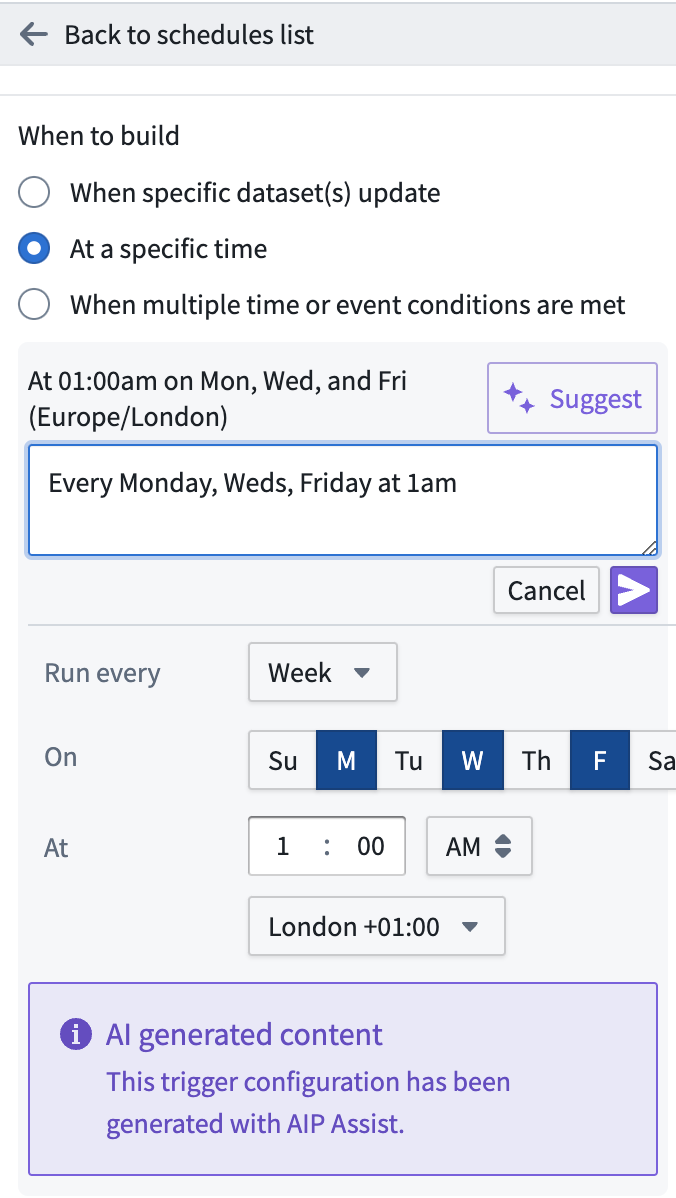
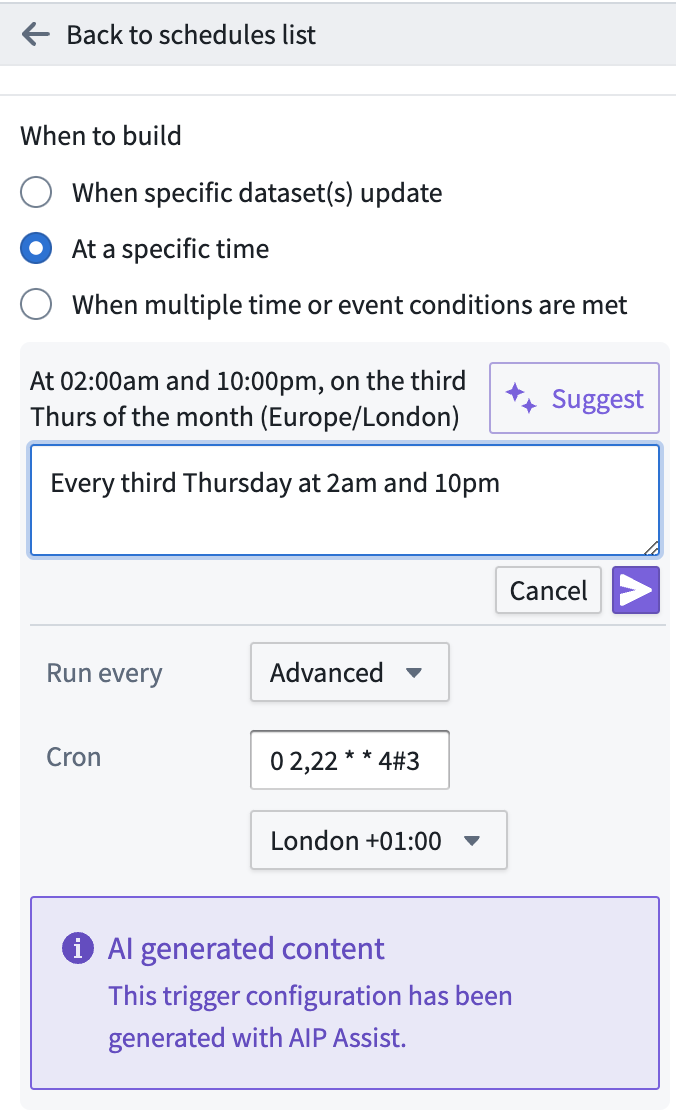
For more information, see Build a schedule with AIP.
Introducing Ontology SDK: Build on top of the Ontology [Beta]
Date published: 2023-06-22
The new Foundry Ontology SDK allows developers to leverage the full power of the Palantir Foundry Ontology directly from within the development environment. You can generate the Ontology SDK with the Developer Console, a new portal for creating and managing applications using Palantir APIs. The Ontology SDK is created as a package in TypeScript based on a selected subset of the Ontology.
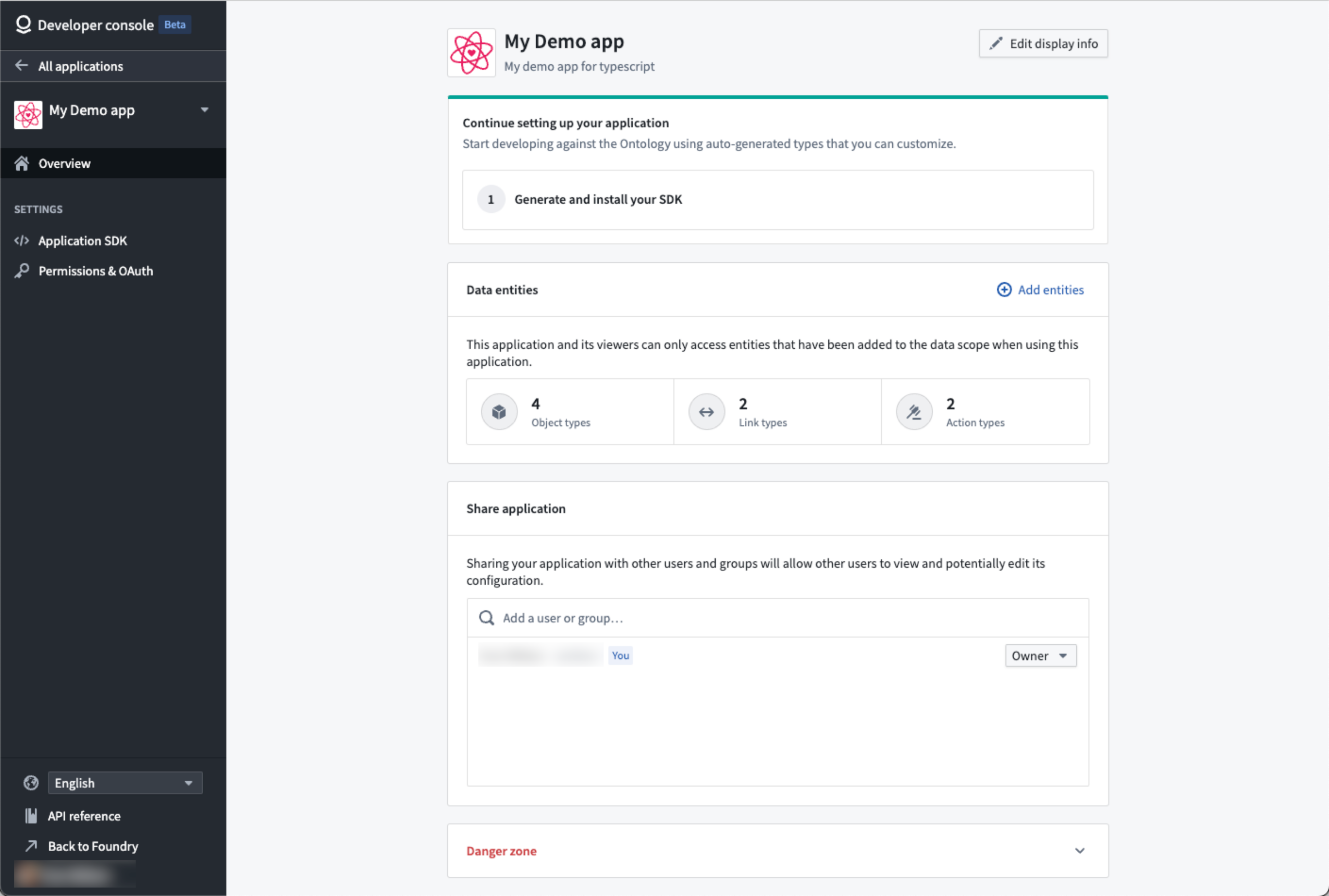
By treating Foundry as your backend, you can leverage the Ontology's robust ability to perform queries and Foundry writeback alongside granular governance controls to accelerate the process of developing applications that can power your organization.
Ontology SDK benefits include:
- Accelerated development: The Ontology SDK helps you to quickly start developing and enhancing applications by enabling ergonomic access to Ontology APIs, allowing you to read and write back to the Ontology with just a few lines of code.
- Strong type safety: The functions and types generated for the Ontology SDK are based off of a selected, relevant subset of the Ontology. Everything is pulled from your Ontology, allowing you to query and explore your data right from the editor.
- Centralized maintenance: As the Ontology is built and managed centrally in Foundry, you can focus on application building and decrease the typical maintenance burden required to build its data foundation.
- Secure by design: The Ontology SDK is generated with a token scoped only to the Ontological entities you want your application to access.
Additionally, TypeScript bindings for frontend development are now available and provide a convenient way for developers to build React applications quickly on top of Foundry.
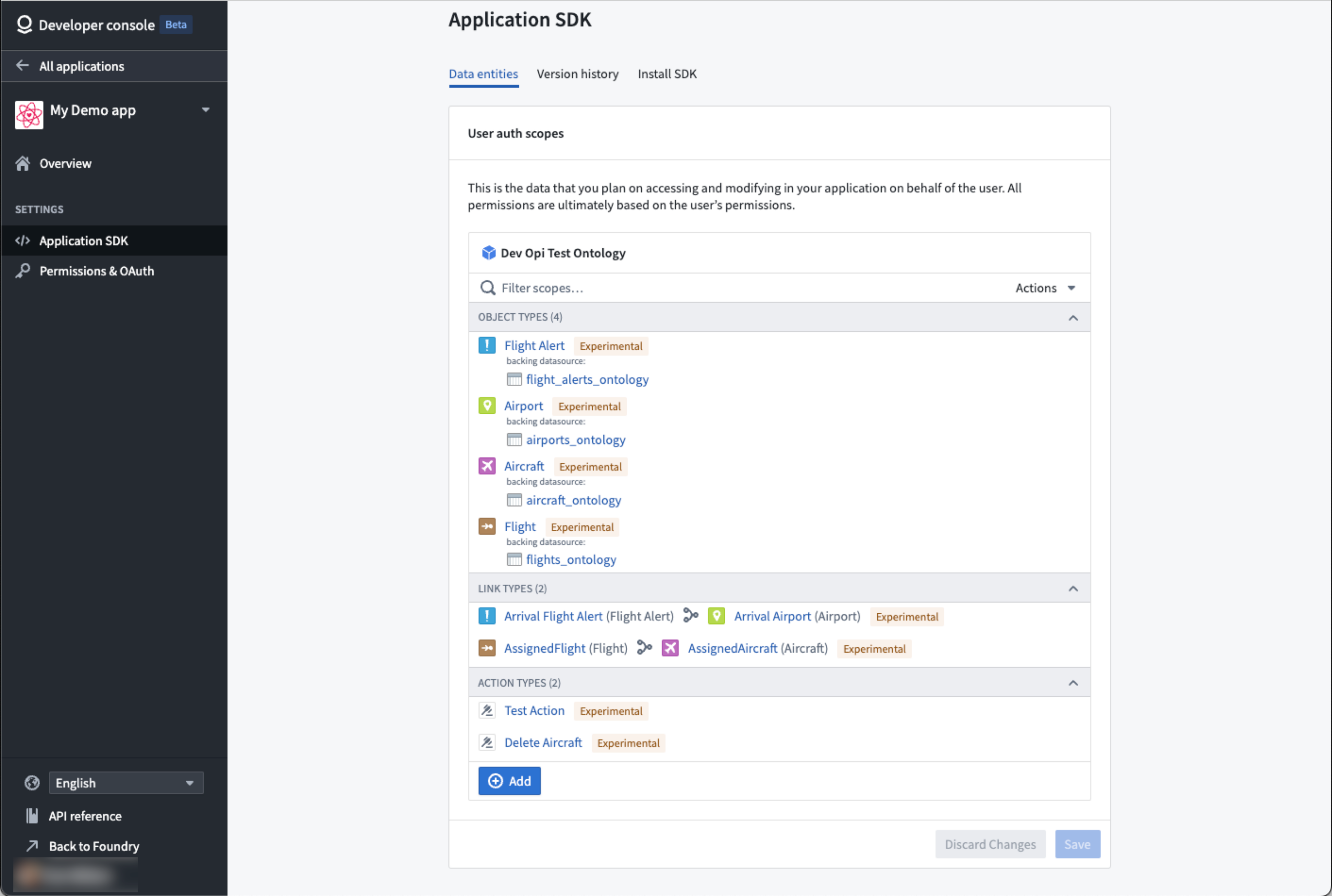
The generated code uses metadata about your Ontology such as property names and descriptions, so you can see them directly in your editor.
Use Developer Console to generate the Ontology SDK
The Ontology SDK is generated through Developer Console, a new portal through which you can create and manage applications built to use Palantir APIs. To start, enable Developer Console in Control Panel, or ask your Palantir support for assistance.
Then, open Developer Console from the left sidebar to start creating and configuring applications.

The Developer Console comes with quick start instructions and installation guidance to help you get started with the Ontology SDK. To get started with TypeScript and React, we provided a TypeScript sample starter repository. Follow the README ↗ instructions to begin.
Read more about the Ontology SDK.
What's on the development roadmap?
The following features are currently in development:
- Python package: In addition to TypeScript, a Python Ontology SDK available via Developer Console.
- Automatic updates: The ability to automatically generate new versions of the Ontology SDK for your application as your ontology evolves.
- Autogenerated API documentation: In-platform, language-specific documentation for your application Ontology SDK.
...and much more!
Introducing AIP Assist Sidebar [Beta]
Date published: 2023-06-15
Palantir Foundry's AIP Assist sidebar is an LLM-powered support tool available where AIP is enabled and designed to help users navigate, understand, and generate value with their Palantir platform. Users can now ask the AIP Assist sidebar questions in natural language and receive real-time help with their queries.
Benefits of using AIP Assist include:
- User-friendly interface: Powered by LLMs, AIP Assist has an intuitive interface that makes it easy for users to ask questions and receive relevant, natural, and easy-to-understand responses.
- Real-time assistance: AIP Assist provides real-time assistance to empower users to resolve issues and queries quickly, improving user productivity while reducing dependency on support teams.
- Multi-language support: AIP can respond to queries in all common languages.
- Context awareness: Designed to maintain context of the conversation, AIP Assist is aware of what Foundry application you are in.
- Foundry-grade security: AIP Assist respects Palantir’s AI Ethics Principles ↗ fully and does not access your data.
- Iterative improvements: Users can provide feedback on the quality of AIP Assist responses to help improve the tool as development continues.
When should I use the AIP Assist sidebar?
The AIP Assist sidebar leverages context surrounding your request to provide real-time assistance without accessing any of your Organization's data. AIP Assist is trained on Palantir's documentation and uses Natural Language Processing (NLP) and third-party Large Language Models (LLMs) to parse the user's query and provide the most relevant response, consistent with Palantir's security standards.
For example, you may interact with the sidebar by querying it about the Foundry platform, debugging model integration, or even how to convert a data structure using a Slate function written in JavaScript. These are just a few of the multi-faceted support areas offered by the AIP Assist sidebar.
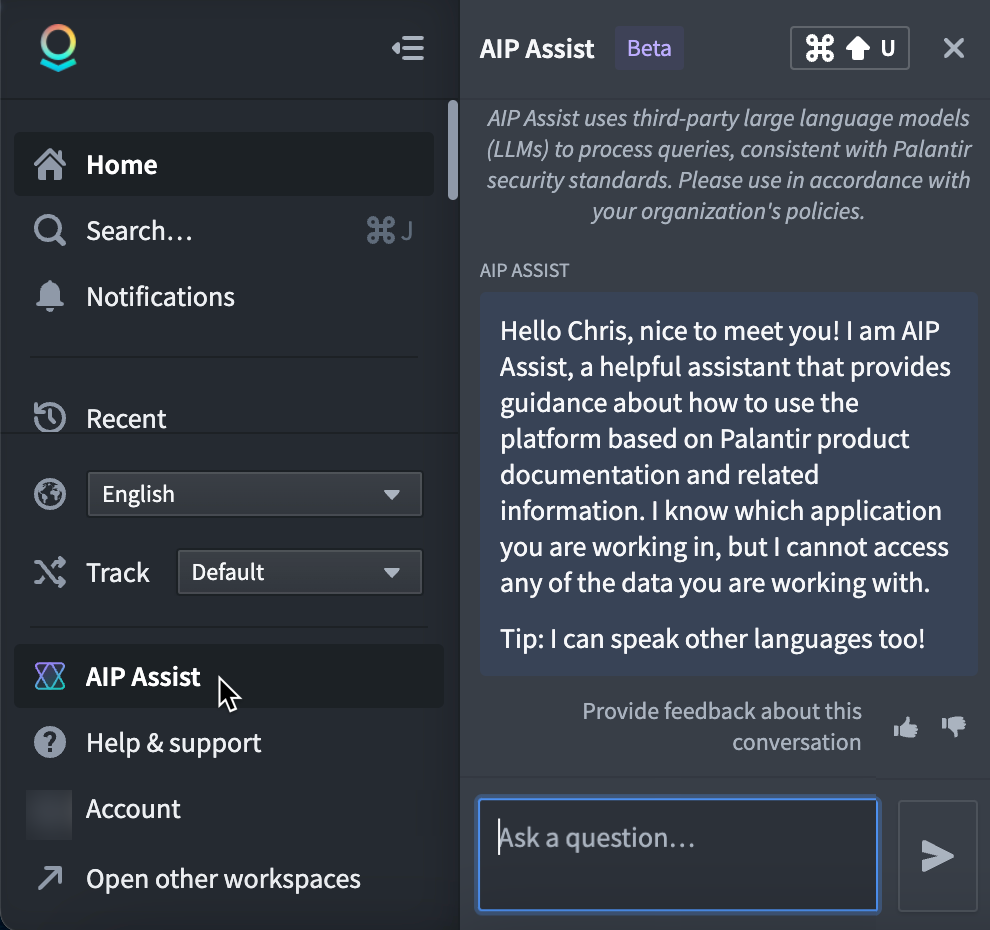
To access this tool on an AIP-enabled instance, select AIP Assist from the workspace navigation bar or access it by a keyboard shortcut Cmd+Shift+U on macOS or Ctrl+Shift+U on Windows. Once opened, you can start typing queries in plain text in the Ask a question... input field.
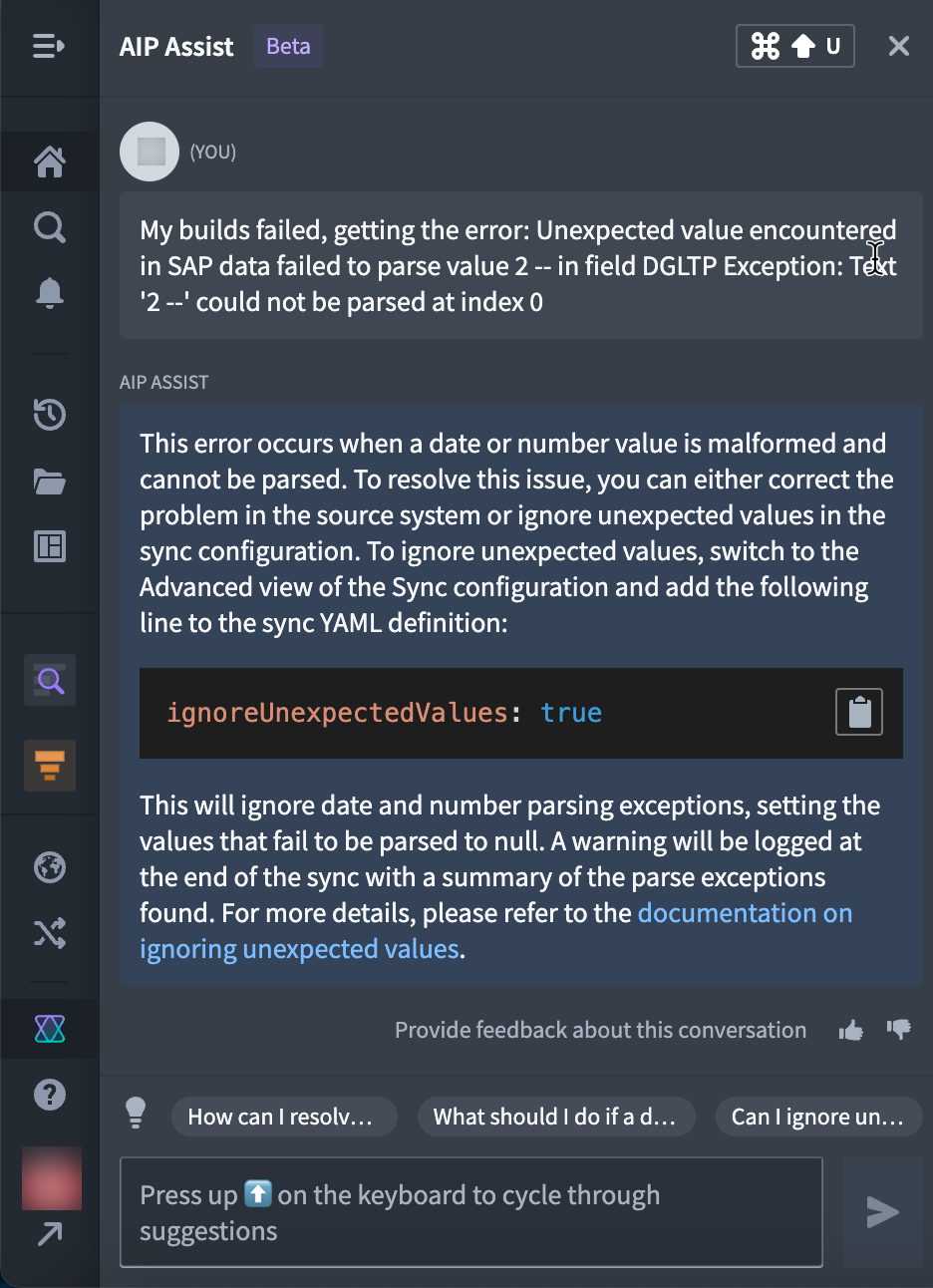
AIP functionality is continually being enhanced across the Palantir platform. Future announcements will detail additional AIP features available for popular tools.
Introducing AIP features in Notepad
Date published: 2023-06-15
Foundry Notepad introduced a collection of AIP features designed to help you share Ontological insights faster and more efficiently. You can use AIP in Notepad to automatically spellcheck, shorten, modify, or translate your text - all while preserving existing formatting.
Notepad's new AIP features include:
- Fix spelling and grammar: Support for English, French, German, Japanese, Korean, Spanish, and Ukrainian.
- Change writing style: Select from “Professional” (suitable for reports) or “Confident” (suitable for announcements) styles.
- Shorten: Make text blocks more concise.
- Translate: Translate text from one supported language to another.
- Preview multiple commands: Preview the result of multiple AIP operations on the same text block. For example, preview spelling corrections, conciseness, and French translations all before replacing your original text.
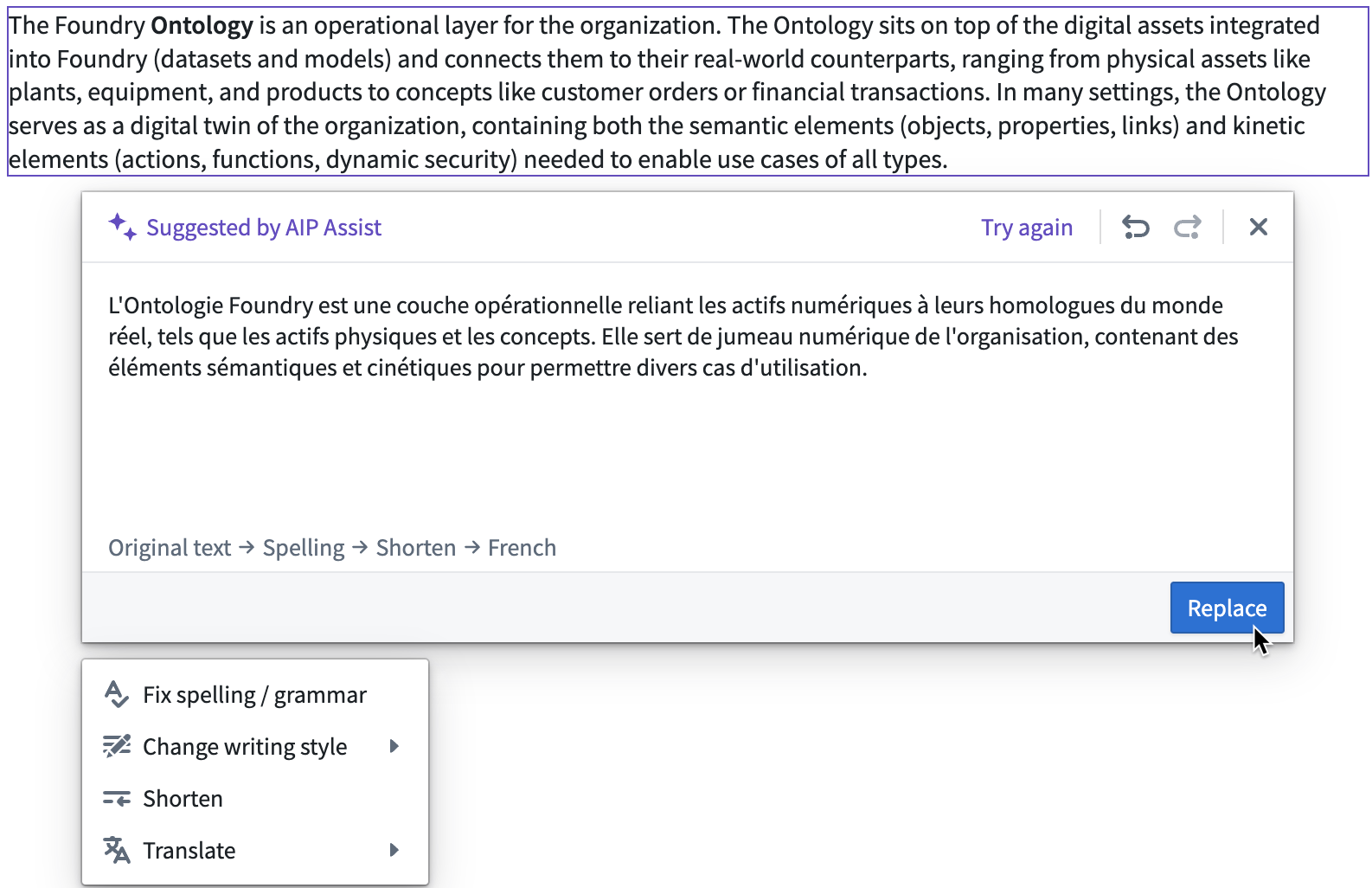
To use AIP in Notepad, select the drag handle that appears next to your text block and choose Edit with AIP Assist from the dropdown menu to begin improving your Notepad document. For reference, see AIP features in Notepad in the documentation.
Announcing Cipher for cryptography-backed data minimization
Date published: 2023-06-06
Palantir Foundry has always come out of the box with default at-rest and in-transit encryption to protect your data from adversaries. Cipher enables yet another layer of protection on top of this existing layer of defense by giving your privacy and data security teams a granular degree of control on the data your operational users see. Use Cipher to restrict visibility at the column level of a single dataset, or add a rate limit on users’ access as an additional check and balance. Administrators can build concrete Cipher workflows without having to manage encryption key access, while users gain intuitive point-and-click tools to access necessary sensitive data.
Right people, right time, right data
Cipher makes it easy to safeguard the privacy and security of your organization’s most important data.
Use Cipher in conjunction with Markings and Restricted Views when you need extra granularity of data access. Administrators can enable decryption in a single dataset down to the cell level so users access only the most-pertinent data for their workflow. Cipher’s ability to manage data at a granular level ensures that setting data permissions is not an all-or-nothing decision.
For example, you can use Cipher to obfuscate a sensitive dataset column by default such that the specific data is obscured from your data scientists, data engineers, and app developers. Once in the Ontology layer, your operational users who need access to the sensitive information can get granular, cell-level access to it when they need it. In addition to the granular permissions, Cipher allows data governance users to easily audit who accesses the sensitive data by recording each encryption or decryption action and its accompanying reasons.
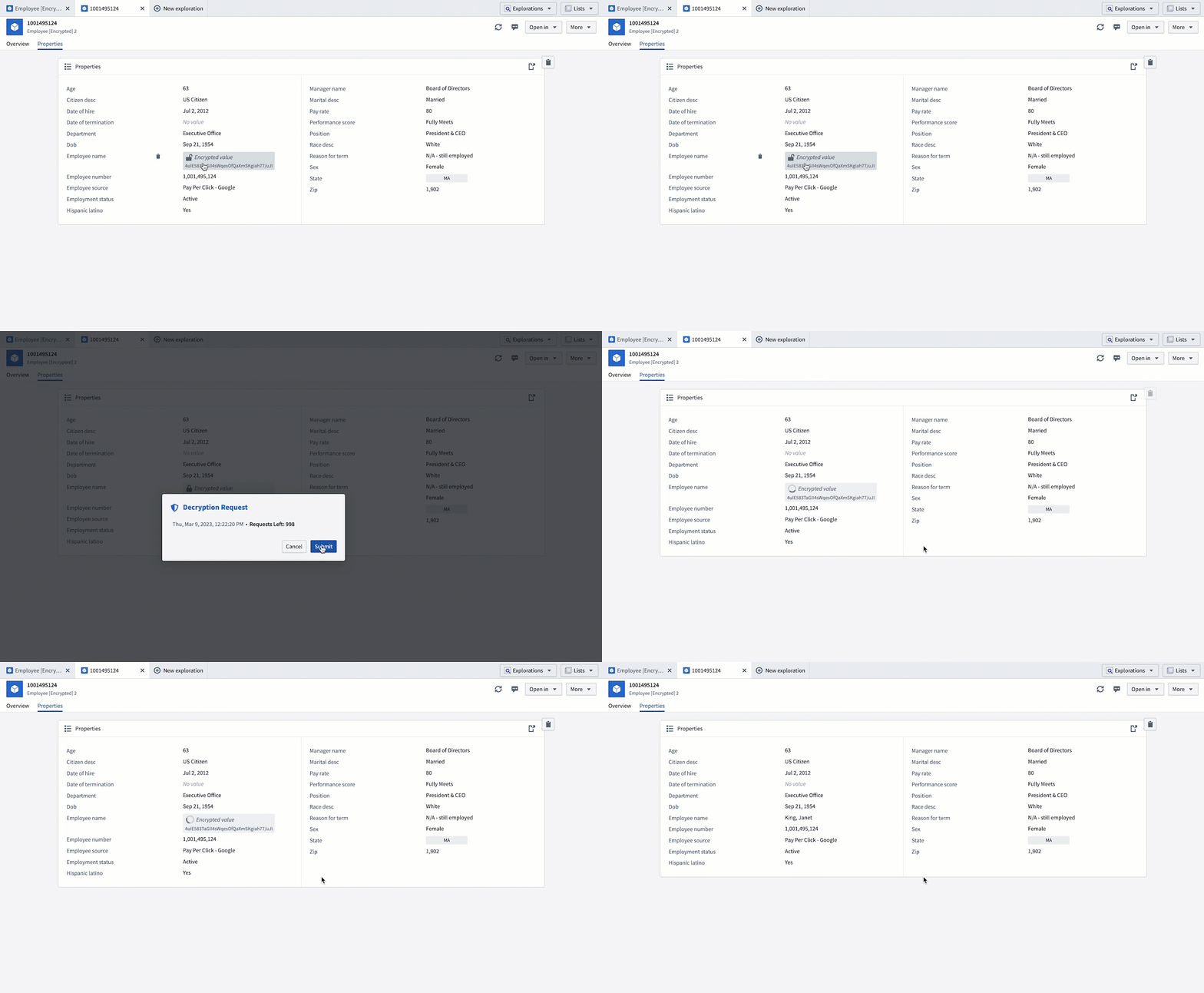
When should I use Cipher?
Cipher can be used to obfuscate sensitive information by default while allowing selective de-obfuscation. Cipher is particularly useful when certain operational users need one-time access to sensitive information for their day-to-day jobs. For example, an employee at a customer service center only needs to know about a customer’s contact information if the employee receives a customer service request from that specific customer.
Additionally, Cipher is useful in cases where operational users need to be given a daily cap, or rate-limit, for the amount of decryption operations they may perform. This helps prevent abuse of sensitive data, even if a user has a genuine need to access the data.
Cipher is now available on all Foundry enrollments. For more information on Cipher, including concrete examples of how it can be used, review the Cipher documentation.
Introducing Resource List widget for Workshop
Date published: 2023-06-06
Application builders can now use the Resource List widget in Palantir Foundry’s Workshop to create rich operational landing pages that reference datasets, pipelines, Ontology objects, and more.
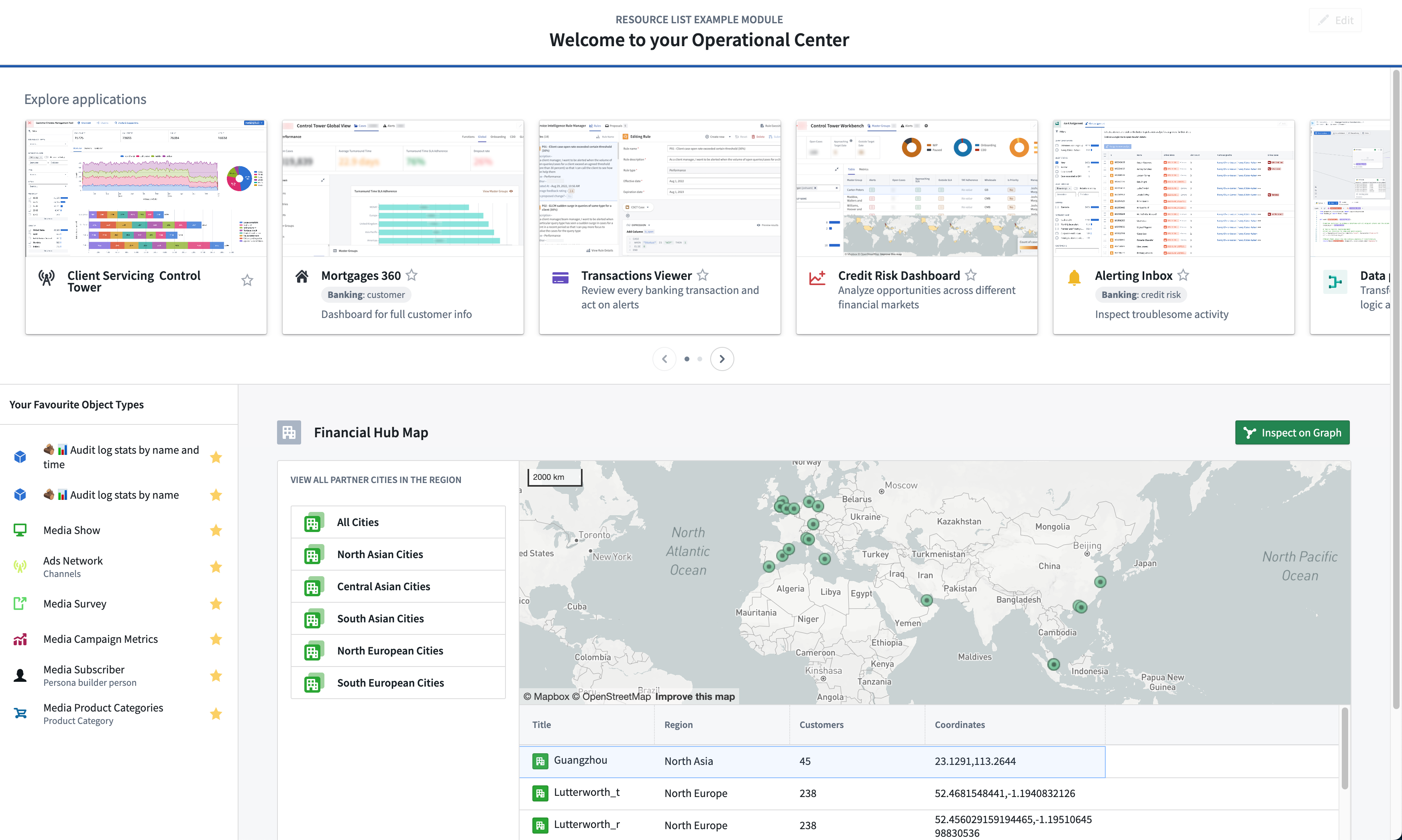
As the scope of an organization’s Ontology and complexity of operational use cases grow, so does the importance of a relevant landing page experience. The Resource List widget provides easy access to resources from your files and project hierarchy, allowing workshop apps to surface a broader array of highly relevant resources for operational users. Resources such as object types and object sets can be dynamically shown based on the viewing user’s favorite or recent resources, or fixed as static resources. Additionally, this can all be customized to meet tailored style requirements for consistent user experiences.
Surface the most relevant resources
Customize the Resource List widget with resources available from Files and Projects and curate user interactions that result from selecting different items. Choose to display between Files and Projects, object types, and object sets using Workshop’s intuitive point-and-click interface. You can populate the widget also using tags via the dynamic subtypes in one view, while harnessing Foundry’s built-in knowledge of an Organization’s directory hierarchies and existing user permissions.
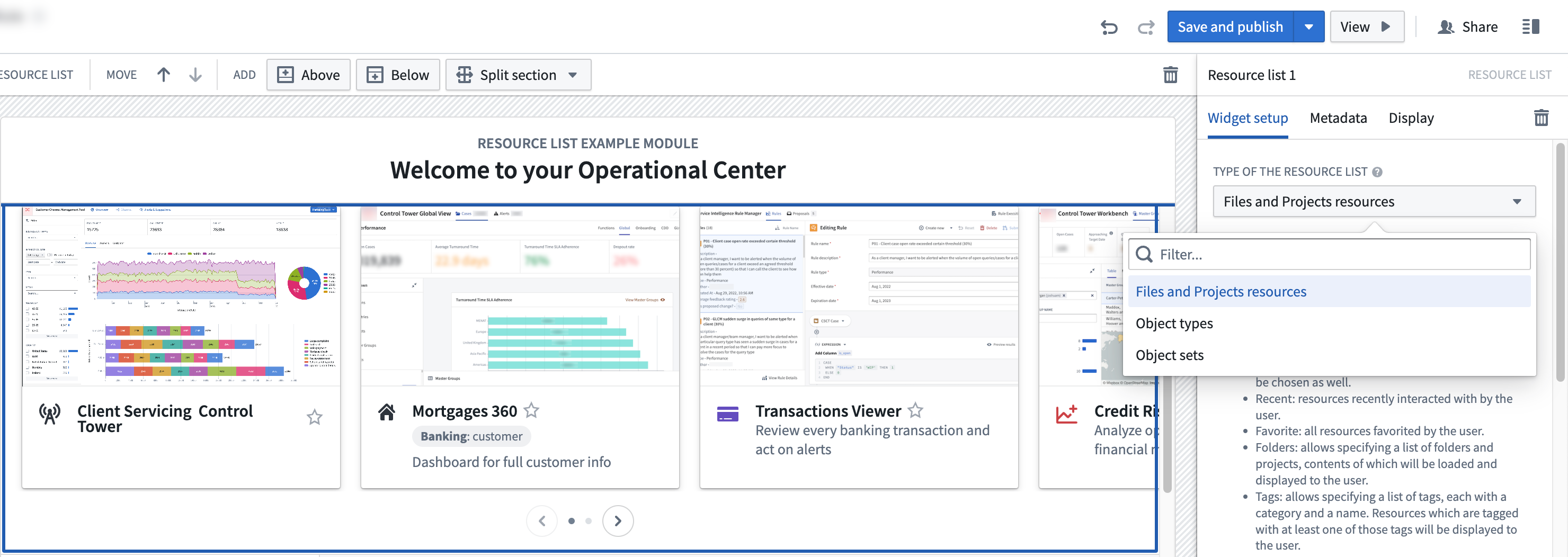
Improve the relevance of the landing page by curating display resources that are tailored toward the needs of your organization and its diverse user groups.
Highly-customizable display configuration
After selecting the resources to display, you can customize how they are displayed from a variety of settings. For object types, you can set a dynamic content view based on the viewing user, composed of all resources, prominent (set in the Ontology Manager), or the user’s favorite resources. Alternatively, display specified resources by RID and customize the titles, descriptions, and the style of each item by selecting from three styles or create an override to make certain object types display more prominently. As the widget respects existing file hierarchy and resource permissions, your users will only see resources available to them, making it a seamless experience for varying user roles.

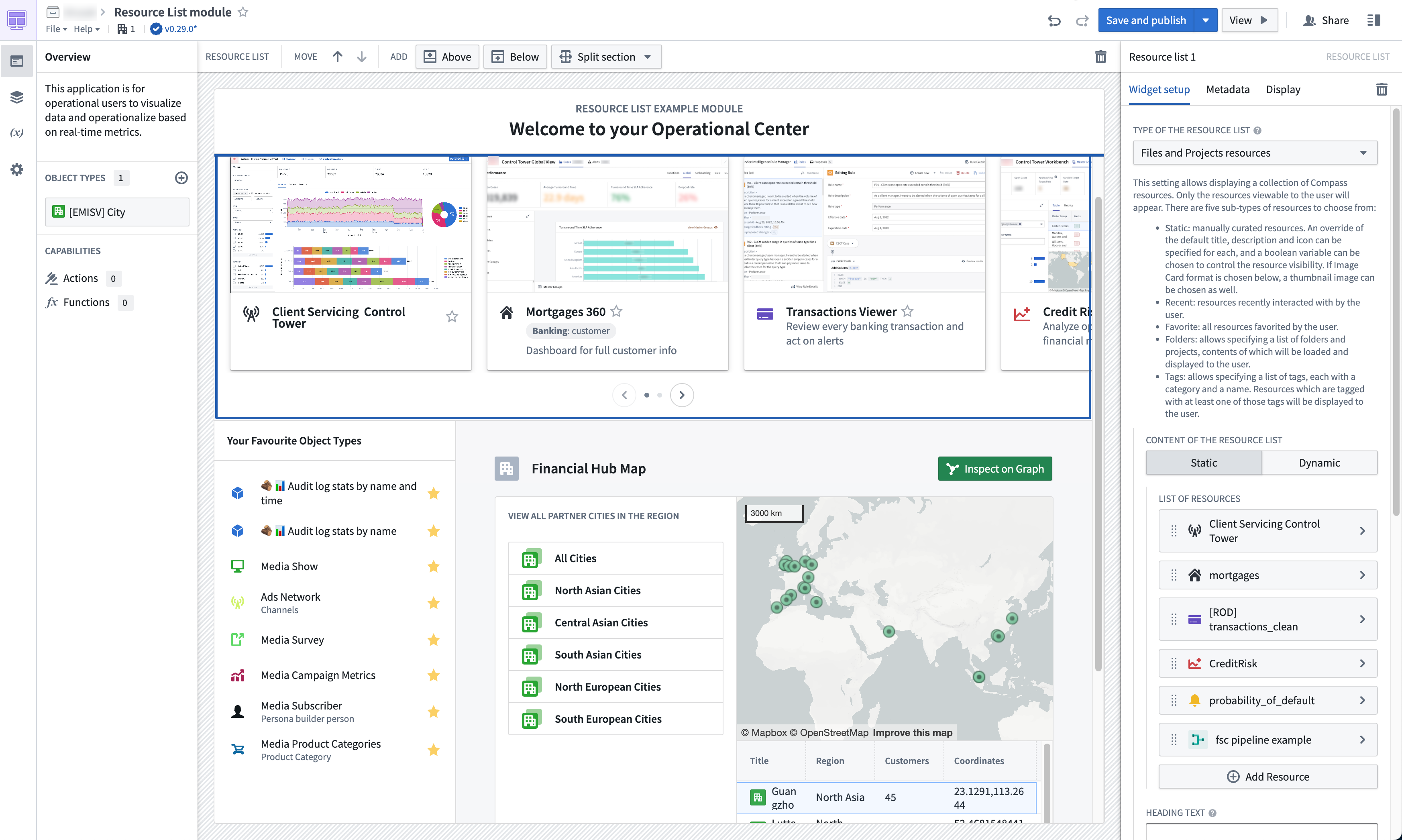
You can also customize image display to be either displayed in a list, or in image cards. Pick the image card style for each individual item and select a thumbnail to represent the resource where necessary. Image cards can be displayed in either orientation, with a scroll bar or a carousel to fit your needs.
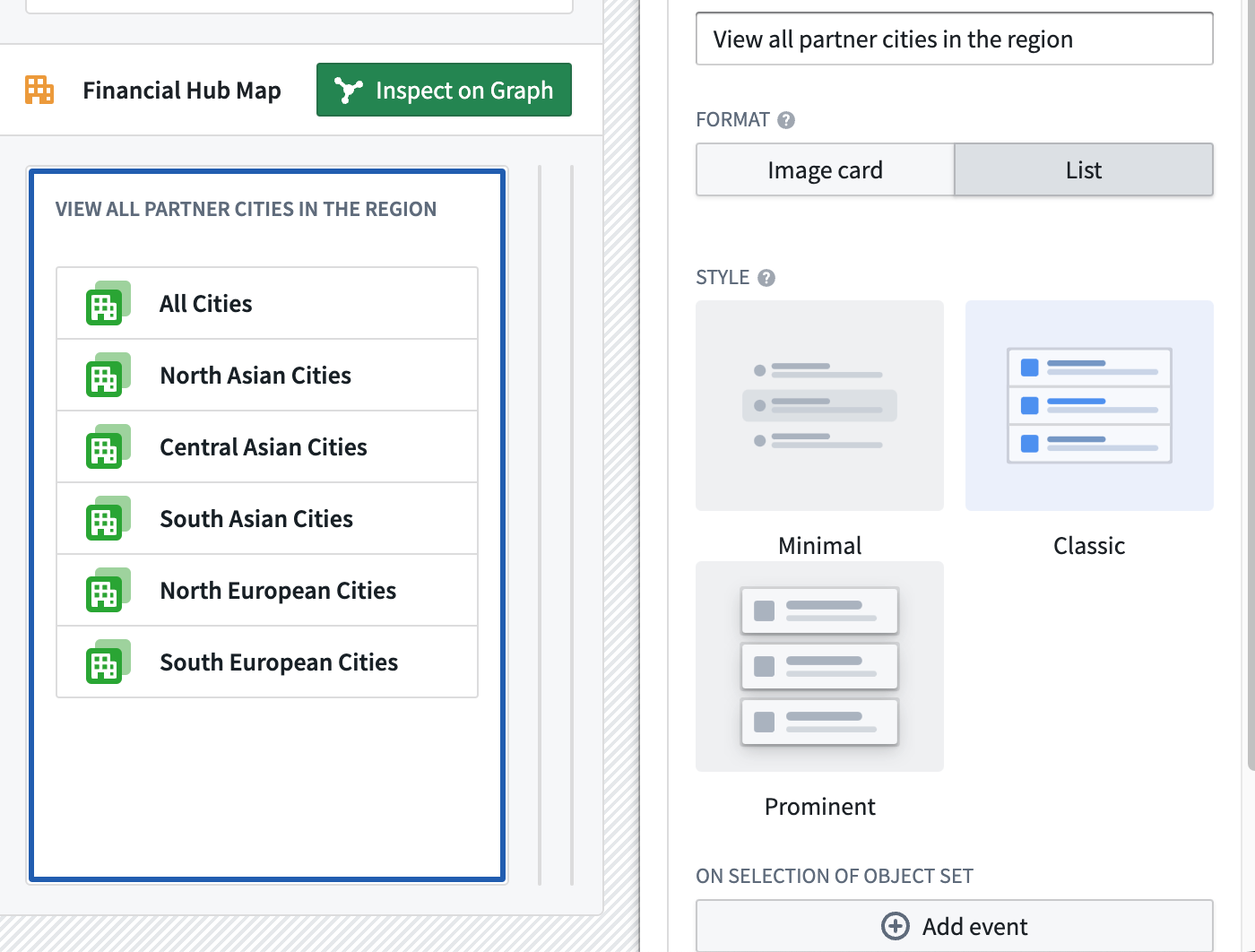
In addition, the action following an item click can also be customized. By default, a click opens the resource, but you can also set the resulting action from a myriad of Workshop events or have the action set a value of a variable.
When should I use the Resource List widget in Workshop?
The Resource List widget for Workshop offers application builders a first-class editing experience when a simple-to-use, yet powerful option to showcase a list of resources to users is required. For example, if you have a link to a report that maps to a folder, dataset, or a Notepad document, you can precisely define the amount of items via RIDs and specify overrides for how each item should be displayed for a first-class editing experience.
Data science or analytically-oriented users may continue to find applications such as Contour or Quiver to be more suitable as Workshop is designed to serve the need of operational users with a focus on the Ontology. Application builders who have white-labeling requirements should consider building in Slate in lieu.
To learn about the available configurations of the Resource List widget, see Workshop documentation.
Announcing AIP
Date published: 2023-06-01
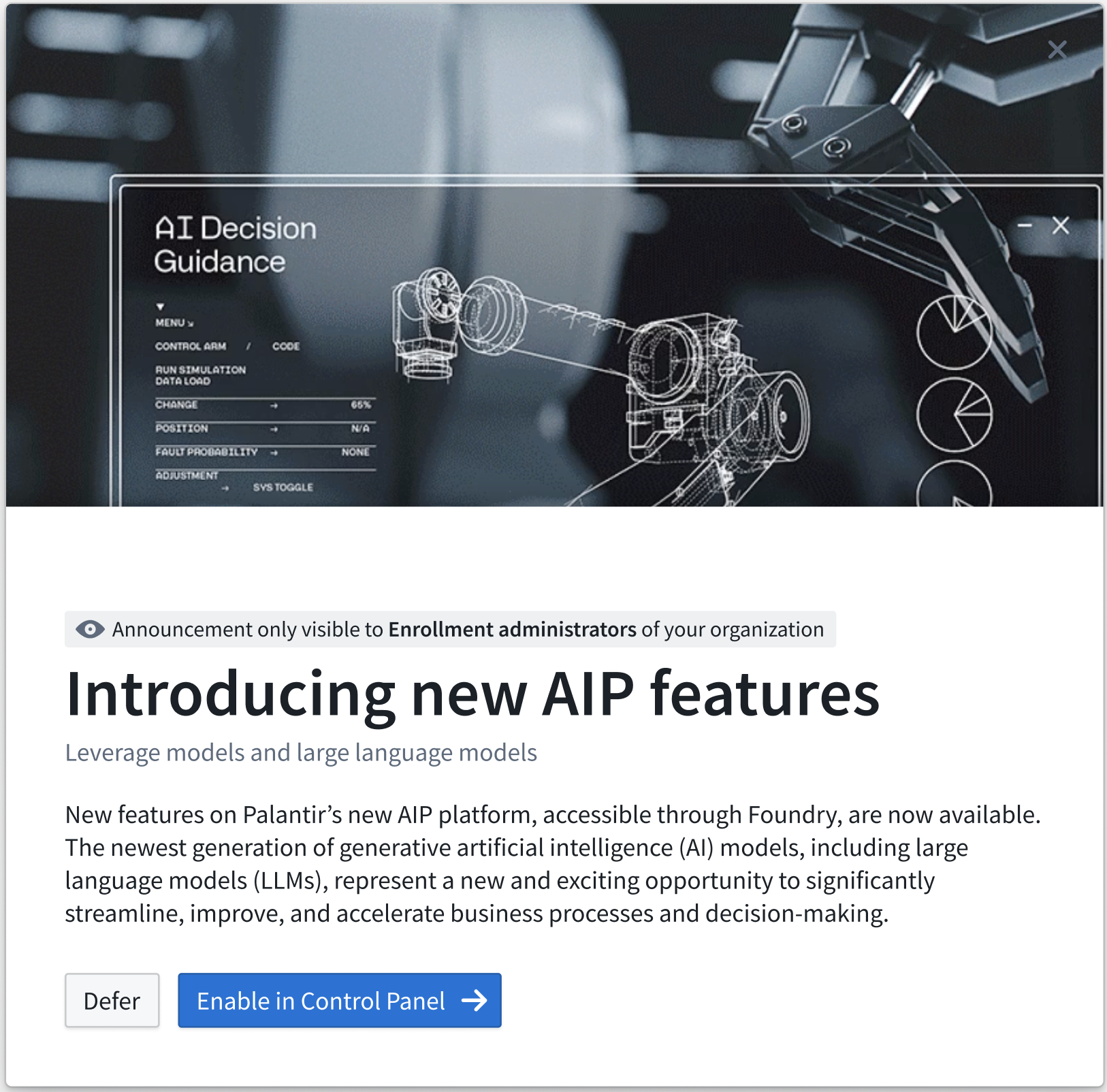
As of last week, some Foundry enrollments are able to activate AIP - Palantir’s new Artificial Intelligence Platform - from within the Control Panel. A prominent banner - displayed only to Foundry administrators - will draw attention to this configuration if it is available.
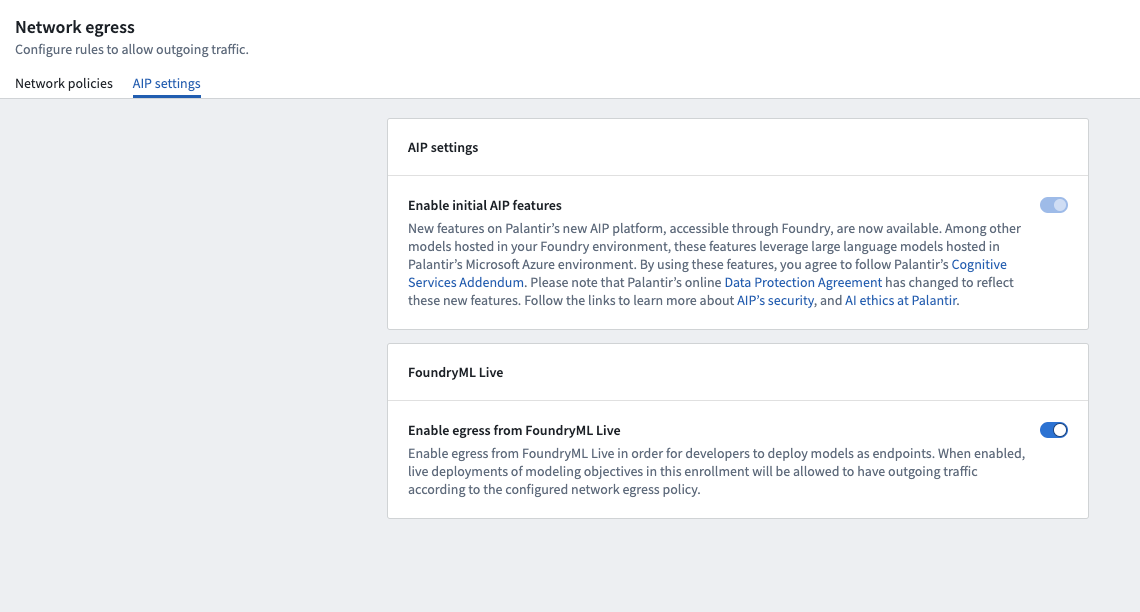
Enabling AIP will provide early access for Foundry users to AIP Assist - an LLM-powered support tool trained on Foundry documentation. Under Help & Support, users can interact live with an AI assistant trained on Foundry content. Note that Assist has contextual awareness of the user's location within Foundry, but no access to any data or metadata.
AIP Assist also enhances the support issue filing flow by gathering additional context and sharing suggestions before a potential interaction with support engineers. Testing has shown that this can satisfactorily resolve a significant percentage of support interactions without back-and-forth with a support engineer and, in the situations where the issue does require a support engineer, reduces the number of follow-ups for clarification.
What's next?
AIP integration is coming for more Foundry tools, including Slate, Pipeline Builder, Quiver, Code Repositories, Notepad, and Workshop. The capabilities will be tuned for each application; for instance, AIP in Slate can help auto-generate custom CSS styling, auto-complete Javascript in Slate functions, offer suggestions for code refactors, and suggest meaningful names for application elements like widgets and queries. Meanwhile, AIP in Pipeline Builder can convert natural language descriptions of data transformation logic into robust, well-factored pipelines, as well as summarize and explain existing data pipelines in natural language.
Foundry AIP is evolving rapidly. More information on future updates will be posted on these Announcements pages as new integrations and features become available. We'll also be publishing documentation for AIP and the underlying Language Model Service in the coming weeks.
FAQs
- Is any Foundry data used to train the AIP model?
- No. The AIP Assist model is only trained on Foundry documentation and has no access to data within Foundry.
- Where do user prompts go?
- The AIP model interacts with the Language Model Service, which interacts with modeling infrastructure provided by Microsoft. User prompts are not used for model training purposes nor are they monitored by Microsoft, due to an exception secured by Palantir for AIP users. Further documentation on the Language Model Service and AIP security guarantees is forthcoming.
Mapbox Boundaries V4 now available for install
Date published: 2023-06-01
Mapbox V4 Boundary datasets are now available to install on all Palantir Foundry instances via Marketplace. The V4 release contains updates to the boundary information itself as well as improved functionality. Notable boundary changes (see full list ↗) include updated blocks and tracts from the 2020 United States census and updated legislative districts from 2022 U.S. redistricting. With Boundaries V4 installed, maps in Foundry will more reliably display region names in tooltips and support automatic zoom-to-fit on boundaries-backed map layers.
Install Boundaries V4 or migrate from previous Boundaries versions
If you are currently using Boundaries V3, we highly recommend upgrading for the most accurate boundaries and the best user experience in the Workshop map widget and Contour map board. While Foundry will continue to support Mapbox Boundaries V3, future boundary-related feature development will take advantage of new capabilities from the Mapbox Boundaries V4 dataset and require V4 as the baseline version.
Review the documentation on how to use geospatial data in the Ontology to learn more about how to install or upgrade to Mapbox Boundaries V4 in Foundry.
Additional highlights
Data Integration | Pipeline Builder
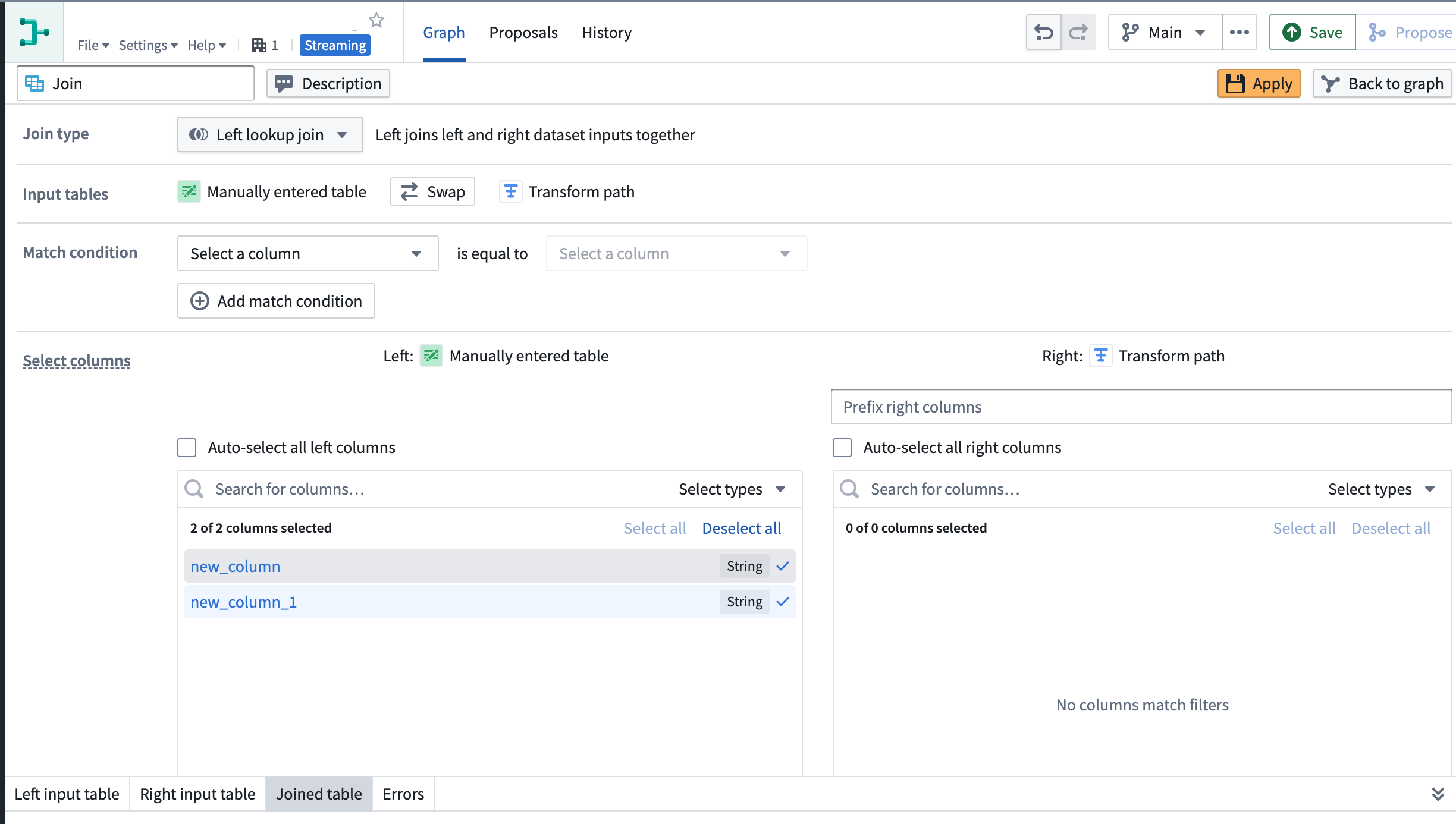
Support added for streaming left lookup joins | Streaming left lookup joins now support the auto-propagation of upstream columns, resulting in an output row for each matching condition. Previously, upgrading from the streaming left join returned a single output row based on the first match from the right side. The new lookup join will return a row for each match.
Security | Projects
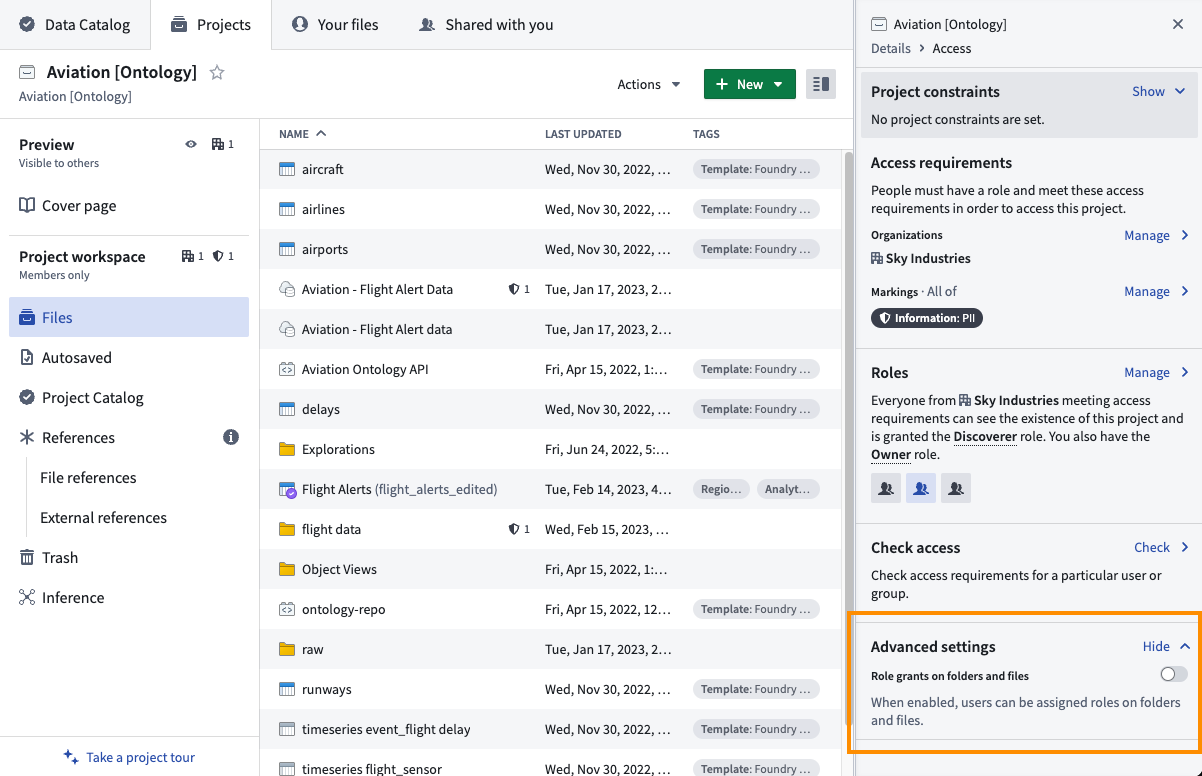
Resource-level role grants | Users with the Owner role on Projects can now disable direct folder and file role grants for resources within the Project. This toggle is enabled by default. When disabled, roles can only be granted at the Project level, providing uniform capabilities on all resources within the Project's scope and easier Project and resource permission management. Existing direct folder and file role grants in Projects are not affected by this update. Learn more in our documentation.
Ontology | Map
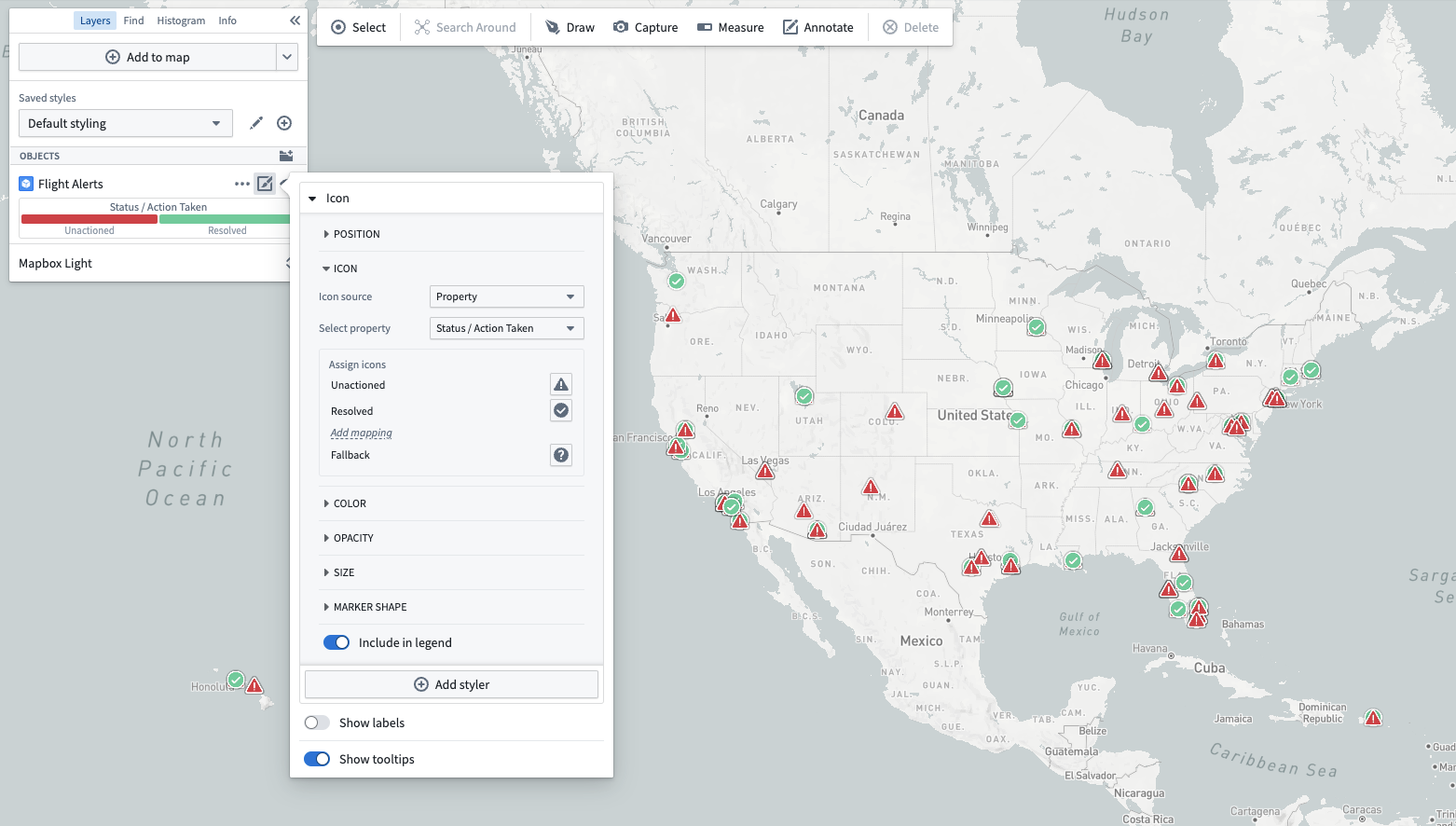
Add icon styling features | Map builders can now specify what icon to use when rendering objects. Previously, the Map application always used the icon configured in the Ontology. Now, users can choose an icon that makes sense of the context of their map, as well as configure icons that will be determined based on the value of a property of the object.
Analytics | Contour
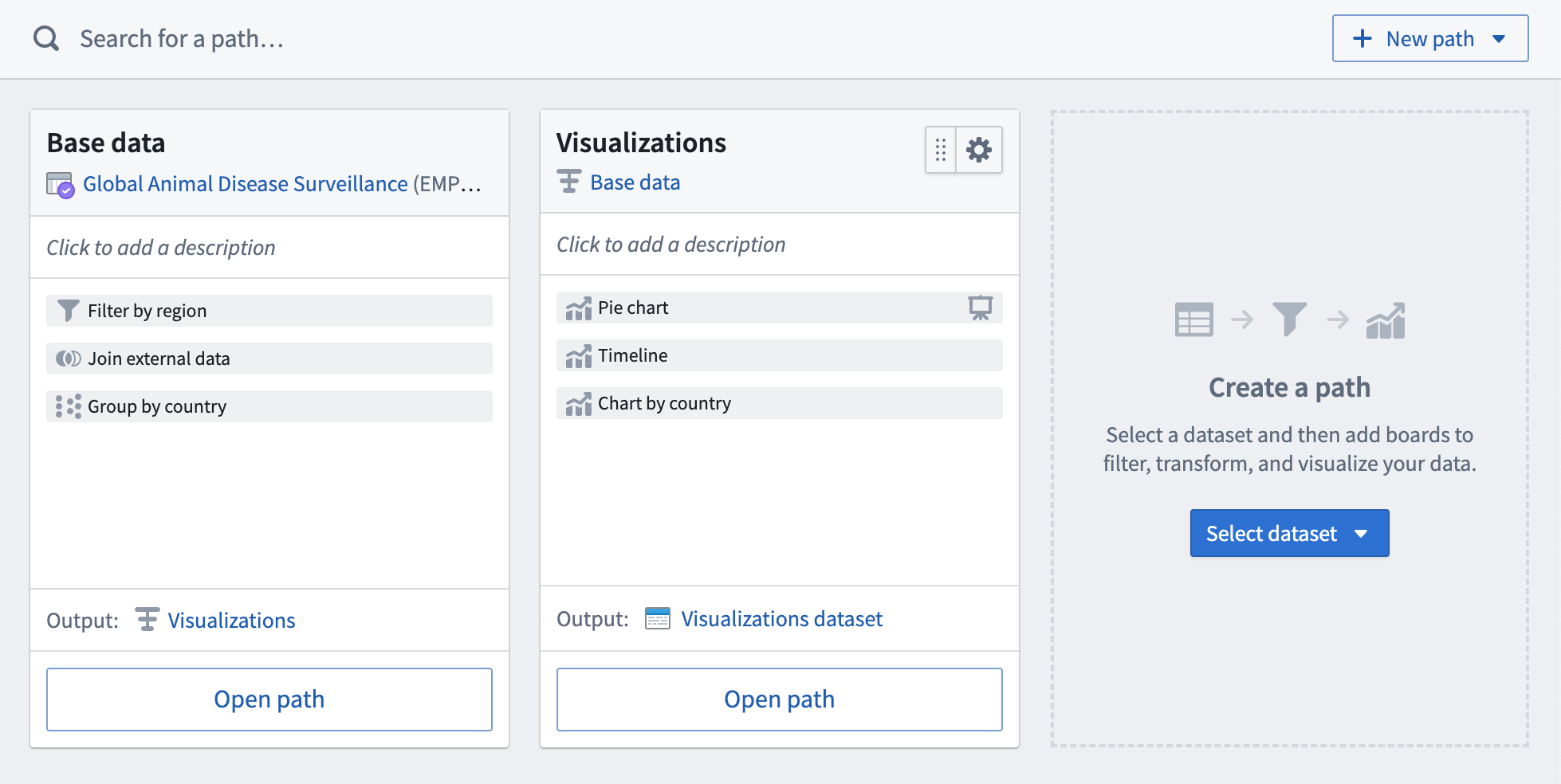
Enable new overview everywhere | Redesigned the analysis overview page to improve performance and make it easier to find and organize the paths of an analysis.
Analytics | Contour
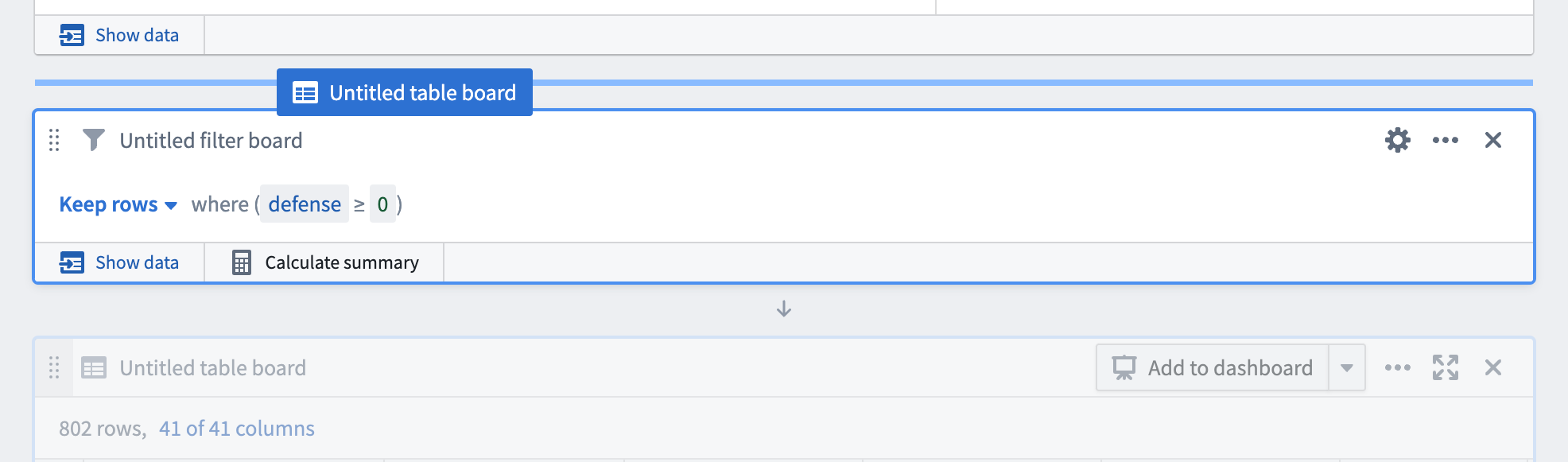
Board drag and drop | Boards can now be rearranged within a path using drag and drop. To rearrange boards, click and hold the drag handle at the top left of a board and then drag it between two other boards on the path.
Ontology | Ontology Management
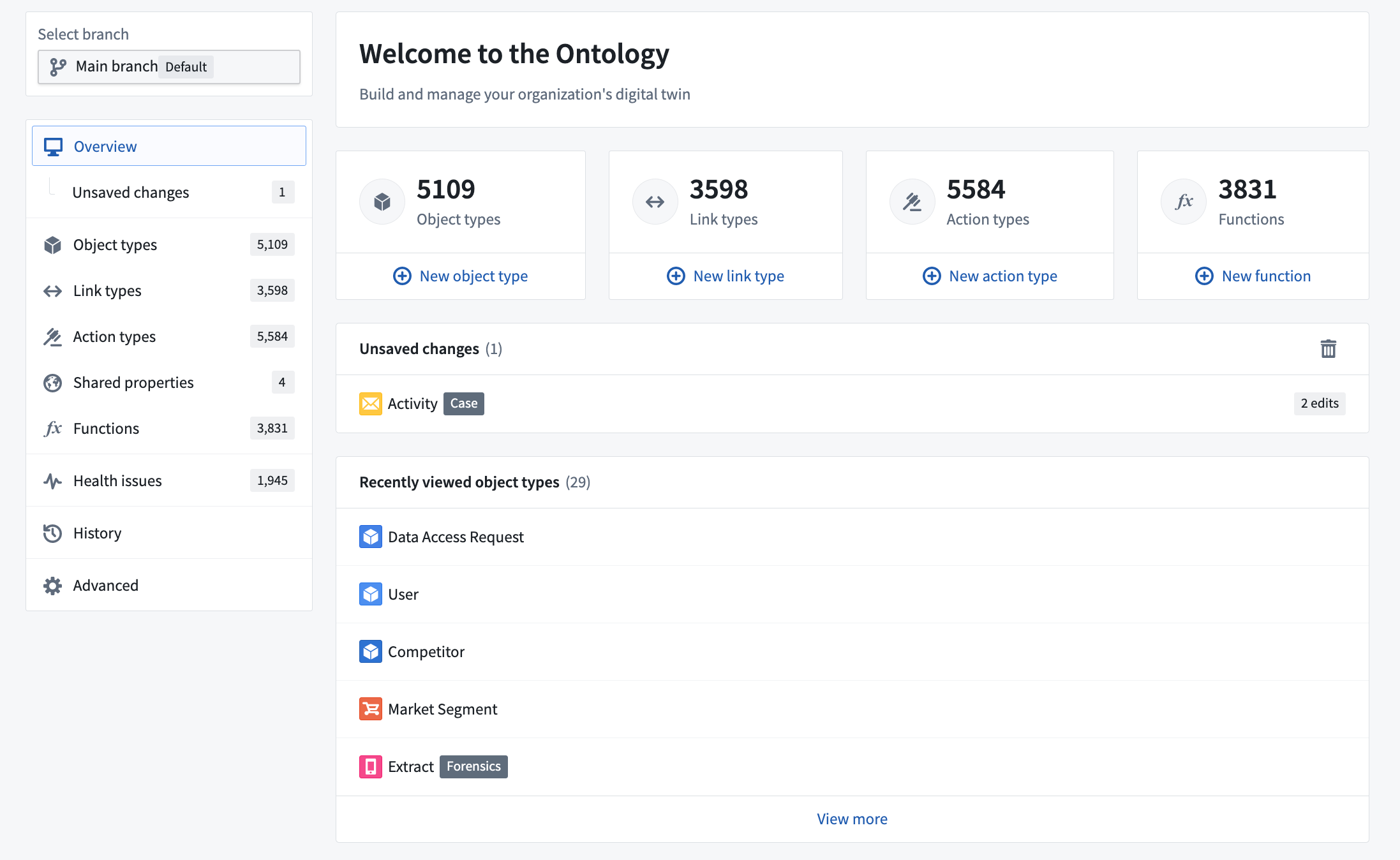
Recently viewed object types on the OMA overview page | Recently viewed object types now have their own section in the Ontology Manager Overview page. Object types in this widget are ordered by how recently you visited them. This widget also benefits from faster loading times, so you may navigate to your recently viewed items before the full Ontology loads.
中文翻译
公告
在调度器中引入 AIP
发布日期:2023-06-22
现在,在创建具有特定时间触发的数据集构建调度时,您可以输入自然语言提示,让 AIP 建议正确的调度配置。通过将 AIP 集成到 构建调度 侧边栏选项中,您可以轻松预配置调度并为复杂触发器生成 cron 格式。
有关更多信息,请参阅使用 AIP 构建调度。
引入本体论 SDK:在本体论之上进行构建 [Beta]
发布日期:2023-06-22
全新的 Foundry 本体论 SDK (Ontology SDK) 允许开发人员直接从开发环境中利用 Palantir Foundry 本体论的全部功能。您可以通过开发者控制台 (Developer Console) 生成本体论 SDK,这是一个使用 Palantir API 创建和管理应用程序的新门户。本体论 SDK 是基于本体论选定子集以 TypeScript 包的形式创建的。
通过将 Foundry 视为您的后端,您可以利用本体论强大的查询和 Foundry 回写能力,配合精细的治理控制,加速开发能够为您的组织提供动力的应用程序。
本体论 SDK 的优势包括:
- 加速开发: 本体论 SDK 通过提供对本体论 API 的便捷访问,帮助您快速开始开发和增强应用程序,只需几行代码即可读写本体论。
- 强类型安全: 为本体论 SDK 生成的函数和类型基于本体论的选定相关子集。所有内容都从您的本体论中提取,允许您直接在编辑器中查询和探索数据。
- 集中维护: 由于本体论是在 Foundry 中集中构建和管理的,您可以专注于应用程序构建,并减少构建其数据基础所需的典型维护负担。
- 安全设计: 本体论 SDK 生成的令牌范围仅限于您希望应用程序访问的本体论实体。
此外,现在提供了用于前端开发的 TypeScript 绑定,为开发人员在 Foundry 之上快速构建 React 应用程序提供了一种便捷方式。
生成的代码使用关于本体论的元数据,例如属性名称和描述,因此您可以直接在编辑器中看到它们。
使用开发者控制台生成本体论 SDK
本体论 SDK 通过开发者控制台生成,这是一个新门户,您可以通过它创建和管理使用 Palantir API 的应用程序。首先,在控制面板中启用开发者控制台,或向您的 Palantir 支持人员寻求帮助。
然后,从左侧边栏打开 开发者控制台 以开始创建和配置应用程序。
开发者控制台附带快速入门指南和安装说明,以帮助您开始使用本体论 SDK。要开始使用 TypeScript 和 React,我们提供了一个 TypeScript 示例启动仓库。请按照 README ↗ 中的说明开始操作。
阅读更多关于本体论 SDK 的信息。
开发路线图上有哪些内容?
以下功能目前正在开发中:
- Python 包: 除了 TypeScript,还将通过开发者控制台提供 Python 本体论 SDK。
- 自动更新: 随着本体论的演变,能够为您的应用程序自动生成新版本的本体论 SDK。
- 自动生成的 API 文档: 平台内针对您的应用程序本体论 SDK 的特定语言文档。
……以及更多!
引入 AIP 辅助侧边栏 [Beta]
发布日期:2023-06-15
Palantir Foundry 的 AIP 辅助侧边栏 (AIP Assist sidebar) 是一个由 LLM 驱动的支持工具,可在启用 AIP 的地方使用,旨在帮助用户导航、理解并利用其 Palantir 平台创造价值。用户现在可以用自然语言向 AIP 辅助侧边栏提问,并获得实时帮助。
使用 AIP 辅助的优势包括:
- 用户友好界面: 由 LLM 驱动,AIP 辅助具有直观的界面,使用户能够轻松提问并接收相关、自然且易于理解的回答。
- 实时协助: AIP 辅助提供实时协助,使用户能够快速解决问题和疑问,提高用户生产力,同时减少对支持团队的依赖。
- 多语言支持: AIP 能够以所有常见语言响应查询。
- 上下文感知: 旨在保持对话的上下文,AIP 辅助知道您当前在哪个 Foundry 应用程序中。
- Foundry 级安全: AIP 辅助完全遵守 Palantir 的 AI 伦理原则 ↗,并且不访问您的数据。
- 迭代改进: 用户可以就 AIP 辅助响应的质量提供反馈,以帮助在持续开发中改进该工具。
何时应该使用 AIP 辅助侧边栏?
AIP 辅助侧边栏利用您请求周围的上下文提供实时协助,而无需访问您组织的任何数据。AIP 辅助基于 Palantir 的文档进行训练,并使用自然语言处理 (NLP) 和第三方大语言模型 (LLMs) 来解析用户的查询并提供最相关的响应,符合 Palantir 的安全标准。
例如,您可以通过查询侧边栏来了解 Foundry 平台、调试模型集成,甚至如何使用 JavaScript 编写的 Slate 函数转换数据结构。这些只是 AIP 辅助侧边栏提供的多方面支持领域中的几个例子。
要在启用了 AIP 的实例上访问此工具,请从工作区导航栏中选择 AIP 辅助,或通过键盘快捷键 Cmd+Shift+U(macOS)或 Ctrl+Shift+U(Windows)访问。打开后,您可以在 提问... 输入字段中开始输入纯文本查询。
AIP 功能在 Palantir 平台上不断增强。未来的公告将详细介绍流行工具可用的其他 AIP 功能。
在 Notepad 中引入 AIP 功能
发布日期:2023-06-15
Foundry Notepad 引入了一系列 AIP 功能,旨在帮助您更快、更高效地分享本体论洞察。您可以在 Notepad 中使用 AIP 自动检查拼写、缩短、修改或翻译文本——同时保留现有格式。
Notepad 的新 AIP 功能包括:
- 修复拼写和语法: 支持英语、法语、德语、日语、韩语、西班牙语和乌克兰语。
- 更改写作风格: 从“专业”(适用于报告)或“自信”(适用于公告)风格中选择。
- 缩短: 使文本块更简洁。
- 翻译: 将文本从一种支持的语言翻译成另一种。
- 预览多个命令: 预览对同一文本块执行多个 AIP 操作的结果。例如,在替换原始文本之前,预览拼写更正、简洁性和法语翻译。
要在 Notepad 中使用 AIP,请选择文本块旁边出现的拖动手柄,然后从下拉菜单中选择 使用 AIP 辅助编辑 以开始改进您的 Notepad 文档。有关参考,请参阅文档中的 Notepad 中的 AIP 功能。
宣布 Cipher:基于密码学的数据最小化
发布日期:2023-06-06
Palantir Foundry 始终默认提供静态和传输中加密,以保护您的数据免受攻击。Cipher 在此现有防御层之上提供了另一层保护,使您的隐私和数据安全团队能够对操作用户看到的数据进行精细控制。使用 Cipher 限制单个数据集列级别的可见性,或为用户访问添加速率限制作为额外的制衡。管理员可以构建具体的 Cipher 工作流,而无需管理加密密钥访问,同时用户可以获得直观的点击式工具来访问必要的敏感数据。
合适的人,合适的时间,合适的数据
Cipher 使保护组织最重要数据的隐私和安全变得容易。
当您需要额外的数据访问粒度时,将 Cipher 与标记和受限视图结合使用。管理员可以在单个数据集中启用单元格级别的解密,以便用户仅访问其工作流最相关的数据。Cipher 在细粒度级别管理数据的能力确保设置数据权限不是全有或全无的决定。
例如,您可以使用 Cipher 默认混淆敏感数据集列,使特定数据对数据科学家、数据工程师和应用程序开发人员不可见。一旦进入本体论层,需要访问敏感信息的操作用户可以在需要时获得细粒度的单元格级别访问权限。除了细粒度权限外,Cipher 还允许数据治理用户通过记录每次加密或解密操作及其附带原因,轻松审计谁访问了敏感数据。
何时应该使用 Cipher?
Cipher 可用于默认混淆敏感信息,同时允许选择性去混淆。当某些操作用户在日常工作中需要一次性访问敏感信息时,Cipher 特别有用。例如,客户服务中心的员工只有在收到特定客户的客户服务请求时,才需要知道该客户的联系信息。
此外,Cipher 在需要为操作用户设置每日上限或速率限制(即他们可以执行的解密操作次数)的情况下也很有用。这有助于防止滥用敏感数据,即使该用户确实有正当理由访问这些数据。
Cipher 现在可用于所有 Foundry 注册。有关 Cipher 的更多信息,包括其使用方式的具体示例,请查阅 Cipher 文档。
为 Workshop 引入资源列表小部件
发布日期:2023-06-06
应用程序构建者现在可以在 Palantir Foundry 的 Workshop 中使用资源列表小部件 (Resource List widget) 创建丰富的操作着陆页,引用数据集、管道、本体论对象等。
随着组织本体论范围的扩大和操作用例复杂性的增加,相关着陆页体验的重要性也随之增加。资源列表小部件提供了从文件和项目层次结构中轻松访问资源的途径,允许 Workshop 应用程序为操作用户展示更广泛的高度相关资源。诸如对象类型和对象集之类的资源可以根据查看用户的收藏或最近使用的资源动态显示,或固定为静态资源。此外,所有这些都可以自定义,以满足特定的样式要求,实现一致的用户体验。
展示最相关的资源
使用文件和项目中的可用资源自定义资源列表小部件,并策划因选择不同项目而产生的用户交互。使用 Workshop 直观的点击式界面,选择在文件和项目、对象类型和对象集之间显示。您还可以通过一个视图中的动态子类型使用标签填充小部件,同时利用 Foundry 内置的组织目录层次结构和现有用户权限知识。
通过策划针对组织及其不同用户群体需求量身定制的显示资源,提高着陆页的相关性。
高度可定制的显示配置
选择要显示的资源后,您可以通过各种设置自定义它们的显示方式。对于对象类型,您可以根据查看用户设置动态内容视图,由所有资源、突出显示的资源(在本体论管理器中设置)或用户的收藏资源组成。或者,通过 RID 显示指定的资源,并通过从三种样式中选择或创建覆盖来使某些对象类型更突出地显示,从而自定义每个项目的标题、描述和样式。由于小部件尊重现有的文件层次结构和资源权限,您的用户只会看到他们可用的资源,从而为不同的用户角色提供无缝体验。
您还可以自定义图像显示为列表或图像卡片。为每个单独的项目选择图像卡片样式,并在必要时选择缩略图来表示资源。图像卡片可以以任一方向显示,带有滚动条或轮播图以满足您的需求。
此外,点击项目后的操作也可以自定义。默认情况下,点击会打开资源,但您也可以从众多 Workshop 事件中设置结果操作,或让操作设置变量的值。
何时应该在 Workshop 中使用资源列表小部件?
当需要一个简单易用但功能强大的选项来向用户展示资源列表时,Workshop 的资源列表小部件为应用程序构建者提供了一流的编辑体验。例如,如果您有一个指向文件夹、数据集或 Notepad 文档的报告链接,您可以通过 RID 精确定义项目数量,并指定每个项目应如何显示的覆盖,以获得一流的编辑体验。
数据科学或分析导向的用户可能会继续发现 Contour 或 Quiver 等应用程序更合适,因为 Workshop 旨在服务于操作用户的需求,重点关注本体论。有白标要求的应用程序构建者应考虑改用 Slate 进行构建。
要了解资源列表小部件的可用配置,请参阅 Workshop 文档。
宣布 AIP
发布日期:2023-06-01
自上周起,部分 Foundry 注册用户能够从控制面板内激活 AIP——Palantir 的新人工智能平台。一个醒目的横幅(仅向 Foundry 管理员显示)将提醒注意此配置(如果可用)。
启用 AIP 将为 Foundry 用户提供对 AIP 辅助的早期访问——这是一个基于 Foundry 文档训练的 LLM 驱动支持工具。在帮助与支持下,用户可以实时与基于 Foundry 内容训练的 AI 助手进行交互。请注意,辅助功能具有对用户在 Foundry 中位置的上下文感知能力,但无法访问任何数据或元数据。
AIP 辅助还通过在潜在交互之前收集额外上下文并分享建议来增强支持问题提交流程。测试表明,这可以在无需与支持工程师来回沟通的情况下,令人满意地解决相当大比例的支持交互;而在问题确实需要支持工程师介入的情况下,则减少了后续澄清的次数。
下一步是什么?
AIP 集成即将登陆更多 Foundry 工具,包括 Slate、Pipeline Builder、Quiver、代码仓库、Notepad 和 Workshop。这些功能将针对每个应用程序进行调整;例如,Slate 中的 AIP 可以帮助自动生成自定义 CSS 样式、自动完成 Slate 函数中的 JavaScript、提供代码重构建议,并为小部件和查询等应用程序元素建议有意义的名称。同时,Pipeline Builder 中的 AIP 可以将数据转换逻辑的自然语言描述转换为健壮、结构良好的管道,并以自然语言总结和解释现有数据管道。
Foundry AIP 正在快速发展。随着新的集成和功能可用,未来更新的更多信息将发布在这些公告页面上。我们还将在此后的几周内发布 AIP 和底层语言模型服务的文档。
常见问题解答
- 是否有任何 Foundry 数据用于训练 AIP 模型?
- 没有。AIP 辅助模型仅基于 Foundry 文档进行训练,无法访问 Foundry 内的数据。
- 用户提示会去哪里?
- AIP 模型与语言模型服务交互,该服务与 Microsoft 提供的建模基础设施交互。由于 Palantir 为 AIP 用户确保的例外情况,用户提示不会用于模型训练目的,也不会被 Microsoft 监控。有关语言模型服务和 AIP 安全保证的进一步文档即将发布。
Mapbox Boundaries V4 现已可供安装
发布日期:2023-06-01
Mapbox V4 边界数据集现在可以通过 Marketplace 在所有 Palantir Foundry 实例上安装。V4 版本包含边界信息本身的更新以及改进的功能。值得注意的边界变化(查看完整列表 ↗)包括来自 2020 年美国人口普查的更新区块和 tracts,以及来自 2022 年美国重新划分选区的更新立法选区。安装了 Boundaries V4 后,Foundry 中的地图将更可靠地在工具提示中显示区域名称,并支持在基于边界的图层上自动缩放以适应。
安装 Boundaries V4 或从以前的 Boundaries 版本迁移
如果您当前正在使用 Boundaries V3,我们强烈建议升级以获得最准确的边界和 Workshop 地图小部件及 Contour 地图板中的最佳用户体验。虽然 Foundry 将继续支持 Mapbox Boundaries V3,但未来与边界相关的功能开发将利用 Mapbox Boundaries V4 数据集的新功能,并要求 V4 作为基线版本。
查阅关于如何在本体论中使用地理空间数据的文档,了解如何在 Foundry 中安装或升级到 Mapbox Boundaries V4。
其他亮点
数据集成 | Pipeline Builder
新增对流式左查找连接的支持 | 流式左查找连接现在支持上游列的自动传播,为每个匹配条件生成一个输出行。此前,从流式左连接升级会根据右侧的第一个匹配返回单个输出行。新的查找连接将为每个匹配返回一行。
安全 | 项目
资源级角色授予 | 对项目具有 Owner 角色的用户现在可以禁用项目内资源的直接文件夹和文件角色授予。此切换默认启用。禁用后,角色只能在项目级别授予,从而为项目范围内的所有资源提供统一的能力,并简化项目和资源权限管理。项目中现有的直接文件夹和文件角色授予不受此更新影响。在我们的文档中了解更多信息。
本体论 | 地图
添加图标样式功能 | 地图构建者现在可以指定渲染对象时使用的图标。以前,地图应用程序始终使用本体论中配置的图标。现在,用户可以选择适合其地图上下文的图标,以及配置将根据对象属性值确定的图标。
分析 | Contour
启用全新的概览页面 | 重新设计了分析概览页面,以提高性能,并使其更容易查找和组织分析的路径。
分析 | Contour
面板拖放 | 现在可以通过拖放重新排列路径内的面板。要重新排列面板,请单击并按住面板左上角的拖动手柄,然后将其拖到路径上另外两个面板之间。
本体论 | 本体论管理
OMA 概览页面上的最近查看对象类型 | 最近查看的对象类型现在在本体论管理器 概览 页面中拥有自己的部分。此小部件中的对象类型按您最近访问它们的时间排序。此小部件还具有更快的加载时间,因此您可以在完整本体论加载之前导航到最近查看的项目。