Announcements(公告)
Python version deprecation
Date published: 2023-07-27
Python 3.6 and 3.7 are being deprecated in Foundry, following the open-source python EOL timelines. Automatic upgrades will be attempted in code repositories, manual action is needed on code workbooks and with older foundry_ml models. Starting from Python 3.8, upstream EOL deprecation timelines will be followed tightly.
Review the Python versions section in the documentation to see which versions are supported and their respective deprecation timeline. We suggest you always maintain your resources on the latest supported version.
Why are Python 3.6 and 3.7 being deprecated?
Open source Python marks old Python versions as End-of-Life (EOL) every year ↗ and drops official support. Python 3.6 and 3.7 are already past their EOL and continued use of EOL Python versions exposes security risks, with the additional following considerations:
- Core packages such as PySpark are hard deprecating older python versions (for example, Python 3.6 and 3.7 deprecation in Spark) and we are not able to deliver runtime improvements nor bug fixes to Python jobs using deprecated Python versions.
- Open source libraries continue to create new releases which are no longer compatible with these deprecated Python releases and causes failing checks and jobs.
What does deprecation mean for me as a user?
If you own resources using a deprecated Python version, you will not be able to develop on those according to the timeline below:
- January 31, 2024
- If any of your workflow is depending on deprecated Python versions, some workflows will not be supported anymore and you will receive no support in case of failures. A limited set of resources can be allowlisted for extended support if agreed with Palantir in advance
- April 1, 2024
- All workflows relying on Python 3.6 and 3.7 will not be supported anymore and will start failing.
Foundry resource migration to supported Python versions
Foundry resource migration will follow the patterns below:
- Code repositories: An automatic upgrade will be attempted in the form of an automatic patch PR.
- Other resources: Informational banners containing instructions and links to support you in moving away from the deprecated Python versions will be displayed. Review the troubleshooting guide for more information.
Currently, the latest version supported in platform is Python 3.10.. Python 3.8. and 3.9.* are also accepted, though they will be deprecated sooner than 3.10.*
Future Python version deprecation
Starting from Python 3.8, Foundry will tightly follow the upstream end-of-life timelines and will deprecate Python versions in Foundry as soon as they reach upstream end-of-life. For more information, see Python versions in the documentation.
Introducing Python support available in Ontology SDK [Beta]
Date published: 2023-07-27
Foundry support for Python in the Ontology SDK and Developer Console is now in beta. This release enables developers to generate Python packages with the desired object types, action types and links, install the package using either conda or pip, and analyze the results in Jupyter® notebooks or any other IDE.
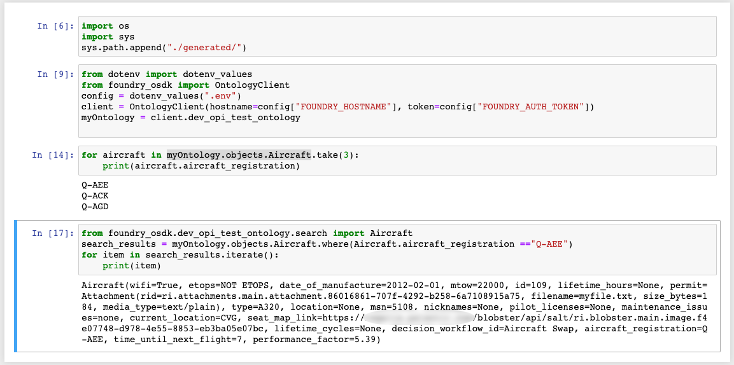
Once the command line package is installed, you can use it to generate the SDK, import the SDK to your Python environment, and begin iterating through objects, searching for specific objects, and applying actions to edit your objects.
How can I try this out?
Each application in Developer Console contains a toggle between the different package managers supported. Use the Install SDK tab on the Application SDK page to toggle between npm installation instructions for TypeScript, or pip and Conda installation instructions for Python.
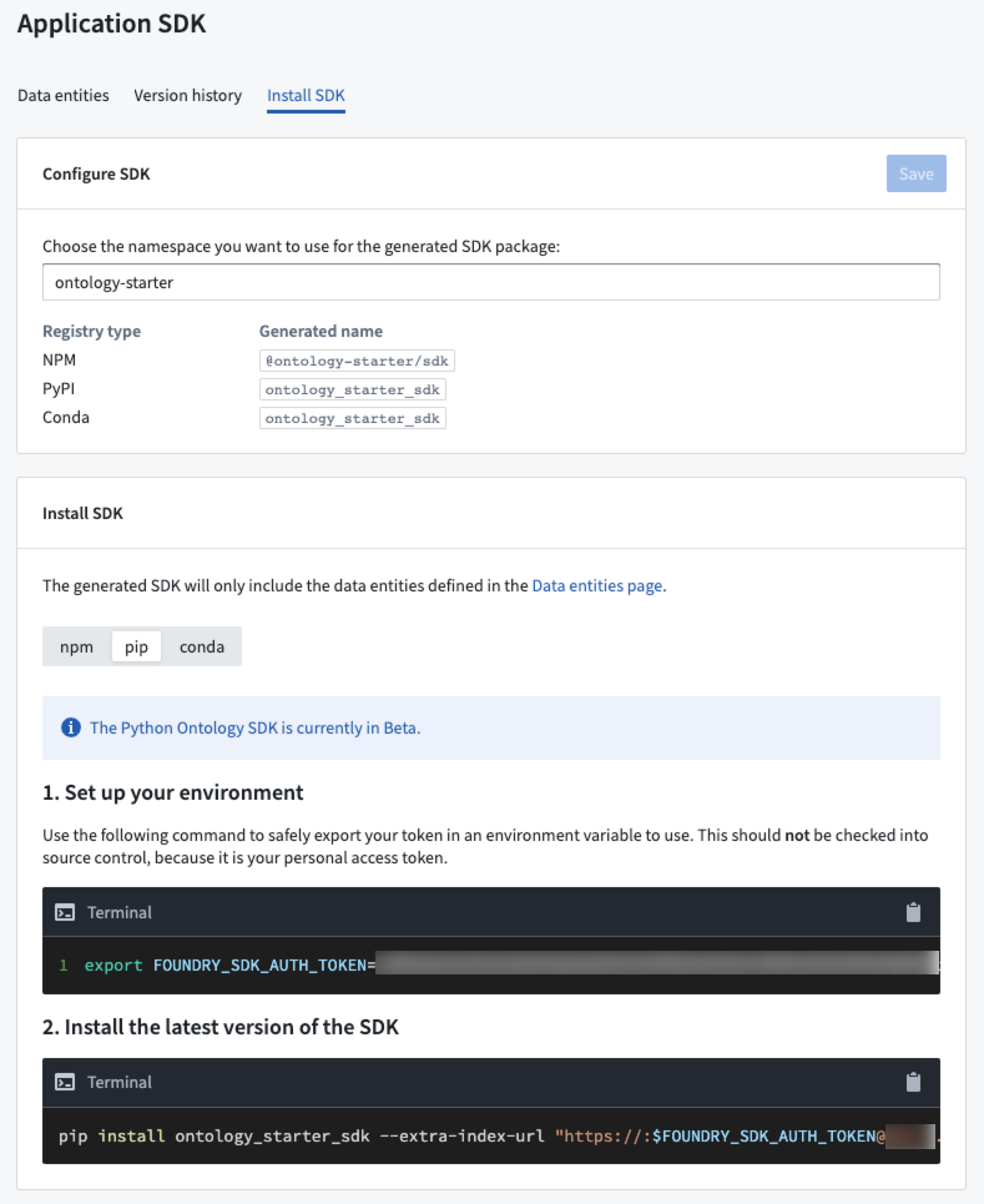
Once installed, start your Python IDE (such as Jupyter®) and import the generated package to begin working with Ontology object types and action types.
For more information, review the Use Jupyter® with OSDK documentation.
What if I need to generate the Python package myself?
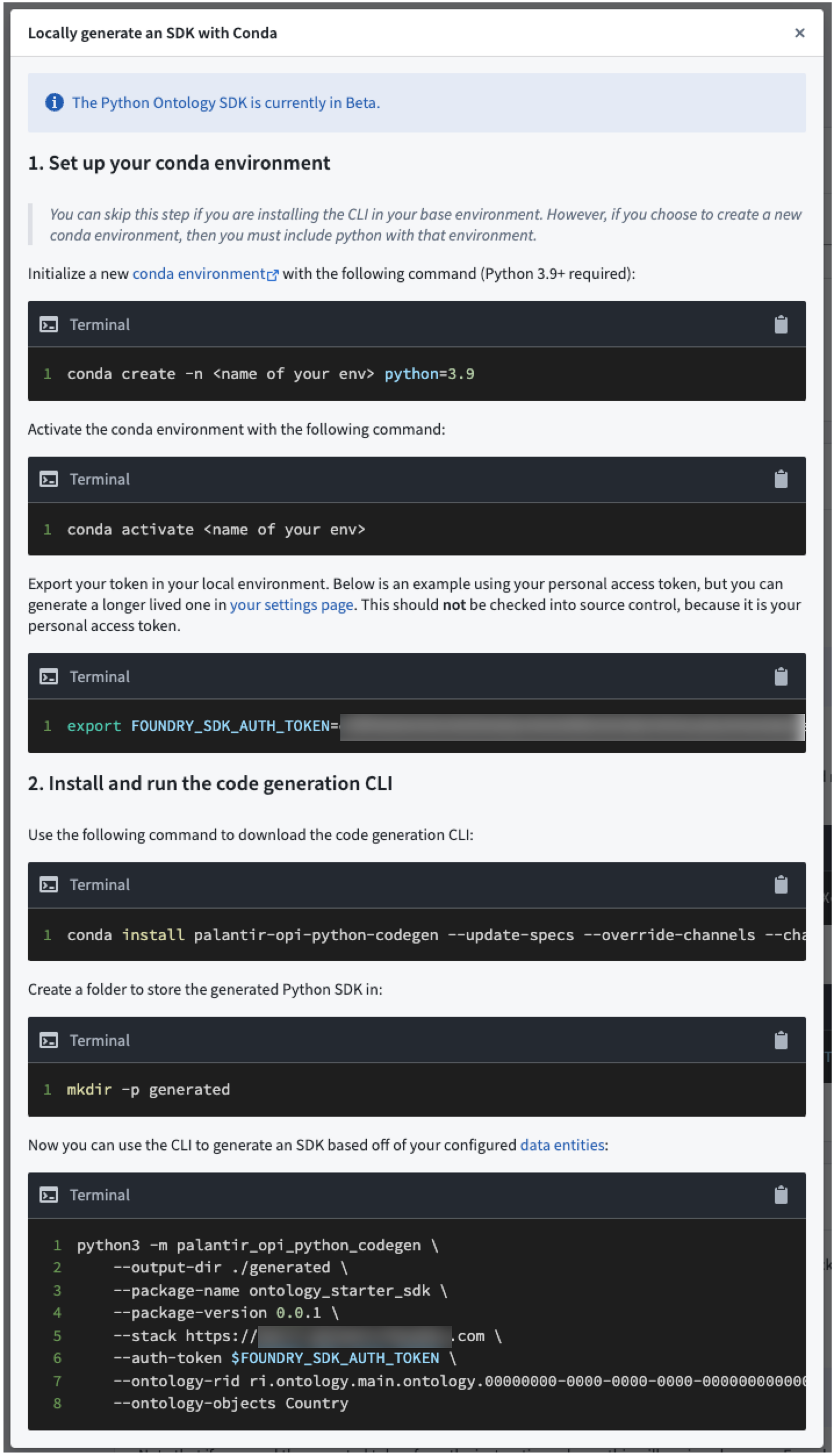
In case the platform cannot generate the package for you, you will be presented with instructions on how to generate the package using the command line interface (CLI) tool.
Jupyter® is a registered trademark of NumFOCUS.
Introducing Timeline in Vertex and Map [GA]
Date published: 2023-07-27
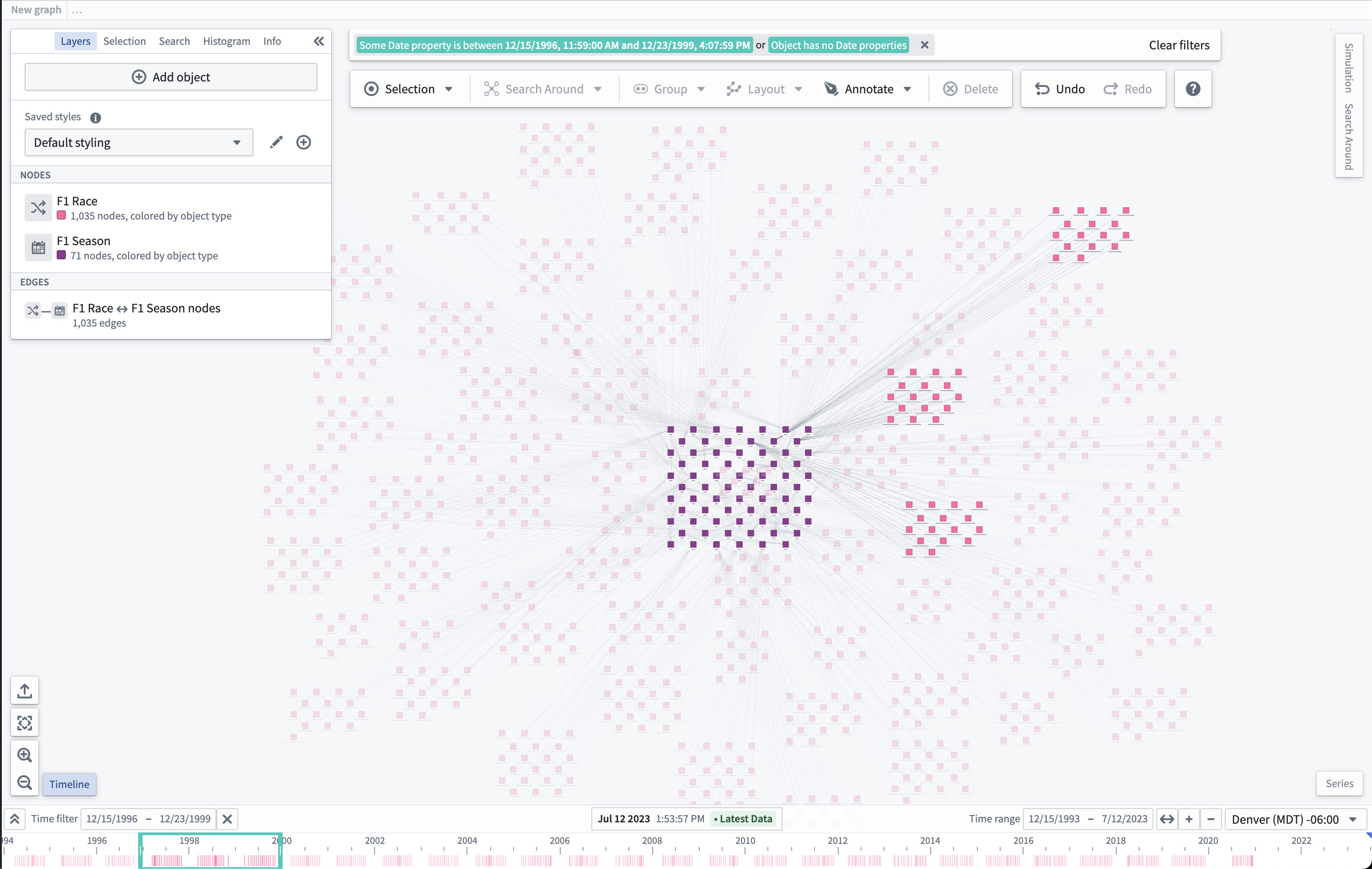
Timeline, a feature in Vertex and Map that enables users to inspect the time properties of selected objects and filter to specific events in a given time range is now generally available. Use the Timeline button located next to the zoom selectors to open a Timeline panel that shows object events on the current Vertex graph or map.
Enable Timeline in Workshop
If you would like the timeline to show up in your Workshop Graph or Map widget, navigate to the Interface section of the configuration for either widgets and toggle Enable Timeline.
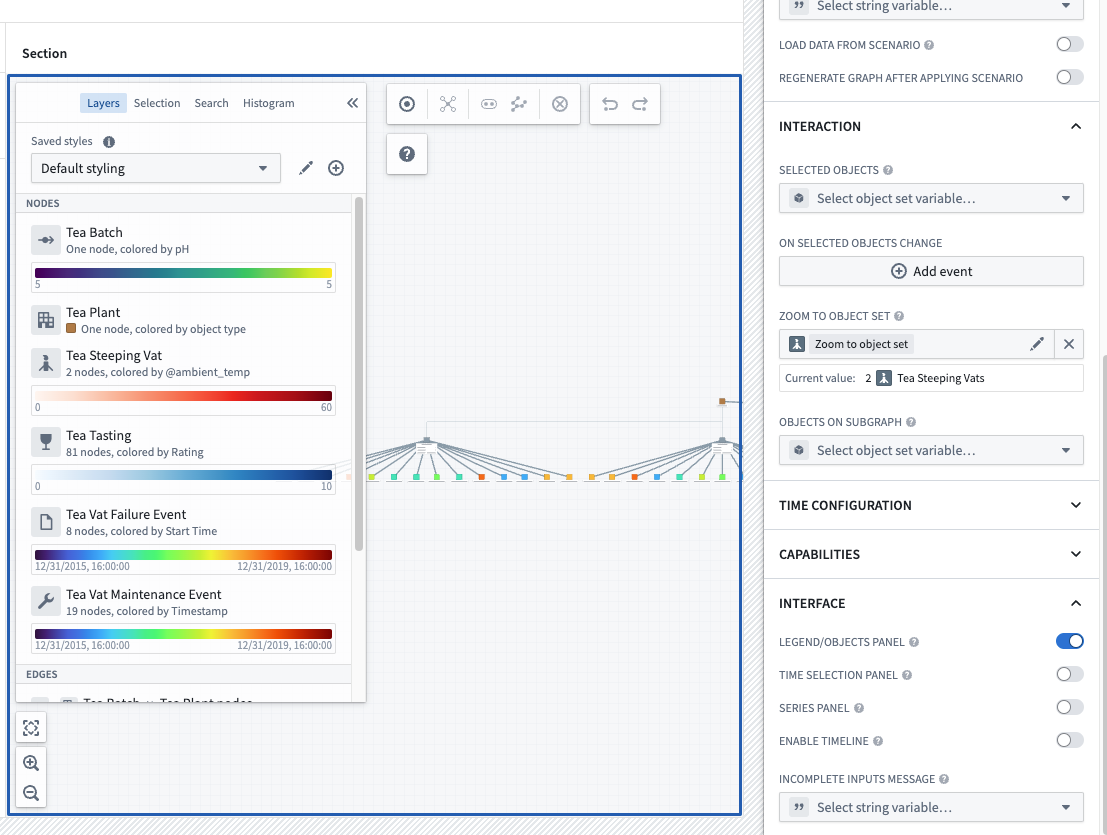
If you were previously using the beta version of Timeline, this option defaults to off and is required to be enabled in each module that you would like the timeline to be available for use.
Deprecation slated for Time selection Panel
As Timeline is now GA, Foundry Map's existing time selection panel functionality is slated for deprecation by Monday, August 21, 2023.
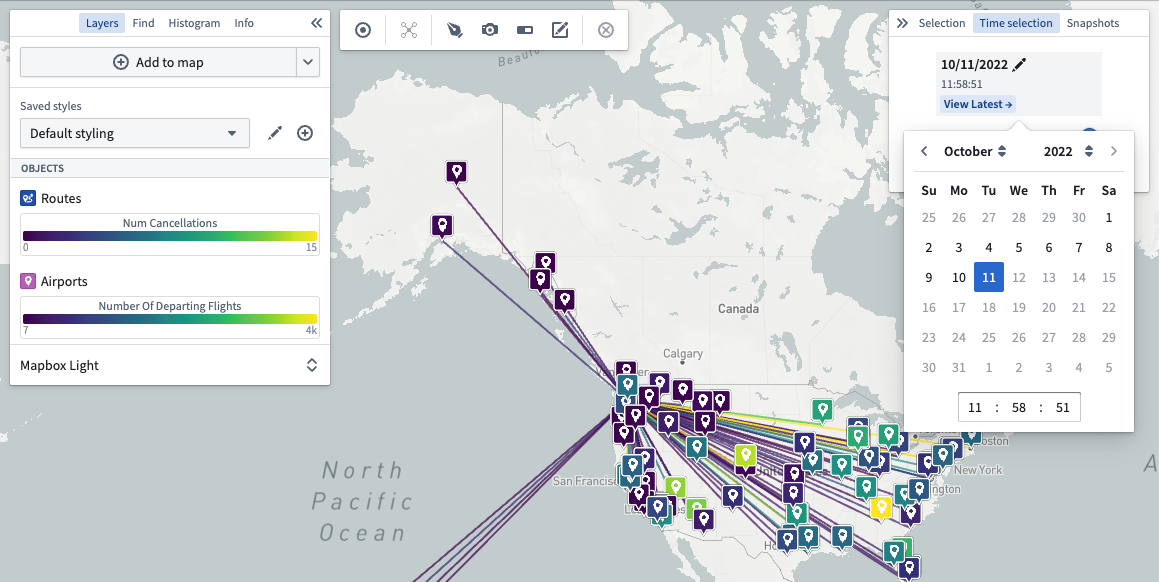
While there is no change to current functionality to prevent disruption to existing time workflows, we do ask that all instances switch over to the Timeline functionality prior to that date. Contact Palantir support if you have any questions or concerns about this update.
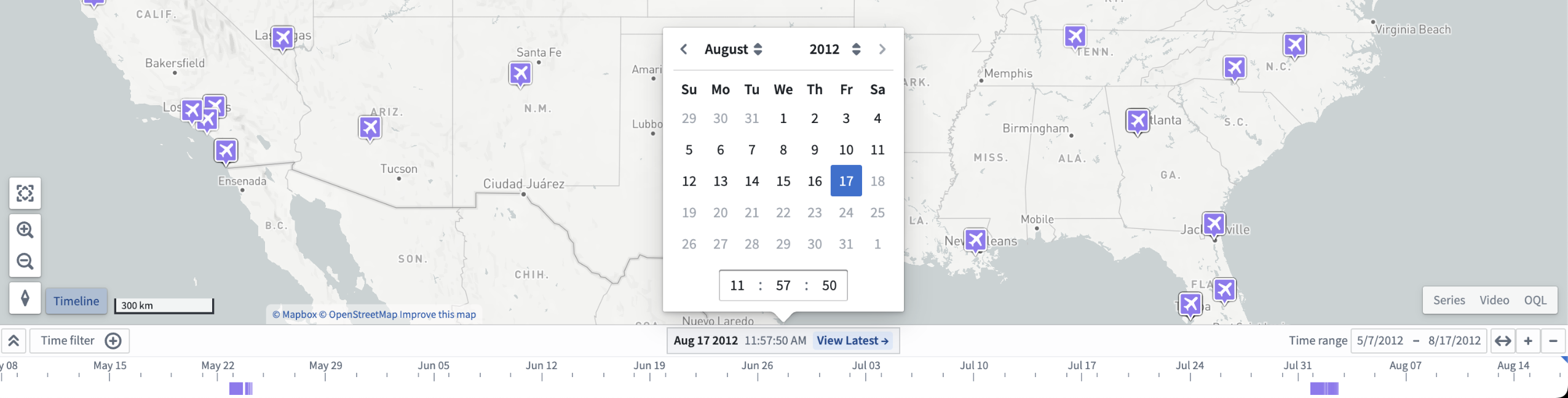
Note that this feature will remain available in Vertex while additional time comparison and modeling features are in development for Timeline.
What's on the development roadmap?
We are planning to enable the ability to collapse or expand the timeline by default on load.
For more information on Timeline and how it can be used, review the documentation for Vertex Timeline or Map Timeline.
Introducing Foundry models in Functions on objects [GA]
Date published: 2023-07-20
You now have the ability to invoke models (served via FoundryML live deployments) from within Functions on objects, increasing the surface area of how models can be executed in the context of the Ontology, used in Workshop and elsewhere in Palantir Foundry. Functions on models can be consumed wherever normal functions are used.
What you can now do
- Complex Ontology mapping: With the power of functions, users can now set links, create objects, and even relax the 1:1 constraint of model inputs to outputs that exists in the Objective binding UI.
- Models as Actions: Actions that are backed by an 'OntologyEditFunction' can now call into models. Those Actions can either be applied to the master Ontology directly or be applied on a Scenario and then be merged back.
- Models as basic functions: Models that do not affect the Ontology, but rather drive visualizations directly, can now be easily integrated into Functions on objects that return Workshop-specific datatypes. This capability speeds up performance and avoids unnecessary setup involving Scenarios.
- Last minute feature engineering: Functions can perform object searches and aggregations that allows feature crafting prior to reaching the model.
Requirements
To enable this workflow, you must first configure an API name for your FoundryML live deployment from its configuration page and meet the following requirements:
- Minimum Apollo product versions:
- functions-typescript-asset-bundle: >= 0.442.0
-
functions-parent-template-bundle: >= 3.5.0
-
Minimum gradle.properties versions:
- functionsTypescriptVersion >= 0.442.0
- functionsVersion: >= 3.5.0
How Functions on models work
The workflow begins with a model saved in Foundry. The user will submit it to a modeling objective, and deploy it via Foundry ML Live.
Function repositories have a new option to import Foundry ML Live deployments, similar to the Ontology import dialog. This registers the model deployment and allows Code Assist to auto-generate typescript bindings for the imported Foundry ML Live deployments, which can be imported using the deployment's API name.
The interface provided in code contains a transform() method that calls into Foundry ML Live. Modeling functions can leverage the new Model Asset primitive to provide a typed transform() reflecting the model input and output. See below for the intended import workflow and example code:
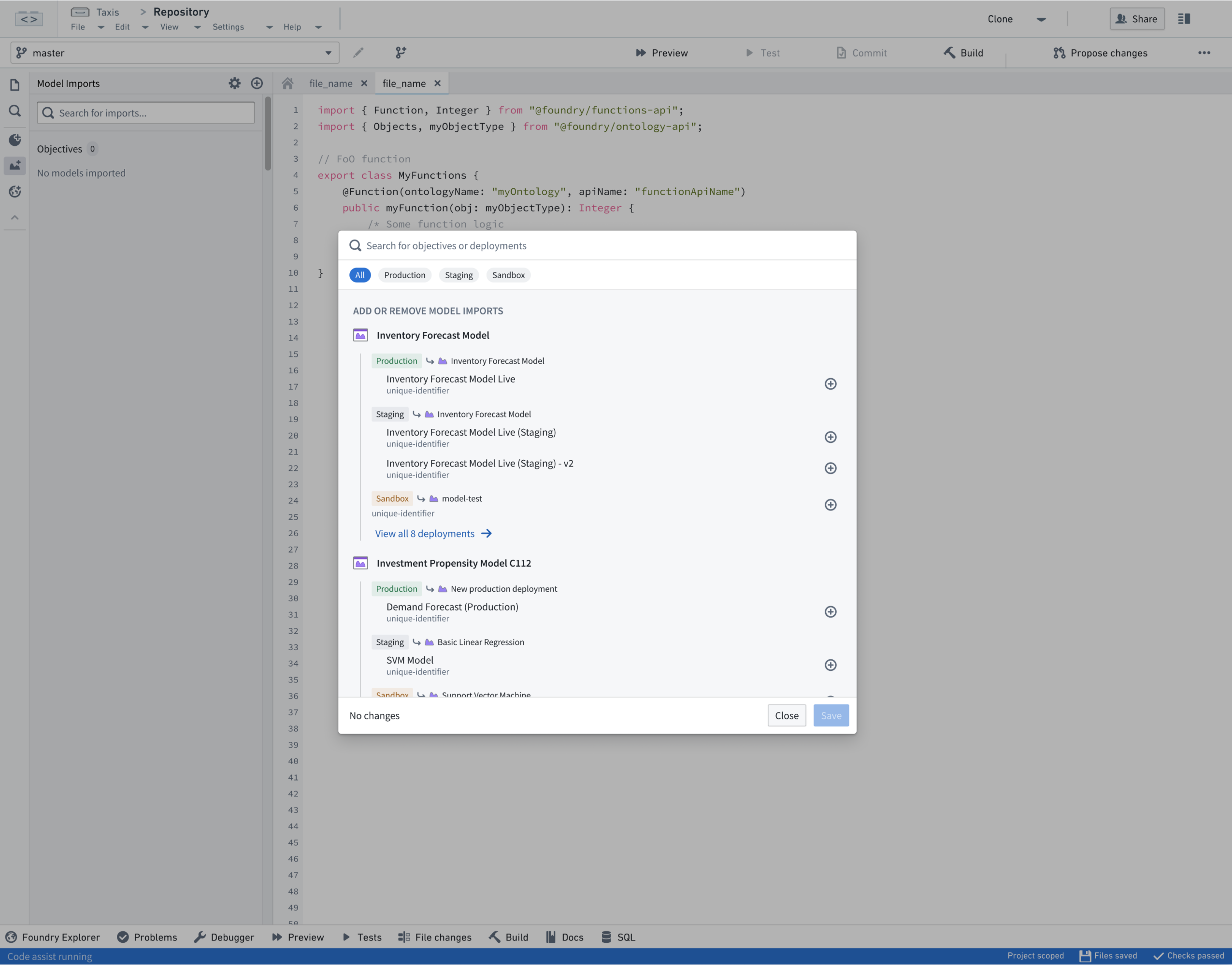
Import dialog for FoundryML live deployments
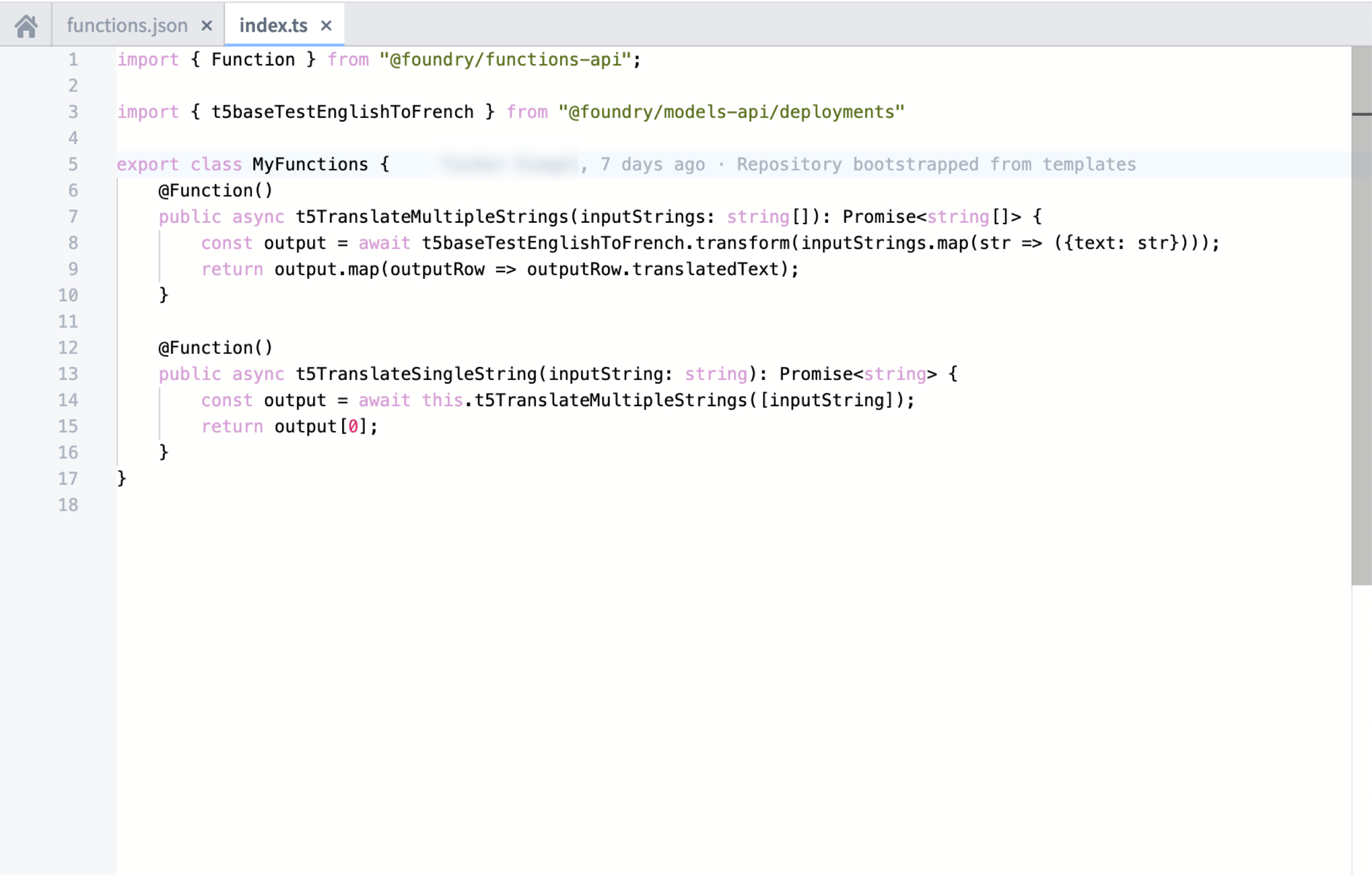
Functions on models example code
What if I am already using Functions on models?
For those already using Functions on models, this GA contains breaking changes, should you choose to upgrade your repository. We encourage all users to migrate old repositories, which is a fairly simple process:
- Define an API name for your ML Live deployment
- Create a new branch in your Functions repository
- Upgrade
functionsVersionandfunctionsTypescriptVersionto the versions listed above - Set
useDeploymentApiNamesto true infunctions.json - Modify all imports from
import { riSanitizedRid } from "@foundry/models-api"toimport { MyDeploymentApiName} from "@foundry/models-api/deployments" - Verify codegen works in the new branch, then submit a pull request to merge back into the main branch
Learn more about Functions on models in the documentation.
Introducing Resource Management data export feature
Date published: 2023-07-20
Resource Management administrators can now export resource management data to a Foundry dataset from Control Panel, enabling the custom investigation and analysis of usage data in Foundry tools such as Contour.
To export your data from Control Panel, navigate to Internal dataset export and export your granular usage data to a new dataset. Once this dataset has been exported, it will remain up to date with the upstream datasource. As with audit logs, once the sensitive dataset has been exported, ensure that you appropriately permission the respective dataset.
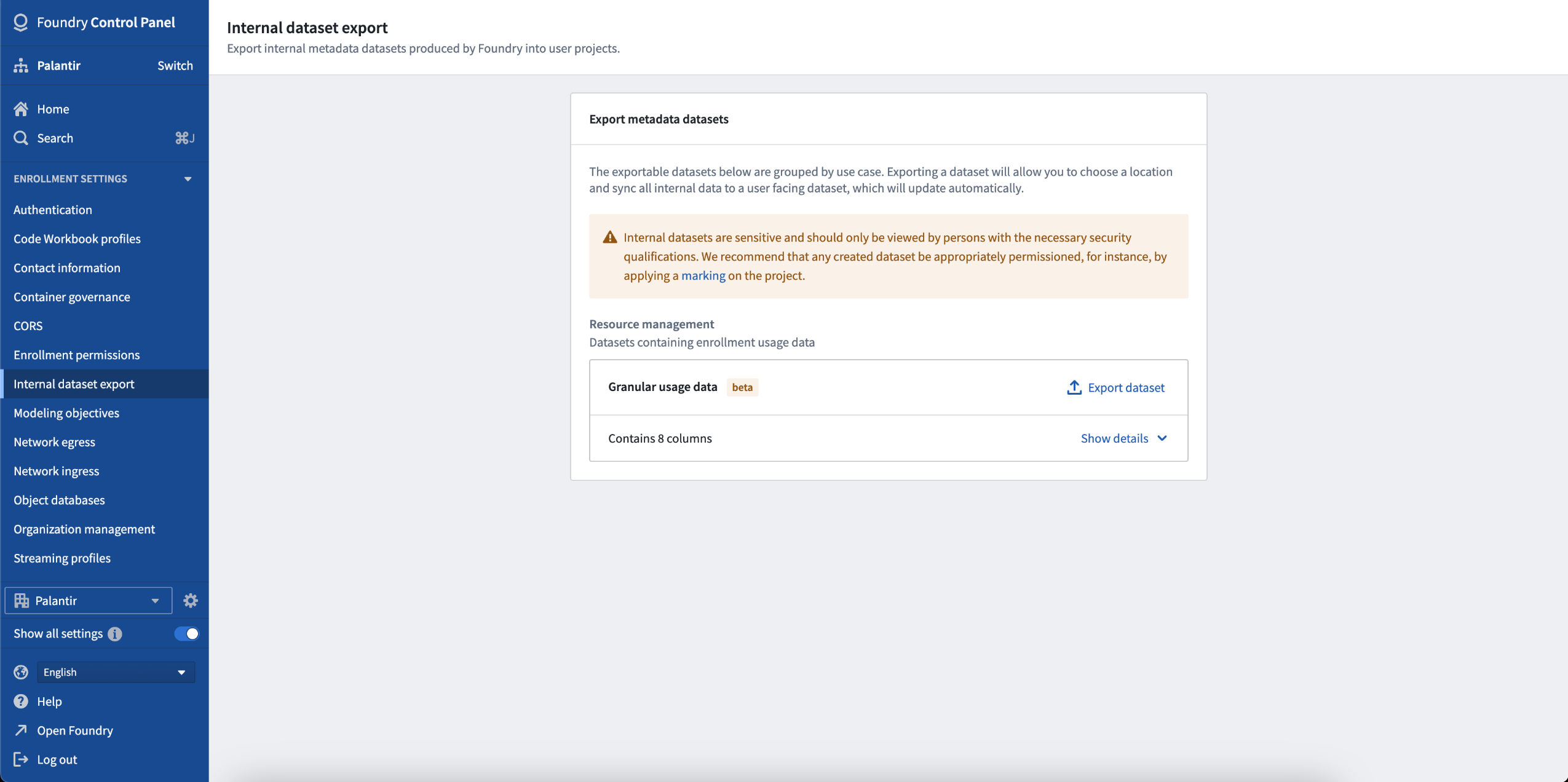
Navigate to Internal dataset export to export resource management data from Control Panel.
The schema of the RMA data is as follows:
enrollment: The enrollment from which the usage data is being exported. This column will contain a single enrollment RID.invoiced_dimension: The invoiced dimension that this row of usage belongs to as set out in the enrollment’s contract.source: The source to which a specific row of usage belongs.summary_resource_rid: The parent of the granular usage. For datasets, this is the Project where the dataset is saved; for Ontology objects, this is the Ontology RID.granular_resource_rid: The resource to which this usage belongs.date: The date on which this usage was consumed.usage: The amount of usage consumed.usage_unit: The unit of usage. For storage, this is GB-months. For compute, this is compute-seconds.
For more information, see the Internal dataset export documentation.
Introducing container-backed models [GA]
Date published: 2023-07-18
The introduction of container-backed models allows you to configure models backed by container images, significantly expanding the range of models that can be used for batch or real-time inference within Foundry. You now have the ability to package arbitrary execution logic into a container image and use that model in Foundry for evaluation, inference, and integration with operational applications. Container-backed Model Assets are particularly useful for large, pre-trained models, models written in languages not natively supported by Foundry Models (such as R), or models that are already containerized for other purposes.
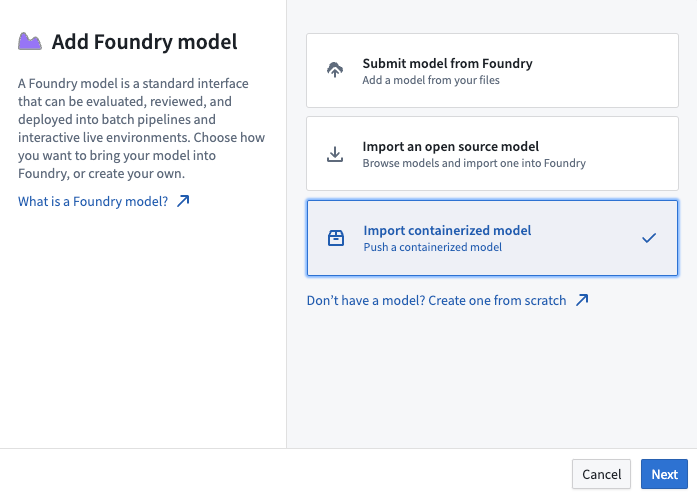
Key features of container-backed models
- Flexibility: Containers can be configured to support a wide range of machine learning frameworks, custom code, and languages.
- Modeling Versioning: Container-backed models can be packaged into Model Versions allowing independent evaluation, review, and release of models in Foundry.
- GPU Support: Container-backed models can be configured to execute with access to a range of GPUs in Foundry for inference and execution.
- Media: Container-backed models have access to tabular and media data, providing the ability to configure computer vision, audio and video workflows natively in Foundry.
How to configure a container-backed model
- Enable container workflows in Control Panel.
- Create a Model Asset and push your container images to it.
- Author a model adapter to interact with your container.
- Configure the model version with the container images and model adapter.
- Deploy your container-backed model and integrate it with operational applications.
For more information on container-backed models, including detailed instructions on how to create, deploy, and manage them, refer to our documentation.
Introducing Home app [GA]
Date published: 2023-07-18
The Home app is a new default Foundry workspace home page designed specifically for new application builders that features a guided experience to facilitate familiarization with completing core workflows and streamline the onboarding process.
Home app's functionalities help you:
- Showcase the variety of workflows users can accomplish within Foundry
- Provide a single access point to resources, apps, and documentation needed for core workflows, making it easier for new developers to become productive
- Enable users to select a workflow goal, allowing for a tailored and goal-oriented initial Foundry experience
- Recommend efficient starting points based on the user's stack and the available Foundry applications and resources
- Offer users a clear understanding of how the Ontology, datasets, and various Foundry applications fit within the ecosystem
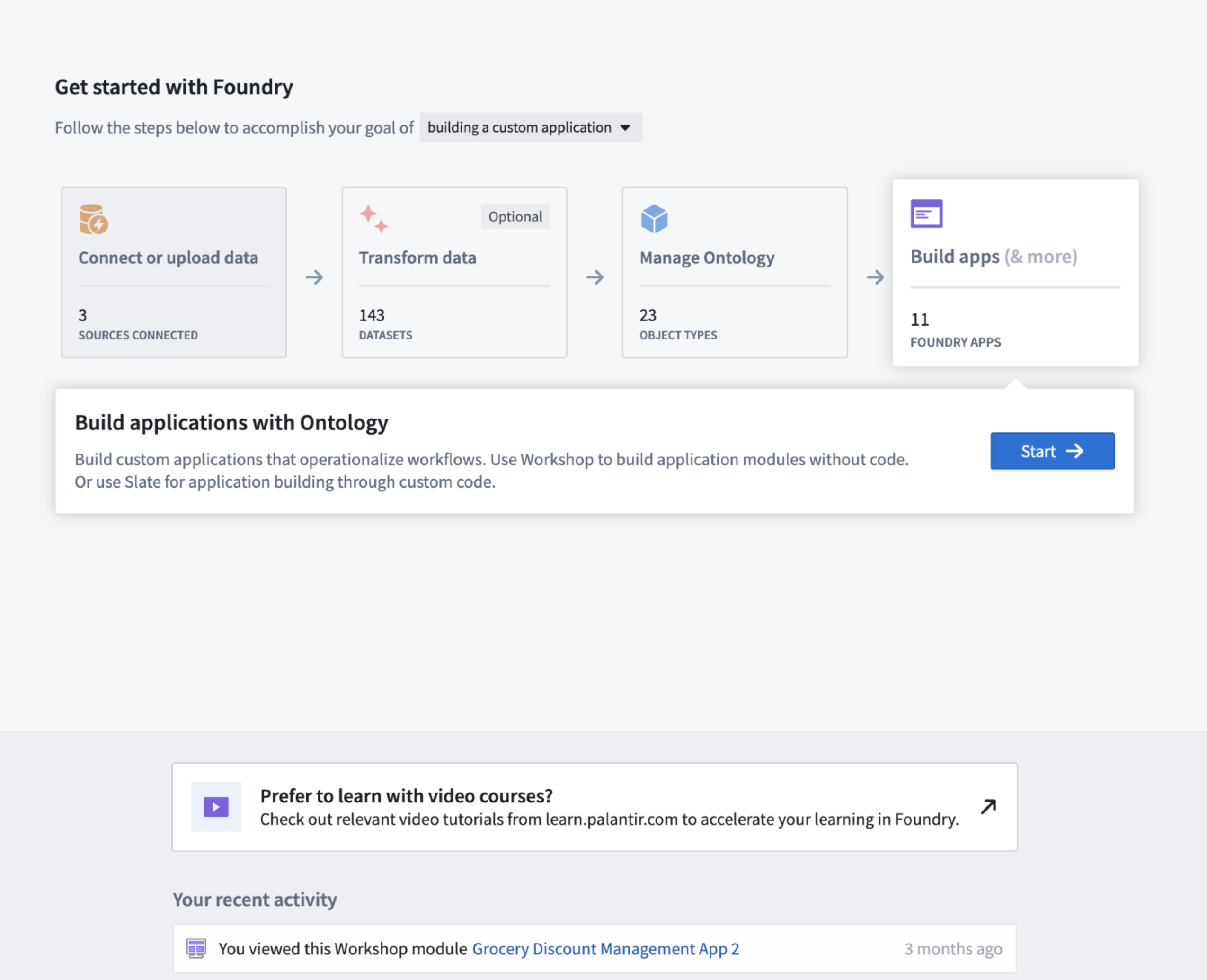
Set Home app as your default home page
Home app is automatically installed on all instances and will be implemented in both existing and new accounts. To set Home app as your stack's default home page, access the home URL setting in Control Panel and select /narrative as the home page for all users or specific user groups. To view Home app on your stack, visit /workspace/narrative.
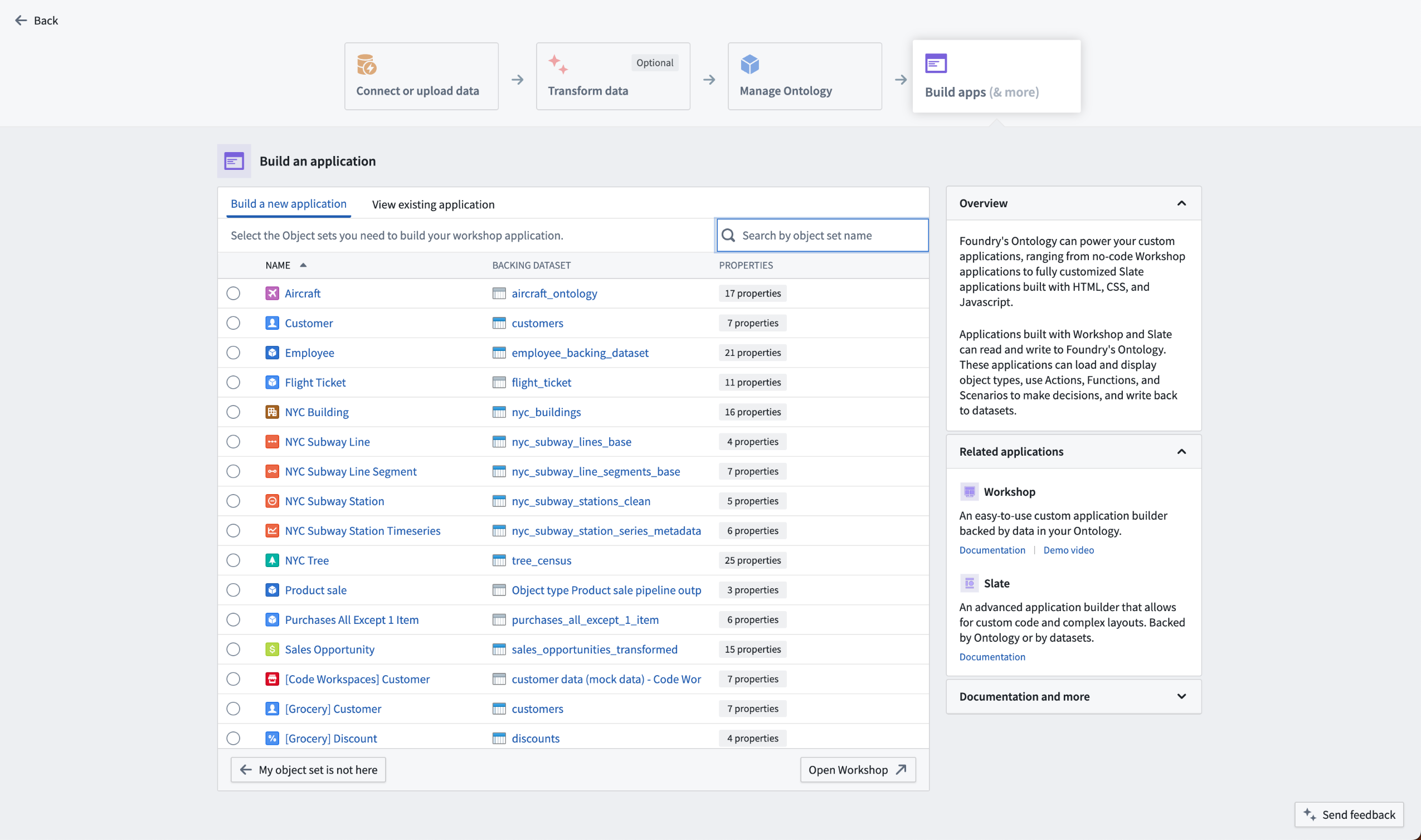
Learn more in the platform experience settings documentation.
Foundry Quicksearch enabled by default
Date published: 2023-07-18
Foundry Quicksearch is now enabled by default for all users, providing a faster and more intuitive search experience. Users can temporarily switch back to the legacy Foundry Search using the "turn off" button in the UI until the end of July, after which Quicksearch will become the only option and the legacy search button will be removed. Review the Quicksearch documentation and the Quicksearch GA announcement for more details.
Introducing updated workflows and UI for time series
Date published: 2023-07-18
The time series setup workflow in Foundry spans multiple stages to transform data into the correct shape, build a robust Ontology to enrich analysis, and create analytics and operational applications to make business-critical decisions. The time series setup process now has walkthroughs and updated user interfaces to make it more accessible to new and existing users in Foundry.
Walkthroughs for the exploration of time series workflows
New walkthroughs are now available in Dataset Preview, Ontology Manager, and Pipeline Builder. These useful guides introduce concepts and workflows that you can review to learn more about using time series data in Foundry.
In Dataset Preview, you can choose to Analyze data from a stream or batch dataset and open a walkthrough to learn about key concepts and setup requirements for the time series workflow.
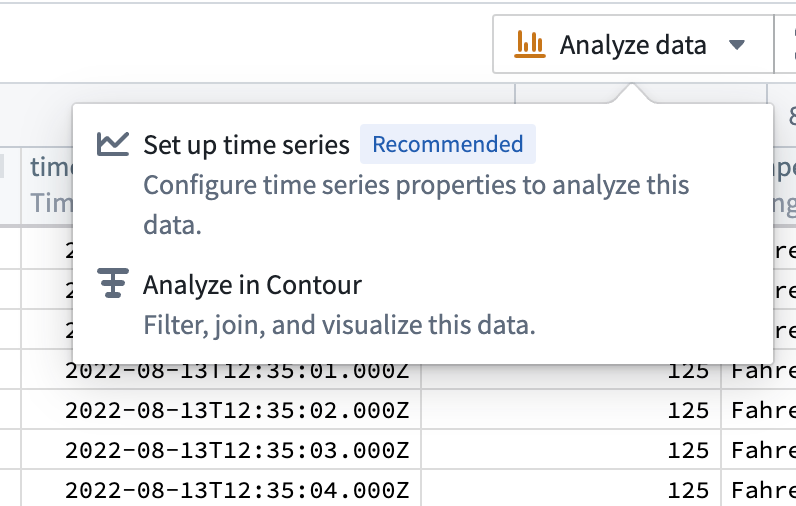
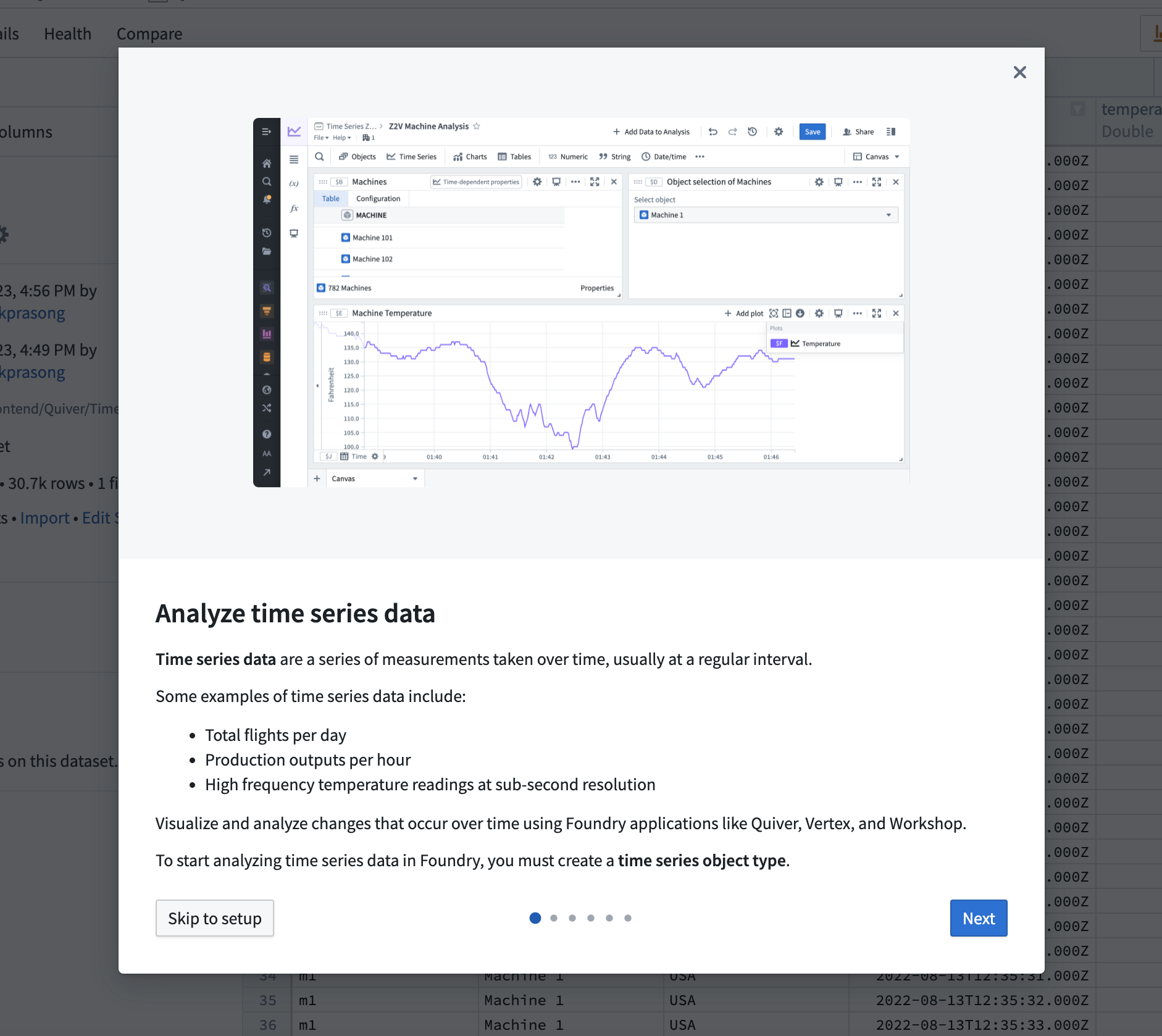
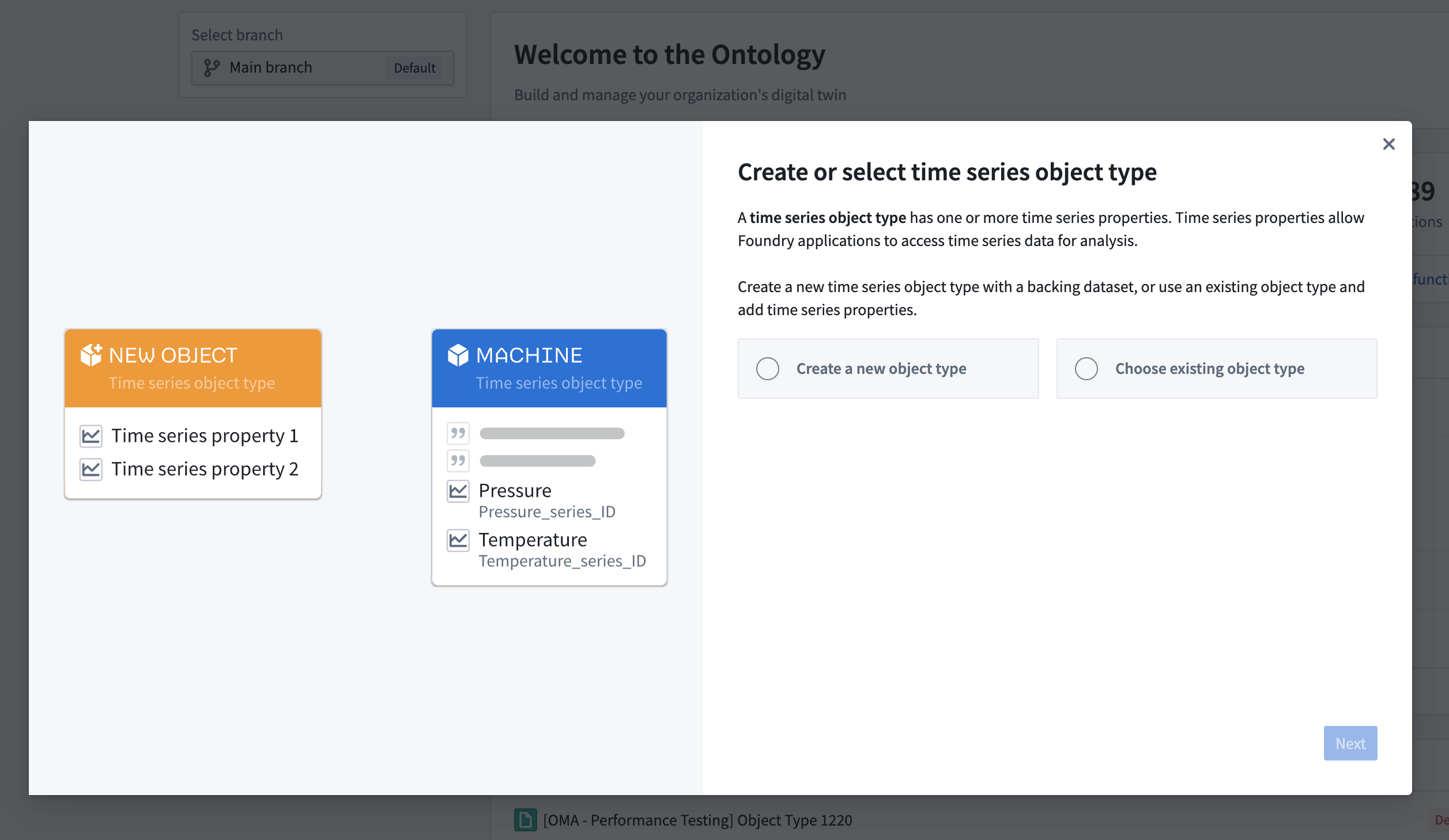
In Ontology Manager, new walkthroughs help you create or select a time series object type and complete the setup of time series properties. These walkthroughs include visual examples representing the architecture and usage of time series data in Foundry.
Improved interfaces for time series management
An updated user interface in Ontology Manager allows you to create and manage time series properties directly from the Capabilities tab. From here, you can link time series syncs from existing pipelines or build new pipelines to create time series syncs.
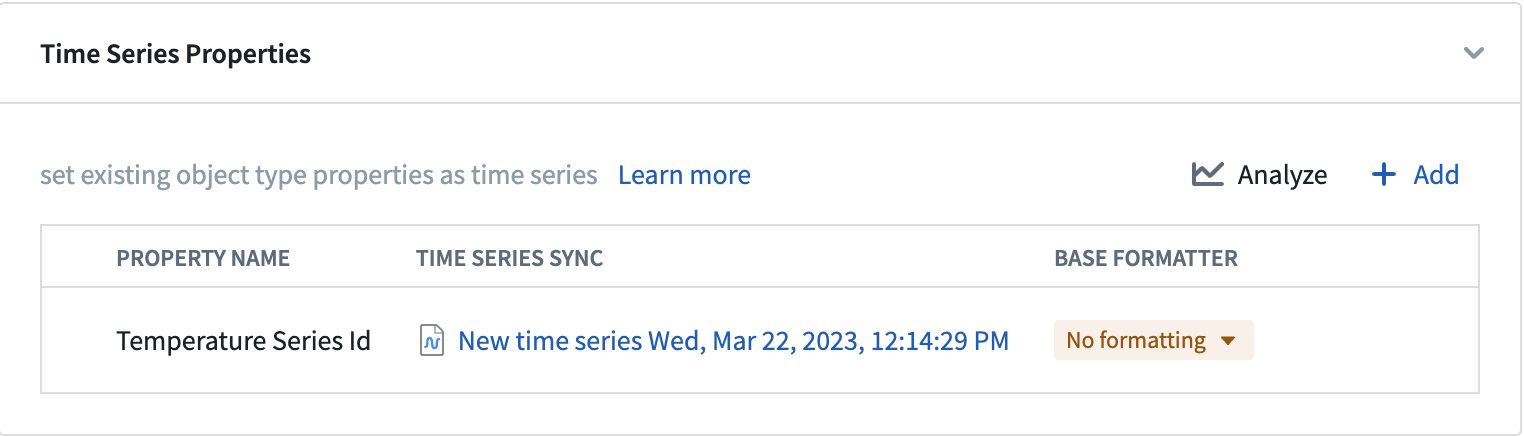
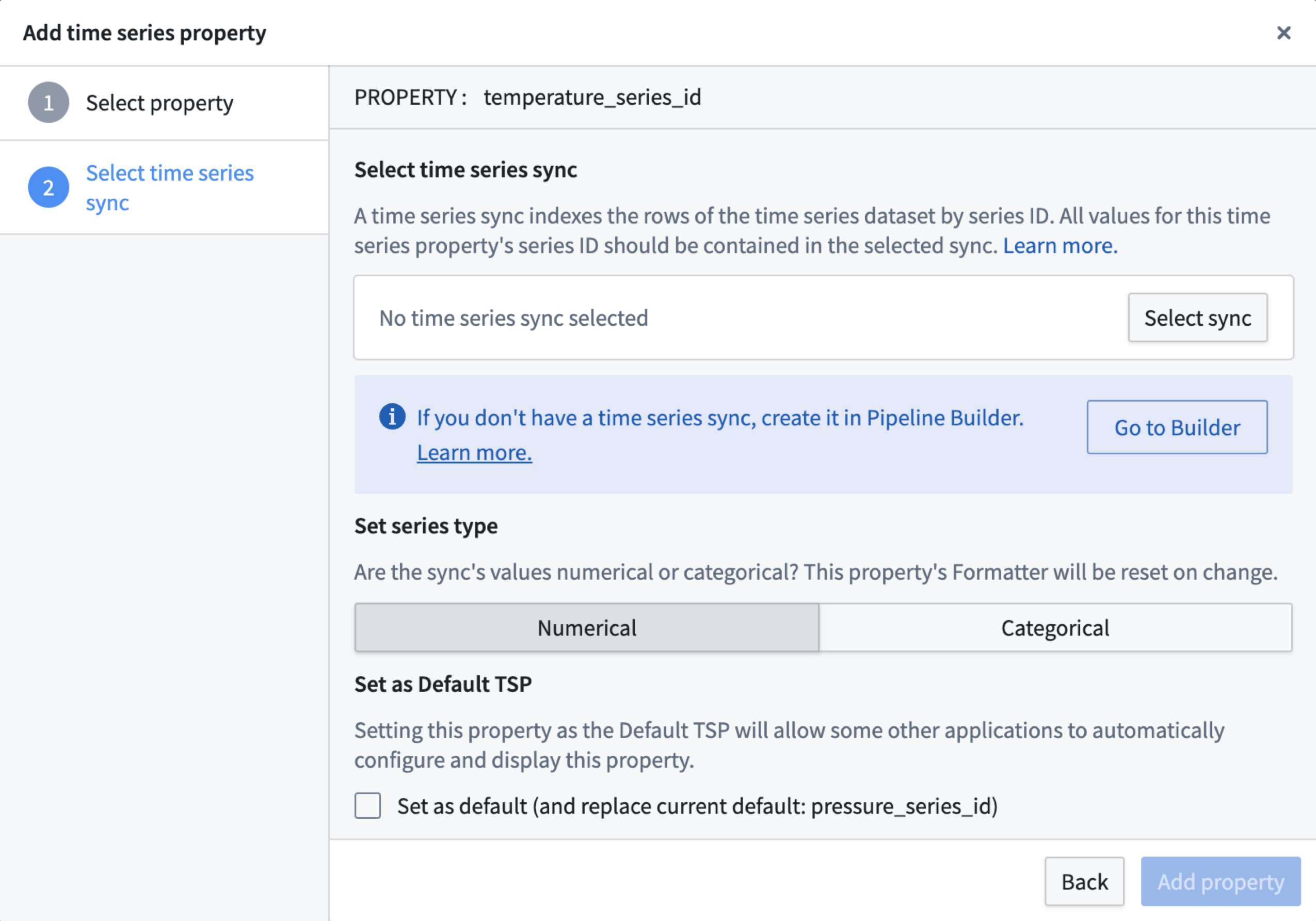
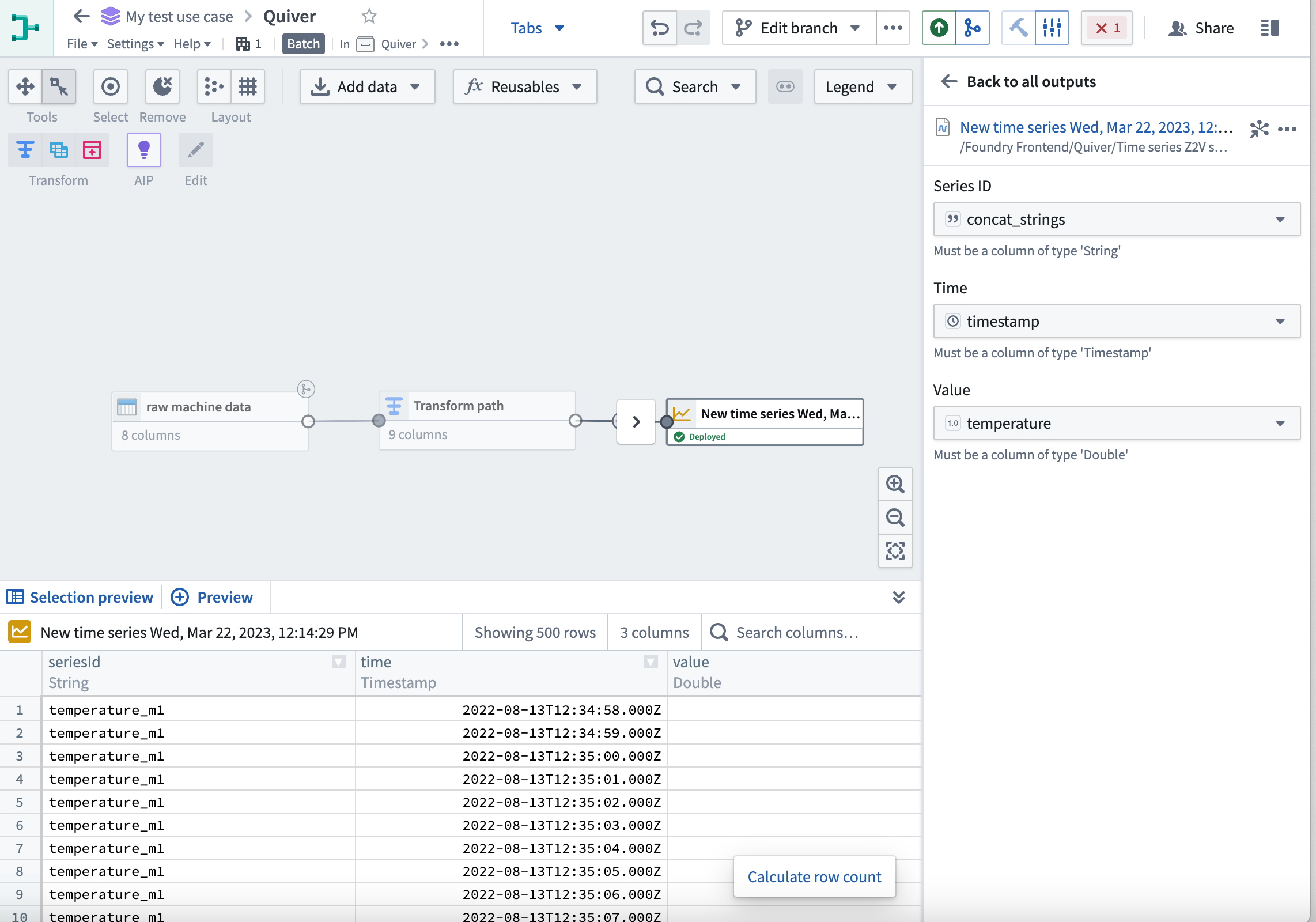
Additionally, Pipeline Builder now fully supports creating time series outputs from streaming or batch time series data. Learn more about Pipeline Builder outputs.
Learn more about the updated workflows and new features by navigating to the time series documentation. Updates have been made to key concepts and the end-to-end setup process, from data to analysis.
What's on the development roadmap?
As part of our goal to make Palantir’s time series product an industry leader in manufacturing, automation, and process management, we continue to invest in key areas that make the journey intuitive and effortless. The following features are currently in development:
- Enhance time series workflows with derived and categorical time series: Authored and maintained in platform.
- Generate derived series: Use Quiver's visual functions UI to create derived time series. Interact with derived and non-derived time series in the same way – from applications like Quiver, Workshop, and Vertex.
- Create categorical time series: Visualize categorical time series properties across platform in Workshop, Object Explorer, and Quiver with an immediate focus on adding support in Workshop for categorical time series in metric cards and object tables.
- Measures concepts revamp: The measures concepts will only be an Ontology setup distinction, by delivering a unified experience for end-users accessing time series properties regardless of whether they are directly on the root object type or on linked sensor objects (for example, via Measures) in analytical and operational applications.
Introducing object-backed map layers [Beta]
Date published: 2023-07-12
The Map layer editor now allows you to configure a map layer by selecting an object type. These object layers can handle extremely high-scale object data by leveraging new backend capabilities to generate tiles directly from data stored in the Ontology.
Previously, accomplishing similar workflows required significant manual configuration to ensure the Ontology remained in sync with an additional, separate service. The new object layers dramatically reduce the effort required to create and style layers backed by data in the Ontology.
This following image demonstrates the complete process to create a layer that can visualize over 1 million objects in realtime:
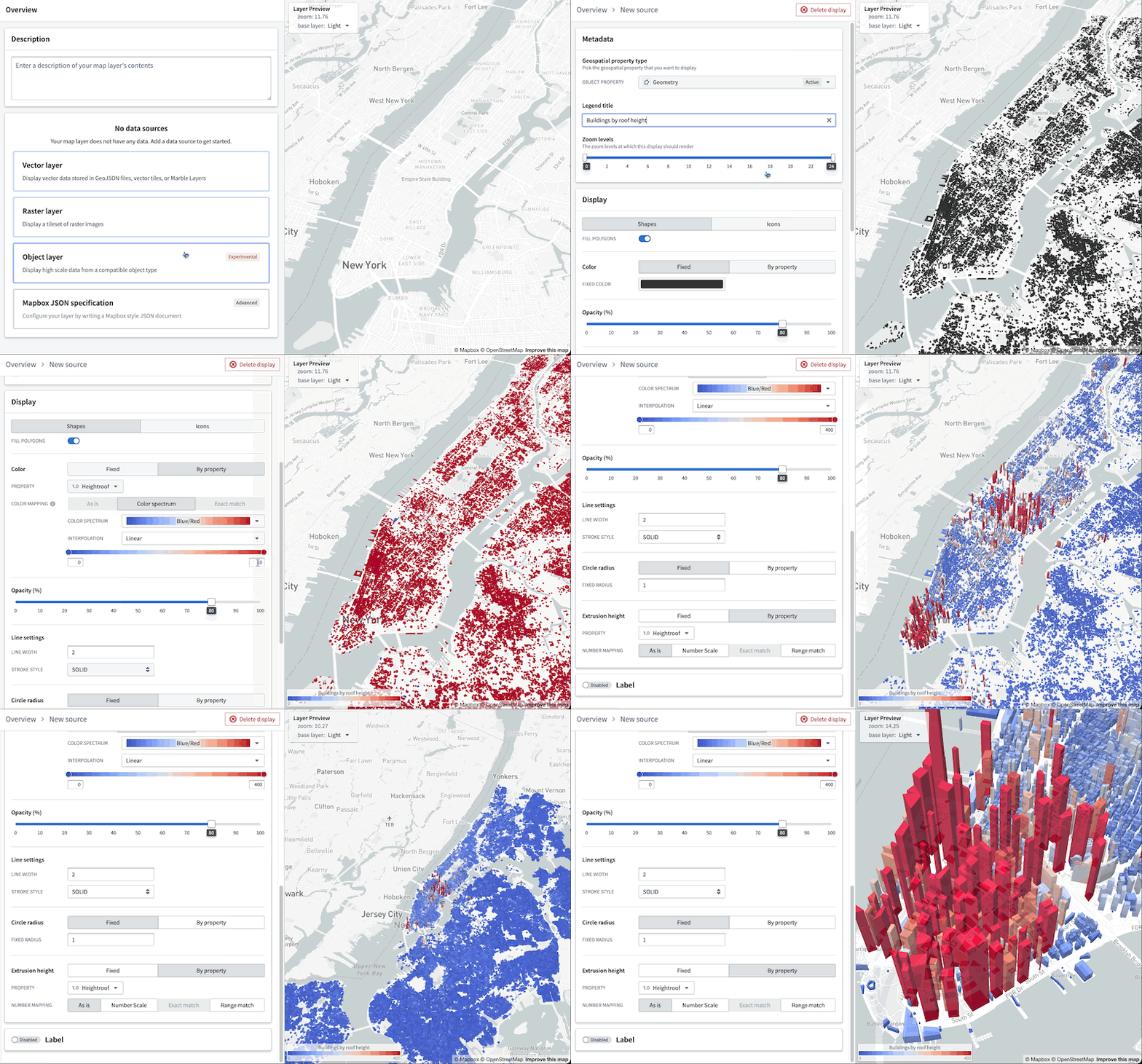
Additionally, you can benefit from the map layer editor's enhanced user interface to easily validate the type of each column in the object-backed layer and configure the appearance, bypassing the burden of manually writing a JSON style specification.
Note that this new capability requires OQL, which is not available on all instances. Contact your Palantir representative for more information.
Announcing new visual depth style features in Workshop
Date published: 2023-07-12
Workshop now offers more control over various style formatting settings to give application builders additional customizability to the design and feel of a module. Configuration options include header formatting, background colors, border styles, and more, available at the page, section and widget levels.
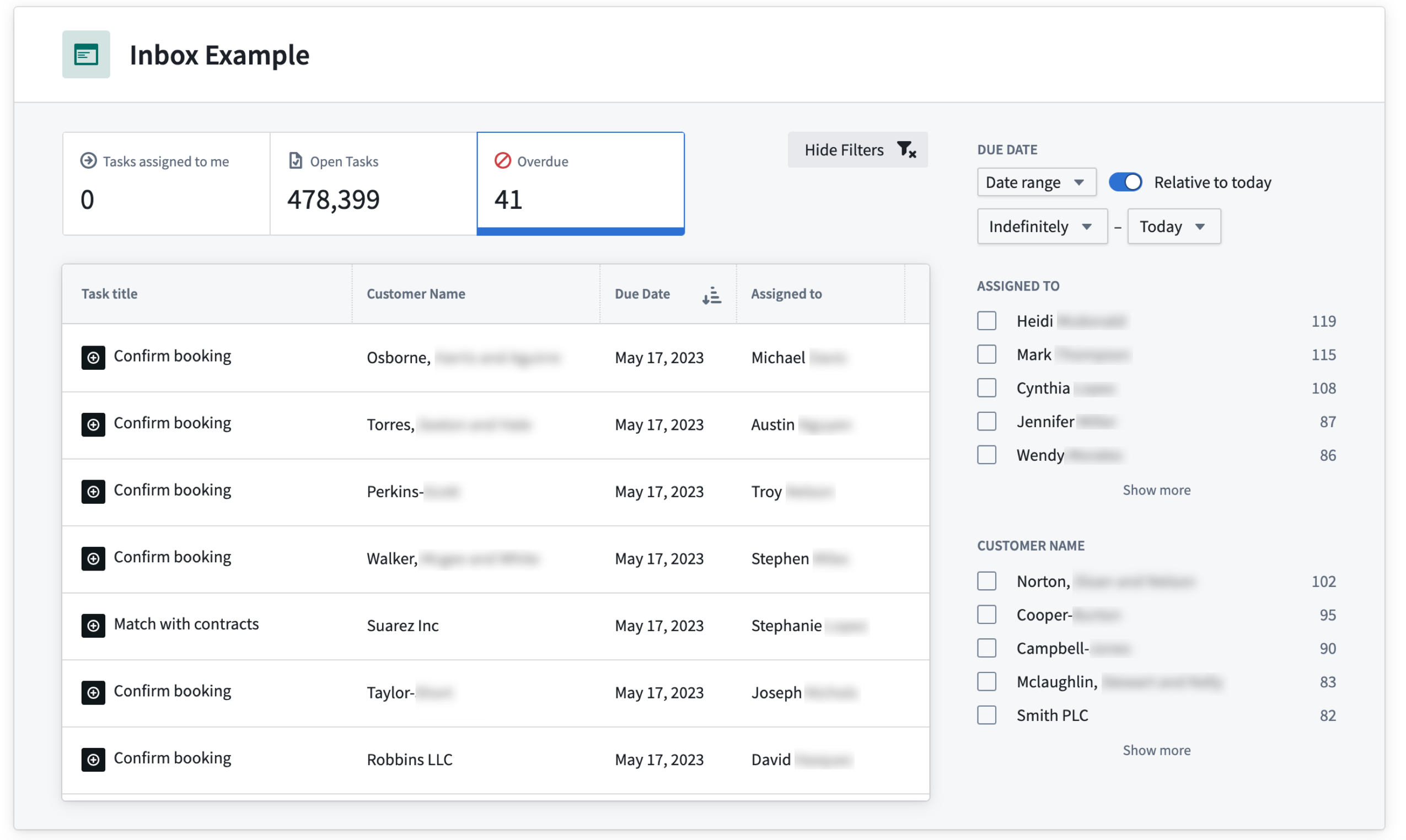
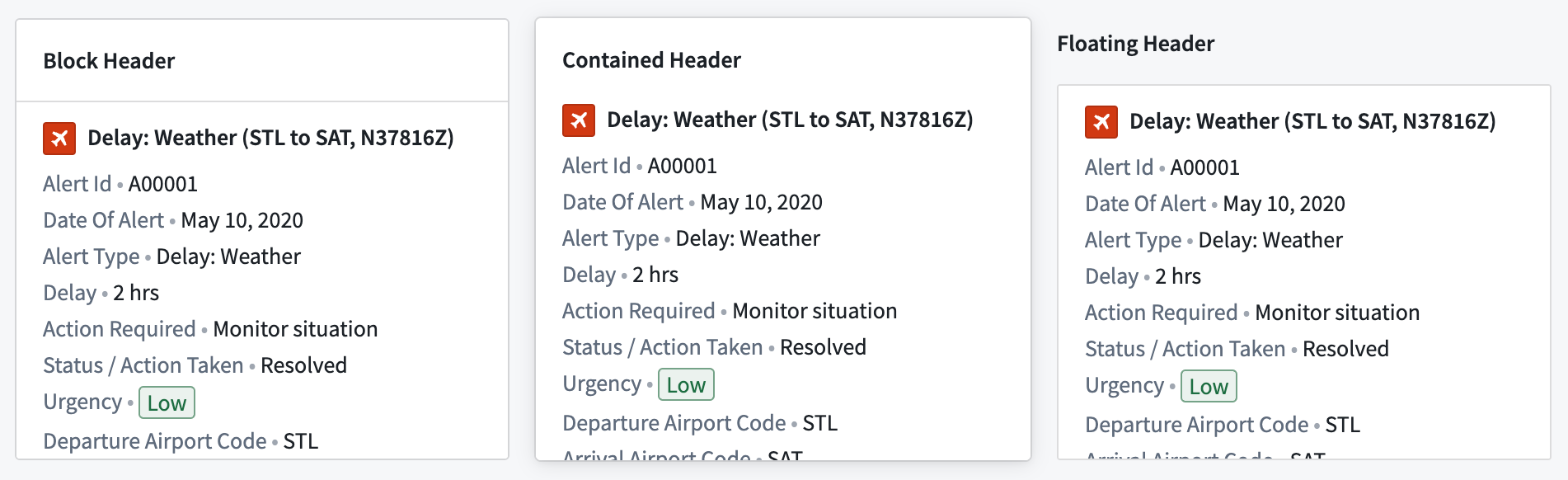
Header formatting
Header formatting options can be added when the header is enabled on a section.
Background colors
Background colors can be added to pages, sections, and widgets to help visually segment parts of a module. There are five shades available for both light mode and dark mode, and a transparent option.

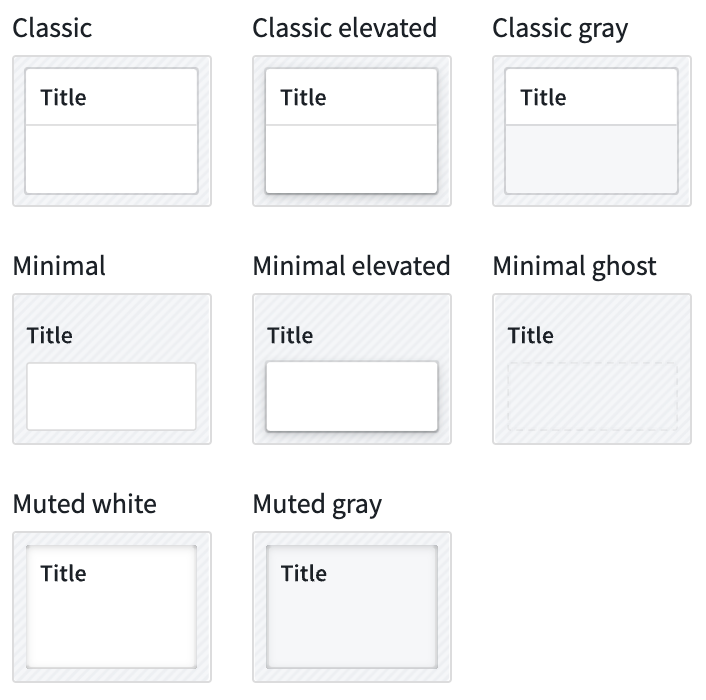
Border styles
Border styles can be configured on sections and widgets, giving the appearance of different elevation levels within a module.

Padding controls
Padding can be configured for pages and sections to set a consistent amount of padding or space around all child components within. Padding adds space between components to provide separation and breathability to the module.
To learn how to apply these styles, see Layouts in the documentation for more information.
Export Contour logic to Pipeline Builder
Date published: 2023-07-12
In Contour, you can now export most Contour analyses to Pipeline Builder directly and take advantage of its comprehensive features for building end-to-end pipelines to feed production applications.
Direct access to Pipeline Builder from Contour analyses means Foundry users gain the flexibility and power of the Ontology through a user-friendly interface. Once the pipeline is converted for use in Pipeline Builder, you can continue building on your workflow's foundations using the application's robust support for streamlined data integration, custom compute profiles, collaboration, type-safety, and incremental mode, just to name a few. In addition, on instances where AIP is enabled, you can take advantage of additional features driven by natural language prompts.
To start, open an existing Contour analysis and simply select Convert to Pipeline Builder to create an equivalent pipeline in Pipeline Builder.

Simply follow the prompt to select a destination folder for your exported pipeline, and it becomes available to open in Pipeline Builder.

To understand more, see exporting Contour logic to Pipeline Builder in the documentation.
Introducing Ontology Proposals [GA]
Date published: 2023-07-06
Ontology branches allow you to suggest changes to the Ontology using a version control system with a built-in proposal and approval workflow, facilitating easier collaboration with peers and more transparency when changes are made to the Ontology.
With Ontology proposals, you can benefit from the following features:
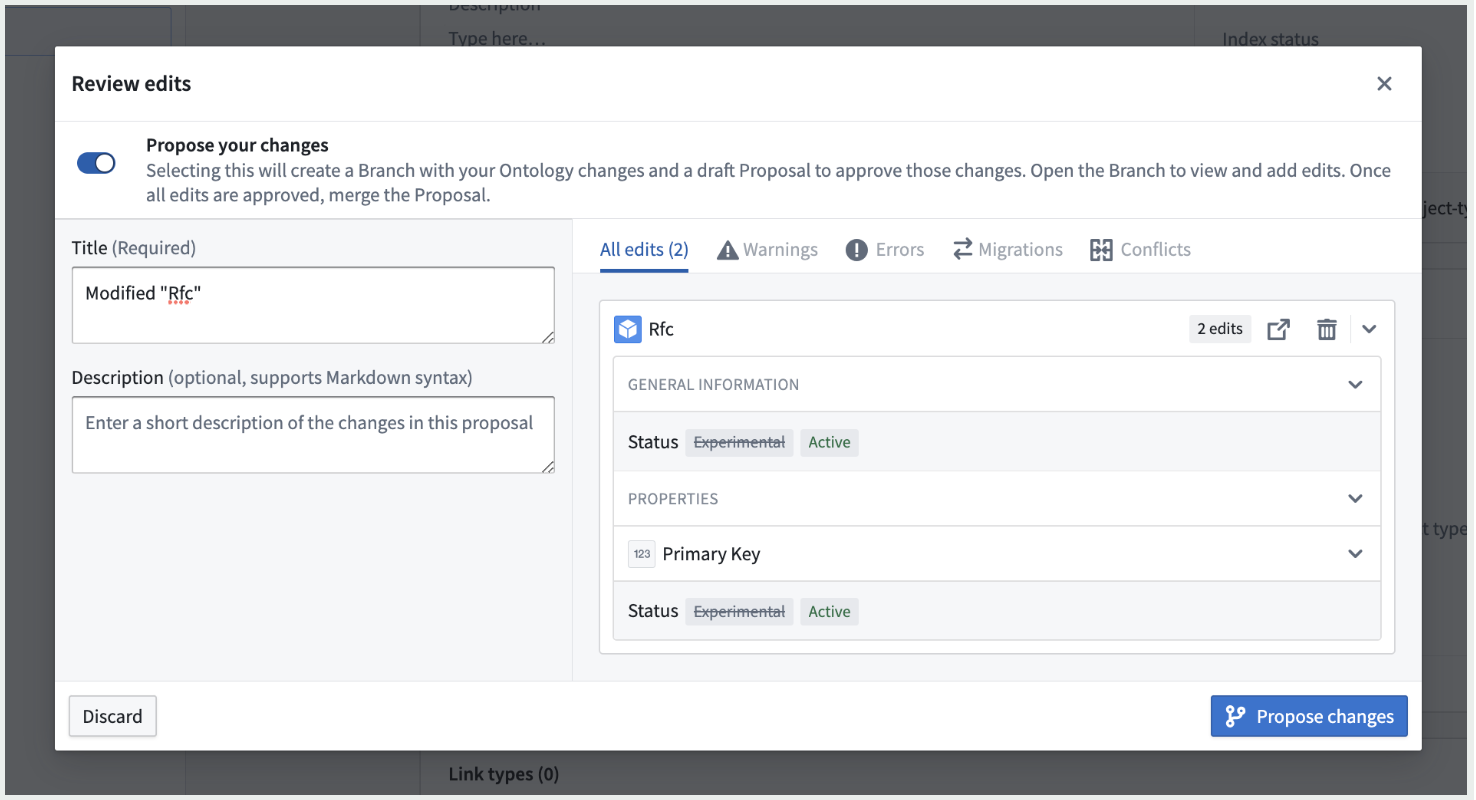
- Branch creation: You can now create a branch with your changes to the Ontology either by selecting Save after having made the desired changes, or prior to making any changes by selecting Create branch.
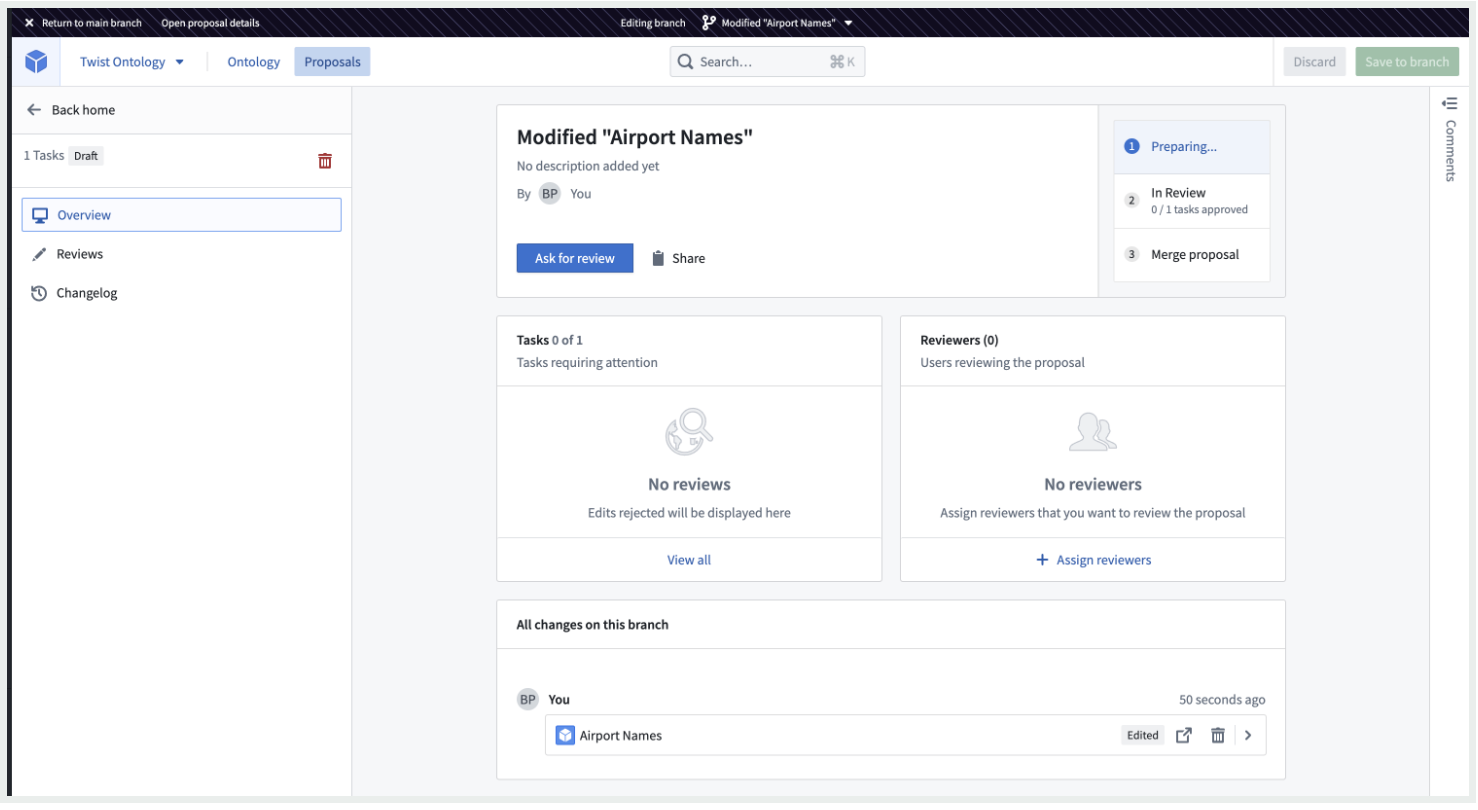
- Proposal Overview: The Proposal overview page centralizes high-level information about a proposal such as description, stage, reviewers, and tasks related to Ontology changes. The Overview is also the starting point for editing the proposal, adding reviewers, reviewing pending tasks, and moving the proposal to the subsequent stage.
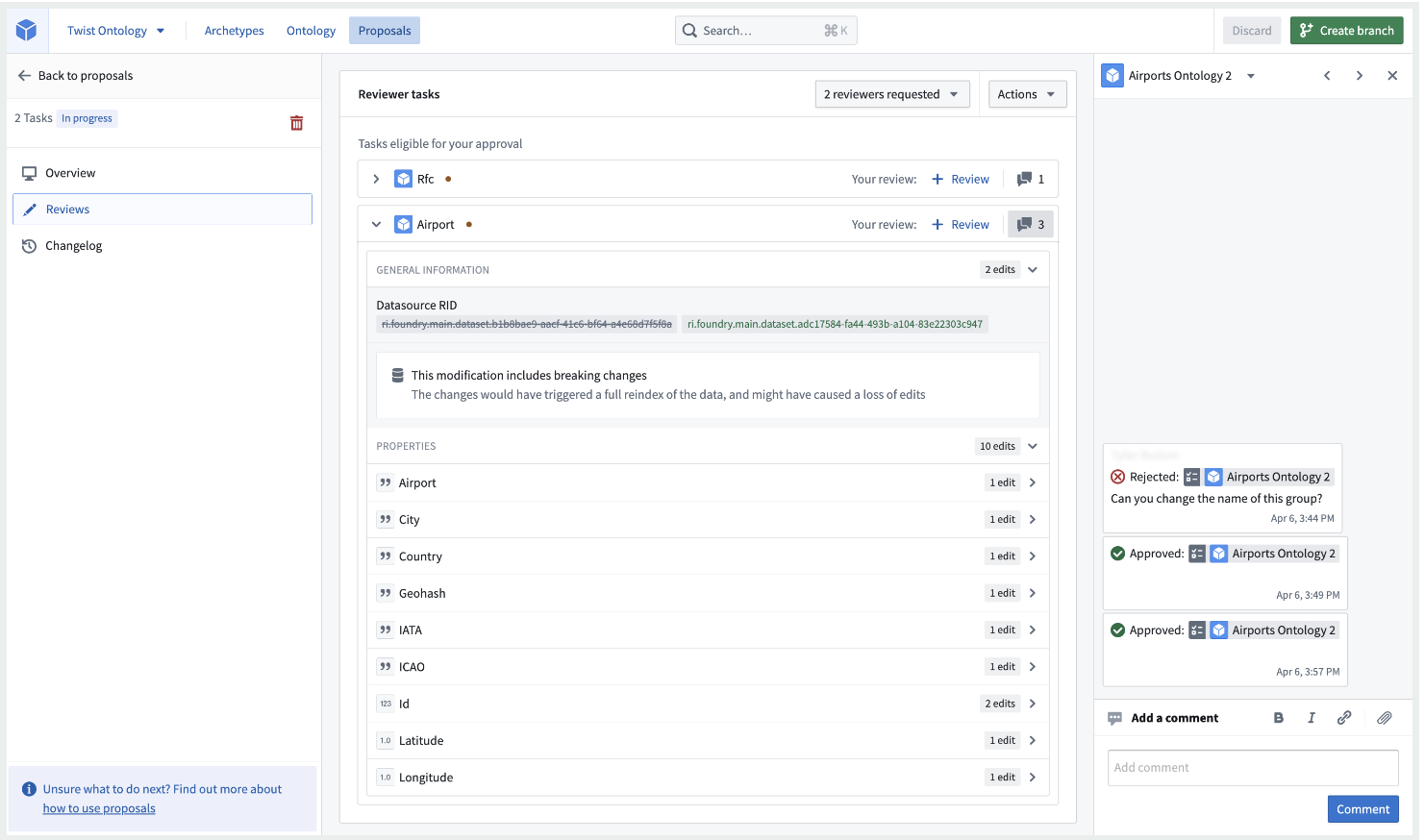
- Reviewing a proposal: Reviewers have the option to either approve or reject changes, and add comments to support their review.
- Releasing a proposal: When all changes have been reviewed and approved, you or your collaborators can choose to save your changes to the Ontology.
Enable Ontology proposals from Control Panel
Proposals can be enabled for all private Ontologies as well as all default Ontologies that do not have collaboration between multiple organizations. To enable Ontology proposals, visit the Ontology settings tab in Control Panel, and toggle on Ontology proposals for your organization.
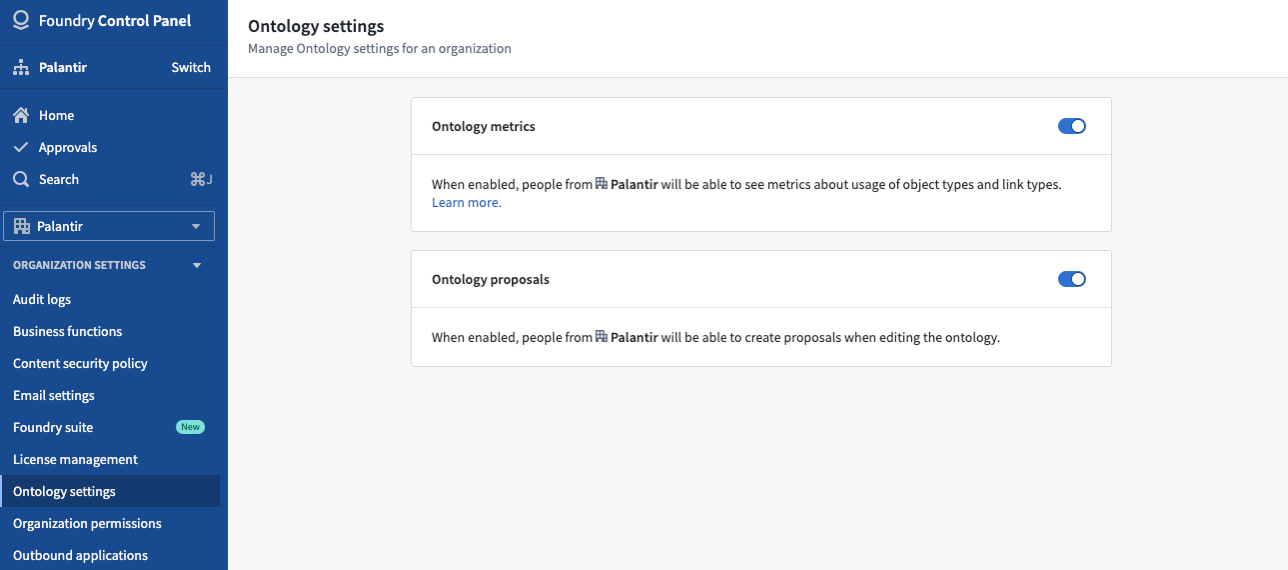
For more information and usage guide, see Ontology branches in the public documentation.
Introducing the Retention Policies application [Beta]
Date published: 2023-07-06
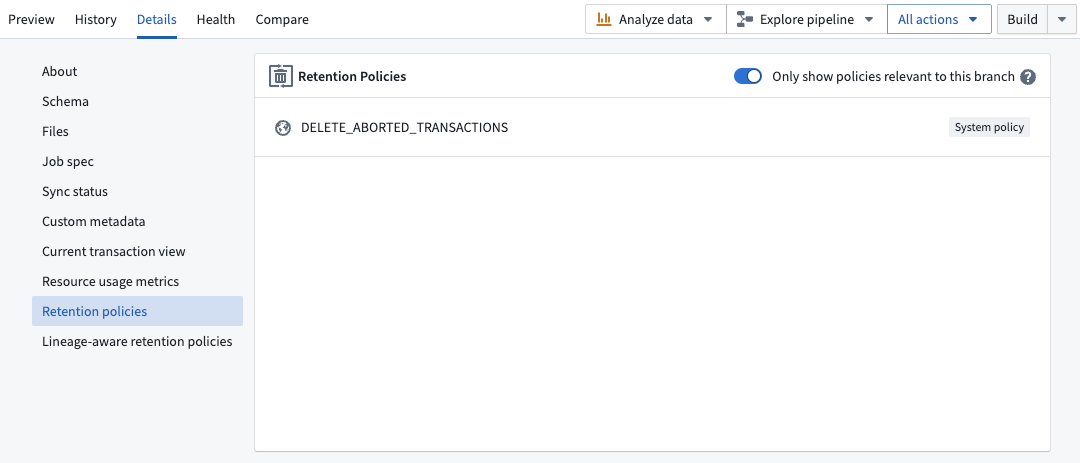
The new Retention Policies application in Palantir Foundry allows you to determine how historical versions of data are deleted from datasets in one self-service interface. Administrators can now easily configure policies that apply to chosen datasets, and Foundry users can view and filter the retention policies that apply to a specific dataset with the Retention policies tab located in the Dataset details view.
The Retention Policies application makes the deletion process more intuitive for administrators while improving transparency for regular Foundry users through its corresponding tab in the Dataset details page.
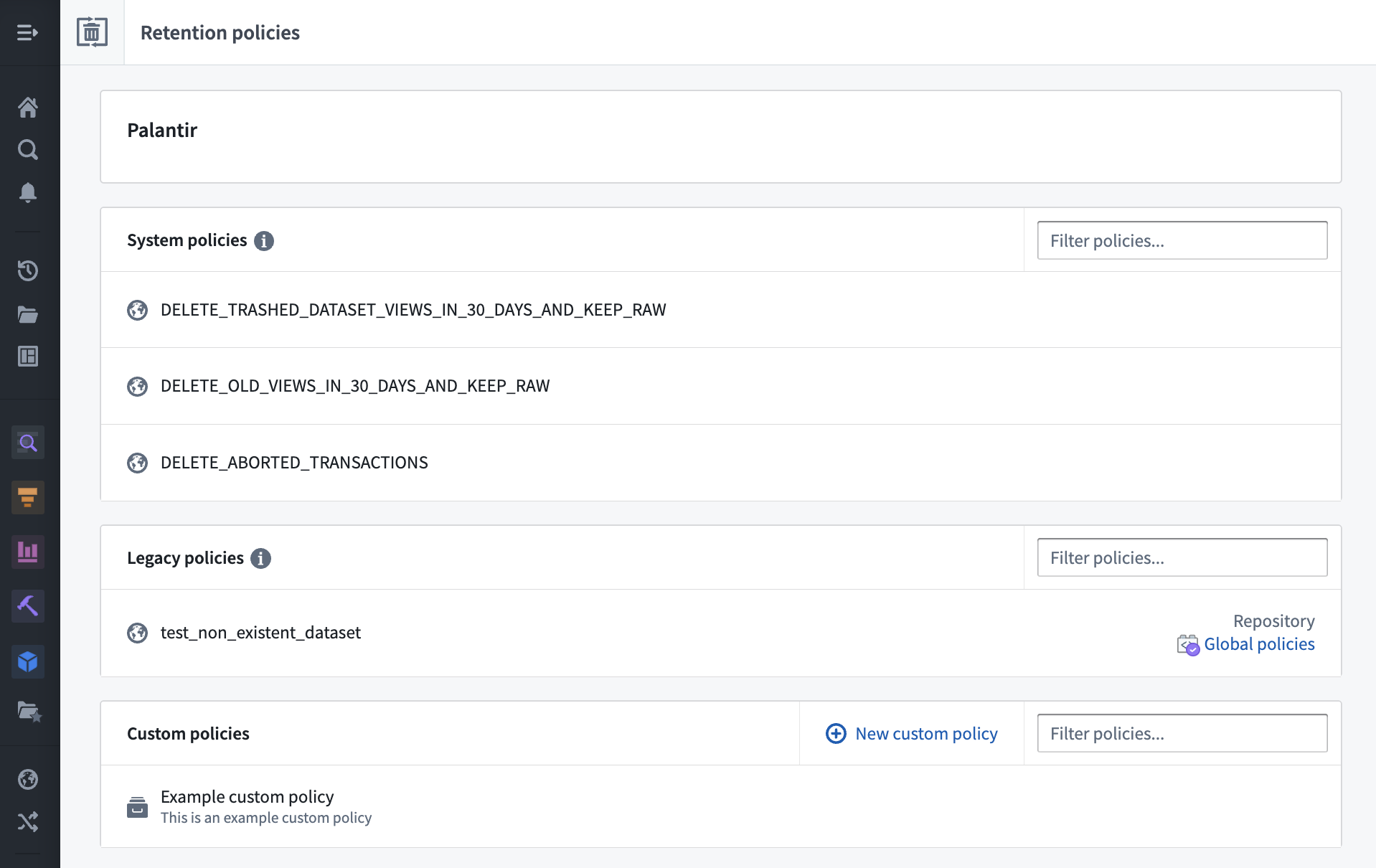
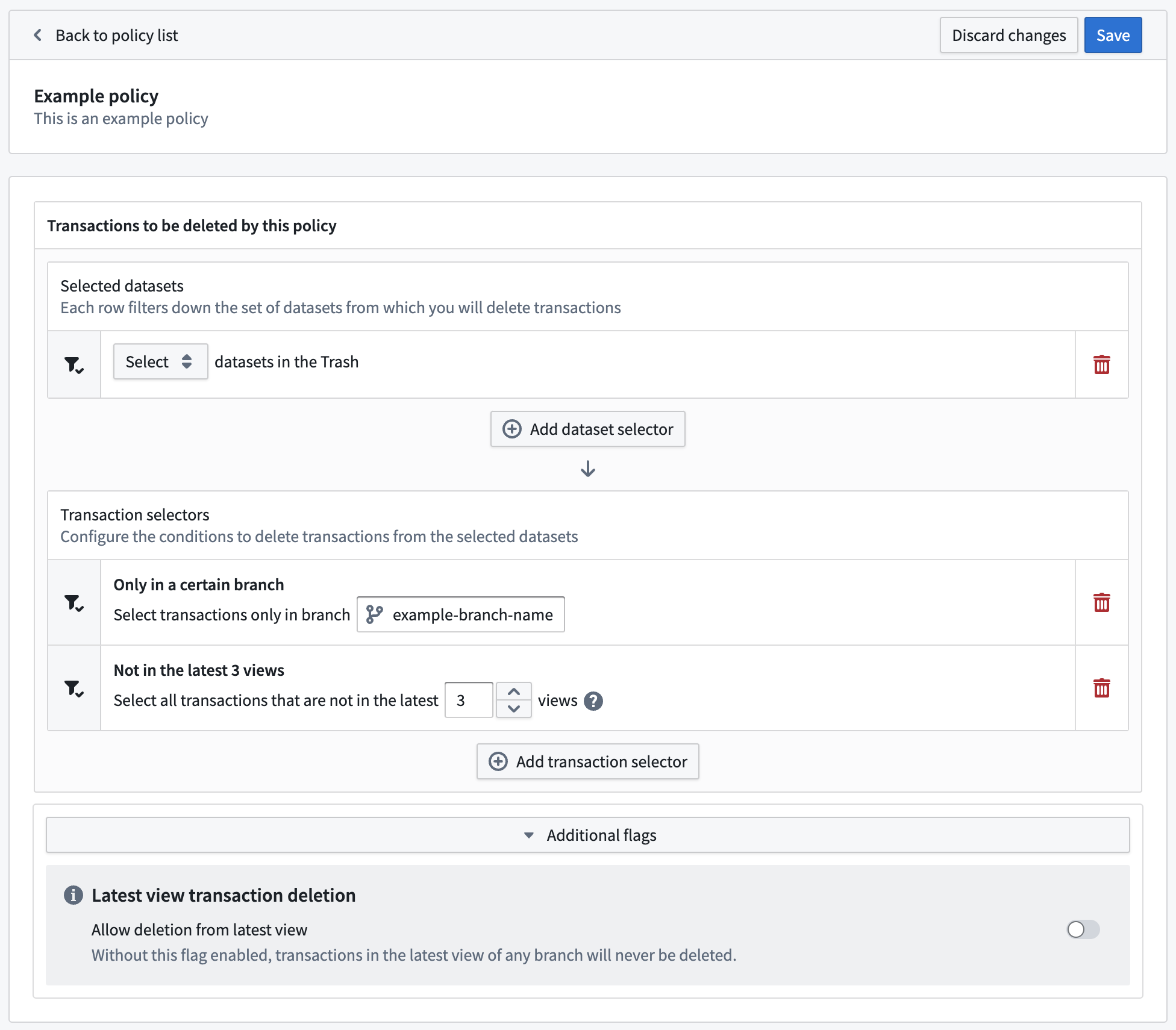
With the Retention Policies application, you can take advantage of the following features:
Retention Policies application (Foundry administrator configuration)
- View all retention policies that apply to a given namespace
- Migrate legacy policies defined in Code Repositories in one click
- Edit mode with validations to alert when the configured policy can be potentially dangerous
Retention policies tab in Dataset details view (Foundry user view)
- View all retention policies that apply to the given dataset
- Optional toggle to filter only the policies affecting the selected branch of the dataset
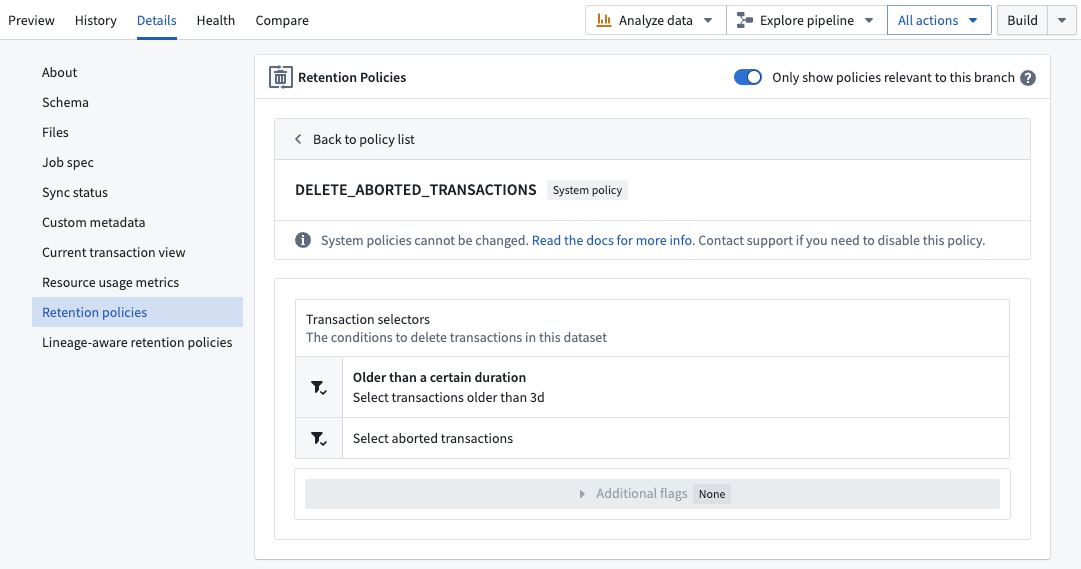
Refer to the Retention policies documentation for further details.
What's on the development roadmap?
Better integration with lineage-aware retention policies: When customers have regulatory requirements to delete data after a period of time, it can be difficult to configure the above retention policies to operate on a whole pipeline at once. Support for a new type of policy that can start deleting from one dataset and move downstream of the deleted data is in development.
Introducing AIP in Quiver [Beta]
Date published: 2023-07-06
AIP is now available in Quiver, allowing new and existing application builders, data analysts, and subject-matter experts of all experiences to explore data with ease via natural language prompts. AIP is integrated with Quiver's functionalities and can infer cards and their configuration to construct meaningful graphs.
AIP in Quiver can help:
- Answer business and analytical question by generating the analysis that backs the answers
- Configure output visualizations (layouts, colors, orientation, titles, etc.) Learn how to use the Quiver application with its extensive and powerful suite of data transformation, visualization, and dashboarding capabilities
You can review AIP's suggestions, review their underlying rationales, then accept or reject them. With a click of a button, you can transform your analysis with flexibility and ease.
Generate analyses and get insights more quickly
Answering business and analytical questions in Quiver is now faster than ever using AIP. Users can generate an analysis by simply asking Quiver natural language questions such as:
- Who are the top retailers by revenue in Atlanta and Texas during 2020-2022?
- What was the marketing spend in 2022 for Company A and Company B combined? And what was it for each?
- What was the sum of marketing spend in each advertising channel for each retailer?
(Demonstration screenshots below depict notional data)
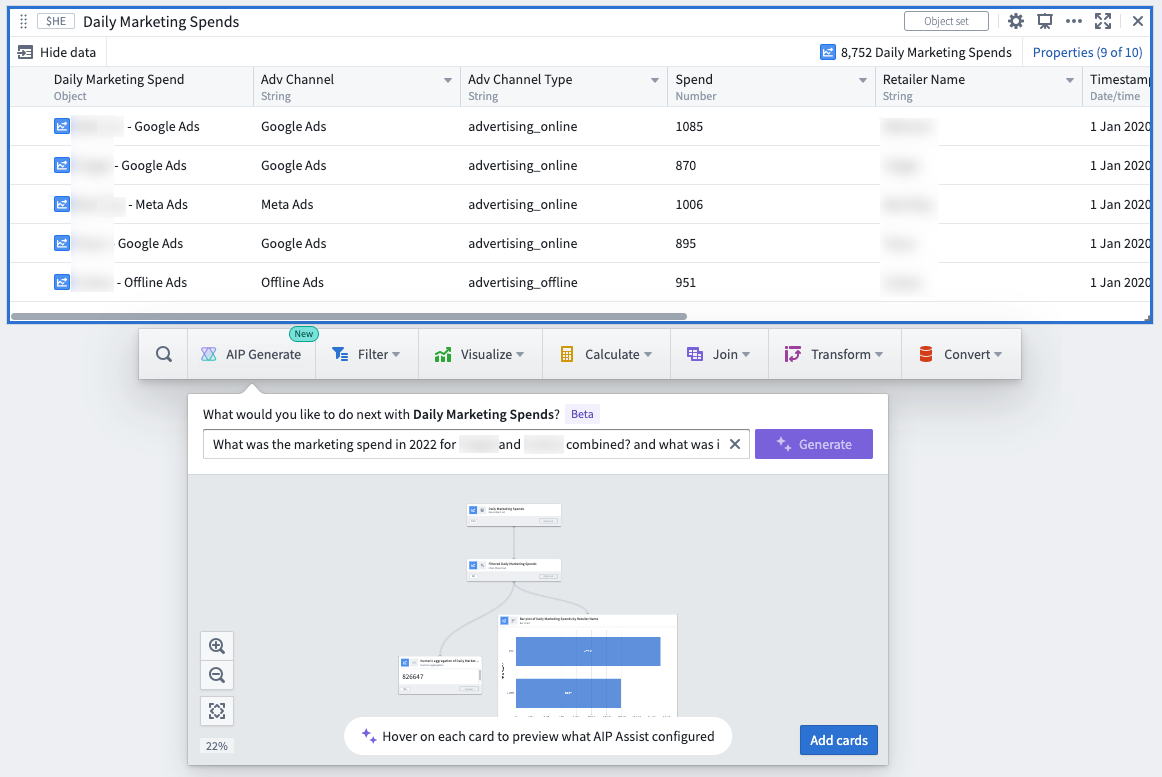
Using a large language model (LLM), AIP parses a user’s question to then construct a resulting Quiver graph, along with a helpful explanation of why specific cards were chosen and how the cards were configured in relation to the respective prompt.
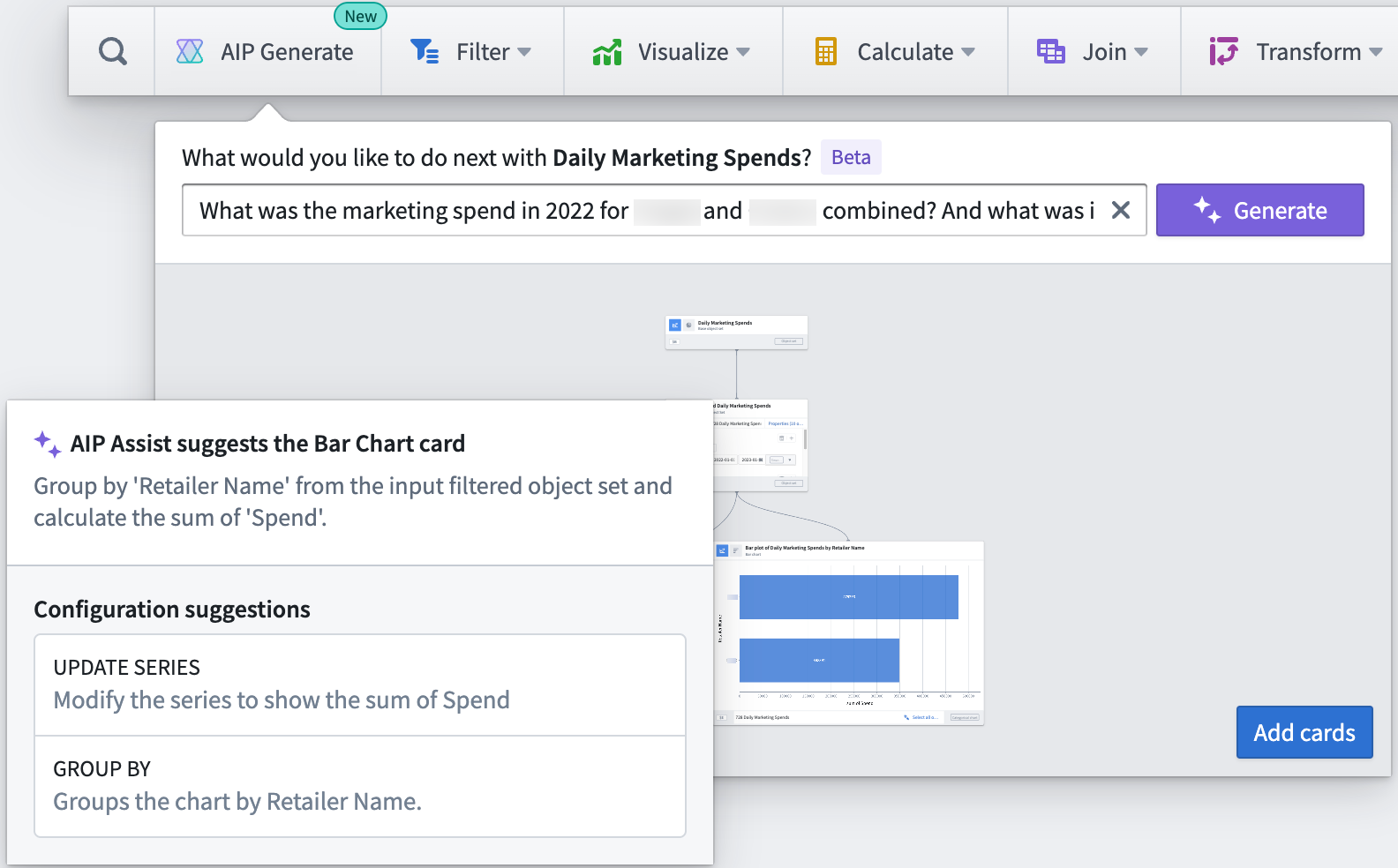
Quiver users can then add the resulting graph to the analysis canvas all at once, to further modify or finalize each card configuration or visualization.
Configure visualizations by describing the desired output
Quiver users can now obtain a picture-perfect visualization without having to know the visualization settings offered by each Quiver card. AIP makes updating card configuration a breeze since users can describe a configuration to AIP such as:
- “Move the legend to the bottom and change the style to grouped”.
- “Change the metric to sum of sales and update the y axis title to
Total Sales".
For each command, AIP returns with card configuration suggestions - accompanied by explanations of why each suggestion was made - which can be accepted or rejected by the user.
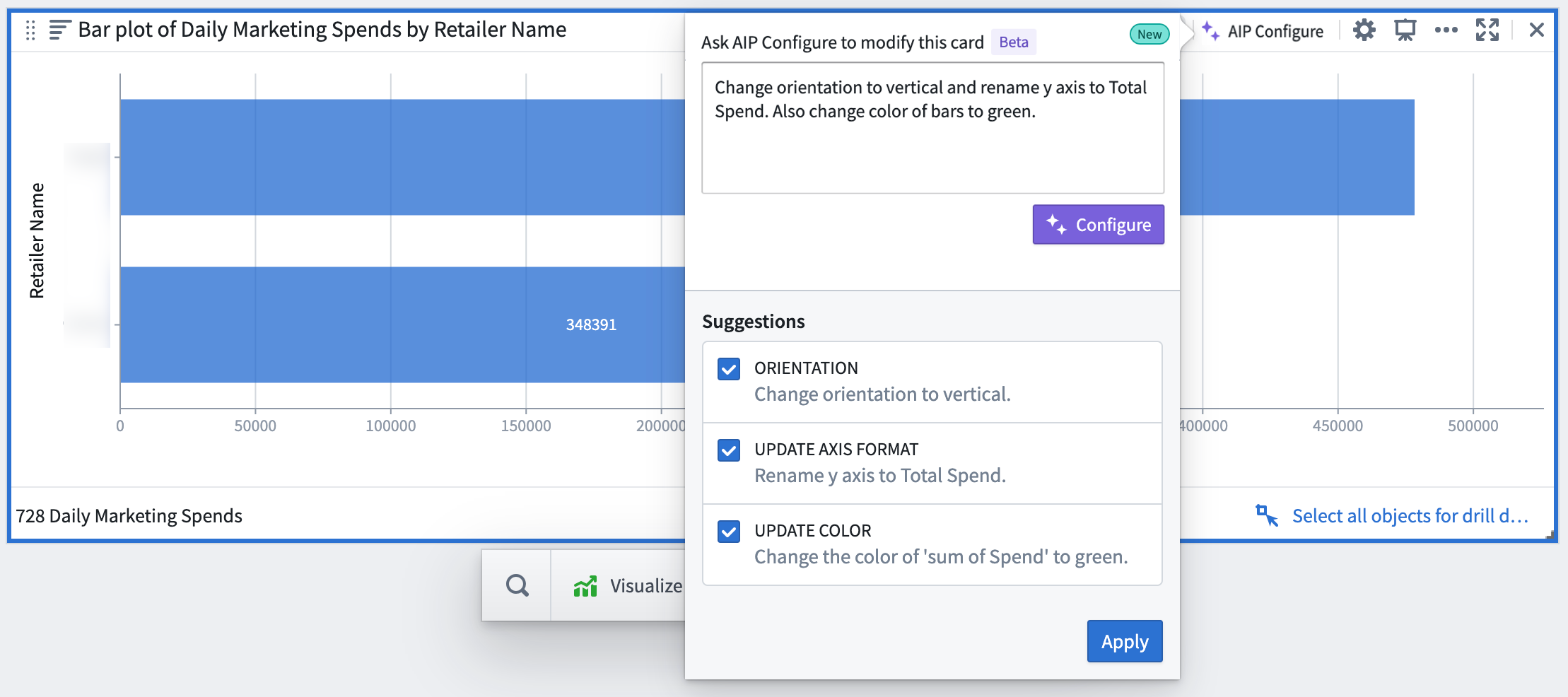
Currently, AIP in Quiver includes support for object set and object cards only. Supported cards are labeled with an "AIP Support" label.
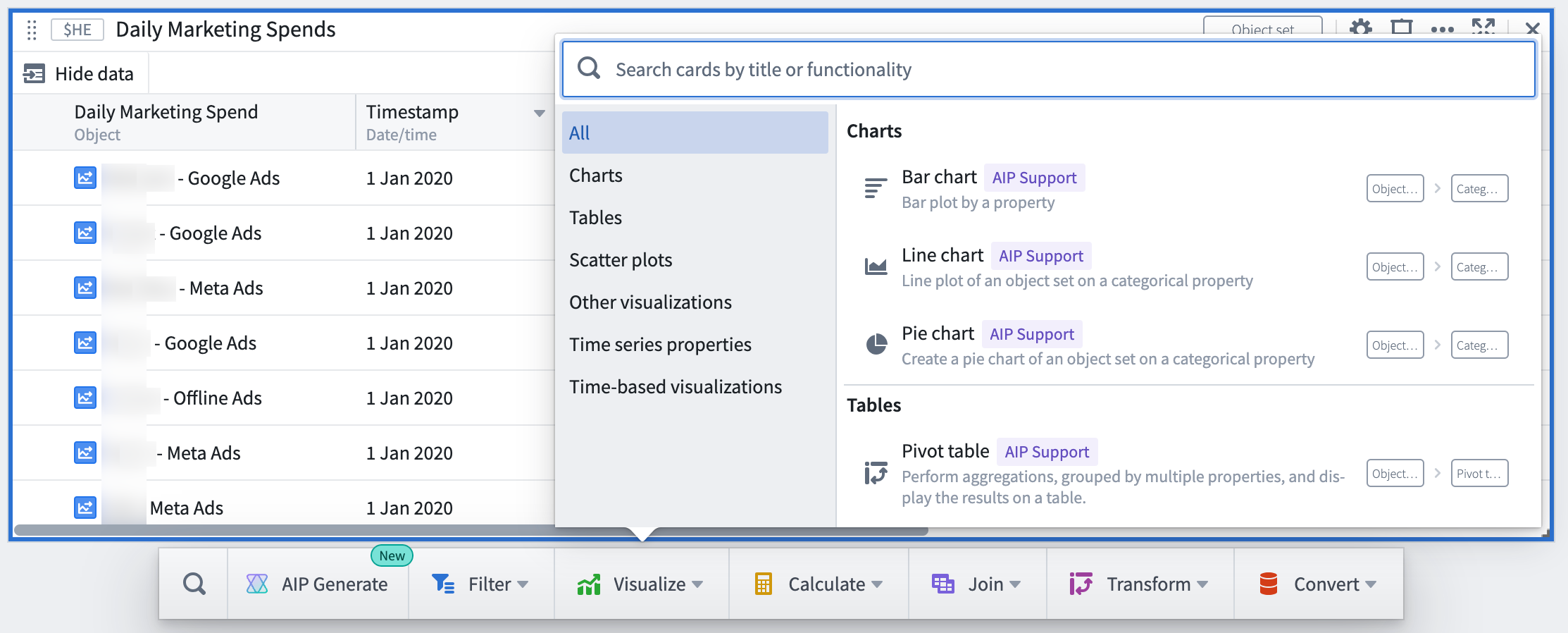
Shortening the time-to-value for new and existing Quiver users, AIP brings Quiver’s full range of advanced functionality to the forefront with just one user command. These new features represent the beginning of exciting ways in which AIP can augment Quiver analyses, with further functionality to come.
See the documentation for more information on Quiver’s AIP features.
Additional highlights
Security | Projects
Surfacing additional data requirements in the Check access panel | The Check access panel in the workspace sidebar now surfaces additional data requirements for certain files such as Markings inherited through lineage for datasets, and Ontology dependencies for Workshop modules & Slate applications.
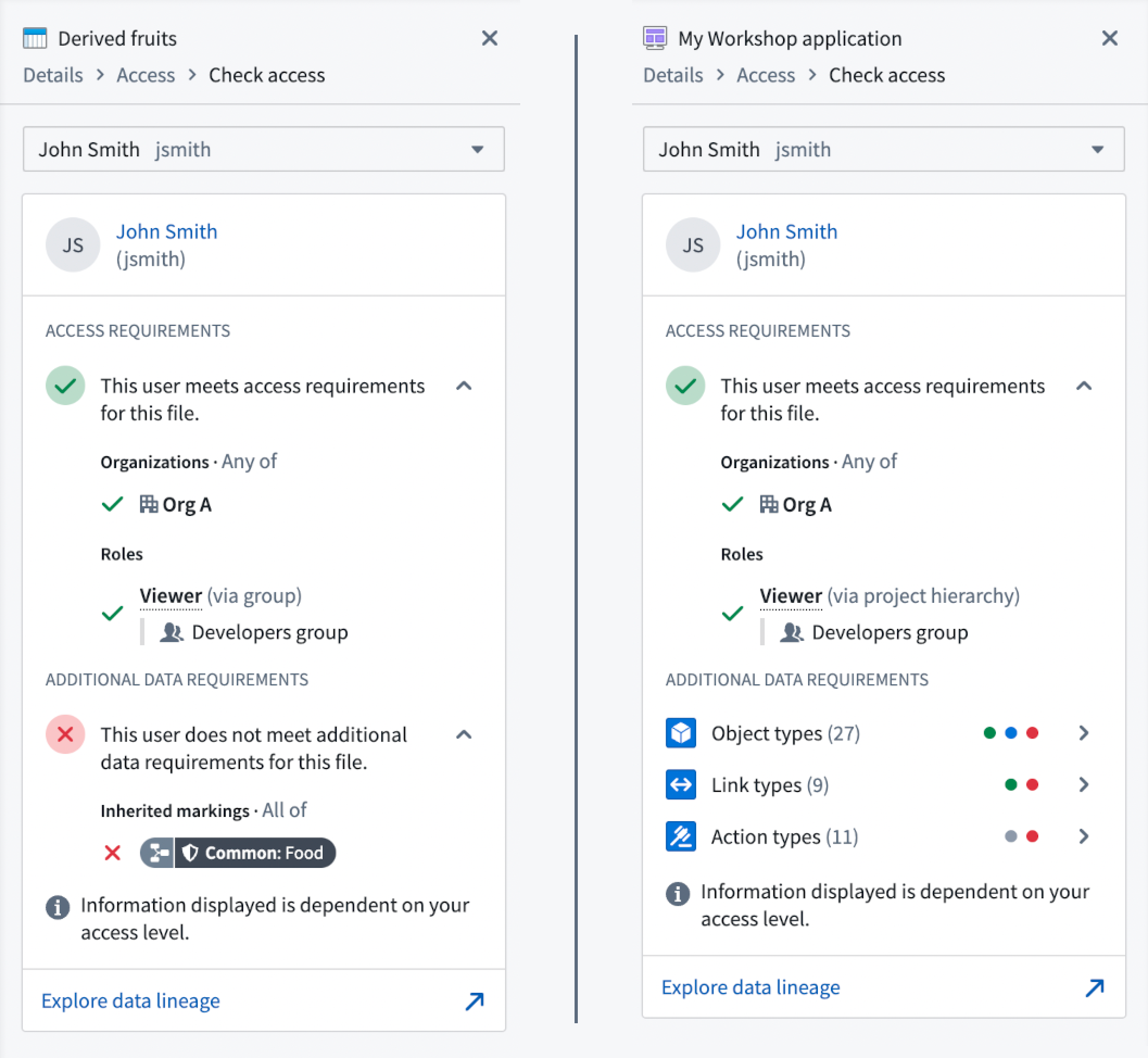 Additional data requirements for dataset and Workshop modules
Data Integration | Code Repositories
New Code Repositories default to deleting source branches when PRs merge | All new code repositories will default to deleting source branches when its respective pull request has been merged. Existing repositories will be unaffected, and new repositories can be opted-out on a per-repository basis. This change will improve performance and stability by slowing the proliferation of branches, thereby minimizing pressure on downstream services.
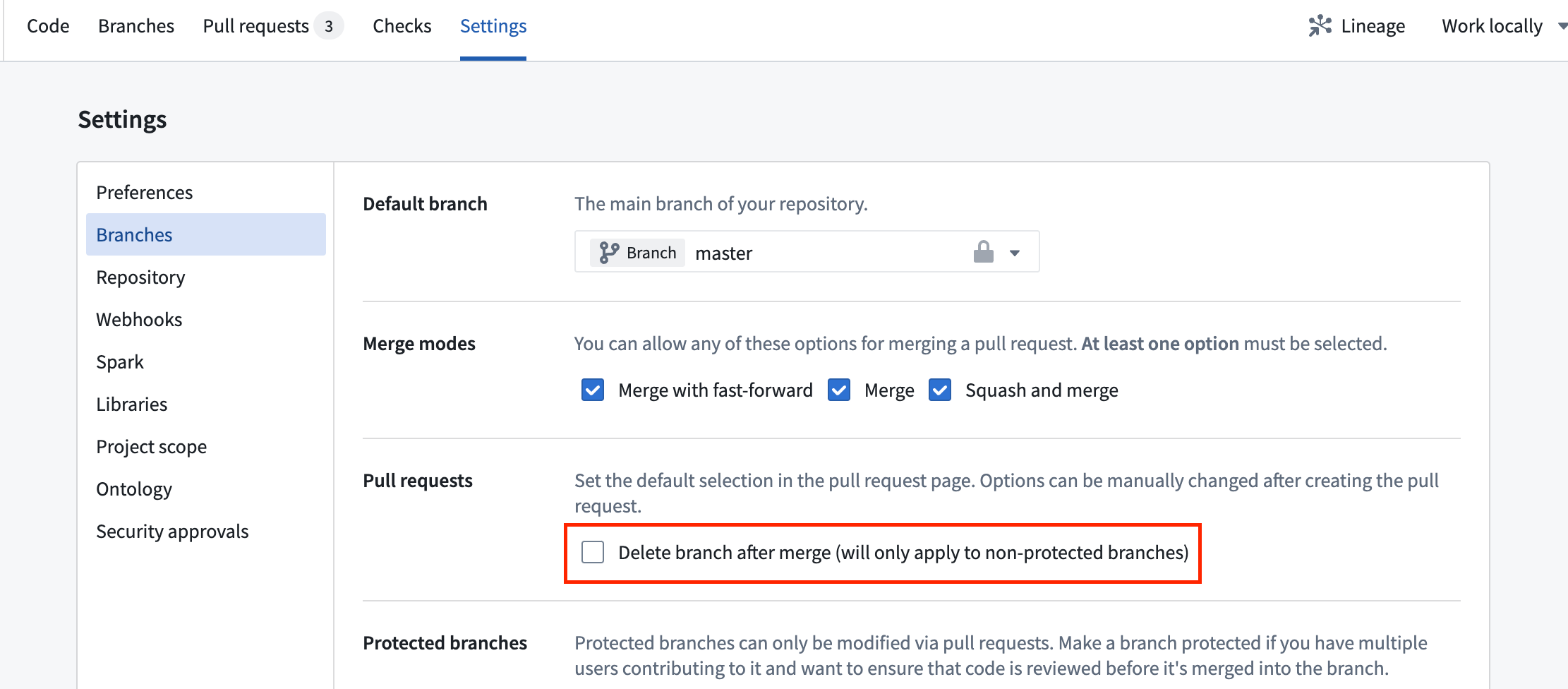 Settings for branch deletion
Data Integration | Data Connection
Export support in Data Connection | Data Connection exports are now supported. Exports are intended to replace export tasks and provide a user-friendly interface for configuring data flows from Foundry out to other systems. With exports, you can use the same connection to both sync data to Foundry and export data from Foundry. For supported sources, you will now see a table of exports on the source overview page as well as an option to create a new export. Exports are available for S3 and Kafka sources in this release. Support for more source types will be coming soon.
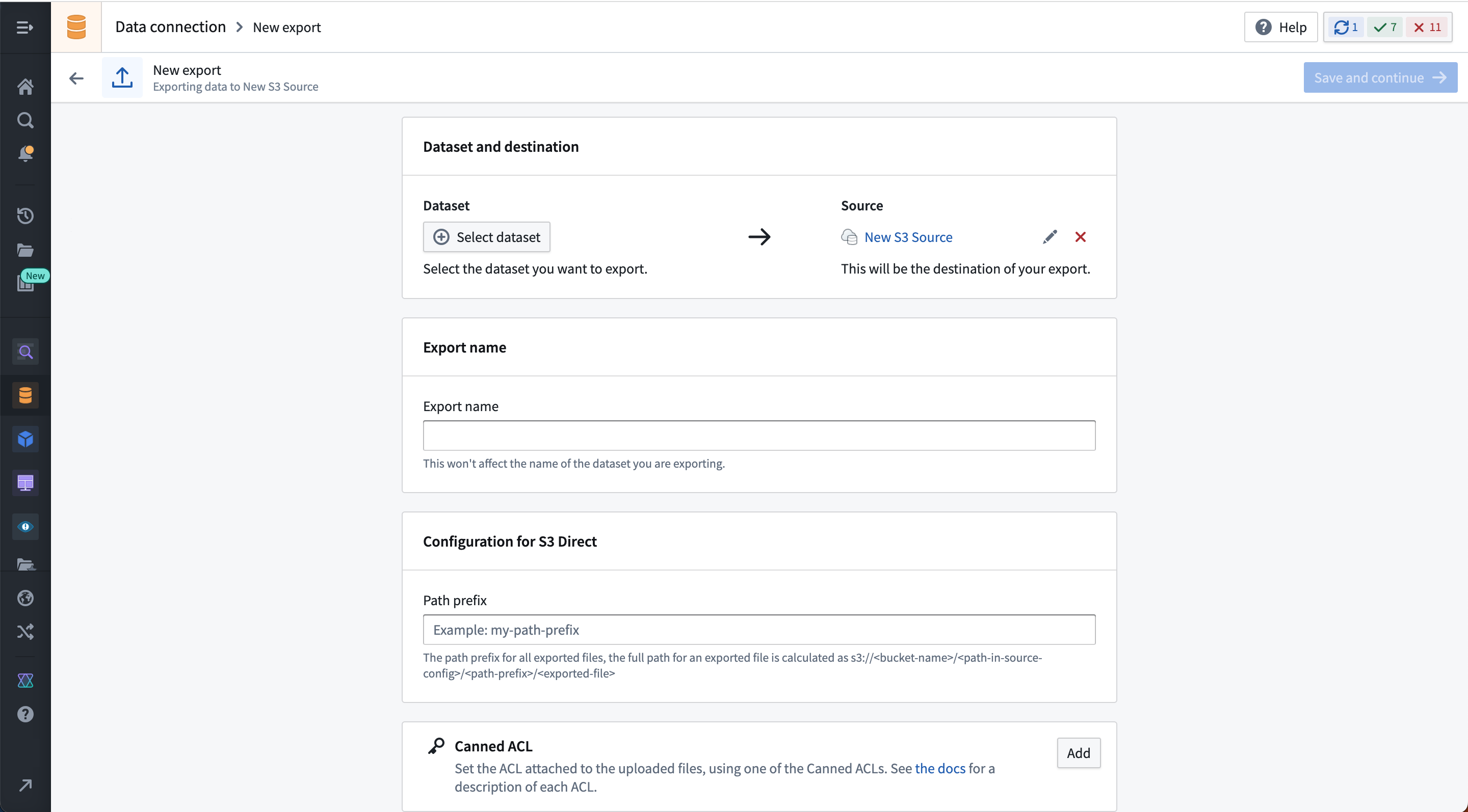 New S3 export page in data connection
Foundry | Cipher
Cipher License to Builder Pipeline | Cipher users can now create Builder pipelines from the Cipher App to kick-start encryption on their most sensitive data. This is available for Admin and Data Manager Licenses that allow Encryption. To do so, users will need to select a dataset and a specific column for encryption. Cipher will then automatically generate a pipeline for users to build upon with the pre-selected column already encrypted.
App Building | Workshop
Object List Widget: card-styling and increased media support | The Object List widget now supports a per-object card styling and also provides more options for displaying images, audio, and other media attachments inline. See an example of the new card styling with a prominent inline image displayed for each object.
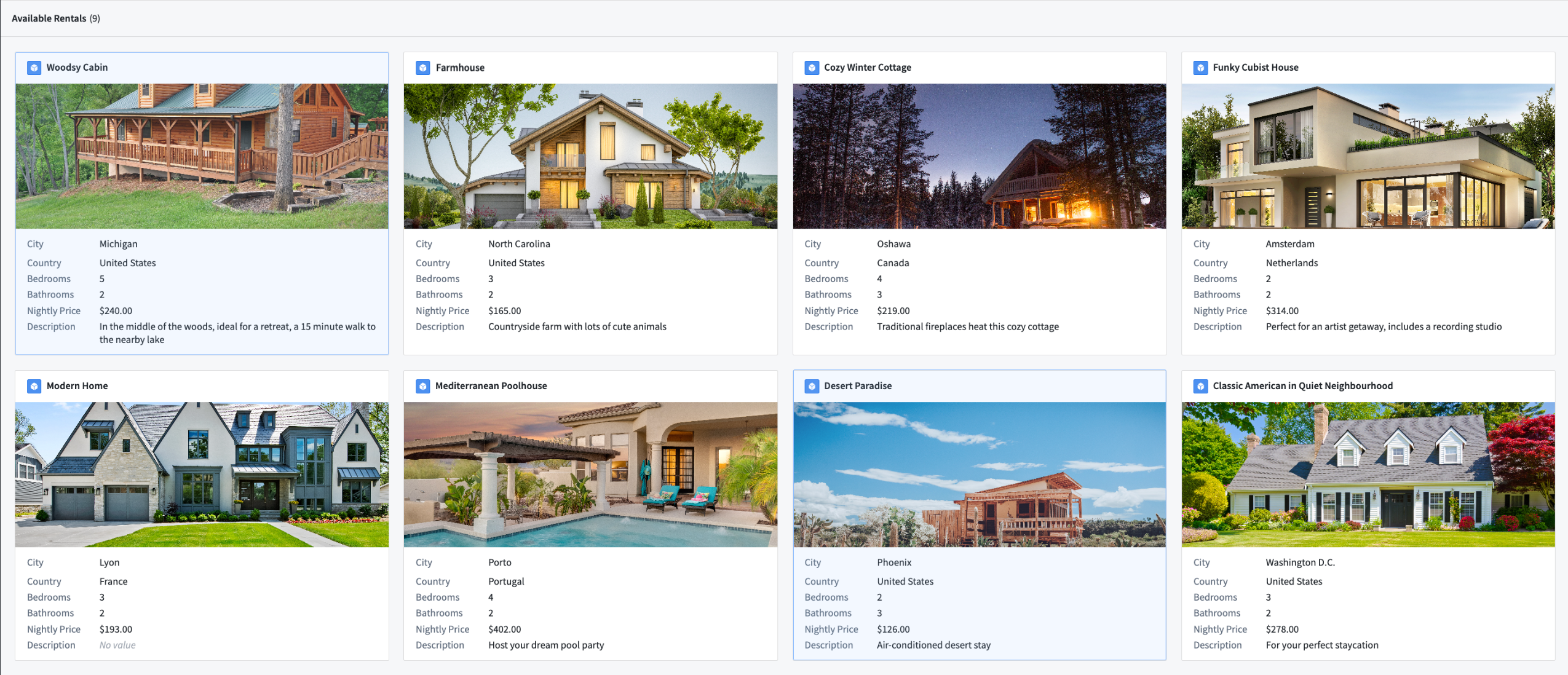
App Building | Workshop
Variable Transforms: Array Operations | Array operations are now supported within Workshop’s front-end variable transformation system. Transforms can be used to compose new arrays, calculate the intersection between arrays, and run boolean checks for the presence/absence of a value within an array.
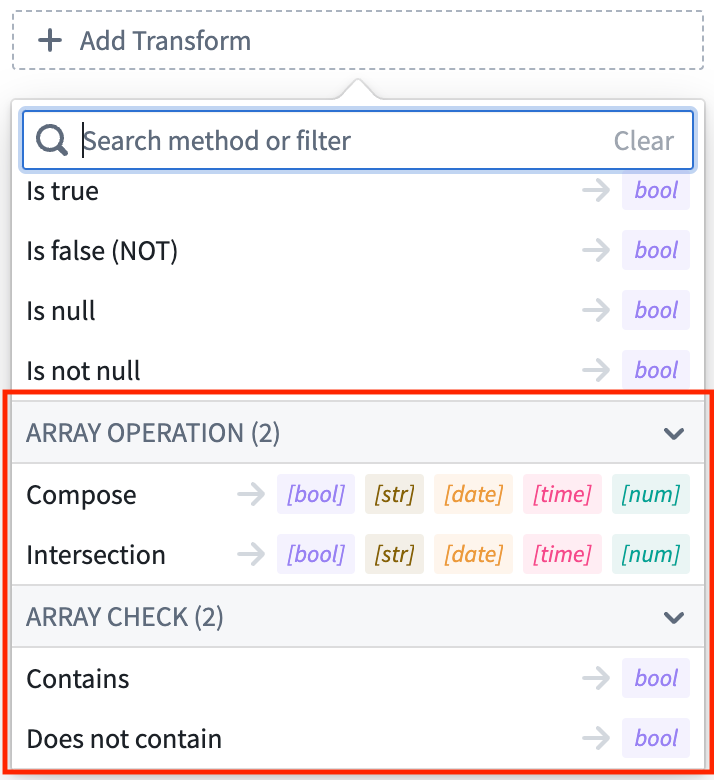
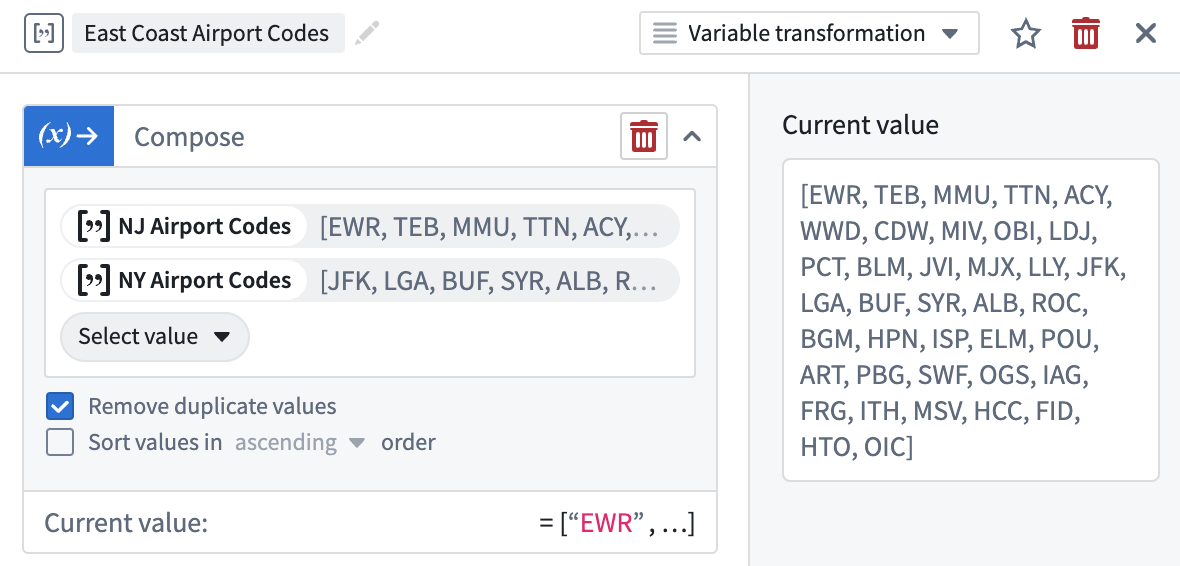
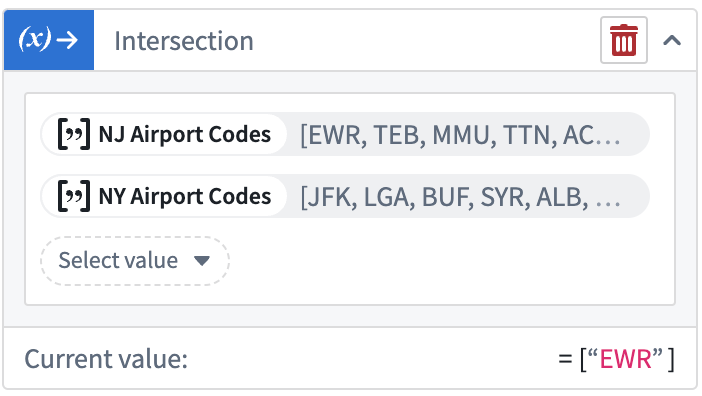
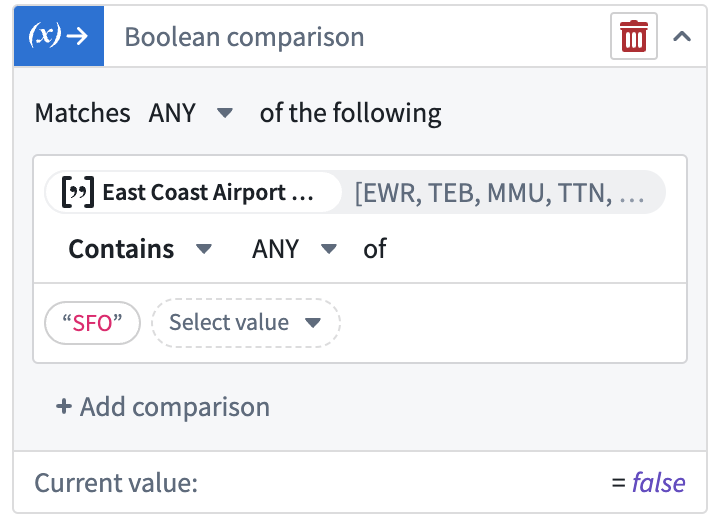
App Building | Workshop
Descriptions on Module Versions | Application builders can now add an optional description when saving a new module version. This helps document the evolution of changes made to production modules and allows builders to main a richer record of a module’s history. Descriptions can be viewed, added, and edited in the module’s versions dialog. Retroactively added or edited descriptions will be marked as edited with accurate timestamp and editor details. Reverting to a previous version of the module will automatically generate a description, logging the taken revert action.
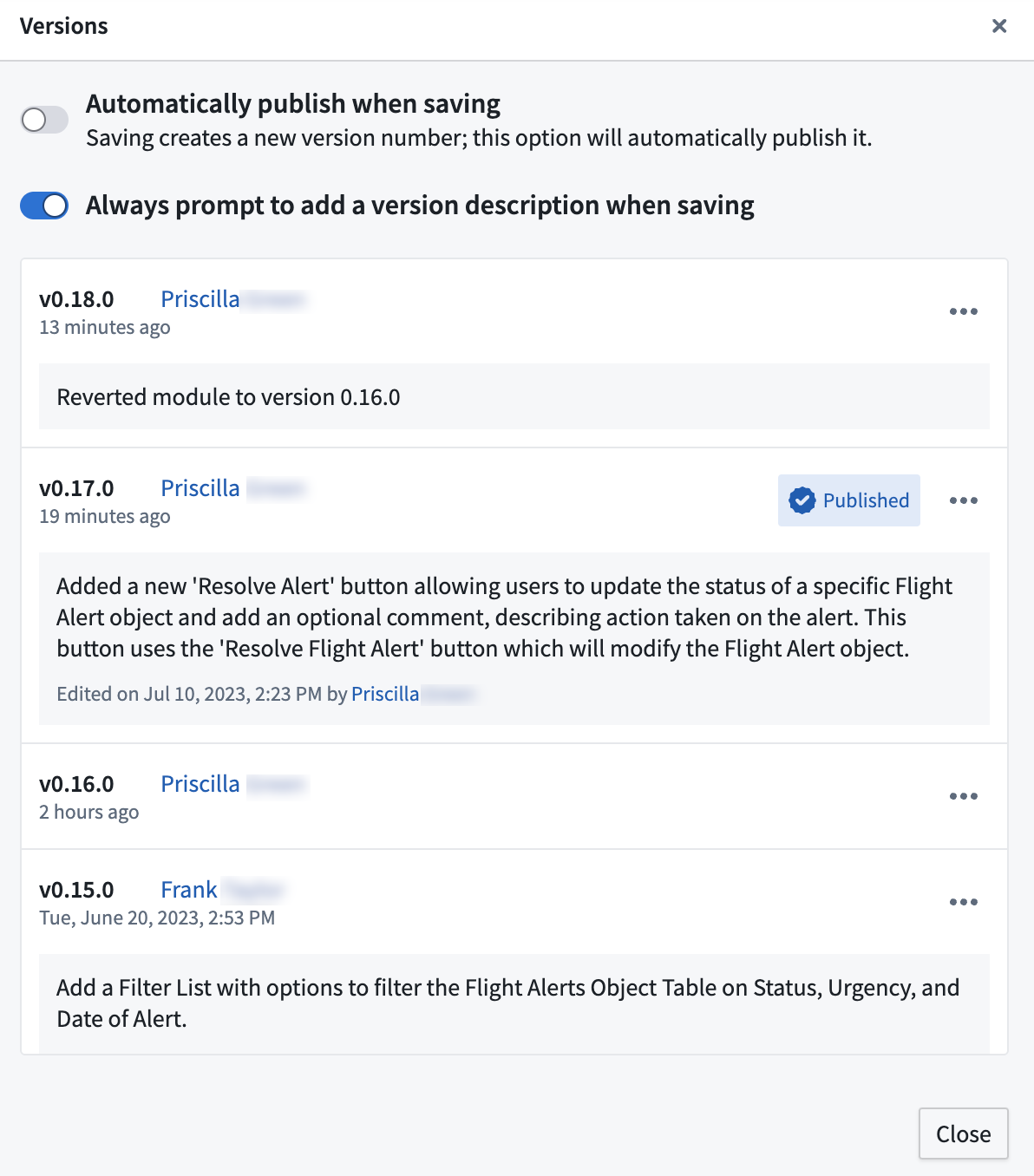
Security | Projects
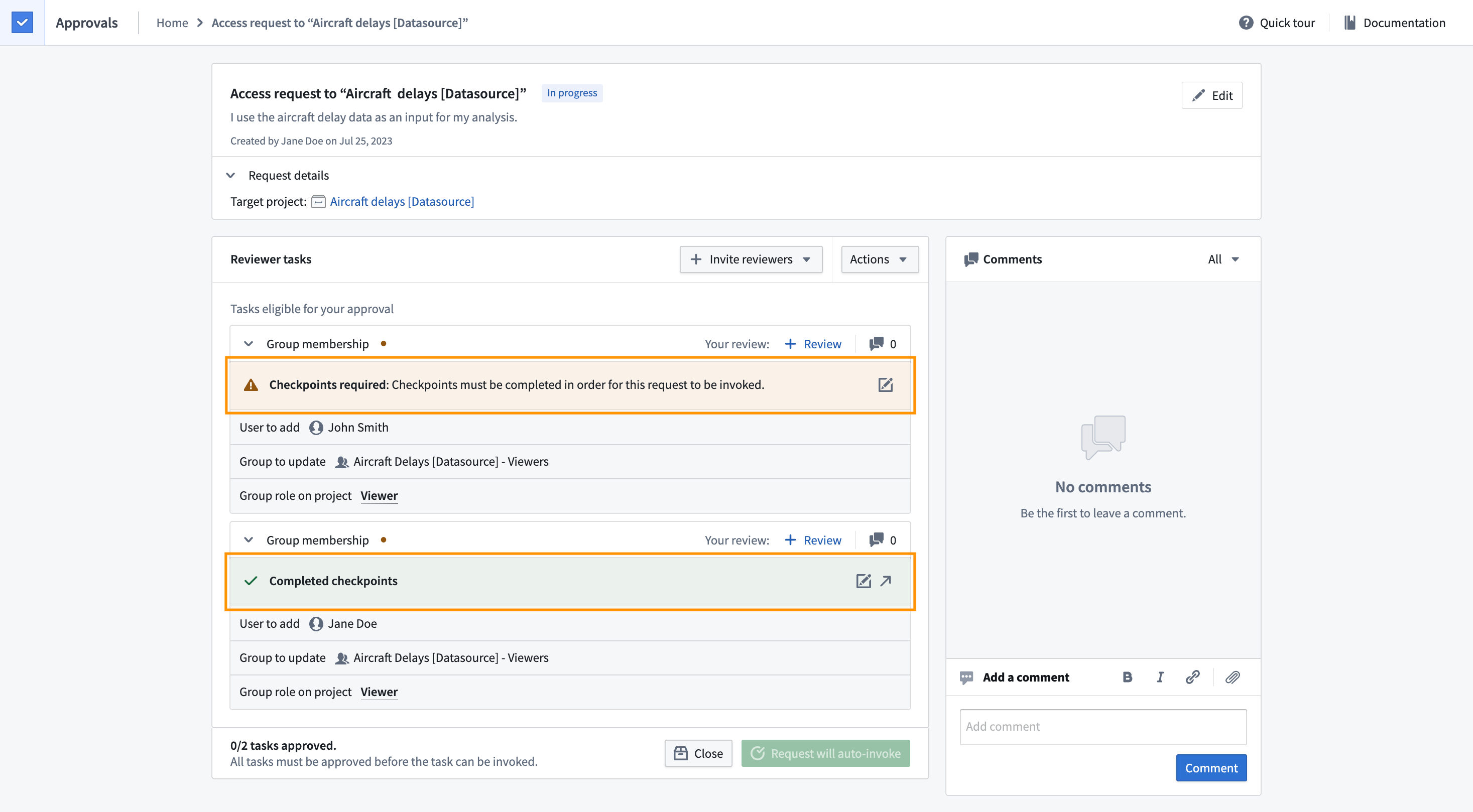
Require checkpoints for actions taken via asynchronous requests | Justifications are now required for asynchronous requests if checkpoints have been configured for certain synchronous actions, such as adding a reference to a project. The corresponding tasks will display whether checkpoints have already been completed or not.
Analytics | Quiver
Add Boolean filter transforms | Added is and is not comparison transforms for filtering transform table rows by Boolean columns. These new transforms enhance filtering capabilities, allowing users to filter by Boolean columns and other column types such as date and string. The comparison transforms can also be used separately outside of transform tables.
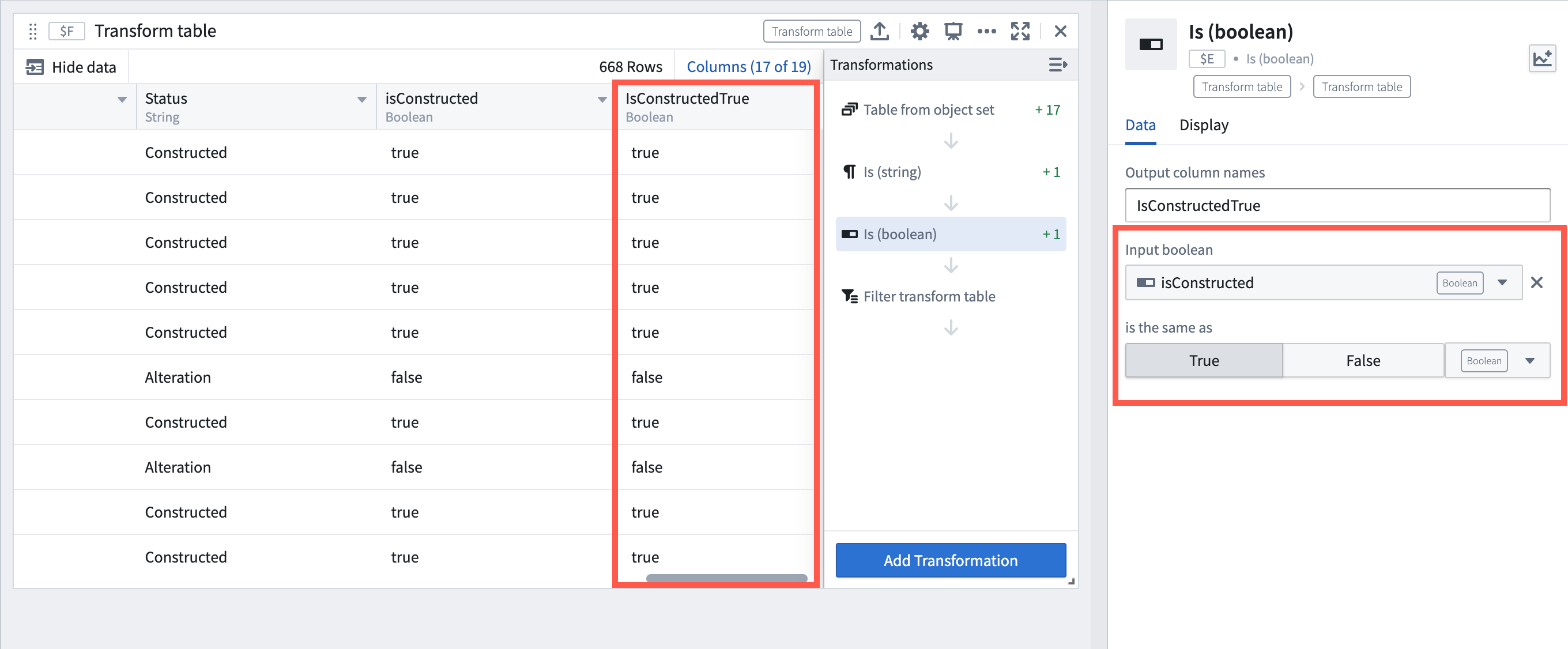
Example of using the new Boolean comparison transform to check if a Boolean column is True.
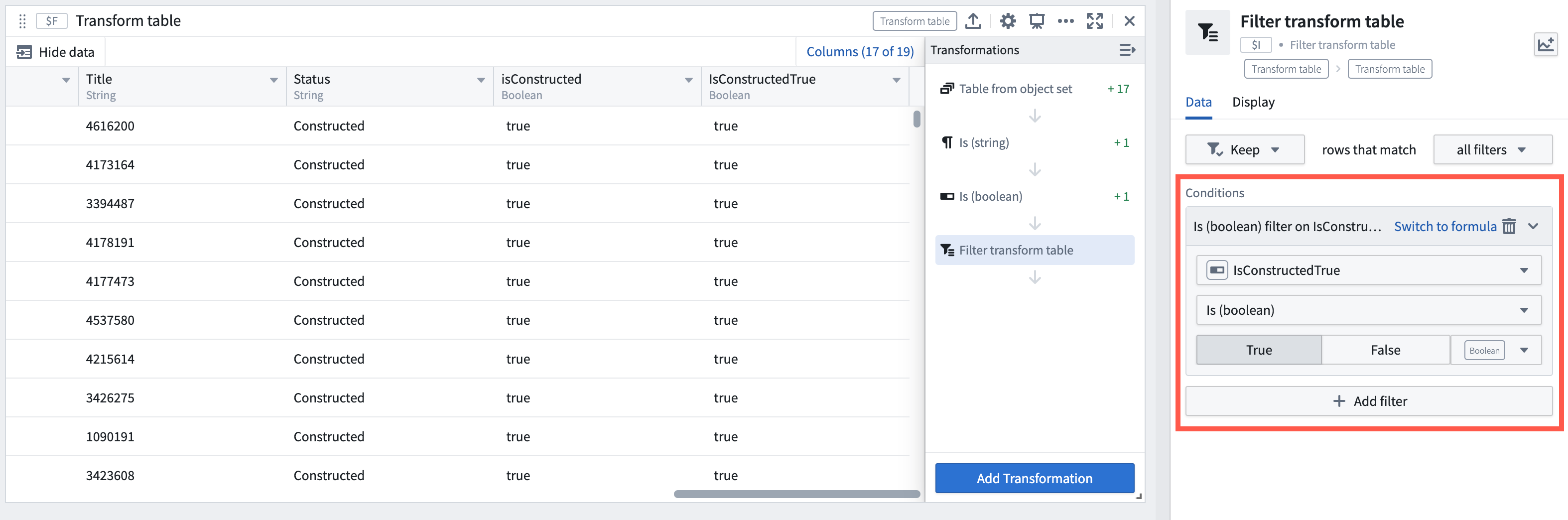
Example of a transform table filtering rows via a Boolean comparison transform output.
Ontology | Ontology Management
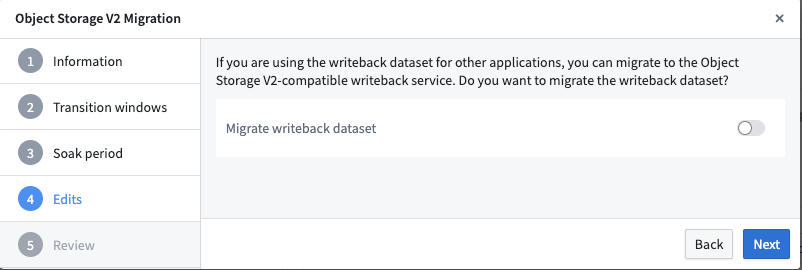
Supporting OSv1 -> OSv2 migration for object types with user edits | User-edited object types and many-to-many link types can now be migrated to OSv2 in the Ontology Manager. Previously, the migration framework did not allow migration of object types and many-to-many link types with existing user edits. Edited object types can now benefit from the new features and capabilities of OSv2.
Analytics | Quiver
Replace Number group aggregation with Number array aggregation transform | "Number array aggregation" is a new transform that performs the following functions: First, last, sum, average, standard deviation, maximum, minimum, difference, product, and count. Replacing the existing "Number group aggregation" transform that only works within a transform table, this new transform works both within and separate from transform tables.
Analytics | Quiver
Add Number to Date Transform | Released a new "Number to Date" transform that converts between a numeric representation of a date (either Unix seconds or milliseconds, representing a timestamp in UTC) to a date type. This transform is useful, for example, to convert the returned value of a numeric aggregation on a Date property type which is a Number type back to a Date type to be used as input for other transforms or cards.
Data Integration | Pipeline Builder
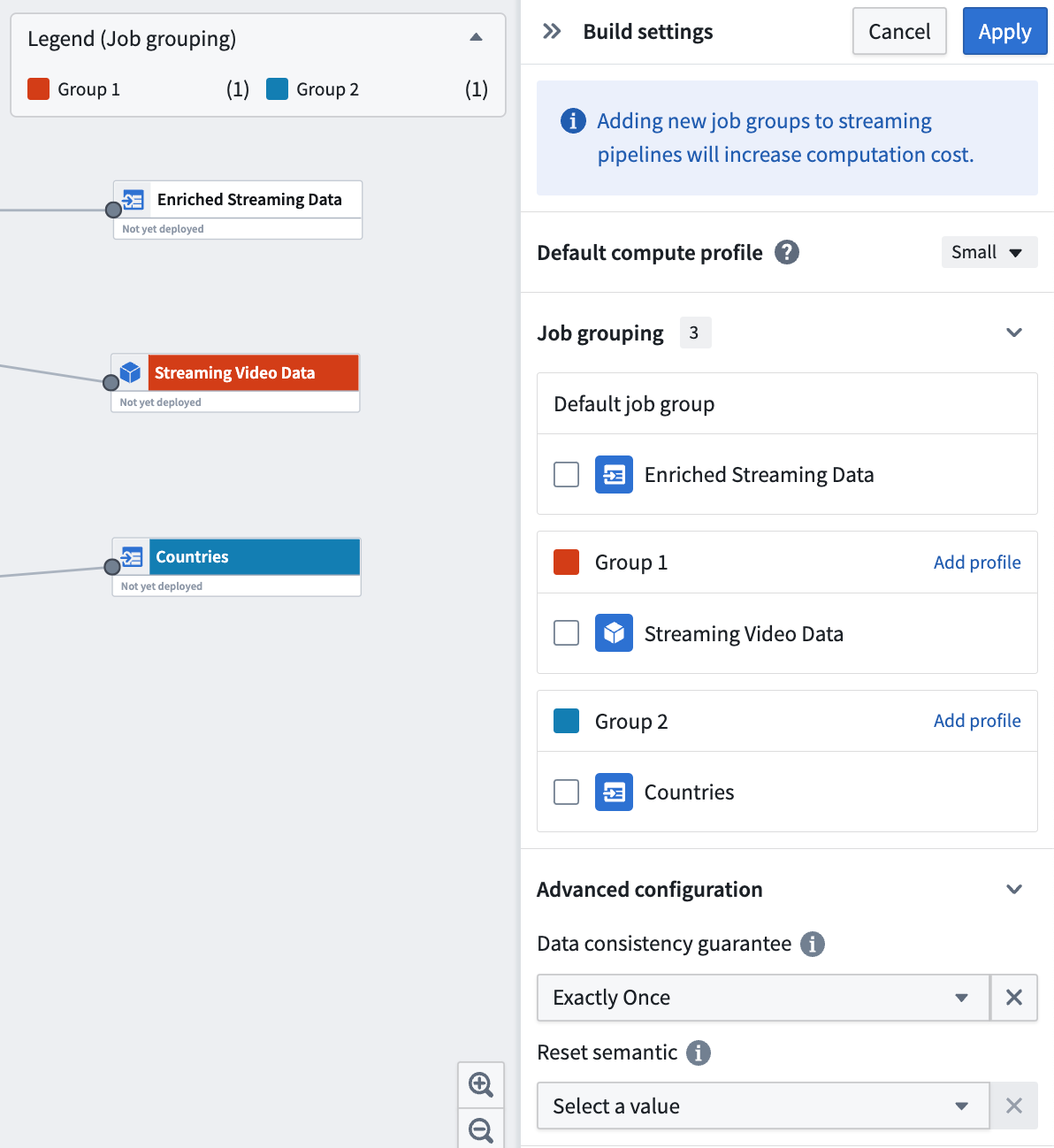
Ability to create job groups in Pipeline Builder | Each successful deployment in Pipeline Builder will initiate a single build. In batch pipelines, by default, each output is built as its own job, so output jobs succeed or fail independently. In streaming pipelines, by default, all outputs are bundled into a single job running on a single Flink cluster, so output streams either all succeed or all fail together.
Job grouping enables you to bundle multiple outputs together into one job in batch pipelines, or split each output into its own job in streaming pipelines. You can also specify compute profiles for each grouping, providing granular control over how your outputs are built.
Data Integration | Pipeline Builder
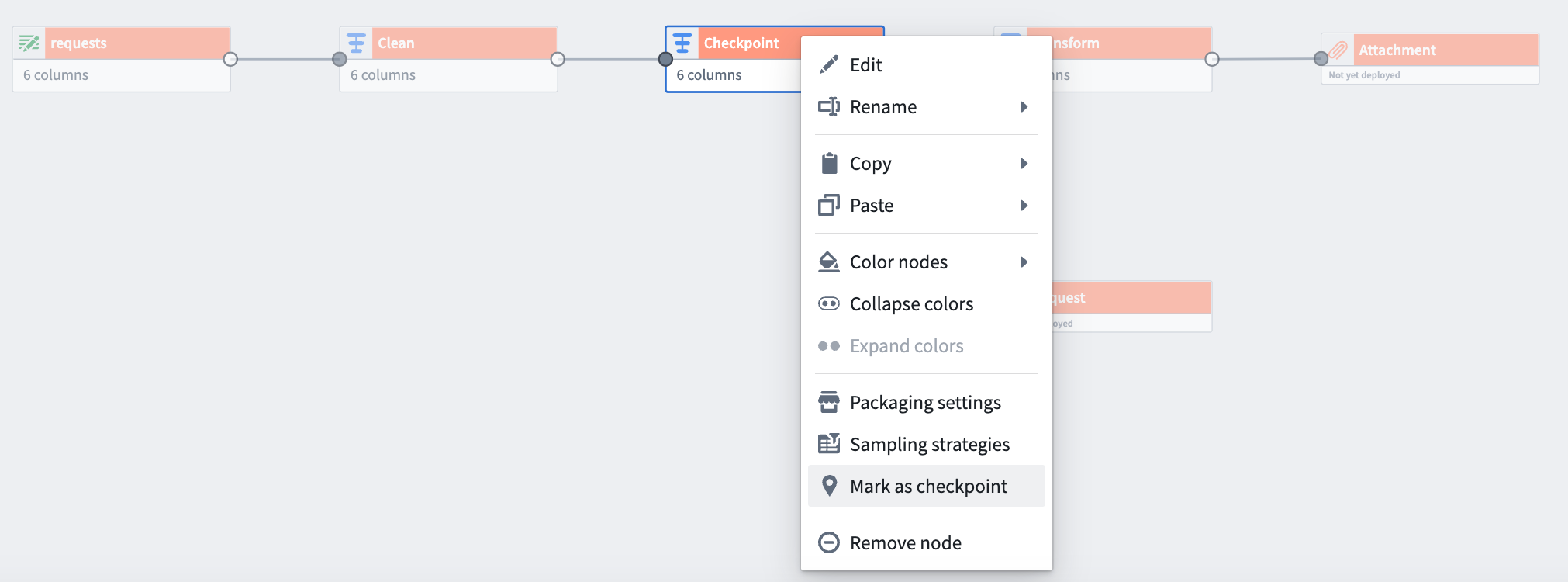
Checkpointing now available in batch pipelines | While building pipelines, you will oftentimes use shared transform nodes between multiple outputs. This logic is normally recomputed once for each output. With checkpointing, you can mark transform nodes as “checkpoints” to save intermediate results during your next build. The logic up to that checkpoint node will only be computed once for all of its shared outputs. This can save compute resources and shorten build times.
Ontology | Foundry Rules
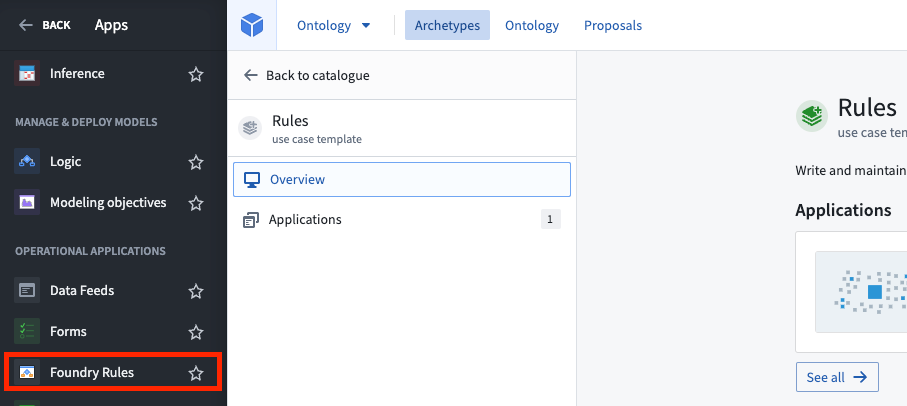
You can now access Foundry Rules configuration via the sidebar | The Foundry Rules deployment and configuration UI is now accessible via a more prominent sidebar icon. See Deploy workflow template in the documentation for more detail.
Ontology | Ontology Management
Performance improvement in OMA: Rendering speed | The Ontology Manager now renders faster as it only loads updated elements instead of the entire app. Ontology Manager users will benefit from a more responsive experience when clicking between pages or making edits.
Data Integration | Scheduler
Add build duration monitor | You can now create a monitor for build duration in Monitoring views in the Data Health app.
中文翻译
公告
Python 版本弃用
发布日期:2023-07-27
根据开源 Python 的 EOL(End-of-Life,生命周期结束)时间线,Foundry 正在弃用 Python 3.6 和 3.7。代码仓库将尝试自动升级,但代码工作簿和旧版 foundry_ml 模型需要手动操作。从 Python 3.8 开始,将严格遵循上游的 EOL 弃用时间线。
请查阅文档中的 Python 版本部分,了解哪些版本受支持及其各自的弃用时间线。我们建议您始终将资源维护在最新的受支持版本上。
为什么要弃用 Python 3.6 和 3.7?
开源 Python 每年都会将旧版 Python 标记为 EOL(生命周期结束) ↗ 并停止官方支持。Python 3.6 和 3.7 已超过其 EOL,继续使用已 EOL 的 Python 版本会带来安全风险,此外还需考虑以下几点:
- PySpark 等核心包正在硬性弃用较旧的 Python 版本(例如,Spark 中弃用 Python 3.6 和 3.7),我们无法为使用已弃用 Python 版本的 Python 作业提供运行时改进或错误修复。
- 开源库持续发布的新版本不再与这些已弃用的 Python 版本兼容,导致检查和作业失败。
弃用对我作为用户意味着什么?
如果您拥有使用已弃用 Python 版本的资源,您将无法根据以下时间线在这些资源上进行开发:
- 2024 年 1 月 31 日
- 如果您的任何工作流依赖于已弃用的 Python 版本,某些工作流将不再受支持,并且在发生故障时您将无法获得支持。如果事先与 Palantir 达成一致,有限的一组资源可被列入允许列表以获得扩展支持。
- 2024 年 4 月 1 日
- 所有依赖 Python 3.6 和 3.7 的工作流将不再受支持,并将开始失败。
Foundry 资源迁移至受支持的 Python 版本
Foundry 资源迁移将遵循以下模式:
- 代码仓库:将尝试以自动补丁 PR 的形式进行自动升级。
- 其他资源:将显示包含说明和链接的信息横幅,以支持您迁移出已弃用的 Python 版本。查阅故障排除指南了解更多信息。
目前,平台支持的最新版本是 Python 3.10.。Python 3.8. 和 3.9. 也被接受,但它们会比 3.10. 更早被弃用。
未来 Python 版本弃用
从 Python 3.8 开始,Foundry 将严格遵循上游的生命周期结束时间线,并在 Python 版本达到上游生命周期结束时立即在 Foundry 中弃用它们。更多信息,请参阅文档中的 Python 版本。
在 Ontology SDK 中引入 Python 支持 [Beta]
发布日期:2023-07-27
Foundry 在 Ontology SDK 和 Developer Console 中对 Python 的支持现已进入 Beta 阶段。此版本使开发者能够生成包含所需对象类型、操作类型和链接的 Python 包,使用 conda 或 pip 安装该包,并在 Jupyter® 笔记本或任何其他 IDE 中分析结果。
安装命令行包后,您可以使用它来生成 SDK,将 SDK 导入到您的 Python 环境中,并开始遍历对象、搜索特定对象以及应用操作来编辑您的对象。
我如何尝试这个?
Developer Console 中的每个应用程序都包含一个切换开关,用于选择支持的包管理器。使用 Application SDK 页面上的 Install SDK 选项卡,在 TypeScript 的 npm 安装说明和 Python 的 pip 和 Conda 安装说明之间切换。
安装完成后,启动您的 Python IDE(例如 Jupyter®)并导入生成的包,即可开始使用 Ontology 对象类型和操作类型。
更多信息,请查阅 将 Jupyter® 与 OSDK 结合使用 文档。
如果我需要自己生成 Python 包怎么办?
如果平台无法为您生成包,您将看到如何使用命令行界面(CLI)工具生成包的说明。
Jupyter® 是 NumFOCUS 的注册商标。
在 Vertex 和 Map 中引入 Timeline [GA]
发布日期:2023-07-27
Timeline 是 Vertex 和 Map 中的一个功能,使用户能够检查所选对象的时间属性,并过滤到给定时间范围内的特定事件,现已正式发布。使用缩放选择器旁边的 Timeline 按钮打开一个 Timeline 面板,显示当前 Vertex 图或地图上的对象事件。
在 Workshop 中启用 Timeline
如果您希望 Timeline 显示在您的 Workshop Graph 或 Map 小部件中,请导航到任一部件配置的 Interface 部分,然后切换 Enable Timeline。
如果您之前使用的是 Timeline 的 Beta 版本,此选项默认为关闭,并且需要在您希望 Timeline 可用的每个模块中启用。
Time selection Panel 计划弃用
由于 Timeline 现已正式发布,Foundry Map 现有的时间选择面板功能计划于 2023 年 8 月 21 日(星期一)之前弃用。
虽然当前功能没有变化,以避免中断现有的时间工作流,但我们要求所有实例在该日期之前切换到 Timeline 功能。如果您对此更新有任何疑问或担忧,请联系 Palantir 支持。
请注意,此功能在 Vertex 中仍将可用,同时 Timeline 的其他时间比较和建模功能正在开发中。
开发路线图上有哪些内容?
我们计划在加载时默认启用折叠或展开时间线的功能。
有关 Timeline 及其使用方法的更多信息,请查阅 Vertex Timeline 或 Map Timeline 的文档。
在 Functions on objects 中引入 Foundry 模型 [GA]
发布日期:2023-07-20
您现在可以从 Functions on objects 内部调用模型(通过 FoundryML 实时部署提供服务),从而扩展了在 Ontology 上下文中执行模型的方式,并可在 Workshop 和 Palantir Foundry 的其他地方使用。模型上的函数可以在任何使用普通函数的地方被消费。
您现在可以做什么
- 复杂的 Ontology 映射: 借助函数的功能,用户可以设置链接、创建对象,甚至可以放宽 Objective 绑定 UI 中存在的模型输入与输出之间的 1:1 约束。
- 模型作为操作: 由 'OntologyEditFunction' 支持的操作现在可以调用模型。这些操作可以直接应用于主 Ontology,也可以应用于 Scenario 然后再合并回来。
- 模型作为基本函数: 不影响 Ontology,而是直接驱动可视化的模型,现在可以轻松集成到返回 Workshop 特定数据类型的 Functions on objects 中。此功能提高了性能,并避免了涉及 Scenario 的不必要设置。
- 最后一刻的特征工程: 函数可以在到达模型之前执行对象搜索和聚合,从而允许进行特征构建。
要求
要启用此工作流,您必须首先从其配置页面为您的 FoundryML 实时部署配置一个 API 名称,并满足以下要求:
- 最低 Apollo 产品版本:
- functions-typescript-asset-bundle: >= 0.442.0
-
functions-parent-template-bundle: >= 3.5.0
-
最低 gradle.properties 版本:
- functionsTypescriptVersion >= 0.442.0
- functionsVersion: >= 3.5.0
Functions on models 如何工作
工作流从保存在 Foundry 中的模型开始。用户将其提交到建模目标,并通过 Foundry ML Live 进行部署。
函数仓库有一个新的选项来导入 Foundry ML Live 部署,类似于 Ontology 导入对话框。这会注册模型部署,并允许 Code Assist 为导入的 Foundry ML Live 部署自动生成 TypeScript 绑定,这些绑定可以使用部署的 API 名称导入。
代码中提供的接口包含一个 transform() 方法,该方法调用 Foundry ML Live。建模函数可以利用新的 Model Asset 原语来提供一个类型化的 transform(),反映模型的输入和输出。请参阅下面的预期导入工作流和示例代码:
FoundryML 实时部署的导入对话框
Functions on models 示例代码
如果我已经在使用 Functions on models 怎么办?
对于已经使用 Functions on models 的用户,如果您选择升级您的仓库,此正式版本包含破坏性更改。我们鼓励所有用户迁移旧仓库,这是一个相当简单的过程:
- 为您的 ML Live 部署定义一个 API 名称
- 在您的 Functions 仓库中创建一个新分支
- 将
functionsVersion和functionsTypescriptVersion升级到上面列出的版本 - 在
functions.json中将useDeploymentApiNames设置为 true - 将所有导入从
import { riSanitizedRid } from "@foundry/models-api"修改为import { MyDeploymentApiName} from "@foundry/models-api/deployments" - 验证代码生成在新分支中是否正常工作,然后提交一个 pull request 以合并回主分支
在文档中了解更多关于 Functions on models 的信息。
引入 Resource Management 数据导出功能
发布日期:2023-07-20
Resource Management 管理员现在可以从 Control Panel 将资源管理数据导出到 Foundry 数据集,从而能够在 Contour 等 Foundry 工具中对使用数据进行自定义调查和分析。
要从 Control Panel 导出数据,请导航到 Internal dataset export 并将您的细粒度使用数据导出到新数据集。一旦此数据集被导出,它将与上游数据源保持同步。与审计日志一样,一旦敏感数据集被导出,请确保您对相应的数据集进行适当的权限设置。
导航到 Internal dataset export 以从 Control Panel 导出资源管理数据。
RMA 数据的模式如下:
enrollment:从中导出使用数据的注册。此列将包含一个单一的注册 RID。invoiced_dimension:根据注册合同规定,此行使用所属的计费维度。source:特定使用行所属的源。summary_resource_rid:细粒度使用的父级。对于数据集,这是保存数据集的项目;对于 Ontology 对象,这是 Ontology RID。granular_resource_rid:此使用所属的资源。date:消耗此使用的日期。usage:消耗的使用量。usage_unit:使用的单位。对于存储,是 GB-月。对于计算,是计算秒。
更多信息,请参阅 Internal dataset export 文档。
引入容器支持的模型 [GA]
发布日期:2023-07-18
容器支持模型的引入允许您配置由容器镜像支持的模型,极大地扩展了可在 Foundry 内用于批处理或实时推理的模型范围。您现在可以将任意执行逻辑打包到容器镜像中,并在 Foundry 中使用该模型进行评估、推理以及与操作应用程序集成。容器支持的模型资产对于大型预训练模型、使用 Foundry 模型原生不支持的语言(如 R)编写的模型,或已为其他目的容器化的模型特别有用。
容器支持模型的关键特性
- 灵活性:容器可以配置为支持广泛的机器学习框架、自定义代码和语言。
- 模型版本控制:容器支持的模型可以打包成模型版本,允许在 Foundry 中进行独立的评估、审查和发布。
- GPU 支持:容器支持的模型可以配置为在 Foundry 中访问一系列 GPU 以进行推理和执行。
- 媒体:容器支持的模型可以访问表格和媒体数据,从而能够在 Foundry 中原生配置计算机视觉、音频和视频工作流。
如何配置容器支持的模型
- 在 Control Panel 中启用容器工作流。
- 创建一个模型资产并将您的容器镜像推送到其中。
- 编写一个模型适配器以与您的容器交互。
- 配置模型版本与容器镜像和模型适配器。
- 部署您的容器支持模型并将其与操作应用程序集成。
有关容器支持模型的更多信息,包括如何创建、部署和管理它们的详细说明,请参阅我们的文档。
引入 Home 应用 [GA]
发布日期:2023-07-18
Home 应用是一个新的默认 Foundry 工作区主页,专为新的应用程序构建者设计,具有引导式体验,以促进熟悉完成核心工作流并简化入职流程。
Home 应用的功能帮助您:
- 展示用户可以在 Foundry 中完成的各种工作流
- 为核心工作流所需的资源、应用程序和文档提供单一访问点,使新开发者更容易提高生产力
- 允许用户选择工作流目标,从而提供量身定制且以目标为导向的初始 Foundry 体验
- 根据用户的堆栈以及可用的 Foundry 应用程序和资源推荐高效的起点
- 让用户清晰了解 Ontology、数据集和各种 Foundry 应用程序如何在生态系统中适配
将 Home 应用设置为您的默认主页
Home 应用会自动安装到所有实例上,并将在现有和新帐户中实施。要将 Home 应用设置为您的堆栈的默认主页,请访问 Control Panel 中的主页 URL 设置,并选择 /narrative 作为所有用户或特定用户组的主页。要在您的堆栈上查看 Home 应用,请访问 /workspace/narrative。
在平台体验设置文档中了解更多信息。
Foundry Quicksearch 默认启用
发布日期:2023-07-18
Foundry Quicksearch 现已默认对所有用户启用,提供更快、更直观的搜索体验。用户可以使用 UI 中的 "turn off" 按钮临时切换回旧的 Foundry Search,直到 7 月底,之后 Quicksearch 将成为唯一选项,旧搜索按钮将被移除。查阅 Quicksearch 文档和 Quicksearch GA 公告了解更多详情。
引入更新的时间序列工作流和 UI
发布日期:2023-07-18
Foundry 中的时间序列设置工作流跨越多个阶段,将数据转换为正确的形状,构建强大的 Ontology 以丰富分析,并创建分析和操作应用程序以做出关键业务决策。时间序列设置过程现在具有演练和更新的用户界面,使其对 Foundry 中的新老用户都更易于访问。
探索时间序列工作流的演练
Dataset Preview、Ontology Manager 和 Pipeline Builder 中现在提供了新的演练。这些有用的指南介绍了概念和工作流,您可以查阅以了解有关在 Foundry 中使用时间序列数据的更多信息。
在 Dataset Preview 中,您可以选择从流式或批处理数据集 Analyze data,并打开一个演练以了解时间序列工作流的关键概念和设置要求。
在 Ontology Manager 中,新的演练可帮助您创建或选择时间序列对象类型并完成时间序列属性的设置。这些演练包括代表 Foundry 中时间序列数据架构和使用的视觉示例。
改进的时间序列管理界面
Ontology Manager 中更新的用户界面允许您直接从 Capabilities 选项卡创建和管理时间序列属性。在这里,您可以链接来自现有管道的时序同步,或构建新管道以创建时序同步。
此外,Pipeline Builder 现在完全支持从流式或批处理时间序列数据创建时间序列输出。了解更多关于 Pipeline Builder 输出的信息。
通过导航到时间序列文档,了解有关更新工作流和新功能的更多信息。关键概念和端到端设置过程(从数据到分析)都已更新。
开发路线图上有哪些内容?
作为使 Palantir 的时间序列产品成为制造、自动化和流程管理行业领导者目标的一部分,我们继续投资于使旅程直观且轻松的关键领域。以下功能正在开发中:
- 使用派生和分类时间序列增强时间序列工作流:在平台中创作和维护。
- 生成派生序列:使用 Quiver 的可视函数 UI 创建派生时间序列。以相同的方式与派生和非派生时间序列交互——从 Quiver、Workshop 和 Vertex 等应用程序。
- 创建分类时间序列:在 Workshop、Object Explorer 和 Quiver 中跨平台可视化分类时间序列属性,并立即专注于在 Workshop 中为指标卡和对象表中的分类时间序列添加支持。
- Measures 概念改造:Measures 概念将仅作为 Ontology 设置的区别,通过为最终用户在分析和操作应用程序中访问时间序列属性提供统一体验,无论这些属性是直接在根对象类型上还是在链接的传感器对象上(例如,通过 Measures)。
引入对象支持的地图层 [Beta]
发布日期:2023-07-12
Map 图层编辑器现在允许您通过选择对象类型来配置地图图层。这些对象图层可以通过利用新的后端能力,直接从存储在 Ontology 中的数据生成瓦片,从而处理极高规模的对象数据。
以前,完成类似工作流需要大量手动配置,以确保 Ontology 与额外的独立服务保持同步。新的对象图层极大地减少了创建和样式化由 Ontology 数据支持的图层所需的工作量。
下图演示了创建能够实时可视化超过 100 万个对象的图层的完整过程:
此外,您可以利用地图图层编辑器增强的用户界面,轻松验证对象支持图层中每列的类型并配置外观,从而免去手动编写 JSON 样式规范的负担。
请注意,此新功能需要 OQL,并非所有实例都可用。请联系您的 Palantir 代表了解更多信息。
宣布 Workshop 中新的视觉深度样式功能
发布日期:2023-07-12
Workshop 现在提供对多种样式格式设置选项的更多控制,为应用程序构建者提供对模块设计和感觉的额外可定制性。配置选项包括页眉格式、背景颜色、边框样式等,可在页面、部分和小部件级别使用。
页眉格式
当在某个部分上启用页眉时,可以添加页眉格式选项。
背景颜色
可以将背景颜色添加到页面、部分和小部件,以帮助在视觉上分割模块的各个部分。浅色模式和深色模式各有五种色调可用,以及一个透明选项。
边框样式
可以在部分和小部件上配置边框样式,从而在模块内呈现不同高度级别的外观。
内边距控制
可以为页面和部分配置内边距,以在其内部的所有子组件周围设置一致的内边距或空间量。内边距在组件之间添加空间,以提供分隔和透气性。
要了解如何应用这些样式,请参阅文档中的 Layouts。
将 Contour 逻辑导出到 Pipeline Builder
发布日期:2023-07-12
在 Contour 中,您现在可以直接将大多数 Contour 分析导出到 Pipeline Builder,并利用其全面的功能来构建端到端管道,以支持生产应用程序。
从 Contour 分析直接访问 Pipeline Builder 意味着 Foundry 用户可以通过用户友好的界面获得 Ontology 的灵活性和强大功能。一旦管道转换为在 Pipeline Builder 中使用,您就可以使用该应用程序对简化数据集成、自定义计算配置文件、协作、类型安全和增量模式(仅举几例)的强大支持,继续在您的工作流基础上进行构建。此外,在启用了 AIP 的实例上,您可以利用由自然语言提示驱动的额外功能。
要开始,请打开一个现有的 Contour 分析,然后只需选择 Convert to Pipeline Builder 即可在 Pipeline Builder 中创建一个等效的管道。
只需按照提示为导出的管道选择一个目标文件夹,它就可以在 Pipeline Builder 中打开。
要了解更多信息,请参阅文档中的将 Contour 逻辑导出到 Pipeline Builder。
引入 Ontology Proposals [GA]
发布日期:2023-07-06
Ontology branches 允许您使用内置提案和审批工作流的版本控制系统建议对 Ontology 进行更改,从而促进与同行更轻松的协作,并在对 Ontology 进行更改时提高透明度。
使用 Ontology proposals,您可以受益于以下功能:
- 分支创建: 您现在可以通过在做出所需更改后选择 Save,或在做出任何更改之前选择 Create branch 来创建包含您对 Ontology 更改的分支。
- 提案概览: 提案概览页面集中了有关提案的高级信息,例如描述、阶段、审阅者以及与 Ontology 更改相关的任务。概览也是编辑提案、添加审阅者、审阅待处理任务以及将提案推进到下一阶段的起点。
- 审阅提案: 审阅者可以选择批准或拒绝更改,并添加评论以支持他们的审阅。
- 发布提案: 当所有更改都经过审阅和批准后,您或您的协作者可以选择将您的更改保存到 Ontology。
从 Control Panel 启用 Ontology proposals
可以为所有私有 Ontology 以及所有没有跨多个组织协作的默认 Ontology 启用提案。要启用 Ontology proposals,请访问 Control Panel 中的 Ontology 设置选项卡,并为您的组织切换 Ontology proposals。
有关更多信息和使用指南,请参阅公共文档中的 Ontology branches。
引入 Retention Policies 应用程序 [Beta]
发布日期:2023-07-06
Palantir Foundry 中新的 Retention Policies 应用程序允许您在一个自助服务界面中确定如何从数据集中删除数据的历史版本。管理员现在可以轻松配置适用于选定数据集的策略,Foundry 用户可以通过位于 Dataset details 视图中的 Retention policies 选项卡查看和过滤适用于特定数据集的保留策略。
Retention Policies 应用程序使删除过程对管理员更直观,同时通过其在 Dataset details 页面中的相应选项卡提高了对普通 Foundry 用户的透明度。
使用 Retention Policies 应用程序,您可以利用以下功能:
Retention Policies 应用程序(Foundry 管理员配置)
- 查看适用于给定命名空间的所有保留策略
- 一键迁移在 Code Repositories 中定义的旧策略
- 带有验证的编辑模式,当配置的策略可能具有潜在危险时发出警报
Dataset details 视图中的 Retention policies 选项卡(Foundry 用户视图)
- 查看适用于给定数据集的所有保留策略
- 可选切换开关,仅过滤影响数据集选定分支的策略
有关更多详细信息,请参阅 Retention policies 文档。
开发路线图上有哪些内容?
与谱系感知保留策略的更好集成: 当客户有监管要求需要在一段时间后删除数据时,可能难以配置上述保留策略以同时在整个管道上运行。支持一种新类型的策略,该策略可以从一个数据集开始删除,并向下游移动已删除的数据,目前正在开发中。
在 Quiver 中引入 AIP [Beta]
发布日期:2023-07-06
AIP 现已在 Quiver 中可用,允许各种经验的新老应用程序构建者、数据分析师和领域专家通过自然语言提示轻松探索数据。AIP 与 Quiver 的功能集成,可以推断卡片及其配置以构建有意义的图表。
Quiver 中的 AIP 可以帮助:
- 通过生成支持答案的分析来回答业务和分析问题
- 配置输出可视化(布局、颜色、方向、标题等) 了解如何使用 Quiver 应用程序及其广泛而强大的数据转换、可视化和仪表板功能套件
您可以审阅 AIP 的建议,查看其背后的理由,然后接受或拒绝它们。只需点击一个按钮,您就可以灵活轻松地转换您的分析。
更快地生成分析并获得见解
使用 AIP,在 Quiver 中回答业务和分析问题比以往任何时候都更快。用户只需向 Quiver 提出自然语言问题即可生成分析,例如:
- 2020-2022 年间,亚特兰大和德克萨斯州按收入排名的顶级零售商是谁?
- 2022 年 A 公司和 B 公司的营销支出总和是多少?各自又是多少?
- 每个零售商在每个广告渠道的营销支出总和是多少?
(下面的演示截图描绘的是模拟数据)
使用大型语言模型(LLM),AIP 解析用户的问题,然后构建一个结果 Quiver 图,并附带一个有用的解释,说明为什么选择特定的卡片以及如何根据相应的提示配置卡片。
然后,Quiver 用户可以一次将结果图添加到分析画布中,以进一步修改或最终确定每个卡片的配置或可视化。
通过描述所需输出来配置可视化
Quiver 用户现在无需了解每个 Quiver 卡片提供的可视化设置,即可获得完美的可视化效果。AIP 使更新卡片配置变得轻而易举,因为用户可以向 AIP 描述配置,例如:
- "将图例移到底部,并将样式更改为分组"。
- "将指标更改为销售额总和,并将 y 轴标题更新为
Total Sales"。
对于每个命令,AIP 都会返回卡片配置建议——并附有每个建议原因的解释——用户可以选择接受或拒绝。
目前,Quiver 中的 AIP 仅支持对象集和对象卡片。受支持的卡片标有 "AIP Support" 标签。
缩短新老 Quiver 用户的价值实现时间,AIP 只需一个用户命令即可将 Quiver 的全方位高级功能带到前台。这些新功能代表了 AIP 增强 Quiver 分析的激动人心方式的开始,更多功能即将推出。
有关 Quiver 的 AIP 功能的更多信息,请参阅文档。
其他亮点
安全 | Projects
在 Check access 面板中显示额外的数据要求 | 工作区侧边栏中的 Check access 面板现在会显示某些文件的额外数据要求,例如通过谱系继承的数据集标记,以及 Workshop 模块和 Slate 应用程序的 Ontology 依赖项。
数据集和 Workshop 模块的额外数据要求
数据集成 | Code Repositories
新的 Code Repositories 默认在 PR 合并时删除源分支 | 所有新的代码仓库将默认在相应的 pull request 合并后删除源分支。现有仓库将不受影响,新仓库可以在每个仓库的基础上选择退出。此更改将通过减缓分支的扩散来提高性能和稳定性,从而最大限度地减少对下游服务的压力。
分支删除设置
数据集成 | Data Connection
Data Connection 中的导出支持 | 现在支持 Data Connection 导出。导出旨在取代导出任务,并提供一个用户友好的界面,用于配置从 Foundry 到其他系统的数据流。使用导出,您可以使用相同的连接将数据同步到 Foundry 以及从 Foundry 导出数据。对于受支持的源,您现在将在源概览页面上看到一个导出表,以及一个创建新导出的选项。此版本中,导出可用于 S3 和 Kafka 源。对更多源类型的支持即将推出。
Data Connection 中新的 S3 导出页面
Foundry | Cipher
Cipher License to Builder Pipeline | Cipher 用户现在可以从 Cipher 应用创建 Builder 管道,以开始对其最敏感的数据进行加密。这对于允许加密的 Admin 和 Data Manager License 可用。为此,用户需要选择一个数据集和一个特定的列进行加密。然后 Cipher 将自动生成一个管道,供用户在此基础上构建,预选列已被加密。
应用构建 | Workshop
Object List Widget:卡片样式和增强的媒体支持 | Object List 小部件现在支持每个对象的卡片样式,并提供更多选项来内联显示图像、音频和其他媒体附件。请参阅新的卡片样式示例,其中为每个对象显示了一个突出的内联图像。
应用构建 | Workshop
Variable Transforms:数组操作 | Workshop 的前端变量转换系统现在支持数组操作。转换可用于组合新数组、计算数组之间的交集,以及执行布尔检查以确定数组中是否存在/不存在某个值。
应用构建 | Workshop
模块版本描述 | 应用程序构建者现在可以在保存新模块版本时添加可选的描述。这有助于记录对生产模块所做更改的演变,并允许构建者维护更丰富的模块历史记录。描述可以在模块的版本对话框中查看、添加和编辑。追溯添加或编辑的描述将被标记为已编辑,并带有准确的时间戳和编辑者详细信息。恢复到模块的先前版本将自动生成一个描述,记录所采取的恢复操作。
安全 | Projects
对通过异步请求执行的操作要求检查点 | 如果已为某些同步操作(例如向项目添加引用)配置了检查点,则现在需要对异步请求提供理由。相应的任务将显示检查点是否已完成。
分析 | Quiver
添加布尔过滤转换 | 添加了 is 和 is not 比较转换,用于按布尔列过滤转换表行。这些新转换增强了过滤能力,允许用户按布尔列以及其他列类型(如日期和字符串)进行过滤。比较转换也可以在转换表之外单独使用。
使用新的布尔比较转换检查布尔列是否为 True 的示例。
通过布尔比较转换输出过滤行的转换表示例。
Ontology | Ontology Management
支持对具有用户编辑的对象类型进行 OSv1 -> OSv2 迁移 | 现在可以在 Ontology Manager 中将用户编辑的对象类型和多对多链接类型迁移到 OSv2。以前,迁移框架不允许迁移具有现有用户编辑的对象类型和多对多链接类型。编辑过的对象类型现在可以受益于 OSv2 的新功能和能力。
![对具有用户编辑的对象类型进行 OSv1 -> OSv2 迁移](/docs/resources