Announcements(公告)
Introducing Linter: Available mid-September 2023 [Beta]
Date published: 2023-08-30
This feature is now generally available. Read the latest announcement.
Introducing the Workshop Design Hub, a Marketplace product
Date published: 2023-08-24
The Workshop Design Hub, a set of modules designed to help inspire you in developing beautiful low-code applications, is now available. These high-quality Workshop modules are end-to-end examples that employ notional data to showcase a variety of application types and use case needs highlighting the versatility of Workshop. You can use these modules to explore Workshop functionality, reverse-engineer for your own needs, or level up your application building skills to create a tailored application from scratch.
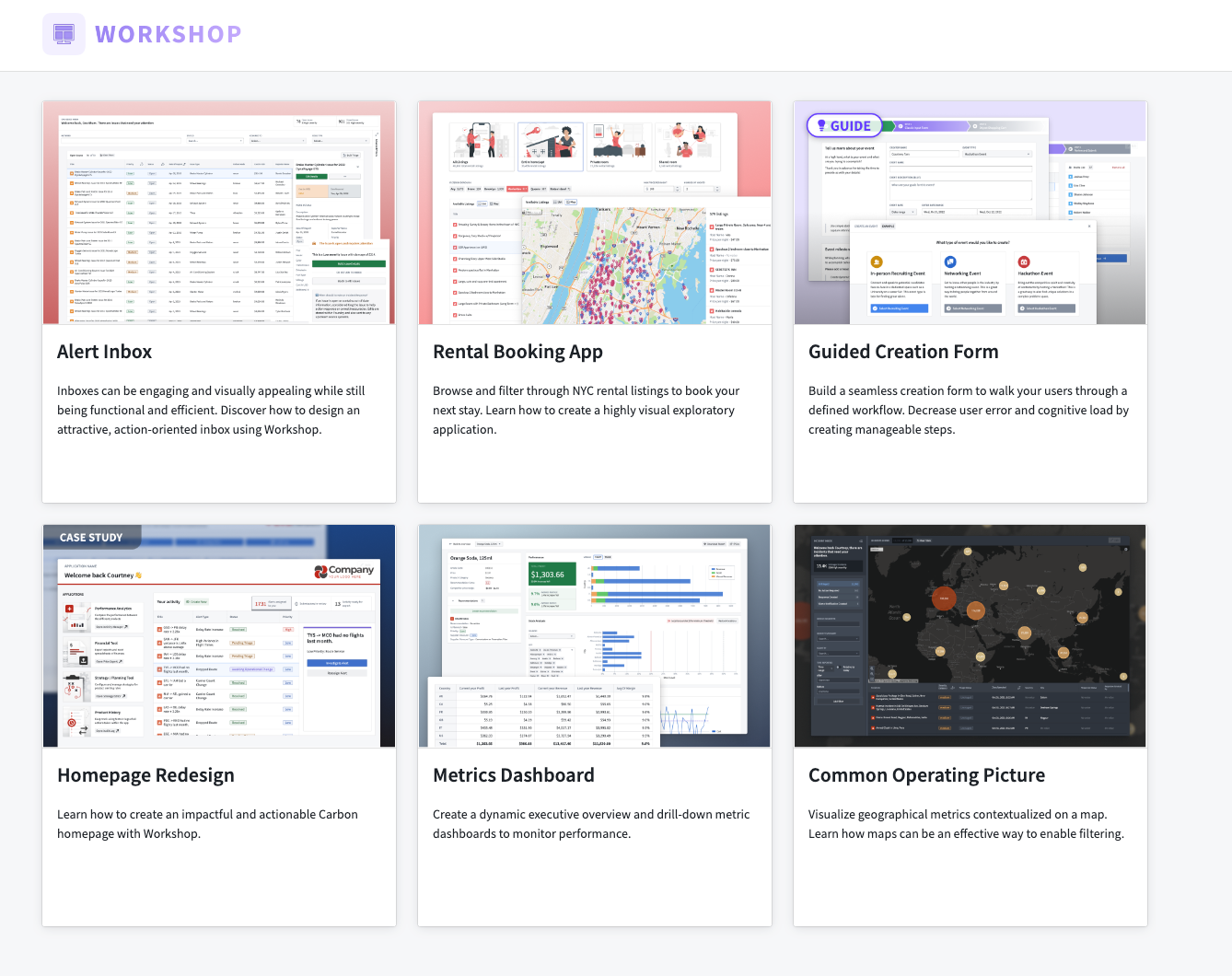
Install and Access the Workshop Design Hub
The Workshop Design Hub is a Marketplace product. Foundry enrollment administrators must first install the Workshop Design Hub via Marketplace and make it accessible to all enrollment users. Once installed, the modules can be found in a project named "Workshop Design Hub".
For guidance on installing Workshop Design Hub, administrators can visit the Marketplace documentation.
To learn more about the Workshop Design Hub and the modules available, review its documentation.
Introducing the Retention Policies application: Available September 2023 [GA]
Date published: 2023-08-22
The Retention Policies application will be GA and available on all stacks by September 2023. The Retention Policies application enables namespace owners to define and manage both static retention policies and data lifetime policies. The new application replaces the use of the legacy YAML-based repository.
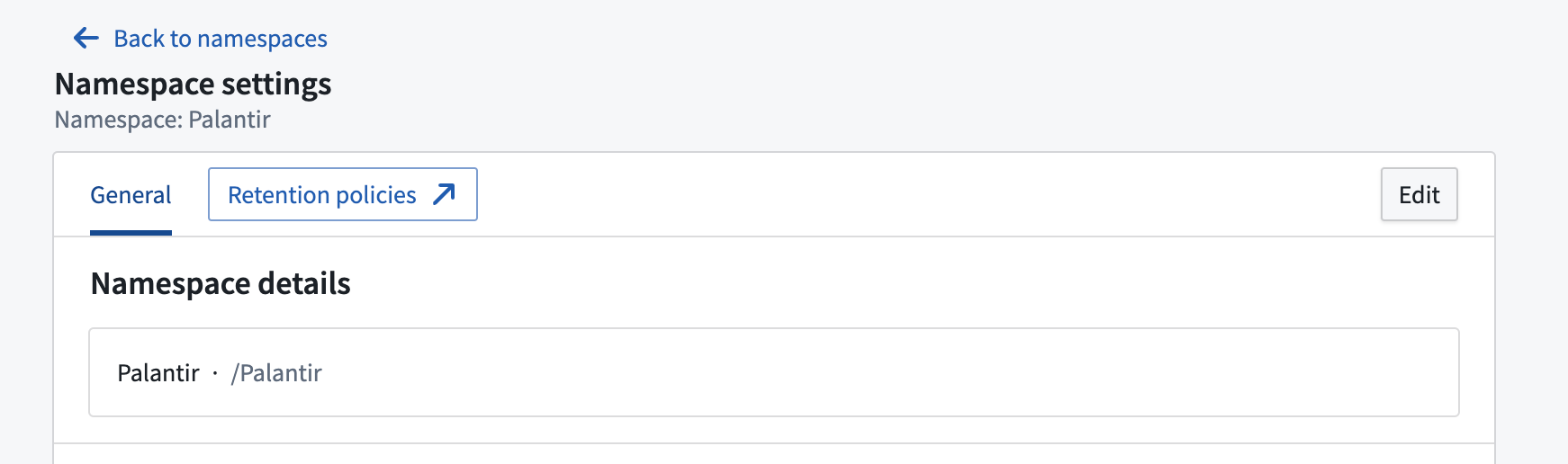
The Namespace settings page with a link to the Retention Policies application.
The application lists all retention policies defined on that namespace, including system, legacy, and custom policies.
- System policy: Retention policies managed by the platform. These policies are not configurable and are designed to only target old versions of data. If your use case requires these policies to be removed, contact your Palantir representative.
- Legacy policy: Retention policies managed by namespace administrators through Code Repositories. These are considered deprecated. We recommend migrating these policies to new custom policies and deleting the policy definition from the repository using the migration option on the legacy policy page.
- Custom policy: Policies managed by the namespace administrator using the Retention Policies application.
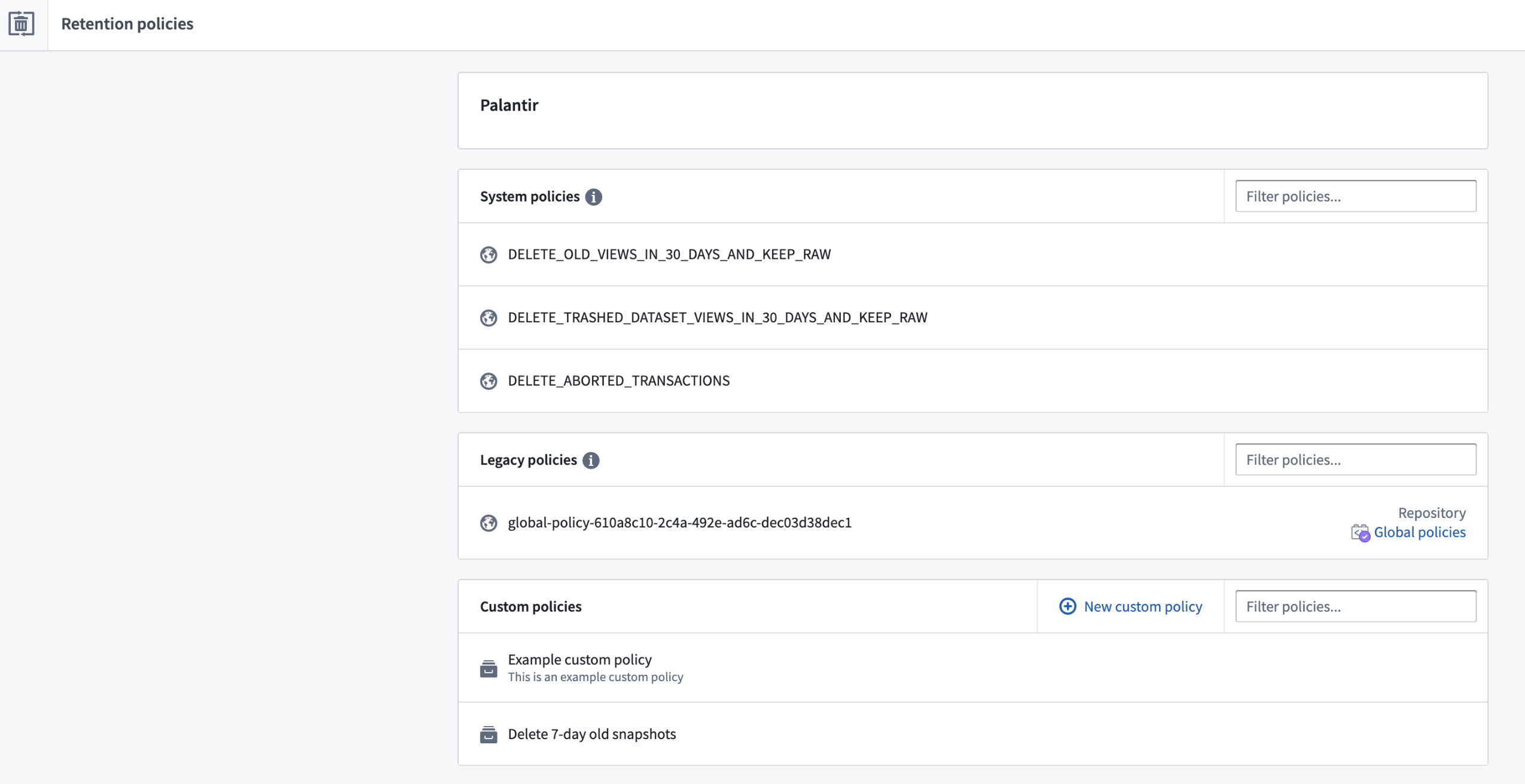
The Retention Policies application showing system, legacy, and custom policies.
Benefits of Retention Policies
Retention Policies provides an intuitive, point-and-click interface to define and manage retention policies. These policies help administrators reduce storage costs by automating the deletion of redundant data and meeting regulatory and deletion requirements.
When managing retention policies, you can choose to add dataset selectors to identify the datasets required for the policy, and transaction selectors to narrow the scope of dataset transactions required for the policy.
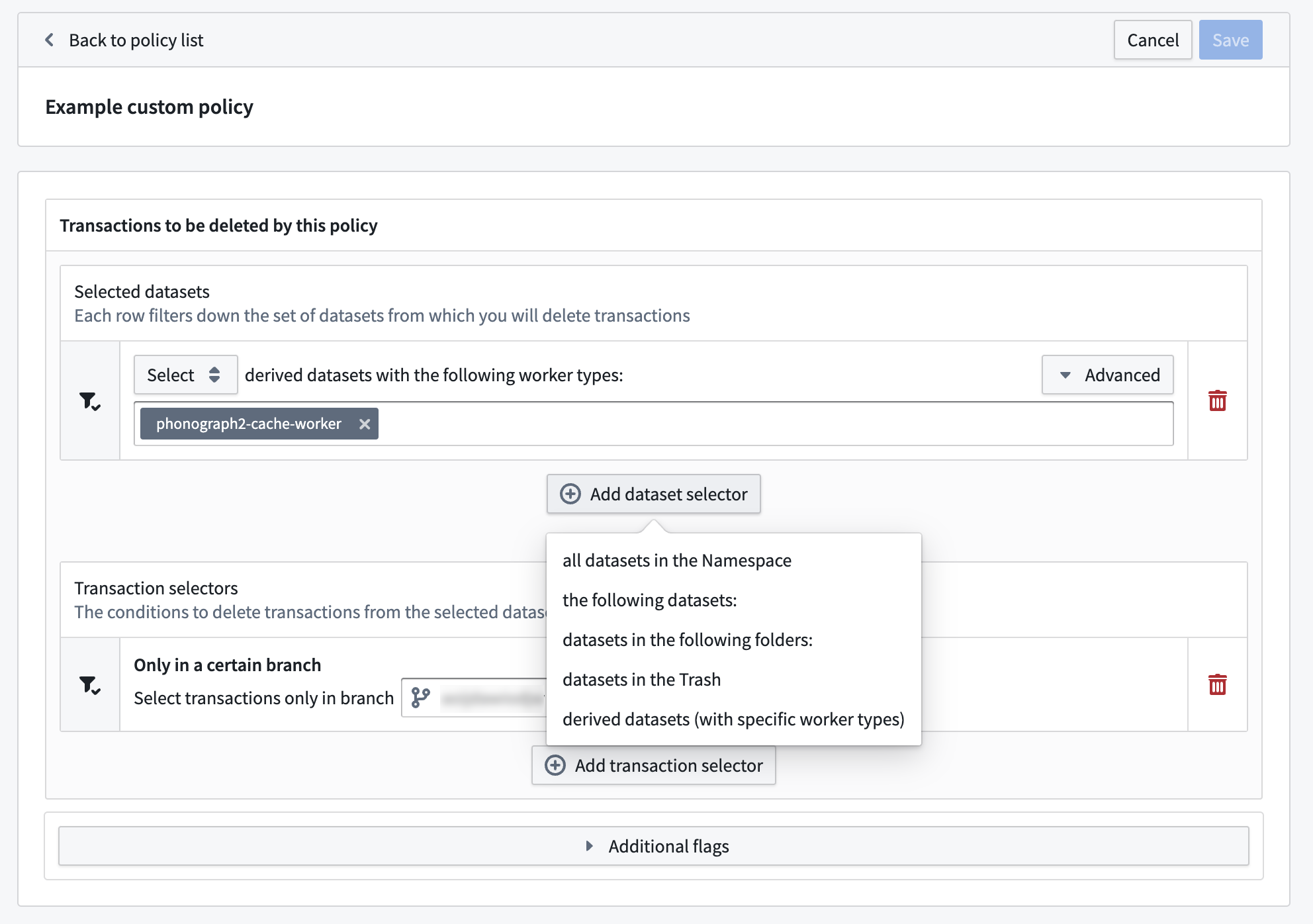
A custom retention policy with an added dataset selector.
A condensed view of Retention Policies is also available through a dataset preview under the Details tab. This view will list all policies that effect the dataset and allow you to filter to the policies that affect only the current branch.
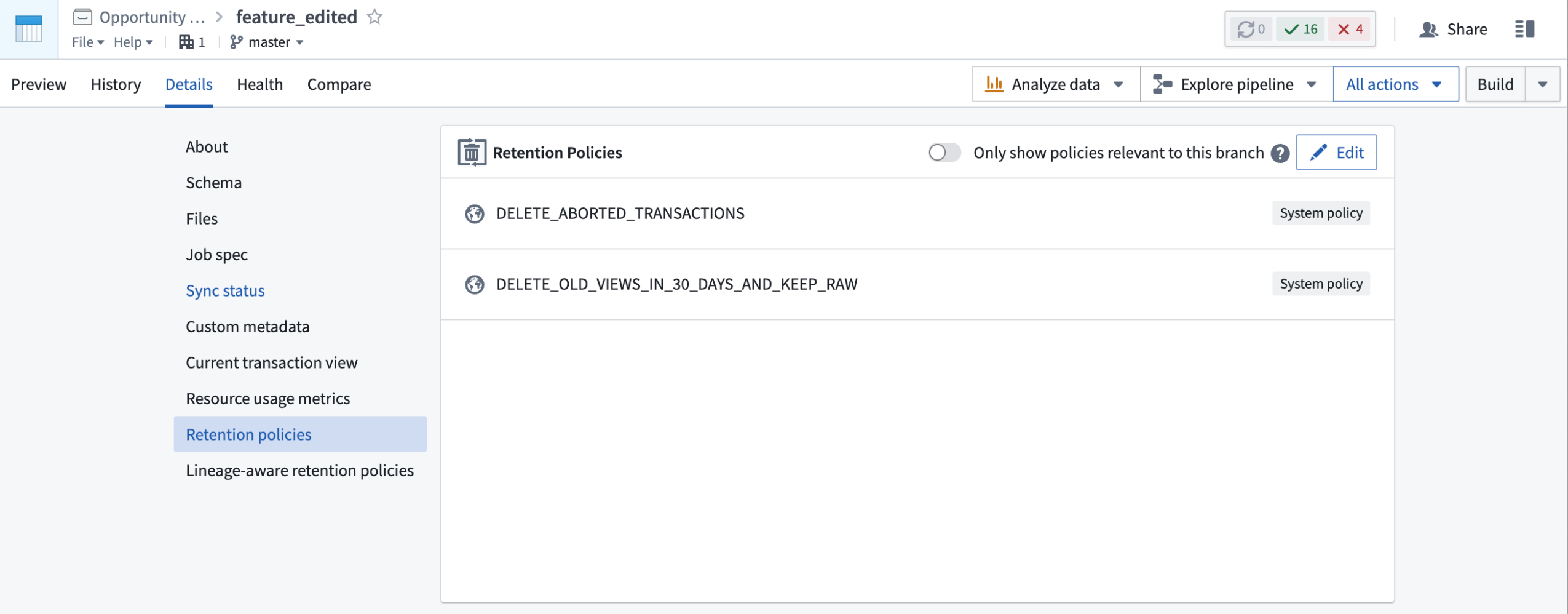
A condensed Retention Policies view listing two system policies.
What's next?
Our upcoming work includes using the Approvals application in Foundry to add approval flow support for each retention policy. This capability will allow administrators to review each policy before approving it.
Introducing HyperAuto V2 [Beta]
Date published: 2023-08-22
HyperAuto V2 will be available for installation by the end of August 2023 and will support SAP at release.
HyperAuto is Foundry’s automation suite for the integration of ERP and CRM systems, providing a point-and-click workflow to dynamically generate valuable, usable outputs (datasets or Ontologies) from the source’s raw data.
HyperAuto V2 introduces significantly updated user experience, performance and stability for automated SAP-related ingestion and data transformation.
The ability to create new SAP pipelines in HyperAuto V1 will be deprecated from August 22, 2023. Existing SAP pipelines and non-SAP systems based on HyperAuto V1 will remain available and unchanged.
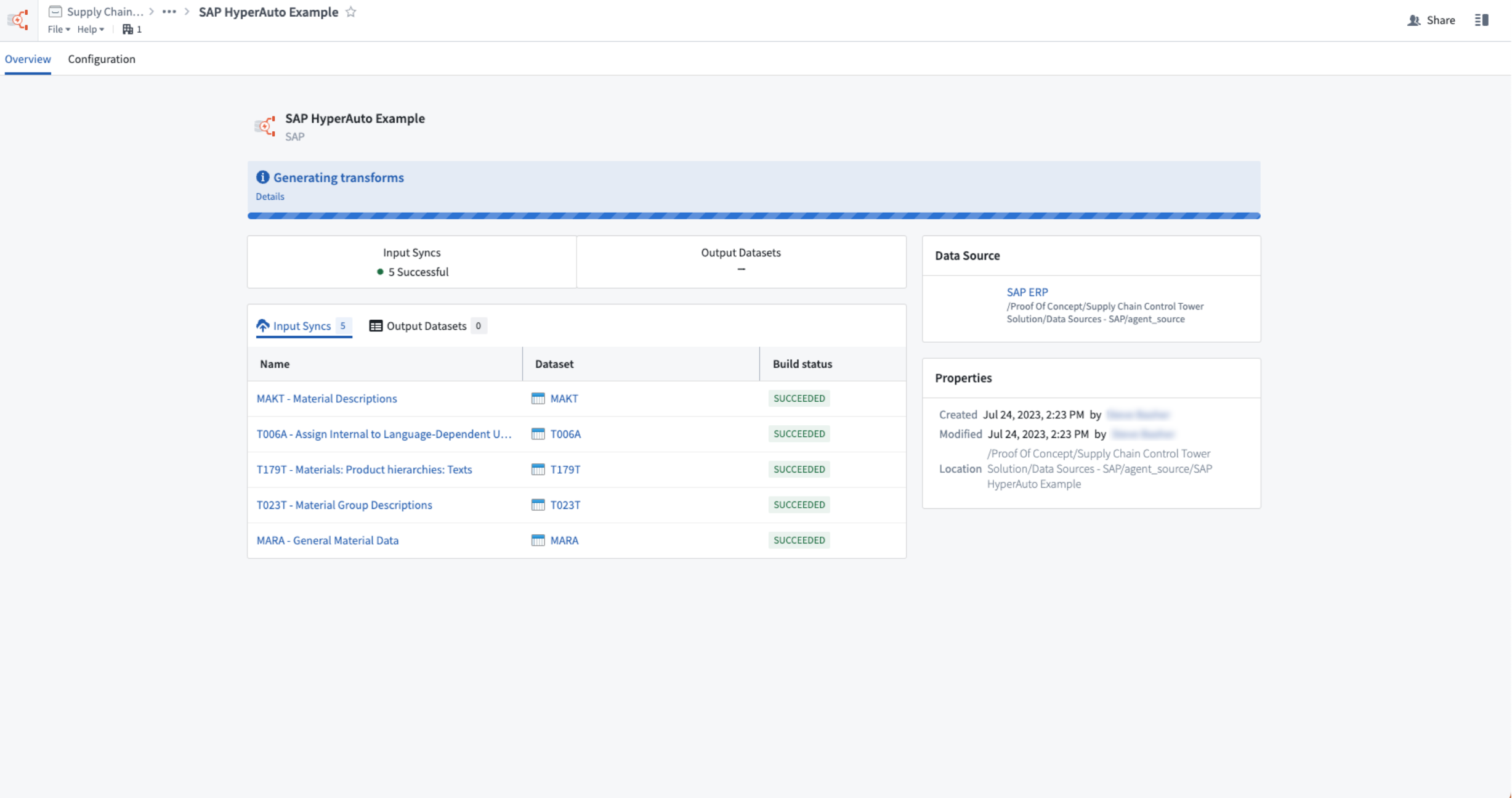
Overview of a live HyperAuto pipeline.
Point-and-click configuration
HyperAuto V2 has been rebuilt with ease-of-use in mind. To create and configure a HyperAuto pipeline, users must simply interact with an intuitive step-by-step wizard. Opinionated defaults are preconfigured to streamline the process, but users can adjust the settings as they deem fit if required.
HyperAuto’s key automation features include:
- Enrich core tables by automatically de-normalizing the data model, joining on tables containing relevant metadata and additional information.
- Format and clean the source’s data, ensuring column types are accurate, column names are intuitive and that null data is handled correctly.
- Intelligently de-duplicate change-log source data, ensuring an up-to-date, clutter-free version of each table exists for operational usage and analysis
For more, review the HyperAuto V2 documentation.
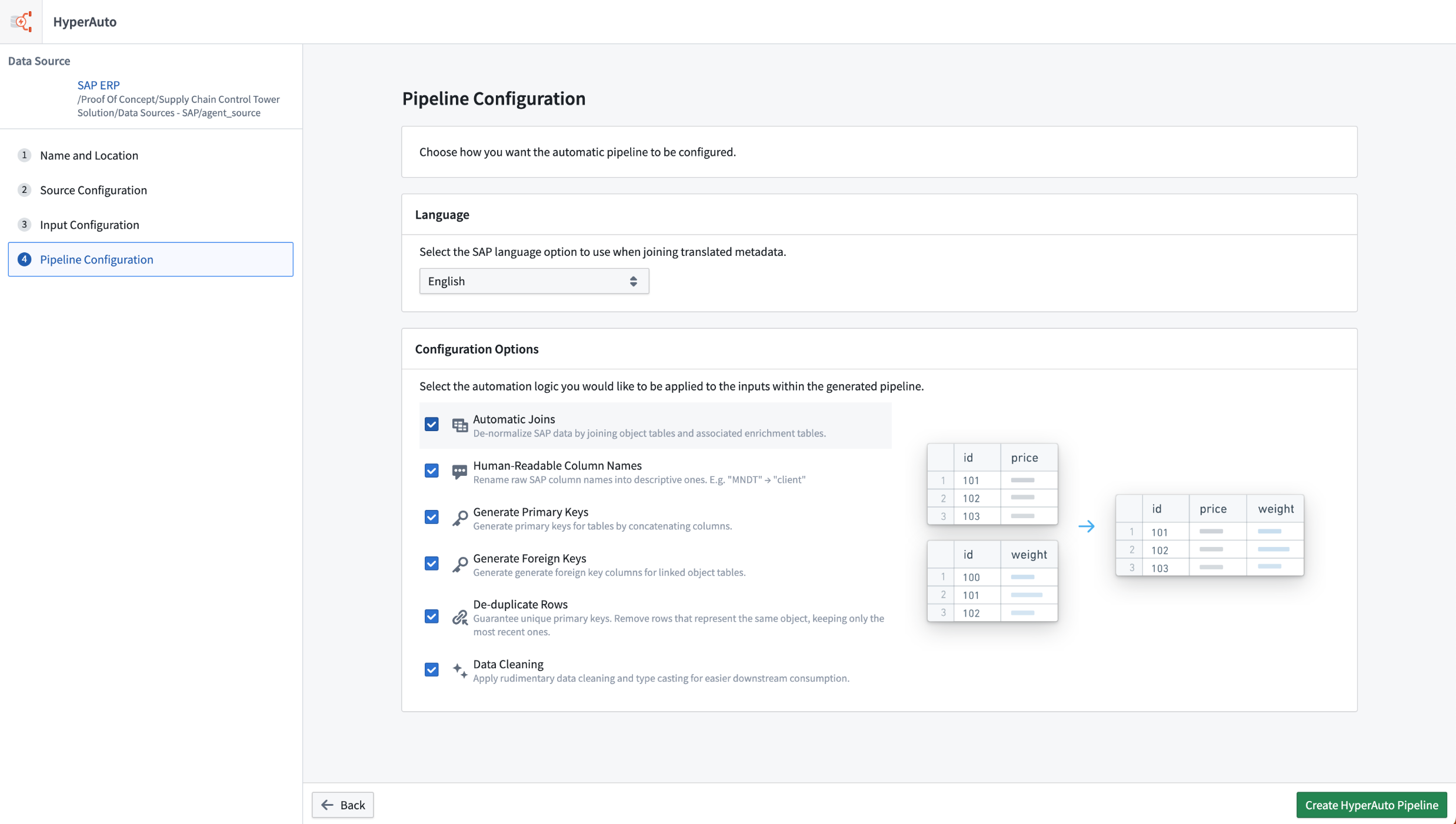
Pipeline configuration with opinionated defaults applied.
Data transformation via Pipeline Builder
HyperAuto V2 dynamically generates Pipeline Builder pipelines to process the source data as required. This provides a familiar, easy-to-understand UI which enables full transparency on how the data is being processed and makes it easier to understand what configuration users might want to change within HyperAuto.
Any changes to an existing HyperAuto pipeline’s configuration creates a new proposal within the underlying Builder pipeline which must be approved and merged by a user before being deployed to the live pipeline. Pipeline Builder comes with a comprehensive change management workflow which HyperAuto makes use of, providing quality-assurance for critical workflows.
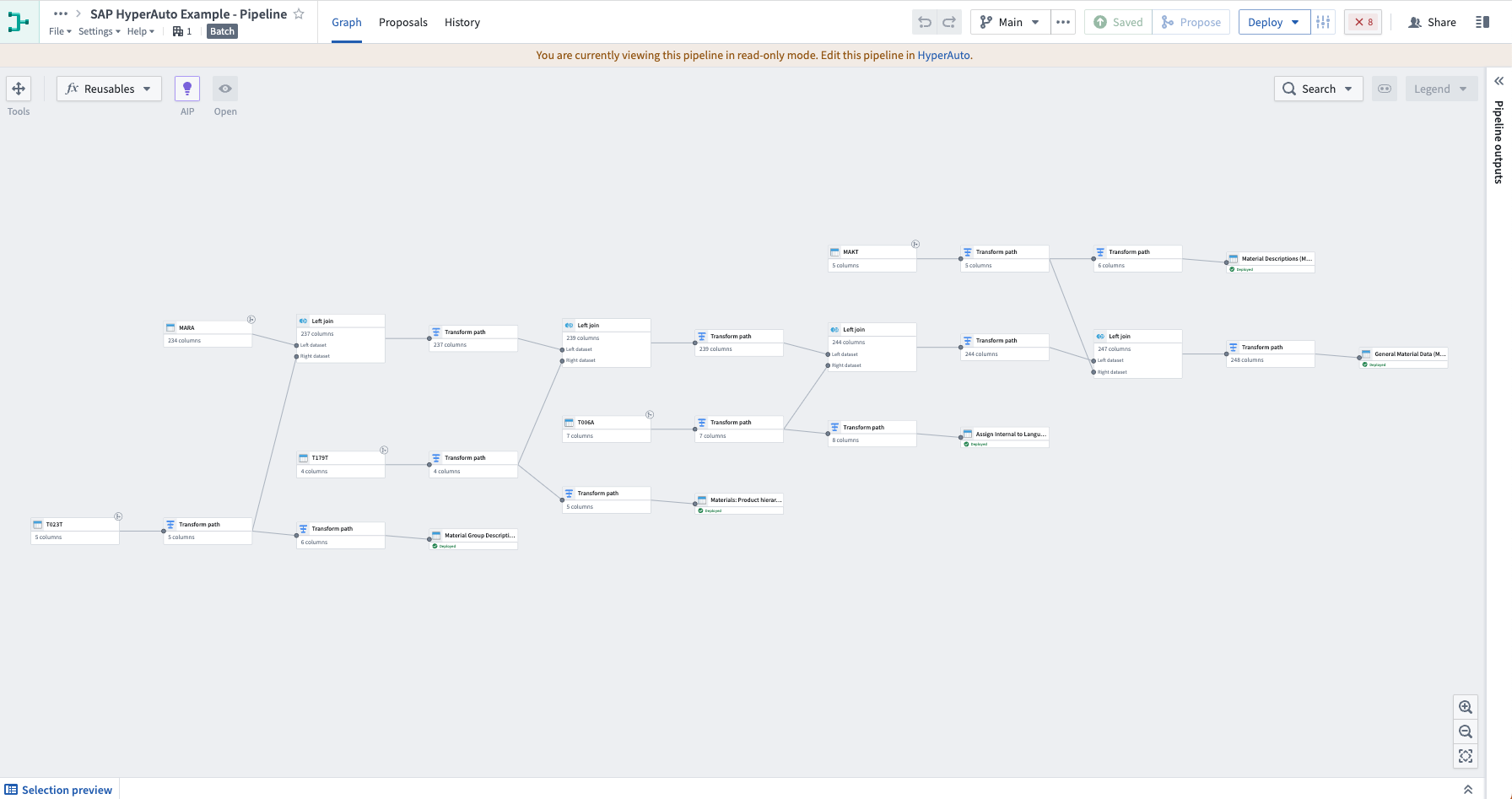
Dynamically generated Pipeline Builder pipeline to process source data.
Real-time data processing from SAP
HyperAuto V2 supports real-time streaming connections and data transformation for SAP sources (requires an SLT Replication Server), enabling critical operational applications that require a real-time view of the relevant SAP data. Additionally, HyperAuto V2 also brings significant performance improvements for batch pipelines.
If you would like to enable SAP streaming, contact your Palantir representative.
Time series chart now integrated with Ontology Actions
Date published: 2023-08-22
Quiver dashboard and Workshop application builders can now expose Ontology actions directly from the selection menu of the time series chart, offering a more intuitive user experience to take action in the context of the observed time series. This new integration between the Ontology action button widget and time series chart allows users to pass the chart selection X or Y boundary values as inputs to the Ontology action, enabling practical applications such as contextualizing an observed phenomenon on a time series or adjusting object property values based on a sensor time series values.
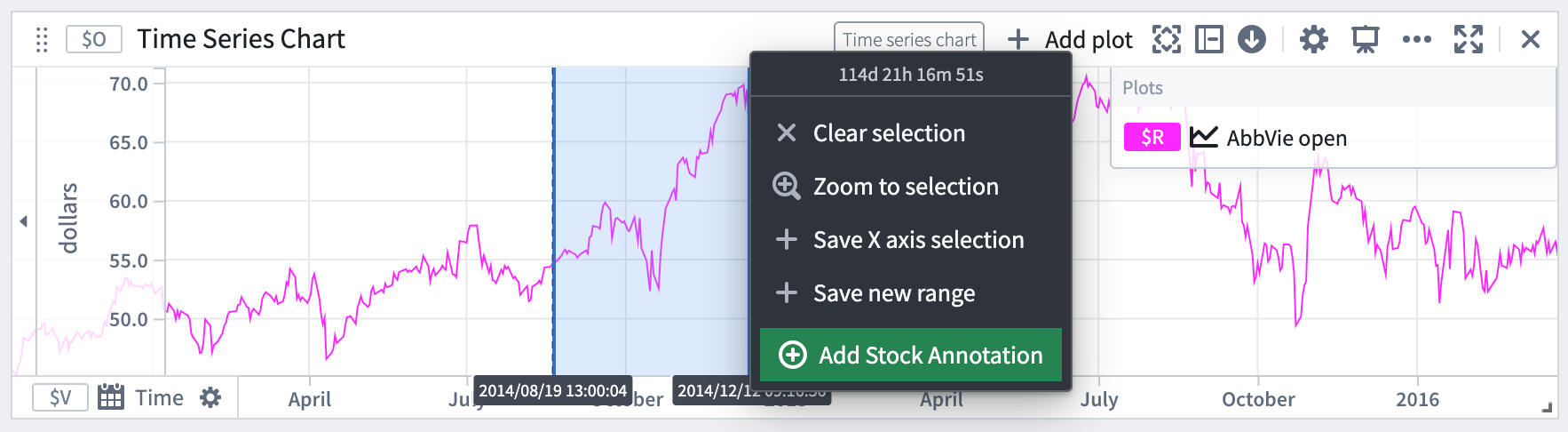
Expose Ontology actions directly from the selection menu of the time series chart.
In action
The new integration can be used to enhance your existing workflows. For instance:
Creating an "Annotation" object instance
Within a time series chart, you can now create an object that captures context on an observed phenomenon. For instance, this could include reasons for a machinery malfunction, or a market macro event that affected a stock index. The start and end temporal values of the x-axis selection are passed as inputs to the Create annotation Ontology Action, resulting in an annotation event. The ability to annotate the plot with multiple events provides greater clarity on the data visuals at hand.
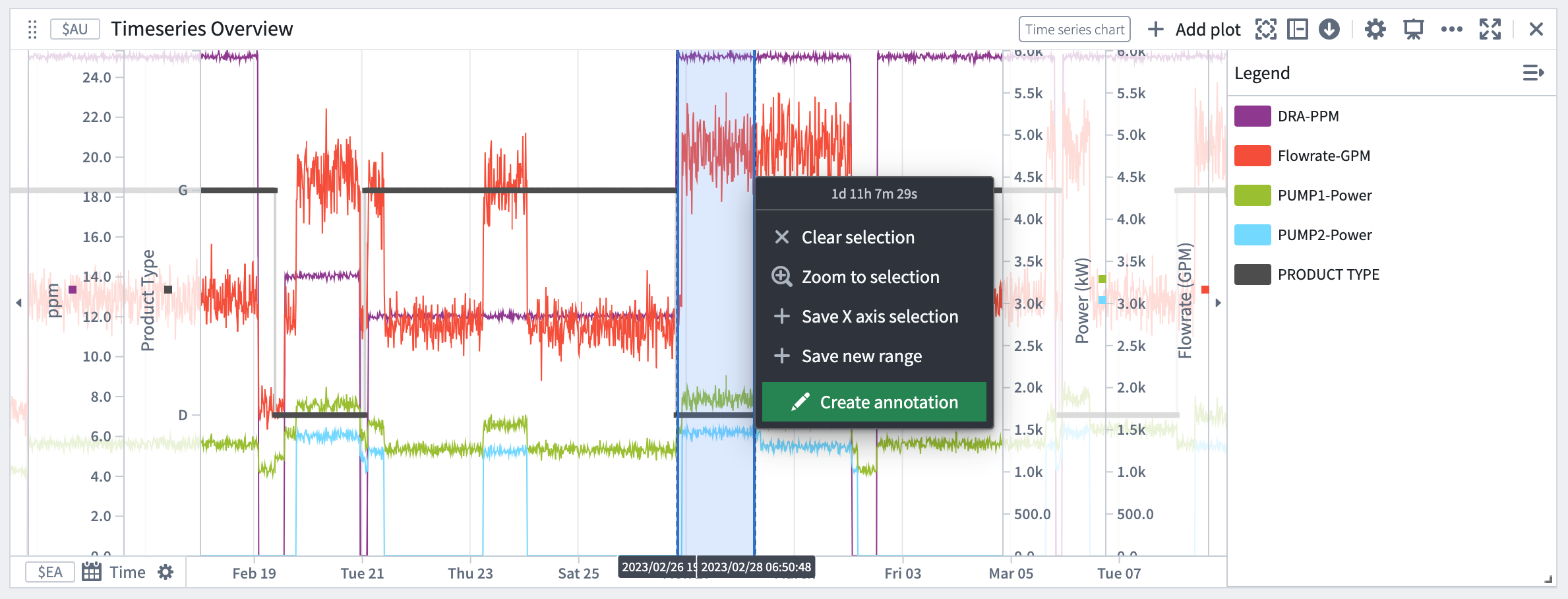 The start and end temporal values of the x-axis selection pass as inputs to the "Create annotation" Ontology Action.
Adjust operational values
You also have the ability to invoke Ontology actions to update a property value based on an observed phenomenon. For example, the time series chart below displays two curves that show the predicted total cost per barrel for two types of products, Gasoline (in blue) and Diesel (in red). We see that today’s actual total cost per barrel (y-axis) for Gasoline (dark blue dots) ranges from 6.35 to 8.45 cents/barrel and is far from the minimal predicted total cost, which is 6.01 cents/barrel. One action we can take to lower the production cost is to adjust the DRA concentration rate from 15 ppm to a value closer to 6.5 ppm. By selecting a range around 6 on the x-axis, we can then select the Adjust DRA level Ontology action which will be set with the selection boundary values automatically.
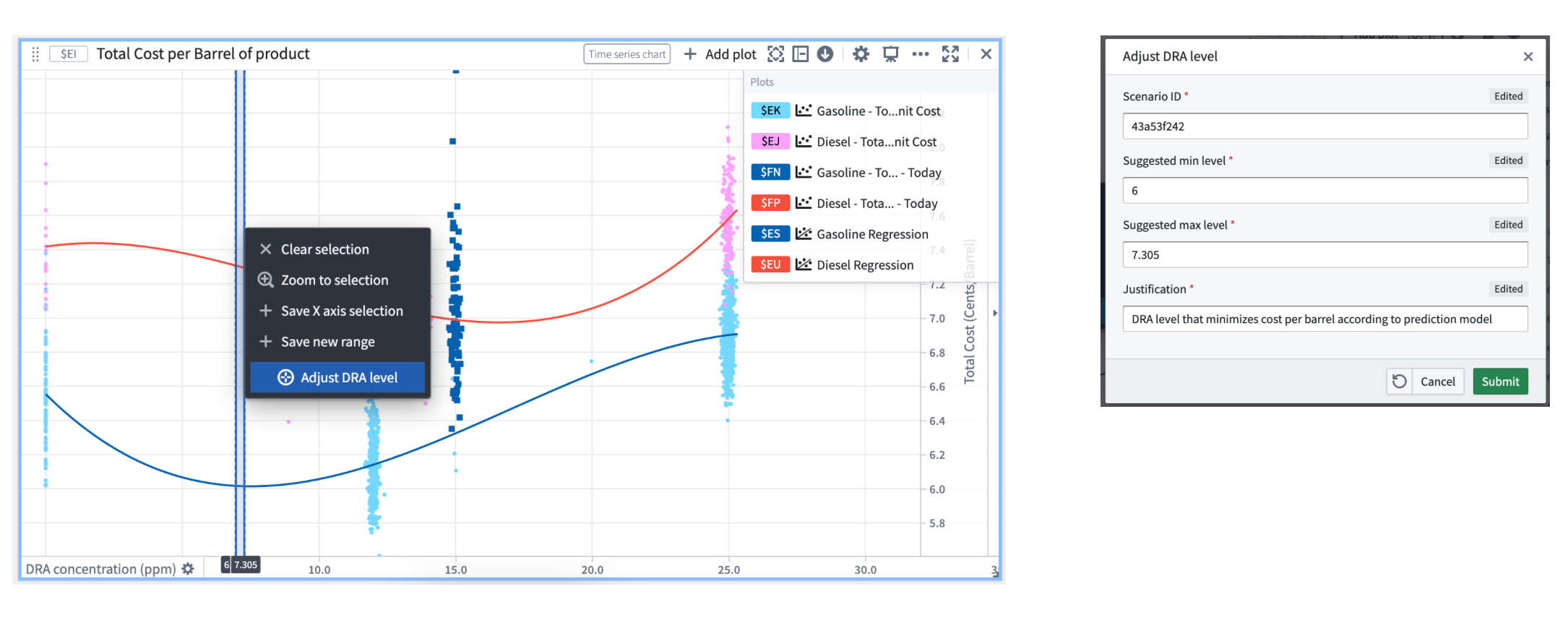
Ontology action invoked to update a property value based on an observed phenomenon.
Streaming transforms migration to Java 17 scheduled end of September 2023 [Migration/Deprecation]
Date published: 2023-08-17
At the end of September 2023, all Foundry Streaming transforms will migrate their runtimes from Java 11 to Java 17 in order to take advantage of Java 17's improved performance and security posture. The Java 17 runtime introduces a breaking change that prevents reflective access to members of internal JDK classes. Most streaming transforms will not be affected by this change, but this announcement is being broadly published for general awareness.
While we expect that the majority of Foundry Streaming transforms will be unaffected by this migration, it is possible for breaks to occur in user-defined function (UDF) streaming transforms where implementations (or their associated external libraries) reflectively access JDK internals. Palantir will work to identify at-risk UDF implementations and contact potentially-affected pipeline owners.
If you own a Foundry UDF Definition repository that is used in any Foundry Streaming pipeline, verify that your UDF is compatible with Java 17 by completing the following steps:
- If your UDF definition depends on any external libraries, verify that the versions of those libraries are compatible with Java 17.
- Open the hidden
versions.propertiesfile in the root of your UDF definition repository. - Identify any dependencies that were added manually from external repositories (that is, dependencies that were not added by default by the repository template).
-
For each such dependency, verify that the declared minimum version in the
versions.propertiesfile is compatible with the Java 17 runtime. This may require checking the dependency’s release notes. -
Verify that the UDF implementation does not reflectively access internal JDK classes.
- If your UDF implementation does not use reflection, no further steps are required.
- If your UDF implementation does use reflection, ensure that either:
- The accessed classes are not JDK internal classes.
- Your implementation can properly handle an
IllegalAccessExceptionand will not break if certain reflective operations begin throwing this exception.
If you encounter any issues remediating UDF definition repositories, or if you have any questions or concerns related to this notification, contact your Palantir administrator.
AIP in Quiver: Transparent assumptions and enhanced ambiguity handling
Date published: 2023-08-09
AIP in Quiver can now answer prompts that are ambiguous, subjective or that use relative terms, such as “Filter transactions to high spend values” or “Group by the most important customers”. Additionally, with increased contextual awareness, AIP can now handle spelling mistakes in column names and data values by inferring the correct values from the object set schema and data.
Transparent assumptions made by AIP Configure
Suggested AIP Configure card configurations have been divided into two categories: configuration suggestions and configuration suggestions requiring assumptions. If a request is less specific, such as "Make this chart more presentable", AIP will make assumptions about the ambiguous parts of the prompt (in this example, ambiguity is inherent in the meaning of "presentable") to infer what changes might be suitable. Users are able to see the parts of their prompt where AIP made assumptions and what those assumptions were before they accept the suggested change.
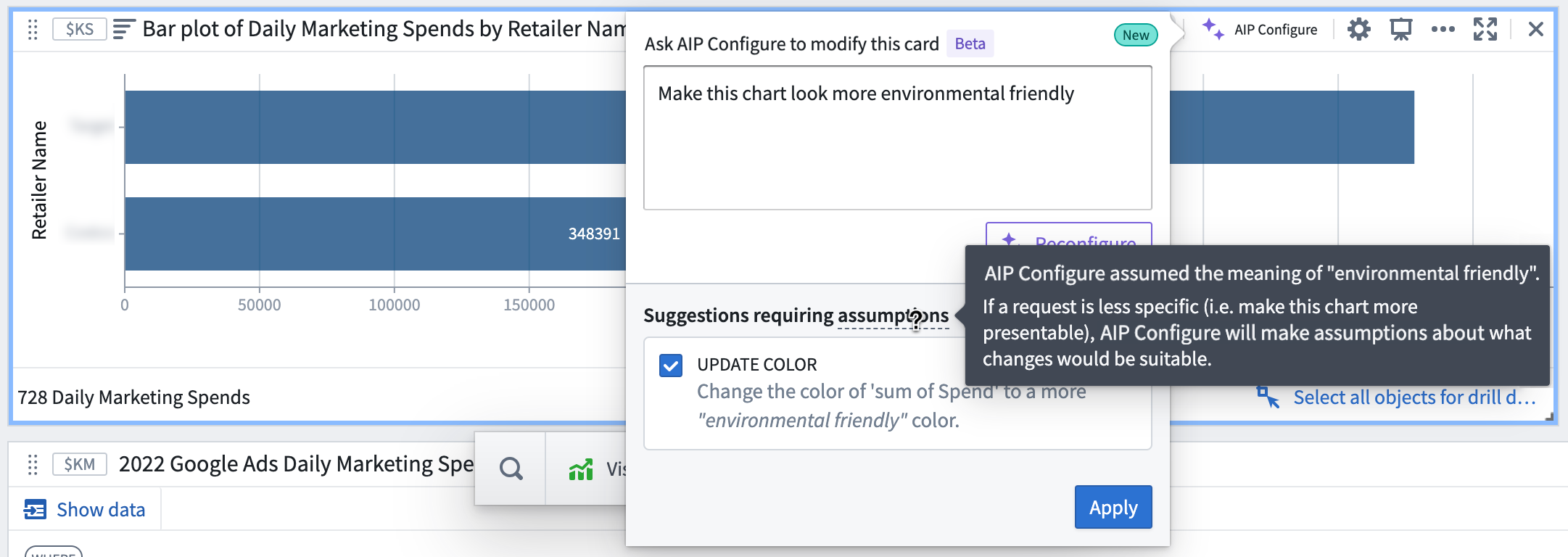
AIP Configure-suggested configuration changes showing assumptions made to answer the prompt
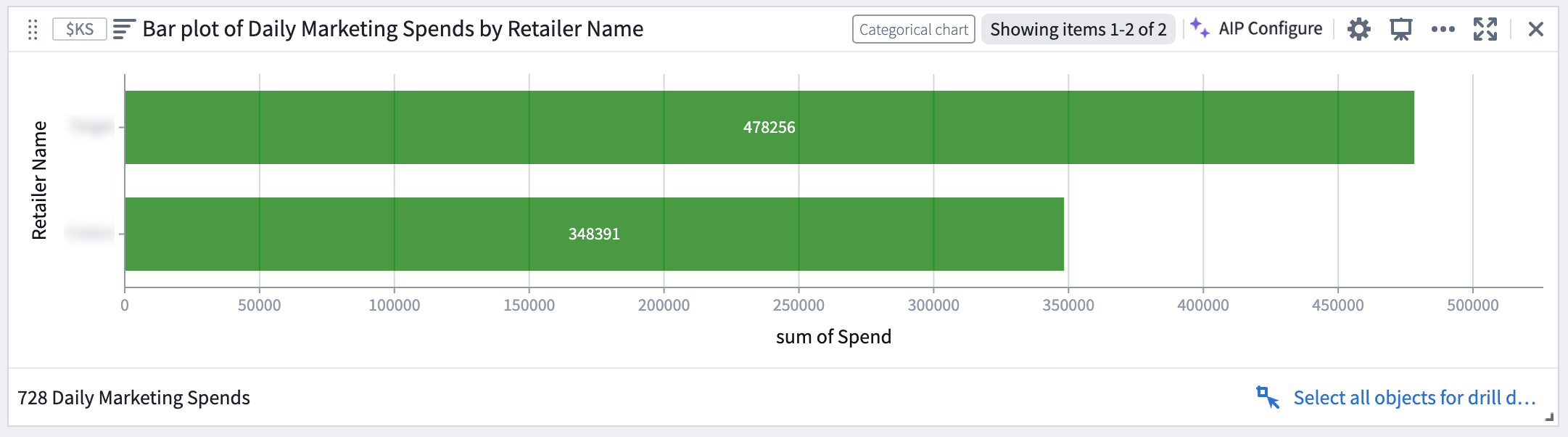
State of the bar plot after accepting the suggested configuration changes
How AIP uses Ontology data
Along with the user prompt, Quiver now sends AIP a summarized version of the object set data, or “property value hints” for processing. Property value hints are only computed for properties that are found to be relevant to answering the user prompt, as follows:
- String property types: Up to 100 unique values are computed
- Numeric property types: The min, max, and average are computed
Previously, without having a sample of valid values, the LLM-filtered object sets were using values that were not in the set. This often resulted in an empty filtered object set, which would then affect the downstream cards in the produced graph. With these improvements, AIP can now use property value hints to correct misspellings of column names and property values and to determine threshold values when making quantitative descriptions such as high, low, and maximum.
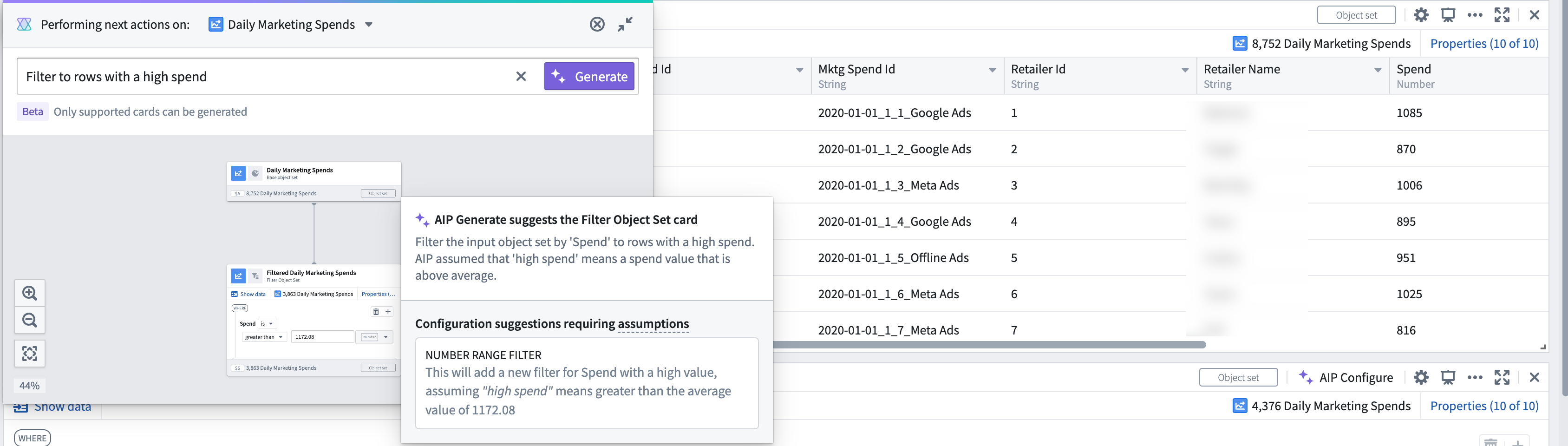
State of the bar plot after accepting the suggested configuration changes
To better understand how AIP works in Quiver, review AIP features in Quiver documentation.
Introducing AIP in Pipeline Builder
Date published: 2023-08-09
AIP in Pipeline Builder helps you harness the power of AI to build production pipelines with greater ease and transparency in your result. With AIP in Pipeline Builder, you can benefit from many capabilities:
- Understand complex pipelines with the Explain feature.
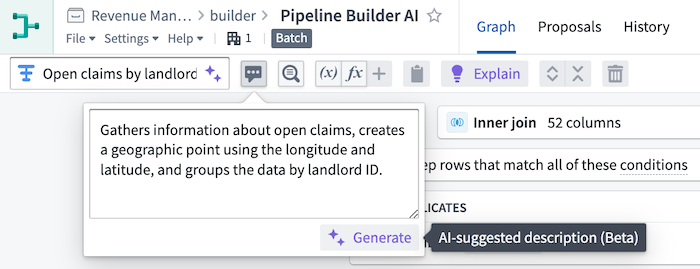
- Generate suggestions for useful transform path names and descriptions.
- Quickly create and modify regular expressions.
- Easily cast strings to set timestamp formats.
Explain pipelines with a single click
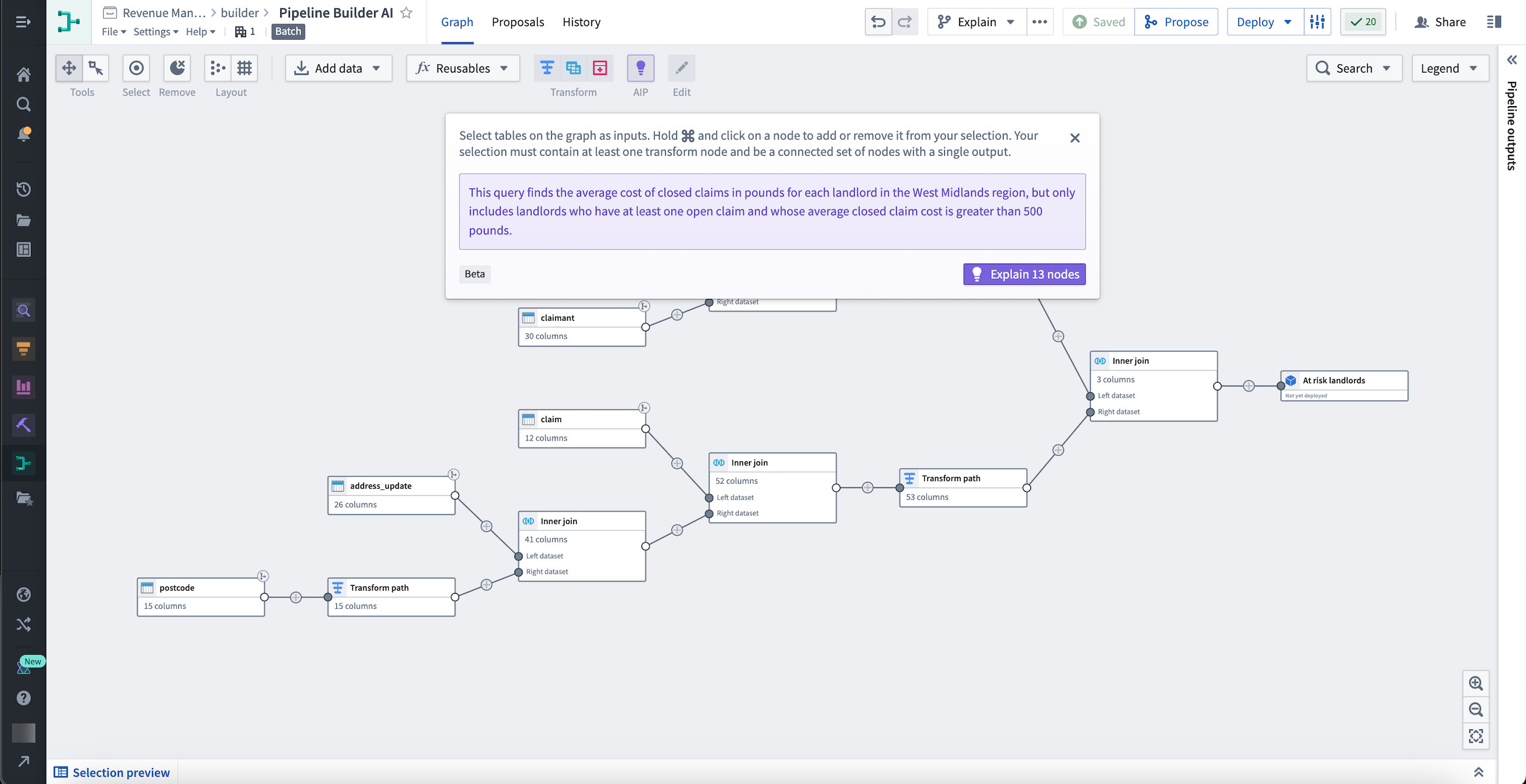
Dynamically obtain descriptions for your pipelines through every step of the development process and keep your collaborators in sync on the current state at all times. Use the Explain feature to provide valuable context for new approvers or facilitate knowledge transfer between new team members with minimal maintenance effort.
You can use Explain to learn more about multiple nodes, as shown below:
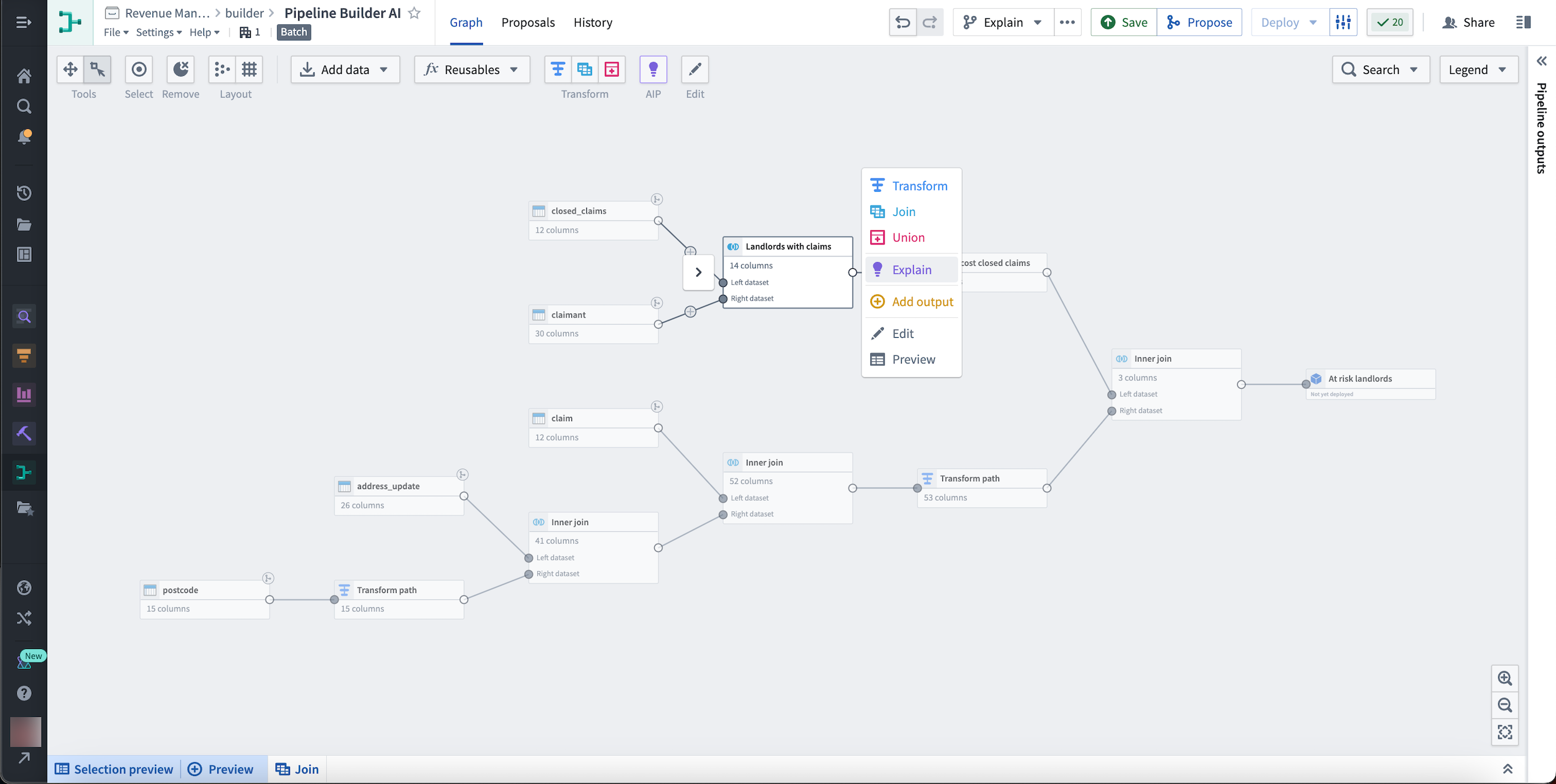
Alternatively, learn more about an individual node by selecting it and choosing the Explain option from the menu that appears to the right.
Generate better path names and descriptions
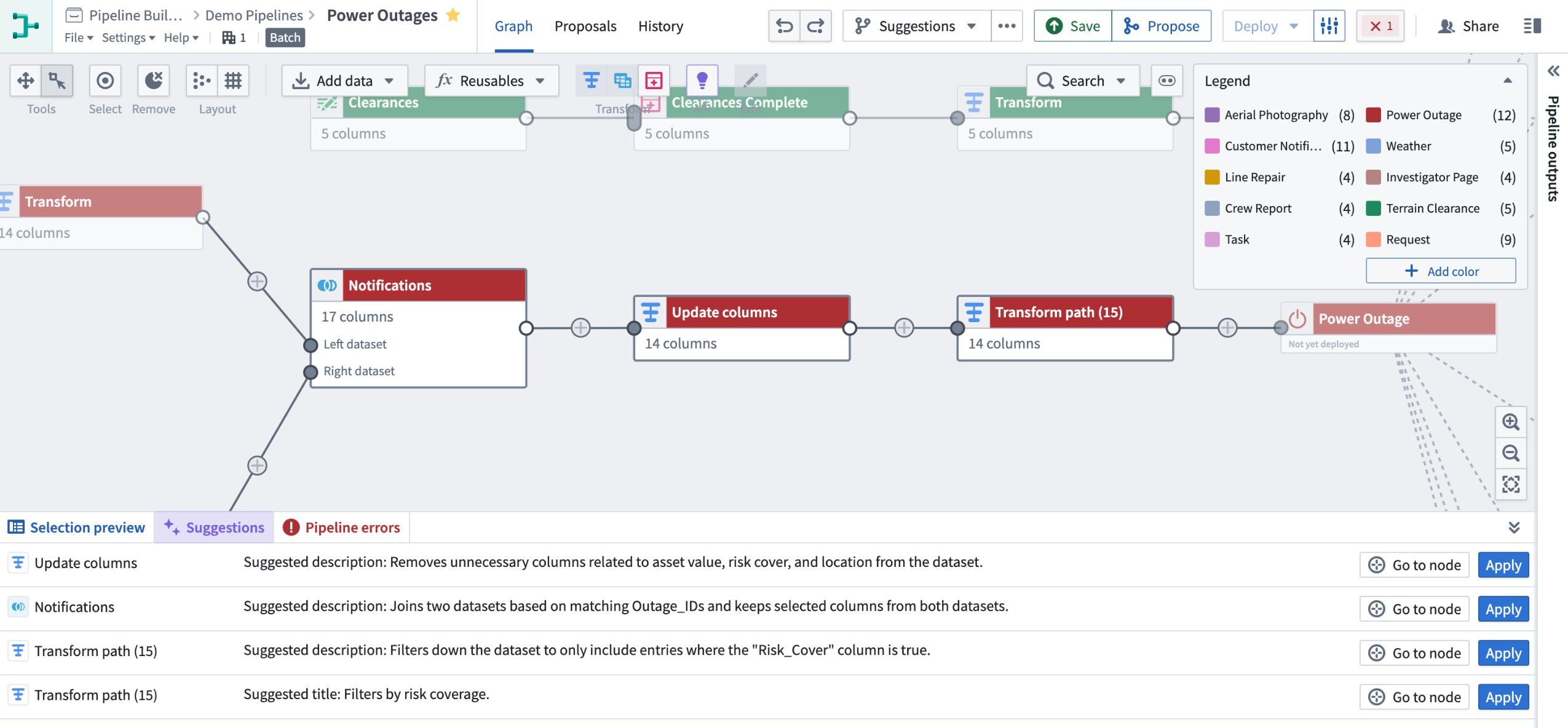
You can also use Explain to suggest and apply helpful transform path names and descriptions to facilitate collaboration and transparency throughout your pipeline. This can be especially useful when understanding complex pipelines and transformations in a given use case.
You can even generate new names and descriptions in bulk using the Suggestions tab in the bottom of the graph view.
Easily configure and apply transforms
Use Pipeline Builder's Transform Assist features to help build complex paths in your pipeline.
Modify and create regular expressions
With Pipeline Builder's new Transform Assist features, you can easily create and modify complex regular expressions by entering a description of the information you want to find into the regex helper. In our example below, we want to apply a regex to return email domains in a dataset.
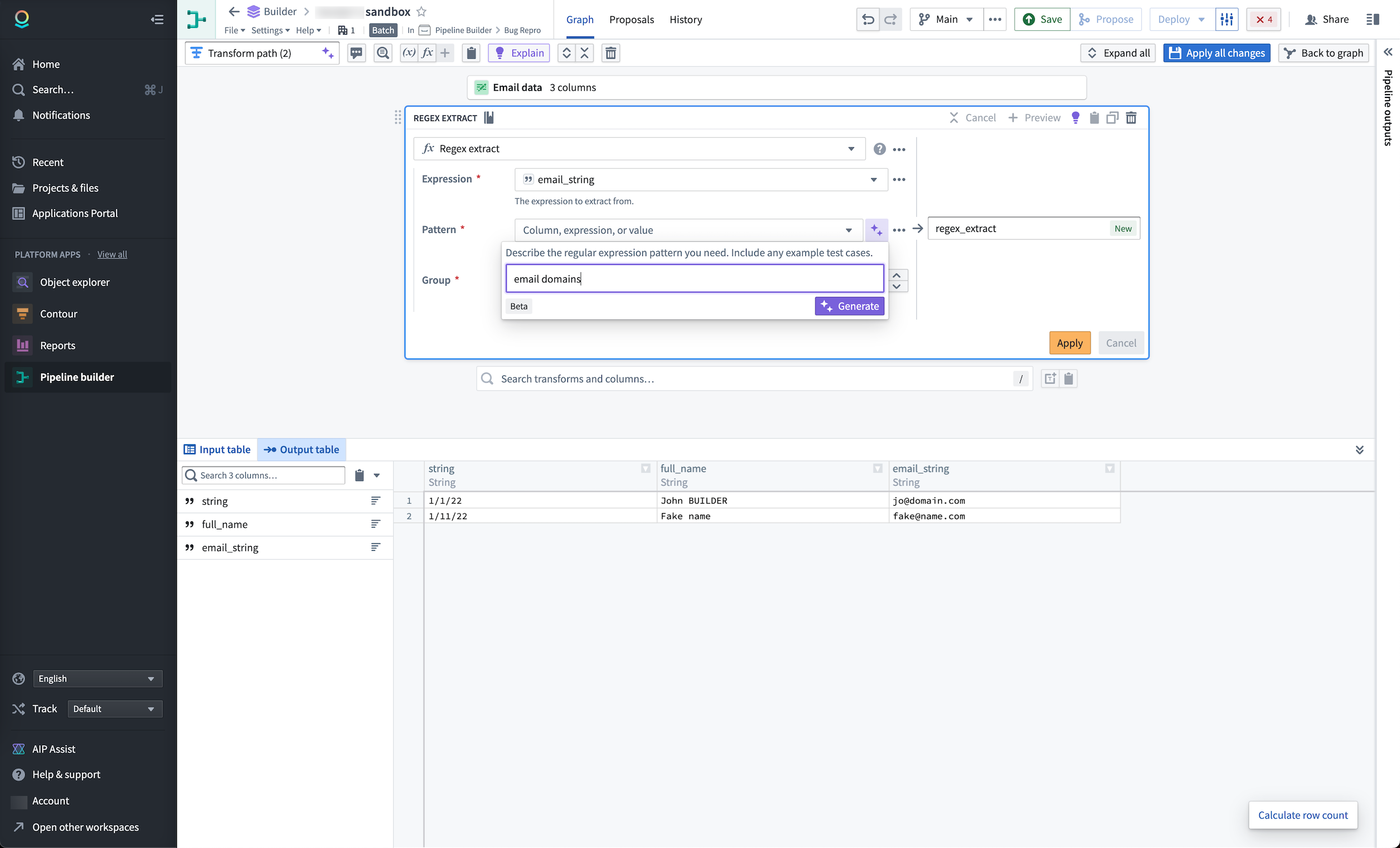
AIP will generate a regex that will return the results defined when applied.
Quickly cast strings to timestamps
With Transform Assist, you can also use the timestamp formatter tool to efficiently cast string columns to specified timestamps. Within a cast board, define the parsing format and select Generate to quickly add your format configurations to the board.
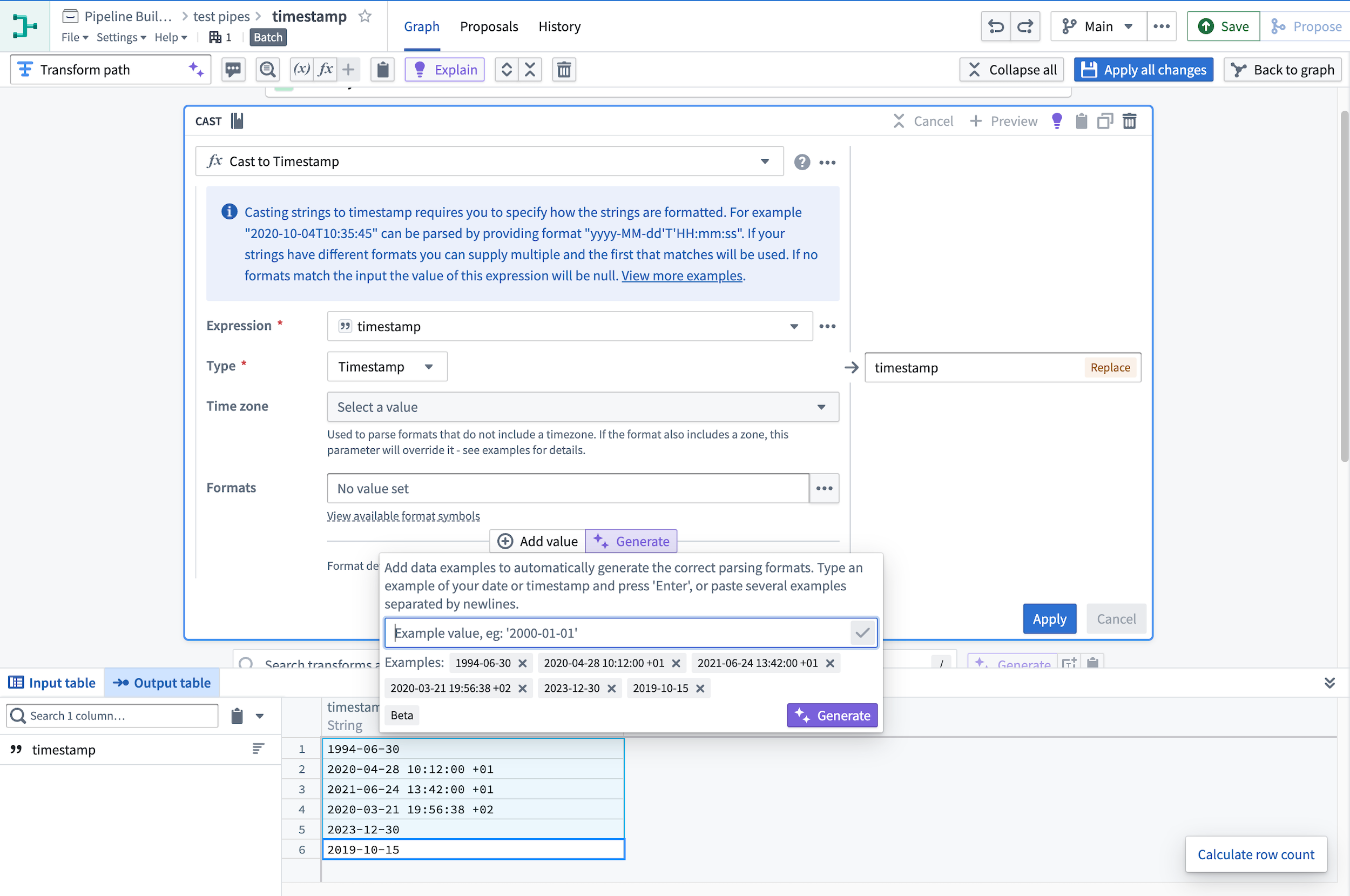
Select Apply to cast the string column into the specified timestamp format.
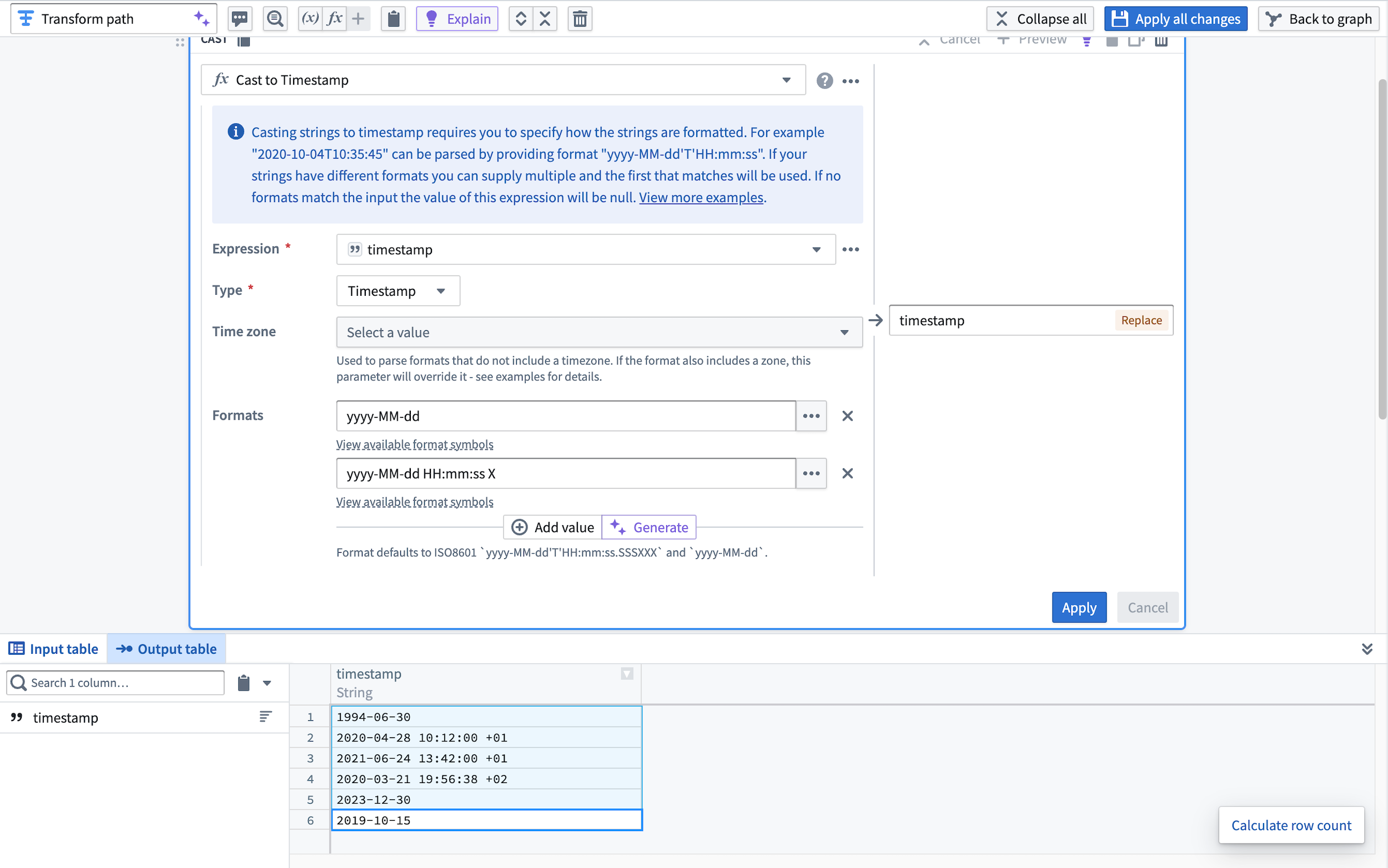
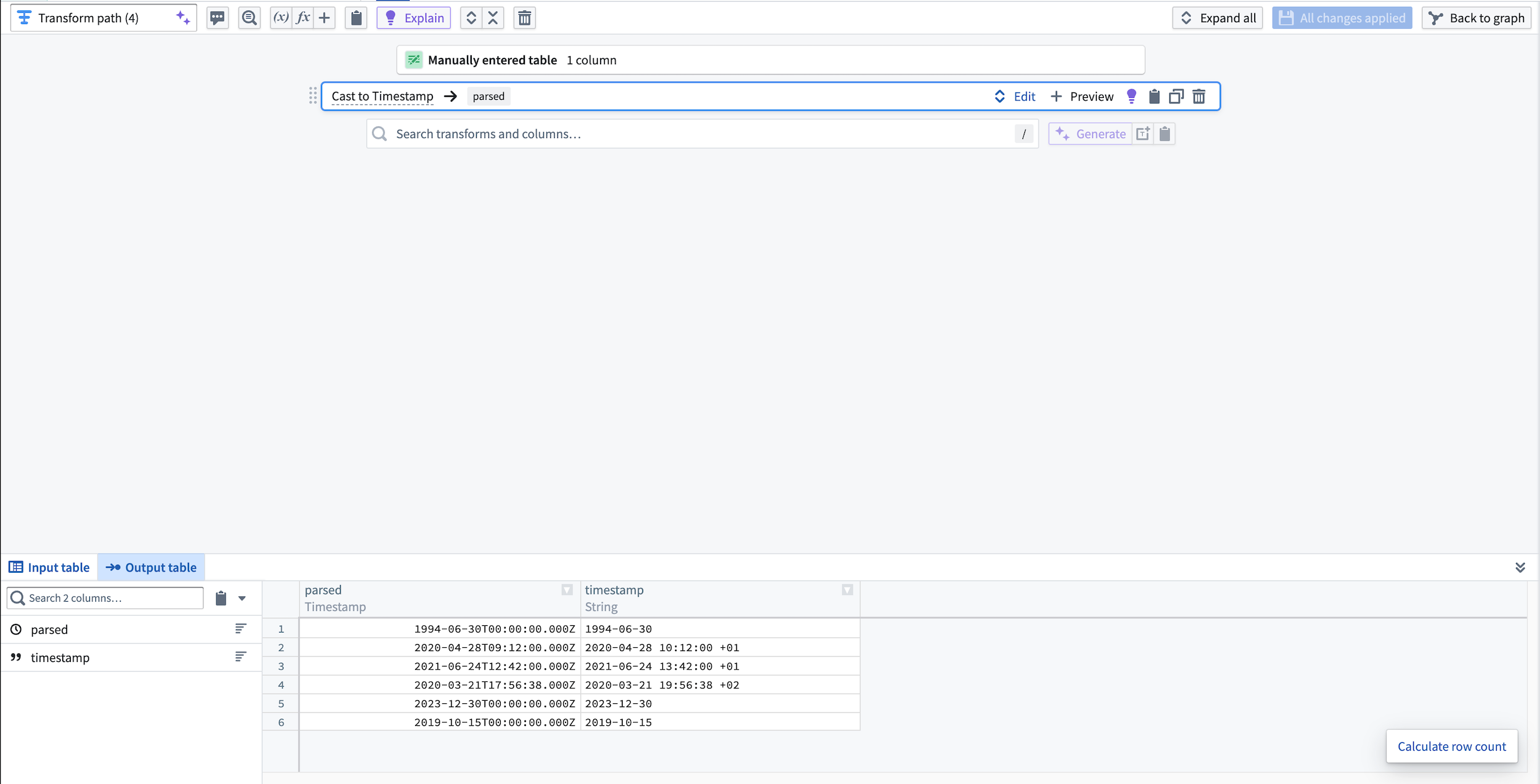
View the new parsed timestamp column in the output dataset preview.
Learn how to get started using AIP features in Pipeline Builder.
Legacy data connection agents to be deprecated in favor of optimized direct connections August 2023 [Sunset]
Date published: 2023-08-07
Palantir Foundry is deprecating its legacy data connection agents in favor of a data connection migration to Rubix ↗, a secure, more reliable, and more efficient cloud offering that runs on Kubernetes. This update means data connection agents are no longer required as they were a provisional solution that allowed Palantir to connect with outside customer networks.
As such, all agents installed on Palantir-provisioned AWS hosts must be decommissioned by the end of August 2023 and all affected workflows need to be moved to direct connection. Palantir engineers are currently working to complete the migration for customers on stacks that have Rubix installations that can run cloud ingests.
Benefits of moving workflows to direct connection include:
- High reliability: Direct connection is more reliable and easier to manage than an agent. There is no requirement of a weekly maintenance window, thus removing downtime.
- Better parallelism: Direct connection is better able to handle multiple parallel syncs and takes advantage of auto-scaling directly in Foundry since each sync runs as an independent job.
- Better networking management: Jobs only have access to the endpoints they need to run, as opposed to the agent-based connection where a single agent host must satisfy networking requirements for all jobs that need to run via that agent.
- Self-service: Direct connection removes reliance on Palantir support, since its administration can be managed directly in Foundry's UI.
If you prefer to continue using agent-based workflow, you can create a new agent hosted on your own hardware, and assign your agent(s) to the affected source.
To complete the migration, follow the instructions provided in the documentation for switching a source from an agent worker runtime to a direct connection.
Introducing the Foundry Newsletter [Beta]
Date published: 2023-08-01
Keeping up to date of all the exciting changes going on across Foundry can be challenging. While we strive to diligently collect our announcements and release notes, we know you've been waiting to receive these updates directly. We're excited to announce the beta release of the Foundry Newsletter subscription, available soon under the Notifications preferences within user Settings.
In addition to the monthly Foundry Newsletter, which summarizes new products within Foundry, new features and improvements across the platform, and general news and updates, users can also opt-in to the Product Feedback channel. This channel will share opportunities to connect with Palantir engineers as they seek targeted user input for ongoing development across the Foundry ecosystem.
Newsletters and other content shared through these opt-in subscriptions will be sent to the email address associated with the Foundry user account. Note that subscription information, as with all other account details, is stored solely within the boundaries of the Foundry enrollment. No email addresses or other user identifying information are collected centrally or sent outside the enrollment.
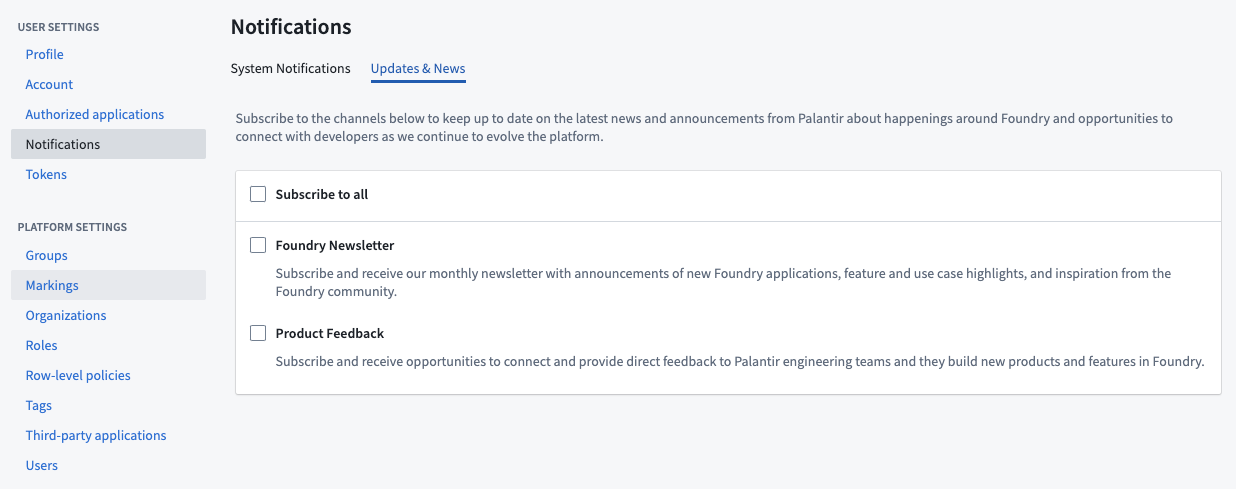
How to subscribe to Foundry Newsletter and Product Feedback**
Additional highlights
App Building | Workshop
Cut, copy, and paste widgets and sections | Workshop builders can now cut, copy, and paste entire sections and individual widgets within a module for a faster building experience.
Artifact Repositories
Release Artifacts home page | Use the Release Artifacts home page to explore and search artifacts in Foundry.
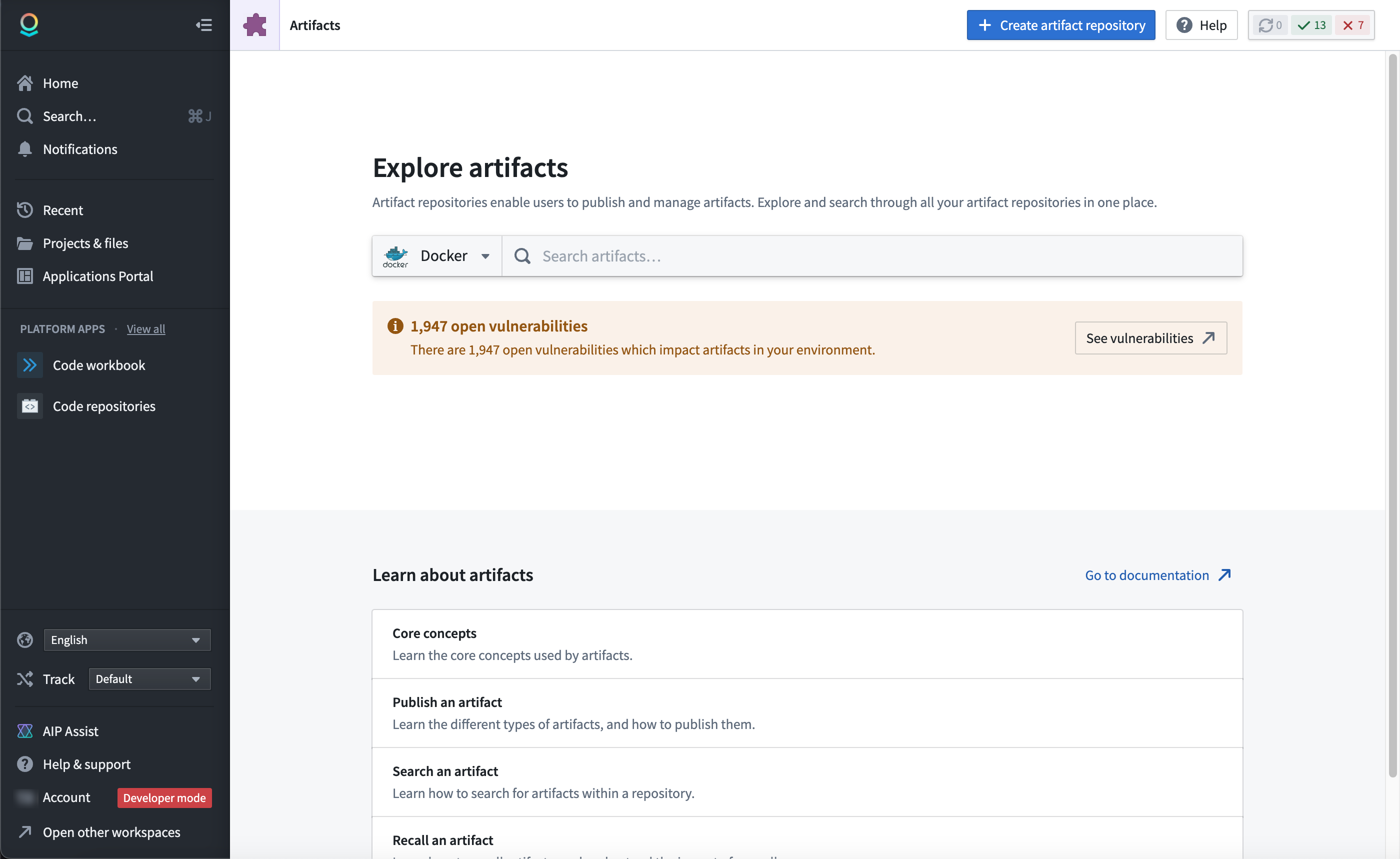
Data Integration | Code Repositories
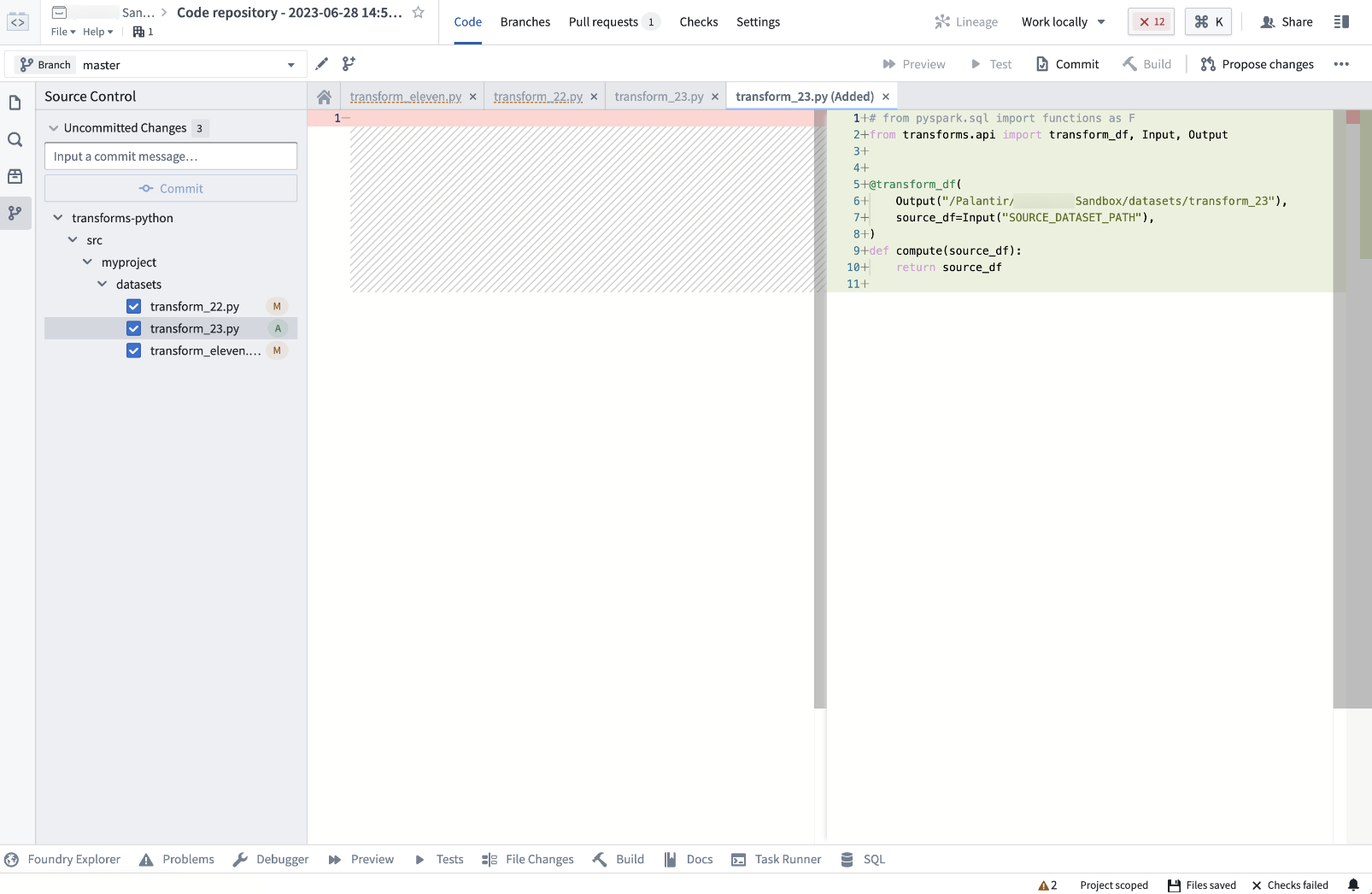
Source Control enabled, new feature flag, and minor changes | Code Repositories users now have access to the Source Control feature, a new panel that displays file changes and allows users to commit them to a remote repository. In addition, we have made improvements to the user experience. The Commit option now opens the Source Control panel to make it easier for users to access and use the feature. How it works:
- When you open Code Repositories, you will now see a new panel for Source Control.
- This panel displays any changes made to the files in the project.
- You can select the files you wish to commit, and provide a commit message to describe the changes.
- Once you are satisfied with your changes, select Commit to commit the changes to the remote repository.
Administration | Control Panel
Announcing Foundry in Ukrainian [Beta] | Foundry's Ukrainian translation is now available in beta. Review the documentation on configuring available languages to enable the Ukrainian language translation.
Data Integration | Pipeline Builder
Simplify copy/paste and add hotkeys | The local node copy and paste functionality has been replaced with a duplicate function that can be accessed using the hotkey d. To copy a selected node to the clipboard, use hotkey Cmd+c (MacOS) or Ctrl+c (Windows), and to paste, use Cmd+v (MacOS) or Ctrl+v (Windows).
App Building | Workshop
iframe widget: Embed eternal applications | The new iframe widget in Workshop allows users to embed external, full-page applications within the platform. This feature supports rendering an external URL and is specially designed to enable iframed Slate embeds with support for input and output parameters, providing a seamless integration experience.
App Building | Workshop
Cut, copy, and paste widgets and sections | Workshop builders can now cut, copy, and paste entire sections and individual widgets within a module for a faster building experience.
Ontology | Ontology Management
Notification preferences for action types | Users can now configure notifications for action types to only notify users in the recipient list with the correct permissions; those without proper access will be ignored. Previously, the notification would fail for all users in the recipients list if any single user did not have proper permissions.
Analytics | Quiver
Open card in new analysis | You now have the option to open a card in a new Quiver analysis through the More actions (...) menu icon at the top right of Quiver cards. This action will copy the selected card over to a new analysis along with any upstream cards that this card depends on.
Model Integration | Modeling
Model Training Template now available in Code Repositories | The Code Repository application now provides a model training template. The new model training template allows you to write Model adapters in the same repository as your model training logic, resulting in faster iteration and a more straightforward development process in Foundry for ML and AI models.
This model training template automatically adds the correct model dependencies to all models produced inside the repository. This simplifies dependency management when models are deployed in the Modeling Objectives application in Foundry by automatically ensuring that all build-time dependencies are made available at inference time.
To get started developing ML and AI models with the new training template, refer to the documentation.
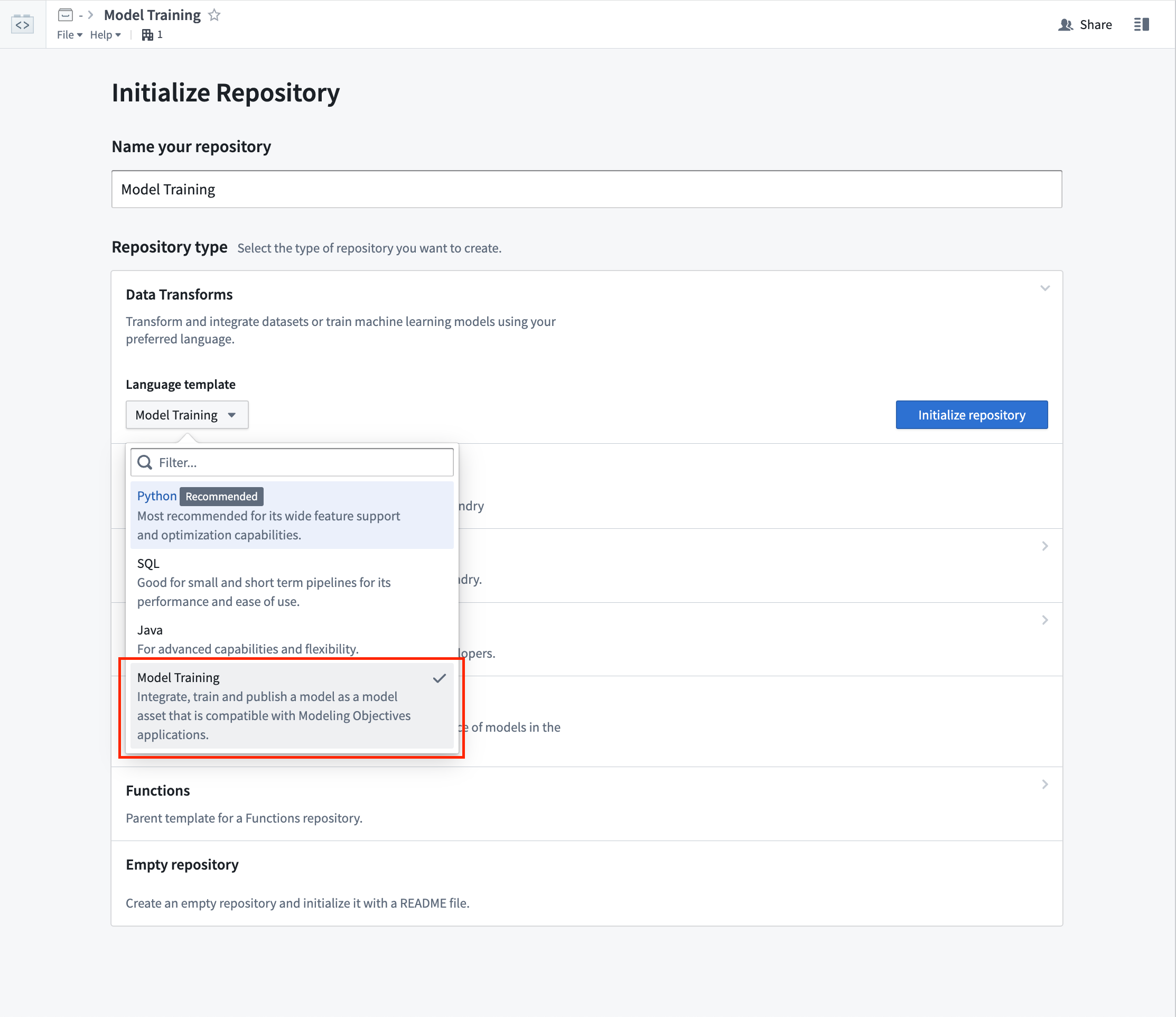
Screenshot of selecting the Model Training Template in Authoring
中文翻译
公告
推出 Linter:2023年9月中旬可用 [Beta]
发布日期:2023-08-30
该功能现已全面可用。阅读最新公告。
推出 Workshop Design Hub,一款 Marketplace 产品
发布日期:2023-08-24
Workshop Design Hub 现已可用,这是一组旨在激发您开发精美低代码应用的模块。这些高质量的 Workshop 模块是端到端示例,使用虚拟数据展示多种应用类型和用例需求,突出 Workshop 的多功能性。您可以使用这些模块探索 Workshop 功能,为自身需求进行逆向工程,或提升应用构建技能,从零开始创建定制化应用。
安装和访问 Workshop Design Hub
Workshop Design Hub 是一款 Marketplace 产品。Foundry 注册管理员必须首先通过 Marketplace 安装 Workshop Design Hub,并使其对所有注册用户可用。安装后,这些模块可在名为 "Workshop Design Hub" 的项目中找到。
关于安装 Workshop Design Hub 的指导,管理员可访问 Marketplace 文档。
要了解更多关于 Workshop Design Hub 及其可用模块的信息,请查阅其文档。
推出 Retention Policies 应用:2023年9月可用 [GA]
发布日期:2023-08-22
Retention Policies 应用将于2023年9月前在所有堆栈上全面可用。该应用使命名空间所有者能够定义和管理静态保留策略(static retention policies)和数据生命周期策略(data lifetime policies)。新应用取代了传统的基于 YAML 的仓库。
包含指向 Retention Policies 应用链接的命名空间设置页面。
该应用列出了在该命名空间上定义的所有保留策略,包括系统策略、遗留策略和自定义策略。
- 系统策略(System policy): 由平台管理的保留策略。这些策略不可配置,仅针对旧版本数据。如果您的用例需要移除这些策略,请联系您的 Palantir 代表。
- 遗留策略(Legacy policy): 由命名空间管理员通过代码仓库管理的保留策略。这些策略被视为已弃用。我们建议将这些策略迁移到新的自定义策略,并使用遗留策略页面上的迁移选项从仓库中删除策略定义。
- 自定义策略(Custom policy): 由命名空间管理员使用 Retention Policies 应用管理的策略。
显示系统、遗留和自定义策略的 Retention Policies 应用。
Retention Policies 的优势
Retention Policies 提供了一个直观的点击式界面来定义和管理保留策略。这些策略通过自动删除冗余数据并满足法规和删除要求,帮助管理员降低存储成本。
在管理保留策略时,您可以选择添加数据集选择器(dataset selectors)来识别策略所需的数据集,以及事务选择器(transaction selectors)来缩小策略所需数据集事务的范围。
带有添加的数据集选择器的自定义保留策略。
Retention Policies 的简洁视图也可通过详细信息选项卡下的数据集预览获得。此视图将列出所有影响该数据集的策略,并允许您筛选出仅影响当前分支的策略。
列出两个系统策略的简洁 Retention Policies 视图。
下一步计划?
我们接下来的工作包括使用 Foundry 中的 Approvals 应用为每个保留策略添加审批流程支持。此功能将允许管理员在批准每个策略之前对其进行审查。
推出 HyperAuto V2 [Beta]
发布日期:2023-08-22
HyperAuto V2 将于2023年8月底前可供安装,并在发布时支持 SAP。
HyperAuto 是 Foundry 用于集成 ERP 和 CRM 系统的自动化套件,提供点击式工作流,从源系统的原始数据动态生成有价值的、可用的输出(数据集或本体)。
HyperAuto V2 引入了显著改进的用户体验、性能和稳定性,用于自动化的 SAP 相关数据摄取和转换。
在 HyperAuto V1 中创建新 SAP 管道的能力将从2023年8月22日起弃用。基于 HyperAuto V1 的现有 SAP 管道和非 SAP 系统将保持可用且不变。
实时 HyperAuto 管道概览。
点击式配置
HyperAuto V2 已以易用性为核心进行了重建。要创建和配置 HyperAuto 管道,用户只需与直观的逐步向导进行交互。预设的推荐默认值已预先配置以简化流程,但用户可以根据需要调整设置。
HyperAuto 的关键自动化功能包括:
- 通过自动反规范化数据模型,连接包含相关元数据和附加信息的表来丰富核心表。
- 格式化并清理源数据,确保列类型准确、列名称直观,并正确处理空数据。
- 智能地对变更日志源数据进行去重,确保每个表都存在一个最新、无冗余的版本,用于操作和分析。
更多信息,请查阅 HyperAuto V2 文档。
应用了推荐默认值的管道配置。
通过 Pipeline Builder 进行数据转换
HyperAuto V2 动态生成 Pipeline Builder 管道,以根据需要处理源数据。这提供了一个熟悉且易于理解的 UI,使数据处理方式完全透明,并更容易理解用户可能希望在 HyperAuto 中更改的配置。
对现有 HyperAuto 管道配置的任何更改都会在底层 Builder 管道中创建一个新的提案,该提案必须由用户批准并合并后才能部署到实时管道。Pipeline Builder 附带了一个全面的变更管理工作流,HyperAuto 利用该工作流为关键工作流提供质量保证。
动态生成的 Pipeline Builder 管道,用于处理源数据。
来自 SAP 的实时数据处理
HyperAuto V2 支持 SAP 源的实时流式连接和数据转换(需要 SLT 复制服务器),从而支持需要实时查看相关 SAP 数据的关键操作应用。此外,HyperAuto V2 还为批处理管道带来了显著的性能改进。
如果您想启用 SAP 流式传输,请联系您的 Palantir 代表。
时间序列图表现已集成本体操作
发布日期:2023-08-22
Quiver 仪表板和 Workshop 应用构建者现在可以直接从时间序列图表的选择菜单中公开本体操作,为用户在观察时间序列的上下文中采取行动提供更直观的体验。此 本体操作按钮小部件 与时间序列图表之间的新集成允许用户将图表选择的 X 或 Y 边界值作为输入传递给本体操作,从而实现实际应用,例如在时间序列上上下文化观察到的现象,或根据传感器时间序列值调整对象属性值。
直接从时间序列图表的选择菜单公开本体操作。
实际应用
新的集成可用于增强您现有的工作流。例如:
创建"注释"对象实例
在时间序列图表中,您现在可以创建一个对象来捕获观察到的现象的上下文。例如,这可能包括机器故障的原因,或影响股票指数的市场宏观事件。x 轴选择的开始和结束时间值作为输入传递给创建注释本体操作,从而产生一个注释事件。能够用多个事件注释图表,为手头的数据可视化提供了更清晰的说明。
x 轴选择的开始和结束时间值作为输入传递给"创建注释"本体操作。
调整操作值
您还可以调用本体操作,根据观察到的现象更新属性值。例如,下面的时间序列图表显示了两条曲线,分别显示了两种产品(汽油(蓝色)和柴油(红色))的每桶预测总成本。我们看到今天汽油(深蓝色点)的实际每桶总成本(y 轴)范围在 6.35 到 8.45 美分/桶之间,远低于最低预测总成本 6.01 美分/桶。我们可以采取的一项降低生产成本的措施是将 DRA 浓度从 15 ppm 调整到接近 6.5 ppm 的值。通过在 x 轴上选择大约 6 的范围,然后我们可以选择调整 DRA 水平本体操作,该操作将自动设置选择边界值。
调用本体操作以根据观察到的现象更新属性值。
流式转换迁移至 Java 17 计划于2023年9月底完成 [迁移/弃用]
发布日期:2023-08-17
到2023年9月底,所有 Foundry 流式转换(Streaming transforms)的运行时将从 Java 11 迁移到 Java 17,以利用 Java 17 改进的性能和安全态势。Java 17 运行时引入了一项破坏性变更,阻止对内部 JDK 类成员的反射访问。大多数流式转换不会受到此变更的影响,但本公告广泛发布以供普遍知晓。
虽然我们预计大多数 Foundry 流式转换不会受此迁移影响,但在用户定义函数(UDF)流式转换中,如果实现(或其相关的外部库)通过反射访问 JDK 内部,则可能发生中断。Palantir 将努力识别有风险的 UDF 实现,并联系可能受影响的管道所有者。
如果您拥有用于任何 Foundry 流式管道的 Foundry UDF 定义仓库,请通过完成以下步骤验证您的 UDF 是否与 Java 17 兼容:
- 如果您的 UDF 定义依赖于任何外部库,请验证这些库的版本是否与 Java 17 兼容。
- 打开 UDF 定义仓库根目录下的隐藏文件
versions.properties。 - 识别从外部仓库手动添加的任何依赖项(即,不是由仓库模板默认添加的依赖项)。
-
对于每个此类依赖项,验证
versions.properties文件中声明的最低版本是否与 Java 17 运行时兼容。这可能需要检查依赖项的发布说明。 -
验证 UDF 实现是否未通过反射访问内部 JDK 类。
- 如果您的 UDF 实现未使用反射,则无需进一步操作。
- 如果您的 UDF 实现确实使用了反射,请确保满足以下任一条件:
- 被访问的类不是 JDK 内部类。
- 您的实现能够正确处理
IllegalAccessException,并且在某些反射操作开始抛出此异常时不会中断。
如果您在修复 UDF 定义仓库时遇到任何问题,或对此通知有任何疑问或担忧,请联系您的 Palantir 管理员。
Quiver 中的 AIP:透明的假设和增强的歧义处理
发布日期:2023-08-09
Quiver 中的 AIP 现在可以回答模糊、主观或使用相对术语的提示,例如"筛选交易到高消费值"或"按最重要的客户分组"。此外,通过增强的上下文感知能力,AIP 现在可以通过从对象集模式和数据结构中推断正确的值来处理列名和数据值中的拼写错误。
AIP Configure 做出的透明假设
建议的 AIP Configure 卡片配置已分为两类:配置建议和需要假设的配置建议。如果请求不太具体,例如"让这张图表更美观",AIP 将对提示中模糊的部分(在此示例中,"美观"的含义本身就存在歧义)做出假设,以推断哪些更改可能是合适的。用户可以在接受建议的更改之前,看到提示中 AIP 做出假设的部分以及这些假设是什么。
AIP Configure 建议的配置更改,显示为回答提示所做的假设
接受建议的配置更改后的条形图状态
AIP 如何使用本体数据
除了用户提示外,Quiver 现在还会向 AIP 发送对象集数据的摘要版本,或"属性值提示(property value hints)"以供处理。属性值提示仅针对被发现与回答用户提示相关的属性进行计算,如下所示:
- 字符串属性类型:最多计算 100 个唯一值
- 数字属性类型:计算最小值、最大值和平均值
以前,由于没有有效值的样本,LLM 过滤的对象集使用了集合中不存在的值。这通常会导致过滤后的对象集为空,进而影响生成图中下游的卡片。通过这些改进,AIP 现在可以使用属性值提示来纠正列名和属性值的拼写错误,并在进行定量描述(如高、低和最大)时确定阈值。
接受建议的配置更改后的条形图状态
要更好地了解 AIP 在 Quiver 中的工作方式,请查阅 Quiver 中的 AIP 功能 文档。
推出 Pipeline Builder 中的 AIP
发布日期:2023-08-09
Pipeline Builder 中的 AIP 帮助您利用 AI 的力量,以更高的易用性和结果透明度构建生产级管道。借助 Pipeline Builder 中的 AIP,您可以受益于许多功能:
- 使用解释功能理解复杂管道。
- 为有用的转换路径名称和描述生成建议。
- 快速创建和修改正则表达式。
- 轻松将字符串转换为设置的时间戳格式。
一键解释管道
在开发过程的每一步动态获取管道的描述,并让您的协作者随时了解当前状态。使用解释功能为新的审批者提供有价值的上下文,或以最小的维护工作量促进新团队成员之间的知识转移。
您可以使用 Explain 来了解多个节点,如下所示:
或者,通过选择单个节点并从右侧出现的菜单中选择解释选项来了解更多信息。
生成更好的路径名称和描述
您还可以使用解释来建议和应用有用的转换路径名称和描述,以促进整个管道的协作和透明度。这在理解特定用例中的复杂管道和转换时尤其有用。
您甚至可以使用图形视图底部的建议选项卡批量生成新的名称和描述。
轻松配置和应用转换
使用 Pipeline Builder 的 Transform Assist 功能来帮助构建管道中的复杂路径。
修改和创建正则表达式
借助 Pipeline Builder 新的 Transform Assist 功能,您可以通过在正则表达式助手中输入要查找的信息描述,轻松创建和修改复杂的正则表达式。在下面的示例中,我们想要应用一个正则表达式来返回数据集中的电子邮件域名。
AIP 将生成一个正则表达式,该表达式在应用时将返回定义的结果。
快速将字符串转换为时间戳
使用 Transform Assist,您还可以使用时间戳格式化工具高效地将字符串列转换为指定的时间戳。在转换板中,定义解析格式并选择生成以快速将您的格式配置添加到板中。
选择应用以将字符串列转换为指定的时间戳格式。
在输出数据集预览中查看新的 parsed 时间戳列。
了解如何开始使用 Pipeline Builder 中的 AIP 功能。
传统数据连接代理将于2023年8月弃用,转而采用优化的直接连接 [日落]
发布日期:2023-08-07
Palantir Foundry 正在弃用其传统的数据连接代理,转而将数据连接迁移到 Rubix ↗,这是一种运行在 Kubernetes 上的安全、更可靠、更高效的云产品。此更新意味着不再需要数据连接代理,因为它们是一种临时解决方案,允许 Palantir 与外部客户网络连接。
因此,所有安装在 Palantir 提供的 AWS 主机上的代理必须在2023年8月底前退役,所有受影响的工作流都需要迁移到直接连接。Palantir 工程师目前正在努力为那些在堆栈上安装了可以运行云数据摄取的 Rubix 的客户完成迁移。
将工作流迁移到直接连接的好处包括:
- 高可靠性: 直接连接比代理更可靠且更易于管理。无需每周维护窗口,从而消除了停机时间。
- 更好的并行性: 直接连接能够更好地处理多个并行同步,并利用 Foundry 中的自动缩放功能,因为每个同步都作为一个独立作业运行。
- 更好的网络管理: 作业只能访问其运行所需的端点,而基于代理的连接中,单个代理主机必须满足需要通过该代理运行的所有作业的网络要求。
- 自助服务: 直接连接消除了对 Palantir 支持的依赖,因为其管理可以直接在 Foundry 的 UI 中进行。
如果您希望继续使用基于代理的工作流,您可以创建一个托管在您自己硬件上的新代理,并将您的代理分配给受影响的源。
要完成迁移,请按照文档中提供的说明进行操作:将源从代理工作器运行时切换到直接连接。
推出 Foundry 新闻通讯 [Beta]
发布日期:2023-08-01
及时了解 Foundry 中发生的所有激动人心的变化可能具有挑战性。虽然我们努力勤勉地收集我们的公告和发布说明,但我们知道您一直在等待直接收到这些更新。我们很高兴地宣布 Foundry 新闻通讯订阅的测试版,即将在用户设置中的通知偏好设置下可用。
除了每月一期的 Foundry 新闻通讯(总结 Foundry 中的新产品、平台上的新功能和改进以及一般新闻和更新)外,用户还可以选择加入产品反馈频道。该频道将分享与 Palantir 工程师联系的机会,因为他们正在为 Foundry 生态系统的持续开发寻求有针对性的用户意见。
通过选择加入的订阅共享的新闻通讯和其他内容将发送到与 Foundry 用户帐户关联的电子邮件地址。请注意,订阅信息与所有其他帐户详细信息一样,仅存储在 Foundry 注册的边界内。不会集中收集电子邮件地址或其他用户识别信息,也不会发送到注册之外。
如何订阅 Foundry 新闻通讯和产品反馈**
其他亮点
应用构建 | Workshop
剪切、复制和粘贴小部件和部分 | Workshop 构建者现在可以在模块内剪切、复制和粘贴整个部分和单个小部件,以获得更快的构建体验。
制品仓库
发布制品主页 | 使用发布制品主页在 Foundry 中探索和搜索制品。
数据集成 | 代码仓库
启用源代码控制、新功能标志和微小更改 | 代码仓库用户现在可以访问源代码控制功能,这是一个显示文件更改并允许用户将其提交到远程仓库的新面板。此外,我们还改进了用户体验。提交选项现在会打开源代码控制面板,使用户更容易访问和使用该功能。工作原理如下:
- 当您打开代码仓库时,您现在会看到一个用于源代码控制的新面板。
- 此面板显示对项目中文件所做的任何更改。
- 您可以选择要提交的文件,并提供提交消息来描述更改。
- 对更改满意后,选择提交以将更改提交到远程仓库。
管理 | 控制面板
宣布 Foundry 乌克兰语版本 [Beta] | Foundry 的乌克兰语翻译现已在测试版中可用。查阅关于配置可用语言的文档以启用乌克兰语翻译。
数据集成 | Pipeline Builder
简化复制/粘贴并添加快捷键 | 本地节点复制和粘贴功能已被替换为可使用快捷键 d 访问的复制功能。要将选定的节点复制到剪贴板,请使用快捷键 Cmd+c(MacOS)或 Ctrl+c(Windows),要粘贴,请使用 Cmd+v(MacOS)或 Ctrl+v(Windows)。
应用构建 | Workshop
iframe 小部件:嵌入外部应用程序 | Workshop 中新的 iframe 小部件允许用户在平台内嵌入外部的全页应用程序。此功能支持渲染外部 URL,并专门设计用于启用 iframed Slate 嵌入,支持输入和输出参数,提供无缝的集成体验。
应用构建 | Workshop
剪切、复制和粘贴小部件和部分 | Workshop 构建者现在可以在模块内剪切、复制和粘贴整个部分和单个小部件,以获得更快的构建体验。
本体 | 本体管理
操作类型的通知偏好设置 | 用户现在可以为操作类型配置通知,仅通知具有正确权限的收件人列表中的用户;没有适当访问权限的用户将被忽略。以前,如果收件人列表中的任何一个用户没有适当的权限,则所有用户的通知都会失败。
分析 | Quiver
在新分析中打开卡片 | 您现在可以选择通过 Quiver 卡片右上角的更多操作 (...) 菜单图标,在新的 Quiver 分析中打开一张卡片。此操作会将选定的卡片以及该卡片依赖的任何上游卡片复制到新的分析中。
模型集成 | 建模
模型训练模板现已在代码仓库中可用 | 代码仓库应用现在提供了一个模型训练模板。新的模型训练模板允许您在同一个仓库中编写模型适配器(Model adapters)和模型训练逻辑,从而在 Foundry 中为 ML 和 AI 模型实现更快的迭代和更直接的开发过程。
此模型训练模板会自动将正确的模型依赖项添加到仓库中生成的所有模型中。这简化了在 Foundry 的 Modeling Objectives 应用中部署模型时的依赖项管理,通过自动确保所有构建时依赖项在推理时可用。
要开始使用新的训练模板开发 ML 和 AI 模型,请参阅文档。
在创作中选择模型训练模板的截图