Announcements(公告)
Code Repositories development experience improvements
Date published: 2023-09-21
The development experience for Palantir Foundry's Code Repositories application has been optimized with a collection of improvements as follows:
- Task Runner, a new Code Repositories functionality, allows users to run supported commands such as
install,formatCode,tasks, andwhoneeds. When Task Runner is enabled, adding a package from the Libraries tab in the left panel will now install the requested package on top of your current environment, instead of provisioning a Code Assist workspace as before. The additional logs generated during this stage helps provide clarity should debugging be required. In addition, the complex filters and preview input configuration interface has been improved for ease of use.
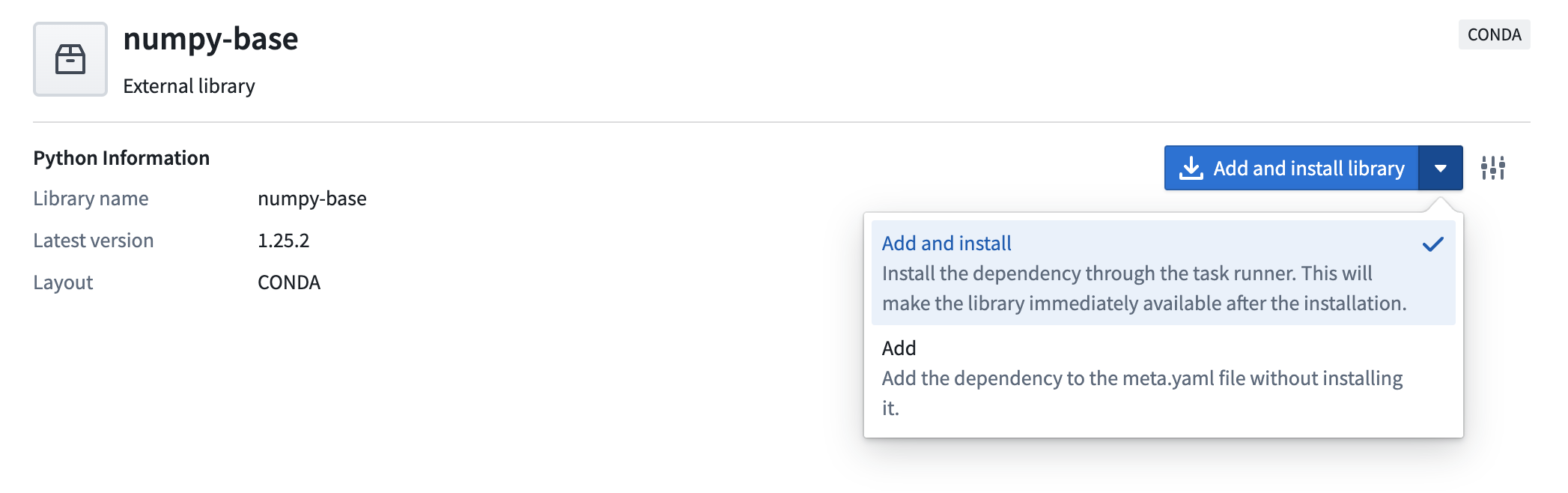
Add and install packages using Task Runner
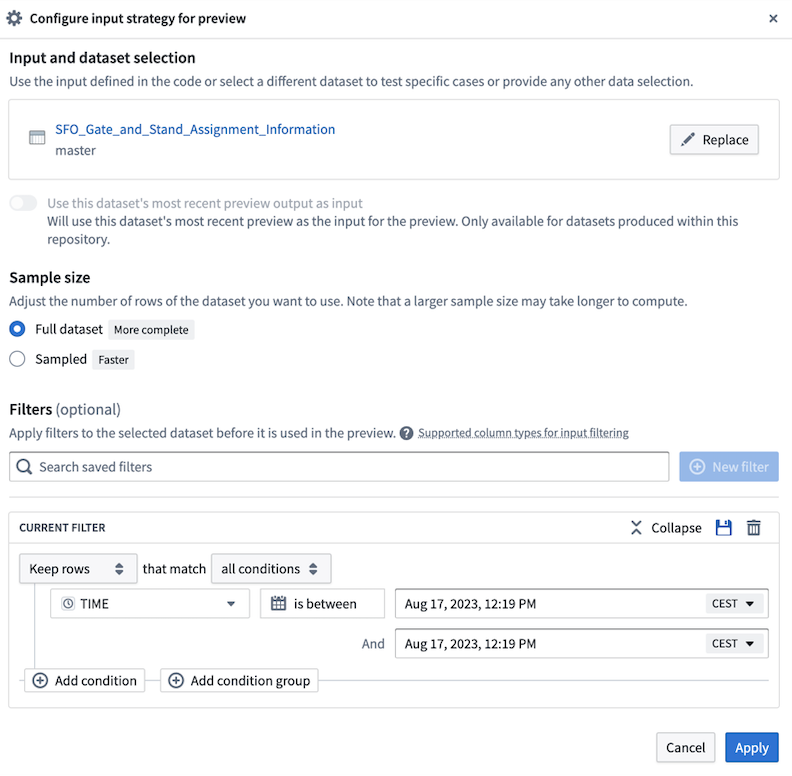
Complex filters and Preview input configuration interface improvements
- Speedier development in Python: On average, checks are now 20-30 seconds faster on cloud environments, with initial checks benefitting from an added lockfile on creation of a new repository in lieu of immediate “superseded” checks. Library installs are faster overall and users can now either add a package to be installed later or install a package without re-creating a workspace in Conda and the present run environment. The test environment is not updated as part of this step.
- Artifacts speed improvements: Code Assist can persist caches and speed up checks when there are no changes to an environment. ZSTD compression support was extended to Artifacts and to Mamba resulting in speedier environment resolutions and installations than before.
- Improvement on the non-Linux local development experience: Added
conda-forgeas an artifacts backing repository for all repositories out-of-the-box. In addition,noarchPython library templates make it easier for developers to create and manage cross-platform libraries. - Added Python formatting support: Choose between
blackandrufflinters to ensure coding style consistency. - Automatic generation of relevant configs: You can now run the
vscodegradle task locally. - Enhanced local development support on macOS and Windows: Local preview is supported via gradle. You also now have streamlined front-end for repository upgrades and Code assist.
- Spark Preview Loader optimizations: Previews of up to 1 M rows (previously 10k) now possible, combined with a faster loading time by 4-5x.
- Easier navigation in checks logs: Navigate directly to the build in Job tracker by selecting buildRIDs directly from within the checks logs.
Ontology SDK (TypeScript and Developer Console) [GA], Python SDK [Beta]
Date published: 2023-09-19
The Ontology SDK (OSDK) typescript version and the new Developer Console application are now GA on all stacks. The Python SDK is currently in beta and on track to GA by the end of October 2023.
The Ontology Software Development Kit (OSDK) allows you to access the full power of the Ontology directly from your development environment. You can generate the Ontology SDK with the Developer Console, a new portal for creating and managing third party applications using Palantir APIs. For more details and instructions, see our public docs.
What is the Ontology SDK and Developer Console?
The Developer Console is a new application that lets you generate an Ontology SDK for ergonomic access to Ontology APIs. The SDK can be generated as a TypeScript NPM package and as Python PyPi/Conda packages (beta). The Ontology SDK package includes only the entities from the Ontology defined by the developer in the Developer Console.
Developers can use the Ontology SDK to easily read from the Ontology, write back to Foundry via Actions, execute Ontology Functions and much more. Using the SDK provides a type-safe way of interacting with our APIs.
Developers can then effectively treat Foundry as a backend, relying on the infrastructure and central Ontology management that Foundry provides and allowing for more focus on application development unique to their organization.
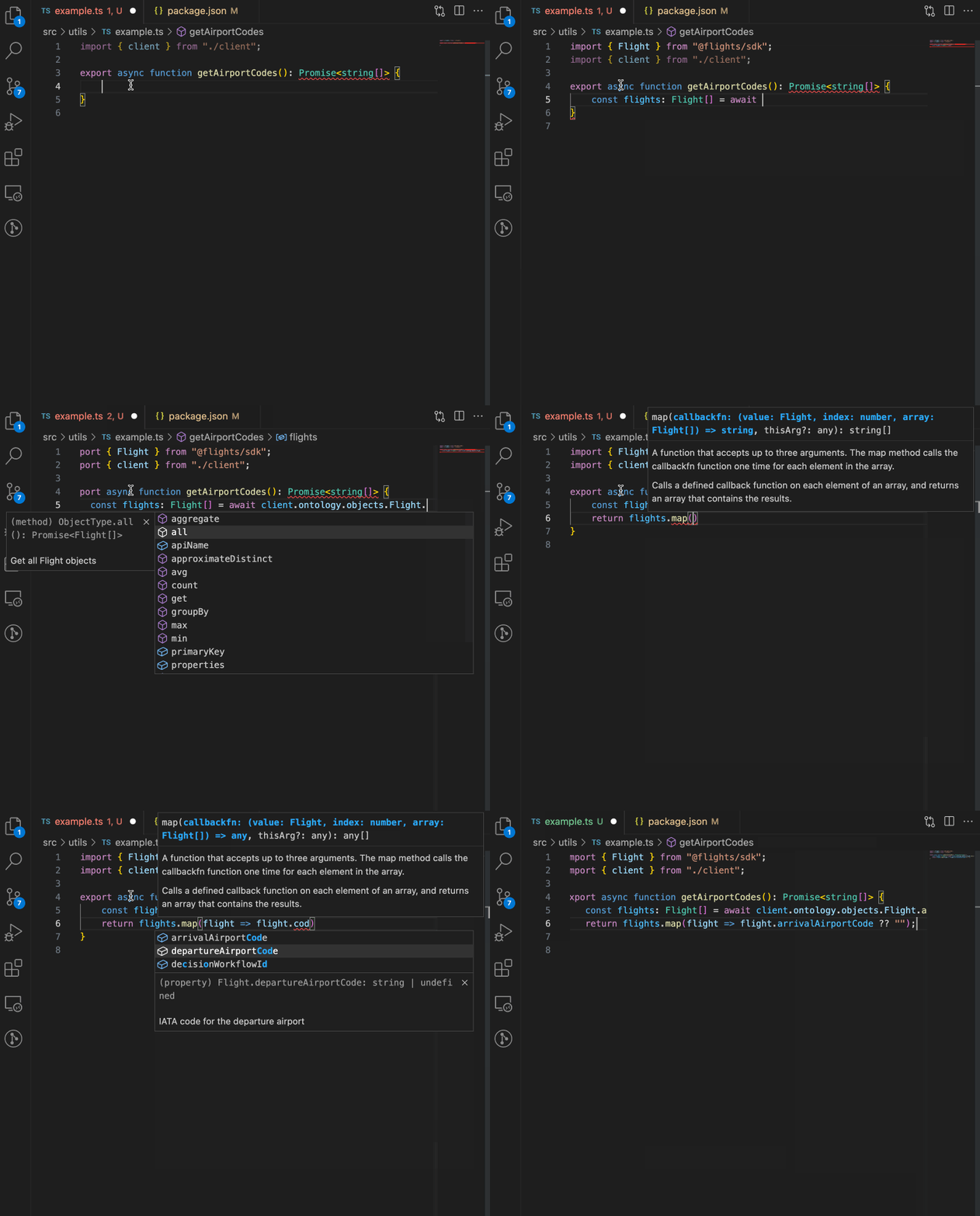
A GIF showing the Ontology SDK integrating Foundry Ontology resources in a code editor.
Why use the Ontology SDK?
- Accelerated development: The OSDK enables ergonomic access to Ontology APIs, allowing you to read and write back to the Ontology with just a few lines of code.
- Strong type-safety: The functions and types generated for the OSDK are based off of the selected subset of the Ontology you are developing with. Everything is pulled from your Ontology, so you can query and explore your data right in your editor.
- Centralized maintenance: Take advantage of the fact that the Ontology is built and managed centrally in Foundry, allowing you to focus on application building rather than investing duplicate effort in maintaining and building the data foundation for your application.
- Cross-team awareness: Using the Developer Console will make applications show up in Foundry’s provenance system just like a native Slate or Workshop app, ensuring that any changes to the ontology which impact your application can be evaluated based on their impact.
- Secure by design: The OSDK is generated with a token scoped only to the Ontological entities you want your application to access.
How do I use it?
The Ontology SDK is generated through the Developer Console, a new Foundry tool through which you can create and manage applications built to use Palantir APIs. Open the Developer Console from the Applications Portal in the workspace navigation bar, or search using CMD + J (MacOS) or CTRL + J (Windows).
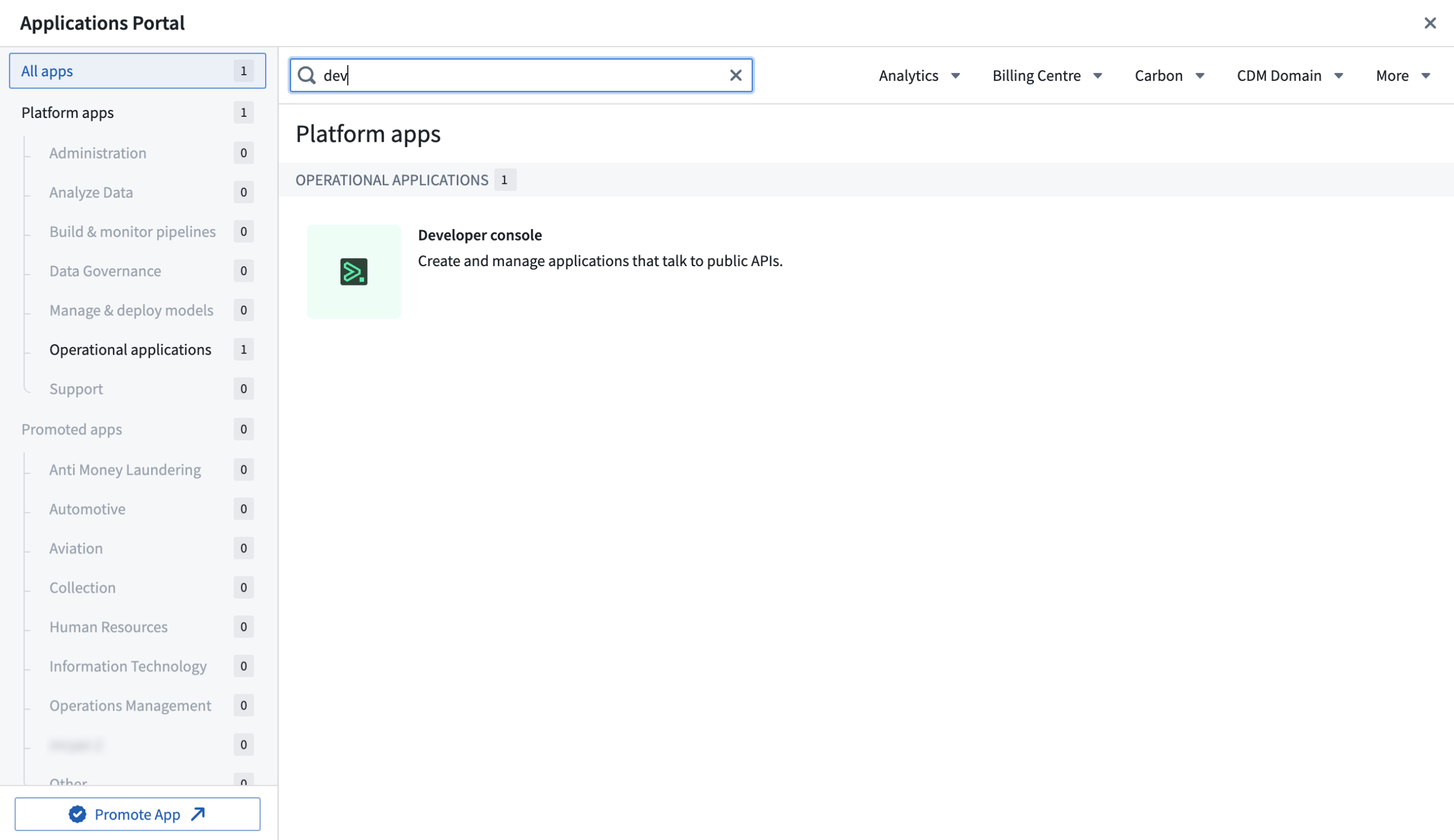
Search for the Developer Console in the Applications Portal.
Though both the Ontology SDK and Developer Console will be available to all enrollments, you can choose to opt-out of the Developer Console by disabling it in Control Panel or configuring granular access for a given group in the Access applications page.
Documentation on how to use the Ontology SDK and Developer Console is available, including walkthroughs for different application workflows. There is also a starter TypeScript/React-based application in our public repository ↗ to help you get started.
The Developer Console provides customized documentation for each application based on the selected Ontology entities.
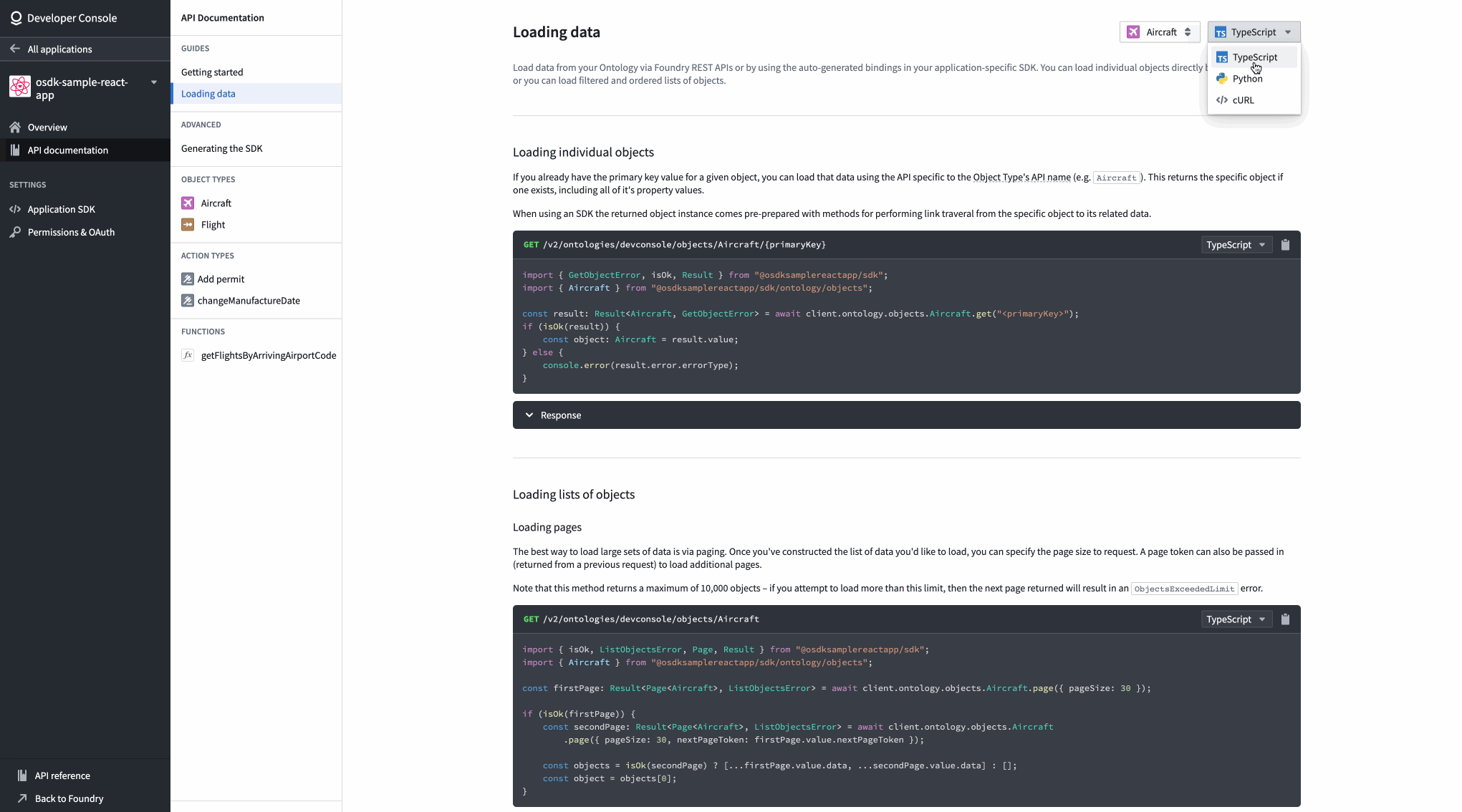
A view of API documentation for an Aircraft object type in the Developer Console.
What’s on the development roadmap?
- Python SDK: We recently announced beta support for the Python SDK package and are working towards GA by October.
- Additional capabilities: We are working on adding more Foundry capabilities into the SDK, including deployed models and Large Language Models (LLM) through Foundry LMS.
Introducing Sensitive Data Scanner [Beta]
Date published: 2023-09-19
Sensitive Data Scanner (SDS, formerly known as "Foundry Inference") helps organizations discover and secure sensitive data within their Palantir Foundry datasets. Available now in beta, governance users can use SDS to specify patterns of sensitive data to identify and the automated action to take when matching data is found. In addition, users can benefit from an updated interface to accurately track and monitor launched scans.
Improved landing page interface
The Sensitive Data Scanner landing page now includes a progress bar serving as status summary of the datasets that were scanned for each one-time scan. The color-coded bar fills proportionately to the number of datasets that match a particular condition over the total number of datasets in queue for scanning:
- Blue: Datasets currently undergoing or pending scanning.
- Orange: Datasets matching a condition.
- Green: Datasets not matching any condition.
- Red: Datasets where the scan failed or skipped.
- Gray: Canceled scans.
Additionally, you can easily review the categorization of each dataset under a particular scan by selecting a dropdown arrow to the right of each scan item.
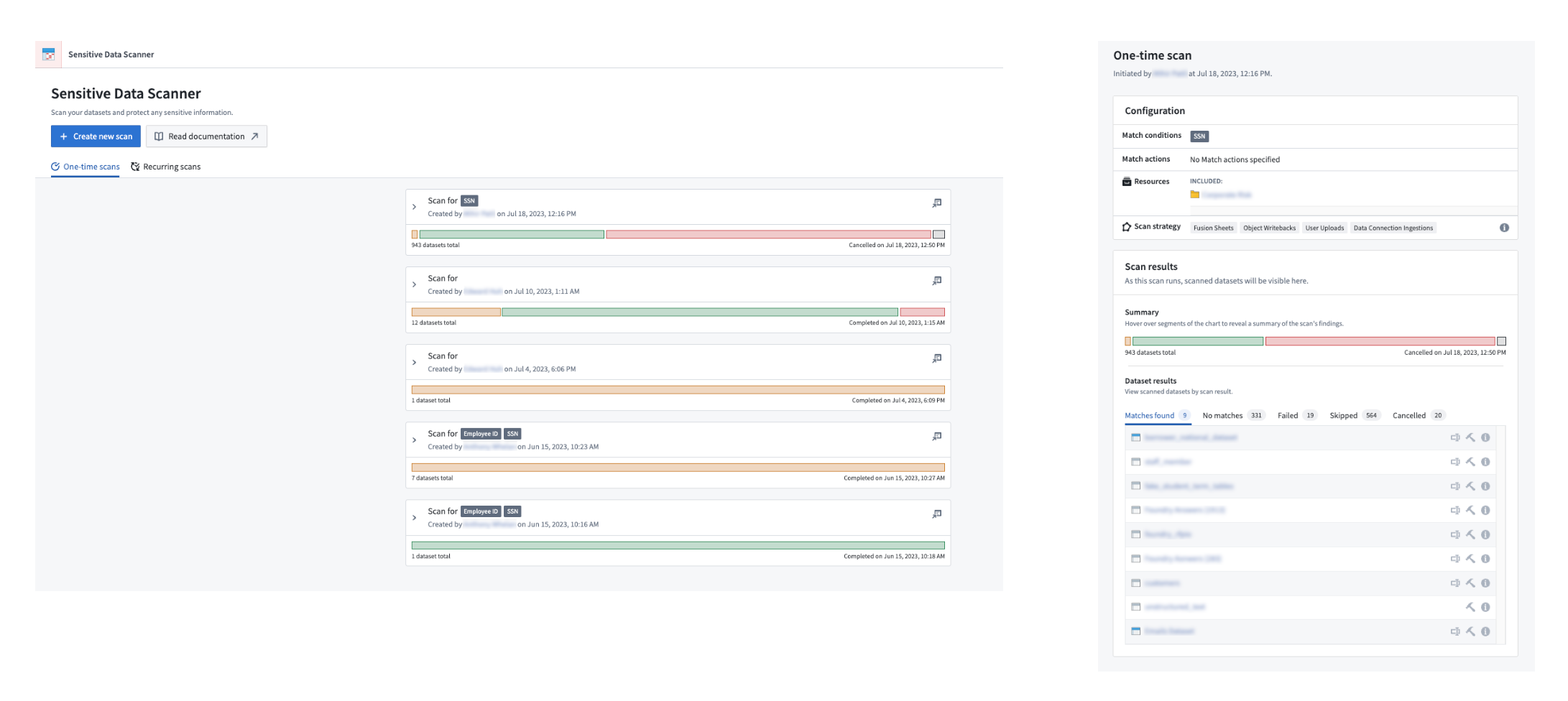
A detailed view of a one-time scan showing the different categorization of files
Estimate your scan compute time
Users can also review the number of datasets that are queued for scanning by Sensitive Data Scanner, providing an estimate of how long the scan may take while encouraging review of the scope of a scan where necessary.
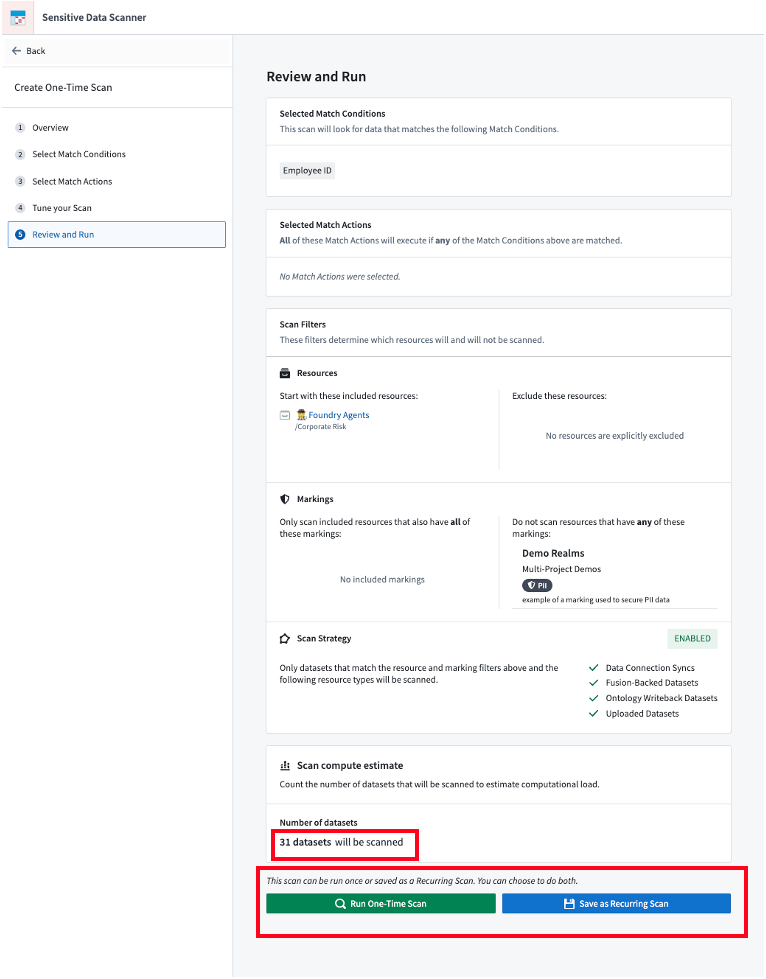
The final step of setting up a scan shows the number of datasets that will be scanned and provides users the option of creating a one-time scan or a recurring scan.
Generate regex match conditions with AIP
You can now generate regular expression match conditions using AIP (on stacks where AIP is enabled) without needing to write the regex yourself. To use this feature, provide a natural-language prompt describing your desired data format, then select Generate during the Select match conditions step when creating a one-time scan.
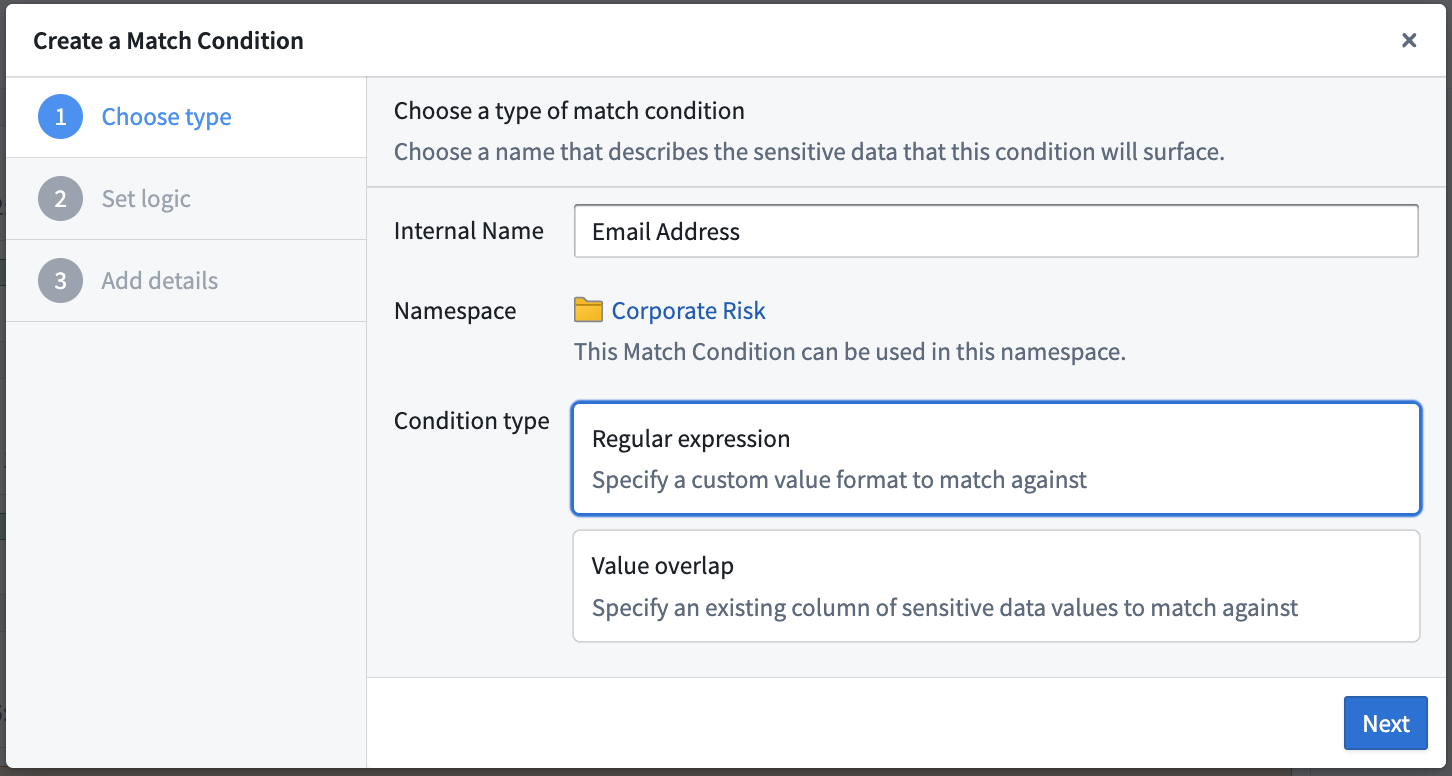
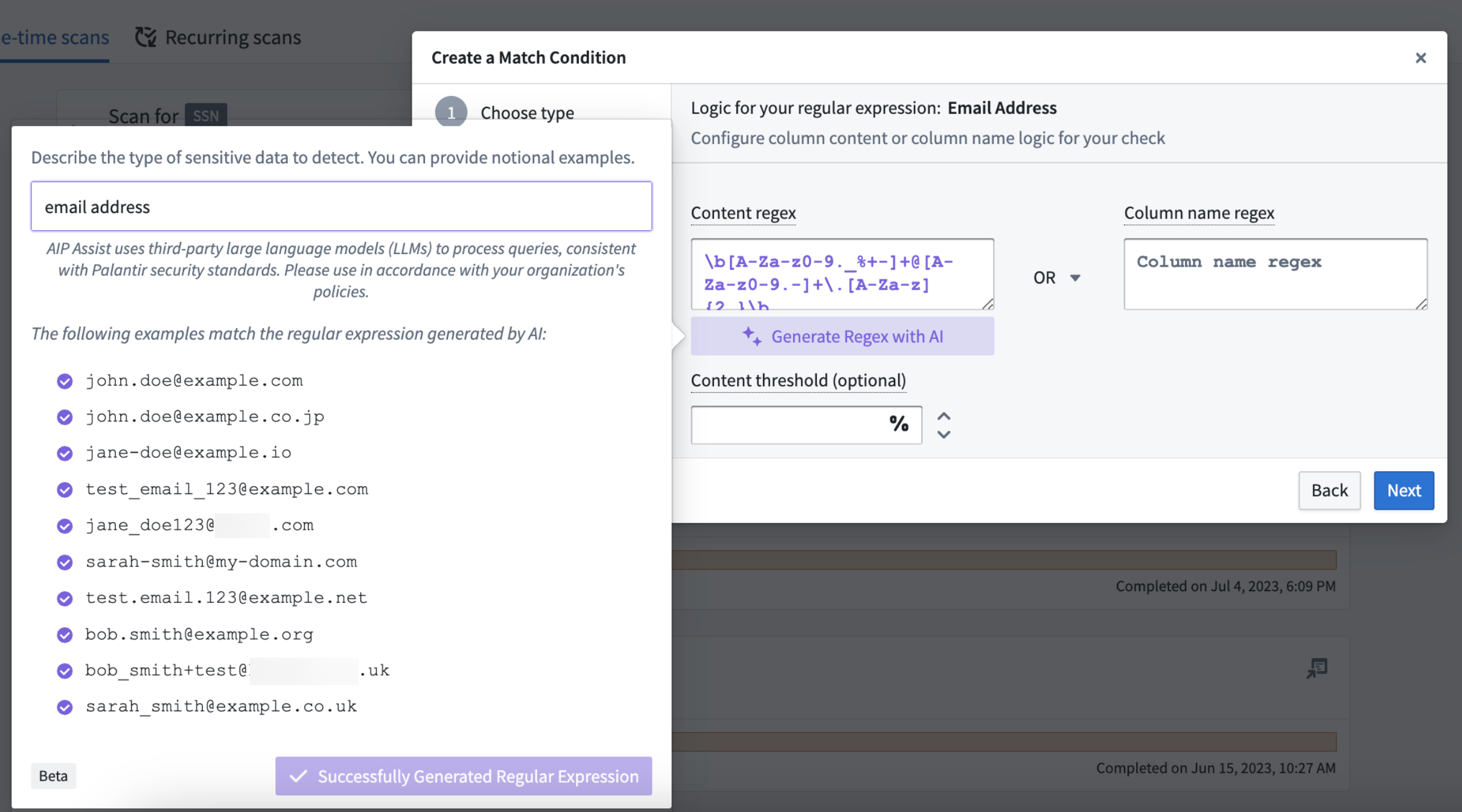
User generating a regex match condition for email addresses using AIP
For more information, review the Sensitive Data Scanner documentation.
Improved checks for Python repositories now in effect
Date published: 2023-09-19
We have updated checks performance across Python repositories on Foundry stacks with targeted improvements. To note, the average P95 checks completion time (the time taken to run checks from start to finish) across all Python jobs on internal stacks decreased from 2 minutes 15 seconds in March 2023 to approximately 1 minute and 15 seconds in June 2023, a decrease of 44.4%.
Improvements for faster checks
Our recent work to improve check efficiency includes the following updates.
Zstandard (ZST) compression for Conda packs
Previously “gzip compression", ZST has been implemented to enable significantly faster compression and decompression for conda-pack ↗, essential for running the condaPackRun and/or condaPackTest tasks in your checks.
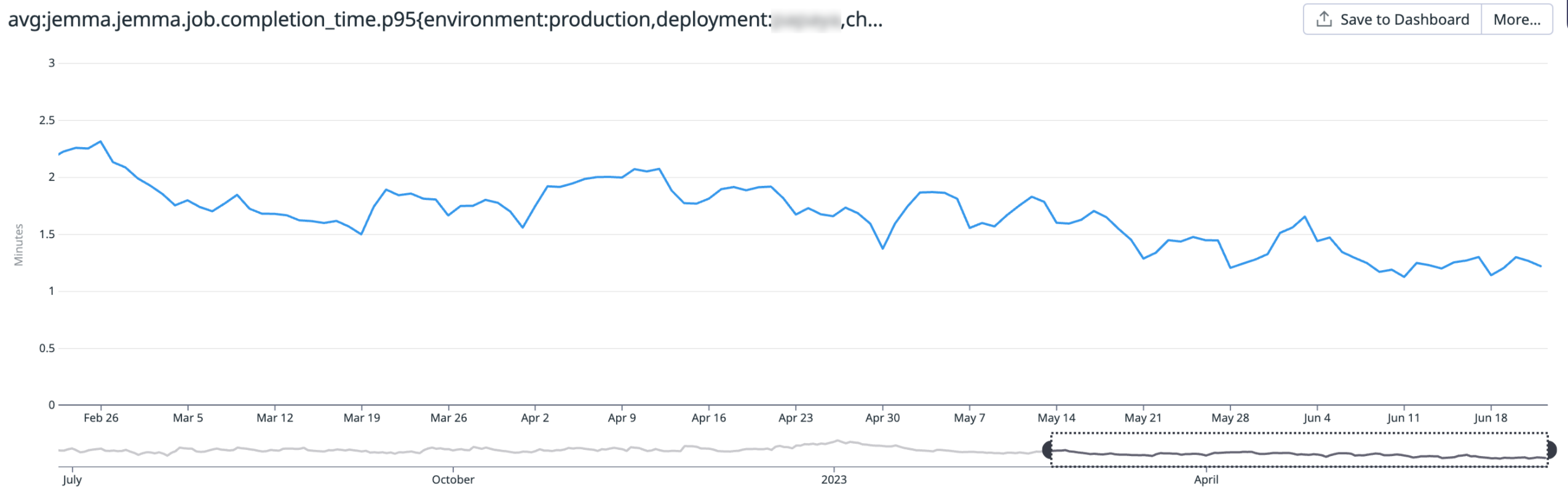
A chart displaying the average P95 checks completion time (down from 2m 15s in March 2023 to ~1m 15s in June 2023)
Jemma-managed caches are no-longer double-compressed
Jemma, our checks runner, no longer double-compresses files. Instead, files are compressed using ZST, resulting in a decrease of resource usage and CPU time.
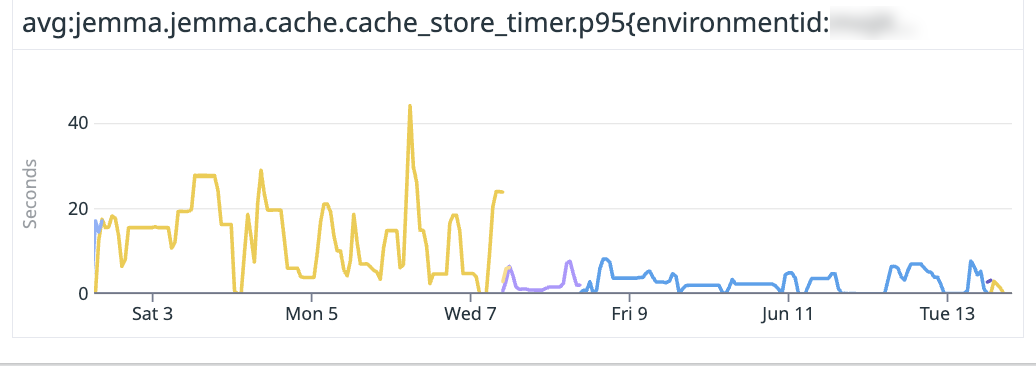
Avoiding double-compression and using zst to compress the cache directories result in a significantly faster compression speed (20MBs → 80MB/s). Shown below is the time taken to compress the cache directory and store the compressed file.
Faster Gradle Conda tasks
The following common tasks will run faster by leveraging base Docker images and updating Gradle tasks where noted:
condaInfo: Bundle the Conda installer into the Docker image used to run checks.setupPythonEnv: Bundle Conda installers for supported Python versions (major and minor) into the Docker image used for checks.vscode: Switch from Gradle's@InputFilesto@Inputto decrease task execution from 13 seconds to less than 1 second.
Custom Gradle caching for Conda packs
Use custom Gradle caching to avoid inefficiencies that cause the double-compression of Conda packs, resulting in wasted compute time and overall slower performance. This improvement also benefits from the ability of the artifacts cache layout to refresh the TTL of entries based on usage.
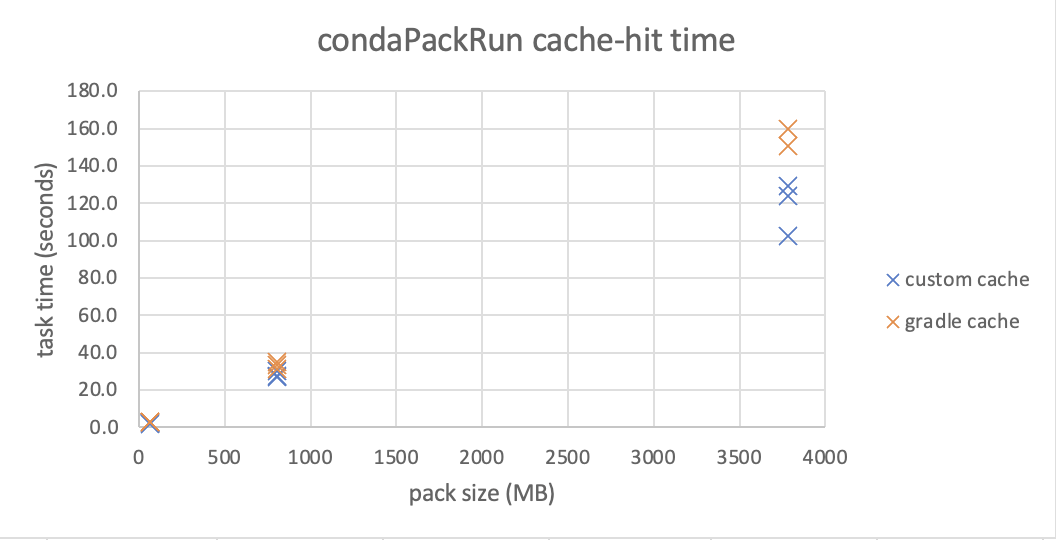
Below is a chart from an early prototype that shows the time required to run a task, using our custom caching mechanism. Note that the improvements become more substantial as the environment grows larger, such as in modeling-related packages.
What's next on the development roadmap?
We are currently working on enhancements to speed up Code Assist at launch and improve the resolution and installation of test environments.
Introducing support for semantic search in Foundry [Beta]
Date published: 2023-09-11
This feature is now generally available. Read the latest announcement.
Additional highlights
Source Control enabled, new feature flag, and minor changes
Date published: 2023-09-28
[Data Integration/Code Repositories] Code Repositories users now have access to the Source Control feature, a new panel that displays file changes and allows users to commit them to a remote repository. Learn more in the associated highlight.

S3-compatible API is now GA
Date published: 2023-09-26
[Foundry S3 Proxy] The S3-compatible API for Foundry datasets has been made generally available. The API for obtaining credentials is considered stable and now offers the ability to use temporary as well as static credentials. For more details and instructions on how to get started with this API and use it with standard AWS clients and SDKs, review the documentation.
Configurable edit-only properties in Ontology Manager
Date published: 2023-09-26
[Ontology/Ontology Management] Users can now set up edit-only properties for object types in OSv2 within the Ontology Manager. These properties are not tied to any column and can only obtain their values through Actions, providing more flexibility in managing object types.
New Foundry Rules home page and streamlined setup process
Date published: 2023-09-26
[Ontology/Foundry Rules] Foundry Rules allows users to author rule-based logic that connects seamlessly to a data transformation pipeline.
Access the new home page of the Foundry Rules application to see workflow setup and configuration. Setting up a new Rules workflow is powered by Foundry Marketplace, providing value quicker while requiring less upfront configuration.
You can also access Foundry Rules by selecting a Rules workflow configuration from Files.
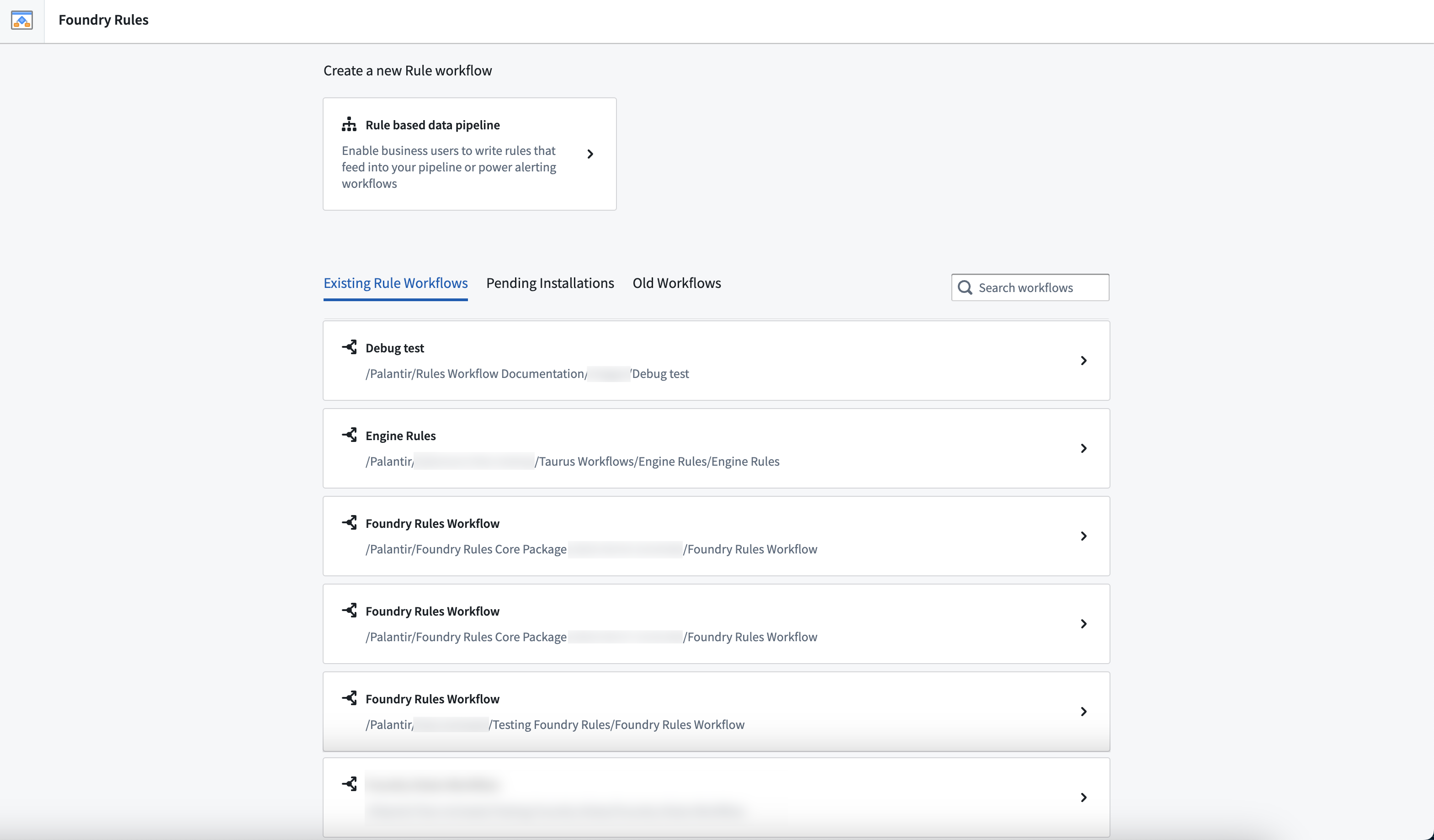
Foundry Rules workflow overview list
Enhanced proposal review functionality
Date published: 2023-09-26
[Data Integration/Pipeline Builder] Users can now add comments to their proposal reviews, enabling them to approve with a message or reject proposals with a reason. This update provides greater flexibility and communication during the review process.
Phonograph deindex countdown in Ontology Management
Date published: 2023-09-26
[Ontology/Ontology Management] The Ontology Management App now displays a countdown for automatic deindexing of unused tables in the Phonograph section for object types and many-to-many link types. This feature helps users to be aware of the remaining time before the automatic deindexing occurs.
AIP Generate now generally available in Pipeline Builder
Date published: 2023-09-26
[Data Integration/Pipeline Builder] AIP Generate is now GA in Pipeline Builder, allowing users to create new data transformation logic with a single prompt. This feature simplifies the process of writing complex data transformations while maintaining transparency and legibility in generated logic.
Introducing value embed widget for Notepad templates
Date published: 2023-09-13
[Analytics / Notepad] The value embed widget lets users insert text from a template input directly into a document. Users can add a value embed widget into a Notepad template, and configure it with a string template input. When documents are generated from the template, text is inserted in place of the widget. Learn more about the value embed widget.
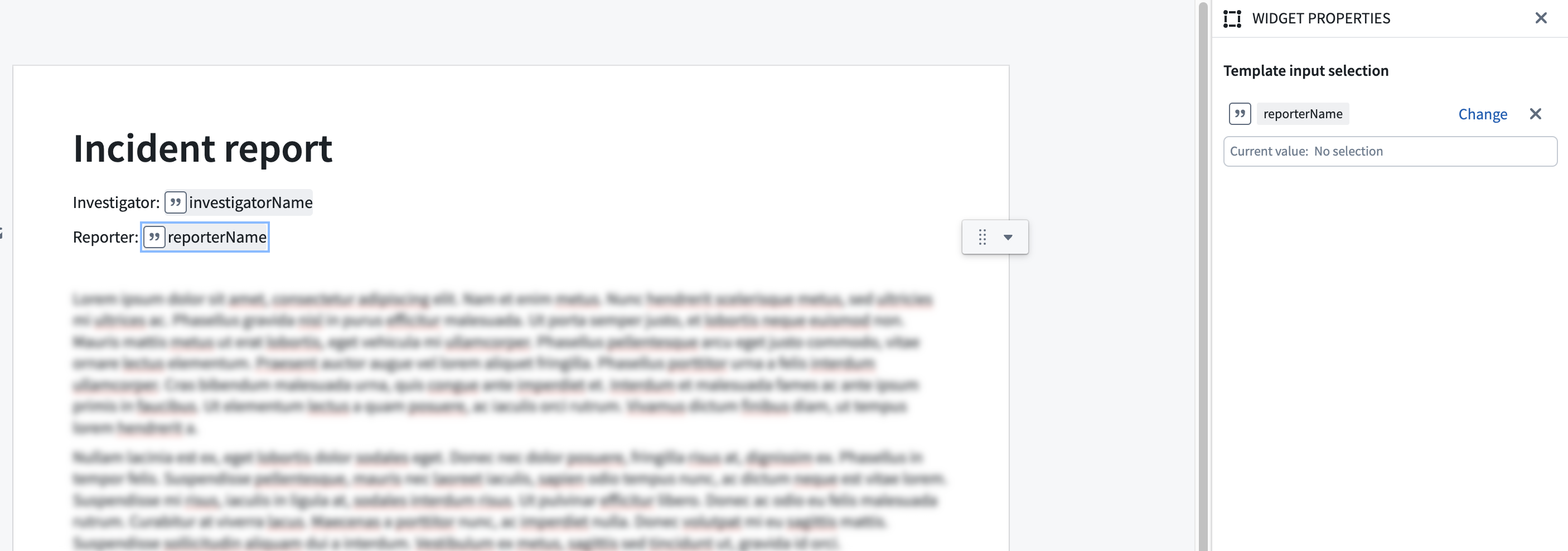
Picture of Notepad template with two value embed widgets
Usability improvements to Quiver AIP
Date published: 2023-09-13
[Analytics/Quiver] The AIP window has been removed from the next actions menu and is now a floating, draggable, and resizable modal window. This update enables users to maintain an unobstructed view of object set properties and visualizations on the canvas while writing prompts. Processing of user prompts now occurs in the background with the AIP window minimized, so users are able to continue their workflows while waiting for a result. Additionally, the AIP buttons have been renamed to better reflect their functionality; AIP Generate will generate cards in the analysis, while AIP Configure will update a card configuration.
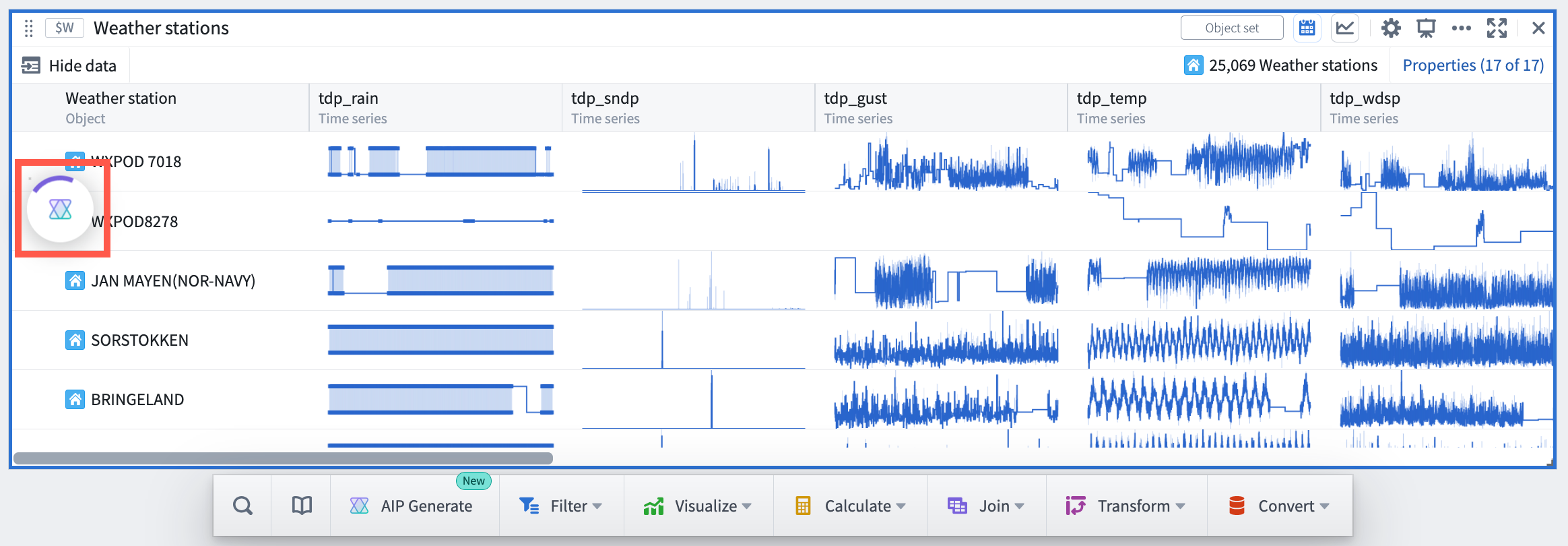
Quiver AIP minimized during runtime
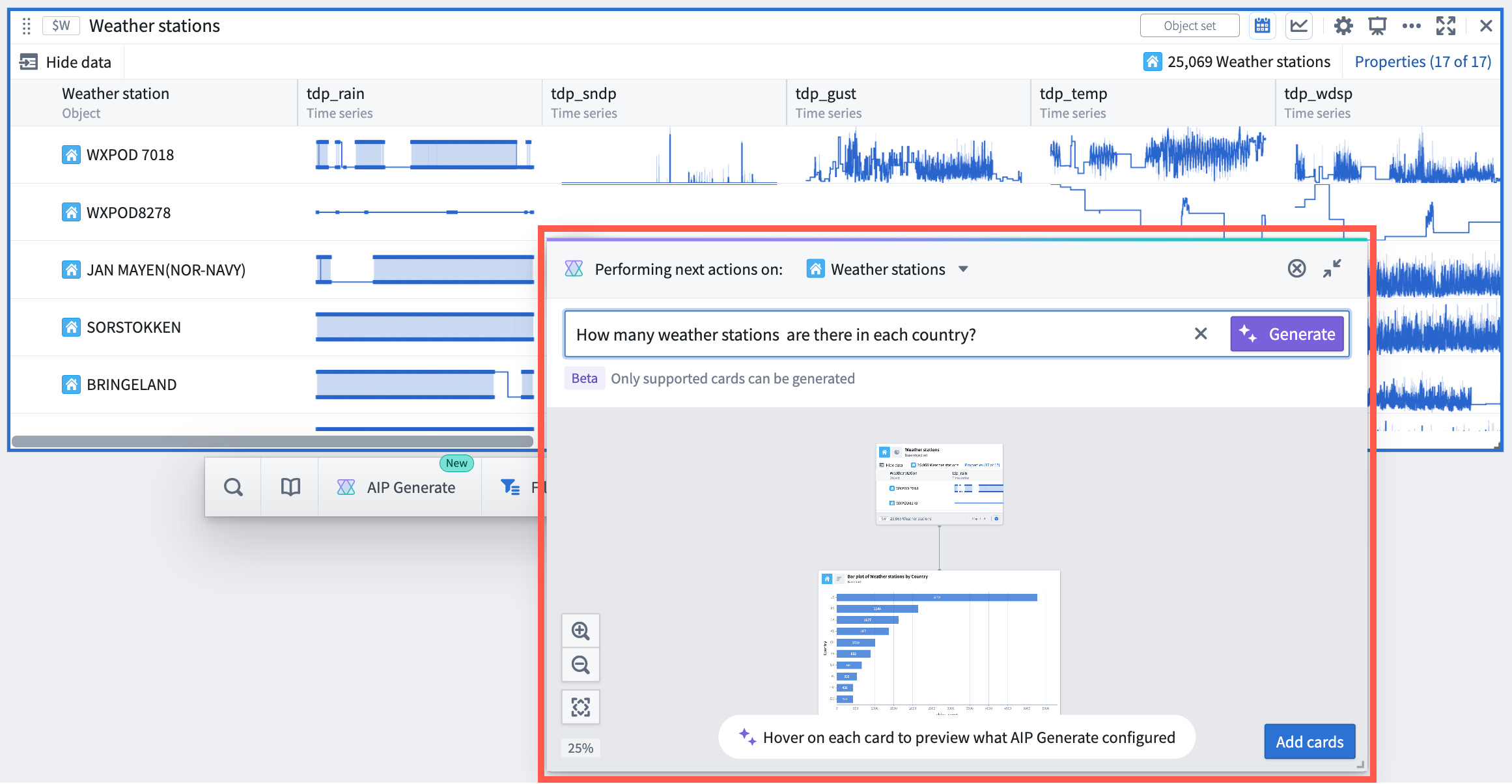
New Quiver AIP modal window
AIP next actions suggestions and prompt completion
Date published: 2023-09-13
[Analytics/Quiver] The AIP window now includes suggestions for possible next actions to be taken on the object or object set based on their properties and Quiver cards that support AIP. Additionally, when typing a prompt, AIP displays possible completions for the prompt. Both features help users discover new opportunities to use AIP to explore and analyze Ontology data.
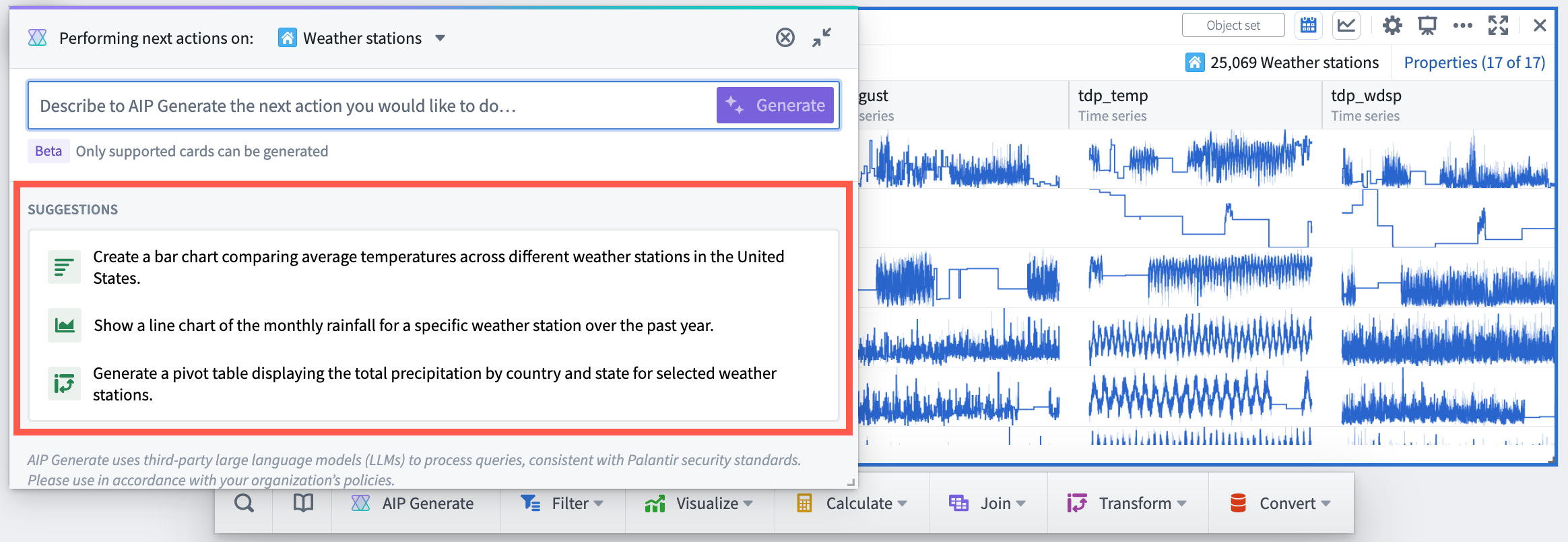
AIP modal window with AIP suggested next actions on the selected object set
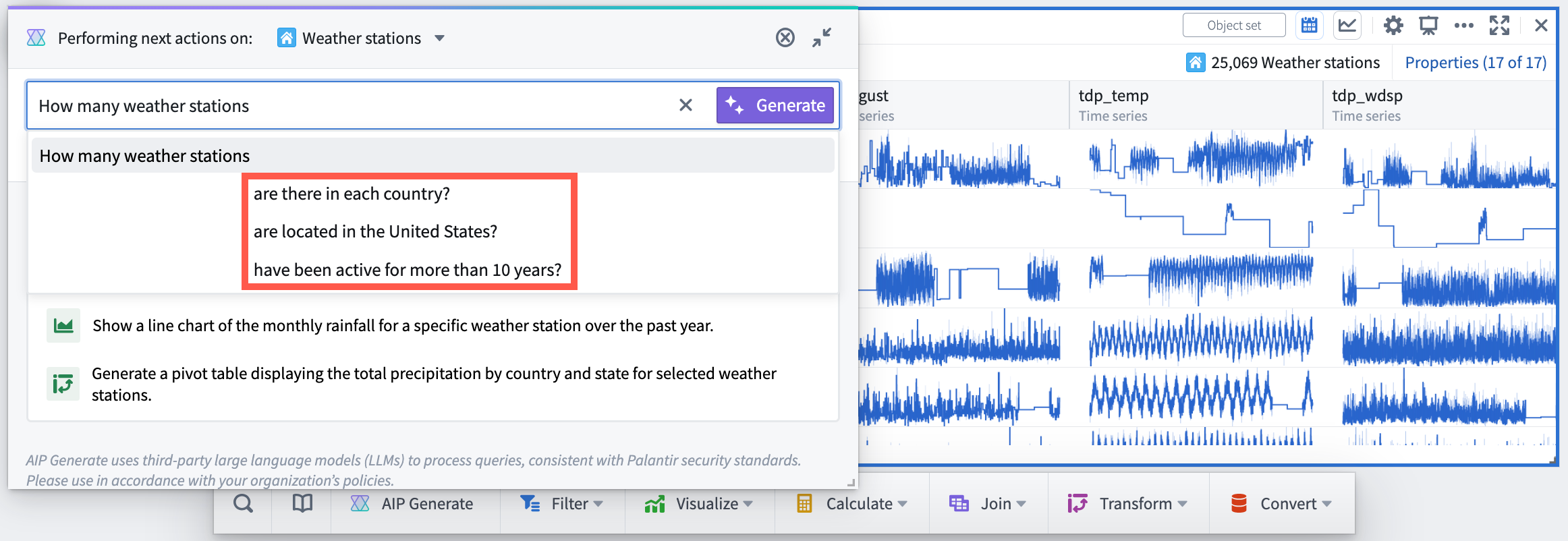
AIP modal window with prompt completions
User-defined functions in Pipeline Builder
Date published: 2023-09-13
[Data Integration / Pipeline Builder] User-defined functions let you run your own arbitrary Java code in Pipeline Builder or in Code Repositories that can be versioned and upgraded. You can now create your own user-defined function (UDF) to incorporate external Java libraries or reuse complex logic across pipelines. Contact your Palantir representative to enable UDFs in Pipeline Builder, and learn more in our documentation.
Quicksearch is now the only supported search interface [Quicksearch GA / Legacy search Deprecation]
Date published: 2023-09-11
[Quicksearch] After two months of widespread availability, Quicksearch is now the sole search interface in Foundry. As proactively announced in July, the legacy search interface has now been deprecated. Users who opted out of the new search experience during the transition will now be rolled into Quicksearch. See the Quicksearch documentation and the Quicksearch GA announcement for more details.
Access graph now available
Date published: 2023-09-05
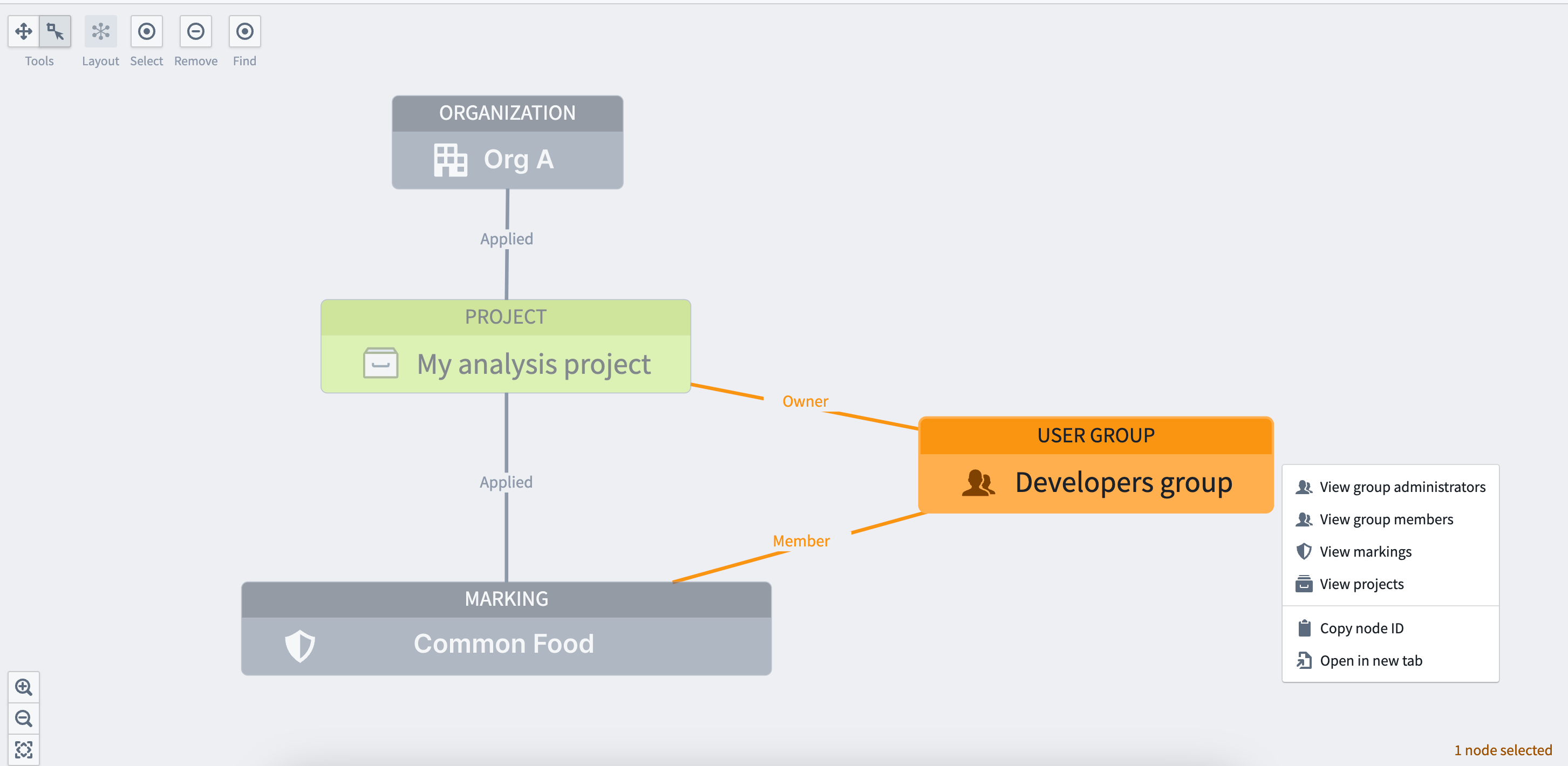
[Security / Projects] A graph-based view, commonly known as Access Graph, can now be used to visualize relationships between entities like projects, users, groups, and markings to make checking permissions simpler. For more information, refer to Checking permissions documentation.
Quicksearch now integrated with resource selector
Date published: 2023-09-05
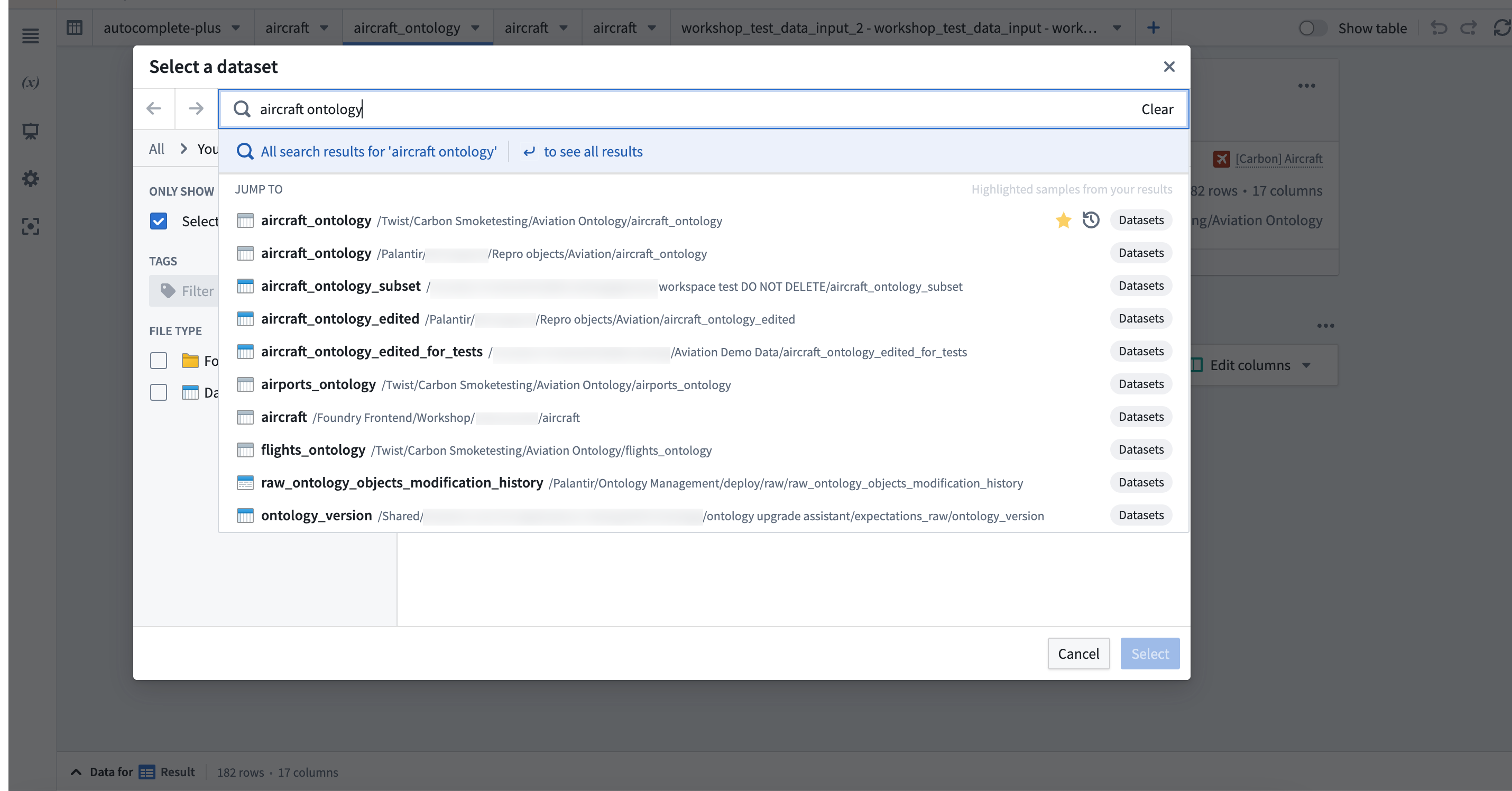
[Model Integration: Workspace] The Quicksearch integration in the resource selector allows users to search for resources quicker without having to wait for panels to load. With results fetched based on names and ranked by search relevance, the Quicksearch bar streamlines navigation while still offering the option to perform a full search.
Create budgets using Resource Management
Date published: 2023-09-05
[Administration: Resource Management] Use the Budgets tab in the Resource Management application to create financial budgets against compute usage.
Custom approval policies for pipeline collaboration
Date published: 2023-09-05
[Data Integration: Pipeline Builder] Introducing custom approval policies for pipeline proposals, enabling users to require reviews from a configurable list of individuals or groups. Enhance version control and safely collaborate on production pipelines by gating changes that affect the main branch. Choose between none, permission-based (edit), and custom policies (groups and users) when configuring your policy.
Favorites Section on Ontology home page
Date published: 2023-09-05
[Ontology: Ontology Management] Introducing a new Favorites section on the Ontology home page, displaying all favorited object types for easy access. Users can reorder or disable this section as needed and it will be enabled by default for those with favorite object types.
中文翻译
公告
代码仓库开发体验改进
发布日期:2023-09-21
Palantir Foundry 的代码仓库(Code Repositories)应用的开发体验已通过以下一系列改进得到优化:
- 任务运行器(Task Runner),一项新的代码仓库功能,允许用户运行支持的命令,例如
install、formatCode、tasks和whoneeds。启用任务运行器后,从左侧面板的"库"选项卡添加包时,将在当前环境之上安装请求的包,而不是像以前那样预配一个 Code Assist 工作区。此阶段生成的额外日志有助于在需要调试时提供清晰度。此外,复杂过滤器和预览输入配置界面已得到改进,更易于使用。
使用任务运行器添加和安装包
复杂过滤器和预览输入配置界面改进
- 更快速的 Python 开发: 平均而言,检查现在在云环境上快 20-30 秒,初始检查得益于在创建新仓库时添加了锁文件(lockfile),而不是立即进行"已取代"检查。库安装整体更快,用户现在可以添加一个稍后安装的包,或者在不重新创建 Conda 和当前运行环境中的工作区的情况下安装包。测试环境不会在此步骤中更新。
- 构件速度改进: 当环境没有变化时,Code Assist 可以持久化缓存并加速检查。ZSTD 压缩支持已扩展到构件(Artifacts)和 Mamba,从而比以往更快地解析和安装环境。
- 非 Linux 本地开发体验改进: 为所有仓库开箱即用地添加了
conda-forge作为构件支持仓库。此外,noarchPython 库模板使开发人员更容易创建和管理跨平台库。 - 添加了 Python 格式化支持: 在
black和ruff代码检查工具之间进行选择,以确保编码风格一致性。 - 自动生成相关配置: 您现在可以在本地运行
vscodegradle 任务。 - 增强了对 macOS 和 Windows 的本地开发支持: 通过 gradle 支持本地预览。您现在还拥有简化的仓库升级和 Code Assist 前端界面。
- Spark 预览加载器优化: 现在可以预览多达 100 万行(之前为 1 万行),同时加载速度提高了 4-5 倍。
- 检查日志中更轻松的导航: 通过直接从检查日志中选择 buildRID,直接导航到作业跟踪器(Job tracker)中的构建。
Ontology SDK(TypeScript 和开发者控制台)[正式发布],Python SDK [测试版]
发布日期:2023-09-19
Ontology SDK(OSDK)TypeScript 版本和新的开发者控制台(Developer Console)应用现已在所有堆栈上正式发布(GA)。Python SDK 目前处于测试版(Beta),预计将于 2023 年 10 月底正式发布。
Ontology 软件开发工具包(OSDK)允许您直接从开发环境访问 Ontology 的全部功能。您可以使用开发者控制台生成 Ontology SDK,这是一个用于创建和管理使用 Palantir API 的第三方应用的新门户。有关更多详细信息和说明,请参阅我们的公共文档。
什么是 Ontology SDK 和开发者控制台?
开发者控制台是一个新应用,允许您生成 Ontology SDK,以便符合人体工程学地访问 Ontology API。该 SDK 可以生成为 TypeScript NPM 包和 Python PyPi/Conda 包(测试版)。Ontology SDK 包仅包含开发者在开发者控制台中定义的 Ontology 中的实体。
开发者可以使用 Ontology SDK 轻松地从 Ontology 读取数据、通过操作(Actions)写回 Foundry、执行 Ontology 函数等等。使用 SDK 提供了一种类型安全的方式来与我们的 API 进行交互。
然后,开发者可以有效地将 Foundry 视为后端,依赖 Foundry 提供的基础设施和集中式 Ontology 管理,从而更专注于开发其组织特有的应用程序。
一个展示 Ontology SDK 在代码编辑器中集成 Foundry Ontology 资源的 GIF。
为什么要使用 Ontology SDK?
- 加速开发: OSDK 支持符合人体工程学地访问 Ontology API,允许您仅用几行代码即可读写 Ontology。
- 强类型安全: 为 OSDK 生成的函数和类型基于您正在开发的 Ontology 的选定子集。所有内容都来自您的 Ontology,因此您可以直接在编辑器中查询和探索数据。
- 集中维护: 利用 Ontology 在 Foundry 中集中构建和管理的优势,使您能够专注于应用程序构建,而不是在维护和构建应用程序的数据基础上投入重复精力。
- 跨团队感知: 使用开发者控制台将使应用程序像原生 Slate 或 Workshop 应用一样出现在 Foundry 的溯源系统中,确保任何影响您应用程序的 Ontology 变更都可以根据其影响进行评估。
- 安全设计: OSDK 使用仅限您希望应用程序访问的 Ontology 实体的令牌生成。
如何使用?
Ontology SDK 通过开发者控制台生成,这是一个新的 Foundry 工具,您可以通过它创建和管理使用 Palantir API 构建的应用程序。从工作区导航栏中的应用门户(Applications Portal)打开开发者控制台,或使用 CMD + J(MacOS)或 CTRL + J(Windows)搜索。
在应用门户中搜索开发者控制台。
尽管 Ontology SDK 和开发者控制台都将对所有注册用户可用,但您可以选择通过控制面板禁用它,或在访问应用程序页面为特定组配置细粒度访问权限,从而选择退出开发者控制台。
关于如何使用 Ontology SDK 和开发者控制台的文档已可用,包括针对不同应用程序工作流的演练。我们的公共仓库中还有一个 TypeScript/React 入门应用程序 ↗ 可帮助您入门。
开发者控制台根据选定的 Ontology 实体为每个应用程序提供定制文档。
开发者控制台中飞机对象类型的 API 文档视图。
开发路线图上有哪些内容?
- Python SDK: 我们最近宣布了对 Python SDK 包的测试版支持,并正在努力在 10 月前实现正式发布。
- 附加功能: 我们正在努力将更多 Foundry 功能添加到 SDK 中,包括通过 Foundry LMS 部署的模型和大语言模型(LLM)。
引入敏感数据扫描器 [测试版]
发布日期:2023-09-19
敏感数据扫描器(Sensitive Data Scanner,SDS,原名"Foundry Inference")帮助组织发现和保护其 Palantir Foundry 数据集中的敏感数据。现在以测试版形式提供,治理用户可以使用 SDS 指定要识别的敏感数据模式以及在找到匹配数据时要采取的自动操作。此外,用户还可以受益于更新的界面,以准确跟踪和监控已启动的扫描。
改进的登录页面界面
敏感数据扫描器登录页面现在包含一个进度条,作为每次一次性扫描的数据集的状态摘要。颜色编码的进度条根据匹配特定条件的数据集数量与排队等待扫描的数据集总数的比例进行填充:
- 蓝色: 当前正在扫描或待扫描的数据集。
- 橙色: 匹配条件的数据集。
- 绿色: 不匹配任何条件的数据集。
- 红色: 扫描失败或跳过的数据集。
- 灰色: 已取消的扫描。
此外,您可以通过选择每个扫描项右侧的下拉箭头,轻松查看特定扫描下每个数据集的分类。
一次性扫描的详细视图,显示文件的不同分类
估算扫描计算时间
用户还可以查看敏感数据扫描器排队等待扫描的数据集数量,从而估算扫描可能需要的时间,同时鼓励在必要时审查扫描范围。
设置扫描的最后一步显示将要扫描的数据集数量,并为用户提供创建一次性扫描或定期扫描的选项。
使用 AIP 生成正则表达式匹配条件
您现在可以使用 AIP(在启用了 AIP 的堆栈上)生成正则表达式匹配条件,而无需自己编写正则表达式。要使用此功能,请提供描述所需数据格式的自然语言提示,然后在创建一次性扫描时,在选择匹配条件步骤中选择生成。
用户使用 AIP 为电子邮件地址生成正则表达式匹配条件
有关更多信息,请查看敏感数据扫描器文档。
Python 仓库的检查改进现已生效
发布日期:2023-09-19
我们通过有针对性的改进,更新了 Foundry 堆栈上 Python 仓库的检查性能。值得注意的是,内部堆栈上所有 Python 作业的平均 P95 检查完成时间(从开始到结束运行检查所需的时间)从 2023 年 3 月的 2 分 15 秒下降到 2023 年 6 月的约 1 分 15 秒,下降了 44.4%。
加快检查速度的改进
我们最近为提高检查效率所做的工作包括以下更新。
Conda 包的 Zstandard(ZST)压缩
以前是"gzip 压缩",现已实现 ZST,可为 conda-pack ↗ 提供显著更快的压缩和解压缩速度,这对于在检查中运行 condaPackRun 和/或 condaPackTest 任务至关重要。
显示平均 P95 检查完成时间的图表(从 2023 年 3 月的 2 分 15 秒下降到 2023 年 6 月的约 1 分 15 秒)
Jemma 管理的缓存不再进行双重压缩
我们的检查运行器 Jemma 不再对文件进行双重压缩。相反,文件使用 ZST 压缩,从而减少了资源使用和 CPU 时间。
避免双重压缩并使用 zst 压缩缓存目录可显著提高压缩速度(20MB/s → 80MB/s)。下面显示了压缩缓存目录并存储压缩文件所需的时间。
更快的 Gradle Conda 任务
通过利用基础 Docker 镜像并在以下位置更新 Gradle 任务,以下常见任务将运行得更快:
condaInfo:将 Conda 安装程序捆绑到用于运行检查的 Docker 镜像中。setupPythonEnv:将支持的 Python 版本(主要和次要)的 Conda 安装程序捆绑到用于检查的 Docker 镜像中。vscode:从 Gradle 的@InputFiles切换到@Input,将任务执行时间从 13 秒减少到不到 1 秒。
Conda 包的自定义 Gradle 缓存
使用自定义 Gradle 缓存来避免导致 Conda 包双重压缩的低效问题,从而浪费计算时间并导致整体性能下降。此改进还受益于构件缓存布局能够根据使用情况刷新条目的 TTL。
下面是来自早期原型的图表,显示了使用我们的自定义缓存机制运行任务所需的时间。请注意,随着环境变得更大(例如在与建模相关的包中),改进效果会更加显著。
开发路线图上的下一步是什么?
我们目前正在致力于增强功能,以加快 Code Assist 的启动速度,并改进测试环境的解析和安装。
在 Foundry 中引入对语义搜索的支持 [测试版]
发布日期:2023-09-11
此功能现已全面可用。阅读最新公告。
其他亮点
源代码控制已启用,新功能标志及微小更改
发布日期:2023-09-28
[数据集成/代码仓库] 代码仓库用户现在可以访问源代码控制(Source Control)功能,这是一个新面板,显示文件更改并允许用户将其提交到远程仓库。在相关亮点中了解更多信息。
S3 兼容 API 现已正式发布
发布日期:2023-09-26
[Foundry S3 代理] 用于 Foundry 数据集的 S3 兼容 API 已全面可用。用于获取凭据的 API 被认为是稳定的,现在提供使用临时凭据和静态凭据的能力。有关如何开始使用此 API 以及如何将其与标准 AWS 客户端和 SDK 一起使用的更多详细信息和说明,请查看文档。
Ontology 管理器中可配置的仅编辑属性
发布日期:2023-09-26
[Ontology/Ontology 管理] 用户现在可以在 Ontology 管理器中为 OSv2 中的对象类型设置仅编辑属性。这些属性不绑定到任何列,只能通过操作(Actions)获取其值,从而在管理对象类型方面提供更大的灵活性。
新的 Foundry Rules 主页和简化的设置流程
发布日期:2023-09-26
[Ontology/Foundry Rules] Foundry Rules 允许用户编写基于规则的逻辑,该逻辑可以无缝连接到数据转换管道。
访问 Foundry Rules 应用的新主页以查看工作流设置和配置。设置新的 Rules 工作流由 Foundry Marketplace 提供支持,从而更快地提供价值,同时需要更少的初始配置。
您还可以通过从文件中选择 Rules 工作流配置来访问 Foundry Rules。
Foundry Rules 工作流概览列表
增强的提案审查功能
发布日期:2023-09-26
[数据集成/管道构建器] 用户现在可以向其提案审查添加评论,从而允许他们附带消息批准或附带理由拒绝提案。此更新在审查过程中提供了更大的灵活性和沟通能力。
Ontology 管理中的 Phonograph 去索引倒计时
发布日期:2023-09-26
[Ontology/Ontology 管理] Ontology 管理应用现在在 Phonograph 部分为对象类型和多对多链接类型显示未使用表的自动去索引倒计时。此功能帮助用户了解自动去索引发生前的剩余时间。
管道构建器中的 AIP 生成现已正式发布
发布日期:2023-09-26
[数据集成/管道构建器] AIP 生成(AIP Generate)现已在管道构建器中正式发布,允许用户通过单个提示创建新的数据转换逻辑。此功能简化了编写复杂数据转换的过程,同时保持生成逻辑的透明性和可读性。
为 Notepad 模板引入值嵌入小部件
发布日期:2023-09-13
[分析/Notepad] 值嵌入小部件允许用户将模板输入中的文本直接插入到文档中。用户可以将值嵌入小部件添加到 Notepad 模板中,并使用字符串模板输入进行配置。当从模板生成文档时,文本将插入到小部件的位置。了解有关值嵌入小部件的更多信息。
包含两个值嵌入小部件的 Notepad 模板图片
Quiver AIP 的可用性改进
发布日期:2023-09-13
[分析/Quiver] AIP 窗口已从下一步操作菜单中移除,现在是一个浮动、可拖动且可调整大小的模态窗口。此更新使用户能够在编写提示时保持对画布上对象集属性和可视化的无遮挡视图。用户提示的处理现在在后台进行,AIP 窗口最小化,因此用户可以在等待结果的同时继续其工作流。此外,AIP 按钮已重命名以更好地反映其功能;AIP 生成将在分析中生成卡片,而 AIP 配置将更新卡片配置。
运行时最小化的 Quiver AIP
新的 Quiver AIP 模态窗口
AIP 下一步操作建议和提示补全
发布日期:2023-09-13
[分析/Quiver] AIP 窗口现在包括基于对象或对象集的属性以及支持 AIP 的 Quiver 卡片,对可能采取的下一步操作的建议。此外,在输入提示时,AIP 会显示提示的可能补全。这两个功能都帮助用户发现使用 AIP 探索和分析 Ontology 数据的新机会。
带有 AIP 建议的所选对象集下一步操作的 AIP 模态窗口
带有提示补全的 AIP 模态窗口
管道构建器中的用户定义函数
发布日期:2023-09-13
[数据集成/管道构建器] 用户定义函数(UDF)允许您在管道构建器或代码仓库中运行您自己的任意 Java 代码,这些代码可以进行版本控制和升级。您现在可以创建自己的用户定义函数,以合并外部 Java 库或跨管道重用复杂逻辑。请联系您的 Palantir 代表以在管道构建器中启用 UDF,并在我们的文档中了解更多信息。
Quicksearch 现在是唯一受支持的搜索界面 [Quicksearch 正式发布 / 旧版搜索弃用]
发布日期:2023-09-11
[Quicksearch] 经过两个月的广泛可用性,Quicksearch 现在是 Foundry 中唯一的搜索界面。正如 7 月份主动宣布的那样,旧版搜索界面现已弃用。在过渡期间选择退出新搜索体验的用户现在将转入 Quicksearch。有关更多详细信息,请参阅 Quicksearch 文档和 Quicksearch 正式发布公告。
访问图现已可用
发布日期:2023-09-05
[安全/项目] 一种基于图形的视图,通常称为访问图(Access Graph),现在可用于可视化项目、用户、组和标记等实体之间的关系,从而简化权限检查。有关更多信息,请参阅检查权限文档。
Quicksearch 现已与资源选择器集成
发布日期:2023-09-05
[模型集成:工作区] 资源选择器中的 Quicksearch 集成允许用户更快地搜索资源,而无需等待面板加载。通过基于名称获取结果并按搜索相关性排序,Quicksearch 栏简化了导航,同时仍然提供执行完整搜索的选项。
使用资源管理创建预算
发布日期:2023-09-05
[管理:资源管理] 使用资源管理应用中的预算选项卡针对计算使用量创建财务预算。
用于管道协作的自定义审批策略
发布日期:2023-09-05
[数据集成:管道构建器] 引入用于管道提案的自定义审批策略,允许用户要求来自可配置的个人或组列表的审查。通过限制影响主分支的更改来增强版本控制并安全地协作生产管道。在配置策略时,在无、基于权限(编辑)和自定义策略(组和用户)之间进行选择。
Ontology 主页上的收藏夹部分
发布日期:2023-09-05
[Ontology:Ontology 管理] 在 Ontology 主页上引入一个新的收藏夹部分,显示所有收藏的对象类型以便于访问。用户可以根据需要重新排序或禁用此部分,并且对于拥有收藏对象类型的用户,它将默认启用。