Announcements(公告)
Introducing the Ontology cleanup tool: streamline and optimize your Ontology
Date published: 2023-10-31
The Ontology cleanup tool, generally available the week of October 30th, aims to increase the ease of Ontology navigation, search performance, while optimizing storage costs by identifying object types suitable for deletion.
The Ontology cleanup tool provides you the following features to help you efficiently manage your Ontology:
Flags
Flags help you easily identify object types that require attention. Customize the process to your specific needs by selecting flags you would like to enable from a pre-existing list, and then assigning a level of importance to each one of them.
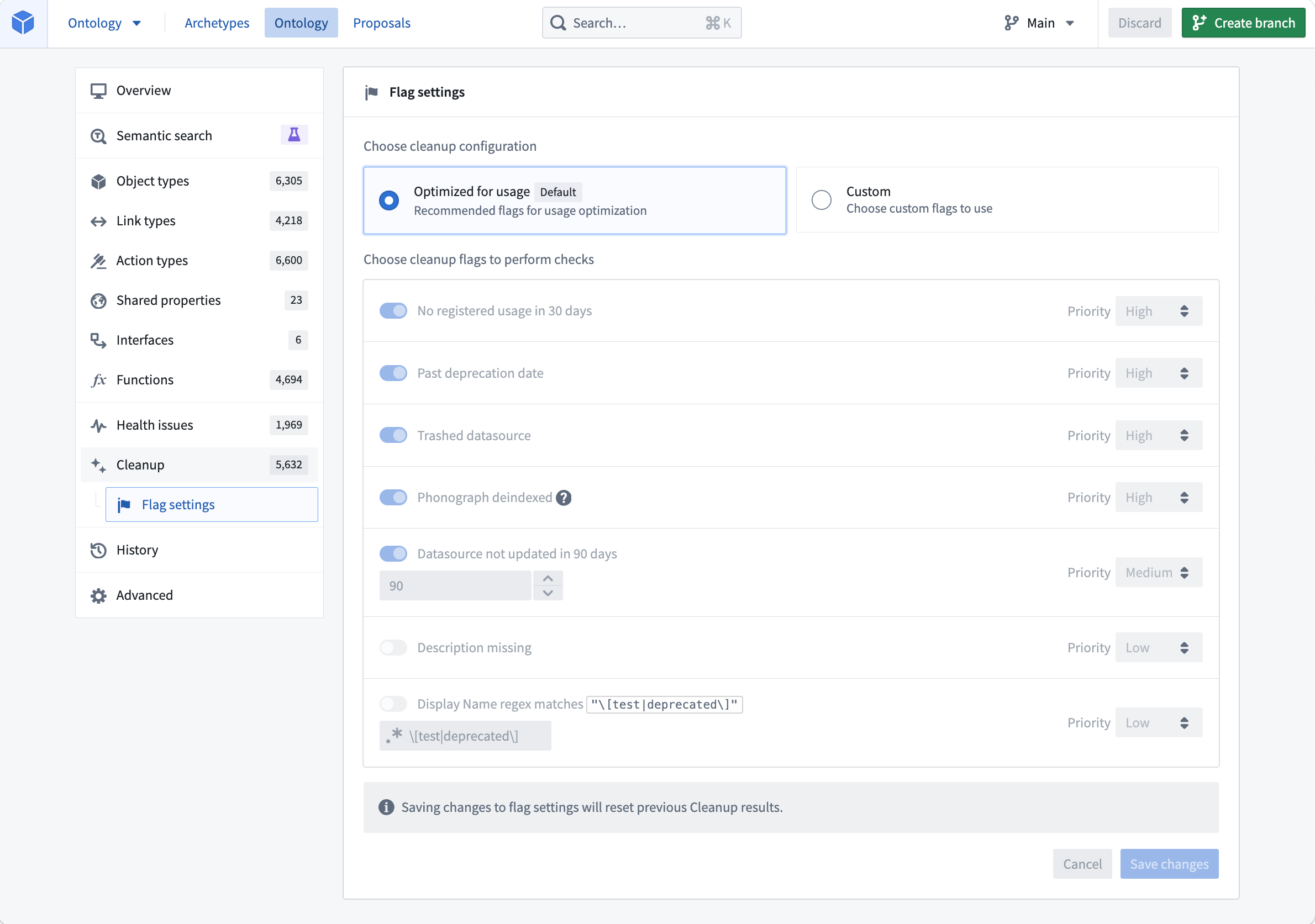
Customize the flag settings and choose cleanup configuration
Actions
The Ontology cleanup tool provides three essential actions to handle flagged object types effectively:
- Snooze: Temporarily hide object types from your cleanup queue for a configurable amount of time. This allows you to review and assess their relevance before deprecating or deleting them.
- Deprecate: Mark object types as deprecated to indicate their obsolescence. This action provides a transition period for users to adjust to alternative options.
- Delete: Permanently remove flagged object types from your Ontology, freeing up storage space while improving the overall performance of your Ontology.
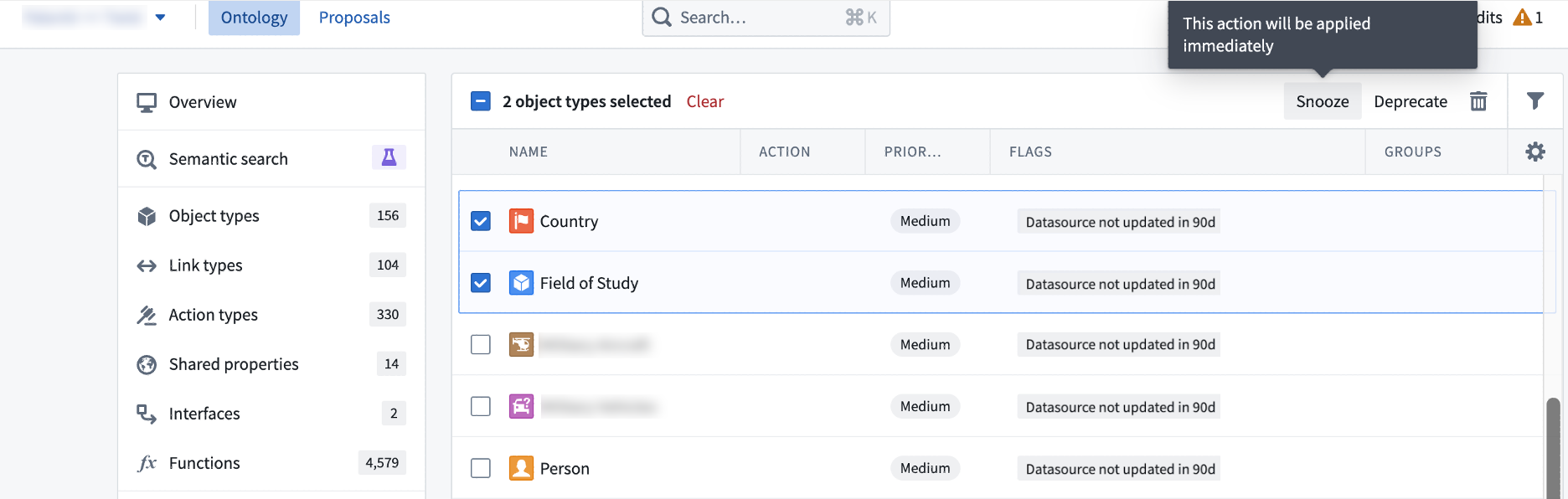
Object types selected either to be snoozed, deprecated, or deleted
Save or propose your changes
When the excess object types have been identified, you can mark and save desired changes directly to your Ontology, ensuring immediate implementation of the cleanup process. Alternatively, you can create a proposal to facilitate a collaborative decision-making and feedback-gathering process from other stakeholders before making any modifications.
Refer to the Foundry documentation on Ontology cleanup tool and get started on optimizing your Ontology.
Introducing AIP-generated Vega plots
Date published: 2023-10-31
Quiver enables users to create fully customizable and interactive visualizations using the Vega ↗ or Vega-Lite ↗ libraries. However, writing a valid Vega plot configuration in JSON format can be prone to error. We are excited to announce that using AIP, it is now possible to generate Vega plot configurations by simply describing the desired plot or changes in natural language.
Describe the desired Vega plot
To use AIP to help generate your Vega plot, simply provide a prompt and select Configure. AIP will make a suggestion for your review. To accept a suggestion, select Apply. If you would like AIP to make an alternative suggestion, edit your prompt and then select Reconfigure.
In the example below, AIP uses the prompt to suggest the configuration of a plot which contains the two numerical properties of interest, caffeine and pH levels.
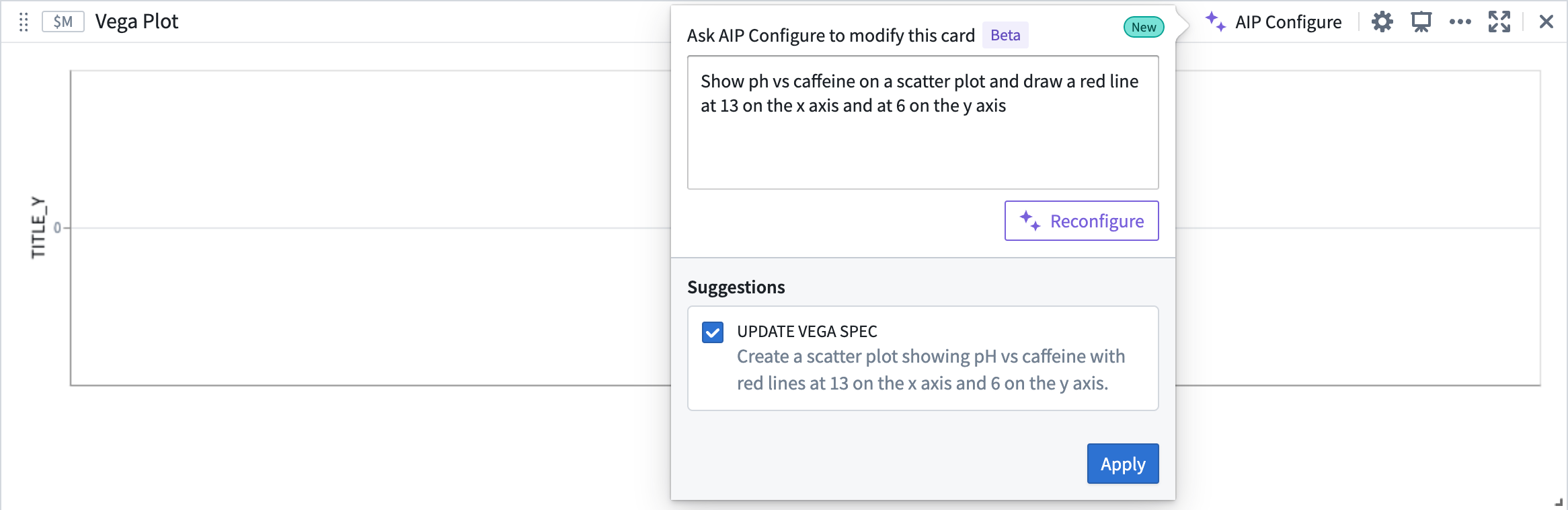
AIP suggestion based on given prompt
To accept AIP’s proposed update, select Apply. The Vega plot will render a visualization based on the updated Vega specification.
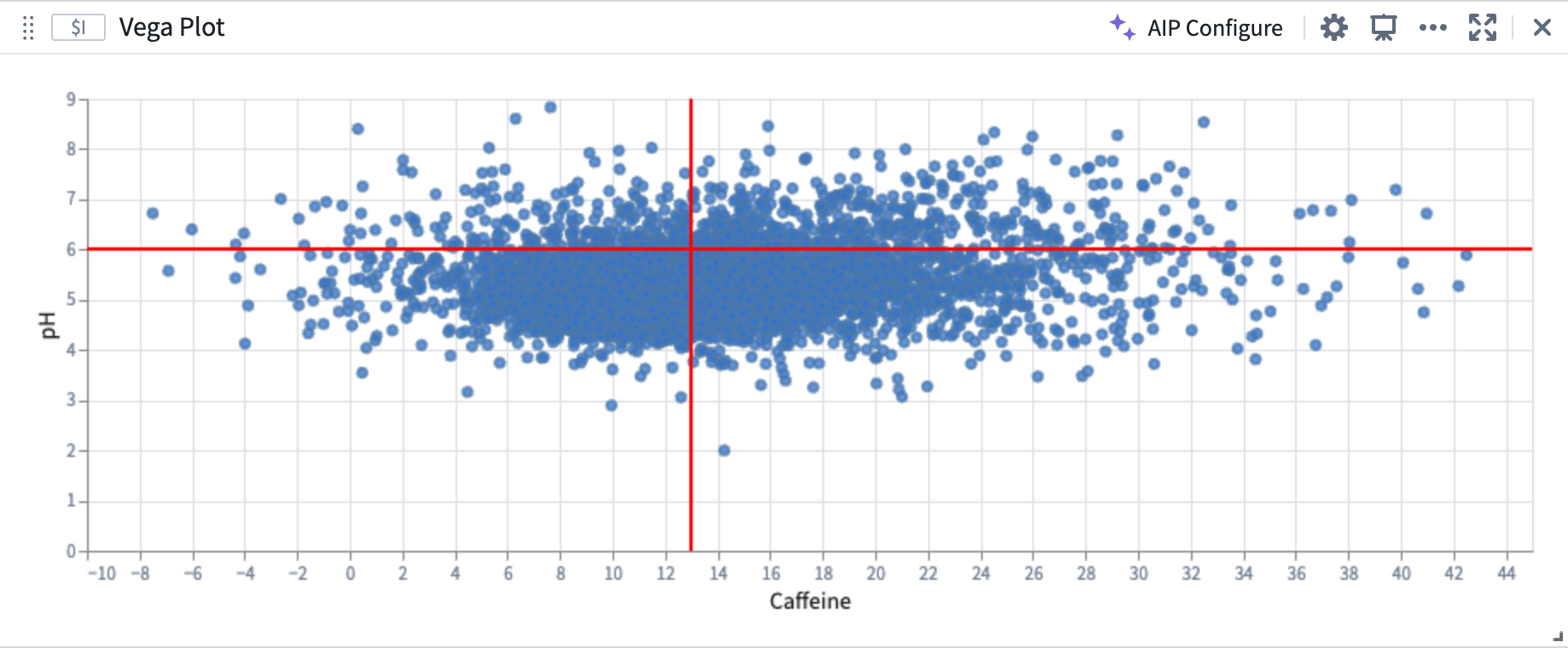
AIP Vega plot configuration
Build on top of existing plots
AIP can recognize and differentiate abstract ideas contained within your prompt and use this information to help generate or modify Vega plots. For example, AIP can use references to the characteristics of previously generated plots, allowing you to “build on top of" your existing plots.
In the image below, the user provides the prompt: “The two lines on the plot split the points into 4 quadrants. Color each quadrant a different color”. AIP recognizes that the areas defined by the vertical and horizontal lines are quadrants, even though the current plot configuration does not contain any definition or configuration of quadrants.
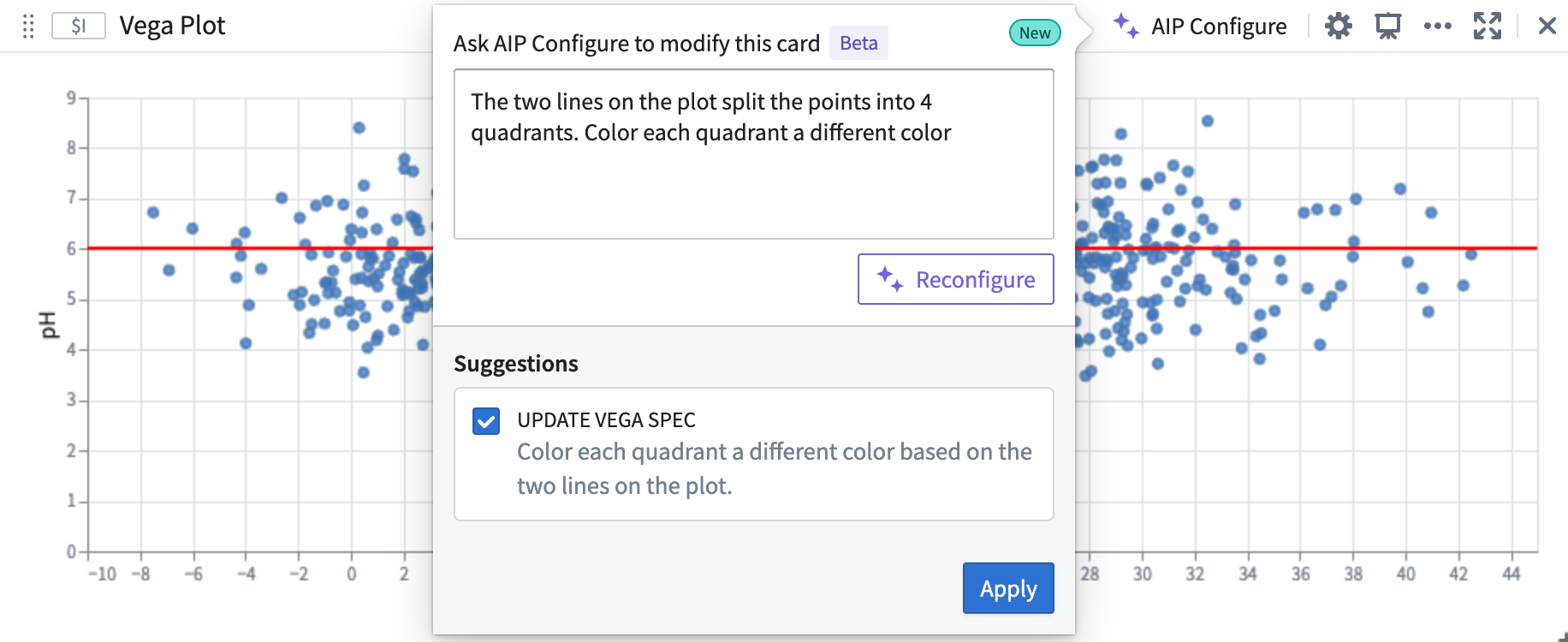
AIP can use prompts that contain references to previously generated plots
AIP accurately generates the desired plot, aligned to the user prompt, which builds off of the initial plot.
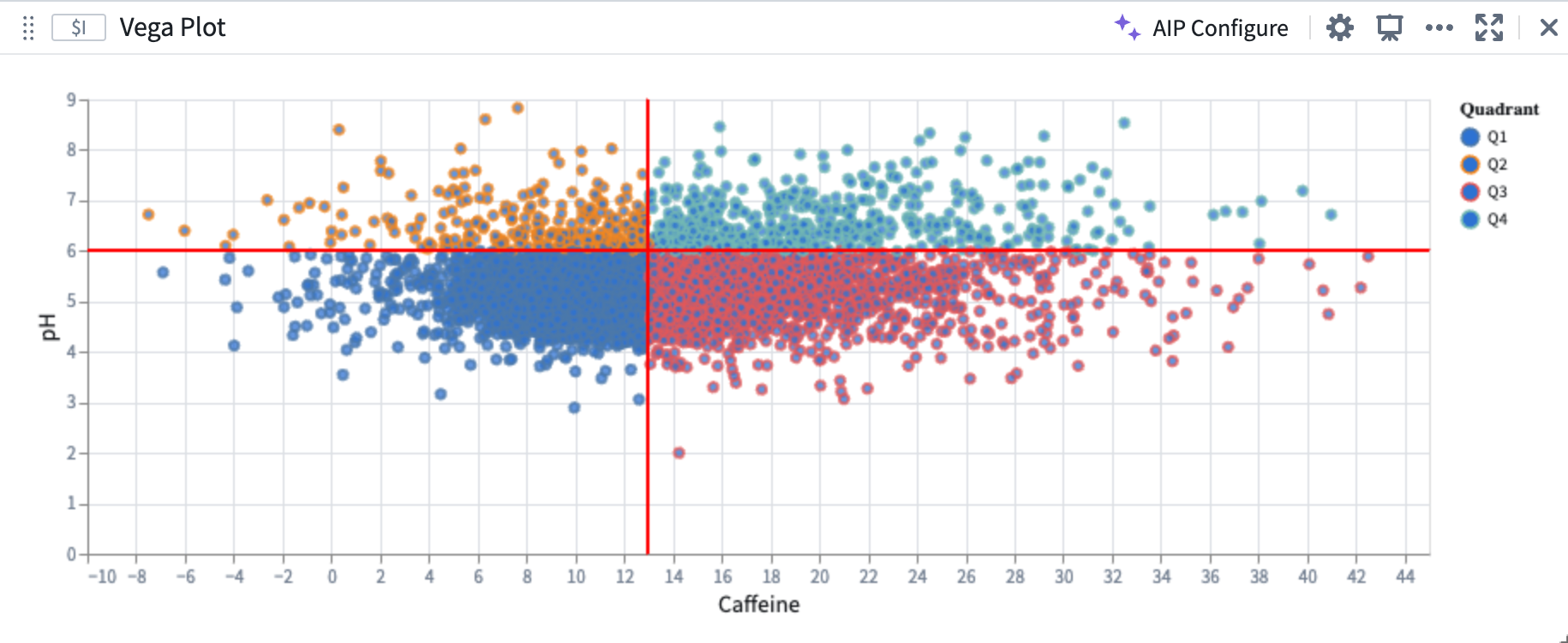
AIP-generated Vega plot
Create Vega plots using AIP Generate
Quiver analysis graphs produced using AIP can include Vega plots. To instruct AIP to produce a Vega plot rather than native Quiver visualizations such as line or scatter plots, make explicit in your prompt that AIP should return a “Vega plot”. For example, an accurate prompt could be: “Show caffeine vs ph on a scatter plot using a vega plot”.
Review the Vega plots documentation.
Note: AIP feature availability is subject to change and may differ between customers.
Introducing Marketplace [GA]: Discover and install Foundry products
Date published: 2023-10-19
Foundry Marketplace enables both technical and non-technical builders to access pre-built solutions for your organization's hardest problems. Available to all enrollments the week of October 30th, users can harness capabilities both from Foundry products built by Palantir and those designed by power users in your own organization with a visit to Marketplace.
Whether you want to use a product out of the box or as a starting point for your next custom use case, leverage the Marketplace product library to get your next project off the ground faster than ever before. Marketplace can power workflows such as:
- Installing a Workshop-based task management application across different departments in your organization with each organization's input data.
- Installing a data connector and Ontology to enable your customers to onboard their own data to Foundry and participate in an ecosystem.
- Installing a Pipeline Builder pipeline in your pre-production and production environments to facilitate controlled release management workflows.
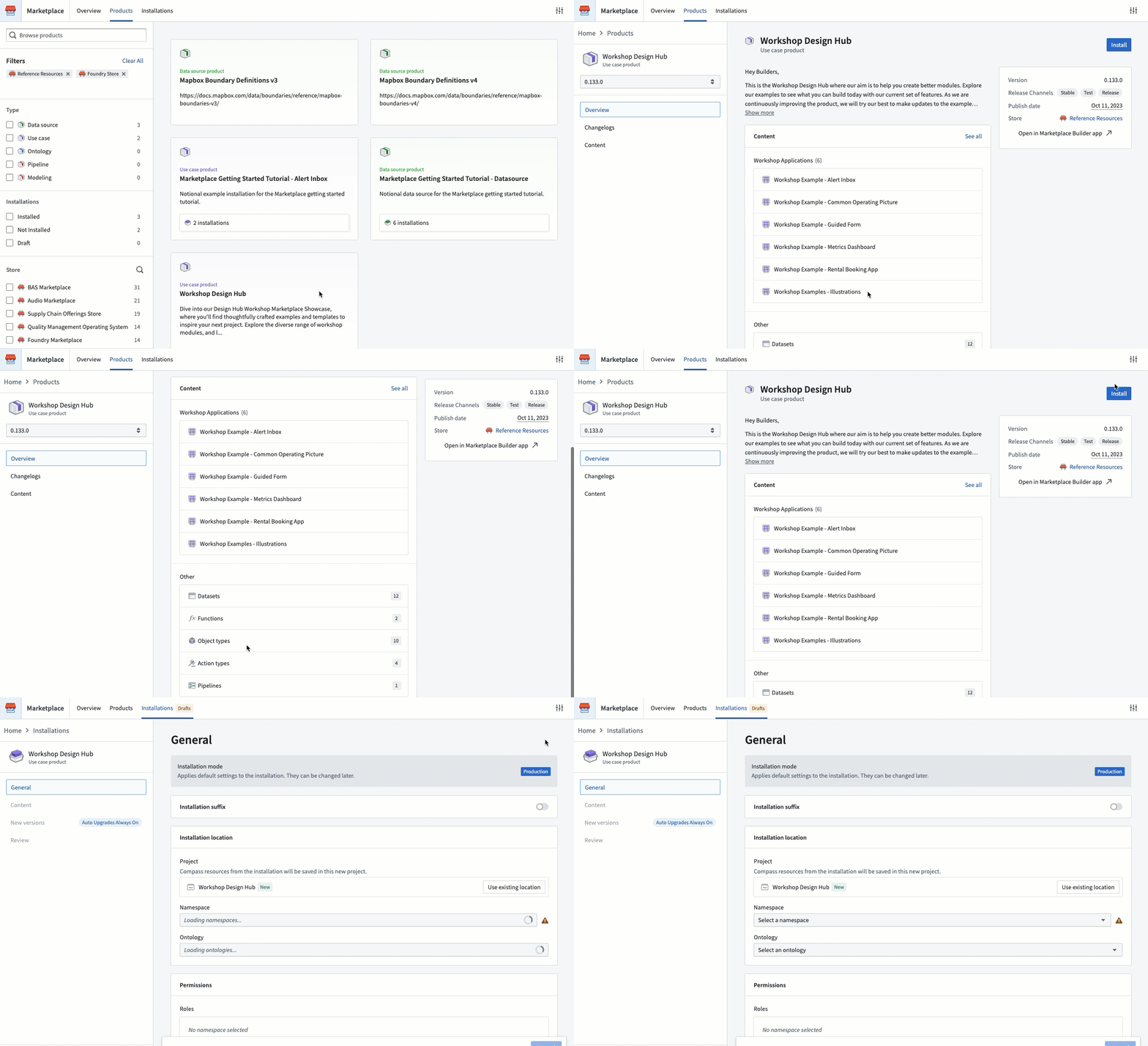
Browse Marketplace using the Products tab and install relevant products.
Clean and simple product discovery
The Marketplace storefront facilitates easy discovery of products available for installation. All new Marketplace users have two stores available by default:
- The Foundry Store, providing Palantir-built products. For example, the Mapbox boundary datasets.
- Reference Resources used for training purposes. For example, the Workshop Design Hub.
You may already have other stores available on your Foundry instance if your organization was an early Marketplace adopter.
Learn more about browsing products.
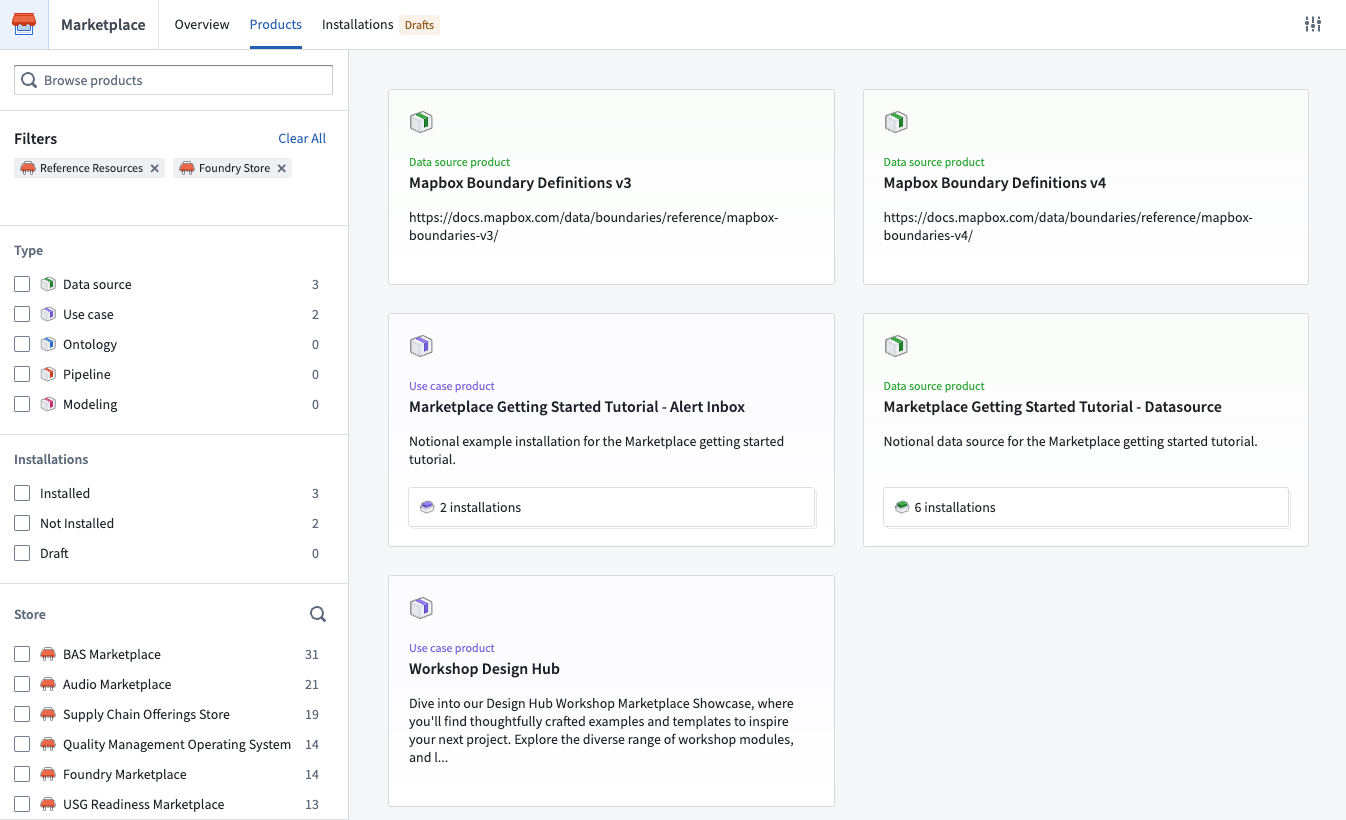
Browse Foundry products from Palantir and from others within your own organization
Bespoke product installations powered by your preferences
Installation is simple. Benefit from Marketplace's guided installation workflow - choose the desired installation location and map your inputs with the intuitive interface. Inputs required to create content (Workshop applications, Pipeline builder pipelines, etc.) are automatically surfaced, as are product owner-provided customization points such as configuration to optionally show or hide a specific section of an application. This allows you to create bespoke product installations powered by your organization's data and preferences.
Simply follow along to complete your installation and start using your new Foundry resources right away.
Learn more about installing products.
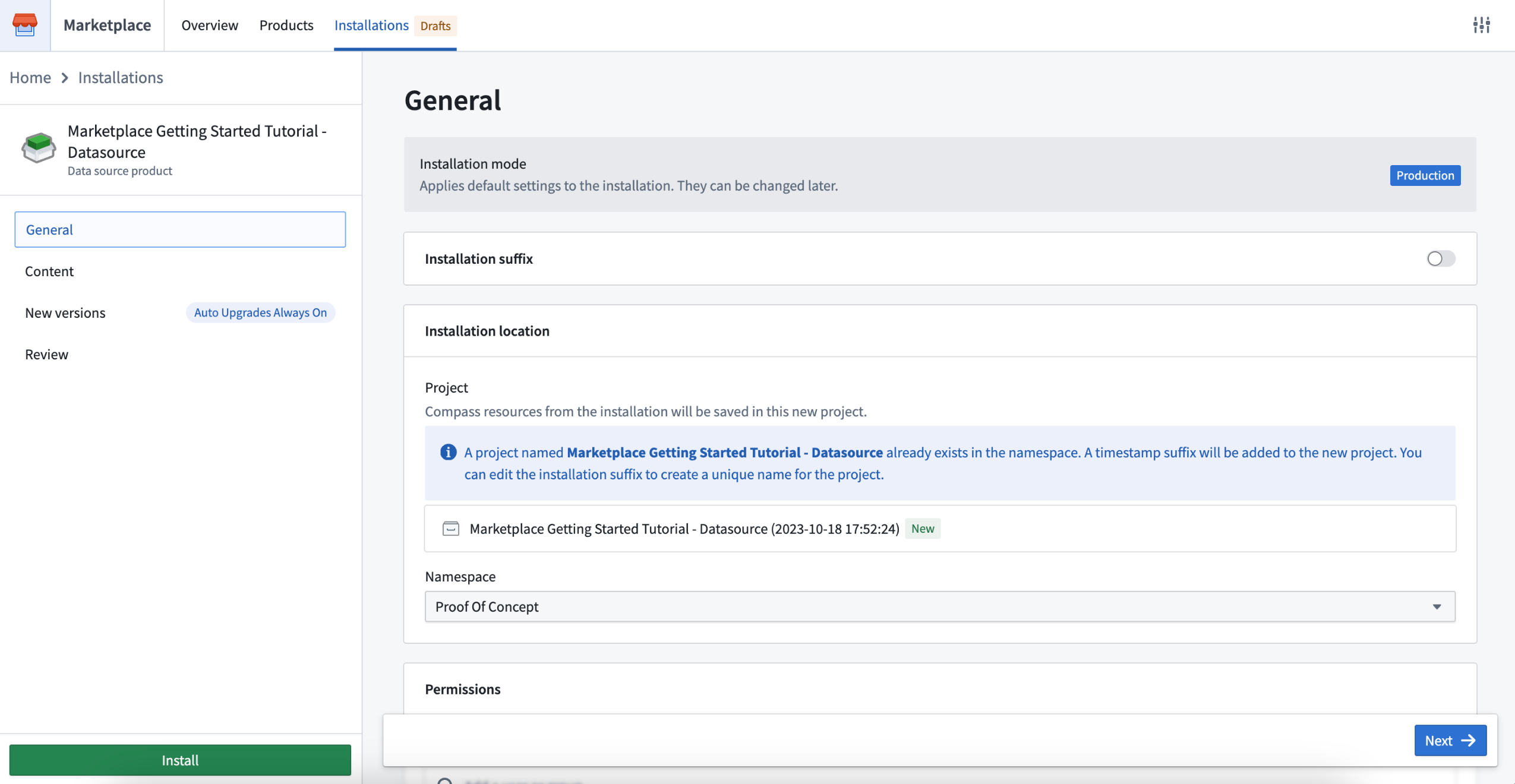
Intuitive product installation process guided by your preferences
Automatic product upgrades with granular control
Use automatic upgrades, maintenance windows, and release channels to keep your product installation up to date with the latest content from the product owner.
- Maintenance windows: Accept upgrades only when it is convenient for you and your users. For example, you may choose to keep operations flowing by only upgrading during out-of-business hours.
- Release channels: You can choose a unique release channel for each installation. For example, you may want to create multiple installations of the same product with department-specific data, or, configure a release management workflow where each installation tracks a different release channel.
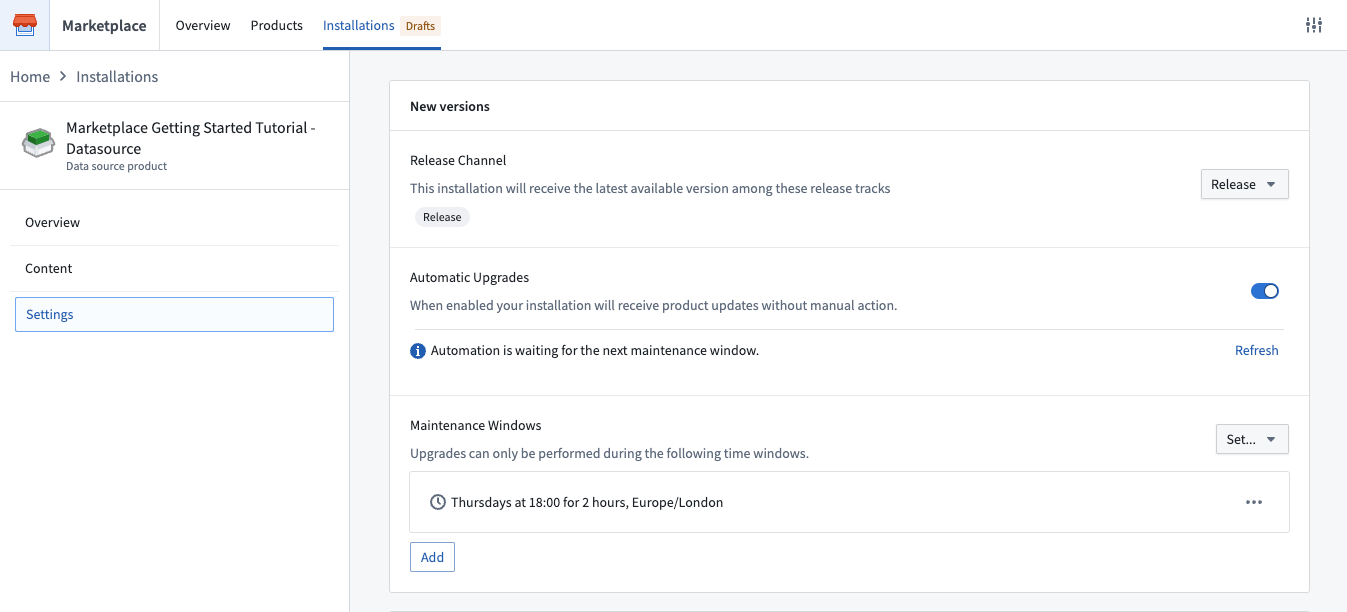
Controlled product upgrades
Marketplace case study: Incentive alerting at J.D. Power
At J.D. Power, Marketplace is used for the secure deployment of use cases to their automotive ecosystem customers on Foundry. For example, their newly developed intelligent alert system tracks vehicle-specific sales activity, competitive dynamics, and macroeconomic trends, allowing OEMs, dealers, and financing companies to optimize incentive strategies based on real-time, hyperlocal data.
Marketplace allows J.D. Power to safely separate development and production versions of the alert system (and others), enabling them to iterate on their Foundry products and automatically release versions to production when they are ready. As product and user needs evolve, Marketplace also provides J.D. Power with the optionality to customize each product installation according to each ecosystem participant's needs.
What's on the development roadmap?
The release of Foundry DevOps, our toolset to create and manage products for installation via Marketplace, currently in limited beta.
Later in 2024, we will make it possible to publish into a central Marketplace store so you can make your products available for other Foundry users to purchase (where relevant) and install.
Learn more about Marketplace in the documentation.
Faster Python environment builds in Code Repositories using cached environments [GA]
Date published: 2023-10-19
We have introduced fast loading environments, a new caching mechanism that significantly speeds up environment build times for Python environments for Python transforms in Code Repositories. Now generally available to all stacks, the caching mechanism makes environment build times 6x faster, on average. As a result, the overall build time for a typical Python transform has now been reduced to ~34 seconds, 2x faster than previous build times.
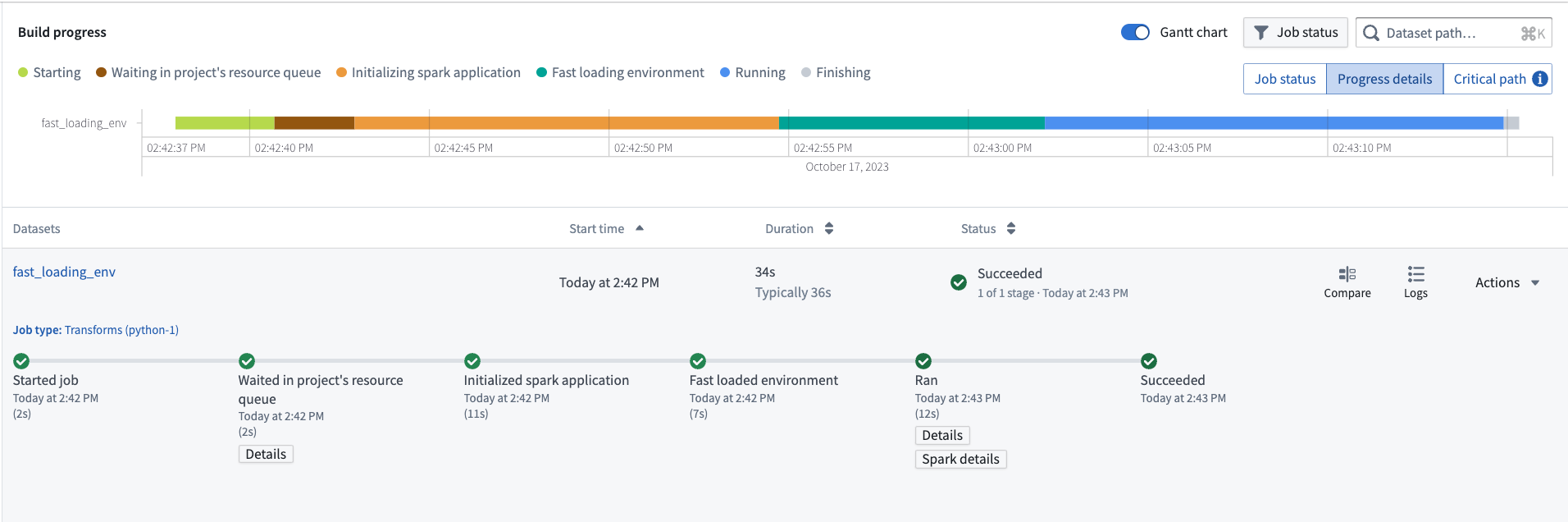
Typical Python transform full build time reduced to ~34 seconds on average
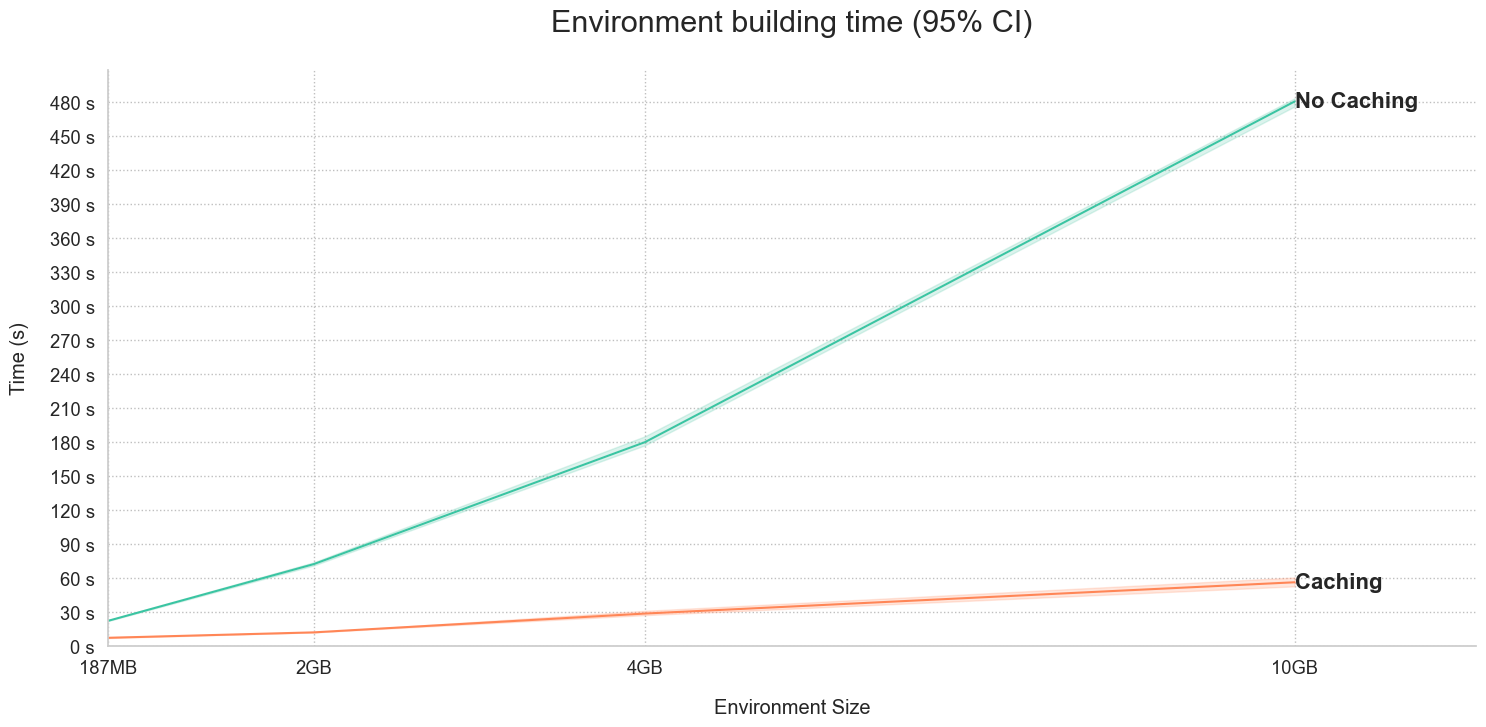
Metrics showing environment build times with and without caching activated
For large environments, even faster environment builds can be achieved, as depicted in the image above. For example, for a large 10GB environment, builds with caches take ~60 vs ~480s. This is 8x faster than when caching is not in use!
Users can now experience fast loading environments on all stacks by upgrading existing repositories.
Introducing Materializations to Quiver
Date published: 2023-10-17
Materializations is a new data type in Quiver that provides analysts a way to transform, visualize and analyze Ontology data at scale, with the capacity to surpass the 50k row constraint on data joins and transformations present in using transform tables.
Specifically, materializations allows you to:
- Perform joins (left/right/inner/full) on objects data
- Derive new columns, filter, or aggregate objects data
- Plot data using categorical charts or Vega plots
How can I use a Materialization?
Use Materializations cards for large-scale analyses that take object sets as inputs, letting Quiver convert object sets seamlessly behind-the-scenes. From an object set, use any of the cards located under the new Materializations next actions, or perform an explicit conversion with the Object set materialization card.
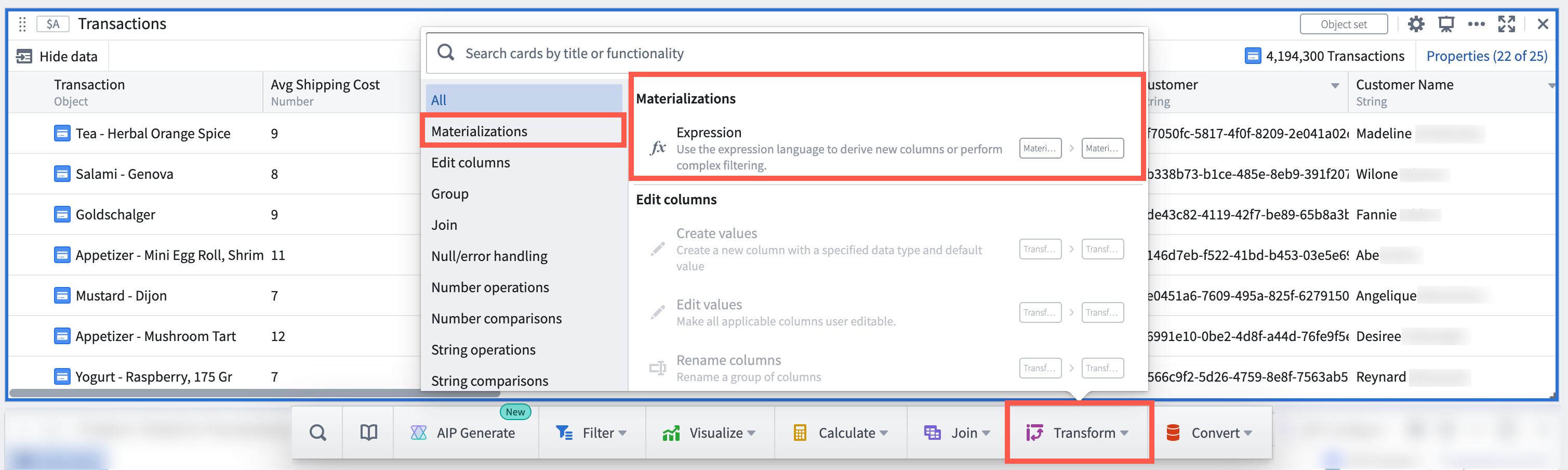
The Materializations card menu
To find out which backing dataset primitives are powering a Materializations card, simply hover over the datasource icon to trace.
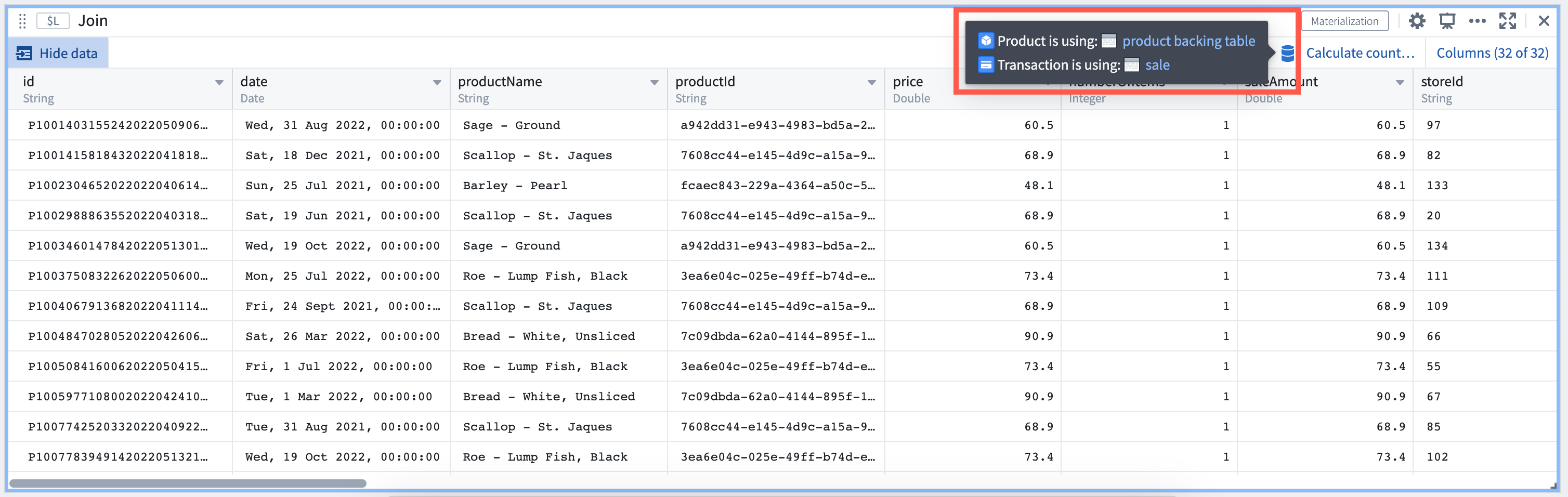
Trace data quickly in Materializations card to its backing dataset
Expressions and joins for flexible analysis
In addition to the availability of new Materializations cards in Quiver, you may consider unlocking new capabilities and workflows by:
- Using the Expression card, similar to the Contour expressions board, to derive new columns or perform complex filtering. Advanced features such as window functions unlock new types of analysis.
- Using the Join card to perform left, right, inner, full joins on Objects data at scale.
- Combining results with existing Quiver cards such as transform tables and Vega Plots to power new workflows.
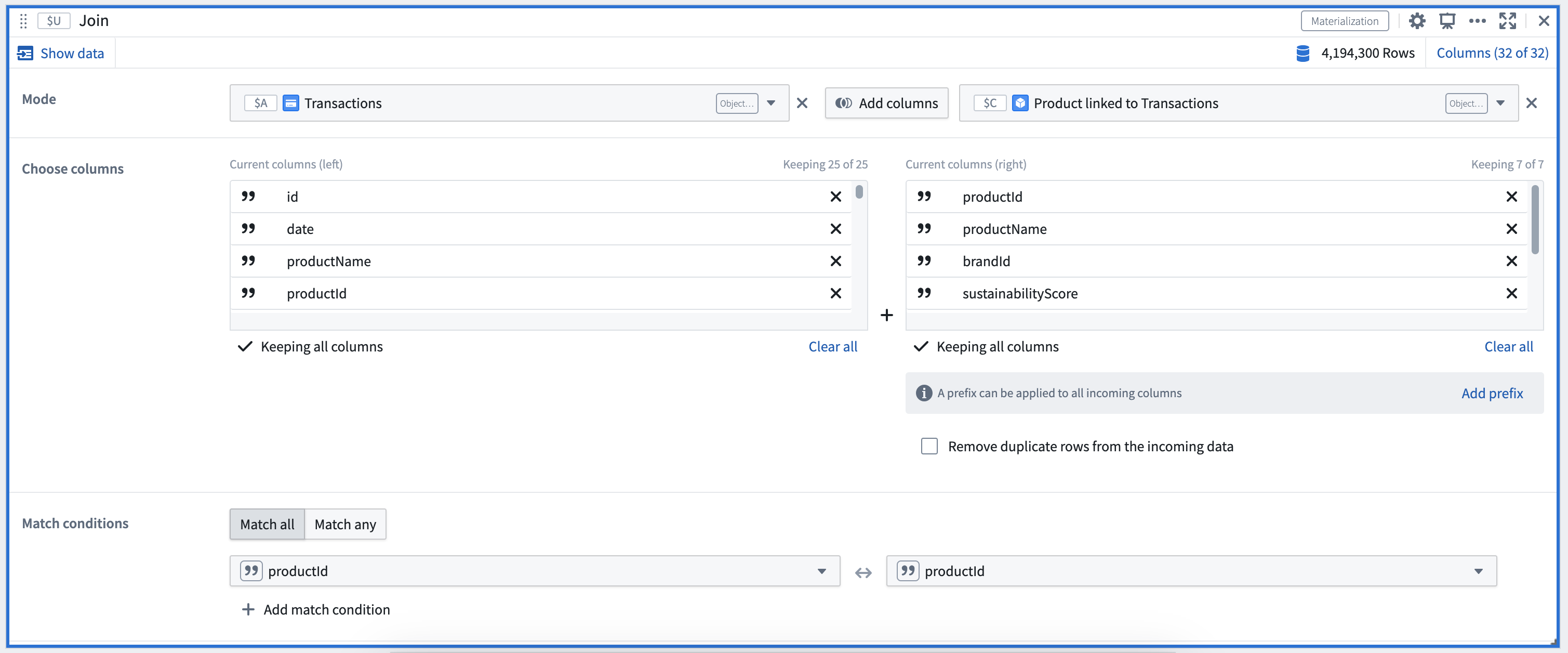
An example of a Materialization Join card configuration
Select the AIP Configure option* in the Expression card to create expressions using natural language, for example:
- “Compute a new column called 'total user score' by multiplying the two score columns”
- “Compute the 'total user score' defined by multiplying the two score columns for each organic category”
- “Compute the average sustainability score for each organic category”
- “Update the values in the Organic column to camel case”
- “Concatenate the two product name columns into one of them”
- “Compute the total revenue per product for each store, taking into account price and quantity sold”
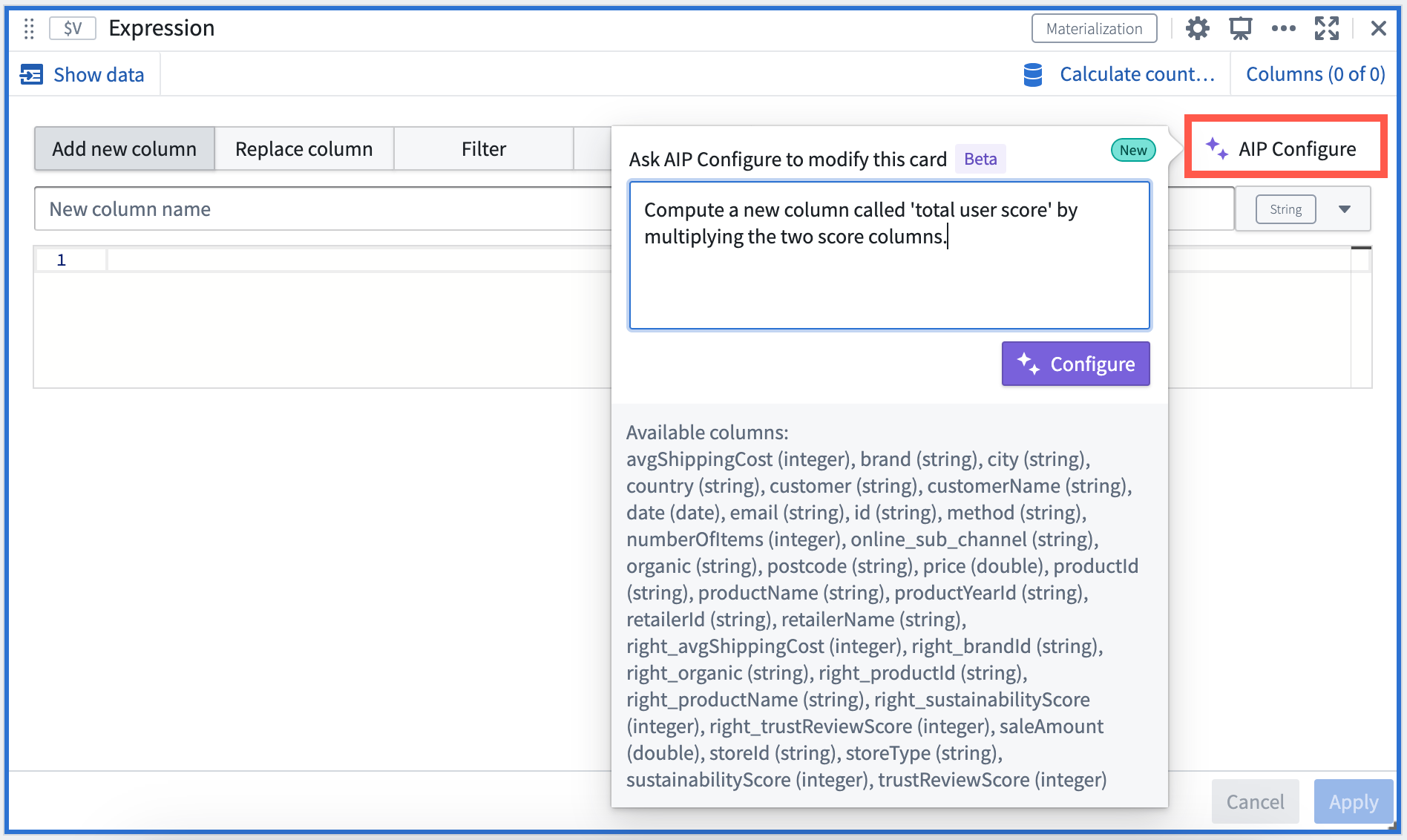
Natural language prompt input in AIP window
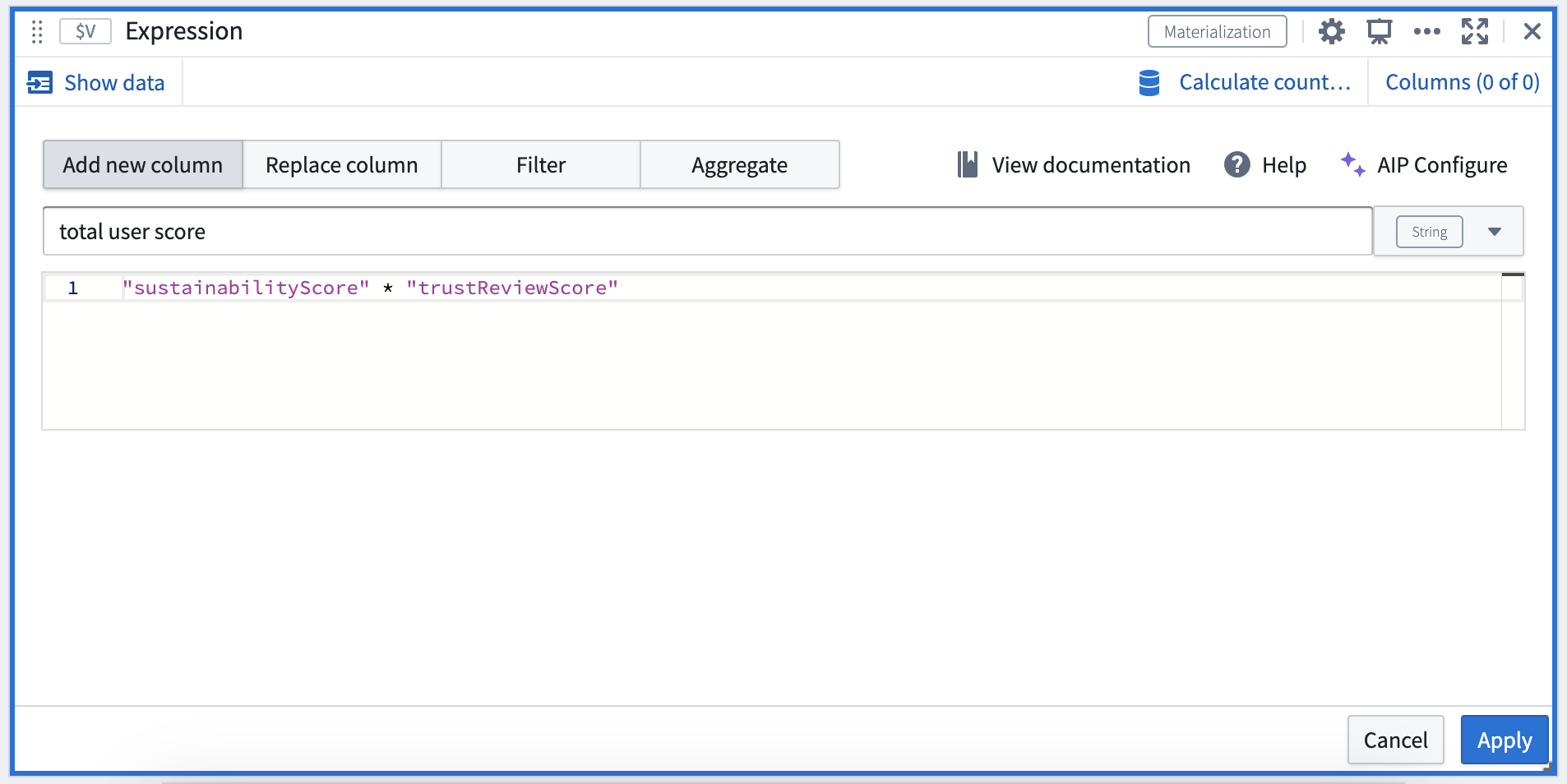
AIP generating expressions matching the natural language prompt
Review Materializations cards, Data types of Quiver data model or Materializations for more information.
*: AIP is available on a limited trial basis.
Foundry Newsletter and Product Feedback channels: Available for sign-up now [GA]
Date published: 2023-10-17
We are excited to announce the release of the Foundry Newsletter and Product Feedback channels, available now for sign-up under the Updates & News tab of your Notifications preferences, within User Settings.
The Foundry Newsletter will deliver a summary of new products, features and improvements across the platform, directly to your inbox. The first (GA) Foundry Newsletter will be sent to subscribers in November 2023. You can also opt-in to the newly-released Product Feedback channel, which provides opportunities to connect directly with Palantir engineers seeking targeted user input. This update presents an exciting opportunity to have your voice heard and play a role in shaping ongoing developments across the Foundry ecosystem.
Newsletters and other content shared through these opt-in subscriptions will be sent to the email address associated with the Foundry user account. Note that notifications information, as well as email addresses, are stored solely within the boundaries of the Foundry enrollment and not collected centrally for Notifications communications.
Steps to subscribe or change your notification preferences are as follows:
- Open your Foundry instance
- Navigate to User Settings:
- Select Account in the bottom left corner
- Select Settings in the pop-up menu (gear icon)
- Once on the User Settings page, navigate to the Notifications tab
- Under Notifications, select the Updates & News tab
- Subscribe to the Foundry Newsletter channel, the Product Feedback channel, or both (Subscribe to all) by checking the associated box
- To unsubscribe from the Foundry Newsletter channel and/or the Product Feedback channel, deselect the associated checkbox
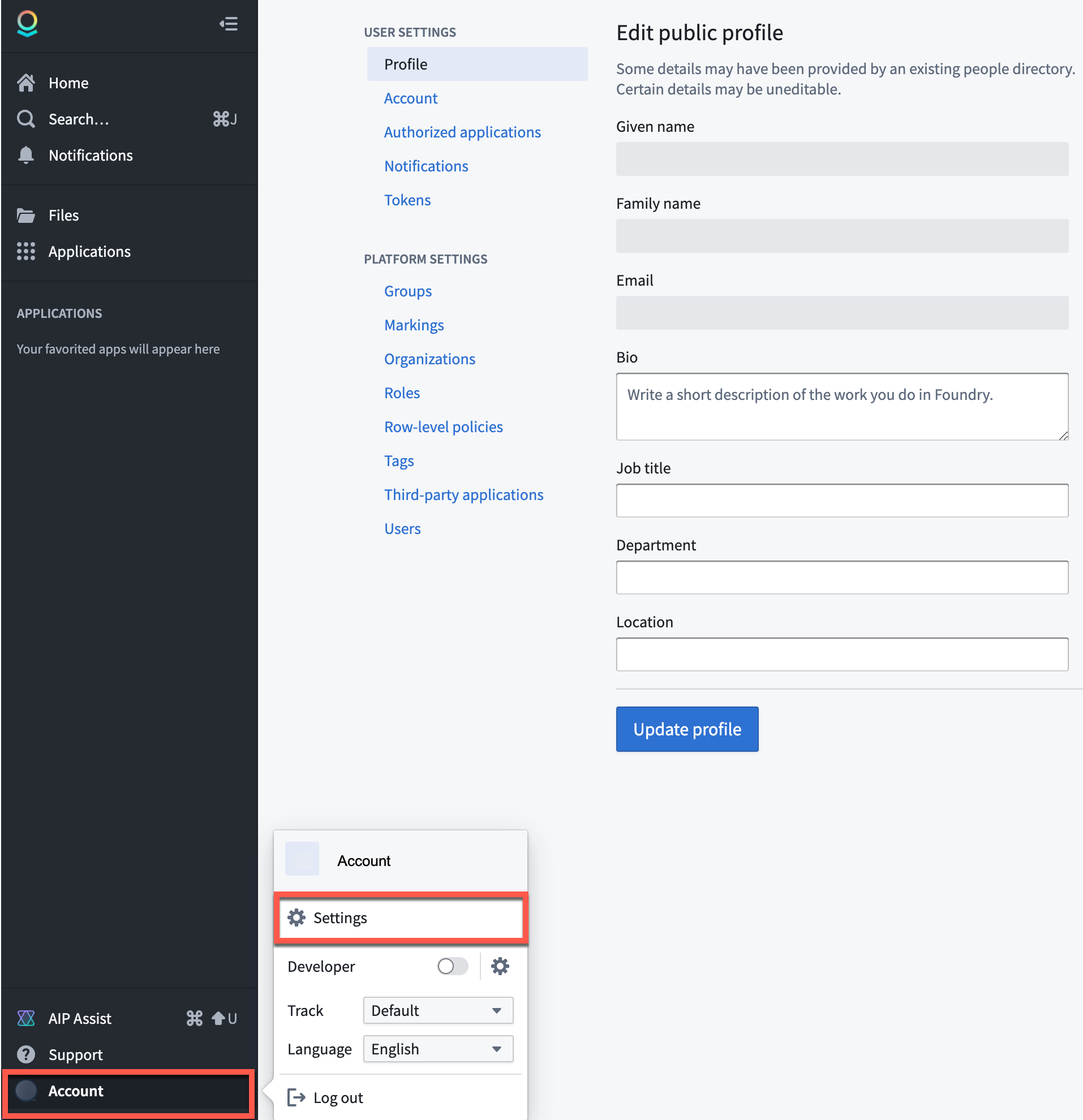
Account settings
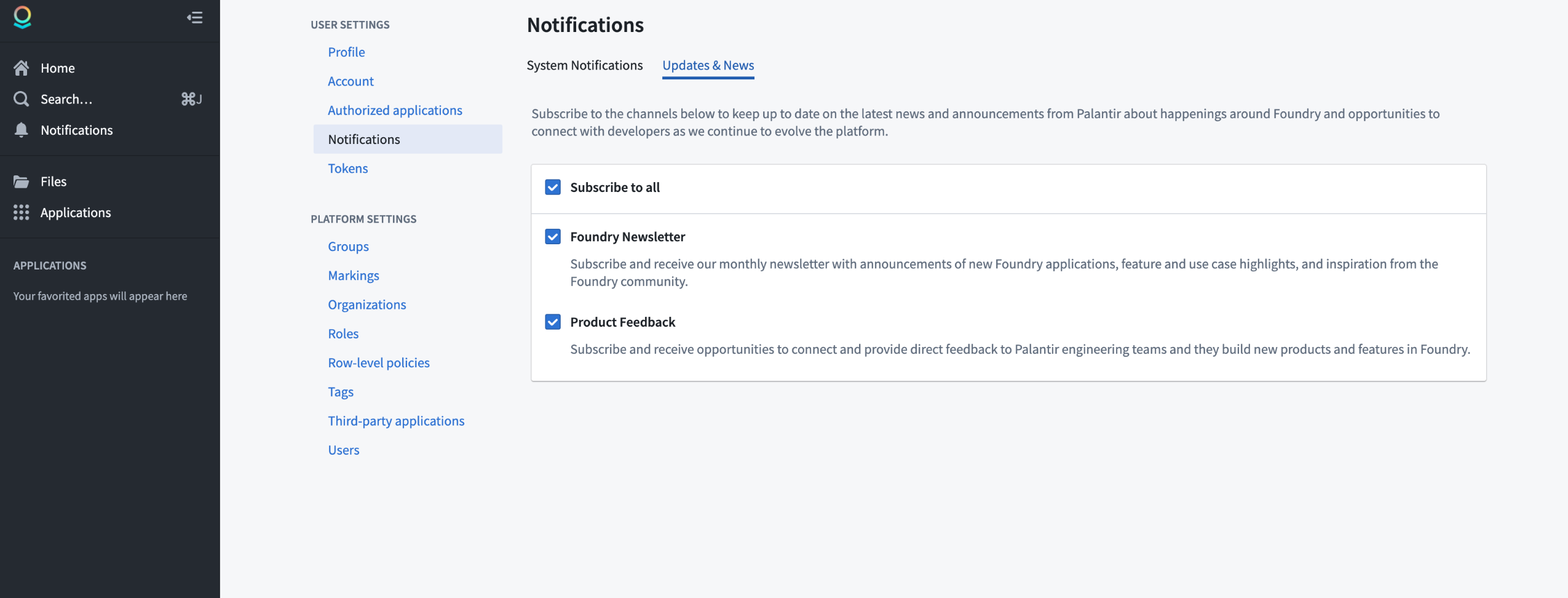
Notifications
Note for platform administrators: Platform administrators should also register their email addresses in the Foundry Control Panel settings for Contact information in order to receive important communications related to platform administration, user support, service disruption announcements, and security updates. Note that these communications are designed for platform administrators and are separate from the Foundry Newsletter and Product Feedback channels (designed for all users) described above.
Widget generation in Workshop, powered by AIP
Date published: 2023-10-17
You can now produce specific widgets in Workshop using natural language prompts, thanks to the support of AIP. Supported Workshop widget types are clearly indicated by an AIP icon displayed in the widget picker dialog.
To use, simply describe the widget you would like to add to your module using natural language, and AIP will generate a widget preview. You can then choose to incorporate it into the module. If not, press Try again to return to the text prompt, where you can provide more clarifying information.
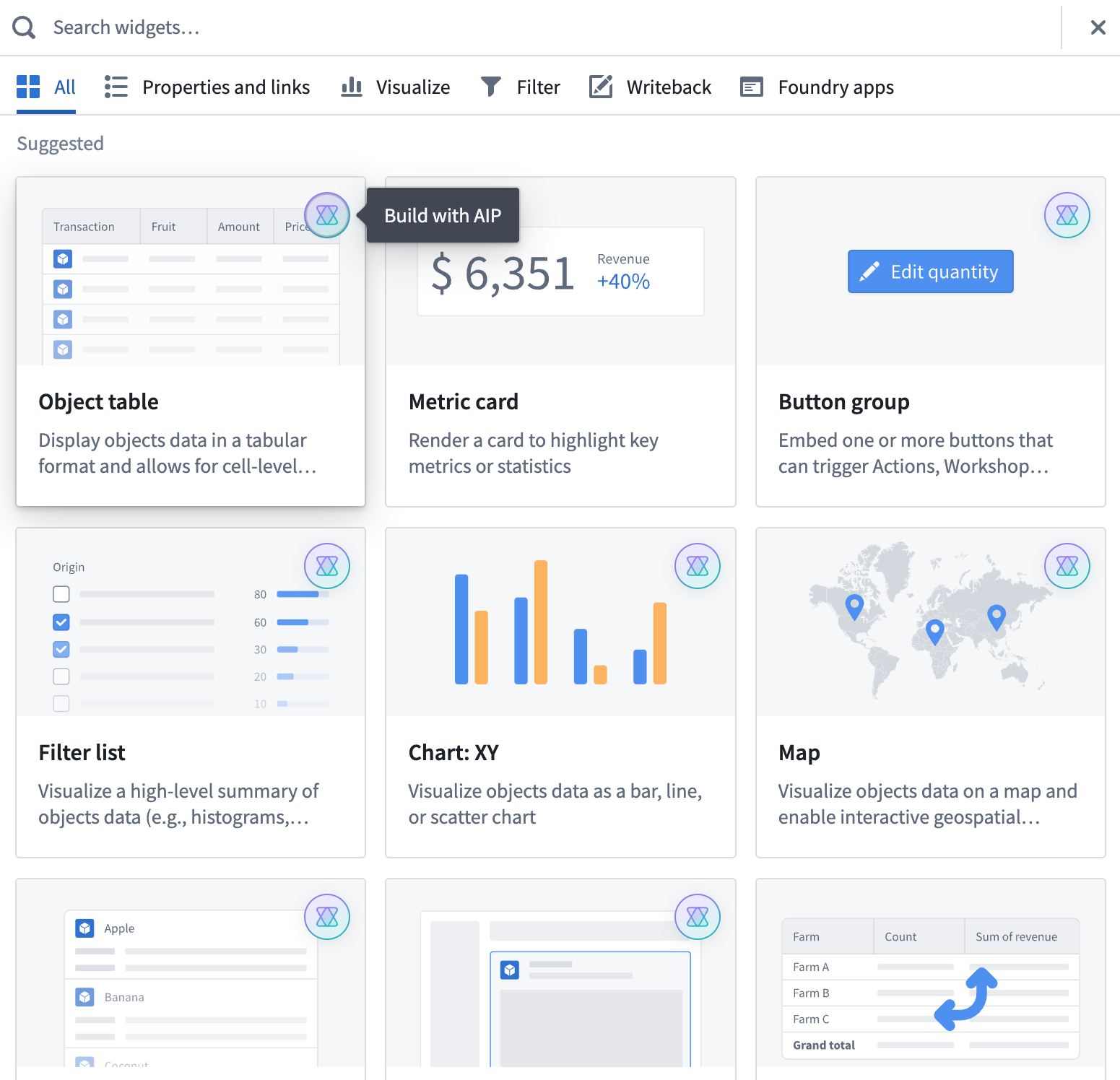
A sample list of widget types marked with an AIP icon to indicate support for widget generation using AI
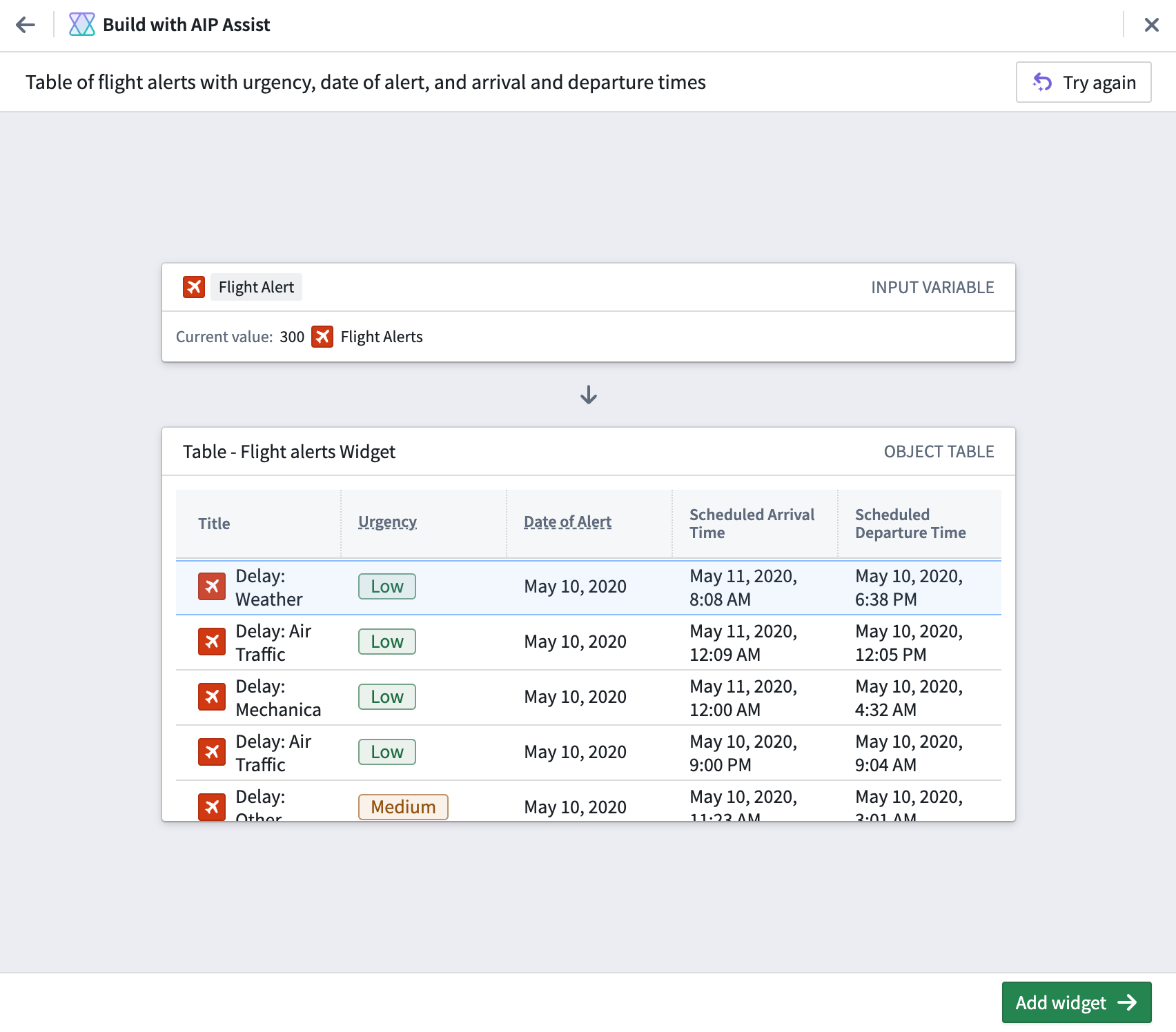
A sample Workshop widget generated by AIP through the use of natural language
Introducing Outbound applications [GA]
Date published: 2023-10-17
Outbound applications provide a new method for administrators to manage OAuth 2.0 connections to external systems from workflows built in Foundry.
Managed at the Organization level, an outbound application represents a bundle of configurations required for Foundry to behave as an OAuth 2.0 client. The application makes requests to another system that can behave as an OAuth 2.0 server.
Create an outbound application in Control Panel
Outbound applications are created within Outbound applications in Control Panel, under Organization settings. To view this page, you must have access to the Manage outbound applications workflow, which is granted by default to the Organization administrator role in Control Panel.
If you have access to multiple Organizations, be sure to select the Organization in which you wish to create your outbound application. All users of this Organization with permission to set up sources in Data Connection will be able to select any outbound application as an authorization mechanism for their connection.
Point-and-click configuration
Outbound applications has been built with a focus on simplified workflows. To create and configure a new outbound application, users interact with an intuitive step-by-step wizard. Settings can be easily adjusted as needed, with users receiving interactive validation for input formats.
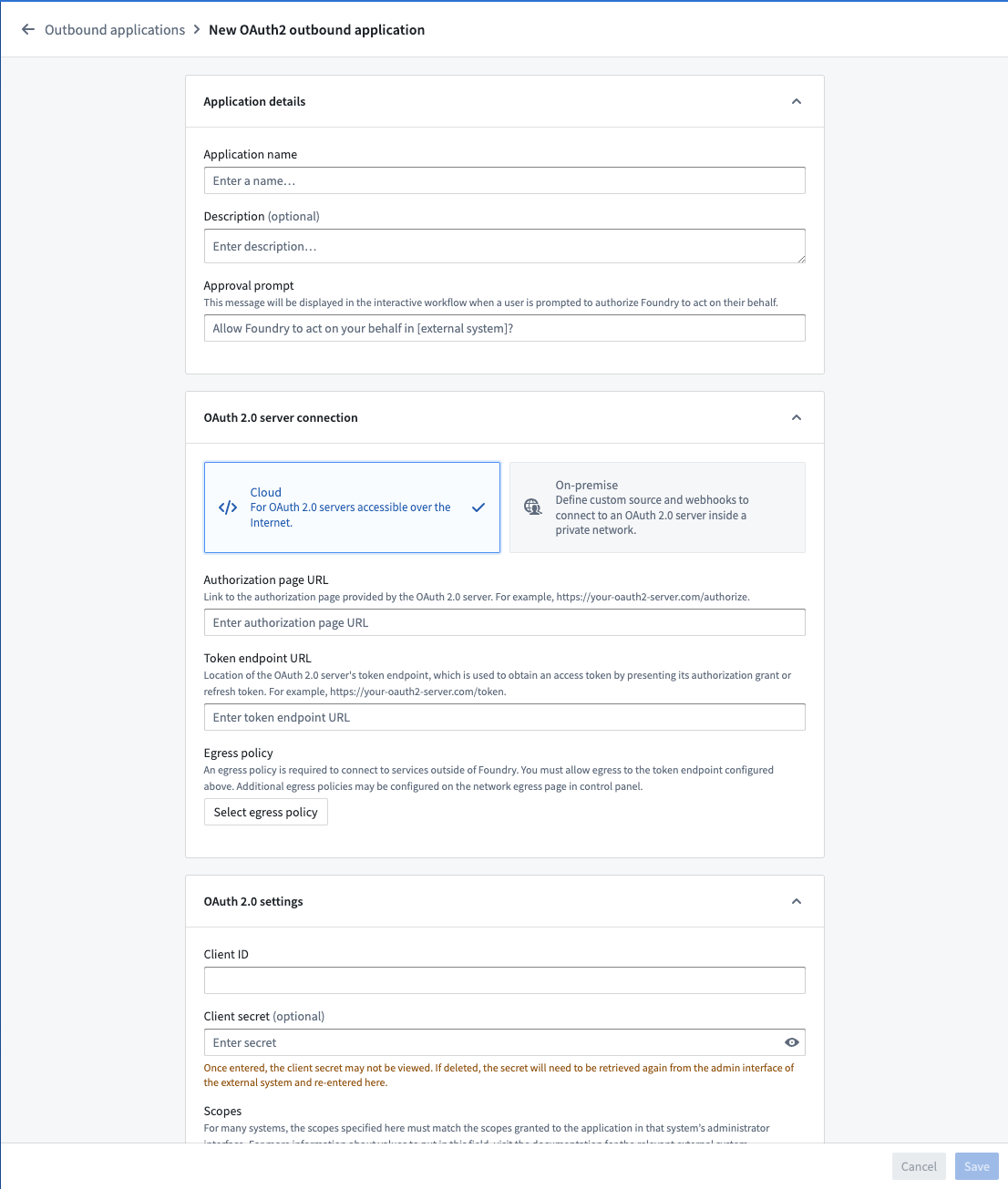
Create an outbound application workflow
Direct cloud and on-premise OAuth server support
To set up an outbound connection that is accessible over the Internet, a direct connection is recommended.
For OAuth servers that require a non-standard token handshake, custom webhook-based handshakes via REST API sources using an agent runtime are also supported. This method requires writing your own requests to perform the OAuth 2.0 handshake.
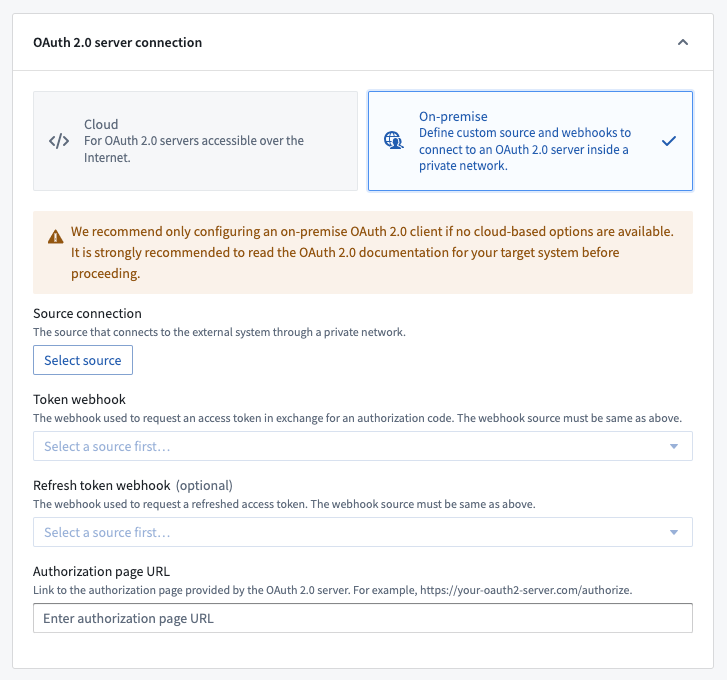
Using an outbound application
Once an outbound application is created and enabled, it may be used as the authentication method for a domain in a REST API source. When configuring a domain, select OAuth 2.0 and then select the desired outbound application from the dropdown.
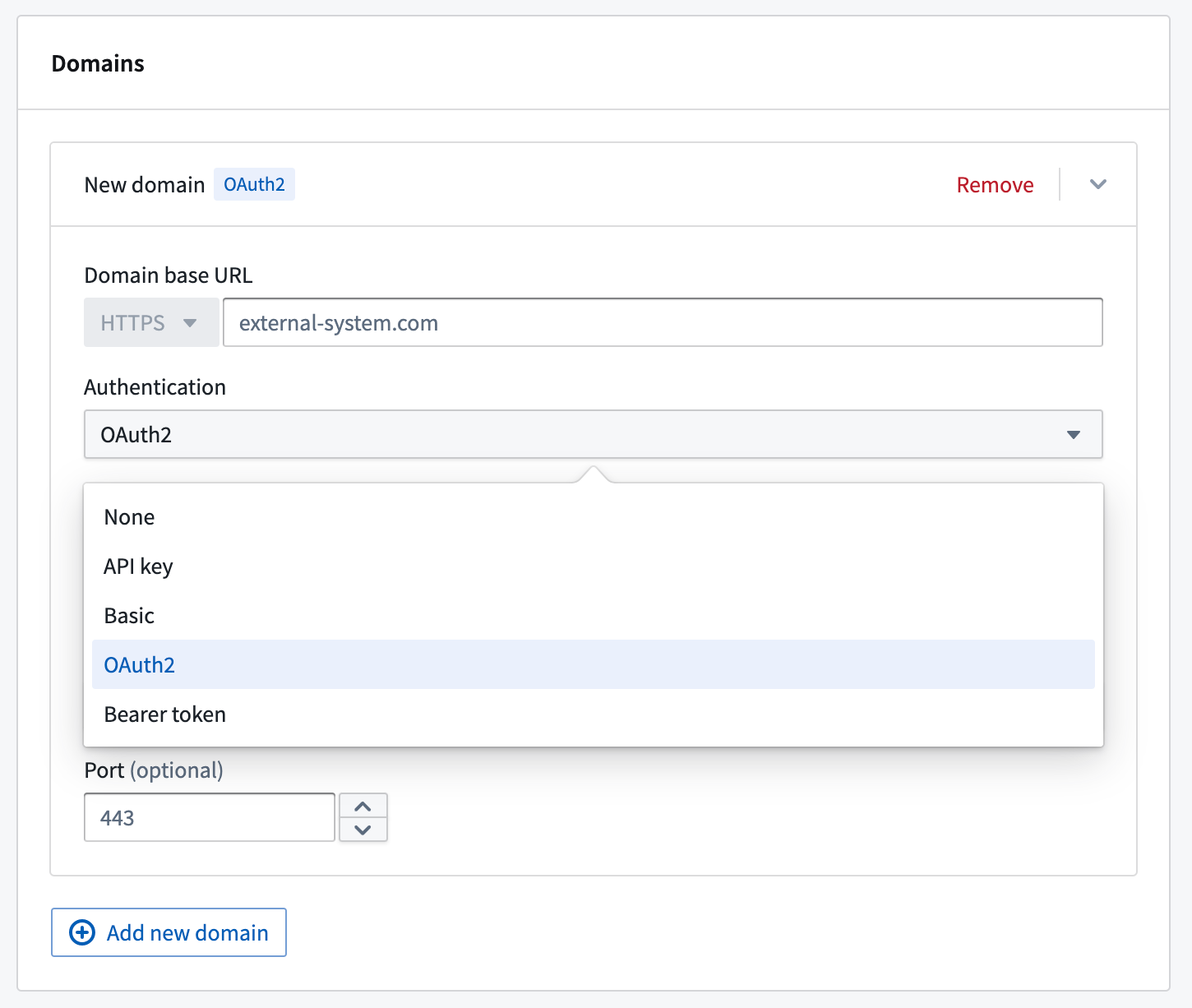
Setting the authentication method for a domain in a REST API source.
Any webhooks using a domain with OAuth 2.0 configured will result in an interactive prompt for each user the first time they attempt to run it. Webhooks are typically triggered by Actions in Workshop. When running an Action, users will be prompted to authorize Foundry to interact with the system on their behalf by logging into the OAuth 2.0 server.
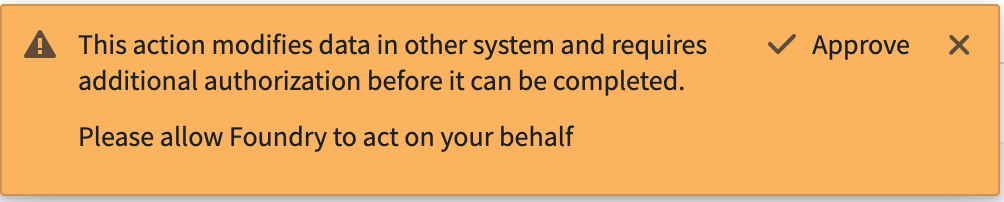
User prompts to authorize Foundry to interact with the system
If a token refresh workflow is configured, users are unlikely to see this prompt again unless the authorization is revoked in the external system or the outbound application is reset. If no refresh workflow is configured, the end user will see the authentication pop-up anytime the resulting token expires. Tokens often expire within minutes or hours, and we encourage use of the refresh flow for a better user experience.
For more on Outbound applications, see the documentation.
Introducing Model Assets [GA]
Date published: 2023-10-17
Model Assets are the recommended approach to integrate all machine learning (ML) and artificial intelligence (AI) models into Foundry. Model Assets provide a consistent method for integrating models into Foundry's ModelOps application, Modeling Objectives, and directly into operational applications via Workshop, Slate, data transforms, and functions on models.

Model import diagram
How can I use a Model Asset?
You can create a Model Asset in a number of ways to enable the deployment of any model inside Foundry, including:
- Models trained in Foundry with Code Repositories
- Models files trained outside of Foundry and saved to Foundry as an unstructured dataset
- Models containerized outside of Foundry and pushed into the Foundry docker registry
- Models trained and hosted outside of Foundry
The consistent interface of a model asset enables machine learning engineers, data scientists, and project teams to easily use models in Foundry applications. Teams can update model weights, architectures, or even hosting infrastructure without migration or downtime. Foundry automatically tracks and maintains the lineage of data and models, providing a comprehensive project history that includes all models, their performance metrics, and releases.
Use the new ModelAdaptor interface defined in the new palantir_models Python SDK to unlock all the benefits of Model Assets.
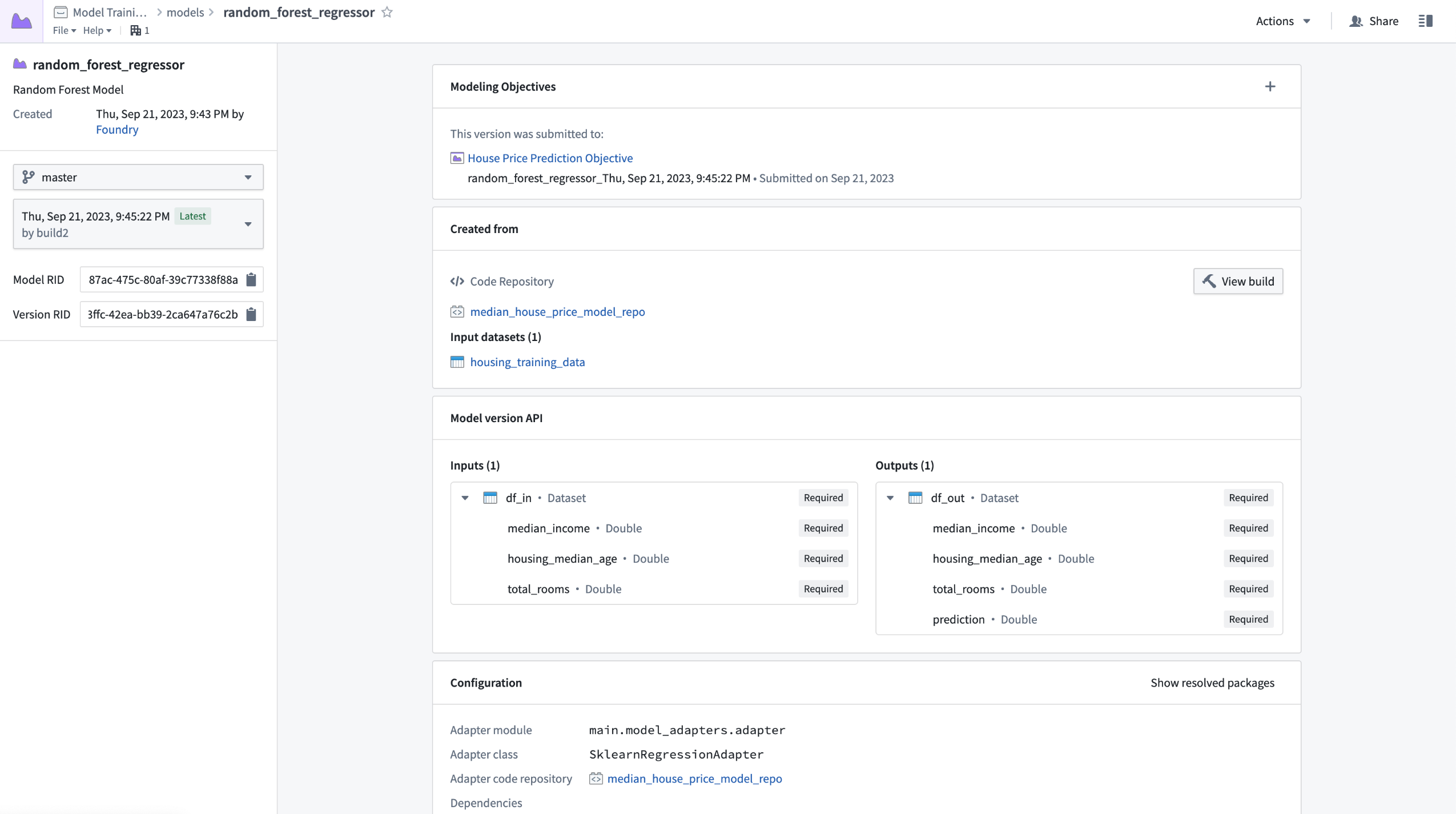
The next generation of models in Foundry
Model Assets (authored with palantir_models) are now recommended over dataset models (authored with foundry_ml). Model Assets not only offer the same functionality as Dataset Models but also delivers additional features, including:
- Increased flexibility that enables data scientists to define custom model serialization, deserialization, and inference logic via the model adapter
- Simplified dependency management by bundling model dependencies alongside the model automatically, removing the need for shared Python libraries, custom stages and re-solving environments at deployment time
- Natively secured credentials and egress policies for connecting to externally hosted models
- Execution of containerized model logic in Rubix - Palantir's Kubernetes environment
- Support for multi-input and multi-output model transforms
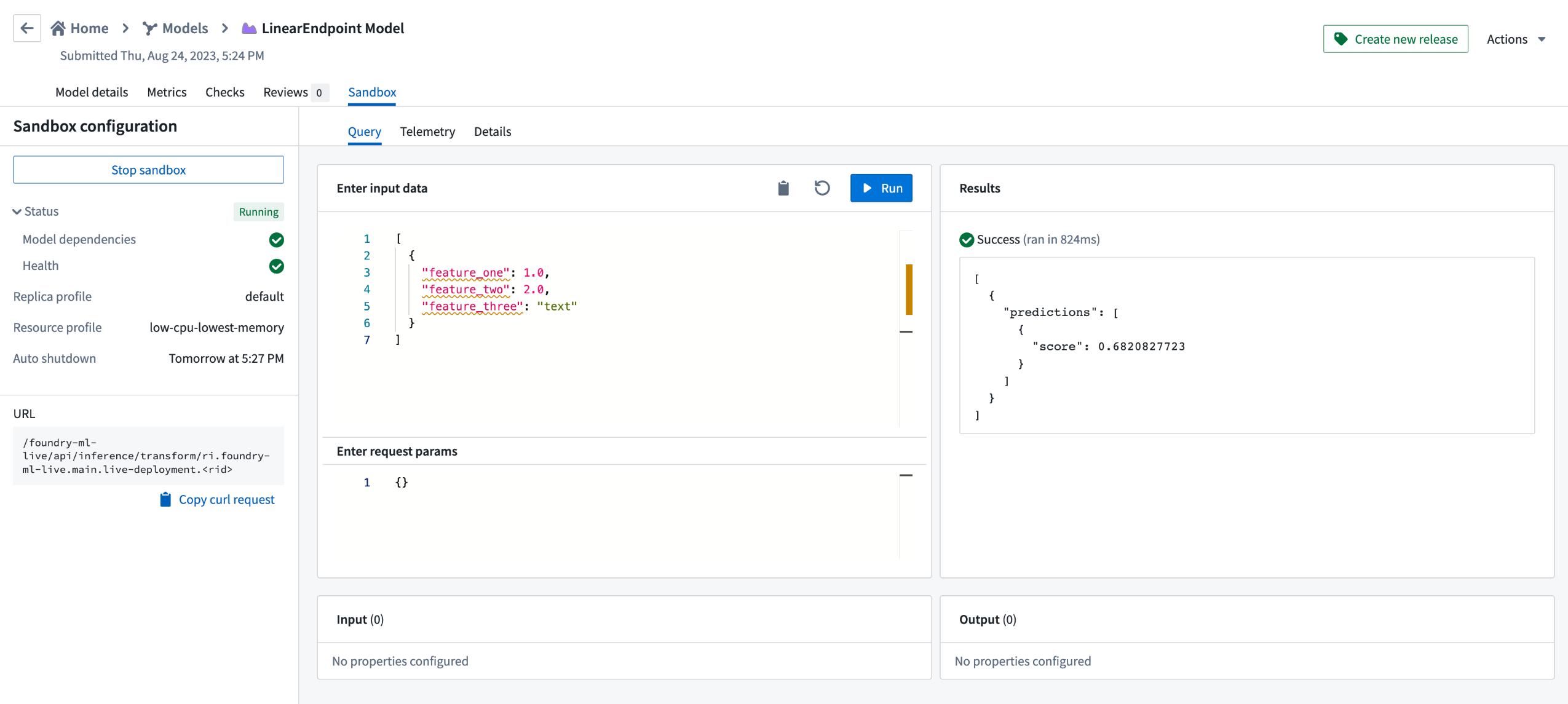
To get started with Model Assets, review the updated Model training tutorial, and complementary documentation on:
We look forward to your feedback on Model Assets and encourage you to contact Palantir Support if you are facing any issues or wish to submit feature requests.
Blueprint 5 is now available in Slate
Date published: 2023-10-17
We are excited to announce that Slate now includes Blueprint 5 ↗, providing you with the latest styling options for use within your Slate documents.
The editing experience within Slate has also been updated, unlocking reusability with the rest of the platform and providing more modern styling options for application builders, including:
- An updated icon library, featuring new icon fonts. See the CSS API for icons in Blueprint 5 ↗ for usage details.
- Modernized styling and fonts, to match with the rest of the platform. (Note that Blueprint does not come with its own fonts ↗; available fonts are based on Palantir’s brand.)
Existing applications that include the use of Blueprint 1, 3, or 4 CSS classes will remain unchanged and should still look as expected. However, we recommend users update to the newest design library whenever possible to take advantage of the latest features.
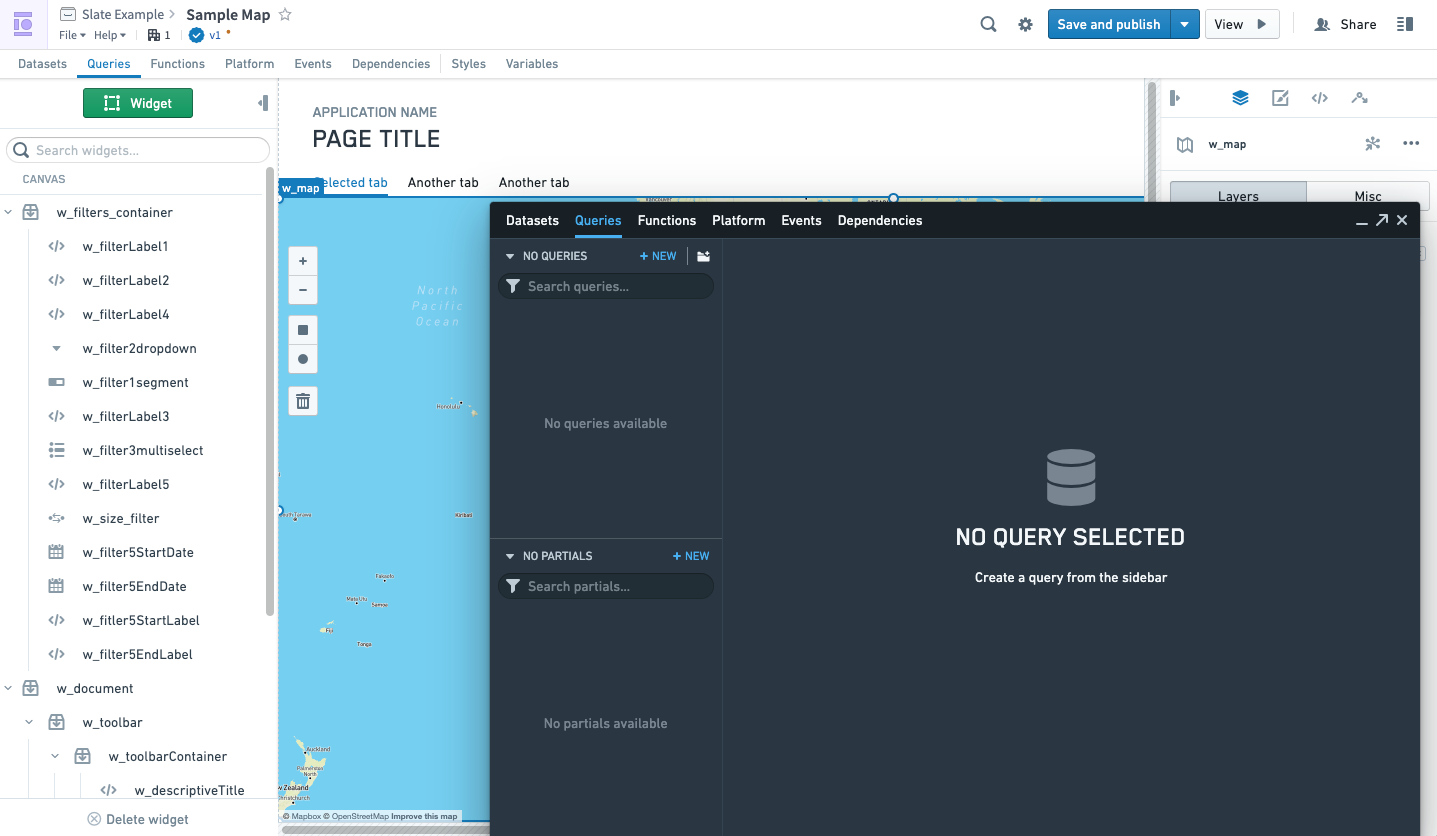
Previous Slate interface
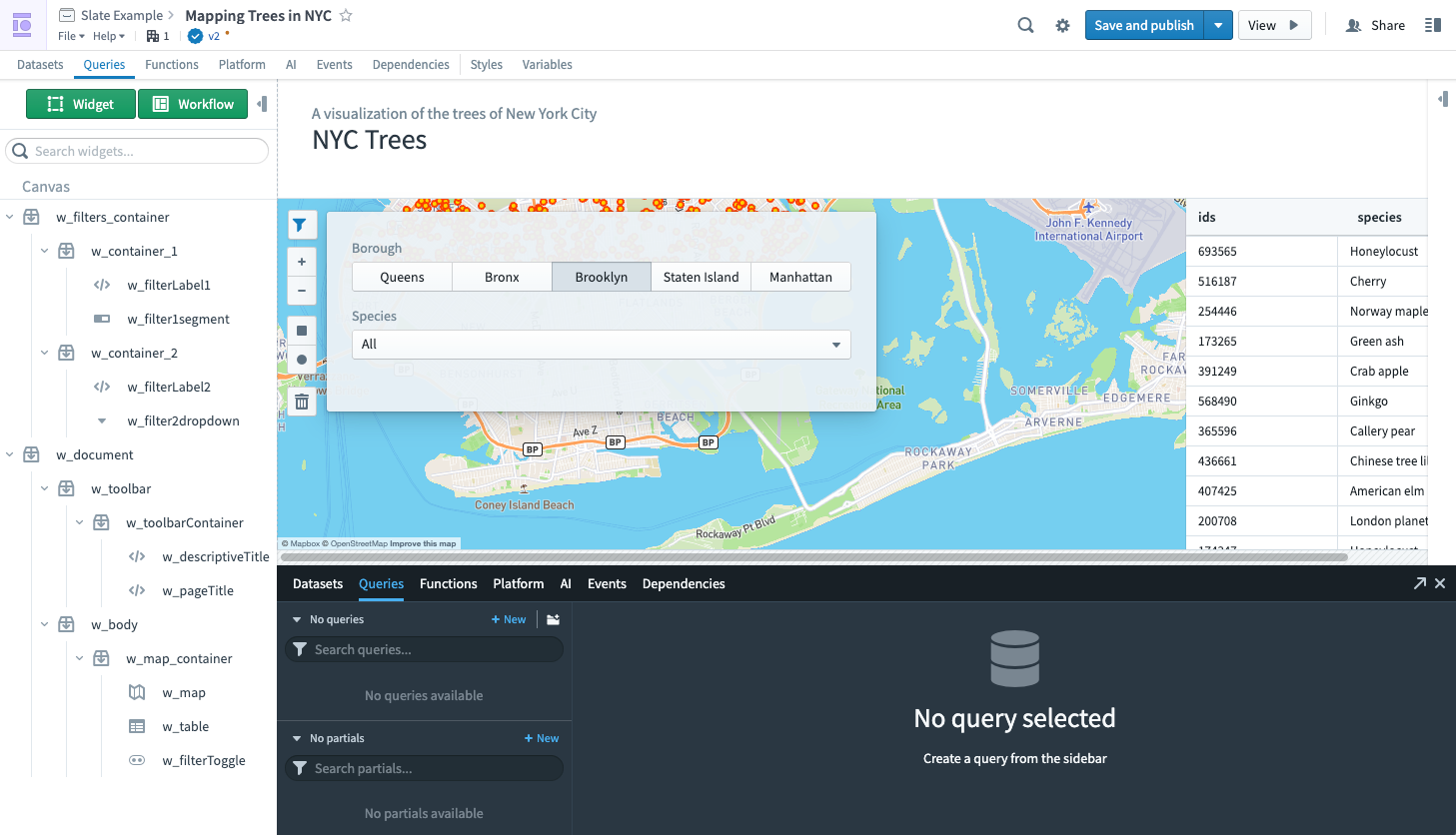
New Slate interface
Slate is still in the process of migrating to use Blueprint 5 APIs, so the look and feel will continue to be updated over time. Stay tuned for more improvements to come.
For more on Slate, see the documentation.
New AIP-powered features for Code Repositories
Date published: 2023-10-12
We are excited to announce three new AIP-powered features for Code Repositories called AI error enhancer (GA), AIP for Code Repositories (GA), and code autocomplete (beta). For additional details on each, review the AIP features in Code Repositories documentation. To use these features, your stack must have AIP enabled.
AI error enhancer [GA]
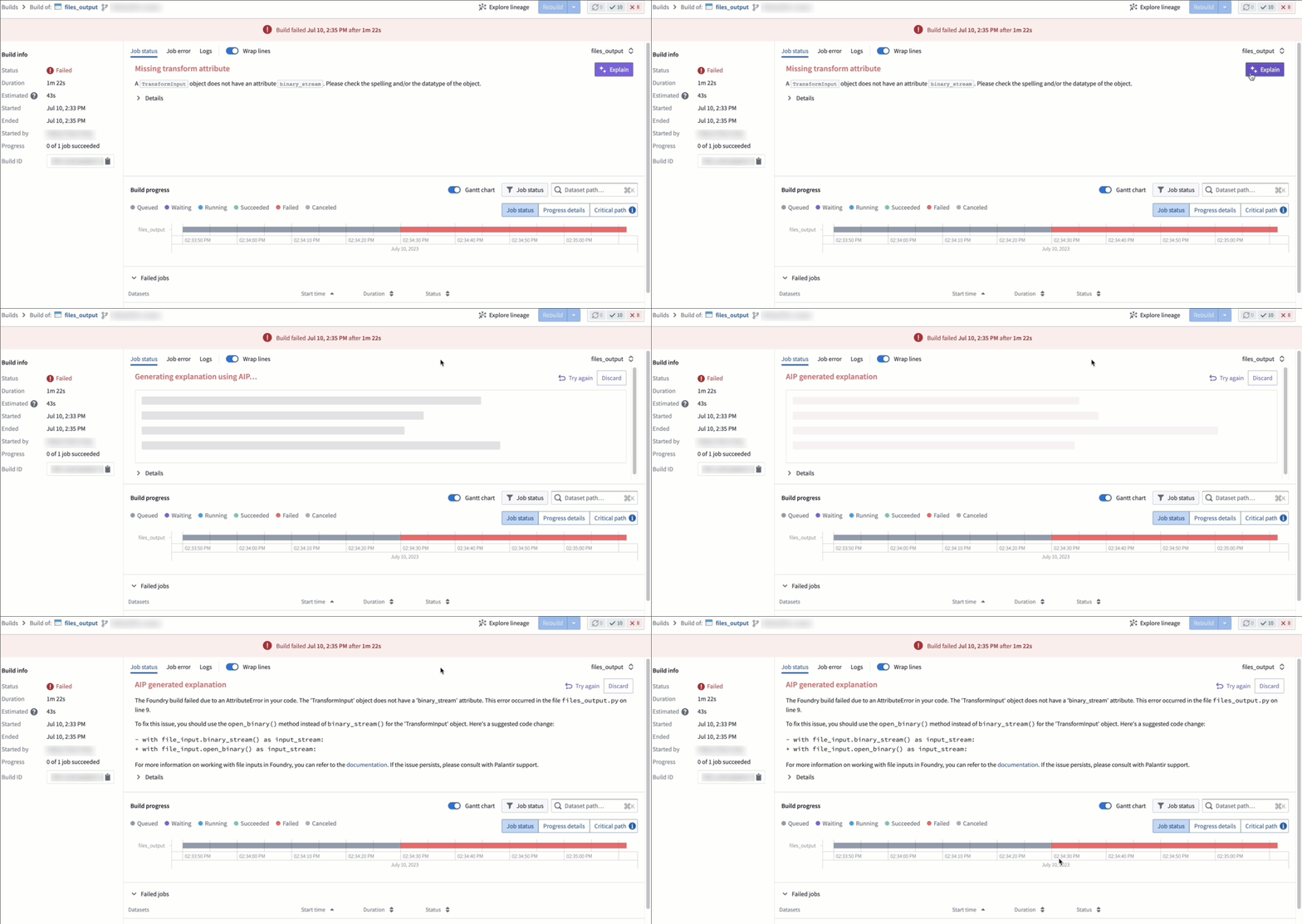
In Code Repositories (Checks and Preview) and Builds (Job Tracker), you can now use the Explain option to be provided a more comprehensive explanation of the error and suggestions for code changes when available. Additionally, you can also view source information used by LLM to generate the explanation and recommended solution.
AIP for Code Repositories [GA]
AIP in Code Repositories can now Explain code snippets or entire files for understanding your code better, find bugs in your code, or translate your code into another language, such as Python, SQL, Mesa, and Java. To access, select the relevant code snippet and open the Ask AIP Assist menu or right-select on the editor and choose the desired option.
You can toggle Ask AIP Assist functionality on and off by navigating to Settings (purple cog icon) > Preferences > AIP Features.
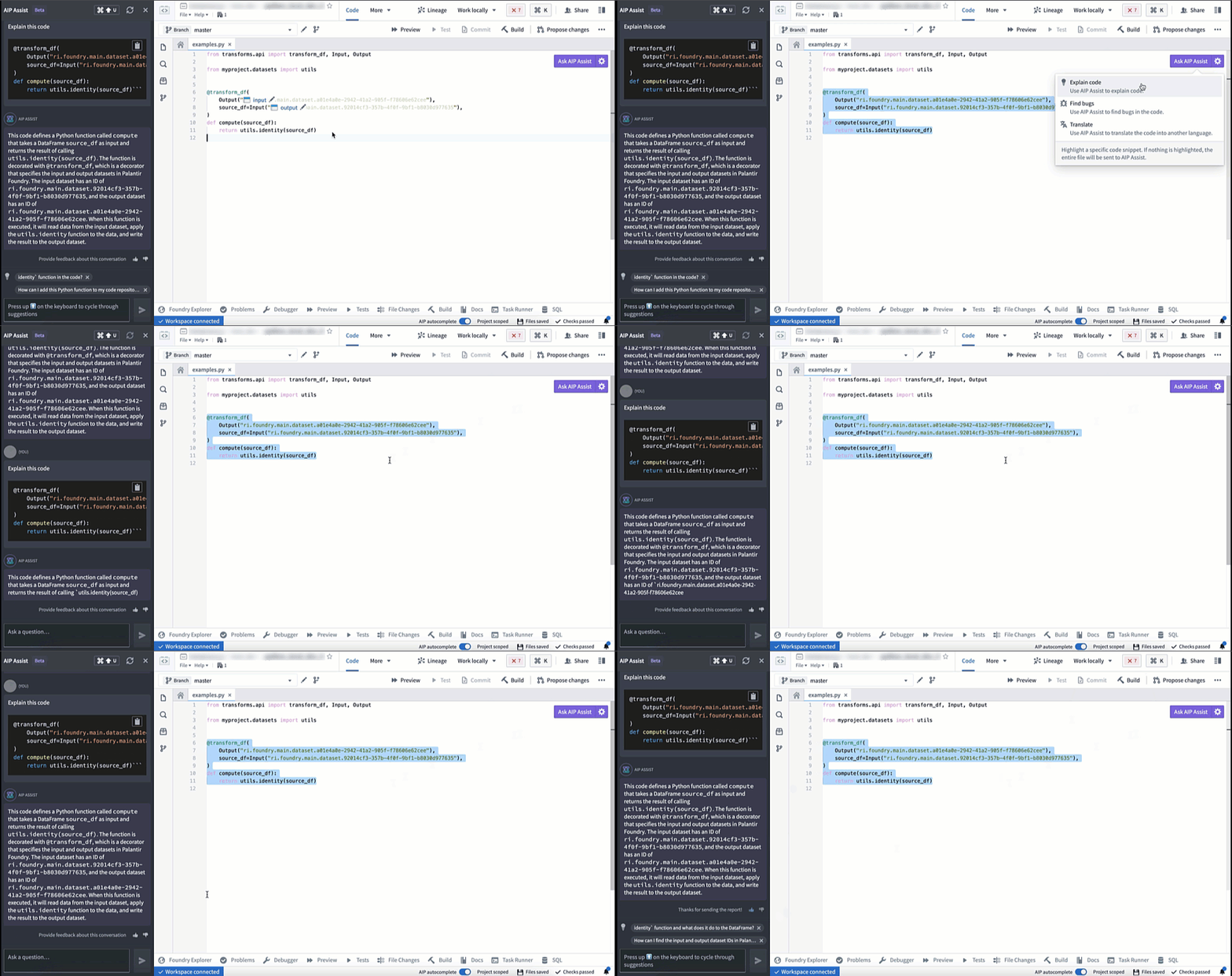
Code Explanation
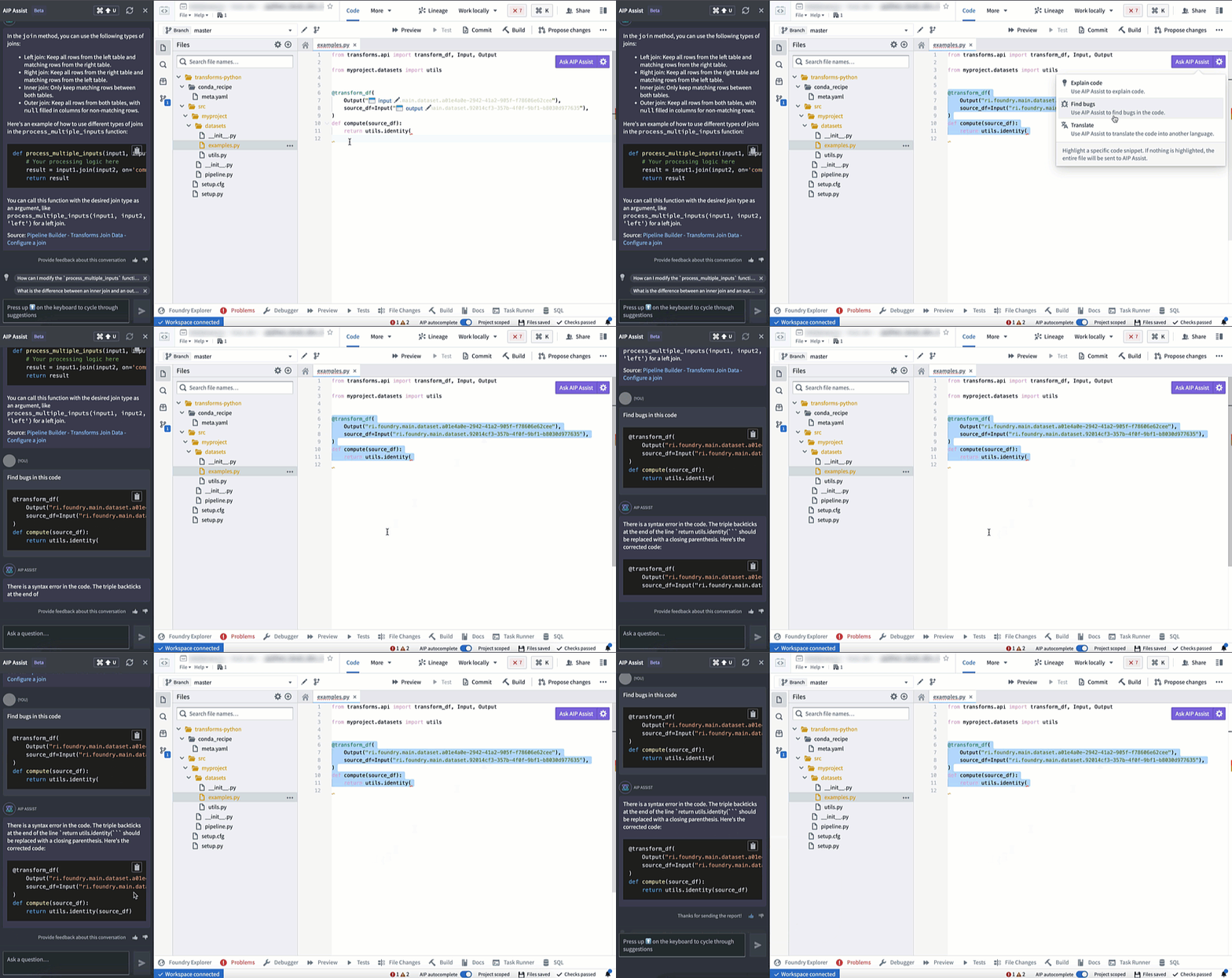
Find bugs
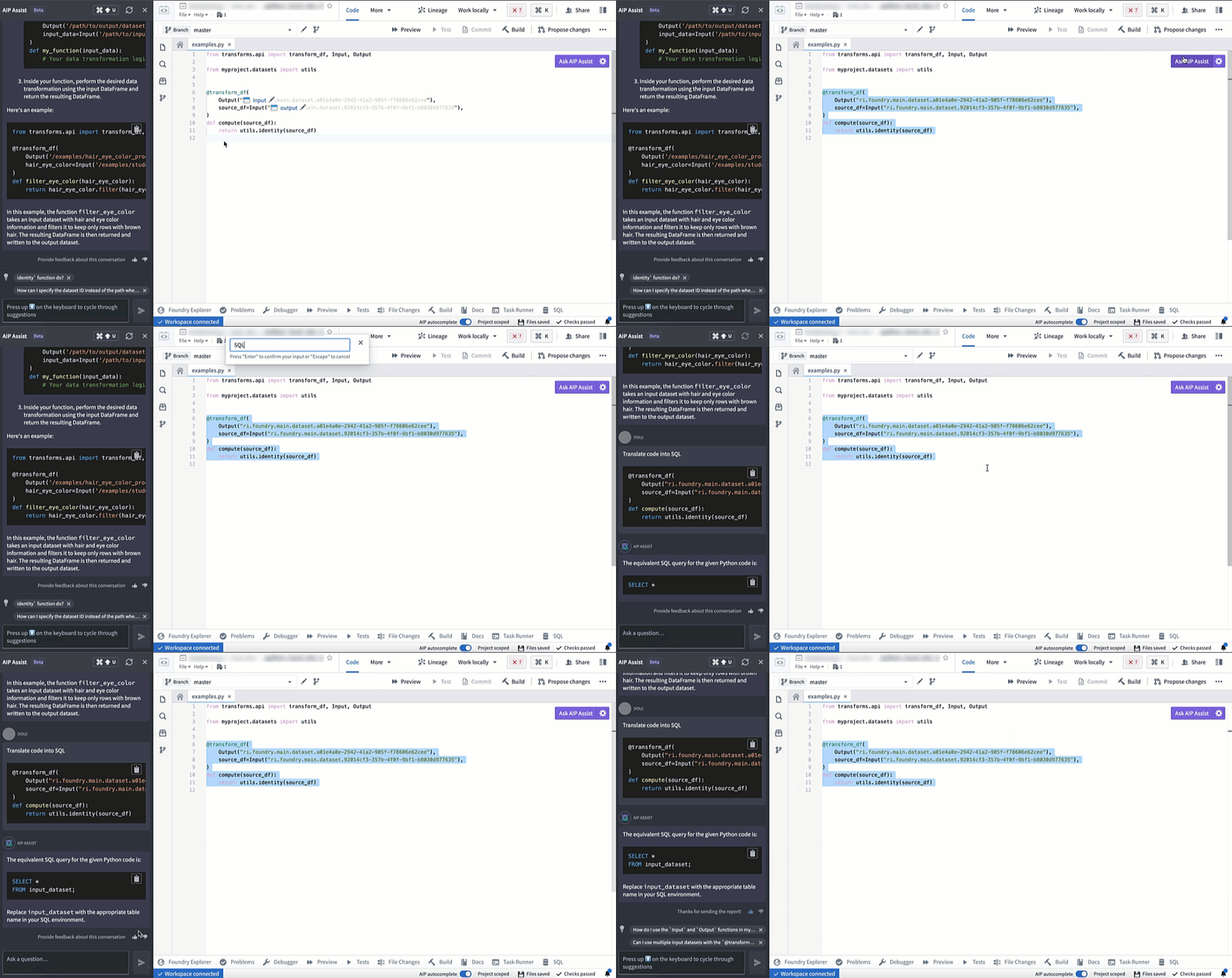
Translate code into other languages
Code autocomplete [Beta]
Code autocomplete can now autogenerate code for you by parsing the file that is currently open if you are working on a Python repository. Review and accept autogenerated code by pressing Tab; to ignore, press Esc or start typing something else. You can toggle AIP autocomplete on or off directly in the editor status bar at the bottom of the window or by navigating to Settings (purple cog icon) > Preferences > AIP Features. Note that this beta feature is currently enabled only for Python repositories.
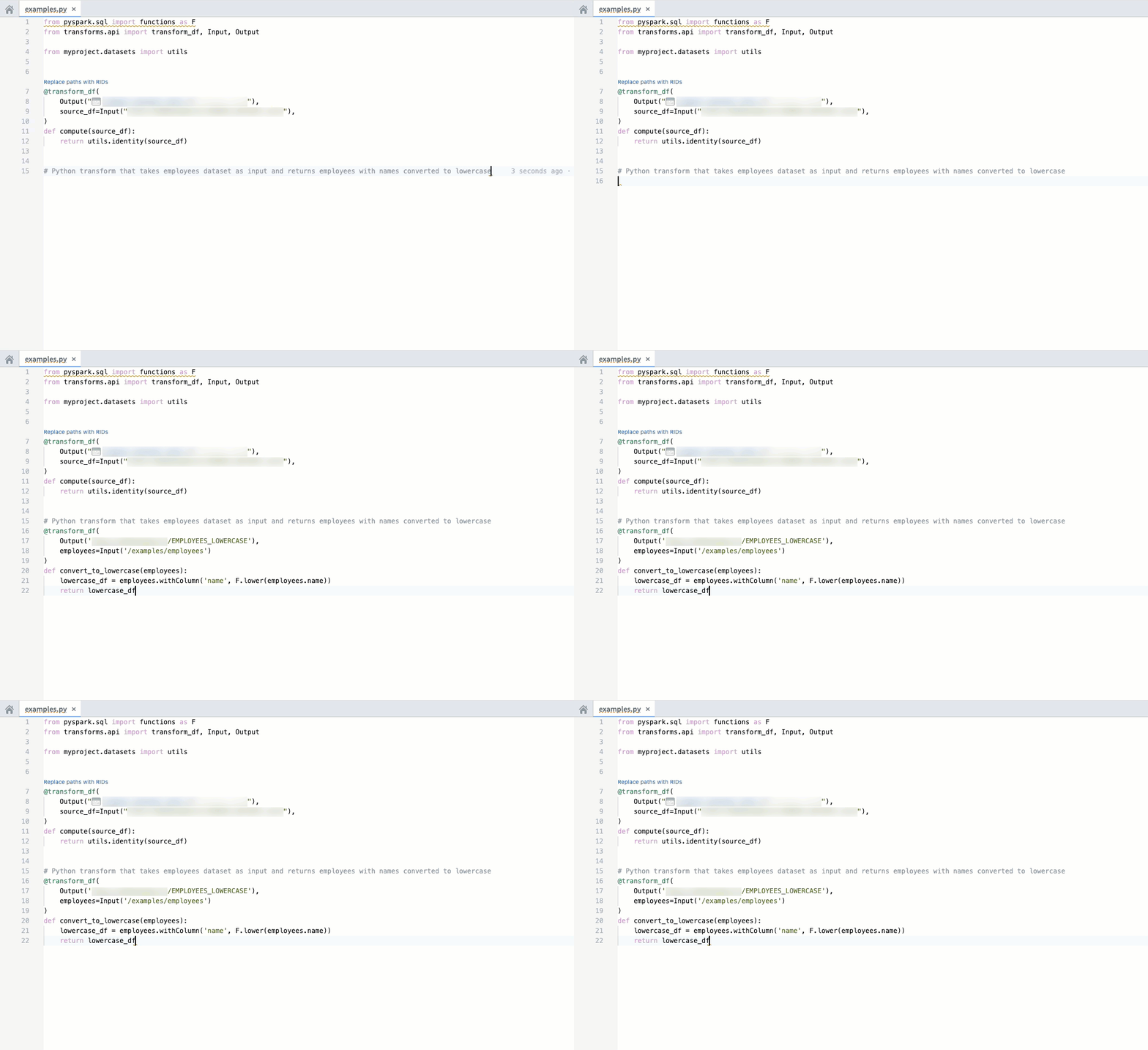
For additional details on each feature, review the AIP features in Code Repositories documentation.
Introducing Virtual Tables [GA]
Date published: 2023-10-12
Virtual Tables, a feature for working with data from supported platforms in a virtualized manner, is now generally available. Virtual Tables introduces a new data integration paradigm as it removes the need to store source data as a Foundry dataset, while empowering you to immediately build workflows that combine data from different source systems.
For direct connections to supported data sources, you now have the two following options:
- Sync datasets: To copy source data into a Foundry dataset, or
- Register Virtual Tables: Create a Virtual Table that acts as a pointer to source data.
Virtual Tables can be set up in Data Connection under the Virtual Tables tab.
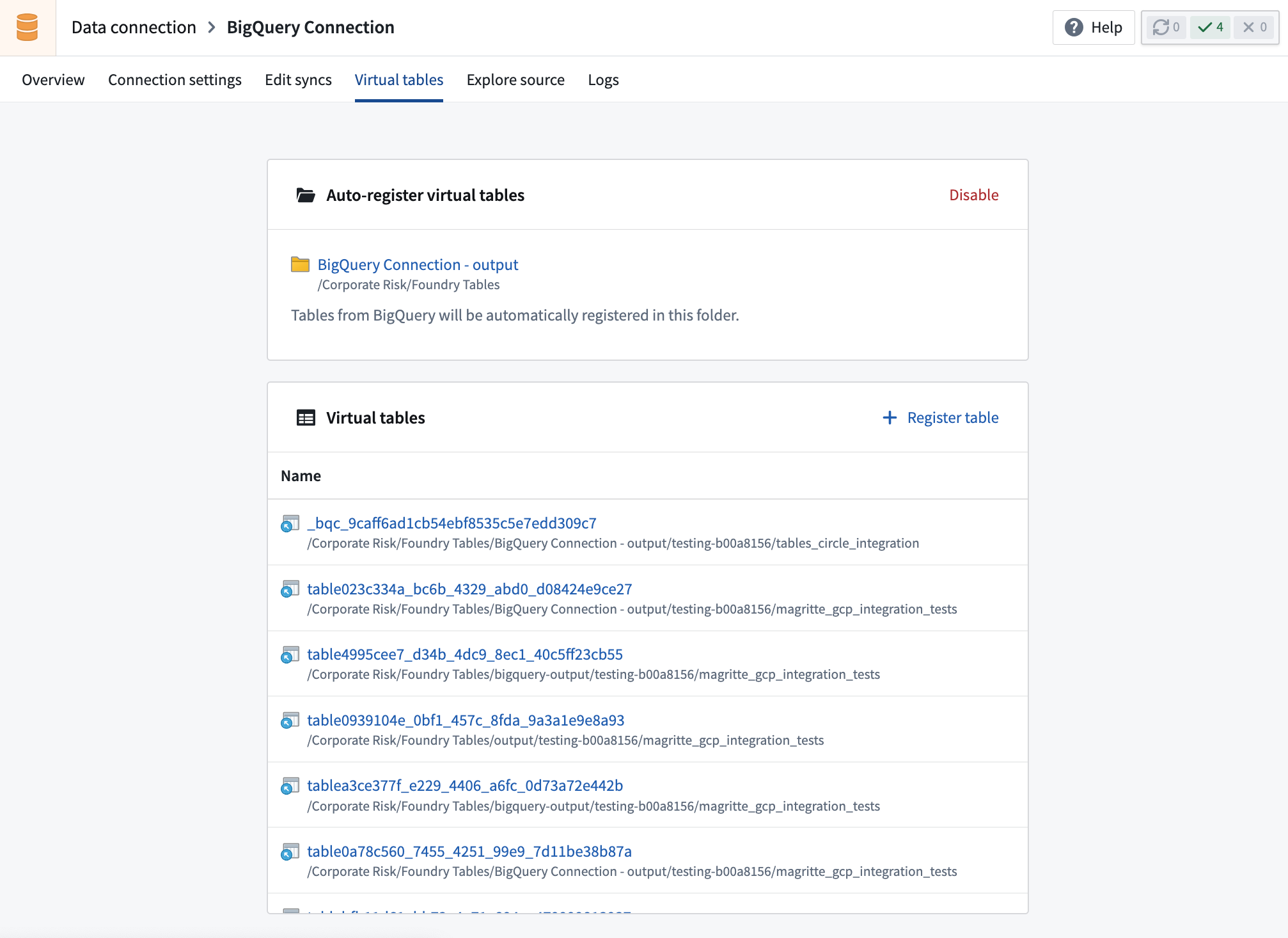
The following sources support Virtual Tables: | Source | Supported formats | Manual registration | Automatic registration | |---------------------------------------------------|----------------------------------------------|---------------------|------------------------| | Amazon S3 | Delta, Parquet | Yes | | | Azure Data Lake Storage Gen2 (Azure Blob Storage) | Delta, Parquet | Yes | | | BigQuery | Table, View, Materialized view | Yes | Yes | | Snowflake | Table, View, Materialized view | Yes | Yes |
Once registered, Virtual Tables can be used in various Foundry applications, most notably:
- Contour for analysis
- Pipeline Builder for pipelining, as well as the creation of downstream Foundry datasets or objects
- [Coming soon] Python transforms support for use in Code Repositories
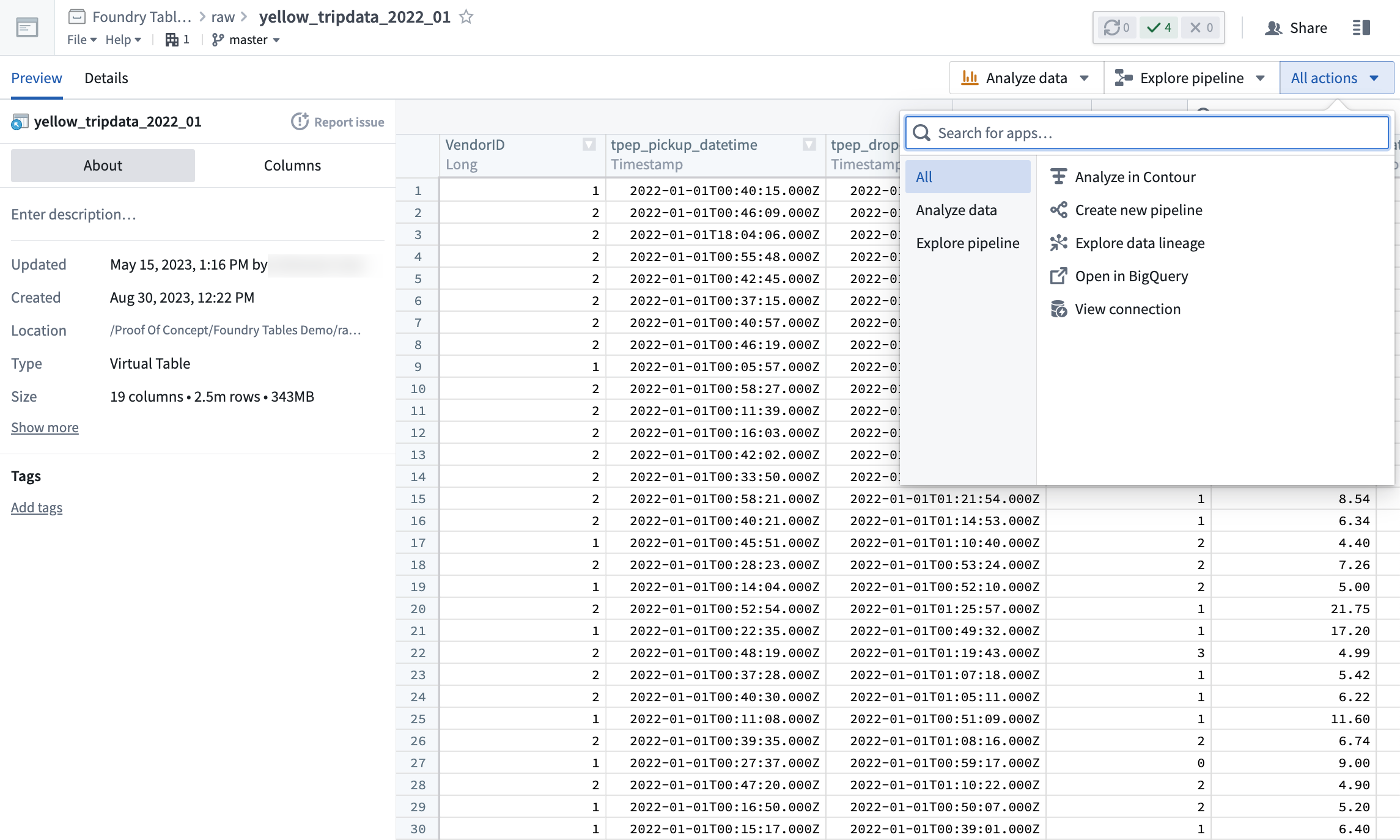
In general, Virtual Tables can be used to back most common Foundry workflows by either:
- Directly interacting with the Virtual Table, or,
- Creating a transformation pipeline backed by a Virtual Table that outputs Foundry datasets or objects. These outputs can be used as normal in the platform.
For more details, review the Virtual Tables documentation.
Application Access replaces Foundry Suite [Migration]
Date published: 2023-10-04
The Foundry Suite section in Control Panel is migrating to a new page called Application access, which will serve as the new view for customizing access to specific tools within Foundry. Any access that was previously configured via Foundry Suite still applies, with no changes to users. The Foundry Suite navigation entry will redirect to Application access and be removed in a few weeks.
The new Application access view surfaces the lifecycle stage of each application, grouping each category's applications by their lifecycle stage. When an application's lifecycle stage changes, it is highlighted at the top of the page. This capability allows you to adjust access accordingly, such as enabling an application when it becomes generally available, or restricting access to an application in the sunset or planned deprecation phases. By default, an application's enablement status will carry over when the lifecycle stage changes, except when an application becomes deprecated, in which case it defaults to disabled.
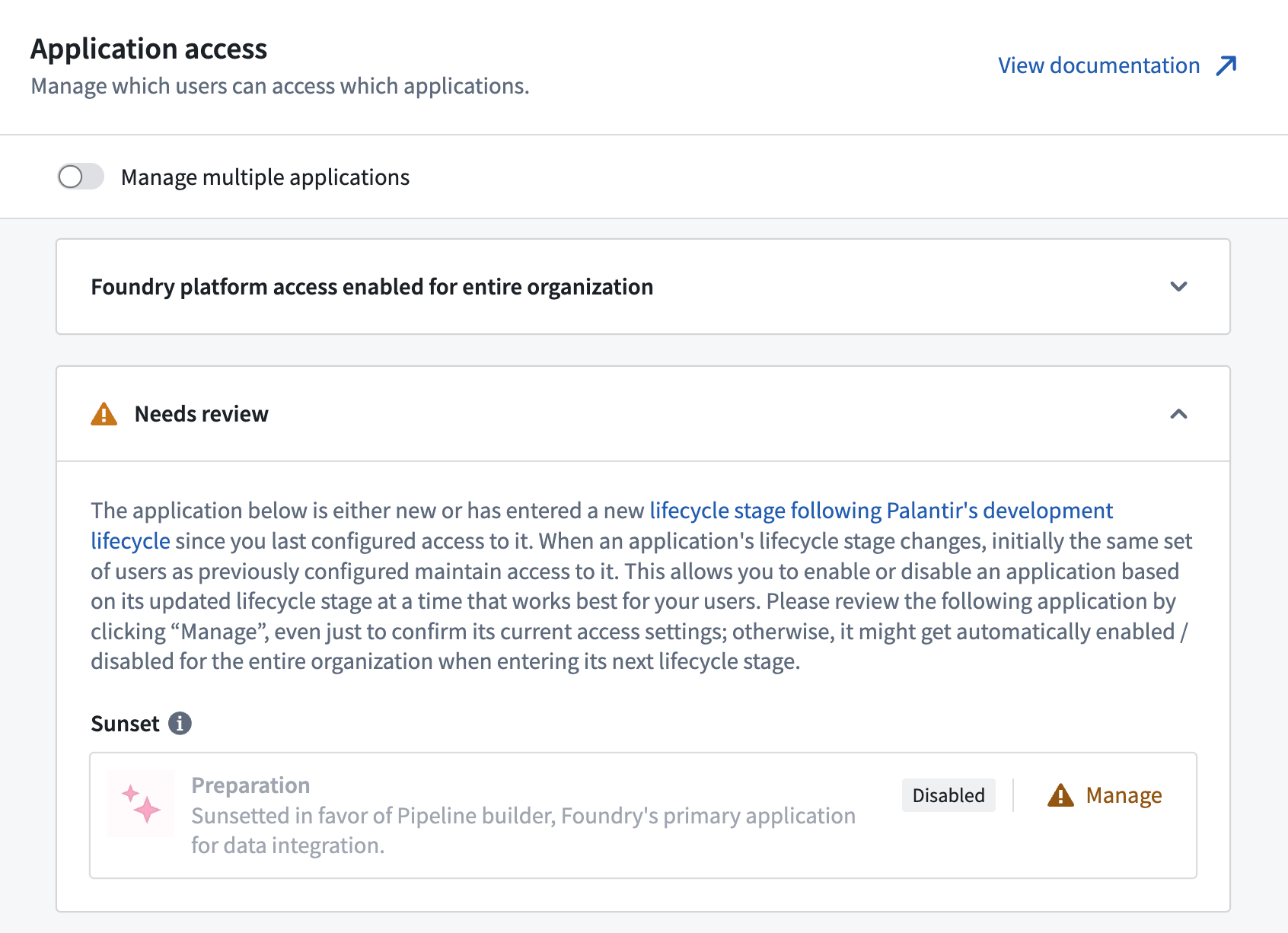
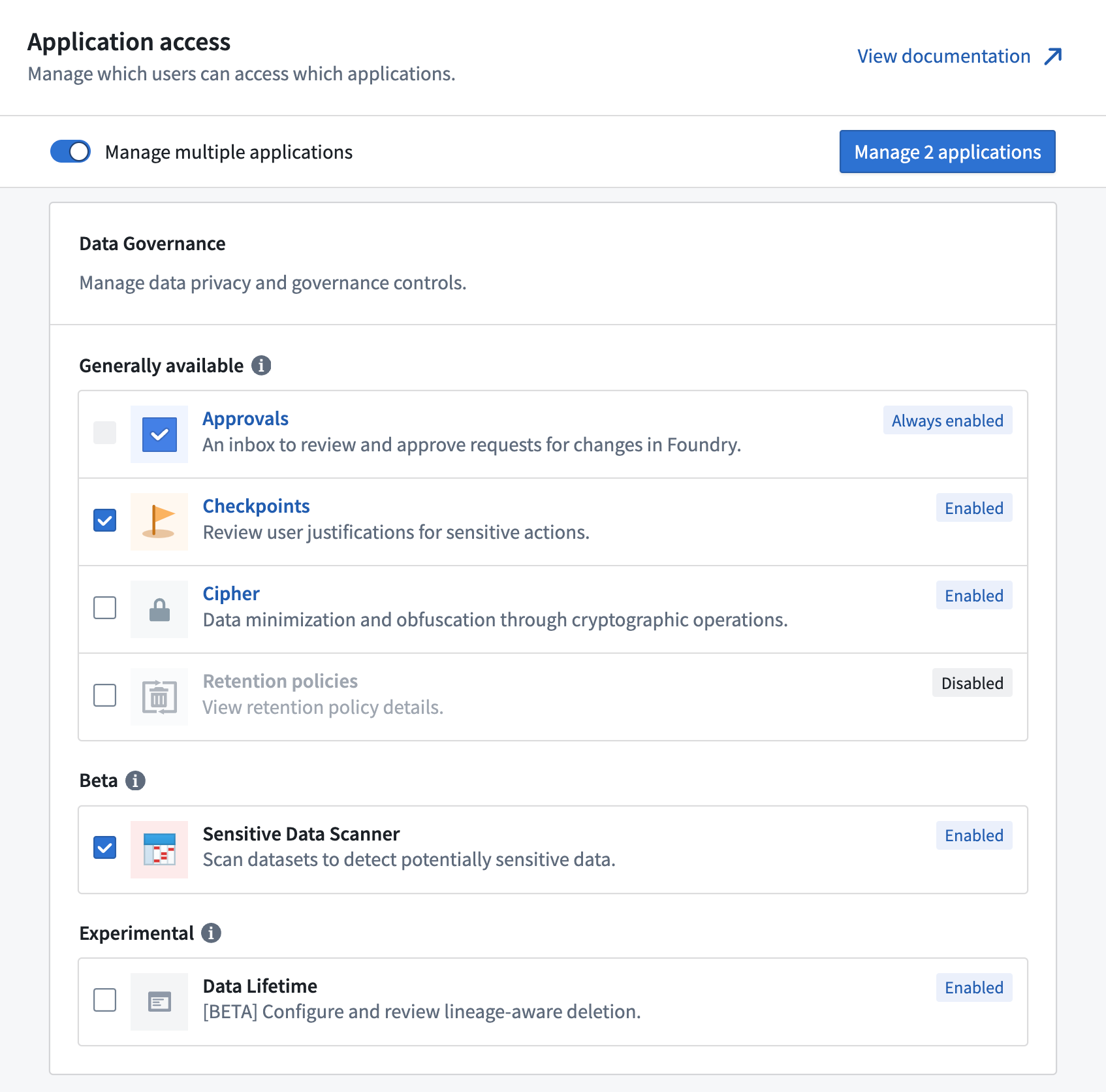
Additionally, applications are now displayed on a single page, which provides a better overview and allows you to find specific applications more quickly. Applications will still be grouped by category, but these categories are no longer used for access control, as all applications are configured individually. By selecting the Manage multiple applications toggle, you can manage multiple applications in bulk and set up the same access restriction for each of them.
Pipeline Builder: Generate pipelines with AIP
Date published: 2023-10-04
AIP can now help you generate new data transformation logic in Pipeline Builder. With a series of user prompts, AIP can access the full suite of proprietary data transformations available to you across Pipeline Builder and recommend the one most suited to your specific needs. Pipelines augmented by AIP behave the same as previous pipelines written by you, enabling seamless integration with your existing workflows.
Consistent with Palantir's security standards, this capability operates with full transparency. AIP provides an explanation of the rationale for suggestions, using metadata to generate logic, all without exposing the underlying data.
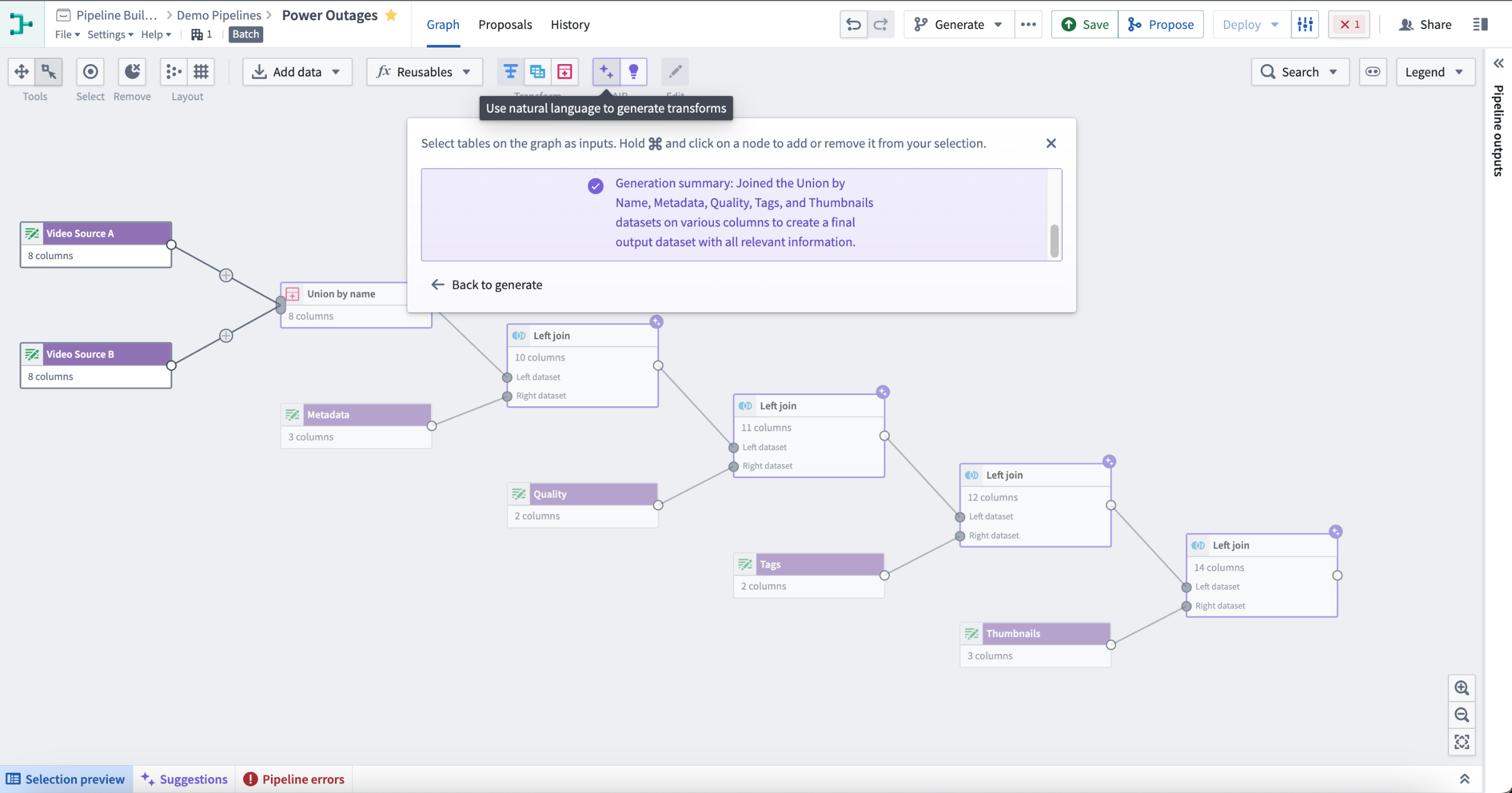
To use Generate, select the purple icon with two stars labeled AIP in the top center of your Pipeline Builder graph. Following the instructions in the pop-up window, select nodes on the graph as inputs. Hold and select on a node to add or remove it from your selection. Next, enter the prompt for AIP to evaluate, then select Generate to start the run.
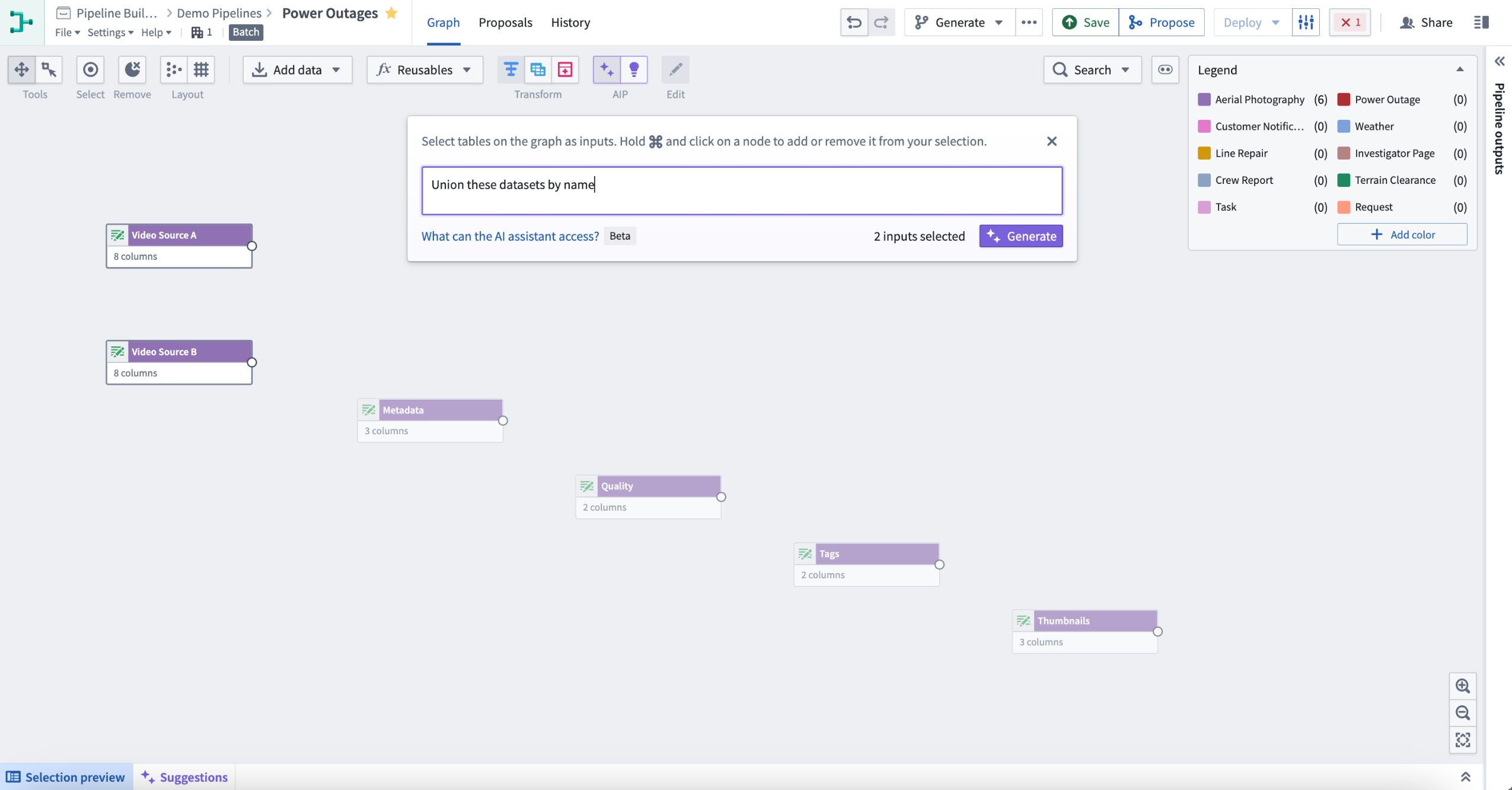
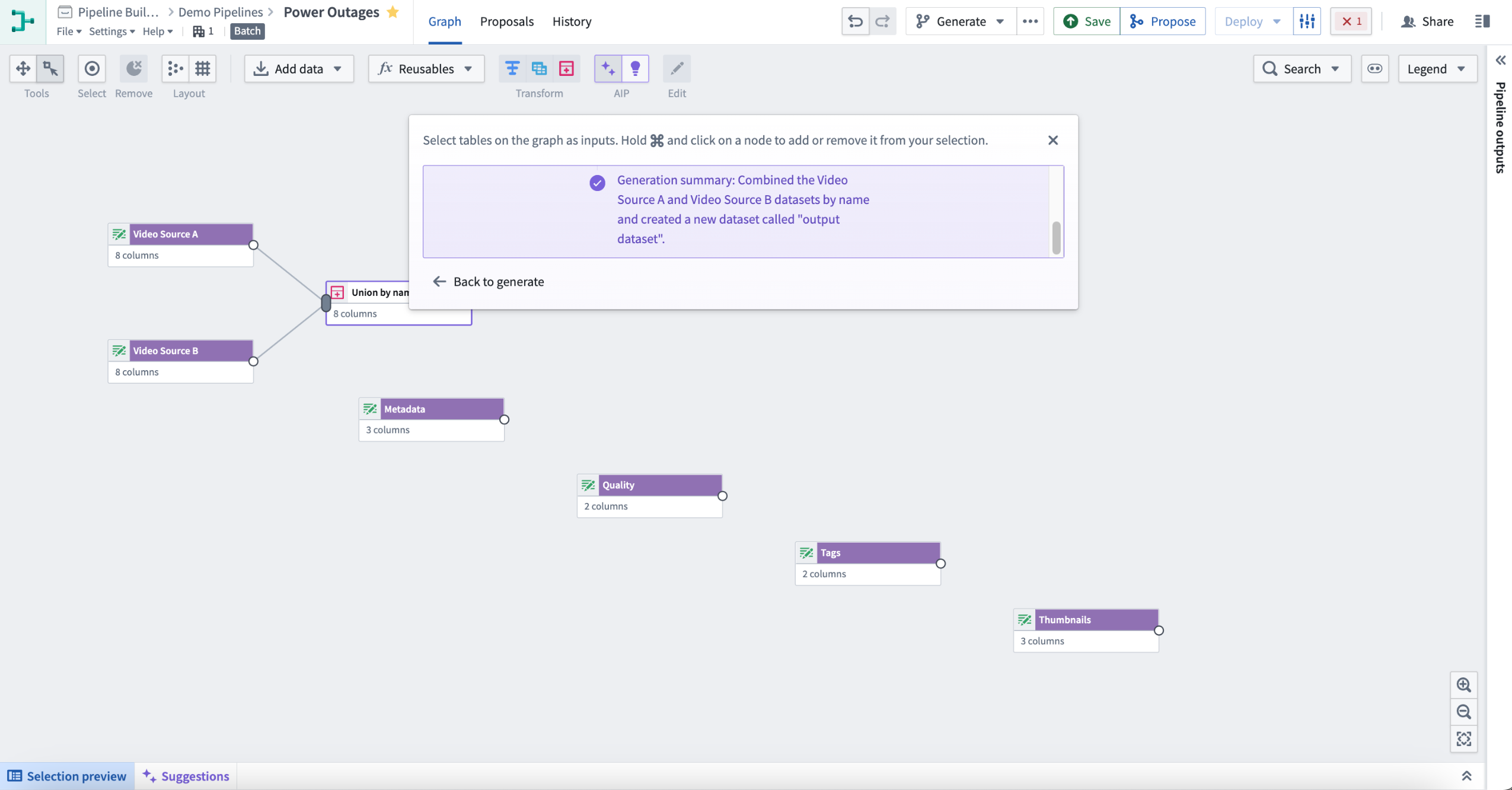
This will return one or more transform nodes highlighted in purple alongside a description of the generated transforms.
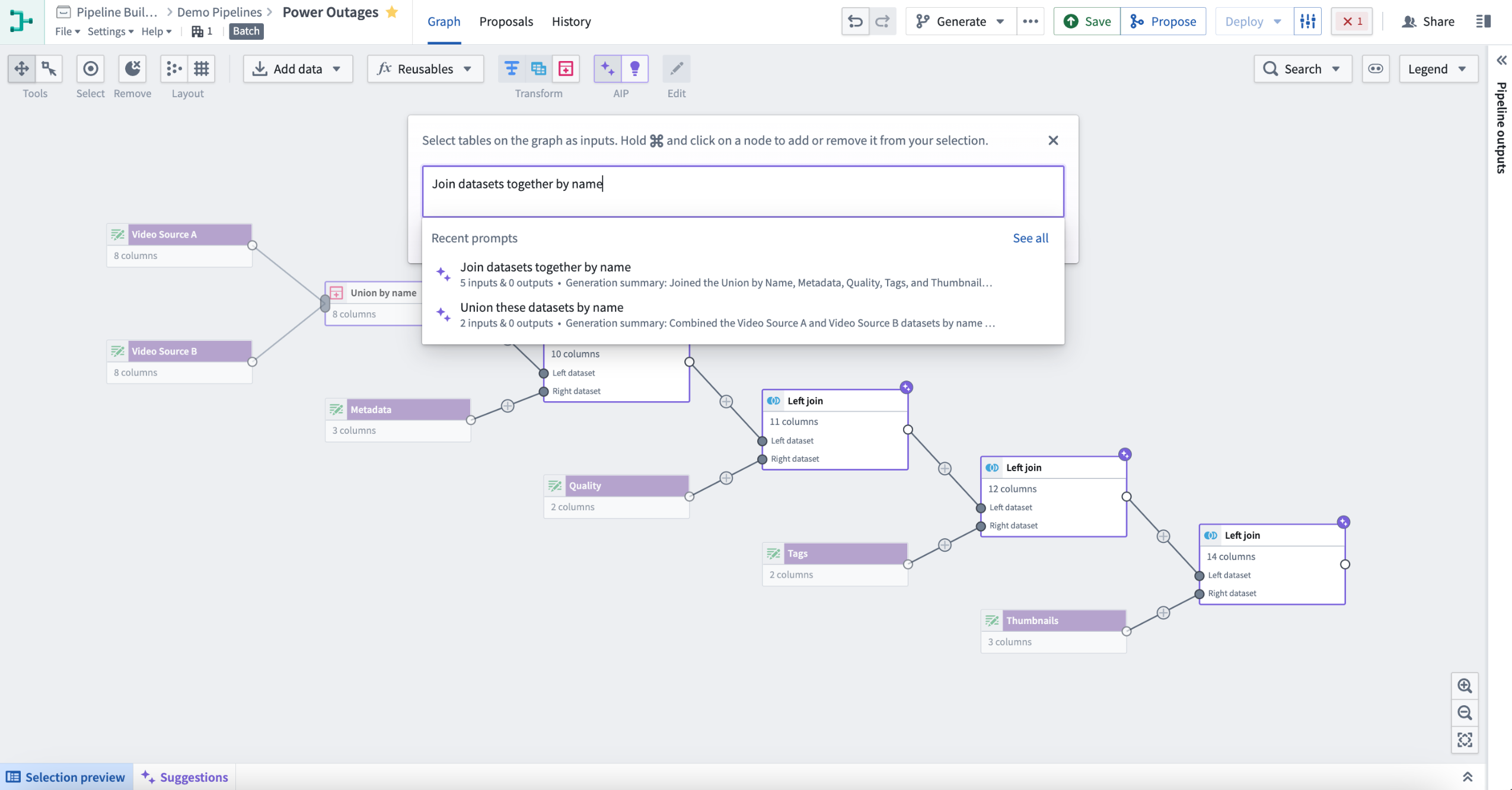
To review your recent prompts, select the input box and choose an entry to retry. This will automatically reselect the related inputs.
Once satisfied with your changes, open a proposal to merge them into the main branch. Select the Generate button to prompt AIP to auto-generate a description of your proposal.
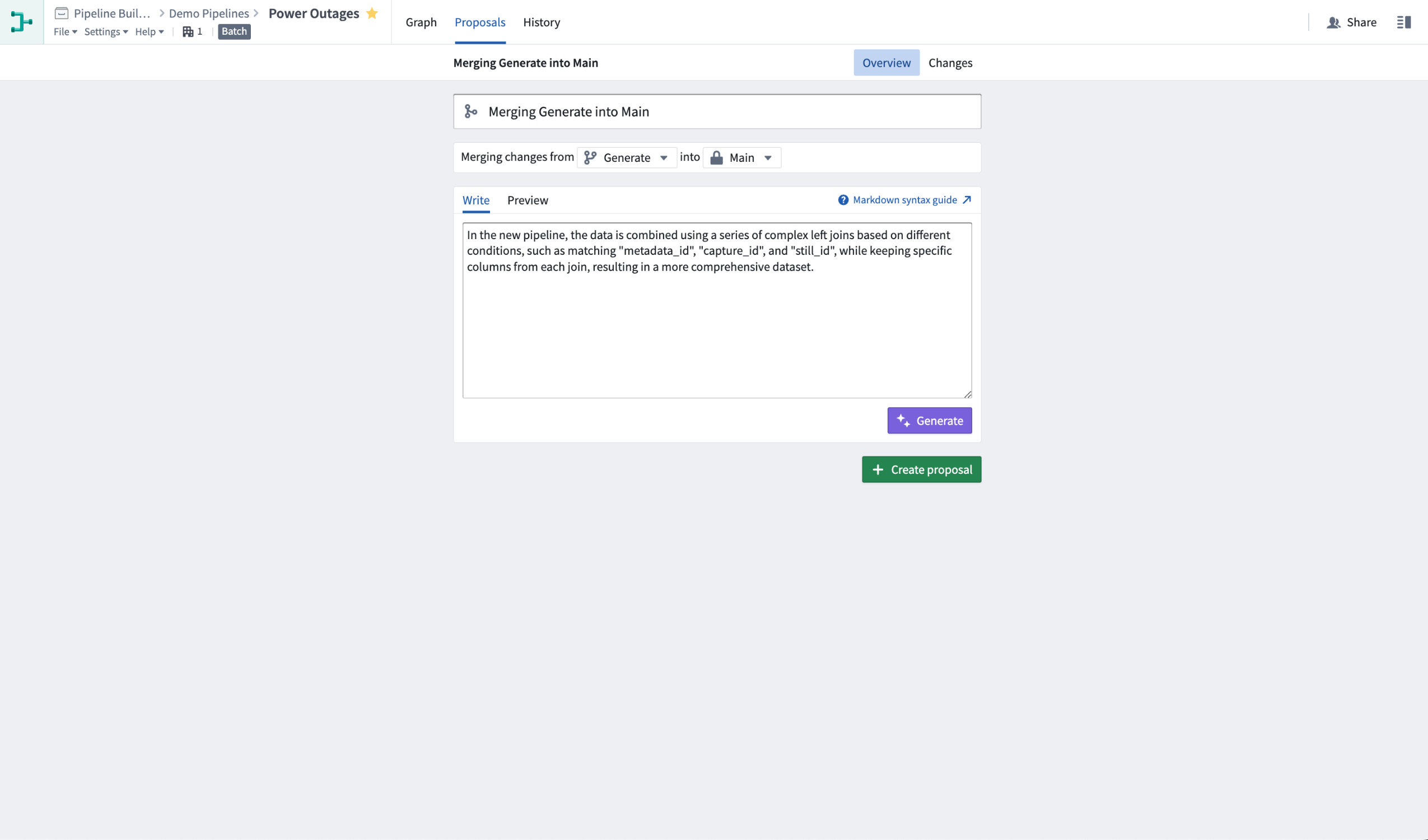
Prior to generating an auto-description, you can also choose to include additional context, bring attention to particular changes, or even start writing a rough proposal description into the text box. AIP will use the information you provide to enhance its proposal description. The generated description will be added below your text, with a clear separation.
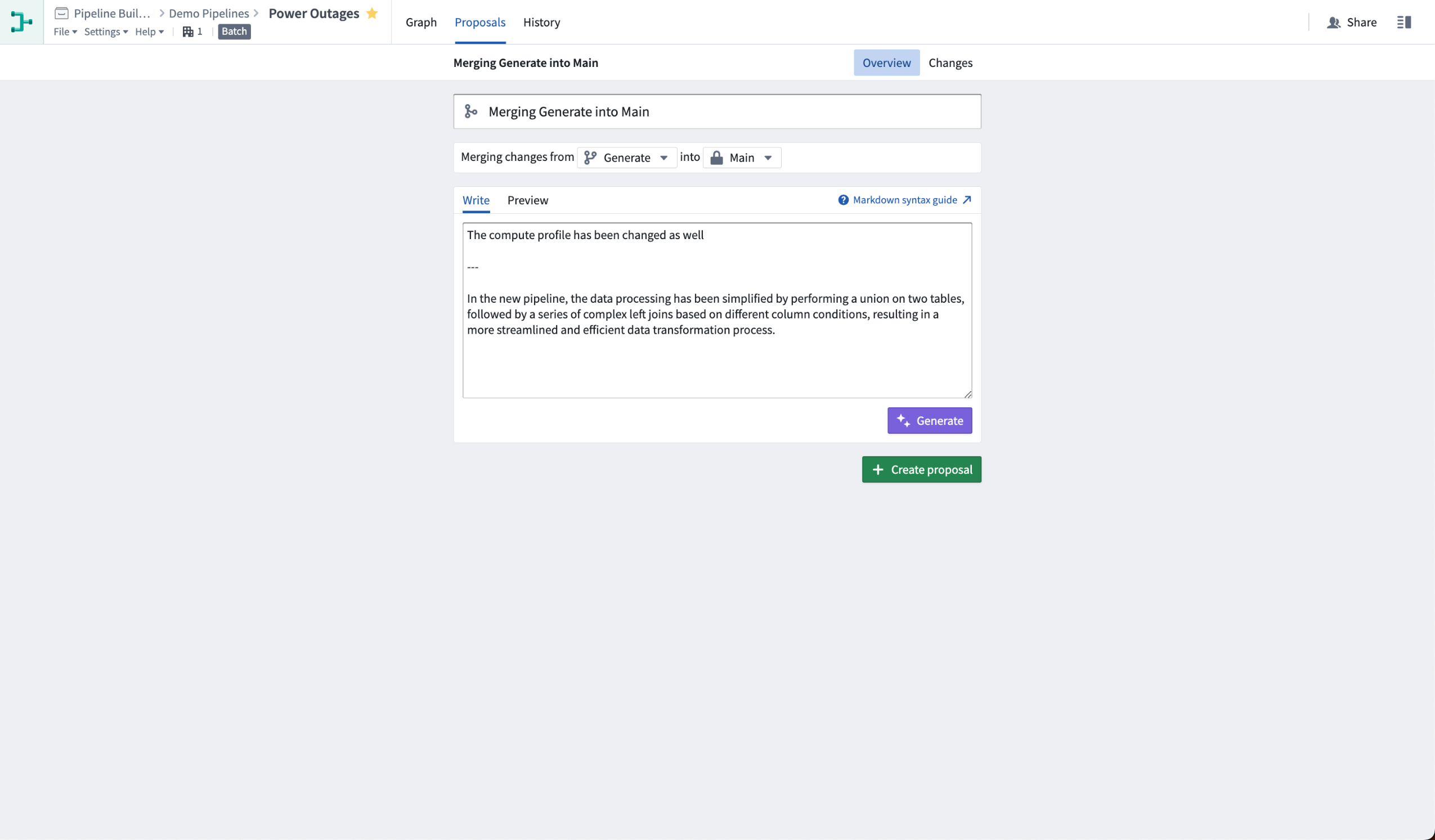
Learn more about our full set of AIP features in Pipeline Builder.
Streaming transforms are now migrating to Java 17 [Migration/Deprecation]
Date published: 2023-10-02
Per the "Streaming transforms migration to Java 17 scheduled end of September 2023 [Migration/Deprecation]" announcement, all streaming transforms are beginning to migrate their runtimes from Java 11 to Java 17 to take advantage of the latter’s improved performance and security posture. This migration will roll out gradually over the next week across Palantir Foundry enrollments.
Notably, the Java 17 runtime introduces a breaking change that prevents reflective access to members of internal JDK classes. As a result, we have taken measures to restore the old access behavior for all core Flink functionality to prevent adverse impact from the change except in the case where user-authored code (such as a Foundry UDF definition) accesses a restricted class and has not yet been remediated. Where a stream is affected, the stream build will fail with an exception containing the following message:
java.lang.IllegalAccessException: class <some class name> cannot access class <internal JDK class name> (in module <internal module>) because module <internal module> does not export <internal JDK package> to unnamed module @<module id>.
If a stream fails in this way and is a UDF transform, review the instructions in the related previous announcement as linked above to identify and remove the component making the illegal access.
Should the failing stream not be a UDF transform, contact your Palantir administrator for assistance remediating the affected stream.
Additional highlights
Data Integration | Code Repositories
Date published: 2023-10-31
Code Repository Landing Page | View all Code Repository pull requests in one place with the new landing page. Instead of searching through individual repositories, you can now use the landing page to search the platform in seconds, as well as keep track of incoming review requests and the status of your own pull requests at a glance.

Data Integration | Code Repositories
Date published: 2023-10-31
Enhanced Function Input Management | Users can now save function inputs for later use in Code Repositories by ticking the Save inputs after execution checkbox before running a function. This feature is available for both live preview and published functions. Saved configurations are stored under the current working branch and are unique to each user. Additionally, the Functions panel has been updated for a more intuitive user experience, with clear separation between the Inputs and Output sections. Finally, navigation tabs for easy acscess to panel menus have been introduced.

Model Integration | Modeling
Date published: 2023-10-31
Model Inference History | Live deployments in the Modeling Objective app can now be configured to record all input requests and output responses to a model inference history dataset. This helps simplify the creation of model monitoring, continuous training, and auditing flows.
Artifact Repositories
Date published: 2023-10-31
Support for npm packages in Artifacts | Users can now publish npm packages within Artifact repositories by following a new set of instructions provided in Artifacts app. In addition, it is now possible to search for npm packages, both within existing Artifacts repositories, and across the global npm ecosystem by using the search bar on the Artifacts landing page.

Data Integration | Code Repositories
Date published: 2023-10-23
Enable Dark Mode for Code Repositories | Users can now enjoy a consistent dark mode experience throughout Code Repositories. To enable dark mode, navigate to your repository's settings and set the syntax highlighting theme to Dark. This enhancement applies dark mode to all elements within Code Repositories.

Data Integration | Pipeline Builder
Date published: 2023-10-23
Large string preview | Dataset preview now contains a panel for previewing large strings, structs, maps and arrays. Right-select a cell in the preview table and choose View cell content to open a text panel with the full string, struct, map or array displayed. The panel supports browser search (Cmd+F or Ctrl+F) for searching through the text and has a switch to toggle line wrapping.

App Building | Slate
Date published: 2023-10-19
Improved asynchronous support in Slate | Slate now offers improved asynchronous function support, allowing users to efficiently manage promise-based operations. This enhancement enables the creation of JavaScript timeouts using promises and async/await functions from various libraries, leading to better performance and increased flexibility in user workflows.
Data Integration | Pipeline Builder
Date published: 2023-10-19
Preview panel for large values | A new panel in Pipeline Builder can be used to preview large strings, structs, maps, and arrays. This formatted text area allows users to easily navigate and search through the content.
Quicksearch
Date published: 2023-10-17
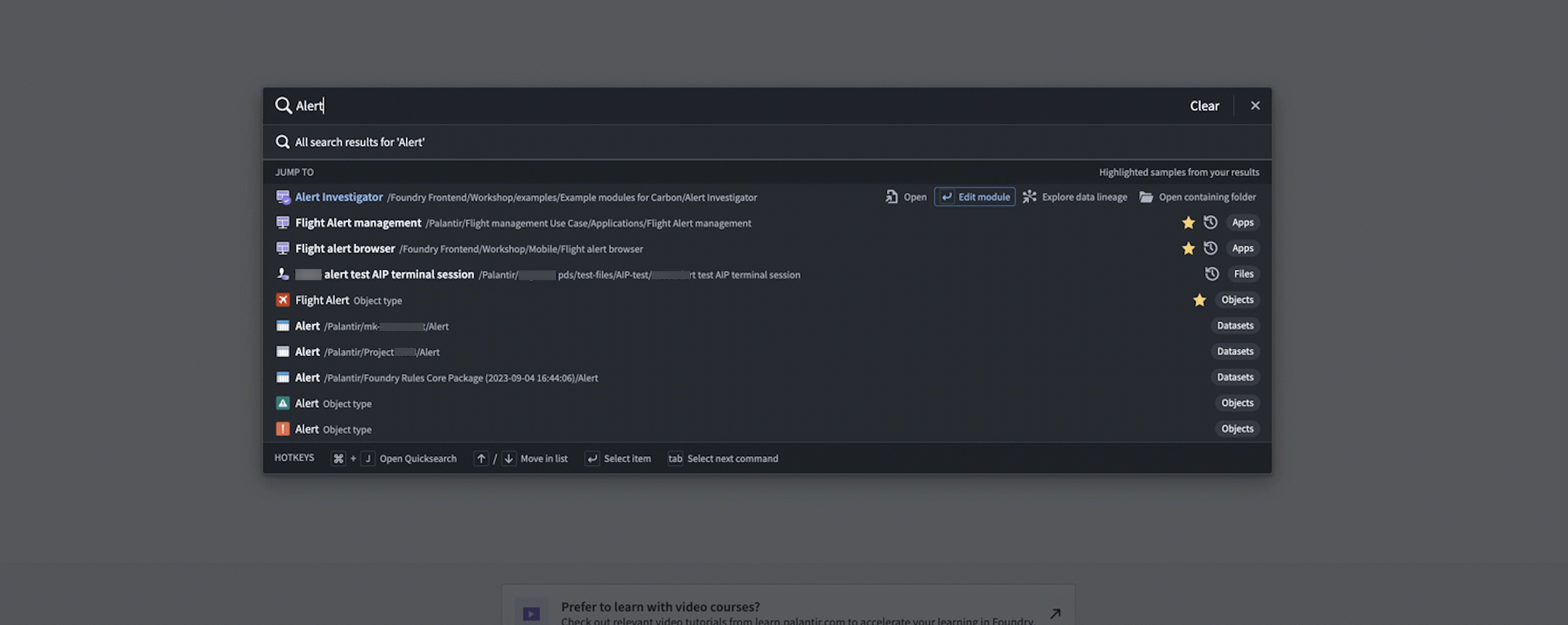
Improvements to Quicksearch | Users can now rapidly perform navigation commands via tab, providing a more efficient and user-friendly experience.
For instance, an Object Type Quicksearch result can be opened in the Ontology Manager instead of Object Explorer, bringing a user directly to Object Type configuration information, instead of search results. Builders may also navigate directly to the Editor interface in Slate and Workshop, rather than opening the module and then separately opening the editor. Finally, the streamlined search workflow enables users to open the containing folder for any Foundry resource, instead of opening the resource directly.
Interventions
Date published: 2023-10-17
Improved Upgrade Assistant Responsiveness | Experience faster resource loading times in the Upgrade Assistant, with up to a 95% improvement when filtering by "resources assigned to me". This update provides a more responsive and efficient user experience.
Data Integration | Data Connection
Date published: 2023-10-17
Google Ads Source Now GA | The Google Ads source type is now generally available, supporting the syncs capability. Users can seamlessly sync data from Google Ads to Foundry datasets, enhancing data integration and analysis.
Data Integration | Data Connection
Date published: 2023-10-17
Enhanced Webhooks with Attachment Support | Users can now include an attachment parameter when using Webhooks with Actions, enabling the ability to send files to external APIs as part of executing a Foundry action. This enhancement provides greater flexibility and integration options for users working with Webhooks and Actions.

Data Integration | Data Connection
Date published: 2023-10-17
Interactive Windows Agent Upgrade Instructions | This release introduces interactive instructions for upgrading Windows agents in the Data Connection application. To access these instructions, navigate to an outdated Windows agent and visit the Agent Settings -> Configuration sub-tab. Users will now find step-by-step guidance on upgrading their agents, enhancing the overall user experience. Learn more about running agents on Windows hosts.

Data Integration | Data Connection
Date published: 2023-10-17
Amazon SQS Connector GA | The Amazon SQS connector is now generally available in Foundry. Users can access this connector through the "New Source" workflow in Data Connection, enabling streaming syncs and streaming exports capabilities.
Data Integration | Data Connection
Date published: 2023-10-17
Cloud identities are now supported as an authentication option for S3 | The S3 connector in data connection now supports using a Cloud Identity to authenticate and access S3. Cloud identities allow you to authenticate to cloud provider resources without the use of static credentials, and where available, it is the recommended way to connect to S3.

Analytics | Contour
Date published: 2023-10-17
Restricted Dashboard Access | Introducing a new analysis setting that limits viewer access to the dashboard. When enabled, users with view-only permissions on the analysis will be unable to navigate to the analysis from the dashboard view.
Security | Projects
Date published: 2023-10-12
Projects in Trash | Users can now view trashed Projects. Permissioned users, including Project owners, can choose to restore or permanently delete the Project.

Analytics | Notepad
Date published: 2023-10-12
AIP in Notepad | AIP can now support with text and list block modification. Users can now easily shorten, change the tone of, spellcheck, and translate their text with the help of AIP.

App Building | Slate
Date published: 2023-10-12
New redirectToUrl action type | Slate now includes a redirectToUrl action type, enabling programmatic redirects to different URLs. This enhancement allows for seamless redirection on page load or when interacting with interface elements.
Foundry Developer Console
Date published: 2023-10-12
Enhanced AIP Integration with Ontology SDK | Where AIP is enabled, users can now add basic AIP logic-backed functions to their Ontology SDK, including functions that take user input and call a model. Support for calling additional tools will be introduced in future updates.
Foundry Developer Console
Date published: 2023-10-04
Python Ontology SDK Supports Aggregations | Users can now aggregate object data with the Python Ontology SDK. Aggregations can range from a simple count() of objects to multiple named aggregations over groups of objects.
Simple example:
num_aircraft = client.ontology.objects.Aircraft
    .count()
    .compute()
Complex example:
cost_statistics = client.ontology.objects.Aircraft
        .groupBy(Aircraft.type.exact())
        .groupBy(Aircraft.dateManufactured.by_days(180))
        .aggregate({
            "most_expensive": Aircraft.unitCost.max(),
            "least_expensive": Aircraft.unitCost.min(),
            "average_cost": Aircraft.unitCost.average(),
        })
        .compute()

Analytics | Contour
Date published: 2023-10-04
Enhanced parameter organization | Users can now effortlessly reorder parameters in the parameters sidebar by dragging and dropping them, providing a more organized and customizable experience for both ungrouped parameters and those within groups.

Analytics | Contour
Date published: 2023-10-04
Enhanced contents panel navigation | The Analysis contents side panel now includes a dedicated section displaying all boards within the selected path, allowing users to easily navigate and rearrange their boards.

Data Integration | Pipeline Builder
Date published: 2023-10-04
Schedule Outputs Directly in Pipeline Builder | Users can now create and edit schedules for their Pipeline Builder outputs directly within the application, streamlining the workflow and eliminating the need to switch between Pipeline Builder and Data Lineage. Simply select a trigger and set of targets or job groups to build, and manage your schedules with ease. Note that schedules with advanced configurations can still only be edited in Data Lineage.
App Building | Workshop
Date published: 2023-10-04
Categorical Series support in Workshop | Workshop's support for time series properties (TSPs) now includes basic support for categorical TSPs. Coupled with the recently added support for creating categorical TSPs in Pipeline Builder and the existing support in Quiver, Vertex, and Object Explorer, this rounds out our first step in supporting categorical TSPs throughout Foundry in a first-class way.
Users can now create string-type Single Value time series summary variables with the First or Last aggregation types currently supported. Users can now also create categorical time series set variables to use as inputs to these summarizers. Categorical time series set variables currently support the time range transform.
String-type time series summary variables can be used in the Metric Card widget, and categorical time series set variables can be used to add a visualization to a Metric Card.
The Object Table widget supports displaying the Last Single Value for a categorical TSP, along with its line for visualization.
Future development work will consider support in the Chart: XY and Map widgets, as well as additional configurability within the Object Table widget and the two variable types.


Administration | Control Panel
Date published: 2023-10-02
Foundry in Ukrainian is now GA | Foundry's Ukrainian translation is now GA. Review the documentation on configuring available languages to enable the Ukrainian language translation.
中文翻译
公告
推出 Ontology 清理工具:精简并优化您的 Ontology
发布日期:2023-10-31
Ontology 清理工具(Ontology cleanup tool)已于 10 月 30 日那周全面上线,旨在通过识别适合删除的对象类型,提高 Ontology 导航的便捷性和搜索性能,同时优化存储成本。
Ontology 清理工具提供以下功能,帮助您高效管理 Ontology:
标记
标记(Flags)帮助您轻松识别需要关注的对象类型。您可以从预定义的列表中选择要启用的标记,并为每个标记分配重要级别,从而根据您的特定需求自定义流程。
自定义标记设置并选择清理配置
操作
Ontology 清理工具提供三种基本操作,以有效处理被标记的对象类型:
- 休眠(Snooze): 在可配置的时间内,临时将对象类型从清理队列中隐藏。这允许您在弃用或删除它们之前,审查并评估其相关性。
- 弃用(Deprecate): 将对象类型标记为已弃用,以表明其已过时。此操作为用户提供了一个过渡期,以便适应替代方案。
- 删除(Delete): 从 Ontology 中永久移除被标记的对象类型,从而释放存储空间并提高 Ontology 的整体性能。
选择要休眠、弃用或删除的对象类型
保存或提议更改
当识别出多余的对象类型后,您可以直接标记并将所需的更改保存到 Ontology,确保立即执行清理过程。或者,您可以创建一个提案(proposal),以便在进行任何修改之前,促进与其他利益相关者的协作决策和反馈收集。
请参阅关于 Ontology 清理工具 的 Foundry 文档,并开始优化您的 Ontology。
推出 AIP 生成的 Vega 图表
发布日期:2023-10-31
Quiver 使用户能够使用 Vega ↗ 或 Vega-Lite ↗ 库创建完全可定制和交互式的可视化。然而,用 JSON 格式编写有效的 Vega 图表配置容易出错。我们很高兴地宣布,现在可以使用 AIP,只需用自然语言描述所需的图表或更改,即可生成 Vega 图表配置。
描述所需的 Vega 图表
要使用 AIP 帮助生成您的 Vega 图表,只需提供一个提示(prompt)并选择 配置(Configure)。AIP 将提出一个建议供您审查。要接受建议,请选择 应用(Apply)。如果您希望 AIP 提出替代建议,请编辑您的提示,然后选择 重新配置(Reconfigure)。
在下面的示例中,AIP 根据提示建议了一个图表的配置,该图表包含两个感兴趣的数值属性:咖啡因和 pH 值水平。
基于给定提示的 AIP 建议
要接受 AIP 提出的更新,请选择 应用(Apply)。Vega 图表将根据更新后的 Vega 规范渲染可视化。
AIP Vega 图表配置
在现有图表基础上构建
AIP 能够识别并区分您提示中包含的抽象概念,并利用这些信息来帮助生成或修改 Vega 图表。例如,AIP 可以使用对先前生成图表特征的引用,允许您在现有图表的基础上“进行构建”。
在下图中,用户提供了提示:“图上的两条线将点分成四个象限。为每个象限着色不同的颜色”。AIP 识别出由垂直线和水平线定义的区域是象限,即使当前图表配置不包含任何象限的定义或配置。
AIP 可以使用包含对先前生成图表引用的提示
AIP 准确地生成了所需的图表,与用户提示保持一致,该图表建立在初始图表之上。
AIP 生成的 Vega 图表
使用 AIP 生成创建 Vega 图表
使用 AIP 生成的 Quiver 分析图可以包含 Vega 图表。要指示 AIP 生成 Vega 图表而不是原生的 Quiver 可视化(如折线图或散点图),请在提示中明确指出 AIP 应返回“Vega 图表”。例如,一个准确的提示可以是:“使用 vega 图表在散点图上显示咖啡因与 ph 值的关系”。
查看 Vega 图表文档。
注意:AIP 功能的可用性可能会发生变化,并且可能因客户而异。
推出 Marketplace [GA]:发现并安装 Foundry 产品
发布日期:2023-10-19
Foundry Marketplace 使技术和非技术构建者都能访问预构建的解决方案,以解决您组织中最棘手的问题。该功能将于 10 月 30 日那周对所有注册用户开放,用户可以访问 Marketplace,利用由 Palantir 构建的 Foundry 产品以及由您组织中的高级用户设计的产品功能。
无论您是希望直接使用某个产品,还是将其作为下一个自定义用例的起点,都可以利用 Marketplace 产品库,比以往任何时候都更快地启动您的下一个项目。Marketplace 可以支持以下工作流:
- 在您组织的不同部门安装基于 Workshop 的任务管理应用程序,并使用每个组织的输入数据。
- 安装数据连接器和 Ontology,使您的客户能够将自己的数据接入 Foundry 并参与生态系统。
- 在您的预发布和生产环境中安装 Pipeline Builder 管道,以促进受控的发布管理工作流。
使用“产品”选项卡浏览 Marketplace 并安装相关产品。
简洁明了的产品发现
Marketplace 商店界面有助于轻松发现可供安装的产品。所有新的 Marketplace 用户默认有两个可用商店:
- Foundry 商店(The Foundry Store),提供 Palantir 构建的产品。例如,Mapbox 边界数据集。
- 用于培训目的的参考资源(Reference Resources)。例如,Workshop 设计中心。
如果您的组织是 Marketplace 的早期采用者,您的 Foundry 实例上可能已经存在其他商店。
浏览来自 Palantir 以及您组织内部其他人的 Foundry 产品
由您的偏好驱动的定制产品安装
安装很简单。受益于 Marketplace 的引导式安装工作流 - 选择所需的安装位置,并通过直观的界面映射您的输入。创建内容(Workshop 应用程序、Pipeline Builder 管道等)所需的输入会自动显示,产品所有者提供的自定义点(例如,可选地显示或隐藏应用程序特定部分的配置)也会自动显示。这使您能够创建由组织数据和偏好驱动的定制产品安装。
只需按照步骤完成安装,并立即开始使用您新的 Foundry 资源。
由您的偏好引导的直观产品安装过程
具有精细控制的自动产品升级
使用自动升级、维护窗口和发布渠道,使您的产品安装与产品所有者提供的最新内容保持同步。
- 维护窗口: 仅在您和您的用户方便时接受升级。例如,您可以选择仅在非工作时间进行升级,以保持操作流畅。
- 发布渠道: 您可以为每个安装选择唯一的发布渠道。例如,您可能希望使用特定部门的数据创建同一产品的多个安装,或者配置一个发布管理工作流,其中每个安装跟踪不同的发布渠道。
受控的产品升级
Marketplace 案例研究:J.D. Power 的激励警报系统
在 J.D. Power,Marketplace 用于将用例安全部署到其在 Foundry 上的汽车生态系统客户。例如,他们新开发的智能警报系统跟踪特定车辆的销售活动、竞争动态和宏观经济趋势,使原始设备制造商(OEM)、经销商和金融公司能够基于实时、超本地数据优化激励策略。
Marketplace 允许 J.D. Power 安全地分离警报系统(及其他系统)的开发版本和生产版本,使他们能够迭代其 Foundry 产品,并在准备就绪时自动将版本发布到生产环境。随着产品和用户需求的发展,Marketplace 还为 J.D. Power 提供了根据每个生态系统参与者的需求自定义每个产品安装的可选性。
开发路线图上有哪些内容?
Foundry DevOps 的发布,这是我们用于创建和管理通过 Marketplace 安装的产品的工具集,目前处于有限测试阶段。
在 2024 年晚些时候,我们将支持发布到中央 Marketplace 商店,以便您可以让其他 Foundry 用户购买(如适用)和安装您的产品。
在文档中了解更多关于 Marketplace 的信息。
使用缓存环境在代码仓库中实现更快的 Python 环境构建 [GA]
发布日期:2023-10-19
我们引入了快速加载环境(fast loading environments),这是一种新的缓存机制,可以显著加快代码仓库中 Python 转换的 Python 环境构建时间。该缓存机制现已对所有堆栈全面可用,平均使环境构建时间加快 6 倍。因此,典型 Python 转换的总构建时间现已减少到约 34 秒,比以前的构建时间快 2 倍。
典型 Python 转换的总构建时间已平均减少到约 34 秒
显示启用和未启用缓存时的环境构建时间的指标
对于大型环境,可以实现更快的环境构建,如上图所示。例如,对于一个 10GB 的大型环境,使用缓存的构建时间约为 60 秒,而不用缓存则需要约 480 秒。这比不使用缓存时快 8 倍!
用户现在可以通过升级现有仓库,在所有堆栈上体验快速加载环境。
在 Quiver 中引入物化
发布日期:2023-10-17
物化(Materializations)是 Quiver 中的一种新数据类型,为分析师提供了一种大规模转换、可视化和分析 Ontology 数据的方法,其能力可以超越使用转换表时数据连接和转换存在的 5 万行限制。
具体来说,物化允许您:
如何使用物化?
使用物化卡片(Materializations cards)进行大规模分析,这些卡片将对象集作为输入,让 Quiver 在后台无缝转换对象集。从对象集出发,使用位于新的 物化 下一步操作下的任何卡片,或使用 对象集物化 卡片执行显式转换。
物化卡片菜单
要找出支持物化卡片的底层数据集基元,只需将鼠标悬停在数据源图标上即可追踪。
在物化卡片中快速追踪数据到其底层数据集
用于灵活分析的表达式和连接
除了 Quiver 中新增的物化卡片外,您还可以考虑通过以下方式解锁新的功能和工作流:
- 使用表达式卡片(类似于 Contour 表达式面板)来派生新列或执行复杂过滤。窗口函数等高级功能可解锁新的分析类型。
- 使用连接卡片对对象数据大规模执行左、右、内、全连接。
- 将结果与现有的 Quiver 卡片(如转换表和 Vega 图表)结合,以支持新的工作流。
物化连接卡片配置示例
在表达式卡片中选择 AIP 配置 选项*,使用自然语言创建表达式,例如:
- “计算一个名为 'total user score' 的新列,方法是将两个分数列相乘”
- “计算 'total user score',定义为将每个有机类别的两个分数列相乘”
- “计算每个有机类别的平均可持续性得分”
- “将 Organic 列中的值更新为驼峰式大小写”
- “将两个产品名列连接到一个列中”
- “计算每个商店每种产品的总收入,考虑价格和销售数量”
在 AIP 窗口中输入自然语言提示
AIP 生成与自然语言提示匹配的表达式
查看物化卡片、Quiver 数据模型的数据类型或物化以获取更多信息。
*:AIP 在有限试用期内可用。
Foundry 新闻通讯和产品反馈渠道:现已开放注册 [GA]
发布日期:2023-10-17
我们很高兴地宣布发布Foundry 新闻通讯和产品反馈渠道,现在可以在用户设置中的通知偏好的更新与新闻选项卡下注册。
Foundry 新闻通讯将直接把新产品、功能和平台改进的摘要发送到您的收件箱。第一期(GA)Foundry 新闻通讯将于 2023 年 11 月发送给订阅者。您也可以选择加入新发布的产品反馈渠道,该渠道提供了直接与寻求针对性用户输入的 Palantir 工程师联系的机会。此更新提供了一个令人兴奋的机会,让您的声音被听到,并在塑造 Foundry 生态系统的持续发展中发挥作用。
通过此类可选订阅共享的新闻通讯和其他内容将发送到与 Foundry 用户帐户关联的电子邮件地址。请注意,通知信息以及电子邮件地址仅存储在 Foundry 注册的边界内,不会为通知通信而集中收集。
订阅或更改通知偏好的步骤如下:
- 打开您的 Foundry 实例
- 导航至用户设置:
- 选择左下角的帐户
- 在弹出的菜单中选择设置(齿轮图标)
- 进入用户设置页面后,导航至通知选项卡
- 在通知下,选择更新与新闻选项卡
- 通过勾选相应的复选框,订阅 Foundry 新闻通讯频道、产品反馈频道,或两者都订阅(全部订阅)
- 要取消订阅 Foundry 新闻通讯频道和/或 产品反馈频道,请取消选中相应的复选框
帐户设置
通知
平台管理员注意: 平台管理员还应在 Foundry 控制面板的联系信息设置中注册其电子邮件地址,以便接收与平台管理、用户支持、服务中断公告和安全更新相关的重要通信。请注意,这些通信专为平台管理员设计,与上述面向所有用户的 Foundry 新闻通讯和产品反馈渠道是分开的。
Workshop 中的小部件生成,由 AIP 驱动
发布日期:2023-10-17
现在,借助 AIP 的支持,您可以使用自然语言提示在 Workshop 中生成特定的小部件。支持的 Workshop 小部件类型会通过小部件选择器对话框中显示的 AIP 图标清晰指示。
使用时,只需用自然语言描述您想要添加到模块中的小部件,AIP 就会生成一个小部件预览。然后您可以选择将其合并到模块中。如果不满意,请按重试返回文本提示,您可以在其中提供更多澄清信息。
示例小部件类型列表,标有 AIP 图标以指示支持使用 AI 生成小部件
通过使用自然语言由 AIP 生成的示例 Workshop 小部件
推出出站应用程序 [GA]
发布日期:2023-10-17
出站应用程序(Outbound applications)为管理员提供了一种新方法,用于管理从 Foundry 构建的工作流到外部系统的 OAuth 2.0 连接。
在组织级别管理,出站应用程序代表 Foundry 作为 OAuth 2.0 客户端所需的一组配置。该应用程序向另一个可以作为 OAuth 2.0 服务器的系统发出请求。
在控制面板中创建出站应用程序
出站应用程序在控制面板的组织设置下的出站应用程序中创建。要查看此页面,您必须有权访问管理出站应用程序工作流,该权限默认授予控制面板中的 Organization administrator 角色。
如果您有权访问多个组织,请确保选择您要创建出站应用程序的组织。此组织中所有有权在 Data Connection 中设置源的用户都将能够选择任何出站应用程序作为其连接的授权机制。
点击式配置
出站应用程序的构建侧重于简化工作流。要创建和配置新的出站应用程序,用户与直观的逐步向导进行交互。可以根据需要轻松调整设置,用户会收到输入格式的交互式验证。
创建出站应用程序工作流
支持直接云和本地 OAuth 服务器
要设置可通过 Internet 访问的出站连接,建议使用直接连接。
对于需要非标准令牌握手的 OAuth 服务器,也支持通过使用代理运行时的 REST API 源进行自定义基于 Webhook 的握手。此方法需要编写您自己的请求来执行 OAuth 2.0 握手。
使用出站应用程序
创建并启用出站应用程序后,它可以用作 REST API 源中域的身份验证方法。配置域时,选择 OAuth 2.0,然后从下拉菜单中选择所需的出站应用程序。
在 REST API 源中设置域的身份验证方法。
任何使用配置了 OAuth 2.0 的域的 Webhook,在用户首次尝试运行它时,都会为每个用户显示一个交互式提示。Webhook 通常由 Workshop 中的操作触发。运行操作时,将提示用户通过登录 OAuth 2.0 服务器来授权 Foundry 代表他们与系统交互。
提示用户授权 Foundry 与系统交互
如果配置了令牌刷新工作流,除非在外部系统中撤销授权或重置出站应用程序,否则用户不太可能再次看到此提示。如果未配置刷新工作流,则最终用户将在生成的令牌过期时看到身份验证弹出窗口。令牌通常会在几分钟或几小时内过期,我们建议使用刷新流程以获得更好的用户体验。
有关出站应用程序的更多信息,请参阅文档。
推出模型资产 [GA]
发布日期:2023-10-17
模型资产(Model Assets)是将所有机器学习(ML)和人工智能(AI)模型集成到 Foundry 中的推荐方法。模型资产提供了一种一致的方法,用于将模型集成到 Foundry 的 ModelOps 应用程序、建模目标中,以及通过 Workshop、Slate、数据转换和模型函数直接集成到运营应用程序中。
模型导入图
如何使用模型资产?
您可以通过多种方式创建模型资产,以在 Foundry 内部署任何模型,包括:
- 在 Foundry 中使用代码仓库训练的模型
- 在 Foundry 外部训练并作为非结构化数据集保存到 Foundry 的模型文件
- 在 Foundry 外部容器化并推送到 Foundry Docker 注册表的模型
- 在 Foundry 外部训练和托管的模型
模型资产的一致接口使机器学习工程师、数据科学家和项目团队能够轻松地在 Foundry 应用程序中使用模型。团队可以更新模型权重、架构甚至托管基础设施,而无需迁移或停机。Foundry 自动跟踪和维护数据和模型的谱系,提供全面的项目历史记录,其中包括所有模型、其性能指标和发布。
使用新的 palantri_models Python SDK 中定义的新 ModelAdaptor 接口,以解锁模型资产的所有优势。
Foundry 中的下一代模型
现在推荐使用模型资产(使用 palantri_models 编写)而不是数据集模型(使用 foundry_ml 编写)。模型资产不仅提供与数据集模型相同的功能,还提供附加功能,包括:
- 更高的灵活性,使数据科学家能够通过模型适配器定义自定义模型序列化、反序列化和推理逻辑
- 通过自动将模型依赖项与模型捆绑在一起,简化依赖项管理,无需共享 Python 库、自定义阶段和在部署时重新解析环境
- 用于连接到外部托管模型的原生安全凭据和出口策略
- 在 Rubix(Palantir 的 Kubernetes 环境)中执行容器化模型逻辑
- 支持多输入和多输出模型转换
要开始使用模型资产,请查看更新的模型训练教程,以及以下补充文档:
我们期待您对模型资产的反馈,如果您遇到任何问题或希望提交功能请求,请随时联系 Palantir 支持。
Blueprint 5 现已在 Slate 中可用
发布日期:2023-10-17
我们很高兴地宣布,Slate 现在包含 Blueprint 5 ↗,为您在 Slate 文档中使用提供最新的样式选项。
Slate 中的编辑体验也已更新,解锁了与平台其余部分的可重用性,并为应用程序构建者提供了更现代的样式选项,包括:
- 更新的图标库,包含新的图标字体。有关使用详情,请参阅 Blueprint 5 中图标的 CSS API ↗。
- 现代化的样式和字体,以与平台其余部分匹配。(请注意,Blueprint 不附带自己的字体 ↗;可用字体基于 Palantir 的品牌。)
包含使用 Blueprint 1、3 或 4 CSS 类的现有应用程序将保持不变,并且外观应与预期一致。但是,我们建议用户尽可能更新到最新的设计库,以利用最新功能。
以前的 Slate 界面
新的 Slate 界面
Slate 仍在迁移以使用 Blueprint 5 API 的过程中,因此外观和感觉将持续更新。敬请期待更多改进。
有关 Slate 的更多信息,请参阅文档。
代码仓库的新 AIP 驱动功能
发布日期:2023-10-12
我们很高兴地宣布代码仓库的三项新 AIP 驱动功能:AI 错误增强器(GA)、代码仓库 AIP(GA)和代码自动补全(beta)。有关每项功能的更多详细信息,请查看代码仓库中的 AIP 功能文档。要使用这些功能,您的堆栈必须启用 AIP。
AI 错误增强器 [GA]
在代码仓库(检查和预览)和构建(作业跟踪器)中,您现在可以使用解释选项来获得更全面的错误解释以及可用的代码更改建议。此外,您还可以查看 LLM 用于生成解释和推荐解决方案的源信息。
代码仓库 AIP [GA]
代码仓库中的 AIP 现在可以解释代码片段或整个文件,以帮助您更好地理解代码、查找代码中的错误,或将代码翻译成另一种语言,如 Python、SQL、Mesa 和 Java。要访问,请选择相关的代码片段并打开询问 AIP 助手菜单,或在编辑器上右键选择并选择所需选项。
您可以通过导航至设置(紫色齿轮图标)> 偏好 > AIP 功能来打开或关闭询问 AIP 助手功能。
代码解释
查找错误
将代码翻译成其他语言
代码自动补全 [Beta]
如果您正在处理 Python 仓库,代码自动补全现在可以通过解析当前打开的文件为您自动生成代码。按 Tab 键查看并接受自动生成的代码;要忽略,请按 Esc 键或开始输入其他内容。您可以直接在窗口底部的编辑器状态栏中,或通过导航至设置(紫色齿轮图标)> 偏好 > AIP 功能来打开或关闭 AIP 自动补全。请注意,此测试版功能目前仅对 Python 仓库启用。
有关每项功能的更多详细信息,请查看代码仓库中的 AIP 功能文档。
推出虚拟表 [GA]
发布日期:2023-10-12
虚拟表(Virtual Tables),一种以虚拟化方式处理来自受支持平台数据的功能,现已全面可用。虚拟表引入了一种新的数据集成范式,因为它消除了将源数据存储为 Foundry 数据集的需要,同时使您能够立即构建结合来自不同源系统数据的工作流。
对于与受支持数据源的直接连接,您现在有以下两个选项:
- 同步数据集: 将源数据复制到 Foundry 数据集中,或
- 注册虚拟表: 创建一个充当指向源数据指针的虚拟表。
虚拟表可以在 Data Connection 的虚拟表选项卡下设置。
以下源支持虚拟表: | 源 | 支持的格式 | 手动注册 | 自动注册 | |---------------------------------------------------|----------------------------------------------|---------------------|------------------------| | Amazon S3 | Delta, Parquet | 是 | | | Azure Data Lake Storage Gen2 (Azure Blob Storage) | Delta, Parquet | 是 | | | BigQuery | 表、视图、物化视图 | 是 | 是 | | Snowflake | 表、视图、物化视图 | 是 | 是 |
注册后,虚拟表可以在各种 Foundry 应用程序中使用,最值得注意的是:
- Contour 用于分析
- Pipeline Builder 用于管道构建,以及创建下游 Foundry 数据集或对象
- [即将推出] Python 转换 支持在代码仓库中使用
通常,虚拟表可以通过以下两种方式之一来支持大多数常见的 Foundry 工作流:
- 直接与虚拟表交互,或者,
- 创建一个由虚拟表支持的转换管道,该管道输出 Foundry 数据集或对象。这些输出可以像往常一样在平台中使用。
有关更多详细信息,请查看虚拟表文档。
应用程序访问取代 Foundry Suite [迁移]
发布日期:2023-10-04
控制面板中的 Foundry Suite 部分正在迁移到一个名为应用程序访问(Application access)的新页面,该页面将作为自定义对 Foundry 内特定工具访问权限的新视图。先前通过 Foundry Suite 配置的任何访问权限仍然适用,对用户没有更改。Foundry Suite 导航条目将重定向到应用程序访问,并将在几周内移除。
新的应用程序访问视图展示了每个应用程序的生命周期阶段,按生命周期阶段对每个类别的应用程序进行分组。当应用程序的生命周期阶段发生变化时,它会在页面顶部突出显示。此功能允许您相应地调整访问权限,例如在应用程序正式发布时启用它,或限制对处于日落或计划弃用阶段的应用程序的访问。默认情况下,当生命周期阶段发生变化时,应用程序的启用状态将延续,除非应用程序被弃用,在这种情况下,它默认为禁用。
此外,应用程序现在显示在单个页面上,这提供了更好的概览,并允许您更快地找到特定应用程序。应用程序仍将按类别分组,但这些类别不再用于访问控制,因为所有应用程序都是单独配置的。通过选择管理多个应用程序切换开关,您可以批量管理多个应用程序并为每个应用程序设置相同的访问限制。
Pipeline Builder:使用 AIP 生成管道
发布日期:2023-10-04
AIP 现在可以帮助您在 Pipeline Builder 中生成新的数据转换逻辑。通过一系列用户提示,AIP 可以访问 Pipeline Builder 中可用的全套专有数据转换,并推荐最适合您特定需求的转换。由 AIP 增强的管道与您之前编写的管道行为相同,能够与您现有的工作流无缝集成。
与 Palantir 的安全标准一致,此功能以完全透明的方式运行。AIP 提供建议理由的解释,使用元数据生成逻辑,所有这些都不会暴露底层数据。
要使用生成功能,请选择 Pipeline Builder 图表顶部中央带有两颗星的紫色 AIP 图标。按照弹出窗口中的说明,选择图表上的节点作为输入。按住并选择节点以将其添加到您的选择中或从中移除。接下来,输入供 AIP 评估的提示,然后选择生成开始运行。
这将返回一个或多个以紫色突出显示的转换节点,以及生成的转换的描述。
要查看您最近的提示,请选择输入框并选择一个条目以重试。这将自动重新选择相关的输入。
对更改满意后,打开一个提案以将其合并到主分支。选择生成按钮以提示 AIP 自动生成您的提案描述。
在生成自动描述之前,您还可以选择包含附加上下文、提请注意特定更改,甚至开始在文本框中编写粗略的提案描述。AIP 将使用您提供的信息来增强其提案描述。生成的描述将添加到您的文本下方,并带有清晰的分隔。
了解有关我们在 Pipeline Builder 中的全套 AIP 功能的更多信息。
流式转换正在迁移到 Java 17 [迁移/弃用]
发布日期:2023-10-02
根据"流式转换迁移到 Java 17 计划于 2023 年 9 月底进行 [迁移/弃用]" 公告,所有流式转换开始将其运行时从 Java 11 迁移到 Java 17,以利用后者改进的性能和安全态势。