Announcements(公告)
REMINDER: You can now sign up for the Foundry Newsletter to receive a summary of new products, features, and improvements across the platform directly to your inbox. For more information on how to subscribe, see the Foundry Newsletter and Product Feedback channels announcement.
Foundry Newsletter and Product Feedback channels: Available for sign-up now [GA]
We are excited to announce the release of the Foundry Newsletter and Product Feedback channels, available now for sign-up by navigating to User Settings > Notifications > Updates & News.
The Foundry Newsletter will deliver a summary of new products, features and improvements across the platform, directly to your inbox. The first (GA) Foundry Newsletter will be sent to subscribers mid-November 2023. You can also opt-in to the newly-released Product Feedback channel, which provides opportunities to connect directly with Palantir engineers seeking targeted user input. This update presents an exciting opportunity to have your voice heard and play a role in shaping ongoing developments across the Foundry ecosystem.
Newsletters and other content shared through these opt-in subscriptions will be sent to the email address associated with the Foundry user account. Note that notifications information, as well as email addresses, are stored solely within the boundaries of the Foundry enrollment and not collected centrally for Notifications communications.
Steps to subscribe or change your notification preferences are as follows:
- Open your Foundry instance
- Navigate to User Settings:
- Select Account in the bottom left corner
- Select Settings in the pop-up menu (gear icon)
- Once on the User Settings page, navigate to the Notifications tab
- Under Notifications, select the Updates & News tab
- Subscribe to the Foundry Newsletter channel, the Product Feedback channel, or both (Subscribe to all) by checking the associated box
- To unsubscribe from the Foundry Newsletter channel and/or the Product Feedback channel, deselect the associated checkbox
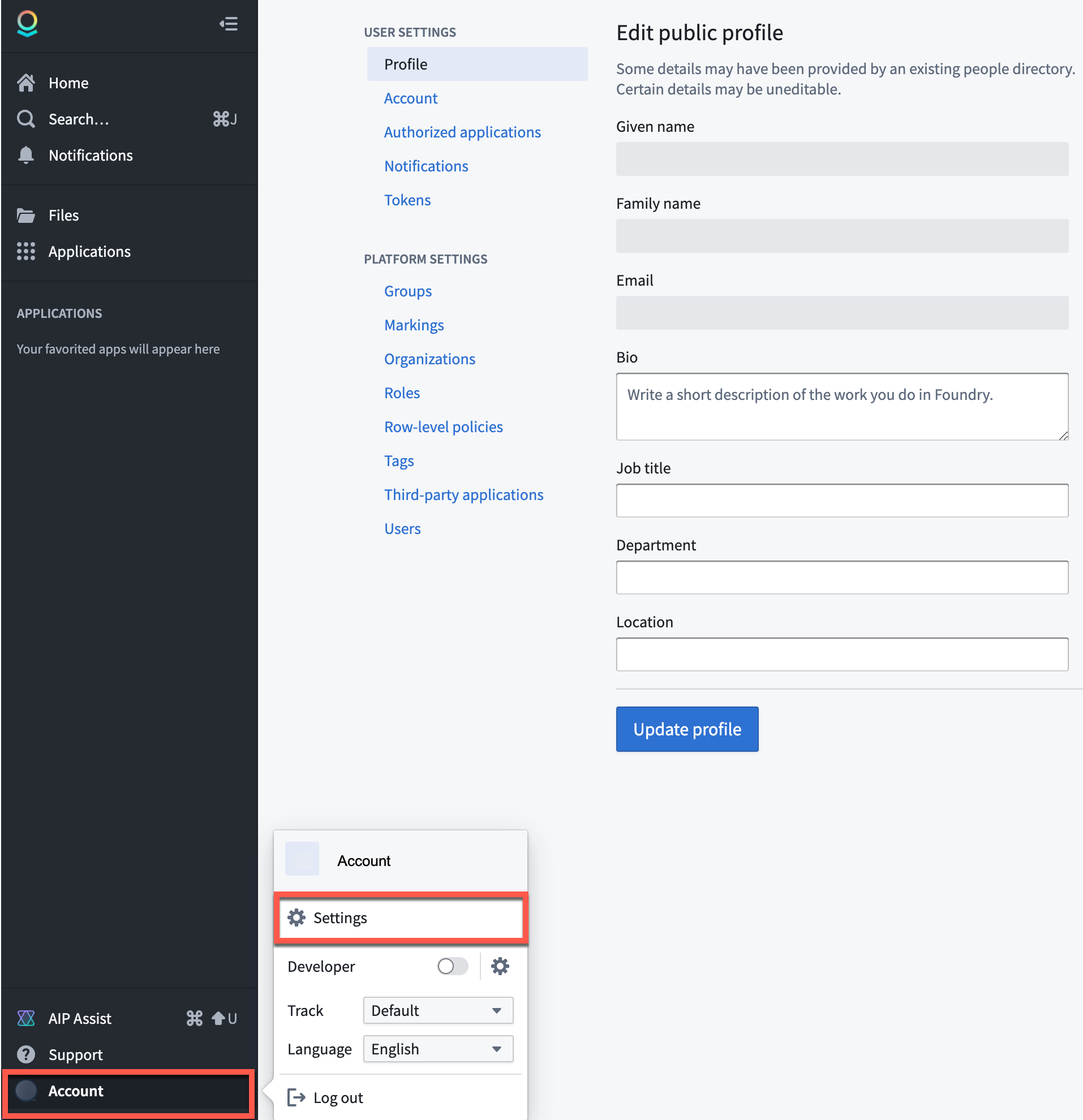
Account settings
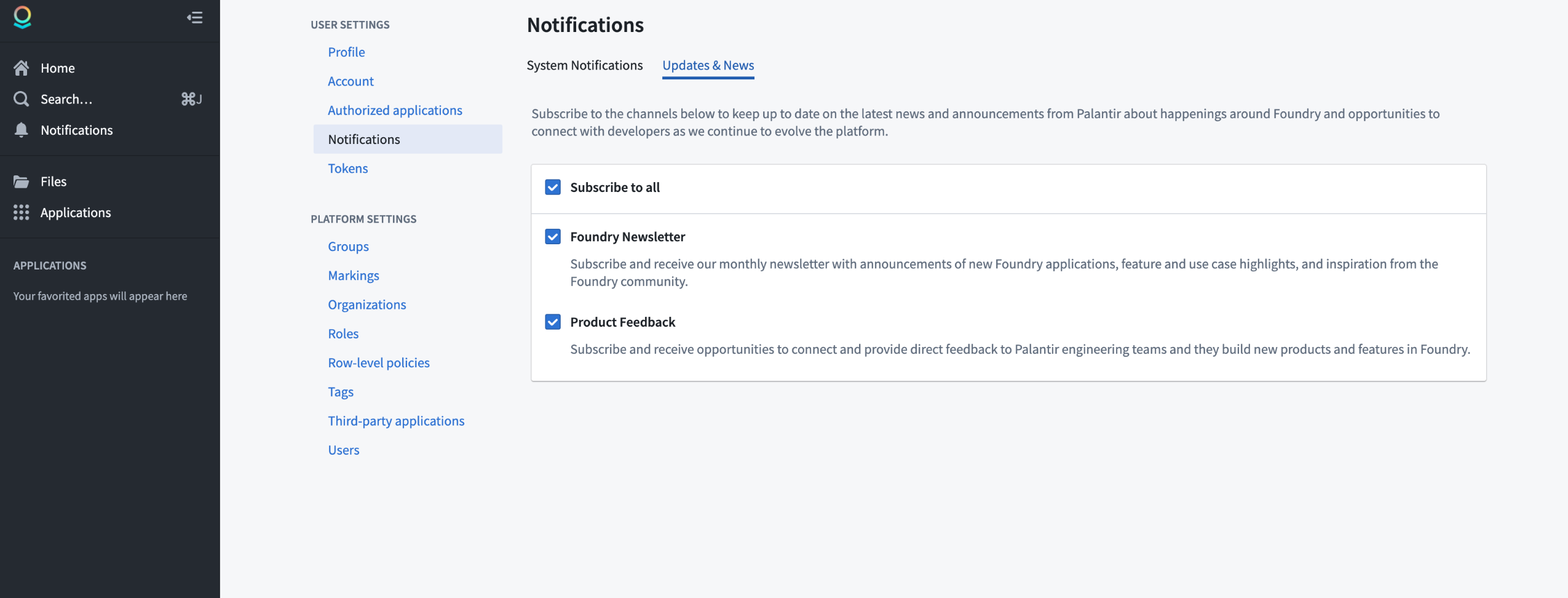
Notifications
Note for platform administrators: Platform administrators should also register their email addresses in the Foundry Control Panel settings for Contact information in order to receive important communications related to platform administration, user support, service disruption announcements, and security updates that are designed for platform administrators and separate from the Foundry Newsletter and Product Feedback channels (designed for all users) described above.
Introducing Approvals tab in Control Panel: Streamlined workflow for sensitive operations
Date published: 2023-11-30
The Approvals inbox has now been integrated into Control Panel to support Control Panel-related workflows, allowing a seamless and centrally-managed approval request review of your sensitive operations. This Control Panel integration provides version control for security configurations, enabling administrators to trace the history and rationales behind modifications made, while an added layer of visibility guarantees that teams can easily monitor and assess updates to security settings, thereby contributing to the maintenance of a secure and compliant environment. Starting now, you can review network ingress configuration requests, with additional workflows in active development.
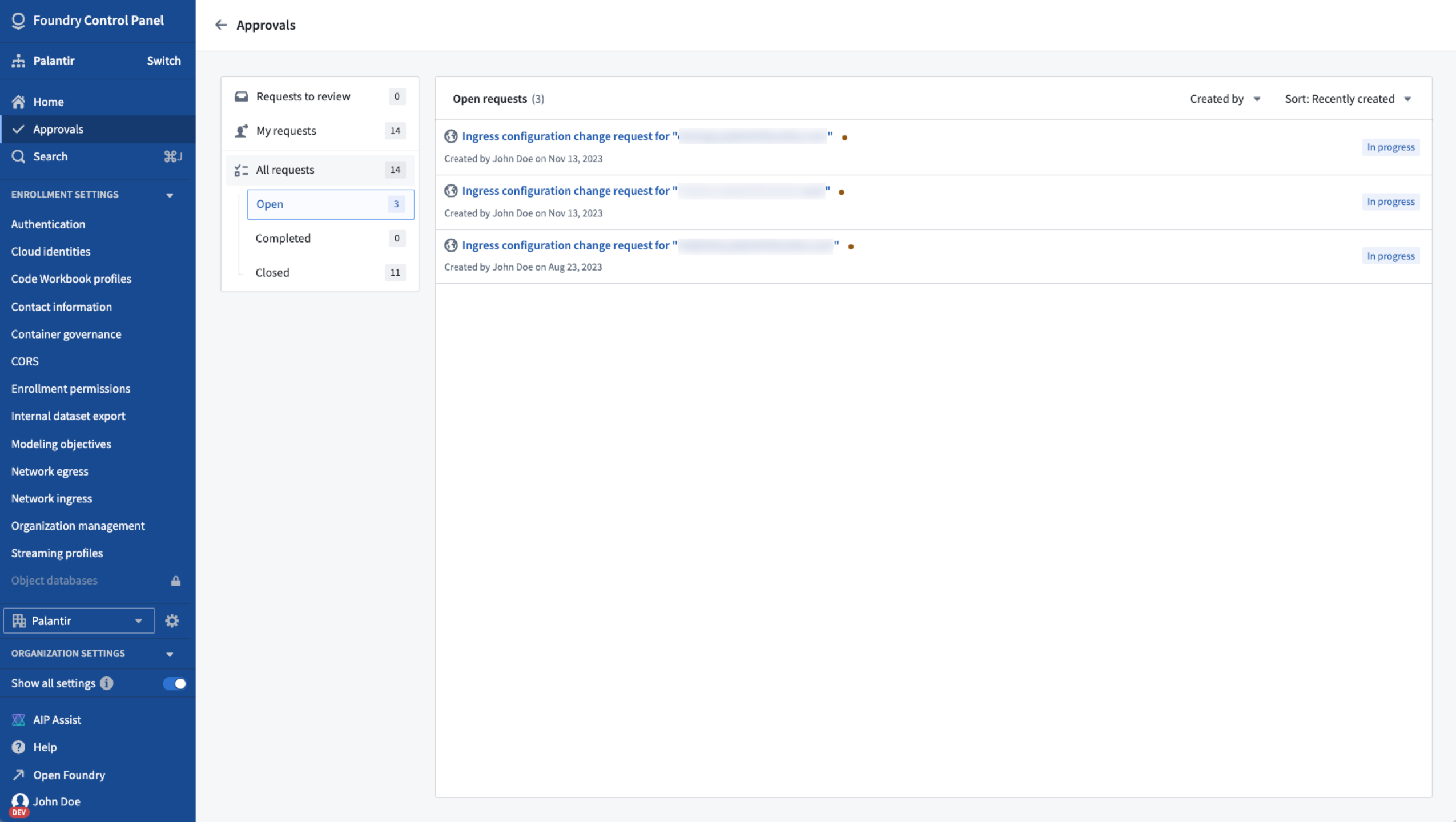
Approvals tab features an inbox with only Control Panel-related workflows, starting with ingress configuration change requests.
Manage network ingress configuration
Starting December 4, an approval will be required to enact network ingress changes. This policy change seeks to ensure a more secure and controlled process for managing ingress configurations while adhering to the platform's existing permissioning model.
Only security officers can open change requests for network ingress configuration, and by default, change requesters can approve their own changes. For a minority of enrollments that require elevated security, the workflow will be configured to require approval from a second security officer.
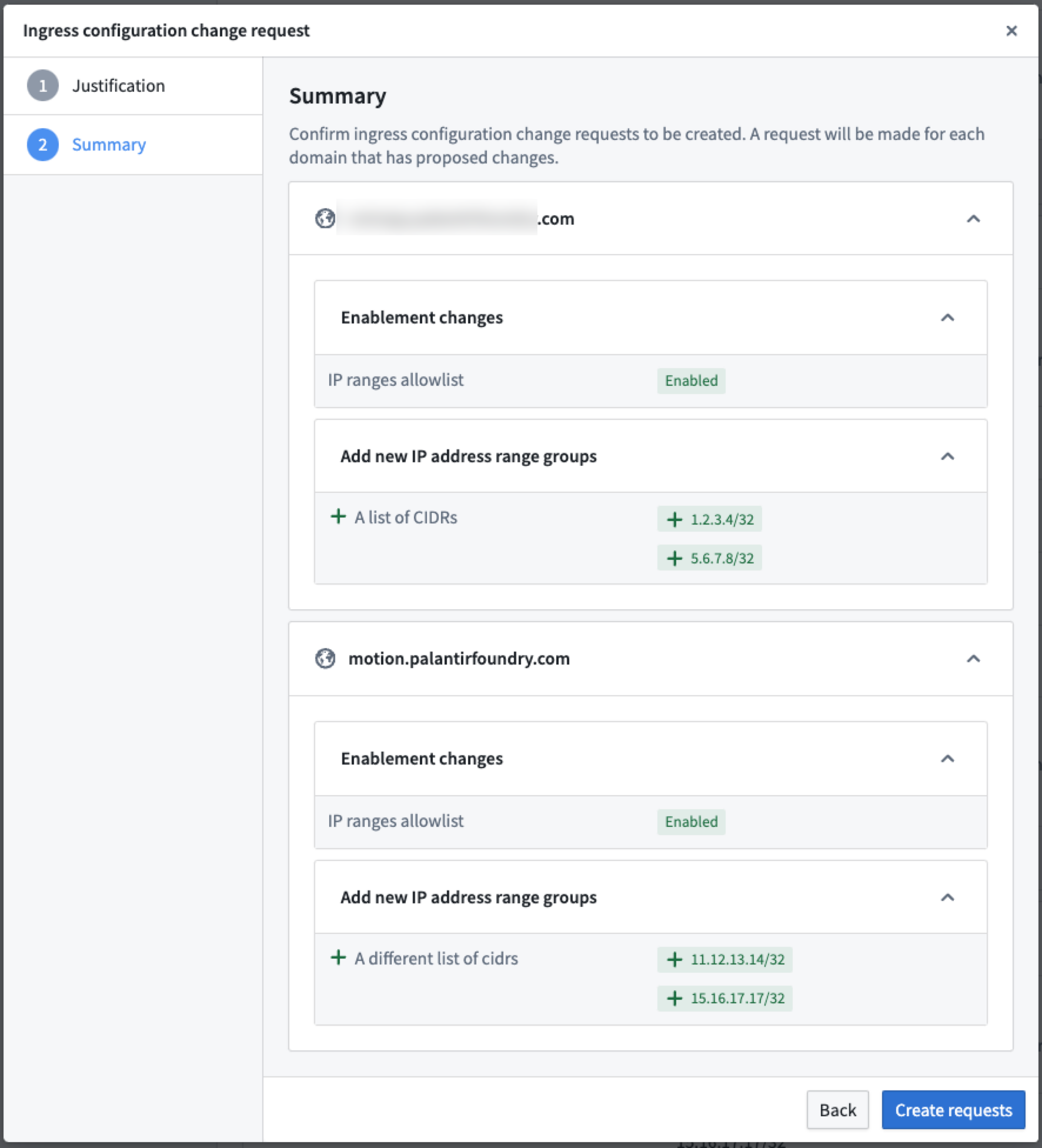
Network ingress configuration managed by Approvals within Control Panel.
What's next on the development roadmap?
Approvals' integration with Control Panel aims to bolster security and control over sensitive workflows and ensure that crucial operations are administered with appropriate oversight. The Approvals inbox will improve by adding new workflows, making sensitive task management more organized and enhancing collaboration.
For more information on how to use the approvals inbox, review Control Panel approvals. Alternatively, to learn more about managing access to the platform, review Configure network ingress documentation.
Embedded Module widgets now available in Workshop [GA]
Date published: 2023-11-28
Workshop application builders can now build reusable application components using Embedded Module widgets, now generally available. This new capability unlocks a powerful composition primitive that enhances the maintainability and reusability of use cases.
For example, consider a Workshop module that has many pages, hundreds of widgets, and thousands of variables. By leveraging the Embedded Module widget and its variable sharing capabilities, this large Workshop module can be divided into smaller, separate embedded modules. Builders can develop these focused embedded modules independently and later combine them into one Workshop module. Any parts of the module which are duplicated, for instance, a filter widget in combination with some display widget, may be separated to another module which is embedded in multiple places.
Getting started with Embedded Modules
Within the Foundry apps section of the widget selection page, locate the Workshop: Embedded Module widget as illustrated below.

The Embedded Module widget is located on the widget selection menu.
Configure your widget by selecting a module for which the module interface variable definitions will be displayed. Then, map parent module variables to child module variables.

Configuration section for the Embedded Module widget for variable mapping.
For more detail, review the Embedded Module widget documentation.
What's next on the development roadmap?
Several additional improvements to embedded modules are planned, including:
-
Loop layouts: Currently in beta, these layouts will extend embedded module capabilities by allowing looping over an object set and displaying a module for each object in the set. Read the Loop layouts documentation to learn more.
-
Module interface variable experience: An improved module interface variable experience for more straightforward configuration and usage with embedded modules is in active development.
Foundry Connector 2.0 for SAP Applications v2.29.0 (SP29) is now available
Date published: 2023-11-28
Version 2.29.0 (SP29) of the Foundry Connector 2.0 for SAP Applications add-on, used to connect Foundry to SAP systems, is now available.
This latest release features minor bug fixes and several enhancements, including:
- Significantly improved throughput of batch data ingests with parallelized data extraction.
- Support for low-latency workflows by streaming data from the SAP Landscape Transformation (SLT) Replication Server to Foundry.
- Handling of multiple outputs from BAPI (Business Application Programming Interface) functions.
Download directly from Foundry's in-platform custom documentation
Starting with SP29, the add-on installation packages can be downloaded directly from within Foundry. To access SP29:
- Open the in-platform custom documentation from the bottom of the Foundry navigation bar.
- Search for "SAP" in the documentation and select the Foundry SAP Connector.
- From the How To section of the documentation, select Download the Add-On.
We recommend sharing this with your organization's SAP Basis team.
For more on downloading the add-on, consult the documentation.
Model inference history datasets [GA]
Date published: 2023-11-28
We are excited to announce that you now have the ability to create model inference history datasets in Foundry. These datasets capture all inference requests (inputs) and inference results (outputs) handled by a live deployment in a modeling objective, simplifying a wide range of workflows, including drift detection, continuous retraining, performance evaluation, and usage analysis.
Harness live deployment data
Model inference history datasets track requests and responses for live deployments. This capability provides valuable feedback for production use cases where the model developer is interested in understanding how the model is being used by real customers and users.
For example, consider the use of a live deployment to serve recommendations on a website. The model inference history records user visits and the recommendations provided to each user. With this, developers can analyze the dataset to determine the effectiveness of the recommendations for specific users. In this case, the dataset creates value by enabling usage analysis which can inform decisions about optimization and resource allocation.
While current model evaluation processes support continuous retraining and performance evaluation, these existing capabilities do not provide user feedback of model usage. As a result, and in contrast to model inference history datasets, these capabilities are more useful for those cases in which there is existing training and testing data, as opposed to live data.
Using model inference history datasets
To create a model inference history dataset, navigate to the Deployments page of your modeling objective, select the live deployment, and choose Create dataset under the Model Inference History section. We highly recommend adding security markings, as inputs and outputs may contain sensitive information.
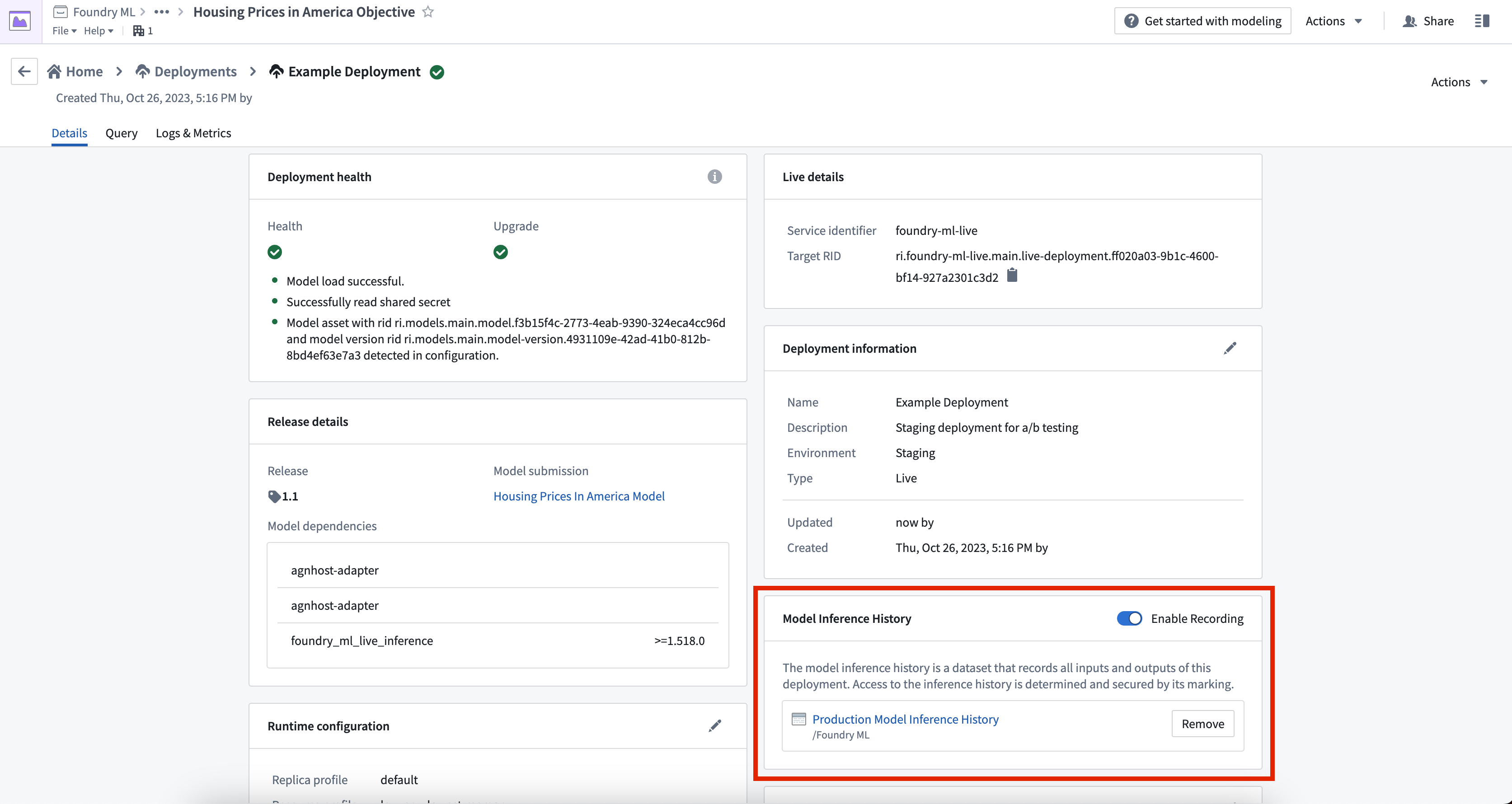
Model inference history is created from the Deployments page of your modeling objective.
Once created, the dataset will record essential information such as timestamps, user IDs, request UUIDs, and JSON representations of inputs and outputs.
Enabling and disabling datasets
To temporarily enable or disable a model inference history, navigate to the Model Inference History card and use the Enable Recording toggle. To permanently disable a model inference history, select the Remove button next to the dataset in the Model Inference History card.
For more information on this topic, refer to the model inference history documentation.
Introducing faster transforms for small-to-medium-sized datasets
Date published: 2023-11-15
We are announcing Lightweight API, an alternative to Spark transforms that capitalizes on the unparalleled performance of container transforms to speed up transforms for small-to-medium-sized datasets that do not need to rely on Spark. As an increasing number of data transforms can now be run on a single node, Lightweight API allows you to eliminate the considerable overhead from the orchestration of distributed parallelism and instead rely on single-node alternatives for authoring data pipelines.
To turn your Pandas transform into a Lightweight Pandas transform:
- Upgrade your Python repository to the latest version.
- Install foundry-transforms-lib-python from the Libraries tab.
- Import and apply
@lightweighton top of your existing decorators, as in the following code snippet:
from transforms.api import transform_pandas, Input, Output, lightweight

@lightweight
@transform_pandas(
    Output('/Project/folder/output'),
    df=Input('/Project/folder/input')
)
def compute(df):
    return df[df['Name'].str.startswith("A")].sort_values(by="Age")
Benchmark study of transformations
The benefits of Lightweight API are demonstrated when comparing the benchmarks of optimizing a complex transformation and a trivial transformation. For context, the two benchmark graphs displayed below demonstrate a controlled optimization comparison of the mean end-to-end running time across seven repetitions of five compute engines executing the same transformation logic on 19 different dataset sizes. The bands represent standard error. Each transformation was provisioned 8 vCPUs and 32 GBs of RAM. The premature ending of lines denotes an out-of-memory (OOM) condition being reached. Polars was used in streaming mode accessible through .polars(lazy=True).
The benchmark image below shows a reasonably complex pipeline containing an explode operation followed by multiple joins and a group-by, natively implemented using the APIs of Pandas, Polars, and PySpark.
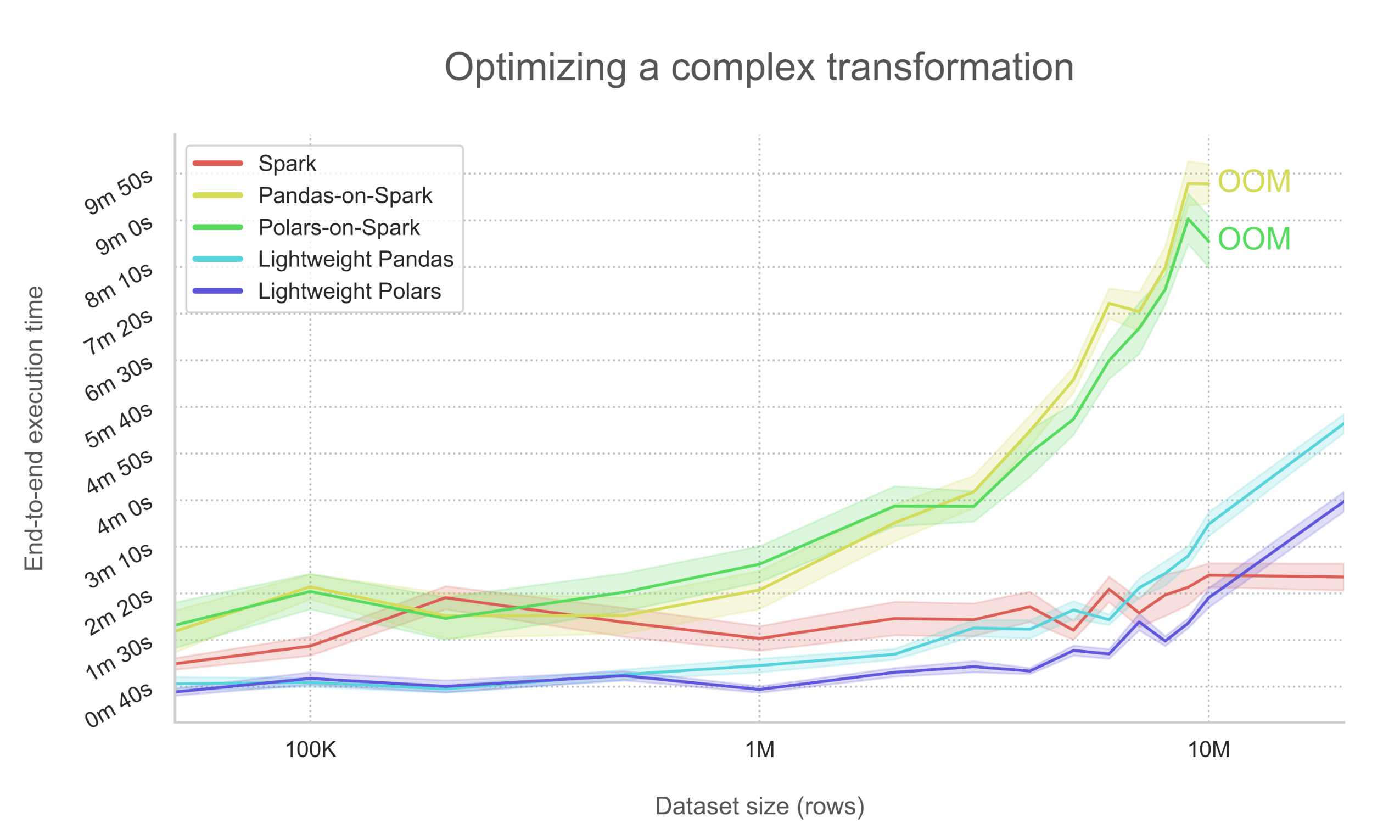
Benchmark graph showing the optimization of a complex transform
In this case, the startup overhead is nearly cut in half when using the Spark-less Lightweight backend. Additionally, both single-node optimized data processing libraries Pandas ↗ and Polars ↗ remain significantly faster up until around 10 million rows, as they do not wait for the results of network-bound shuffles as Spark does. However, for larger datasets and more complex operations, Spark's query plan scales to be much more efficient and is thus recommended in these use cases.
In contrast, applying a simpler pipeline to even larger data indicates that Spark does not always manage to outperform Polars, even on immensely large datasets.
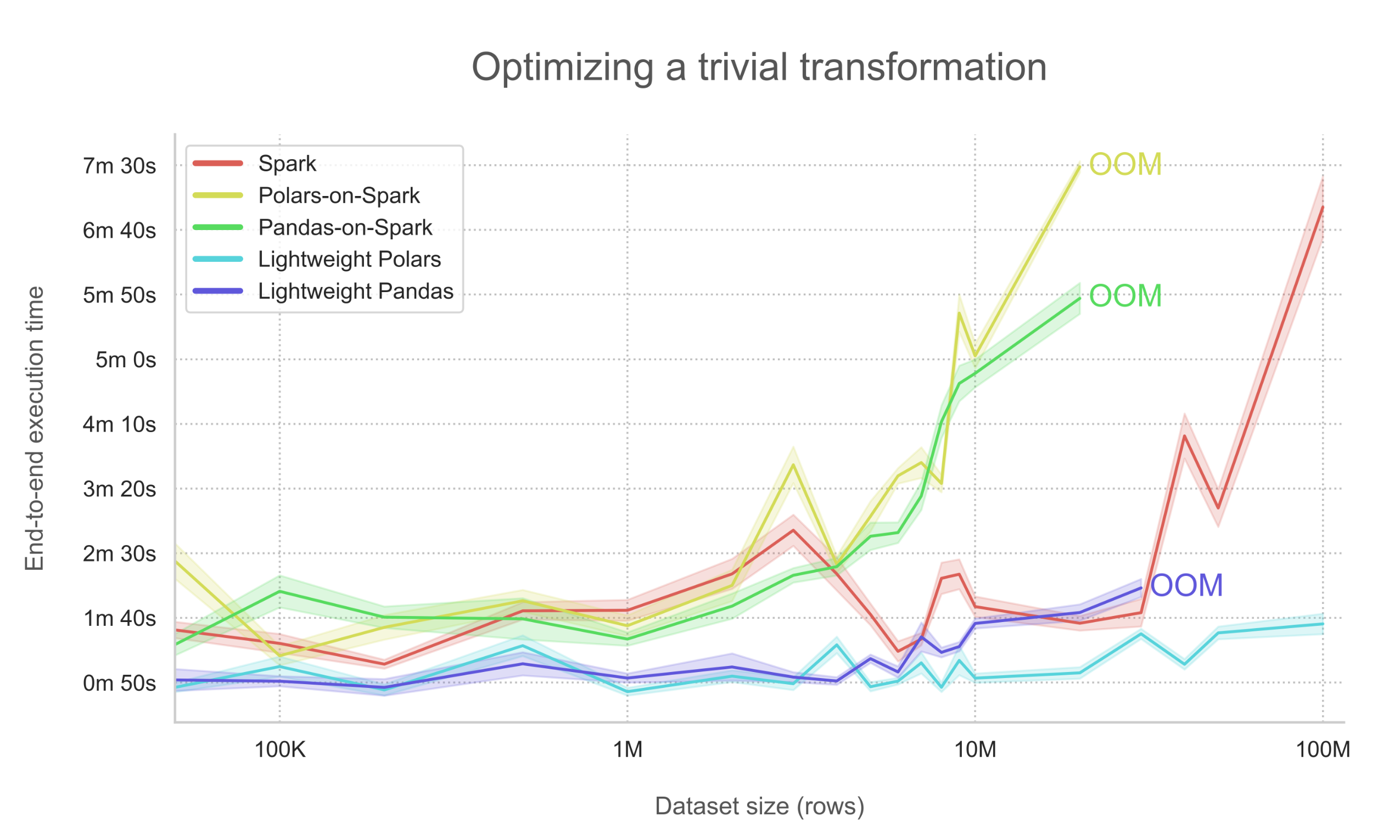
Benchmark graph showing the optimization of a trivial transform
The above chart highlights a key observation that the implemented transformation logic is close to trivial, containing only a single filter operation on a column by which the dataset is not partitioned. In this setup where the pipeline is simple (such as fewer operators and memory-friendly joins), Lightweight Polars' streaming mode ↗ vastly outperforms Spark and is recommended for all dataset sizes. As a reminder, when a @transform is decorated with @lightweight, Spark methods are not accessible.
What's next on the development roadmap?
We are actively developing Lightweight API. As such, some features including unmarking workflows or external transforms are not yet supported. The following features are coming soon:
- More compute engine support (such as DuckDB or cuDF)
- Custom Docker image support
- Incremental transform support
Additional information
In cases of smaller-scale datasets or simpler processing logic, we recommend using Lightweight transforms for faster computation.
For more details, review the documentation on Lightweight API and transform_polars or give it a try by installing the Lightweight transforms examples Marketplace product from your Reference Resources.
Support for semantic search in Foundry is now available [GA]
Date published: 2023-11-13
Palantir Foundry now supports semantic search in the Ontology with the introduction of vector properties and functions. Users can now create a vector property type for objects in the Ontology and use a K-nearest neighbors (KNN) function on objects (FoO) to enable semantic search over objects. This feature makes it possible to use the outputs of models leveraging the Ontology for more accurate results.
Semantic search capabilities in Foundry enable a range of use cases, including improved experience for documentation base users searching for a specific topic. With semantic search support, a user's query can be matched with its semantic meaning and return related objects. Additionally, with access to the Ontology, these results can then be piped back into the LLM to generate a useful user-friendly prompt boosting existing AIP builder features.
What is semantic search?
Semantic search is a search technique that takes into account the context of a query to return more accurate and relevant search results. Unlike keyword search, which simply matches whole phrases from a query regardless of context, semantic search incorporates the meaning behind the user's search terms.
Support for semantic search in Foundry is facilitated by various enhancements made to the Ontology, including:
- Introduction of vector property type in Object Storage V2 (OSv2)
- K-nearest neighbors (KNN) searches through functions on objects
Generate a vector property from a float array obtained from a Foundry modeling objective to then allow searches using KNN in a FoO function for similar vectors. For a detailed end-to-end semantic search workflow example, refer to the semantic search workflow tutorial.
Configure a vector property type
The new vector type can be used to capture embeddings from models into the Ontology. These can be created on any float array dataset field of fixed dimension. There are a few similarity functions to compare vectors that can be chosen based on use case and model output.
From within Ontology Manager, you can configure the vector property, starting with a type, choosing the dimension (output length of model that this is based on), and then selecting the similarity function that decides how you want to compare this vector property type with other objects that have the same vector property type.

K-nearest neighbors functions on objects
The addition of K-Nearest Neighbors (KNN) Function on Object (FoO) support simplifies the process of creating a function to semantically query an object type. A live model-generated vector or existing vector from an object can be used to perform the KNN search over the object type. Review additional information on KNN FoO functions in the documentation.
For more information on topics related to this announcement, refer to following documentation:
- Create an end-to-end semantic search workflow
- K-nearest neighbors in API: Object sets
- Vector property type limitations
Introducing the ability to pin a Spark module version to a repository in-platform
Date published: 2023-11-13
We have simplified and sped-up the process of enforcing usage of a specific Spark module version (also known as "pinning") on your desired code repository. You can now select the Spark module version directly from within in-platform from the Settings > Runtime override tab of your repository in Code Repositories. Previously, this action required a manual and time-consuming CDConfig process.
As a reminder, the use of pins is intended to solely be a temporary approach. We always recommend using the most recent version of Spark to benefit from the latest performance and security enhancements.
To pin a Spark version, open your repository in Code Repositories and navigate to the Settings > Runtime overrides tab.
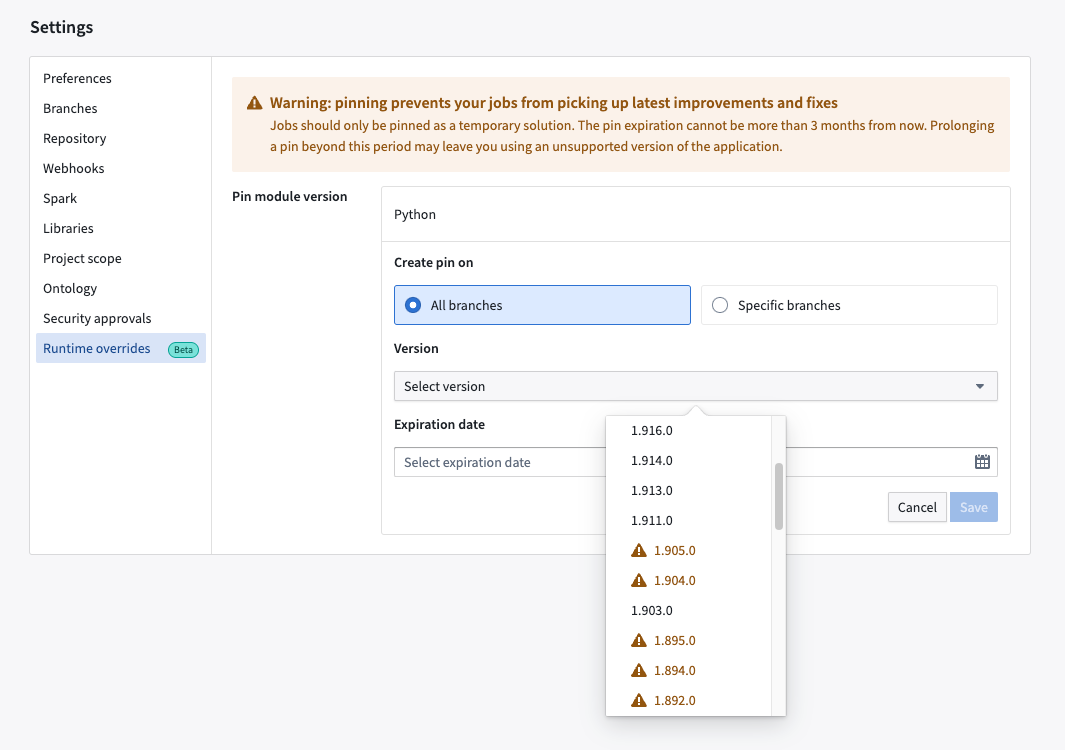
Configure your module versions in the Runtime overrides tab of your code repository's Settings view
You can Create pins and select specific Versions of Spark that you would like to pin on All branches or Specific branches. An Expiration date must be specified and cannot be more than 90 days from the current date.
Once you Save a pin, you can see confirmation in the Runtime overrides tab as depicted in the image above. Existing pins are displayed and can be Edited or Archived where they will no longer be in effect. Archived pins are tagged with an Expired label and can be restored if necessary.
The pin can also be viewed on the Build Preview > View details page:

Code repositories will display a "Pinned" tag listing the Spark module version when the feature is enabled
What's on the development roadmap?
This feature currently supports pinning Spark module to repositories. Our team is working to include pinning support for the following:
- Individual builds via the Job Tracker interface
- Pipeline Builder pipelines
For more details on this new feature, review the Pin Spark modules in-platform documentation.
Control Panel roles will now grant members Organization permissions in Platform Settings
Date published: 2023-11-02
Organization permissions are migrating in two phases from Platform Settings to Control Panel in order to improve legibility, reduce confusion, and provide greater flexibility in permission setups for platform administrators. Currently, the controls which govern how users experience Foundry, including the management of permissions, membership, marking categories, and group memberships are managed in the Platform Settings interface but will be consolidated to Control Panel by this move.
-
Phase 1 (Starting the week of November 20th): Platform Settings workflows/permissions added to Control Panel roles.
-
Phase 2 (Expected Q1 2024): Remaining members of Platform Settings permissions are migrated to the Control Panel roles that contain the workflows/permissions. Once users have been fully migrated, legacy Organization platform settings will solely be available in Control Panel. The details of phase 2 changes will be communicated in a future announcement.
Review the following notice carefully to understand how permissions updates will affect you and your Organization.
Why are we doing this?
We have seen instances where users are confused by which permissions are granted in Control Panel vs. Platform Settings. Consolidating into a single UI improves clarity and reduces the complexity of administrative workflows.
The current permissions system is inflexible and burdens top-level administrators with excessive workload due to their exclusive access to certain tasks. Roles in Control Panel allow for customization out of the box, and permissions for these workflows can be granted in a granular manner via custom roles.
How will these changes impact users and existing permissions?
By the end of Phase 2, all existing permissions will be automatically migrated and result in no loss of access or privileges. However, there are a few important changes to note:
Phase 1 changes (Effective the week of November 20th)
To shift away from using Platform Settings permissions, we first have to grant these permission/workflows to roles in Control Panel. One new role will be created, and some existing roles will have new workflows added, resulting in existing role members gaining additional permissions inline with the description of the role.
We recommend you review the changes below against your Organizations' role memberships in advance for considerations of security and update roles in Control Panel where necessary.
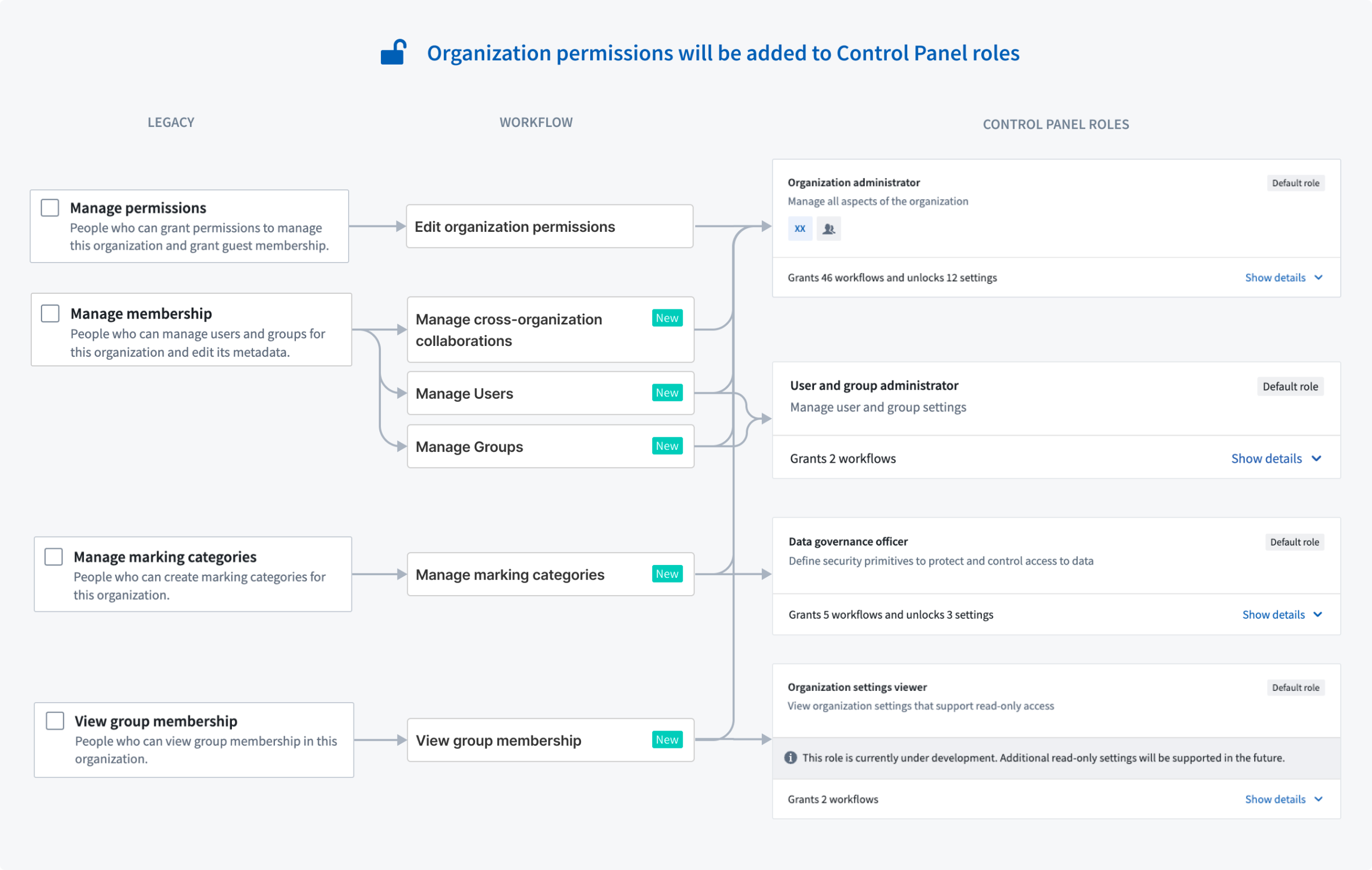
Graphical chart representing role mappings to Control Panel roles in phase 1 changes
Organization administrator acquires Manage permissions and other permissions granted in Platform Settings
Organization administrator acquires Manage permissions, membership, marking categories and control Expand Access/Apply Organization.
Users with the Organization administrator default role will gain the ability to perform workflows previously granted via Platform Settings (Manage permissions, Manage membership, Manage marking categories, and View group membership). The change maintains our philosophy that Organization administrator is a highly privileged role and should have the ability to manage all aspects of the Organization.
Expand access will remain separate and not be automatically granted to Organization administrators. Organization administrators will however be able to manage the users and groups who have this capability by navigating to Control Panel > Organization Permissions tab.
Organization settings viewer acquires View group membership
Users with the Organization settings viewer default role will gain the ability to View group membership for the Organization. Currently, this Control Panel role grants read-only access to Organization permissions in Control Panel, but more read-only workflows will be added in the coming months.
Data Governance Officer acquires Manage marking categories
Users with the Data governance officer default role will gain the ability to Manage marking categories for the organization.
[NEW] Users and groups administrator default role
A new default role is being added to Control Panel called Users and groups administrator. Users added to this role will gain the ability to Manage membership for the Organization.
[NEW] Organization Marking permissions tab
A new Marking Permissions tab will be added to the Organization Permissions section in Control Panel. This is a one-to-one replacement for the Apply Organization and Expand access sections in Platform Settings.
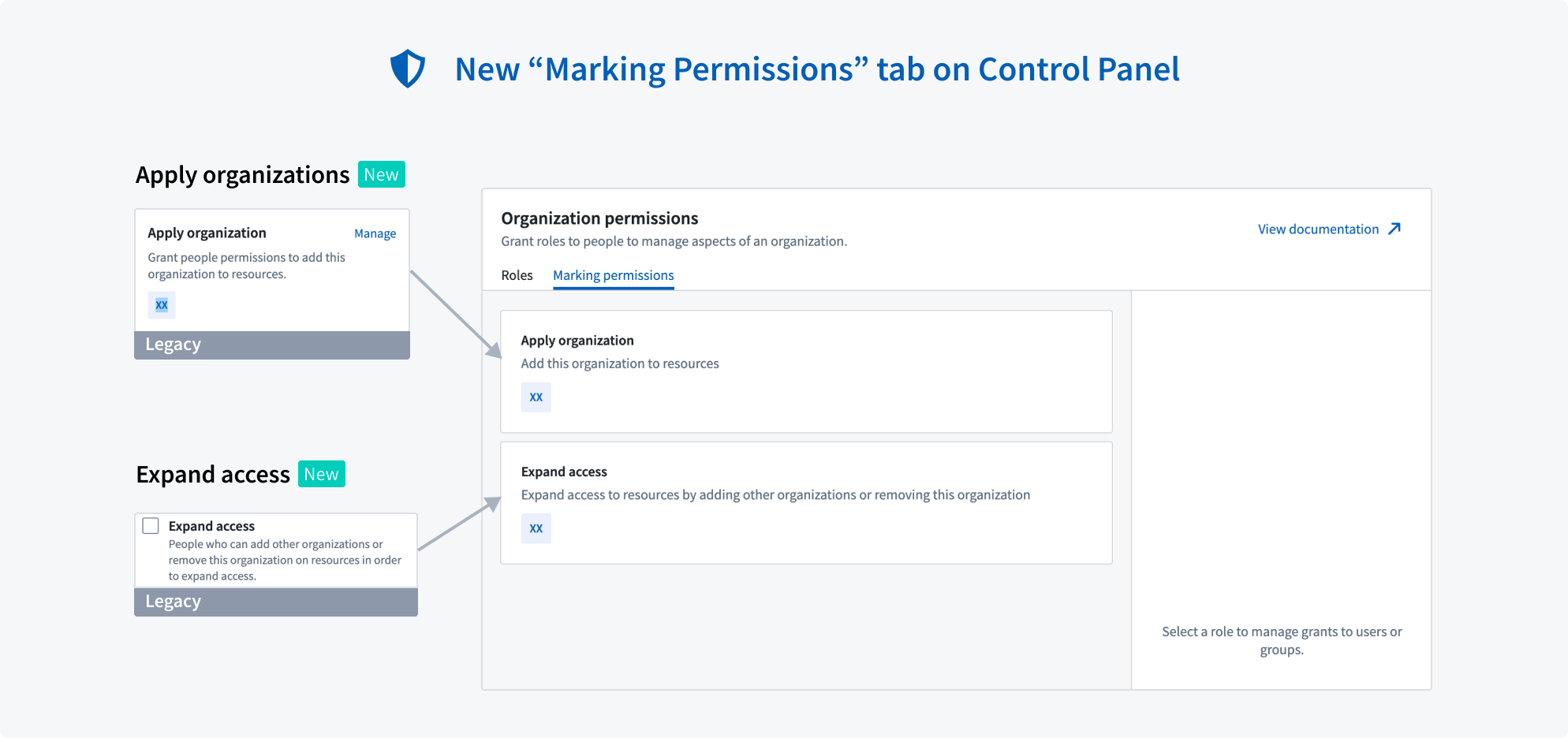
New Marking permissions tab on Control Panel for Organization administrators to review Organization permissions and existing permissions
Phase 2 changes (Scheduled for Q1 2024)
In Phase 2, existing permission grants will be automatically migrated over to Control Panel roles and the interface on Platform Settings will be fully deprecated and removed. Additional communication about phase 2 details will be provided once phase 1 is underway. At the start of Phase 1, we encourage administrators to:
- No longer rely on Platform Settings to manage these permissions, but to instead grant them through the appropriate Control Panel role; and,
- Manually audit and move over existing permission grants in Platform Settings to target Control Panel roles.
For more information on how permissions and its primitives work in Foundry, review the documentation on Enrollments and Organizations in Foundry.
Ontology SDK for Python [GA]
Date published: 2023-11-02
The Python language version of the Ontology SDK is now generally available. Developers can use Developer Console to generate a Python package with object types, link types, and action types from their Ontology, and install the package using either Conda or pip.
The Ontology SDK can be used to load data, perform aggregations, and apply actions. The following is a code snippet example:

Where can I learn about the Python Ontology SDK?
The Python Ontology SDK is generated using Developer Console. Refer to the Ontology SDK documentation for more details, or follow our walkthrough on how to use the Python SDK with Jupyter notebook.
Developer Console also includes dynamic documentation customized to the content of your application. In-platform API documentation is also available for TypeScript and cURL.
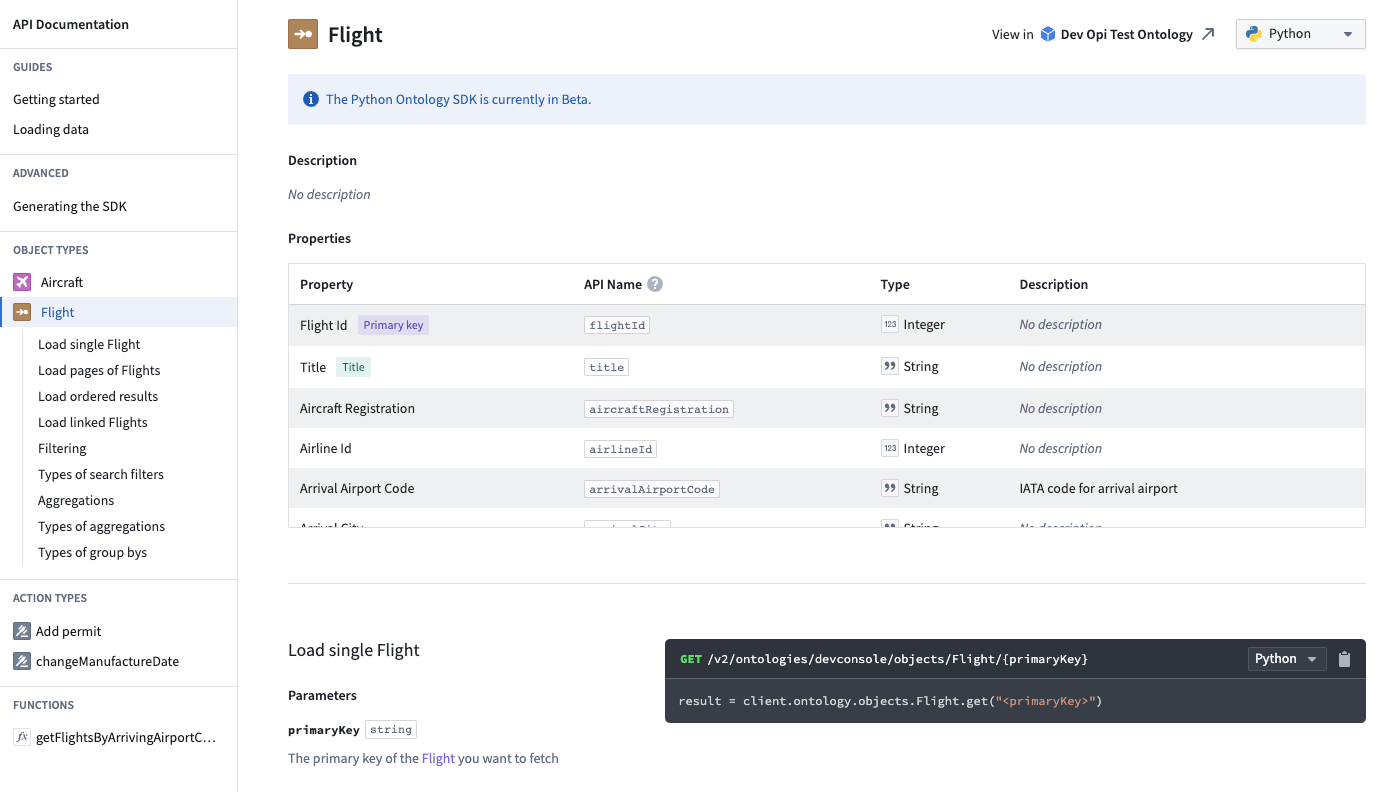
Developer Console includes documentation for each object type included in the SDK
How can I try this out?
Open Developer Console from your Foundry workspace navigation bar and create an application or open one you have already created. On the Application SDK page, you will find a list of all the generated versions of the SDK. Start by selecting Getting started docs located on the top right.
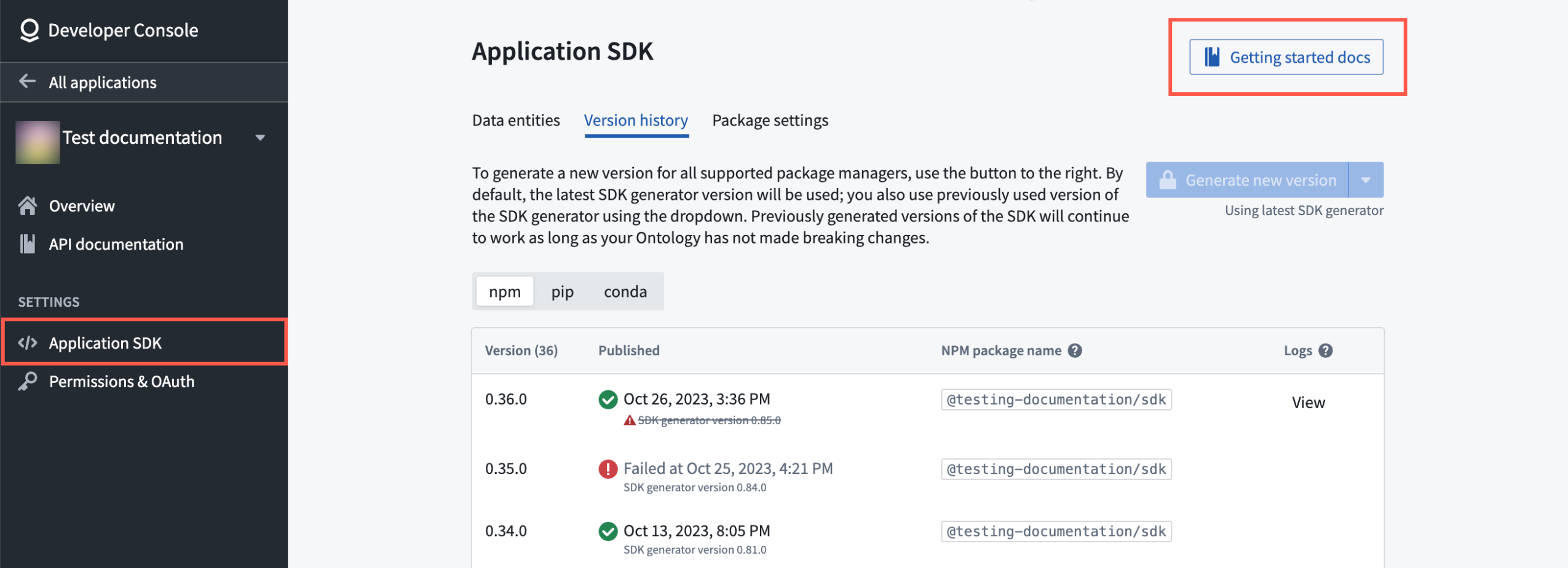
Developer Console includes documentation for each object type included in the SDK
Access the Application SDK from under the Settings menu of the Developer Console navigation bar and begin with Getting started docs
For more information, review Ontology SDK documentation.
Objects Monitoring becomes Automate [GA]
Date published: 2023-11-02
Automate, generally available the week of November 20th, is the new, fully backwards-compatible product that replaces Objects Monitoring to become the single entry point for all business automation in Foundry. All existing object monitors will automatically be migrated to the new application and continue to function without change.
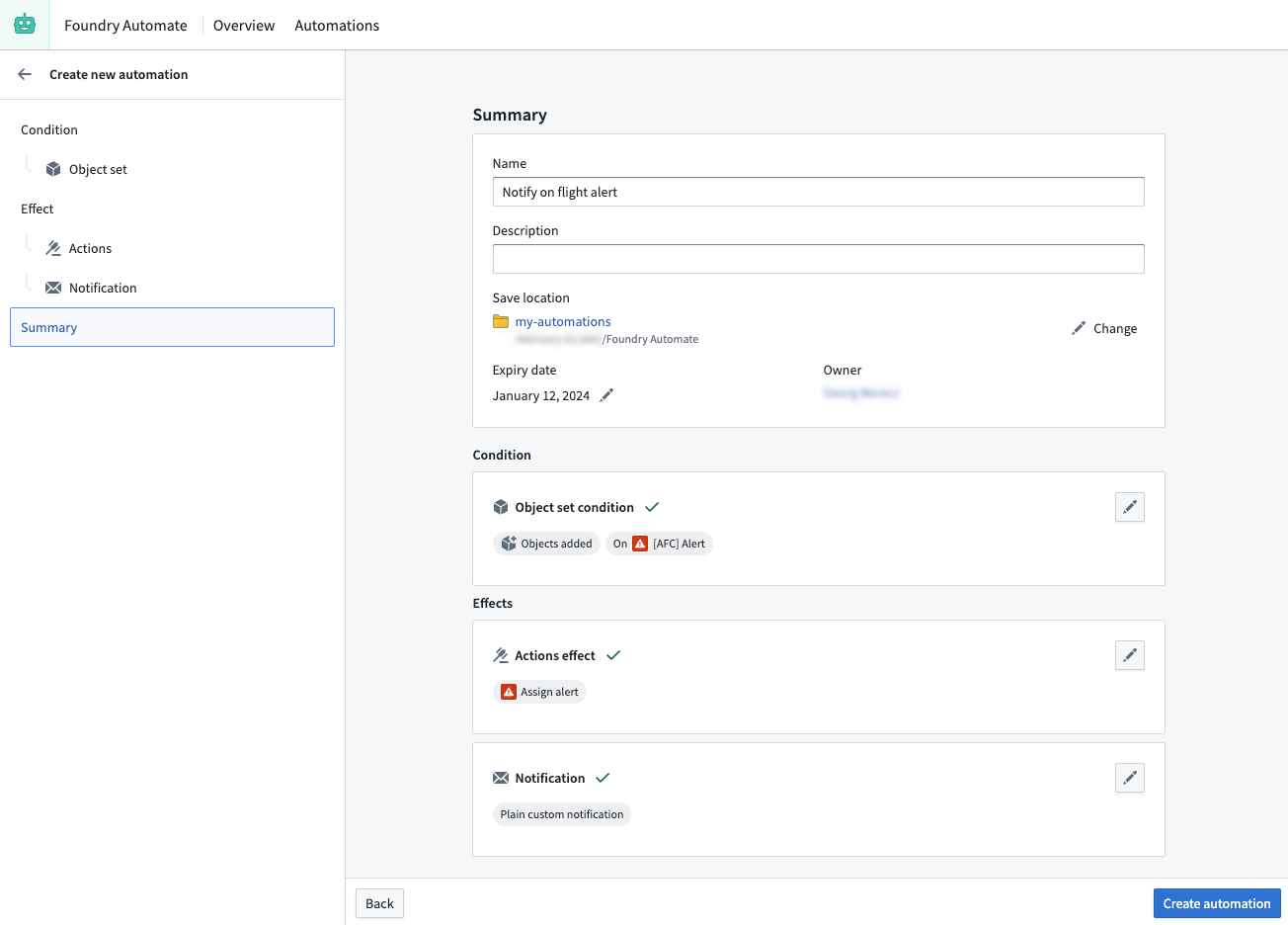
Automate's summary page at a glance
Automate allows users to newly set time conditions in addition to object conditions, and link them to actions or notifications that automatically execute when conditions are met. With many improvements and extensions over Object Monitoring, Automate offers a fully redesigned user interface for creating automations, more options to configure conditions and effects, and native integrations with other applications in the platform.
New conditions and effects for robust configuration
In addition to Automate's ability to create automations that never expire, you can now configure a variety of new conditions, effects, and native integrations to provide you more automation flexibility.
Conditions
- Time condition: Configure a schedule and execute effects at a pre-defined time (For example, "every Monday at 9 AM").
- Object set conditions
- Objects modified condition: Trigger effects when any or specific properties of objects change
- Allow specifying the monitored object set inline (no saved Hubble exploration required anymore)
- New execution modes (in addition to the existing batched mode)
- Per-object execution: Allow triggering effects for each object that triggered the automation separately
- Per-group execution: Allow triggering effects for a pre-defined group
- Live Patch support: Object sets that can be live-monitored now immediately pick up changes coming from Actions
- Combined time and object set condition: Check an object set condition at a pre-defined time (For example, "every Monday at 9 AM and for any new alerts objects".)
Effects
- Notifications
- Property-backed recipients: Use object properties to dynamically set recipients for a notification effect
- Attachments: Select Notepads or Notepad templates to automatically attach as PDF to email notifications
- Notepad
- Notepad templates
- Support for passing affected objects from the object condition
- Function-backed notifications
- Support for passing single affected object, object reference, object list, and object set parameters
- Actions
- Support for providing dynamic object set definitions as object set parameter
Native integrations
- Native Notepad integration
- Set up an automation directly from Notepad without switching to Automate
- Native Ontology Management Application (OMA) integration
- Set up automation from OMA and view all automations that are associated with a specific object type or Action type
What's on the development roadmap?
We plan on extending Automate's capabilities and embedding it even further with other Foundry applications, with a highlight on improving:
- Support for streaming object types
- Infrastructure improvements to raise execution limits
- Native integration with Machinery
- Native integration with Foundry Logic
For more information, review the Automate documentation or learn how to Get started with Automate.
Additional highlights
Data Integration | Code Repositories
Date published: 2023-11-30
New Repository Guidance | Foundry now provides helpful suggestions for files to edit when creating a new repository in Code Repositories. This feature aims to streamline the process of setting up a new repository by recommending relevant files to modify.

Foundry Developer Console
Date published: 2023-11-30
Enhanced SDK Generator Selection | Users can now choose from all available generator versions for each package manager, providing more flexibility and control over SDK generation. A new dialog has been introduced for selecting generator versions and specifying which packages to generate, improving the overall user experience.
Administration | Control Panel
Date published: 2023-11-30
Cloud Identities Extension Now Generally Available | The Cloud Identities extension in Control Panel is now generally available. Cloud identities allow you to authenticate to cloud provider resources without the use of static credentials.

Administration | Control Panel
Date published: 2023-11-30
Custom Base Layers Support in Workshop Map Widget and Foundry Maps | This update enables custom base layers in the Workshop Map Widget and Foundry Maps, providing users with more flexibility in map visualization. The "enable mapbox base layer" toggle in the Map section of the Control Panel now applies to all maps, and when disabled, maps will use the first custom base layer configured. Additionally, Workshop now offers a "custom" base style option.
Analytics | Quiver
Date published: 2023-11-30
Enhanced Time Series Transforms | Quiver now offers improved time series transforms with parameterizable inputs, units support, unit override, and unit conversion. These features apply to time series transforms used both natively and in the transform table, providing a more flexible and efficient user experience.

Ontology | Ontology Management
Date published: 2023-11-30
Enhanced object storage filter for Ontology cleanup | The Ontology Manager application now includes an improved object storage filter to streamline the ontology cleanup process. Users can more efficiently identify and remove unnecessary objects, resulting in a cleaner and more organized ontology.
Administration | Control Panel
Date published: 2023-11-30
Cloud Identity Permissions Management | Introducing a new permissions manager for cloud identities in the Control Panel, allowing users to easily manage access and permissions for their cloud resources.

App Building | Slate
Date published: 2023-11-28
Improved widget navigation in Slate | Users can now easily navigate to widgets on a long canvas in Slate by selecting the widget in the widget list. The canvas will automatically scroll to the selected widget, providing a more efficient and user-friendly experience.
App Building | Slate
Date published: 2023-11-28
Full-width editor panels now available | The Slate application now features full-width editor panels, enabled by default on all stacks. This update provides users with a more spacious and comfortable editing experience.
Data Integration | Code Repositories
Date published: 2023-11-28
Enhanced dataset preview for local development | Users can now preview datasets with files during local development, providing a more efficient way to test and validate their work. This update includes improved file preview capabilities and supports multiple input and output files.
App Building | Slate
Date published: 2023-11-28
Cross-window messaging in Slate | Slate now supports cross-window messaging, allowing users to send and receive messages between browser windows using the slate.sendMessage action and slate.getMessage event. This feature provides a more flexible and generic way to communicate between windows.
Data Integration | Code Repositories
Date published: 2023-11-28
Installing TypeScript Packages via Task Runner | Installation through the Task Runner is now enabled for TypeScript Functions repositories with functions-typescript template versions of at least 0.523.0.
To use this feature, search for a package using the Libraries tab of your code repository. After selecting a package, the new Add and install library option can be selected to automatically install the package using the task runner. This will automatically update both the package.json and package-lock.json files in your repository.
For more information, read the documentation.

Artifact Repositories
Date published: 2023-11-28
Enhanced npm package search and installation | The search and installation workflow for npm packages in TypeScript Functions for Code Repositories now benefits from enhanced functionality. Previously, the only place to find npm packages was in the external public registry. Now, an enhanced Typescript developer experience allows users to search for any published npm package from Artifacts Repositories or directly from https://npmjs.com within their Typescript Functions Code Repositories, and subsequently import them to their Code Repositories. Additionally, users can now publish their custom typescript packages directly to Artifacts Repositories, enabling developers to import any library's functionality directly to Foundry! To learn more, read the documentation.

App Building | Workshop
Date published: 2023-11-28
Updated Workshop home page | Workshop now features a newly revamped home page, offering enhanced features that enable users to effortlessly create ready-to-use applications from a variety of templates. Users can conveniently input their own data and choose properties that will be smoothly integrated into the module. The current collection of templates features an inbox, map, and metrics dashboard, with more exciting options coming soon!

Ontology | Vertex
Date published: 2023-11-28
Improved large graph performance in Vertex | Users will experience a significant performance improvement when drag-selecting on large graphs with approximately 1000 nodes in the Vertex application. This enhancement provides a smoother and more responsive experience for users working with large datasets.
Ontology | Ontology Management
Date published: 2023-11-28
Enhanced safety for deleting edits in Ontology Manager | The Ontology Manager now provides additional safeguards by preventing users from deleting all edits on an Object type with an "Active" status in Object Storage V2. This ensures data integrity and reduces the risk of accidental data loss.
Analytics | Contour
Date published: 2023-11-28
Board collapse | Visualization boards can now be collapsed to free up path space and improve performance for large paths. To collapse a board, select the Hide board contents option in the top right of the board. All transforms that the board applies to the path will be kept but any visualizations will be hidden.

Security | Projects
Date published: 2023-11-28
Enhanced security for data transformations | We have improved the security posture within Foundry's data transformation architecture by implementing an updated job spec restriction policy. This update provides tighter controls for input datasets referenced in code authoring and code workbooks transforms. If a transform is affected by this update, it will fail, and the user will receive a detailed message explaining the root cause. For more information, refer to the documentation on Project references and permissions.
App Building | Workshop
Date published: 2023-11-28
New page templates available | New layout templates for pages are now available in Workshop! On creation of a new page, five new pre-styled layout options will be available for selection including a details, grid, inbox, overview, and settings view. Layout options may be previewed prior to selection by hovering over their respective icons.

Administration | Resource Management
Date published: 2023-11-15
Business metrics are visible in the overview page of the Resource Management app | Users can now highlight key business metrics, including data scale and average daily users. Metrics can be configured per enrollment or usage account and are visible at the top of the Overview tab or in the Usage accounts tab, respectively.

Ontology | Ontology Management
Date published: 2023-11-13
Enhanced Resource Selection in Actions | Action parameter configurations now support a Foundry Resource Selector display option for String type parameters, allowing users to easily select resources within their workflows. This makes it much simpler to build workflows that use both objects and resources in creative ways.

Ontology | Ontology Management
Date published: 2023-11-13
Restriction on Primary Key Changes for Object Storage V2 | Ontology Management now restricts users from changing the primary key of an OSv2-backed object type that has received edits, as this is not supported in Object Storage V2. This change ensures data consistency and prevents potential issues.
Ontology | Ontology Management
Date published: 2023-11-13
Enhanced Schema Migrations Interface in Ontology Manager | The Ontology Manager application now features a redesigned schema migrations UI when making breaking schema changes in OSV2. Users can easily apply a set of suggested migrations, streamlining the process and improving the user experience.

Foundry Developer Console
Date published: 2023-11-13
Include Attachments documentation in developer console | When generating documentation for the Typescript OSDK, there is now a section on working with Attachments if the relevant ontology object types, actions, and functions include any attachment properties.

Foundry Developer Console
Date published: 2023-11-13
Enhanced Developer Console Function Selection | The Developer Console now allows the selection of Functions with unsupported inputs/outputs, providing a more flexible experience. Unsupported types are documented, and failures are surfaced in the CLI logs.
Model Integration | Modeling
Date published: 2023-11-13
Model Inference History for Live Deployments | The Model Inference History is a dataset in Foundry that captures all inference requests (inputs) and inference results (outputs) sent to a Modeling Live Deployment. This feature enhances the user experience by providing a comprehensive record of all inferences made, allowing for better tracking and analysis of model performance.
Data Integration | Code Repositories
Date published: 2023-11-13
Improved Telemetry Service Stability | The Foundry Telemetry Service has been optimized, resulting in a significant decrease in QoS and Transaction Conflict exceptions. Users can expect a more stable and reliable experience with a 91% reduction in these exceptions.
App Building | Slate
Date published: 2023-11-13
Strict Mode Enabled in Slate | Slate now operates in "strict mode ↗" as all scripts run as ES6 modules, ensuring better code quality and error handling. This update may affect variable naming, as JavaScript keywords are now strictly reserved.
App Building | Slate
Date published: 2023-11-13
Enhanced Cross-Window Messaging in Slate | Slate now supports more flexible cross-window messaging. This new feature allows users to send messages between different browser windows, providing a more integrated and seamless user experience. This implementation is highly versatile, essentially serving as a wrapper around the window.postMessage function and a listener for incoming events. Users can now use the slate.sendMessage action to specify their messages and post anything they want and selectively trigger specific Slate actions when a message is received.
Ontology Management | Ontology
Date published: 2023-11-13
Pipeline Origin Indication for Object Types | Object types created in Pipeline Builder now display a banner indicating the pipeline they were created in, even when editing is enabled in Ontology Manager. The banner also shows whether editing in Ontology Manager has been enabled. For object types created in Pipeline Builder that are not targeting building a dataset but are populating the object type directly, the Pipeline Builder pipeline will be displayed instead of a backing dataset.
Data Integration | Pipeline Builder
Date published: 2023-11-08
Enhanced Ontology integration in Pipeline Builder | Pipeline Builder now supports Ontology output types, ensuring seamless integration with downstream production applications. Users can now add an object type or a link type output directly within Pipeline Builder, eliminating the need to link a dataset output to an object in Ontology Manager.


Data Integration | Code Repositories
Date published: 2023-11-08
Enhanced executor profiling for debug jobs | Improved the profiling of executor-side performance for debug jobs with periodic executor profiling. By default, executors are profiled every 5 minutes for one minute, providing better visibility to identify and address performance regressions. You can download HTML files containing flame graphs for each executor and profiling interval from the files view in the output dataset's Details tab.


Model Integration | Modeling
Date published: 2023-11-08
Enhanced model creation experience | The Model Assets creation process has been significantly improved, offering a variety of guided options for creating different model types. Additionally, the model submission dialog in the Modeling Objectives application now supports more source types and direct sandbox deployment for immediate testing of new model submissions.

Foundry Developer Console
Date published: 2023-11-08
Developer Console: Update groupby syntax | The Foundry Developer Console now uses the group_by syntax instead of groupby for improved consistency and readability.
Data Integration | Pipeline Builder
Date published: 2023-11-08
Enhanced preview speed with input sampling | Pipeline Builder now supports input sampling, allowing users to choose a percentage of their input data for faster previews. This feature significantly increases preview speed while maintaining full input computation upon building.


Data Integration | Pipeline Builder
Date published: 2023-11-08
Enhanced geospatial data preview in Pipeline Builder | Users can now preview geospatial transformations on a map directly within Pipeline Builder using the geospatial preview board in the bottom left panel. To use this feature, select a series of geospatial datapoints in your preview table, then right-click and choose Open geo preview.


Foundry Developer Console
Date published: 2023-11-06
Opt-in to SDK Beta Features | Users can now opt-in to beta SDK features in the Foundry Developer Console. This allows users to test and experiment with new features, such as Time Series properties, before they are rolled out to everyone. To enable beta features, simply toggle the "Enable Beta Features" option in the package settings.

Analytics | Notepad
Date published: 2023-11-06
Conditional selection in Notepad templates | Conditional selection enables users to selectively include content in a generated document based on the value of a string template input. Configure a rule with an "if" section to set the condition, and a "then" section to determine the consequence, opting to either hide or show the contents of the conditional section.

Data Integration | Pipeline Builder
Date published: 2023-11-02
Pipeline Builder search panel | The search panel has been updated to provide a more user-friendly experience while searching the pipeline graph and transform paths. New features include more explicit tooltips and labels, the ability to use Enter and Shift + Enter to navigate between results, and the option to open the search panel via Ctrl + F (Windows) / cmd + f (MacOS).
Users can combine multiple conditions, and each condition can be toggled to search node name, description/text boards, column references, schema or property names, transform names, and parameter references.


Data Integration | Pipeline Builder
Date published: 2023-11-02
Pipeline Builder proposals now support comments | Comments can now be added to proposals to help facilitate discussion among users about the proposed changes.

Analytics | Quiver
Date published: 2023-11-02
Time series unit overrides and conversions | Users can now manually override the unit of a time series using a transform table column or a string provider. When used together with the Time series unit transform, users can propagate the unit of one time series to multiple time series.
Additionally, users can now convert the values of a series data using available unit conversions. The available unit conversions are dependent on the base unit of the series, or the override unit if specified.


中文翻译
公告
提醒: 您现在可以注册 Foundry 新闻通讯,直接在收件箱中接收平台新产品、功能和改进的摘要。有关如何订阅的更多信息,请参阅 Foundry 新闻通讯和产品反馈渠道公告。
Foundry 新闻通讯和产品反馈渠道:现已开放注册 [GA]
我们很高兴地宣布 Foundry 新闻通讯 和 产品反馈 渠道现已发布,您可以通过导航至 用户设置 > 通知 > 更新与新闻 进行注册。
Foundry 新闻通讯 将向您的收件箱直接发送平台新产品、功能和改进的摘要。第一期(GA)Foundry 新闻通讯将于 2023 年 11 月中旬发送给订阅者。您还可以选择加入新发布的 产品反馈 渠道,该渠道为您提供直接与寻求针对性用户输入的 Palantir 工程师联系的机会。此更新为您提供了一个激动人心的机会,让您的声音被听到,并在塑造 Foundry 生态系统的持续发展中发挥作用。
通过这些可选订阅共享的新闻通讯和其他内容将发送到与 Foundry 用户帐户关联的电子邮件地址。请注意,通知信息以及电子邮件地址仅存储在 Foundry 注册的边界内,不会集中收集用于通知通信。
订阅或更改通知偏好的步骤如下:
- 打开您的 Foundry 实例
- 导航至 用户设置:
- 选择左下角的 帐户
- 在弹出的菜单中选择 设置(齿轮图标)
- 进入 用户设置 页面后,导航至 通知 选项卡
- 在 通知 下,选择 更新与新闻 选项卡
- 通过勾选相应的复选框,订阅 Foundry 新闻通讯 频道、产品反馈 频道,或两者都订阅(全部订阅)
- 要取消订阅 Foundry 新闻通讯 频道和/或 产品反馈 频道,请取消勾选相应的复选框
帐户设置
通知
平台管理员须知: 平台管理员还应在 Foundry 控制面板的 联系信息 设置 中注册其电子邮件地址,以便接收与平台管理、用户支持、服务中断公告和安全更新相关的重要通信,这些通信专为平台管理员设计,与上述面向所有用户的 Foundry 新闻通讯和产品反馈渠道分开。
控制面板中引入审批选项卡:简化敏感操作的工作流程
发布日期:2023-11-30
审批收件箱现已集成到控制面板中,以支持与控制面板相关的工作流程,从而实现对敏感操作的审批请求进行无缝且集中管理的审查。此控制面板集成为安全配置提供了版本控制,使管理员能够追溯修改的历史和理由,同时增加的可见性层确保团队可以轻松监控和评估安全设置的更新,从而有助于维护安全合规的环境。从现在开始,您可以审查网络入口配置请求,其他工作流程正在积极开发中。
审批选项卡包含一个仅包含控制面板相关工作流程的收件箱,从入口配置更改请求开始。
管理网络入口配置
从 12 月 4 日开始,实施网络入口更改将需要获得批准。此策略变更旨在确保在管理入口配置时采用更安全、更可控的流程,同时遵守平台现有的权限模型。
只有安全官可以打开网络入口配置的更改请求,默认情况下,更改请求者可以批准自己的更改。 对于少数需要更高安全性的注册,工作流程将配置为需要第二位安全官的批准。
由控制面板内的审批管理的网络入口配置。
开发路线图上的下一步是什么?
审批与控制面板的集成旨在加强对敏感工作流程的安全和控制,并确保关键操作在适当的监督下进行管理。审批收件箱将通过添加新的工作流程、使敏感任务管理更有条理以及增强协作来改进。
有关如何使用审批收件箱的更多信息,请查看 控制面板审批。或者,要了解有关管理平台访问权限的更多信息,请查看 配置网络入口文档。
Workshop 中现已提供嵌入式模块小部件 [GA]
发布日期:2023-11-28
Workshop 应用程序构建者现在可以使用嵌入式模块小部件构建可重用的应用程序组件,该功能现已正式发布。这一新功能解锁了一个强大的组合原语,增强了用例的可维护性和可重用性。
例如,考虑一个包含许多页面、数百个小部件和数千个变量的 Workshop 模块。通过利用嵌入式模块小部件及其变量共享功能,可以将这个大型 Workshop 模块划分为更小的、独立的嵌入式模块。构建者可以独立开发这些专注的嵌入式模块,然后将其组合到一个 Workshop 模块中。模块中任何重复的部分,例如,一个过滤器小部件与某个显示小部件的组合,可以分离到另一个模块中,并在多个位置嵌入。
嵌入式模块入门
在小部件选择页面的 Foundry 应用程序 部分,找到如下所示的 Workshop:嵌入式模块 小部件。
嵌入式模块小部件位于小部件选择菜单上。
通过选择一个模块来配置您的小部件,该模块的模块接口变量定义将显示出来。然后,将父模块变量映射到子模块变量。
用于变量映射的嵌入式模块小部件的配置部分。
有关更多详细信息,请查看 嵌入式模块小部件文档。
开发路线图上的下一步是什么?
计划对嵌入式模块进行几项额外的改进,包括:
-
循环布局: 目前处于测试阶段,这些布局将通过允许循环遍历对象集并为集合中的每个对象显示一个模块来扩展嵌入式模块的功能。阅读 循环布局文档 以了解更多信息。
-
模块接口变量体验: 正在积极开发改进的模块接口变量体验,以便更直接地配置和使用嵌入式模块。
Foundry Connector 2.0 for SAP Applications v2.29.0 (SP29) 现已可用
发布日期:2023-11-28
用于将 Foundry 连接到 SAP 系统的 Foundry Connector 2.0 for SAP Applications 插件 的 2.29.0 版本 (SP29) 现已可用。
此最新版本包含次要的错误修复和多项增强功能,包括:
- 通过并行化数据提取,显著提高了批量数据摄入的吞吐量。
- 通过从 SAP Landscape Transformation (SLT) 复制服务器流式传输数据到 Foundry,支持低延迟工作流程。
- 处理来自 BAPI(业务应用程序编程接口)函数的多个输出。
直接从 Foundry 平台内自定义文档下载
从 SP29 开始,插件安装包可以直接从 Foundry 内部下载。要访问 SP29:
- 从 Foundry 导航栏底部打开平台内自定义文档。
- 在文档中搜索 "SAP" 并选择 Foundry SAP Connector。
- 从文档的 How To 部分,选择 Download the Add-On。
我们建议与您组织的 SAP Basis 团队分享此信息。
有关下载插件的更多信息,请查阅 文档。
模型推理历史数据集 [GA]
发布日期:2023-11-28
我们很高兴地宣布,您现在可以在 Foundry 中创建模型推理历史数据集。这些数据集捕获建模目标中实时部署处理的所有推理请求(输入)和推理结果(输出),简化了各种工作流程,包括漂移检测、持续重训、性能评估和使用分析。
利用实时部署数据
模型推理历史数据集跟踪实时部署的请求和响应。此功能为生产用例提供了宝贵的反馈,在这些用例中,模型开发者有兴趣了解模型如何被真实客户和用户使用。
例如,考虑使用实时部署在网站上提供推荐。模型推理历史记录用户访问以及向每个用户提供的推荐。通过这种方式,开发者可以分析数据集以确定推荐对特定用户的有效性。在这种情况下,数据集通过启用使用分析来创造价值,这可以为有关优化和资源分配的决策提供信息。
虽然当前的 模型评估过程 支持持续重训和性能评估,但这些现有功能不提供模型使用的用户反馈。因此,与模型推理历史数据集相比,这些功能对于存在现有训练和测试数据的情况更有用,而不是实时数据。
使用模型推理历史数据集
要创建模型推理历史数据集,请导航到建模目标的 部署 页面,选择实时部署,然后在 模型推理历史 部分下选择 创建数据集。我们强烈建议添加安全标记,因为输入和输出可能包含敏感信息。
模型推理历史是从建模目标的部署页面创建的。
创建后,数据集将记录基本信息,例如时间戳、用户 ID、请求 UUID 以及输入和输出的 JSON 表示。
启用和禁用数据集
要临时启用或禁用模型推理历史,请导航到 模型推理历史 卡片并使用 启用记录 切换开关。要永久禁用模型推理历史,请在 模型推理历史 卡片中选择数据集旁边的 移除 按钮。
有关此主题的更多信息,请参阅 模型推理历史 文档。
为中小型数据集引入更快的转换
发布日期:2023-11-15
我们宣布推出 Lightweight API,它是 Spark 转换的替代方案,利用容器转换无与伦比的性能来加速不需要依赖 Spark 的中小型数据集的转换。随着越来越多的数据转换现在可以在单个节点上运行,Lightweight API 允许您消除编排分布式并行性带来的大量开销,而是依赖单节点替代方案来编写数据管道。
要将您的 Pandas 转换转换为 Lightweight Pandas 转换:
- 升级您的 Python 仓库 到最新版本。
- 从 库 选项卡 安装 foundry-transforms-lib-python。
- 在现有装饰器之上导入并应用
@lightweight,如以下代码片段所示:
from transforms.api import transform_pandas, Input, Output, lightweight

@lightweight
@transform_pandas(
    Output('/Project/folder/output'),
    df=Input('/Project/folder/input')
)
def compute(df):
    return df[df['Name'].str.startswith("A")].sort_values(by="Age")
转换的基准研究
在比较优化复杂转换和简单转换的基准时,Lightweight API 的优势得以体现。作为背景,下面显示的两个基准图展示了在 19 种不同数据集大小上执行相同转换逻辑的五个计算引擎的七次重复中,平均端到端运行时间的受控优化比较。带状区域代表标准误差。每个转换配置了 8 个 vCPU 和 32 GB RAM。线条的提前结束表示达到内存不足 (OOM) 条件。Polars 以流模式使用,可通过 .polars(lazy=True) 访问。
下面的基准图像显示了一个相当复杂的管道,包含一个展开操作,然后是多个连接和一个分组操作,使用 Pandas、Polars 和 PySpark 的 API 原生实现。
显示复杂转换优化的基准图
在这种情况下,使用无 Spark 的 Lightweight 后端时,启动开销几乎减少了一半。此外,两个单节点优化的数据处理库 Pandas ↗ 和 Polars ↗ 在达到约 1000 万行之前仍然明显更快,因为它们不像 Spark 那样等待网络绑定洗牌的结果。然而,对于更大的数据集和更复杂的操作,Spark 的查询计划扩展效率更高,因此在这些用例中推荐使用。
相比之下,将更简单的管道应用于更大的数据表明,即使在非常大的数据集上,Spark 也并非总能胜过 Polars。
显示简单转换优化的基准图
上图突出了一个关键观察结果:实现的转换逻辑非常简单,仅包含对数据集未分区的列进行单个过滤操作。在这种管道简单的设置中(例如,更少的操作符和内存友好的连接),Lightweight Polars 的流模式 ↗ 大大优于 Spark,并且推荐用于所有数据集大小。提醒一下,当 @transform 用 @lightweight 装饰时,Spark 方法不可访问。
开发路线图上的下一步是什么?
我们正在积极开发 Lightweight API。因此,某些功能(例如取消标记工作流程或外部转换)尚不支持。以下功能即将推出:
- 更多计算引擎支持(例如 DuckDB 或 cuDF)
- 自定义 Docker 镜像支持
- 增量转换支持
附加信息
对于较小规模的数据集或更简单的处理逻辑,我们建议使用 Lightweight 转换以获得更快的计算速度。
有关更多详细信息,请查看关于 Lightweight API 和 transform_polars 的文档,或通过从您的 参考资源 安装 Lightweight transforms examples Marketplace 产品 来尝试一下。
Foundry 中支持语义搜索现已可用 [GA]
发布日期:2023-11-13
Palantir Foundry 现在通过引入向量属性和函数来支持本体中的语义搜索。用户现在可以为本体中的对象创建向量属性类型,并使用对象上的 K 最近邻 (KNN) 函数来启用对对象的语义搜索。此功能使得利用本体的模型输出能够获得更准确的结果。
Foundry 中的语义搜索功能支持一系列用例,包括为搜索特定主题的文档库用户改善体验。借助语义搜索支持,用户的查询可以与其语义含义匹配并返回相关对象。此外,通过访问本体,这些结果可以传回 LLM,以生成有用的、用户友好的提示,从而增强现有的 AIP 构建器功能。
什么是语义搜索?
语义搜索是一种搜索技术,它考虑查询的上下文以返回更准确和相关的搜索结果。与仅匹配查询中完整短语而忽略上下文的 keyword search(关键词搜索)不同,语义搜索结合了用户搜索词背后的含义。
Foundry 中对语义搜索的支持是通过对本体的各种增强来实现的,包括:
- 在 Object Storage V2 (OSv2) 中引入向量属性类型
- 通过对象上的函数进行 K 最近邻 (KNN) 搜索
从从 Foundry 建模目标获得的浮点数组生成向量属性,然后允许在 FoO 函数中使用 KNN 搜索相似向量。有关详细的端到端语义搜索工作流程示例,请参阅 语义搜索工作流程教程。
配置向量属性类型
新的向量类型可用于将模型中的嵌入捕获到本体中。这些可以在任何固定维度的浮点数组数据集字段上创建。有几种相似度函数可以比较向量,可以根据用例和模型输出进行选择。
在 Ontology Manager 中,您可以配置向量属性,从类型开始,选择维度(所基于模型的输出长度),然后选择相似度函数,该函数决定如何将此向量属性类型与具有相同向量属性类型的其他对象进行比较。
对象上的 K 最近邻函数
添加对象上的 K 最近邻 (KNN) 函数支持简化了创建函数以语义查询对象类型的过程。可以使用实时模型生成的向量或对象中的现有向量来对对象类型执行 KNN 搜索。查看 文档中关于 KNN FoO 函数的更多信息。
有关与此公告相关的主题的更多信息,请参阅以下文档:
引入在平台内将 Spark 模块版本固定到仓库的功能
发布日期:2023-11-13
我们简化并加速了在您所需的代码仓库上强制使用特定 Spark 模块版本(也称为"固定")的过程。您现在可以直接在平台内从代码仓库的 设置 > 运行时覆盖 选项卡中选择 Spark 模块版本。以前,此操作需要手动且耗时的 CDConfig 过程。
提醒一下,使用固定旨在仅作为一种临时方法。我们始终建议使用最新版本的 Spark,以受益于最新的性能和安全性增强。
要固定 Spark 版本,请在代码仓库中打开您的仓库,然后导航至 设置 > 运行时覆盖 选项卡。
在代码仓库的“设置”视图的“运行时覆盖”选项卡中配置您的模块版本
您可以 创建固定 并选择要固定到 所有分支 或 特定分支 的特定 Spark 版本。必须指定 到期日期,且不能超过当前日期 90 天。
一旦您 保存 固定,您可以在 运行时覆盖 选项卡中看到确认信息,如上图所示。现有固定会显示出来,并且可以 编辑 或 归档,归档后将不再生效。已归档的固定会标记为 已过期 标签,必要时可以恢复。
该固定也可以在 构建预览 > 查看详情 页面上查看:
启用该功能后,代码仓库将显示一个“已固定”标签,列出 Spark 模块版本
开发路线图上的内容是什么?
此功能目前支持将 Spark 模块固定到仓库。我们的团队正在努力为以下内容添加固定支持:
- 通过 Job Tracker 界面的单个构建
- Pipeline Builder 管道
有关此新功能的更多详细信息,请查看 在平台内固定 Spark 模块 文档。
控制面板角色现在将授予成员平台设置中的组织权限
发布日期:2023-11-02
组织权限正在分两个阶段从平台设置迁移到 控制面板,以提高清晰度、减少混淆,并为平台管理员提供更大的权限设置灵活性。目前,控制用户如何体验 Foundry 的控件,包括权限、成员资格、标记类别和组成员资格的管理,都在平台设置界面中管理,但将通过此迁移整合到控制面板。
-
第一阶段(从 11 月 20 日那周开始):平台设置工作流程/权限添加到控制面板角色。
-
第二阶段(预计 2024 年第一季度):平台设置权限的其余成员迁移到包含工作流程/权限的控制面板角色。一旦用户完全迁移,旧版组织平台设置将仅在控制面板中可用。第二阶段变更的详细信息将在未来的公告中传达。
请仔细阅读以下通知,以了解权限更新将如何影响您和您的组织。
我们为什么要这样做?
我们遇到过用户对控制面板与平台设置中授予的权限感到困惑的情况。整合到单个 UI 中可以提高清晰度并降低管理工作流程的复杂性。
当前的权限系统不灵活,并且由于顶级管理员对某些任务的独占访问权限,给他们带来了过重的工作负担。控制面板中的角色允许开箱即用地进行自定义,并且可以通过自定义角色以细粒度方式授予这些工作流程的权限。
这些更改将如何影响用户和现有权限?
到第二阶段结束时,所有现有权限将自动迁移,并且不会导致访问权限或特权的丢失。但是,需要注意一些重要的变化:
第一阶段变更(11 月 20 日那周生效)
为了摆脱使用平台设置权限,我们首先必须将这些权限/工作流程授予控制面板中的角色。将创建一个新角色,并且一些现有角色将添加新的工作流程,导致现有角色成员根据角色描述获得额外的权限。
我们建议您提前根据您组织的角色成员资格审查以下更改,以考虑安全性,并在必要时更新控制面板中的角色。
表示第一阶段变更中角色映射到控制面板角色的图表
组织管理员获得 管理 权限和平台设置中授予的其他权限
组织管理员获得管理权限、成员资格、标记类别以及控制扩展访问/应用组织。
拥有组织管理员默认角色的用户将能够执行以前通过平台设置授予的工作流程(管理权限、管理成员资格、管理标记类别和查看组成员资格)。此更改维护了我们的理念,即组织管理员是一个高特权角色,应该能够管理组织的所有方面。
扩展访问将保持独立,不会自动授予组织管理员。但是,组织管理员将能够通过导航至 控制面板 > 组织权限 选项卡来管理拥有此功能的用户和组。
组织设置查看者获得 查看组成员资格
拥有组织设置查看者默认角色的用户将能够查看组织的组成员资格。目前,此控制面板角色授予对控制面板中组织权限的只读访问权限,但未来几个月将添加更多只读工作流程。
数据治理官获得 管理标记类别
拥有数据治理官默认角色的用户将能够管理组织的标记类别。
[新增] 用户和组管理员 默认角色
控制面板中正在添加一个名为用户和组管理员的新默认角色。添加到该角色的用户将能够管理组织的成员资格。
[新增] 组织 标记权限 选项卡
控制面板中的组织权限部分将添加一个新的标记权限选项卡。这是平台设置中应用组织和扩展访问部分的一对一替换。
控制面板上新的标记权限选项卡,供组织管理员审查组织权限和现有权限
第二阶段变更(计划于 2024 年第一季度)
在第二阶段,现有的权限授予将自动迁移到控制面板角色,并且平台设置上的界面将完全弃用并移除。一旦第一阶段开始,将提供关于第二阶段细节的额外沟通。在第一阶段开始时,我们鼓励管理员:
- 不再依赖平台设置来管理这些权限,而是通过适当的控制面板角色来授予它们;并且,
- 手动审计并将平台设置中的现有权限授予迁移到目标控制面板角色。
有关权限及其原语如何在 Foundry 中工作的更多信息,请查看 Foundry 中关于 注册和组织 的文档。
Python 版 Ontology SDK [GA]
发布日期:2023-11-02
Ontology SDK 的 Python 语言版本现已正式发布。开发者可以使用 Developer Console 从其本体生成包含对象类型、链接类型和操作类型的 Python 包,并使用 Conda 或 pip 安装该包。
Ontology SDK 可用于加载数据、执行聚合和应用操作。以下是一个代码片段示例:
我在哪里可以了解 Python Ontology SDK?
Python Ontology SDK 是使用 Developer Console 生成的。有关更多详细信息,请参阅 Ontology SDK 文档,或按照我们的 如何使用 Jupyter notebook 使用 Python SDK 的演练进行操作。
Developer Console 还包括针对您应用程序内容定制的动态文档。平台内 API 文档也可用于 TypeScript 和 cURL。
Developer Console 包含 SDK 中每种对象类型的文档
我如何尝试这个?
从您的 Foundry 工作区导航栏打开 Developer Console,然后创建一个应用程序或打开一个您已创建的应用程序。在应用程序 SDK 页面上,您将找到所有已生成版本的 SDK 列表。首先选择位于右上角的 入门文档。
Developer Console 包含 SDK 中每种对象类型的文档
从 Developer Console 导航栏的“设置”菜单下访问应用程序 SDK,并从入门文档开始
有关更多信息,请查看 Ontology SDK 文档。
Objects Monitoring 成为 Automate [GA]
发布日期:2023-11-02
Automate 于 11 月 20 日那周正式发布,是取代 Objects Monitoring 的全新、完全向后兼容的产品,成为 Foundry 中所有业务自动化的单一入口点。所有现有的对象监视器将自动迁移到新应用程序,并继续正常运行,无需更改。
Automate 的概览页面一览
Automate 允许用户新设置时间条件以及对象条件,并将它们链接到满足条件时自动执行的操作或通知。与 Object Monitoring 相比,Automate 进行了许多改进和扩展,提供了完全重新设计的用于创建自动化的用户界面、更多配置条件和效果的选项,以及与平台中其他应用程序的原生集成。
用于稳健配置的新条件和效果
除了 Automate 能够创建永不过期的自动化之外,您现在还可以配置各种新的条件、效果和原生集成,为您提供更多的自动化灵活性。
条件
- 时间条件: 配置一个计划并在预定义的时间执行效果(例如,"每周一上午 9 点")。
- 对象集条件
- 对象已修改条件: 当对象的任何或特定属性发生变化时触发效果
- 允许内联指定监视的对象集(不再需要保存的 Hubble 探索)
- 新的执行模式(除了现有的批处理模式)
- 按对象执行: 允许为触发自动化的每个对象单独触发效果
- 按组执行: 允许为预定义的组触发效果
- Live Patch 支持: 可以实时监视的对象集现在可以立即拾取来自操作的变化
- 组合时间和对象集条件: 在预定义的时间检查对象集条件(例如,"每周一上午 9 点以及任何新的警报对象")。
效果
- 通知
- 属性支持的收件人: 使用对象属性动态设置通知效果的收件人
- 附件: 选择 Notepad 或 Notepad 模板,以自动作为 PDF 附件添加到电子邮件通知中
- Notepad
- Notepad 模板
- 支持传递来自对象条件的影响对象
- 函数支持的通知
- 支持传递单个影响对象、对象引用、对象列表和对象集参数
- 操作
- 支持提供动态对象集定义作为对象集参数
原生集成
- 原生 Notepad 集成
- 直接从 Notepad 设置自动化,无需切换到 Automate
- 原生 Ontology Management Application (OMA) 集成
- 从 OMA 设置自动化,并查看与特定对象类型或操作类型关联的所有自动化
开发路线图上的内容是什么?
我们计划扩展 Automate 的功能,并将其进一步嵌入到其他 Foundry 应用程序中,重点改进:
- 支持流式对象类型
- 提高执行限制的基础设施改进
- 与 Machinery 的原生集成
- 与 Foundry Logic 的原生集成
有关更多信息,请查看 Automate 文档或了解如何 Automate 入门。
其他亮点
数据集成 | 代码仓库
发布日期:2023-11-30
新的仓库指南 | Foundry 现在在代码仓库中创建新仓库时提供有用的文件编辑建议。此功能旨在通过推荐要修改的相关文件来简化设置新仓库的过程。
Foundry Developer Console
发布日期:2023-11-30
增强的 SDK 生成器选择 | 用户现在可以为每个包管理器从所有可用的生成器版本中进行选择,从而为 SDK 生成提供更大的灵活性和控制。引入了一个新的对话框,用于选择生成器版本并指定要生成的包,从而改善了整体用户体验。
管理 | 控制面板
发布日期:2023-11-30
Cloud Identities 扩展现已正式发布 | 控制面板中的 Cloud Identities 扩展现已正式发布。云身份允许您在不使用静态凭据的情况下向云提供商资源进行身份验证。
管理 | 控制面板
发布日期:2023-11-30
Workshop 地图小部件和 Foundry Maps 中的自定义基础图层支持 | 此更新在 Workshop 地图小部件和 Foundry Maps 中启用了自定义基础图层,为用户在地图可视化方面提供了更大的灵活性。控制面板地图部分中的"启用 mapbox 基础图层"切换开关现在适用于所有地图,当禁用时,地图将使用配置的第一个自定义基础图层。此外,Workshop 现在提供"自定义"基础样式选项。
分析 | Quiver
发布日期:2023-11-30
增强的时间序列转换 | Quiver 现在提供改进的时间序列转换,具有可参数化的输入、单位支持、单位覆盖和单位转换。这些功能适用于原生使用和在转换表中使用的时间序列转换,提供更灵活和高效的用户体验。
本体 | 本体管理
发布日期:2023-11-30
用于本体清理的增强对象存储过滤器 | Ontology Manager 应用程序现在包含一个改进的对象存储过滤器,以简化本体清理过程。用户可以更有效地识别和移除不必要的对象,从而获得更清晰、更有组织的本体。
管理 | 控制面板
发布日期:2023-11-30
云身份权限管理 | 在控制面板中引入一个新的 云身份 权限管理器,允许用户轻松管理其云资源的访问和权限。
应用构建 | Slate
发布日期:2023-11-28
Slate 中改进的小部件导航 | 用户现在可以通过在小部件列表中选择小部件来轻松导航到 Slate 长画布上的小部件。画布将自动滚动到所选小部件,提供更高效和用户友好的体验。
应用构建 | Slate
发布日期:2023-11-28
全宽编辑器面板现已可用 | Slate 应用程序现在具有全宽编辑器面板,默认在所有堆栈上启用。此更新为用户提供了更宽敞、更舒适的编辑体验。
数据集成 | 代码仓库
发布日期:2023-11-28
增强的本地开发数据集预览 | 用户现在可以在本地开发期间预览包含文件的数据集,从而提供更有效的方式来测试和验证其工作。此更新包括改进的文件预览功能,并支持多个输入和输出文件。
应用构建 | Slate
发布日期:2023-11-28
Slate 中的跨窗口消息传递 | Slate 现在支持跨窗口消息传递,允许用户使用 slate.sendMessage 操作和 slate.getMessage 事件在浏览器窗口之间发送和接收消息。此功能提供了一种更灵活、更通用的窗口间通信方式。
数据集成 | 代码仓库
发布日期:2023-11-28
通过任务运行器安装 TypeScript 包 | 对于 functions-typescript 模板版本至少为 0.523.0 的 TypeScript Functions 仓库,现在可以通过任务运行器进行安装。
要使用此功能,请使用代码仓库的 库 选项卡搜索包。选择包后,可以选择新的 添加并安装库 选项,以使用任务运行器自动安装该包。这将自动更新仓库中的 package.json 和 package-lock.json 文件。
有关更多信息,阅读文档。
制品仓库
发布日期:2023-11-28
增强的 npm 包搜索和安装 | 代码仓库中 TypeScript Functions 的 npm 包搜索和安装工作流程现在受益于增强的功能。以前,查找 npm 包的唯一地方是外部公共注册表。现在,增强的 TypeScript 开发者体验允许用户在 TypeScript Functions 代码仓库中从 Artifacts Repositories 或直接从 https://npmjs.com 搜索任何已发布的 npm 包,然后将其导入到他们的代码仓库中。此外,用户现在可以直接将自定义的 TypeScript 包发布到 Artifacts Repositories,使开发者能够将任何库的功能直接导入 Foundry!要了解更多信息,阅读文档。
应用构建 | Workshop
发布日期:2023-11-28
更新的 Workshop 主页 | Workshop 现在具有全新改版的主页,提供增强的功能,使用户能够从各种模板轻松创建即用型应用程序。用户可以方便地输入自己的数据并选择将顺利集成到模块中的属性。当前的模板集合包括收件箱、地图和指标仪表板,更多令人兴奋的选项即将推出!
本体 | Vertex
发布日期:2023-11-28
Vertex 中改进的大型图性能 | 在 Vertex 应用程序中,当在具有大约 1000 个节点的大型图上进行拖拽选择时,用户将体验到显著的性能提升。此增强为处理大型数据集的用户提供了更流畅、响应更快的体验。
本体 | 本体管理
发布日期:2023-11-28
增强的删除编辑安全性 | Ontology Manager 现在通过阻止用户在 Object Storage V2 中删除具有"活动"状态的对象类型上的所有编辑来提供额外的安全保障。这确保了数据完整性并降低了意外数据丢失的风险。