Announcements(公告)
REMINDER: You can now sign up for the Foundry Newsletter to receive a summary of new products, features, and improvements across the platform directly to your inbox. For more information on how to subscribe, see the Foundry Newsletter and Product Feedback channels announcement.
Introducing enhanced design capabilities for Tabs widget in Workshop
Date published: 2024-01-25
Application builders can now experience improved theming and design options for the Tabs widget in Workshop. This update offers greater flexibility in styling and configuring Tabs widgets, assisting builders in achieving their functional and aesthetic needs while creating modules.
Cater to module requirements with four fresh design presets
Application builders now have the choice of four design presets to achieve a professional and stylish Tabs widget that suits the needs of a range of modules. The available presets include: outline, block, prominent, and grouped.

Tab preset options and previews.
Within each of the presets, application builders can unlock new capabilities by defining additional configuration preferences, including tab size. For example, the option to choose from small, medium, or large tabs can help enhance content readability, as well as enable the tabs to better accommodate other widgets. Tab size can also be used to create a nested effect, allowing application builders to establish a hierarchy amongst tabs.
1. Prominent tabs, 2. Nested effect using various tab sizes, 3. Grouped tabs
Additional display and formatting settings for enhanced flexibility
Enhanced customization is now possible with newly added display and formatting settings, including:
- Color theming: Set a primary color for your tab and choose the color of different parts of the tab label, icon, and badge. This option can help create contrast with the container background, improving tab visibility for end users.
- Direction and alignment: Select to display tabs either horizontally or vertically. You may also justify your tabs to the left or center in relation to the tab container, which can help facilitate the overall document flow of widgets.
- Conditional visibility: Determine whether a tab should be visible, disabled, or entirely hidden using variables of your choice. This capability enables you to better hide or display information depending on the state of your application and user.
For more on the Tabs widget in Workshop, consult the updated documentation.
Introducing Media Sets, a new way to organize your unstructured media data
Date published: 2024-01-25
Media sets will be generally available on the week of 29 January 2024, enabling users to enhance workflow capabilities involving unstructured data.
A media set is a collection of media files of common schema designed to work with high-scale, unstructured data and to facilitate the complex processing of media items such as audio, imagery, and PDFs (with support for video coming soon). You can enhance your media workflows and pipelines by using media sets to enable access to flexible storage, compute optimizations, and schema-specific transformations. Optionally, you may also create virtual media sets that read directly from Azure or S3 external source systems and bypass onerous data transfer and storage logistics. Users of on-premise enrollments can enable access to the media sets feature through Palantir Support.
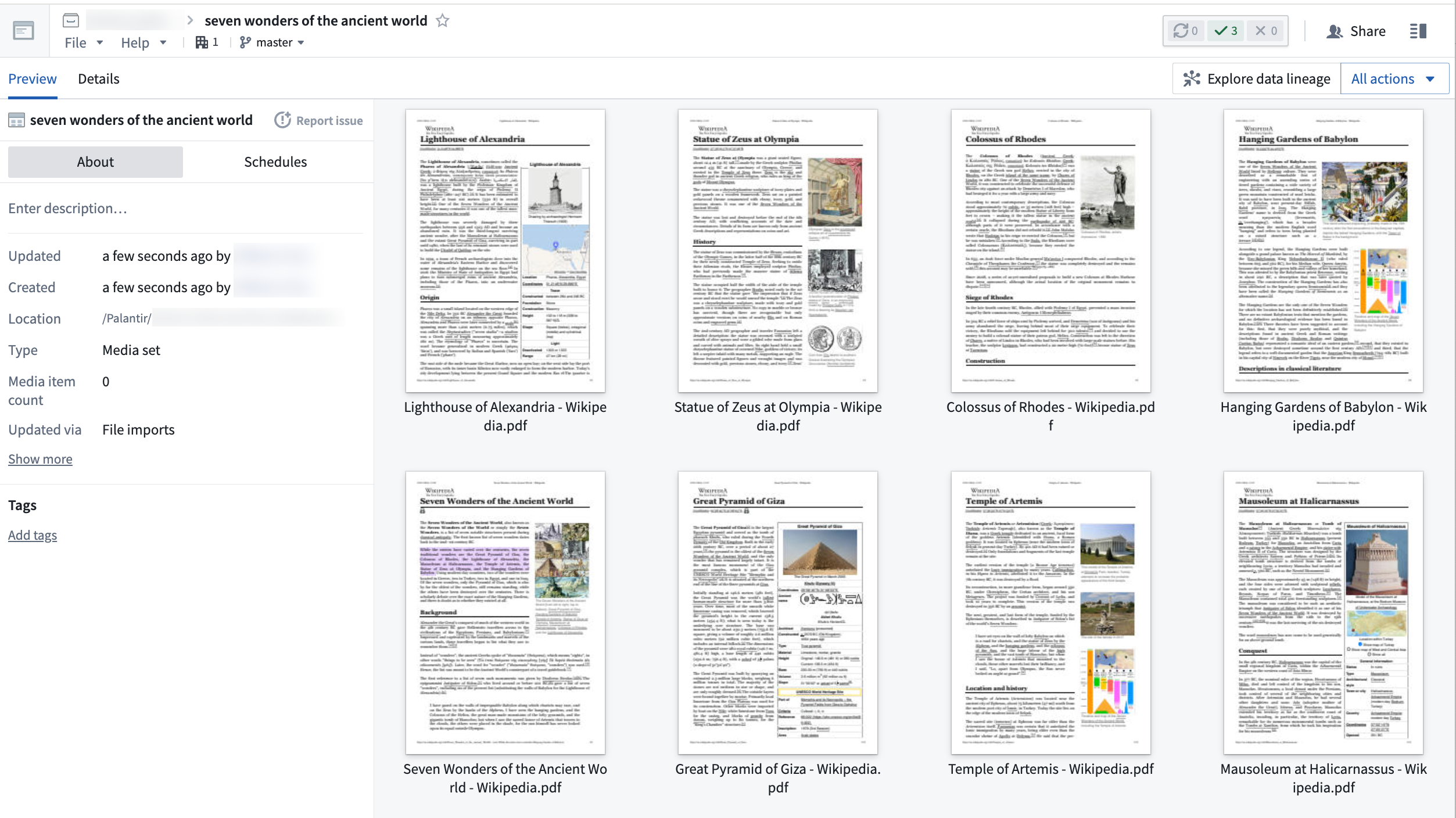
Media sets support the import of audio, imagery, and PDFs.
Versatile configuration setup for transformations
Media sets can be configured to your latency requirements either as with transactions, similar to a Catalog dataset, or transactionless where it is similar to a stream. Once setup, you can use a selection of the existing out-of-the-box transformations that can be leveraged in Transforms using the transforms-media SDK, with support for additional transformations in Pipeline Builder in active development.
Explore new workflows powered by media sets
The following are a list of sample workflows you can now accomplish with the introduction of media sets:
- PDF text extraction with Pipeline Builder: Easily build complex workflows with PDF sources using Pipeline Builder.
- Optimized thumbnail and platform preview: View uploads quickly and intuitively across the platform. File format normalization: Transcode more than 8 audio formats to MP3 simply by uploading files into an MP3 media set.
- Raster tiling in Vortex (TIFF, NITF): Upload your geospatial imagery and Ontologize using a media reference property, or simply use native tiling features in Vortex.
- DICOM image support: Preview DICOM files in media sets or Workshop apps without preprocessing in pipelines.
More information on media sets is available in our public documentation.
Introducing Workshop Routing [GA]
Date published: 2024-01-16
Workshop routing, now generally available, enables specific states or views of a module to be written to the URL, allowing users to easily share these defined views with others through link sharing.
When routing is enabled for a module, the ID of the current page will be written to the URL. The routing feature also offers support for writing the values of variables with an external ID to the URL.
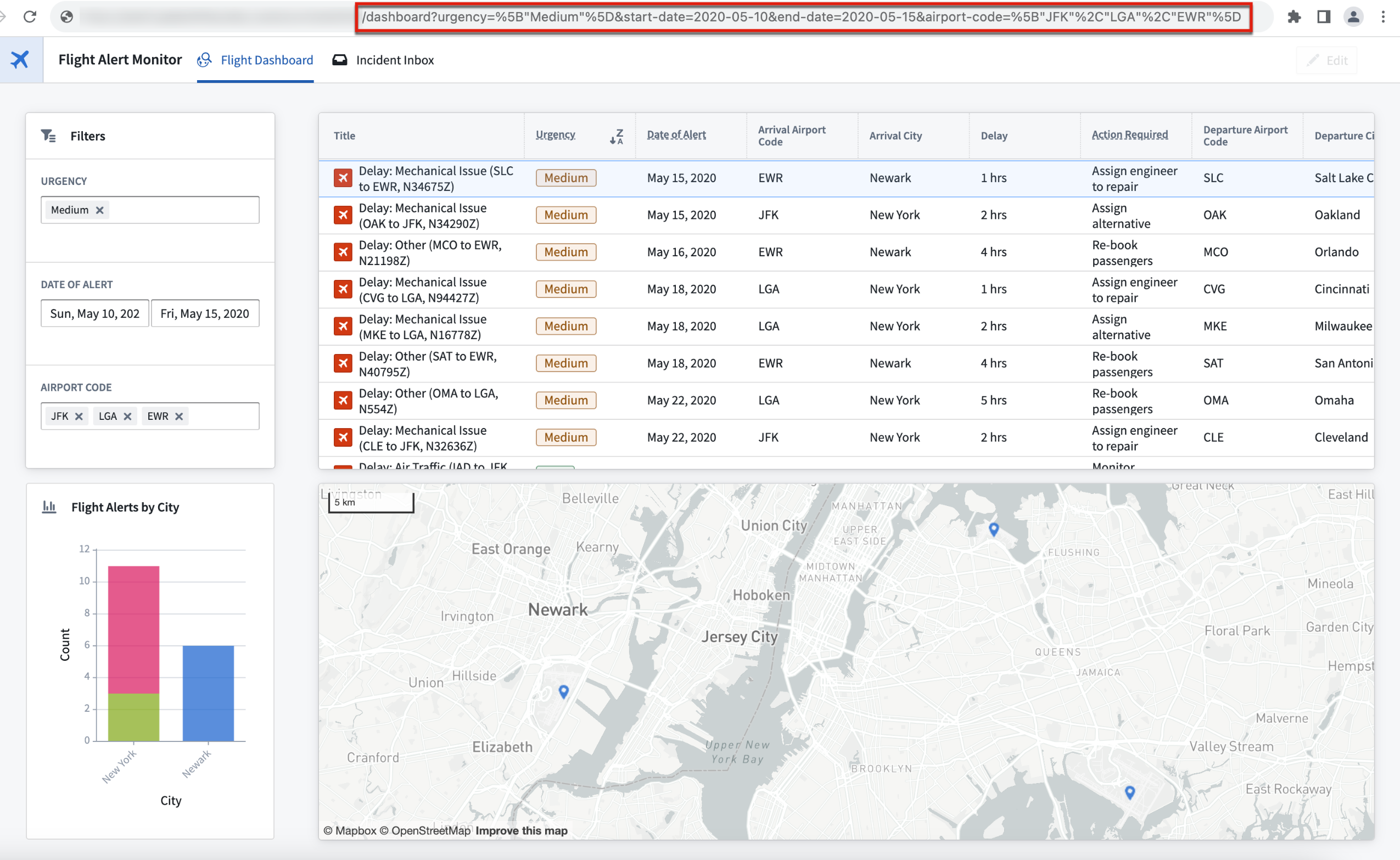
Example of routing shown in the URL bar in a user's browser.
To support routing, the promoted variable user interface has been updated to a variable settings panel that offers more information on how variables with a configured external ID can be used. In this Settings panel, application builders can configure which variables with external IDs to be present in the URL, and whether the external IDs should always be present, or only when used by a visible widget or layout in the current module view.
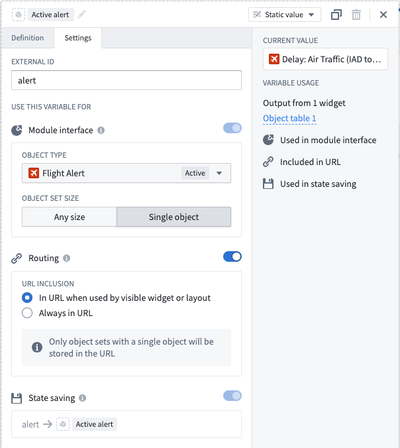
Routing section of the variable Settings panel.
For more information on how to use Workshop routing, review the Routing documentation.
TypeScript Functions on Objects (FoO) performance improvements in Code Repositories
Date published: 2024-01-16
We are excited to announce improvements to TypeScript Functions on Objects (FoO) authoring in Code Repositories. These updates result in significantly faster live preview loading times and checks, as well as enhanced responsiveness in the editor.
Function discovery in both Code Assist & CI checks now over 10 times faster
Code Repositories perform extensive analyses of TypeScript code to identify user-authored Functions, automatically detect read and edited object types, and flag potentially problematic patterns such as unsafe type casting. Live preview loading times and CI checks are now significantly faster as static analysis operations in the Function discovery workflow have been replaced with more efficient alternatives.
To illustrate, in a test repository consisting of more than 50,000 lines of TypeScript code with more than 3,000 Functions, Function discovery for TypeScript asset bundle version 0.527.0 took approximately 1.6 seconds compared to the previous 25 seconds runtime, making it 15.6 times faster.

Function discovery before (25 seconds) and after (approx. 1.6 seconds) on a benchmarking repository.
To benefit from this increased speed, upgrade your repository to the latest version. Navigate to the ellipses at the top-right of the repository's window and select Upgrade.

Upgrade your repository to experience faster preview loading times and CI checks.
More performant Code Assist TypeScript language server
Common language features, such as code complete, are now more efficient due to better handling of CPU-bound operations.
For context, the TypeScript language server actively processes each keystroke for autocompletions and error identification. In the past, outdated requests in large repositories created unnecessary, long-running child processes, making the system less responsive.

Autocompletion and error identification features by the TypeScript language server.
To address unnecessary processes, stale requests are now canceled, and several other optimizations have been implemented. As a result, the language server's efficiency has significantly improved, offering a more responsive and seamless experience for users on TypeScript language server version 0.188.0.
Learn more about Code Repositories in the documentation.
Introducing the AIP Agent widget
Date published: 2024-01-11
Note: As of the week of April 27, 2026, the AIP Agent widget was renamed the AIP Chatbot widget. All existing features and functionalities remain unchanged.
The AIP Agent widget, now available on AIP-enabled enrollments, is a Workshop feature that brings the power of AIP Logic, Functions, and LLM-powered Ontology exploration to your operational applications. Furthermore, by using Workshop variables, the widget can read from and write to your application state.

AIP Agent widget configuration panel.
Extend widget capabilities in the context of your application
You can grant the widget access to tools (AIP Logic, Functions on objects, other Workshop applications, and so on) to extend its capabilities in the context of your application. For example, you can define an LLM-backed Function in AIP Logic, add it as a tool, and see every run of the AIP Logic call from the Workshop application reflected in the debugger for review purposes.
Enable the Agent widget to understand user references and interact with visualizations
Like other Workshop widgets, you can save and read object sets in variables. Once configured, the Agent widget can interpret user-referenced topics and update a predefined object set variable, which can then be passed to other widgets in the Workshop application.
Employ default LLM tools to explore and traverse the Ontology
The widget also has standard LLM tools for traversing objects, reading and filtering on properties, and running aggregations. These tools can be managed from the widget's configuration panel.
White-label and customize the Agent widget to fit the context of your application
You can edit the zero state, add new logos, change the assistant name of the AIP Agent widget, and set up suggested prompts to customize the Agent widget for your intended workflow.
Robust configuration to support nuanced use cases
The AIP Agent widget comes with a robust suite of configuration options, including:
- Define the widget's role, configure tools and capabilities, and set up prompts that reference tools and variables
-
This component allows you to establish the widget's role within the application context. Provide a prompt that describe the widget's function and refer to the configured tools and variables by their designated names using the
/command to refer to the tools and variables. The configuration also facilitates the setup of tools and capabilities the widget will have access to, and you can also refer to them throughout the prompt.
AIP Agent widget configuration panel with the base configuration and tools section populated.
-
Set up Ontology and application context
-
Customize the widget's access to workshop variables and configure the object types the widget should be aware of. Enable users to customize the AIP Agent widget's access to workshop variables for read or write operations. Users can also configure object types for the widget's awareness.

Managing Ontology and application context in the widget setup.
-
Advanced tools configuration
- Achieve greater control over default AIP tools by configuring LLM's access to them. This component offers an option to customize LLM's access to the default AIP tools, providing you with more control over their availability to the widget.
For more information, see the following documentation pages:
Auto migration of Checkpoints Admin users and groups to Data Governance Officer default role in Control Panel after January 31, 2024
Date published: 2024-01-09
The Checkpoints Admin role in Control Panel is being deprecated. Current Checkpoints admin workflows (configuring organization-scoped checkpoints and reviewing organization-scoped records) have already been granted to the Data Governance Officer default role in Control Panel, and after January 31, all users and groups assigned to the Checkpoints Admin role will be automatically migrated to the Data Governance Officer role.
When these users are migrated to the Data Governance Officer role, they will automatically be granted access to the current and future workflows assigned to that role. See the screenshot below for an overview of the current workflows. It is likely that Checkpoint Admins were already acting in some data governance capacity, so expanding their access to additional data governance workflows makes sense in most cases. Otherwise, you may create and define a custom role that mirrors the current Checkpoints Admin role’s permissions with the instructions provided below.
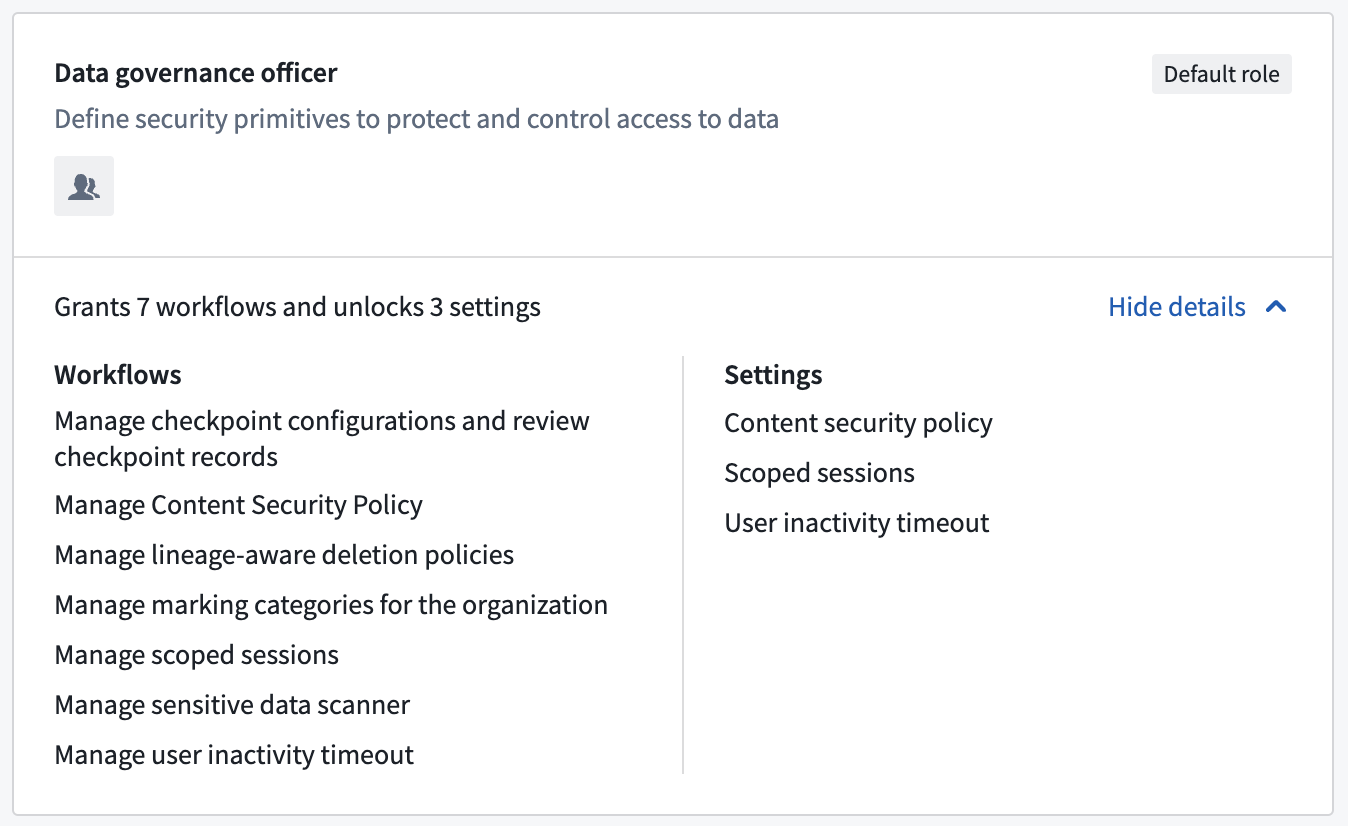
Existing DGO workflows and settings for reference.
Why is the Checkpoints Admin role being deprecated?
The Checkpoints Admin role is a legacy Administrative Permission role in Control Panel. These legacy roles are being phased out, in favor of default organization roles in order to improve the discoverability, legibility, and customizability of permission setups for platform administrators.
Checkpoints itself is a robust pillar of Foundry’s data governance product offerings, and as the Checkpoints Admin workflows are all related to data governance, they are most suitable to be held by Data Governance Officer default role.
Create and define a custom role that mirrors existing Checkpoints Admin permissions (optional)
Optionally, if you prefer not to migrate users from Checkpoints Admin to Data Governance Officer, follow the steps below to create a custom role for your Checkpoint admin users.
To start, you can review the workflows granted to the Data Governance Officer by navigating to Organization settings > Organization permissions > Data governance officer in Control Panel (as depicted in the first screenshot in this announcement).
If you do not want to migrate all Checkpoints Admin users into the Data Governance Officer role, you can define a custom role for Checkpoints admins and move your users there instead. This should take little time (~5 minutes).
- In Control Panel, go to Organization settings > Organization permissions .
- Create a new custom role by selecting New role.
- Grant this new role the Manage checkpoints configs and review checkpoint records workflow.
- Add all users and groups from the Checkpoints Admin application admin role to this new custom role. You can find these users and groups by going to Organization settings > Organization permissions > Application-specific roles > Checkpoints admin.
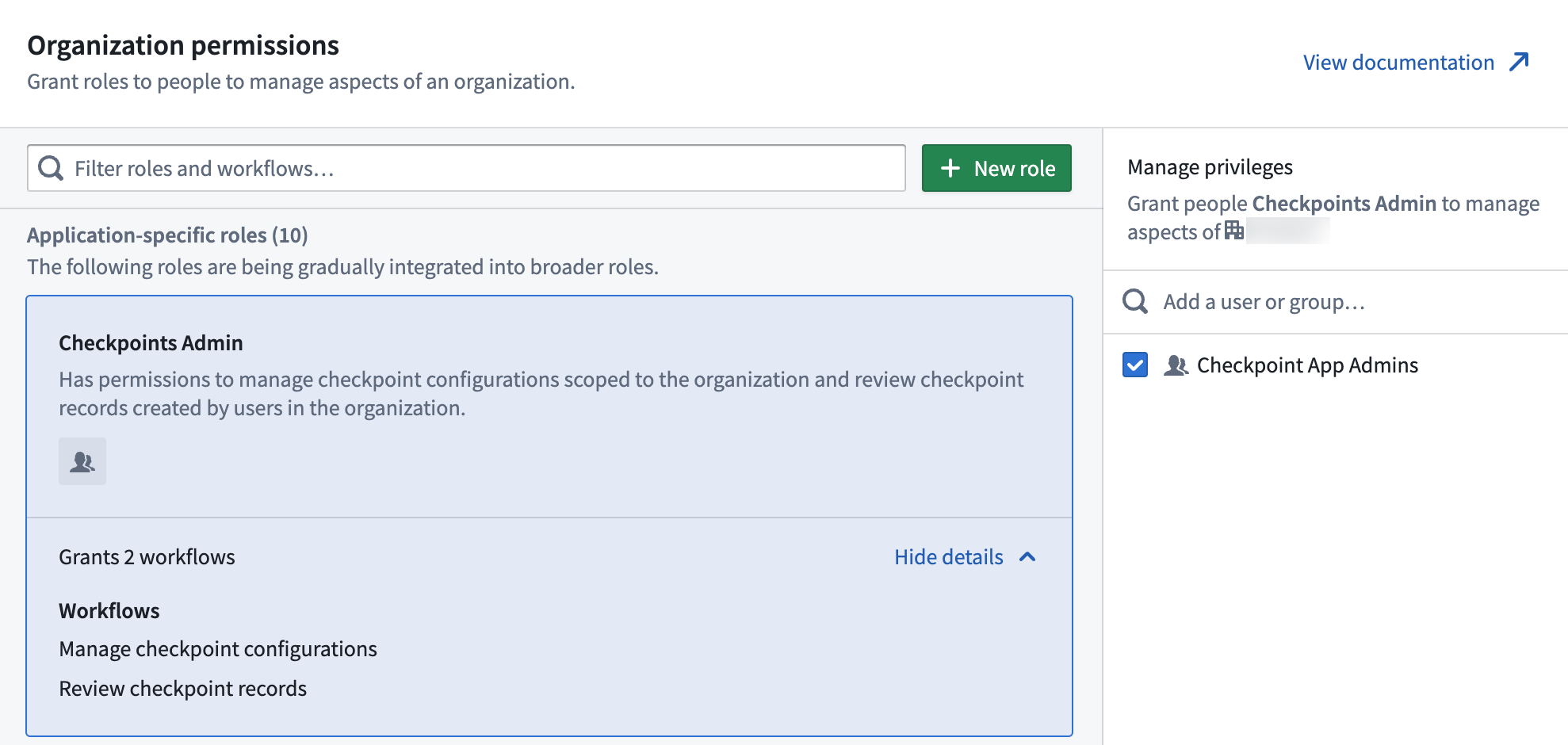
Organization permissions details for Checkpoints Admin role.
- ⚠️ Important: Remove all users and groups from the Checkpoints Admin Application-specific role! Any users or groups assigned to this role after January 31 will be automatically added to the Data Governance Officer role.
- For more information on the migration, see the following documentation pages:
- Organization administrator review
Introducing Ontology API publishing using OpenAPI Specification
Date published: 2024-01-04
We are pleased to announce that Developer Console now supports Ontology API publishing in an OpenAPI YAML file, allowing developers to easily integrate their specific Ontology API with other systems that support OpenAPI Specification, such as Swagger.io ↗ or Postman ↗. With this update, connecting Ontology APIs with other systems is now even more streamlined and user-friendly.
Generate an OpenAPI Specification file
After creating your Developer Console application, use the SDK Generation tab to select the Export as OpenAPI option, as pictured below.

Select which generator versions and package manager to use on the SDK generation tab of Application SDK.
The generated file will include the name and description of any resource you included in your application. However, it will not include any data stored in these object types. Once saved to your computer, the file can be opened in any text editor or imported into your preferred tool, as illustrated in the image below.
Be aware that if the specification download is restricted, you should contact your Data Governance Officer to request access.

Example of exported Open API Specification file.
Keep in mind that a new specification file must be generated whenever the Developer Console application is updated.
Audit specification downloads
Data Governance Officers can configure a checkpoint specifically for OpenAPI exports. This checkpoint, named OpenAPI Export in the Checkpoint application, prompts users who select the Export as OpenAPI option with a confirmation dialog.

The OpenAPI Export checkpoint can be configured from the Checkpoint application.
As in the image above, users must acknowledge that they are exporting data from the platform before proceeding, and to confirm that the exported data conforms to their data policy.
For more information on using the Ontology SDK, review the documentation.
Additional highlights
Model Asset
Date published: 2024-01-30
Preview Model Assets in Code Repositories | Model Assets now support preview in the Code Repositories application. This allows model developers to test model adapter, model training, and inference logic on selected, small scale data without waiting for repository checks, unit tests or a full build. This capability can significantly speed up development for models trained in-platform or backed by user-uploaded files.

Security | Approvals
Date published: 2024-01-30
Approvals: Warning for request creators with limited access | Approvals now display a warning when the request creator cannot view the access request due to limited discovery permissions on the requested resource. This additional context can assist users in making informed decisions when approving requests.
Model Integration | Workspace
Date published: 2024-01-30
Enhanced clips and restricted views | Introducing an improved experience for working with clips and restricted views in Workspace. Users can now seamlessly manage and interact with their content.
Security| Approvals
Date published: 2024-01-30
Approvals: Support for editing access requests | Users with appropriate permissions can now edit open access requests in Approvals. This allows both the request creator and users with approval permissions to add or remove users from an open request.

App Building | Workshop
Date published: 2024-01-30
FilterList V9 enhancements | This update introduces several improvements to the FilterList component, including the ability to order options in ascending or descending order for singleSelect and multiSelect, a resetOnSelect option for multiSelect, and adjustable chart height for histograms. Additionally, the multipassUser component now supports multi-select functionality, and singleSelect offers radio and dropdown display options.
Administration | Resource Management
Date published: 2024-01-30
Enhanced anomaly detection for compute usage | Detect anomalous patterns in compute usage with improved accuracy and efficiency. Automatically identify spikes, troughs, and flatlines to protect against runaway spend or validate specified data pipelines. Learn more in the Resource Management Anomaly Detection documentation.

App Building | Workshop
Date published: 2024-01-30
Configure KNN Object Sets in Object Set Editor | The Object Set Editor now supports configuring KNN object sets, enabling easier semantic search workflow setups in Workshop.
App Building | Workshop
Date published: 2024-01-30
Improved PDF rendering in Adaptable Preview | Adaptable Preview now uses PdfRendererV2, the same renderer used in Workshop and Notepad, for improved PDF rendering and consistency across applications.
Ontology | Ontology Management
Date published: 2024-01-30
Enhanced staging dialog in Ontology Manager | The staging dialog in Ontology Manager has been redesigned to improve user experience and prepare for the upcoming separation of branches and proposals. Users can now save both with and without an edit, and the dialog will display the updated design.
Ontology | Ontology Management
Date published: 2024-01-30
Improved Ontology Manager redirects | Ontology Manager now automatically redirects users to the correct Ontology for object types and link types when no edits have been made.
Administration | Control Panel
Date published: 2024-01-30
Email suppressions now generally available | Email suppressions, a feature that displays when emails are stuck and cannot be sent to certain targets, is now generally available. This feature currently mirrors the underlying AWS suppressions list. If the stack is not using AWS (including BYOSMTP / PCloud), the suppressions view will be empty.
Data Integration | Code Repositories
Date published: 2024-01-25
Model Asset I/O Preview Enabled | Users can now preview model input and output data directly within the Code Repositories application. This enhancement provides a more convenient way to visualize and understand the data flow in your models.
Ontology | Ontology Management
Date published: 2024-01-25
Improved Datasource Diffs in Ontology Manager | Enhancements have been made to datasource diffs in Ontology Manager, including improved wording for datasource diff codes and rendering datasources instead of just displaying an RID.
Data Integration | Pipeline Builder
Date published: 2024-01-23
Deploy Without Build Feature for Pipeline Builder | Deploy without build is now available for batch and streaming pipelines in Pipeline Builder, allowing users to selectively deploy pipeline targets and publish jobspecs without running a full build. Choose individual builds or job groups as the build target. This reduces operational costs and unnecessary build time. When selectively building targets on a streaming pipeline, users can also optionally replay specific targets during deployment.
Data Integration | Job Tracker
Date published: 2024-01-23
Display Supported CPU Architectures in Job Tracker | The Job Tracker now displays supported CPU architectures for each job, making it easier for users to identify the appropriate architecture for their custom libraries. Users can force a job to run on a specific architecture using Spark profiles KUBERNETES_CPU_ARCHITECTURE_OVERRIDE_AMD64 and KUBERNETES_CPU_ARCHITECTURE_OVERRIDE_ARM64. Note that only a subset of environments has access to ARM architecture due to capacity or compliance concerns.
Security | Projects
Date published: 2024-01-23
Time-based Group Membership (Beta) | Introducing beta functionality for time-based group membership. Users can now be granted temporary access to data through time-constrained group memberships. Configure groups with time constraint conditions to ensure all memberships adhere to these conditions. Approval access requests against a group will also be constrained by the group's time constraint conditions. This feature supports data protection principles such as use limitation and purpose specification. Note that this functionality is in beta and may not be available in your enrollment. Contact Palantir Support to enable this feature.
Data Integration | Code Repositories
Date published: 2024-01-23
Improved External Transforms Performance with Lightweight Mode | External transforms now supports the @lightweight API, resulting in improved performance by reducing startup overhead. This enhancement is ideal for external transforms as they are typically not Spark dependent or CPU-intensive, leading to better latency and throughput.
App Building | Workshop
Date published: 2024-01-23
Configure Feature Exclusions for Promoted Variables | Builders can now enable a subset of features to use for variables with an external ID (previously called "promoted variables"). This update allows for more granular control over which features each variable is used for, improving the overall user experience when working with variables.
Security | Projects
Date published: 2024-01-16
Enhanced Markdown Support in Project Documentation | Foundry now supports Github-flavored markdown extensions, such as tables, todo lists, and automatic links, in project covers and documentation. This enhancement allows users to create more engaging and organized project documentation.

Ontology | Automate
Date published: 2024-01-16
Enhanced Attachment Property Injection | Users can now inject attachment properties from conditions into effects in Automate, supporting per-object execution. This enhancement streamlines the process of working with attachment properties and improves the overall user experience.
Model Integration | Modeling
Date published: 2024-01-09
Direct Publishing of Models in Function Registry | Live deployments in Modeling Objectives application can now be directly published as a function for consumption across Foundry. In comparison to functions on models, this enhancement offers a more streamlined, no-code method for operationalizing a model, while retaining the same benefits.

Administration | Control Panel
Date published: 2024-01-09
Enhanced CORS Configuration in Control Panel | Administrators can now configure CORS (cross-origin resource sharing) policies in the Control Panel, allowing specific external origins to access Foundry resources. This enhancement supports workflows such as accessing Foundry public APIs and integrating third-party applications.
Security | Projects
Date published: 2024-01-04
Add CBAC markings to user marking access section | For environments that use Classification-based Access Controls (CBAC), CBAC markings associated with a user are now shown in User settings under Marking access.

App Building | Workshop
Date published: 2024-01-04
Enhanced list parameter support in Workshop | Users can now pass promoted list variables between Workshop modules when embedded in a Carbon workspace, improving the flexibility and functionality of Workshop within Carbon.
Ontology | Ontology Management
Date published: 2024-01-04
Improved error message for invalid primary key references | The Ontology Manager now provides a clearer error message when users encounter the LinkTypeReferencesInvalidPrimaryKeyError while saving changes to the Ontology.
App Building | Workshop
Date published: 2024-01-04
Sortable Object Table title columns | Object Table title columns are now sortable, allowing users to easily organize and navigate through their data. This update enhances the user experience by providing a more efficient way to sort and manage object tables.
中文翻译
公告
提醒: 您现在可以订阅 Foundry 新闻通讯(Newsletter),直接在收件箱中接收平台新产品、功能及改进的摘要。有关订阅方式的更多信息,请参阅 Foundry 新闻通讯与产品反馈渠道公告。
Workshop 中 Tabs 组件迎来增强设计功能
发布日期:2024-01-25
应用构建者现在可以体验 Workshop 中 Tabs 组件(Tabs widget)改进的主题和设计选项。此次更新为 Tabs 组件的样式和配置提供了更高的灵活性,帮助构建者在创建模块时满足功能与美学需求。
四种全新设计预设满足模块需求
应用构建者现可选择四种设计预设(design presets),打造专业且时尚的 Tabs 组件,以适应各类模块需求。可用预设包括:轮廓(outline)、块状(block)、突出(prominent)和分组(grouped)。
Tab 预设选项与预览。
在每个预设中,应用构建者可通过定义额外的配置偏好(如标签大小)解锁新功能。例如,选择小、中、大标签可提升内容可读性,并使标签更好地适配其他组件。标签大小还可用于创建嵌套效果,帮助构建者在标签间建立层级关系。
1. 突出标签,2. 使用不同标签大小实现的嵌套效果,3. 分组标签
新增显示与格式设置,提升灵活性
新增的显示与格式设置(display and formatting settings)实现了更强的自定义能力,包括:
- 颜色主题(Color theming): 为标签设置主色,并选择标签标签、图标和徽章不同部分的颜色。此选项有助于与容器背景形成对比,提升终端用户的标签可见性。
- 方向与对齐(Direction and alignment): 选择水平或垂直显示标签。您还可以将标签相对于容器左对齐或居中对齐,有助于优化组件的整体文档流。
- 条件可见性(Conditional visibility): 使用您选择的变量决定标签是否可见、禁用或完全隐藏。此功能使您能够根据应用状态和用户需求更好地隐藏或显示信息。
有关 Workshop 中 Tabs 组件的更多信息,请参阅更新的文档。
引入 Media Sets:组织非结构化媒体数据的新方式
发布日期:2024-01-25
Media Sets(媒体集)将于 2024 年 1 月 29 日当周正式发布(GA),使用户能够增强涉及非结构化数据的工作流能力。
Media Set 是共享同一模式(schema)的媒体文件集合,专为处理大规模非结构化数据而设计,并支持音频、图像和 PDF 等媒体项目的复杂处理(视频支持即将推出)。通过使用 Media Sets,您可以启用灵活的存储、计算优化和特定模式的转换,从而增强媒体工作流和管道。此外,您还可以创建虚拟 Media Sets(virtual media sets),直接从 Azure 或 S3 外部源系统读取数据,省去繁琐的数据传输和存储物流。
本地部署(on-premise)用户可通过 Palantir 支持启用 Media Sets 功能。
Media Sets 支持导入音频、图像和 PDF。
灵活的转换配置设置
Media Sets 可根据延迟需求配置为带事务(with transactions)(类似于 Catalog 数据集)或无事务(transactionless)(类似于流)。设置完成后,您可以使用现有的开箱即用转换(out-of-the-box transformations),通过 transforms-media SDK 在 Transforms 中利用这些转换,同时 Pipeline Builder 中的额外转换支持正在积极开发中。
探索由 Media Sets 驱动的新工作流
以下是引入 Media Sets 后可以实现的示例工作流列表:
- 使用 Pipeline Builder 进行 PDF 文本提取: 使用 Pipeline Builder 轻松构建包含 PDF 源的复杂工作流。
- 优化的缩略图和平台预览: 在平台上快速直观地查看上传内容。 文件格式标准化: 只需将文件上传到 MP3 Media Set,即可将超过 8 种音频格式转码为 MP3。
- Vortex 中的栅格切片(TIFF、NITF): 上传地理空间图像,并使用媒体引用属性(media reference property)进行本体化(Ontologize),或直接在 Vortex 中使用原生切片功能。
- DICOM 图像支持: 在 Media Sets 或 Workshop 应用中预览 DICOM 文件,无需在管道中进行预处理。
有关 Media Sets 的更多信息,请参阅我们的公共文档。
Workshop 路由功能正式发布(GA)
发布日期:2024-01-16
Workshop 路由(Workshop routing)现已正式发布(GA),可将模块的特定状态或视图写入 URL,使用户能够通过链接共享轻松与他人分享这些定义的视图。
为模块启用路由后,当前页面的 ID 将写入 URL。路由功能还支持将具有外部 ID(external ID)的变量值写入 URL。
用户浏览器 URL 栏中显示的路由示例。
为支持路由,提升变量(promoted variable)的用户界面已更新为变量设置面板(variable settings panel),提供有关如何使用配置了外部 ID 的变量的更多信息。在此设置面板中,应用构建者可以配置哪些具有外部 ID 的变量应出现在 URL 中,以及这些外部 ID 是始终存在,还是仅在当前模块视图中由可见组件或布局使用时才存在。
变量设置面板的路由部分。
有关如何使用 Workshop 路由的更多信息,请参阅路由文档。
Code Repositories 中 TypeScript 对象函数(FoO)性能提升
发布日期:2024-01-16
我们很高兴地宣布,Code Repositories 中 TypeScript 对象函数(Functions on Objects,FoO)的编写体验得到了改进。这些更新显著加快了实时预览加载时间和检查速度,并提升了编辑器的响应能力。
Code Assist 和 CI 检查中的函数发现速度提升超过 10 倍
Code Repositories 会对 TypeScript 代码进行广泛分析,以识别用户编写的函数,自动检测读取和编辑的对象类型,并标记潜在问题模式(如不安全的类型转换)。由于函数发现工作流中的静态分析操作已被更高效的替代方案取代,实时预览加载时间和 CI 检查现在显著加快。
举例来说,在一个包含超过 50,000 行 TypeScript 代码和 3,000 多个函数的测试仓库中,TypeScript 资产包版本 0.527.0 的函数发现耗时约 1.6 秒,而之前为 25 秒,速度提升了 15.6 倍。
基准测试仓库中函数发现性能对比:之前(25 秒)与之后(约 1.6 秒)。
要享受这一速度提升,请将您的仓库升级到最新版本。导航至仓库窗口右上角的省略号,选择 升级。
升级您的仓库,体验更快的预览加载时间和 CI 检查。
更高效的 Code Assist TypeScript 语言服务器
由于对 CPU 密集型操作的处理得到改进,代码补全等常见语言功能现在更加高效。
背景信息:TypeScript 语言服务器会主动处理每次按键,以提供自动补全和错误识别。过去,大型仓库中的过时请求会创建不必要的、长时间运行的子进程,导致系统响应变慢。
TypeScript 语言服务器的自动补全和错误识别功能。
为解决不必要的进程问题,现已取消过时请求,并实施了多项其他优化。因此,语言服务器的效率显著提升,为使用 TypeScript 语言服务器版本 0.188.0 的用户提供了更响应、更流畅的体验。
在文档中了解更多关于 Code Repositories 的信息。
引入 AIP Agent 组件
发布日期:2024-01-11
注意: 自 2026 年 4 月 27 日当周起,AIP Agent 组件已更名为 AIP Chatbot 组件。所有现有功能保持不变。
AIP Agent 组件(AIP Agent widget)现已在启用 AIP 的部署中可用,这是一项 Workshop 功能,可将 AIP Logic、函数(Functions)和基于 LLM 的本体探索(Ontology exploration)能力引入您的运营应用。此外,通过使用 Workshop 变量,该组件可以读取和写入您的应用状态。
AIP Agent 组件配置面板。
在应用上下文中扩展组件能力
您可以授予组件访问工具(如 AIP Logic、对象函数、其他 Workshop 应用等)的权限,以在应用上下文中扩展其能力。例如,您可以在 AIP Logic 中定义一个基于 LLM 的函数,将其添加为工具,并在调试器中查看 Workshop 应用中每次 AIP Logic 调用的运行情况,以便审查。
使 Agent 组件理解用户引用并与可视化交互
与其他 Workshop 组件一样,您可以在变量中保存和读取对象集。配置完成后,Agent 组件可以解释用户引用的主题,并更新预定义的对象集变量,该变量随后可传递给 Workshop 应用中的其他组件。
使用默认 LLM 工具探索和遍历本体
该组件还提供标准的 LLM 工具,用于遍历对象、读取和过滤属性以及运行聚合。这些工具可从组件的配置面板进行管理。
白标和自定义 Agent 组件以适应应用上下文
您可以编辑零状态(zero state)、添加新徽标、更改 AIP Agent 组件的助手名称,并设置建议提示(suggested prompts),以针对预期工作流自定义 Agent 组件。
强大的配置支持复杂用例
AIP Agent 组件提供了一套强大的配置选项,包括:
- 定义组件角色、配置工具和能力,并设置引用工具和变量的提示
-
此组件允许您在应用上下文中建立组件的角色。提供描述组件功能的提示,并使用
/命令引用已配置的工具和变量。配置还便于设置组件将有权访问的工具和能力,您可以在整个提示中引用它们。已填写基本配置和工具部分的 AIP Agent 组件配置面板。
-
设置本体和应用上下文
-
自定义组件对 Workshop 变量的访问权限,并配置组件应了解的对象类型。使用户能够自定义 AIP Agent 组件对 Workshop 变量的读取或写入访问权限。用户还可以配置组件应了解的对象类型。
在组件设置中管理本体和应用上下文。
-
高级工具配置
- 通过配置 LLM 对默认 AIP 工具的访问权限,实现对它们的更精细控制。此组件提供自定义 LLM 对默认 AIP 工具访问权限的选项,使您能更好地控制这些工具对组件的可用性。
有关更多信息,请参阅以下文档页面:
2024 年 1 月 31 日后,Control Panel 中 Checkpoints Admin 用户和组将自动迁移至 Data Governance Officer 默认角色
发布日期:2024-01-09
Control Panel 中的 Checkpoints Admin 角色即将弃用。当前的 Checkpoints 管理员工作流(配置组织范围的检查点和审查组织范围的记录)已授予 Control Panel 中的 Data Governance Officer 默认角色。2024 年 1 月 31 日后,所有分配给 Checkpoints Admin 角色的用户和组将自动迁移至 Data Governance Officer 角色。
当这些用户迁移至 Data Governance Officer 角色后,他们将自动获得对该角色当前和未来工作流的访问权限。请参阅下方截图了解当前工作流概览。Checkpoints Admin 很可能已经在履行某些数据治理职责,因此在大多数情况下,扩展他们对其他数据治理工作流的访问权限是合理的。否则,您可以按照以下说明创建并定义一个自定义角色,以镜像当前 Checkpoints Admin 角色的权限。
供参考的现有 DGO 工作流和设置。
为何弃用 Checkpoints Admin 角色?
Checkpoints Admin 角色是 Control Panel 中的遗留管理权限角色(legacy Administrative Permission role)。这些遗留角色正在逐步淘汰,取而代之的是默认组织角色(default organization roles),以提高平台管理员对权限设置的可发现性、可读性和可定制性。
Checkpoints 本身是 Foundry 数据治理产品体系中的强大支柱,由于 Checkpoints Admin 工作流均与数据治理相关,因此最适合由 Data Governance Officer 默认角色持有。
创建并定义一个镜像现有 Checkpoints Admin 权限的自定义角色(可选)
如果您不希望将用户从 Checkpoints Admin 迁移至 Data Governance Officer,请按照以下步骤为您的 Checkpoints 管理员用户创建一个自定义角色。
首先,您可以通过在 Control Panel 中导航至 组织设置 > 组织权限 > Data governance officer 来查看授予 Data Governance Officer 的工作流(如本公告第一张截图所示)。
如果您不想将所有 Checkpoints Admin 用户迁移至 Data Governance Officer 角色,您可以为 Checkpoints 管理员定义一个自定义角色,并将用户迁移至该角色。这只需少量时间(约 5 分钟)。
- 在 Control Panel 中,前往 组织设置 > 组织权限。
- 选择 新建角色 创建新的自定义角色。
- 授予此新角色 管理检查点配置和审查检查点记录 工作流。
- 将 Checkpoints Admin 应用管理员角色中的所有用户和组添加到此新自定义角色。您可以通过前往 组织设置 > 组织权限 > 应用特定角色 > Checkpoints admin 找到这些用户和组。
Checkpoints Admin 角色的组织权限详情。
- ⚠️ 重要提示: 从 Checkpoints Admin 应用特定角色中移除所有用户和组!1 月 31 日后分配给此角色的任何用户或组将自动添加到 Data Governance Officer 角色。
- 有关迁移的更多信息,请参阅以下文档页面:
- 配置检查点条件
- 组织管理员审查
引入使用 OpenAPI 规范发布本体 API
发布日期:2024-01-04
我们很高兴地宣布,Developer Console 现在支持以 OpenAPI YAML 文件发布本体 API(Ontology API),使开发人员能够轻松地将其特定本体 API 与支持 OpenAPI 规范的其他系统(如 Swagger.io ↗ 或 Postman ↗)集成。通过此次更新,连接本体 API 与其他系统变得更加简化和用户友好。
生成 OpenAPI 规范文件
创建 Developer Console 应用后,使用 SDK 生成 选项卡选择 导出为 OpenAPI 选项,如下图所示。
在 Application SDK 的 SDK 生成选项卡上选择要使用的生成器版本和包管理器。
生成的文件将包含您在应用中包含的任何资源的名称和描述。但是,它不会包含这些对象类型中存储的任何数据。保存到计算机后,该文件可以在任何文本编辑器中打开,或导入到您偏好的工具中,如下图所示。
请注意,如果规范下载受到限制,您应联系您的 Data Governance Officer 请求访问权限。
导出的 Open API 规范文件示例。
请记住,每当 Developer Console 应用更新时,都必须生成新的规范文件。
审计规范下载
Data Governance Officer 可以为 OpenAPI 导出配置专门的检查点(checkpoint)。此检查点在 Checkpoint 应用中名为 OpenAPI 导出,会提示选择 导出为 OpenAPI 选项的用户确认对话框。
可以从 Checkpoint 应用配置 OpenAPI 导出检查点。
如上图所示,用户必须确认他们正在从平台导出数据,并确认导出的数据符合其数据策略。
有关使用 Ontology SDK 的更多信息,请参阅文档。
其他亮点
模型资产
发布日期:2024-01-30
在 Code Repositories 中预览模型资产 | 模型资产(Model Assets)现在支持在 Code Repositories 应用中进行预览。这使得模型开发者可以在选定的、小规模数据上测试模型适配器、模型训练和推理逻辑,而无需等待仓库检查、单元测试或完整构建。此功能可以显著加快在平台内训练或由用户上传文件支持的模型的开发速度。
安全 | 审批
发布日期:2024-01-30
审批:对访问权限有限的请求创建者发出警告 | 当请求创建者因对请求资源的发现权限有限而无法查看访问请求时,审批(Approvals)现在会显示警告。此额外上下文可帮助用户在批准请求时做出明智决策。
模型集成 | 工作空间
发布日期:2024-01-30
增强的剪辑和受限视图 | 引入在 Workspace 中处理剪辑(clips)和受限视图(restricted views)的改进体验。用户现在可以无缝管理和交互其内容。
安全 | 审批
发布日期:2024-01-30
审批:支持编辑访问请求 | 具有适当权限的用户现在可以在审批中编辑未关闭的访问请求。这使得请求创建者和具有审批权限的用户都可以在未关闭的请求中添加或移除用户。
应用构建 | Workshop
发布日期:2024-01-30
FilterList V9 增强 | 此次更新为 FilterList 组件引入了多项改进,包括能够为 singleSelect 和 multiSelect 按升序或降序排列选项,为 multiSelect 提供 resetOnSelect 选项,以及可调整的直方图高度。此外,multipassUser 组件现在支持多选功能,singleSelect 提供单选按钮和下拉列表显示选项。
管理 | 资源管理
发布日期:2024-01-30
增强的计算使用异常检测 | 以更高的准确性和效率检测计算使用中的异常模式。自动识别峰值、谷值和平稳期,以防止失控支出或验证指定的数据管道。在资源管理异常检测文档中了解更多信息。
应用构建 | Workshop
发布日期:2024-01-30
在对象集编辑器中配置 KNN 对象集 | 对象集编辑器(Object Set Editor)现在支持配置 KNN 对象集,从而在 Workshop 中更轻松地设置语义搜索工作流。
应用构建 | Workshop
发布日期:2024-01-30
Adaptable Preview 中改进的 PDF 渲染 | Adaptable Preview 现在使用 PdfRendererV2(与 Workshop 和 Notepad 中使用的相同渲染器),以改进 PDF 渲染并确保跨应用的一致性。
本体 | 本体管理
发布日期:2024-01-30
Ontology Manager 中增强的暂存对话框 | Ontology Manager 中的暂存对话框(staging dialog)已重新设计,以改善用户体验并为即将到来的分支和提案分离做准备。用户现在可以在编辑或不编辑的情况下保存,对话框将显示更新后的设计。
本体 | 本体管理
发布日期:2024-01-30
改进的 Ontology Manager 重定向 | 当未进行任何编辑时,Ontology Manager 现在会自动将用户重定向到对象类型和链接类型的正确本体。
管理 | Control Panel
发布日期:2024-01-30
电子邮件抑制功能现已正式发布 | 电子邮件抑制(Email suppressions)功能现已正式发布,该功能显示电子邮件何时被卡住且无法发送到某些目标。此功能当前镜像底层的 AWS 抑制列表。如果堆栈未使用 AWS(包括 BYOSMTP / PCloud),抑制视图将为空。
数据集成 | Code Repositories
发布日期:2024-01-25
模型资产 I/O 预览已启用 | 用户现在可以直接在 Code Repositories 应用中预览模型输入和输出数据。此增强功能提供了一种更方便的方式来可视化和理解模型中的数据流。
本体 | 本体管理
发布日期:2024-01-25
Ontology Manager 中改进的数据源差异 | Ontology Manager 中的数据源差异(datasource diffs)已得到增强,包括改进了数据源差异代码的措辞,并渲染数据源而非仅显示 RID。
数据集成 | Pipeline Builder
发布日期:2024-01-23
Pipeline Builder 的“无需构建即可部署”功能 | Pipeline Builder 中的批处理和流式管道现在支持“无需构建即可部署”(Deploy Without Build),允许用户选择性地部署管道目标并发布 jobspecs,而无需运行完整构建。选择单个构建或作业组作为构建目标。这降低了运营成本和不必要的构建时间。在流式管道上选择性构建目标时,用户还可以在部署期间选择性地重放特定目标。
数据集成 | Job Tracker
发布日期:2024-01-23
在 Job Tracker 中显示支持的 CPU 架构 | Job Tracker 现在显示每个作业支持的 CPU 架构,使用户更容易为其自定义库识别合适的架构。用户可以使用 Spark 配置文件 KUBERNETES_CPU_ARCHITECTURE_OVERRIDE_AMD64 和 KUBERNETES_CPU_ARCHITECTURE_OVERRIDE_ARM64 强制作业在特定架构上运行。请注意,由于容量或合规性问题,只有部分环境可以访问 ARM 架构。
安全 | 项目
发布日期:2024-01-23
基于时间的组成员资格(Beta) | 引入基于时间的组成员资格(time-based group membership)测试版功能。用户现在可以通过有时间限制的组成员资格获得对数据的临时访问权限。配置具有时间约束条件的组,以确保所有成员资格都遵守这些条件。针对组的审批访问请求也将受组的时间约束条件限制。此功能支持数据保护原则,如使用限制和目的规范。请注意,此功能处于测试阶段,可能不适用于您的部署。请联系 Palantir 支持以启用此功能。
数据集成 | Code Repositories
发布日期:2024-01-23
轻量级模式提升外部转换性能 | 外部转换(External transforms)现在支持 @lightweight API,通过减少启动开销来提升性能。此增强功能非常适合外部转换,因为它们通常不依赖 Spark 或 CPU 密集型,从而带来更好的延迟和吞吐量。
应用构建 | Workshop
发布日期:2024-01-23
为提升变量配置功能排除项 | 构建者现在可以为具有外部 ID(以前称为“提升变量”)的变量启用部分功能。此更新允许更精细地控制每个变量用于哪些功能,从而改善使用变量时的整体用户体验。
安全 | 项目
发布日期:2024-01-16
项目文档中增强的 Markdown 支持 | Foundry 现在在项目封面和文档中支持 GitHub 风格的 Markdown 扩展,例如表格、待办事项列表和自动链接。此增强功能允许用户创建更具吸引力和组织性的项目文档。
本体 | 自动化
发布日期:2024-01-16
增强的附件属性注入 | 用户现在可以将条件中的附件属性(attachment properties)注入到 Automate 的效果中,支持按对象执行。此增强功能简化了处理附件属性的过程,并改善了整体用户体验。
模型集成 | 建模
发布日期:2024-01-09
在函数注册表中直接发布模型 | Modeling Objectives 应用中的实时部署现在可以直接发布为函数,供整个 Foundry 使用。与模型函数相比,此增强功能提供了一种更简化、无需代码的方法来操作模型,同时保留相同的优势。
管理 | Control Panel
发布日期:2024-01-09
Control Panel 中增强的 CORS 配置 | 管理员现在可以在 Control Panel 中配置 CORS(跨源资源共享)策略,允许特定的外部源访问 Foundry 资源。此增强功能支持诸如访问 Foundry 公共 API 和集成第三方应用等工作流。
安全 | 项目
发布日期:2024-01-04
将 CBAC 标记添加到用户标记访问部分 | 对于使用基于分类的访问控制(CBAC)的环境,与用户关联的 CBAC 标记现在显示在 用户设置 的 标记访问 下。
应用构建 | Workshop
发布日期:2024-01-04
Workshop 中增强的列表参数支持 | 用户现在可以在嵌入 Carbon 工作空间时,在 Workshop 模块之间传递提升的列表变量,从而提升 Workshop 在 Carbon 中的灵活性和功能性。
本体 | 本体管理
发布日期:2024-01-04
改进了无效主键引用的错误消息 | 当用户在保存对本体的更改时遇到 LinkTypeReferencesInvalidPrimaryKeyError 错误,Ontology Manager 现在会提供更清晰的错误消息。
应用构建 | Workshop
发布日期:2024-01-04
可排序的对象表标题列 | 对象表(Object Table)的标题列现在可以排序,使用户能够轻松组织和浏览数据。此更新通过提供更高效的排序和管理对象表的方式,增强了用户体验。