Announcements(公告)
REMINDER: You can now sign up for the Foundry Newsletter to receive a summary of new products, features, and improvements across the platform directly to your inbox. For more information on how to subscribe, see the Foundry Newsletter and Product Feedback channels announcement.
Introducing value types [Beta]
Date published: 2024-02-28
This feature is now generally available. Read the latest announcement.
Foundry Connector 2.0 for SAP Applications v2.30.0 (SP30) is now available
Date published: 2024-02-27
Version 2.30.0 (SP30) of the Foundry Connector 2.0 for SAP Applications add-on, used to connect Foundry to SAP systems, is now available.
This latest release features bug fixes and minor enhancements, including:
- An extended Post Installation Wizard that covers remote agents (NetWeaver 7.0 and above) and simplifies the setup process for remote agents.
- An extended API that indicates if a table is an enrichment table, which will be used by Palantir HyperAuto (all versions).
- A fix for an authorization problem for custom roles when the agent name and the RFC name to the agent system are different.
- A logic change implementation in the CDPOS incremental type to address an issue that caused potential data loss during incremental syncs using the CDPOS type exclusively.
Download directly from Foundry's in-platform custom documentation
Starting with SP29, the add-on installation packages can be downloaded directly from within the Palantir platform. To access SP29:
- Open the in-platform custom documentation from the bottom of the Foundry navigation bar.
- Search for
SAPin the documentation and select the Foundry SAP Connector. - From the How To section of the documentation, select Download the Add-On.
We recommend sharing this notice with your organization's SAP Basis team.
For more on downloading the add-on, consult Download the Palantir Foundry Connector 2.0 for SAP Applications add-on in documentation.
Introducing JupyterLab® and RStudio® support in Code Workspaces GA, coming March 2024
Date published: 2024-02-22
JupyterLab® and RStudio® support in Code Workspaces is now GA. See the April announcement for more information.
Introducing support for Palantir-provided language models in Code Workspaces
Date published: 2024-02-22
The Palantir-provided set of language and embedding models are now available for use in Jupyter® notebooks via Code Workspaces, similar to transforms. With this new capability, users can interactively run inference against Palantir-provided models to generate text completions and embeddings, and can quickly prototype with language models before deploying a full production pipeline.
Use language models in Code Workspaces
Using the Models view, Notebook authors can easily import Palantir-provided models into their code workspace and access the bindings for those models using the palantir_models Python SDK.
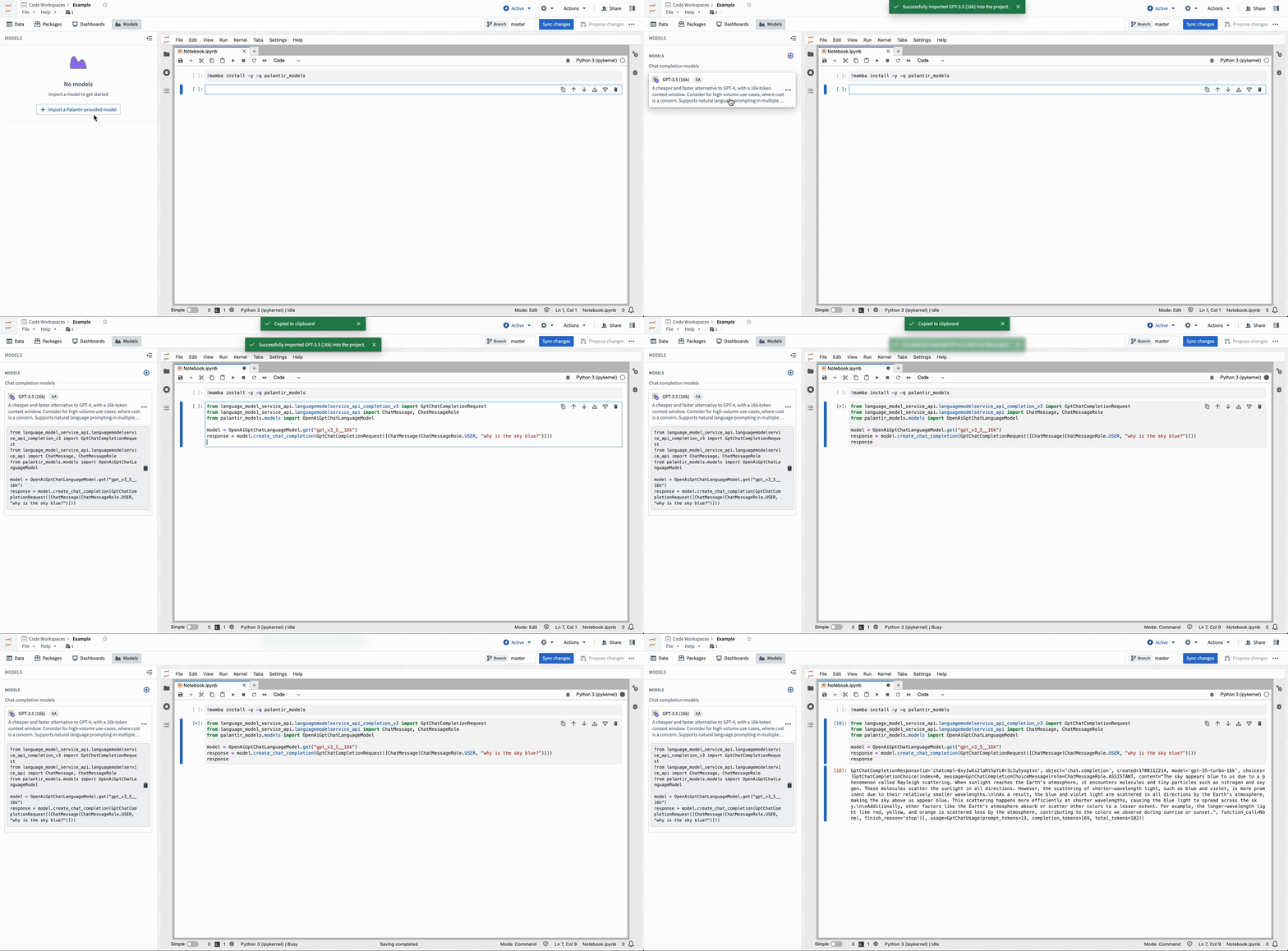
Import Palantir-provided models into Code Workspace from the Models menu.
Example notebook cell
The code snippet below demonstrates how a developer can use Open AI's GPT-4 ↗ in their notebook. After importing a model into Code Workspace, copy and paste the provided snippet into a cell to run inference.
from language_model_service_api.languagemodelservice_api_completion_v3 import GptChatCompletionRequest
from language_model_service_api.languagemodelservice_api import ChatMessage, ChatMessageRole
from palantir_models.models import OpenAiGptChatLanguageModel

model = OpenAiGptChatLanguageModel.get("gpt_v4")
response = model.create_chat_completion(GptChatCompletionRequest([ChatMessage(ChatMessageRole.USER, "why is the sky blue?")]))
response.choices[0].message.content
For more information on using Palantir-provided models, consult the documentation on Palantir-provided models within Jupyter® notebooks.
Jupyter®, JupyterLab®, and the Jupyter® logos are trademarks or registered trademarks of NumFOCUS. All third-party trademarks (including logos and icons) referenced remain the property of their respective owners. No affiliation or endorsement is implied.
The foundry_ml Python library will be deprecated in favor of the palantir_models library on October 31, 2025
Date published: 2024-02-22
As of today, the foundry_ml Python library is in the planned deprecation phase of development. The foundry_ml library will be deprecated October 31, 2025, corresponding with the planned deprecation of Python 3.9. In its place, we recommend using the palantir_models framework to develop, test, and serve models in the platform.
What is the palantir_models framework?
The palantir_models framework offers significantly more flexibility to customize models for Foundry workflows, including:
- Custom serialization, API, and inference logic to easily support a wider range of models and inference modes
- Multi-input and multi-output models
- Automatic bundling of Python dependencies for immediate deployment
- First-class wrapping of externally-hosted models for model evaluation and inference in Foundry
- Container-backed models to enable very large or very custom modeling frameworks
- Direct access to media sets for model inference
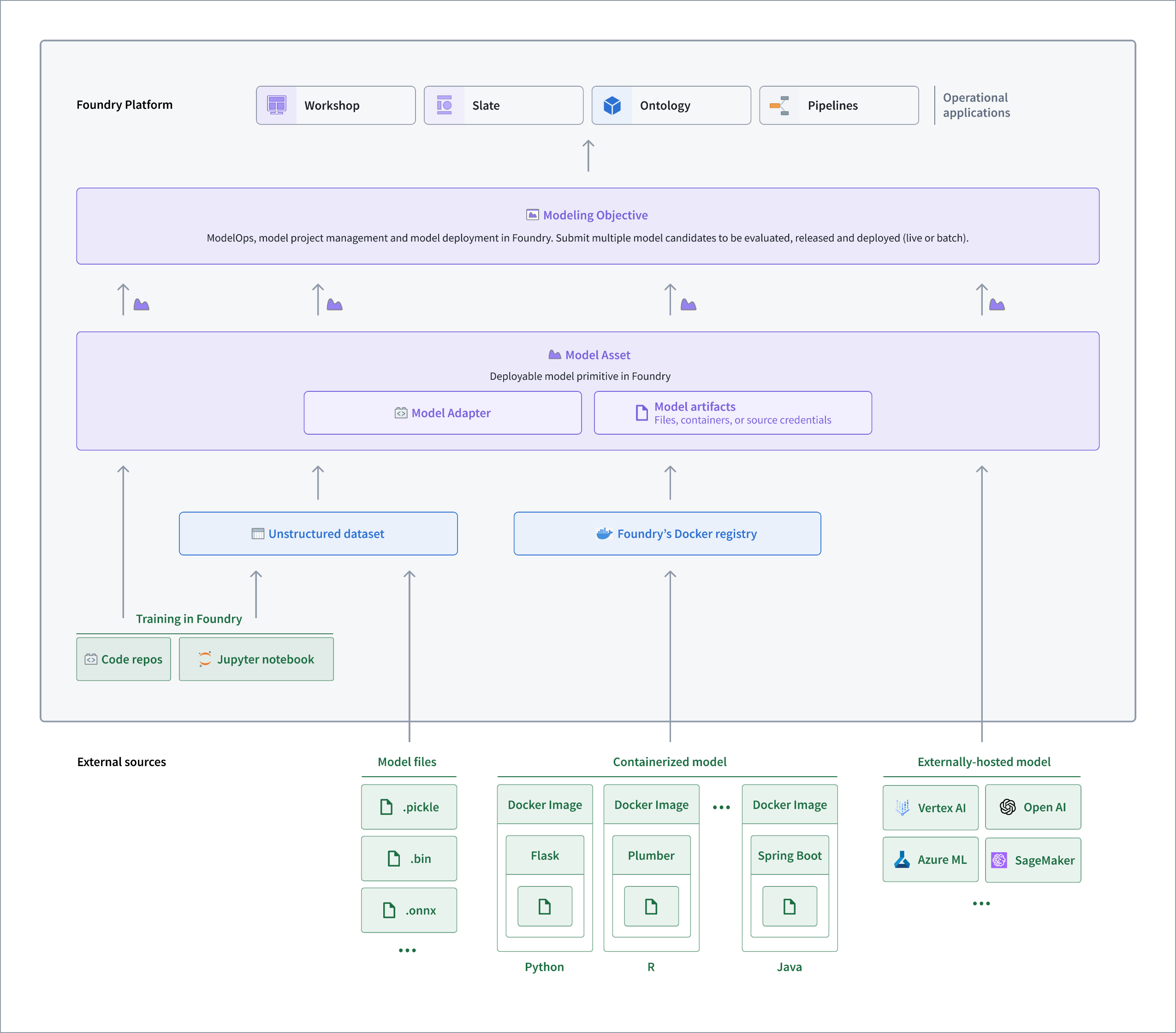
Architecture diagram of how palantir_models is used in Foundry.
Many models originally developed with foundry_ml can be migrated to palantir_models with minimal additional code by using the Model Training template in Code Repositories and one of the example model adapters found in the documentation as below:
- Train a binary classification model with scikit-learn in Code Repositories
- Example: Implement a container model adapter
- Example: Integrate an Amazon SageMaker model
Note that other models may require manual migration to the palantir_models framework. To learn more, review the following content:
How do I migrate to palantir_models?
Models trained with foundry_ml need to be updated to use the palantir_models framework by October 31, 2025. Equally, models developed with foundry_ml will not be supported in modeling objectives, Python transforms, or modeling objective deployments. For guidance on migration by building a new model with palantir_models, review How to train a model in Code Repositories.
As a reminder, Palantir will initiate an Upgrade Assistant intervention campaign to notify impacted teams using affected models in October 2024. If you have a concern regarding migrating your workflow to the palantir_models framework, contact Palantir Support.
Introducing Automate AIP Logic integration and manual execution features [GA]
Date published: 2024-02-20
AIP Logic functions now support automation, enabling Ontology edits to be either automatically applied or staged for user review. These automations can be triggered on existing objects or when new objects are created. This feature allows you to apply your AIP Logic functions-backed actions, such as making Ontology edits at scale, automatically to up to 100k objects.
How do I get started?
You can create a new automation from your AIP Logic dashboard using the Automations option on the right-side menu. Selecting this option opens a new view with a pre-populated automation flow based on your logic instructions. The condition will monitor an object set and trigger the AIP Logic function effect for each new object added or for existing objects.
You can also create an automation directly from the Automate user interface, as pictured below.

Create an automation by navigating to the Automation icon on the right-side menu.
Run effects over a set of existing objects with Automate manual execution
Automate now also supports running effects such as Actions and AIP Logic functions and triggering notifications over an existing set of objects. This feature is helpful if you would like to automatically run an AIP Logic function over an existing batch of objects, either to generate Ontology edit proposals or make Ontology edits directly.
How do I configure the effects?
After creating an automation, select Execute on the left side menu. Then, define the object to immediately execute effects. The object type in the object set must match that of the object set used when setting up the automation. To start, configure your desired batch size, then select Execute. Automations can be executed on object sets of up to 100k objects. The scheduled job will then display, allowing you to view the progress details of existing batches.
Keep in mind that if you wish to prevent effects from being executed on new objects, you must deactivate the automation by choosing the Mute option from the dropdown menu situated in the upper-right corner of your screen.

To prevent effects from an automation being executed over new objects, mute the automation from the dropdown menu.
For more information on setting up an automation, review the Automate documentation.
Introducing Foundry DevOps support for Quiver dashboards [Beta]
Date published: 2024-02-20
Foundry DevOps and Marketplace are tools for rapidly developing and deploying packages of data-backed workflows built in Foundry. We are excited to announce initial support for Quiver dashboards, available on all enrollments by mid-February.
Dashboards which use object analytics cards, object-based visualizations, and transform tables can now be packaged and deployed via Foundry DevOps as a Marketplace product. Additionally, dashboards can be packaged alongside other content. For example, a Workshop module and embedded Quiver dashboard can now be packaged together.
How to package dashboards
From the right side of the dashboard settings pane, select the Enable Marketplace templating option. Then, use the Run Validation option available in the header to identify potential Marketplace templatization issues, if any.

Options to enable Marketplace templating and template validation in Workshop.
If the validator does not display any errors, the dashboard's Publish or Republish options will save a Marketplace-ready version of the dashboard to be used in a new or existing Marketplace product.
View dashboard history
The Dashboards section of the Analysis History dialog also displays which dashboard versions have been validated for packaging.

Dashboard history indicates when a version has been validated for Marketplace packaging.
What's on the development roadmap?
We are actively expanding the number of supported cards with the aim of adding time series and materializations cards in the near future. Additionally, we plan to provide a way to create a new Quiver analysis from an installed dashboard.
For more information, refer to the documentation to add Quiver dashboards to a Marketplace product.
Introducing Slate's health check dialog [GA]
Date published: 2024-02-20
With the new Slate Health Check dialog, application builders can now quickly identify and resolve failed queries and functions while preventing outdated or inaccurate data in widgets. Whereas previously errors may have gone unnoticed as they were only visible in the queries or functions panels, this new capability consolidates all errors and warnings from Slate queries and functions. By doing so, it simplifies the process of uncovering errors and facilitates a better understanding of the downstream implications on other application components.
Discover issues immediately
When a Slate application is opened in edit mode, the application automatically checks for a successful runtime of all queries and functions upon loading. However, users should note that queries with conditions may not run if the conditions are unmet in the default application state. Any errors or warnings encountered will appear in the action bar located atop the page.

Errors and warnings within your Slate application will appear in the action bar.
Select the issues icon to open the Health Check dialog. From here, jump directly to the query or function raising the issue either on the canvas or in the dependency graph view for further investigation.

Jump directly to the query or function raising the issue.
With this, the new Health Check dialog improves the maintainability of Slate applications, particularly for large applications with hundreds of queries. This enhancement makes it easier to discover and resolve issues, ensuring a more streamlined user experience.
For more, review the documentation on debugging Slate applications.
Introducing Claude, Llama2, and other Palantir-hosted open source models on approved enrollments
Date published: 2024-02-15
Palantir AIP now supports Claude, Llama2, and other Palantir-hosted LLM models by default. The default models enabled in each enrollment may differ, and certain enrollments can take advantage of alternative models released under more permissive open-source licenses, when applicable.
A new Control Panel feature for approving terms and enabling new models is being developed and will be ready by the end of February.

These models are now supported in Functions and transforms.
For more details, review Palantir-provided large language models.
Introducing Vega-Lite plot selection
Date published: 2024-02-13
Quiver enables users to create fully-customizable visualizations using the Vega-Lite ↗ or Vega ↗ libraries. Previously, Vega plots did not support selection – a powerful and highly-customizable feature for building interactive visualizations. We are excited to announce that it is now possible to configure Vega-Lite plots to output selection data. Users can leverage the selection data to parameterize downstream cards, construct drill-down workflows, and continue analysis. Vega-Lite selection allows users to interact with charts through two types of selection:
- Point selection: Select a single point, or
Shift+clickto select multiple points. - Interval selection: Drag to select a bounded rectangular region on the canvas.
Define selection parameters
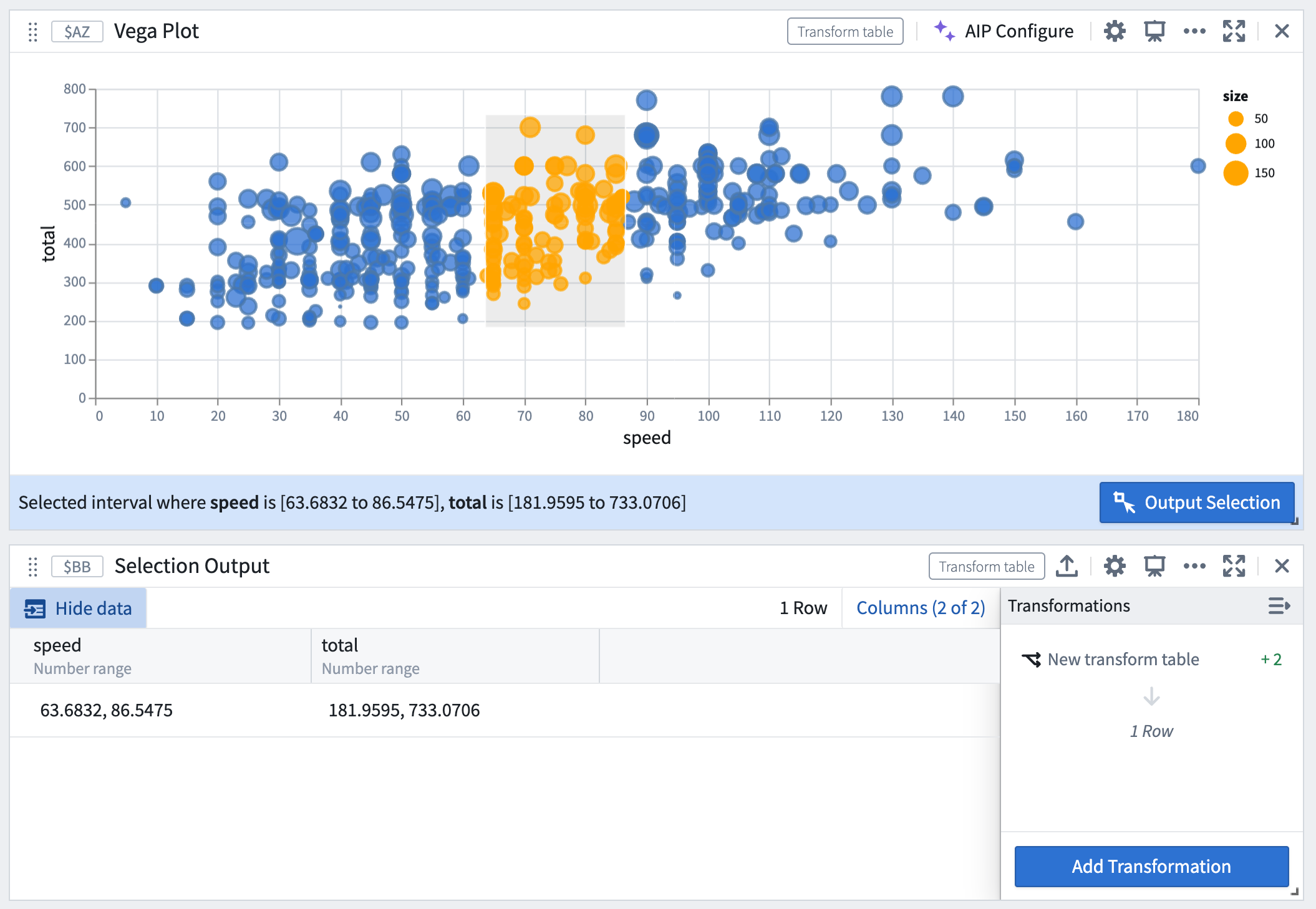
Write custom selection parameters in your Vega-Lite specification, and connect them to a transform table output by naming them quiverDefaultClick or quiverDefaultBrush. Define the encoding fields you wish to select over, such as x, y, or shape.
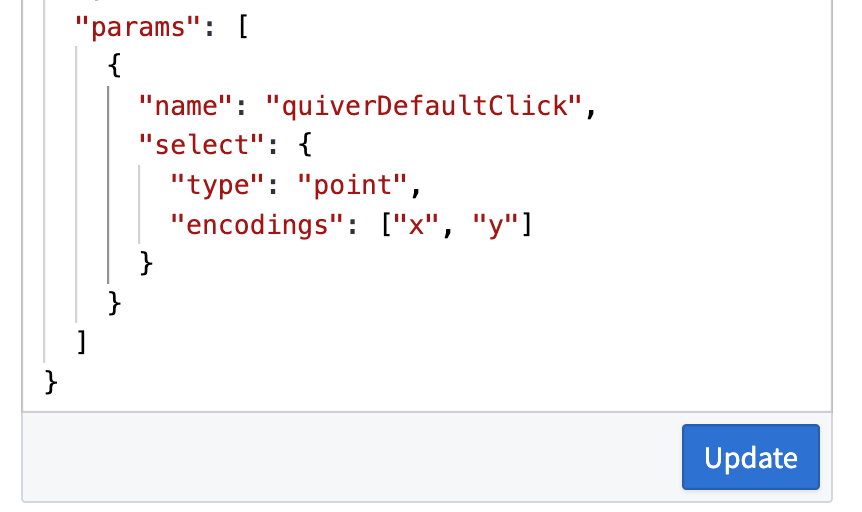
Write custom selection parameters in Vega-Lite specification.
Output selection data as a transform table
Point selections are output as a table of fields and values, where each column corresponds to a field, and each row represents a selected point.
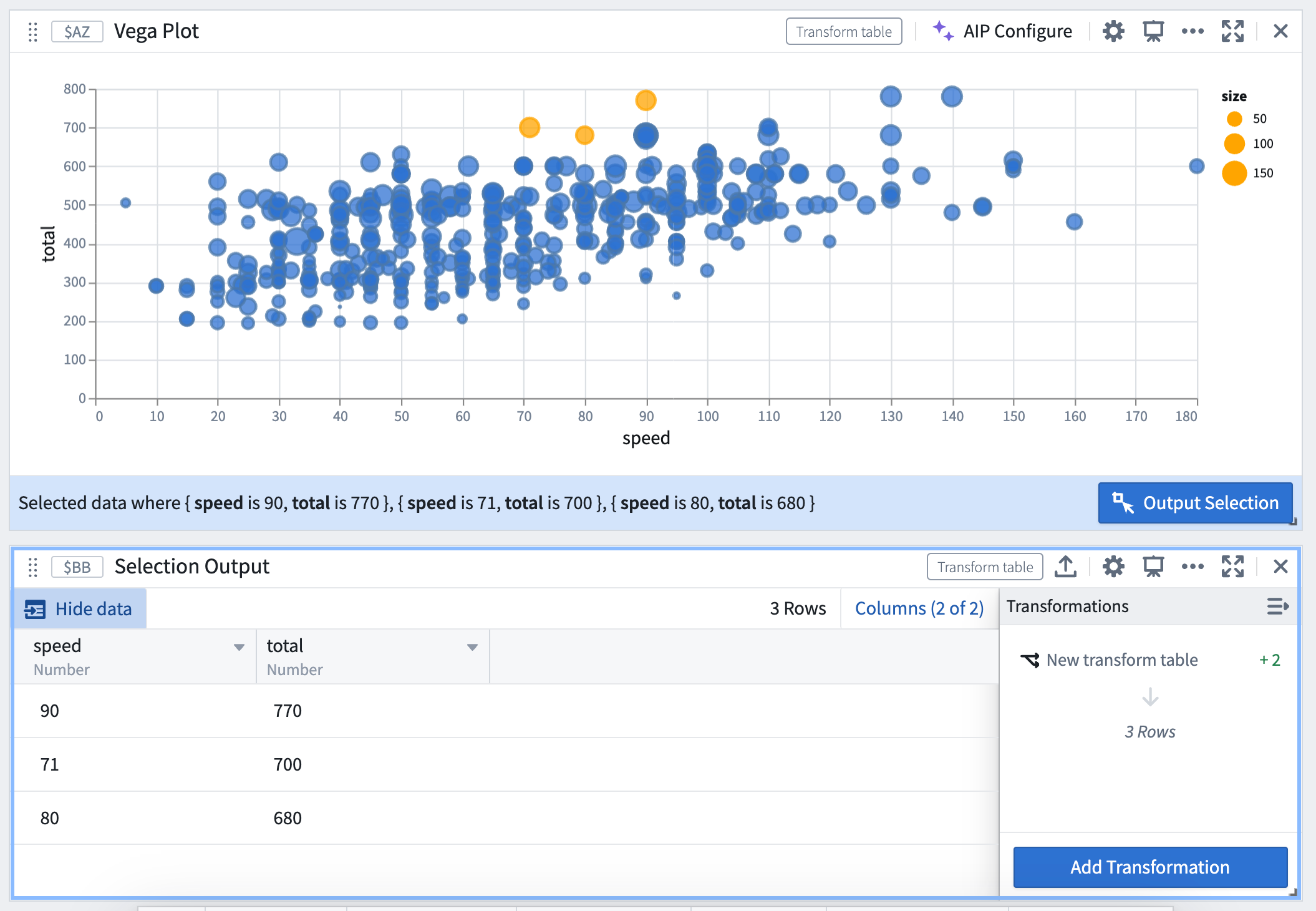
Interval selections are output as a range of the interval’s bounds if the field is continuous, or as an array of values if the field is discrete.
Construct drill-down workflows
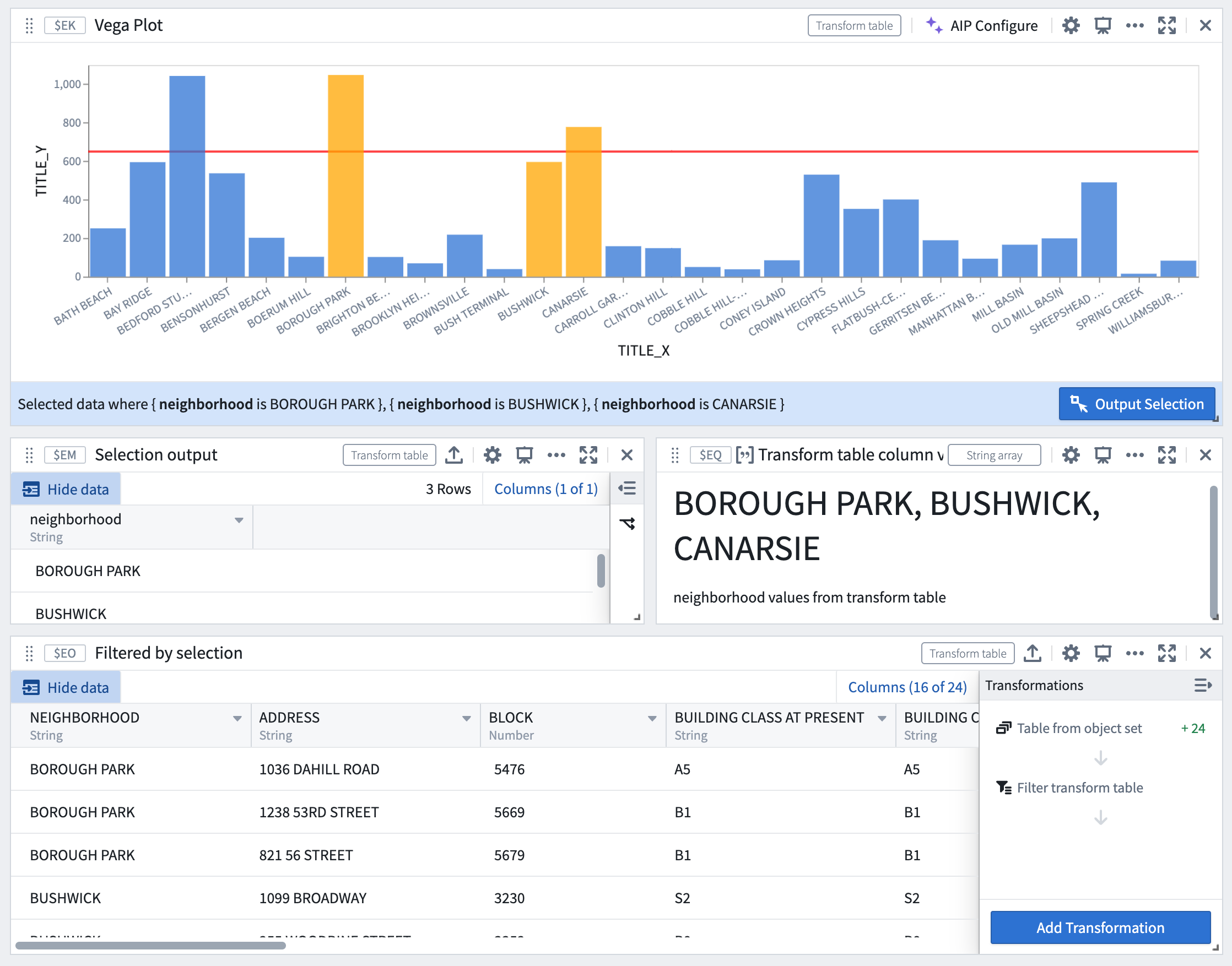
Selection data from Vega-Lite plots can be used to construct drill-down workflows, where chart selections act as a filter and users can continue analysis on a subset of data based on the selection upstream.
For example, the image below demonstrates a workflow where selections in the Vega plot act as a real-time filter on the downstream transform table.
Selections in the Vega plot act as a real-time filter.
Customize selection behavior
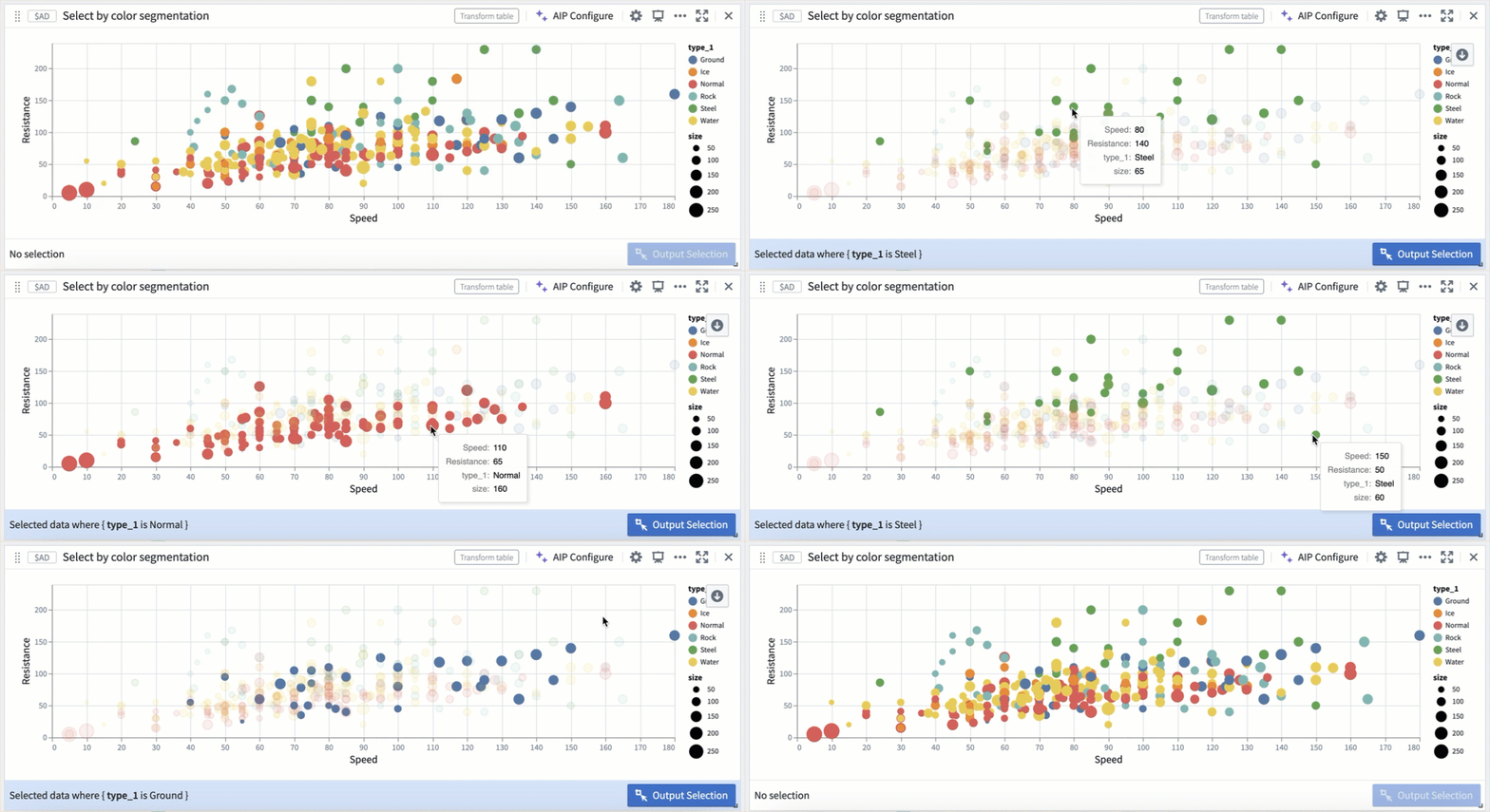
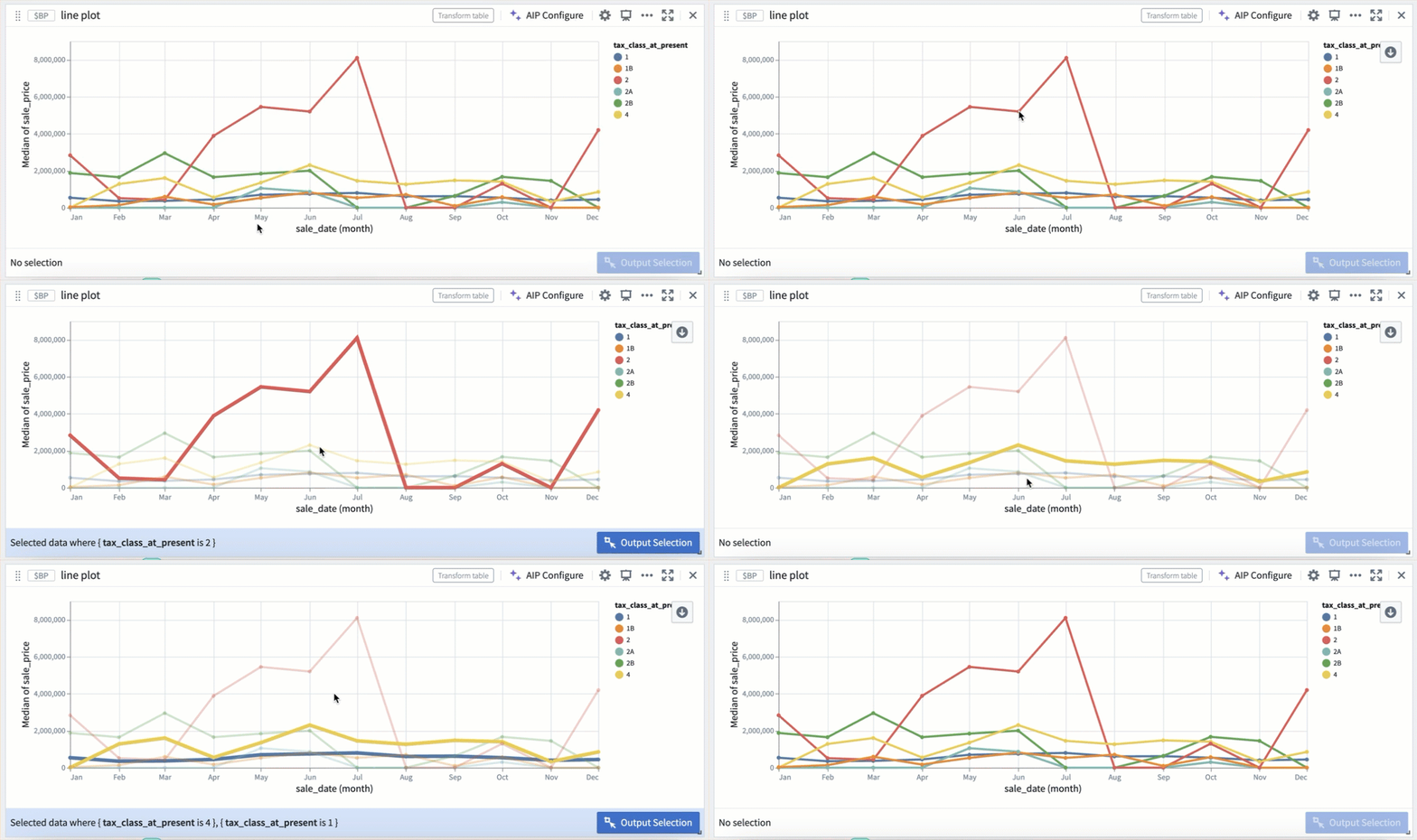
Selection parameters can also be customized to select over different fields, or be triggered on different mouse events.
Selection by color segmentation within a scatter plot.
Selection by color segmentation within a line plot.
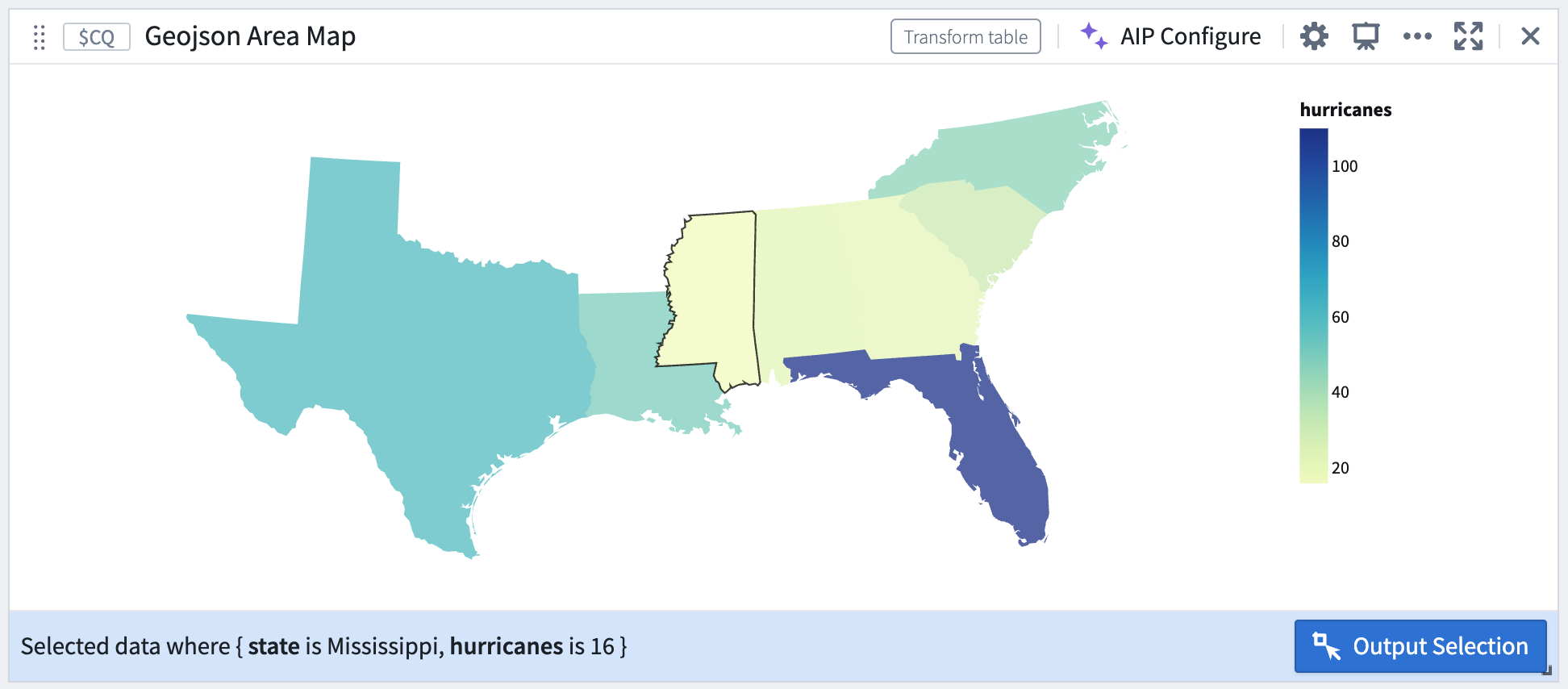
Selection by geographic area.
For more on using Vega plots in Quiver, review the documentation.
Introducing Sensitive Data Scanner [GA]
Date published: 2024-02-08
Sensitive Data Scanner (“SDS”, formerly known as "Foundry Inference") helps organizations discover and secure sensitive data within Foundry across datasets. Governance users can use SDS to define patterns of sensitive data, identify them, and automate actions to be taken when matching data is discovered. In addition, users benefit from an updated interface to accurately track and monitor launched scans.
Sensitive Data Scanner will be generally available the week of February 19 across Foundry enrollments.
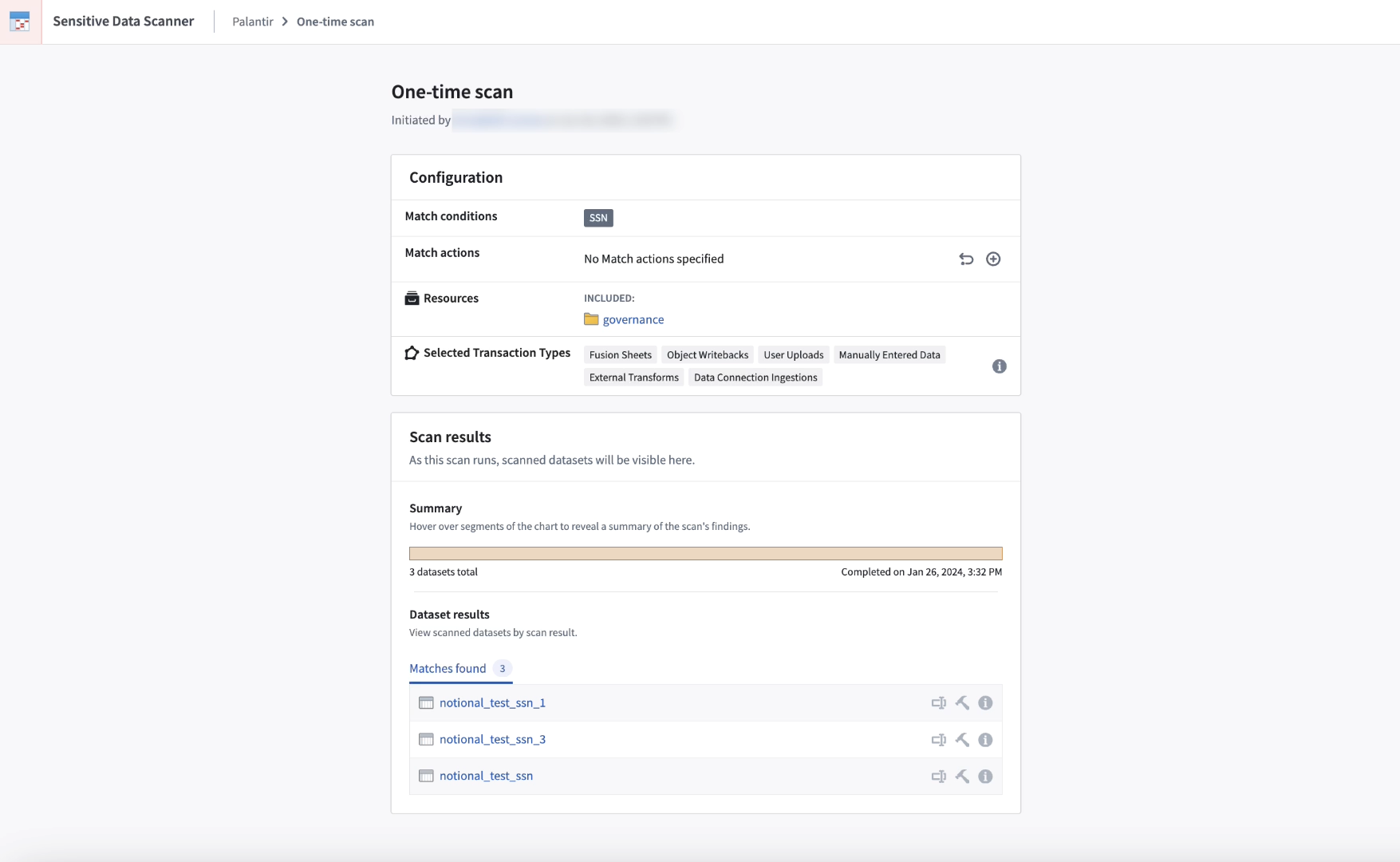
Sensitive Data Scanner one-time scan overview.
Automate discovery and protection of sensitive data
Sensitive Data Scanner (SDS) enables administrators to discover and secure sensitive data within Foundry. Setting up a sensitive data scan is straightforward and can be completed by both technical and non-technical users. First, provide a natural language prompt for AIP, or directly input regex to specify sensitive data patterns. Then, configure automated actions for Foundry to take when data matching the patterns are found.
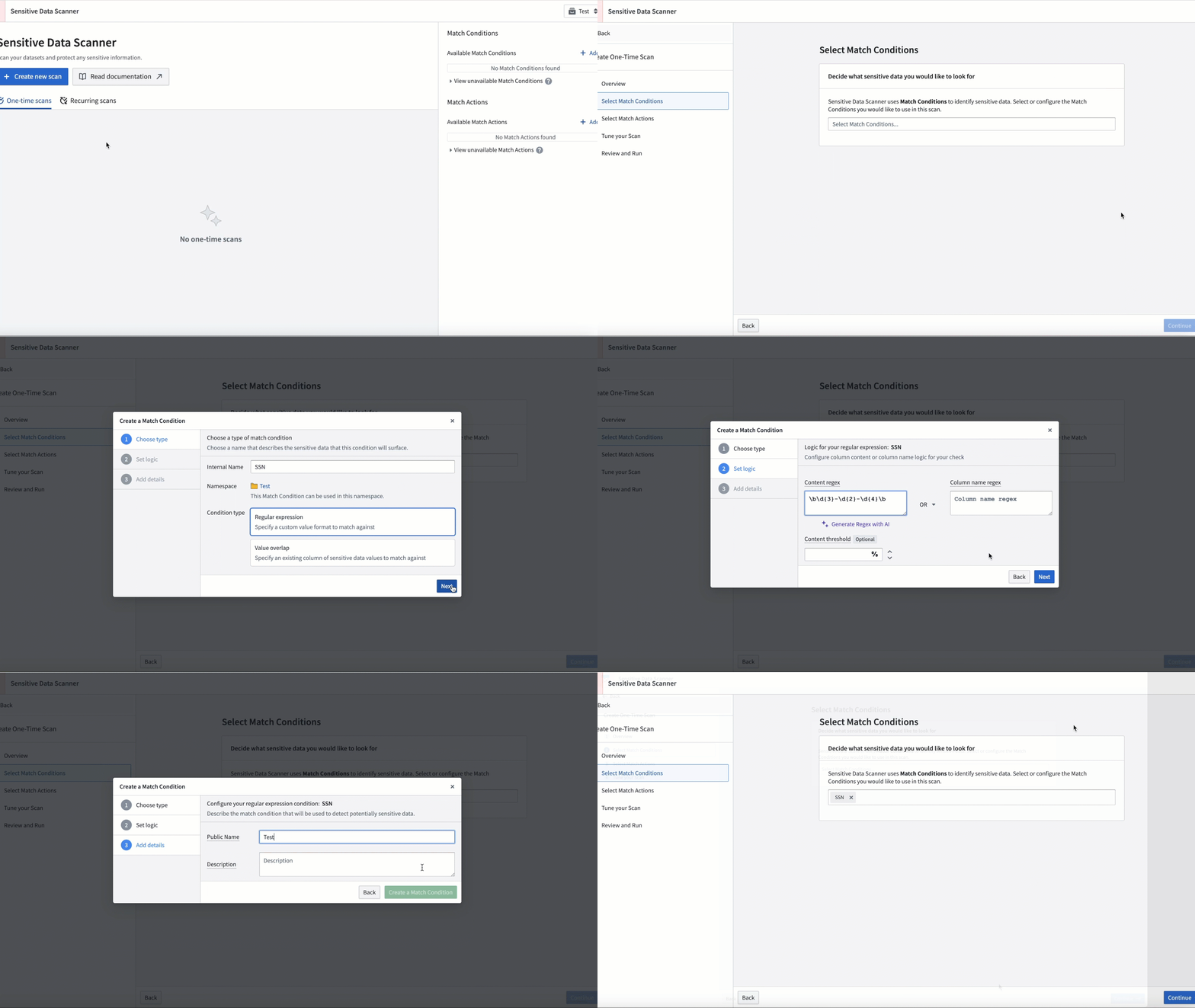
Creating a SDS Match condition.
SDS can be used for ad-hoc scans or scheduled to run on a recurring basis as new data is added to the platform.
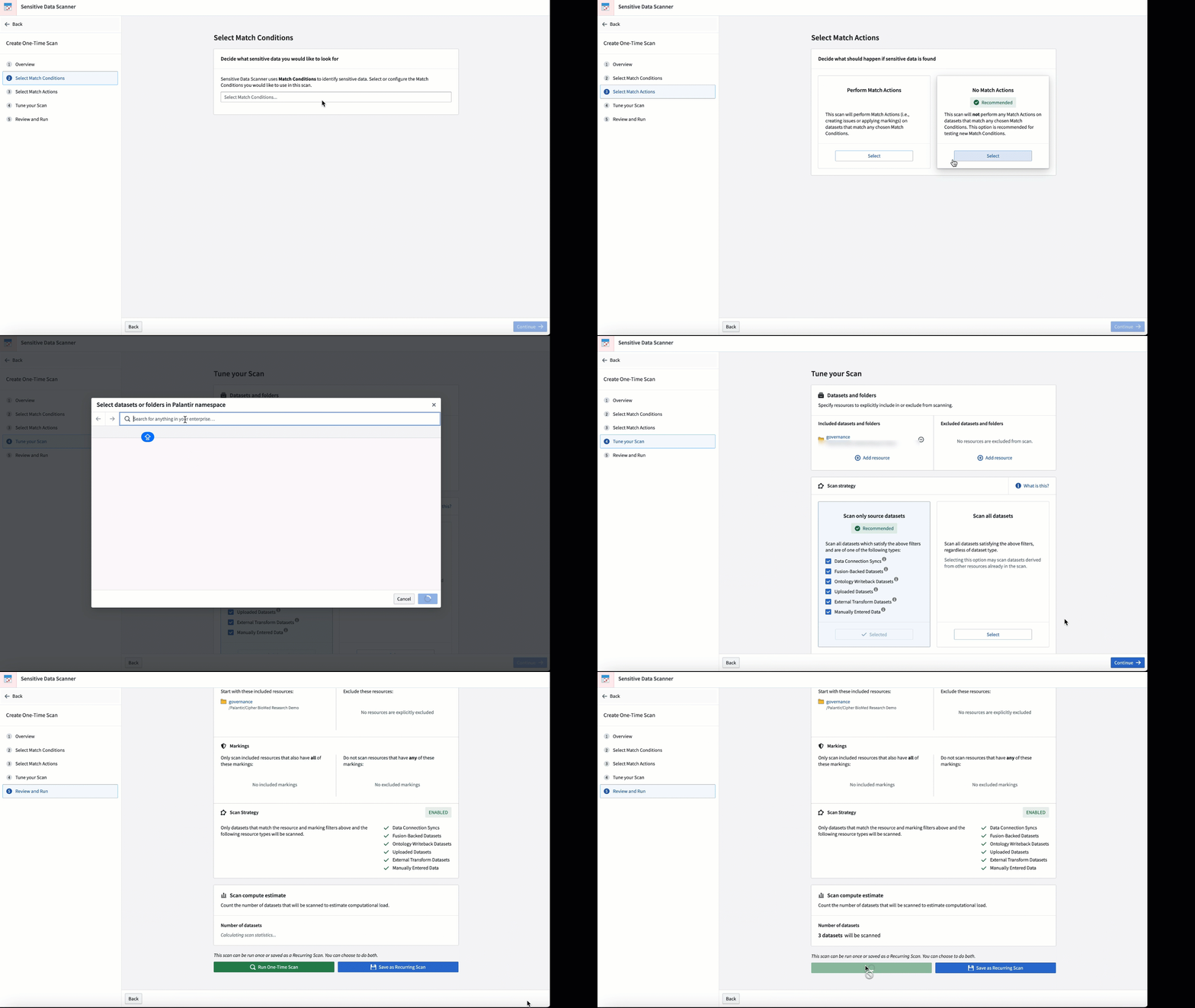
Personalize your scan by adjusting the match condition and the frequency with which the scan is conducted.
Peace of mind across multiple applications
Sensitive Data Scanner can be employed to protect your data. Consider the following notional examples:
- An organization that regularly ingests data that includes personally identifiable information (PII) through manual uploads, as well as Magritte ingests, may forget to set markings on new datasets. Recurring SDS scans can be used to prevent inadvertent leaks of PII to unauthorized users at large.
- Data Governance teams at organizations handling sensitive data can employ SDS to lockdown highly-sensitive information by executing recurring scans on datasets using an appropriate set of parameters. Members of the team can create an overlap match condition for the scan and ensure that the most sensitive data remains secured and restricted for analysis.
- An organization leveraging AIP to develop operational workflows with LLMs can apply SDS to examine text extracted from documents through optical character recognition (OCR) before integrating it into Ontology objects, which can help to prevent sending sensitive information to an LLM.
For more information, review the Sensitive Data Scanner documentation.
Introducing web hosting in Developer Console [Beta]
Date published: 2024-02-08
Developer Console will soon support hosting for static websites. Static websites contain a pre-defined number of files (for example, HTML, CSS, JavaScript) that are downloaded and rendered to the end user's browser directly as stored. Previously, to host a static web application built using OSDK, users had to use their own external web hosting solution with frameworks such as React ↗. This new feature allows developers to use Foundry to host and serve websites directly, simplifying the workflow by eliminating the need for external web hosting infrastructure.
This capability will be available as a beta feature for all Foundry managed domains by mid-February, with plans to be generally available later this year.
Host your site directly on Foundry
Configuration of static website hosting in Developer Console can be accomplished in a few simple steps. First, select Website hosting in the left side menu, then:
- Set an application domain for the site to define the URL from which users will access the site.
- Upload the asset containing the site to Foundry.
- Preview the results of your upload and publish to the site.
You can also configure access to the website and set advanced Content Security Policy (CSP) settings for your site directly from the settings page.
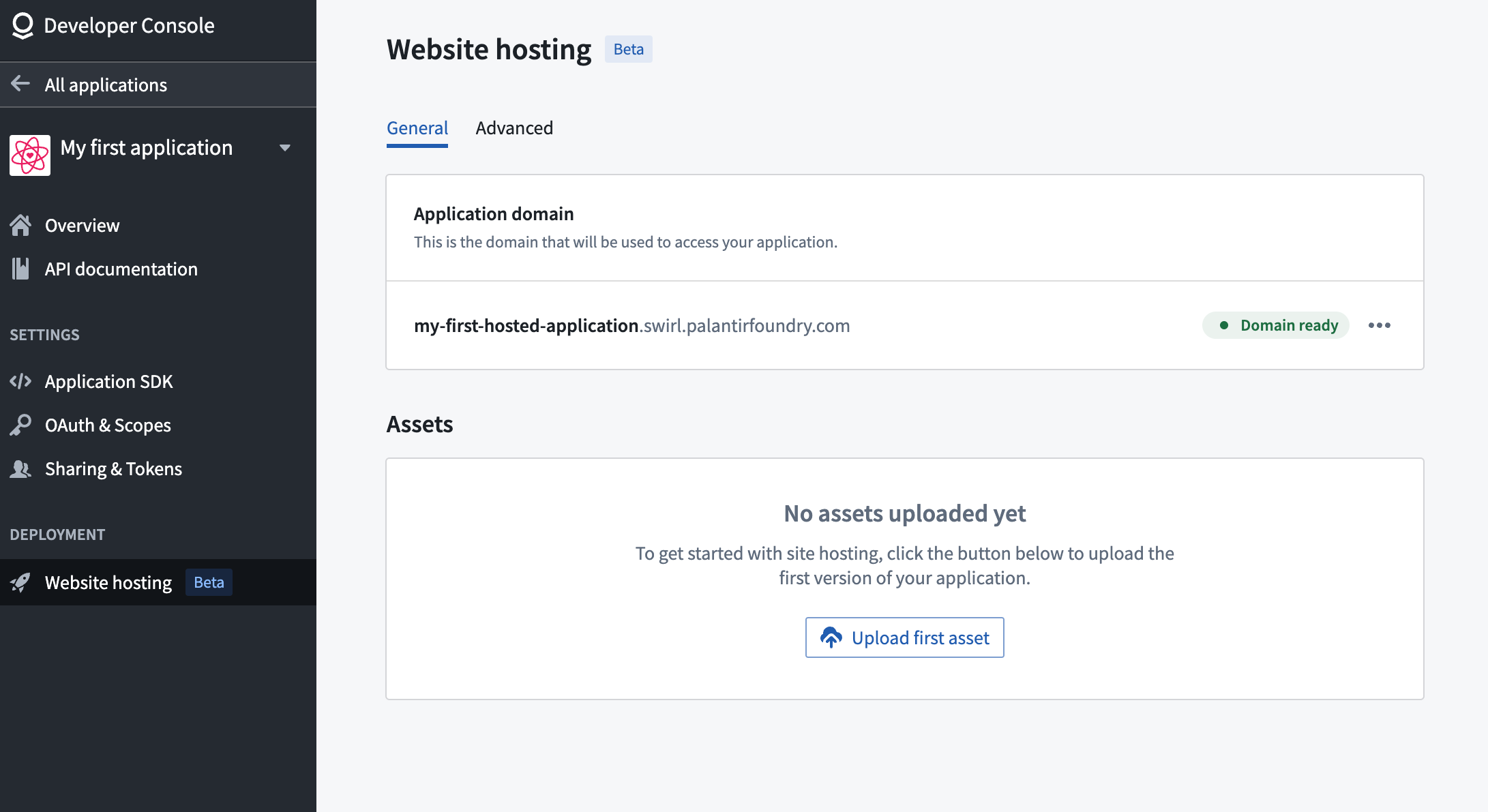
Support for static website hosting is coming soon to Developer Console.
Who can configure website hosting?
Any user with Developer Console edit permissions or an owner role can configure static website hosting. The subdomain address for the application must be approved by the Enrollment Information Officer (EIO). Approval requests can be managed within the Developer Console Settings, while EIOs grant approvals through Control Panel.
What's on the development roadmap?
We are working on enabling web hosting for customer-owned domains. Additionally, APIs for integrating site deployment to this web hosting service from your continuous integration and continuous delivery (CI/CD) pipelines are in active development.
To learn more about website hosting configuration, review Deploy an Ontology SDK application on Foundry (Beta).
Significantly faster Code Assist startup and checks in Python Code repositories
Date published: 2024-02-01
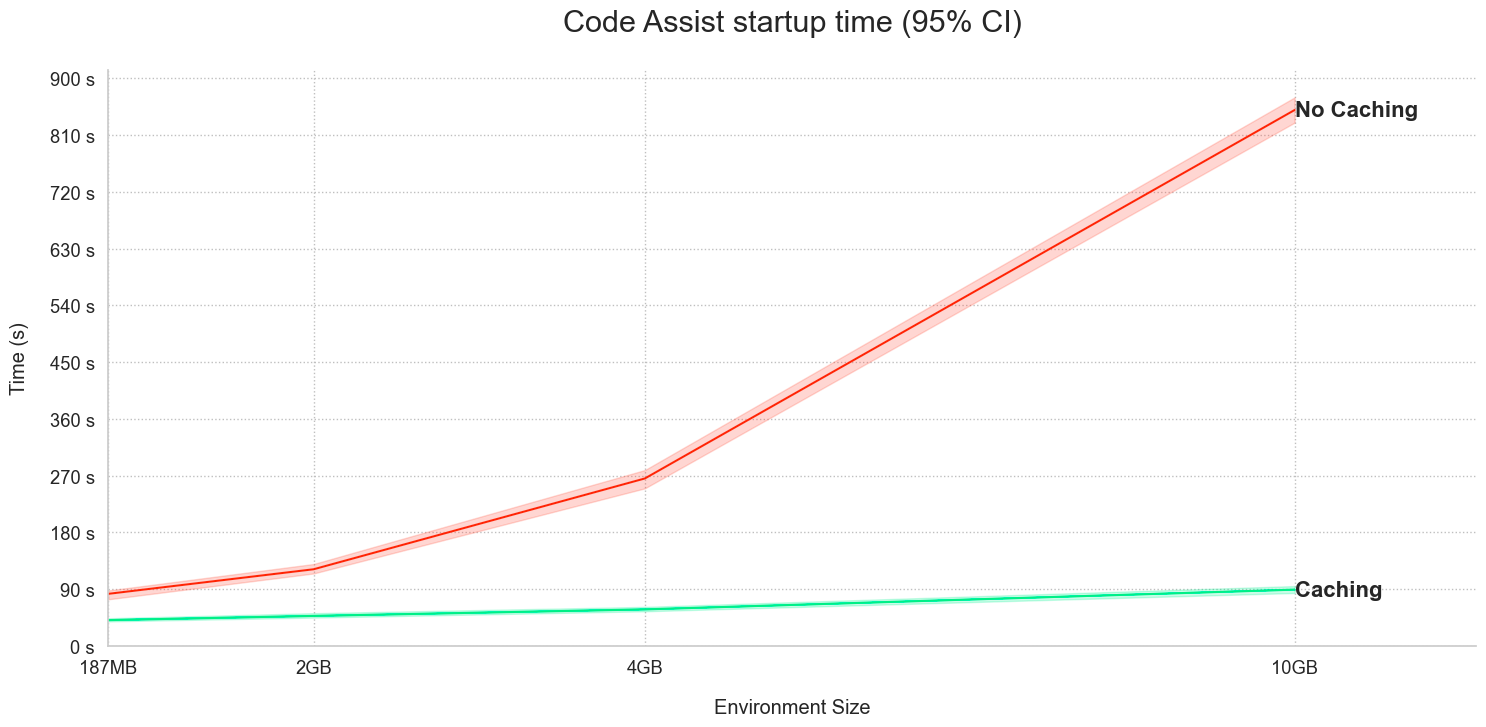
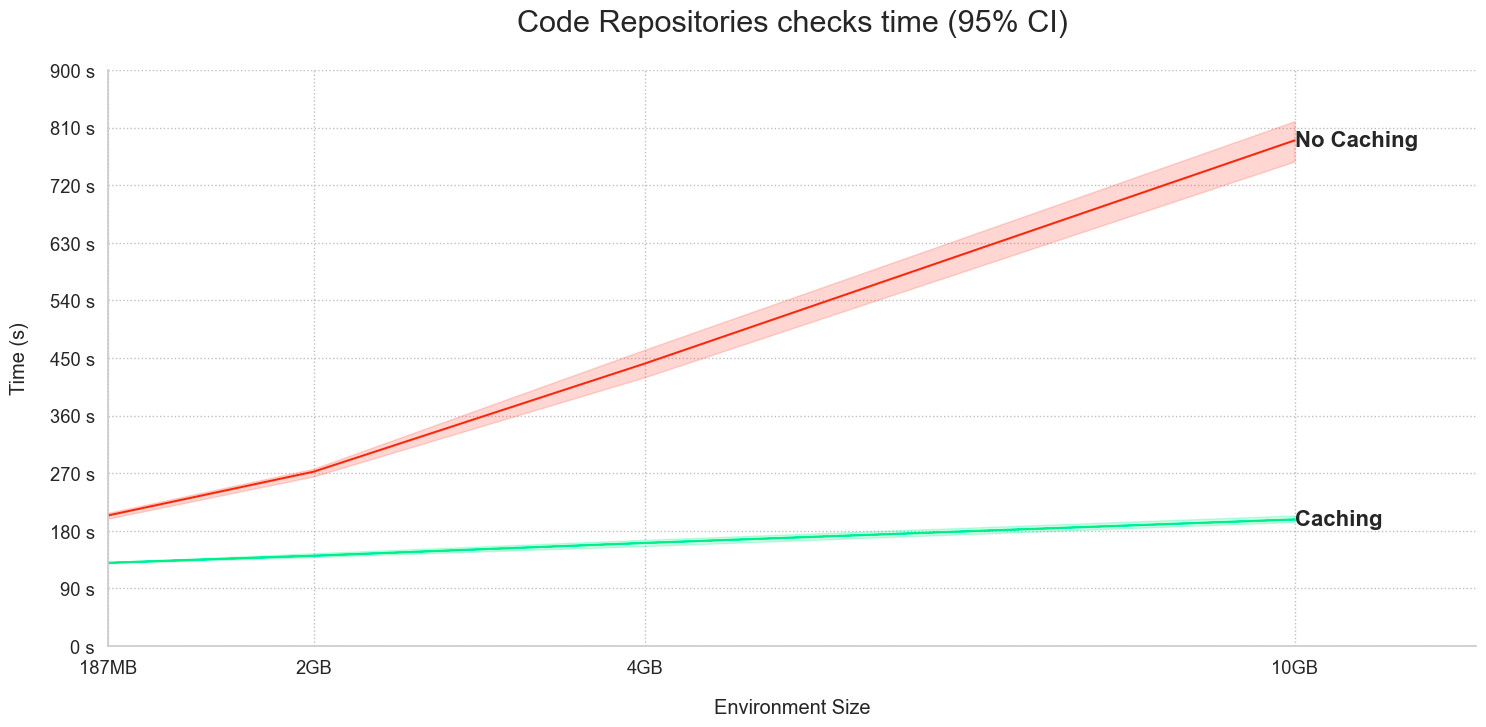
Code Assist and Checks in Python repositories now share Python environment caches, resulting in a significant performance improvement on Code Assist startup and faster Checks (CI). To benefit from this improvement available on all enrollments, upgrade your code repositories.
The following workflows benefit from new performance enhancements:
-
Running checks: When a user triggers Checks, an environment is built and cached. Code Assist startup now performs faster by using the cached environment published by Checks.
-
Code Assist startup: The Python environment is created and cached, with Checks running faster due to the cached environment published by Code Assist. Additionally, any subsequent Code Assist startups will also use the same cache for performance optimization.
Consider the time graphs for the following two examples:
- Code Assist startup using Checks caches:
- Checks performance using Code Assist caches:
Note that this feature is not currently available when installing dependencies using the Task Runner.
New extensibility features for Lightweight Transforms
Date published: 2024-02-01
Lightweight transforms now support a wide range of data processing engines and bring-your-own-container (BYOC) workflows.
In addition to speed, Lightweight transforms are easy to connect with arbitrary data processing solutions. We have introduced a new set of APIs allowing you to quickly integrate your Foundry datasets with not just Pandas and Polars, but also DuckDB, Ibis, DataFusion, cuDF, and other data processing engines that rely on industry standard data formats, such as Arrow and Parquet. The new APIs give you additional options for running your transform with the engine of your choice based on your needs. As opposed to Spark transforms, integrating with these systems through @lightweight transforms does not incur additional serialization and deserialization overhead. For instance, the following snippet demonstrates using the Lightweight API to integrate with Apache DataFusion:
@lightweight
@transform(my_input=Input('/input'), my_output=Output("/output"))
def my_datafusion_transform(my_input, my_output):
    ctx = datafusion.SessionContext()
    table = ctx.read_parquet(my_input.path())
    my_output.write_table(
        table
        .filter(starts_with(col("name"), literal("John")))
        .to_arrow_table()
    )
Additionally, Lightweight transforms now support BYOC workflows in which you can bring an arbitrary environment to Foundry and run executables that were previously unsupported. The next code snippet shows how you can even compile and run a COBOL program to generate data:
@lightweight(container_image='my-image', container_tag='0.0.1')
@transform(my_output=Output('my_output'))
def compile_cobol_data_generator(my_output):
    """Demonstrate how we can bring dependencies that would be difficult to get through Conda."""
    # Compile the Cobol program
    # (Everything from the src folder is available in $USER_WORKING_DIR/user_code)
    os.system("cobc -x -free -o data_generator $USER_WORKING_DIR/user_code/resources/data_generator.cbl")

    # Run the program to create and populate data.csv
    os.system('$USER_WORKING_DIR/data_generator')

    # Store the results into Foundry
    my_output.write_table(pd.read_csv('data.csv'))
For a full walkthrough of the two examples above, review the documentation for Advanced compute options and BYOC. Furthermore, additional examples can be found in the Lightweight examples product on the Reference Resources Marketplace store.
To start using the full feature set of the new Lightweight API, upgrade your repository to the latest version and install the latest version of foundry-transforms-lib-python. For more detail, review our documentation.
Introducing SMB Connector [Beta]
Date published: 2024-02-01
The SMB Connector [Beta] allows you to connect to Server Message Block (SMB) file shares and ingest files into the Palantir platform. Common examples of SMB file shares include Windows File Server, Samba File Server, and most commercial NAS devices.
Until now, our recommended pattern for connecting to SMB file shares has been to mount the share as a directory on a Foundry Agent's server and then use the Directory Connector to ingest the files. We encourage anyone using the old pattern to migrate to the new SMB Connector.
Advantages of the SMB Connector over file system mounting:
- Does not require SSH access to your agent
- Can be run as a direct connection
- Does not store credentials as plaintext on agent servers
- Persists across server restarts
For more information, review Server Message Block (SMB) [Beta] in the public documentation.
Additional highlights
Administration | Workspace
Date published: 2024-02-29
Deprecation of the Help Center sidebar | The Help Center sidebar is deprecated and replaced in favor of comparable integrations with the Foundry documentation and Foundry Issues.
Analytics | Contour
Date published: 2024-02-27
New Visualization Timezone Setting in Contour | Contour now features a new setting, Visualization Timezone, that allows users to control how date times are displayed across all boards in an analysis. This setting can be configured to either a user's local timezone or a fixed timezone, providing a unified approach to timezone behaviors. For new analyses, the default setting will be the user's local timezone. However, for existing analyses, users will need to manually select a visualization timezone. Review the documentation.

App Building | Workshop
Date published: 2024-02-27
Improved Workshop Filtering: GA Linked Object Filtering | Linked property filtering in Workshop's filter list is now generally available, allowing users to filter based on linked object properties, offering a more precise and focused search experience.
Analytics | Quiver
Date published: 2024-02-27
New Aggregation Metrics in Quiver: Exact Unique Count, Standard Deviation, and Variance | Quiver now supports new aggregation metrics: Exact Unique Count, Standard Deviation, and Variance. Users can calculate the exact unique count over a property type, though this is not supported for object types backed by Object Storage V1 and may degrade performance for results exceeding 10,000. In addition, users can now calculate the standard deviation and variance over a property type, with the option to switch between calculating sample or population standard deviation and variance. For details review the Quiver Charts documentation.
Model Integration | Modeling
Date published: 2024-02-27
Python 3.9 Support Added to foundry_ml library | We have updated the foundry_ml library to add support for Python 3.9. As per our announcement, this will be the last Python version that the foundry_ml library will support.
App Building | Workshop
Date published: 2024-02-27
Enhanced Linked Object Filtering in Object Set Editor | The Object Set Editor now supports filtering on linked objects, allowing builders to easily configure link filters, such as retrieving all 'Flights' linked to an 'Alert' with 'high priority'.
Security | Approvals
Date published: 2024-02-27
Completed Requests Now Show Completion Date in Approvals Inbox | Completed requests in the Approvals inbox will now display a "Completed on
Analytics | Notepad
Date published: 2024-02-27
Improved 'Lock Data' Snapshot Security in Notepad | The Lock data feature in Notepad now mandates markings on all resources supplying data to a widget when creating a static snapshot, enhancing data security. Note that Lock data for widgets receiving data from restricted views or resources with undeterminable access controls is no longer possible. Refer to the documentation on Snapshot widgets for more details.
App Building | Ontology SDK
Date published: 2024-02-27
Enhanced Website Style Customization | Users can now configure the 'style-src' in the Content Security Policy (CSP) of their hosted websites, enabling more extensive customization of website styles.

Security | Approvals
Date published: 2024-02-27
Enhanced Marking Popover Accessibility in Approval Tasks | The Approvals component now provides improved access to the marking popover within marking access tasks, such as 'Add members to marking' and 'Add marking to project constraints'. This improvement enables users to effortlessly navigate to settings for viewing markings or additional metadata, delivering a more seamless and efficient user experience.
Models
Date published: 2024-02-27
Model Training template now supports PyPI dependencies | Models produced in the Model Training template in code repositories now support PyPI dependencies. These dependencies will automatically be included in batch and live deployments through the Modeling Objectives application.
Ontology | Vertex
Date published: 2024-02-27
Improved Vertex Widget Experience in Workshop | The Vertex widget in Workshop has been upgraded to offer a more dynamic user experience. Now, whenever the Selected Objects variable is updated by another widget, the Vertex widget will automatically refresh. This ensures that users always have the most up-to-date information at their fingertips.
Ontology | Vertex
Date published: 2024-02-27
Custom Label Names for Maps | Users can now define custom label names in Maps, providing more flexibility and personalization. This update allows users to better organize and manage their data by using labels that are more meaningful to them.
Model Integration | Modeling
Date published: 2024-02-22
Python 3.9 Support Added to Modeling | We have introduced support for Python 3.9 in Modeling, enabling users to take advantage of the latest features and enhancements in Python 3.9, and further improving their ability to create and manage models in Foundry.
App Building | Workshop
Date published: 2024-02-22
Image Annotation Widget Now Generally Available | The Workshop Image Annotation widget is now generally available, allowing users to display images via media URL or media reference property and create annotations by marking areas of interest. Annotations can be easily referenced as action parameters for creation, modification, or deletion of annotation objects, with support for up to 1000 annotations per image. The widget also offers optional configuration for annotation coloring and triggering events on annotation creation. Learn more
App Building | Workshop
Date published: 2024-02-22
Object References in Markdown: General Availability | The Markdown widget within Workshop now includes Object References, enabling users to link objects to text and set up on-click events. This update enhances the reliability of written or AI-generated content by connecting it to authoritative objects in the Ontology. Custom rendering of Object References is compatible with standard Markdown features, such as lists, backquotes, tables, and more. Find more details in the documentation

Data Integration | Code Repositories
Date published: 2024-02-22
Enhanced Debugging Capabilities for TypeScript Functions in Code Repositories | The Code Repositories now offer enhanced debugging capabilities for TypeScript functions. With the new TypeScript Functions Debugger tool, you can examine unit tests in real-time, set breakpoints to pause execution, and gain a deeper understanding of your functions and libraries. For a step-by-step guide on how to use this feature, refer to the Set breakpoints documentation.
Analytics | Quiver
Date published: 2024-02-22
Create Duration Unit Parameters in Quiver | Quiver now supports the creation of duration unit parameters, allowing users to specify the types of duration units they wish to include or exclude. The configuration process is consistent with other Quiver parameter configurations, ensuring a seamless user experience.
Analytics | Notepad
Date published: 2024-02-15
Enhanced Sorting Capabilities in Templates | Notepad templates now include a Sorting configuration field in each row or section generator. This new feature allows users to sort the output of these generators by object property value, offering additional configuration options such as case sensitivity and ascending or descending order. When a Notepad is generated from the template, the generated rows and sections will be sorted according to the configured property, providing a more organized and customizable user experience.
Security | Projects
Date published: 2024-02-15
Enhanced Permission Checking | The Data Lineage application now offers enhanced permission checking for object types and Ontology Actions. Users can verify if they have the ability to view an object type or objects within that type. Any limitations from the upstream data source will also be visible. Users can also check if they have the permission to view and submit an Action, along with any potential submission limitations.
Security | Checkpoints
Date published: 2024-02-13
Reauthentication Justifications Now Supported in Checkpoints | Checkpoints now includes reauthentication as a justification type, alongside acknowledgements, free-text responses, and dropdown selections. This feature allows users to justify a checkpoint when performing a sensitive action by reauthenticating with the platform. When encountering a Checkpoint that requires reauthentication, users will be prompted to reauthenticate with their configured Identity Provider (IdP) in a separate window. Upon completion of the reauthentication process, users can proceed with their intended action. A record of this reauthentication justification will be available for review in the Checkpoints application by authorized users. Reauthentication justifications are compatible with all checkpoint types, excluding Login and Scoped Session Select types. For guidance on creating a checkpoint using this justification, refer to the Checkpoints documentation.

Analytics | Quiver
Date published: 2024-02-13
Quiver Time Series Chart Display Sections | Adds an Axes Options section to Quiver Time Series Charts Editor, and renames Y-Axes Compression editor.
Data Integration | Data Lineage
Date published: 2024-02-13
Enhanced permission checks in Data Lineage | The Data Lineage application now includes improved permission checks for object types and actions. Users can view whether they have access to an object type, as well as any limitations from upstream data sources. Additionally, users can see if they can view or submit actions, along with any submission limitations. To view other user permissions, users must have access to the user, underlying object types, actions, and backing datasets.
Analytics | Contour
Date published: 2024-02-13
Enhanced Parameter Cross Filtering at Higher Scales | Parameter cross filtering in Contour has been significantly improved to handle higher scales. This enhancement reduces the likelihood of hitting cardinality limits when parameter values are filtered by another parameter. Users can now create parameter filtering groups and experience a more seamless interaction with suggested values for parameters while editing or working with number parameters.
Model Integration | Modeling
Date published: 2024-02-13
Model Asset Auto Serialization | The palantir_models package has been updated to include default methods for automatic serialization and deserialization of model artifacts. Using the new auto_serialize annotation in a model adapter removes the need to manually write save() and load() methods in a model adapter.
App Building | Ontology SDK
Date published: 2024-02-13
Application search in Developer Console available | Users can now search for applications in Developer Console, providing a more efficient way to find and access specific applications.
Analytics | Quiver
Date published: 2024-02-13
New Boolean Filter Transforms in Quiver | Quiver now supports two new Boolean comparison transforms for Transform Tables, allowing users to compare and filter rows based on boolean column values.
Foundry Advanced Search
Date published: 2024-02-07
Advanced Search enhancement | Advanced Search is Foundry's comprehensive, full-screen extension to QuickSearch for finding hard-to-find resources. Advanced Search includes support for Artificial Intelligence Platform powered queries, copy-paste query sharing, and extensive search filtering.

Security | Projects
Date published: 2024-02-07
Request access button added for data marking permissions | Users facing permissions dead-ends as a result of missing data or file markings can now request access to missing marking(s) in-platform using the Approvals application. For more information on Approvals, refer to the Approvals documentation.

App Building | Workshop
Date published: 2024-02-06
Easier semantic search setup in workshop | Semantic search is now easier to support within Workshop modules. Previously, Workshop builders needed to write custom typescript Functions to allow for semantic search atop objects with vector embedding properties. Now, Workshop's Object Set Definition panel allows configuring of semantic search filtering in the frontend with just a few clicks.


Ontology | Vertex
Date published: 2024-02-06
Vertex UI Improvements | Several UI enhancements have been made to the Vertex home page, layout selection, and timeline. Users will experience a more polished interface, with clearer object type UI, improved layout selection visuals, and reduced flashing in the timeline.
Ontology | Ontology Management
Date published: 2024-02-06
Enhanced Validation for Property Types in Ontology Manager | The Ontology Manager now includes enhanced validation to prevent saving invalid property types when reverting to Object Storage V1 to ensure data integrity and consistency when migrating property types.
Analytics | Contour
Date published: 2024-02-06
Top Values Custom Board | Introducing the Top Values Custom Board, allowing users to filter and display the top or bottom values of a column based on a specified number or percentage. This new board provides a dynamic way to analyze data and create useful reports.
Ontology | Vertex
Date published: 2024-02-06
Duplicate Annotations in Vertex | Users can now duplicate one or more selected annotations in Vertex, making it easier to create similarly-styled annotations.
Ontology | Ontology Management
Date published: 2024-02-06
Custom Error Messages for Top 20 Ontology Manager Errors | Ontology Manager now provides custom error toast messages for the top 20 most common errors users encounter when saving changes to their Ontology. This enhancement improves user experience by providing clearer and more specific error messages.
Ontology | Ontology Management
Date published: 2024-02-06
Update Input Datasources for MDO Exports | Users can now update the input datasources for multi-datasource object (MDO) export types in Ontology Manager. This allows for greater flexibility when changing input datasets for object types backed by multiple datasources.
Ontology | Vertex
Date published: 2024-02-06
Custom Label Names for Vertex | Users can now define custom label names in Vertex, providing more flexibility and personalization. This update allows users to better organize and manage their data by using labels that are more meaningful to them.
Analytics | Contour
Date published: 2024-02-06
Expanded Dataset Access in Analysis Submenu | Users can now access datasets in the Analysis submenu across all resource selector dropdown menus, improving convenience and efficiency when working with join and union boards.
App Building | Workshop
Date published: 2024-02-06
Workshop: Edits History Widget Now Available | Introducing the Edits History Widget in Workshop, which allows users to view edits made to an object's properties. Builder's can configure the set of viewable properties, and the order in which edits are displayed. This widget is only compatible with object types using Objects Storage V1, with V2 support coming later in the year.


Data Integration | Code Repositories
Date published: 2024-02-06
Enhanced TypeScript Debugger for Unit Tests | Introducing enhanced debugging capabilities for TypeScript functions, allowing you to run your unit tests in debug mode. Set breakpoints throughout your code and step through the execution process to gain a better understanding of how everything works behind the scenes.
Ontology | Ontology Management
Date published: 2024-02-06
Improved Display Name Sorting in Ontology Manager | Ontology Manager now sorts display names more intuitively by combining uppercase and lowercase results. Previously, entities starting with an uppercase letter were sorted separately from those starting with a lowercase letter. The new sorting behavior groups entities starting with any letter together.
Model Integration | Modeling
Date published: 2024-02-06
Live Deployments as Functions | Users can now publish live deployments as functions and access a new deployments table for better organization and management.
App Building | Foundry Developer Console
Date published: 2024-02-06
New Permissions Page in Developer Console | Developer Console now has a dedicated Permissions page where you can manage sharing the app, sharing the website, and application discovery. The OAuth client role grants will also be moved to this page in the future.
中文翻译
公告
提醒: 您现在可以订阅 Foundry 新闻通讯(Foundry Newsletter),直接在收件箱中接收平台新产品、功能和改进的摘要。有关如何订阅的更多信息,请参阅 Foundry 新闻通讯与产品反馈渠道公告。
引入值类型(Value Types)[Beta]
发布日期:2024-02-28
此功能现已正式发布(GA)。请阅读最新公告。
Foundry Connector 2.0 for SAP Applications v2.30.0 (SP30) 现已可用
发布日期:2024-02-27
用于将 Foundry 连接到 SAP 系统的 Foundry Connector 2.0 for SAP Applications 插件 的 2.30.0 版本 (SP30) 现已可用。
此最新版本包含错误修复和次要增强功能,包括:
- 扩展的安装后向导(Post Installation Wizard),涵盖远程代理(NetWeaver 7.0 及以上版本),并简化了远程代理的设置过程。
- 扩展的 API,用于指示表是否为富集表(enrichment table),该 API 将被 Palantir HyperAuto(所有版本)使用。
- 修复了当代理名称与代理系统的 RFC 名称不同时,自定义角色的授权问题。
- 在 CDPOS 增量类型中实施了逻辑更改,以解决仅使用 CDPOS 类型进行增量同步时可能导致潜在数据丢失的问题。
直接从 Foundry 平台内自定义文档下载
从 SP29 开始,插件安装包可以直接从 Palantir 平台内下载。要访问 SP29:
- 从 Foundry 导航栏底部打开平台内自定义文档。
- 在文档中搜索
SAP,然后选择 Foundry SAP Connector。 - 在文档的 How To 部分,选择 Download the Add-On。
我们建议将此通知分享给您组织的 SAP Basis 团队。
有关下载插件的更多信息,请查阅文档中的 Download the Palantir Foundry Connector 2.0 for SAP Applications add-on。
在 Code Workspaces 中引入 JupyterLab® 和 RStudio® 支持(GA),将于 2024 年 3 月推出
发布日期:2024-02-22
Code Workspaces 中的 JupyterLab® 和 RStudio® 支持现已正式发布(GA)。有关更多信息,请参阅四月公告。
在 Code Workspaces 中引入对 Palantir 提供的语言模型的支持
发布日期:2024-02-22
Palantir 提供的语言和嵌入模型集 现在可以通过 Code Workspaces 在 Jupyter® 笔记本中使用,类似于转换(transforms)。借助这一新功能,用户可以交互式地对 Palantir 提供的模型运行推理,以生成文本补全和嵌入,并可以在部署完整生产管道之前使用语言模型快速构建原型。
在 Code Workspaces 中使用语言模型
使用 Models 视图,笔记本作者可以轻松地将 Palantir 提供的模型导入其代码工作区,并使用 palantir_models Python SDK 访问这些模型的绑定。
从 Models 菜单将 Palantir 提供的模型导入 Code Workspace。
示例笔记本单元格
下面的代码片段演示了开发者如何在其笔记本中使用 Open AI 的 GPT-4 ↗。将模型导入 Code Workspace 后,将提供的代码片段复制并粘贴到单元格中以运行推理。
from language_model_service_api.languagemodelservice_api_completion_v3 import GptChatCompletionRequest
from language_model_service_api.languagemodelservice_api import ChatMessage, ChatMessageRole
from palantir_models.models import OpenAiGptChatLanguageModel

model = OpenAiGptChatLanguageModel.get("gpt_v4")
response = model.create_chat_completion(GptChatCompletionRequest([ChatMessage(ChatMessageRole.USER, "why is the sky blue?")]))
response.choices[0].message.content
有关使用 Palantir 提供的模型的更多信息,请查阅关于 Jupyter® 笔记本中的 Palantir 提供模型 的文档。
Jupyter®、JupyterLab® 和 Jupyter® 标志是 NumFOCUS 的商标或注册商标。 所有第三方商标(包括标志和图标)均归其各自所有者所有。不暗示任何隶属关系或认可。
foundry_ml Python 库将于 2025 年 10 月 31 日弃用,推荐使用 palantir_models 库
发布日期:2024-02-22
自即日起,foundry_ml Python 库已进入开发的计划弃用阶段。foundry_ml 库将于 2025 年 10 月 31 日弃用,这与 Python 3.9 的计划弃用时间一致。我们建议改用 palantir_models 框架在平台中开发、测试和服务模型。
什么是 palantir_models 框架?
palantir_models 框架为定制 Foundry 工作流的模型提供了显著更高的灵活性,包括:
- 自定义序列化、API 和推理逻辑,以轻松支持更广泛的模型和推理模式
- 多输入和多输出模型
- 自动捆绑 Python 依赖项以实现即时部署
- 对外部托管模型的一流封装,用于在 Foundry 中进行模型评估和推理
- 基于容器的模型,以支持非常大或非常定制的建模框架
- 直接访问媒体集(media sets)以进行模型推理
palantir_models 在 Foundry 中使用的架构图。
许多最初使用 foundry_ml 开发的模型可以通过使用代码仓库中的模型训练模板(Model Training template)以及文档中的示例模型适配器(model adapters)迁移到 palantir_models,只需最少的额外代码,如下所示:
请注意,其他模型可能需要手动迁移到 palantir_models 框架。要了解更多信息,请查看以下内容:
如何迁移到 palantir_models?
使用 foundry_ml 训练的模型需要在 2025 年 10 月 31 日之前更新为使用 palantir_models 框架。同样,使用 foundry_ml 开发的模型将不再受建模目标(modeling objectives)、Python 转换或建模目标部署的支持。有关通过使用 palantir_models 构建新模型进行迁移的指导,请查看如何在代码仓库中训练模型。
提醒一下,Palantir 将于 2024 年 10 月启动升级助手干预活动,以通知使用受影响模型的受影响团队。如果您对将工作流迁移到 palantir_models 框架有疑问,请联系 Palantir 支持。
引入自动化 AIP Logic 集成和手动执行功能 [GA]
发布日期:2024-02-20
AIP Logic 函数现在支持自动化,使本体(Ontology)编辑可以自动应用或暂存以供用户审核。这些自动化可以在现有对象上触发,也可以在新对象创建时触发。此功能允许您将基于 AIP Logic 函数的操作(例如大规模进行本体编辑)自动应用于多达 100,000 个对象。
如何开始?
您可以从 AIP Logic 仪表板使用右侧菜单中的 Automations 选项创建新的自动化。选择此选项将打开一个新视图,其中包含基于您的逻辑指令预填充的自动化流程。该条件将监控一个对象集,并为每个添加的新对象或现有对象触发 AIP Logic 函数效果。
您也可以直接从 Automate 用户界面创建自动化,如下图所示。
通过导航到右侧菜单上的 Automation 图标来创建自动化。
使用 Automate 手动执行对现有对象集运行效果
Automate 现在还支持对现有对象集运行效果,例如操作(Actions)和 AIP Logic 函数以及触发通知。如果您希望对现有的一批对象自动运行 AIP Logic 函数,无论是为了生成本体编辑建议还是直接进行本体编辑,此功能都很有用。
如何配置效果?
创建自动化后,选择左侧菜单上的 Execute。然后,定义要立即执行效果的对象。对象集中的对象类型必须与设置自动化时使用的对象集的对象类型匹配。首先,配置所需的批处理大小,然后选择 Execute。自动化可以在多达 100,000 个对象的对象集上执行。然后,计划的任务将显示,允许您查看现有批次的进度详情。
请记住,如果您希望阻止对新对象执行效果,必须通过选择屏幕右上角下拉菜单中的 Mute 选项来停用自动化。
要阻止自动化的效果在新对象上执行,请从下拉菜单中静音自动化。
有关设置自动化的更多信息,请查看 Automate 文档。
为 Quiver 仪表板引入 Foundry DevOps 支持 [Beta]
发布日期:2024-02-20
Foundry DevOps 和 Marketplace 是用于快速开发和部署在 Foundry 中构建的数据支持工作流包的工具。我们很高兴地宣布对 Quiver 仪表板 的初始支持,该功能将于 2 月中旬在所有注册实例上可用。
使用对象分析卡片、基于对象的可视化和转换表的仪表板现在可以通过 Foundry DevOps 作为 Marketplace 产品进行打包和部署。此外,仪表板可以与其他内容一起打包。例如,Workshop 模块和嵌入式 Quiver 仪表板现在可以打包在一起。
如何打包仪表板
从仪表板设置窗格的右侧,选择 Enable Marketplace templating 选项。然后,使用标题中可用的 Run Validation 选项来识别潜在的 Marketplace 模板化问题(如果有)。
在 Workshop 中启用 Marketplace 模板化和模板验证的选项。
如果验证器未显示任何错误,则仪表板的 Publish 或 Republish 选项将保存一个 Marketplace 就绪版本的仪表板,以便在新的或现有的 Marketplace 产品中使用。
查看仪表板历史记录
Analysis History 对话框的 Dashboards 部分也会显示哪些仪表板版本已验证可用于打包。
仪表板历史记录指示版本何时已验证可用于 Marketplace 打包。
开发路线图上有哪些内容?
我们正在积极扩展支持的卡片数量,目标是在不久的将来添加时间序列和物化(materializations)卡片。此外,我们计划提供一种从已安装的仪表板创建新 Quiver 分析的方法。
有关更多信息,请参阅文档将 Quiver 仪表板添加到 Marketplace 产品。
引入 Slate 的健康检查对话框 [GA]
发布日期:2024-02-20
借助新的 Slate Health Check 对话框,应用程序构建者现在可以快速识别和解决失败的查询和函数,同时防止小部件中出现过时或不准确的数据。以前,错误可能未被注意到,因为它们仅在查询或函数面板中可见,而这项新功能整合了来自 Slate 查询和函数的所有错误和警告。通过这样做,它简化了发现错误的过程,并有助于更好地理解对其他应用程序组件的下游影响。
立即发现问题
当 Slate 应用程序在编辑模式下打开时,应用程序会在加载时自动检查所有查询和函数的成功运行。但是,用户应注意,如果默认应用程序状态中不满足条件,则带有条件的查询可能不会运行。遇到的任何错误或警告都将出现在页面顶部的操作栏中。
Slate 应用程序中的错误和警告将出现在操作栏中。
选择问题图标以打开 Health Check 对话框。从这里,直接跳转到引发问题的查询或函数,无论是在画布上还是在依赖关系图视图中,以便进一步调查。
从健康检查对话框直接跳转到引发问题的查询或函数。
因此,新的 Health Check 对话框提高了 Slate 应用程序的可维护性,特别是对于具有数百个查询的大型应用程序。此增强功能使发现和解决问题变得更加容易,确保了更简化的用户体验。
有关更多信息,请查看关于调试 Slate 应用程序的文档。
在批准的注册实例上引入 Claude、Llama2 和其他 Palantir 托管的开源模型
发布日期:2024-02-15
Palantir AIP 现在默认支持 Claude、Llama2 和其他 Palantir 托管的 LLM 模型。每个注册实例中启用的默认模型可能不同,某些注册实例可以利用在适用情况下以更宽松的开源许可证发布的替代模型。
一个新的用于批准条款和启用新模型的控制面板功能正在开发中,将于 2 月底准备就绪。
这些模型现在在 Functions 和 transforms 中得到支持。
有关更多详细信息,请查看 Palantir 提供的大型语言模型。
引入 Vega-Lite 图表选择功能
发布日期:2024-02-13
Quiver 使用户能够使用 Vega-Lite ↗ 或 Vega ↗ 库创建完全可定制的可视化。以前,Vega 图表不支持选择——这是一个用于构建交互式可视化的强大且高度可定制的功能。 我们很高兴地宣布,现在可以配置 Vega-Lite 图表以输出选择数据。用户可以利用选择数据参数化下游卡片、构建向下钻取工作流并继续分析。 Vega-Lite 选择允许用户通过两种类型的选择与图表进行交互:
- 点选择(Point selection): 选择单个点,或
Shift+click选择多个点。 - 区间选择(Interval selection): 拖动以在画布上选择一个有边界的矩形区域。
定义选择参数
在您的 Vega-Lite 规范中编写自定义选择参数,并通过将它们命名为 quiverDefaultClick 或 quiverDefaultBrush 将它们连接到转换表输出。定义您希望选择的编码字段,例如 x、y 或 shape。
在 Vega-Lite 规范中编写自定义选择参数。
将选择数据输出为转换表
点选择输出为一个字段和值的表,其中每列对应一个字段,每行代表一个选定的点。
如果字段是连续的,区间选择输出为区间边界的范围;如果字段是离散的,则输出为值的数组。
构建向下钻取工作流
来自 Vega-Lite 图表的选择数据可用于构建向下钻取工作流,其中图表选择充当过滤器,用户可以根据上游选择对数据子集继续分析。
例如,下图演示了一个工作流,其中 Vega 图表中的选择充当下游转换表的实时过滤器。
Vega 图表中的选择充当实时过滤器。
自定义选择行为
选择参数也可以自定义,以选择不同的字段,或在不同鼠标事件上触发。
在散点图中按颜色分段进行选择。
在线图中按颜色分段进行选择。
按地理区域进行选择。
有关在 Quiver 中使用 Vega 图表的更多信息,请查看文档。
引入敏感数据扫描器(Sensitive Data Scanner)[GA]
发布日期:2024-02-08
敏感数据扫描器("SDS",以前称为 "Foundry Inference")帮助组织在 Foundry 中发现和保护跨数据集(datasets)的敏感数据。治理用户可以使用 SDS 定义敏感数据的模式、识别它们,并在发现匹配数据时自动化要采取的操作。此外,用户还可以从更新的界面中受益,以准确跟踪和监控已启动的扫描。
敏感数据扫描器将于 2 月 19 日那周在 Foundry 注册实例上正式发布(GA)。
敏感数据扫描器一次性扫描概览。
自动化发现和保护敏感数据
敏感数据扫描器(SDS)使管理员能够发现和保护 Foundry 中的敏感数据。设置敏感数据扫描很简单,技术和非技术用户都可以完成。首先,为 AIP 提供自然语言提示,或直接输入正则表达式(regex)以指定敏感数据模式。然后,配置 Foundry 在找到匹配模式的数据时要采取的自动化操作。
创建 SDS 匹配条件。
SDS 可用于临时扫描,或安排在新数据添加到平台时定期运行。
通过调整匹配条件和扫描频率来个性化您的扫描。
跨多个应用程序安心无忧
敏感数据扫描器可用于保护您的数据。考虑以下示例:
- 一个组织定期通过手动上传以及 Magritte 摄取(ingests)摄取包含个人身份信息(PII)的数据,可能会忘记在新数据集上设置标记。定期 SDS 扫描可用于防止 PII 大规模意外泄露给未经授权的用户。
- 处理敏感数据的组织的数据治理团队可以使用 SDS 通过对数据集使用适当的参数集执行定期扫描来锁定高度敏感的信息。团队成员可以为扫描创建重叠匹配条件,并确保最敏感的数据保持安全并限制用于分析。
- 一个利用 AIP 开发具有 LLM 的操作工作流的组织可以应用 SDS 在将通过光学字符识别(OCR)从文档中提取的文本集成到本体对象之前对其进行检查,这有助于防止将敏感信息发送给 LLM。
有关更多信息,请查看敏感数据扫描器文档。
在开发者控制台(Developer Console)中引入网站托管 [Beta]
发布日期:2024-02-08
开发者控制台即将支持静态网站的托管。静态网站包含预定义数量的文件(例如,HTML、CSS、JavaScript),这些文件直接按原样下载并渲染到最终用户的浏览器。以前,要托管使用 OSDK 构建的静态 Web 应用程序,用户必须使用自己的外部 Web 托管解决方案,例如使用 React ↗ 等框架。这项新功能允许开发者使用 Foundry 直接托管和服务网站,通过消除对外部 Web 托管基础设施的需求来简化工作流。
此功能将于 2 月中旬作为所有 Foundry 管理域名的 Beta 功能提供,并计划在今年晚些时候正式发布(GA)。
直接在 Foundry 上托管您的网站
在开发者控制台中配置静态网站托管可以通过几个简单的步骤完成。首先,在左侧菜单中选择 Website hosting,然后:
- 为网站设置一个应用程序域,以定义用户访问网站的 URL。
- 将包含网站的资产上传到 Foundry。
- 预览上传结果并发布到网站。
您还可以直接从设置页面配置对网站的访问权限,并为您的网站设置高级内容安全策略 (CSP) 设置。
对静态网站托管的支持即将在开发者控制台中推出。
谁可以配置网站托管?
任何具有开发者控制台编辑权限或所有者角色的用户都可以配置静态网站托管。应用程序的子域地址必须由注册信息官(EIO)批准。批准请求可以在开发者控制台设置中管理,而 EIO 通过控制面板授予批准。
开发路线图上有哪些内容?
我们正在努力启用客户自有域名的网站托管。此外,用于将站点部署从您的持续集成和持续交付(CI/CD)管道集成到此网站托管服务的 API 正在积极开发中。
要了解有关网站托管配置的更多信息,请查看在 Foundry 上部署 Ontology SDK 应用程序 (Beta)。
Python 代码仓库中显著更快的 Code Assist 启动和检查
发布日期:2024-02-01
Python 仓库中的 Code Assist 和 Checks 现在共享 Python 环境缓存,从而显著提高了 Code Assist 启动性能和更快的 Checks(CI)。要受益于所有注册实例上可用的此改进,请升级您的代码仓库。
以下工作流受益于新的性能增强:
-
运行检查: 当用户触发 Checks 时,会构建并缓存一个环境。Code Assist 启动现在通过使用 Checks 发布的缓存环境来执行得更快。
-
Code Assist 启动: Python 环境被创建并缓存,由于 Code Assist 发布的缓存环境,Checks 运行得更快。此外,任何后续的 Code Assist 启动也将使用相同的缓存进行性能优化。
考虑以下两个示例的时间图:
- 使用 Checks 缓存的 Code Assist 启动:
- 使用 Code Assist 缓存的 Checks 性能:
请注意,使用任务运行器(Task Runner)安装依赖项时,此功能目前不可用。
轻量级转换(Lightweight Transforms)的新可扩展性功能
发布日期:2024-02-01
轻量级转换现在支持广泛的数据处理引擎和自带容器(BYOC)工作流。
除了速度之外,轻量级转换易于与任意数据处理解决方案连接。我们引入了一组新的 API,允许您不仅可以将 Foundry 数据集与 Pandas 和 Polars 快速集成,还可以与 DuckDB、Ibis、DataFusion、cuDF 以及其他依赖行业标准数据格式(如 Arrow 和 Parquet)的数据处理引擎集成。 新的 API 为您提供了更多选项,可以根据需要选择您喜欢的引擎来运行转换。与 Spark 转换相比,通过 @lightweight 转换与这些系统集成不会产生额外的序列化和反序列化开销。 例如,以下代码片段演示了使用轻量级 API 与 Apache DataFusion 集成:
@lightweight
@transform(my_input=Input('/input'), my_output=Output("/output"))
def my_datafusion_transform(my_input, my_output):
    ctx = datafusion.SessionContext()
    table = ctx.read_parquet(my_input.path())
    my_output.write_table(
        table
        .filter(starts_with(col("name"), literal("John")))
        .to_arrow_table()
    )
此外,轻量级转换现在支持 BYOC 工作流,您可以将任意环境带到 Foundry 并运行以前不支持的可执行文件。下一个代码片段展示了如何编译和运行 COBOL 程序来生成数据:
@lightweight(container_image='my-image', container_tag='0.0.1')
@transform(my_output=Output('my_output'))
def compile_cobol_data_generator(my_output):
    """Demonstrate how we can bring dependencies that would be difficult to get through Conda."""
    # Compile the Cobol program
    # (Everything from the src folder is available in $USER_WORKING_DIR/user_code)
    os.system("cobc -x -free -o data_generator $USER_WORKING_DIR/user_code/resources/data_generator.cbl")

    # Run the program to create and populate data.csv
    os.system('$USER_WORKING_DIR/data_generator')

    # Store the results into Foundry
    my_output.write_table(pd.read_csv('data.csv'))
有关上述两个示例的完整演练,请查看高级计算选项和 BYOC 的文档。此外,可以在 Reference Resources Marketplace 商店的 Lightweight examples 产品中找到更多示例。
要开始使用新轻量级 API 的完整功能集,请将您的仓库升级到最新版本,并安装最新版本的 foundry-transforms-lib-python。有关更多详细信息,请查看我们的文档。
引入 SMB 连接器(SMB Connector)[Beta]
发布日期:2024-02-01
[SMB 连接器 [Beta]](https://palantir.com/docs/foundry/available-connectors/smb/) 允许您连接到服务器消息块(SMB)文件共享并将文件摄取到 Palantir 平台。SMB 文件共享的常见示例包括 Windows 文件服务器、Samba 文件服务器和大多数商用 NAS 设备。
到目前为止,我们推荐的连接到 SMB 文件共享的模式是将共享挂载为 Foundry Agent's 服务器上的目录,然后使用目录连接器(Directory Connector)摄取文件。我们鼓励任何使用旧模式的人迁移到新的 SMB 连接器。
SMB 连接器相对于文件系统挂载的优势:
- 不需要对您的代理进行 SSH 访问
- 可以作为直接连接运行
- 不会将凭据以明文形式存储在代理服务器上
- 在服务器重启后持续存在
有关更多信息,请查看公共文档中的 [Server Message Block (SMB) [Beta]](https://palantir.com/docs/foundry/available-connectors/smb/)。
其他亮点
管理 | 工作区
发布日期:2024-02-29
帮助中心侧边栏弃用 | 帮助中心侧边栏已弃用,取而代之的是与 Foundry 文档和 Foundry Issues 的类似集成。
分析 | Contour
发布日期:2024-02-27
Contour 中的新可视化时区设置 | Contour 现在具有一项新设置,可视化时区(Visualization Timezone),允许用户控制日期时间在分析中的所有看板上的显示方式。此设置可以配置为用户本地时区或固定时区,为时区行为提供统一的方法。对于新分析,默认设置将是用户的本地时区。但是,对于现有分析,用户需要手动选择可视化时区。查看文档。
应用构建 | Workshop
发布日期:2024-02-27
改进的 Workshop 过滤:GA 链接对象过滤 | Workshop 过滤器列表中的链接属性过滤现已正式发布(GA),允许用户根据链接的对象属性进行过滤,提供更精确和集中的搜索体验。
分析 | Quiver
发布日期:2024-02-27
Quiver 中的新聚合指标:精确唯一计数、标准差和方差 | Quiver 现在支持新的聚合指标:精确唯一计数、标准差和方差。用户可以计算属性类型上的精确唯一计数,但这不适用于由对象存储 V1 支持的对象类型,并且对于超过 10,000 的结果可能会降低性能。此外,用户现在可以计算属性类型上的标准差和方差,并可以选择在计算样本或总体标准差和方差之间切换。有关详细信息,请查看 Quiver Charts 文档。
模型集成 | 建模
发布日期:2024-02-27
foundry_ml 库添加了对 Python 3.9 的支持 | 我们已更新 foundry_ml 库,添加了对 Python 3.9 的支持。根据我们的公告,这将是 foundry_ml 库支持的最后一个 Python 版本。
应用构建 | Workshop
发布日期:2024-02-27
对象集编辑器中的增强链接对象过滤 | 对象集编辑器现在支持对链接对象进行过滤,允许构建者轻松配置链接过滤器,例如检索所有链接到具有“高优先级”的“警报”的“航班”。
安全 | 审批
发布日期:2024-02-27
已完成的请求现在在审批收件箱中显示完成日期 | 审批收件箱中已完成的请求现在将显示“Completed on
分析 | Notepad
发布日期:2024-02-27
Notepad 中改进的“锁定数据”快照安全性 | Notepad 中的 Lock data 功能现在在创建静态快照时强制要求所有为小部件提供数据的资源具有标记,从而增强了数据安全性。请注意,对于从受限视图或访问控制无法确定的资源接收数据的小部件,Lock data 不再可能。有关更多详细信息,请参阅快照小部件的文档。
应用构建 | Ontology SDK
发布日期:2024-02-27
增强的网站样式自定义 | 用户现在可以配置其托管网站的内容安全策略(CSP)中的 'style-src',从而实现对网站样式的更广泛自定义。
安全 | 审批
发布日期:2024-02-27
审批任务中增强的标记弹出窗口可访问性 | 审批组件现在在标记访问任务(例如“向标记添加成员”和“向项目约束添加标记”)中提供了对标记弹出窗口的改进访问。此改进使用户能够轻松导航到设置以查看标记或其他元数据,提供更无缝和高效的用户体验。
模型
发布日期:2024-02-27
模型训练模板现在支持 PyPI 依赖项 | 在代码仓库中的模型训练模板中生成的模型现在支持 PyPI 依赖项。这些依赖项将通过建模目标应用程序自动包含在批处理和实时部署中。
本体 | Vertex
发布日期:2024-02-27
Workshop 中改进的 Vertex 小部件体验 | Workshop 中的 Vertex 小部件已升级,以提供更动态的用户体验。现在,每当选定对象变量被另一个小部件更新时,Vertex 小部件将自动刷新。这确保用户始终掌握最新的信息。
本体 | Vertex
发布日期:2024-02-27
地图的自定义标签名称 | 用户现在可以在 Maps 中定义自定义标签名称,提供更多的灵活性和个性化。此更新允许用户通过使用对他们更有意义的标签来更好地组织和管理他们的数据。
模型集成 | 建模
发布日期:2024-02-22
建模中添加了对 Python 3.9 的支持 | 我们在建模中引入了对 Python 3.9 的支持,使用户能够利用 Python 3.9 的最新特性和增强功能,并进一步提高他们在 Foundry 中创建和管理模型的能力。
应用构建 | Workshop
发布日期:2024-02-22
图像注释小部件现已正式发布(GA) | Workshop 图像注释小部件现已正式发布(GA),允许用户通过媒体 URL 或媒体引用属性显示图像,并通过标记感兴趣的区域创建注释。注释可以轻松地作为操作参数引用,用于创建、修改或删除注释对象,每个图像最多支持 1000 个注释。该小部件还提供注释着色和在注释创建时触发事件的可选配置。了解更多
应用构建 | Workshop
发布日期:2024-02-22
Markdown 中的对象引用:正式发布(GA) | Workshop 中的 Markdown 小部件现在包含对象引用,使用户能够将对象链接到文本并设置点击事件。此更新通过将书面或 AI 生成的内容连接到本体中的权威对象,增强了其可靠性。对象引用的自定义渲染与标准 Markdown 功能兼容,例如列表、反引