Announcements(公告)
REMINDER: You can now sign up for the Foundry Newsletter to receive a summary of new products, features, and improvements across the platform directly to your inbox. For more information on how to subscribe, see the Foundry Newsletter and Product Feedback channels announcement.
Introducing Build with AIP [Beta], coming early May
Date published: 2024-04-30
We are excited to announce that Build with AIP will become available in a beta state in early May. The Build with AIP application provides a suite of pre-built products that can be used as reference examples, tutorials, or builder starter packs to adapt to your needs.
From the application, simply search for keywords, use cases, or capabilities to find a product that can accelerate your workflow building. Some of the workflows covered by products include:
- End-to-end semantic search implementation
- Authoring a user-defined function (UDF) for custom boards in Pipeline Builder
- Creating guided forms for user data entry in Workshop
- Code samples to optimize the performance of PySpark transformations
- Using LLMs to classify unstructured data into structured categories
- Rules to automate business processes, such as notifying users upon an event
And more! New AIP products are under active development and will be released as soon as they become available.
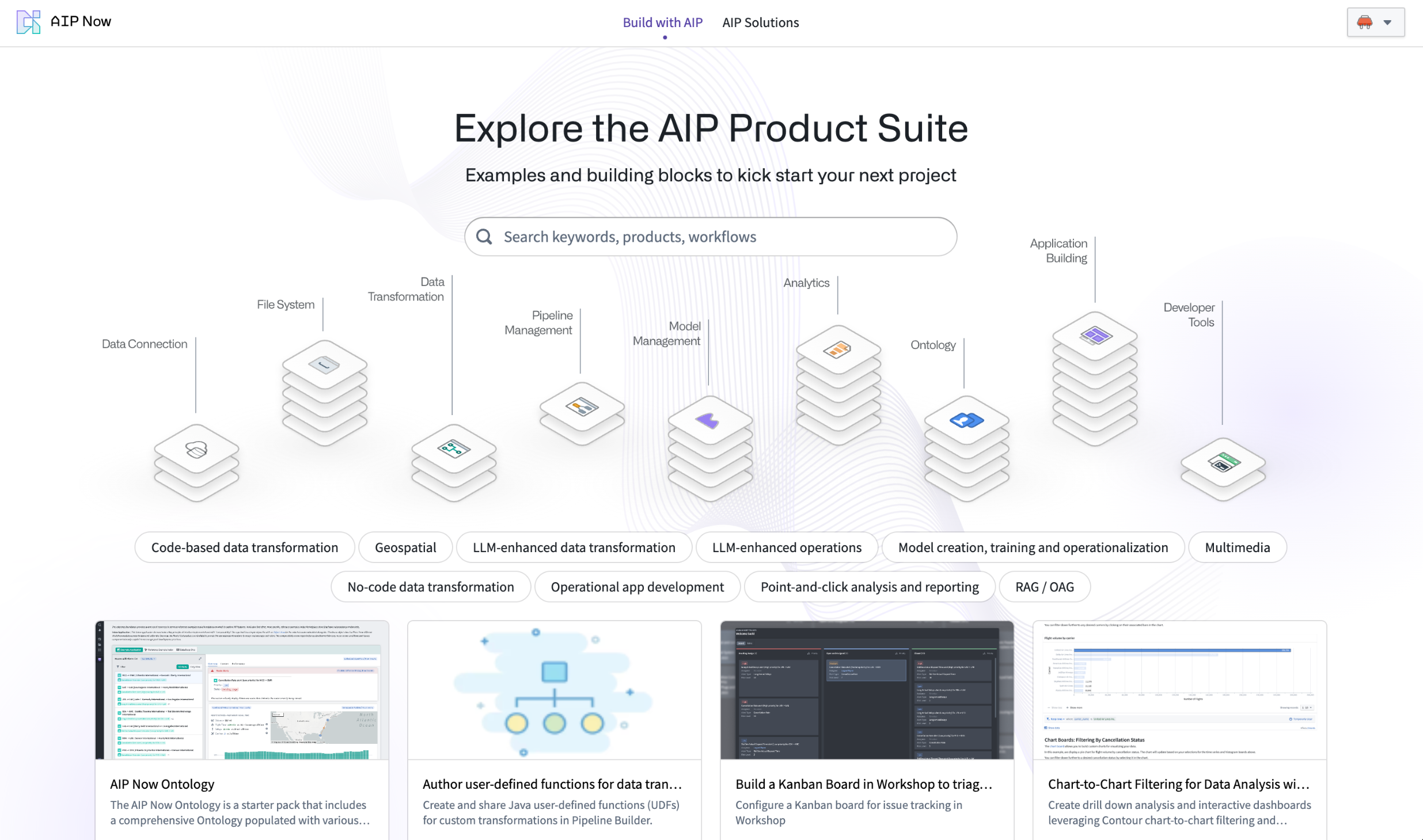
Explore the Build with AIP application.
To learn more about a product, select the product to see a detailed explanation of the value, implementation design, and a break-down of individual resources contained within. Users can install any product to a destination Project of their choice, and monitor the progress of the installation. Previously-installed products can always be accessed from within Build with AIP.
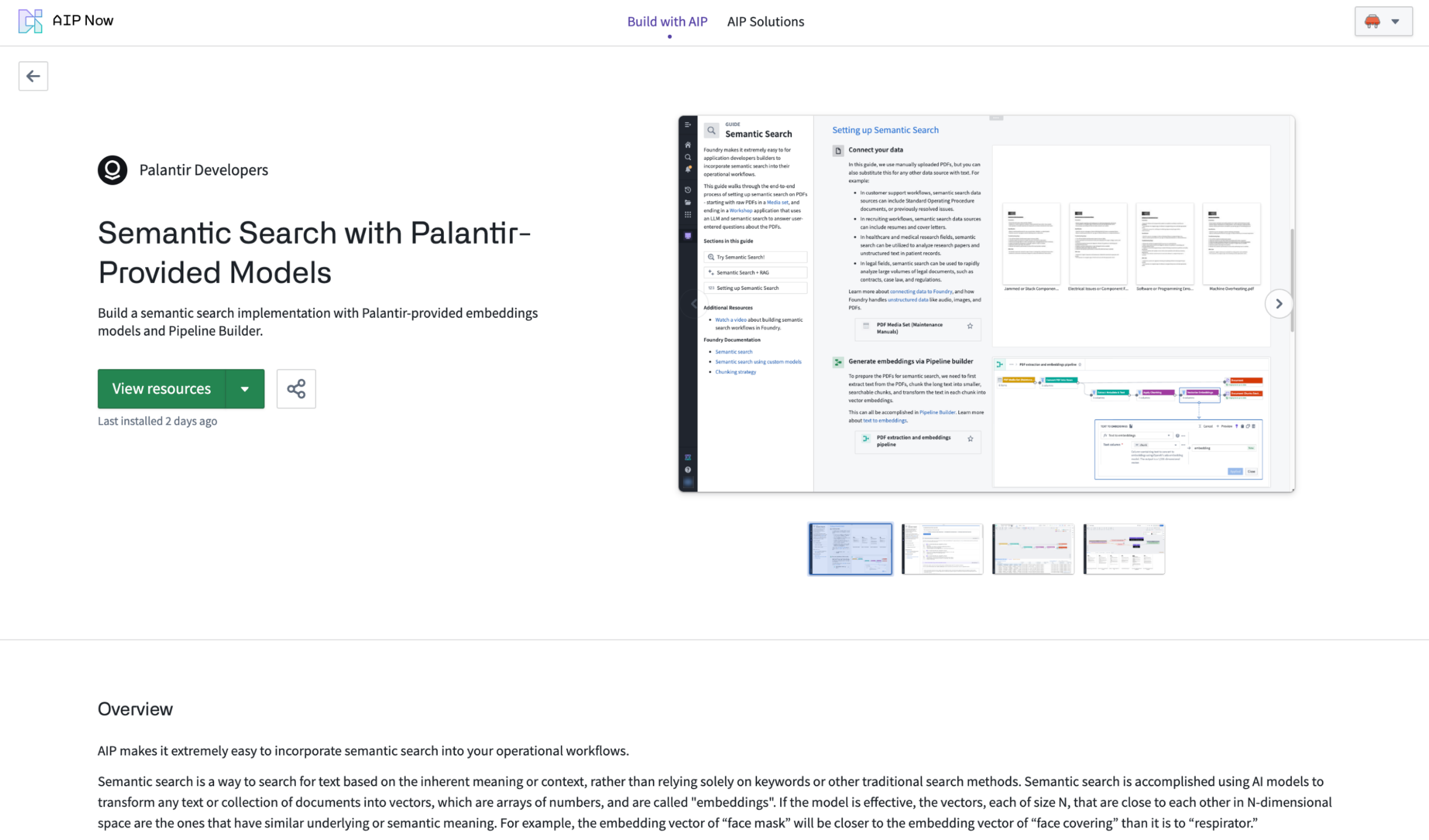
Inside the AIP product showcase.
Additional products will be added continuously based on recommended and requested implementation patterns.
The Build with AIP application is on an accelerated release track and will soon be available for all existing customers. Platform administrators opting to restrict access to this feature can do so via Control Panel through Application Access settings.
All products are backed by Foundry Marketplace. For more details, review the documentation.
HyperAuto V2 is now available [GA]
Date published: 2024-04-30
HyperAuto is Palantir Foundry’s automation suite for the integration of ERP and CRM systems, providing a point-and-click workflow to dynamically generate valuable, usable outputs (datasets or Ontologies) from the source’s raw data. This feature is now available across all enrollments as of this week.
This new major version introduces a significantly updated user experience as well as increased performance and stability for automated SAP-related ingestion and data transformation workflows.
To create your first HyperAuto pipeline, see Getting Started.
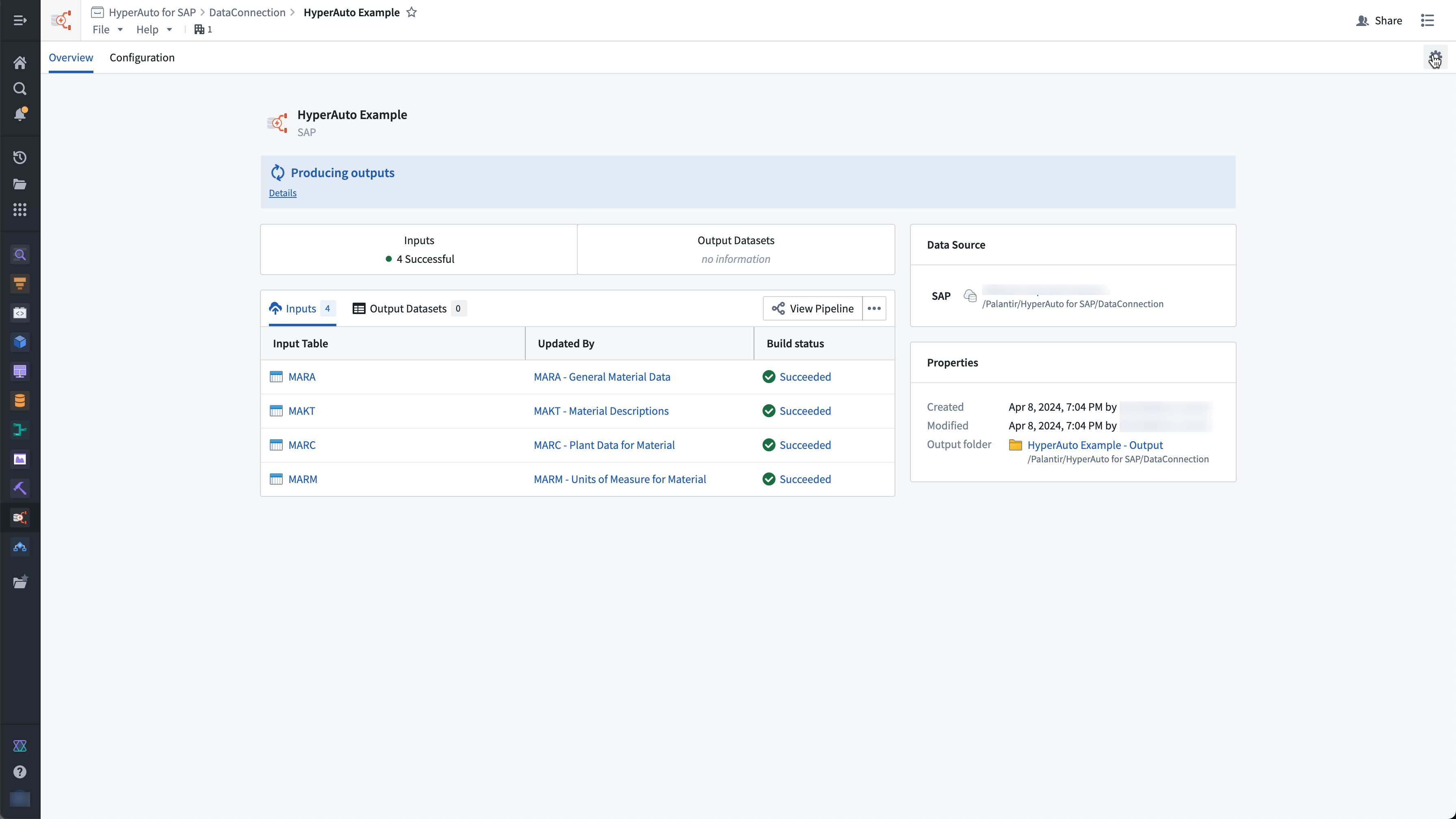
Overview of a live HyperAuto pipeline.
Dynamic integration and management of SAP data
Following the previous beta announcement, the following capabilities are now generally available:
- Ease of configuration: HyperAuto offers a user-friendly, point-and-click wizard, opinionated defaults for quick setup, and customizable settings for advanced users, automating tasks like data renaming, cleaning, de-normalization and de-duplication.
- Pipeline Builder integration: HyperAuto dynamically generates Pipeline Builder pipelines, providing a transparent UI and includes a change management workflow for updating and deploying pipeline configuration changes.
- Real-time SAP data processing: HyperAuto supports real-time data streaming from SAP sources (requires SLT Replication Server), allowing data to flow from source to Ontology in seconds.
- Support for static cuts of SAP data: With this new release, HyperAuto supports working on top of uploaded datasets, in case where a live connection to an SAP source is not possible.
For more information on HyperAuto V2, review the documentation.
Website hosting for static application in Developer console is now GA
Date published: 2024-04-30
Developer Console now provides the ability to host static websites. This addition allows developers to employ Foundry for hosting and serving their websites without the need for external web hosting infrastructure. Static websites consist of a fixed set of files (HTML, CSS, JavaScript) that are downloaded to the user's browser and displayed on the client side. Numerous web application development frameworks, such as React, can be used to create static websites.
Static website support is available for enrollments on domains managed by Palantir (example: enrollment.palantirfoundry.com or geographical equivalent). Feature support for enrollments on customer-managed domains is currently in active development.
Hosting your site on Foundry
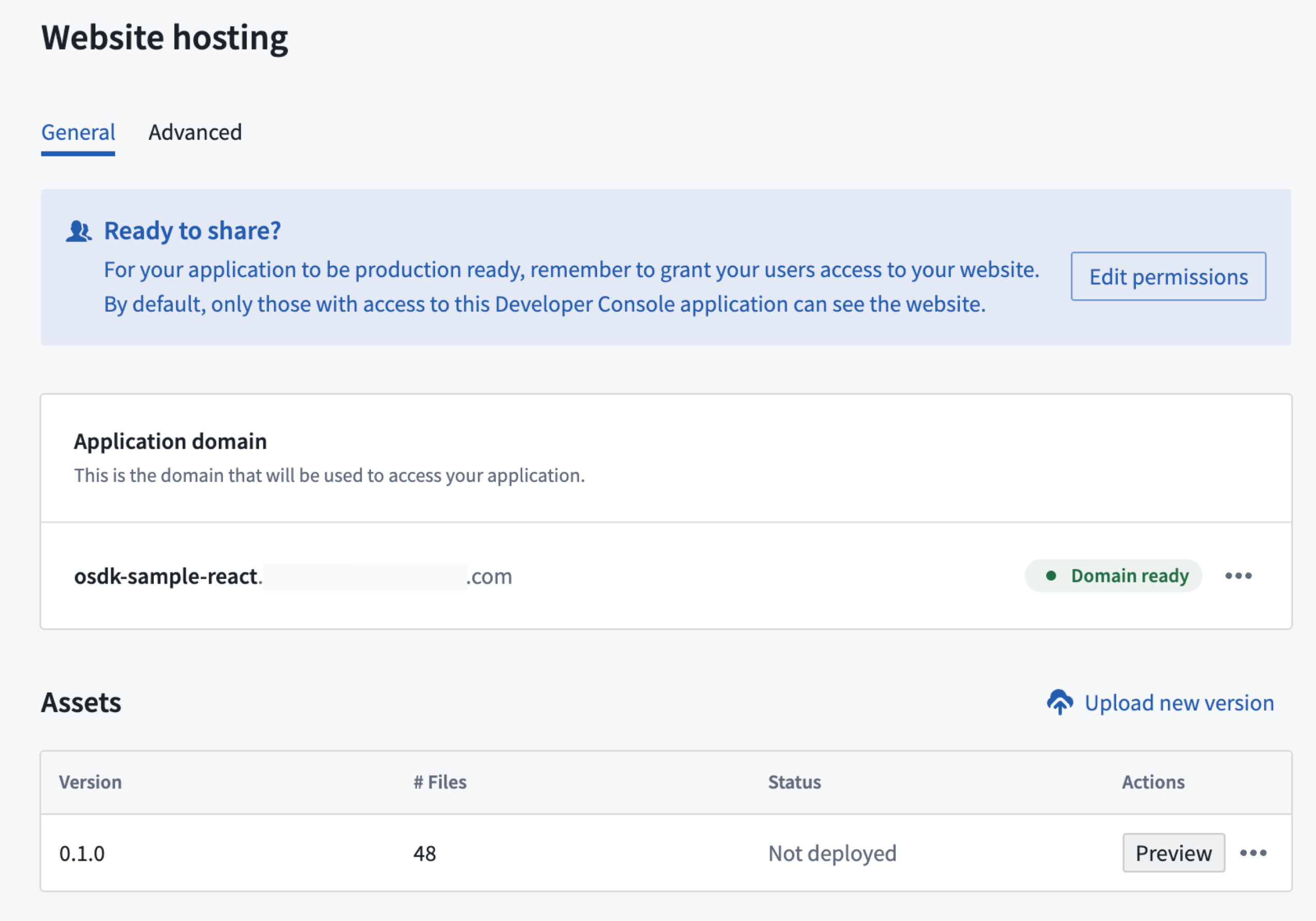
Website hosting menu.
To set up and configure website hosting, you will need to:
- Set an application subdomain for the site, determining the URL your users will use to access the site.
- Upload the asset containing the site to Foundry, preview the results, and publish the site.
You can also configure access to the website and set advance Content Security Policy (CSP) settings for your site.
Who can configure website hosting?
Web hosting can be configured by any user with developer console edit or owner role. Setting up web hosting include creating a subdomain which need to be approved by the enrollment information officer.
Website hosting command line tool
Automate the static website deployment process using a command line tool or by integrating with existing CI/CD tools. Review the API documentation within your OSDK application for more information.
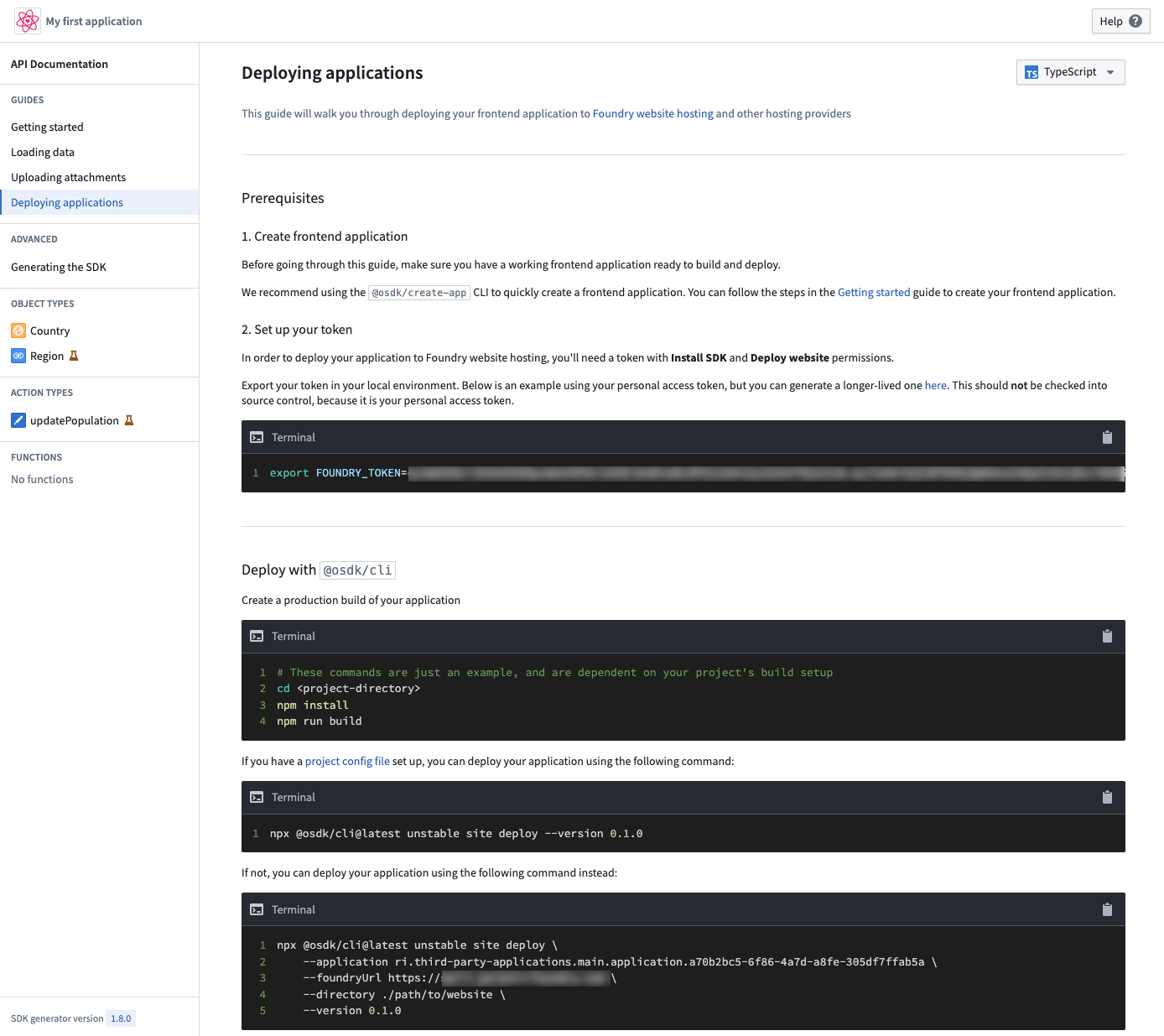
Deploying applications tutorial within the OSDK application documentation.
What is coming next?
We are actively developing support for website hosting on customer-owned domains, as well as adding support for hosting your code on Foundry and running CI/CD directly from within Palantir Foundry.
To learn more about website hosting configuration, review the documentation.
Remove Markings on outputs in Pipeline Builder
Date published: 2024-04-30
We are excited to announce that you can now remove Markings on outputs directly in Pipeline Builder on all stacks. From within Pipeline Builder, it is now possible to:
- Remove one or multiple inherited markings from your output.
- Proactively remove non-inherited markings that could appear on your dataset in the future.
- Undo any marking removal that was previously applied on your output within the specified pipeline.
To use the remove Markings functionality, ensure you meet the following prerequisites:
- Have the
Remove markingpermission for the specific Marking(s) - Branch protection must be enabled on your pipeline
- Code approvals are required on your pipeline
To remove a marking, navigate to the output you want to remove the marking from and select Configure Markings.
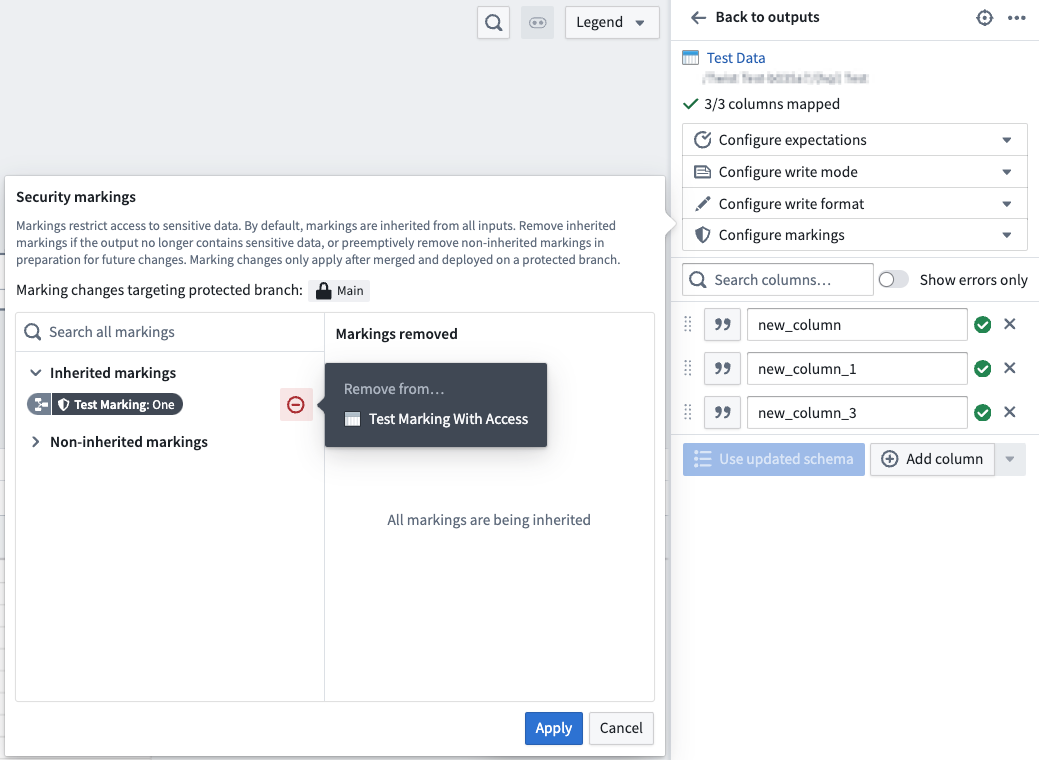
Markings option panel with cursor hovering over the remove from icon.
Once you have selected the marking(s) you wish to remove, these markings will be listed under the Markings removed section
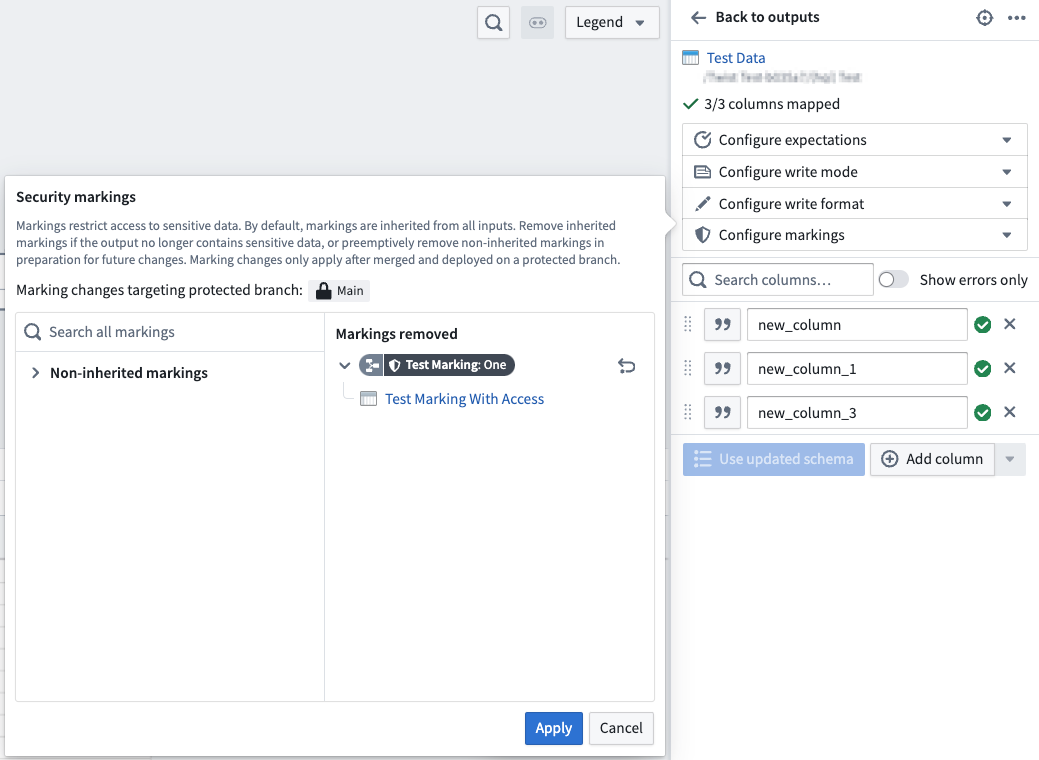
After the removals are applied, the marking will no longer appear on the output once your branch is merged and built on master.
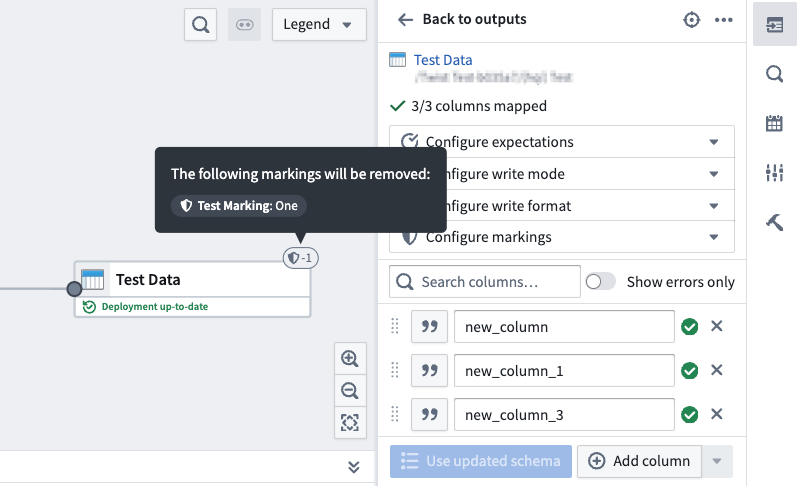
Review the documentation to learn more about removing Markings directly in Pipeline Builder.
Model development in Jupyter® notebooks now generally available
Date published: 2024-04-30
Beginning today, users can take full advantage of the existing Code Workspaces JupyterLab® integration to train, test, and publish models for consumption across the platform. Code Workspaces provides an alternative to the existing model training flow in Code Repositories by offering a more familiar, interactive environment for data scientists.
Models published through Code Workspaces are immediately available for consumption in downstream applications like Workshop, Slate, Python transforms, and more.
Create models from within Code Workspaces
Models can now be published directly from within Code Workspaces. Just navigate to the Models tab, and select Create a model. Once you have selected your model's location, you will be asked to define a model alias, which is a human readable identifier that maps to the resource identifier used by Palantir Foundry to identify your model.
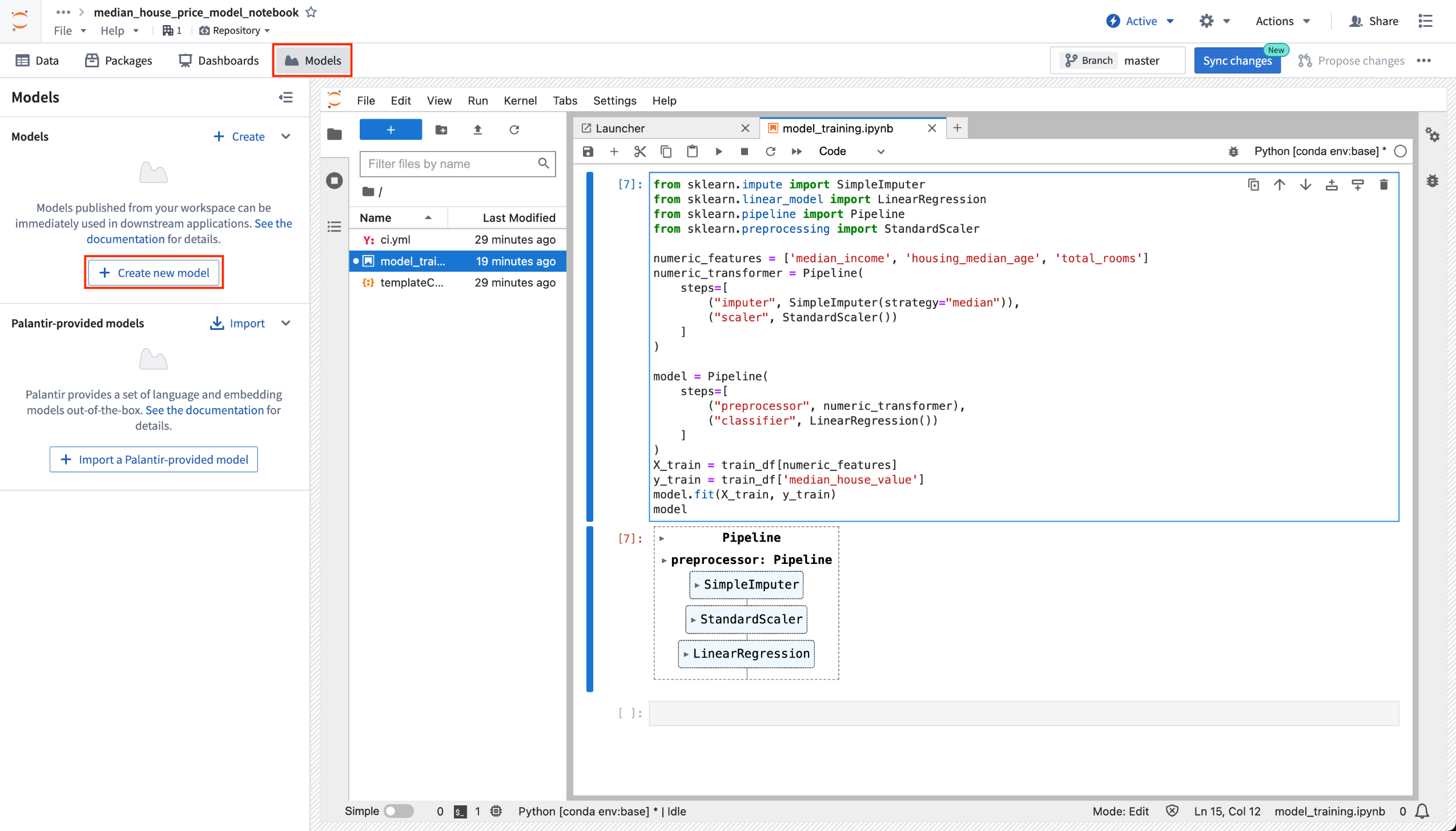
Create new model option from within Code Workspaces.
Publish your models directly to Foundry
After defining your model's alias, follow the step-by-step guide located on the left of the view to publish your model to Foundry. Review details on installing the required packages, defining your model adapter, and finally, to publish your model.
When a model is first created, a skeleton adapter file will be generated with the name [MODEL_ALIAS]_adapter.py. Review the Model adapter serialization documentation and Model adapter API documentation for more information on how to define a model adapter.
Once you have authored your adapter, you can use the provided model publishing snippet to publish your model to Foundry. Select the snippet to copy it, then paste it into a notebook cell, and execute it.
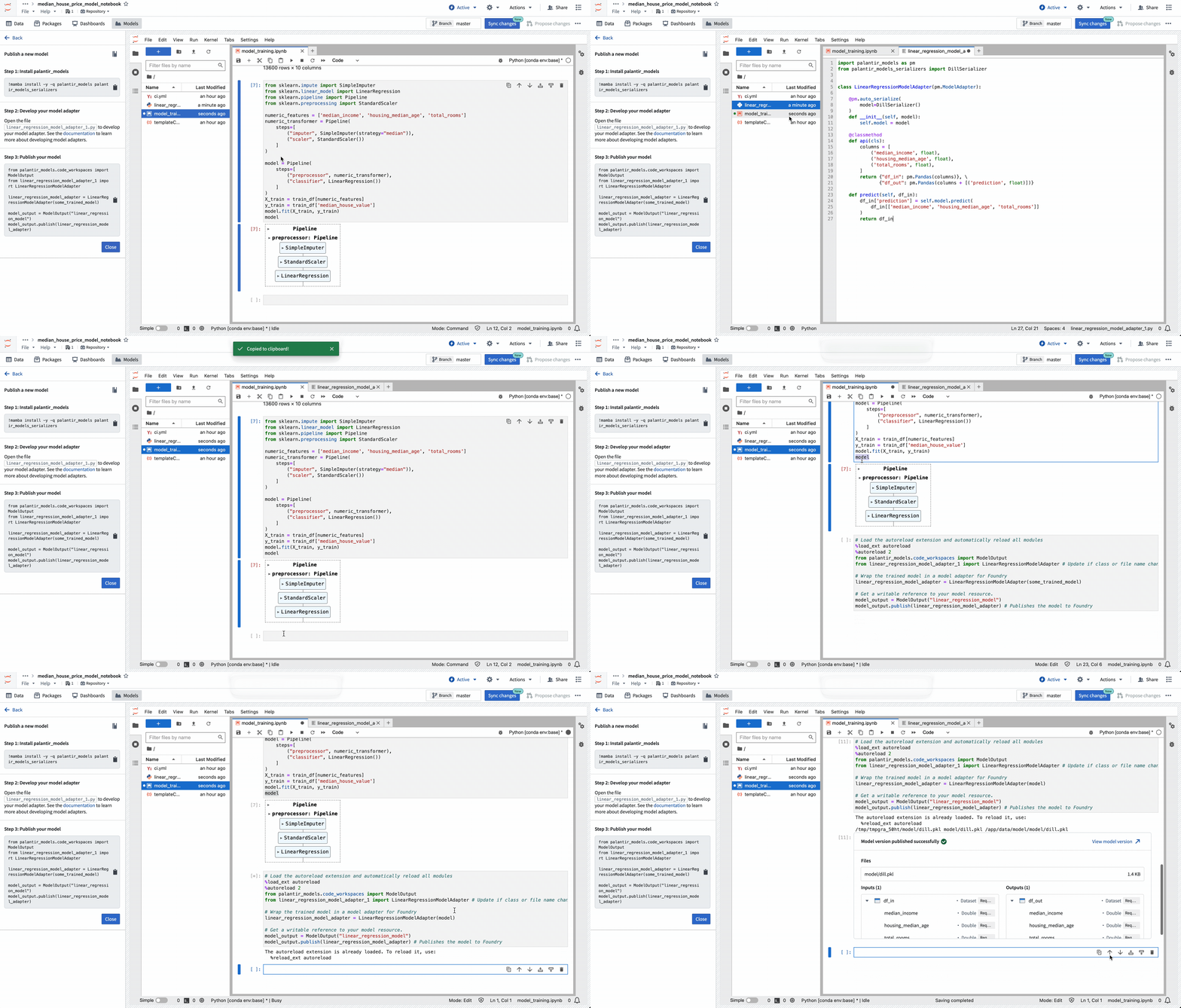
Models that publish successfully will display a preview output indicating that publishing was a success, and will display information about the model like the model's API and the saved model files.
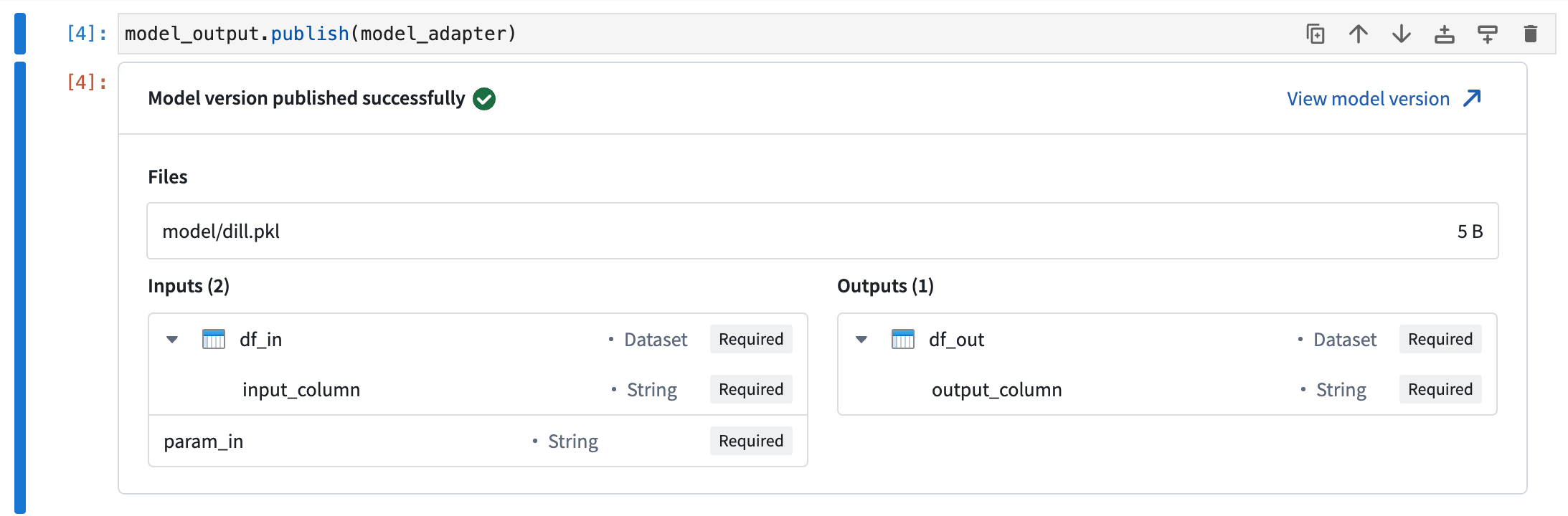
Model version successful publish notice.
Learn more
To learn more about developing and publishing models from Code Workspaces, review the Code Workspaces model training documentation. You can also review our full tutorial that walks you through setting up your project, building your model, and deploying your model for consumption in downstream applications.
Jupyter®, JupyterLab®, and the Jupyter® logos are trademarks or registered trademarks of NumFOCUS. All third-party trademarks (including logos and icons) referenced remain the property of their respective owners. No affiliation or endorsement is implied.
Sunsetting Preparation (Blacksmith)
Date published: 2024-04-30
Preparation (Blacksmith) is being sunset and replaced by Pipeline Builder, the de facto tool for no-code pipelining and data cleaning. Preparation has been in maintenance mode for several years and will not support Marketplace integrations. While new enrollments will no longer be granted access, this change will not affect any existing installations of Preparation for now.
Introducing Model Catalog: Available End of April 2024 [GA]
Date published: 2024-04-24
Model Catalog will be generally available at the end of April 2024, enabling users to view all Palantir-provided models and discover new models in AIP.
Model Catalog enables builders to:
- View the models that are available in AIP and discover new models.
- Select the right model for your use case.
- Get started with a workflow using both basic templates and entire use case templates in Marketplace.
- Test different models in a sandbox/playground.
Model Catalog has two main components: the Model Catalog home page and the Model entity page.
Model Catalog home page
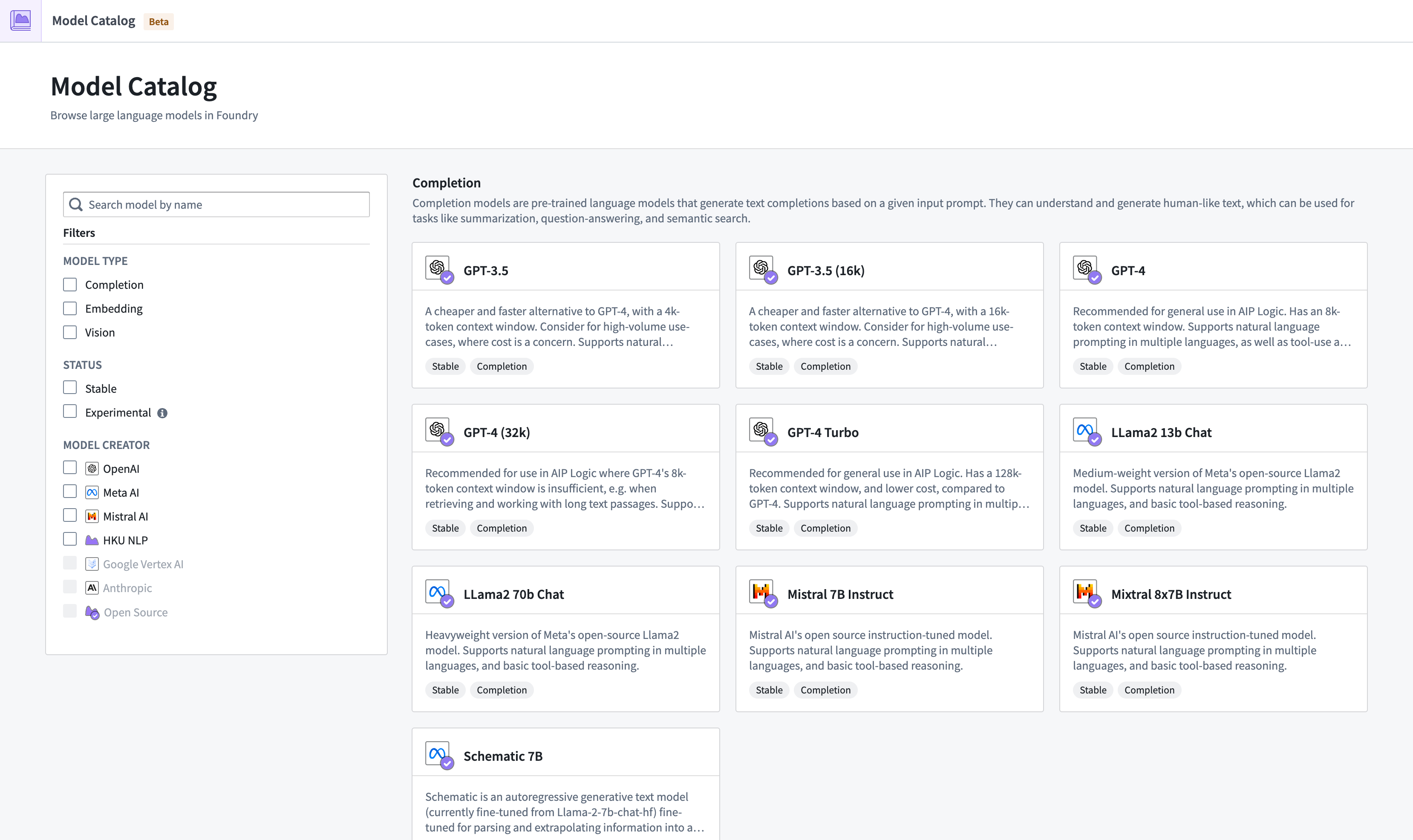
The Model Catalog homepage.
The Model Catalog homepage is a discovery and navigation interface, displaying all large language models available on your Foundry enrollment.
There are a few ways to filter models in the home page:
- Model Type: View all available completion models, embedding models, or vision models.
- Status: View models based on their lifecycle status, either stable or experimental.
- Model Creator: View models based on the organization responsible for creating, developing, and maintaining a specific LLM.
Model entity page
Each model has an entity page with three main sections:
- Test: An interface for builders to try out the different models.
- How to use it: Get started by creating a resource, already populated with the content required to start building your workflow. Model Catalog currently supports Functions and Transforms.
- Model description: View a basic description, legal disclaimer, context window of the model such as tokens limit, training data cutoff, and more.
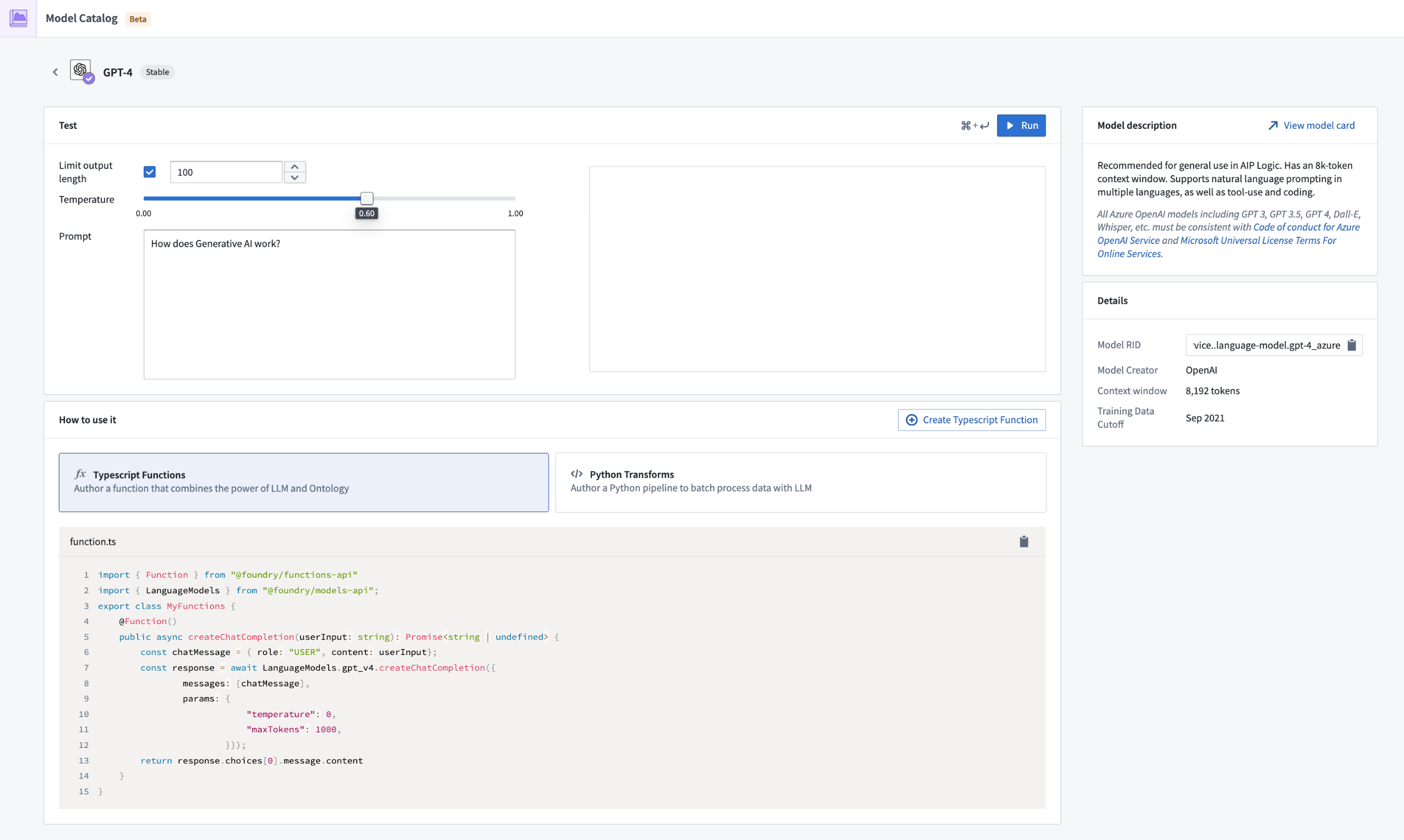
The Model entity page.
What's next on the development roadmap?
- Provide more tools and benchmarks for comparing models and making decisions.
- Improve the testing sandbox to support different features and prompt types.
- Expand the How to use it functionality to all AIP applications.
For more information on Model Catalog, review the documentation.
Announcing Ontology SDK TypeScript 1.1
Date published: 2024-04-24
In preparation for a major version upgrade (TypeScript 2.0), we are releasing minor version 1.1. Migrating your code to this new version will help you get ready for TypeScript 2.0.
Why are we developing TypeScript 2.0?
To benefit from new Ontology primitives such as Ontology interfaces, real-time subscription, and for a more efficient way to work with data, we refactored the OSDK TypeScript semantics. This change will be labeled as major release v2.0, to be released before the end of 2024.
Prior to the release of version 2.0, we are aiming to minimize the impact for customers by first providing version 1.1 and 1.2 as a bridge to the upcoming upgrade.
To clarify, the next two upcoming versions are detailed below:
-
Version 1.1: This version maintains the current language syntax but will deprecate a few methods and properties that will no longer be supported.
-
Version 1.2: Released later this year, version 1.2 will mainly provide the same functionality as the 1.x version but will introduce the new language syntax.
What will change in OSDK TypeScript 1.1?
The following table is a summary of deprecated features and their replacements, with more detailed info on the changes below:
| Deprecated | Replacement |
|---|---|
| page | fetchPage, fetchPageWithErrors |
| __apiName | $apiName |
| __primaryKey | $primaryKey |
| __rid | $rid |
| all() | asyncIter() |
| bulkActions | batchActions |
| searchAround{linkApiName} | pivotTo(linkApiName) |
Page()
We are deprecating the page function, and adding the following two methods for convenience:
fetchPageWithErrors- This functions exactly like
pagedid, and was renamed for consistency with API naming conventions in V2.0 to come. -
Before
- ```javascript
const result: Result
if(isOk(result)){ const employees = result.value.data; }
* **After**
*
javascript const result: Resultif(isOk(result)){ const employees = result.value.data; } ```
- ```javascript
const result: Result
-
fetchPage - This will return a page that does not have a result wrapper (no
Result<Value,Error>) - This was added to for users who prefer the
try/catchpattern as it will throw errors where relevant. -
Before
- ```javascript
const result: Result
if(isOk(result)){ const employees = result.value.data; }
* **After**
*
javascript try{ const result:} catch(e) { console.error(e); } ```
- ```javascript
const result: Result
apiName, primaryKey, rid
We are deprecating __apiName, __primaryKey and __rid properties and replacing them with $apiName, $primaryKey and $rid properties.
All()
We are deprecating all() method and added the following method instead for convenience:
-
asyncIter()This returns an async iterator that will allow you to iterate through all results of your object set -
Before
const result: Result<Employee[], ListObjectsError> = await client.ontology
.objects.Employee.all();

if(isOk(result)){
const employees = result.value.data
}
- After
const employees: Employee[] = await Array.fromAsync(await client.ontology.objects.Employee.asyncIter());
BulkActions
We are deprecating bulkActions and renaming it to batchActions This was renamed to match the REST API name.
- Before
await client.ontology.bulkActions.doAction([...])
- After
await client.ontology.batchActions.doAction([...])
SearchArounds
We are deprecating searchAround{linkApiName} and replacing it with:
pivotTo(linkApiName)-
This will function exactly the same as search around, but the name will better reflect that the result is of the type of the object you pivoted to.
-
Before
await client.ontology.objects.testObject.where(...).searchAroundLinkedObject().page()
- After
await client.ontology.objects.testObject.where(...).pivotTo("linkedObject").fetchPage()
How can I try this out?
After the updated generator version is released, when you create a new SDK version for your application using Developer Console, the produced version will contain these features. Once you update the dependencies in your application, you will see the deprecated methods and properties with a crossover line searchAroundLinkedObject(), but the code will still function as before. Version 2.0 will drop the support for the deprecated methods.
You can also decide to use an older version of the generator by using the dropdown list using the Generate new version option.
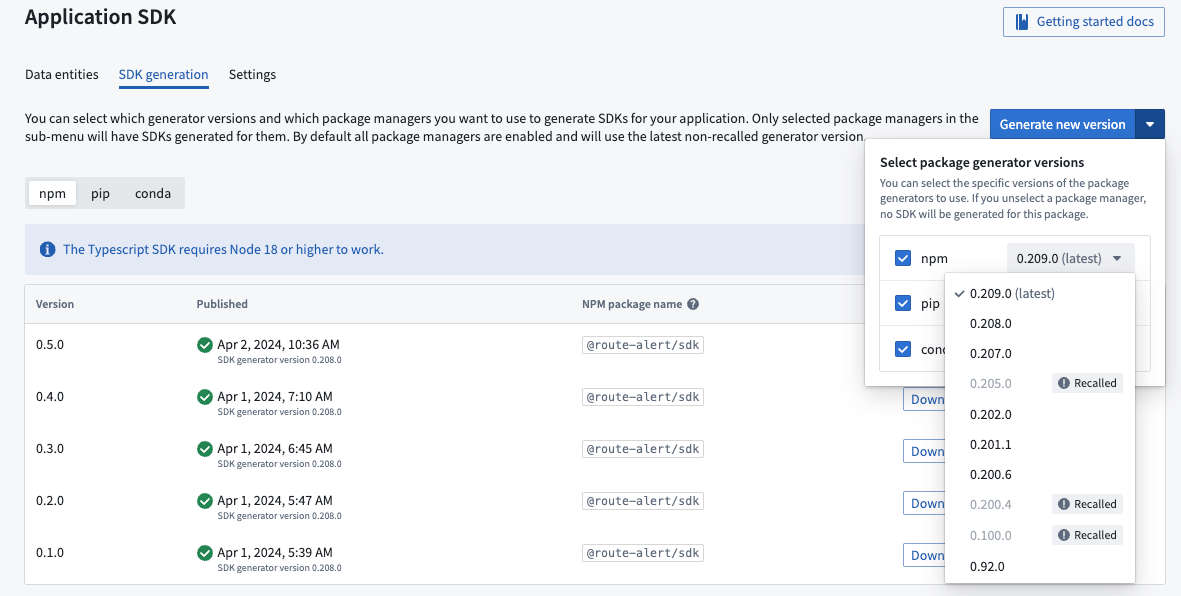
What’s coming next?
As a summary of the above, the OSDK TypeScript versions to come are as follows:
Version 1.1: This version maintains the current language syntax but will deprecate a few methods and properties which will no longer be supported.
Version 1.2: With release marked for later this year, version 1.2 will introduce the new language syntax.
Version 2.0: Marks the new language syntax as general availability (GA), while dropping support for the deprecated methods and properties and introduce new capabilities which are not available yet.
Time-based group memberships for data access are now generally available
Date published: 2024-04-11
Time-based group memberships are now available as a security feature in the platform. This feature can support data protection principles such as use limitation and purpose specification by limiting user access to data.
Users with Manage membership permissions can now grant group memberships for a given amount of time, allowing temporary access to data based on the set configuration. You can choose to configure access based on latest expiration or maximum duration:
- Latest expiration: All new memberships must have an expiration date that is earlier than this date.
- Maximum duration: All new memberships must expire within the specified duration.
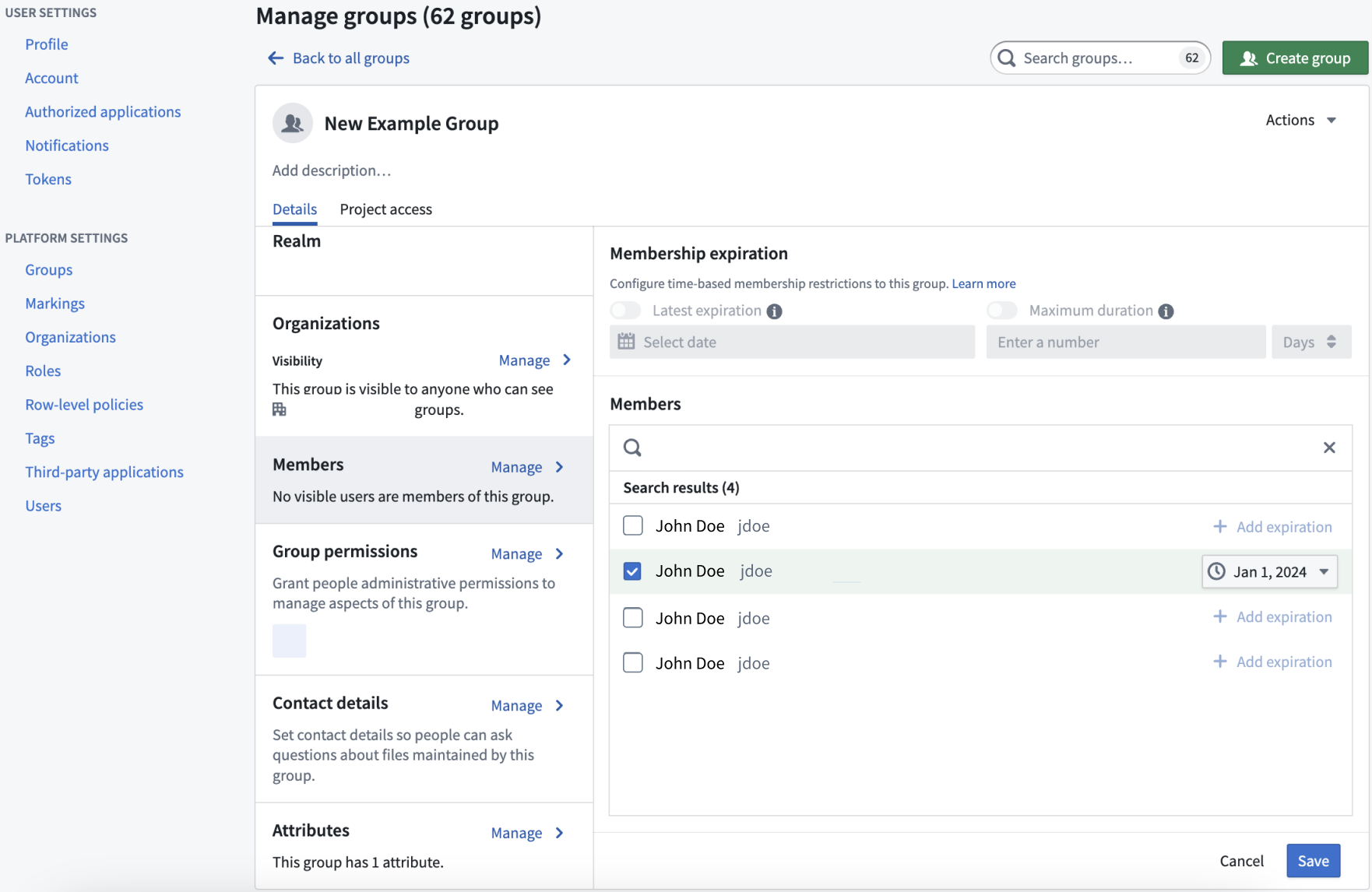
The group settings page with time constraint settings.
Any membership access requests to groups with time constraints applied to them will be bounded by those constraints.
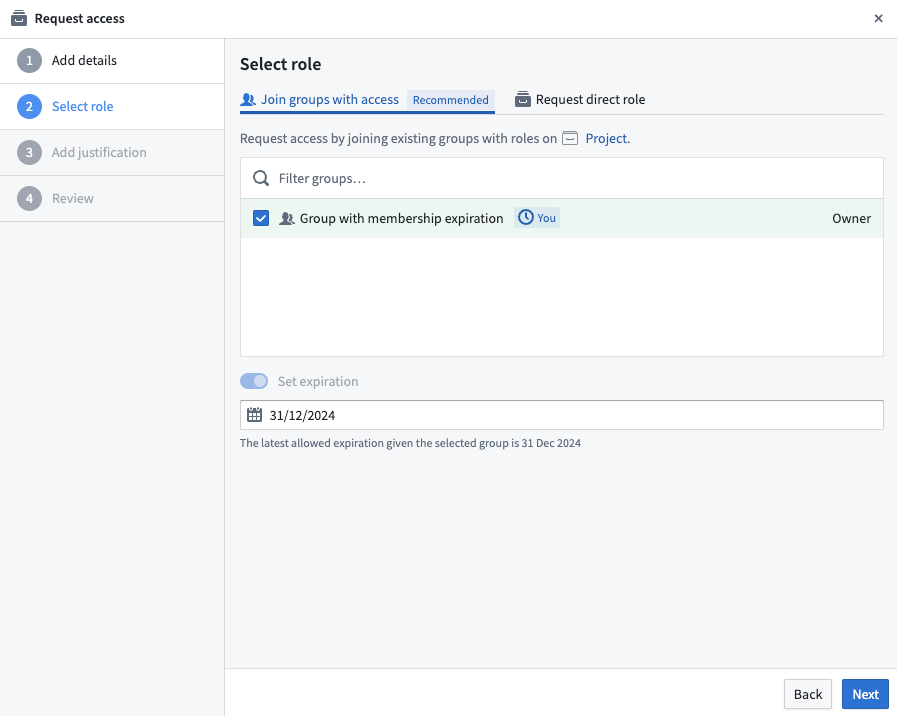
A group membership request with the latest expiration constraint of 31/12/2024.
For more information, review our documentation on how to manage groups.
Introducing an improved Foundry resource sidebar
Date published: 2024-04-11
We are happy to announce the launch of our newly redesigned resource sidebar, targeted at streamlining administrative workflows and making them more easily discoverable. You can experience the new visual refresh and organization on the Overview, Access, Activity, Usage, and Settings right-side panels of the resource sidebar in Palantir Foundry.
What is changing?
- Improved navigation: The levels of nesting have been minimized to ensure all workflows are accessible with fewer clicks with an aim for boosting productivity.
- Enhanced security model legibility: Security governance features, such as Access requirements, have been revamped o make them more user-friendly and easier to interpret.
- A fresh visual update: Enjoy a more streamlined visual appearance.
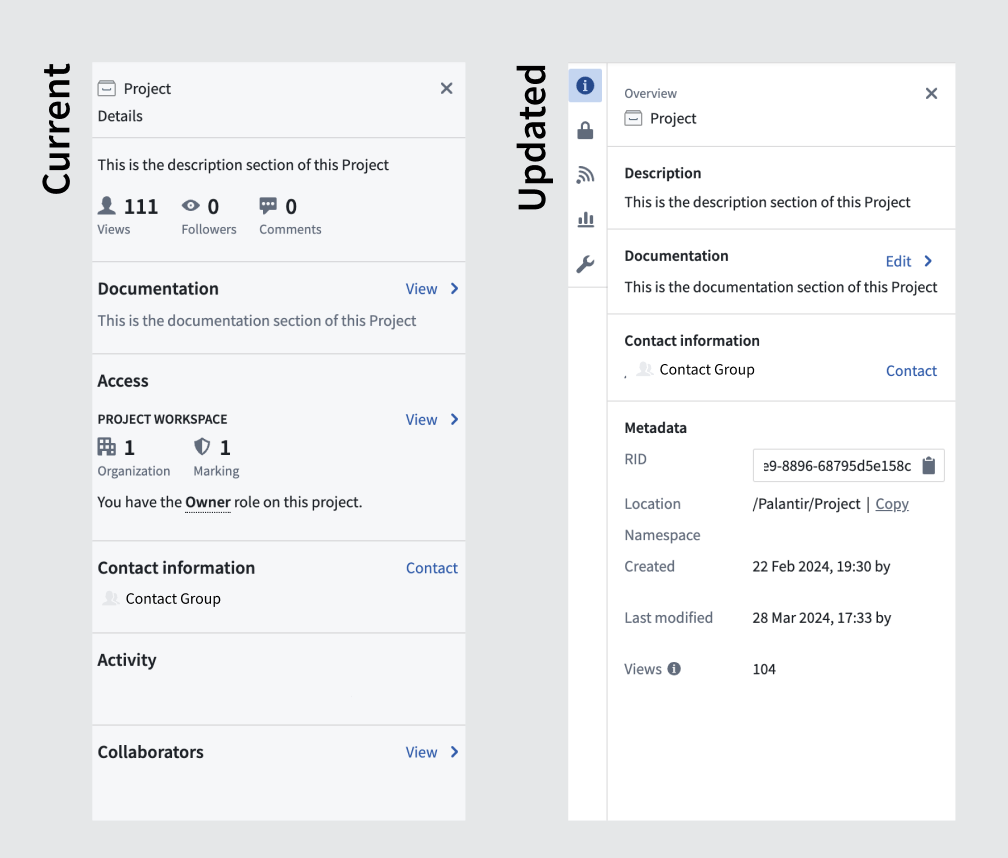
An updated interface for the Project overview pane.
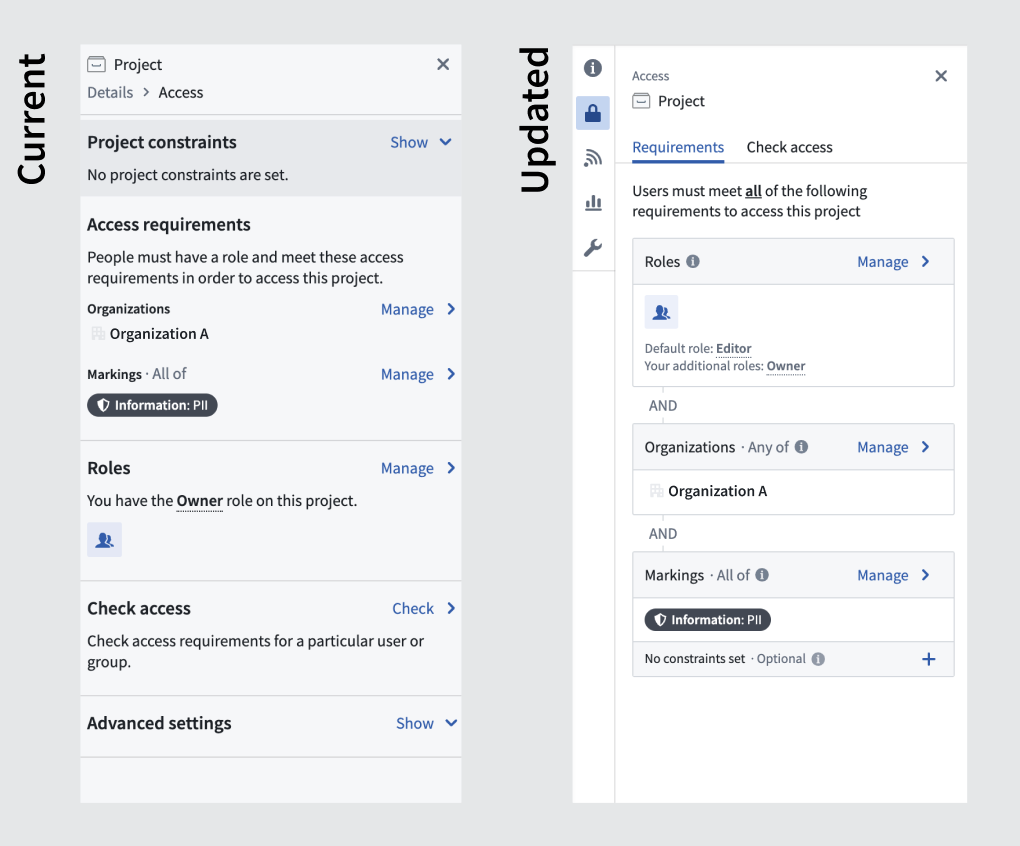
An updated appearance of the Project access panel.
The updated resource sidebar retains all existing functionality and continues to support all your current workflows without any disruption.
Natively Accelerated Spark in Python Code Repositories
Date published: 2024-04-11
We are excited to introduce Natively Accelerated Spark in Pipeline Builder and Python code repositories, a feature designed to enhance performance and reduce the cost of batch jobs. This feature allows you to leverage low-level hardware optimizations to increase the efficiency of your data pipelines.
Use native acceleration for the following benefits:
- Faster performance: Native acceleration optimizes general SQL functions like
select,filter, andpartition, significantly improving the speed of your batch jobs. - Cost reduction: By boosting performance, native acceleration also helps reduce costs associated with batch job execution, making it ideal for those with big data needs or high throughput requirements.
- Detailed implementation: Guidance is available to help you set up and integrate this feature into your workflows.
Usage and Limitations
You can enable native acceleration within Pipeline Builder and Python transforms. Note that repositories that use user-defined functions (UDFs) and resilient distributed dataset (RDD) operations may marginally benefit from this feature as well.
Native acceleration is particularly beneficial for data scientists with big data or latency-critical workflows. If you are running frequent builds (every 5 minutes) or operating in a cost-sensitive environment, native acceleration offers a powerful solution.
To test the benefits of native acceleration, simply run your pipeline once with the feature enabled. If you notice an improvement in performance, keep the feature enabled for the pipeline.
How to enable native acceleration
To leverage the full potential of native acceleration, review the documentation for Natively Accelerated Spark in Pipeline Builder and Python code repositories.
Code Workspaces [GA]: JupyterLab® and RStudio® is now generally available
Date published: 2024-04-09
We created Code Workspaces so users can conduct effective exploratory analyses using widely-known tools while seamlessly leveraging the power of Palantir Foundry. Now generally available, Code Workspaces will bring the JupyterLab® and RStudio® third-party IDEs to Foundry, enabling users to boost productivity and accelerate data science and statistics workflows. Code Workspaces serves as the definitive hub within Foundry for conducting comprehensive exploratory analysis by delivering unparalleled speed and flexibility.
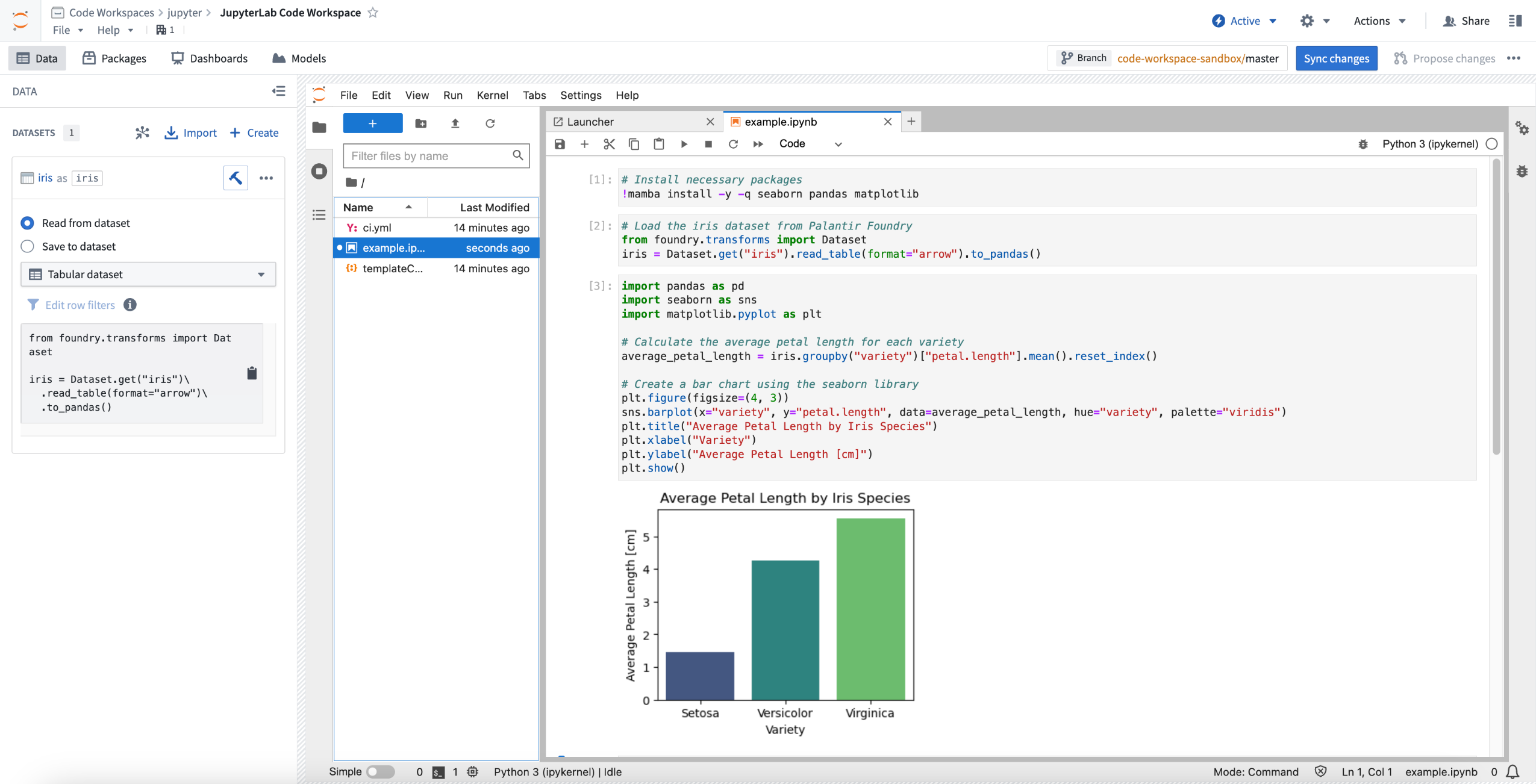
Jupyter® Code Workspace used for data science.
Flexible and efficient exploratory analyses
Code Workspaces integrates widely-used tools such as JupyterLab® Notebooks and RStudio® Workbench with the power of the Palantir ecosystem, establishing itself as the go-to place in Foundry for efficient exploratory analysis.
You can soon benefit from the following capabilities:
- Use widely adopted data science and machine learning tools and seamlessly integrate RStudio® and Jupyter® on top of your organization's data.
- Load data from any dataset while benefiting from Foundry’s world-class primitives of security, provenance, governance, and data lineage.
- Interactive code development and write-back, instant feedback loops, previews with cell-by-cell analyses and REPL terminal commands.
- Transform or generate data, visualization, reports, and insights that can be consumed by the rest of the Palantir platform.
- Efficiently train, optimize, and implement machine learning models before using them in production.
- Fully customize multiple Python and R environments with an interactive, integrated package manager solution supporting Conda, pip, and CRAN.
- Use native Git versioning and collaborative functionality provided by Code Repositories.
- Create interactive Dash, Streamlit®, and Shiny® dashboards to share analyses with peers and drive decision-making.
- Fully customize your compute settings to cater to the scale of data to be processed.
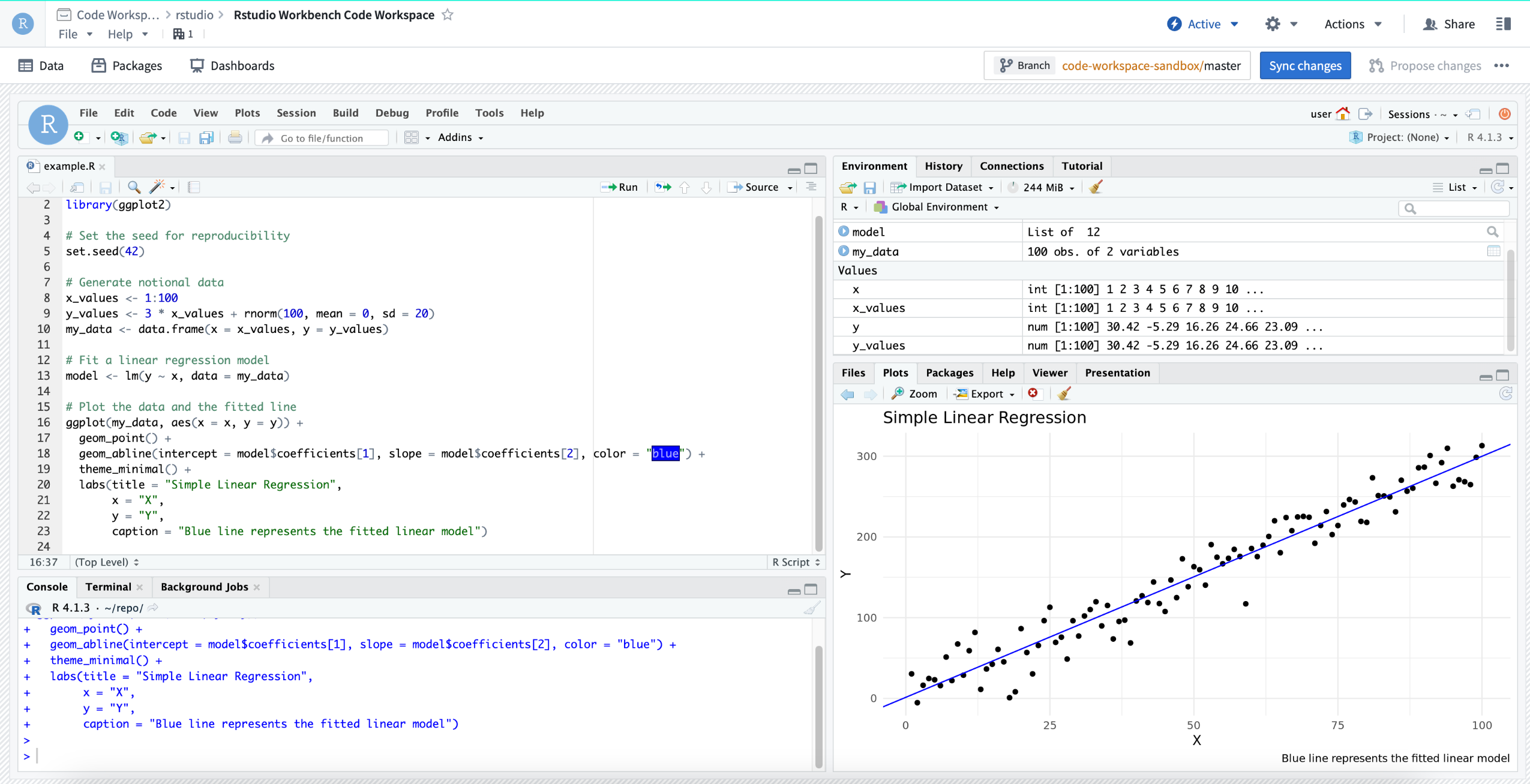
RStudio® Code Workspace used for machine learning training.
When should I use Code Workspaces?
Code Workspaces provides a comprehensive set of tools for performing quick and efficient iterative analysis on your data, seamlessly integrating the best of third-party tools with Palantir's extensive suite of built-in data analytics capabilities. Use it for data visualization, prototyping, report building, and iterative data transformations. Code Repositories and Pipeline Builder can be employed to convert these data transformations into robust production pipelines.
For most workflows, Code Workspaces and other Foundry tools complement each other, with the outputs of any pipeline being accepted as inputs to Code Workspaces analyses, and vice versa. Both Code Repositories and Code Workspaces rely on the same Git version control system. Large R pipelines, model training, or extensive visualization workflows can also be exported to Code Workbook to leverage its distributed Spark architecture.
Real-world use cases that drive impact
The following examples are some many real-world use cases that leverage Code Workspaces:
- Large insurance retailers employing Code Workspaces for the fine-tuning of their insurance pricing models.
- A health board using Streamlit dashboards in Code Workspaces to make spatial analysis on multiplex immunofluorescence data accessible to even computationally-novice biologists.
- A retail company using Jupyter® Code Workspaces to conduct exploratory analysis of their sales data and develop forecasting models.
- A pharmaceutical company using RStudio® Code Workspaces to generate completely reproducible lab reports detailing the effectiveness of drug trials.
To learn more about what you can do in Code Workspaces, review the relevant documentation:
What's on the development roadmap?
The following features are currently under active development:
- Code Workspaces transforms: Take the contents of a JupyterLab® Notebook or an RStudio® R script and persist it as a reproducible pipeline, leveraging Palantir’s robust build infrastructure.
- Integration with Palantir-managed models: Load and use models developed elsewhere in Foundry.
- AIP Integration: Call out to any language model supported by AIP directly from Code Workspaces.
- Ontology support: Fully leverage the power of the Ontology, and load objects into Code Workspaces to perform exploratory analysis.
- First-class reporting solution: Turn data analyses into reports that can be shared to inform decision-making across your entire organization.
Jupyter®, JupyterLab®, and the Jupyter® logos are trademarks or registered trademarks of NumFOCUS. RStudio® and Shiny® are trademarks of Posit™. Streamlit® is a trademark of Snowflake Inc.
All third-party referenced trademarks (including logos and icons) remain the property of their respective owners. No affiliation or endorsement is implied.
Pipeline Builder now supports running LLMs in your pipeline at scale
Date published: 2024-04-04
We're excited to launch a new cutting-edge feature in Pipeline Builder: the Use LLM node. This feature allows you to effortlessly combine the power of Large Language Models (LLMs) with your production pipelines in a few simple clicks.
Integrating LLM capabilities with production pipelines has traditionally been a complex challenge, often leaving users in search of seamless, scalable solutions for their data processing requirements. Our solution addresses these challenges by providing the following features:
- Production guarantees for LLM processing: Many LLM use cases are based only on foundational data and don't require iterative user input. Save time by processing and running your LLM model on your data directly in Pipeline Builder, leveraging the production pipelining features that Pipeline Builder offers, such as branching and build monitoring.
- Preview before deploy on multiple rows: Users can run trials on a few rows of their input data to iterate on their prompt before running a full build. Preview computations are completed in just seconds, greatly accelerating the feedback loop.
- Pre-engineered prompt templates: Users can benefit from prompt engineering expertise provided by our experienced team. These templates provide a warm start, enabling users to quickly initiate their projects.
Five beginner-friendly prompt templates to jumpstart your projects
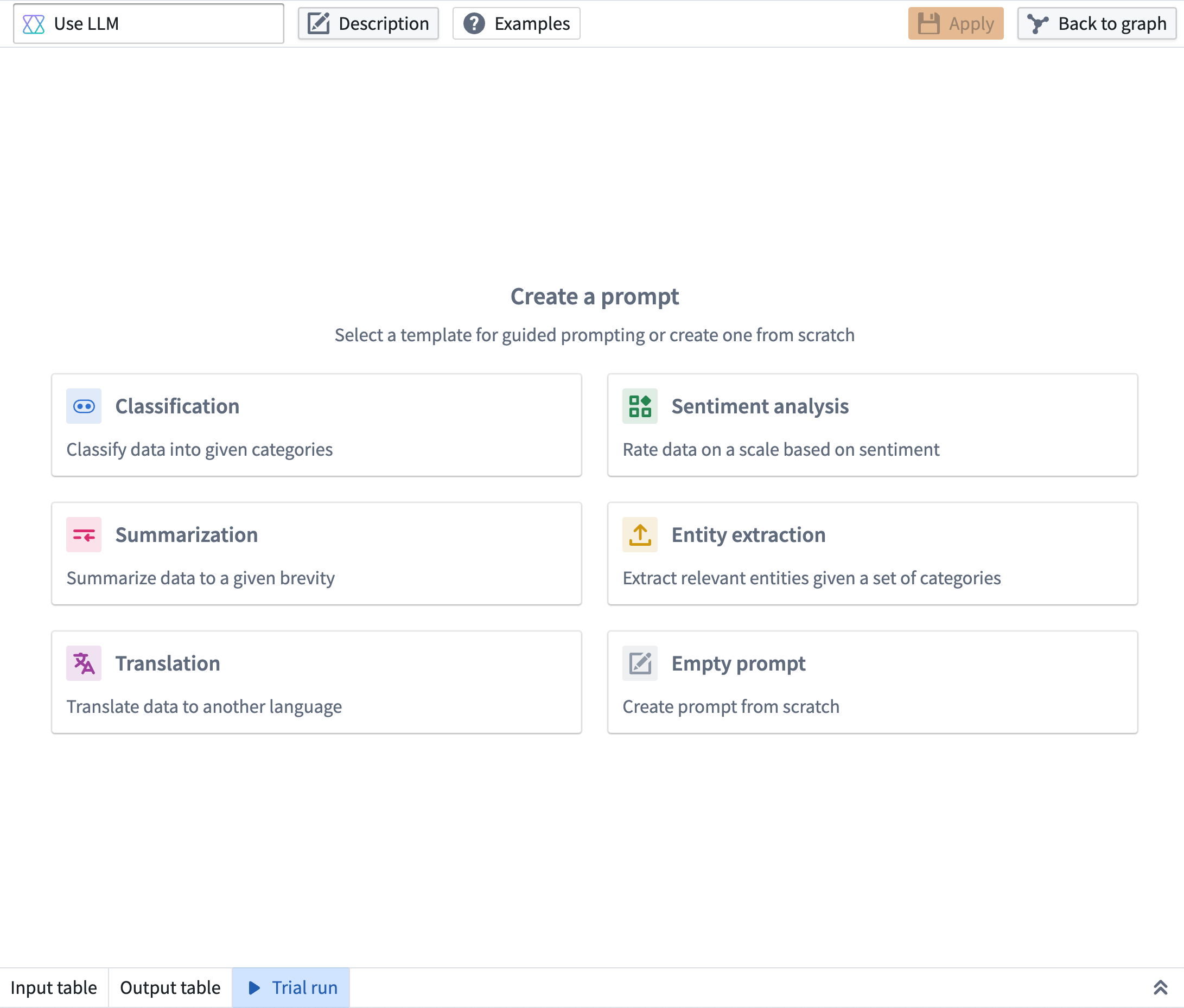
Pipeline Builder interface showing the addition of five guided prompts.
- Classification: Use LLMs to classify your data into given categories. In the example below we are classifying restaurant reviews into three different categories: food, service, and atmosphere. Our model will categorize each review into one or more of those categories.
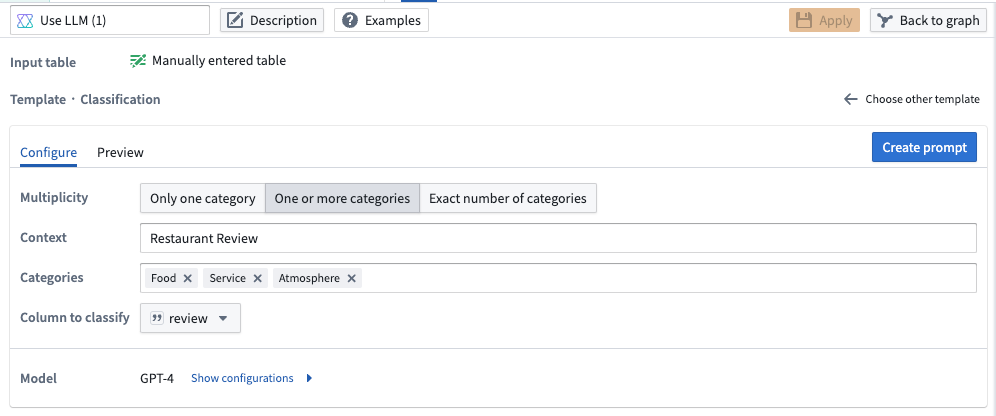
Pipeline Builder interface showing a prompt to classify restaurant reviews into three different categories.
- Sentiment Analysis: Use LLMs to rate your data on a scale based on positive or negative sentiment. In the example below, we rate the positive or negative sentiment of restaurant reviews on a scale of 0 (most negative) to 5 (most positive).
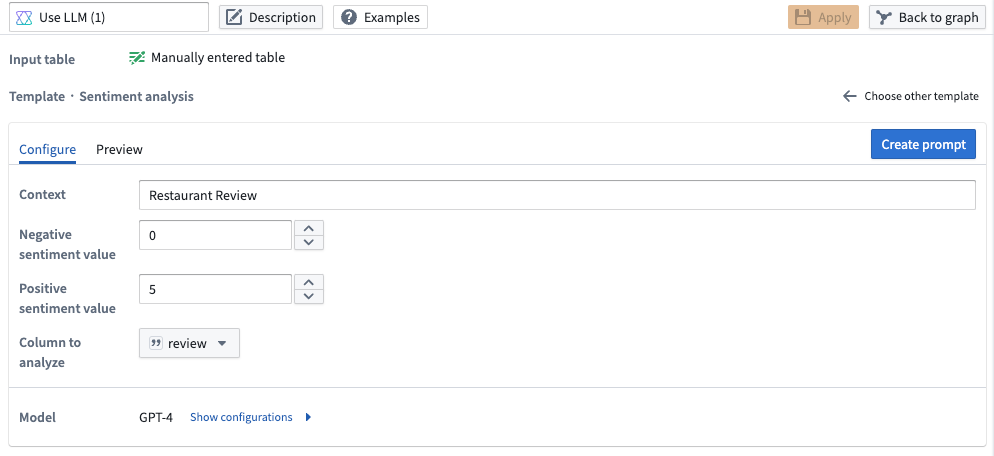
Pipeline Builder interface showing a prompt to rate positive or negative sentiment of restaurant reviews.
- Summarization: Use LLMs to summarize your data to a given length. In the example below, we are summarizing the restaurant reviews into one sentence.
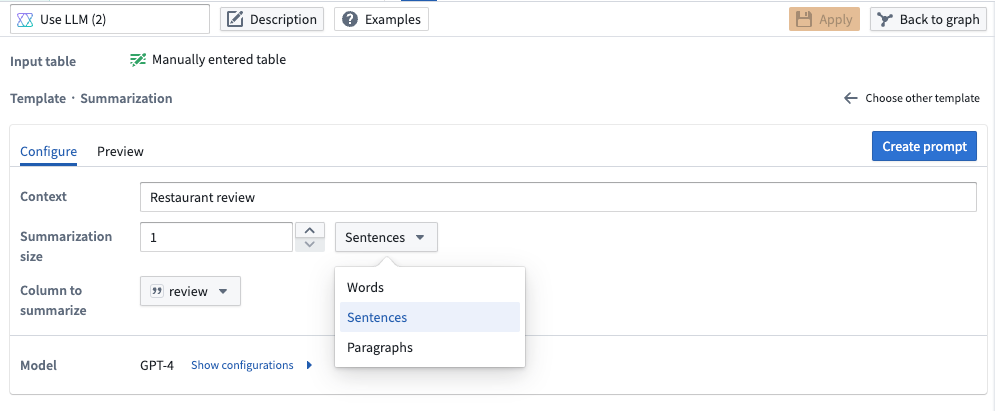
Pipeline Builder interface showing a prompt to summarize restaurant review by length.
- Entity Extraction: Use LLMs to extract relevant elements given a set of categories. In the example below, we want to extract any food or drink elements in each restaurant review.
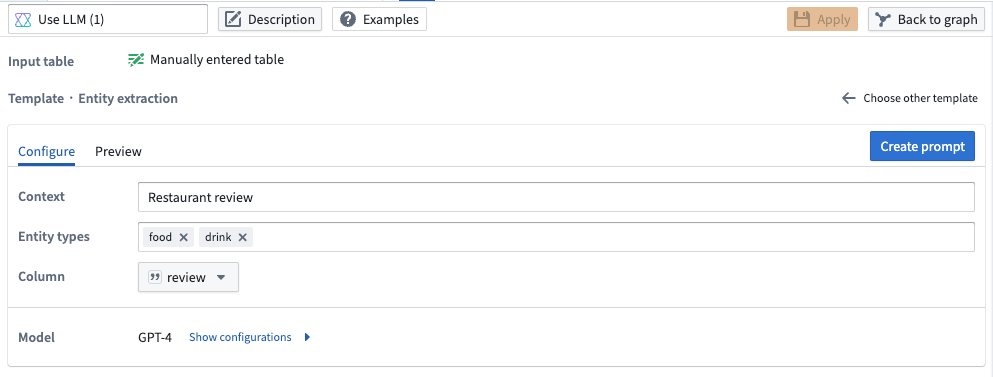
Pipeline Builder interface showing a prompt to extract any food or drink elements from each restaurant review.
- Translation: Use LLMs to translate your data into another language. In the example below, we are translating the restaurant reviews to Spanish.
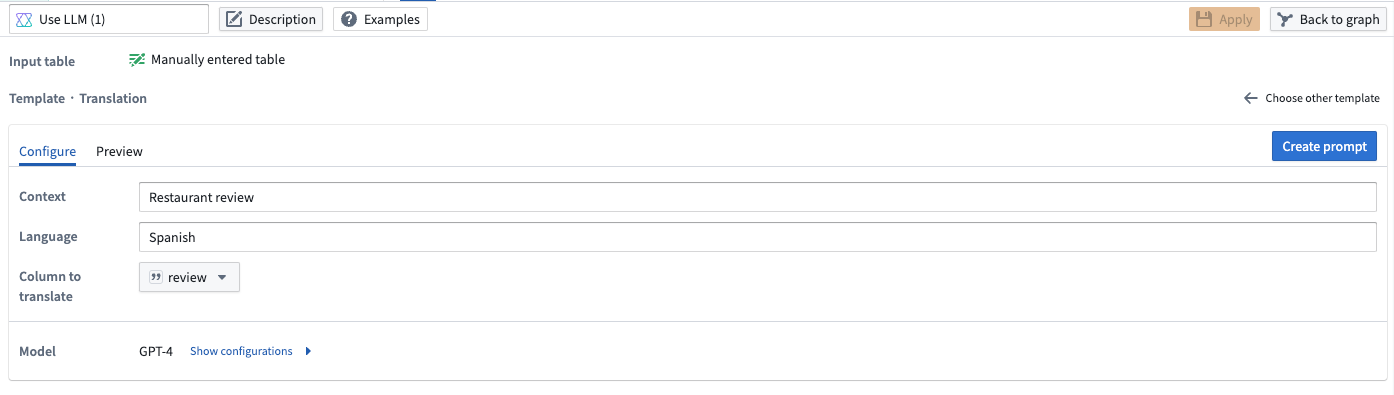
Pipeline Builder interface showing a prompt to translate restaurant reviews to Spanish.
Customize your own LLM prompt
Tailor the model to your specific requirements by creating your own LLM prompt.
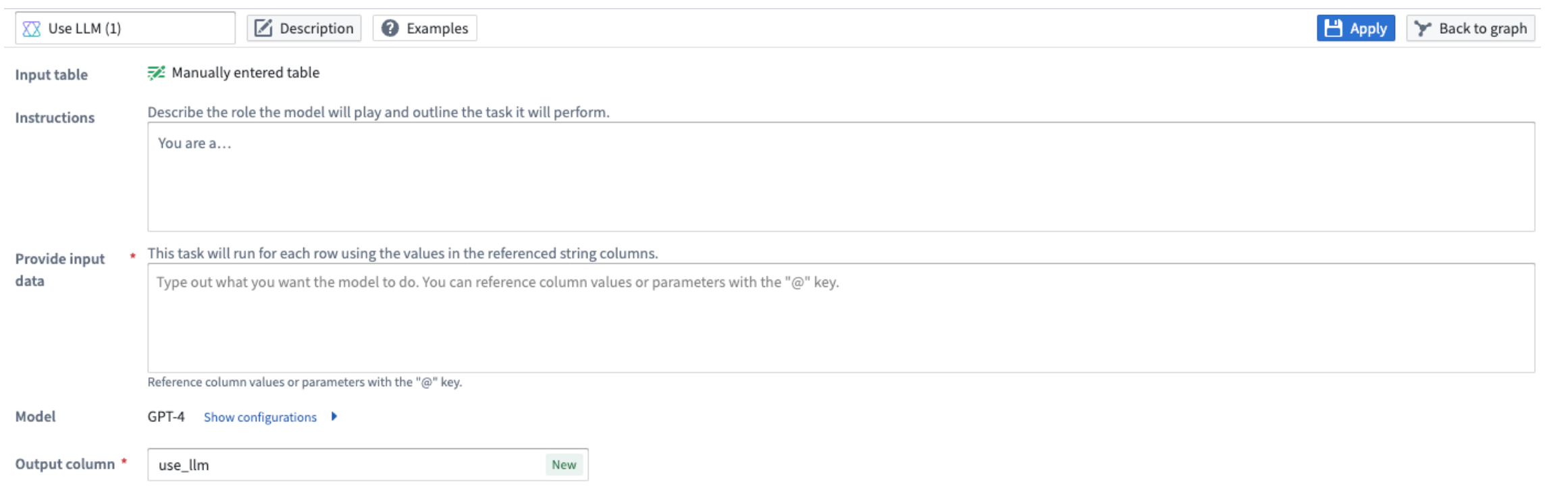
Pipeline Builder interface showing a custom prompt.
See our documentation for more on using the new LLM node in Pipeline Builder.
Introducing the Workshop module interface
Date published: 2024-04-02
Workshop has rebranded "promoted variables" as "module interface." The module interface is the set of variables that are able to be mapped to variables from a parent module when embedded, and initialized from the URL. You can think of the module interface as the API for a Workshop module.
To add a variable to the module interface, navigate to the Settings panel for a variable, add an external ID, and make sure the toggle for module interface is enabled. Optionally, you can give a module interface variable a display name and description, which will be shown when the module is embedded or used in an Open Workshop module event.
The transition from promoted variables to the module interface entails minimal functionality changes, which are detailed below.
Preview module interface values
The Workshop module Overview tab now provides a comprehensive overview of the module interface, along with a new ability to set a static override preview value for interface variables.
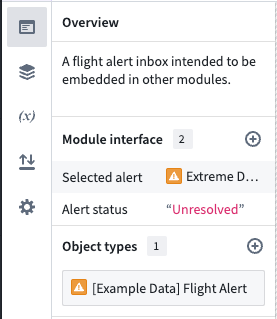
New module interface overview section in the overview panel of the Workshop editor.
Variable settings panel
Variables can be added to the module interface using the newly added variable settings panel. The settings panel provides the ability to set a display name and description for module interface variables, offering an improved experience when configuring variables to pass through the module interface from another module, such as when embedding a module or configuring an open Workshop module event. Moreover, the state saving and routing features can now be independently enabled, offering greater flexibility and control over the module interface.
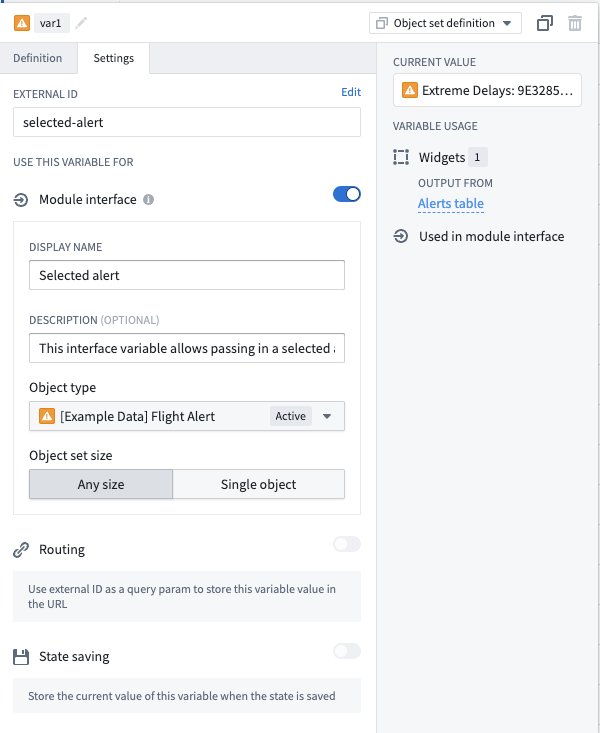
The variable settings panel, featuring an object set variable configured for use with the module interface.
New object view tabs are now built solely in Workshop
Date published: 2024-04-02
Workshop is now the sole application builder for content in new tabs in object views. While existing Object View tabs built using the legacy application builder are still supported, you can no longer create new tabs of this type.
Building with Workshop means more flexible layout options, more powerful widgets and visualizations, and configurable data edits via actions. Creating a new tab will now automatically generate a new Workshop module to back the tab. When a new object type is created, Workshop also backs a cleaner default object view which contains a single tab displaying the object's properties and links.
Additionally, you can also embed existing modules to be used as object views by using the ▼ dropdown menu available next to Add tab.
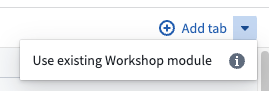
Recent improvements to the Workshop object view building experience include the following:
- Improvements to the Property List widget including inline editing support, one-click value copying, time dependent property support, and value wrapping.
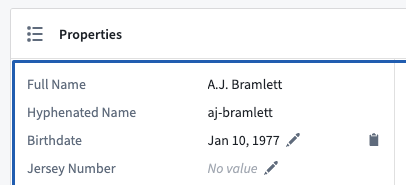
Inline editing and one-click value copying.
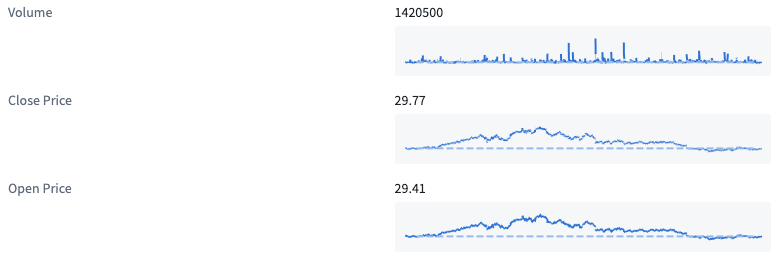
Time dependent properties.
- A new Object Edits History widget object types using Objects Storage V1.
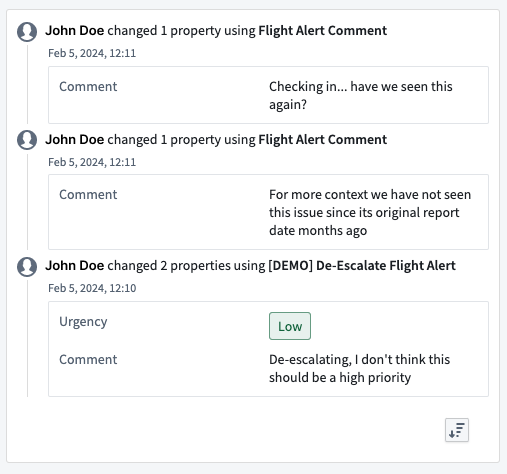
Object edits history at a glance.
- The ability to rename object view modules and publish the object views directly in Workshop.
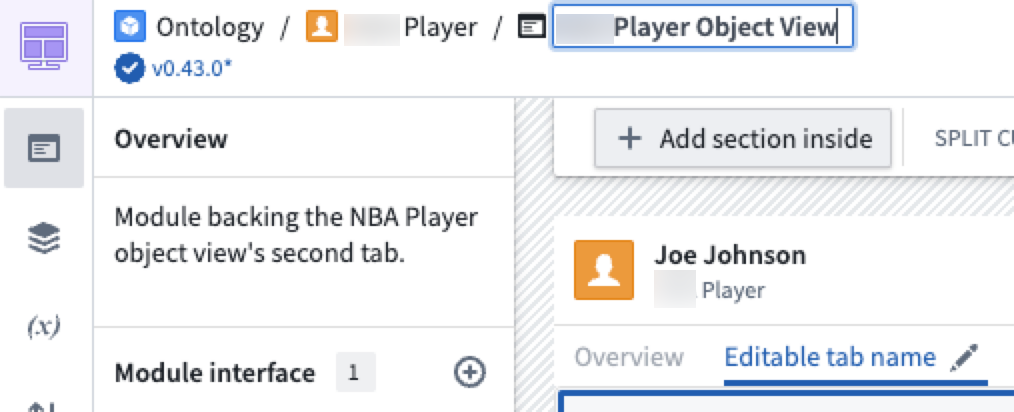
Editable module name, and editable object view tab name from within Workshop.
Review the Configure tabs documentation to learn more about editing object views.
Additional highlights
Administration | Upgrade Assistant
Listing Maintenance Operator contact information in Upgrade Assistant and related resources | We are working on providing maintenance operators and end users with a seamless, efficient experience when performing required upgrades on Palantir Foundry. As a first step, the maintenance operator role will be more visible across the platform. Users will be able to find their Organization's maintenance operator listed in Upgrade Assistant and notifications related to upgrades, as well as any other relevant areas. Users are now able to easily identify the maintenance operator when action is required for upgrades and communicate with the operator when clarification and guidance is required in a timely manner.

Analytics | Code Workspaces
Branch pinning for dataset aliases | Dataset alias mappings in Code Workspaces can now be pinned to a specific branch, allowing you to use data from the exact branch of a dataset. As part of this change, it is now also possible to import the same dataset more than once so that you can use data from multiple branches of the same dataset. To use this feature, open the context menu for an imported dataset and select Pin dataset branch. Select a specific branch to pin, or select Recommended to restore the default behavior.

Analytics | Notepad
Seamless Media Set Link Transformation in Notepad | Embedding a media set link into Notepad now intuitively transforms it into a resource link, enhancing the ease of connecting to media sets.
Analytics | Quiver
Autocomplete match conditions for object-derived datasets in the Materialization join editor | The Materialization join editor now provides autocomplete functionality for datasets derived from object sets. If both the left and right sides of the join are converted object sets, the editor will attempt to auto-complete the join condition with the primary / foreign key columns. The autocomplete logic will run whenever either of the two sides is changed; if either of the two is not an object set, the configuration will be left unchanged. If both sides are object types but have no link, the match condition will be undefined. Note that the inputs must be directly-converted object sets; an object set that has been previously converted to a materialization will not be detected.
App Building | Ontology SDK
Refined Ontology SDK Resource Handling | The Ontology SDK now offers improved mechanisms for managing application resources, ensuring dependencies are automatically accounted for when resources are added or removed. A new alert feature cautions developers about potential issues when excluding resources, providing an option to preserve them and prevent application disruptions. This enhancement promotes a seamless transition across SDK updates and simplifies the removal of outdated resources through the OAuth & Scopes interface.
App Building | Workshop
Gantt Chart widgets now support more timing options | The Gantt Chart widget has been upgraded to support custom timings backed by functions on objects (FoO) to provide more flexibility in visualizing Gantt charts. Previously, Gantt Chart widgets only supported properties for determining event timing.
Expanded Workshop Conversion Capabilities | Workshop now supports additional data type conversions in Variable Transforms, including Date to Timestamp, Timestamp to Date, and String to Number, enabling more flexibility in data manipulation.
Enable column renames on export button events | Workshop now offers the ability to personalize property column names when setting up exports to CSV or clipboard formats. This update introduces a new level of customization for organizing and labeling exported data.
Data Integration | Code Repositories
Data Integration | Pipeline Builder
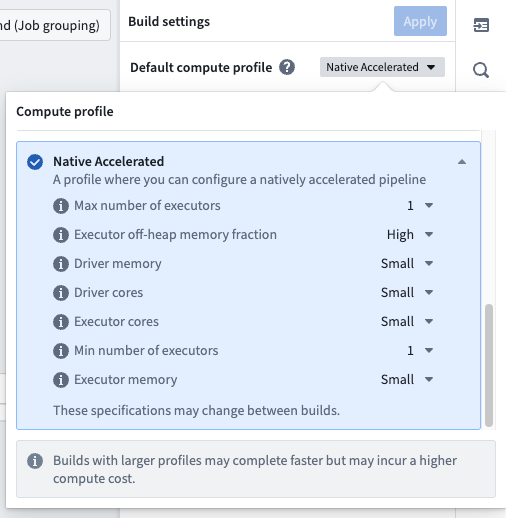
Accelerated Batch Processing in Pipeline Builder | Pipeline Builder now supports natively accelerated pipelines, offering significant performance improvements for batch processing. Refer to the updated documentation for details on managing native acceleration.
Improved Dataset and Time Series Labeling in Pipeline Builder | Within Pipeline Builder, users now have the enhanced capability to directly modify the names of dataset inputs and constructed dataset outputs via the graph's context menu. This enhancement extends to the renaming of constructed time series synchronizations, which is also accessible through the same context menu interaction.
Dev Ops | Marketplace
Customizable Thumbnails for Marketplace Listings | The Marketplace has been enhanced to support customizable thumbnails for each product version within the DevOps application, ensuring a more visually appealing presentation on the Marketplace Discovery page. Should a thumbnail not be provided, a default image corresponding to the product category will be displayed instead.
Model Integration | AIP Logic
Introducing Branching in AIP Logic | AIP Logic now supports branching, which is a more efficient way to collaboratively manage edits. Users can now create a new branch, save changes, and merge those changes into the main version when they are done iterating.

Precise Parameter Control with New Apply Action Block | The new Apply Action block in AIP Logic enables users to invoke actions with exact parameter configurations without having to go via an LLM block. This block gives you precise control over how parameters are filled out and speeds up the execution.

Streamlined Function Execution in AIP Logic | Users can now deterministically use functions within AIP Logic through the Execute block. This enhancement allows for precise data loading, which can be passed to an LLM block or used alongside the Transforms block. For example, users can leverage the output from a semantic search function through the Execute block to facilitate the retrieval of resolution text from similar incidents.


Model Integration | Modeling
Streamlined Evaluation Setup with Direct Media Set Integration | Users can now directly integrate media sets into the evaluation configuration workflow in Modeling. The new media set integration feature automatically presents available options when selecting a dataset, simplifying the evaluation setup process and ensuring the correct media sets are easily included.

Ontology | Object Storage V2
Enhanced Indexing Prioritization in Object Storage V2 | Enhanced queuing logic in Object Storage V2 now ensures more efficient handling of indexing tasks, particularly for large shards, leading to reduced wait times for metadata updates and an overall boost in system performance.
Ontology | Ontology Management
Update your action types to the latest function version in Ontology Manager | You can now update in bulk your function-backed actions to use the latest version of the backing function. This feature is accessible from the Action Types tab in Ontology Manager. Simply filter down the set of action types to those with the Run function rule, select the action types to update, and then select Update function version.


Enhanced Bulk Function Version Management in Ontology Manager | Ontology Manager introduces enhanced capabilities for managing multiple function versions simultaneously. Users can now efficiently update function version references in bulk for a variety of action types, ensuring up-to-date functionality across the board. To optimize server performance, updates are capped at 50 action types per operation. Note, action types linked to high-scale functions are not eligible for bulk updates.
Improved Alias Creation in Ontology Manager | Ontology Manager has been upgraded to facilitate the establishment of alternative designations, or aliases, for object types, enhancing the ability to locate objects when precise names are not known.
Ontology | Vertex
Streamlined Node Operations in Vertex Diagrams | Vertex diagrams now offer enhanced node management, enabling users to directly modify the backing object of a node within the diagram interface. The functionality for adjusting the backing object of edges has also been improved, now accessible via the component root editor for more intuitive use.
Security | Checkpoints
Streamlined Justification Retrieval for Checkpoints | Users can now swiftly access their top five most recent justifications for text-based prompts within Checkpoints, enhancing efficiency in adhering to organizational standards. This convenience is extended to both Response and Dropdown Checkpoints justification categories and remains available for 30 days post-justification creation. To activate this feature, administrators may select the corresponding setting in the Checkpoints configuration. For further details, refer to documentation on configuring recent justifications.


Introduction of New Checkpoint Varieties: Schedule Delete and Run | Users now have access to additional checkpoint types: Schedule, Delete, and Run. These new options enhance the flexibility and efficiency of managing checkpoint timetables, contributing to more streamlined workflows.
Security | Projects
General Availability of Project Constraints | The introduction of Project constraints allows for the support of advanced governance guardrails on how data can be used. With project constraints, owners can configure which markings may or may not be applied on files within a Project. Project constraints can allow for the effective technical implementation of data protection principles like purpose limitation.
This is typically used to prevent users from accidentally joining data that should not be joined and is relevant in situations where users might need access to multiple markings though specific combinations of marked data should not be allowed. For example, a bank might have a requirement that sensitive investment data can never be joined with research data for compliance reasons. However, compliance officers may need access to both investment and research data separately to do their work.
For more information, see project constraints documentation and details on how to configure.

中文翻译
公告
提醒: 您现在可以注册 Foundry 新闻通讯,直接在收件箱中接收关于整个平台的新产品、功能和改进的摘要。有关如何订阅的更多信息,请参阅 Foundry 新闻通讯和产品反馈渠道公告。
即将推出 Build with AIP [Beta],预计五月初上线
发布日期:2024-04-30
我们很高兴地宣布,Build with AIP 将于五月初以 Beta 状态上线。Build with AIP 应用程序提供了一套预构建的产品,可作为参考示例、教程或构建者入门套件,以适应您的需求。
在应用程序中,只需搜索关键词、用例或功能,即可找到能够加速您工作流构建的产品。产品涵盖的一些工作流包括:
- 端到端语义搜索实现
- 在 Pipeline Builder 中为自定义面板编写用户自定义函数 (UDF)
- 在 Workshop 中创建用于用户数据输入的引导式表单
- 优化 PySpark 转换性能的代码示例
- 使用 LLM 将非结构化数据分类为结构化类别
- 自动化业务流程的规则,例如在事件发生时通知用户
以及更多!新的 AIP 产品正在积极开发中,一旦可用就会发布。
探索 Build with AIP 应用程序。
要了解有关某个产品的更多信息,请选择该产品以查看其价值、实现设计以及其中包含的各个资源的详细说明。用户可以将任何产品安装到他们选择的目标项目 (Project) 中,并监控安装进度。之前安装的产品始终可以从 Build with AIP 中访问。
AIP 产品展示内部。
将根据推荐和请求的实现模式持续添加更多产品。
Build with AIP 应用程序采用加速发布轨道,并将很快对所有现有客户开放。希望限制对此功能访问的平台管理员可以通过控制面板 (Control Panel) 中的应用程序访问 (Application Access) 设置进行限制。
所有产品均由 Foundry Marketplace 提供支持。有关更多详细信息,请查阅文档。
HyperAuto V2 现已可用 [GA]
发布日期:2024-04-30
HyperAuto 是 Palantir Foundry 用于集成 ERP 和 CRM 系统的自动化套件,提供了一种点击式工作流,可从源的原始数据动态生成有价值的、可用的输出(数据集或本体 (Ontology))。此功能自本周起已对所有注册 (enrollment) 可用。
这个新的主要版本引入了显著更新的用户体验,并为自动化的 SAP 相关数据摄取和转换工作流提高了性能和稳定性。
要创建您的第一个 HyperAuto 管道,请参阅入门指南。
一个实时 HyperAuto 管道的概览。
SAP 数据的动态集成与管理
继之前的 Beta 公告之后,以下功能现已正式可用 (GA):
- 易于配置: HyperAuto 提供用户友好的点击式向导、用于快速设置的预设默认值以及面向高级用户的可自定义设置,可自动化数据重命名、清理、反规范化和去重等任务。
- Pipeline Builder 集成: HyperAuto 动态生成 Pipeline Builder 管道,提供透明的 UI,并包含用于更新和部署管道配置变更的变更管理工作流。
- 实时 SAP 数据处理: HyperAuto 支持来自 SAP 源的实时数据流(需要 SLT 复制服务器),允许数据在数秒内从源流到本体 (Ontology)。
- 支持 SAP 数据的静态快照: 在此新版本中,HyperAuto 支持在无法与 SAP 源建立实时连接的情况下,对上传的数据集进行操作。
有关 HyperAuto V2 的更多信息,请查阅文档。
开发者控制台中的静态应用程序网站托管现已正式可用 (GA)
发布日期:2024-04-30
开发者控制台 (Developer Console) 现在提供托管静态网站的能力。此新增功能允许开发人员使用 Foundry 来托管和提供其网站,而无需外部 Web 托管基础设施。静态网站由一组固定的文件(HTML、CSS、JavaScript)组成,这些文件会下载到用户的浏览器并在客户端显示。许多 Web 应用程序开发框架(例如 React)都可用于创建静态网站。
静态网站支持适用于由 Palantir 管理的域上的注册 (enrollment)(例如:enrollment.palantirfoundry.com 或地理等效域)。对客户管理域上的注册的功能支持目前正在积极开发中。
在 Foundry 上托管您的站点
网站托管菜单。
要设置和配置网站托管,您需要:
- 为站点设置一个应用程序子域,确定用户访问站点时将使用的 URL。
- 将包含站点的资源上传到 Foundry,预览结果,然后发布站点。
您还可以配置对网站的访问权限,并为您的站点设置高级内容安全策略 (CSP) 设置。
谁可以配置网站托管?
任何具有开发者控制台编辑或所有者角色的用户都可以配置 Web 托管。设置 Web 托管包括创建一个子域,该子域需要得到注册信息官 (enrollment information officer)的批准。
网站托管命令行工具
使用命令行工具或通过与现有 CI/CD 工具集成来自动化静态网站部署过程。有关更多信息,请查看您的 OSDK 应用程序中的 API 文档。
OSDK 应用程序文档中的部署应用程序教程。
下一步是什么?
我们正在积极开发对客户自有域上的网站托管支持,并增加对在 Foundry 上托管代码以及直接从 Palantir Foundry 内运行 CI/CD 的支持。
要了解有关网站托管配置的更多信息,请查阅文档。
在 Pipeline Builder 中移除输出上的标记 (Markings)
发布日期:2024-04-30
我们很高兴地宣布,您现在可以在所有堆栈 (stack) 上直接在 Pipeline Builder 中移除输出上的标记 (Markings)。在 Pipeline Builder 中,现在可以:
- 从您的输出中移除一个或多个继承的标记。
- 主动移除将来可能出现在您数据集上的非继承标记。
- 撤销之前在指定管道中对输出应用的任何标记移除操作。
要使用移除标记功能,请确保您满足以下先决条件:
- 拥有特定标记的
Remove marking权限 - 您的管道必须启用分支保护
- 您的管道需要代码审批
要移除标记,请导航到您要从中移除标记的输出,然后选择配置标记 (Configure Markings)。
标记选项面板,光标悬停在移除自图标上。
选择您要移除的标记后,这些标记将列在已移除的标记 (Markings removed) 部分下。
应用移除后,一旦您的分支合并并在主分支 (master) 上构建,该标记将不再出现在输出上。
查阅文档以了解有关直接在 Pipeline Builder 中移除标记的更多信息。
在 Jupyter® Notebook 中进行模型开发现已正式可用 (GA)
发布日期:2024-04-30
从今天开始,用户可以充分利用现有的 Code Workspaces JupyterLab® 集成来训练、测试和发布模型,以供整个平台使用。Code Workspaces 通过为数据科学家提供更熟悉的交互式环境,提供了代码仓库 (Code Repositories) 中现有模型训练流程的替代方案。
通过 Code Workspaces 发布的模型可立即在 Workshop、Slate、Python 转换等下游应用程序中使用。
从 Code Workspaces 内部创建模型
现在可以直接从 Code Workspaces 内部发布模型。只需导航到模型 (Models) 选项卡,然后选择创建模型 (Create a model)。选择模型位置后,系统会要求您定义模型别名,这是一个人类可读的标识符,映射到 Palantir Foundry 用于标识模型的资源标识符。
从 Code Workspaces 内部创建新模型选项。
将您的模型直接发布到 Foundry
定义模型别名后,按照视图左侧的分步指南将模型发布到 Foundry。查看有关安装所需包、定义模型适配器以及最终发布模型的详细信息。
首次创建模型时,将生成一个名为 [MODEL_ALIAS]_adapter.py 的骨架适配器文件。查阅模型适配器序列化文档和模型适配器 API 文档以获取有关如何定义模型适配器的更多信息。
编写适配器后,您可以使用提供的模型发布代码片段将模型发布到 Foundry。选择代码片段进行复制,然后将其粘贴到 notebook 单元格中并执行。
成功发布的模型将显示一个预览输出,指示发布成功,并显示有关模型的信息,例如模型的 API 和保存的模型文件。
模型版本成功发布通知。
了解更多
要了解有关从 Code Workspaces 开发和发布模型的更多信息,请查阅 Code Workspaces 模型训练文档。 您还可以查看我们的完整教程,该教程将引导您完成设置项目、构建模型以及部署模型以供下游应用程序使用的全过程。
Jupyter®、JupyterLab® 和 Jupyter® 标志是 NumFOCUS 的商标或注册商标。所有第三方商标(包括徽标和图标)均为其各自所有者的财产。不暗示任何隶属关系或认可。
停止 Preparation (Blacksmith) 服务
发布日期:2024-04-30
Preparation (Blacksmith) 正在被停止服务,并由 Pipeline Builder 取代,后者是用于无代码管道和数据清洗的事实标准工具。Preparation 已处于维护模式数年,并且不支持 Marketplace 集成。虽然新的注册 (enrollment) 将不再获得访问权限,但此更改目前不会影响 Preparation 的任何现有安装。
推出模型目录 (Model Catalog):2024 年 4 月底可用 [GA]
发布日期:2024-04-24
模型目录 (Model Catalog) 将于 2024 年 4 月底正式可用 (GA),使用户能够查看所有 Palantir 提供的模型,并在 AIP 中发现新模型。
模型目录使构建者能够:
- 查看 AIP 中可用的模型并发现新模型。
- 为您的用例选择合适的模型。
- 使用 Marketplace 中的基本模板和完整用例模板开始工作流。
- 在沙箱/游乐场中测试不同的模型。
模型目录有两个主要组件:模型目录主页和模型实体页面。
模型目录主页
模型目录主页。
模型目录主页是一个发现和导航界面,显示您的 Foundry 注册 (enrollment) 上可用的所有大语言模型。
在主页上有几种过滤模型的方法:
- 模型类型: 查看所有可用的补全模型、嵌入模型或视觉模型。
- 状态: 根据模型的生命周期状态(稳定或实验性)查看模型。
- 模型创建者: 根据负责创建、开发和维护特定 LLM 的组织查看模型。
模型实体页面
每个模型都有一个包含三个主要部分的实体页面:
- 测试: 供构建者试用不同模型的界面。
- 如何使用: 通过创建资源开始,该资源已填充开始构建工作流所需的内容。模型目录目前支持函数 (Functions) 和转换 (Transforms)。
- 模型描述: 查看基本描述、法律免责声明、模型的上下文窗口(例如令牌限制、训练数据截止日期等)。
模型实体页面。
开发路线图上的下一步是什么?
- 提供更多用于比较模型和做出决策的工具和基准。
- 改进测试沙箱以支持不同的功能和提示类型。
- 将如何使用功能扩展到所有 AIP 应用程序。
有关模型目录的更多信息,请查阅文档。
宣布推出 Ontology SDK TypeScript 1.1
发布日期:2024-04-24
为准备主要版本升级(TypeScript 2.0),我们发布了次要版本 1.1。将您的代码迁移到此新版本将帮助您为 TypeScript 2.0 做好准备。
我们为什么要开发 TypeScript 2.0?
为了受益于新的本体 (Ontology) 原语(如本体接口、实时订阅)以及更高效的数据处理方式,我们重构了 OSDK TypeScript 语义。此更改将被标记为主要版本 v2.0,计划在 2024 年底前发布。
在 2.0 版本发布之前,我们的目标是通过首先提供版本 1.1 和 1.2 作为即将到来的升级的桥梁,来最大限度地减少对客户的影响。
为澄清起见,即将推出的两个版本详情如下:
-
版本 1.1: 此版本保持当前的语言语法,但将弃用一些不再受支持的方法和属性。
-
版本 1.2: 将于今年晚些时候发布,版本 1.2 主要提供与 1.x 版本相同的功能,但将引入新的语言语法。
OSDK TypeScript 1.1 将发生哪些变化?
下表总结了已弃用的功能及其替代品,有关更改的更多详细信息如下:
| 已弃用 | 替代品 |
|---|---|
| page | fetchPage, fetchPageWithErrors |
| __apiName | $apiName |
| __primaryKey | $primaryKey |
| __rid | $rid |
| all() | asyncIter() |
| bulkActions | batchActions |
| searchAround{linkApiName} | pivotTo(linkApiName) |
Page()
我们正在弃用 page 函数,并添加以下两个方便的方法:
-
fetchPageWithErrors- 此函数的功能与
page完全相同,为了与即将到来的 V2.0 中的 API 命名约定保持一致而重命名。 - 之前
-
```javascript const result: Result
if(isOk(result)){ const employees = result.value.data; }
*   **之后**
        *
javascript const result: Resultif(isOk(result)){ const employees = result.value.data; } ```
-
- 此函数的功能与
-
fetchPage- 这将返回一个没有结果包装器(没有
Result<Value,Error>)的页面。 - 这是为喜欢
try/catch模式的用户添加的,因为它会在相关时抛出错误。 - 之前
-
```javascript const result: Result
if(isOk(result)){ const employees = result.value.data; }
*   **之后**
        *
javascript try{ const result:} catch(e) { console.error(e); } ```
-
- 这将返回一个没有结果包装器(没有
apiName, primaryKey, rid
我们正在弃用 __apiName、__primaryKey 和 __rid 属性,并将其替换为 $apiName、$primaryKey 和 $rid 属性。
All()
我们正在弃用 all() 方法,并添加了以下替代方法:
-
asyncIter()- 这将返回一个异步迭代器,允许您遍历对象集的所有结果。
-
之前
const result: Result<Employee[], ListObjectsError> = await client.ontology
.objects.Employee.all();

if(isOk(result)){
const employees = result.value.data
}
- 之后
const employees: Employee[] = await Array.fromAsync(await client.ontology.objects.Employee.asyncIter());
BulkActions
我们正在弃用 bulkActions 并将其重命名为 batchActions。此重命名是为了匹配 REST API 名称。
- 之前
await client.ontology.bulkActions.doAction([...])
- 之后
await client.ontology.batchActions.doAction([...])
SearchArounds
我们正在弃用 searchAround{linkApiName} 并将其替换为:
-
pivotTo(linkApiName)- 此函数的功能与 search around 完全相同,但名称将更好地反映结果是您转向的对象类型。
-
之前
await client.ontology.objects.testObject.where(...).searchAroundLinkedObject().page()
- 之后
await client.ontology.objects.testObject.where(...).pivotTo("linkedObject").fetchPage()
我如何尝试这个?
在更新的生成器版本发布后,当您使用开发者控制台 (Developer Console) 为您的应用程序创建新的 SDK 版本时,生成的版本将包含这些功能。一旦您更新了应用程序中的依赖项,您将看到已弃用的方法和属性带有删除线 searchAroundLinkedObject(),但代码仍将像以前一样运行。版本 2.0 将放弃对已弃用方法的支持。
您也可以决定使用旧版本的生成器,方法是使用生成新版本 (Generate new version) 选项下的下拉列表。
下一步是什么?
总结以上内容,即将推出的 OSDK TypeScript 版本如下:
版本 1.1: 此版本保持当前的语言语法,但将弃用一些不再受支持的方法和属性。
版本 1.2: 计划于今年晚些时候发布,版本 1.2 将引入新的语言语法。
版本 2.0: 将新的语言语法标记为正式可用 (GA),同时放弃对已弃用方法和属性的支持,并引入尚不可用的新功能。
基于时间的数据访问组成员资格现已正式可用 (GA)
发布日期:2024-04-11
基于时间的组成员资格现已作为平台中的一项安全功能提供。此功能可以通过限制用户对数据的访问来支持数据保护原则,例如使用限制和目的规范。
拥有 Manage membership 权限的用户现在可以授予给定时间段的组成员资格,从而允许根据设置的配置临时访问数据。您可以选择基于最新到期时间 (latest expiration) 或最大持续时间 (maximum duration) 来配置访问权限:
- 最新到期时间: 所有新成员资格必须具有早于此日期的到期日期。
- 最大持续时间: 所有新成员资格必须在指定的持续时间内到期。
带有时间约束设置的组设置页面。
任何对应用了时间约束的组的成员资格访问请求都将受这些约束的限制。
一个组成员资格请求,最新到期时间约束为 2024 年 12 月 31 日。
有关更多信息,请查阅我们关于如何管理组的文档。
推出改进的 Foundry 资源侧边栏
发布日期:2024-04-11
我们很高兴地宣布推出我们全新设计的资源侧边栏,旨在简化管理工作流并使其更易于发现。您可以在 Palantir Foundry 中资源侧边栏的概览 (Overview)、访问 (Access)、活动 (Activity)、使用情况 (Usage) 和设置 (Settings) 右侧面板中体验新的视觉刷新和组织方式。
有哪些变化?
- 改进的导航: 嵌套层级已最小化,以确保所有工作流都可以通过更少的点击访问,旨在提高生产力。
- 增强的安全模型可读性: 安全治理功能(例如访问要求)已重新设计,使其更加用户友好且更易于理解。
- 全新的视觉更新: 享受更简洁的视觉外观。
项目概览窗格的更新界面。
项目访问面板的更新外观。
更新后的资源侧边栏保留了所有现有功能,并继续支持您当前的所有工作流,不会造成任何中断。
Python 代码仓库中的原生加速 Spark
发布日期:2024-04-11
我们很高兴地介绍 Pipeline Builder 中的原生加速 Spark 和 Python 代码仓库,这是一个旨在提高批处理作业性能并降低其成本的功能。此功能允许您利用底层硬件优化来提高数据管道的效率。
使用原生加速可带来以下好处:
- 更快的性能: 原生加速优化了常见的 SQL 函数,如
select、filter和partition,显著提高了批处理作业的速度。 - 降低成本: 通过提升性能,原生加速还有助于降低与批处理作业执行相关的成本,使其成为大数据需求或高吞吐量要求的理想选择。
- 详细实现: 提供指导以帮助您设置此功能并将其集成到您的工作流中。
使用和限制
您可以在 Pipeline Builder 和 Python 转换中启用原生加速。请注意,使用用户自定义函数 (UDF) 和弹性分布式数据集 (RDD) 操作的代码仓库也可能从此功能中略微受益。
原生加速对于处理大数据或延迟关键型工作流的数据科学家特别有益。如果您正在运行频繁的构建(每 5 分钟一次)或在成本敏感的环境中运行,原生加速提供了一个强大的解决方案。
要测试原生加速的好处,只需在启用该功能的情况下运行一次管道。如果您注意到性能有所改善,请为该管道保持启用该功能。
如何启用原生加速
要充分利用原生加速的潜力,请查阅 Pipeline Builder 和 Python 代码仓库 中关于原生加速 Spark 的文档。
Code Workspaces [GA]:JupyterLab® 和 RStudio® 现已正式可用 (GA)
发布日期:2024-04-09
我们创建了 Code Workspaces,以便用户可以使用广为人知的工具进行有效的探索性分析,同时无缝利用 Palantir Foundry 的强大功能。Code Workspaces 现已正式可用 (GA),它将 JupyterLab® 和 RStudio® 第三方 IDE 引入 Foundry,使用户能够提高生产力并加速数据科学和统计工作流。Code Workspaces 通过提供无与伦比的速度和灵活性,成为 Foundry 内进行综合探索性分析的最终枢纽。
用于数据科学的 Jupyter® Code Workspace。
灵活高效的探索性分析
Code Workspaces 将 JupyterLab® Notebooks 和 RStudio® Workbench 等广泛使用的工具与 Palantir 生态系统的强大功能相结合,成为 Foundry 中进行高效探索性分析的首选之地。
您很快就能受益于以下功能:
- 使用广泛采用的数据科学和机器学习工具,并在您组织的数据之上无缝集成 RStudio® 和 Jupyter®。
- 从任何数据集加载数据,同时受益于 Foundry 世界级的安全性、来源、治理和数据沿袭原语。
- 交互式代码开发和写回、即时反馈循环、逐单元分析和 REPL 终端命令预览。
- 转换或生成数据、可视化、报告和见解,供 Palantir 平台的其余部分使用。
- 在生产中使用之前,高效地训练、优化和实现机器学习模型。
- 使用支持 Conda、pip 和 CRAN 的交互式集成包管理器解决方案,完全自定义多个 Python 和 R 环境。
- 使用代码仓库 (Code Repositories) 提供的原生 Git 版本控制和协作功能。
- 创建交互式 Dash、Streamlit® 和 Shiny® 仪表板,与同行分享分析结果并推动决策。
- 完全自定义您的计算设置,以适应要处理的数据规模。
用于机器学习训练的 RStudio® Code Workspace。
何时应该使用 Code Workspaces?
Code Workspaces 提供了一套全面的工具,用于对数据执行快速高效的迭代分析,将第三方工具的最佳功能与 Palantir 广泛的内置数据分析功能无缝集成。将其用于数据可视化、原型设计、报告构建和迭代数据转换。代码仓库 (Code Repositories) 和 Pipeline Builder 可用于将这些数据转换转换为健壮的生产管道。
对于大多数工作流,Code Workspaces 和其他 Foundry 工具相辅相成,任何管道的输出都可以作为 Code Workspaces 分析的输入,反之亦然。代码仓库 (Code Repositories) 和 Code Workspaces 都依赖于相同的 Git 版本控制系统。大型 R 管道、模型训练或广泛的可视化工作流也可以导出到 Code Workbook,以利用其分布式 Spark 架构。
推动影响力的真实用例
以下示例是使用 Code Workspaces 的众多真实用例中的一部分:
- 大型保险零售商使用 Code Workspaces 微调其保险定价模型。
- 一个健康委员会使用 Code Workspaces 中的 Streamlit 仪表板,使即使计算能力较弱的生物学家也能对多重免疫荧光数据进行空间分析。
- 一家零售公司使用 Jupyter® Code Workspaces 对其销售数据进行探索性分析并开发预测模型。
- 一家制药公司使用 RStudio® Code Workspaces 生成完全可重复的实验室报告,详细说明药物试验的有效性。
要了解有关在 Code Workspaces 中可以做什么的更多信息,请查阅相关文档:
开发路线图上有哪些内容?
以下功能目前正在积极开发中:
- Code Workspaces 转换: 获取 JupyterLab® Notebook 或 RStudio® R 脚本的内容,并将其持久化为可重现的管道,利用 Palantir 强大的构建基础设施。
- 与 Palantir 管理的模型集成: 加载并使用在 Foundry 其他地方开发的模型。
- AIP 集成: 直接从 Code Workspaces 调用任何 AIP 支持的语言模型。
- 本体 (Ontology) 支持: 充分利用本体 (Ontology) 的强大功能,并将对象加载到 Code Workspaces 中以执行探索性分析。
- 一流的报告解决方案: 将数据分析转化为报告,可以共享以通知整个组织的决策。
Jupyter®、JupyterLab® 和 Jupyter® 标志是 NumFOCUS 的商标或注册商标。 RStudio® 和 Shiny® 是 Posit™ 的商标。 Streamlit® 是 Snowflake Inc. 的商标。
所有引用的第三方商标(包括徽标和图标)均为其各自所有者的财产。不暗示任何隶属关系或认可。
Pipeline Builder 现在支持在管道中大规模运行 LLM
发布日期:2024-04-04
我们很高兴在 Pipeline Builder 中推出一项尖端新功能:使用 LLM 节点。此功能允许您通过几次简单点击,轻松地将大语言模型 (LLM) 的强大功能与您的生产管道结合起来。
将 LLM 功能与生产管道集成传统上是一个复杂的挑战,用户常常需要为他们的数据处理需求寻找无缝、可扩展的解决方案。我们的解决方案通过提供以下功能来应对这些挑战:
- LLM 处理的生产级保证: 许多 LLM 用例仅基于基础数据,不需要迭代的用户输入。通过直接在 Pipeline Builder 中对数据运行 LLM 模型进行处理,利用 Pipeline Builder 提供的生产级管道功能(如分支和构建监控)来节省时间。
- 部署前在多行上预览: 用户可以在运行完整构建之前,对输入数据的几行进行试验以迭代他们的提示。预览计算在几秒钟内即可完成,大大加速了反馈循环。
- 预设计的提示模板: 用户可以从我们经验丰富的团队提供的提示工程专业知识中受益。这些模板提供了一个热启动,使用户能够快速启动他们的项目。
五个适合初学者的提示模板,助您快速启动项目
Pipeline Builder 界面显示添加了五个引导式提示。
- 分类: 使用 LLM 将您的数据分类到给定的类别中。在下面的示例中,我们将餐厅评论分为三个不同的类别:食物、服务和氛围。我们的模型会将每条评论分类到一个或多个类别中。
Pipeline Builder 界面显示一个提示,将餐厅评论分为三个不同的类别。
- 情感分析: 使用 LLM 根据正面或负面情感对您的数据进行评分。在下面的示例中,我们根据餐厅评论的正面或负面情感,以 0(最负面)到 5(最正面)的等级进行评分。
Pipeline Builder 界面显示一个提示,对餐厅评论的正面或负面情感进行评分。
- 摘要: 使用 LLM 将您的数据摘要到给定的长度。在下面的示例中,我们将餐厅评论摘要为一句话。
Pipeline Builder 界面显示一个提示,按长度摘要餐厅评论。
- 实体提取: 使用 LLM 根据一组类别提取相关元素。在下面的示例中,我们想要提取每条餐厅评论中的任何食物或饮料元素。
Pipeline Builder 界面显示一个提示,从每条餐厅评论中提取任何食物或饮料元素。
- 翻译: 使用 LLM 将您的数据翻译成另一种语言。在下面的示例中,我们将餐厅评论翻译成西班牙语。
Pipeline Builder 界面显示一个提示,将餐厅评论翻译成西班牙语。
自定义您自己的 LLM 提示
通过创建您自己的 LLM 提示,根据您的特定需求定制模型。
Pipeline Builder 界面显示一个自定义提示。
有关使用新的 Pipeline Builder 中的 LLM 节点的更多信息,请参阅我们的文档。
推出 Workshop 模块接口
发布日期:2024-04-02
Workshop 已将“提升变量 (promoted variables)”重新品牌化为“模块接口 (module interface)”。模块接口是一组变量,当嵌入时,这些变量能够映射到父模块的变量,并从 URL 初始化。您可以将模块接口视为 Workshop 模块的 API。
要将变量添加到模块接口,请导航到变量的设置 (Settings) 面板,添加外部 ID,并确保启用了模块接口的切换开关。您还可以为模块接口变量指定显示名称和描述,当模块被嵌入或用于打开 Workshop 模块事件时,这些信息将显示出来。
从提升变量到模块接口的过渡涉及最小的功能更改,详情如下。
预览模块接口值
Workshop 模块的概览 (Overview) 选项卡现在提供了模块接口的全面概览,以及为接口变量设置静态覆盖预览值的新功能。
Workshop 编辑器概览面板中的新模块接口概览部分。
变量设置面板
可以使用新添加的变量设置面板将变量添加到模块接口。设置面板提供了为模块接口变量设置显示名称和描述的能力,在配置要从另一个模块(例如嵌入模块或配置打开 Workshop 模块事件时)通过模块接口传递的变量时,提供了改进的体验。此外,状态保存和路由功能现在可以独立启用,从而为模块接口提供更大的灵活性和控制。
变量设置面板,显示一个配置为与模块接口一起使用的对象集变量。
了解有关模块接口以及如何使用这些变量启用各种 Workshop 功能的更多信息。
新的对象视图选项卡现在完全在 Workshop 中构建
发布日期:2024-04-02
Workshop 现在是对象视图中新选项卡内容的唯一应用程序构建器。虽然使用旧版应用程序构建器构建的现有对象视图选项卡仍然受支持,但您不能再创建这种类型的新选项卡。
使用 Workshop 构建意味着更灵活的布局选项、更强大的小部件和可视化,以及通过操作进行可配置的数据编辑。创建新选项卡现在将自动生成一个新的 Workshop 模块来支持该选项卡。当创建新的