Announcements(公告)
REMINDER: Sign up for the Foundry Newsletter to receive a summary of new products, features, and improvements across the platform directly to your inbox. For more information on how to subscribe, see the Foundry Newsletter and Product Feedback channels announcement.
Share your thoughts about these announcements in our Developer Community Forum ↗.
Introducing the ability to power AIP Assist with your custom documentation
Date published: 2024-05-29
You can now equip AIP Assist with your personal documentation, allowing it to supply users with information as needed. Starting the week of May 27 across AIP-enabled enrollments, configuration options to make AIP Assist aware of your custom operational documentation is available in Control Panel. This feature includes the ability to centrally manage when Assist can access the documentation, which documentation, and whether to limit referencing to when a user is viewing certain resources. By allowing AIP Assist to respond to user questions on how to interact with operational workflows as well as how to navigate the platform, you can improve the ease of user onboarding to your workflows.
Information that you can allow your assist to share may include program documentation, standard operating procedures (SOP), and wiki-inspired information, such as data ingestion processes, procedures for requesting permissions, best practices for organizing projects, and general information. More focused documentation, like use case and workflow documents, can be particularly beneficial for user onboarding, training sessions, and promoting general self-service and usability. Learn more.
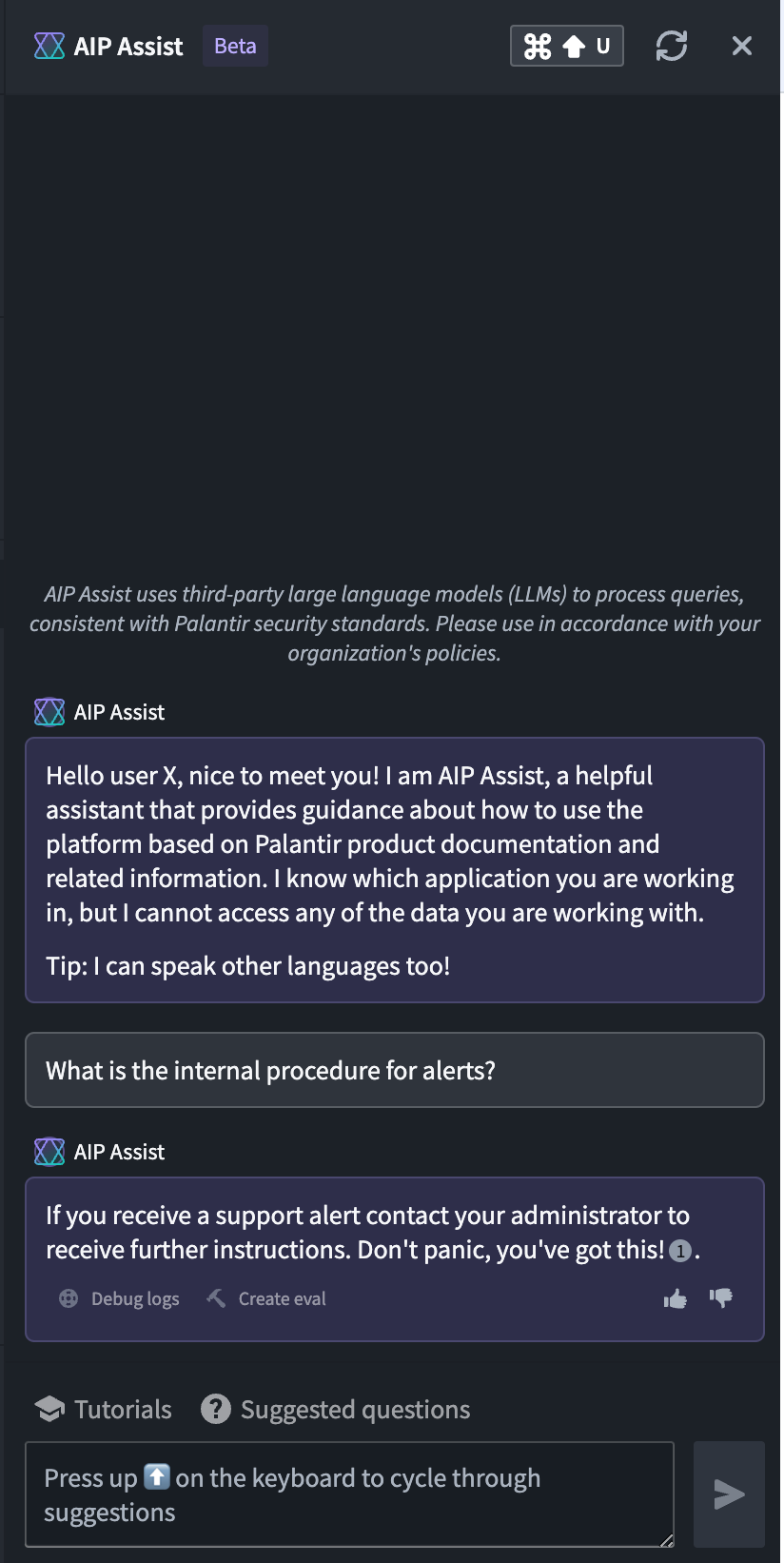
Empower AIP Assist with your custom documentation to further customize Assist's ability in answering program and use-case documentation relevant for your operations.
To start, enable access to your documentation repository
To leverage this capability, you must already have custom docs in a Documentation repository within your Code Repositories. Contact your Palantir representative to enable documentation type repository if not available, and if already setup, to whitelist the repository after creation. To fully manage the scope of the documentation beyond the documentation source, you must also have permission to use Control Panel.
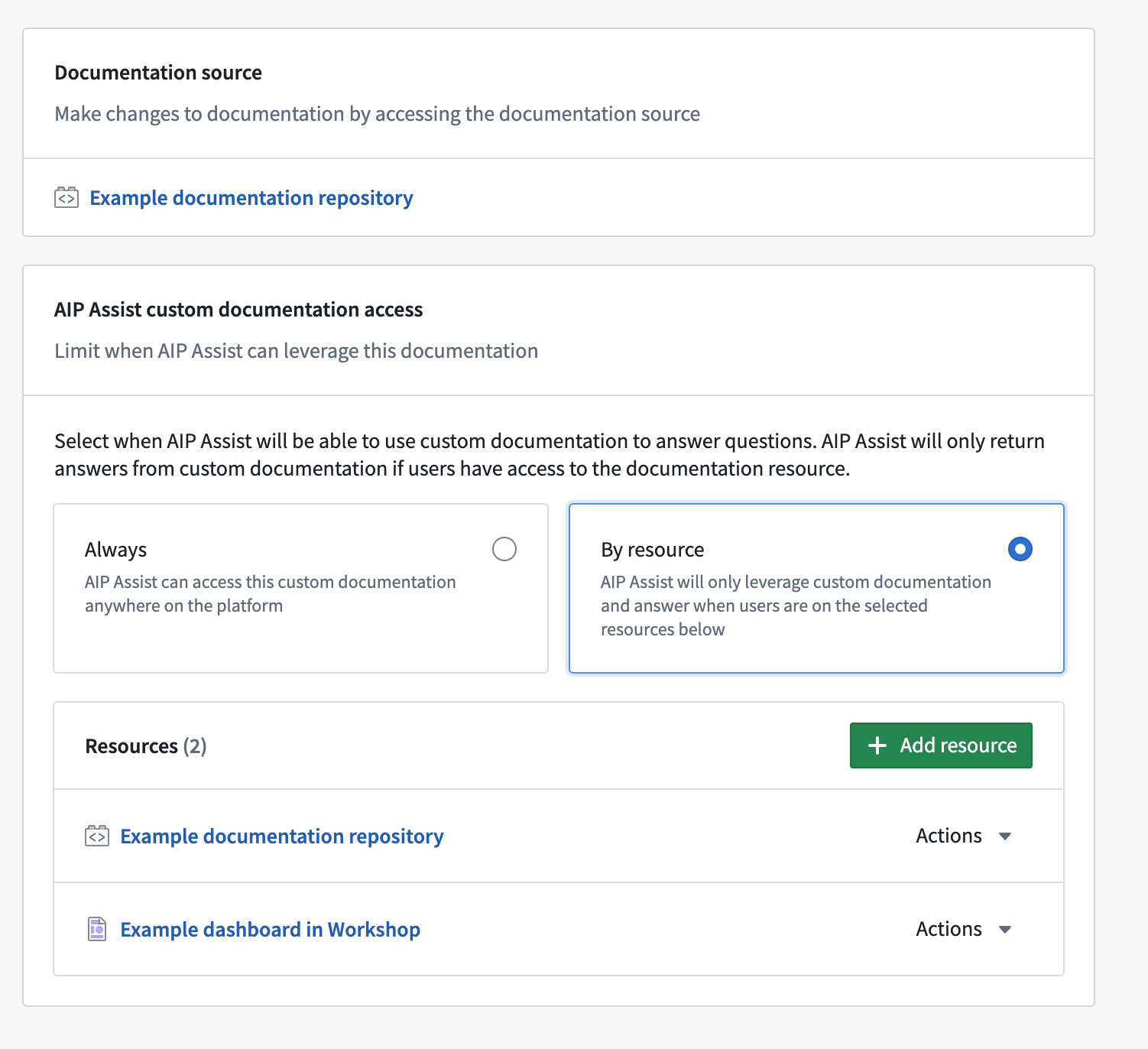
Manage when AIP Assist can access the documentation to answer a user question. Set to "always available" or "by resource" for more granular control.
For more, review the AIP Assist Custom Documentation guide.
Spark 3.5.1 Upgrade
Date published: 2024-05-29
The version of Spark used in Foundry transforms is being upgraded from 3.4.1 to 3.5.1. This brings a plethora of bug fixes, performance improvements, and new features that can be viewed on the release page ↗. No action is required to enable this upgrade. The transforms runtime versions are managed automatically in the background through adjudication, as per the transforms versions docs.
The Spark versioning policy ↗ disallows the introduction of API and behavior changes between minor versions. Any changes are documented in the migration guide ↗, which has been tested by Palantir to ensure the user experience remains constant.
It is possible for upgrades to affect the performance of pipelines and introduce new bugs. For high-risk jobs, use a temporary pin to control the upgrade rollout until you have confirmed the upgrade to be issue-free for your workflows.
Introducing object type groups in the Ontology
Date published: 2024-05-29
Rather than tagging objects directly, builders can now utilize a fully-featured Ontology primitive called groups to classify object types. Groups make it easier to search for objects and improve the legibility of complex Ontologies.
New group features
Group metadata can now be modified from the new Groups menu, accessible from the left-hand navigation bar in Ontology Manager. In addition, all groups will now be discoverable to any user that can view the Ontology. This change aligns group visibility with other Ontology primitives to increase clarity and transparency in governance.
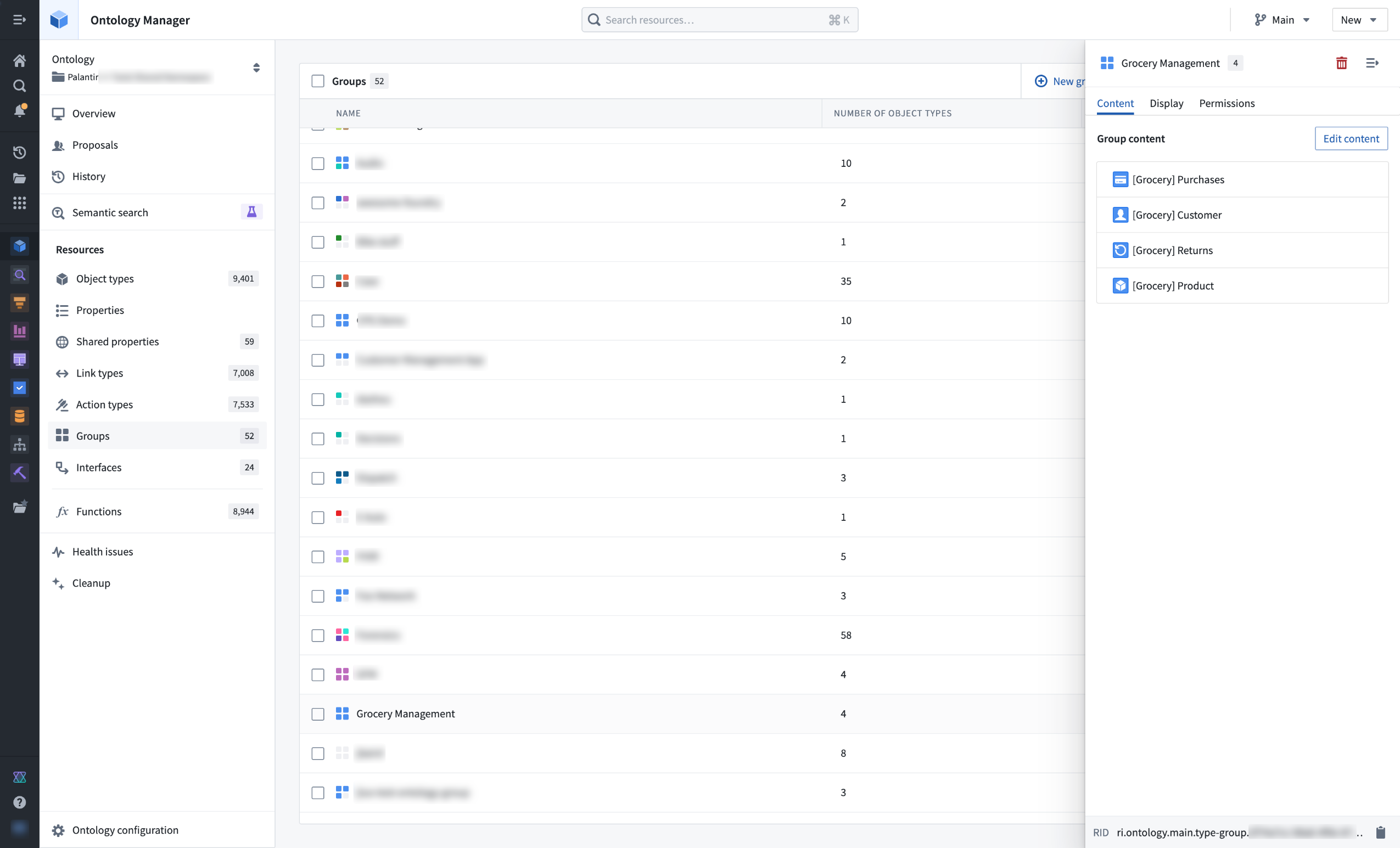
View and modify object type groups from the Ontology Manager.
Groups can be added or removed as part of object type configuration in Ontology Manager. Groups are also searchable and filterable in Ontology Manager, and are used in the Object Explorer Overview page to categorize object types.
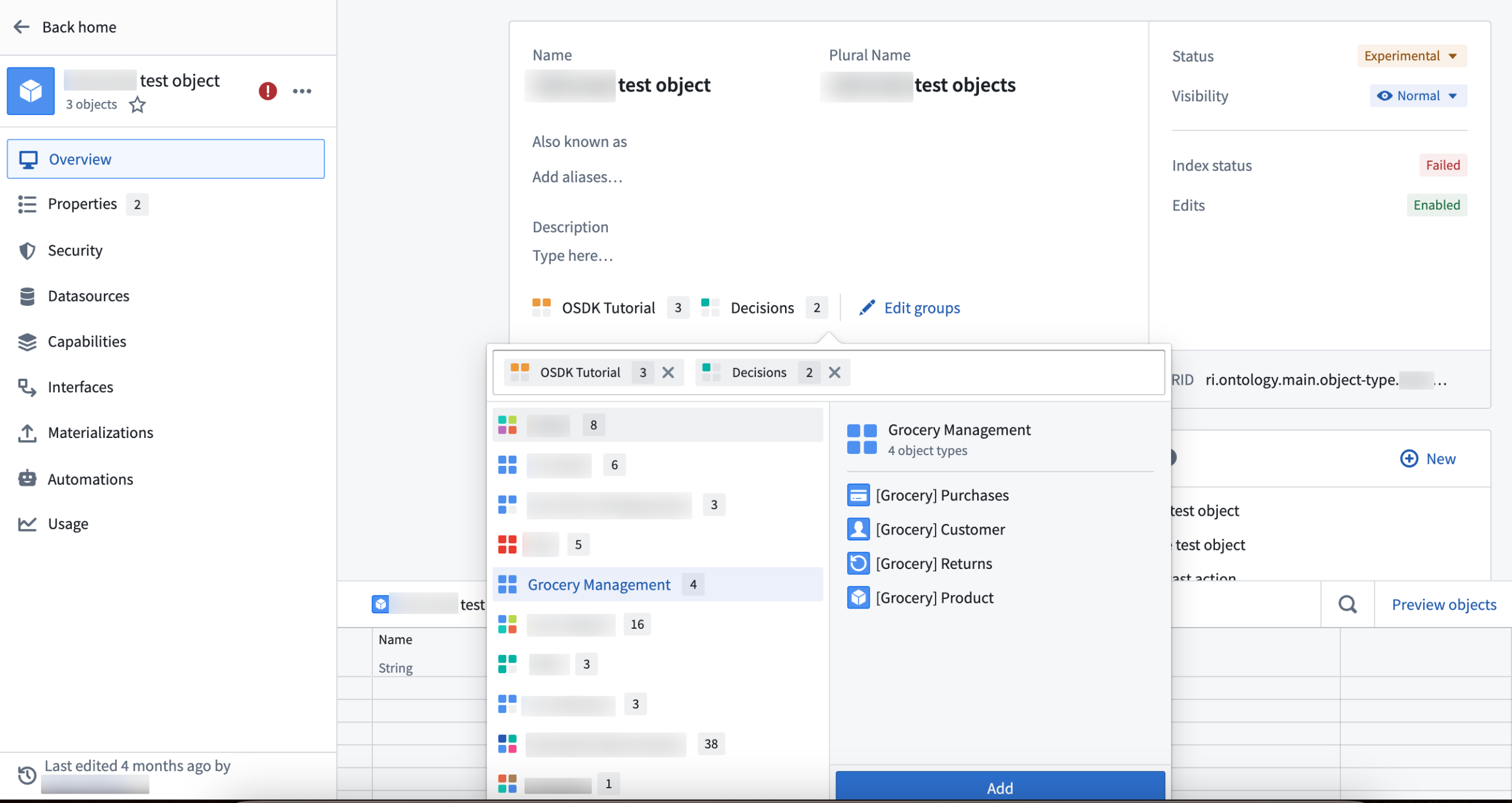
Add groups as part of object type configuration.
Legacy groups
Some legacy groups were not eligible for automatic migration. In these cases, Ontology owners were notified via an Upgrade Assistant intervention that manual action was necessary.
As of May 22, 2024, legacy groups that could not be safely migrated were hidden from operational users across all applications such as Workshop and Object Explorer. To provide backward compatibility, the names of legacy groups remain stored as type class metadata on object types.
Ontology owners may continue to manually migrate these hidden, legacy groups using Ontology Manager. To do this, navigate to the Ontology Configuration menu in the bottom left corner and select Approve all Groups for migration.
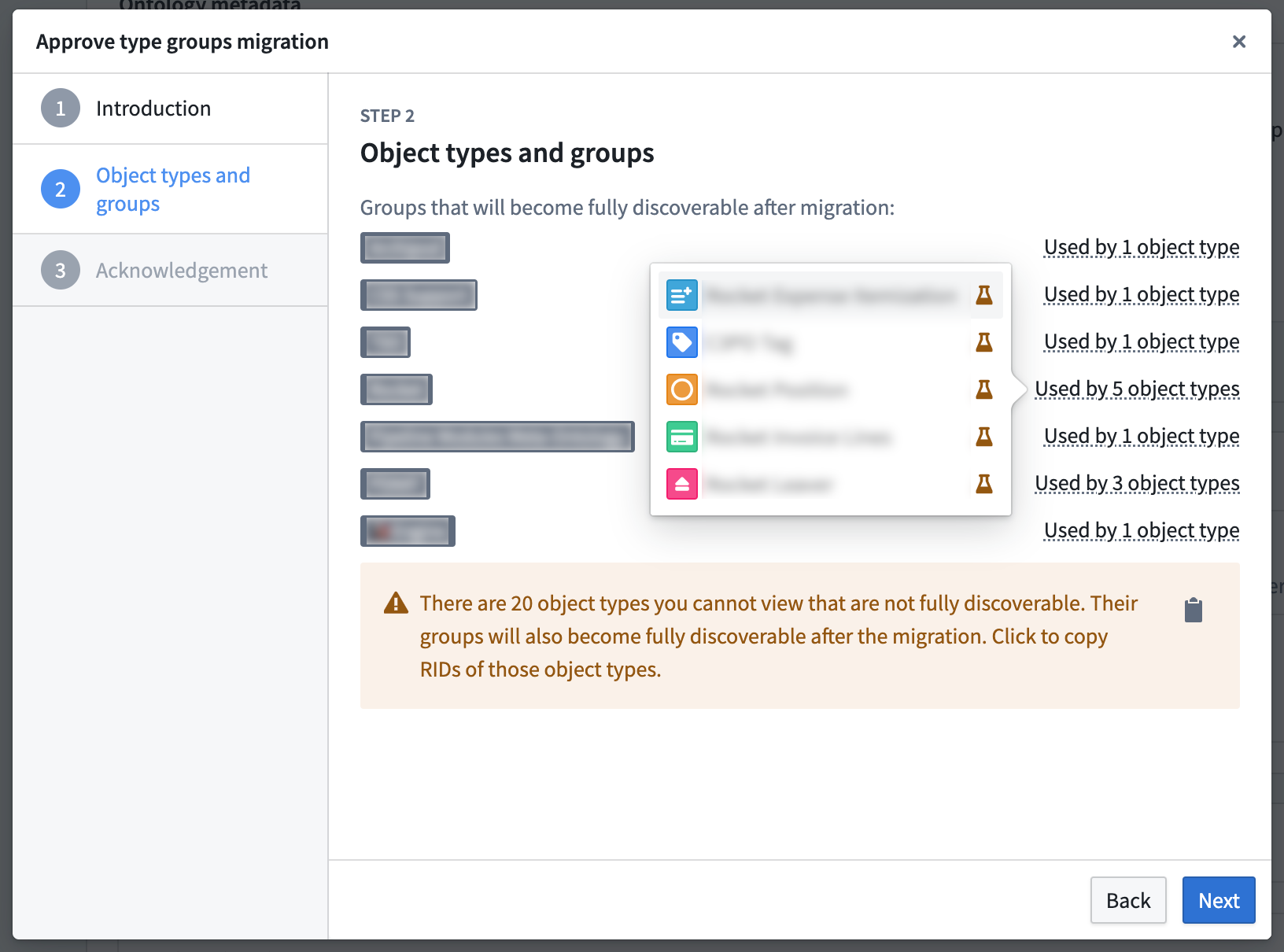
Some legacy groups require manual migration to unlock new features.
Pipeline Builder now supports outputting errors in your LLM runs
Date published: 2024-05-23
You can now configure your LLM output column to contain both the output value and an error message if the row fails, offering easier debugging for LLM-related issues. With this feature, you receive both the LLM response and error message as a struct in your output column. This transparency into LLM errors makes it easier to debug processing issues and understand what is happening behind the scenes with your model. Example error messages may include:
- "Context limit exceeded"
- "Cannot coerce to provided output type"
- "Input prompt is null or empty"
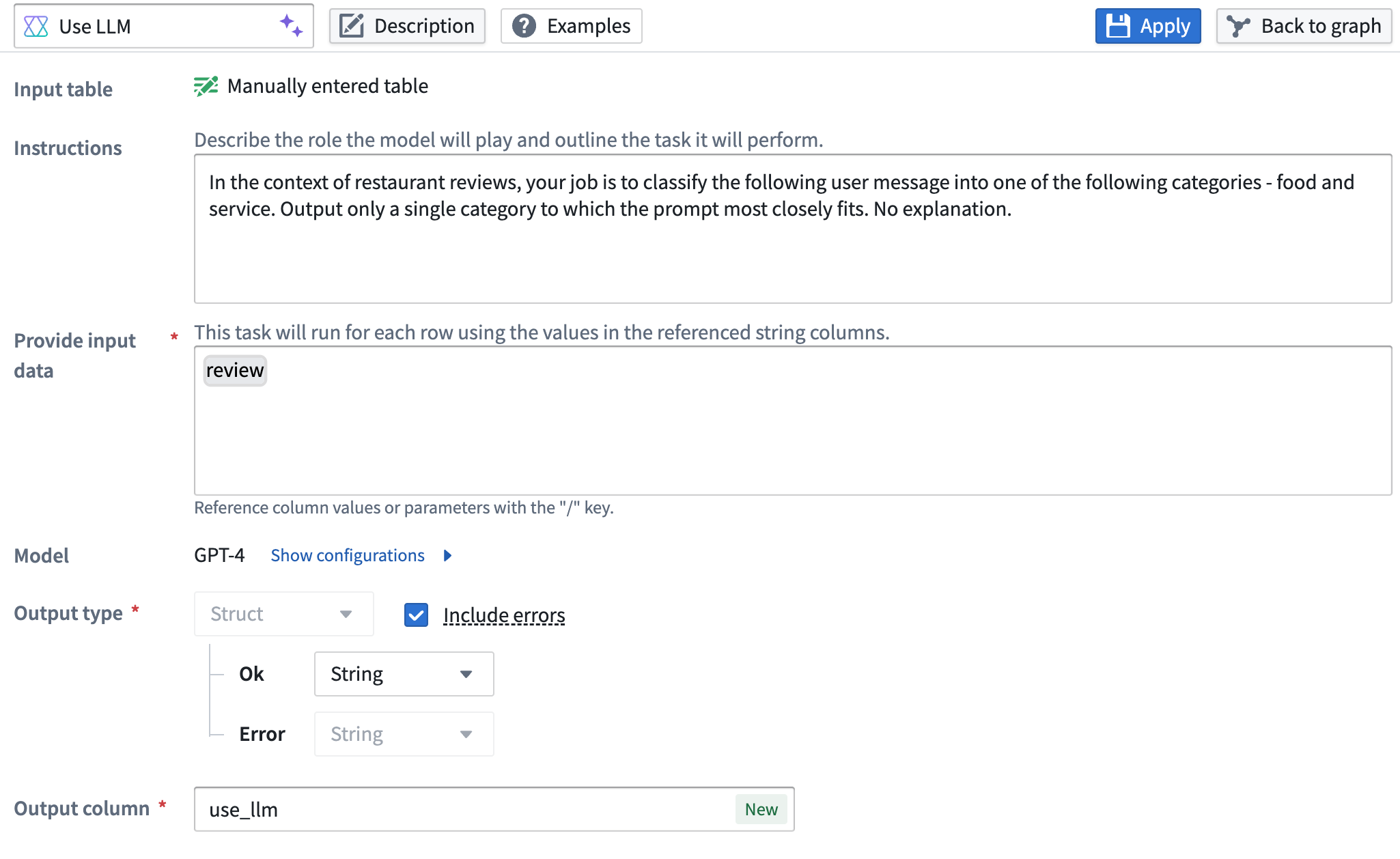
Example of an LLM prompt configured to include errors.
To use this feature:
- In Pipeline Builder, open a Use LLM node and create a prompt.
- Locate the Output type section.
- Toggle on the Include errors checkbox.
When including LLM error messages, the node output will be a struct type, containing both the regular output value (which can be any supported output type, including a struct) and the associated error message.
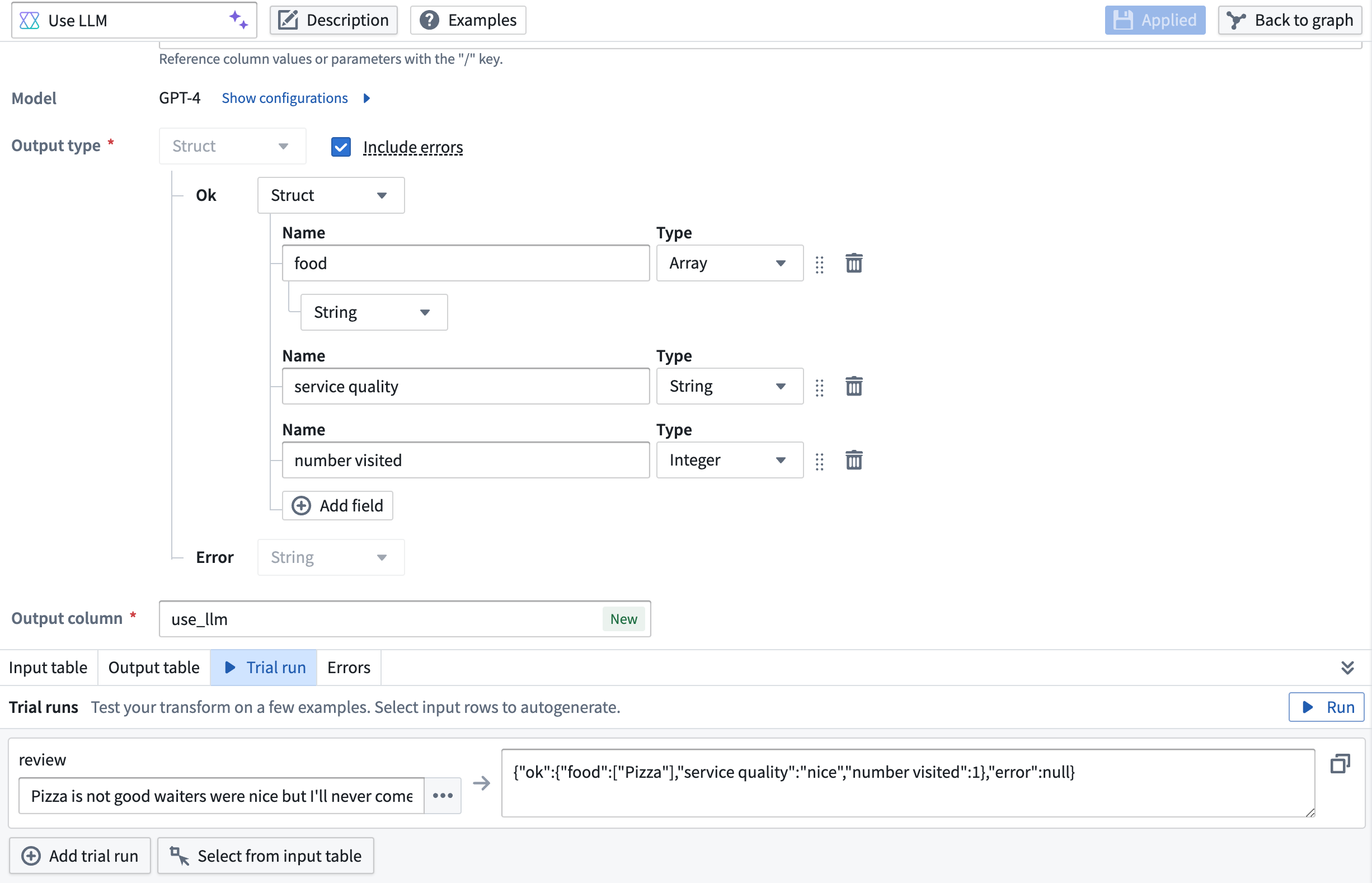
Example of a struct output type (containing an array, a string, and an integer) with the included error message.
You can easily switch this feature on or off for flexible error transparency control by deselecting the Include errors box.
Learn more about using LLMs in Pipeline Builder from our documentation.
Introducing Pages and Shared Variables in Slate
Date published: 2024-05-23
Pages offer application builders the ability to split application UI, logic and resources (data, variables, functions, events) into different pages within a single application, providing isolated scope for each page that loads separately, including widgets, functions, queries, and more. Additionally, you now have a more nuanced control of variables, being able to configure them by page scope, "local" and "shared", with shared variables being accessible from any page, thereby enhancing application design, performance, and user experience.
Speed up app loading time
A common pattern for splitting a Palantir Slate application into multiple views is to use a tabbed container. However, this approach may lead to very large page loads, limit the level of control developers have over loading data, and present widget maintainability and organizational challenges due to having a single list of components and widgets.
Switching from tabbed containers to pages allows larger applications to load information more quickly, as they only load data relevant to each page's specific scope.

Multiple pages can now be built in a single Slate application.
This approach enables the scoping of application logical flows into individual pages with meaningfully named URL routes. Additionally, page names can be used in the URL to navigate to the page directly when sharing a link into a Slate application.

Application logical flows can now be scoped into individual pages with meaningfully named URLs.
Increase application stability
Splitting up the logic of a complex Slate application into pages also simplifies refactoring, resulting in improved maintainability and performance.
Seamless navigation between pages
The new onNavigate event and navigateTo action allow for simple navigation actions between pages within the same application. Navigating to a page will update the URL route to point to the target page.
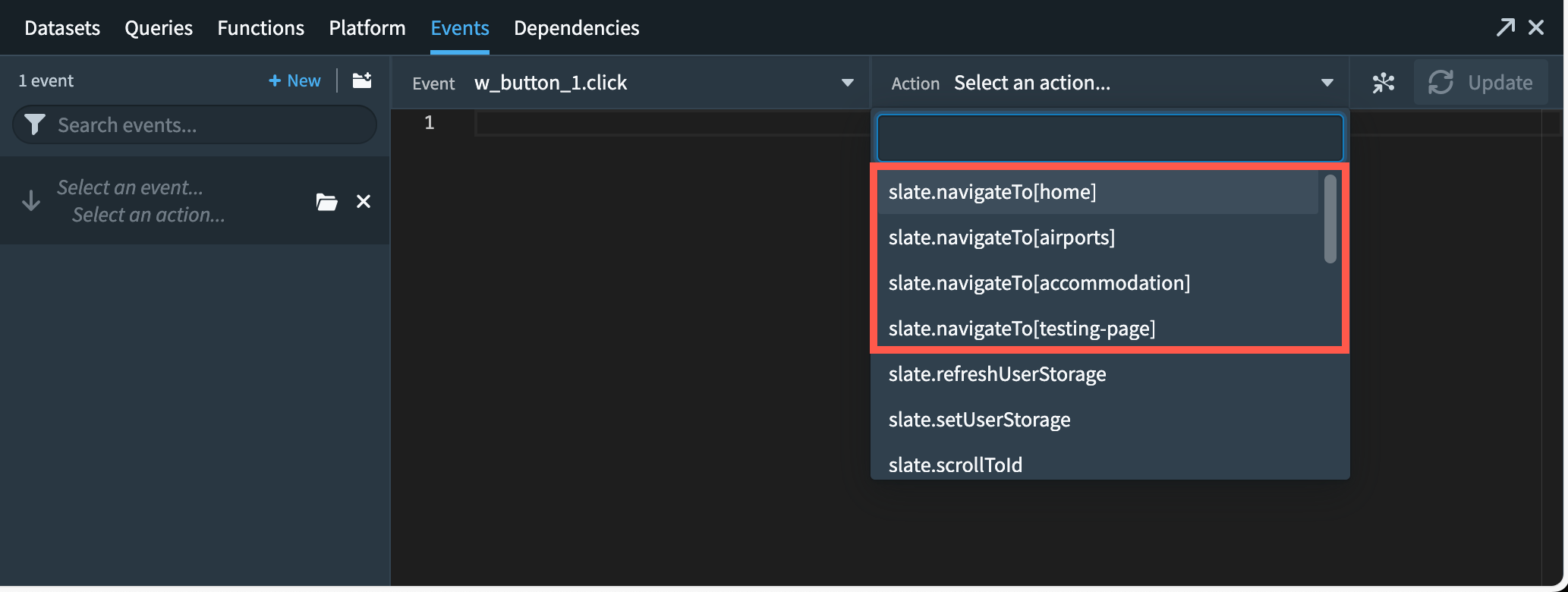
Navigation to a page will update the URL route to point to target page.
Sharing application state between pages
New Shared variables are accessible from any Slate page, allowing for an application level state sharing across pages.

For more on Slate, review the documentation on Slate application Pages.
Introducing conflict resolution strategies for Ontology user edits and datasource updates [GA]
Date published: 2024-05-23
Object instances in the Foundry Ontology can be created and modified by both input datasources and user edits. When a single object instance, such as a row or object with a specific primary key value, receives data from both the input datasource and user edits, these received values must be transparently resolved with a conflict resolution strategy.
You can configure conflict resolution strategies at the object type level. Select an object type in Ontology Manager and navigate to the Datasources section.
Note that conflict resolution strategies are only supported for Object Storage V2 object types.
Conflict resolution strategies
There are two conflict resolution strategies for Ontology edits:
- Apply user edits (default): With this strategy, the final state of an object instance is always determined by the user edits applied to it, regardless of any future datasource updates for the given object instance.
- Apply most recent value (limited beta): With this strategy, user edits are only applied if the timestamp value of the user edit is more recent than the timestamp value of the datasource update for the given object instance.
This strategy also requires that the datasource contains a property with the Timestamp type; the Date property type will not work for this option. The Timestamp property is used to evaluate whether a user edit or input datasource update should be applied.
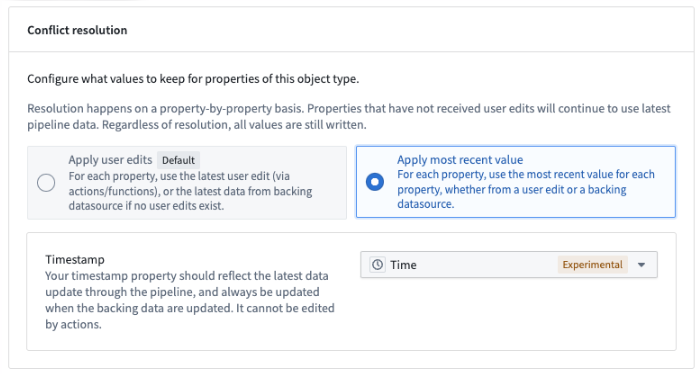
Configure conflict resolution strategies in Ontology Manager.
Configure different resolution strategies for multiple datasources
You can configure different conflict resolution strategies for each input datasource of the object type. For example, for an object type backed by two datasources, you can configure one datasource to use the Apply user edits strategy and the other datasource to use the Apply most recent value strategy.
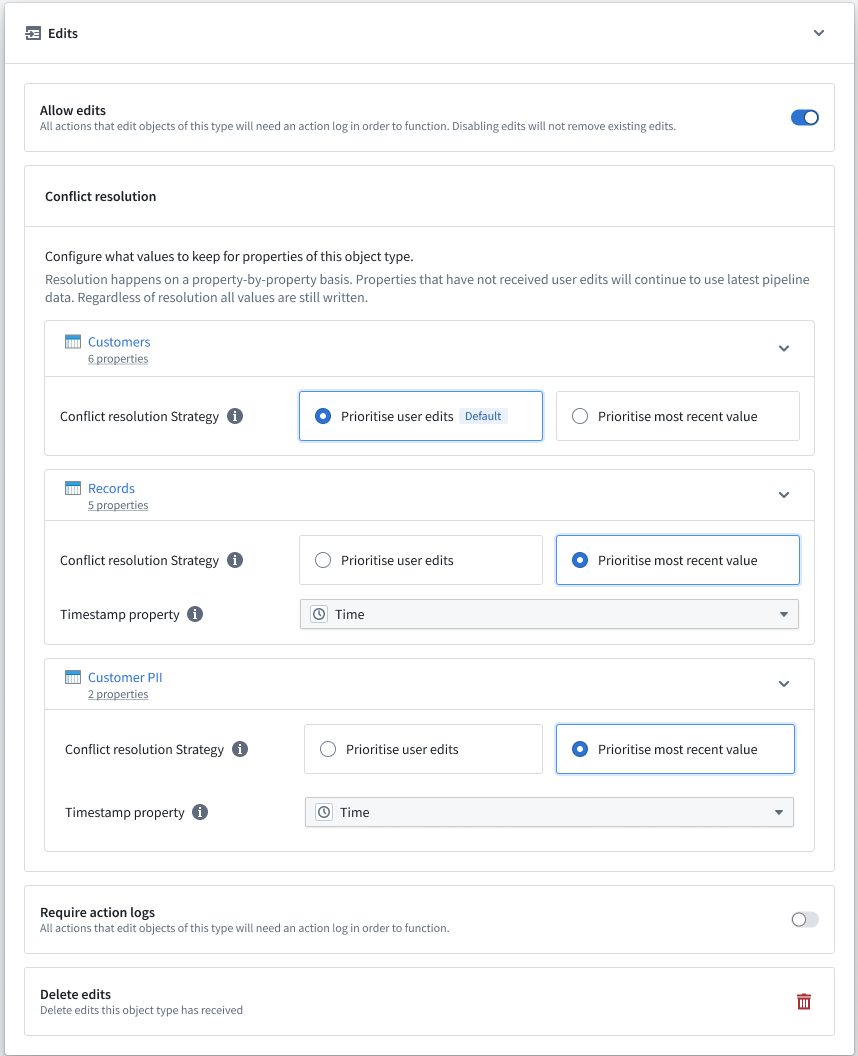
Configure conflict resolution strategies for multiple datasources in Ontology Manager.
If a user edit updates properties across multiple datasources, Ontology Manager will determine whether to always apply or conditionally apply the edits using the conflict resolution strategy of the datasource that backs the property.
Learn more about how user edits are applied.
Introducing Quick Start in Code Repository
Date published: 2024-05-23
Available now on all enrollments, Code Repositories can now guide your repository setup via an intuitive quick start discovery and navigation interface. Selecting the ideal code-based workflow for development can be difficult, but this user-friendly quick start interface simplifies the process. Forget about sifting through extensive documentation; just answer three quick questions or search for your repository type, such as "Python transforms," to effortlessly set up your repository with examples and READMEs to steer your development journey.
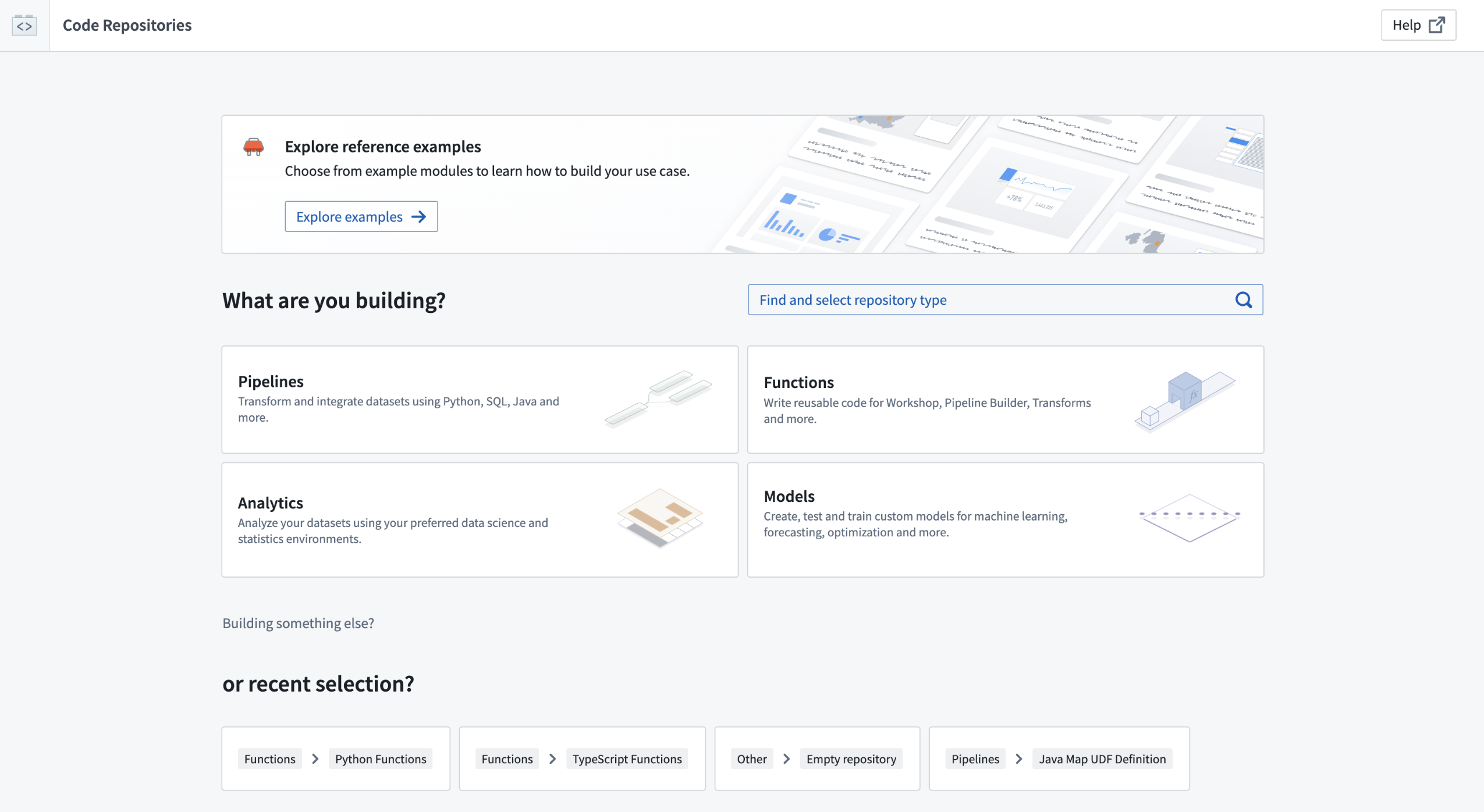
Quick start page for Code Repositories.
Intuitively view, select, and discover workflows
Quick start empowers application builders to:
- View all the code-based workflows available in the Palantir platform.
- Select the right template for your workflow.
- Discover reference examples from Marketplace.
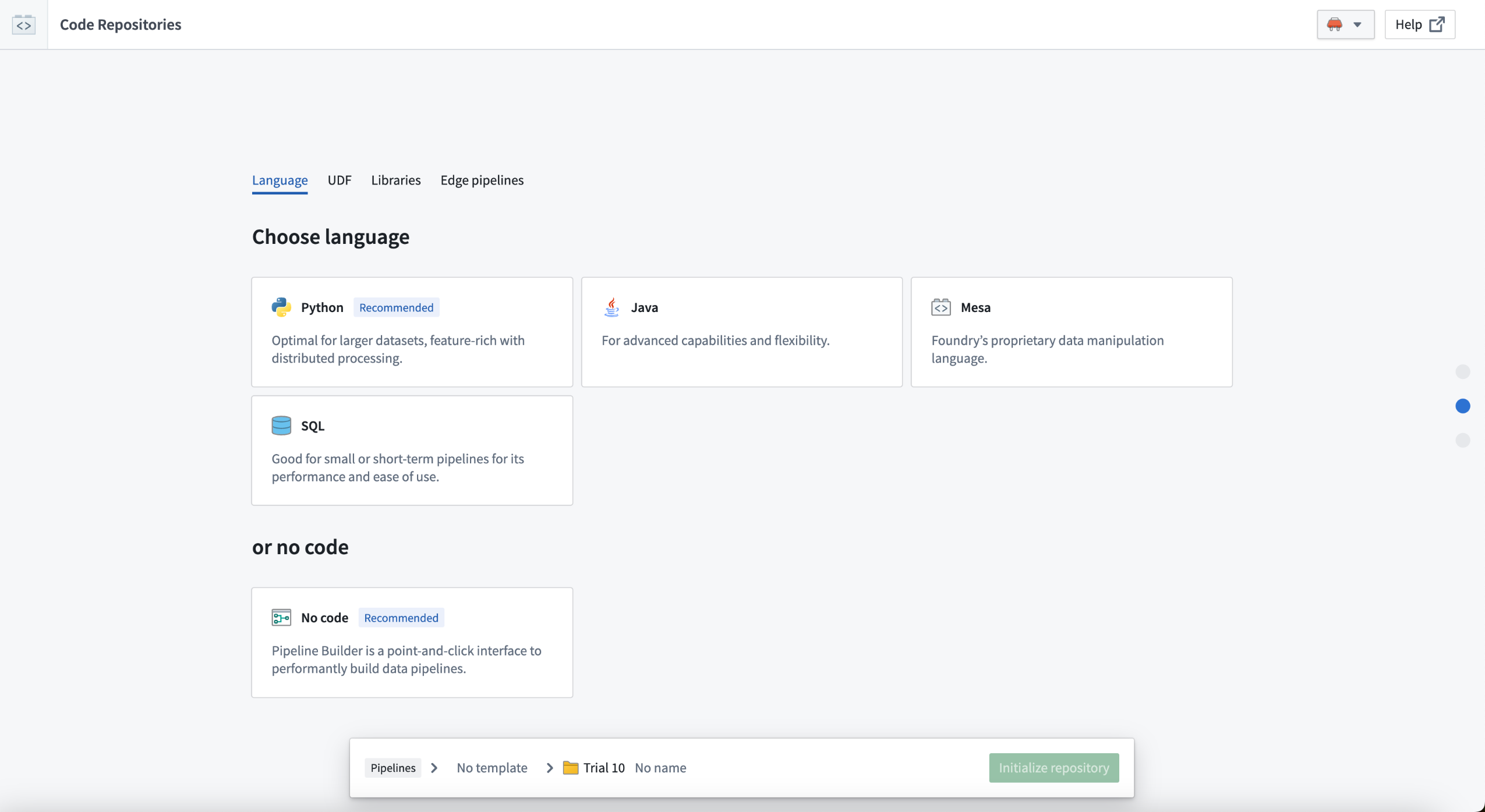
Answer just three questions to receive recommendations and examples for your repository.
What's next on the development roadmap?
We are actively developing new functionalities and templates, while creating more reference examples for Marketplace.
Introducing AIP Accelerate [Beta], your notebook environment for LLM workflows.
Date published: 2024-05-21
AIP Accelerate is a notebook environment for building large language model (LLM) powered workflows. Available the week of June 3 across enrollments, AIP Accelerate enables you to rapidly iterate on LLM prompts that leverage your data in various forms, whether it is a dataset imported from Foundry, or a file on your computer. With AIP Accelerate’s provided library of LLM operations, you can build complex chains of thought, interpret uploaded images, and generate LLM-powered insights. With support for the latest generative AI models, AIP Accelerate is a sandbox for wielding the capabilities of LLMs for investigative business workflows.
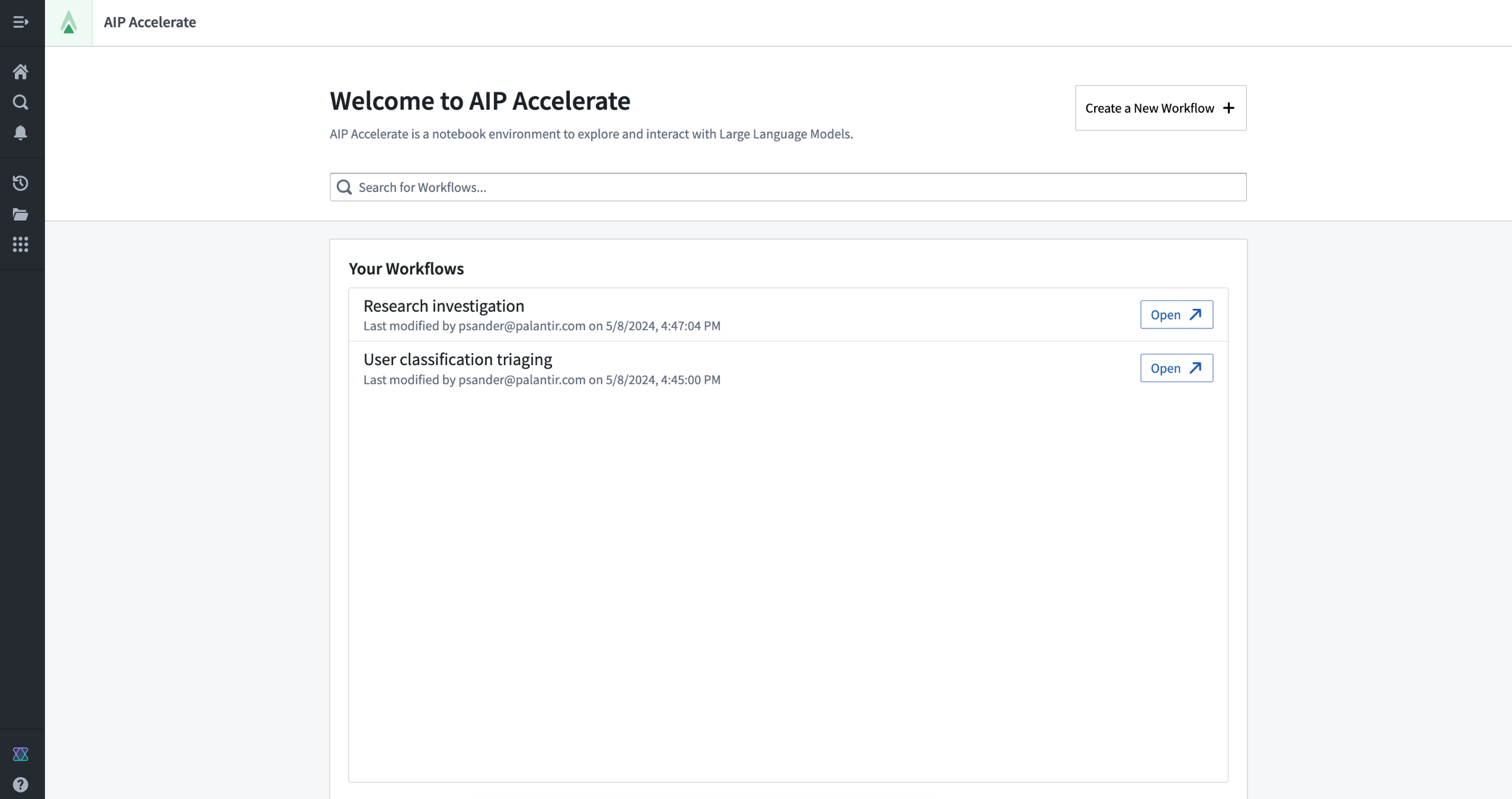
AIP Accelerate landing page.
A LLM's response effectiveness highly depends on the contextual environment. AIP Accelerate enables you to carefully manage what context the LLM is given by using Context Threads. Context threads are one of the primary components of Accelerate, and denote a chain of information that is provided to a large language model. Cells pass information downward, via a context thread, to their sub-cells. Workflow builders can use context threads to break out of the linear-chat motif and engineer workflows that are not limited by a single context path. Furthermore, AIP Accelerate leverages primitives within the platform to enable operations on various forms of structured and unstructured data (such as tabular data, PDF, or image files) to do complex analysis.
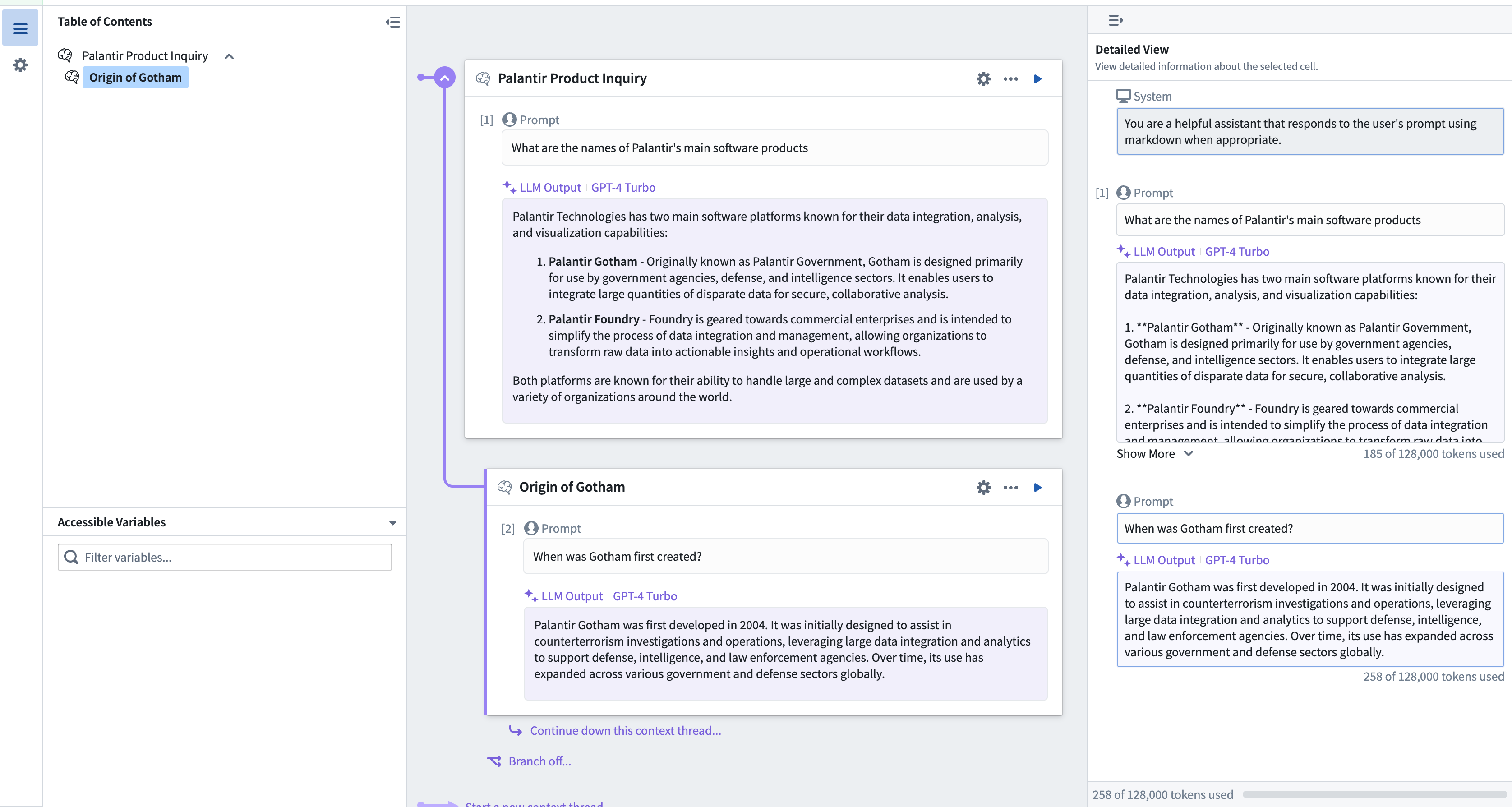
AIP Accelerate context thread where the child LLM cell inherits the context of its parent, continuing the conversation.
In the image above, we have a two-cell context thread. We can continue nesting cells to drill into a conversation with an LLM, or branch off after any cell and go down a different path.
Secure and customizable AI-powered analysis
The key features of AIP Accelerate include:
- User-friendly interface: AIP Accelerate has an intuitive interface that makes it easy for workflow builders to construct complex, multi-dimensional analysis using LLMs.
- Generative AI models: Customize which available LLMs to use when executing both text and vision based tasks.
- Operate on real data: Deploy LLMs over data within the platform such as datasets or mediasets (images or PDF documents).
- Share results: Save analysis results as a new dataset for use in other AIP tools or share a workflow with other users.
- Data security: AIP Accelerate is built on the same rigorous security model that governs the rest of the Palantir platform, including user based data permissions. These platform security controls grant an LLM access only to what is necessary to complete a task.
AIP Accelerate is under active development and support for more operations are coming soon.
Access AIP Accelerate
AIP Accelerate can be accessed from the platform’s workspace navigation bar or by using the quick search shortcuts CMD + J (macOS) or CTRL + J (Windows). Alternatively, you can create a new workflow from your Files by selecting +New and then choosing Accelerate, as shown below.

The Foundry app navigation menu.
Introducing new features for an improved code experience in AIP Assist
Date published: 2024-05-15
We are excited to introduce two new features in AIP Assist that improve the developer experience and increase efficiency. The new code tool helps answer complex coding questions, and a TypeScript compiler is now in use to improve TypeScript code and flag issues with initially proposed code. This is now available on all enrollments.
Get accurate, Palantir-specific code
With the new AIP Assist code tool, we are now able to return answers with accurate, Palantir-specific code for several applications and features. For example, you can ask an Ontology-focused question ("how can I write an Ontology edit function?"), or ask about a specific language ("how can I parse raw files in parallel in a Python transform?"). Previously, AIP Assist could provide answers using generic, non-Palantir code that presented general use cases. With these improvements, developers will be able to receive accurate, specific code that directly supports their workflow in Code Repositories.
On introduction, the code tool in AIP Assist supports the following languages:
- Python
- TypeScript
- SQL
- PySpark
- Contour expression language

The new code tool improves code responses in AIP Assist.
The new code tool will continue to improve the developer experience in AIP Assist as Palantir engineers update and expand our collections of code examples; the examples, now available in our documentation, will provide use case guidance and inspiration for solving complex problems and transformations.
Fix compiler errors in the moment
AIP Assist is now also integrated with the TypeScript compiler to flag issue with type mismatches, unhandled promises, and more. Once AIP Assist generates an initial code in response to questions, the code will pass through the compiler to find errors and allow users to commit changes directly in the Assist interface.
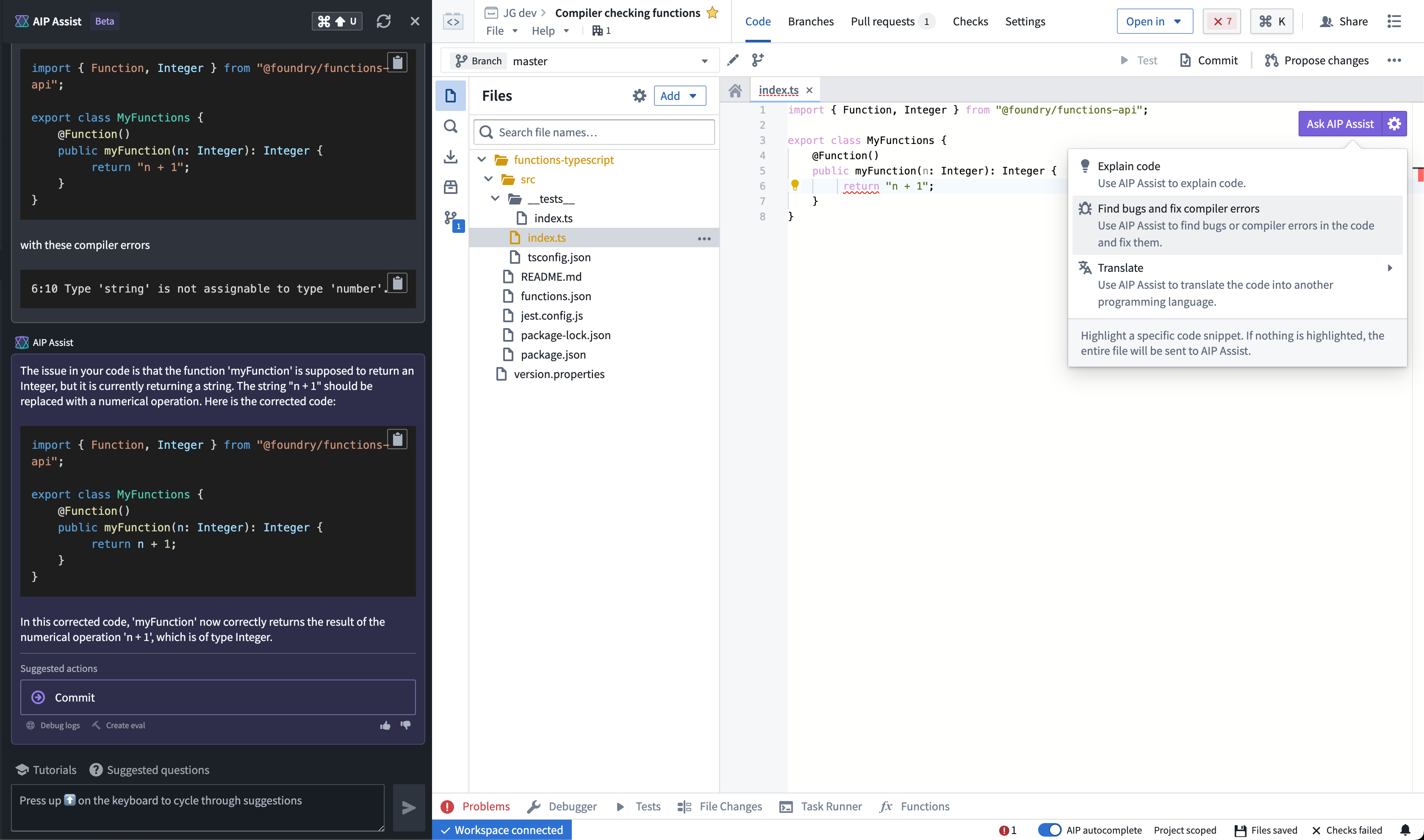
Compile Typescript errors directly in AIP Assist.
As the TypeScript compiler works, AIP Assist receives feedback that iteratively refines the generated code. The compiler adjusts types, adds missing type definitions, corrects promise handling, and ensures the code adheres to TypeScript's strict typing. Each iteration is re-checked by the compiler until the code compiles without errors.
AIP Assist not only solves immediate problems with code, but also provides insight into developers on how to avoid similar issues in the future.
Learn more about the AIP features you can use to improve your developer experience.
Pipeline Builder now supports enforced output types for LLM nodes
Date published: 2024-05-15
You can now specify the output types of your Use LLM nodes in Pipeline Builder! These functionalities ensure consistent output types, enhancing your ability to maintain data type consistency and optimize data processing within your pipelines.
How to enforce output type in the Use LLM node:
- Ensure that your Foundry frontend instance is updated to v6.321.0 or higher.
- Add a
Use LLMnode to your pipeline. If you use a template, submit the template first to get to the prompt page. - On the prompt screen, locate the Output type field and select the desired output type from the dropdown menu.
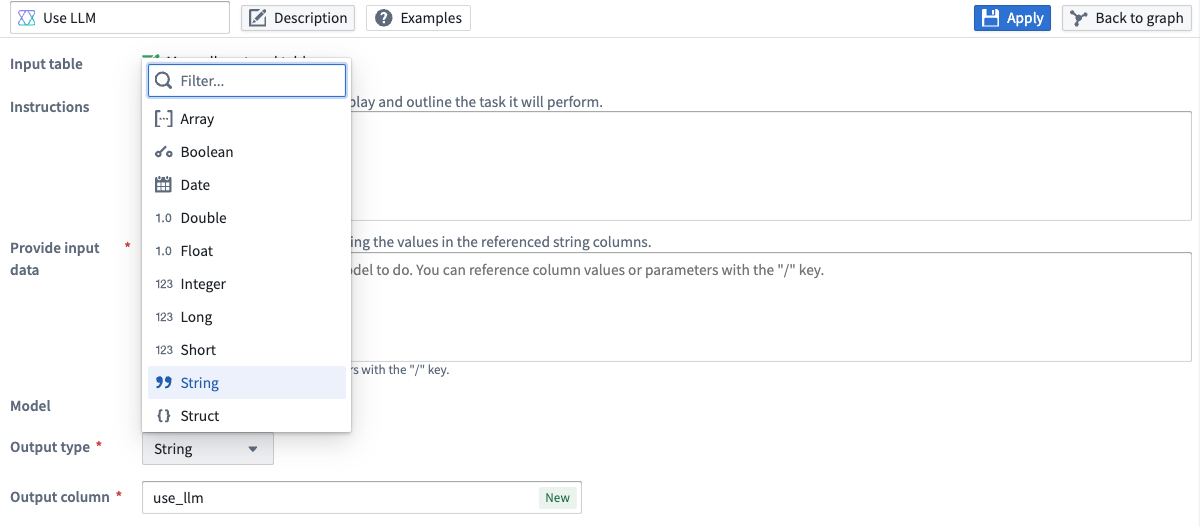
Use the dropdown menu to specify an output type for your Use LLM node.
For entity extraction, you can also specify the output types inside a struct to provide more flexibility and control over your data outputs.
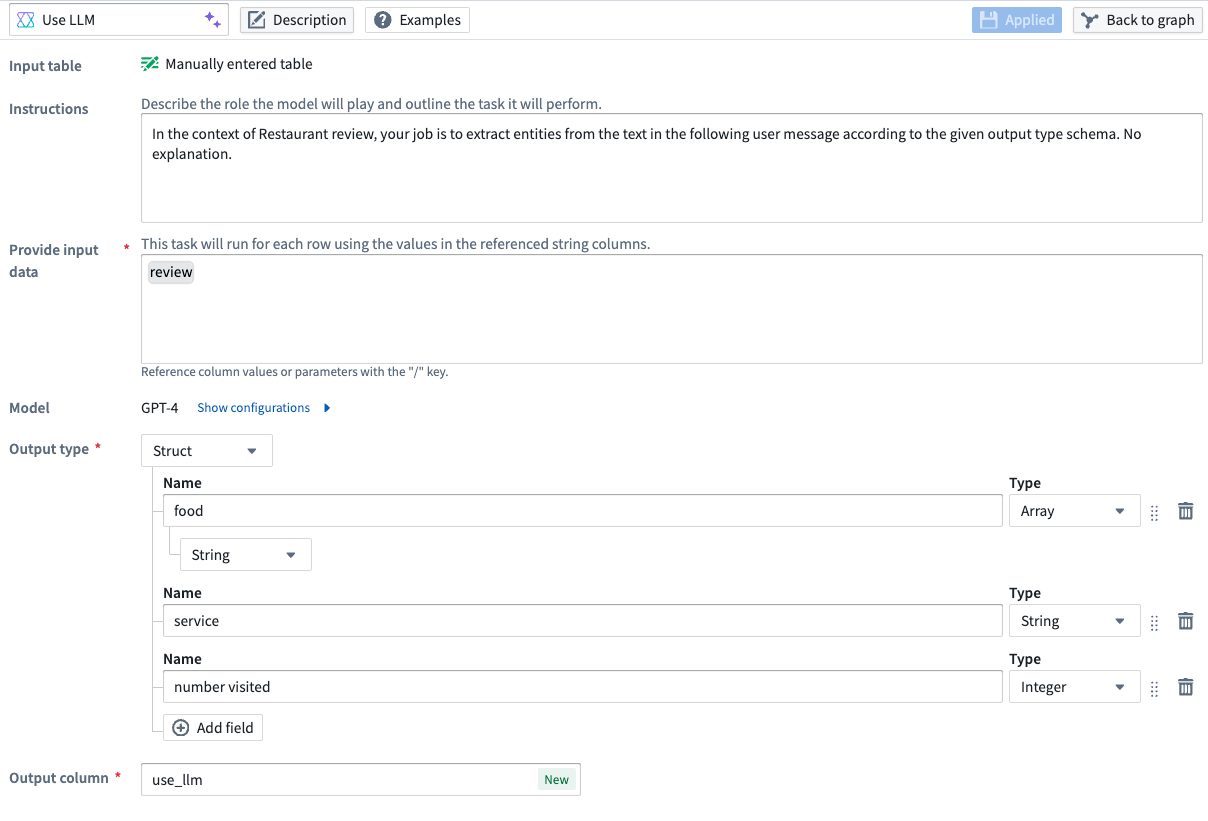
Example of a struct output type containing an array, a string, and an integer.
Learn more about using LLMs in Pipeline Builder from our documentation.
Sync real-time data with Ontology streaming
Date published: 2024-05-15
Put operational data in front of users in seconds with Foundry's new Ontology streaming capabilities, now generally available.
Object Storage V2 now supports creating objects backed by streams as input datasources. By departing from the batch infrastructure used for non-streaming datasets, streams enable indexing of data into your Foundry Ontology in seconds to support latency-sensitive operational workflows.
You can now configure object types with stream input datasources directly in Pipeline Builder or Ontology Manager, similar to other Ontology object types.
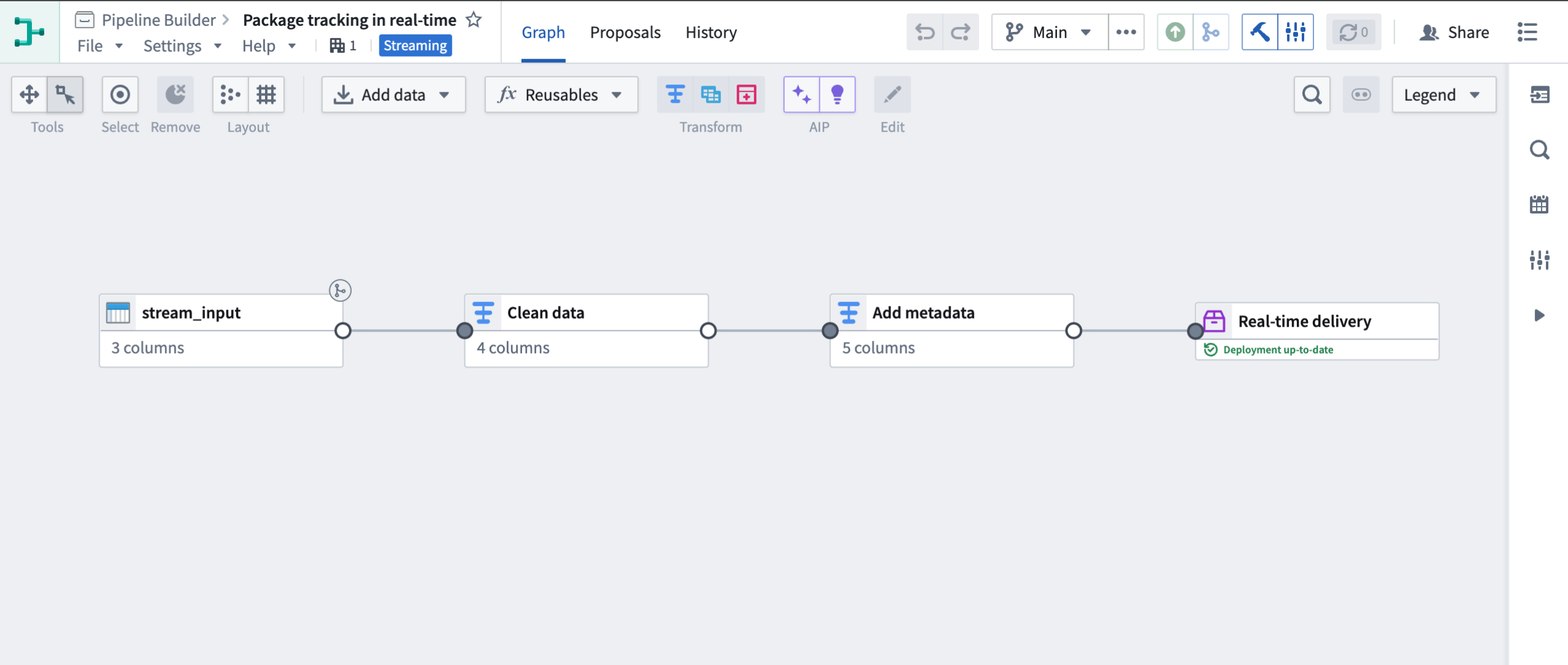
Configuring a streaming object type in Pipeline Builder
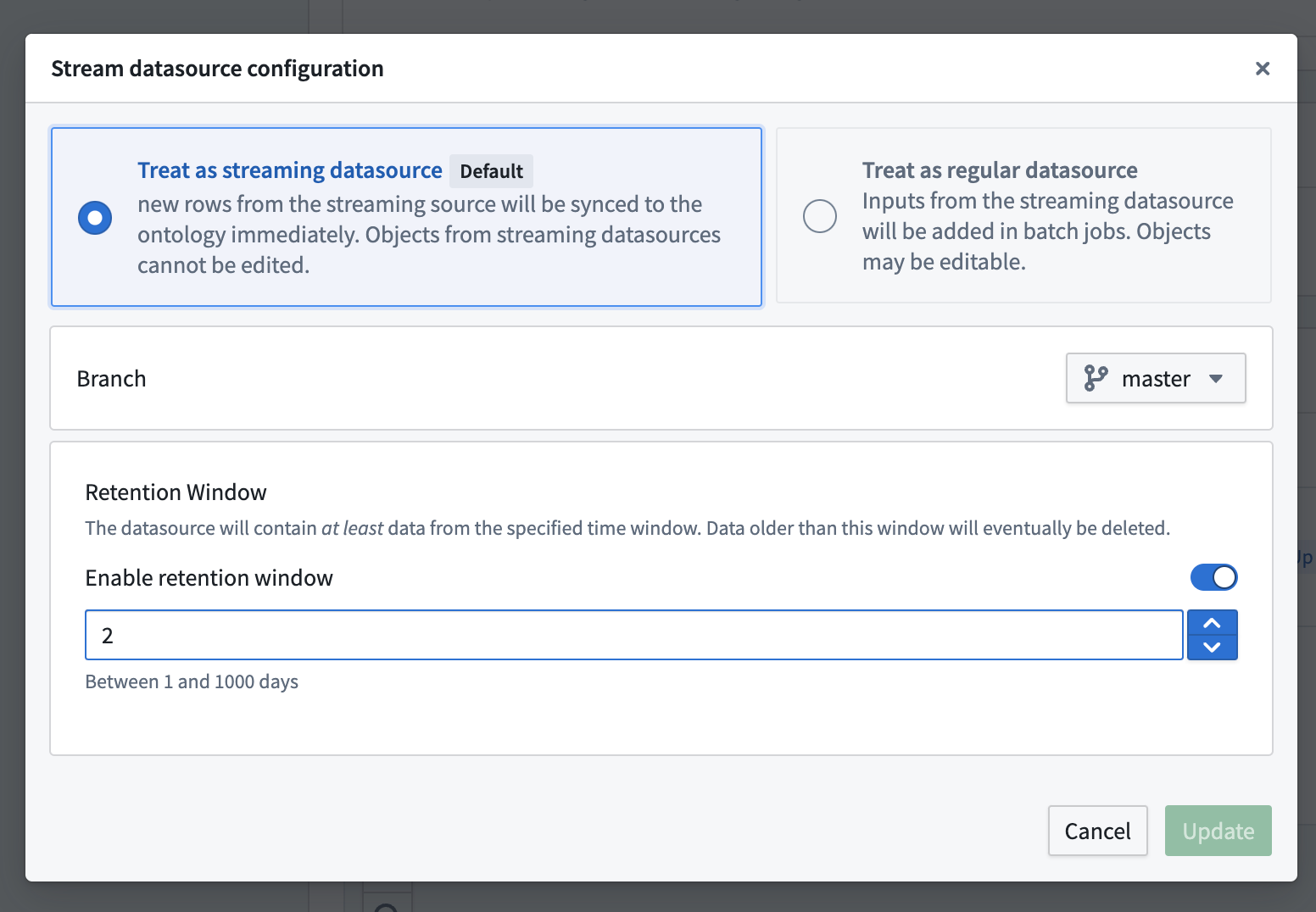
Configuring a streaming object type in Ontology Manager
If you do not yet have a stream configured, you can create one by integrating with an existing stream in Data Connection or by building a streaming pipeline in Pipeline Builder. See the indexing FAQ to learn more about how streams are indexed.
Learn more about setting up a streaming sync and the architecture of a streaming pipeline.
Introducing Upgrade Assistant Prompts
Date published: 2024-05-15
We are happy to introduce Upgrade Assistant Prompts, available now on all enrollments. Starting today, where a resource is impacted on the Palantir platform, you will start to see prompts indicating "This [resource] is affected by an ongoing upgrade".
The new feature enhances the visibility of impacted resources during Palantir platform upgrades by directly highlighting them to assigned users.
What does this mean for you?
Starting today, if you are assigned a particular resource that is impacted by an upgrade tracked in Upgrade Assistant, you will be able to see this information directly within the platform as showcased in following screenshots. This feature ensures that:
- All resources are addressed during an upgrade: You will no longer have to worry about missing out on critical resources during upgrades.
- Improved visibility: Identify and navigate easily through resources that are affected by an upgrade so you can take appropriate action.
Support for Ontology resources is under active development and will be released at a later time.
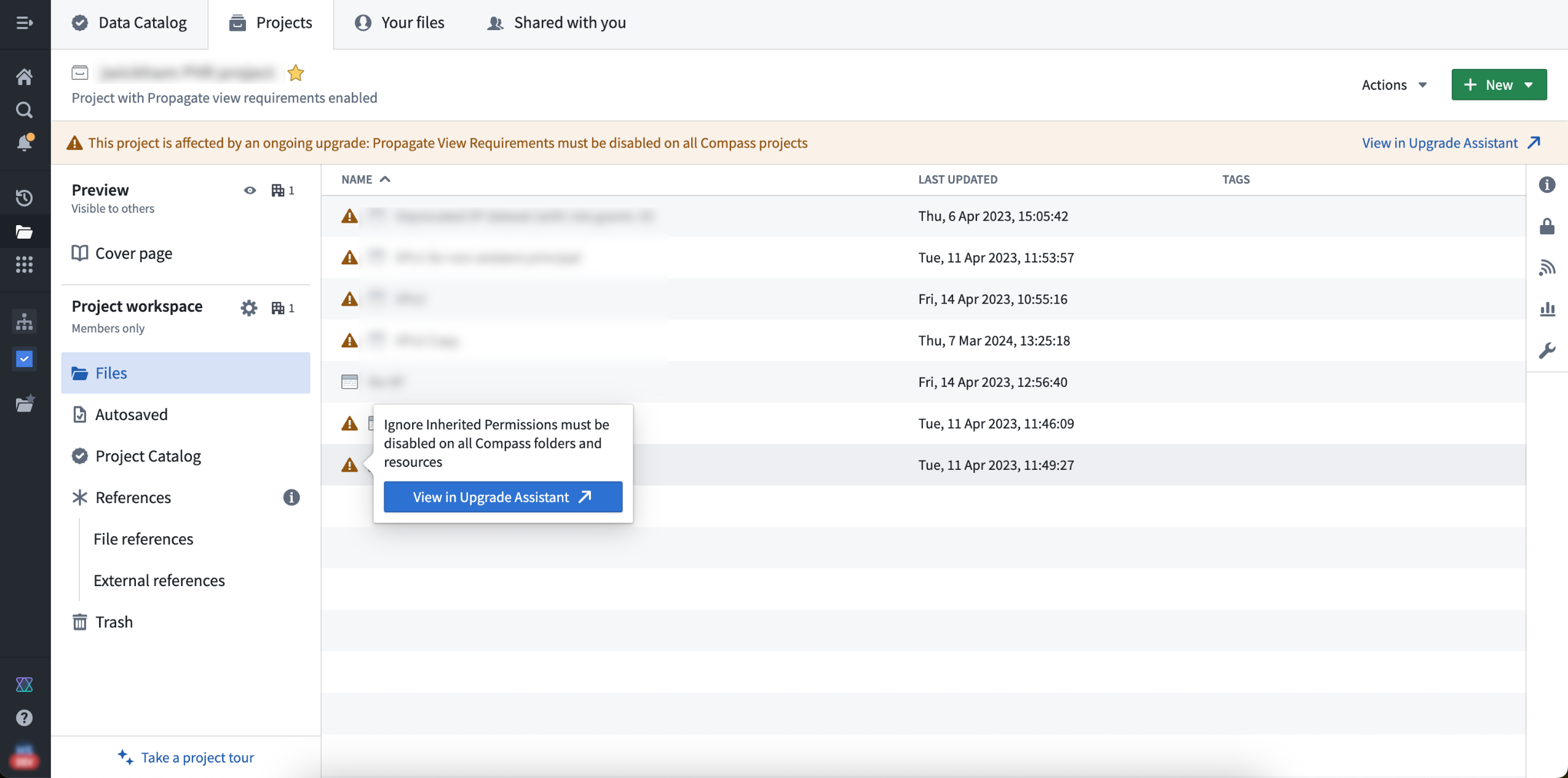
Learn more by reviewing Upgrade Assistant documentation.
AIP model enablement in Control Panel
Date published: 2024-05-09
Enrollment administrators can now use Control Panel to enable groups of AIP models for use. To do so, navigate to the Model enablement tab under the AIP Settings extension.
In Control Panel, models are grouped together into model families based on their legal status and use policy. These model families include both open-source or proprietary models hosted by Palantir, and models provided by Palantir but hosted on Azure, AWS Bedrock, or Google Vertex AI.
Prior to use, the administrator must accept the model family terms and agreements related to usage conditions at the enrollment level. Once a model is enabled, it can immediately be used across the platform on every supported AIP application.
The Model Enablement tab is visible once AIP is enabled in Control Panel under AIP Settings.
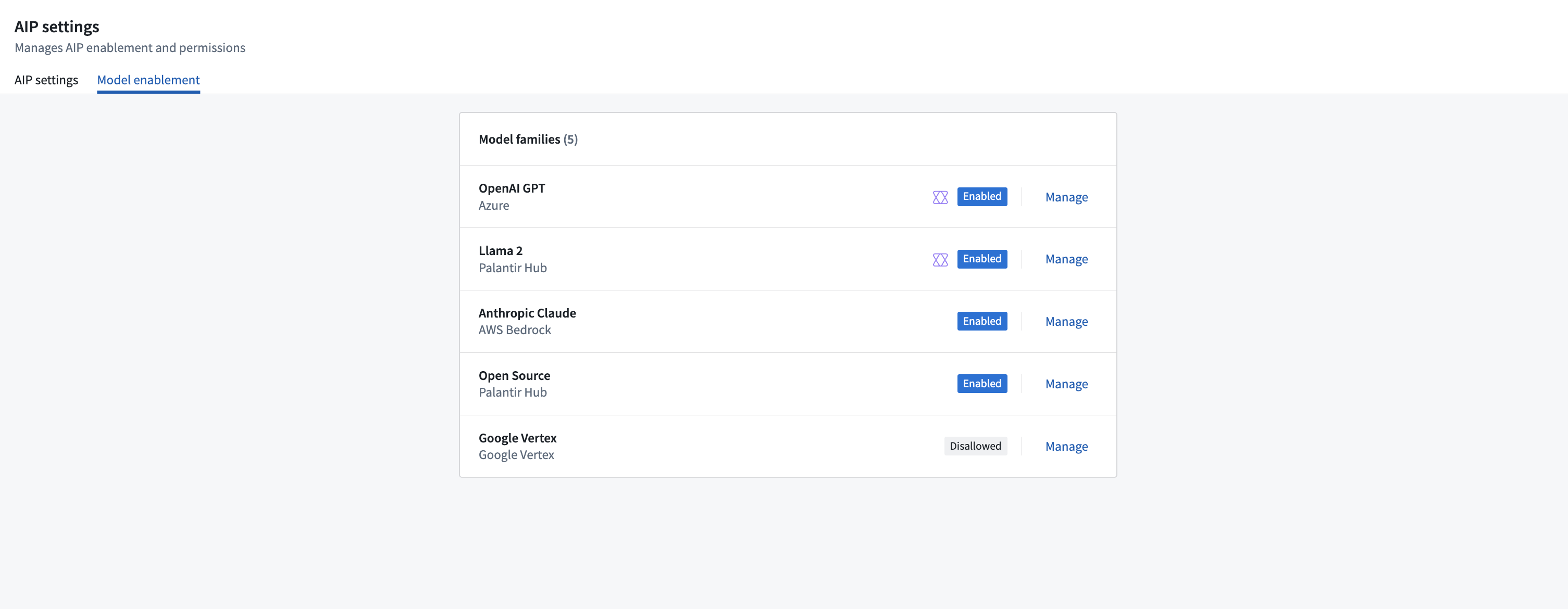
All the model families available for your enrollment, family groups are shown as enabled, disabled, or disallowed.
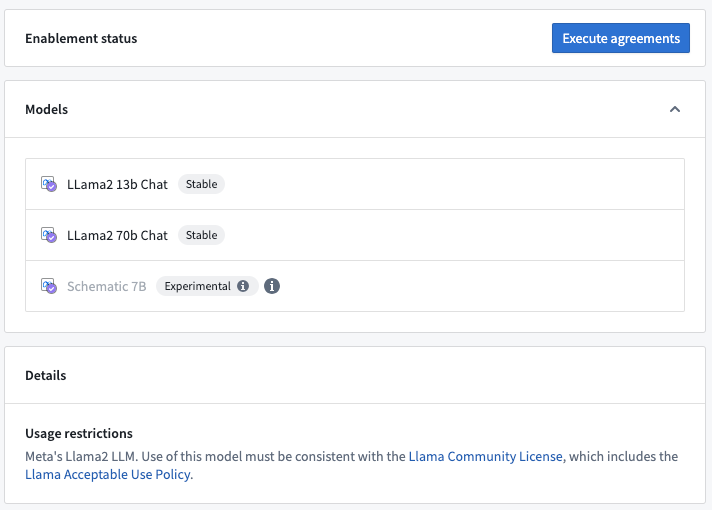
After choosing a model family, you will see all the models available and execute an agreement to enable it.
The Control Panel Model enablement tab under AIP Settings also allows admins to disable models that have already been enabled on that enrollment. Prior to disabling any group of models, consider that:
- Disabling models used for AIP native features (such as AIP Assist, Code Assist) would disable the same capabilities.
- Disabling a group of models would break any workflow that leverages models of that group.
Note that experimental models are currently inaccessible via the Control Panel. Enable the model family first, then contact your Palantir representative for general access. On-premise or specific enrollments interested in activating a new model group must also contact a Palantir representative.
For more information, review the related documentation.
Introducing Preview for external transforms in Code Repositories
Date published: 2024-05-09
Code Repositories now supports Preview for external transforms. Users can run previews for external transforms instead of having to wait for checks and builds to finish running, allowing them to iterate more quickly in the development process. Currently, only external transforms that have no inputs are supported.
To view data and/or files written during Preview, select Preview and then select your output dataset.
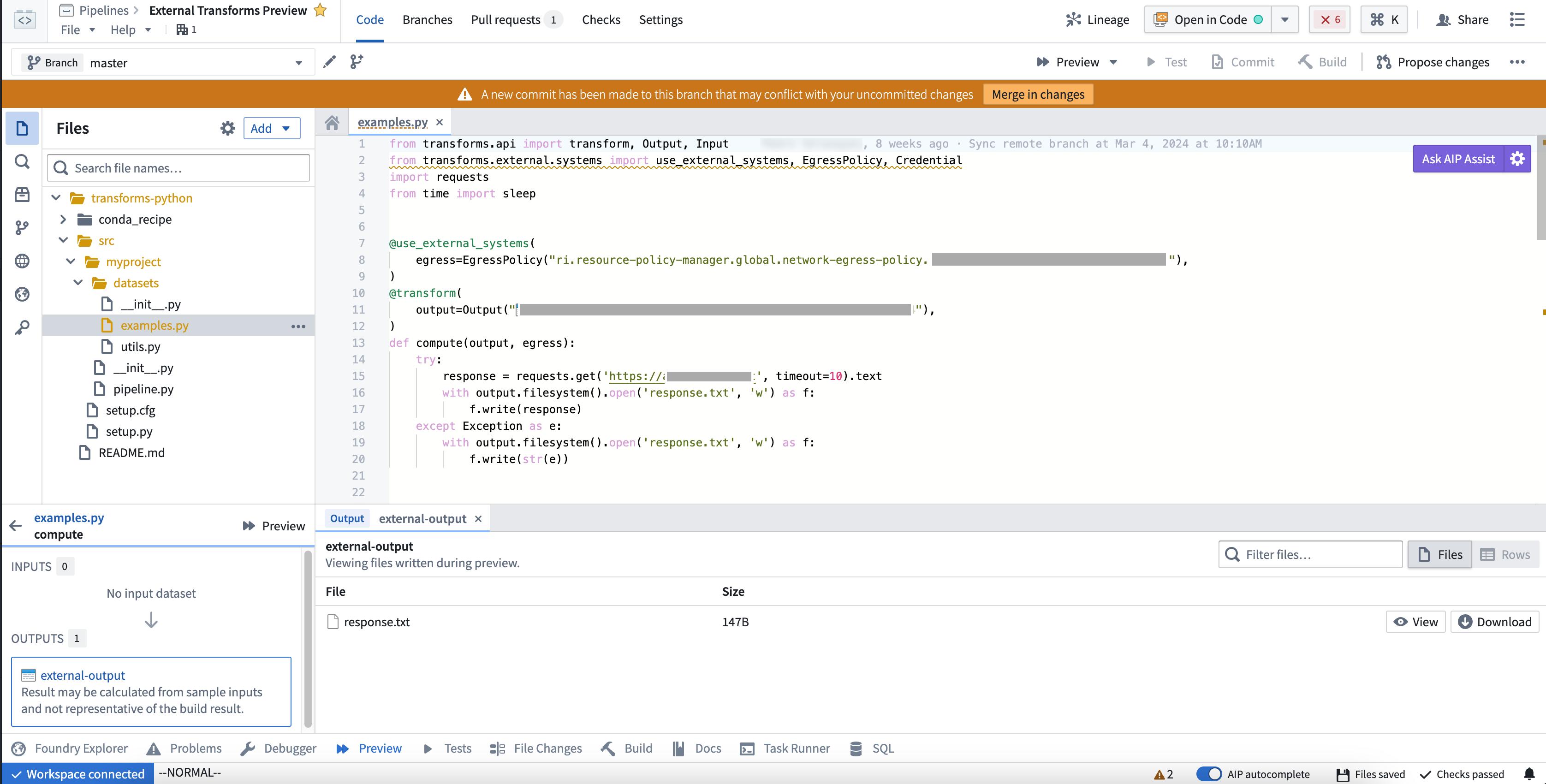
Example Preview on an external transform.
As a next step, we are working on expanding Preview functionality to all input types and also adding support for Source-based external transforms.
Introducing Solution Designer, for designing your business use case [GA]
Date published: 2024-05-06
Solution Designer is an interactive tool for creating architectural representations of solutions built using the Palantir platform, including representations for first and third-party integration points, links to platform resources, on-demand access to documentation and best practices, and more.
Solution Designer is on an accelerated release track and will soon be available for all enrollments at the end of this week.
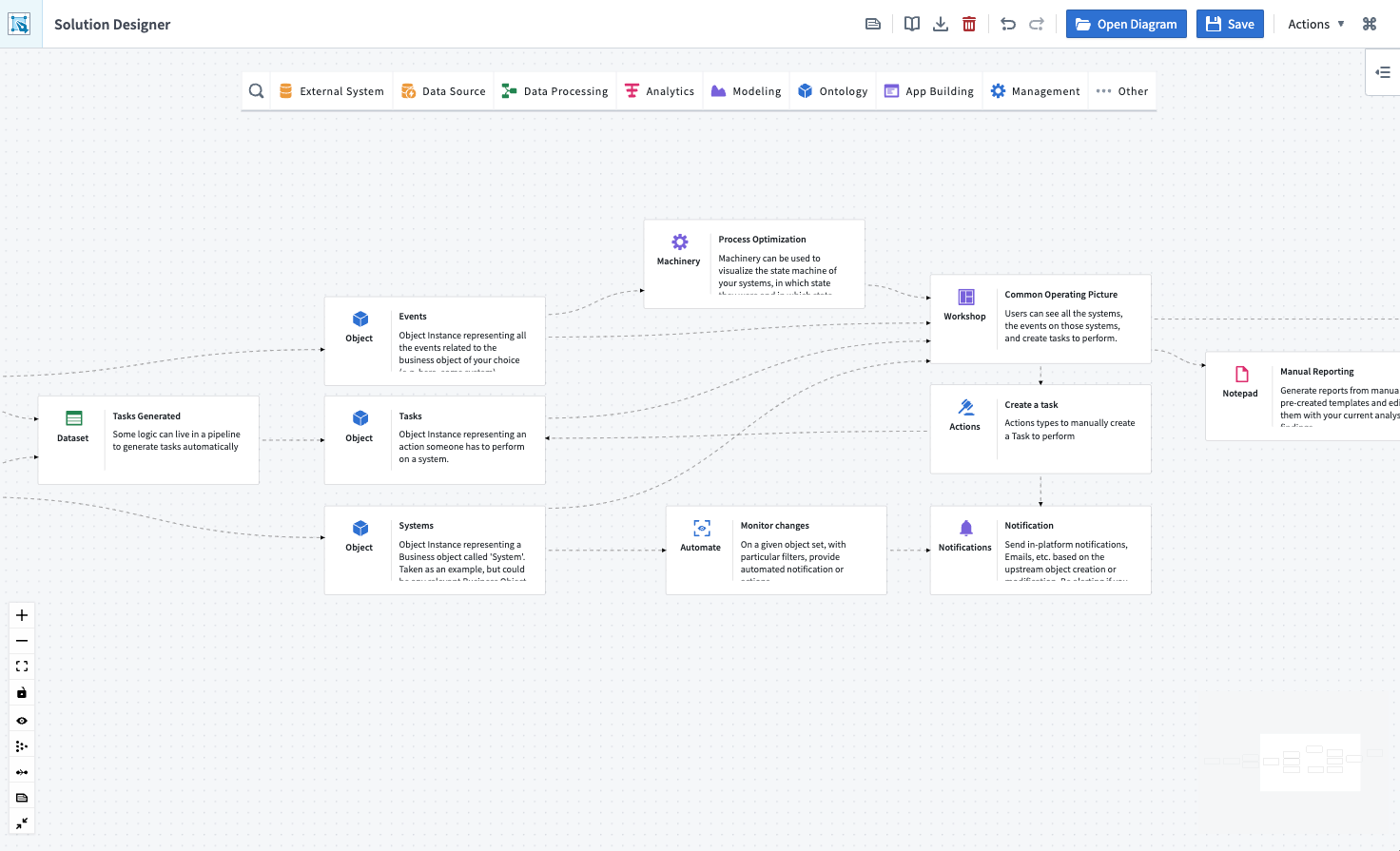
The solution design of a modeling workflow.
Solution Designer allows you to:
- Discover more of the platform: Learn about platform components and how they interact with each other. Explore a curated library of industry and technical reference architectures.
- Architect your solution: Create diagrams from scratch, edit and expand reference patterns, import existing resources, and add comments or descriptions for each step of your use case solution.
- Collaborate and transfer knowledge: Create connections between architectural discussion and specific applications and/or code, actually on the platform. Share solution design along with your project's existing work.
Solution designer is platform-aware, meaning that you can visually interact with nodes that represent Foundry, AIP, and other components, and design solutions for your use cases more effectively.
If you are a platform administrator and would like to disable Solution Designer, navigate to Control Panel > Application access for the correct Organization, then use the Manage option next to the Solution Designer listing and save to restrict access.
Access Solution Designer directly from Files
Solution Designer can be accessed from the platform’s workspace navigation bar or by using the quick search shortcuts CMD + J (macOS) or CTRL + J (Windows). Alternatively, you can create a new solution design diagram from your Files by selecting +New > Solution Design, as shown below.
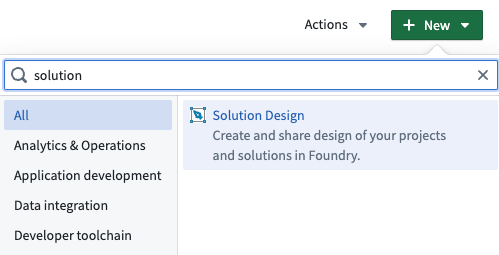
Create a new solution design from your Files manager.
Draw inspiration from a collection of industry and technical patterns
Looking for ideas? You can look through Solution Designer's vast collection of industry and technical patterns to help you get started. Expand from these existing patterns or start from scratch to create the solution architecture for your project and reach a consensus on build plans and strategies that work best for your organization.
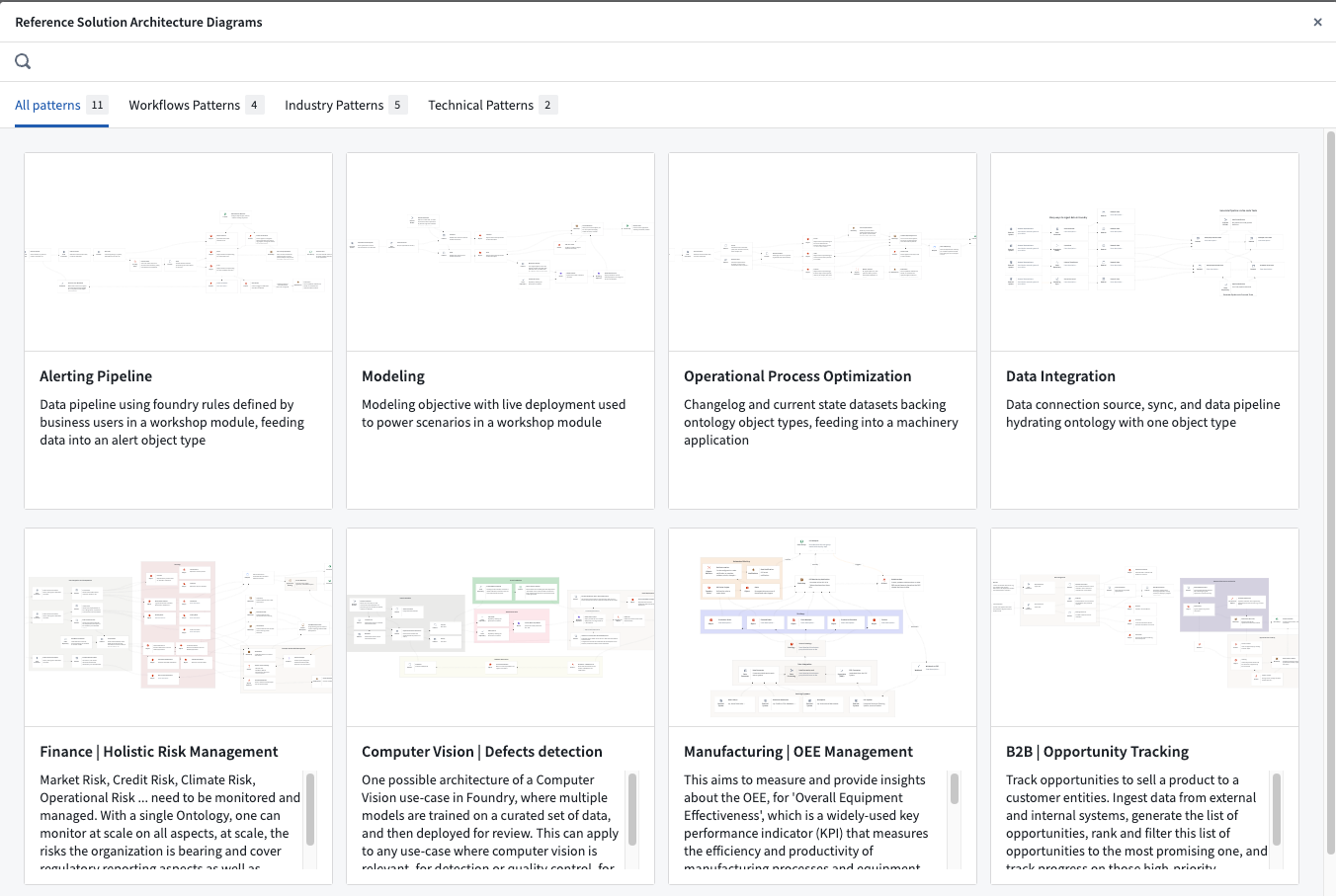
Reference architecture patterns available in Solution Designer.
What's next on the development roadmap?
We are actively working to bring the following features to Solution Designer in the next months:
- Additional workflow guidance and rails to get started
- Resources bootstrapping
- Comprehensive integration with Foundry Marketplace and other applications
Get started with Solution Designer
To get started, review our tutorial on How to create your first diagram.
Otherwise, learn more about Solution Designer in documentation.
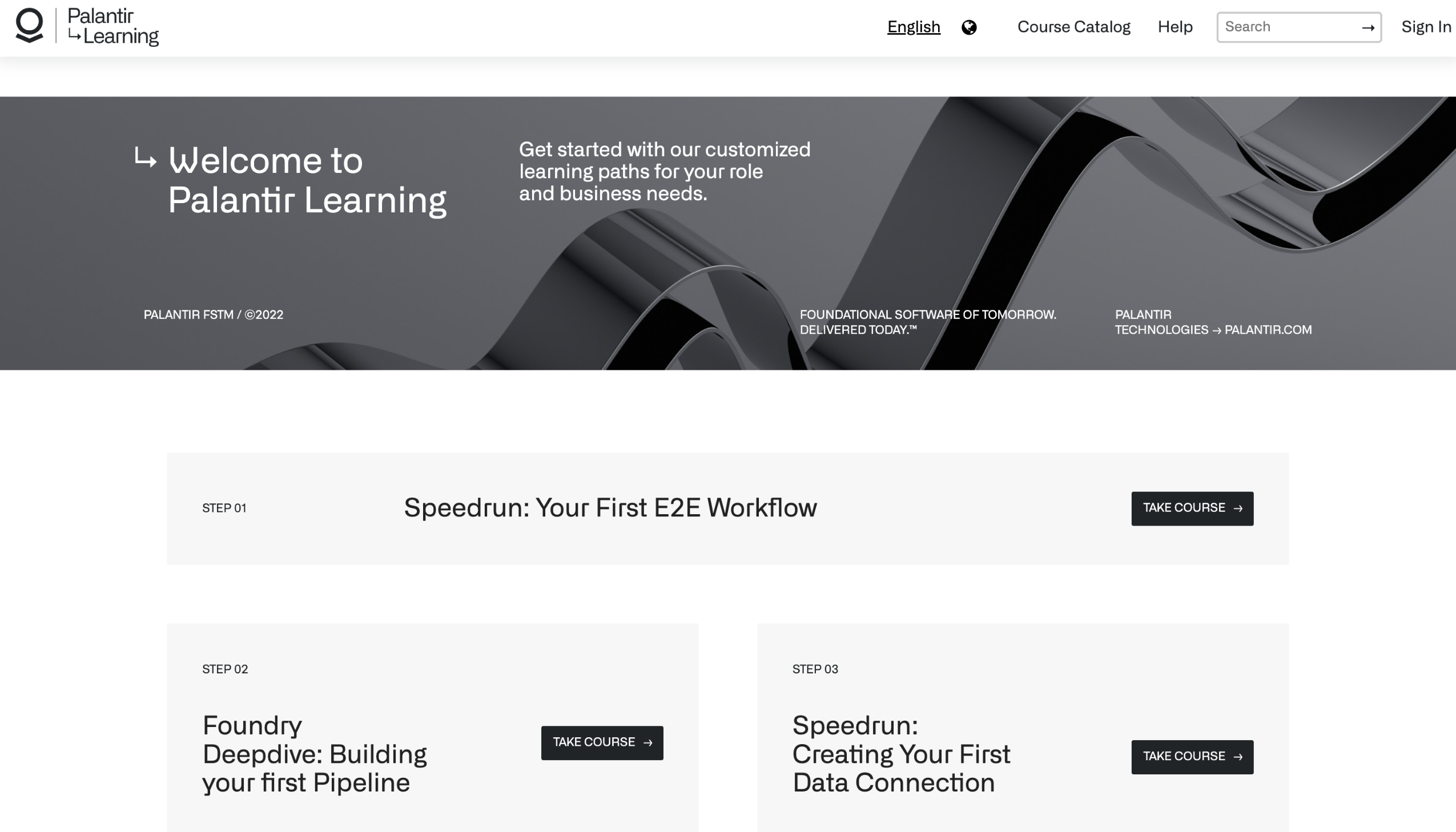
Foundry Academy is being sunset, use Palantir Learning and Build with AIP.
As of today, the Academy application has started its sunset period and will be fully deprecated on November 7, 2024. In its place, we welcome you to use Palantir Learning (Learn.Palantir.com) ↗, our up-to-date platform for training paths and certifications, as well as new in-platform examples and tutorials to learn about Palantir Foundry.
Palantir Learning ↗ is the recommended resource for mastering Palantir platforms. The platform features over 50 courses in various languages and caters to learners from beginners to advanced levels, across specialized tracks like Data Engineer and Application Developer, with new courses added continuously. For users on enrollments without Internet access, this content is also available mirrored in text format through the documentation site.
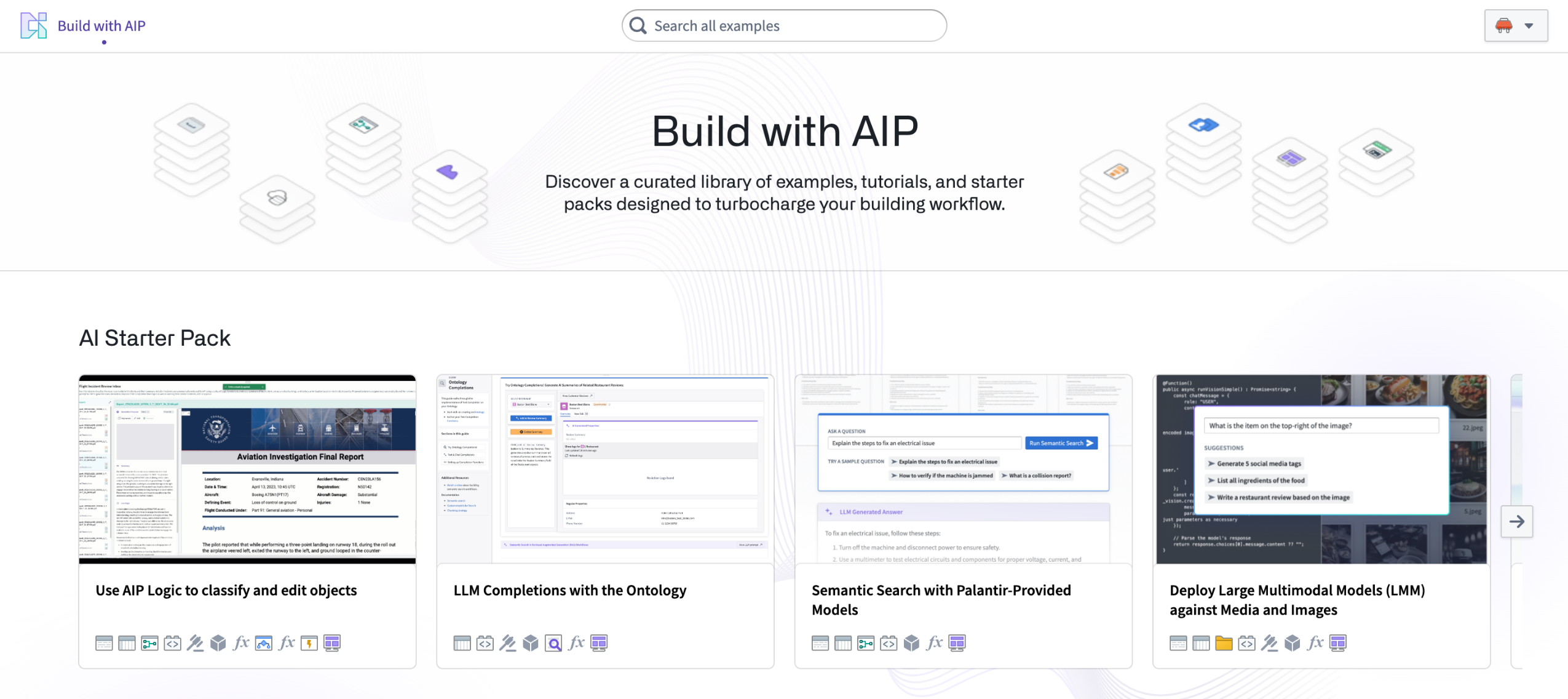
Additionally, you can explore a range of pre-built products available for installation in the Build with AIP application. These products can serve as reference examples, tutorials, or starter packs for builders, adaptable to your specific needs.
Exciting updates about tutorials in AIP Assist are coming soon for users of the custom tutorial building feature in Academy.
What will happen?
Default Academy tutorials, which have already been redirected to learn.palantir.com ↗ for over a year, will be removed imminently. Custom tutorials will continue to be available. When changes occur, we will initiate an Upgrade Assistant intervention campaign to notify impacted customers (those who have created custom Academy tutorials and had active usage in the previous four months) about the deprecation of Academy. For any concerns regarding this transition, contact Palantir Support.
Faster startup times for Ontology Manager
Date published: 2024-05-06
Ontology Manager has been updated to only load upfront the resources that are most relevant to individual users, resulting in a significant performance improvement on startup. From this week on, you can start to experience a faster load time when working in Ontology Manager. No user action is required to activate this enhancement.
The following graph shows a comparative chart of loading times for enrollments with Faster Ontology Loads in green and enrollments (control group) in yellow.
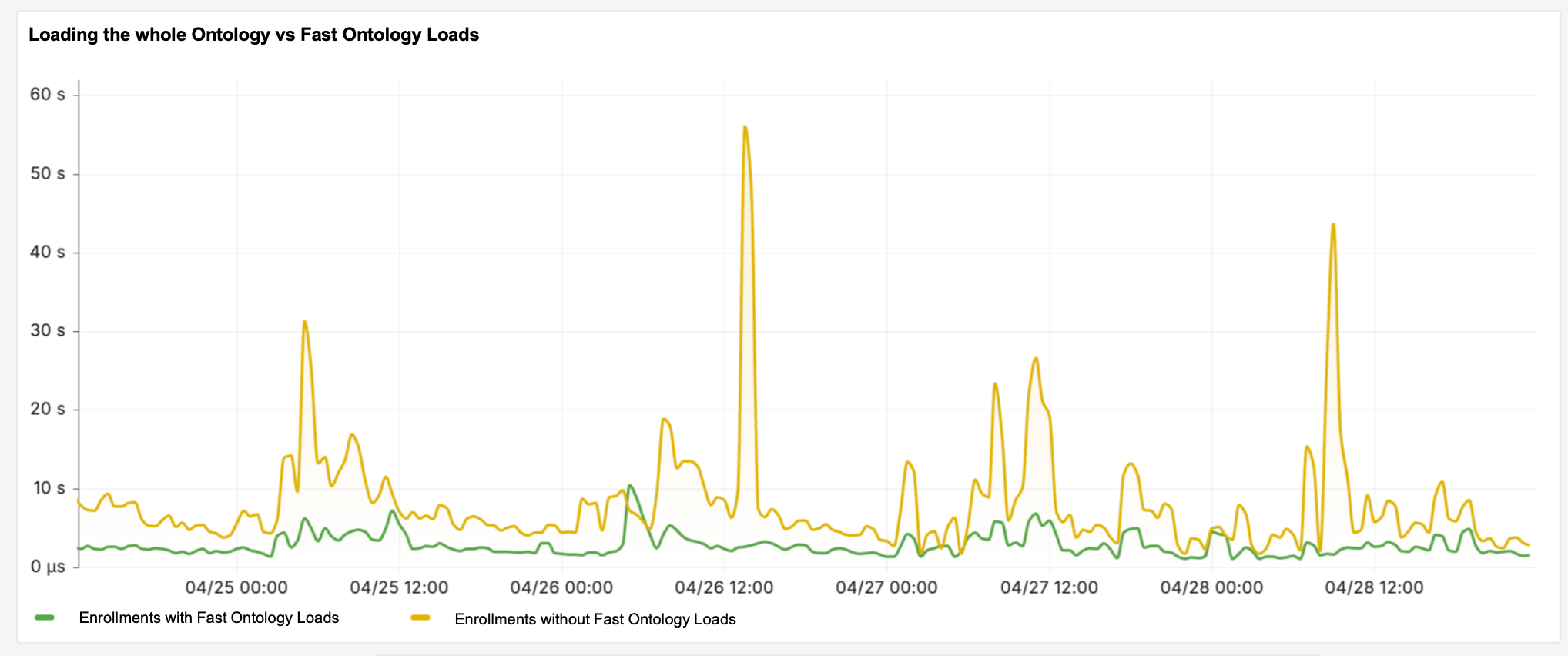
Fast Ontology Loads improve your loading times.
The following workflows benefit from the new Faster Ontology Loads performance enhancement, including:
- Efficient loading of recently-used Ontology resources: You can view or edit your most relevant work faster.
- Efficient loading of Ontology resource queries: Search results are now loaded in batches.
- Quicker access to working state changes: Unsaved changes are now part of the fast load, so you can pick up where you left off without waiting for the full Ontology to load.
- Smoother Ontology switching: Switch between Ontologies before the full Ontology load has completed.
- Faster availability after saves: Ontology Manager is available after a shorter waiting period post-saving.
Additional highlights
Analytics | Notepad
Notepad Resource Header and Toolbar Redesign | The Notepad's UI has been significantly revamped, particularly the resource header and toolbar, to improve usability and organization. Now, elements like collaborator bubbles, web socket connectivity, checkpointing, and the Actions menu are displayed at the top of the document within the resource header. A new View menu has been added to the header, offering user view options such as View checkpoint history and View in print mode. The toolbar now resizes responsively with the web browser and consolidates document editing actions like font resizing, AIP Assist editing, comments, and table configurations. Moreover, various options in the toolbar have been rearranged for better usability.

Introducing a new Map widget in Notepad | Notepad users can now add maps and map templates from the Map app using the map widget, allowing for geospatial visualization creation. Map templates can also dynamically generate map views in Notepad templates by setting inputs with map parameters and providing geohashed object sets.
Analytics | Quiver
Improved Keyboard Navigation in Quiver's Action Selector | The Action Selector in Quiver now supports enhanced keyboard navigation. Users can effortlessly move through options using the up and down arrow keys, and select their desired action with the enter key. This enhancement simplifies the selection process, particularly post-search. Note: Horizontal tab navigation with left and right keys remains unsupported at this time.
Time Series Dashboard Sharing Enhanced in Marketplace | The Marketplace now enables the seamless sharing of Quiver dashboards incorporating time series data. Learn how to use by reviewing Quiver documentation.
App Building | Ontology SDK
Streamlined SDK Integration Experience | A new feature has been introduced allowing users to unveil additional SDK generation insights with a simple click on any SDK generation entry. This enhancement provides in-depth metadata and step-by-step installation guidance, streamlining the integration of the latest SDK updates into developers' local setups. The feature is embedded directly within the Ontology SDK interface, ensuring immediate access to essential documentation and facilitating a smoother development experience.
App Building | Slate
Streamlined Media Set Enhancements | The introduction of a new feature now permits users to effortlessly add new items to a media set from the convenience of the left sidebar, simplifying the update process for media sets that rely on file imports. Moreover, the system now ensures the cache is promptly refreshed post-upload, guaranteeing accurate updates to both the preview and item count.
Improved Query Parsing Notifications in Slate | Slate introduces a new feature for more informative feedback on query parsing errors. The Queries panel now displays a callout in edit mode that outlines parsing issues and offers syntax recommendations for adjustments. The Health Check dialog will now alert users to these issues, aiding in the creation of more precise queries and reducing the likelihood of result misinterpretations.
App Building | Workshop
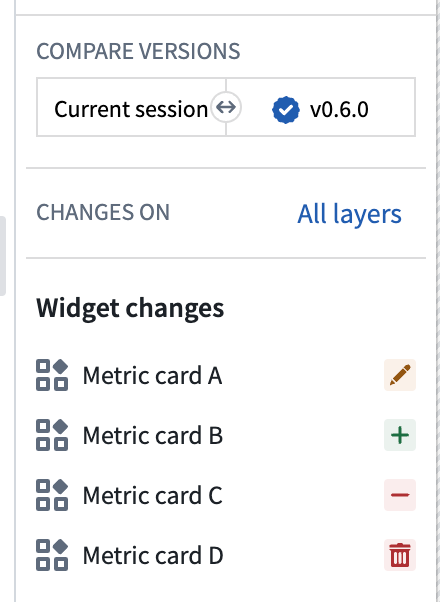
Workshop Changelog Panel | The Workshop Changelog panel is now generally available. This feature enables builders to visualize changes between workshop module versions. It is useful for tracking modifications made over time and identifying which change potentially caused an issue when debugging problems with the module. Review Changelog panel documentation.
Data Integration | Code Repositories
Expanded Catalog Dataset Input for External Transforms | Foundry's external transforms have been upgraded to support catalog dataset inputs, streamlining the execution of transforms that are designed to operate without inputs or exclusively with catalog dataset inputs.
Data Integration | Data Connection
Refined Egress Policy Submission Process | Users now have the capability to submit network egress policy suggestions, which are then subject to approval or denial via the control panel by an Information Security Officer. Suggestions made directly by an Information Security Officer receive automatic approval shortly thereafter, ensuring that officers can efficiently establish policies. This enhancement democratizes the process of suggesting egress policies, bolstering security management practices. For comprehensive instructions on egress policy management, review the network egress documentation.


Introducing Databricks Connector [Beta] | The Databricks Connector [Beta] allows Foundry customers to connect to their Databricks environments to ingest data into Foundry for analysis and operations. The connector supports accessing both Unity and non-Unity Databricks Catalogs. The connector currently supports both batch and incremental ingests. We are actively developing capabilities for Exports and Virtual tables. For more information, review our Databricks Connector [Beta] documentation.
*Databricks™ is a trademark of Databricks, Inc.
All third-party trademarks (including logos and icons) referenced remain the property of their respective owners. No affiliation or endorsement is implied.*
Improved Multi-Identity Display in S3 Source Connections | Users can now access and view up to 15 cloud identities within S3 Source Connections, assuming they possess the necessary permissions and multiple identities are present. This enhancement broadens the visibility of cloud identities, allowing users additional credentials for their S3 data sources.
Revamped Visuals on Data Connection Entry Page | The entry screen for Data Connection now showcases card imagery, enhancing both the informational value and visual appeal for users.
Data Integration | Pipeline Builder
Streamlined Data Input via Enhanced Popovers in Pipeline Builder | Pipeline Builder interface has been upgraded to include advanced popovers for streamlined manual data entry within tables. This update simplifies the process of inputting intricate data types like timestamps, dates, arrays, binary, structs, and maps. By typing or double-clicking on a cell, users can now access a more intuitive interface that guides them through the precise input of data.
Streamlined Ontology Output Transformation | Users now have the capability to seamlessly transition object type outputs to dataset outputs within the primary Ontology type output editor in Pipeline Builder. This enhancement grants comprehensive editing privileges for object types using the Ontology Manager.
Streamlined Preview Enhancement with Custom Filter Expressions | The latest update to Pipeline Builder introduces a custom filter expression feature, streamlining the preview process by allowing for the application of user-defined filters. This enhancement facilitates a quicker and more effective identification and resolution of data inconsistencies by enabling filter application across various stages of the pipeline, thus optimizing the time spent on troubleshooting data quality issues.
Intuitive Output Assignment via Context Menu in Pipeline Builder | Using the context menu by right-clicking on a node within the Pipeline Builder now specifically allows for the assignment of an output to job groups when an output node is highlighted. This update enhances the user interface by making the assignment action context-sensitive, directly correlating with the user's selection of an output node, thereby streamlining the workflow within the Pipeline Builder.
Model Integration | AIP Logic
Consolidated AIP Logic Uses panel | Users can now directly observe downstream usage of functions within AIP Logic files, enhancing the ease of tracing function impact. This new feature reduces the number of clicks required to create a new action backed by a AIP Logic function from 12 to four.

Introducing Object links in the Query Objects tool | The query objects tool can now traverse object links. To use this feature, open an LLM block, navigate to the Query objects property selector, and select the link types and objects you want your LLM to access.

Introducing Object links in the Query Objects tool | The query objects tool can now traverse object links. To use this feature, open an LLM block, go to the Query objects property selector, and select the link types and objects you want your LLM to access.
Consolidated AIP Logic usages panel | Users can now directly observe downstream usage of functions within AIP Logic files, enhancing the ease of tracing function impact. This new feature reduces the number of clicks required to create a new action backed by a AIP Logic function from 12 to 4.
Ontology | Ontology Management
Flagging Unassociated Properties in Ontology Manager | Ontology Manager's Properties tab now highlights properties that are associated with non-existent datasource columns. This enhancement simplifies the process of spotting and cleaning up these unassociated properties.
Streamlined TypeScript Code Synthesis in Ontology Manager | Ontology Manager now streamlines the creation of TypeScript code, enabling users to effortlessly transform simple actions into executable scripts. This advancement facilitates the creation, modification, or removal of links and objects by auto-generating TypeScript code snippets from defined actions. Designed to reduce the TypeScript learning curve and promote interactive learning, this feature eases the transition from action-based to script-based customizations.
Security | Projects
Enhanced Project Folder Callouts | Intervention callouts are now highlighted within the Project folder view, offering users immediate access to pertinent project-related information.
Improved Resource Import Functionality | Import requests for resources can now be initiated by users lacking the import-from operation permission, effectively broadening access to previously restricted resources.
中文翻译
公告
提醒: 请注册 Foundry 新闻通讯,即可直接在收件箱中收到关于新产品、功能及平台改进的摘要。有关如何订阅的更多信息,请参阅 Foundry 新闻通讯与产品反馈渠道公告。
欢迎在我们的开发者社区论坛 ↗ 分享您对这些公告的看法。
引入使用自定义文档为 AIP Assist 赋能的能力
发布日期:2024-05-29
您现在可以为 AIP Assist 配备您的个人文档,使其能够按需向用户提供信息。自 5 月 27 日那周起,在所有启用了 AIP 的注册环境中,控制面板中提供了配置选项,使 AIP Assist 能够了解您的自定义操作文档。此功能包括集中管理 Assist 何时可以访问文档、访问哪些文档,以及是否限制仅在用户查看特定资源时引用。通过允许 AIP Assist 回答用户关于如何操作工作流程以及如何导航平台的问题,您可以提高用户上手工作流程的便捷性。
您可以允许您的 Assist 共享的信息可能包括项目文档、标准操作程序 (SOP) 以及类似 Wiki 的信息,例如数据摄取流程、请求权限的程序、组织项目的最佳实践以及一般信息。更聚焦的文档,例如用例和工作流程文档,对于用户入职、培训课程以及促进通用的自助服务和可用性特别有益。了解更多。
使用您的自定义文档赋能 AIP Assist,以进一步定制 Assist 回答与您的操作相关的项目和用例文档的能力。
首先,启用对文档存储库的访问
要利用此功能,您必须在代码存储库中拥有一个文档类型的存储库,其中包含自定义文档。如果尚不可用,请联系您的 Palantir 代表以启用文档类型存储库;如果已设置,请在创建后将该存储库加入白名单。要完全管理文档源之外文档的范围,您还必须拥有使用控制面板的权限。
管理 AIP Assist 何时可以访问文档以回答用户问题。设置为"始终可用"或"按资源"以实现更精细的控制。
更多信息,请查阅 AIP Assist 自定义文档指南。
Spark 3.5.1 升级
发布日期:2024-05-29
Foundry 转换中使用的 Spark 版本正在从 3.4.1 升级到 3.5.1。这带来了大量的错误修复、性能改进和新功能,可在发布页面 ↗上查看。无需任何操作即可启用此升级。转换运行时版本会根据转换版本文档,通过裁决在后台自动管理。
Spark 版本控制策略 ↗ 不允许在次要版本之间引入 API 和行为更改。任何更改都记录在迁移指南 ↗中,Palantir 已对其进行测试,以确保用户体验保持不变。
升级可能会影响管道的性能并引入新的错误。对于高风险作业,请使用临时固定来控制升级推出,直到您确认升级对您的工作流程没有问题。
在 Ontology 中引入对象类型组
发布日期:2024-05-29
构建者现在可以利用一个功能完备的 Ontology 原语——组来对对象类型进行分类,而不是直接标记对象。组使得搜索对象更容易,并提高了复杂 Ontology 的可读性。
新的组功能
现在可以从 Ontology Manager 左侧导航栏中的新"组"菜单修改组元数据。此外,任何可以查看 Ontology 的用户现在都可以发现所有组。此更改使组可见性与其他 Ontology 原语保持一致,以提高治理的清晰度和透明度。
从 Ontology Manager 查看和修改对象类型组。
在 Ontology Manager 中,组可以作为对象类型配置的一部分进行添加或删除。组在 Ontology Manager 中也是可搜索和可过滤的,并用于对象资源管理器概览页面对对象类型进行分类。
将组添加为对象类型配置的一部分。
旧版组
某些旧版组不符合自动迁移条件。在这些情况下,Ontology 所有者会通过升级助手干预收到通知,表明需要手动操作。
自 2024 年 5 月 22 日起,无法安全迁移的旧版组已对所有应用程序(如 Workshop 和对象资源管理器)中的操作用户隐藏。为了提供向后兼容性,旧版组的名称仍作为类型类元数据存储在对象类型上。
Ontology 所有者可以继续使用 Ontology Manager 手动迁移这些隐藏的旧版组。为此,请导航至左下角的 Ontology 配置菜单,然后选择批准所有组进行迁移。
某些旧版组需要手动迁移才能解锁新功能。
Pipeline Builder 现在支持在 LLM 运行中输出错误
发布日期:2024-05-23
您现在可以配置您的 LLM 输出列,使其在行失败时同时包含输出值和错误消息,从而为 LLM 相关问题提供更轻松的调试。借助此功能,您可以在输出列中同时获得 LLM 响应和错误消息(作为结构体)。这种对 LLM 错误的透明性使得更容易调试处理问题并了解模型后台发生的情况。示例错误消息可能包括:
- "超出上下文限制"
- "无法强制转换为提供的输出类型"
- "输入提示为空或 null"
配置为包含错误的 LLM 提示示例。
要使用此功能:
- 在 Pipeline Builder 中,打开一个"使用 LLM"节点并创建一个提示。
- 找到输出类型部分。
- 打开包含错误复选框。
当包含 LLM 错误消息时,节点输出将是一个结构体类型,包含常规输出值(可以是任何支持的输出类型,包括结构体)和关联的错误消息。
包含错误消息的结构体输出类型示例(包含数组、字符串和整数)。
您可以通过取消选中包含错误框,轻松打开或关闭此功能,以实现灵活的错误透明度控制。
从我们的文档中了解有关在 Pipeline Builder 中使用 LLM 的更多信息。
在 Slate 中引入页面和共享变量
发布日期:2024-05-23
页面为应用程序构建者提供了将应用程序 UI、逻辑和资源(数据、变量、函数、事件)拆分为单个应用程序内不同页面的能力,为每个单独加载的页面提供隔离的作用域,包括小部件、函数、查询等。此外,您现在可以对变量进行更精细的控制,能够按页面作用域配置它们,分为"本地"和"共享",共享变量可从任何页面访问,从而增强应用程序设计、性能和用户体验。
加快应用加载时间
将 Palantir Slate 应用程序拆分为多个视图的常见模式是使用选项卡式容器。然而,这种方法可能导致非常大的页面加载,限制开发人员对加载数据的控制级别,并且由于组件和小部件列表单一,会带来小部件可维护性和组织方面的挑战。
从选项卡式容器切换到页面允许更大的应用程序更快地加载信息,因为它们只加载与每个页面特定作用域相关的数据。
现在可以在单个 Slate 应用程序中构建多个页面。
这种方法允许将应用程序逻辑流划分到具有有意义名称的 URL 路由的各个页面中。此外,在共享指向 Slate 应用程序的链接时,可以在 URL 中使用页面名称直接导航到该页面。
应用程序逻辑流现在可以划分到具有有意义名称的 URL 的各个页面中。
提高应用程序稳定性
将复杂 Slate 应用程序的逻辑拆分为页面也简化了重构,从而提高了可维护性和性能。
页面间无缝导航
新的 onNavigate 事件和 navigateTo 操作允许在同一应用程序内的页面之间进行简单的导航操作。导航到某个页面将更新 URL 路由以指向目标页面。
导航到某个页面将更新 URL 路由以指向目标页面。
在页面之间共享应用程序状态
新的共享变量可从任何 Slate 页面访问,允许跨页面进行应用程序级别的状态共享。
有关 Slate 的更多信息,请查阅 Slate 应用程序页面的文档。
引入 Ontology 用户编辑和数据源更新的冲突解决策略 [GA]
发布日期:2024-05-23
Foundry Ontology 中的对象实例可以由输入数据源和用户编辑创建和修改。当单个对象实例(例如,具有特定主键值的行或对象)同时从输入数据源和用户编辑接收数据时,必须使用冲突解决策略透明地解决这些接收到的值。
您可以在对象类型级别配置冲突解决策略。在 Ontology Manager 中选择一个对象类型,然后导航到数据源部分。
请注意,冲突解决策略仅受 Object Storage V2 对象类型支持。
冲突解决策略
Ontology 编辑有两种冲突解决策略:
- 应用用户编辑(默认):使用此策略,对象实例的最终状态始终由应用于它的用户编辑决定,无论该对象实例未来的数据源更新如何。
- 应用最新值(有限 Beta):使用此策略,仅当用户编辑的时间戳值晚于该对象实例的数据源更新时间戳值时,才应用用户编辑。
此策略还要求数据源包含一个 Timestamp 类型的属性;Date 属性类型不适用于此选项。Timestamp 属性用于评估是应用用户编辑还是输入数据源更新。
在 Ontology Manager 中配置冲突解决策略。
为多个数据源配置不同的解决策略
您可以为对象类型的每个输入数据源配置不同的冲突解决策略。例如,对于由两个数据源支持的对象类型,您可以配置一个数据源使用应用用户编辑策略,另一个数据源使用应用最新值策略。
在 Ontology Manager 中为多个数据源配置冲突解决策略。
如果用户编辑更新了跨多个数据源的属性,Ontology Manager 将使用支持该属性的数据源的冲突解决策略来确定是始终应用还是有条件地应用编辑。
在代码存储库中引入快速启动
发布日期:2024-05-23
现在所有注册环境均可使用,代码存储库现在可以通过直观的快速启动发现和导航界面来指导您的存储库设置。为开发选择理想的基于代码的工作流程可能很困难,但这个用户友好的快速启动界面简化了过程。无需再翻阅大量文档;只需回答三个快速问题或搜索您的存储库类型,例如"Python 转换",即可轻松设置您的存储库,并附带示例和 README 来指导您的开发之旅。
代码存储库的快速启动页面。
直观地查看、选择和工作流程发现
快速启动使应用程序构建者能够:
- 查看 Palantir 平台中所有可用的基于代码的工作流程。
- 为您的工作流程选择正确的模板。
- 从 Marketplace 发现参考示例。
只需回答三个问题即可获得针对您存储库的推荐和示例。
开发路线图上的下一步是什么?
我们正在积极开发新的功能和模板,同时为 Marketplace 创建更多参考示例。
引入 AIP Accelerate [Beta],您的 LLM 工作流程笔记本环境。
发布日期:2024-05-21
AIP Accelerate 是一个用于构建基于大型语言模型 (LLM) 的工作流程的笔记本环境。自 6 月 3 日那周起,在所有注册环境中可用,AIP Accelerate 使您能够快速迭代利用各种形式数据的 LLM 提示,无论是从 Foundry 导入的数据集,还是您计算机上的文件。借助 AIP Accelerate 提供的 LLM 操作库,您可以构建复杂的思维链、解释上传的图像以及生成 LLM 驱动的洞察。AIP Accelerate 支持最新的生成式 AI 模型,是一个用于在调查性业务工作流程中运用 LLM 能力的沙盒。
AIP Accelerate 登录页面。
LLM 的响应有效性高度依赖于上下文环境。AIP Accelerate 使您能够通过使用上下文线程来仔细管理提供给 LLM 的上下文。上下文线程是 Accelerate 的主要组件之一,表示提供给大型语言模型的信息链。单元格通过上下文线程将信息向下传递给其子单元格。工作流程构建者可以使用上下文线程突破线性聊天的模式,设计不受单一上下文路径限制的工作流程。此外,AIP Accelerate 利用平台内的原语,对各种形式的结构化和非结构化数据(例如表格数据、PDF 或图像文件)进行操作,以进行复杂分析。
AIP Accelerate 上下文线程,其中子 LLM 单元格继承其父单元格的上下文,继续对话。
在上图中,我们有一个两单元格的上下文线程。我们可以继续嵌套单元格以深入与 LLM 的对话,或者在任意单元格之后分支并走不同的路径。
安全且可定制的 AI 驱动分析
AIP Accelerate 的主要功能包括:
- 用户友好的界面: AIP Accelerate 拥有直观的界面,使工作流程构建者能够轻松地使用 LLM 构建复杂的多维分析。
- 生成式 AI 模型: 自定义在执行基于文本和视觉的任务时使用哪些可用的 LLM。
- 对真实数据进行操作: 在平台内的数据(如数据集或媒体集(图像或 PDF 文档))上部署 LLM。
- 共享结果: 将分析结果保存为新数据集,以便在其他 AIP 工具中使用,或与其他用户共享工作流程。
- 数据安全: AIP Accelerate 建立在与 Palantir 平台其他部分相同的严格安全模型之上,包括基于用户的数据权限。这些平台安全控制仅授予 LLM 完成任务所需的最小权限。
AIP Accelerate 正在积极开发中,对更多操作的支持即将推出。
访问 AIP Accelerate
可以从平台的工作区导航栏或使用快速搜索快捷键 CMD + J (macOS) 或 CTRL + J (Windows) 访问 AIP Accelerate。或者,您可以从文件中通过选择 +新建,然后选择 Accelerate 来创建新工作流程,如下所示。
Foundry 应用导航菜单。
在 AIP Assist 中引入新功能以改善代码体验
发布日期:2024-05-15
我们很高兴在 AIP Assist 中引入两项新功能,以改善开发者体验并提高效率。新的代码工具有助于回答复杂的编码问题,并且现在使用TypeScript 编译器来改进 TypeScript 代码并标记最初提议代码中的问题。此功能现已适用于所有注册环境。
获取准确、特定于 Palantir 的代码
借助新的 AIP Assist 代码工具,我们现在能够针对多个应用程序和功能返回包含准确、特定于 Palantir 的代码的答案。例如,您可以提出一个专注于 Ontology 的问题("如何编写 Ontology 编辑函数?"),或询问特定语言("如何在 Python 转换中并行解析原始文件?")。以前,AIP Assist 可以使用通用的、非 Palantir 的代码提供答案,这些代码展示了通用用例。通过这些改进,开发者将能够收到准确、具体的代码,直接支持他们在代码存储库中的工作流程。
在引入时,AIP Assist 中的代码工具支持以下语言:
- Python
- TypeScript
- SQL
- PySpark
- Contour 表达式语言
新的代码工具改进了 AIP Assist 中的代码响应。
随着 Palantir 工程师更新和扩展我们的代码示例集合,新的代码工具将继续改善 AIP Assist 中的开发者体验;这些示例现已可在我们的文档中获取,将为解决复杂问题和转换提供用例指导和灵感。
即时修复编译器错误
AIP Assist 现在也与 TypeScript 编译器集成,以标记类型不匹配、未处理的 Promise 等问题。一旦 AIP Assist 生成响应问题的初始代码,代码将通过编译器以查找错误,并允许用户直接在 Assist 界面中提交更改。
直接在 AIP Assist 中编译 Typescript 错误。
在 TypeScript 编译器工作时,AIP Assist 会接收反馈,从而迭代地优化生成的代码。编译器调整类型、添加缺失的类型定义、更正 Promise 处理,并确保代码符合 TypeScript 的严格类型检查。每次迭代都会由编译器重新检查,直到代码无错误编译。
AIP Assist 不仅解决了代码的即时问题,还为开发者提供了如何避免将来出现类似问题的见解。
了解更多关于可用于改善开发者体验的 AIP 功能。
Pipeline Builder 现在支持 LLM 节点的强制输出类型
发布日期:2024-05-15
您现在可以在 Pipeline Builder 中指定 Use LLM 节点的输出类型!这些功能确保了输出类型的一致性,增强了您在管道中维护数据类型一致性和优化数据处理的能力。
如何在 Use LLM 节点中强制输出类型:
- 确保您的 Foundry 前端实例已更新到 v6.321.0 或更高版本。
- 向您的管道添加一个
Use LLM节点。如果您使用模板,请先提交模板以进入提示页面。 - 在提示屏幕上,找到输出类型字段,然后从下拉菜单中选择所需的输出类型。
使用下拉菜单为您的 Use LLM 节点指定输出类型。
对于实体提取,您还可以在结构体内部指定输出类型,以提供更大的灵活性和对数据输出的控制。
包含数组、字符串和整数的结构体输出类型示例。
从我们的文档中了解有关在 Pipeline Builder 中使用 LLM 的更多信息。
使用 Ontology 流式传输同步实时数据
发布日期:2024-05-15
借助 Foundry 新的 Ontology 流式传输功能(现已正式发布),可在数秒内将操作数据呈现给用户。
Object Storage V2 现在支持创建由流作为输入数据源支持的对象。通过脱离用于非流式数据集的批处理基础设施,流能够在数秒内将数据索引到您的 Foundry Ontology 中,以支持对延迟敏感的操作工作流程。
您现在可以直接在 Pipeline Builder 或 Ontology Manager 中配置具有流输入数据源的对象类型,类似于其他 Ontology 对象类型。
在 Pipeline Builder 中配置流式对象类型
在 Ontology Manager 中配置流式对象类型
如果您尚未配置流,可以通过与数据连接中的现有流集成或在 Pipeline Builder 中构建流式管道来创建一个。请参阅索引常见问题解答以了解有关流如何被索引的更多信息。
引入升级助手提示
发布日期:2024-05-15
我们很高兴推出升级助手提示,现已适用于所有注册环境。从今天开始,当 Palantir 平台上的某个资源受到影响时,您将开始看到提示,表明"此 [资源] 受到正在进行的升级的影响"。
新功能通过在 Palantir 平台升级期间直接向分配的用户高亮显示受影响的资源,增强了受影响资源的可见性。
这对您意味着什么?
从今天开始,如果您被分配了某个特定资源,且该资源受到升级助手中跟踪的升级的影响,您将能够直接在平台内看到此信息,如下面的截图所示。此功能确保:
- 升级期间所有资源都得到处理: 您不再需要担心在升级期间错过关键资源。
- 提高可见性: 轻松识别和导航受升级影响的资源,以便您采取适当行动。
对 Ontology 资源的支持正在积极开发中,将在稍后发布。
通过查阅升级助手文档了解更多信息。
控制面板中的 AIP 模型启用
发布日期:2024-05-09
注册管理员现在可以使用控制面板来启用 AIP 模型组以供使用。为此,请导航至 AIP 设置扩展下的模型启用选项卡。
在控制面板中,模型根据其法律状态和使用策略被分组到模型系列中。这些模型系列包括由 Palantir 托管的开源或专有模型,以及由 Palantir 提供但托管在 Azure、AWS Bedrock 或 Google Vertex AI 上的模型。
在使用之前,管理员必须在注册级别接受与使用条件相关的模型系列条款和协议。一旦模型被启用,它就可以立即在平台上所有受支持的 AIP 应用程序中使用。
一旦在控制面板的 AIP 设置下启用了 AIP,模型启用选项卡就会可见。
您的注册可用的所有模型系列,系列组显示为已启用、已禁用或不允许。
选择模型系列后,您将看到所有可用的模型并执行协议以启用它。
控制面板 AIP 设置下的模型启用选项卡还允许管理员禁用已在该注册上启用的模型。在禁用任何模型组之前,请考虑:
- 禁用用于 AIP 原生功能(如 AIP Assist、Code Assist)的模型将禁用这些功能。
- 禁用一组模型将破坏任何利用该组模型的工作流程。
请注意,实验性模型目前无法通过控制面板访问。首先启用模型系列,然后联系您的 Palantir 代表以获取常规访问权限。对激活新模型组感兴趣的内部部署或特定注册也必须联系 Palantir 代表。
有关更多信息,请查阅相关文档。
在代码存储库中引入外部转换的预览功能
发布日期:2024-05-09
代码存储库现在支持外部转换的预览功能。用户可以运行外部转换的预览,而无需等待检查和构建完成,从而允许他们在开发过程中更快地迭代。目前,仅支持没有输入的外部转换。
要查看预览期间写入的数据和/或文件,请选择预览,然后选择您的输出数据集。
外部转换的预览示例。
作为下一步,我们正在努力将预览功能扩展到所有输入类型,并增加对基于源的外部转换的支持。
引入 Solution Designer,用于设计您的业务用例 [GA]
发布日期:2024-05-06
Solution Designer 是一个交互式工具,用于创建使用 Palantir 平台构建的解决方案的架构表示,包括第一方和第三方集成点的表示、平台资源的链接、按需访问文档和最佳实践等。
Solution Designer 正在加速发布轨道上,将于本周末对所有注册环境可用。
建模工作流程的解决方案设计。
Solution Designer 允许您:
- 发现更多平台功能: 了解平台组件以及它们如何相互交互。探索精选的行业和技术参考架构库。
- 架构您的解决方案: 从头开始创建图表,编辑和扩展参考模式,导入现有资源,并为用例解决方案的每个步骤添加注释或描述。
- 协作和传递知识: 在架构讨论与平台上的特定应用程序和/或代码之间建立联系。将解决方案设计与项目现有工作一起共享。
Solution Designer 是平台感知的,这意味着您可以直观地与代表 Foundry、AIP 和其他组件的节点进行交互,并更有效地为您的用例设计解决方案。
如果您是平台管理员并希望禁用 Solution Designer,请导航至控制面板 > 为正确的组织配置应用程序访问,然后使用 Solution Designer 列表旁边的管理选项并保存以限制访问。
直接从文件访问 Solution Designer
可以从平台的工作区导航栏或使用快速搜索快捷键 CMD + J (macOS) 或 CTRL + J (Windows) 访问 Solution Designer。或者,您可以从文件中通过选择 +新建 > 解决方案设计 来创建新的解决方案设计图,如下所示。
从您的文件管理器创建新的解决方案设计。
从行业和技术模式集合中汲取灵感
寻找灵感?您可以浏览 Solution Designer 庞大的行业和技术模式集合,以帮助您入门。从这些现有模式扩展或从头开始,为您的项目创建解决方案架构,并就最适合您组织的构建计划和策略达成共识。
Solution Designer 中可用的参考架构模式。
开发路线图上的下一步是什么?
我们正在积极努力,在未来几个月内为 Solution Designer 带来以下功能:
- 更多入门工作流程指导和轨道
- 资源引导
- 与 Foundry Marketplace 和其他应用程序的全面集成
开始使用 Solution Designer
要开始使用,请查阅我们的教程如何创建您的第一个图表。
或者,在文档中了解更多关于 Solution Designer 的信息。
Foundry Academy 正在退役,请使用 Palantir Learning 和 Build with AIP。
从今天起,Academy 应用程序已开始其退役期,并将于 2024 年 11 月 7 日完全弃用。取而代之,我们欢迎您使用 Palantir Learning (Learn.Palantir.com) ↗,这是我们最新的培训路径和认证平台,以及平台内新的示例和教程,以了解 Palantir Foundry。
Palantir Learning ↗ 是掌握 Palantir 平台的推荐资源。该平台提供超过 50 门各种语言的课程,面向从初学者到高级水平的学习者,涵盖数据工程师和应用程序开发者等专业方向,并持续添加新课程。对于无法访问互联网的注册用户,此内容也可通过文档站点以文本格式镜像提供。
此外,您可以探索 Build with AIP 应用程序中可安装的一系列预构建产品。这些产品可以作为构建者的参考示例、教程或入门包,并可适应您的特定需求。
对于 Academy 中自定义教程构建功能的用户,AIP Assist 中关于教程的激动人心的更新即将推出。
将会发生什么?
默认的 Academy 教程(一年多来已重定向到 learn.palantir.com ↗)将很快被移除。自定义教程将继续可用。当发生变化时,我们将启动升级助手干预活动,以通知受影响的客户(那些创建了自定义 Academy 教程并在过去四个月内有活跃使用的客户)关于 Academy 的弃用。对于此过渡的任何问题,请联系 Palantir 支持。
Ontology Manager 更快的启动时间
发布日期:2024-05-06
Ontology Manager 已更新,仅预先加载与各个用户最相关的资源,从而在启动时实现显著的性能改进。从本周开始,您在使用 Ontology Manager 时可以体验到更快的加载时间。无需用户操作即可激活此增强功能。
下图显示了加载时间的比较图表,其中绿色表示具有更快 Ontology 加载的注册环境,黄色表示注册环境(对照组)。
快速 Ontology 加载改善了您的加载时间。
以下工作流程受益于新的更快 Ontology 加载性能增强,包括:
- 高效加载最近使用的 Ontology 资源: 您可以更快地查看或编辑您最相关的工作。
- 高效加载 Ontology 资源查询: 搜索结果现在分批加载。
- 更快访问工作状态更改: 未保存的更改现在是快速加载的一部分,因此您可以在不等待完整 Ontology 加载的情况下从中断处继续。
- 更平滑的 Ontology 切换: 在完整 Ontology 加载完成之前切换 Ontology。
- 保存后更快可用: Ontology Manager 在保存后等待时间更短即可使用。
其他亮点
分析 | Notepad
Notepad 资源标题和工具栏重新设计 | Notepad 的 UI 已进行重大改进,特别是资源标题和工具栏,以提高可用性和组织性。现在,协作者气泡、Web Socket 连接、检查点和操作菜单等元素显示在文档顶部的资源标题内。标题中添加了一个新的视图菜单,提供用户视图选项,例如查看检查点历史记录和以打印模式查看。工具栏现在可响应式地调整大小以适应 Web 浏览器,并整合了文档编辑操作,如字体调整、AIP Assist 编辑、注释和表格配置。此外,工具栏中的各种选项已重新排列以获得更好的可用性。
在 Notepad 中引入新的地图小部件 | Notepad 用户现在可以使用地图小部件从地图应用添加地图和地图模板,从而允许创建地理空间可视化。地图模板还可以通过使用地图参数设置输入并提供地理哈希对象集,在 Notepad 模板中动态生成地图视图。
分析 | Quiver
Quiver 操作选择器中改进的键盘导航 | Quiver 中的操作选择器现在支持增强的键盘导航。用户可以使用向上和向下箭头键轻松浏览选项,并使用回车键选择所需操作。此增强简化了选择过程,尤其是在搜索后。注意:目前仍不支持使用左右键进行水平选项卡导航。
Marketplace 中增强的时间序列仪表板共享 | Marketplace 现在支持无缝共享包含时间序列数据的 Quiver 仪表板。通过查阅 Quiver 文档了解如何使用。
应用构建 | Ontology SDK
简化的 SDK 集成体验 | 引入了一项新功能,允许用户只需单击任何 SDK 生成条目即可揭示额外的 SDK 生成见解。此增强功能提供深入的元数据和分步安装指南,简化了将最新 SDK 更新集成到开发者本地环境的过程。该功能直接嵌入在 Ontology SDK 界面中,确保立即访问基本文档并促进更顺畅的开发体验。
应用构建 | Slate
简化的媒体集增强功能 | 引入了一项新功能,允许用户现在从方便的左侧边栏轻松向媒体集添加新项目,简化了依赖文件导入的媒体