Announcements(公告)
REMINDER: Sign up for the Foundry Newsletter to receive a summary of new products, features, and improvements across the platform directly to your inbox. For more information on how to subscribe, see the Foundry Newsletter and Product Feedback channels announcement.
Share your thoughts about these announcements in our Developer Community Forum ↗.
Introducing community.palantir.com, our official Palantir Developer Community
Date published: 2024-06-25
We are proud to introduce the Palantir Developer Community ↗, a collaborative space dedicated to the exchange of ideas and expertise among Foundry and AIP users and partners. Through this community, Palantir developers, application builders, and power users can connect with one another to ask and answer questions, provide product feedback and stay up-to-date with the latest product initiatives and developer events.
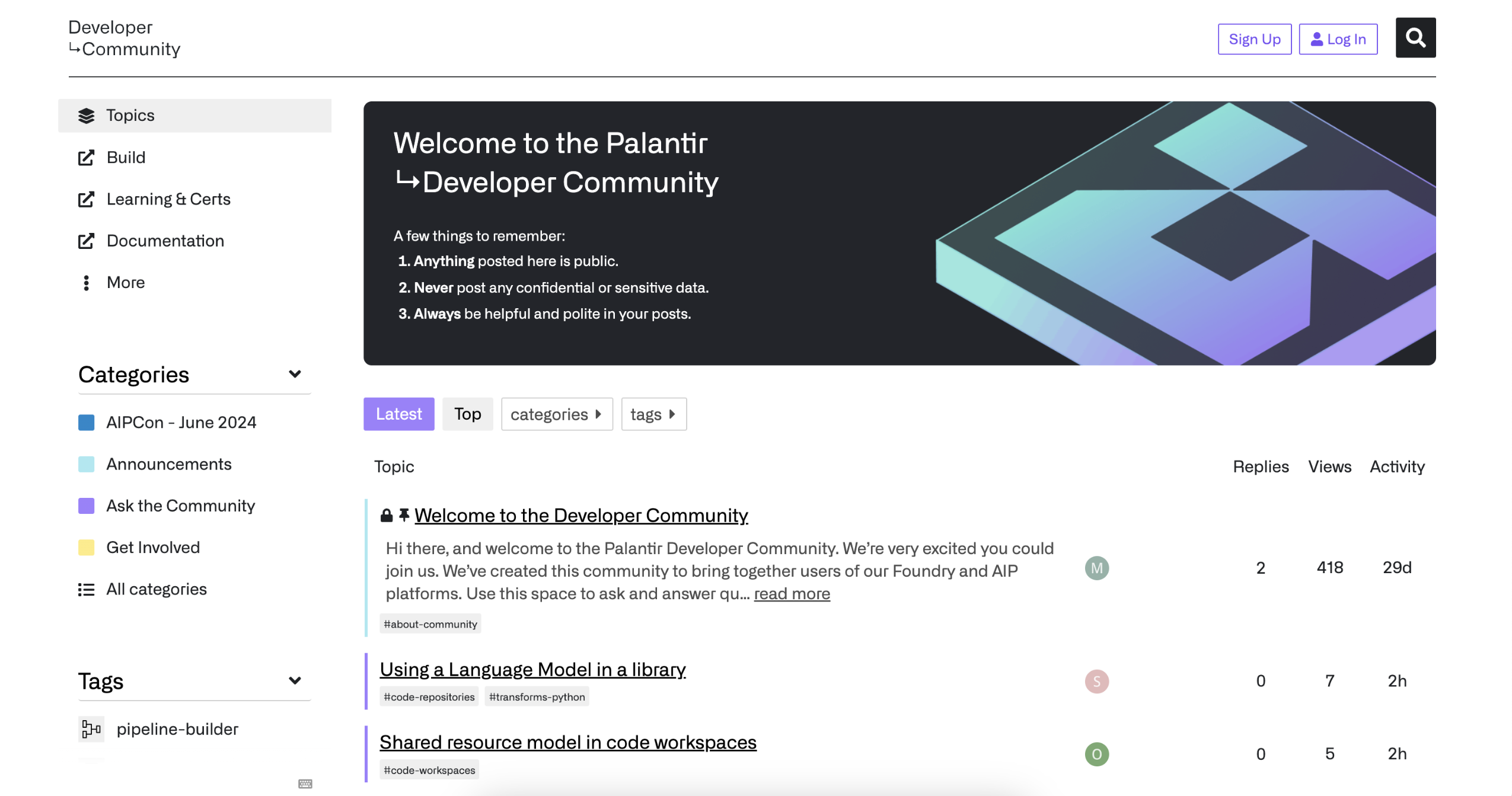
Palantir Developer Community, a home for developers and power users of the Palantir platforms.
To get started, navigate to community.palantir.com ↗ to create a free account and join the conversation.
Note: The Palantir Developer Community is public. Please refrain from posting confidential or sensitive data, and adhere to the relevant policies of your organization when posting in the Palantir Developer Community. Participation is voluntary, and responses are not guaranteed. Palantir customers with support contracts should submit requests that require a response, non-public inquiries, bug reports, or feature requests through standard support channels.
Table exports for JDBC systems are now available
Date published: 2024-06-25
Datasets can now be exported to external JDBC systems using table exports in Data Connection. Table exports introduce a new user experience for configuring exports of tabular data through an intuitive interface, a rich export mode selection, and the ability to explore the target system to configure the export. Table exports will work with custom JDBC systems configured with both direct connection and agent runtimes.
Export modes
Table exports support six distinct export modes to accommodate your unique requirements:
- Efficiently mirror dataset to external table (recommended): The external table will always match what you see in the Foundry dataset.
- Full dataset without truncation: Always export a snapshot of the entire view of the Foundry dataset, without truncating the external table first.
- Full dataset with truncation: Truncate (drop) the target table, then export a snapshot of the full current dataset view.
- Export incrementally: Exports only unexported transactions from the current view without truncating the target table.
- Export incrementally with truncation: Truncate (drop) the target table, then export only transactions from the current view that have not previously been exported.
- Export incrementally and fail if not
APPEND: Exports only unexported transactions from the current view, failing if there is aSNAPSHOT,UPDATE, orDELETEtransaction (after the first run).
Learn more about the details of each export mode in our documentation.
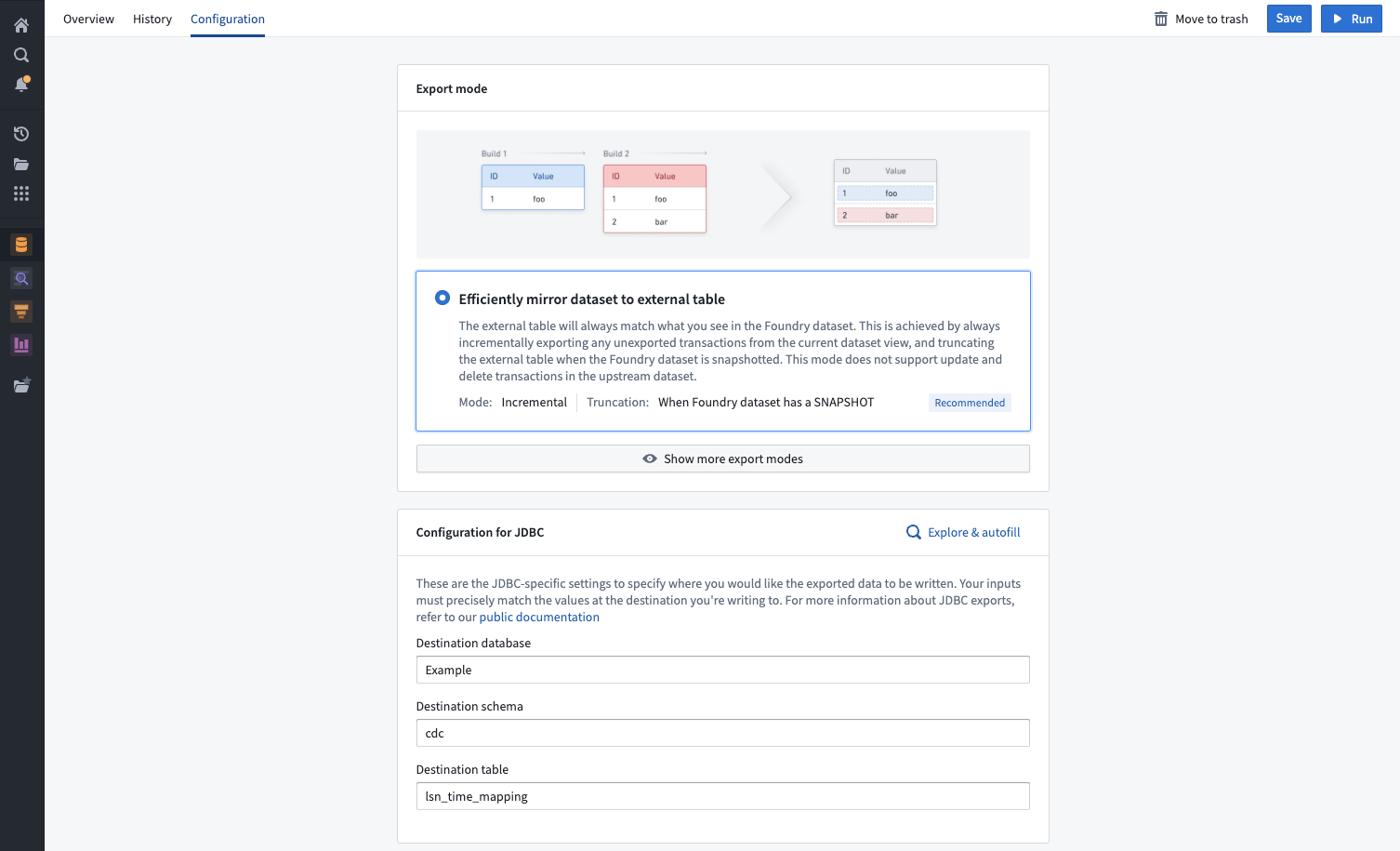
Example of an export mode selection in Data Connection.
Explore target systems
For a dataset to be exported, its schema must match the schema of a table on the target system. To help you configure the correct table, a source explorer is available to navigate all schemas and tables available on the target source.
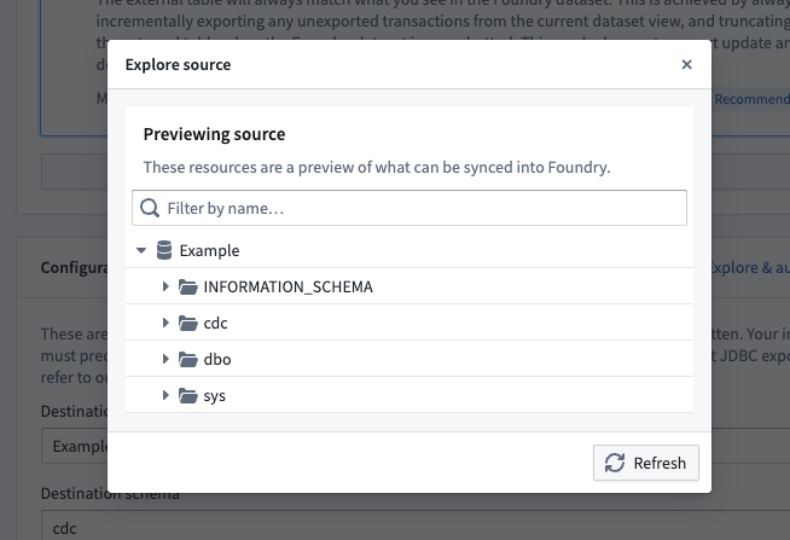
Example of a source exploration dialog.
Migrate from export tasks
The addition of table exports is intended to replace the usage of the now sunsetted export tasks to export tabular data, and every user of export tasks is encouraged to migrate to table exports. Learn more about the differences between Data Connection exports and export tasks, and learn how to migrate your workflows.
What's next on the development roadmap?
Currently, table exports are only available for custom JDBC sources. We plan to expand support for more connector types in the near future.
Estimate compute usage with token counts in Pipeline Builder
Date published: 2024-06-25
Token count metrics are now available for Pipeline Builder previews and trial runs that use OpenAI models. This feature provides more visibility into compute usage before deploying pipelines, giving users more control over compute usage and costs.
Use LLM node previews and downstream transforms now feature a total estimated token count when using OpenAI models. Trial runs also display the total estimated token count for the number of rows run.
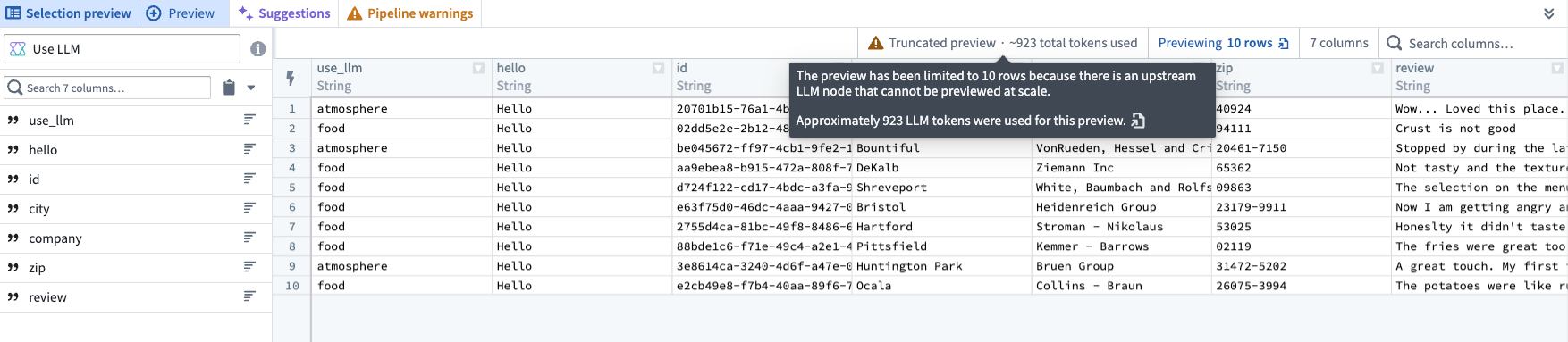
The approximate token count for rows in a Use LLM node preview.

The approximate token count displayed in a trial run.
Note that token counts are not provided for cached results, since no additional tokens are used.
Learn more about Pipeline Builder previews and trial runs.
Introducing a customizable landing page in Ontology Manager
Date published: 2024-06-25
Ontology Manager now makes it easier for you to resume your work, or navigate to the object types that are most important to you upon launch.
Tailor your landing page experience
The new Discover page can be customized to display object types in groups of key interest, giving you quick access to your favorites and recently viewed object types.
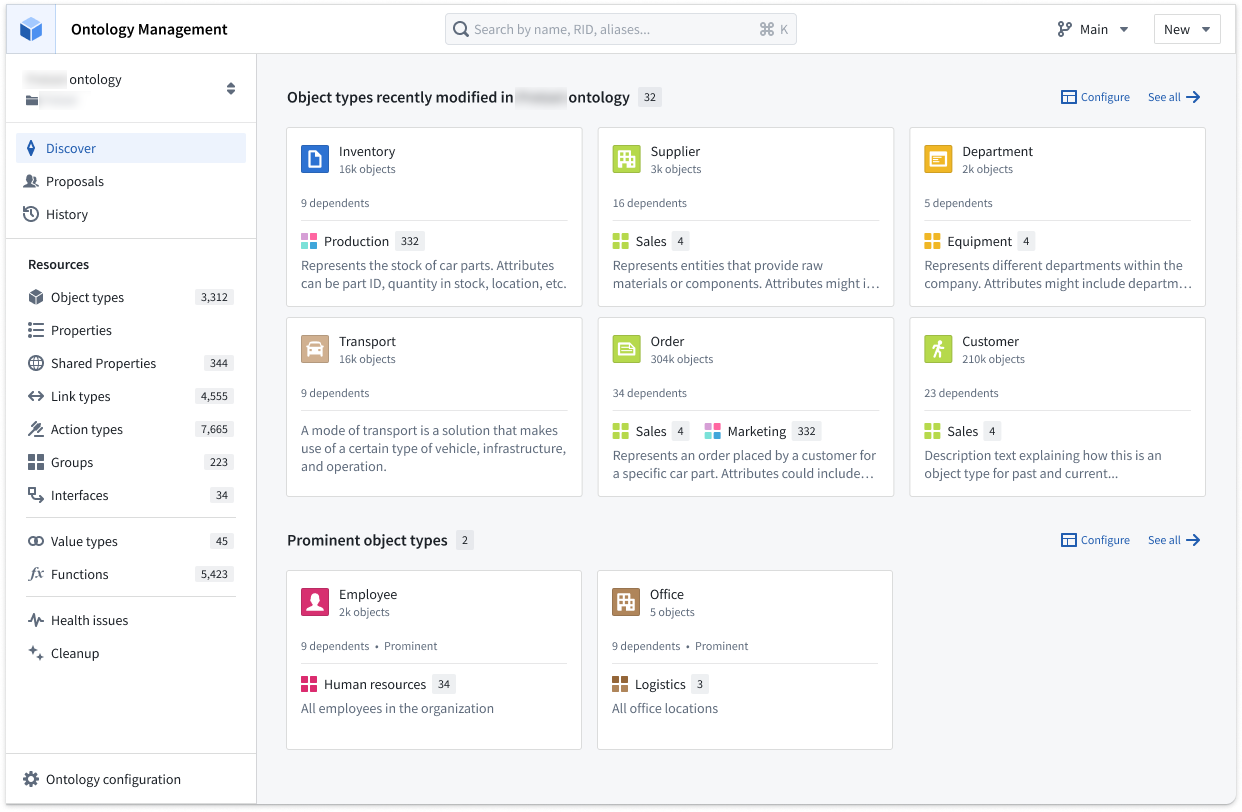
Review your recently-viewed object types, favorite object types, or favorite groups from Discover.
Customize sections to your preference
Choose what sections are available, and order them on your customizable homepage through the Configure option. Use the Add section option to choose from favorite groups, object types, or recently viewed, or choose a specific type group.
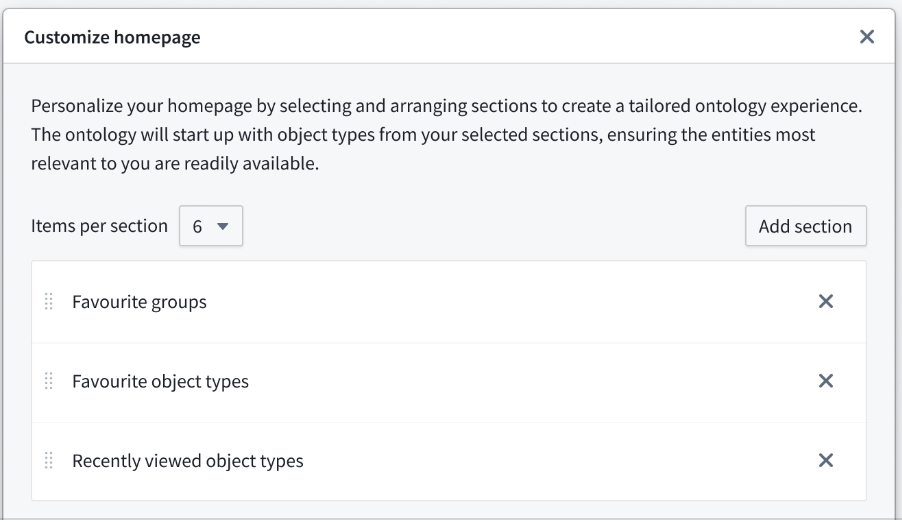
Add sections and rank them using the Customize homepage window.
To help reduce Ontology load times and allow you to resume your workflows swiftly, object types in the sections you choose are loaded first.
Object types at a glance
The Discover page includes a new compact preview of object types to help you better understand how resources can be used. This view is optimized for legibility at a glance by surfacing object count, number of dependents, visibility, and group memberships.
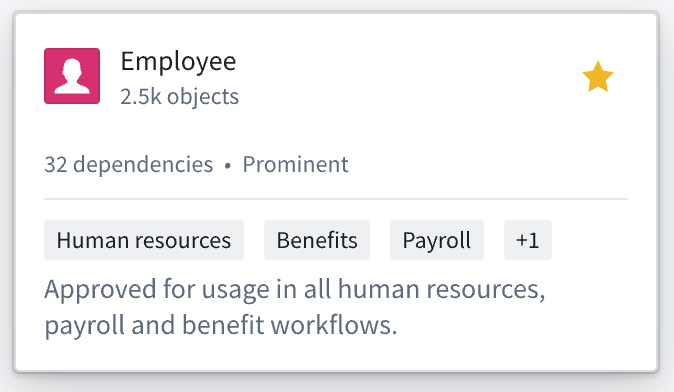
Compact preview of Employee object type.
Learn more about Ontology Manager.
Foundry Connector 2.0 for SAP Applications v2.31.0 (SP31) is now available
Date published: 2024-06-20
Version 2.31.0 (SP31) of the Foundry Connector 2.0 for SAP Applications add-on, used to connect Foundry to SAP systems, is now available for download from within the Palantir platform.
This latest release features bug fixes and minor enhancements, including:
- Performance improvements of metadata retrieval for SAP Landscape Transformation Replication Server (SLT).
- An extended functionality to split
STXLline format on a character. - An enhanced incremental resolution method for incremental syncs leveraging CDPOS.
We recommend sharing this notice with your organization's SAP Basis team.
For more on downloading the latest add-on version, consult Download the Palantir Foundry Connector 2.0 for SAP Applications add-on in documentation.
Introducing Build with AIP for Ontology SDK
Date published: 2024-06-20
A new Build with AIP package is now available for the Ontology Software Development Kit (OSDK). The Ontology SDK allows you to access the full power of the Ontology directly from your development environment and treat Palantir as the backend to develop custom applications. With the Build with AIP package, you can follow an in-platform tutorial to create your own "To Do" application in the Developer Console that is customized to your organization's Ontology resources, allowing you to connect object types, action types, links, and more that are specific to the use cases you care about. Using the Build with AIP package offers builders the ability to seamlessly read from and write to the Ontology, limiting the need to navigate across other Foundry applications to update or load data.
This comprehensive in-platform guide will teach you everything from setting up your development environment in React or Jupyter®, to deploying your final product. For example, you could build a React application backed by data and Ontology action types, or use Jupyter® to perform analysis on your unique Ontology data.
To get started with the Build with AIP package in Ontology SDK, first search for the Build with AIP portal in your platform applications. Then, search for "OSDK" to find the Getting Started with Ontology SDK (OSDK) package. Choose to install it, then designate a location in which to save it.
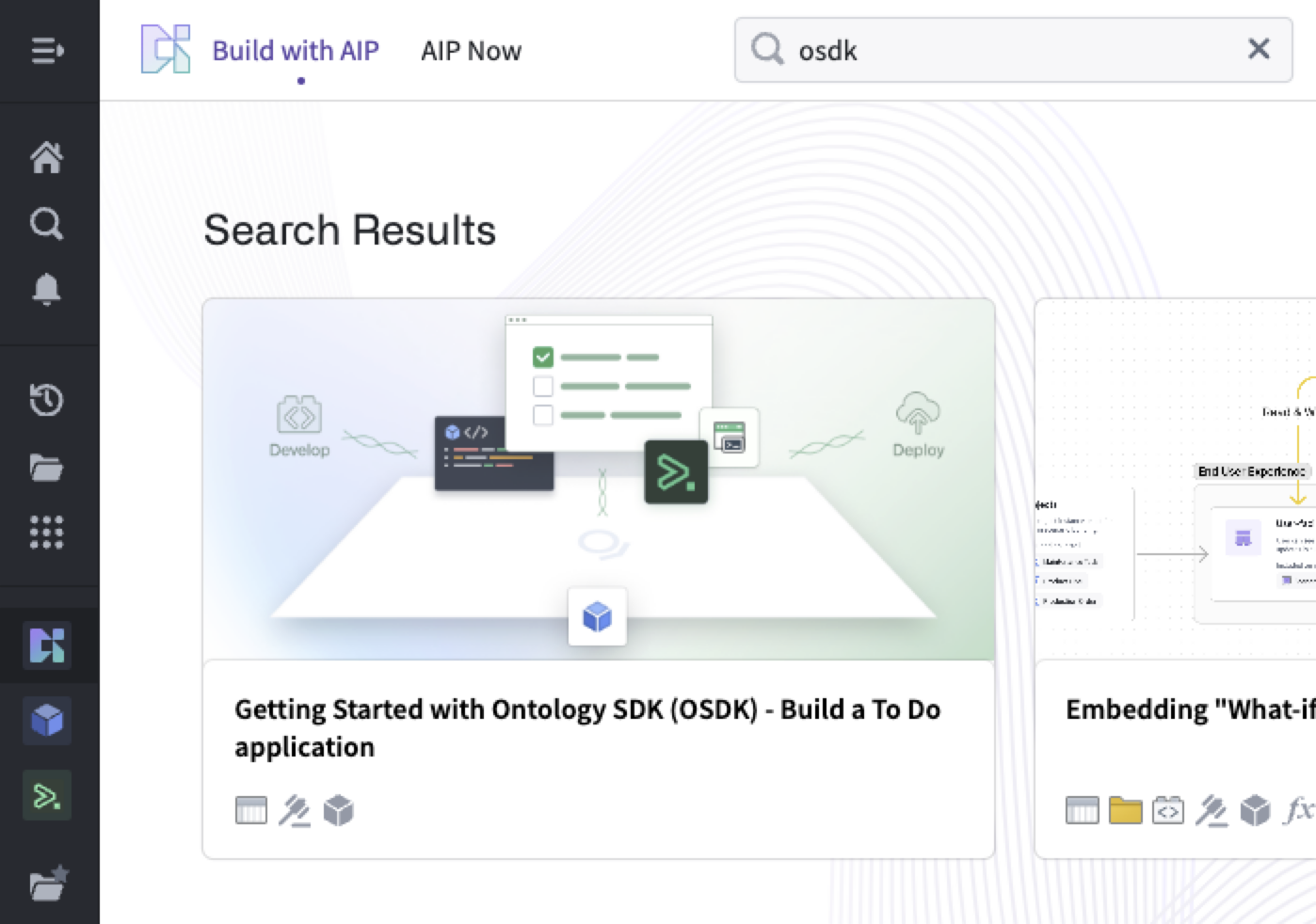
Search for "OSDK" in Build with AIP.
Once installation is complete, select Open Example to follow the guide.
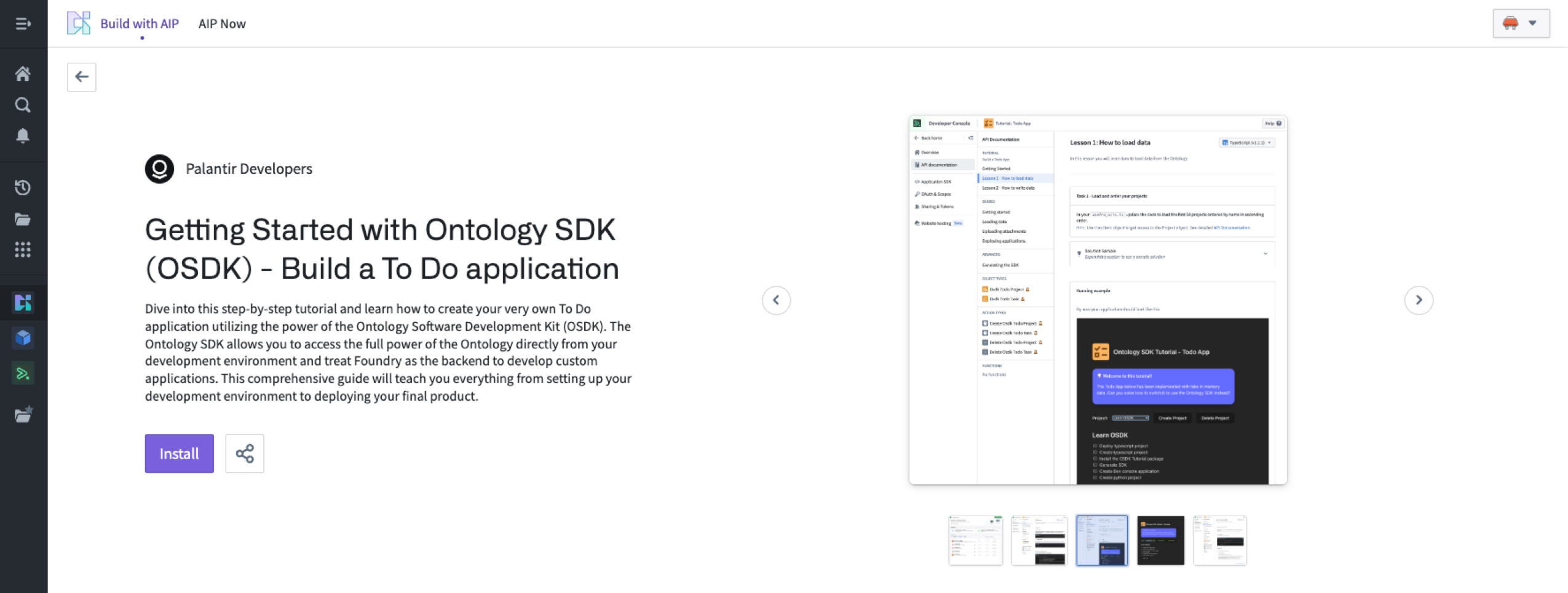
Install the sample To-Do application.
Have you tried this feature?
Share your thoughts in our Developer Community ↗.
What's next on the development roadmap?
We are working to publish more Build with AIP packages, including ones that demonstrate how to use LLMs and leverage AIP Logic from your Ontology SDK application.
Jupyter®, JupyterLab®, and the Jupyter® logos are trademarks or registered trademarks of NumFOCUS.
All third-party trademarks (including logos and icons) referenced remain the property of their respective owners. No affiliation or endorsement is implied.
AIP Assist can now direct users to the Palantir Developer Community forum
Date published: 2024-06-20
As of the week of July 7, AIP Assist will start to redirect user inquiries to Community.palantir.com, our Palantir Developer Community ↗, when unable to provide suitable answers.
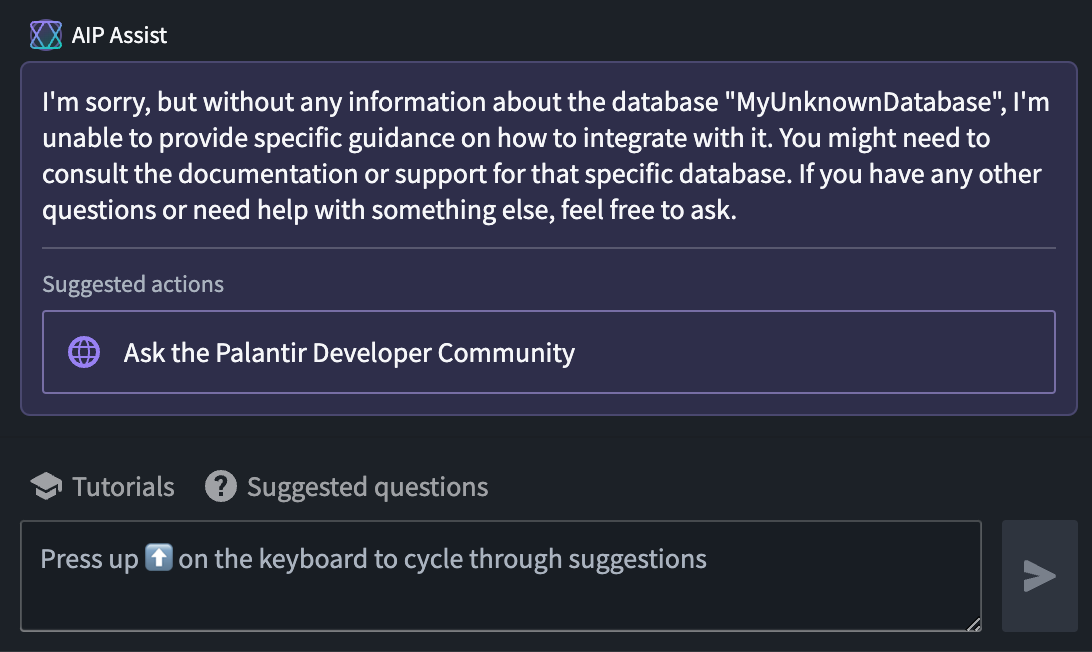
Sample user interaction leading to a suggestion of asking the Palantir Developer Community.
To provide more control over the user experience, enrollment administrators may disable this feature by navigating to Control Panel > AIP Assist > Suggested actions as of today.
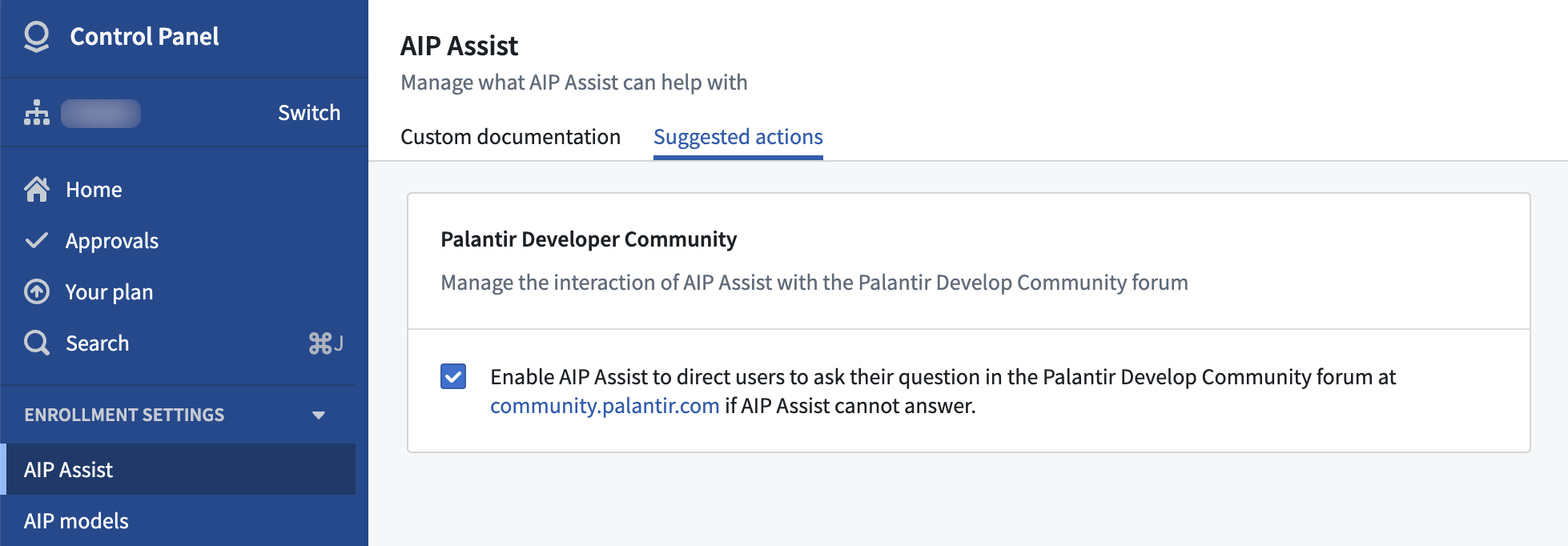
Enable or disable redirection to community.palantir.com in AIP Assist.
Learn about enabling and disabling the feature in AIP Assist documentation.
Over 150 new sources are now available in Data Connection
Date published: 2024-06-20
Our available source connections in the Data Connection application now include over 150 new supported source types. These new sources allow organizations to access data in even more locations using Palantir-provided JDBC drivers. New source types include DynamoDB, Dataverse, CosmosDB, LDAP, and many others.
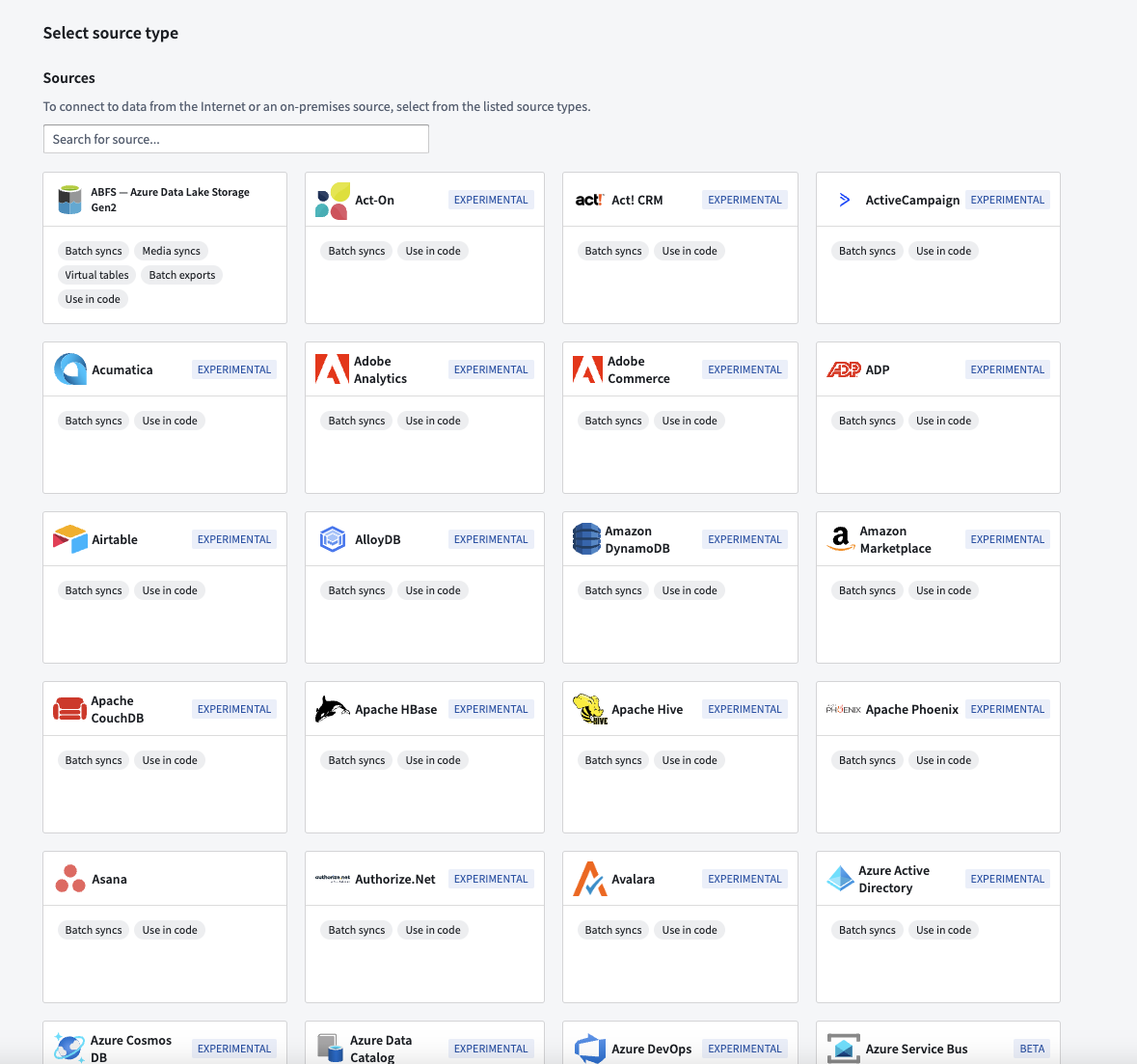
Updated Data Connection landing page showing new connectors.
The new sources have been released in the Experimental stage of Palantir's development lifecycle and are labeled as such. Each source will independently follow the stages of the development lifecycle as usage and support expand.
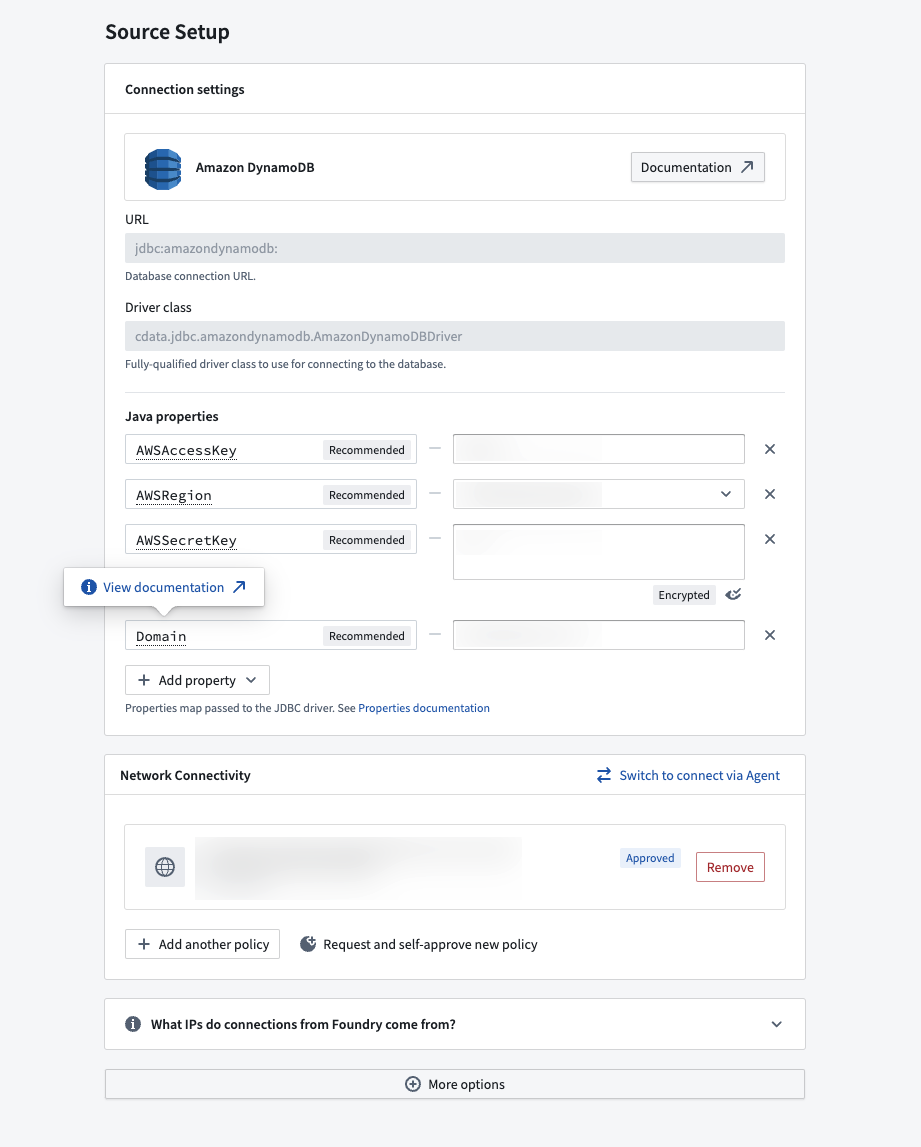
Example source configuration with inline documentation.
Learn more about connecting with Palantir-provided drivers, and explore the list of new available sources in our documentation.
All third-party trademarks (including logos and icons) referenced remain the property of their respective owners. No affiliation or endorsement is implied.
Faster previews in Pipeline Builder
Date published: 2024-06-17
Pipeline Builder previews are now significantly faster due to caching enhancements. Internal tests show a reduction in computation times from 40 seconds to 1 second, speeding up resource intensive previews by 40x. This feature is now generally available on all enrollments.
Faster previews powered by caching improvements
Caching improvements now allow nodes in Pipeline Builder to use cached, or "stored" results from upstream nodes that have already been previewed. This allows downstream nodes to skip recomputes and swiftly display your data previews.
Pipeline Builder's improved caching features include:
- Decreased redundant computations: Previews in Pipeline Builder now only compute additional nodes when previewing downstream of cached nodes.
- Efficient caching: Computationally expensive nodes such as joins and
use LLMare now proactively cached, allowing downstream nodes to avoid repetitive and time-consuming computations.
Users will benefit from snappy previews and decreased processing costs, saving time and resources when working downstream of expensive nodes. A lightning bolt icon will appear on previews that use cached upstream preview results, as shown below:

Improved node caching
Before this change, if you previewed a node twice without any logic changes, it would cache the results from the first preview and reuse them for the second preview. If you then previewed a downstream node, it would not have access to other cached node results. Upstream nodes needed to be recomputed from scratch.
Now, all node previews in Pipeline Builder can make use of cached results, so only additional downstream nodes need to be computed.
Take the following example dataset:

If you preview C, nodes Dataset → A → B → C are computed. Before this change, if you then preview D:
- Nodes
Dataset → A → B → Care recomputed, in addition toD.
After this change, if you preview D after C:
- Only nodes
C → Dare computed, because nodeDcan now use cached results from nodeC.
Note that all node previews compute up to 500 rows. Operations that will not benefit from this feature include operations that change row counts, joins, aggregations, or changes in logic.
Learn more about Pipeline Builder previews.
Support for Llama 3's 70B Instruct and 8B Instruct LLMs now available
Date published: 2024-06-17
Llama 3's 70B Instruct and 8B Instruct LLMs are now generally available and can be enabled for all commercial enrollments. These new flagship models from Meta have performance comparable to other top models in the industry. If your enrollment's agreement with Palantir does not cover usage of these models, enrollment admins must first accept an additional contract addendum through the AIP Settings Control Panel extension before these models can be enabled.
This model should be usable in all AIP features such as Functions, Transforms, Logic, and Pipeline Builder.
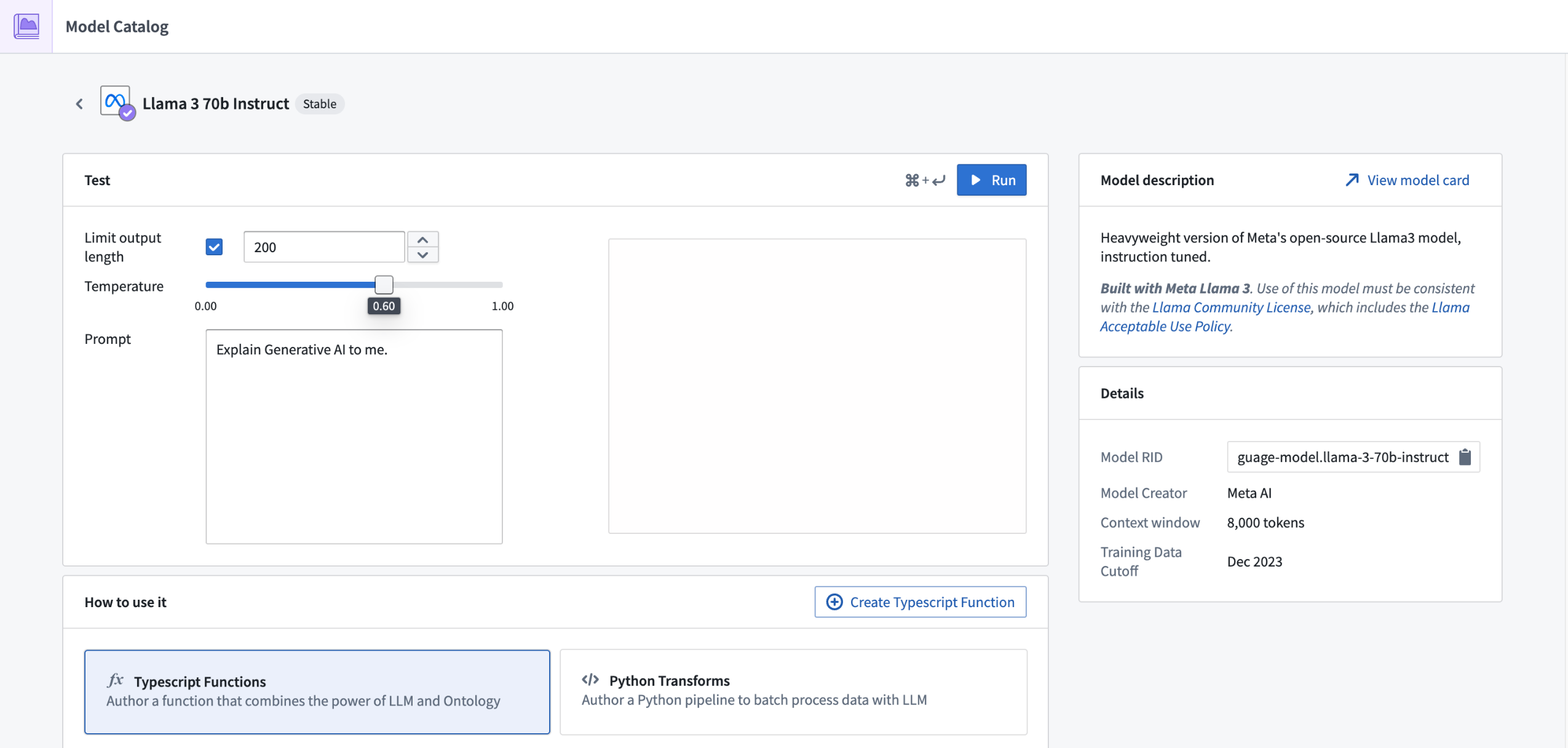
Review a list of LLMs supported in Palantir.
Support for GPT-4o LLM now available
Date published: 2024-06-17
GPT-4o through Azure OpenAI is now generally available on all enrollments that are either not geographically-restricted, or are geographically restricted to the United States or European Union.
To use GPT-4o, you will need to have Azure OpenAI models enabled through the AIP Settings Control Panel extension.
GPT-4o is targeted to be the new flagship model provided by OpenAI. Existing workflows which use GPT-4 are recommended to use GPT-4o as it is cheaper, faster, with more capacity available than existing models provided by Azure OpenAI, and supports multi-modal input such as image and text.
The expansion of supported regions is in development.
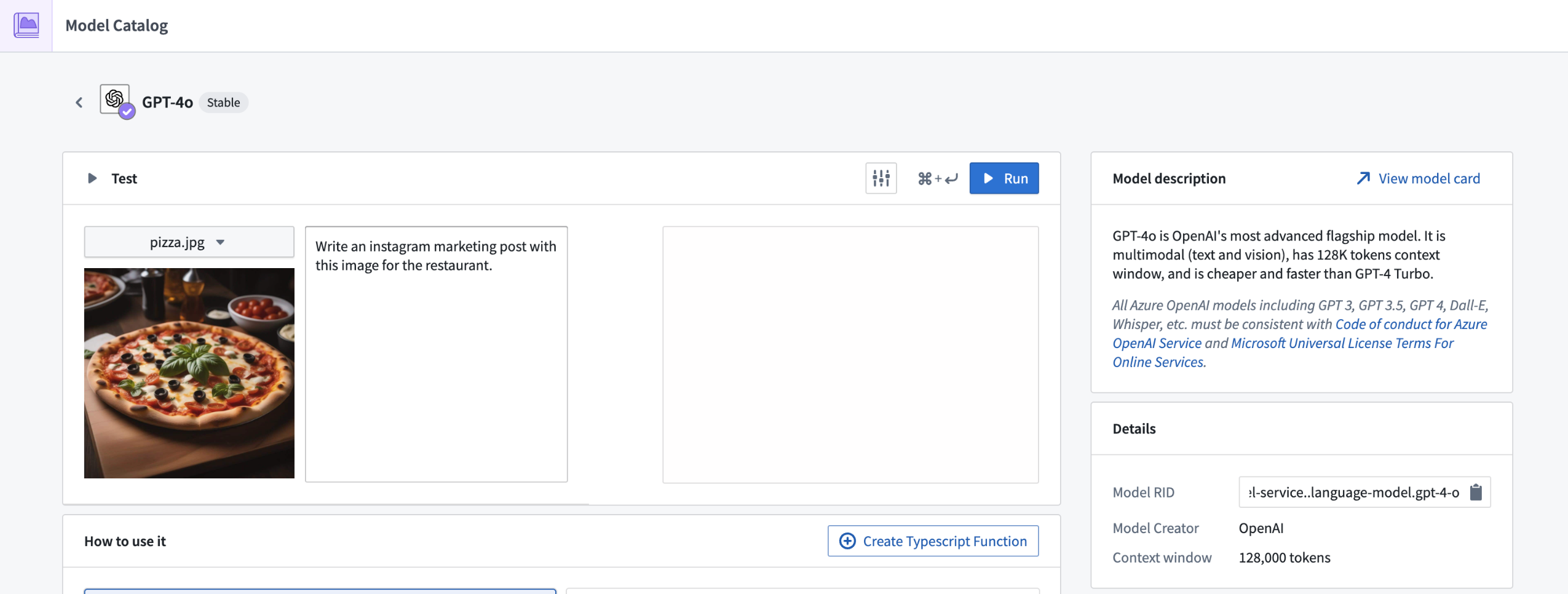
Review a list of LLMs supported in Palantir.
Support for Claude 3 Sonnet LLM through AWS Bedrock now available
Date published: 2024-06-17
Claude 3 Sonnet through AWS Bedrock is now generally available for all non-geographically-restricted enrollments, and geographically-restricted enrollments in the United States, European Union, and Australia. This new flagship model from Anthropic has performance comparable to other top models within the industry, and supports multi-modal workflows, including vision. If your enrollment agreement does not cover Claude 3 Sonnet usage, enrollment admins must first accept an additional contract addendum through the AIP Settings Control Panel extension before the LLM can be enabled.
This model should be usable in all AIP features such as Functions, Transforms, Logic, and Pipeline Builder.
Support for geographically-restricted enrollments in other regions is under active development.
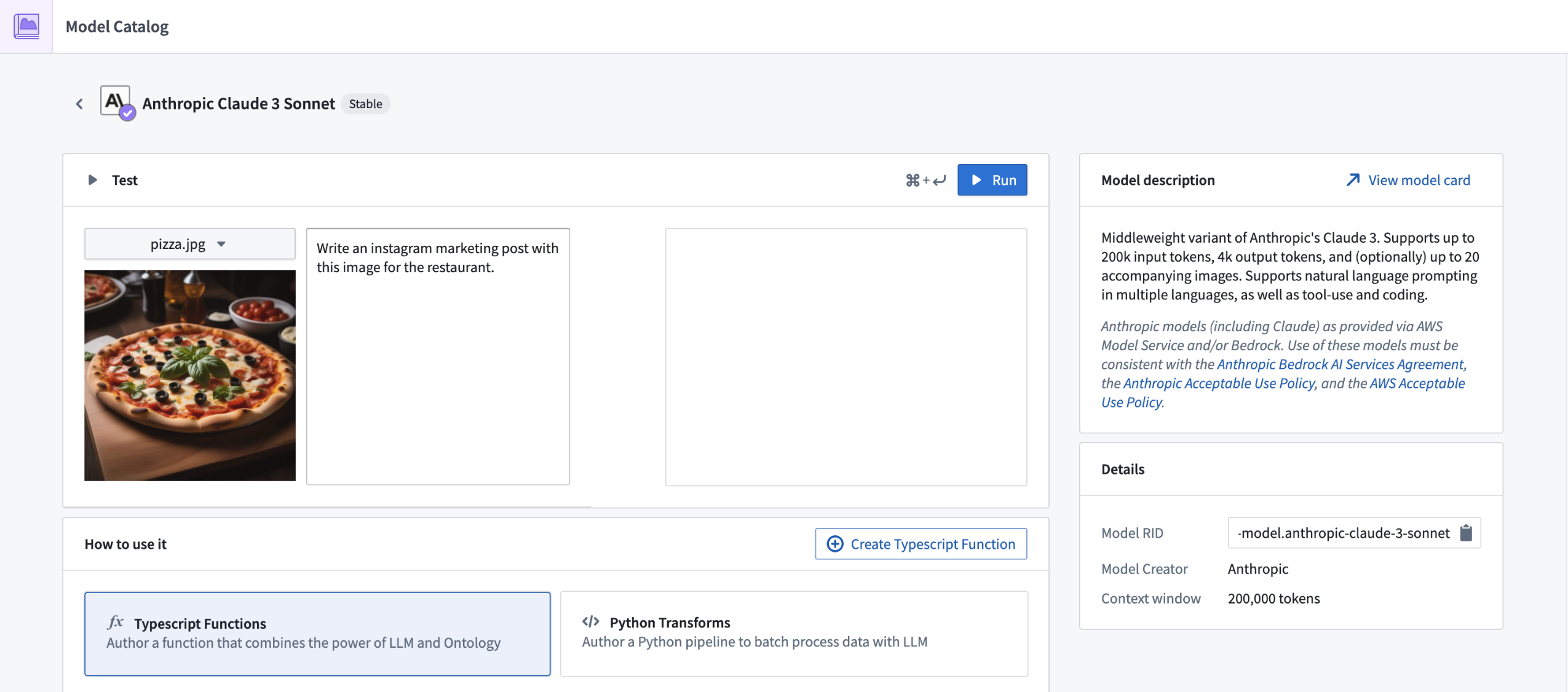
Review a list of LLMs supported in Palantir.
Introducing Python functions for Pipeline Builder, Workshop, and more [Beta]
Date published: 2024-06-13
Python functions are now supported in Pipeline Builder, Workshop, and other Ontology-based applications. Python is a familiar, easy to learn, and well-documented language ↗ with an extensive list of libraries for everything from data science to image processing that you can now leverage in the Palantir platform.
Since user-defined Python functions in the Palantir platform are intentionally reusable across applications, you can easily pre-compute values in Pipeline Builder or calculate them in real time in Workshop modules when users add inputs. This same function can also be used in other Ontology-based applications to empower decision-making processes for your organization.
The following benefits can be found across the platform when using user-defined Python functions:
-
Leverage external libraries: Python has a huge number of libraries that can make development simpler, faster, and more performant.
-
Iterate rapidly: Preview your code in Code Repositories as you develop to monitor your results.
Use Python functions in Pipeline Builder
Python functions in Pipeline Builder offer efficiency and flexibility for your pipelines:
-
Release with ease: When you are satisfied with your changes, simply tag and release your code to make it available in Pipeline Builder.
-
Improve execution time: Reduce your build time by setting your batch size between 100 and 1000, specifying the number of rows to process in parallel.
Add a custom function to your Pipeline Builder pipeline by selecting Reusables in the upper right of your graph. Then, choose User-defined functions > + Import UDF. Here, you can choose the Python function you want to add to your pipeline. Your function will take in a single row, transform it using your logic, and output a single row for all batch and streaming pipelines.
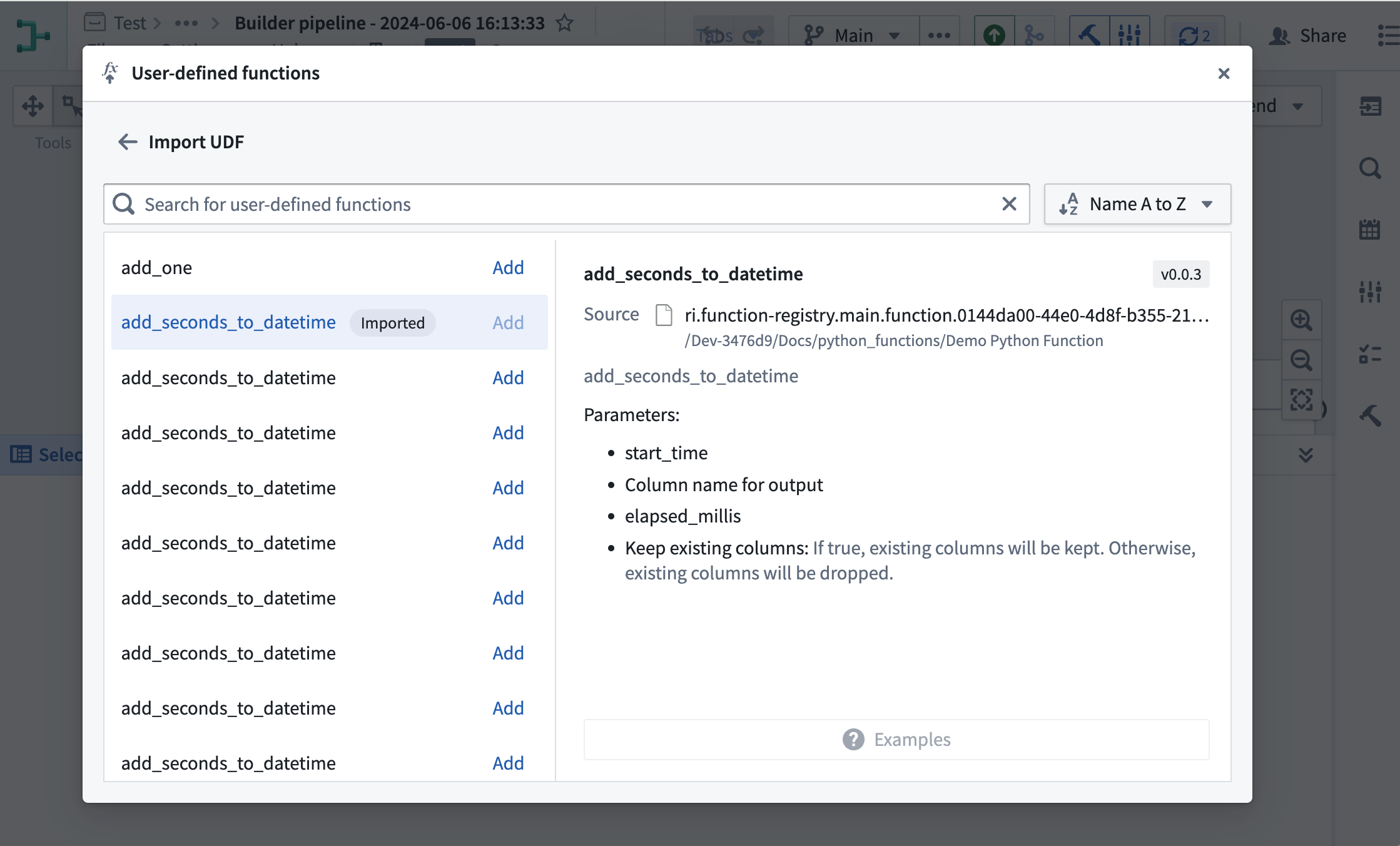
Importing Python functions into Pipeline Builder.
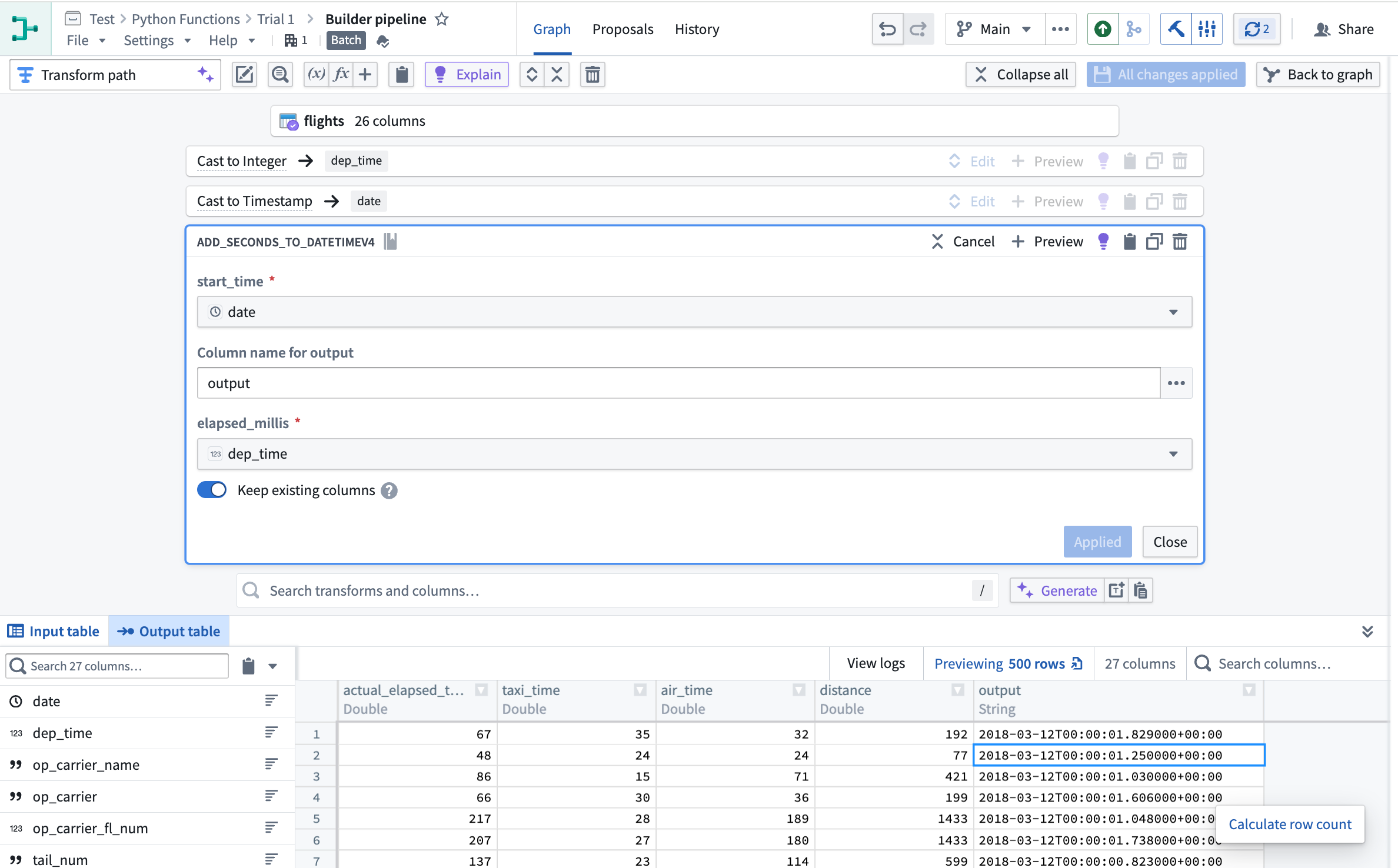
Adding Python functions to the Pipeline Builder pipeline.
Use Python Functions in Workshop and Ontology-based applications
In Workshop, your function will be "deployed", allowing it to dynamically adapt to the number of incoming requests. During periods of high usage, your deployed function will dynamically scale to support new user inputs.
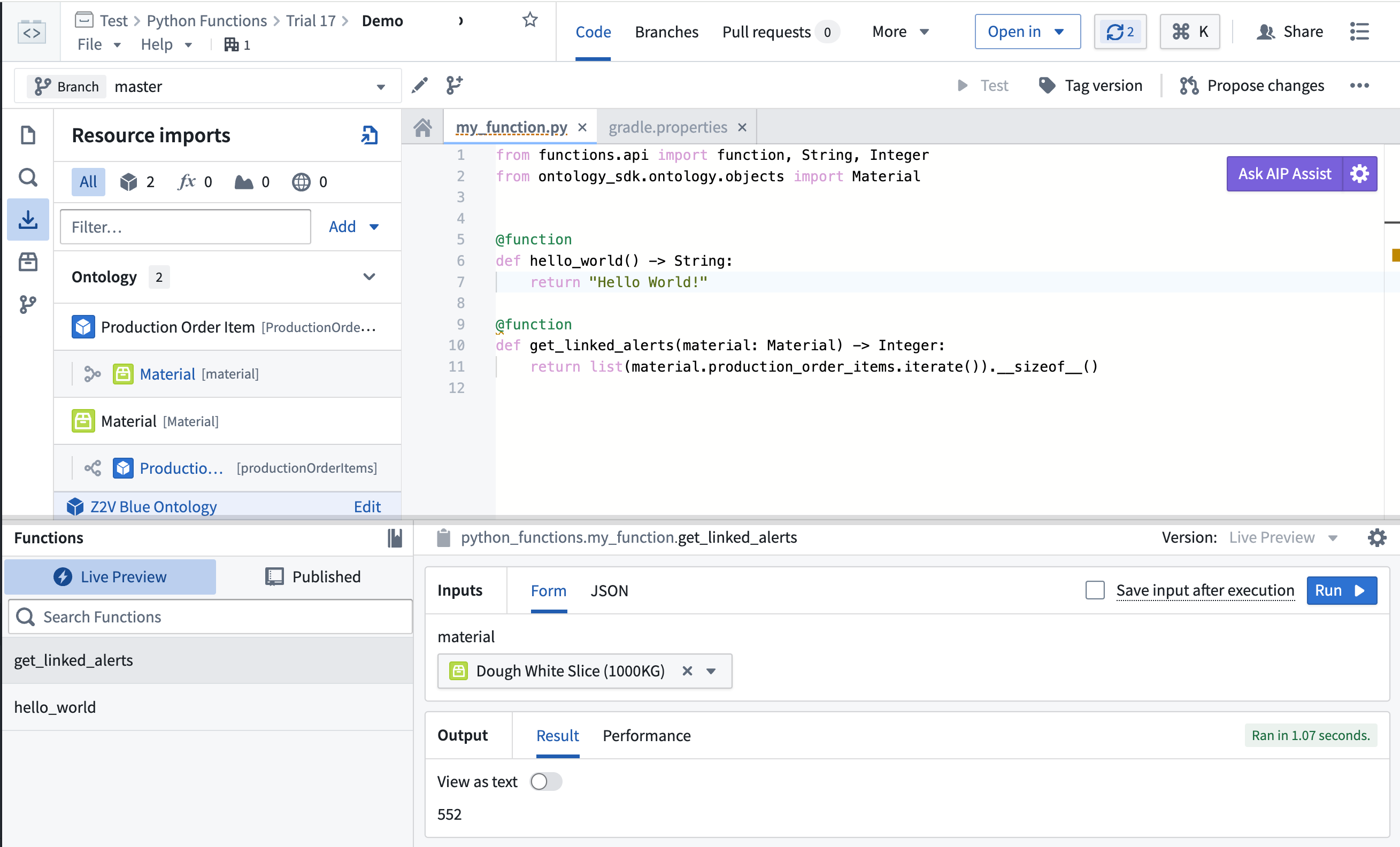
Preview your function in Code Repositories.
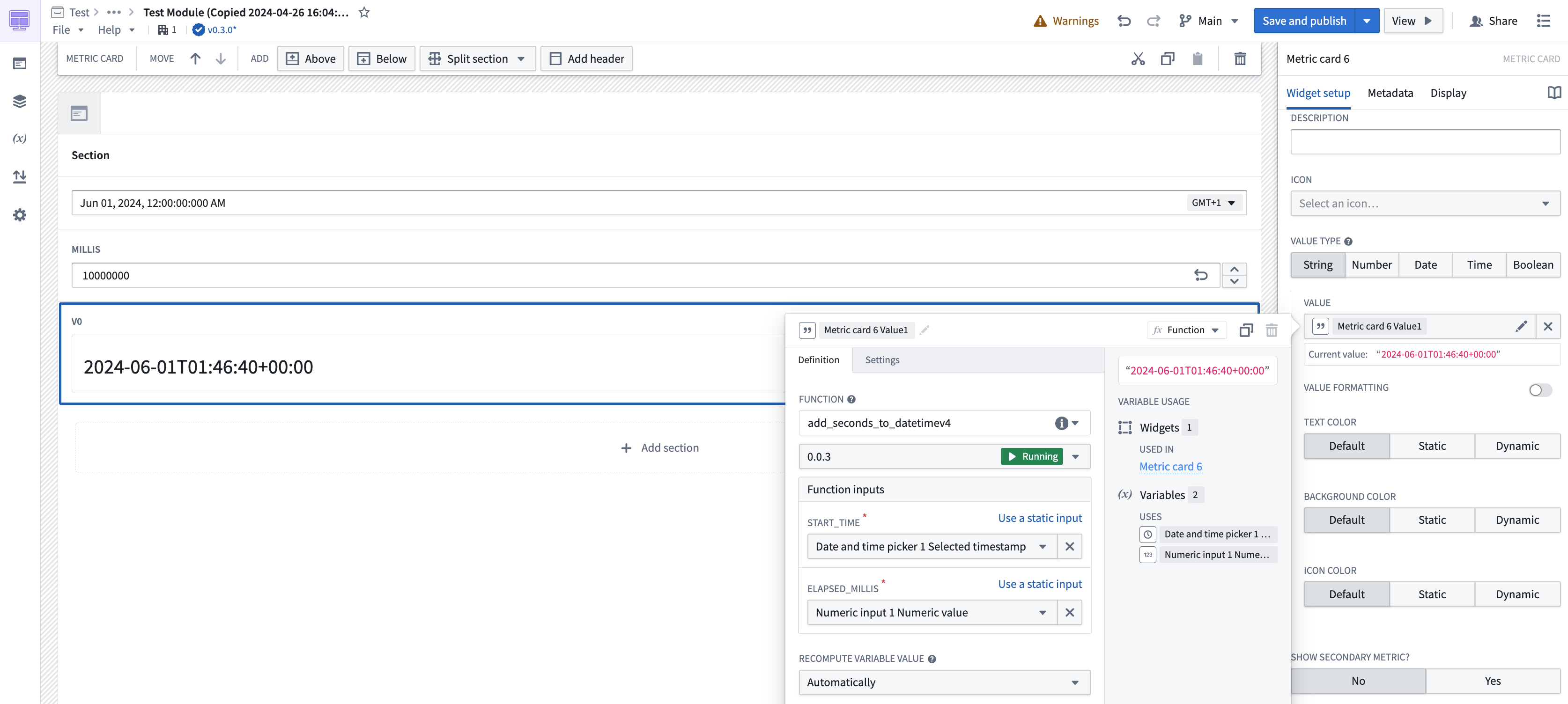
Deployed functions in a Workshop module.
Learn more about Python functions and write your first user-defined Python function with our documentation.
What's next on the development roadmap?
-
A cheaper, faster backend: We are actively working on improving backend performance for Python functions used in Workshop and other applications to match the high-level performance of TypeScript functions.
-
Bridging gaps between TypeScript and Python functions: We continue to work to provide the same level of support to Python functions as we do with TypeScript functions. Currently, our highest priority is to provide support for Ontology edits through Python functions.
-
Marketplace compatibility: Python functions will soon be available in Marketplace so you can share easily share your functions with other users.
Code Repositories now supports Python 3.11
Date published: 2024-06-10
Code Repositories now supports Python 3.11 ↗ for all enrollments. Python 3.11 provides significant performance enhancements such as being "between 10-60% faster than Python 3.10" according to Python documentation ↗.
To access these benefits, you must upgrade your code repositories. We strongly advise keeping your repositories up to date to leverage the latest performance improvements and critical security patches.
Python 3.11 support with boosted performance, TOML parsing, and enhanced typing
Users will now be able to use this version in Python environments, both during Preview and also when the Python transform is running.
Highlights from Python 3.11 include:
- Significant performance improvements
- Support for parsing TOML ↗
- Improved exception information and typing support
To use Python 3.11, users must upgrade repositories and can set the Python environment to use either the recommended version of Python or explicitly select a Python 3.11 release.
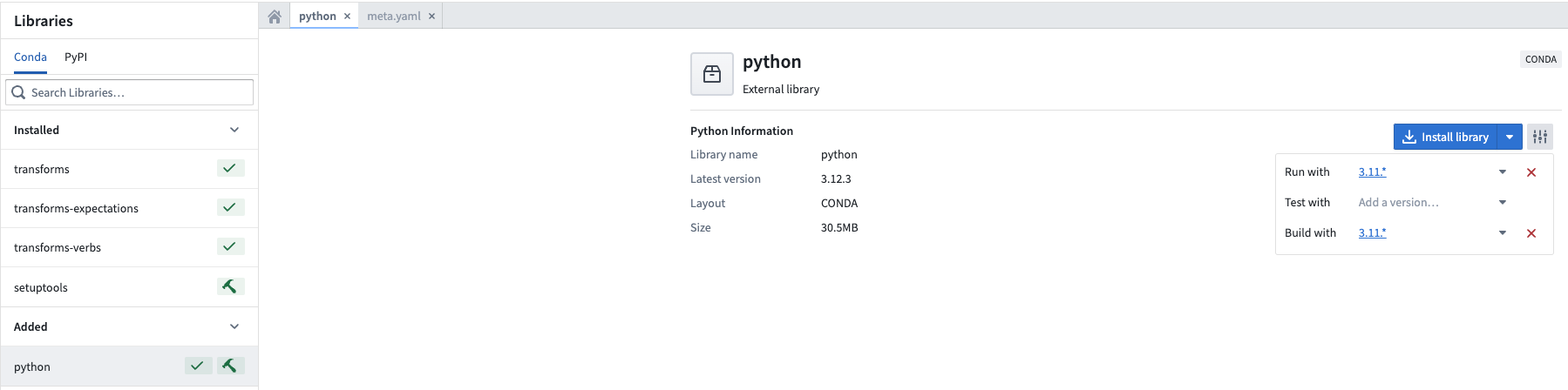
Setting the Python environment to a desired version.
Learn more about Code Repositories.
Introducing Hawk for Python package management in Code Repositories
Date published: 2024-06-10
We are excited to announce Hawk, a new package manager for Python environments. Hawk will be available in Code Repositories on Foundry enrollments in mid-June 2024. It replaces Mamba ↗, which underwent major breaking changes in September 2023, as the default Python package manager in Code Repositories.
Hawk offers enhanced performance and maintainability, ensuring a more efficient and reliable Python environment management experience. Initial tests of Hawk have shown performance improvements of ~25% in checks execution time relative to Mamba when resolving and installing new packages. Additionally, Hawk is built on top of actively maintained libraries, ensuring that the core infrastructure remains up-to-date and secure.
New Python code repositories will begin using Hawk automatically. For existing repositories, you can upgrade the repository by selecting ... and then selecting Upgrade.
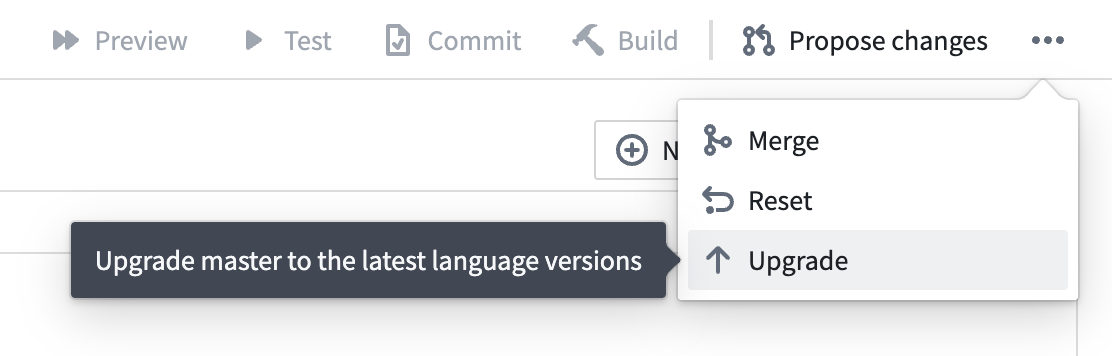
Upgrade your Python repositories to the new Hawk environment management system.
In Python repositories using Hawk, you can view log lines in the Checks tab that indicate certain tasks are being executed by Hawk instead of Mamba. For example, you can view the log line Executing task 'runVersions' with 'HAWK'.
Hawk is built on top of the open-source library Rattler ↗.
Introducing OSDK in Slate [Beta]
Date published: 2024-06-05
The Ontology Software Development Kit (OSDK) allows you to access the full power of the Ontology directly from your development environment. On all enrollments, OSDK is now available in Slate and you can interact with the Ontology by writing functions in Slate to transform Ontology data.
With the OSDK, benefit from a tighter integration between Slate and the Ontology. For example, builders can access object types, link types, and actions from a dedicated interface where the OSDK package can be generated and updated whenever the Ontology is changed.
Fully interact with the richness of the Ontology in code by building applications that can traverse object types with ease, and use actions for a rich and customized application for your organization's most important workflows.
Slate allows for using Foundry Functions in the Platform tab as well as working with non-Ontology data sources to provide a highly-flexible environment for application builders.
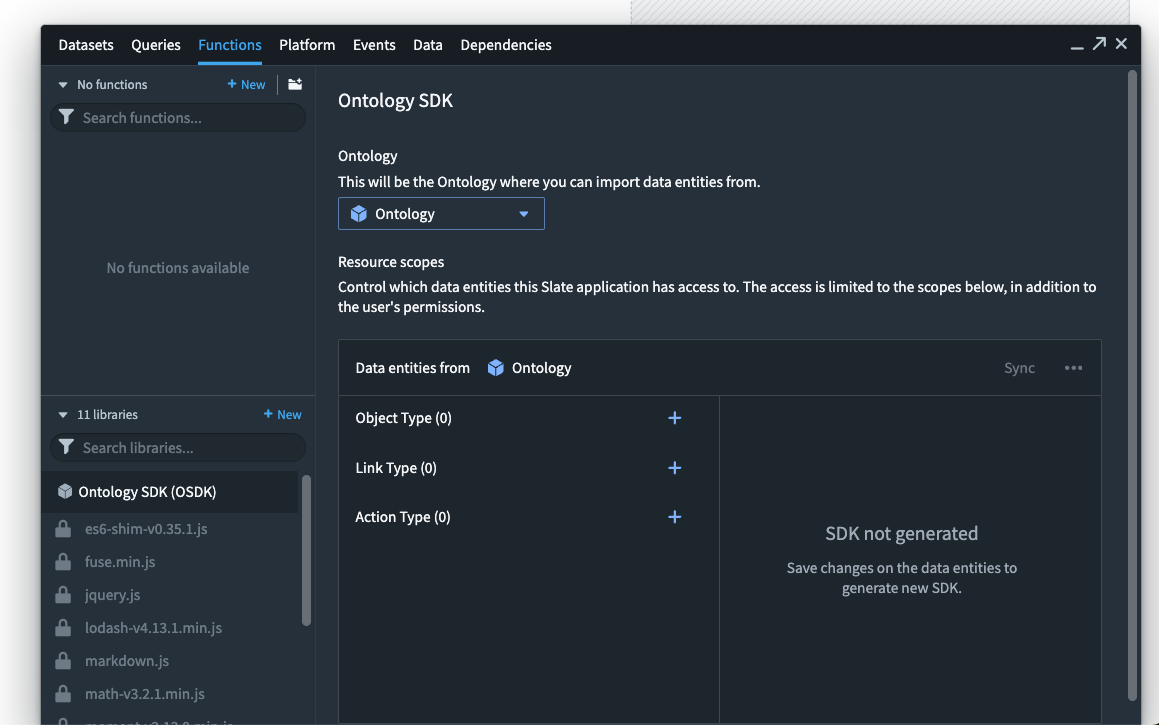
Application builders can now use OSDK functionalities in Slate to enable products that interact with the Ontology.
Learn more about Using the Ontology SDK (OSDK) in Slate.
Additional highlights
Administration | Control Panel
Spaces are now managed in Control Panel | In an effort to consolidate and simplify administrative settings in Foundry, spaces (previously referred to as namespaces) are now managed in Control Panel under enrollment settings.
Although the Spaces tab is visible to everyone, permissions required to manage individual spaces remain unchanged. To configure, it is necessary to meet the access requirements and be granted a role on the relevant space. For more details, review our spaces documentation.


Analytics | Notepad
Enhanced Document Creation from Notepad Templates | The Notepad application now includes an enhanced feature allowing users to instantly generate documents from the latest versions of published Notepad templates. This new functionality is conveniently accessible either from the application's home page or directly through the file menu in the application header.
Analytics | Quiver
Refined Gradient Display for Time Series Insights | Quiver now features a gradient display option configuring a color fill for time series charts. This improves legibility when plots overlap in the same chart and helps in identifying relative changes in magnitude over time.

App Building | Slate
Enhanced Sidebar Experience in Slate | The redesigned sidebar in Slate introduces a more cohesive user interface. This update centralizes essential tools for application layout, data management, logic operations, and debugging into a singular, accessible panel, enhancing the user journey and facilitating a smoother introduction for new users.
Enhanced JSON Export for Slate Documents in Version History | The Versions dialog now supports exporting the JSON of a Slate document for any selected version. This enhancement ensures editors can easily access and export document JSON for any existing version.
App Building | Workshop
New sorting options | The Object List widget now supports sorting on multiple properties along with sorting on function-backed properties.
Virtualized Object List in Workshop | Object List widgets now leverage virtualization technology to dramatically boost performance, especially for lists containing numerous elements.
Enhanced Widget Configuration in Workshop | The Workshop Action widget now supports a tabular data entry configuration with support for creating multiple rows of new data simultaneously or uploading a spreadsheet of rows to populate the input table. This feature unlocks workflows that require high volume manual data entry.
Enhanced Branch-to-Main Module Comparison | The changelog panel now supports selecting the latest main version for comparison while working within a branch, streamlining the module diffing process. This update is especially advantageous for users engaged in branching workflows.
Data Integration | Data Connection
Enhanced Webhook Access in Data Connection | Users can now directly view and manage the webhooks associated with a source by navigating to that source. The previously available page listing all webhooks has been deprecated.
Ontology | Ontology Management
Refined Primary Key Handling in Ontology Manager Uploads | Enhancements to the tabular entry mode for Actions now ensure a more intuitive handling of primary keys during file uploads. Valid primary keys are automatically associated with their respective objects for object reference form parameters. Those that cannot be resolved are promptly highlighted for direct editing within the upload interface. This update simplifies the data correction process when populating a tabular action with a CSV upload.
Ontology | Vertex
Refined Icon Personalization in Vertex Graph Layers | Vertex introduces refined icon personalization capabilities for graph layers, enabling users to tailor icons according to object attributes or choose from an expanded selection of static icons. This improvement offers a tailored approach to node visualization in graph representations, meeting the varied needs of different workflows.
Security | Approvals
Improved Approvals actions and statuses | Access requests in Approvals have been streamlined; available actions are now present at the request level, rather than at the task level. Approvers can now apply actions to multiple tasks. This improves the discoverability and explainability of all available actions and simplifies request processing. New access request statuses such as Pending approval, Closed, Action required, and Completed have been introduced to better communicate the state of a request.

Improved Approvals inbox search | The Approvals inbox now allows users to filter requests based on included Projects, users, or groups, in addition to existing filters. These new filters only apply to access requests and significantly improve user experience by making access request reviews more efficient. Filters that were previously displayed in the table header are now in the left sidebar.

中文翻译
公告
提醒: 请注册 Foundry 新闻通讯(Newsletter),以便直接在收件箱中接收关于新产品、功能及平台改进的摘要。有关订阅方式的更多信息,请参阅 Foundry 新闻通讯与产品反馈渠道公告。
欢迎在我们的开发者社区论坛 ↗分享您对这些公告的看法。
隆重推出 community.palantir.com——我们的官方 Palantir 开发者社区
发布日期:2024-06-25
我们自豪地推出 Palantir 开发者社区 ↗,这是一个致力于在 Foundry 和 AIP 用户及合作伙伴之间交流思想与专业知识的协作空间。通过该社区,Palantir 开发者、应用构建者及高级用户能够相互联系,提问与解答、提供产品反馈,并随时了解最新产品计划和开发者活动。
Palantir 开发者社区,Palantir 平台开发者和高级用户的家园。
要开始使用,请访问 community.palantir.com ↗ 创建免费账户并加入讨论。
注意:Palantir 开发者社区是公开的。请勿发布机密或敏感数据,并在 Palantir 开发者社区中发帖时遵守您组织的相关政策。参与是自愿的,不保证回复。拥有支持合同的 Palantir 客户应通过标准支持渠道提交需要回复、非公开咨询、错误报告或功能请求。
面向 JDBC 系统的表导出(Table exports)现已可用
发布日期:2024-06-25
现在,您可以使用 Data Connection 中的表导出(Table exports)将数据集导出到外部 JDBC 系统。表导出引入了一种新的用户体验,通过直观的界面、丰富的导出模式选择以及探索目标系统以配置导出的能力,来配置表格数据的导出。表导出将适用于配置了直接连接和代理运行时(agent runtimes)的自定义 JDBC 系统。
导出模式(Export modes)
表导出支持六种不同的导出模式,以满足您的特定需求:
- 高效地将数据集镜像到外部表(推荐): 外部表将始终与您在 Foundry 数据集中看到的内容匹配。
- 完整数据集,不截断: 始终导出 Foundry 数据集完整视图的快照,而不先截断外部表。
- 完整数据集并截断: 截断(删除)目标表,然后导出当前完整数据集视图的快照。
- 增量导出: 仅从当前视图导出尚未导出的交易,而不截断目标表。
- 增量导出并截断: 截断(删除)目标表,然后仅从当前视图导出之前未导出的交易。
- 增量导出,若非
APPEND则失败: 仅从当前视图导出尚未导出的交易,如果存在SNAPSHOT、UPDATE或DELETE交易(在首次运行之后),则失败。
在我们的文档中详细了解每种导出模式的详细信息。
Data Connection 中导出模式选择的示例。
探索目标系统(Explore target systems)
要导出数据集,其模式必须与目标系统上表的模式匹配。为了帮助您配置正确的表,提供了一个源资源管理器(source explorer),用于浏览目标源上所有可用的模式和表。
源探索对话框的示例。
从导出任务(export tasks)迁移
表导出的引入旨在取代现已停用的导出任务(export tasks)用于导出表格数据的功能,我们鼓励所有导出任务的用户迁移到表导出。详细了解 Data Connection 导出与导出任务之间的区别,并了解如何迁移您的工作流。
开发路线图上的下一步是什么?
目前,表导出仅适用于自定义 JDBC 源。我们计划在不久的将来扩展对更多连接器类型的支持。
通过 Pipeline Builder 中的令牌计数(Token counts)估算计算使用量
发布日期:2024-06-25
令牌计数指标现在可用于使用 OpenAI 模型的 Pipeline Builder 预览(Previews)和试运行(Trial runs)。此功能在部署管道之前提供了对计算使用量的更多可见性,让用户更好地控制计算使用量和成本。
使用 OpenAI 模型时,Use LLM 节点预览和下游转换现在具有总估计令牌计数。试运行也会显示所运行行数的总估计令牌计数。
Use LLM 节点预览中行的近似令牌计数。
试运行中显示的近似令牌计数。
请注意,不会为缓存结果提供令牌计数,因为不会使用额外的令牌。
详细了解 Pipeline Builder 预览和试运行。
在 Ontology Manager 中引入可自定义的登录页面(Landing page)
发布日期:2024-06-25
Ontology Manager 现在让您能够更轻松地恢复工作,或在启动时导航到对您最重要的对象类型(Object types)。
定制您的登录页面体验
新的 发现(Discover) 页面可以自定义,以按关键兴趣组显示对象类型,让您快速访问收藏夹和最近查看的对象类型。
从 发现(Discover) 查看您最近查看的对象类型、收藏的对象类型或收藏的组。
根据您的偏好自定义分区
通过 配置(Configure) 选项,选择哪些分区可用,并在您可自定义的主页上对它们进行排序。使用 添加分区(Add section) 选项从收藏组、对象类型或最近查看中进行选择,或选择特定的类型组。
使用 自定义主页(Customize homepage) 窗口添加分区并对其进行排序。
为了帮助减少 Ontology 加载时间并让您快速恢复工作流,您选择的分区中的对象类型将首先加载。
对象类型一览
发现(Discover) 页面包含一个新的紧凑预览,用于显示对象类型,以帮助您更好地了解如何使用资源。此视图通过显示对象计数、依赖项数量、可见性和组成员身份,优化了一目了然的可读性。
Employee 对象类型的紧凑预览。
Foundry Connector 2.0 for SAP Applications v2.31.0 (SP31) 现已可用
发布日期:2024-06-20
用于将 Foundry 连接到 SAP 系统的 Foundry Connector 2.0 for SAP Applications 插件 2.31.0 版 (SP31) 现已可从 Palantir 平台内下载。
此最新版本包含错误修复和次要增强功能,包括:
- 改进了 SAP Landscape Transformation Replication Server (SLT) 元数据检索的性能。
- 扩展了按字符拆分
STXL行格式的功能。 - 增强了利用 CDPOS 进行增量同步的增量解析方法。
我们建议将此通知分享给您组织的 SAP Basis 团队。
有关下载最新插件版本的更多信息,请参阅文档中的下载 Palantir Foundry Connector 2.0 for SAP Applications 插件。
为 Ontology SDK 推出 Build with AIP
发布日期:2024-06-20
一个新的 Build with AIP 包现已可用于 Ontology 软件开发工具包(OSDK)。Ontology SDK 允许您直接从开发环境访问 Ontology 的全部功能,并将 Palantir 视为后端来开发自定义应用程序。借助 Build with AIP 包,您可以按照平台内教程在 Developer Console 中创建自定义的"待办事项(To Do)"应用程序,该应用程序可根据您组织的 Ontology 资源进行定制,允许您连接与您关心的用例相关的对象类型、操作类型(Action types)、链接等。使用 Build with AIP 包使构建者能够无缝地从 Ontology 读取和写入,从而减少了在其它 Foundry 应用程序之间导航以更新或加载数据的需求。
这个全面的平台内指南将教您从在 React 或 Jupyter® 中设置开发环境到部署最终产品的所有内容。例如,您可以构建一个由数据和 Ontology 操作类型支持的 React 应用程序,或使用 Jupyter® 对您独特的 Ontology 数据进行分析。
要开始使用 Ontology SDK 中的 Build with AIP 包,首先在您的平台应用程序中搜索 Build with AIP 门户。然后,搜索"OSDK"以找到 Ontology SDK (OSDK) 入门(Getting Started with Ontology SDK (OSDK)) 包。选择安装它,然后指定一个保存位置。
在 Build with AIP 中搜索"OSDK"。
安装完成后,选择 打开示例(Open Example) 以跟随指南。
安装示例待办事项应用程序。
您尝试过此功能吗?
在我们的开发者社区 ↗分享您的想法。
开发路线图上的下一步是什么?
我们正在努力发布更多 Build with AIP 包,包括那些演示如何使用 LLM 以及从您的 Ontology SDK 应用程序中利用 AIP Logic 的包。
Jupyter®、JupyterLab® 和 Jupyter® 标志是 NumFOCUS 的商标或注册商标。
所有引用的第三方商标(包括徽标和图标)仍为其各自所有者的财产。不暗示任何隶属关系或认可。
AIP Assist 现在可以将用户引导至 Palantir 开发者社区论坛
发布日期:2024-06-20
自 7 月 7 日那周起,当 AIP Assist 无法提供合适的答案时,它将开始将用户查询重定向到 Community.palantir.com,我们的 Palantir 开发者社区 ↗。
示例用户交互,导致建议询问 Palantir 开发者社区。
为了提供对用户体验的更多控制,注册管理员(Enrollment administrators)现在可以通过导航到 控制面板(Control Panel) > AIP Assist > 建议的操作(Suggested actions) 来禁用此功能。
在 AIP Assist 中启用或禁用重定向到 community.palantir.com。
Data Connection 中现已提供超过 150 个新源
发布日期:2024-06-20
Data Connection 应用程序中可用的源连接现在包括超过 150 种新的受支持源类型。这些新源允许组织使用 Palantir 提供的 JDBC 驱动程序访问更多位置的数据。新的源类型包括 DynamoDB、Dataverse、CosmosDB、LDAP 等。
更新后的 Data Connection 登录页面显示新的连接器。
新源已在 Palantir 的开发生命周期的 实验性(Experimental) 阶段发布,并相应标记。每个源将随着使用和支持的扩展,独立遵循开发生命周期的各个阶段。
带有内联文档的示例源配置。
详细了解如何连接 Palantir 提供的驱动程序,并在我们的文档中探索新的可用源列表。
所有引用的第三方商标(包括徽标和图标)仍为其各自所有者的财产。不暗示任何隶属关系或认可。
Pipeline Builder 中更快的预览
发布日期:2024-06-17
由于缓存增强,Pipeline Builder 预览现在显著加快。内部测试显示计算时间从 40 秒减少到 1 秒,将资源密集型预览速度提高了 40 倍。此功能现已对所有注册(Enrollments)普遍可用。
由缓存改进驱动的更快预览
缓存改进现在允许 Pipeline Builder 中的节点使用来自已预览的上游节点的缓存或"存储"结果。这使得下游节点能够跳过重新计算并快速显示您的数据预览。
Pipeline Builder 改进的缓存功能包括:
- 减少冗余计算: 现在,仅当预览缓存节点下游时,Pipeline Builder 中的预览才计算额外的节点。
- 高效缓存: 计算密集型节点(如连接和
use LLM)现在被主动缓存,允许下游节点避免重复且耗时的计算。
用户将受益于快速的预览和降低的处理成本,从而在处理昂贵节点的下游时节省时间和资源。使用缓存的上游预览结果的预览上将出现一个闪电图标,如下所示:
改进的节点缓存
在此更改之前,如果您预览一个节点两次而没有进行任何逻辑更改,它将缓存第一次预览的结果并在第二次预览中重用它们。如果您随后预览一个下游节点,它将无法访问其他缓存的节点结果。上游节点需要从头开始重新计算。
现在,Pipeline Builder 中的所有节点预览都可以利用缓存结果,因此只需要计算额外的下游节点。
以下面的示例数据集为例:
如果您预览 C,则计算节点 Dataset → A → B → C。在此更改之前,如果您随后预览 D:
- 节点
Dataset → A → B → C被重新计算,此外还有D。
在此更改之后,如果您在 C 之后预览 D:
- 仅计算节点
C → D,因为节点D现在可以使用来自节点C的缓存结果。
请注意,所有节点预览最多计算 500 行。不会从此功能中受益的操作包括更改行数的操作、连接、聚合或逻辑更改。
现已支持 Llama 3 的 70B Instruct 和 8B Instruct LLM
发布日期:2024-06-17
Llama 3 的 70B Instruct 和 8B Instruct LLM 现已普遍可用,并可为所有商业注册启用。Meta 的这些新旗舰模型具有与业内其他顶级模型相当的性能。如果您注册的协议不涵盖这些模型的使用,注册管理员必须首先通过 AIP 设置控制面板扩展接受额外的合同附录,然后才能启用这些模型。
此模型应可用于所有 AIP 功能,例如 Functions、Transforms、Logic 和 Pipeline Builder。
现已支持 GPT-4o LLM
发布日期:2024-06-17
通过 Azure OpenAI 的 GPT-4o 现已对所有不受地理限制,或地理限制在美国或欧盟的注册普遍可用。
要使用 GPT-4o,您需要通过 AIP 设置控制面板扩展启用 Azure OpenAI 模型。
GPT-4o 旨在成为 OpenAI 提供的新旗舰模型。建议现有使用 GPT-4 的工作流使用 GPT-4o,因为它比 Azure OpenAI 提供的现有模型更便宜、更快、容量更大,并且支持多模态输入,如图像和文本。
支持区域的扩展正在开发中。
现已支持通过 AWS Bedrock 使用 Claude 3 Sonnet LLM
发布日期:2024-06-17
通过 AWS Bedrock 的 Claude 3 Sonnet 现已对所有不受地理限制的注册,以及位于美国、欧盟和澳大利亚的地理限制注册普遍可用。Anthropic 的这个新旗舰模型具有与业内其他顶级模型相当的性能,并支持多模态工作流,包括视觉。如果您的注册协议不涵盖 Claude 3 Sonnet 的使用,注册管理员必须首先通过 AIP 设置控制面板扩展接受额外的合同附录,然后才能启用该 LLM。
此模型应可用于所有 AIP 功能,例如 Functions、Transforms、Logic 和 Pipeline Builder。
对其他地区地理限制注册的支持正在积极开发中。
为 Pipeline Builder、Workshop 等引入 Python 函数 [Beta]
发布日期:2024-06-13
Python 函数现在在 Pipeline Builder、Workshop 和其他基于 Ontology 的应用程序中得到支持。Python 是一种熟悉、易于学习且文档完善的编程语言 ↗,拥有从数据科学到图像处理等各个领域的广泛库,您现在可以在 Palantir 平台中利用这些库。
由于 Palantir 平台中用户定义的 Python 函数有意设计为跨应用程序可重用,您可以轻松地在 Pipeline Builder 中预计算值,或者在用户添加输入时在 Workshop 模块中实时计算它们。同一个函数也可以用于其他基于 Ontology 的应用程序,以增强您组织的决策过程。
在使用用户定义的 Python 函数时,可以在整个平台中获得以下好处:
-
利用外部库: Python 拥有大量库,可以使开发更简单、更快速、性能更高。
-
快速迭代: 在开发过程中在代码仓库(Code Repositories)中预览您的代码,以监控您的结果。
在 Pipeline Builder 中使用 Python 函数
Pipeline Builder 中的 Python 函数为您的管道提供了效率和灵活性:
-
轻松发布: 当您对更改满意时,只需标记并发布您的代码,即可在 Pipeline Builder 中使用。
-
缩短执行时间: 通过将批处理大小设置在 100 到 1000 之间,指定并行处理的行数,从而减少构建时间。
通过在图表的右上角选择 可重用项(Reusables),将自定义函数添加到您的 Pipeline Builder 管道。然后,选择 用户定义函数(User-defined functions) > + 导入 UDF(Import UDF)。在这里,您可以选择要添加到管道中的 Python 函数。您的函数将接收单行数据,使用您的逻辑进行转换,并为所有批处理和流式管道输出单行数据。
将 Python 函数导入 Pipeline Builder。
将 Python 函数添加到 Pipeline Builder 管道。
在 Workshop 和基于 Ontology 的应用程序中使用 Python 函数
在 Workshop 中,您的函数将被"部署(deployed)",使其能够动态适应传入请求的数量。在高使用率期间,您部署的函数将动态扩展以支持新的用户输入。
在代码仓库中预览您的函数。
Workshop 模块中部署的函数。
通过我们的文档详细了解 Python 函数并编写您的第一个用户定义的 Python 函数。
开发路线图上的下一步是什么?
-
更便宜、更快的后端: 我们正在积极致力于改进 Workshop 和其他应用程序中使用的 Python 函数的后端性能,以匹配 TypeScript 函数的高性能水平。
-
弥合 TypeScript 和 Python 函数之间的差距: 我们继续努力为 Python 函数提供与 TypeScript 函数相同级别的支持。目前,我们的最高优先级是通过 Python 函数提供对 Ontology 编辑的支持。
-
Marketplace 兼容性: Python 函数将很快在 Marketplace 中可用,以便您可以轻松地与其它用户共享您的函数。
代码仓库(Code Repositories)现已支持 Python 3.11
发布日期:2024-06-10
代码仓库现在为所有注册支持 Python 3.11 ↗。根据 Python 文档 ↗,Python 3.11 提供了显著的性能增强,例如"比 Python 3.10 快 10-60%"。
要访问这些好处,您必须升级您的代码仓库。我们强烈建议保持您的仓库最新,以利用最新的性能改进和关键安全补丁。
Python 3.11 支持:提升的性能、TOML 解析和增强的类型提示
用户现在可以在 Python 环境中使用此版本,无论是在预览期间还是在 Python 转换运行时。
Python 3.11 的亮点包括:
- 显著的性能改进
- 支持解析 TOML ↗
- 改进的异常信息和类型提示支持
要使用 Python 3.11,用户必须升级仓库,并可以将 Python 环境设置为使用 推荐(recommended) 版本的 Python,或显式选择 Python 3.11 版本。
将 Python 环境设置为所需版本。
在代码仓库中引入用于 Python 包管理的 Hawk
发布日期:2024-06-10
我们很高兴地宣布 Hawk,一个用于 Python 环境的新包管理器。Hawk 将于 2024 年 6 月中旬在 Foundry 注册的代码仓库中可用。它取代了 Mamba ↗(后者在 2023 年 9 月经历了重大的破坏性变更),成为代码仓库中的默认 Python 包管理器。
Hawk 提供了增强的性能和可维护性,确保了更高效、更可靠的 Python 环境管理体验。Hawk 的初步测试显示,在解析和安装新包时,与 Mamba 相比,检查执行时间性能提升了约 25%。此外,Hawk 构建在积极维护的库之上,确保核心基础设施保持最新和安全。
新的 Python 代码仓库将自动开始使用 Hawk。对于现有仓库,您可以通过选择 ... 然后选择 升级(Upgrade) 来升级仓库。
将您的 Python 仓库升级到新的 Hawk 环境管理系统。
在使用 Hawk 的 Python 仓库中,您可以在 检查(Checks) 选项卡中查看日志行,这些日志行指示某些任务正在由 Hawk 而不是 Mamba 执行。例如,您可以查看日志行 Executing task 'runVersions' with 'HAWK'。
Hawk 构建在开源库 Rattler ↗ 之上。
在 Slate 中引入 OSDK [Beta]
发布日期:2024-06-05
Ontology 软件开发工具包(OSDK)允许您直接从开发环境访问 Ontology 的全部功能。在所有注册中,OSDK 现在可在 Slate 中使用,您可以通过在 Slate 中编写函数来转换 Ontology 数据,从而与 Ontology 进行交互。
借助 OSDK,受益于 Slate 和 Ontology 之间更紧密的集成。例如,构建者可以从专用界面访问对象类型、链接类型和操作,在该界面中,每当 Ontology 发生更改时,都可以生成和更新 OSDK 包。
通过构建能够轻松遍历对象类型并使用操作来为您组织最重要的工作流提供丰富且自定义的应用程序,在代码中与 Ontology 的丰富性进行完全交互。
Slate 允许在 平台(Platform) 选项卡中使用 Foundry Functions,以及处理非 Ontology 数据源,为应用程序构建者提供了一个高度灵活的环境。
应用程序构建者现在可以在 Slate 中使用 OSDK 功能来启用与 Ontology 交互的产品。
详细了解在 Slate 中使用 Ontology SDK (OSDK)。
其他亮点
管理 | 控制面板
空间(Spaces)现在在控制面板中管理 | 为了整合和简化 Foundry 中的管理设置,空间(Spaces)(以前称为命名空间(Namespaces))现在在控制面板的注册设置下进行管理。
尽管 空间(Spaces) 选项卡对所有人可见,但管理单个空间所需的权限保持不变。要进行配置,需要满足访问要求并被授予相关空间的角色。有关更多详细信息,请查看我们的空间文档。
分析 | Notepad
从 Notepad 模板增强文档创建 | Notepad 应用程序现在包含一项增强功能,允许用户从已发布的 Notepad 模板的最新版本即时生成文档。此新功能可从应用程序的主页或通过应用程序标题中的文件菜单方便地访问。
分析 | Quiver
时间序列洞察的优化渐变显示 | Quiver 现在具有渐变显示选项,可为时间序列图表配置颜色填充。当图表在同一图表中重叠时,这提高了可读性,并有助于识别随时间变化的相对幅度变化。
应用构建 | Slate
Slate 中增强的侧边栏体验 | Slate 中重新设计的侧边栏引入了更具凝聚力的用户界面。此更新将应用程序布局、数据管理、逻辑操作和调试的基本工具集中到一个可访问的面板中,增强了用户体验,并为新用户提供了更顺畅的入门体验。
Slate 文档在版本历史中的增强 JSON 导出 | 版本(Versions)对话框现在支持为任何选定版本导出 Slate 文档的 JSON。此增强功能确保编辑者可以轻松访问和导出任何现有版本的文档 JSON。
应用构建 | Workshop
新的排序选项 | 对象列表(Object List)小部件现在支持按多个属性以及按函数支持的属性进行排序。
Workshop 中的虚拟化对象列表 | 对象列表小部件现在利用虚拟化技术来显著提升性能,特别是对于包含大量元素的列表。
Workshop 中增强的小部件配置 | Workshop 操作(Action)小部件现在支持表格数据输入配置,支持同时创建多行新数据或上传电子表格行以填充输入表。此功能解锁了需要大量手动数据输入的工作流。
增强的分支到主模块比较 | 变更日志面板现在支持在分支内工作时选择最新的主版本进行比较,从而简化了模块差异比较过程。此更新对于参与分支工作流的用户尤其有利。
数据集成 | Data Connection
Data Connection 中增强的 Webhook 访问 | 用户现在可以通过导航到源来直接查看和管理与该源关联的 webhook。以前列出所有 webhook 的页面已被弃用。
Ontology | Ontology 管理
Ontology Manager 上传中优化的主键处理 | 对操作(Actions)表格输入模式的增强现在确保了文件上传期间更直观的主键处理。有效的主键会自动与它们各自的对象关联,用于对象引用表单参数。那些无法解析的主键会立即在上传界面中突出显示以供直接编辑。此更新简化了通过 CSV 上传填充表格操作时的数据更正过程。
Ontology | Vertex
Vertex 图图层中优化的图标个性化 | Vertex 为图图层引入了优化的图标个性化功能,使用户能够根据对象属性定制图标,或从扩展的静态图标选择中进行选择。此改进为图形表示中的节点可视化提供了一种定制方法,满足了不同工作流的多样化需求。
安全 | 审批
改进的审批操作和状态 | 审批中的访问请求已简化;可用操作现在出现在请求级别,而不是任务级别。审批者现在可以将操作应用于多个任务。这提高了所有可用操作的可发现性和可解释性,并简化了请求处理。引入了新的访问请求状态,例如 待审批(Pending approval)、已关闭(Closed)、需要操作(Action required) 和 已完成(Completed),以更好地传达请求的状态。
改进的审批收件箱搜索 | 审批收件箱现在允许用户根据包含的项目、用户或组来过滤请求,此外还有现有的过滤器。这些新过滤器仅适用于访问请求,并通过使访问请求审查更高效来显著改善用户体验。以前显示在表头中的过滤器现在位于左侧边栏中。