Announcements(公告)
REMINDER: Sign up for the Foundry Newsletter to receive a summary of new products, features, and improvements across the platform directly to your inbox. For more information on how to subscribe, see the Foundry Newsletter and Product Feedback channels announcement.
Share your thoughts about these announcements in our Developer Community Forum ↗.
Ontology SDK now supports Java development [Beta]
Date published: 2024-07-25
Java support is now available in the Ontology SDK and Developer Console. Java developers can now generate a Java library to easily interact with Ontology objects, links, actions, and functions.
The Ontology Software Development Kit (OSDK) allows you to access the full power of the Ontology directly from your development environment. You can generate the Ontology SDK with Developer Console, a portal for creating and managing applications using Palantir APIs. With the new support for Java SDK, you can build Java-based programs, such as backend services that interact with the Ontology. These services will use confidential clients to authenticate to the Palantir platform and serve data based on the permissions granted to users.
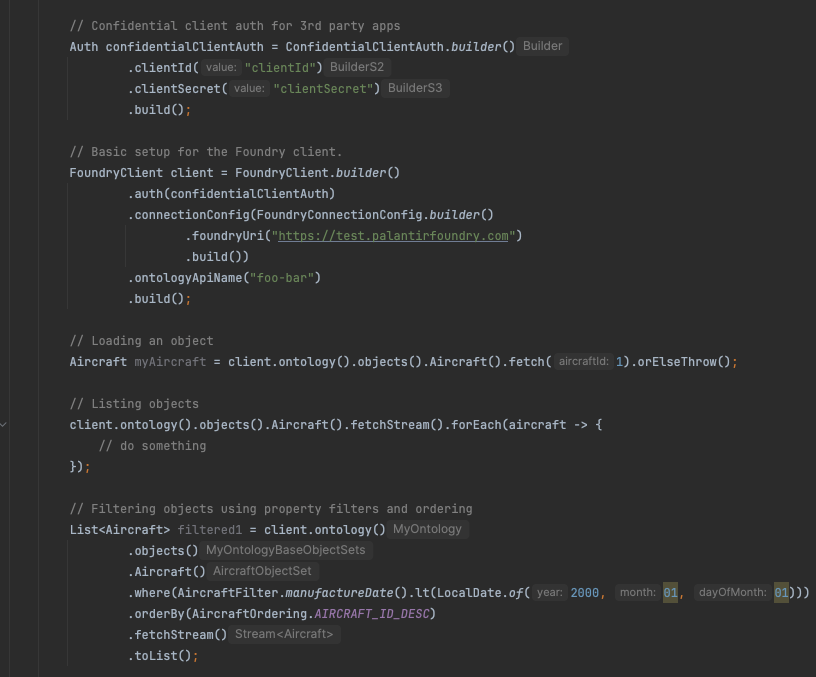
A code sample of a generated Java library for the Ontology SDK.
Get started with Java packages
Java support is included as an additional language to Developer Console, which also supports Typescript and Python development. Developers who want to use the Java SDK can follow the documented steps to create a Developer Console application and generate a new version. The Application SDK page now includes a maven tab that lists all generated Java packages.
Before you can generate a Java OSDK, you must set a Maven group ID under Application SDK > Settings. Once generated, follow the instructions found in API documentation > Getting started to import your Ontology SDK into your Java environments.
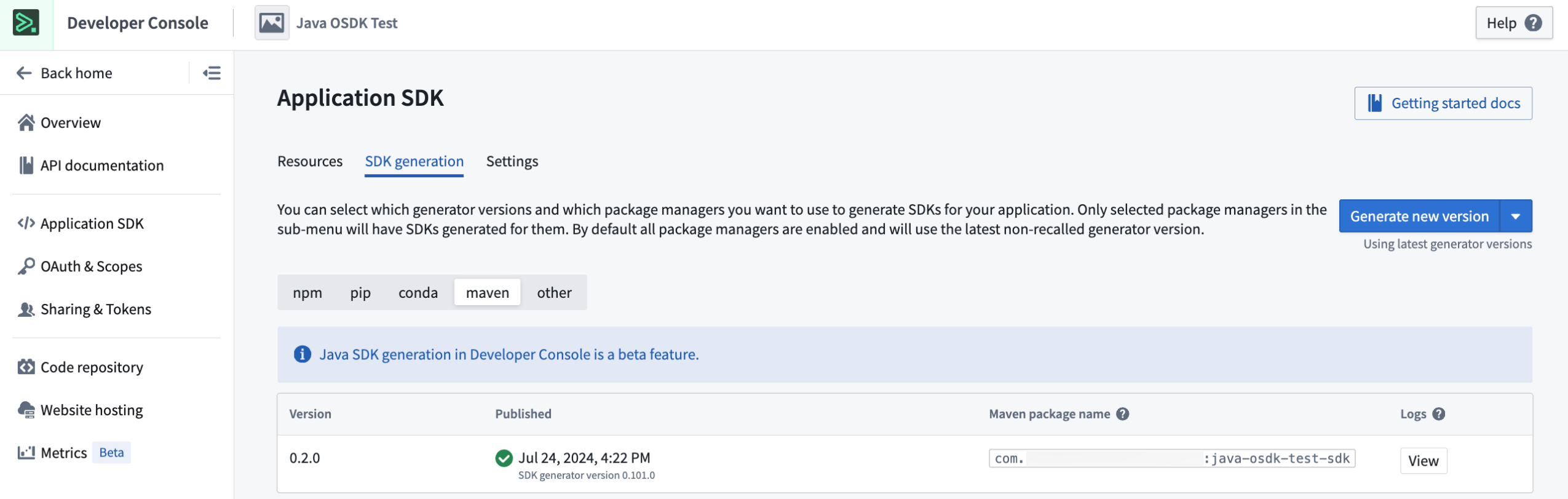
The Application SDK page in Developer Console, where you can set a Maven group ID and generate a new SDK version.
Need support?
Developer Console includes dynamically created API documentation for all languages supported by the Ontology SDK. Use the language dropdown menu to switch to Java-specific documentation.
We are always happy to engage with you through our Palantir Community Forum ↗. Submit feedback and any questions related to Ontology SDK or Developer Console using the #ontology-sdk tag.
What's next on the development roadmap?
We are working on adding even more features to the Java Ontology SDK, including aggregations, dynamic Javadoc generation, and more.
Notepad documents can now be used for AIP Assist custom documentation
Date published: 2024-07-25
As of the week of August 5, AIP Assist can provide your users with content sourced from Notepad, supplementing its already existing support for custom documentation. Integrating an additional documentation source to AIP Assist boosts its ability to offer personalized resources to your users, aligning with your operational requirements and effectively presenting pertinent information when needed.
Notepad support for custom documentation allows you to benefit from the accessibility and ease of creating Notepad documents to speed up workflows and onboarding, deliver targeted instructional content, and automate support. Ensure that you first configure visibility settings for Notepad documents by user and group, as existing permissions are respected by AIP Assist. Then, navigate to Control Panel > AIP Assist to configure Notepad custom documentation visibility, with the option to grant access anywhere on the platform or only on selected resources.
Custom documentation in AIP Assist is part of Palantir’s AIP offering and requires your enrollment to have AIP enabled in Control Panel. If you have AIP and Assist features enabled, but do not see the option to add Notepad documents to AIP Assist in Notepad, you may need to contact a Palantir representative to find out if your enrollment is eligible for this feature.
Unlock the potential of Notepad documentation
Adding custom documentation in AIP Assist is now easier than ever; you can add Notepad documents to your custom documentation with minimal configuration and no code.
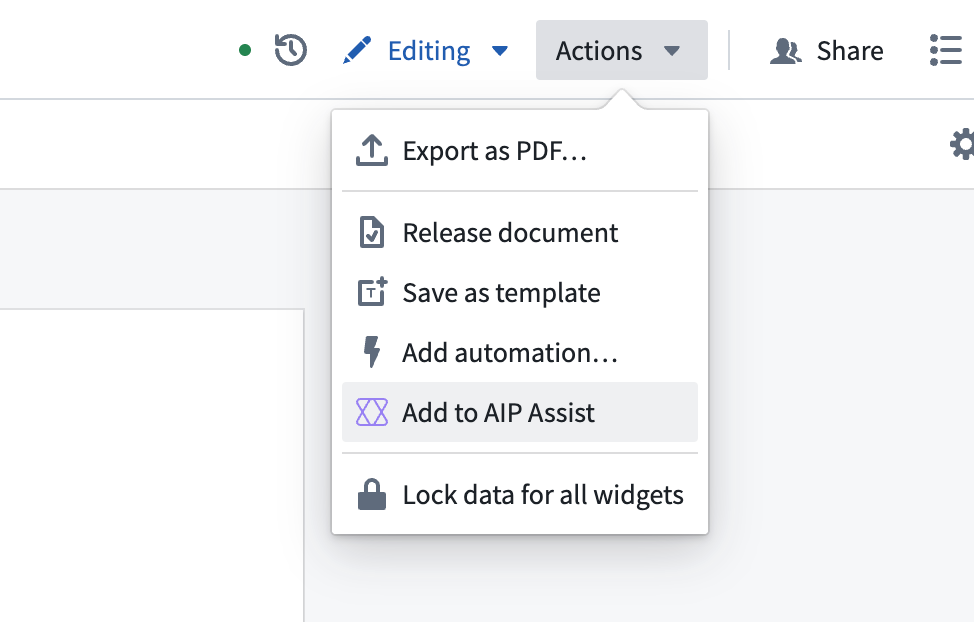
The “Add to AIP Assist” option in the Notepad actions dropdown menu.
As shown above, you can add informational content from Notepad to AIP Assist in just a few clicks. Leverage this new feature to easily augment AIP Assist responses with information directly from your organization, and empower users to get the most out of your platform.
Learn more about Custom Documentation in AIP Assist.
Introducing AIP Logic Evaluations: Your new tool for enhanced Logic function testing
Date published: 2024-07-18
LLMs (Large Language Models) are inherently non-deterministic, which can raise concerns whether your AI workflow is consistently generating the high-quality results needed for production environments. Recognizing this, we developed AIP Logic Evaluations, a new set of features that empower you to rigorously assess the performance of your AIP Logic functions. This set of features is now available on all enrollments as of this week.
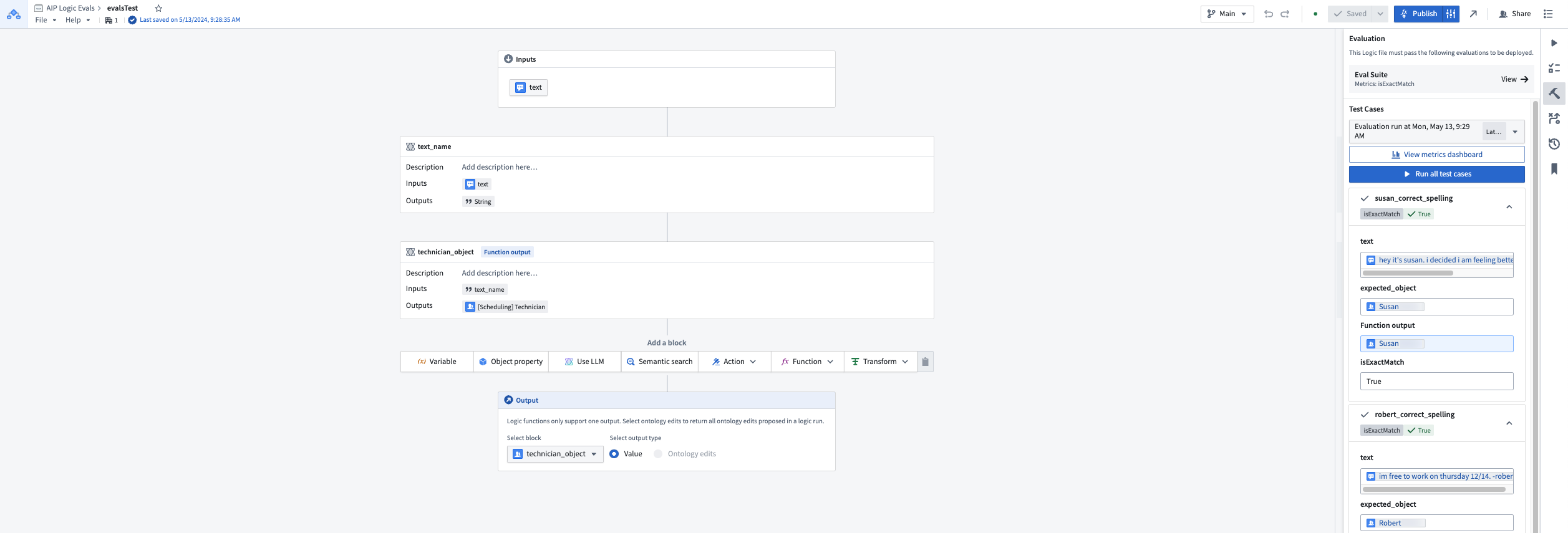
The Evaluations side panel with test case results in an AIP Logic function.
Test with out-of-the-box and custom evaluation functions
Evaluations enable you to write detailed tests for your Logic functions, allowing you to:
- Use one of several out-of-the-box evaluation functions such as string match, object match, and temporal range.
- Author custom evaluation functions in AIP Logic using LLMs to evaluate function outputs.
- Scale testing by leveraging the ability to use Object sets as test cases.
- Examine aggregate results and individual test cases in the evaluations metrics dashboard.
When to use AIP Logic Evaluations
From function iteration to monitoring function performance in production, Evaluations is designed to assist with every stage of the development cycle.
- Debug and improve Logic functions and prompts throughout the development lifecycle.
- Compare and assess different models (GPT-4 vs. Llama 3) during development and as a tool for model migration.
- Monitor long-term performance after workflows have been moved into production.
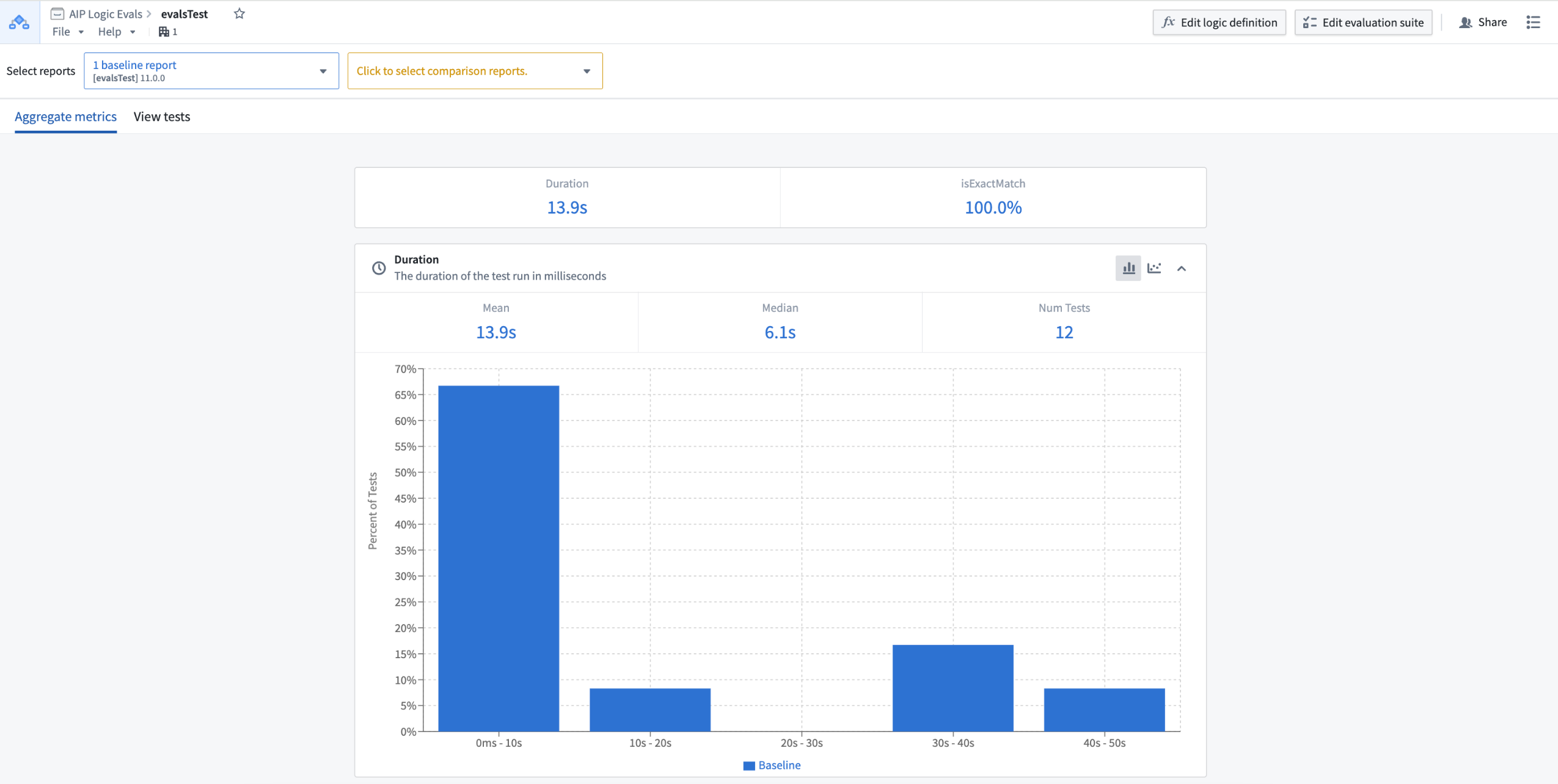
The aggregate metrics view in the evaluations metrics dashboard.
What's next on the development roadmap?
Our team is actively working on the following features for a future update:
- Support for unpublished AIP Logic functions
- Evaluations for intermediate AIP Logic blocks
Review the Evaluations documentation.
Introducing streamlined application access administration
Date published: 2024-07-18
Palantir platform applications follow the development lifecycle, and application access is configured for the current lifecycle stage from within Control Panel > Application access. When an application transitions from one lifecycle stage to the next, the same set of users maintain access. This is now the case even when an application moves through multiple lifecycle stages without admin review.
There are only two cases where the effective access to an application changes automatically:
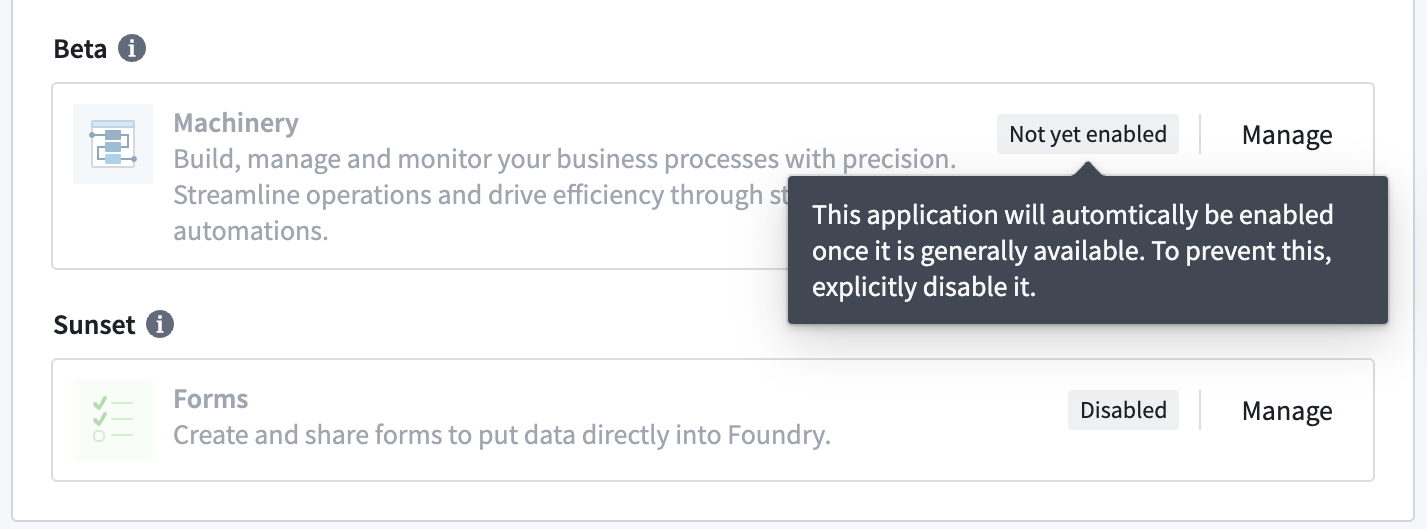
- When an application becomes generally available, all users get access to it automatically - unless the application has been explicitly disabled during the experimental or beta stage. Applications that will automatically get enabled upon reaching general availability are now shown as
Not yet enabledrather thanDisabledin Application access to indicate this state.
- When an application is deprecated, all users will lose access to it.
With these improvements, the previous Needs review callout at the top of the page is getting replaced with more targeted callouts for significant application lifecycle updates:
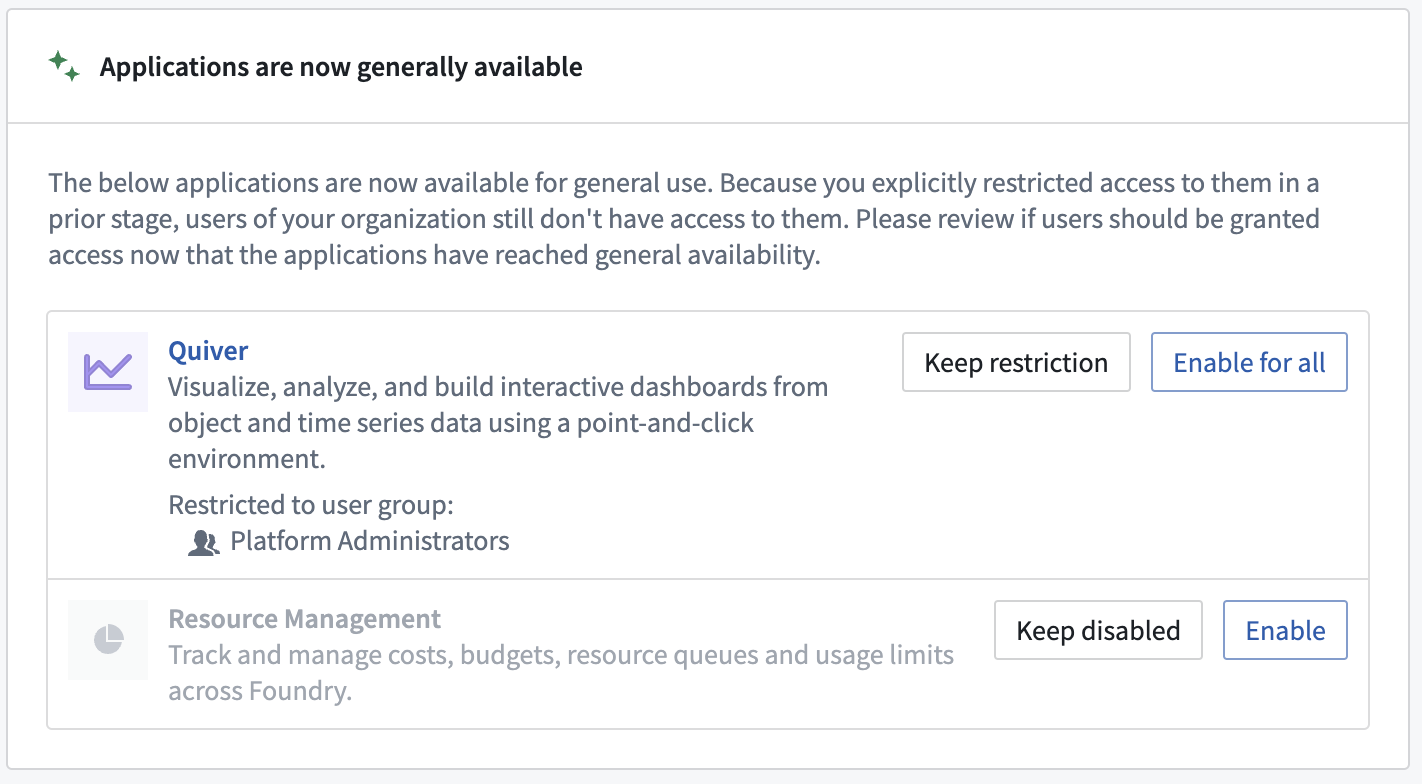
- Generally available applications that were previously disabled: Applications that were explicitly disabled or restricted to certain user groups during the experimental or beta stage remain restricted when those applications reach general availability. There are quick actions to either keep the restriction or enable the application for all users in its new lifecycle stage.
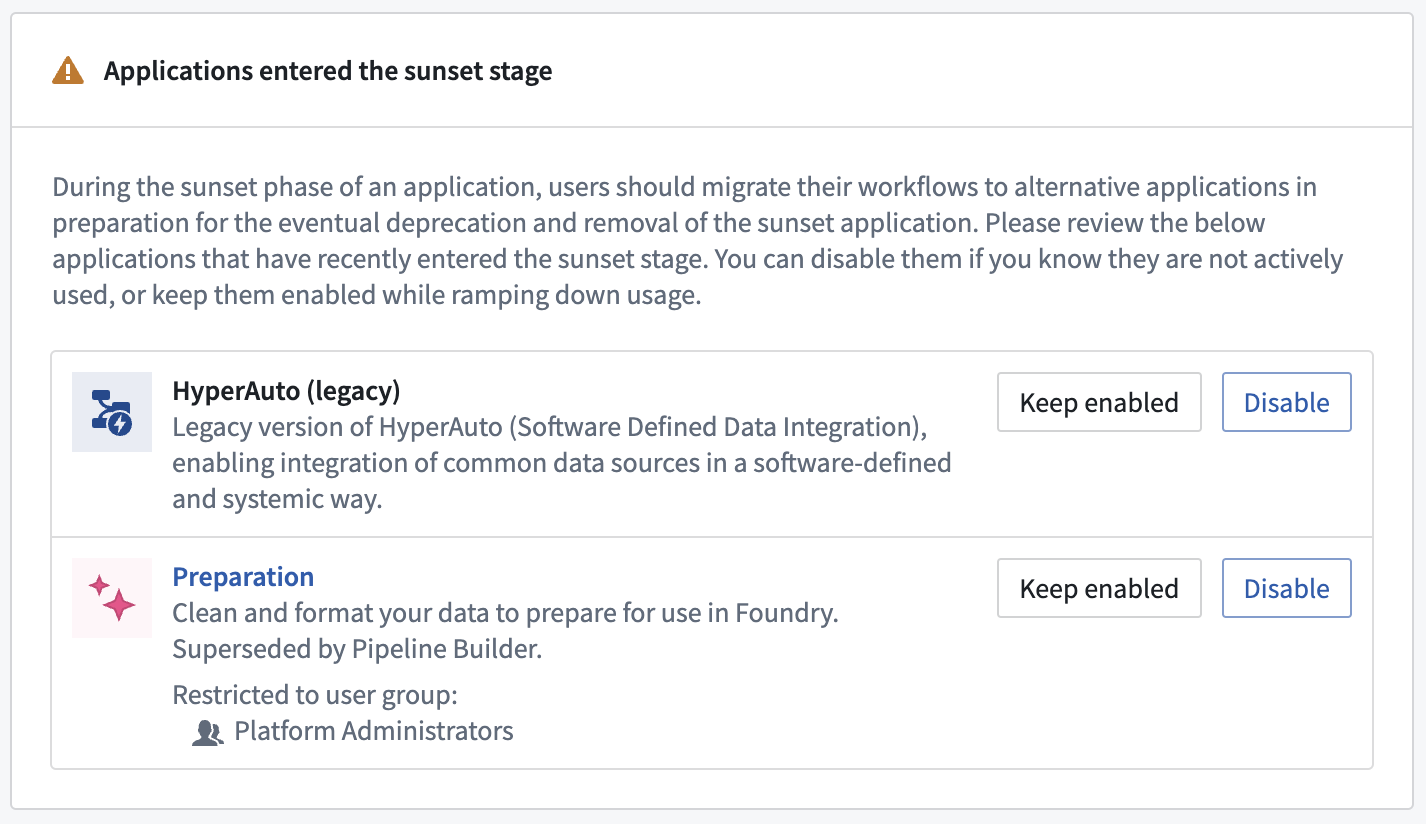
- Recently-sunset applications that are enabled: When an application enters the sunset stage, users who had access before continue to maintain access. At this point, we recommend you to work with existing users to ramp down application usage and then disable the application after users have migrated away.
- Deprecated applications that are enabled: It is expected that all users have migrated to different workflows while the application was in the sunset stage, so deprecated applications can disappear from your Palantir platform installation at any point and should no longer be used.
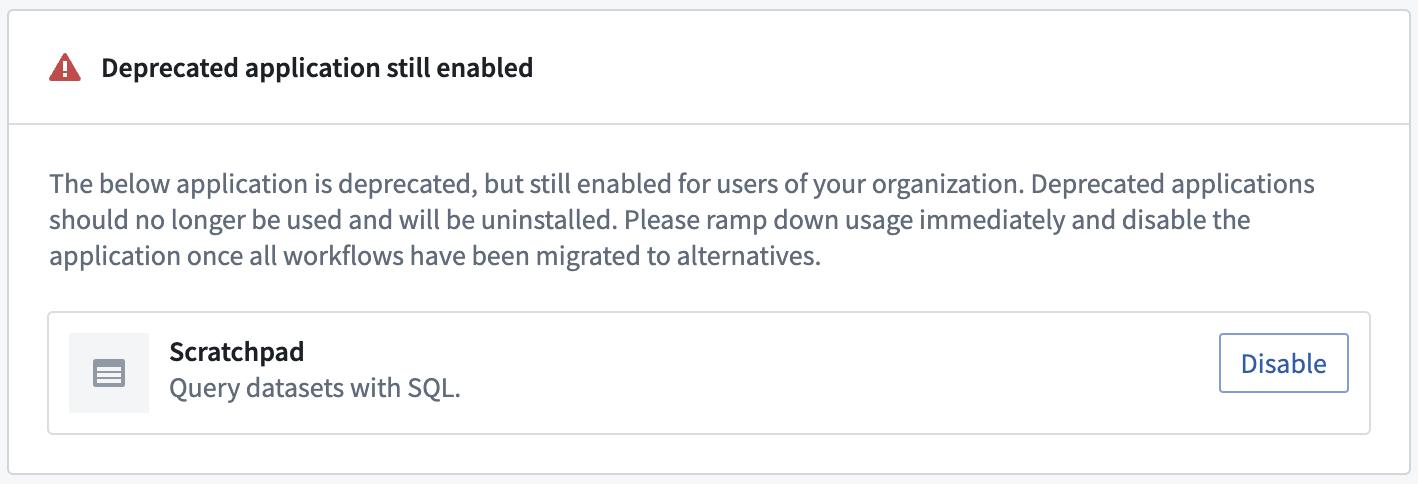
With these changes, the application access page lets you focus on those applications that have gone through a significant lifecycle change and quickly revisit which users should have access to them. You no longer have to reconfirm the previous lifecycle stage's access settings every time an application moves to the next lifecycle stage.
Reference our documentation updates on these improvements.
Preview source-based external transforms in Code Repositories
Date published: 2024-07-11
Code Repositories now supports Preview for source-based external transforms. Users can now communicate with external systems and also preview transforms that interact with the on-premise proxy. To use, select Preview located in the options bar at the bottom of your code repository. This feature is now available for stacks running Code-Assist-Proxy ≥ 2.1017.0 and Python Language Server ≥ 1.299.0.
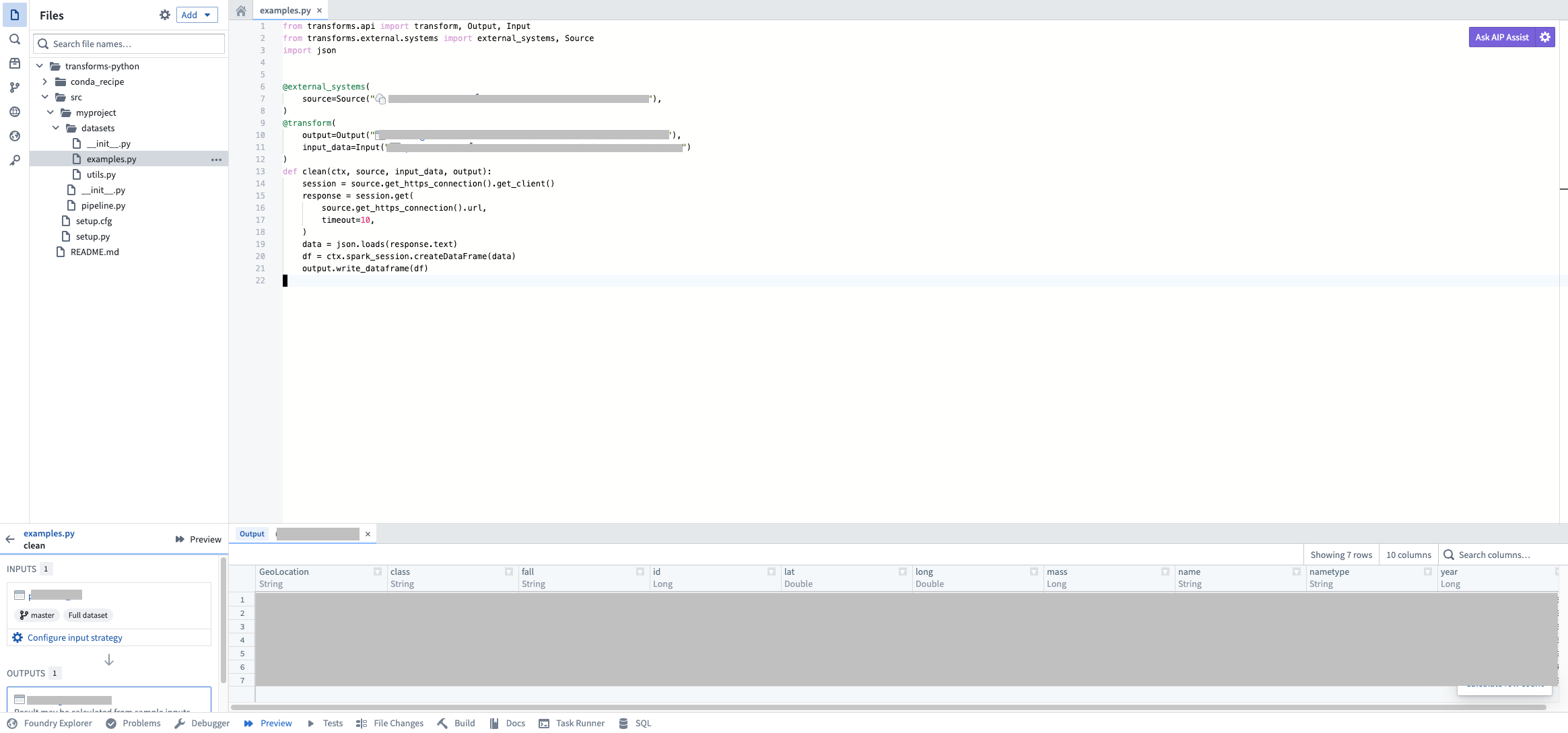
Running a source-based external transform preview to communicate with the on-premise proxy.
As a reminder, you may also continue to use egress-based external transforms in Code Repositories.
Our team is working on expanding Preview functionality to all input types, which we expect to come out later this year.
Review our documentation on source-based external transforms.
New pipeline management features in Pipeline Builder
Date published: 2024-07-02
Pipeline Builder users can now manage large pipelines more efficiently by showing and hiding selected nodes and color groups. Customizing displayed nodes allows quick and easy identification of pipeline segments and an improved navigation and editing experience.
New pipeline management features include:
- Show and hide selected nodes: Select a group of nodes and right-click to hide them or hide all other nodes.
- Show and hide color groups: Select and hide a color group from the legend or hide all other color groups.
- Hidden input and node count: View hidden node inputs by selecting the left connecting circle on a node, or view the total hidden node count.
- Easily show hidden nodes: Keep track of hidden nodes and show all of them with a single click.
- Cross-view compatibility: Show and hide features are available across different views, including the main graph, diff views, and the conflict resolution page.
As shown below, the improved Pipeline Builder interface features indicators on nodes connected to hidden inputs, while hidden color groups are shown in the Legend. Underneath, a button provides the hidden node count and the option to show all nodes.
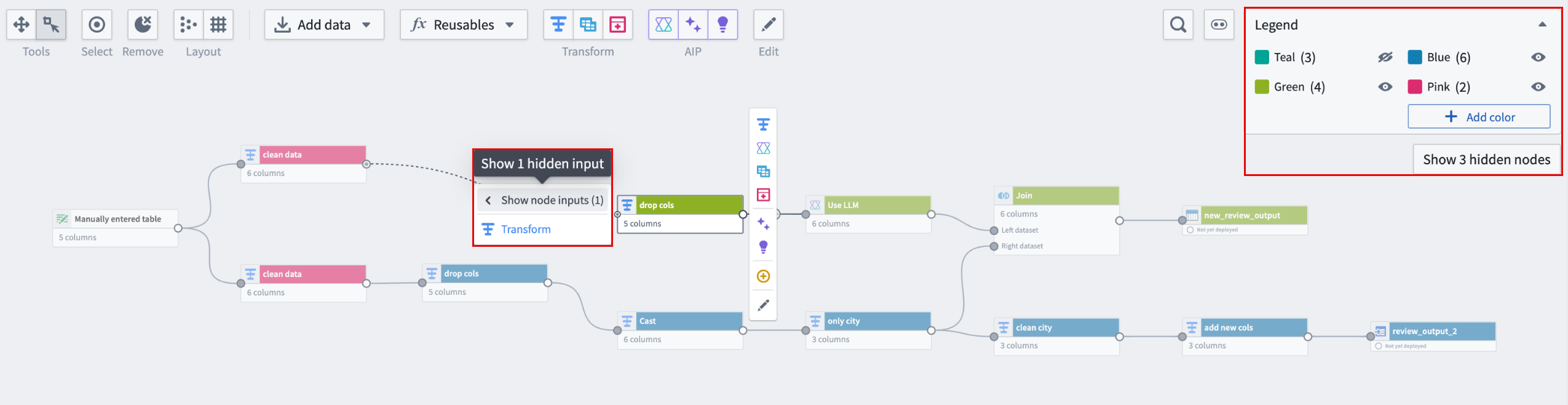
A graph in pipeline builder showing a dataset and its connected nodes.
These changes provide a streamlined experience that allows users to better understand and more easily navigate their pipelines and data flows.
Learn more about showing and hiding nodes.
Improved module headers in Workshop
Date published: 2024-07-02
Workshop module headers now offer enhanced customization options, giving builders the tools to craft a more personalized experience for their application.
- Custom color options: Customize background and title colors for your module headers, allowing the alignment of the application appearance to your brand or preferred color scheme.
- Custom app logo: Add a personal touch to your application by uploading a custom image as its logo.
- New header layouts: Arrange your application logos and widgets in various positions within the header using header targets for a more organized and user-friendly experience.
- Vertical orientation with collapsibility: Enable the new vertical orientation option and configure its collapsibility for module headers. Users can now expand application headers to view more content or collapse them to maximize space for module content while maintaining easy side navigation.
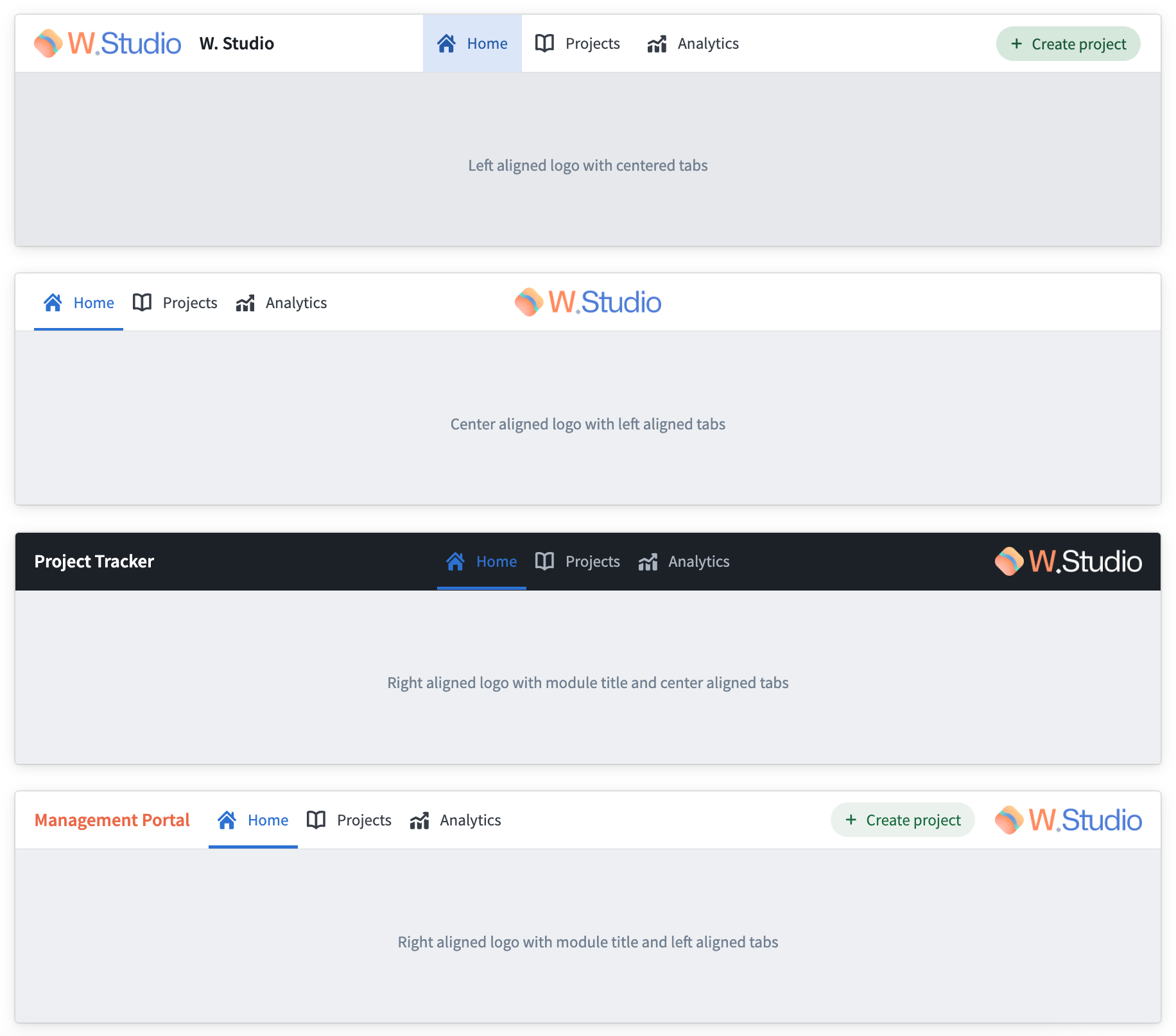
Benefit from various new module header options now available in Workshop.
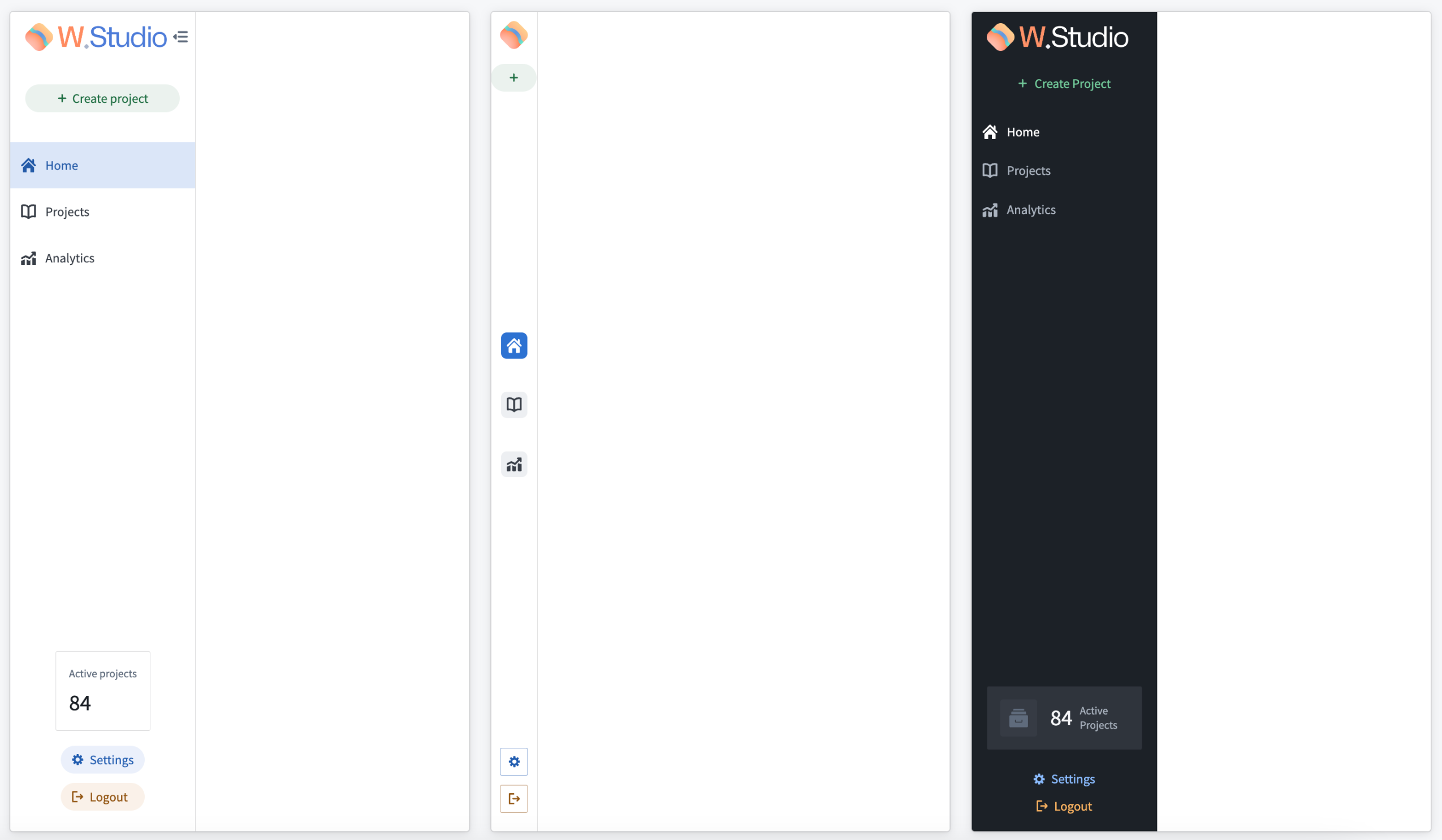
Vertical orientation with collapsibility so users can view more content or choose to hide content.
For more on module headers configuration options, review the header section on our Layouts documentation.
Additional highlights
Analytics | Code Workspaces
Models can now be created by transforms from Code Workspaces | Users can now publish a model from a transform configured in Code Workspaces that will execute a .ipynb file using the Palantir build infrastructure. This feature allows users to run long-running training jobs in parallel while continuing to iterate in their Jupyter® notebook. These transforms can be executed on a schedule or whenever the inputs are modified. Learn more about creating transforms with model outputs.

App Building | Carbon
Enhanced Workshop Data URL Support | Users can now utilize Data URLs as button destinations within Workshop, enabling the direct download of files in specific formats from the application interface. This update simplifies the process of obtaining necessary files for operational tasks, improving the application's usability.
App Building | Slate
Enhanced Checkpoint Dialog and Event Integration in Slate | Slate's latest update enhances user interaction with checkpoints by introducing a Checkpoint dialog across additional areas, including function and query exports. This improvement enables the triggering of the onCloseCheckpoint event more broadly within the application. Users will experience refined feedback during export activities or when canceling exports, alongside the new capability to leverage the onCloseCheckpoint event and showCheckpoint action for a more integrated workflow experience.
App Building | Workshop
Chart padding customization | Padding can be customized in Workshop Chart XY and Pie chart widgets. The three new padding options are: none, compact, and large.
Streamlined Resource List to Ontology Manager Navigation | The Resource List widget now supports the configuration of on-click events for object types, allowing efficient, direct access to the Ontology Manager for edits.
Dev Ops | Marketplace
Placeholder inputs for Marketplace Installs | If you would like to deploy Marketplace products before your production data is available, you can now create temporary stub datasets to allow you to proceed with the installation. Placeholder dataset inputs will create an empty dataset with the correct schema in the folder of your choice, and automatically map all the inputs. You can then remap these inputs to your production data once available with one click. Support for more input types to come soon.

Data Integration | Dataset Preview
Quick analysis over structured / tabular datasets using SQL | Users can now conduct quick analysis over structured (tabular) datasets using an SQL "scratchpad" that supports read-only SQL queries. Features include autocompletion on the dataset's schema (column names), the ability to search for other datasets within backticks "`" to perform efficient JOIN queries, editor-friendly keyboard shortcuts (Cmd + Enter) (macOS) to run a highlighted query, output preview table for the results of the executed SQL query, and resizable columns and bottom panel to fit user preferences.
Security | Projects
Improved POC Accessibility in Project Sidebar | The Project sidebar now prominently displays a dedicated section for setting the Point of Contact (POC), enhancing visibility and ease of access for users with the necessary permissions to assign or change the POC directly from the sidebar and bypassing the need to navigate through the Actions menu.
中文翻译
公告
提醒: 订阅 Foundry 新闻通讯(Foundry Newsletter),即可直接在收件箱中收到平台新产品、功能及改进的摘要。有关如何订阅的更多信息,请参阅 Foundry 新闻通讯与产品反馈渠道公告。
欢迎在我们的 开发者社区论坛 ↗ 分享您对这些公告的看法。
Ontology SDK 现已支持 Java 开发 [Beta]
发布日期:2024-07-25
Ontology SDK 和 开发者控制台(Developer Console) 现已支持 Java。Java 开发者现在可以生成 Java 库,以便轻松与 Ontology 对象、链接、操作和函数进行交互。
Ontology 软件开发工具包(OSDK)允许您直接从开发环境中利用 Ontology 的全部功能。您可以通过开发者控制台(一个使用 Palantir API 创建和管理应用程序的门户)生成 Ontology SDK。借助新的 Java SDK 支持,您可以构建基于 Java 的程序,例如与 Ontology 交互的后端服务。这些服务将使用机密客户端(confidential clients)向 Palantir 平台进行身份验证,并根据授予用户的权限提供数据。
Ontology SDK 生成的 Java 库代码示例。
Java 包入门
Java 支持是开发者控制台新增的语言,该控制台此前已支持 TypeScript 和 Python 开发。希望使用 Java SDK 的开发者可以按照文档步骤 创建开发者控制台应用程序 并生成新版本。应用程序 SDK(Application SDK) 页面现在包含一个 maven 选项卡,列出了所有生成的 Java 包。
在生成 Java OSDK 之前,您必须在 应用程序 SDK > 设置 中设置 Maven 组 ID。生成后,请按照 API 文档 > 入门 中的说明将 Ontology SDK 导入到您的 Java 环境中。
开发者控制台中的应用程序 SDK 页面,您可以在其中设置 Maven 组 ID 并生成新的 SDK 版本。
需要支持?
开发者控制台包含 Ontology SDK 支持的所有语言的动态创建的 API 文档。使用语言下拉菜单切换到 Java 专属文档。
我们始终乐于通过 Palantir 社区论坛 ↗ 与您互动。请使用 #ontology-sdk 标签提交与 Ontology SDK 或开发者控制台相关的反馈和问题。
开发路线图下一步是什么?
我们正在为 Java Ontology SDK 添加更多功能,包括聚合、动态 Javadoc 生成等。
Notepad 文档现可用于 AIP Assist 自定义文档
发布日期:2024-07-25
自 8 月 5 日起,AIP Assist 可以向用户提供源自 Notepad 的内容,补充其已有的自定义文档支持。为 AIP Assist 集成额外的文档源,可增强其向用户提供个性化资源的能力,从而符合您的运营需求,并在需要时有效呈现相关信息。
Notepad 对自定义文档的支持使您能够利用 Notepad 文档的易用性和便捷性来加速工作流程和入职培训、提供有针对性的指导内容以及实现支持自动化。请确保首先按用户和组配置 Notepad 文档的可见性设置,因为 AIP Assist 会遵循现有权限。然后,导航至 控制面板 > AIP Assist 配置 Notepad 自定义文档的可见性,可以选择授予平台任意位置的访问权限,或仅限选定资源。
AIP Assist 中的自定义文档是 Palantir AIP 产品的一部分,需要您的注册在控制面板中启用 AIP。如果您已启用 AIP 和 Assist 功能,但在 Notepad 中看不到将 Notepad 文档添加到 AIP Assist 的选项,则可能需要联系 Palantir 代表,以确认您的注册是否符合使用此功能的条件。
释放 Notepad 文档的潜力
在 AIP Assist 中添加自定义文档现在比以往任何时候都更容易;您只需极少的配置且无需编码即可将 Notepad 文档添加到自定义文档中。
Notepad 操作下拉菜单中的“添加到 AIP Assist”选项。
如上所示,只需点击几下,即可将 Notepad 中的信息内容添加到 AIP Assist。利用此新功能,可以轻松地用来自您组织的直接信息增强 AIP Assist 的响应,并帮助用户充分利用您的平台。
推出 AIP Logic 评估:增强 Logic 函数测试的新工具
发布日期:2024-07-18
LLM(大型语言模型)本质上具有非确定性,这可能会引发对您的 AI 工作流是否能够持续生成生产环境所需高质量结果的担忧。认识到这一点,我们开发了 AIP Logic 评估(AIP Logic Evaluations),这是一组新功能,使您能够严格评估 AIP Logic 函数的性能。自本周起,所有注册均可使用这组功能。
AIP Logic 函数中带有测试用例结果的评估侧面板。
使用开箱即用和自定义评估函数进行测试
评估使您能够为 Logic 函数编写详细的测试,从而允许您:
- 使用多种开箱即用的评估函数,例如字符串匹配、对象匹配和时间范围。
- 在 AIP Logic 中使用 LLM 编写自定义评估函数来评估函数输出。
- 利用将对象集(Object sets)用作测试用例的能力来扩展测试。
- 在评估指标仪表板中检查汇总结果和单个测试用例。
何时使用 AIP Logic 评估
从函数迭代到监控生产环境中的函数性能,评估旨在协助开发周期的每个阶段。
- 在整个开发生命周期中调试和改进 Logic 函数及提示词。
- 在开发过程中以及作为模型迁移工具,比较和评估不同模型(GPT-4 与 Llama 3)。
- 在工作流迁移到生产环境后监控长期性能。
评估指标仪表板中的汇总指标视图。
开发路线图下一步是什么?
我们的团队正在积极为未来更新开发以下功能:
- 支持未发布的 AIP Logic 函数
- 中间 AIP Logic 块的评估
推出简化的应用程序访问管理
发布日期:2024-07-18
Palantir 平台应用程序遵循 开发生命周期,应用程序访问权限在 控制面板 > 应用程序访问 中根据当前生命周期阶段进行配置。当应用程序从一个生命周期阶段过渡到下一个阶段时,同一组用户保持访问权限。即使应用程序在未经管理员审查的情况下经历多个生命周期阶段,现在也是如此。
只有两种情况会导致应用程序的有效访问权限自动更改:
- 当应用程序变为 正式发布(generally available) 时,所有用户都会自动获得访问权限 - 除非 该应用程序在实验或 Beta 阶段已被明确禁用。在达到正式发布状态时将自动启用的应用程序,现在在应用程序访问中显示为
尚未启用而非已禁用,以指示此状态。
- 当应用程序被 弃用(deprecated) 时,所有用户将失去对其的访问权限。
通过这些改进,页面顶部之前的 需要审查 标注将被替换为针对重大应用程序生命周期更新的更有针对性的标注:
- 之前被禁用的正式发布应用程序: 在实验或 Beta 阶段被明确禁用或限制给特定用户组的应用程序,在达到正式发布状态时仍保持受限。提供快速操作,可以选择保持限制,或在新生命周期阶段为所有用户启用该应用程序。
- 已启用但近期进入日落阶段的应用程序: 当应用程序进入日落阶段时,之前拥有访问权限的用户将继续保持访问权限。此时,我们建议您与现有用户合作,逐步减少应用程序的使用,并在用户迁移完成后禁用该应用程序。
- 已启用但已弃用的应用程序: 预计所有用户在应用程序处于日落阶段时已迁移到不同的工作流,因此已弃用的应用程序可能随时从您的 Palantir 平台安装中消失,不应再使用。
通过这些更改,应用程序访问页面让您可以专注于那些经历了重大生命周期变化的应用程序,并快速重新审视哪些用户应拥有访问权限。您不再需要在应用程序每次进入下一个生命周期阶段时重新确认上一生命周期阶段的访问设置。
参考 我们关于这些改进的文档更新。
在代码仓库中预览基于源的外部转换
发布日期:2024-07-11
代码仓库(Code Repositories) 现在支持预览 基于源的外部转换(source-based external transforms)。用户现在可以与外部系统通信,并预览与本地代理交互的转换。要使用此功能,请选择代码仓库底部选项栏中的 预览。此功能现可用于运行 Code-Assist-Proxy ≥ 2.1017.0 和 Python Language Server ≥ 1.299.0 的堆栈。
运行基于源的外部转换预览以与本地代理通信。
提醒一下,您也可以继续在代码仓库中使用 基于出口的外部转换(egress-based external transforms)。
我们的团队正在努力将预览功能扩展到所有输入类型,预计将在今年晚些时候推出。
Pipeline Builder 中的新管道管理功能
发布日期:2024-07-02
Pipeline Builder 用户现在可以通过显示和隐藏选定节点及颜色组来更高效地管理大型管道。自定义显示的节点可以快速轻松地识别管道段,并改善导航和编辑体验。
新的管道管理功能包括:
- 显示和隐藏选定节点: 选择一组节点并右键单击以隐藏它们或隐藏所有其他节点。
- 显示和隐藏颜色组: 从图例中选择并隐藏一个颜色组,或隐藏所有其他颜色组。
- 隐藏的输入和节点计数: 通过选择节点上的左侧连接圆来查看隐藏的节点输入,或查看隐藏的节点总数。
- 轻松显示隐藏节点: 跟踪隐藏节点,并一键显示所有节点。
- 跨视图兼容性: 显示和隐藏功能可在不同视图中使用,包括主图、差异视图和冲突解决页面。
如下所示,改进后的 Pipeline Builder 界面在连接到隐藏输入的节点上显示指示器,而隐藏的颜色组则显示在 图例 中。下方有一个按钮,提供隐藏节点计数以及显示所有节点的选项。
Pipeline Builder 中显示数据集及其连接节点的图形。
这些更改提供了简化的体验,使用户能够更好地理解并更轻松地导航其管道和数据流。
Workshop 中改进的模块标题
发布日期:2024-07-02
Workshop 模块标题现在提供增强的自定义选项,为构建者提供为其应用程序打造更个性化体验的工具。
- 自定义颜色选项: 自定义模块标题的背景和标题颜色,使应用程序外观与您的品牌或首选配色方案保持一致。
- 自定义应用程序徽标: 通过上传自定义图像作为徽标,为您的应用程序增添个性化色彩。
- 新的标题布局: 使用标题目标将应用程序徽标和小部件放置在标题内的不同位置,以获得更有条理且用户友好的体验。
- 可折叠的垂直方向: 为模块标题启用新的垂直方向选项并配置其可折叠性。用户现在可以展开应用程序标题以查看更多内容,或折叠它们以最大化模块内容的空间,同时保持便捷的侧边导航。
利用 Workshop 中现在可用的各种新模块标题选项。
可折叠的垂直方向,使用户可以查看更多内容或选择隐藏内容。
有关模块标题配置选项的更多信息,请查看我们布局文档中的标题部分。
其他亮点
分析 | 代码工作区(Code Workspaces)
现在可以通过代码工作区的转换创建模型 | 用户现在可以从代码工作区中配置的转换发布模型,该转换将使用 Palantir 构建基础设施执行 .ipynb 文件。此功能允许用户并行运行长时间的训练作业,同时继续在其 Jupyter® 笔记本中进行迭代。这些转换可以按计划执行,也可以在输入被修改时执行。详细了解创建带有模型输出的转换。
应用构建 | Carbon
增强的 Workshop 数据 URL 支持 | 用户现在可以将数据 URL 用作 Workshop 中的按钮目标,从而能够直接从应用程序界面下载特定格式的文件。此更新简化了获取操作任务所需文件的过程,提高了应用程序的可用性。
应用构建 | Slate
Slate 中增强的检查点对话框和事件集成 | Slate 的最新更新通过在更多区域(包括函数和查询导出)引入检查点对话框,增强了用户与检查点的交互。此改进使得能够在应用程序中更广泛地触发 onCloseCheckpoint 事件。用户在导出活动或取消导出时将体验到更精细的反馈,同时还能利用新的 onCloseCheckpoint 事件和 showCheckpoint 操作,获得更集成的工作流体验。
应用构建 | Workshop
图表内边距自定义 | 可以在 Workshop 图表 XY 和饼图小部件中自定义内边距。三种新的内边距选项是:无、紧凑和大。
简化的资源列表到 Ontology Manager 导航 | 资源列表小部件现在支持为对象类型配置点击事件,从而允许高效、直接地访问 Ontology Manager 进行编辑。
开发运维 | 市场(Marketplace)
市场安装的占位符输入 | 如果您希望在生成数据可用之前部署市场产品,现在可以创建临时存根数据集,以便继续进行安装。占位符数据集输入将在您选择的文件夹中创建一个具有正确架构的空数据集,并自动映射所有输入。然后,您可以在生产数据可用后一键将这些输入重新映射到生产数据。即将支持更多输入类型。
数据集成 | 数据集预览
使用 SQL 对结构化/表格数据集进行快速分析 | 用户现在可以使用支持只读 SQL 查询的 SQL“草稿本”对结构化(表格)数据集进行快速分析。功能包括:数据集架构(列名)的自动补全、能够在反引号 "`" 内搜索其他数据集以执行高效的 JOIN 查询、编辑器友好的键盘快捷键 (Cmd + Enter) (macOS) 以运行高亮查询、执行 SQL 查询结果的输出预览表,以及可调整大小的列和底部面板以适应个人偏好。
安全 | 项目
项目侧边栏中改进的 POC 可访问性 | 项目侧边栏现在突出显示一个专门用于设置联系人(Point of Contact, POC)的部分,提高了可见性和易用性,拥有必要权限的用户可以直接从侧边栏分配或更改 POC,而无需通过操作菜单导航。