Announcements(公告)
REMINDER: Sign up for the Foundry Newsletter to receive a summary of new products, features, and improvements across the platform directly to your inbox. For more information on how to subscribe, see the Foundry Newsletter and Product Feedback channels announcement.
Share your thoughts about these announcements in our Developer Community Forum ↗.
Introducing interfaces, a new Ontology type [Beta]
Date published: 2024-08-27
We are excited to announce the new interface Ontology type, a primitive that allows users to describe the shape of an object type and its capabilities. Interfaces provide object type polymorphism, allowing for consistent modeling of and interaction with object types that share a common shape.
Interfaces are composed of shared properties, interface link types, and metadata about the interface. An interface can be implemented by multiple object types and can be extended to allow for composability of interfaces.
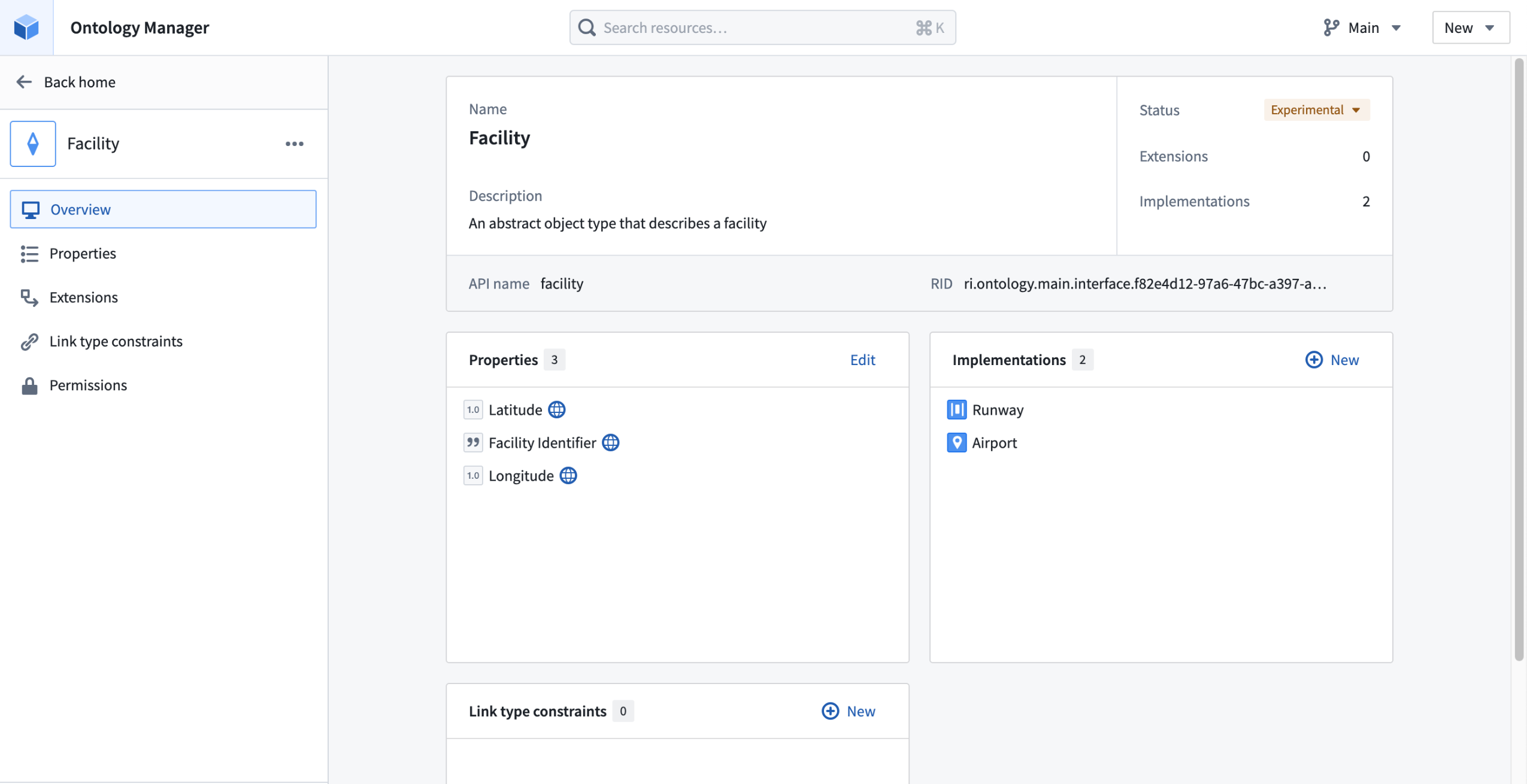
An example Facility interface in Ontology Manager.
The power of interfaces
For data integrators, an interface can represent a pipeline target for integrating similar but distinct object types. For application developers, an interface can serve as an API surface for accessing all implementing object types.
- Object Set Service searches against the interface will return matching objects of the implementing object type.
- Users can interact with objects of the implementing object type using both their local API names when typed as the concrete object type and the interface API names for properties and links when typed as the interface type.
In short, implementing an interface allows downstream applications to interact with any and all implementing objects through the interface definition. This allows users to write application code using the interface as an API layer, instead of requiring the application to support every implementing object type individually. Additionally, by using the interface as an application API layer, new object types can be added to the application by having them implement the application interface without requiring code changes to explicitly support the new object type.
Example interface: Scheduling
A common use case for interfaces is to indicate that an object type has a certain capability, for example to indicate that an object represents a schedulable event. By implementing the Schedulable Event interface, an object can be used by Ontology-aware apps for dynamic scheduling workflows, calendar management, and more.
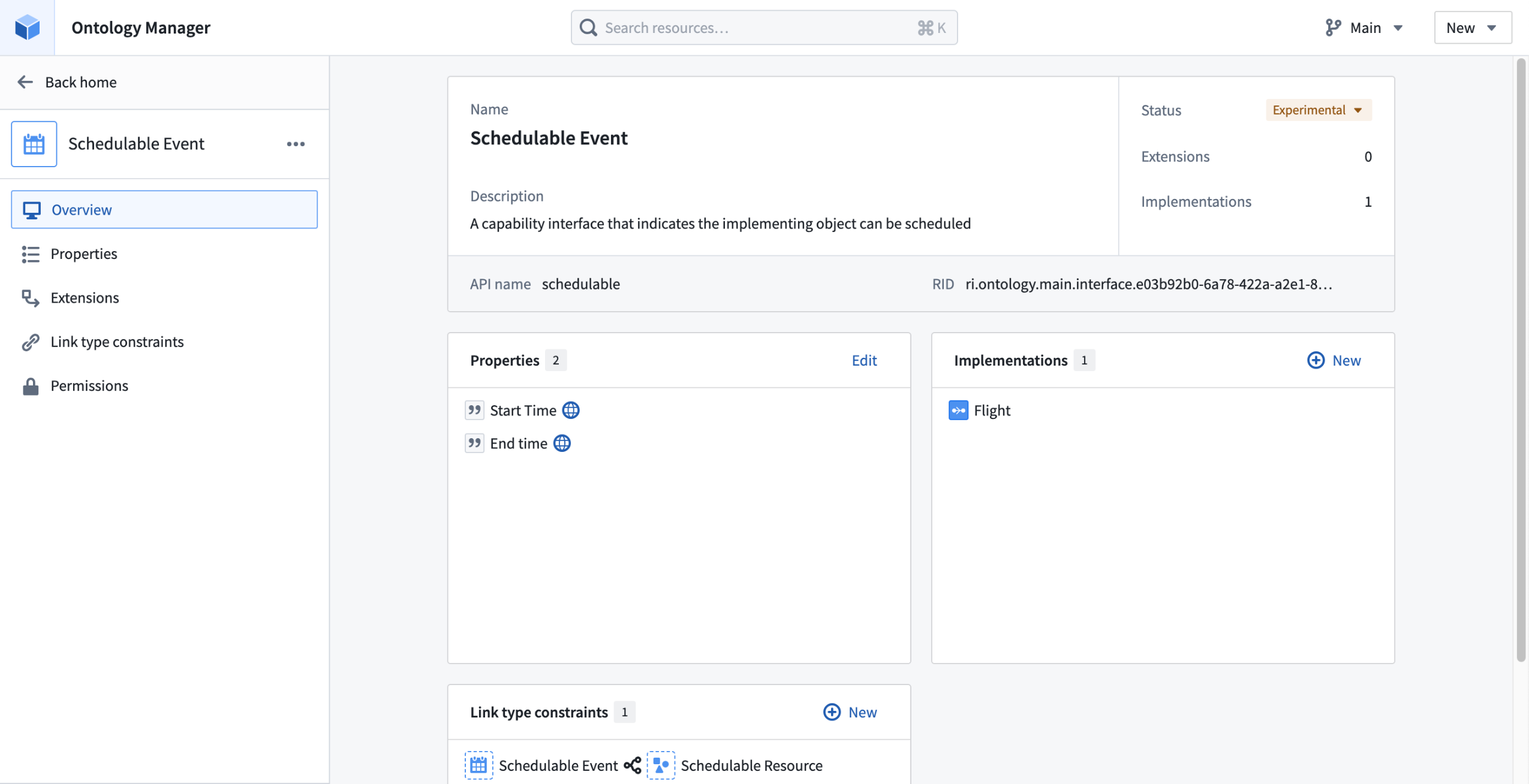
An example Schedulable Event interface, implemented on the Flight object type with shared Start Time and End Time properties.
Get started with interfaces
To add interfaces to your Ontology, you can create new interfaces or extend existing ones in Ontology Manager. Once you have an interface, you can then implement that interface with an object type of the appropriate shape or edit it to better fit your Organization as your Ontology evolves.
Once your interface is declared, you can package and install them with Marketplace, implement them in Pipeline Builder, and use them as your API in Ontology SDK applications.
To learn more about interfaces and how to use them, review our interface documentation.
What's next on the development roadmap?
As we work to make interface types generally available, we will extend support for interfaces as inputs to Actions, Functions, and Workshop widgets.
Introducing folders for node organization in Pipeline Builder
Date published: 2024-08-22
To improve your navigation and editing experience, you can now create folders and subfolders in Pipeline Builder. Creating folders is intuitive; you can group nodes by selecting them on the graph or highlighting them in the Pipeline file tree sidebar. A hierarchical file structure, also known as a file tree, will be created for your pipeline with additional visibility and node targeting options based on selected folders.
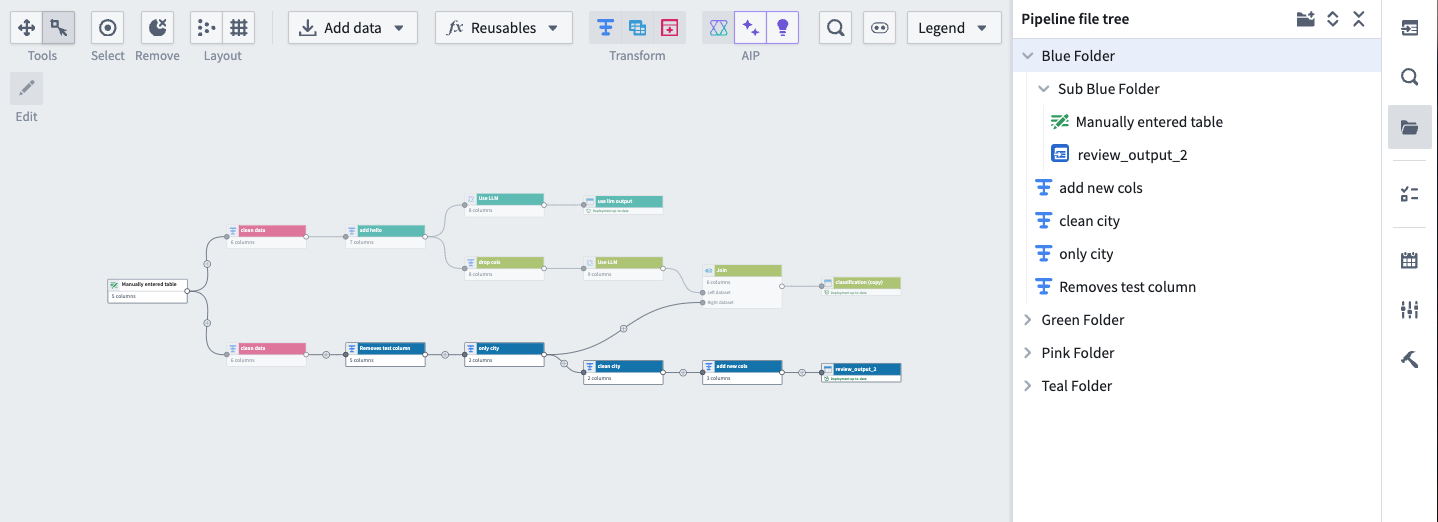
A pipeline with nodes organized into various folders and subfolders.
Narrow pipeline scope and display relevant nodes
You can toggle the visibility of nodes in a subset of folders to narrow the scope of your pipeline by choosing one of the visibility options shown below:
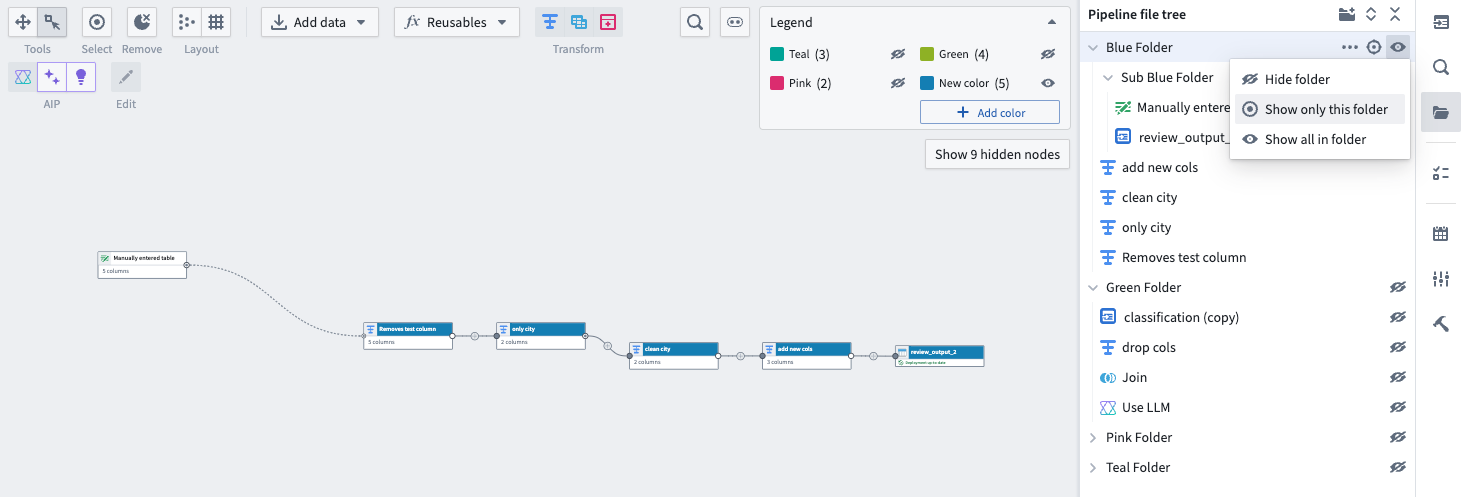
Only the nodes in the Blue Folder are displayed on the graph, with folder visibility options in the top right.
Additionally, you can quickly target relevant nodes on the graph by selecting the target icon to the right of the folder name. Leverage these new organization and visibility features to make the management of large and complex pipelines more efficient and streamlined.
Learn more about folders in Pipeline Builder.
Increase pipeline reliability with unit tests in Pipeline Builder
Date published: 2024-08-20
We are happy to announce that you can now implement unit tests for pipelines in Pipeline Builder. Unit tests serve as a valuable tool for debugging, detecting breaking changes, and ultimately ensuring higher quality pipelines. Create and run unit tests directly from Pipeline Builder to detect issues early and deploy your pipelines with added confidence.
What is a unit test?
Similar to unit tests in code, unit tests in Pipeline Builder allow you to confirm that pipeline logic produces the expected outputs when tested with predefined inputs. Unit tests consist of:
- Test inputs
- Transform nodes
- Expected outputs
Test inputs and expected outputs can be created with manually entered or existing datasets and schemas, allowing for fast and streamlined unit test creation. The transform nodes to be tested can be selected in the Pipeline Builder workspace.
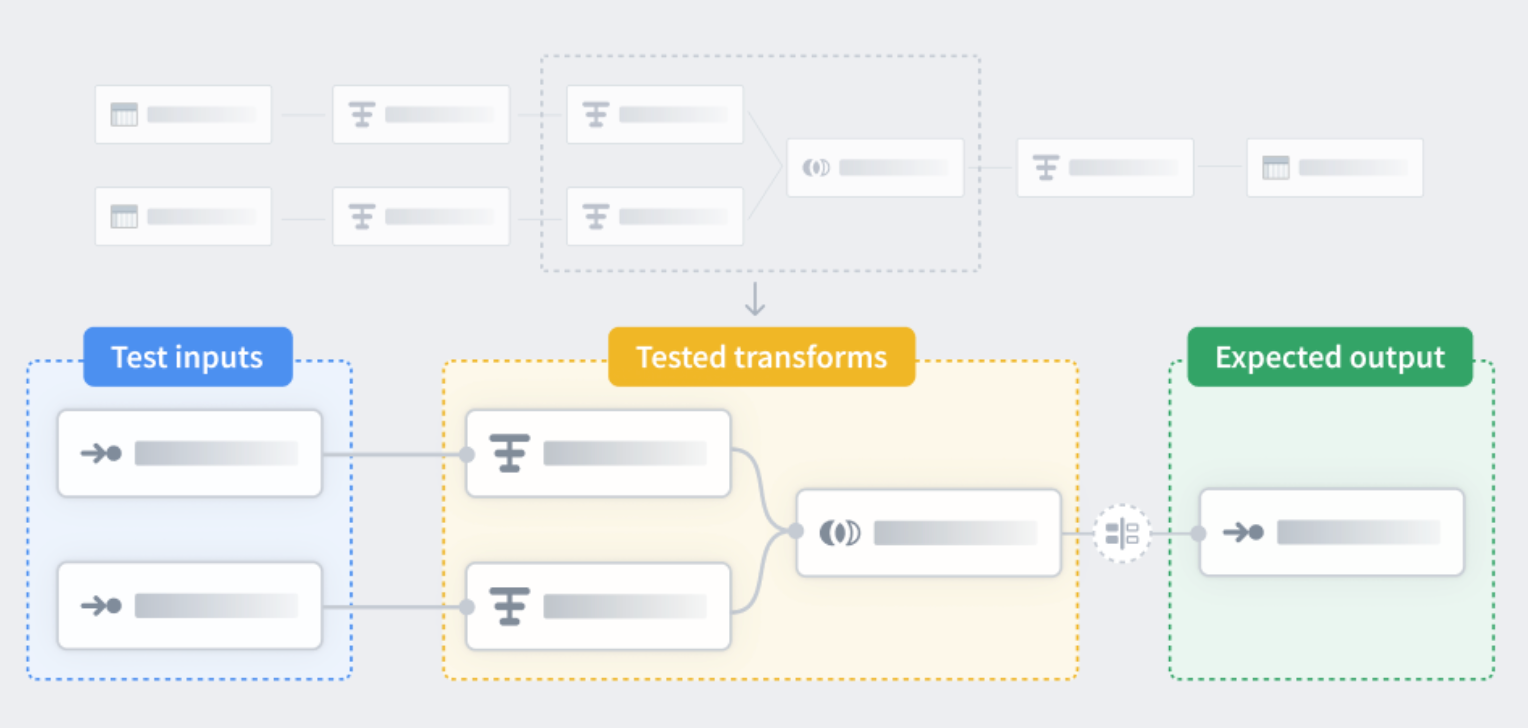
A diagram of the unit test workflow showing test inputs, tested transform nodes, and expected outputs.
Unit test capabilities
You can access unit tests by selecting the Unit tests icon on the right side panel. From there, you can create and fine tune unit tests by selecting the relevant nodes and providing input and output datasets.
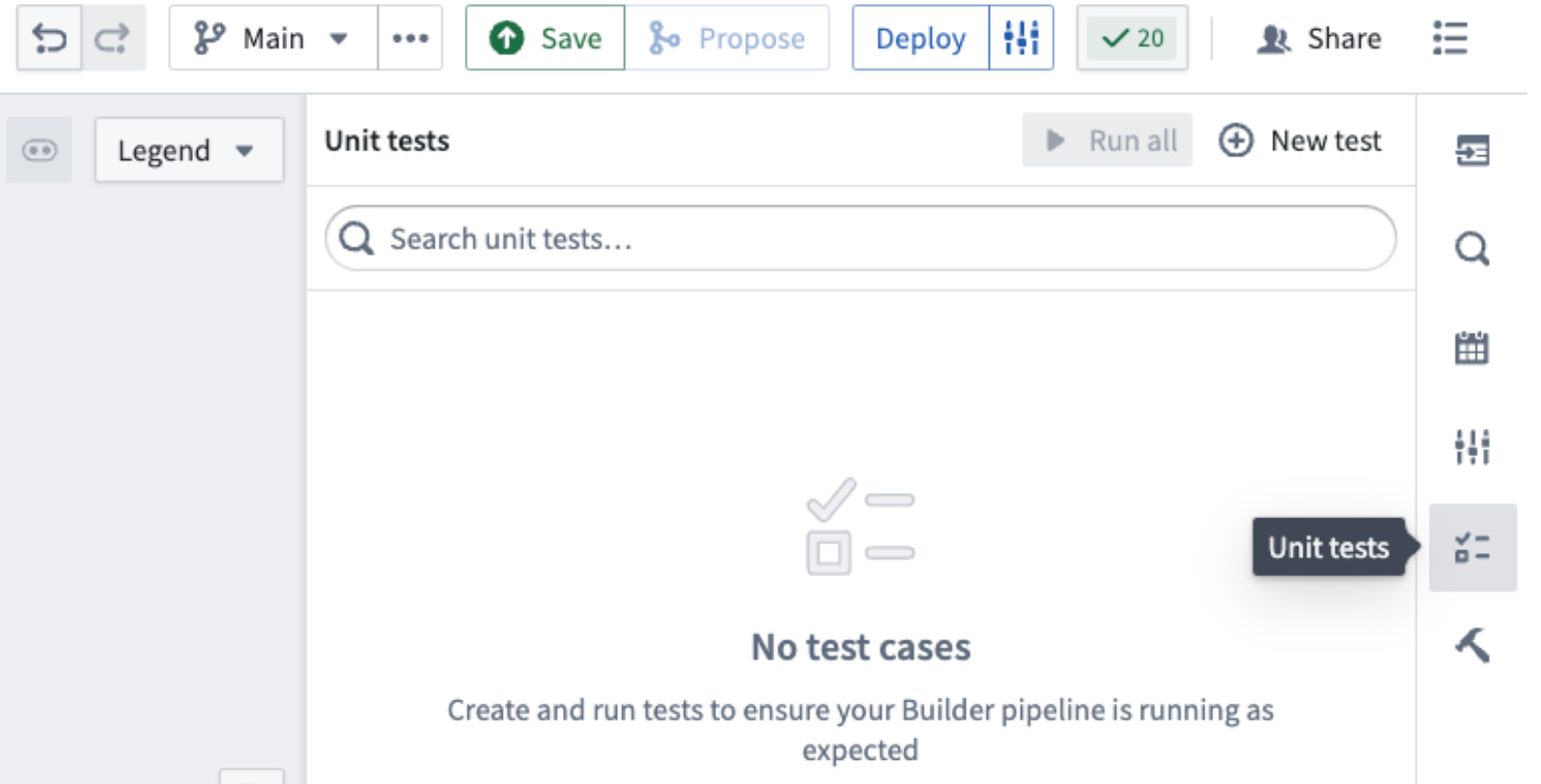
The Unit tests icon on the right side panel.
After you have configured a unit test and created input and output datasets, select Run test to display expected and received outputs. From here, you can assess results and iterate on your pipeline or unit tests if necessary, all in one place.
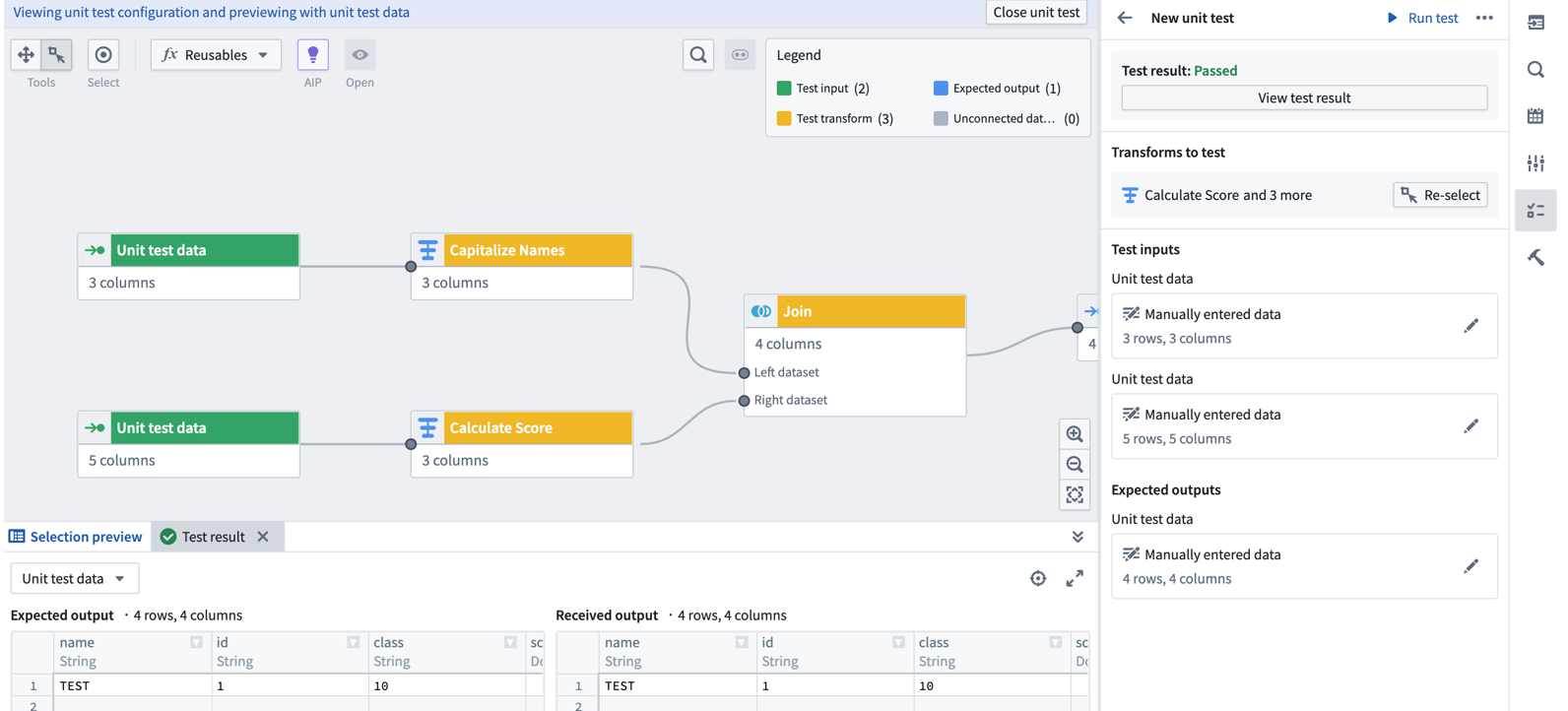
A sample unit test result, displaying test results and configuration on the right and expected and received outputs on the bottom.
As part of this flexible and fully-featured testing interface, you can easily edit and delete unit tests to keep up with rapidly evolving pipelines. Changes to unit tests will also show up in the proposals page, allowing you to track changes and ensure that all tests are passing before merging proposals.
Learn more about unit testing in Pipeline Builder.
Improved Pipeline Builder and Ontology integration
Date published: 2024-08-13
Pipeline Builder just got more powerful; it is now possible to create and edit Ontology object and link types, resolve conflicts, and migrate schemas directly from your pipelines. Thanks to an improved Pipeline Builder and Ontology integration, users can now benefit from streamlined workflows and added versatility when building on the Palantir platform.
Previously, it was not possible to edit Pipeline Builder-owned objects and links in Ontology Manager. Now, you can make changes to Pipeline Builder-owned objects in both Pipeline Builder and Ontology Manager, with the necessary conflict resolution and schema migration features to ensure consistency. Note that while objects created in Pipeline Builder can be edited in Ontology Manager, objects created in Ontology Manager cannot yet be edited in Pipeline Builder.
Enable edits through Actions
To get started, enable edits in Pipeline Builder or Ontology Manager. Toggle Allow edits to objects of this type to allow edits in both Pipeline Builder and Ontology Manager. This will also enable Action-based Ontology edits in Workshop and other applications. Note that only batch-backed objects created in Pipeline Builder currently support this feature, and stream-backed object types do not currently support edits.
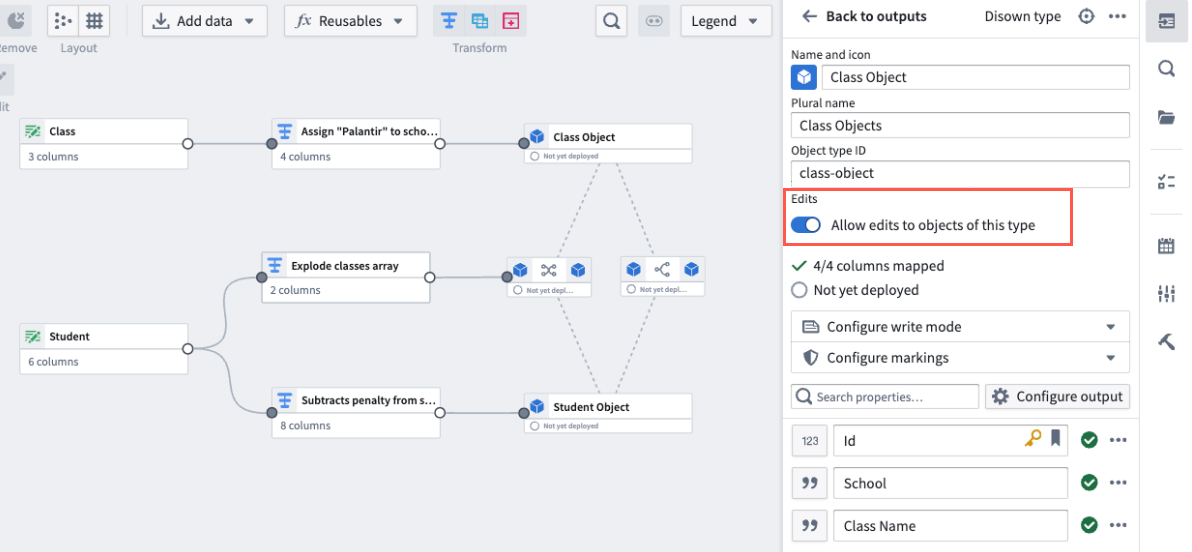
The Allow edits toggle in the edit object type panel.
Bidirectional change syncing between applications
To support Ontology changes from both Pipeline Builder and Ontology Manager, we have introduced the following features to ensure that conflicts, validation errors, and schema changes are handled seamlessly.
Merge conflict resolutions: We have added a merge conflict resolution dialog box for smoother editing across Ontology Manager and Pipeline Builder, preventing concurrent updates from being overwritten.
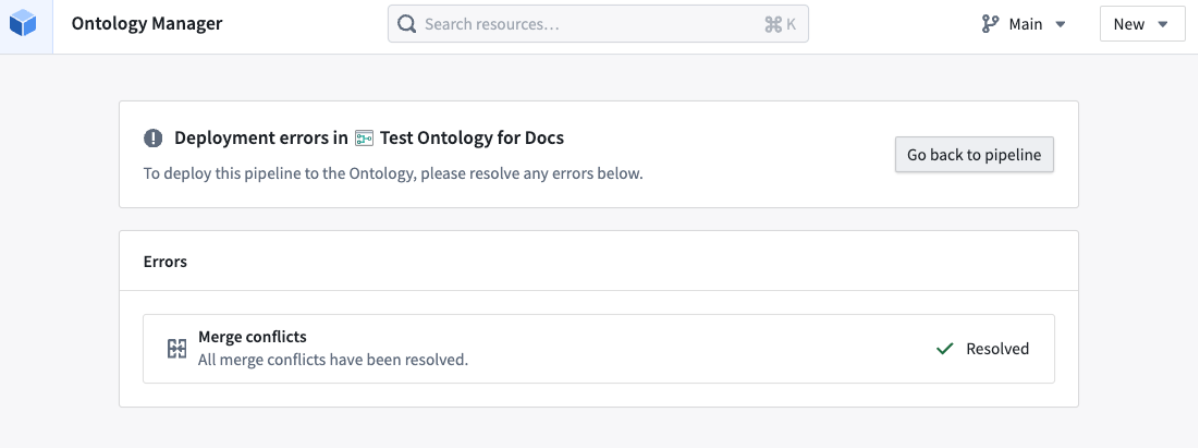
The merge conflict resolution page in Ontology Manager.
Validation error resolution: You will be informed of validation errors and provided with resolution options before deploying pipelines that make changes to the Ontology. This way, you can avoid errors and failures during pipeline deployment when attempting to push invalid changes to the Ontology.
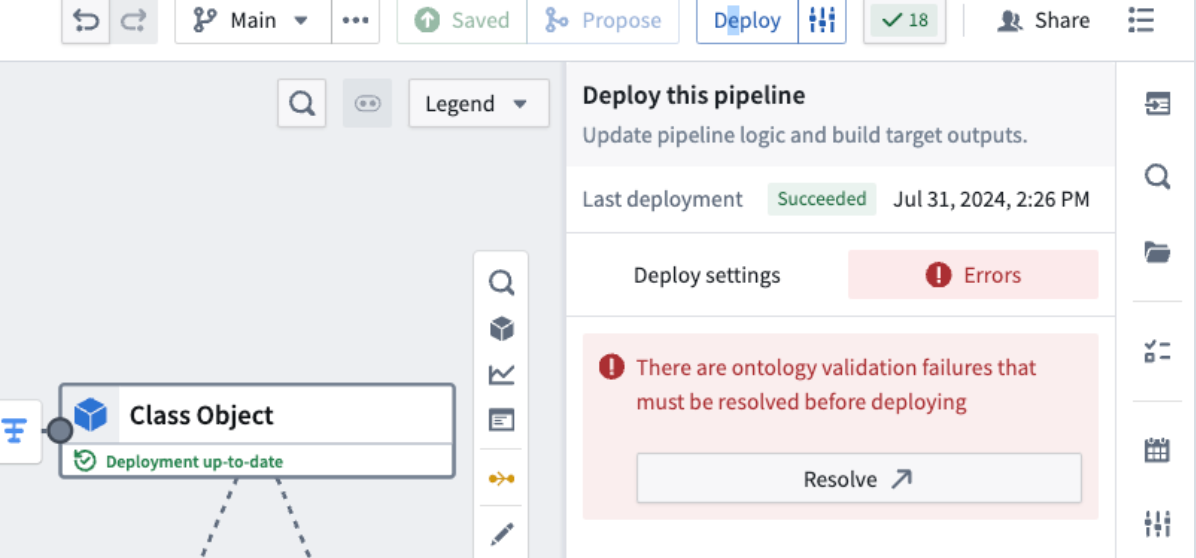
An example of validation failures that must be resolved before deployment.
Schema migration support: We have added a schema migrations dialog to let you choose between different schema migration options when required, such as dropping edits on a property or casting edits to a different data type.
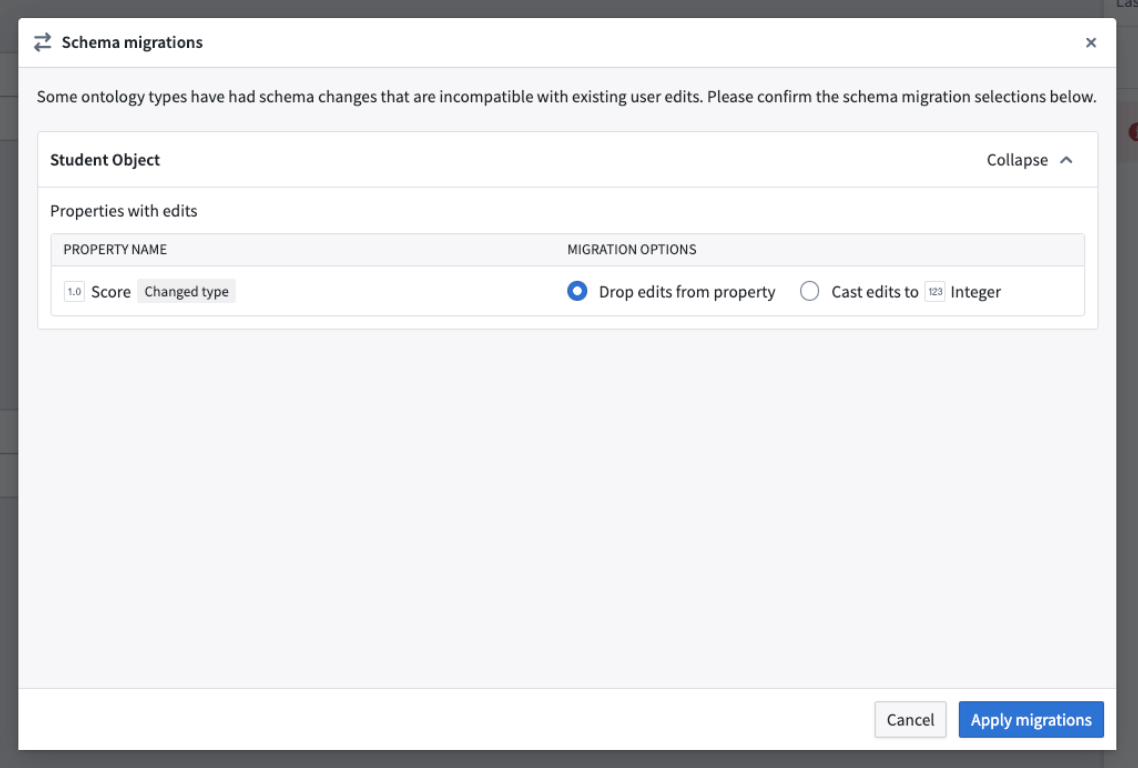
The Schema migrations dialog providing different options to enable schema migrations when needed.
Share pipelines with full Marketplace compatibility
Pipelines with Ontology outputs can now be packaged and installed via Marketplace. Share or download pipelines that include Ontology object and link types to more easily set up and deploy workflows.
Learn more about Ontology outputs in Pipeline Builder.
Platform settings Organization permissions UI will be deprecated, with members being migrated to Control Panel roles
Date published: 2024-08-08
Phase 2 of migrating Organization permissions from Platform Settings to Control Panel Organization roles is taking place the week commencing September 9. This phase streamlines the administrative workflows within the Palantir platform by consolidating two separate categories of Organization permissions to a single source of truth, represented by Organization roles.
Phase 2: Automatic migration and removal of the Platform Settings user interface
Remaining members with Platform Settings permissions will be transitioned to the corresponding roles in Control Panel, which were enriched with the necessary workflows and permissions in the first phase of the migration. With the completion of Phase 2, the permissions granted by the legacy Organization settings will be available exclusively through Organization roles in Control Panel. Environments that do not have Control Panel installed will have the current Platform Settings permissions sidebar replaced by a lightweight organization permissions component.
You can expect the following changes:
- Automatic migration: All existing permissions members will be automatically migrated to ensure continuity and no loss of access or privileges. Two new custom Control Panel Organization roles will be created as needed for any individual members of legacy permissions to avoid expanding access. The diagram below shows which members of legacy permissions will be added to corresponding Organization roles.
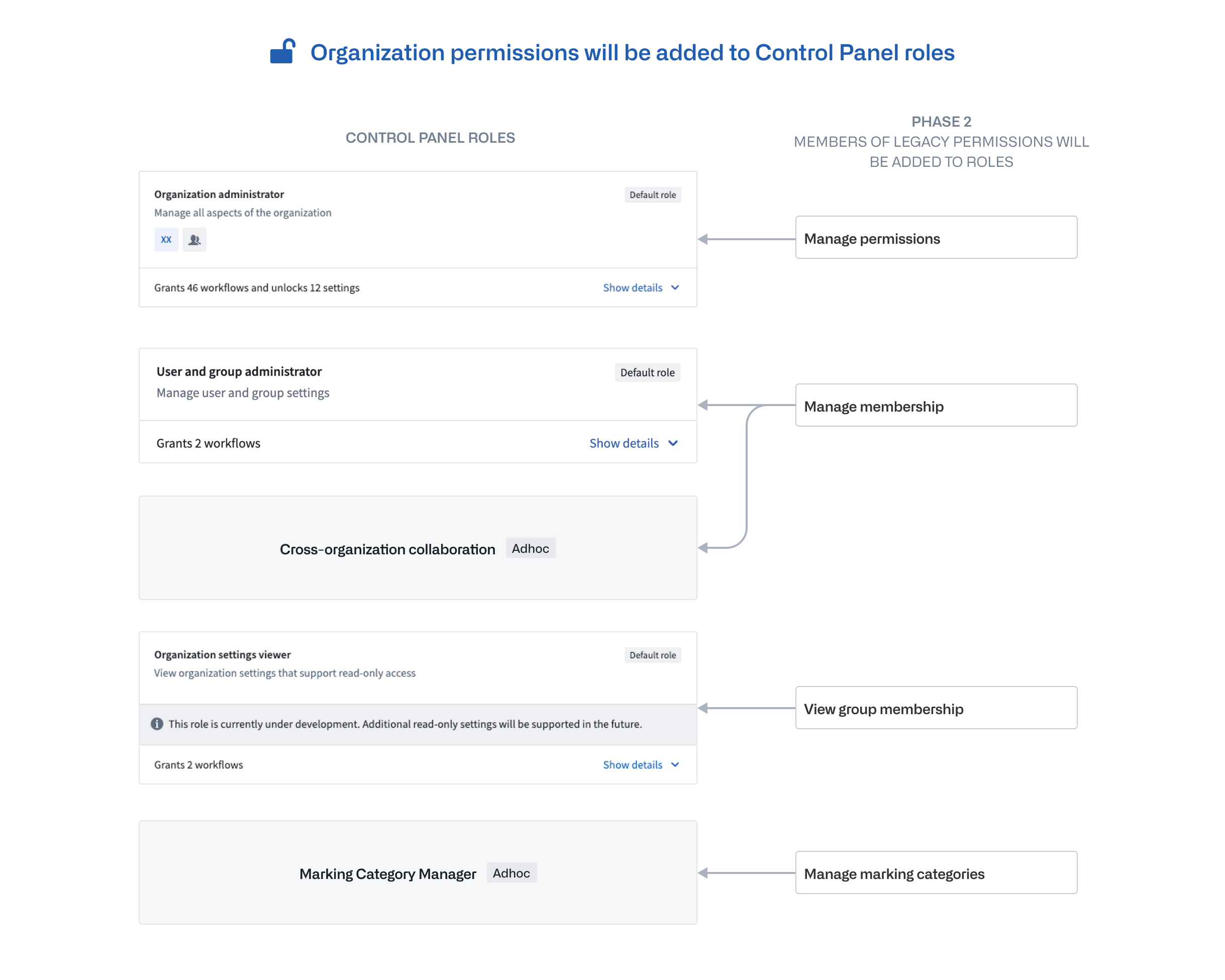
Diagram showing which members of legacy permissions will be added to corresponding Organization roles.
- Removal of the Platform Settings user interface: The user interface for permissions management in Platform Settings will be deprecated, consolidating permission management solely within Control Panel, where available.
Administrators should audit permissions and review documentation
The consolidation of permissions into a single interface is part of our ongoing efforts to simplify administrative tasks and improve the user experience. By enhancing role customization and granularity in permissions, administrators can more efficiently manage their Organization's settings and security.
As Phase 2 starts, we ask all administrators to:
- Audit permissions: Perform a final audit to ensure that all permissions are correctly assigned in line with your Organization's requirements.
- Review documentation: Take the time to review the updated documentation on permissions management in the Palantir platform to familiarize yourself with the new workflows.
For more information on how permissions and its primitives work in the Palantir platform, review the documentation on Enrollments and Organizations.
Use struct variables in Workshop to decrease network calls and speed up your workflows
Date published: 2024-08-06
Workshop now supports a new struct variable type, which are composite variables containing fields of other variable types, backed by functions. This new feature gives application builders the ability to return custom types from functions or structs from Logic functions, decreasing both the amount of functions that need to be called and total network calls. Use the struct variable type to reduce complexity, bolster generative AI responses, and boost your Workshop module performance.
Create struct variables within Workshop to support your workflows
You can create a struct variable using either a function written in code repositories, or a Logic function. If a field's type is not supported in Workshop, it will be ignored and omitted from the initialized variable's fields. Note that the following are not currently supported: struct nesting (for example, inside a person struct, you cannot have another struct bestFriend), and struct arrays.
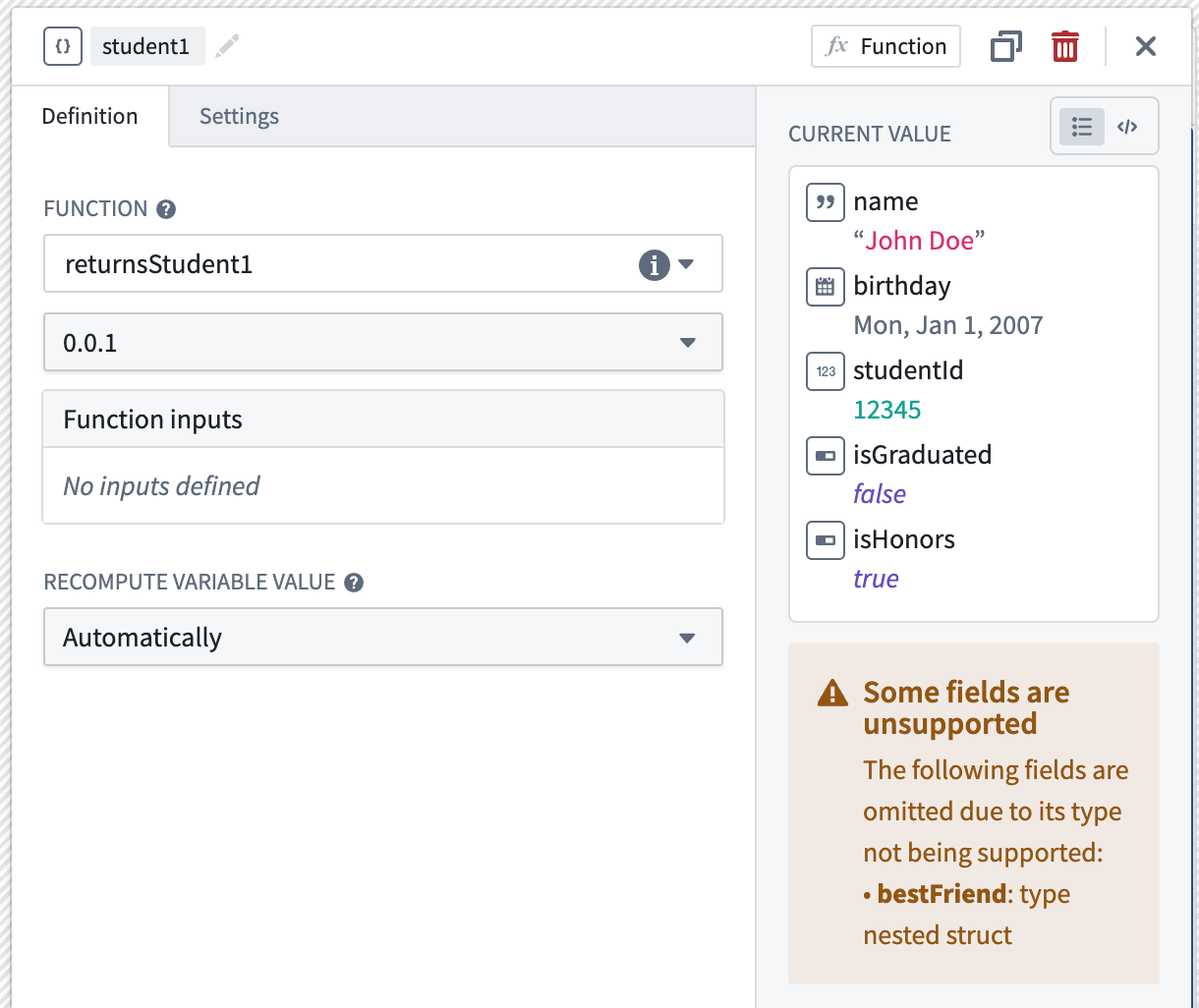
Struct variable student1 is backed by a function that returns fields name, birthday, studentId, isGraduated, isHonors of field types string, date, number, boolean, boolean, respectively. Unsupported field bestFriend which is a type of nested struct is not yet supported and is omitted.
Extract fields from struct variables to display in widgets
As widgets and variable transformation operations cannot use structs as a whole, extract individual struct fields for use. The image below shows how the string type name field is extracted from the person struct variable using an extract struct field variable transform, and then used in a Metric card widget.
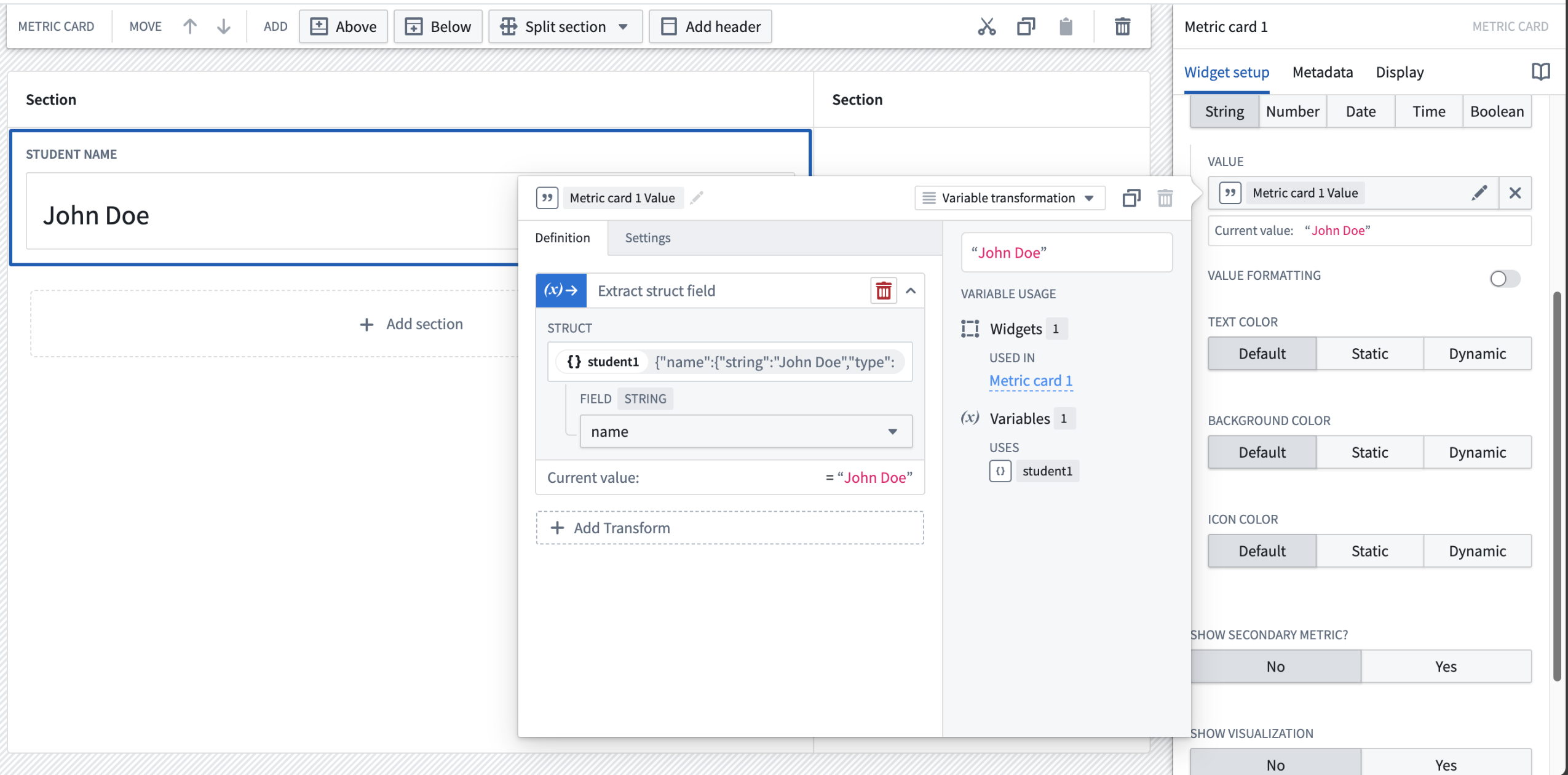
Field name on struct variable student1 is extracted into a string variable and displayed on a Metric card widget.
Pass struct variables as inputs to functions
Finally, understand that struct variables can also be used as inputs to functions. When configuring a function that uses a struct as an input, the required fields of the struct input may be previewed by hovering over the Preview schema label. In doing so, application builders can easily verify that the expected input schema matches that of the selected struct variable by referencing it to the struct variable's raw Current value.
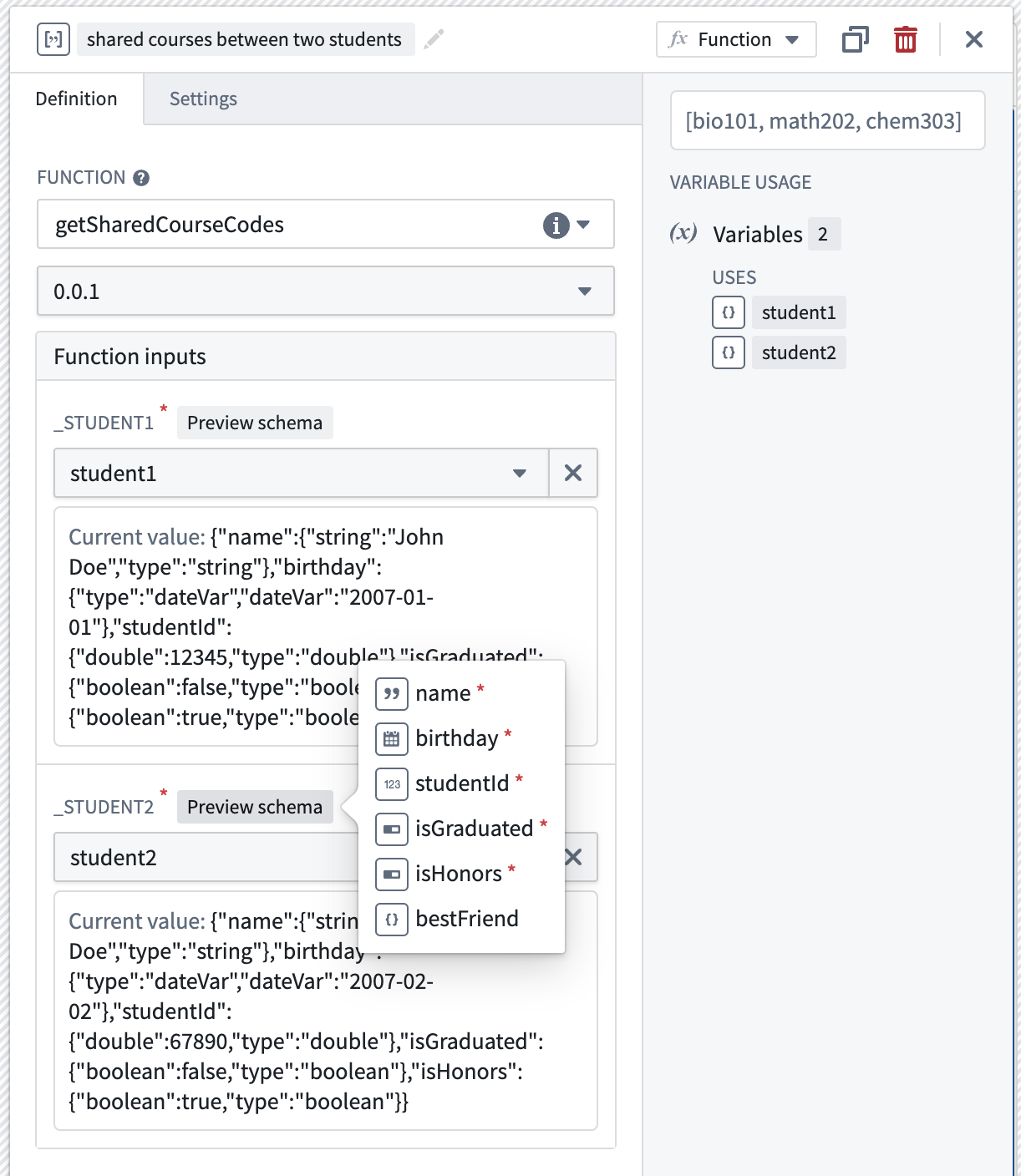
A function that returns a list of common course codes shared by the two students takes in two student structs as inputs.
Review the documentation on struct variables in Workshop.
Value types are now generally available in the Ontology and Marketplace
Date published: 2024-08-01
Value types are now generally available, providing semantic wrappers around field types that include metadata and constraints to enhance type safety, expressiveness, and context. These value types can be reused across multiple object types and pipelines in the platform, with no need to duplicate validation logic. You can easily create and manage value types through the new Value Types application, then apply them to properties in your Ontology using the Ontology Manager. With their move to general availability, you can also package and install value types in Marketplace for use in your Marketplace products.
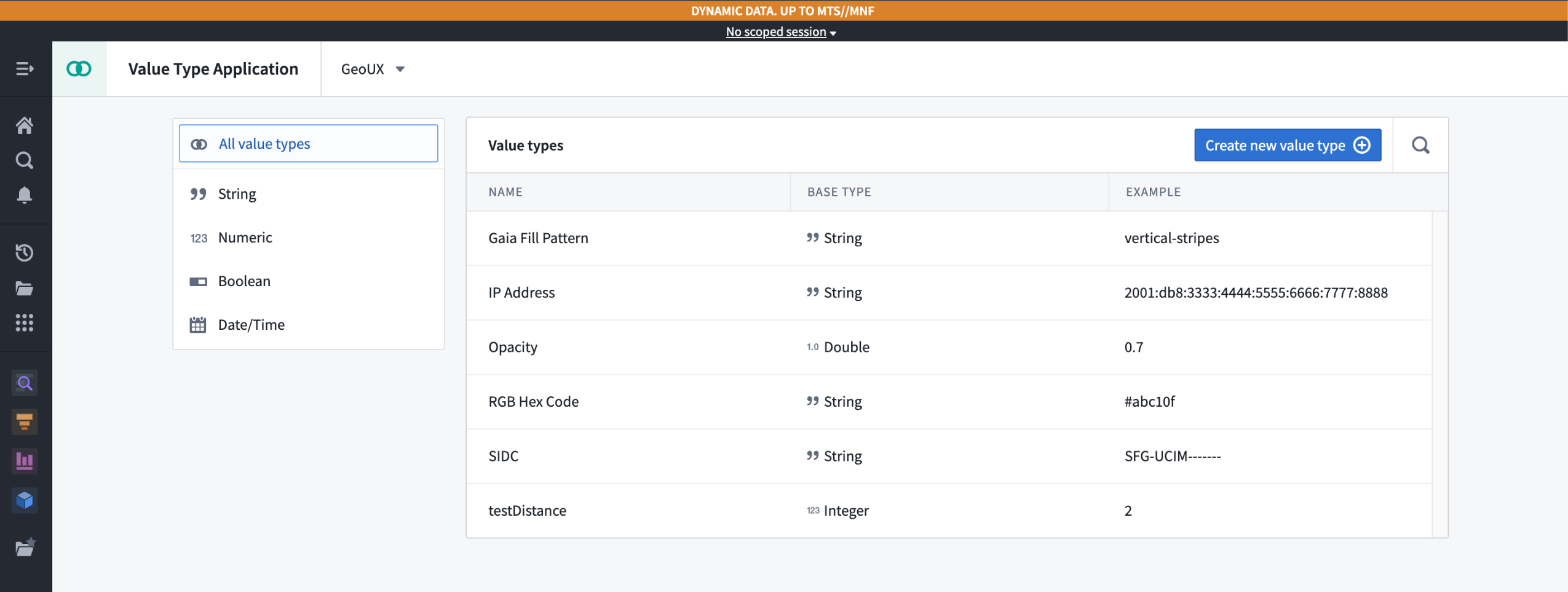 The Value Types application, displaying available value types in a given namespace.
Add user-defined semantic types
With value types, you can capture the context and semantic meaning of data while centralizing data validation. You can intuitively define and consume meaning directly from the value type without relying on information like column names or property descriptions. Value types also enforce validation constraints on data in Pipeline Builder pipelines and the Ontology, allowing data integrators and ontology managers to ensure proper semantic typing in their data flows and models.
For example, you can define an email value type that has a regular expression constraint to ensure that any property using the value type represents a valid email address. This value type can then be reused across multiple object types and pipelines, without needing to duplicate the validation logic for every given property. Additionally, each property that uses this value type is explicitly understood to contain an email address.
Use value types in the platform
Once you create a value type, you can use it to provide data validation across Foundry. You can use value types in a variety of use cases:
- Assigning a value type to an object type property
- Assigning a value type to a shared property
- Assigning a value type to a Pipeline Builder pipeline property as a logical type, using the
logical type castexpression and selecting the value type on the property when you write to the objects target.
To assign a value type to a property, select the value type from the dropdown menu during property configuration.
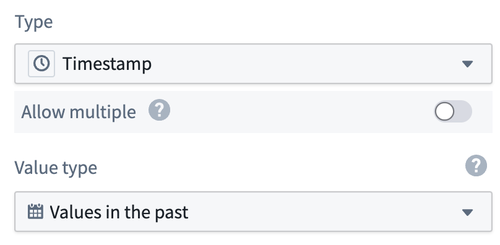
The value type selector in Ontology Manager, allowing a user to assign a value type to a property.
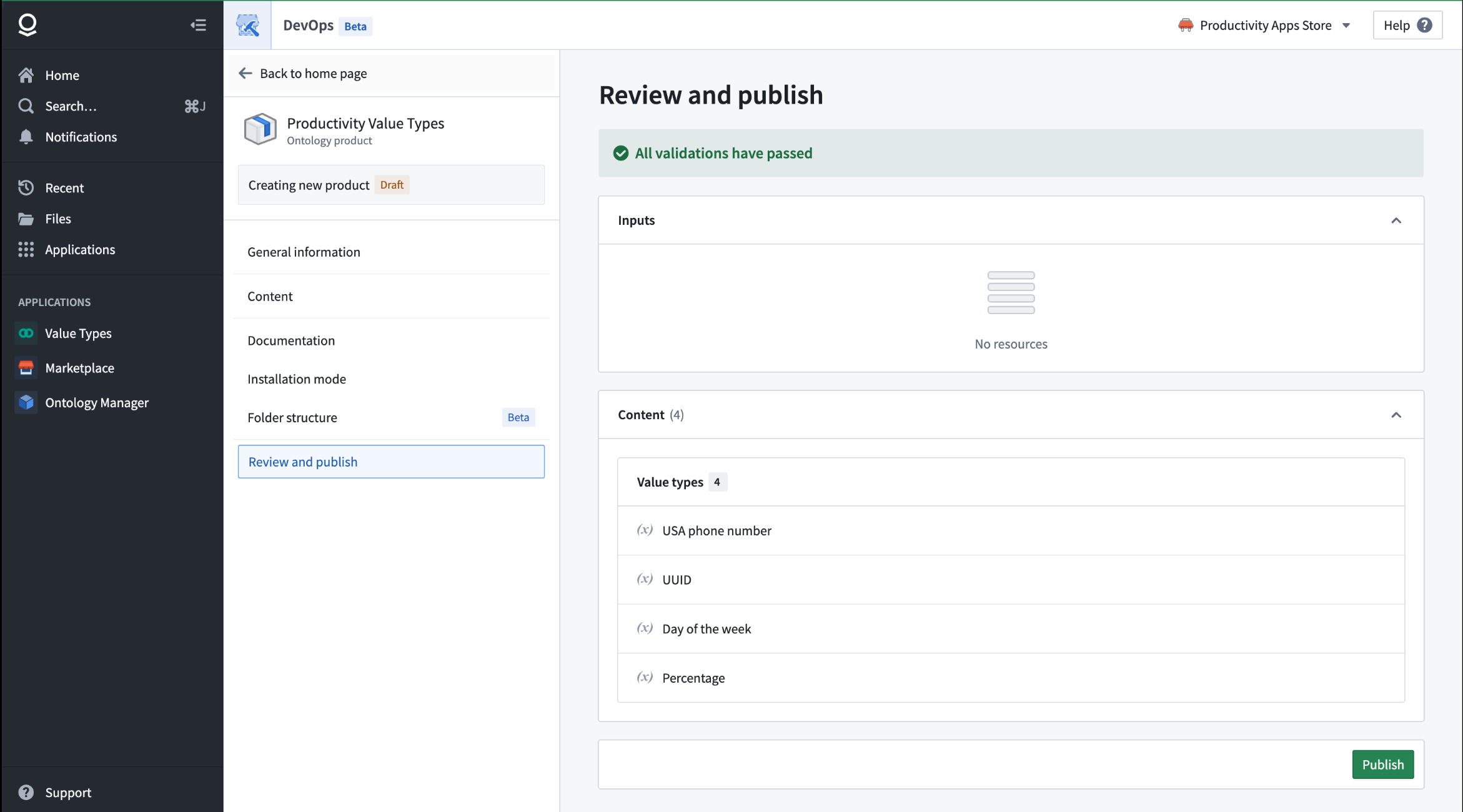
Value types packaged in a Marketplace product.
Additional highlights
Administration | Workspace
View platform updates from the workspace sidebar | Users can now navigate to the latest public announcements and release notes from Foundry using the Platform updates link available in the Support menu of the workspace sidebar.

Data Integration | Builds
Introducing live logs | The live logs feature enables you to monitor logs from any job run in real time, directly within the Palantir platform. You can access live logs within the Builds application and in most areas where logs are typically available for viewing. To use live logs, select the View live option located in the top right corner of the log viewer.
Data Integration | Data Lineage
Egress policy integration in Data Lineage | Sources with egress policies are now visually integrated into the Data Lineage downstream flow, offering improved insights into data movement.

Data Integration | Pipeline Builder
Coalesce partitions with a new transform | We are excited to introduce partition coalescing with a new Pipeline Builder transform to reduce the number of partitions in your input. By reducing partitions, you can significantly speed up data processing tasks, leading to faster job completion times. Additionally, fewer partitions mean less overhead and more efficient use of system resources.
To use this transform, select Coalesce Data and enter the number of partitions to coalesce to. If you have a large number of partitions and coalesce to a smaller number, a shuffle will not occur; instead, each of the new partitions will claim a set of the current partitions. If a larger number of partitions is requested, the current number of partitions will remain.

Ontology | Ontology Management
Enhanced date and time formatting in Ontology Manager | Ontology Manager has now introduced expanded capabilities for customizing date and time formats. Users can tailor date and timestamp properties through a new selector. You can also now have a uniform format for all users regardless of local date formats.
中文翻译
公告
提醒: 订阅 Foundry 新闻通讯(Newsletter),即可直接在收件箱中接收关于平台新产品、功能及改进的摘要。有关如何订阅的更多信息,请参阅 Foundry 新闻通讯与产品反馈渠道公告。
欢迎在我们的开发者社区论坛 ↗分享您对这些公告的看法。
全新本体类型:接口(Interface)现已推出 [Beta 版]
发布日期:2024-08-27
我们很高兴地宣布推出全新的接口(Interface)本体类型(Ontology type),这是一种原语(Primitive),允许用户描述对象类型(Object type)的形态及其能力。接口提供了对象类型多态性(Object type polymorphism),使得对具有共同形态的对象类型进行一致的建模和交互成为可能。
接口由共享属性(Shared properties)、接口链接类型(Interface link types)以及关于接口的元数据(Metadata)组成。一个接口可以被多个对象类型实现(Implement),并且可以被扩展(Extend),以实现接口的可组合性。
本体管理器中的示例 Facility 接口。
接口的强大之处
对于数据集成人员(Data integrators)而言,接口可以代表一个管道目标(Pipeline target),用于集成相似但不同的对象类型。对于应用程序开发人员(Application developers)而言,接口可以作为访问所有实现对象类型的 API 表面(API surface)。
- 针对接口的对象集服务(Object Set Service)搜索将返回实现对象类型的匹配对象。
- 用户可以与实现对象类型的对象进行交互,既可以使用其本地 API 名称(当类型化为具体对象类型时),也可以使用接口 API 名称来访问属性和链接(当类型化为接口类型时)。
简而言之,实现一个接口允许下游应用程序通过接口定义与任何及所有实现对象进行交互。这使得用户可以将接口作为 API 层来编写应用程序代码,而无需应用程序单独支持每个实现对象类型。此外,通过将接口用作应用程序 API 层,新的对象类型只需实现该应用程序接口即可添加到应用程序中,而无需修改代码来显式支持新的对象类型。
示例接口:日程安排(Scheduling)
接口的一个常见用例是指示对象类型具有某种特定能力,例如,指示一个对象代表一个可安排的事件(Schedulable event)。通过实现 Schedulable Event 接口,对象可以被支持本体的应用程序(Ontology-aware apps)用于动态日程安排工作流、日历管理等。
一个示例 Schedulable Event 接口,在 Flight 对象类型上实现,并带有共享的 Start Time 和 End Time 属性。
开始使用接口
要向您的本体(Ontology)添加接口,您可以在本体管理器(Ontology Manager)中创建新接口或扩展现有接口。一旦拥有接口,您就可以使用具有适当形态的对象类型来实现该接口,或者随着本体的发展编辑它以更好地适应您的组织。
声明接口后,您可以将其与Marketplace一起打包和安装,在Pipeline Builder中实现它们,并在本体 SDK(Ontology SDK)应用程序中将其用作您的 API。
要了解有关接口及其使用方法的更多信息,请查阅我们的接口文档。
开发路线图上的下一步是什么?
在我们努力使接口类型正式可用(Generally available)的过程中,我们将扩展对接口作为操作(Actions)、函数(Functions)和 Workshop 小部件(Workshop widgets)输入的支持。
Pipeline Builder 中引入用于节点组织的文件夹
发布日期:2024-08-22
为了改善您的导航和编辑体验,您现在可以在 Pipeline Builder 中创建文件夹和子文件夹。创建文件夹非常直观;您可以通过在图(Graph)上选择节点或在管道文件树(Pipeline file tree)侧边栏中高亮显示节点来对它们进行分组。系统将为您的管道创建一个层级文件结构(也称为文件树),并根据所选文件夹提供额外的可见性和节点定位选项。
一个管道,其节点被组织到各种文件夹和子文件夹中。
缩小管道范围并显示相关节点
您可以通过选择下图所示的可见性选项之一,来切换文件夹子集中节点的可见性,从而缩小管道范围:
只有蓝色文件夹(Blue Folder)中的节点显示在图上,右上角有文件夹可见性选项。
此外,您可以通过选择文件夹名称右侧的目标图标,快速定位图上的相关节点。利用这些新的组织和可见性功能,使大型复杂管道的管理更加高效和精简。
了解有关 Pipeline Builder 中文件夹的更多信息。
通过 Pipeline Builder 中的单元测试提高管道可靠性
发布日期:2024-08-20
我们很高兴地宣布,您现在可以在 Pipeline Builder 中为管道实现单元测试(Unit tests)。单元测试是调试、检测破坏性变更(Breaking changes)以及最终确保更高质量管道的宝贵工具。直接在 Pipeline Builder 中创建和运行单元测试,以便及早发现问题,并以更高的信心部署您的管道。
什么是单元测试?
类似于代码中的单元测试,Pipeline Builder 中的单元测试允许您确认管道逻辑在使用预定义输入进行测试时是否产生预期的输出。单元测试包括:
- 测试输入(Test inputs)
- 转换节点(Transform nodes)
- 预期输出(Expected outputs)
测试输入和预期输出可以使用手动输入或现有数据集和模式(Schemas)创建,从而实现快速、简化的单元测试创建。要测试的转换节点可以在 Pipeline Builder 工作区中选择。
单元测试工作流示意图,显示测试输入、被测试的转换节点和预期输出。
单元测试功能
您可以通过选择右侧面板上的单元测试(Unit tests)图标来访问单元测试。从那里,您可以通过选择相关节点并提供输入和输出数据集来创建和微调单元测试。
右侧面板上的单元测试图标。
配置好单元测试并创建输入和输出数据集后,选择运行测试(Run test)以显示预期输出和实际输出。从这里,您可以评估结果,并在必要时迭代您的管道或单元测试,所有操作都在一个地方完成。
一个示例单元测试结果,右侧显示测试结果和配置,底部显示预期输出和实际输出。
作为这个灵活且功能齐全的测试界面的一部分,您可以轻松编辑和删除单元测试,以跟上快速演变的管道。对单元测试的更改也会显示在提案(Proposals)页面中,使您能够跟踪更改,并确保在合并提案之前所有测试都通过。
了解有关 Pipeline Builder 中单元测试的更多信息。
改进的 Pipeline Builder 与本体集成
发布日期:2024-08-13
Pipeline Builder 变得更加强大;现在可以直接从管道中创建和编辑本体对象类型和链接类型、解决冲突以及迁移模式。得益于改进的 Pipeline Builder 与本体集成,用户在 Palantir 平台上构建时,可以享受简化的工作流和更高的灵活性。
以前,无法在本体管理器中编辑 Pipeline Builder 拥有的对象和链接。现在,您可以在 Pipeline Builder 和本体管理器中对 Pipeline Builder 拥有的对象进行更改,并配备必要的冲突解决和模式迁移功能以确保一致性。请注意,虽然在 Pipeline Builder 中创建的对象可以在本体管理器中编辑,但在本体管理器中创建的对象尚不能在 Pipeline Builder 中编辑。
通过操作(Actions)启用编辑
首先,在 Pipeline Builder 或本体管理器中启用编辑。切换允许编辑此类型的对象(Allow edits to objects of this type)以允许在 Pipeline Builder 和本体管理器中进行编辑。这也将在 Workshop 和其他应用程序中启用基于操作的本体编辑。请注意,目前只有 Pipeline Builder 中创建的批处理支持(Batch-backed)对象支持此功能,流支持(Stream-backed)对象类型目前不支持编辑。
编辑对象类型面板中的允许编辑(Allow edits)切换开关。
应用程序之间的双向变更同步
为了支持来自 Pipeline Builder 和本体管理器的本体变更,我们引入了以下功能,以确保无缝处理冲突、验证错误和模式变更。
合并冲突解决: 我们添加了一个合并冲突解决对话框,以便在本体管理器和 Pipeline Builder 之间进行更平滑的编辑,防止并发更新被覆盖。
本体管理器中的合并冲突解决页面。
验证错误解决: 在部署对本体进行更改的管道之前,系统会通知您验证错误并提供解决选项。这样,在尝试向本体推送无效更改时,您可以避免管道部署期间的错误和失败。
一个必须在部署前解决的验证失败示例。
模式迁移支持: 我们添加了一个模式迁移对话框,让您在需要时可以选择不同的模式迁移选项,例如删除对属性的编辑或将编辑转换为不同的数据类型。
模式迁移对话框,在需要时提供不同的选项以启用模式迁移。
共享管道,完全兼容 Marketplace
现在可以通过 Marketplace 打包和安装具有本体输出的管道。共享或下载包含本体对象类型和链接类型的管道,以便更轻松地设置和部署工作流。
了解有关 Pipeline Builder 中本体输出的更多信息。
平台设置(Platform settings)中的组织权限(Organization permissions)UI 将被弃用,成员将迁移至控制面板(Control Panel)角色
发布日期:2024-08-08
将组织权限从平台设置迁移到控制面板组织角色的第二阶段将于 9 月 9 日开始的这一周进行。此阶段通过将两个独立的组织权限类别合并为一个单一事实来源(由组织角色表示),简化了 Palantir 平台内的管理工作流。
第二阶段:自动迁移和移除平台设置用户界面
拥有平台设置权限的剩余成员将过渡到控制面板中的相应角色,这些角色已在迁移的第一阶段丰富了必要的工作流和权限。随着第二阶段的完成,由旧版组织设置授予的权限将仅通过控制面板中的组织角色提供。未安装控制面板的环境,其当前的平台设置权限侧边栏将被一个轻量级的组织权限组件取代。
您可以期待以下变化:
- 自动迁移: 所有现有的权限成员将被自动迁移,以确保连续性,不会丢失任何访问权限或特权。将根据需要为旧版权限的任何单个成员创建两个新的自定义控制面板组织角色,以避免扩大访问范围。下图显示了哪些旧版权限成员将被添加到相应的组织角色中。
图表显示哪些旧版权限成员将被添加到相应的组织角色中。
- 移除平台设置用户界面: 平台设置中的权限管理用户界面将被弃用,将权限管理完全整合到控制面板中(如果可用)。
管理员应审计权限并查阅文档
将权限整合到单一界面是我们持续努力简化管理任务和改善用户体验的一部分。通过增强角色定制和权限粒度,管理员可以更有效地管理其组织的设置和安全性。
随着第二阶段的开始,我们要求所有管理员:
- 审计权限: 执行最终审计,确保所有权限都根据您组织的要求正确分配。
- 查阅文档: 花时间查阅 Palantir 平台上关于权限管理的最新文档,以熟悉新的工作流。
有关权限及其原语在 Palantir 平台中如何工作的更多信息,请查阅关于注册和组织(Enrollments and Organizations)的文档。
在 Workshop 中使用结构体变量(Struct variables)以减少网络调用并加速工作流
发布日期:2024-08-06
Workshop 现在支持一种新的结构体(Struct)变量类型,这是一种包含其他变量类型字段的复合变量,由函数支持。这个新功能使应用程序构建者能够从函数或逻辑函数(Logic functions)中返回自定义类型,从而减少需要调用的函数数量和总的网络调用次数。使用结构体变量类型来降低复杂性,增强生成式 AI 响应,并提升您的 Workshop 模块性能。
在 Workshop 中创建结构体变量以支持您的工作流
您可以使用代码仓库中编写的函数或逻辑函数来创建结构体变量。如果某个字段的类型在 Workshop 中不受支持,它将被忽略并从初始化变量的字段中省略。请注意,以下内容目前不受支持:结构体嵌套(例如,在一个 person 结构体内部,不能有另一个结构体 bestFriend)以及结构体数组。
结构体变量 student1 由一个函数支持,该函数返回字段 name、birthday、studentId、isGraduated、isHonors,其字段类型分别为 string、date、number、boolean、boolean。不受支持的字段 bestFriend(一种嵌套结构体类型)尚不支持,因此被省略。
从结构体变量中提取字段以显示在小部件中
由于小部件和变量转换操作不能整体使用结构体,因此需要提取单个结构体字段以供使用。下图显示了如何使用提取结构体字段变量转换(Extract struct field variable transform)从 person 结构体变量中提取字符串类型的 name 字段,然后将其用于指标卡小部件(Metric card widget)。
结构体变量 student1 上的字段 name 被提取到一个字符串变量中,并显示在指标卡小部件上。
将结构体变量作为输入传递给函数
最后,请注意结构体变量也可以用作函数的输入。在配置一个使用结构体作为输入的函数时,可以通过悬停在 预览模式(Preview schema) 标签上来预览结构体输入所需的字段。通过这样做,应用程序构建者可以通过将其与结构体变量的原始 当前值(Current value) 进行对照,轻松验证预期的输入模式是否与所选的结构体变量匹配。
一个函数,返回两个学生共享的公共课程代码列表,该函数接受两个学生结构体作为输入。
值类型(Value types)现已在本体和 Marketplace 中正式可用(Generally available)
发布日期:2024-08-01
值类型(Value types)现已正式可用,它们为字段类型提供了语义包装器(Semantic wrappers),包含元数据和约束,以增强类型安全、表达力和上下文。这些值类型可以在平台上的多个对象类型和管道中重复使用,无需重复验证逻辑。您可以通过新的值类型应用程序轻松创建和管理值类型,然后使用本体管理器(Ontology Manager)将它们应用到本体中的属性上。随着它们正式可用,您还可以在 Marketplace 中打包和安装值类型,以便在您的 Marketplace 产品中使用。
值类型应用程序,显示给定命名空间中的可用值类型。
添加用户定义的语义类型
使用值类型,您可以捕获数据的上下文和语义含义,同时集中数据验证。您可以直接从值类型直观地定义和消费含义,而无需依赖列名或属性描述等信息。值类型还在 Pipeline Builder 管道和本体中强制执行验证约束,允许数据集成人员和本体管理器确保其数据流和模型中的正确语义类型。
例如,您可以定义一个 email 值类型,它具有正则表达式约束,以确保任何使用该值类型的属性都代表一个有效的电子邮件地址。该值类型可以在多个对象类型和管道中重复使用,无需为每个给定属性重复验证逻辑。此外,每个使用此值类型的属性都被明确理解为包含一个电子邮件地址。
在平台中使用值类型
一旦您创建了一个值类型,您就可以使用它在 Foundry 中提供数据验证。您可以在多种用例中使用值类型:
- 为对象类型属性分配值类型
- 为共享属性分配值类型
- 为 Pipeline Builder 管道属性分配值类型作为逻辑类型(Logical type),使用
逻辑类型转换(logical type cast)表达式,并在写入对象目标时在属性上选择值类型。
要为属性分配值类型,请在属性配置期间从下拉菜单中选择值类型。
本体管理器中的值类型选择器,允许用户为属性分配值类型。
打包在 Marketplace 产品中的值类型。
其他亮点
管理 | 工作区(Workspace)
从工作区侧边栏查看平台更新 | 用户现在可以通过工作区侧边栏的支持(Support)菜单中的平台更新(Platform updates)链接,导航到 Foundry 最新的公开公告和发布说明。
数据集成 | 构建(Builds)
引入实时日志(Live logs) | 实时日志功能使您能够直接在 Palantir 平台内实时监控任何作业运行的日志。您可以在构建应用程序以及大多数通常可以查看日志的区域访问实时日志。要使用实时日志,请选择日志查看器右上角的查看实时(View live)选项。
数据集成 | 数据沿袭(Data Lineage)
数据沿袭中的出口策略(Egress policy)集成 | 具有出口策略的数据源现已视觉集成到数据沿袭下游流中,提供对数据移动的改进洞察。
数据集成 | Pipeline Builder
使用新转换合并分区(Coalesce partitions) | 我们很高兴地引入分区合并功能,这是一个新的 Pipeline Builder 转换,用于减少输入中的分区数量。通过减少分区,您可以显著加快数据处理任务,从而缩短作业完成时间。此外,更少的分区意味着更少的开销和更有效的系统资源利用。
要使用此转换,请选择合并数据(Coalesce Data)并输入要合并到的分区数量。如果您有大量分区并合并到较小的数量,则不会发生混洗(Shuffle);相反,每个新分区将声明一组当前分区。如果请求了更大数量的分区,则当前分区数量将保持不变。
本体 | 本体管理
本体管理器中增强的日期和时间格式化 | 本体管理器现已引入扩展功能,用于自定义日期和时间格式。用户可以通过一个新的选择器定制日期和时间戳属性。您现在还可以为所有用户提供统一的格式,而无需考虑本地日期格式。