Announcements(公告)
REMINDER: Sign up for the Foundry Newsletter to receive a summary of new products, features, and improvements across the platform directly to your inbox. For more information on how to subscribe, see the Foundry Newsletter and Product Feedback channels announcement.
Share your thoughts about these announcements in our Developer Community Forum ↗.
Generate actionable recommendations with Linter, generally available soon [GA]
Date published: 2024-09-24
We are happy to announce that Linter will be generally available for all enrollments the week of October 7. This change includes UI updates, improvements to scalability, visibility features for recommendations, and a fix assistant to help users act on recommendations. Linter generates opinionated, actionable recommendations when workflow designs incur unnecessary costs, do not use the latest Palantir platform features, or do not adhere to best practices. You can use these recommendations to reduce costs, optimize your Ontology, and increase pipeline stability and resilience across your enrollment.
With Linter, you can better understand the wide range of capabilities that the Palantir platform has to offer while monitoring platform updates that could benefit your use case objectives. Linter is enabled by default; if you are a platform administrator, you can configure user group access to Linter by navigating to Control Panel > Application access for the correct Organization, and selecting the Manage option next to Linter.
Why was Linter created?
The Palantir platform is the best place to host workflows, and while application builders aim to design optimized workflows, the reality is that design decisions can prove to be suboptimal in practice. To address this issue, we created Linter to ensure that workflows use available technology and achieve the same results with more efficient use of resources and features.
When should Linter be used?
Linter can be used at any time, whether you are just getting started with the Palantir platform, or you already have complex and extensive workflows in place. Linter will monitor new and existing workflows and provide ongoing recommendations, performing regularly-occurring sweeps to gather an analysis of the state of your enrollment. These sweeps identify a list of resources that match predefined rules and produce a list of recommendations based on sweep results.
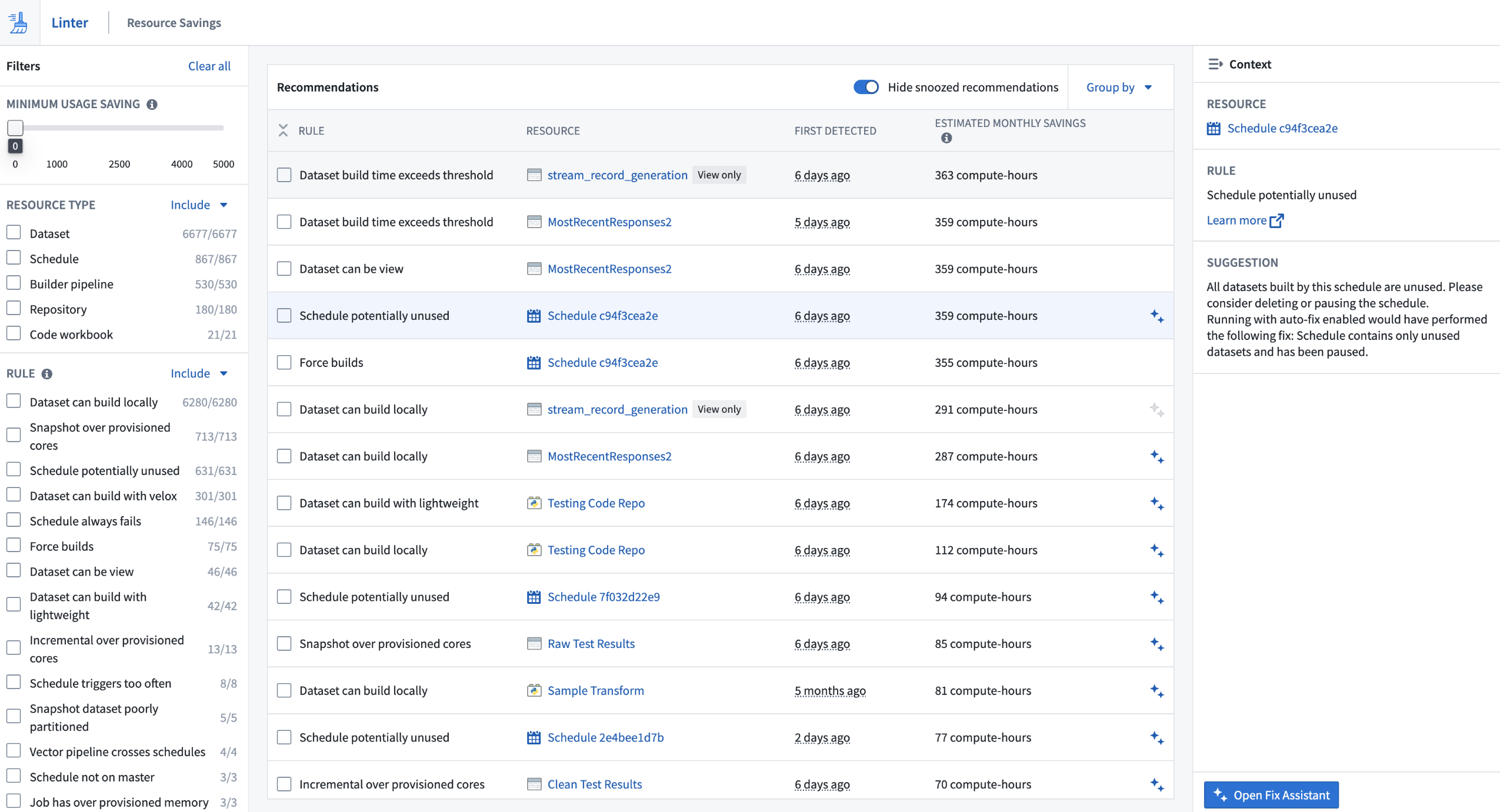
Linter's Impact Tracking UI displaying the number of actioned recommendations
Because Palantir platform capabilities are frequently updated, the results of a Linter sweep are dynamic and can change from day to day. To keep up with these changes you can set up a sweep schedule to periodically perform sweeps against Foundry resources in Projects that belong to a space.
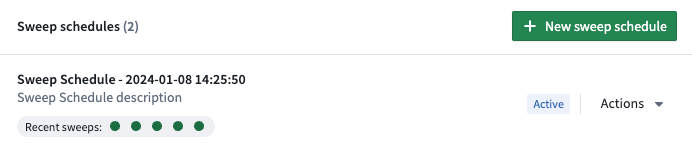
A sample sweep schedule, the option to generate a new schedule, the Actions dropdown, and recent sweep statuses
Reduce costs and optimize workflows
Users of Linter in beta investigated and eliminated significant amounts of compute-hours of waste in cloud costs, resulting in quantitative improvements. Impact for customers correlates to their platform usage, but even enrollments with relatively small developer bases have benefited from Linter to meet their cloud cost targets.
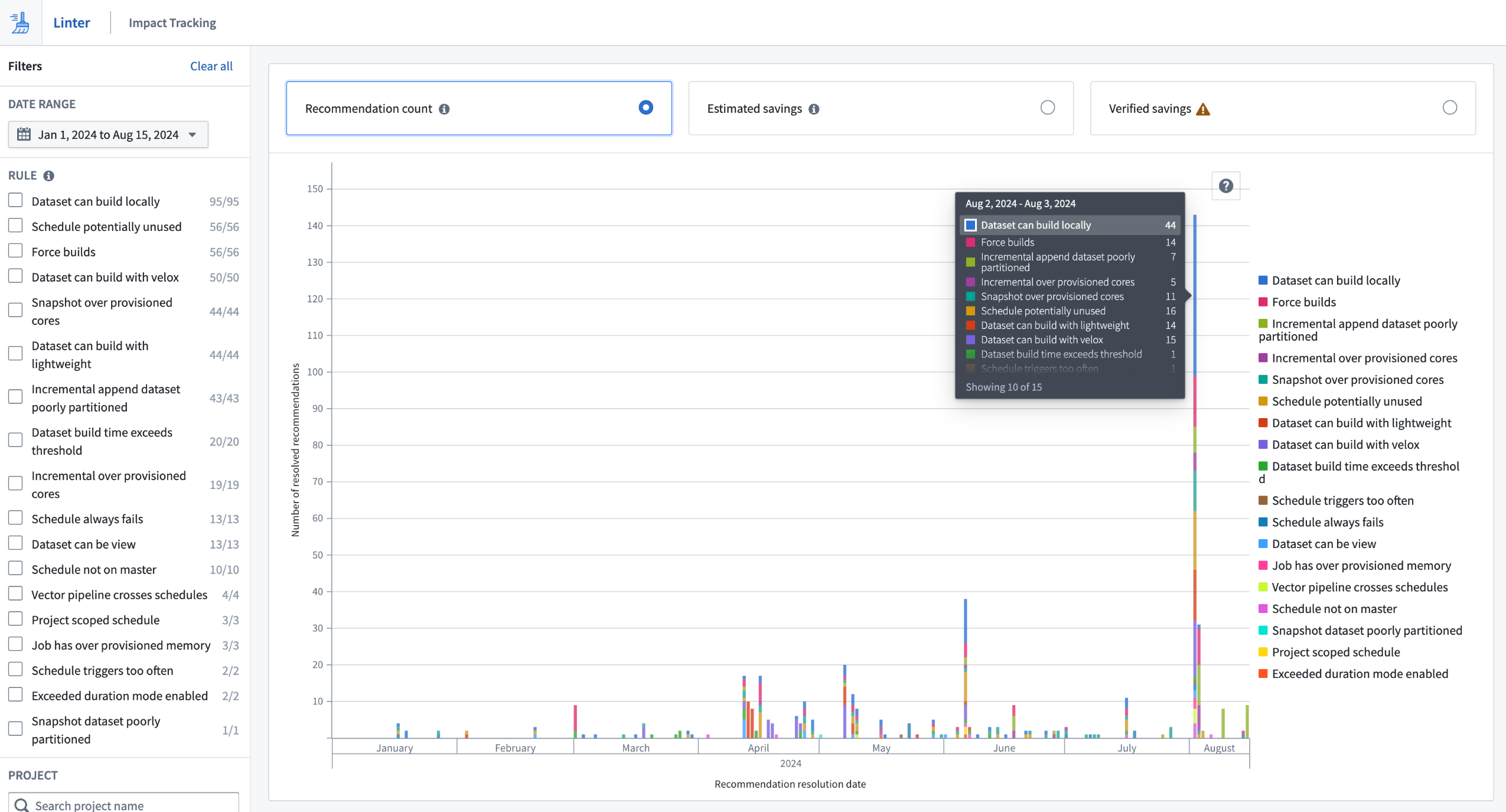
Linter's Impact Tracking UI displaying the number of actioned recommendations
Some customers organized sprints to investigate and act on Linter recommendations, while others spread their focus over longer periods by positioning Linter as a supportive tool for resource usage. Many customers now dedicate time to acting on Linter recommendations as a core part of their Palantir platform engagements.
Aside from cost reductions, Linter has also been used to recommend workflow updates to use newly available features in the Palantir platform. These include opportunities to use lightweight transforms and native Spark acceleration, neither of which existed at the beginning of this year.
Since Linter's beta release, the following features have been added, in addition to scalability improvements:
- Expansion of Linter rules, such as the addition of the dataset can build with lightweight rule.
- Introduction of the fix assistant to streamline fix generation and implementation of actions for recommendations.
- User Interfaces for impact tracking and editing sweep schedules.
Access tailored pathways for success with the Training application [GA]
Date published: 2024-09-19
We are pleased to announce that the in-platform Training application will become generally available in the coming weeks. The Training application offers customized training pathways for roles like data analysts and AI engineers, and provides a collection of courses, documentation, and resources on how to best use the Palantir platform.
Additionally, this application allows administrators to highlight organization-specific documentation or instructions that users should be aware of as they begin their training journey.
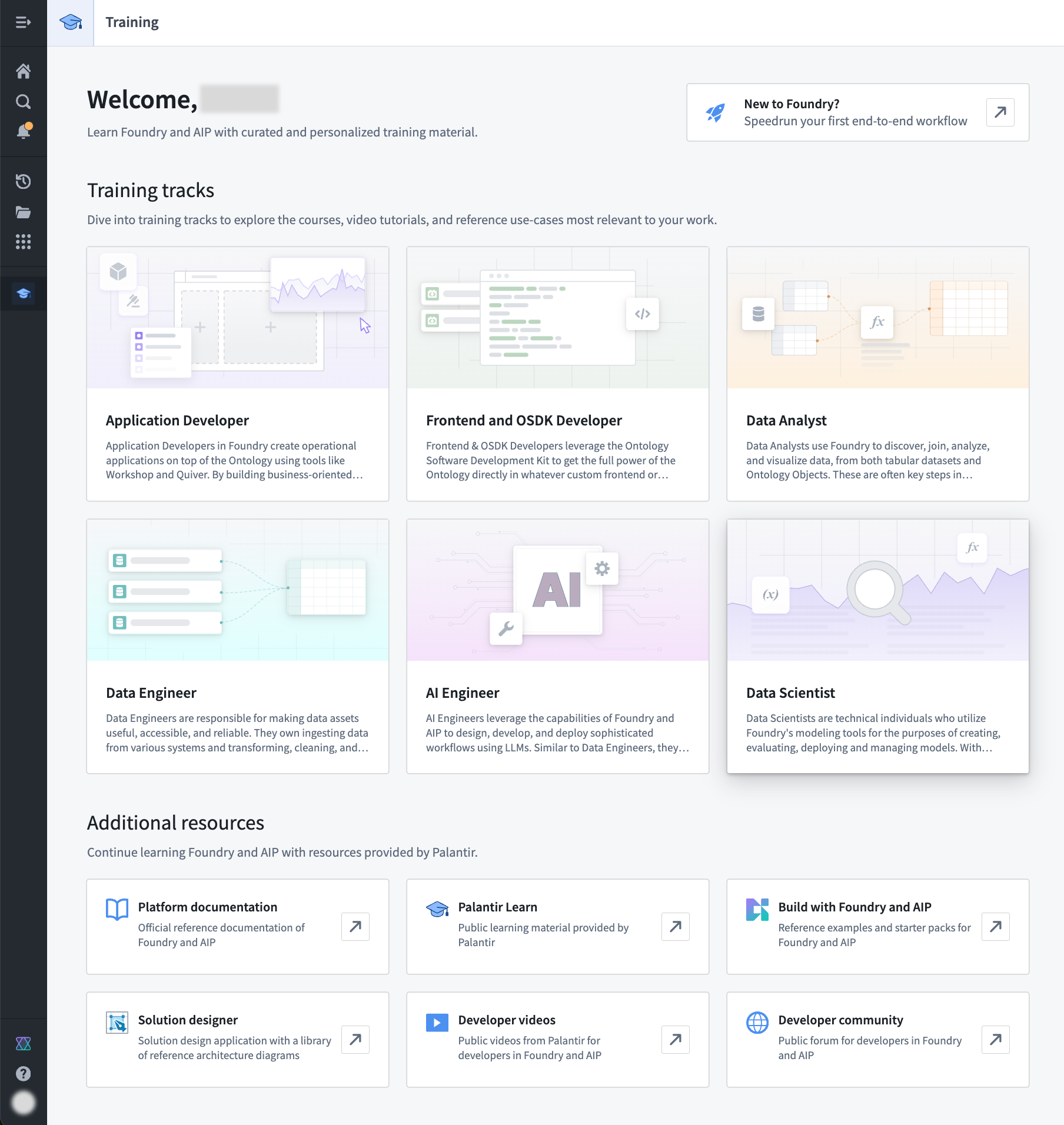
Learn how to use the Palantir platform with our Training application.
GPT-4o's vision capabilities are now available in Pipeline Builder
Date published: 2024-09-19
We are excited to announce that Pipeline Builder is now integrated with GPT-4o's vision capabilities, bringing you the power of vision prompts to your workflows. Now, you can transform your image-based workflows with the power of LLMs, allowing you to pass images through the model for analysis and receive answers to questions based on the visual input.
To use vision functionality with LLMs, first add the Use LLM node to a dataset node in your Pipeline Builder pipeline. Choose to add an Empty prompt to open the LLM configuration screen. From here, add the media reference column to the Provide input data section and select GPT-4o as the model.
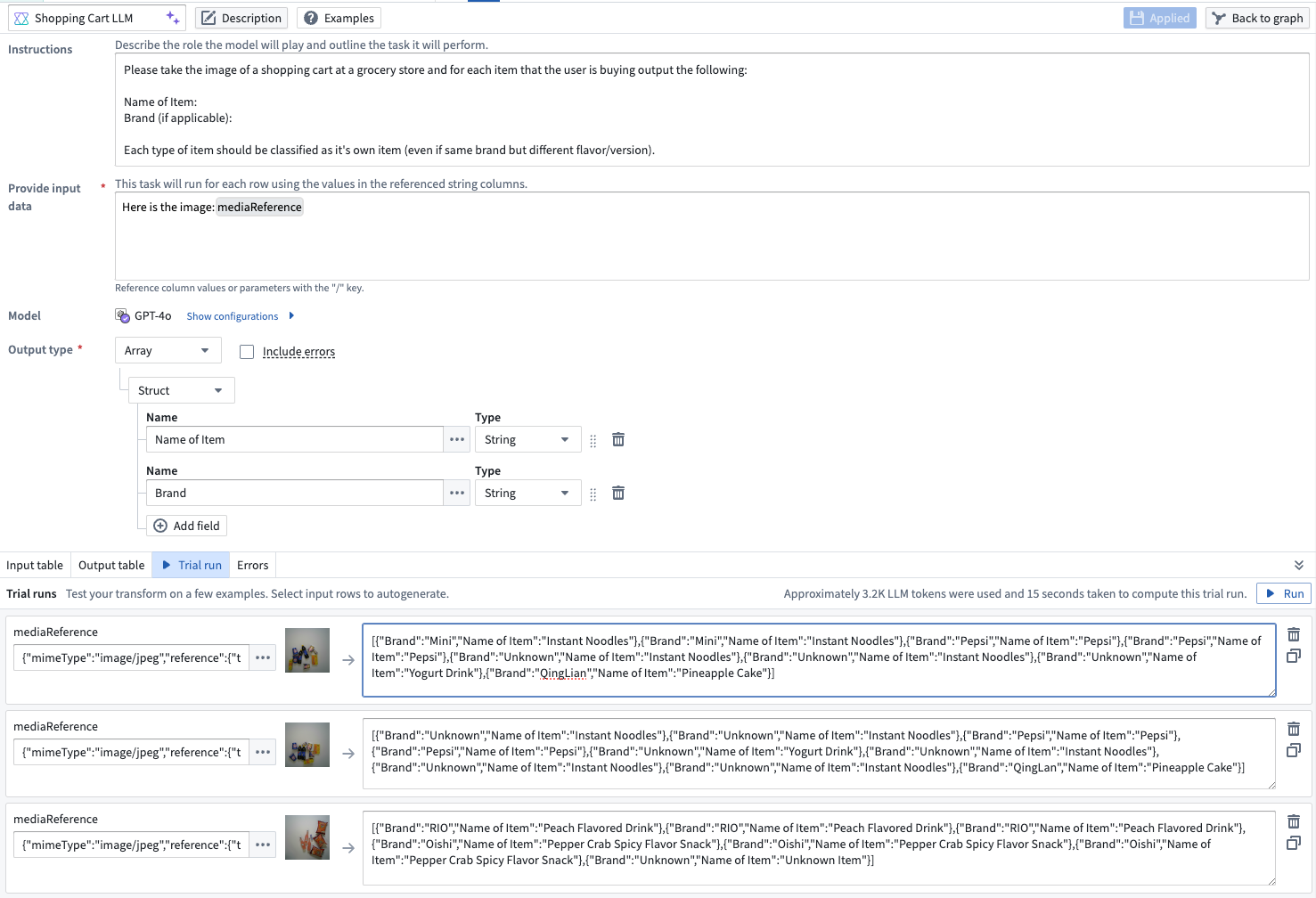
An LLM prompt configured to use GPT-4o to reference images and return names and brands of items in a grocery cart.
If you have an image-based media set you want to use with an LLM prompt, first use the Convert media set to table rows transform to output a table with a media reference column that you can then add to the LLM configuration.

The Convert media set to table rows transform board.
Learn more about vision capabilities in Pipeline Builder and other ways to use LLMs in your pipeline.
Localize your Workshop application with ease using the new Translations feature
Date published: 2024-09-17
Application builders can now provide translations for supported string types used within a Workshop application through the new Translations feature. With Translations, easily localize Workshop applications into various languages manually or with the help of AIP Assist for enabled enrollments.
Viewers will be presented with a translated view of the module in the language set for their account if the Workshop application has been translated to that language using this feature.
For details on what content is translatable using this feature and how to configure this feature as a builder, review the Translations feature documentation.
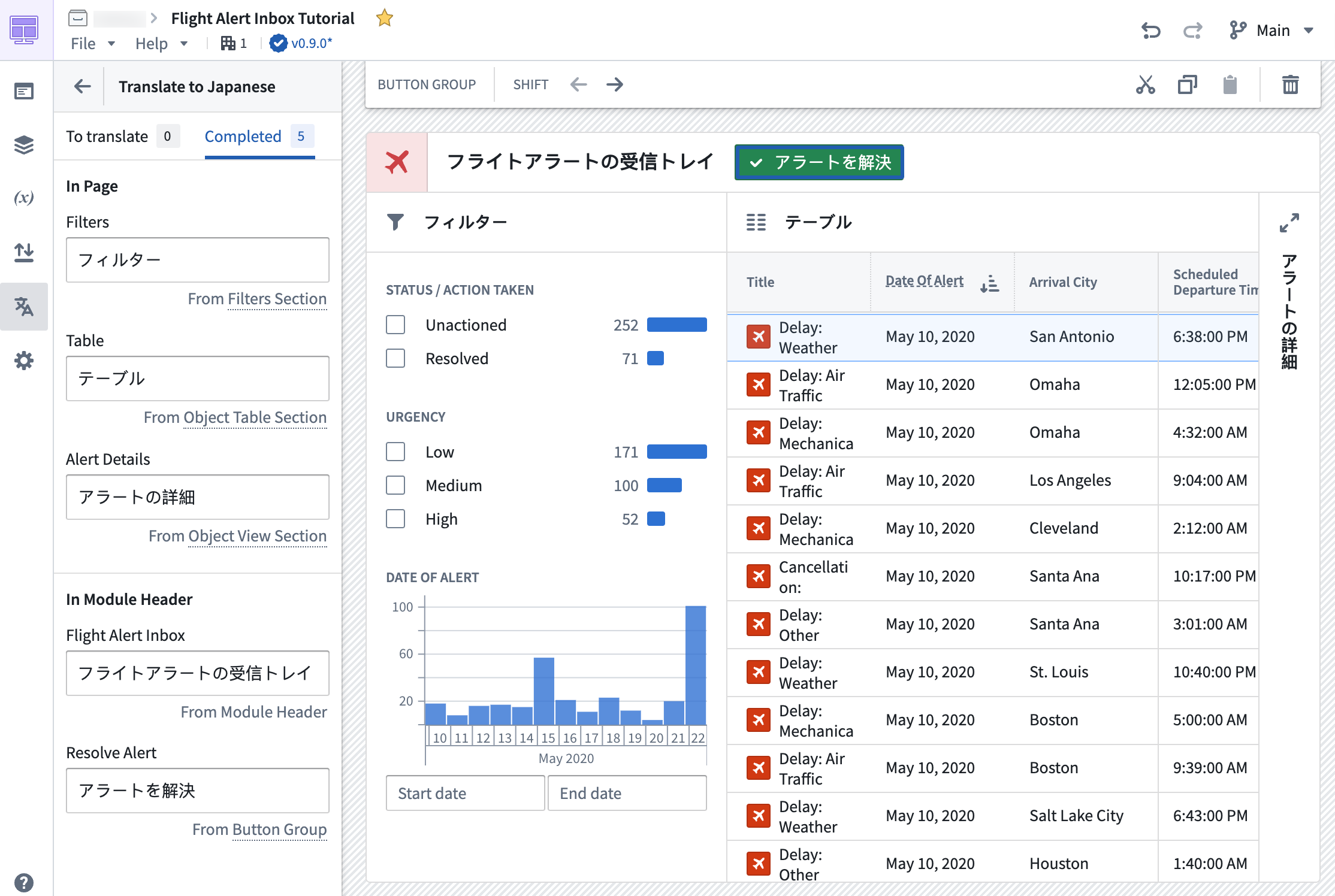
A Workshop application with the Translations panel open, with instant preview in the main section of the screen.
Support for Llama 3.1 70B Instruct and 8B Instruct LLMs now generally available
Date published: 2024-09-17
Llama 3.1 70B Instruct and 8B Instruct LLMs ↗ are now generally available and can be enabled for all enrollments. These new flagship models from Meta have performance comparable to other top models in the industry. If your enrollment's agreement with Palantir does not cover the usage of these models, enrollment admins must first accept an additional contract addendum through the AIP Settings Control Panel extension before these models can be enabled.
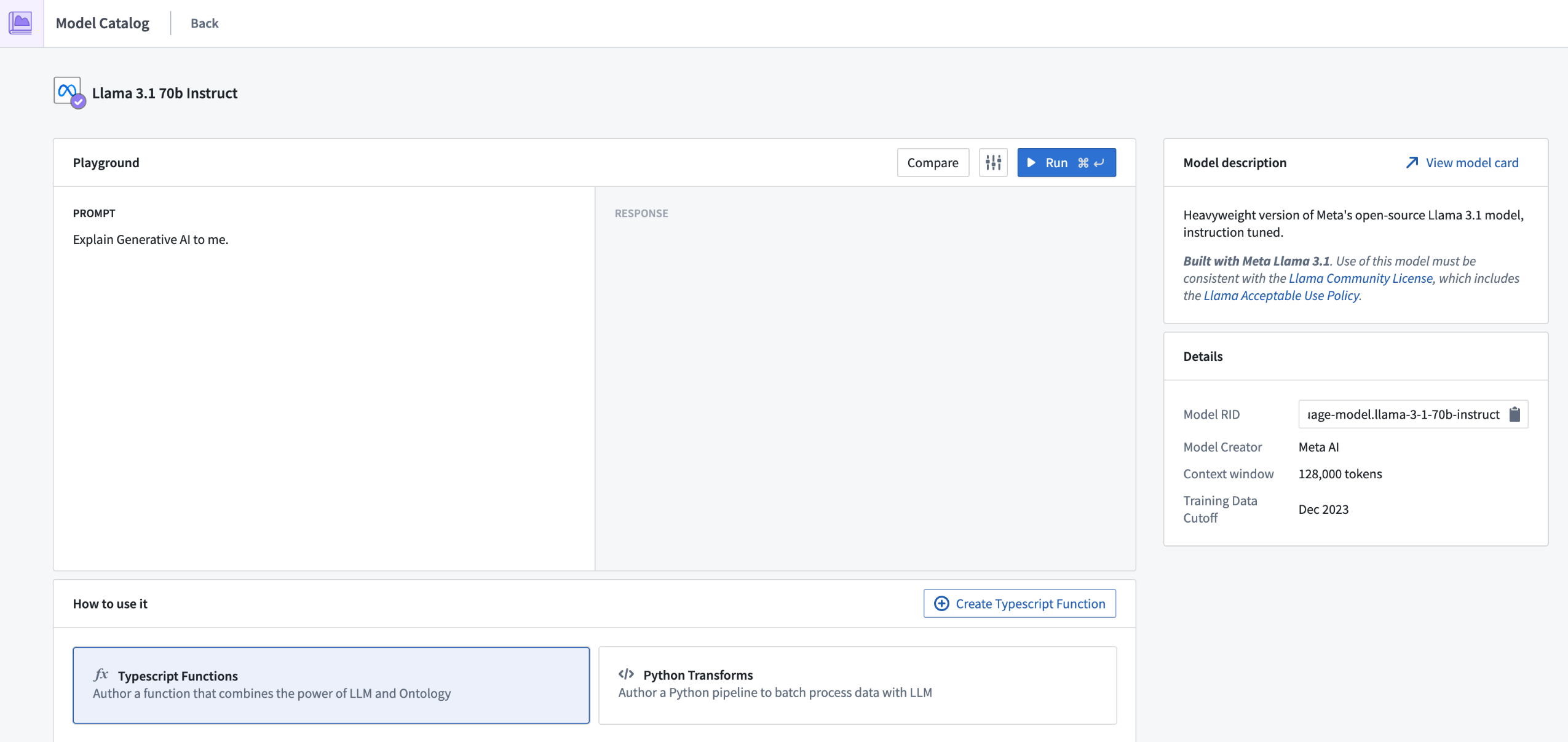
This model is usable in all Palantir AIP features such as Functions, Transforms, Logic, and Pipeline Builder.
Support for Claude 3.5 Sonnet and Claude 3 Haiku LLMs through AWS Bedrock now generally available
Date published: 2024-09-17
Claude 3.5 Sonnet and Claude 3 Haiku through AWS Bedrock are now generally available for all non-geographically-restricted enrollments. Additionally, for enrollments that are geographically-restricted, these models are also available in all US regions and some EU regions, with support for other regions under active development. For additional details, review the documentation on georestriction of model availability.
These new flagship models from Anthropic have performance comparable to other top models within the industry, and support multi-modal workflows, including vision. Details for each model follow below.
-
Claude 3.5 Sonnet ↗: Sonnet is Anthropic's most intelligent and advanced model yet, demonstrating exceptional capabilities across a diverse range of tasks and evaluations. Additionally, Sonnet has surpassed Claude 3 Opus on standard vision benchmarks. These step-change improvements are most noticeable for tasks that require visual reasoning, like interpreting charts and graphs. Claude 3.5 Sonnet can also accurately transcribe text from imperfect images—a core capability for retail, logistics, and financial services, where AI may glean more insights from an image, graphic or illustration than from text alone.
-
Claude 3 Haiku ↗: Haiku is Anthropic’s fastest, most compact, and affordable model for near-instant responsiveness. Haiku is the best choice for building seamless AI experiences that mimic human interactions. Enterprises can use Haiku to moderate content, optimize inventory management, produce quick and accurate translations, summarize unstructured data, and more.
If your enrollment agreement does not cover Claude 3.5 Sonnet or Claude 3 Haiku usage, enrollment admins must first accept an additional contract addendum through the AIP Settings Control Panel extension before the LLM can be enabled.
This model should be usable in all AIP features such as Functions, Transforms, Logic, and Pipeline Builder.
Introducing a simplified model deployment workflow with increased stability and speed
Date published: 2024-09-12
Previously, deploying a machine learning model for real-time inference required the effort and time of setting up a live deployment with Modeling Objectives, our tool for managing production-grade modeling workflows. From your model overview page, you can now deploy models with one click on either the Start deployment or Start & run option, without going through the Modeling Objectives application flow. Additionally, we are introducing multiple improvements to our infrastructure that enable faster startup times, cleaner functions Integration, autoscaling through Compute Modules, auto-upgrades, inference type safety, and more.
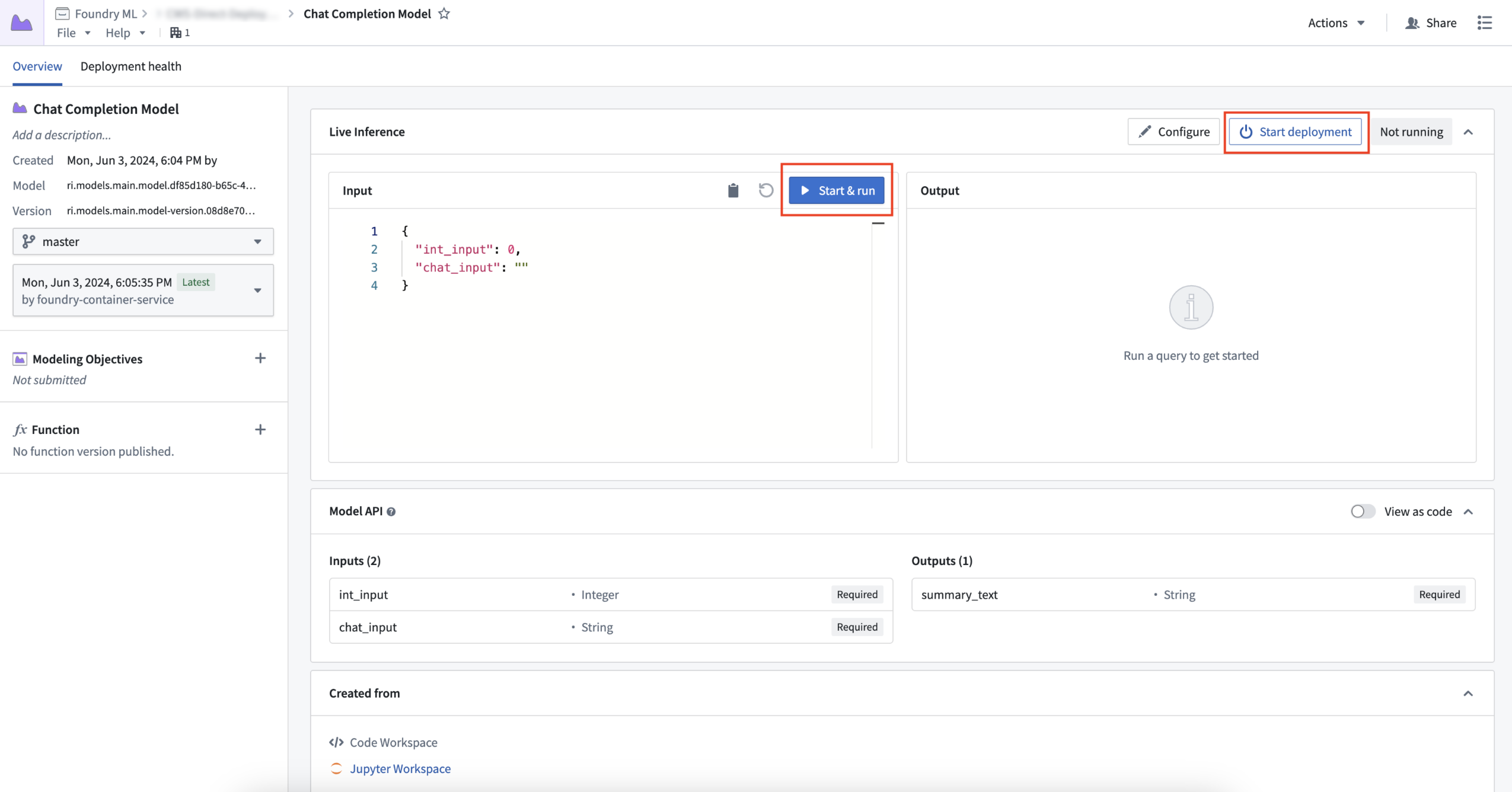
Users can now deploy a model directly from the model's Overview page.
Simplify auto-upgrades and autoscale down to zero for cost savings
Model deployment can now be fully managed from the model's overview page. You can start, stop, update model scaling configuration, and also test inference in the same interface. As deployments are now backed by Compute Modules, you can benefit from its autoscaling capacity which spins up or draws down replicas dynamically in relation to the model's inference traffic and usage.
For example, if your request load only comes at specific times, you can now set the range of replicas to be made available and scalable to actual request volumes. You can even scale replicas down to a minimum of zero to benefit from potential cost-savings if your model deployment is periodically not queried.

Configuring runtime scaling and resource availability based on model deployment needs.
Model deployments follow a user's branch of the model, making updates seamless. Simply publish a new model version from either Code Repositories or Code Workspaces, and the existing model deployment will be upgraded, ensuring all downstream workflows are always pointing to the latest model.
Functions integration without the need for a TypeScript repository
A model deployment can now easily be registered as a Function and used directly within Workshop, saving you the time and effort from building and using a TypeScript repository. Additionally, benefit from support for tabular inputs and outputs, with more types of models now supported as Functions in the Modeling Objectives application. Specifically, models with pandas APIs (tabular inputs/outputs) can now be directly integrated into Workshop applications, meaning you no longer need to have a translation layer from a pandas dataframe to parameters in TypeScript. Relatedly, models with parameter input and outputs continue to be supported.
For other API shapes, models can be published with an API name so they can still be used in TypeScript repositories where needed, such as when enabling the usage of a Function that cannot be consumed by Workshop directly.
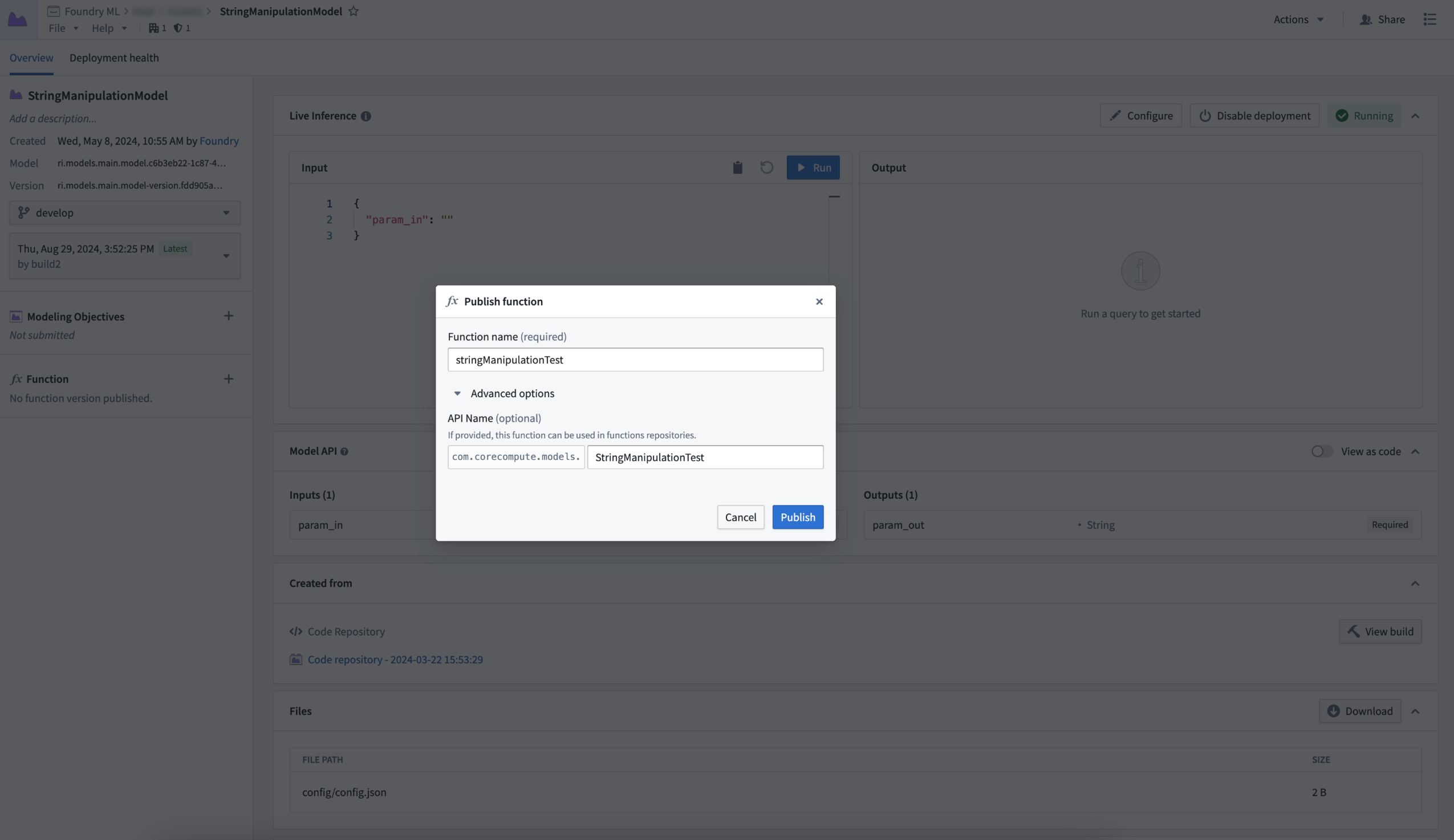
Publishing a function from a model deployment.
Notably improved stability and faster startup times
We have also incorporated the use of fully containerized models, a major change to the modeling infrastructure, meaning that models are now a Docker image with the full model environment, adapter instance, and model weights all patched together, ensuring faster startup times. Additionally, containerized images do not require any connection to the Palantir platform to launch. During internal testing, model deployments became fully ready in just one minute, whereas live deployments took three; compressed startup times become increasingly impactful within large, complex environments.
Guaranteed inference type safety
We are now able to guarantee inference type safety by using Apache Arrow to communicate with the model's container. This ensures that a user’s inference inputs are being passed to their model adapter logic in exactly the method specified within the model adapter’s API. For example, if the model’s API declares an integer parameter to be supplied, the input value will be either cast as an integer, or thrown if the value cannot be cast successfully. Additionally, date-time and timestamp values will now pass safely and accurately.
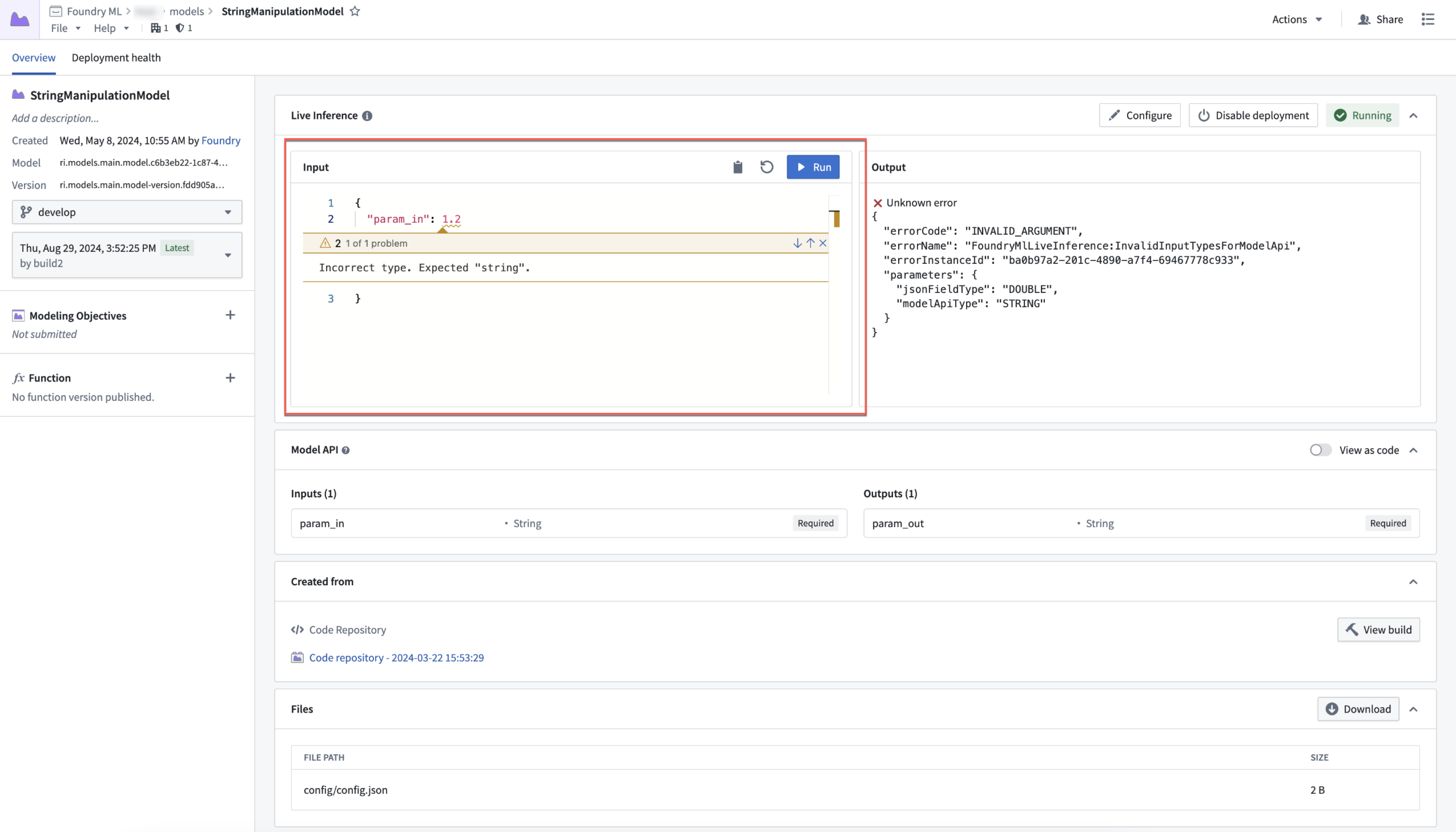
Open model with incorrect type error message.
Debug mode with practical flame graph visualization
Direct model deployments now boast a new debugging feature: the ability to create and view a full flame graph of a model’s inference. This feature empowers you to view how different parts of the model interact. By leveraging this new view, you can now gain insight into exactly what parts of code are slower than expected, allowing you to iteratively optimize model performance more easily than before.
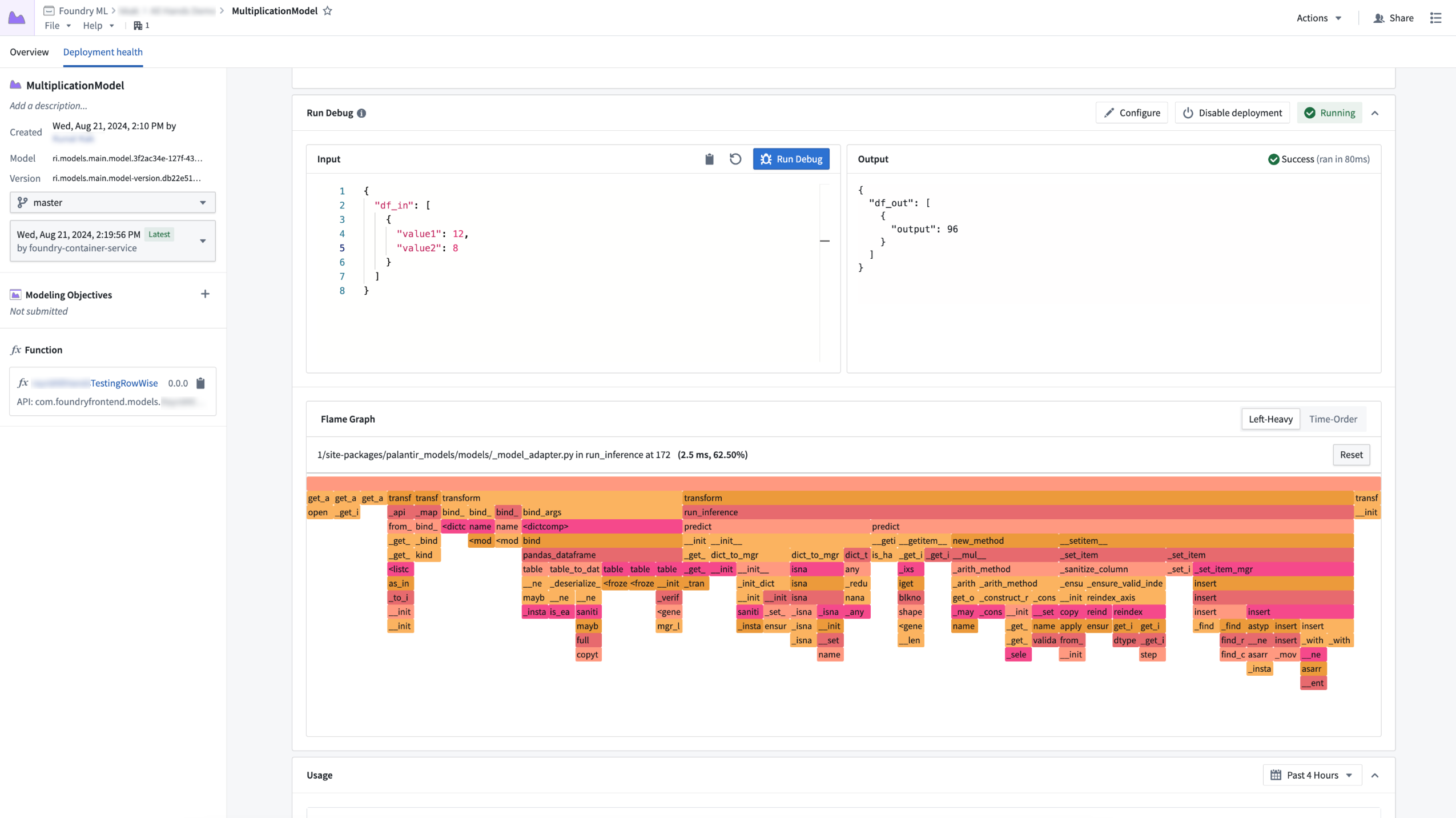
Flame graph view for a model deployment inference query.
Get started with model deployments
To benefit from these features above, make sure to publish a new model version for your model using the latest palantir_models library. Note that the feature set is not yet available for on-premise stacks, and that not all model types are supported by model deployments. External models and SparkML models are currently excluded.
To get started, review our model deployment guide.
Python version 3.8 will be deprecated January 31, 2025
Date published: 2024-09-12
Python 3.8 is being deprecated in the Palantir platform in line with open source Python's End-of-Life (EOL) timeline. As a result, automatic upgrades will be attempted in code repositories; manual action is needed on code workbooks and with older foundry_ml models. Starting from Python 3.9, we will be following Python's EOL deprecation timelines closely. Review the Python versions section in the documentation to see supported versions and respective deprecation timelines. We recommend that resources always be kept on the latest supported Python version.
Why is Python 3.8 being deprecated?
Open-source Python marks old Python versions as End-of-Life (EOL) every year ↗ and drops official support. Python 3.8 is approaching its EOL and continued use of EOL Python versions exposes security risks. Additionally, open-source libraries continue to create new releases which are no longer compatible with these deprecated Python releases, potentially causing failing checks and jobs for unmigrated workflows.
What does deprecation mean for me as a user?
If you own resources using a deprecated Python version, note the following important dates:
- January 31, 2025: Workflows depending on deprecated Python versions will no longer be supported, and you will receive no support in case of failures. A limited set of resources can be allowlisted for extended support if agreed with Palantir in advance.
- April 30, 2025: All workflows relying on Python 3.8 or older will no longer be supported and might experience failures.
Foundry resource migration to supported Python versions
Foundry resource migration will follow the patterns below:
- Code repositories: An automatic upgrade will be attempted in the form of an automatic patch pull request. This will be attempted for all resources on Python 3.8, regardless of priority.
- Other resources: Informational banners containing migration instructions from the deprecated Python versions will be displayed. Review the troubleshooting guide for more information.
Currently, the latest version of Python supported in platform is Python 3.11.
Future Python version deprecation
Starting from Python 3.9, the Palantir platform will closely follow the upstream end-of-life timelines and will deprecate Python versions in-platform as soon as they reach upstream end-of-life. For more information, see Python versions in the documentation.
Optimize Pipeline Builder LLM builds by skipping processed rows
Date published: 2024-09-10
We are pleased to announce that Pipeline Builder can now skip previously processed rows for Use LLM nodes and Text to Embeddings transforms to save costs and improve performance. Previously, each row was re-processed during pipeline builds. Now, however, row results can be cached, meaning that they are stored and reused in subsequent builds. You can save both time and costs by skipping already processed rows; tested use cases have shown build times decreasing from 3 hours to just 20 minutes.
To get started, enable Skip recomputing rows when configuring Use LLM or Text to Embeddings. When this is enabled, rows will be compared with previously processed rows based on the columns and parameters passed into the input prompt. Matching rows with the same column and parameter values will get the cached output value without reprocessing in future deployments.
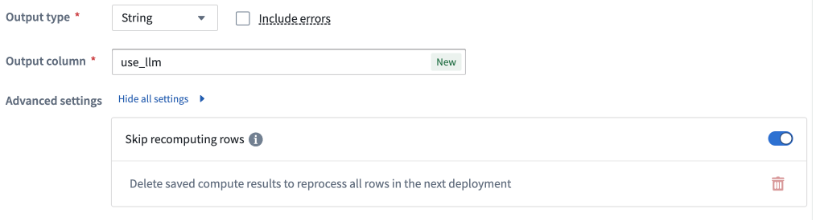
The Skip recomputing rows option.
Users can manually clear the cache if changes to the prompt require all rows to be recomputed. In this case, a warning banner will appear over the LLM view, and users can decide to keep all previously cached values as long as the output type remains the same.
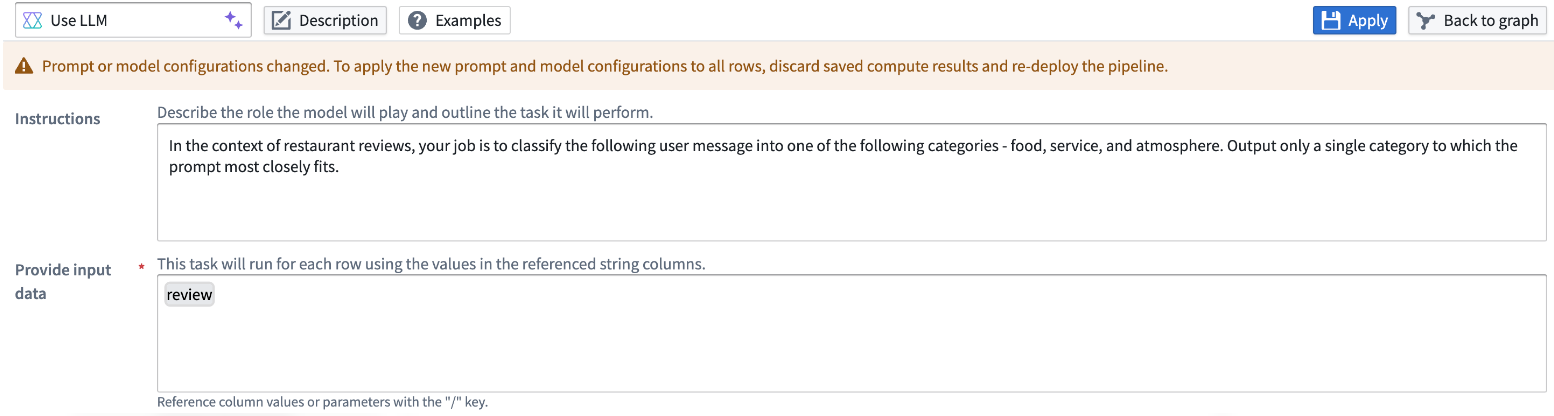
The LLM view with a warning banner informing users that the prompt or model configuration has changed.
Improve workflow efficiency and reduce computational costs by enabling this feature on Use LLM nodes and Text to Embeddings transforms in your pipelines.
Learn more about skipping processed rows.
Introducing the Scheduling Calendar widget
Date published: 2024-09-10
We are excited to introduce the Scheduling Calendar widget in Workshop, a new way to visualize and interact with time-bound objects. The Scheduling Calendar provides a clean and flexible way to display events or tasks.
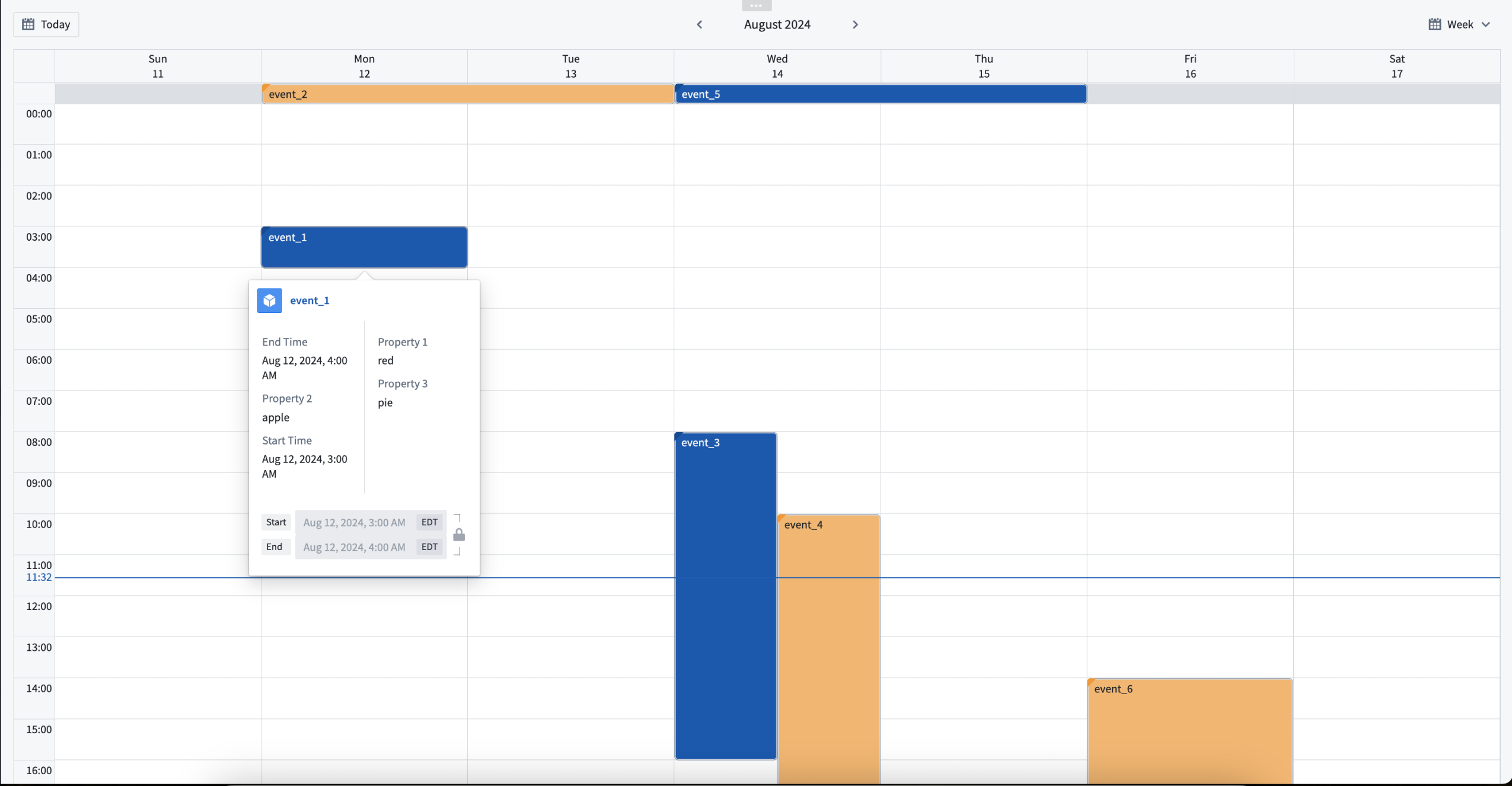 Example of events in the Scheduling Calendar widget.
Example use cases for the Scheduling Calendar widget:
- Appointment or meeting scheduling
- Tracking task and milestone deadlines
- Viewing employee shift assignments
Key features of the Scheduling Calendar widget:
- Intuitive drag-and-drop functionality, allowing you to easily reschedule events.
- Customizable display options like coloring and object details that provide context to scheduling decisions.
- Native day, week, and month views.
What’s next on the development roadmap?
Our team is actively working on the following features for a future update:
- Trigger Actions and Workshop events directly in the Scheduling Calendar widget.
- Simulate scheduling changes through integration with Scenarios.
For more information, review the Scheduling Calendar widget documentation.
Introducing live logs [GA]
Date published: 2024-09-03
We are excited to announce the live logs feature, now available as part of the Builds application in your Palantir enrollment. Live logs grant users real-time visibility into actively-running jobs, providing powerful and insightful monitoring on how these jobs are progressing across your data resources and the ability to inspect long-running tasks such as streams or compute modules.
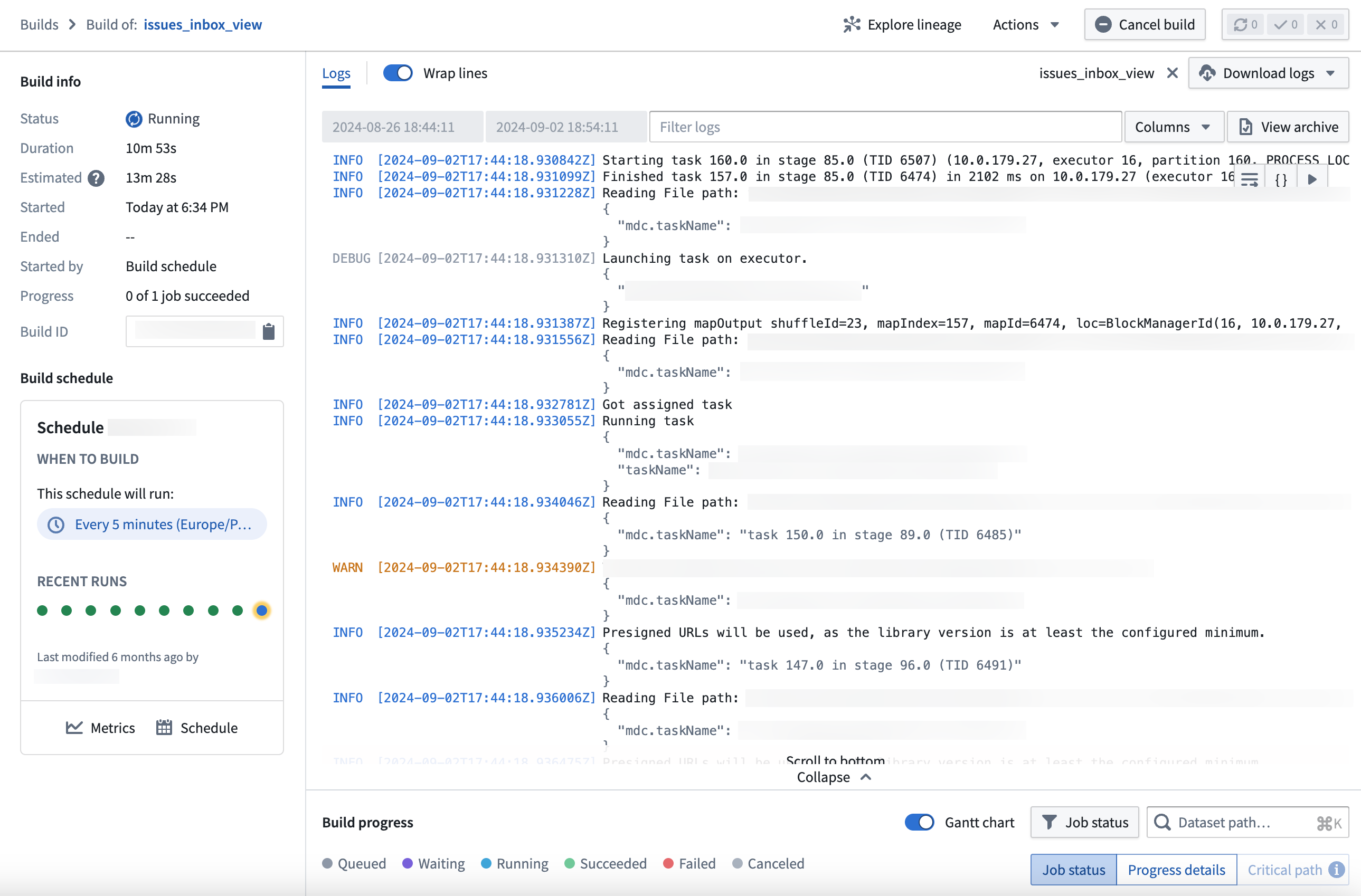
The live logs feature in the Builds application, returning task reports in real-time.
Rooted in user control
Live logs are designed with user control in mind; you can stop the logs at any time using the Pause option in the top right corner of the log view and easily start again from the same location. Additionally, parameters and safe parameters are visible as a structured and readable JSON block for easier consumption and understanding.
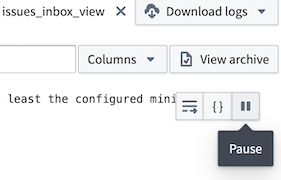
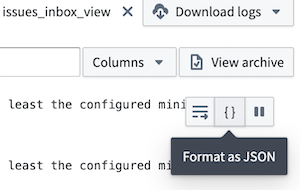
The Pause and Format as JSON options from the live log view.
Colorful visibility
A key benefit of using live logs to monitor your jobs is the color-coded identification of issues with the build. Use these colors to quickly identify warnings and errors in your live log feed and prioritize the necessary fixes to complete a successful build.
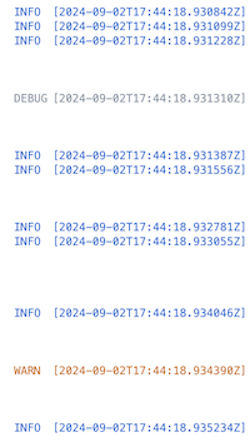
An example of color coded debugging and warning alerts in a live log feed.
Get started with live logs
To access live logs, navigate to the Builds application and choose to view an active job. Then, select View live from the top right corner of the log viewer.
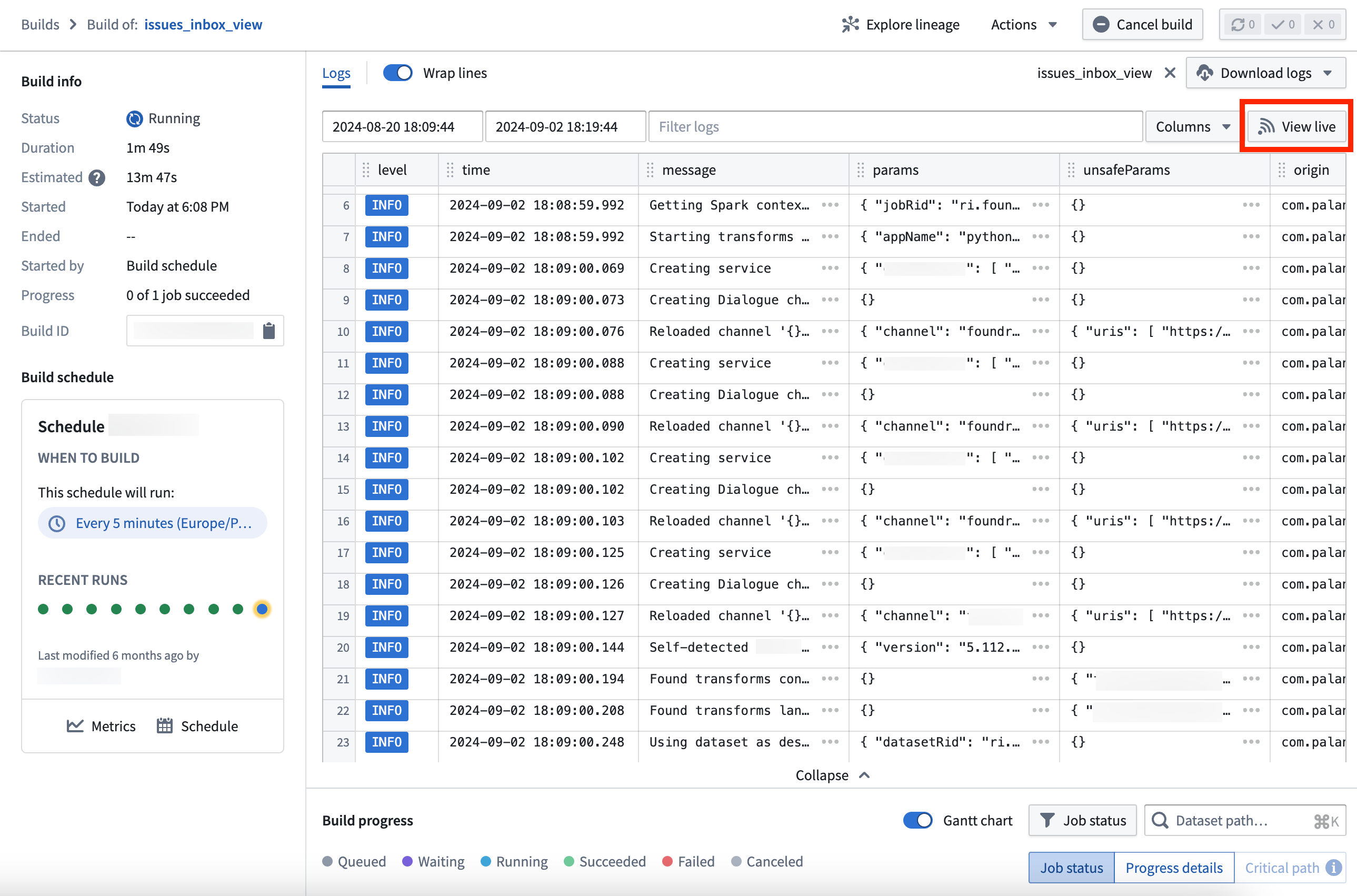
The log view of an active build, with the option to View live in the top right corner.
Learn more about live logs and Builds application in our documentation.
Earn your Foundry and AIP builder foundations badge
Date published: 2024-09-03
We are proud to launch the new Foundry and AIP builder foundations quiz and badge ↗ on the official Palantir training site ↗. Take the ten question quiz and earn a badge that can be shared on LinkedIn as an official LinkedIn credential.

A badge that can be displayed as a credential on your LinkedIn profile.
This quiz complements the Speedrun: Your First End-to-End Workflow ↗ course, which provides an intro to Pipeline Builder, the Ontology, Workshop, and Actions in under 60 minutes. Users who are familiar with Foundry should be able to pass the quiz and earn the badge without completing the Speedrun course. You will also be awarded an official certificate acknowledging completion of the curriculum.

An example of the official certificate you can earn with this quiz.
If you do not have a Palantir Learn account, you can sign up ↗ for free to get started with training tracks and certifications across a range of topics including data engineering, end-to-end workflow building, solution design, and platform administration.
Use multiple protected branches in Pipeline Builder
Date published: 2024-09-03
You can now protect multiple branches in Pipeline Builder to achieve a greater level of governance and defense against unintended changes. A protected branch can only be modified with a pull request and must go through the specified approval process for changes to be merged. By implementing protected branches, you ensure that only authorized modifications are made and increase the security and integrity of your data workflows.
To get started, configure protected branches under Settings > Manage branches in Pipeline Builder:
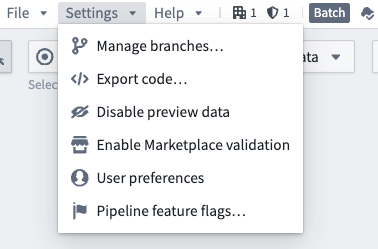
The Manage branches option in the settings dropdown.
Select the Branch protection tab and choose the branches to be protected, along with the desired approval policies. All protected branches will follow the same approval policies.
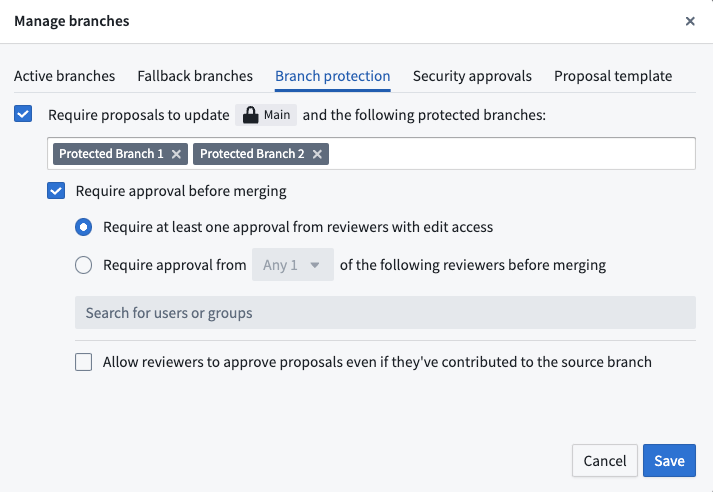
The Branch protection tab with two additional protected branches and approval policy options.
Use multiple protected branches to minimize the risk of unintended changes and create a more controlled development environment for greater peace of mind.
Learn more about protected branches.
Additional highlights
Analytics | Notepad
Template Anchor Link Improvements in Notepad | Previously, generating a new document from a template caused anchor links to point back to the template. With this latest improvement, anchor links in newly generated documents now correctly reference points within the same document, ensuring seamless user navigation.

Notepad Object Media Preview Widget in Marketplace | Object media previews are now supported in templates for Marketplace in Notepad versions. Before this enhancement, users had to create a new notepad document for every template change. This improvement streamlines the workflow significantly because you can now use Notepad object media previews in Marketplace.
App Building | Ontology SDK
Announcing a new Build with AIP package for Ontology SDK, powered by AIP Logic | We are excited to announce that a new Build with AIP package is now available for Ontology Software Development Kit (OSDK), featuring the power of AIP Logic. This new package expands upon the previously released Getting Started with Ontology SDK Build with AIP package, demonstrating how to use Palantir AIP capabilities from any external application, such as running an AIP Logic function, calling a query that uses LLMs to enrich your data, and building a "To-Do" application with AIP Logic automation. To get started with the new Build with AIP package, first search for the Build with AIP portal in your platform applications. Then, search for "OSDK" to find the Ontology SDK (OSDK) with AIP Logic package. Choose to install it, then designate a location in which to save it. Once installation is complete, select Open Example to follow the guide and start building.

App Building | Workshop
Workshop Resizable Sections | Workshop now supports configuring absolute sized sections to be resizable by users in View mode. Resizable sections feature a minimum and maximum size config, an accessible resize handle, and auto-collapse functionality for collapsible sections with headers.
Horizontal filter list | The Filter List layout now supports a horizontal setup. In this layout, each filter will be displayed within an interactive tag, enabling access to the corresponding filter.
Data Integration | Pipeline Builder
Implement interfaces in Pipeline Builder (Beta) | You can now implement interfaces on objects created in Pipeline Builder. Interfaces offer object type polymorphism, enabling consistent modeling and interaction with object types that share a common structure. They facilitate composability by allowing multiple object types to implement and extend shared properties, link types, and metadata.
Learn more on how to implement an interface on objects created in Pipeline Builder.

DevOps | Marketplace
Improved Marketplace store and product navigation | We are thrilled to introduce a revamped navigation experience in Marketplace. With enhanced store overview, you can now begin your Marketplace journey by viewing all available stores, making it easier to dive into a specific store to explore and search for products. Breadcrumb navigation has been added to help direct you through the store, product, and installation or draft stages. Use improved global search to find products intuitively, right from the search bar accessible from anywhere within the application.
Security | Sensitive Data Scanner
Built-in match conditions now available in Sensitive Data Scanner | Sensitive Data Scanner now includes a variety of built-in match conditions to detect common types of Personally Identifiable Information (PII), such as Social Security numbers, email addresses, and phone numbers. You can access these conditions by expanding the Built-in Match Conditions section in the right sidebar.
You may still create your own custom match conditions for your unique requirements. For more information on how to navigate match conditions, refer to our documentation.

中文翻译
公告
提醒: 请注册 Foundry 新闻通讯(Newsletter),即可直接在收件箱中收到关于新产品、功能及平台改进的摘要。有关如何订阅的更多信息,请参阅 Foundry 新闻通讯与产品反馈渠道公告。
欢迎在我们的开发者社区论坛 ↗分享您对这些公告的看法。
使用 Linter 生成可操作建议,即将全面上市 [GA]
发布日期:2024-09-24
我们很高兴地宣布,Linter 将于 10 月 7 日那周对所有注册用户(enrollment)全面上市。此次更新包括 UI 改进、可扩展性提升、建议的可视化功能,以及帮助用户执行建议的修复助手(fix assistant)。当工作流设计产生不必要的成本、未使用最新的 Palantir 平台功能或未遵循最佳实践时,Linter 会生成有观点、可操作的建议。您可以使用这些建议来降低成本、优化本体(Ontology),并提高整个注册环境中的流水线稳定性和弹性。
借助 Linter,您可以更好地了解 Palantir 平台提供的广泛功能,同时监控可能有益于您用例目标的平台更新。Linter 默认启用;如果您是平台管理员,可以通过导航至正确组织的控制面板 > 应用程序访问,然后选择 Linter 旁边的管理选项,来配置用户组对 Linter 的访问权限。
为什么创建 Linter?
Palantir 平台是托管工作流的最佳场所,尽管应用程序构建者旨在设计优化的工作流,但现实情况是,设计决策在实践中可能被证明是次优的。为了解决这个问题,我们创建了 Linter,以确保工作流使用可用技术,并通过更有效地利用资源和功能来实现相同的结果。
何时应使用 Linter?
Linter 可随时使用,无论您是刚刚开始使用 Palantir 平台,还是已经拥有复杂且广泛的工作流。Linter 将监控新的和现有的工作流,并提供持续的建议,定期执行扫描以收集您注册环境状态的分析。这些扫描会识别与预定义规则匹配的资源列表,并根据扫描结果生成建议列表。
Linter 的影响跟踪 UI,显示已处理的建议数量
由于 Palantir 平台功能会频繁更新,Linter 扫描的结果是动态的,并且可能每天都会变化。为了跟上这些变化,您可以设置扫描计划,定期对属于某个空间的项目中的 Foundry 资源执行扫描。
示例扫描计划、生成新计划的选项、操作下拉菜单以及最近的扫描状态
降低成本并优化工作流
处于测试阶段的 Linter 用户调查并消除了大量计算小时数的云成本浪费,从而实现了量化改进。对客户的影响与其平台使用情况相关,但即使是开发人员基础相对较小的注册环境,也已从 Linter 中受益,以实现其云成本目标。
Linter 的影响跟踪 UI,显示已处理的建议数量
一些客户组织冲刺来调查并执行 Linter 建议,而其他客户则通过将 Linter 定位为资源使用的支持工具,将关注点分散到更长的时期内。现在,许多客户将时间用于执行 Linter 建议,作为其 Palantir 平台参与的核心部分。
除了降低成本之外,Linter 还被用于建议工作流更新,以使用 Palantir 平台中新增的功能。这些包括使用轻量级转换和原生 Spark 加速的机会,这两者在今年年初都还不存在。
自 Linter 测试版发布以来,除了可扩展性改进之外,还添加了以下功能:
通过培训应用程序访问量身定制的成功路径 [GA]
发布日期:2024-09-19
我们很高兴地宣布,平台内的培训(Training)应用程序将在未来几周内全面上市。培训应用程序为数据分析师和 AI 工程师等角色提供定制的培训路径,并提供关于如何最佳使用 Palantir 平台的课程、文档和资源集合。
此外,该应用程序允许管理员突出显示用户开始培训之旅时应了解的组织特定文档或说明。
了解如何使用我们的培训应用程序学习 Palantir 平台。
GPT-4o 的视觉功能现已在 Pipeline Builder 中可用
发布日期:2024-09-19
我们激动地宣布,Pipeline Builder 现已与 GPT-4o 的视觉功能集成,将视觉提示的强大功能引入您的工作流。现在,您可以利用 LLM 的强大功能转换基于图像的工作流,允许您将图像传递给模型进行分析,并根据视觉输入接收问题的答案。
要使用 LLM 的视觉功能,首先在 Pipeline Builder 流水线中向数据集节点添加使用 LLM 节点。选择添加空提示以打开 LLM 配置屏幕。在此处,将媒体引用列添加到提供输入数据部分,并选择 GPT-4o 作为模型。
配置为使用 GPT-4o 引用图像并返回购物车中物品名称和品牌的 LLM 提示。
如果您有一个基于图像的媒体集(media set)想要与 LLM 提示一起使用,请首先使用 Convert media set to table rows 转换输出一个包含媒体引用列的表,然后您可以将其添加到 LLM 配置中。
Convert media set to table rows 转换面板。
了解有关 Pipeline Builder 中的视觉功能以及在流水线中使用 LLM 的其他方式的更多信息。
使用新的翻译功能轻松本地化您的 Workshop 应用程序
发布日期:2024-09-17
应用程序构建者现在可以通过新的翻译(Translations)功能,为 Workshop 应用程序中使用的受支持字符串类型提供翻译。借助翻译功能,可以轻松地将 Workshop 应用程序手动或借助 AIP Assist(适用于已启用的注册环境)本地化为多种语言。
如果 Workshop 应用程序已使用此功能翻译成查看者账户设置的语言,查看者将看到模块的翻译视图。
有关哪些内容可以使用此功能进行翻译以及构建者如何配置此功能的详细信息,请查看翻译功能文档。
一个 Workshop 应用程序,翻译面板已打开,屏幕主区域显示即时预览。
对 Llama 3.1 70B Instruct 和 8B Instruct LLM 的支持现已全面上市
发布日期:2024-09-17
Llama 3.1 70B Instruct 和 8B Instruct LLM ↗ 现已全面上市,可为所有注册环境启用。Meta 的这些新旗舰模型具有与业内其他顶级模型相当的性能。如果您的注册环境与 Palantir 的协议未涵盖这些模型的使用,注册管理员必须首先通过 AIP 设置控制面板扩展接受额外的合同附录,然后才能启用这些模型。
此模型可用于所有 Palantir AIP 功能,例如函数、转换、逻辑和 Pipeline Builder。
通过 AWS Bedrock 对 Claude 3.5 Sonnet 和 Claude 3 Haiku LLM 的支持现已全面上市
发布日期:2024-09-17
通过 AWS Bedrock 提供的 Claude 3.5 Sonnet 和 Claude 3 Haiku 现已对所有非地理限制的注册环境全面上市。此外,对于受地理限制的注册环境,这些模型在美国所有地区和部分欧盟地区也可用,其他地区的支持正在积极开发中。有关更多详细信息,请查看关于模型可用性的地理限制的文档。
Anthropic 的这些新旗舰模型具有与业内其他顶级模型相当的性能,并支持多模态工作流,包括视觉。每个模型的详细信息如下。
-
Claude 3.5 Sonnet ↗:Sonnet 是 Anthropic 迄今为止最智能、最先进的模型,在多种任务和评估中展现出卓越的能力。此外,Sonnet 在标准视觉基准测试上已超越 Claude 3 Opus。这些阶跃式改进在需要视觉推理的任务中最为明显,例如解释图表和图形。Claude 3.5 Sonnet 还可以从不完美的图像中准确转录文本——这是零售、物流和金融服务的一项核心能力,在这些领域,AI 从图像、图形或插图中获取的见解可能比仅从文本中获取的更多。
-
Claude 3 Haiku ↗:Haiku 是 Anthropic 最快、最紧凑且最实惠的模型,可实现近乎即时的响应。Haiku 是构建模仿人类交互的无缝 AI 体验的最佳选择。企业可以使用 Haiku 来审核内容、优化库存管理、生成快速准确的翻译、总结非结构化数据等。
如果您的注册协议未涵盖 Claude 3.5 Sonnet 或 Claude 3 Haiku 的使用,注册管理员必须首先通过 AIP 设置控制面板扩展接受额外的合同附录,然后才能启用该 LLM。
此模型应可用于所有 AIP 功能,例如函数、转换、逻辑和 Pipeline Builder。
推出简化且更稳定、更快速的模型部署工作流
发布日期:2024-09-12
以前,部署机器学习模型以进行实时推理需要花费精力和时间来设置实时部署(live deployment),使用建模目标——这是我们用于管理生产级建模工作流的工具。现在,您可以从模型概览页面一键部署模型,选择开始部署或开始并运行选项,而无需经过建模目标应用程序流程。此外,我们还对我们的基础设施进行了多项改进,以实现更快的启动时间、更清晰的函数集成、通过计算模块实现的自动缩放、自动升级、推理类型安全等。
用户现在可以直接从模型的概览页面部署模型。
简化自动升级并自动缩放到零以节省成本
现在可以从模型的概览页面完全管理模型部署。您可以启动、停止、更新模型缩放配置,并在同一界面中测试推理。由于部署现在由计算模块支持,您可以受益于其自动缩放能力,该能力会根据模型的推理流量和使用情况动态启动或缩减副本。
例如,如果您的请求负载仅在特定时间出现,您现在可以设置副本的范围,使其可用并可根据实际请求量进行缩放。您甚至可以将副本缩减到最少为零,以便在模型部署定期未被查询时从潜在的成本节约中受益。
根据模型部署需求配置运行时缩放和资源可用性。
模型部署遵循用户模型的分支,使更新无缝进行。只需从代码仓库或代码工作区发布新的模型版本,现有的模型部署将自动升级,确保所有下游工作流始终指向最新模型。
函数集成,无需 TypeScript 仓库
现在可以轻松地将模型部署注册为函数(Function),并直接在 Workshop 中使用,从而节省您构建和使用 TypeScript 仓库的时间和精力。此外,受益于对表格输入和输出的支持,现在在建模目标应用程序中支持更多类型的模型作为函数。具体来说,具有 pandas API(表格输入/输出)的模型现在可以直接集成到 Workshop 应用程序中,这意味着您不再需要从 pandas 数据帧到 TypeScript 参数的转换层。与此相关,具有参数输入和输出的模型继续得到支持。
对于其他 API 形状,模型可以使用 API 名称发布,以便在需要时仍可在 TypeScript 仓库中使用,例如当启用使用无法直接被 Workshop 消费的函数时。
从模型部署发布函数。
显著提高稳定性和更快的启动时间
我们还采用了完全容器化的模型,这是对建模基础设施的一项重大更改,这意味着模型现在是一个 Docker 镜像,其中包含完整的模型环境、适配器实例和模型权重,全部打包在一起,确保了更快的启动时间。此外,容器化镜像不需要与 Palantir 平台建立任何连接即可启动。在内部测试中,模型部署在一分钟内即可完全就绪,而实时部署则需要三分钟;在大型复杂环境中,压缩的启动时间变得越来越重要。
保证推理类型安全
我们现在能够通过使用 Apache Arrow 与模型容器通信来保证推理类型安全。这确保了用户的推理输入能够以模型适配器 API 中指定的确切方法传递给其模型适配器逻辑。例如,如果模型的 API 声明要提供一个整数参数,则输入值将被转换为整数,如果无法成功转换,则会抛出异常。此外,日期时间和时间戳值现在将安全准确地传递。
打开模型并显示错误类型消息。
具有实用火焰图可视化的调试模式
直接模型部署现在拥有一个新的调试功能:能够创建和查看模型推理的完整火焰图。此功能使您能够查看模型不同部分如何交互。通过利用这个新视图,您现在可以深入了解代码的哪些部分比预期慢,从而使您能够比以前更容易地迭代优化模型性能。
模型部署推理查询的火焰图视图。
开始使用模型部署
要受益于上述功能,请确保使用最新的 palantir_models 库为您的模型发布新的模型版本。请注意,该功能集尚不适用于本地部署堆栈,并且并非所有模型类型都受模型部署支持。外部模型和 SparkML 模型目前被排除在外。
Python 3.8 版本将于 2025 年 1 月 31 日弃用
发布日期:2024-09-12
Python 3.8 正在 Palantir 平台中弃用,这与开源 Python 的生命周期结束(EOL)时间表一致。因此,将尝试在代码仓库中进行自动升级;代码工作簿和较旧的 foundry_ml 模型需要手动操作。从 Python 3.9 开始,我们将密切关注 Python 的 EOL 弃用时间表。查看文档中的 Python 版本部分以了解支持的版本和相应的弃用时间表。我们建议资源始终保持在最新的受支持 Python 版本上。
为什么弃用 Python 3.8?
开源 Python 每年都会将旧版 Python 标记为生命周期结束(EOL)↗,并放弃官方支持。Python 3.8 即将达到其 EOL,继续使用 EOL Python 版本会带来安全风险。此外,开源库继续创建新版本,这些版本不再与这些已弃用的 Python 版本兼容,可能导致未迁移的工作流出现检查失败和作业失败。
弃用对我作为用户意味着什么?
如果您拥有使用已弃用 Python 版本的资源,请注意以下重要日期:
- 2025 年 1 月 31 日: 依赖已弃用 Python 版本的工作流将不再受支持,如果发生故障,您将不会获得任何支持。如果事先与 Palantir 达成一致,可以允许将有限的资源集列入白名单以获得扩展支持。
- 2025 年 4 月 30 日: 所有依赖 Python 3.8 或更早版本的工作流将不再受支持,并且可能会遇到故障。
Foundry 资源迁移到受支持的 Python 版本
Foundry 资源迁移将遵循以下模式:
- 代码仓库:将尝试以自动补丁拉取请求的形式进行自动升级。这将针对 Python 3.8 上的所有资源尝试,无论优先级如何。
- 其他资源:将显示包含从已弃用 Python 版本迁移说明的信息横幅。查看故障排除指南以获取更多信息。
目前,平台中支持的最新 Python 版本是 Python 3.11。
未来的 Python 版本弃用
从 Python 3.9 开始,Palantir 平台将密切关注上游的生命周期结束时间表,并在 Python 版本达到上游生命周期结束时立即在平台内弃用它们。有关更多信息,请参阅文档中的 Python 版本。
通过跳过已处理行来优化 Pipeline Builder LLM 构建
发布日期:2024-09-10
我们很高兴地宣布,Pipeline Builder 现在可以跳过先前为使用 LLM 节点和文本到嵌入转换处理过的行,以节省成本并提高性能。以前,在流水线构建期间会重新处理每一行。然而,现在可以缓存行结果,这意味着它们被存储并在后续构建中重用。您可以通过跳过已处理的行来节省时间和成本;经过测试的用例显示,构建时间从 3 小时减少到仅 20 分钟。
要开始使用,请在配置使用 LLM 或文本到嵌入时启用跳过重新计算行。启用后,将根据传递到输入提示中的列和参数,将行与先前处理过的行进行比较。具有相同列和参数值的匹配行将在未来的部署中获取缓存的输出值,而无需重新处理。
跳过重新计算行选项。
如果对提示的更改需要重新计算所有行,用户可以手动清除缓存。在这种情况下,LLM 视图上方将出现一个警告横幅,用户可以决定保留所有先前缓存的值,只要输出类型保持不变。
LLM 视图,带有警告横幅,通知用户提示或模型配置已更改。
通过在流水线中的使用 LLM 节点和文本到嵌入转换上启用此功能,提高工作流效率并降低计算成本。
了解有关跳过已处理行的更多信息。
引入调度日历小部件
发布日期:2024-09-10
我们激动地在 Workshop 中引入调度日历(Scheduling Calendar)小部件,这是一种可视化和与时间绑定对象交互的新方式。调度日历提供了一种清晰灵活的方式来显示事件或任务。
调度日历小部件中的事件示例。
调度日历小部件的示例用例:
- 预约或会议安排
- 跟踪任务和里程碑截止日期
- 查看员工轮班分配
调度日历小部件的主要功能:
- 直观的拖放功能,使您可以轻松地重新安排事件。
- 可自定义的显示选项,如颜色和对象详细信息,为调度决策提供上下文。
- 原生日、周和月视图。
开发路线图上的下一步是什么?
我们的团队正在积极为未来的更新开发以下功能:
- 直接在调度日历小部件中触发操作和 Workshop 事件。
- 通过与场景(Scenarios)集成来模拟调度更改。
有关更多信息,请查看调度日历小部件文档。
引入实时日志 [GA]
发布日期:2024-09-03
我们激动地宣布实时日志功能,现已成为您 Palantir 注册环境中构建应用程序的一部分。实时日志让用户能够实时查看正在运行的作业,提供强大且有洞察力的监控,了解这些作业在您的数据资源中的进展情况,并能够检查长时间运行的任务,例如流或计算模块。
构建应用程序中的实时日志功能,实时返回任务报告。
根植于用户控制
实时日志的设计以用户控制为核心;您可以随时使用日志视图右上角的暂停选项停止日志,并轻松地从同一位置重新开始。此外,参数和安全参数作为结构化和可读的 JSON 块可见,便于消费和理解。
实时日志视图中的暂停和格式化为 JSON选项。
彩色可见性
使用实时日志监控作业的一个关键好处是,可以通过颜色编码识别构建中的问题。使用这些颜色快速识别实时日志流中的警告和错误,并优先处理必要的修复以成功完成构建。
实时日志流中颜色编码的调试和警告警报示例。
开始使用实时日志
要访问实时日志,请导航至构建应用程序,并选择查看一个活动作业。然后,从日志查看器的右上角选择查看实时。
活动构建的日志视图,右上角有查看实时选项。
获得您的 Foundry 和 AIP 构建者基础徽章
发布日期:2024-09-03
我们自豪地在官方 Palantir 培训网站 ↗ 上推出新的 Foundry 和 AIP 构建者基础测验和徽章 ↗。参加包含十个问题的测验,并获得一个可以在 LinkedIn 上作为官方 LinkedIn 凭证分享的徽章。
可以作为凭证显示在您的 LinkedIn 个人资料上的徽章。
此测验是对 Speedrun:您的第一个端到端工作流 ↗ 课程的补充,该课程在 60 分钟内介绍了 Pipeline Builder、本体、Workshop 和操作。熟悉 Foundry 的用户应该能够通过测验并获得徽章,而无需完成 Speedrun 课程。您还将获得一份官方证书,确认您已完成该课程。
您可以在此测验中获得的官方证书示例。
如果您没有 Palantir Learn 帐户,您可以免费注册 ↗,开始学习涵盖数据工程、端到端工作流构建、解决方案设计和平台管理等主题的培训课程和认证。
在 Pipeline Builder 中使用多个受保护分支
发布日期:2024-09-03
您现在可以在 Pipeline Builder 中保护多个分支,以实现更高级别的治理和防御意外更改。受保护分支只能通过拉取请求进行修改,并且必须经过指定的审批流程才能合并更改。通过实施受保护分支,您可以确保只进行授权的修改,并提高数据工作流的安全性和完整性。
要开始使用,请在 Pipeline Builder 中的设置 > 管理分支下配置受保护分支:
设置下拉菜单中的管理分支选项。
选择分支保护选项卡,并选择要保护的分支以及所需的审批策略。所有受保护分支将遵循相同的审批策略。
分支保护选项卡,带有两个额外的受保护分支和审批策略选项。
使用多个受保护分支来最大程度地降低意外更改的风险,并创建一个更受控的开发环境,以获得更大的安心。
其他亮点
分析 | Notepad
Notepad 中的模板锚链接改进 | 以前,从模板生成新文档会导致锚链接指向回模板。通过这项最新改进,新生成文档中的锚链接现在正确地引用同一文档中的点,确保无缝的用户导航。
Marketplace 中的 Notepad 对象媒体预览小部件 | 现在,在 Notepad 版本的 Marketplace 模板中支持对象媒体预览。在此增强之前,用户必须为每个模板更改创建一个新的 notepad 文档。此改进显著简化了工作流,因为您现在可以在 Marketplace 中使用 Notepad 对象媒体预览。
应用程序构建 | Ontology SDK
宣布推出适用于 Ontology SDK 的新 Build with AIP 包,由 AIP Logic 提供支持 | 我们激动地宣布,一个新的 Build with AIP 包现已可用于本体软件开发工具包(OSDK),该包具有 AIP Logic 的强大功能。这个新包扩展了先前发布的Ontology SDK 入门 Build with AIP 包,演示了如何从任何外部应用程序使用 Palantir AIP 功能,例如运行 AIP Logic 函数、调用使用 LLM 丰富数据的查询,以及使用 AIP Logic 自动化构建"待办事项"应用程序。要开始使用新的 Build with AIP 包,首先在您的平台应用程序中搜索 Build with AIP 门户。然后,搜索"OSDK"以找到 Ontology SDK (OSDK) with AIP Logic 包。选择安装它,然后指定一个保存位置。安装完成后,选择打开示例以按照指南开始构建。
应用程序构建 | Workshop
Workshop 可调整大小的部分 | Workshop 现在支持将绝对大小的部分配置为在查看模式下可由用户调整大小。可调整大小的部分具有最小和最大大小配置、可访问的调整大小手柄,以及带有标题的可折叠部分的自动折叠功能。
水平过滤器列表 | 过滤器列表布局现在支持水平设置。在此布局中,每个过滤器将显示在一个交互式标签内,从而可以访问相应的过滤器。
数据集成 | Pipeline Builder
在 Pipeline Builder 中实现接口(Beta) | 您现在可以在 Pipeline Builder 中创建的对象上实现接口。接口提供对象类型多态性,从而能够对共享公共结构的对象类型进行一致的建模和交互。它们通过允许多个对象类型实现和扩展共享属性、链接类型和元数据来促进可组合性。
了解有关如何在 Pipeline Builder 中创建的对象上实现接口的更多信息。
DevOps | Marketplace
改进的 Marketplace 商店和产品导航 | 我们激动地推出 Marketplace 中全新的导航体验。通过增强的商店概览,您现在可以通过查看所有可用商店来开始您的 Marketplace 之旅,从而更容易深入特定商店以探索和搜索产品。添加了面包屑导航,以帮助引导您完成商店、产品以及安装或草稿阶段。使用改进的全局搜索,直接从应用程序内任何位置都可访问的搜索栏中直观地查找产品。
安全 | 敏感数据扫描器
敏感数据扫描器中现在提供内置匹配条件 | 敏感数据扫描器现在包含各种内置匹配条件,用于检测常见类型的个人身份信息(PII),例如社会安全号码、电子邮件地址和电话号码。您可以通过展开右侧边栏中的内置匹配条件部分来访问这些条件。
您仍然可以根据您的独特需求创建自己的自定义匹配条件。有关如何导航匹配条件的更多信息,请参阅我们的文档。