Announcements(公告)
REMINDER: Sign up for the Foundry Newsletter to receive a summary of new products, features, and improvements across the platform directly to your inbox. For more information on how to subscribe, see the Foundry Newsletter and Product Feedback channels announcement.
Share your thoughts about these announcements in our Developer Community Forum ↗.
View raw prompts and outputs in Pipeline Builder
Date published: 2024-11-26
We are excited to announce that you can now view the raw prompts and outputs in the Use LLM node in Pipeline Builder. To access this new feature, navigate to the Trial run section in the Use LLM node and select the \</> icon for the specific trial run you want to analyze.
This enhancement provides greater visibility into the data being sent to the LLM, improving transparency and making it easier to debug your LLM runs.
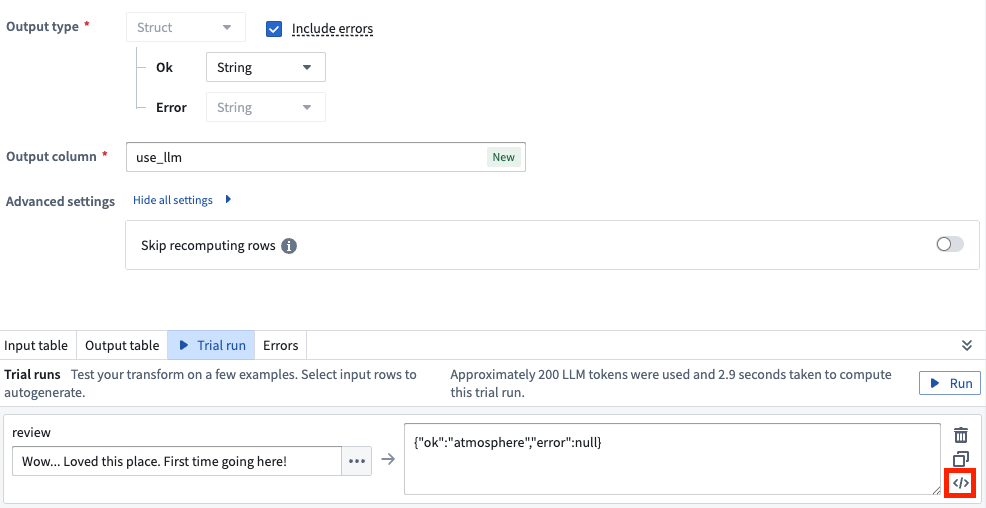
Select the \</> icon to view the raw prompts and outputs from the Use LLM node.
The Use LLM node now displays:
- Initial Prompt: The exact prompt sent to the model, including any modifications or additions made by Pipeline Builder.
- Intermediate LLM Outputs: All outputs from the LLM, including any failed outputs.
- Corrections: Details on corrections made for any failures.
- Final Output: The ultimate result provided by the LLM.
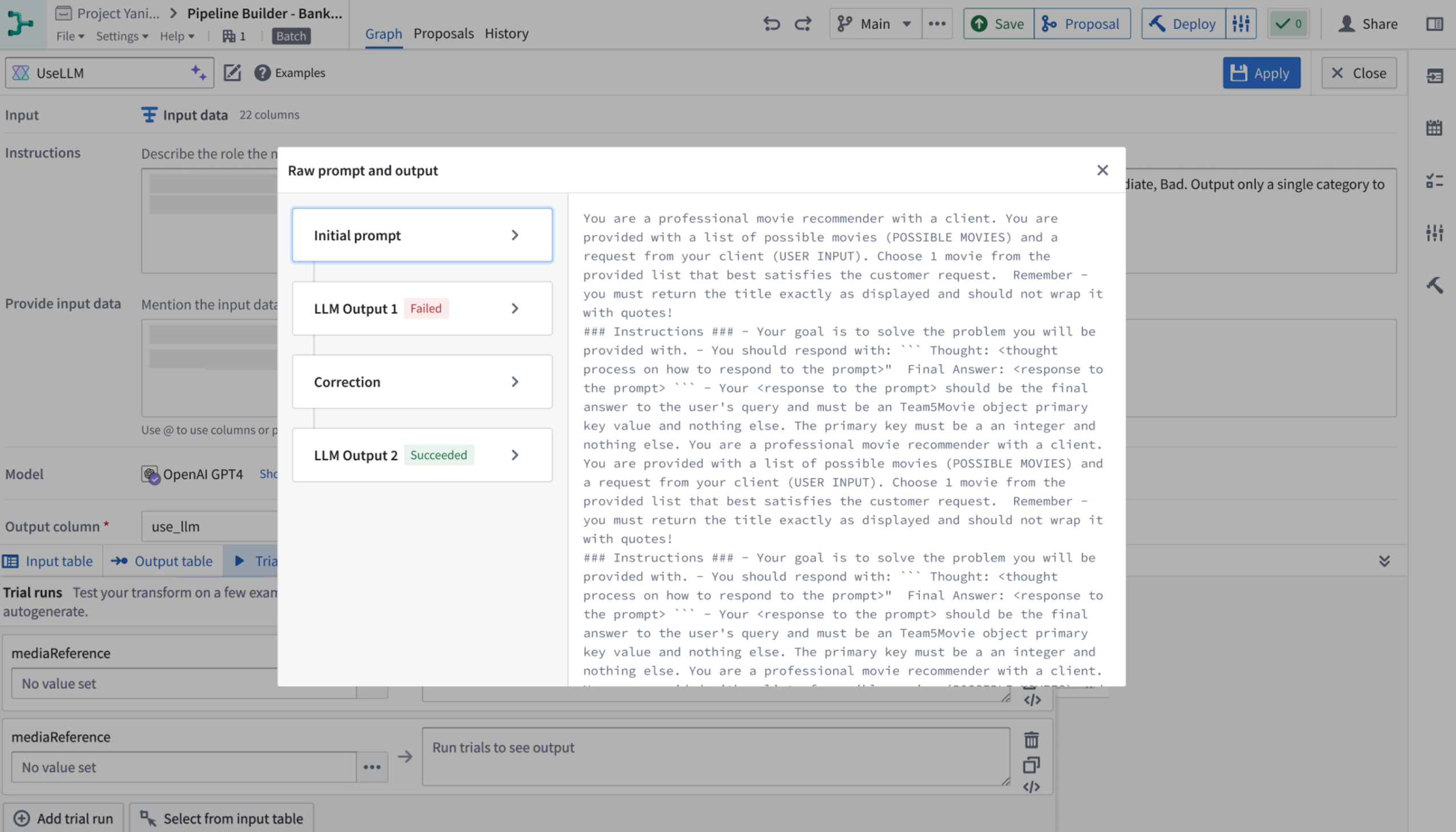
Example raw prompts and output displayed by the Use LLM node.
Learn more in the trial run documentation.
Create custom in-platform tutorials with Walkthroughs [Beta]
Date published: 2024-11-26
This feature is now generally available; read the latest announcement.
Register any external LLM as a specialized Typescript function and use it in Logic [GA]
Date published: 2024-11-21
It is now much easier to integrate your own LLM and use it in the Palantir platform. You can now use your models in the useLLM board in AIP Logic by externally querying them from a specialized TypeScript function that implements the new function interface primitive.
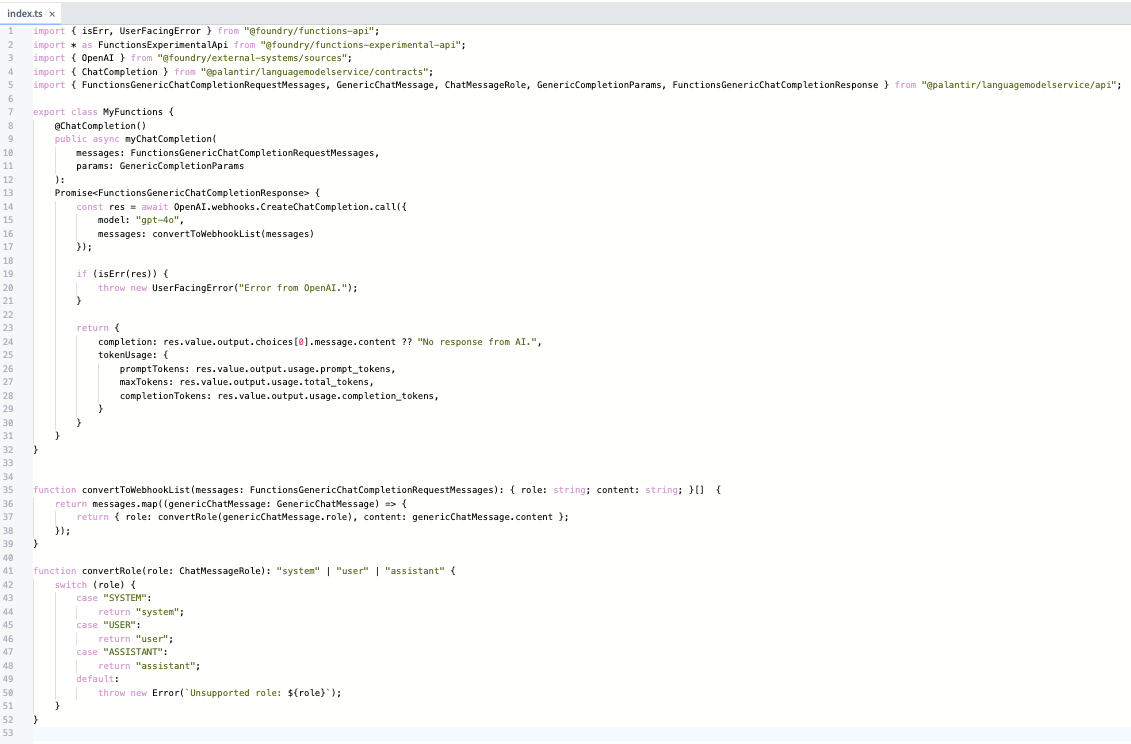
A view of the ChatCompletion function.
Rapid integration of new models: Increasingly, there are models being released that are faster and cheaper for specific workflows and use cases. Although Palantir will continue to provide quick support for first-class models from providers like OpenAI, Anthropic, and Gemini, we want you to be able to experiment with any new LLM immediately after its release. With this feature, you can connect a new LLM into the Palantir platform in less than 15 minutes.
First-class accessibility across the Palantir platform: External model sources are no longer confined to Code repositories. LLMs registered with this feature are immediately available in Logic's useLLM. Additionally, support for accessing these models in Builder's useLLM board and AIP Agent Studio is currently in beta and will be generally available (GA) early next year. Contact your Palantir representative if you would like to try this new feature in Pipeline Builder.
Improved authoring experience: The TypeScript code authoring environment streamlines the work needed for you to register your external LLM under a unified, yet customizable, API. Simply implement the function interface with the types provided and call the external source of your choice.
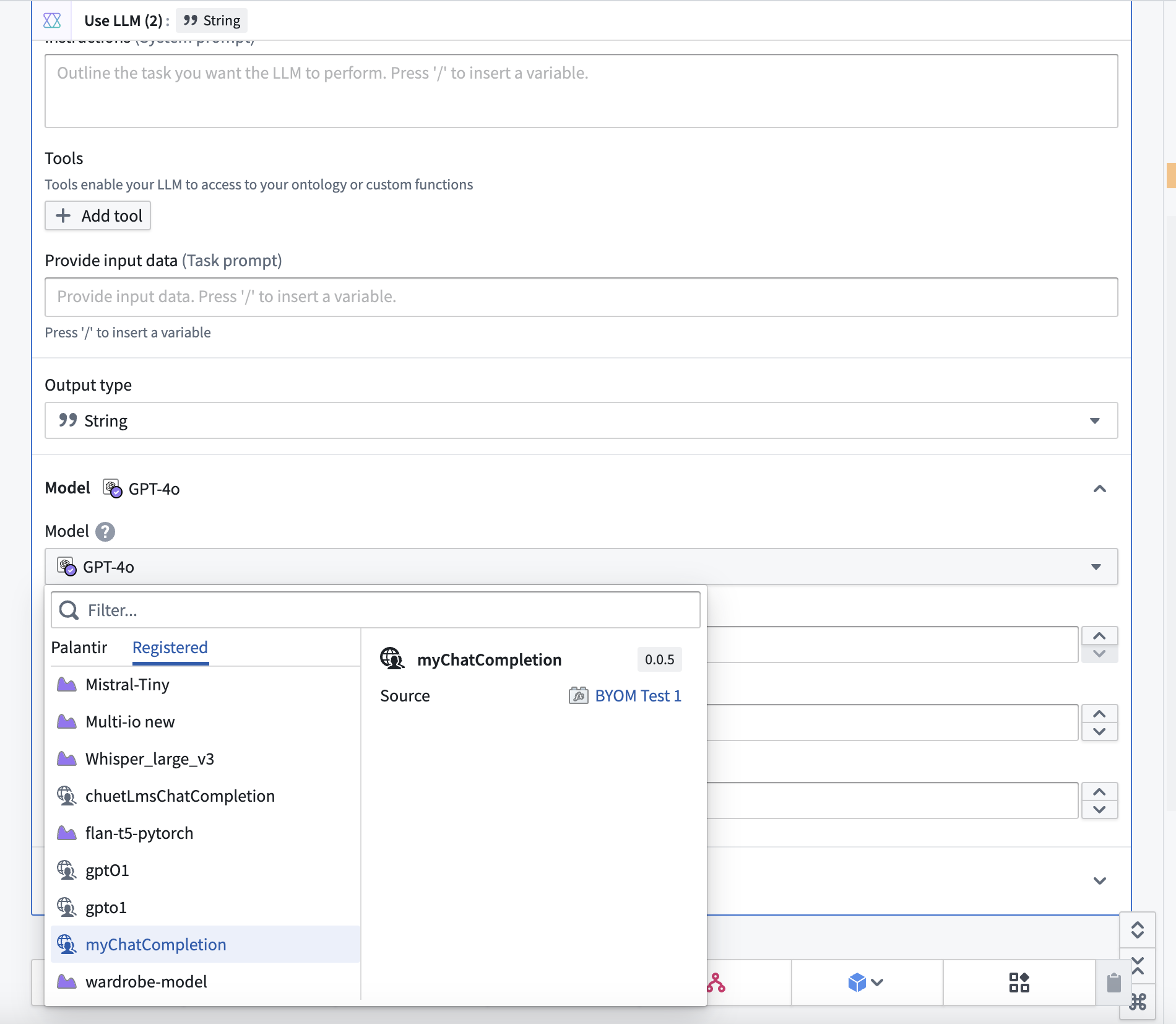
Using your custom model in AIP Logic is now easier. Select your model from the dropdown menu to begin.
Review the Function interface documentation to learn more.
Protect sensitive image data using the visual obfuscation algorithm in Cipher [GA]
Date published: 2024-11-21
The visual obfuscation algorithm is now generally available when you create a Cipher channel to reversibly obfuscate portions of images. As a core Foundry security and governance service, Cipher enables users to obfuscate data through cryptographic operations managed through channels, which describe a specific protocol for an encryption framework. Unlike traditional image redaction, the visual obfuscation algorithm is commutative, reversible, and obscures portions of images by scrambling their RGB pixel values. Users can encrypt and decrypt images with the appropriate Cipher licenses that control permissions to use cryptographic operations defined in a channel. Additionally, you can use the visual obfuscation algorithm in Python transforms to redact entire images or portions containing sensitive contents.
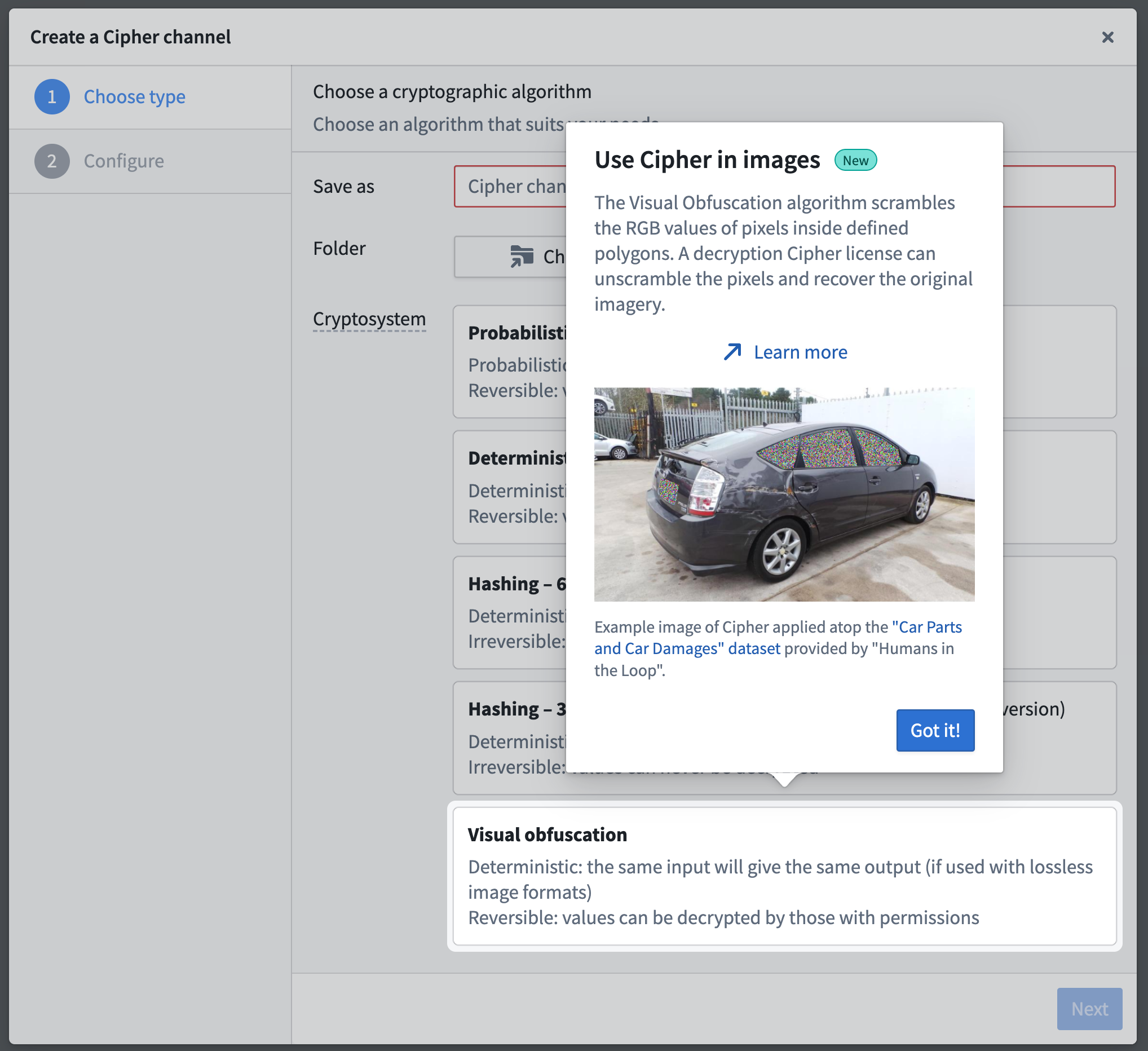
The visual obfuscation algorithm is now generally available when you create a new Cipher channel.
Media sets serve as key data assets powering a variety of Foundry workflows. Images contained in media sets, much like tabular text-based data, often require strict protection of their potentially sensitive content through granular data governance. Visual obfuscation's reversibility provides an additional level of data minimization and permission management for an image's sensitive content, as a user with the necessary access granted through a Cipher decryption license can recover an image's obfuscated sections. Users can share an image across different access groups for analysis as a singular data asset - users in one group may be able to view the image's original content, while users in another will only be able to view the image with sensitive regions obfuscated by default.
Apply visual obfuscation to improve image security and access
Administrators can configure a visual obfuscation decryption license to impose limits on decryption frequency. An administrator may also require users to submit a checkpoint as justification for viewing sensitive imagery, which collects records of image interactions.
As an example, a user trained to tag the damaged areas of a car can complete their workflow by viewing an image of the car with its sensitive regions obfuscated, such as the license plate and windows showing the interior. Another user trained to provide customer support can access the same image and decrypt the license plate region to confirm that the vehicle belongs to a specific customer. Additionally, an administrator can verify that the customer support user's interactions adhere to the decryption license's prescribed data governance policy.

Users can apply the visual obfuscation algorithm to obscure potentially sensitive regions of an image. Image source: Car Parts and Car Damages ↗ provided under a CC0 license.
How and when to use visual obfuscation
Since its beta release, Foundry users have applied visual obfuscation in tandem with object detection models to identify and obscure personally identifiable attributes within images before human access, reducing bias during analytical workflows. You should use PNG files, as other image file types may not support pixel scrambling during encryption and decryption.
You can use visual obfuscation to:
- Redact image sections containing PII (Personally Identifiable Information) or PHI (Protected Health Information) before providing an image to an OCR (Optical Character Recognition) or text extraction model.
- Reduce an image's sensitivity level by selectively obfuscating certain sections in order to broaden user access to support analysis.
- Hide parts of images that may introduce bias into a workflow and require a justification to reveal the obfuscated section.
- Add an additional layer of protection against possible data leaks or permission misconfigurations.
- [Beta] Interact with obfuscated imagery using the Image Display widget in Workshop, as seen below.
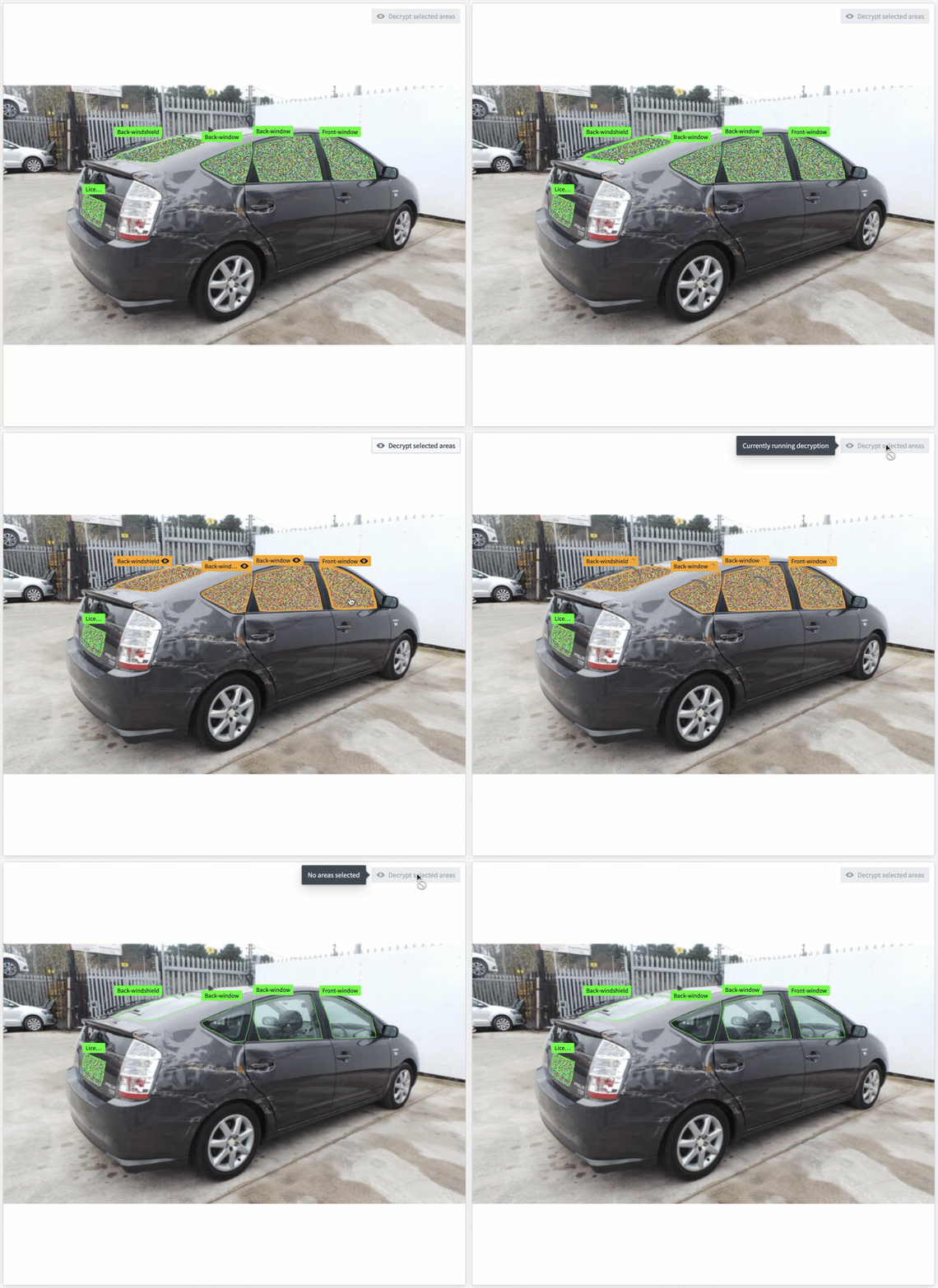
Window areas which have been visually obfuscated are selected and decrypted using the beta Image Display widget in Workshop.
Contact your Palantir representative to install visual obfuscation on your Foundry enrollment if it is not currently available.
For more information, review Cipher's visual obfuscation documentation.
Introducing Portfolios, a new way to organize Projects [GA]
Date published: 2024-11-21
We are excited to introduce Portfolios, a new way to organize Projects. Editors of Spaces can add Projects to a Portfolio to create a one-stop catalog of datasets, applications, and other important resources. This is especially useful for enrollments with many Projects, as administrators can curate a few Portfolios for users to navigate rather than hundreds of Projects.
Portfolios can group Projects in a number of ways. Administrators can curate Portfolios to represent:
- A business unit or department. All the resources under that team's oversight are grouped together, making navigation and discovery easy for users.
- A specific product or workstream. All the product or workstream's resources are brought into a single view while respecting the separation of concerns for Projects that individually handle data integration, analysis, and operational applications.
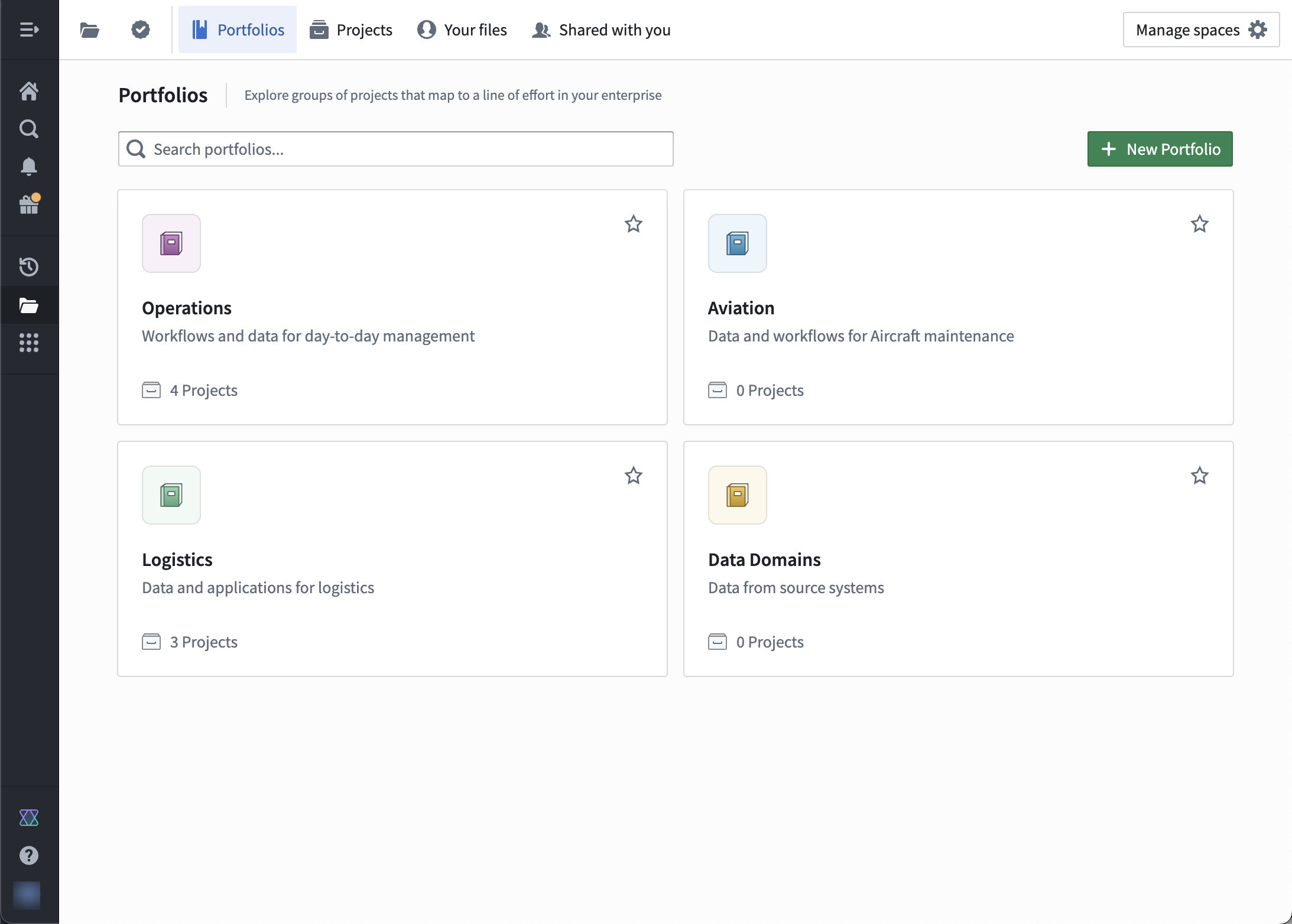
Example of Portfolios for different use cases.
Each Portfolio contains many Projects, but each Project belongs to at most a single Portfolio. Any user with access to a Space can view its Portfolios, but users still separately need permissions to view the Projects inside a Portfolio.
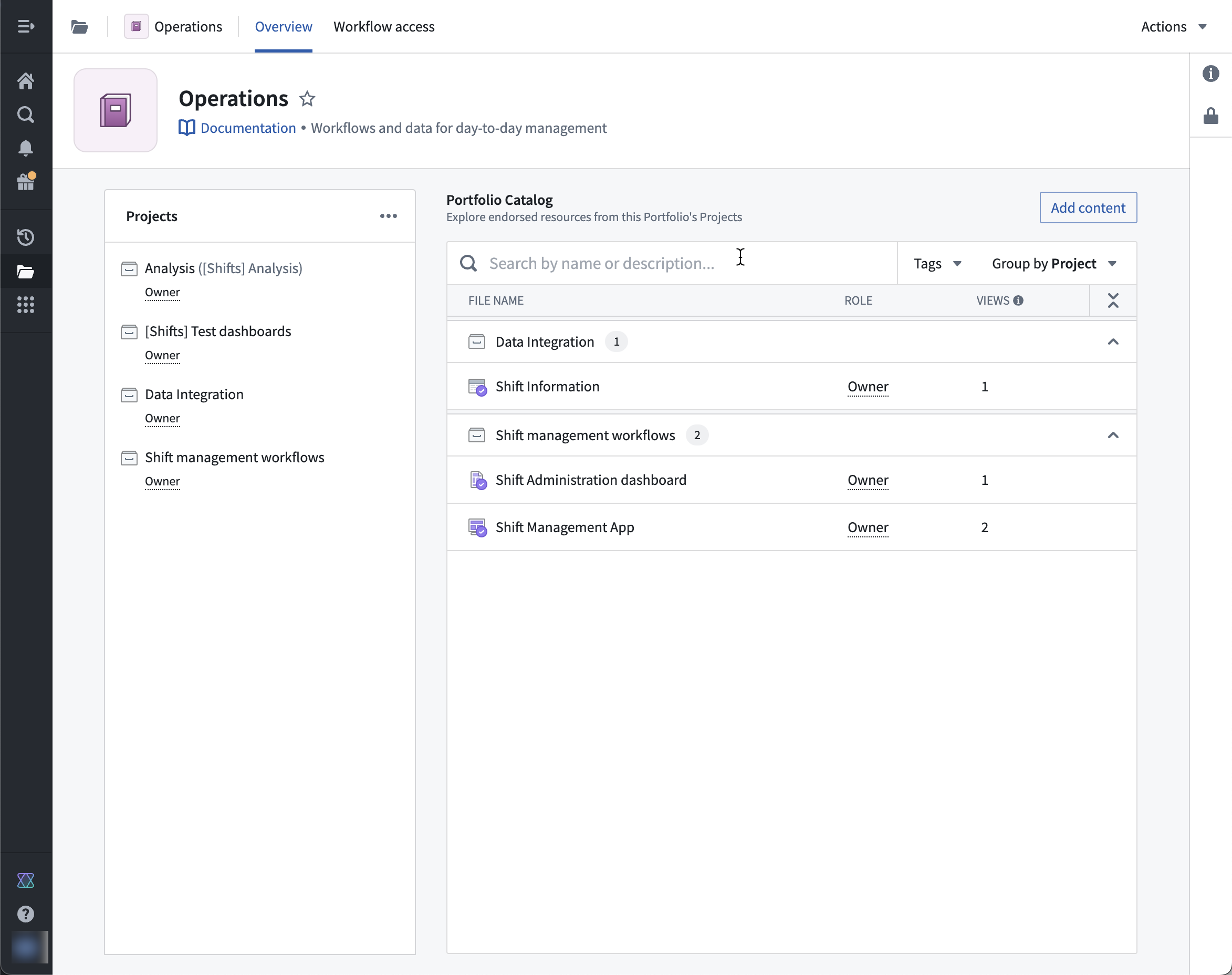
Example Portfolio that contains four Projects.
Important resources that have been added to a Project catalog or collection appear in the Portfolio catalog for ease of access.
Key features of Portfolios
- Users can easily discover and navigate to the Projects in their line of effort.
- Users can view Projects by Portfolio, and no longer need to navigate the entire Project list at once.
- Portfolios provide a single-pane view for all the Projects that make up a work area.
For more information, see the Portfolios documentation.
Authentication and user management through intake forms [GA]
Date published: 2024-11-21
Intake forms are generally available the week of November 18, 2024.
Platform administrators can create authentication intake forms from Foundry's Control Panel to capture, review, and supplement user information not provided through their identity provider integrations. Intake forms can be used to gather and enhance user data required for platform access management, particularly in instances where certain information may not be obtained from identity providers.
User attributes captured through intake forms need to be reviewed and approved before they are assigned to a user. Additionally, intake forms can also gate access to the platform until appropriate approval.
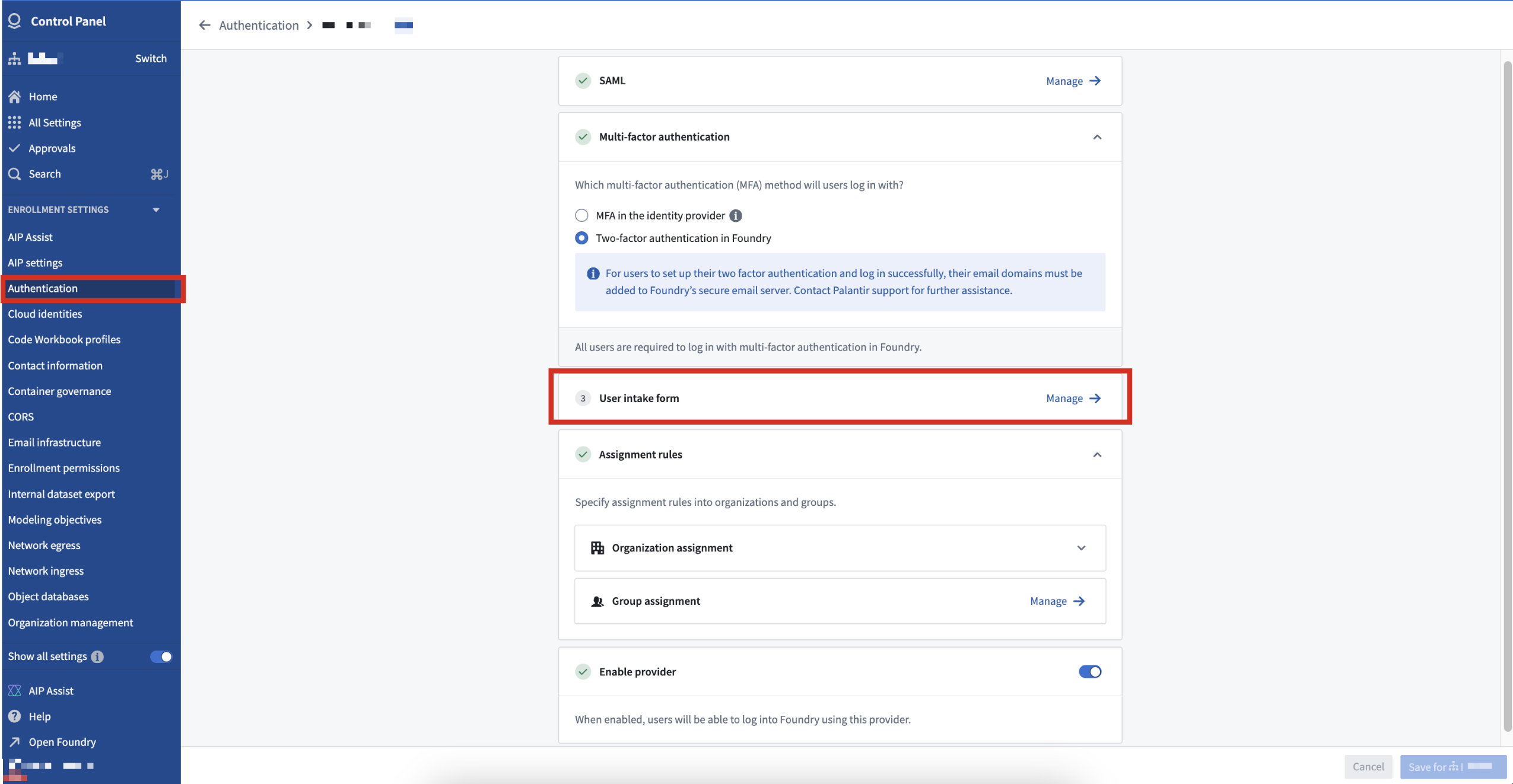
User intake forms created in the Control Panel supplement authentication information not inherited from an identity provider.
After a platform administrator publishes an intake form, users complete the form at the time of their first login and receive platform access upon approval. After submission, users can view their intake form's status and resubmit a new form, if necessary.
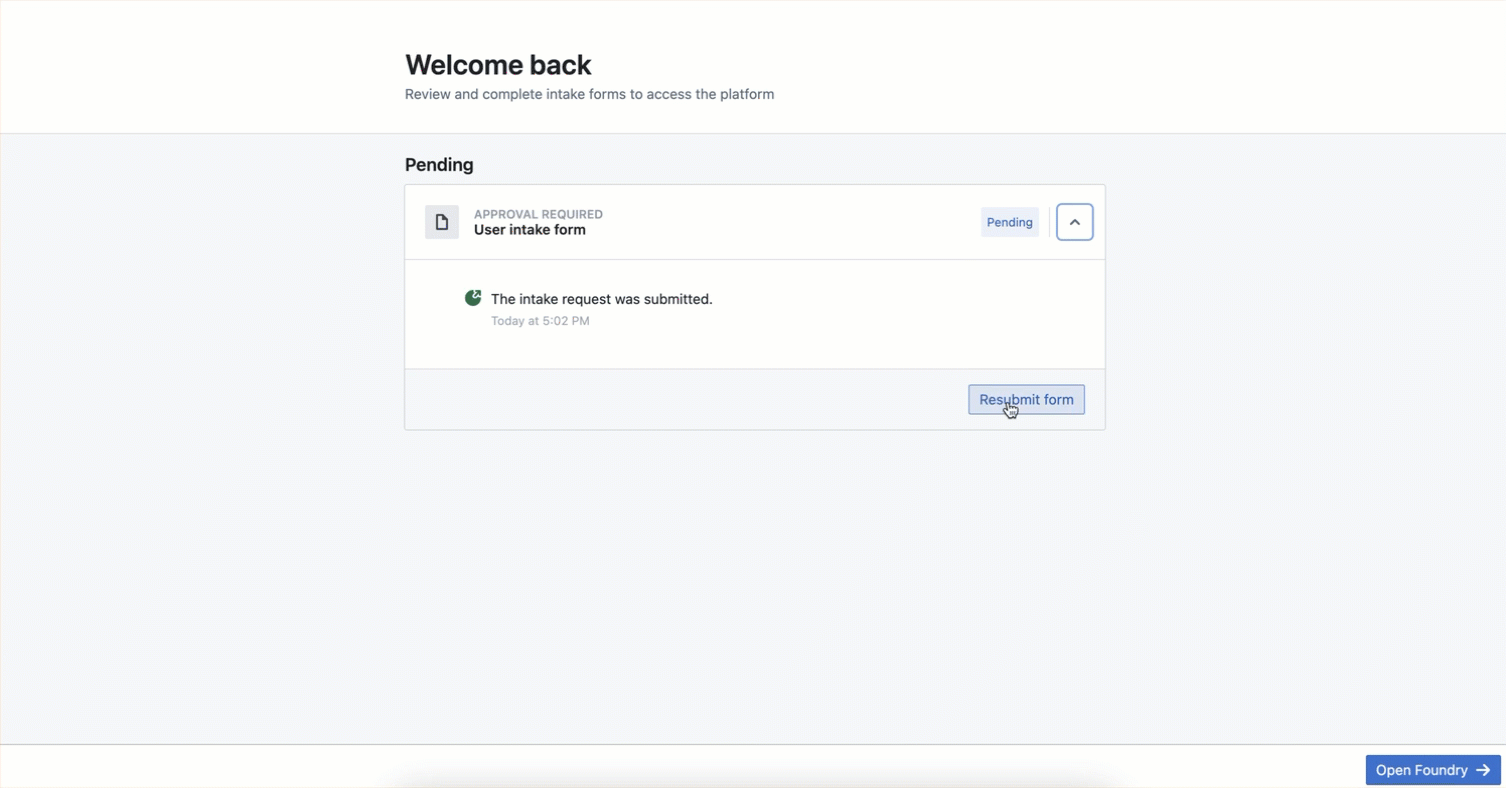
Users can view their intake form's review status or resubmit a new form to garner platform access.
Since their introduction, intake forms have been used in combination with automatic group assignment based on user attributes to streamline effective authorization management.
Palantir's platform authentication documentation offers additional detail about intake forms.
Create, configure sources and data syncs in Pipeline Builder
Date published: 2024-11-18
We are thrilled to announce that you can now create and configure sources and sync datasets directly within the Pipeline Builder user interface on all enrollments.
Two new ways to import a source
You can now easily import any Data Connection source to your Pipeline Builder pipeline. There are two ways to do this: If your input data was created from a Data Connection sync, you can add the source to the Pipeline Builder graph by selecting the input data node and using the Add source to graph option.

The Add source to graph option makes it easy to import any Data Connection source.
Alternatively, you can use the Add data toolbar button or the Import data to Foundry action to search for, import, or create sources. Select Import data to Foundry, then choose a new source type to create or search for an existing source to connect.

Choose from a selection of options to bring your data into Foundry.
Overall, this enhances the ease of integrating various data sources. This ensures that you can quickly connect to and utilize your data without long configuration processes, making your data operations more efficient and reducing setup time.
Directly input source configuration
Once the source is imported, you can configure it directly in Pipeline Builder. Under the Configure source section, you can specify required source-specific configurations. Pipeline Builder supports Foundry-supported JDBC sources that require only mandatory fields.
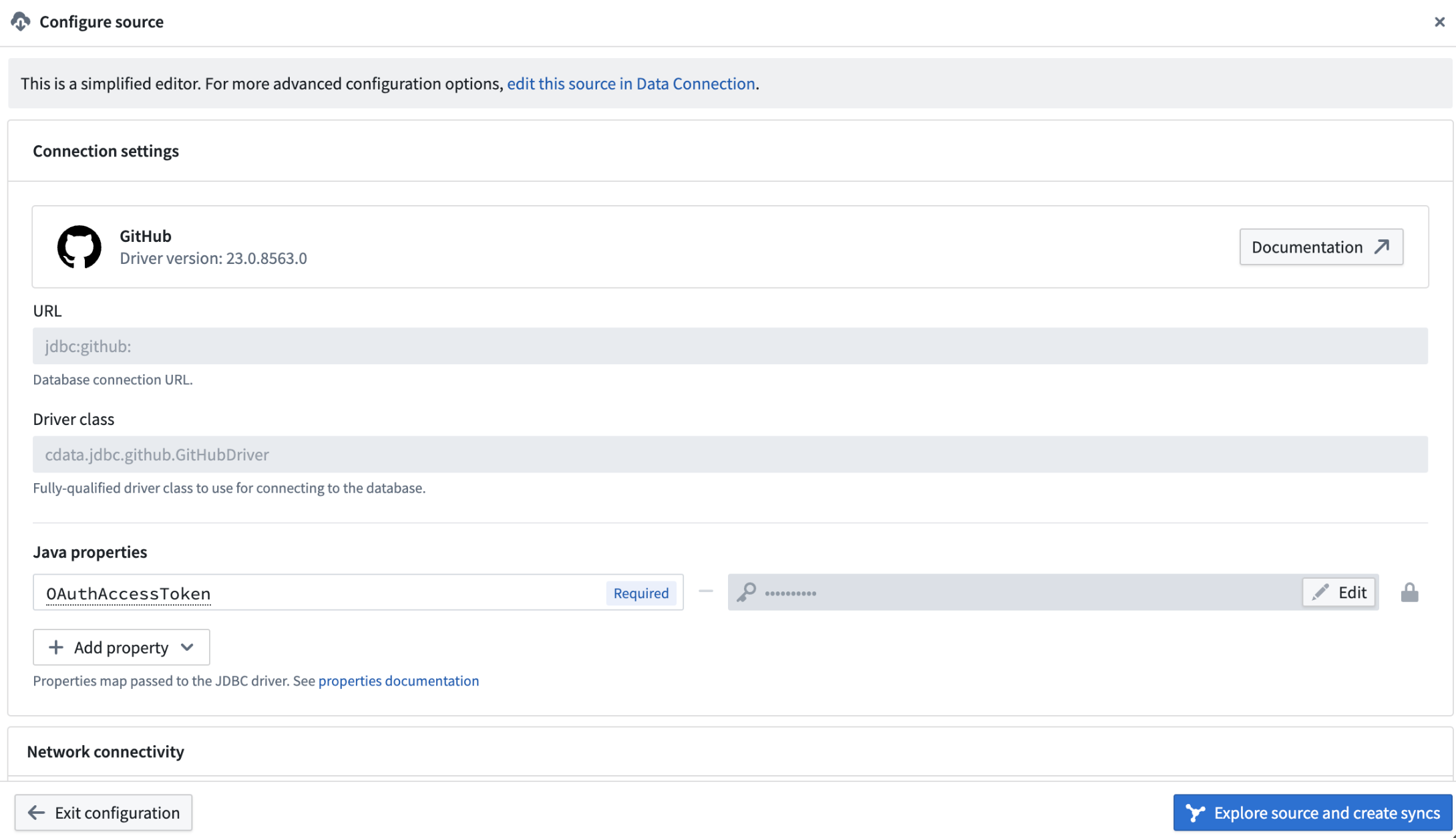
Use the Configure source section to input source-specific configurations.
This streamlines source creation by centralizing all necessary configurations with the data pipeline logic, ensuring optimal data flow.
Greater focus with integrated sync creation
The ability to explore sources and create syncs for batch datasets directly in Pipeline Builder significantly enhances your data management capabilities. This feature allows you to easily identify and sync the data you need, improving data accessibility and ensuring that your datasets are up-to-date. The streamlined sync process means you can focus on leveraging your data rather than managing it.
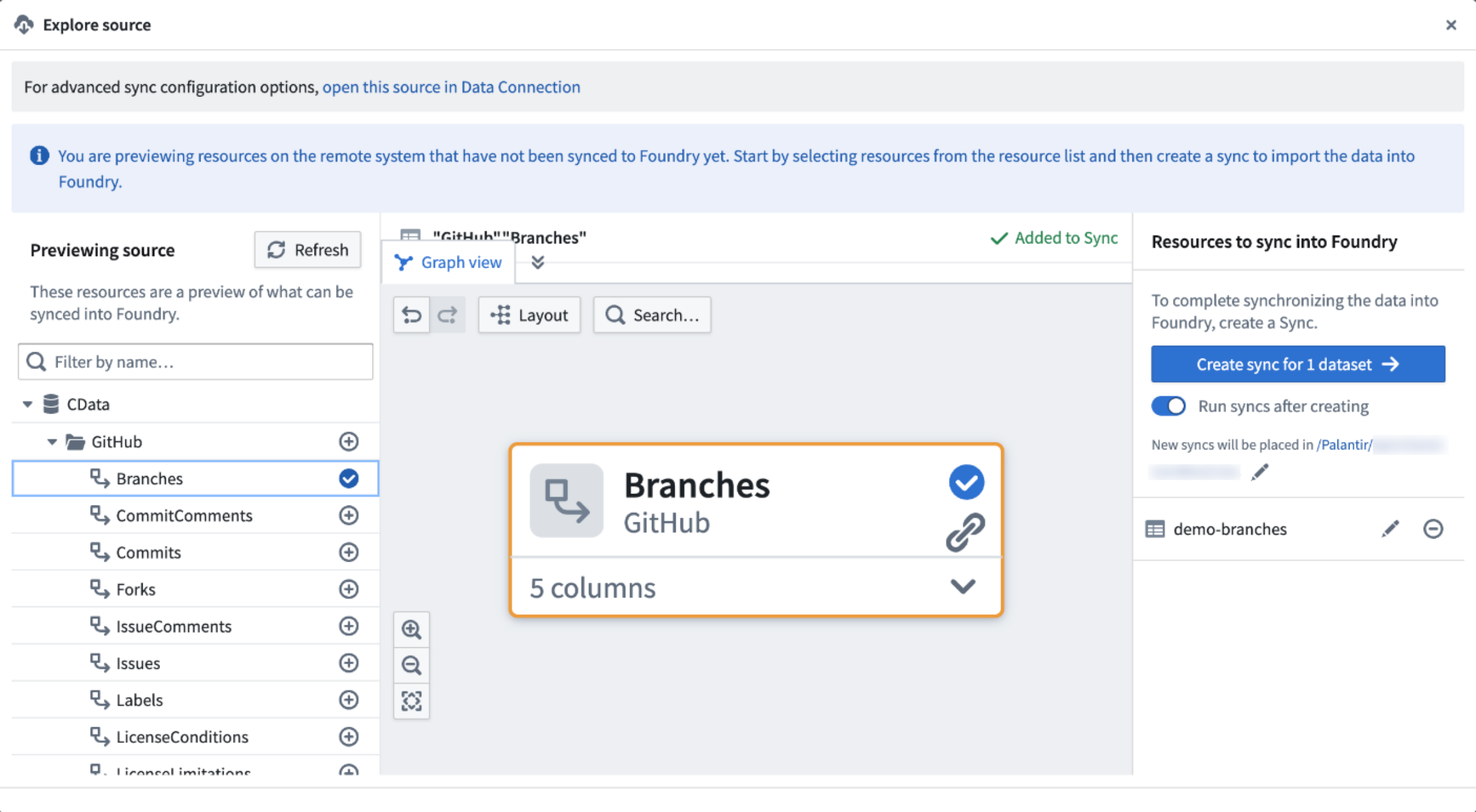
Leverage your data with the Explore source view.
Run serverless Docker images with compute modules [Beta]
Date published: 2024-11-11
We are excited to launch compute modules, a developer-focused way to run serverless Docker images in Foundry. With compute modules, you can scale your Docker containers dynamically based on load. Plus, bring your own logic without needing to rewrite it in a Foundry-supported language while augmenting Palantir platform capabilities.
The Compute Modules application is now available in a beta state. Contact Palantir Support to enable Compute Modules in your enrollment.
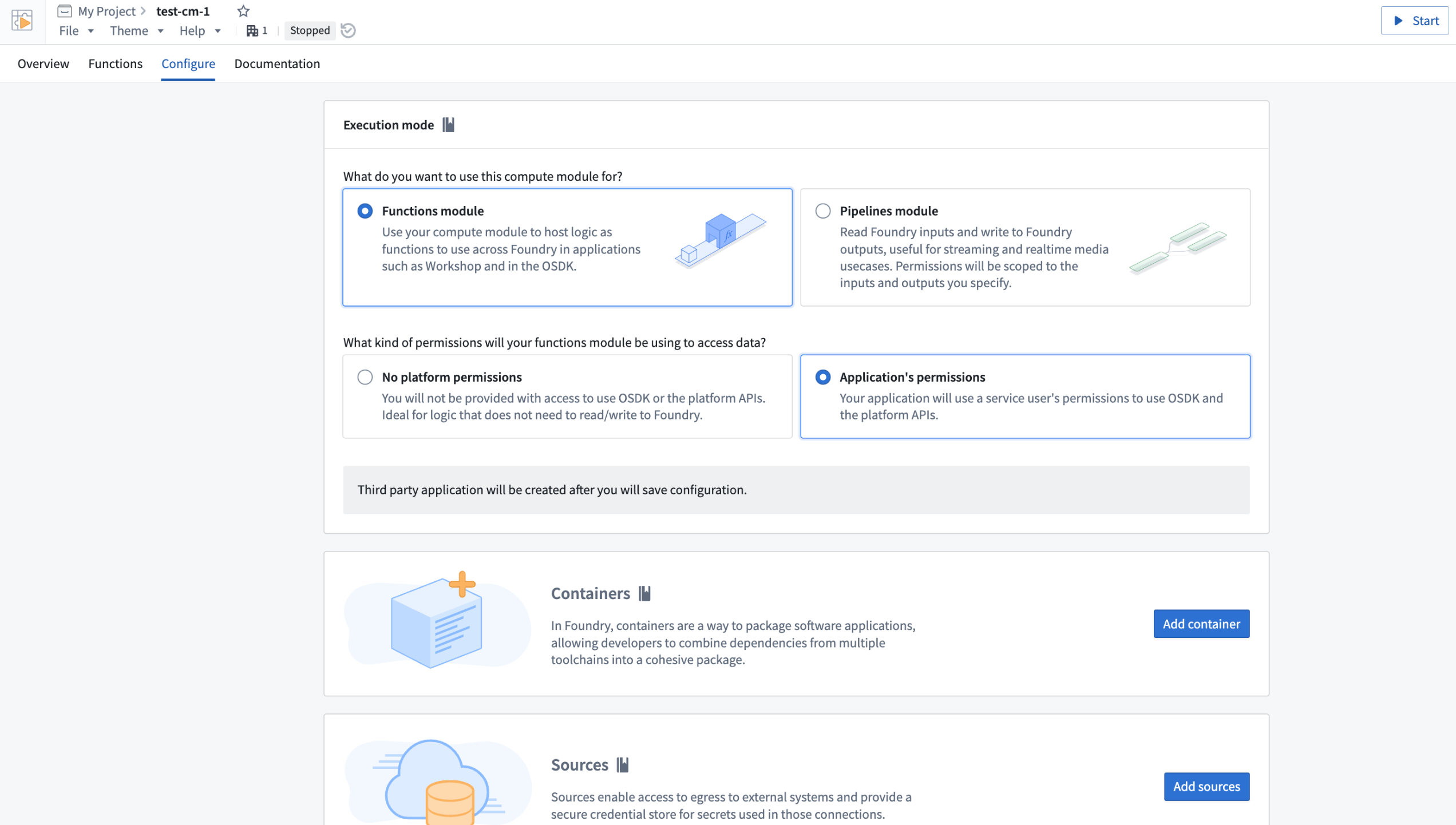
The Compute Modules application on the Configure page.
Key features
Compute modules are built to cater directly to developers, offering a variety of significant features to make the best use of Foundry capabilities while using your own logic and preferred language:
- Custom APIs and functions: Set up your own APIs and functions to be used seamlessly within Workshop, Slate, Ontology SDK applications, and other Foundry environments.
- Dynamic and predictive horizontal scaling: If you expect to serve a varying number of requests, compute modules can ensure higher availability by scaling the number of available replicas up or down based on current and historic load.
- Internal connections: Create complex Foundry orchestrations across products, including datasets, Ontology resources, schedules, and builds, using Foundry API endpoints.
- External connections: Write custom logic to create programmatic connections to external systems using whichever protocols those systems support, such as REST, WebSockets and SSE.
- Upgrade without downtime: Update a compute module without any downtime.
- Marketplace compatible: Compute modules can be published to Marketplace so others can leverage your work.
Practical applications
Once you get started with a compute module, use it to expand the potential of your critical workflows:
- Real-time data streaming: Connect to arbitrary data sources and ingest data into streams, datasets, or media sets in real time.
- Rapid code integration: Bring in business-critical code in any language with no translation needed. Use this code to back pipelines, Workshop modules, AIP Logic functions, or custom Ontology SDK applications.
- Model deployment: Host custom or open-source models from platforms like Hugging Face ↗; call them in a pipeline or as a function.
- Third-party integration: Pull in essential proprietary logic from other companies and offer them the opportunity to sell their products in Marketplace.
For more information on getting started with compute modules, review our public documentation, or navigate to the platform documentation in the Compute Modules application.
Introducing Workflow Lineage, an interactive workspace for understanding your workflows
Date published: 2024-11-09
Workflow Lineage is a new application designed to help with building, debugging and managing workflows. Available across all enrollments the week of November 11, you can add Ontology resources – objects, LLMs, models, actions, functions, applications – to the graph and expand to other resources with logical references.
Workflow Lineage graphs are autogenerated - simply use the keyboard shortcut CMD + i (macOS) or Ctrl + i (Windows) when viewing any Workshop application to get started immediately.
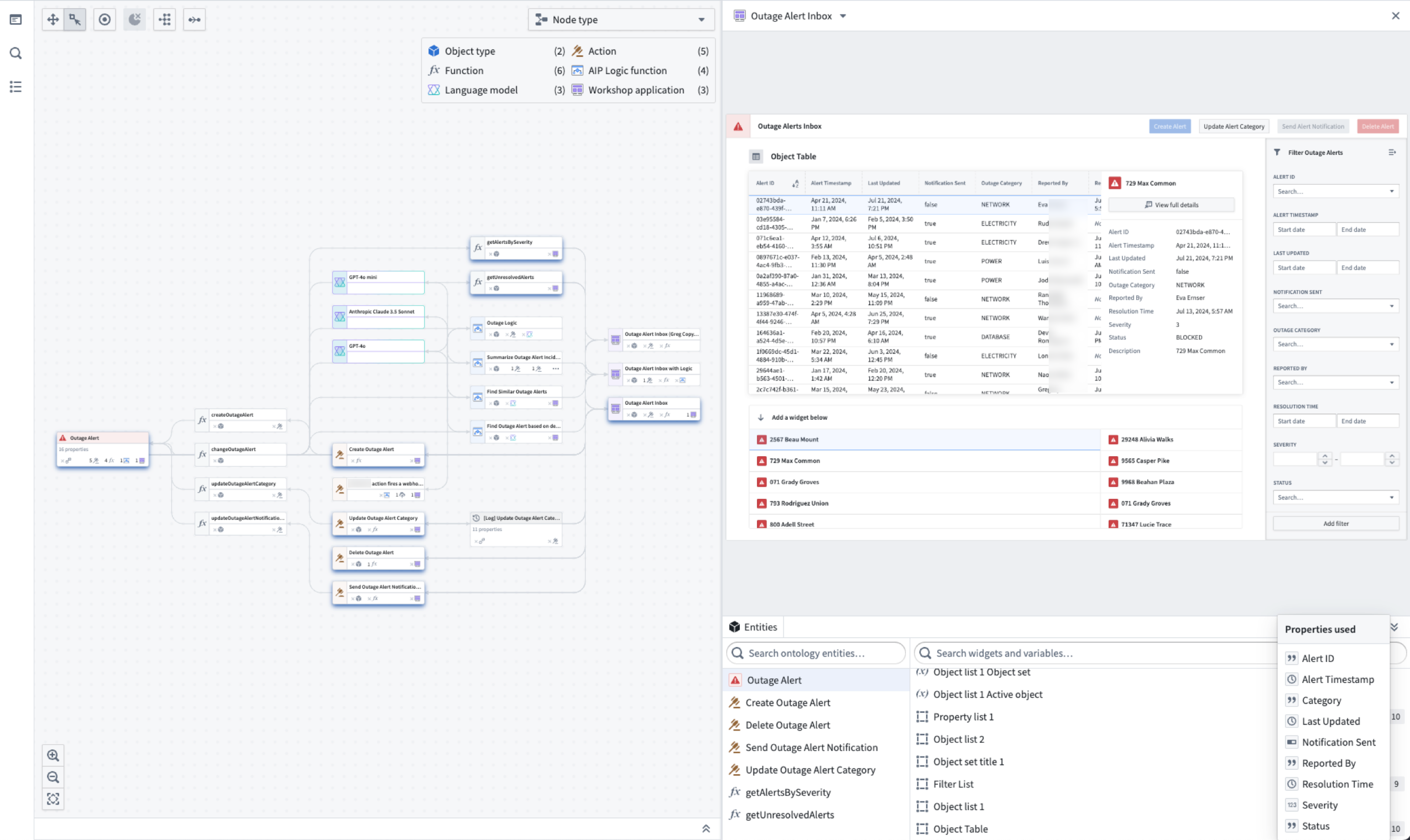
Workflow Lineage is an interactive workspace for understanding and managing applications.
Optimize your workflow management
See all usages downstream for a specific column in an object: Including dependent Actions, Functions, and Workshop applications.
- See all usages downstream for a specific column in an object: Including dependent Actions, Functions, and Workshop applications.
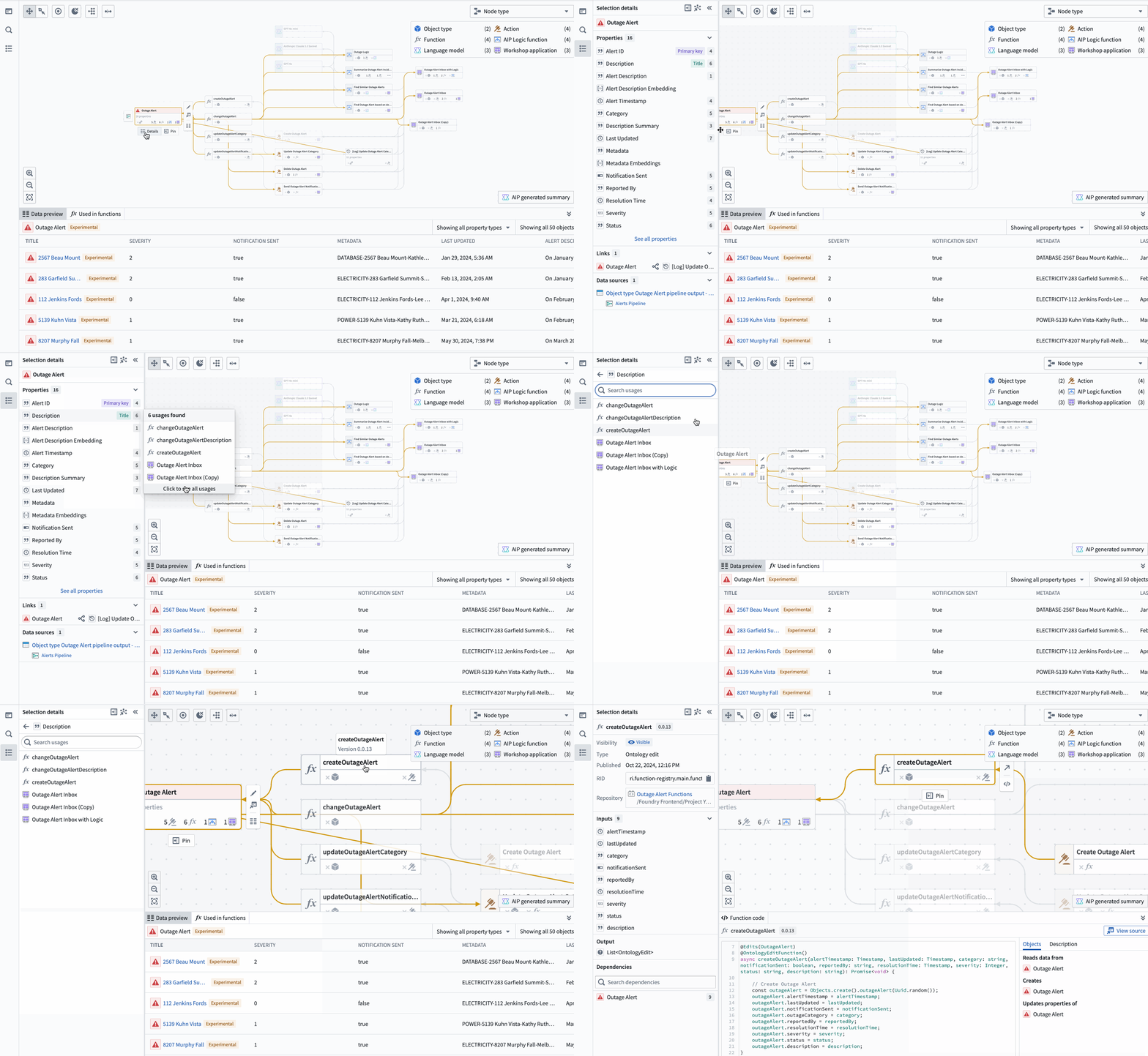 The property list of a selected object, complete with all the applications of a specific property, and a preview of the backing function.
 - Bulk update Actions: Easily select outdated Actions backed by Functions and update those Functions to a specific version all at once.
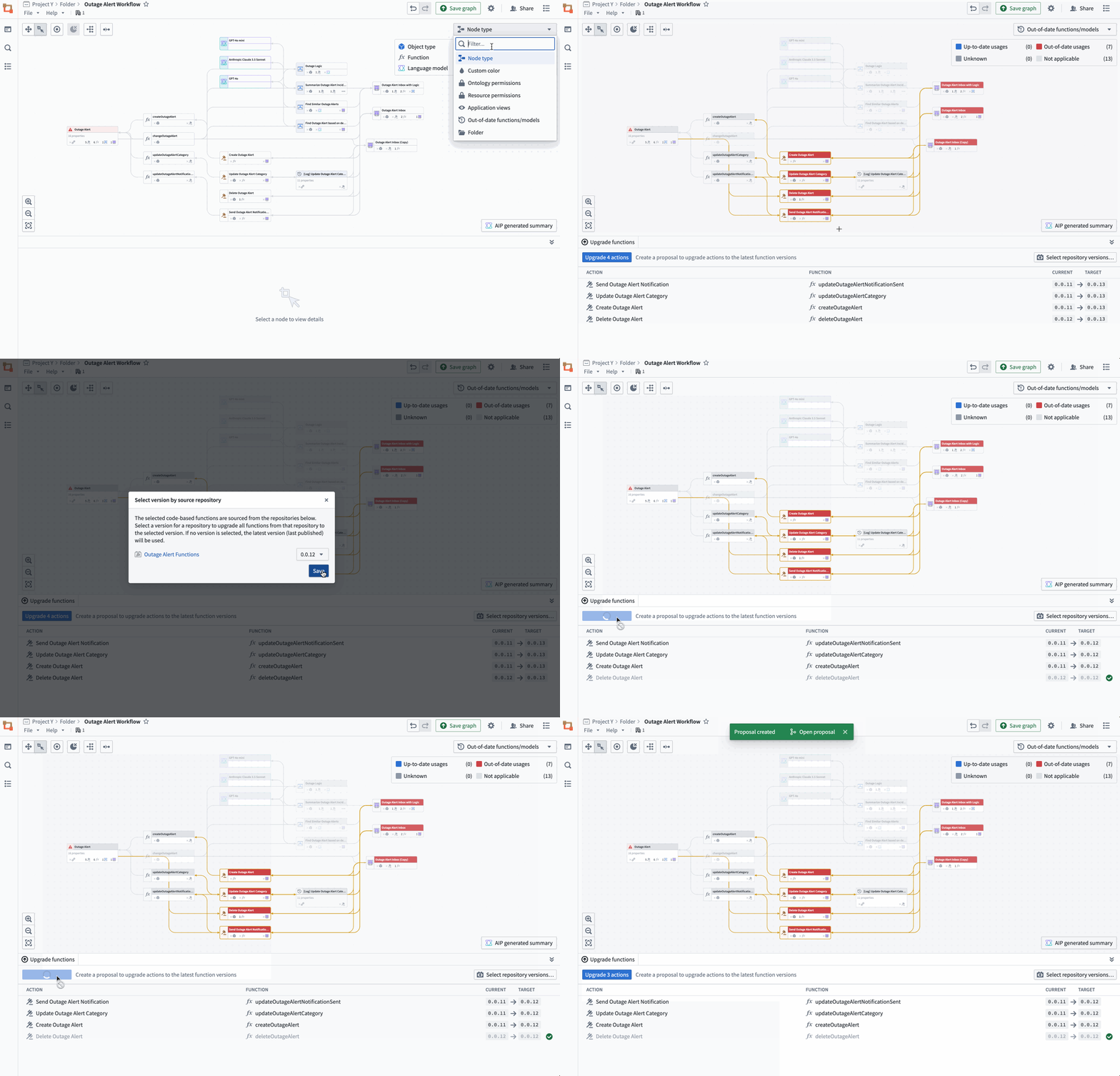 Bulk select outdated Actions backed by Functions to complete an update on the Functions.
 - Review Ontology security permissions with the new color legend: See Actions with matching submission criteria across all Actions, Workshop application views, and more.
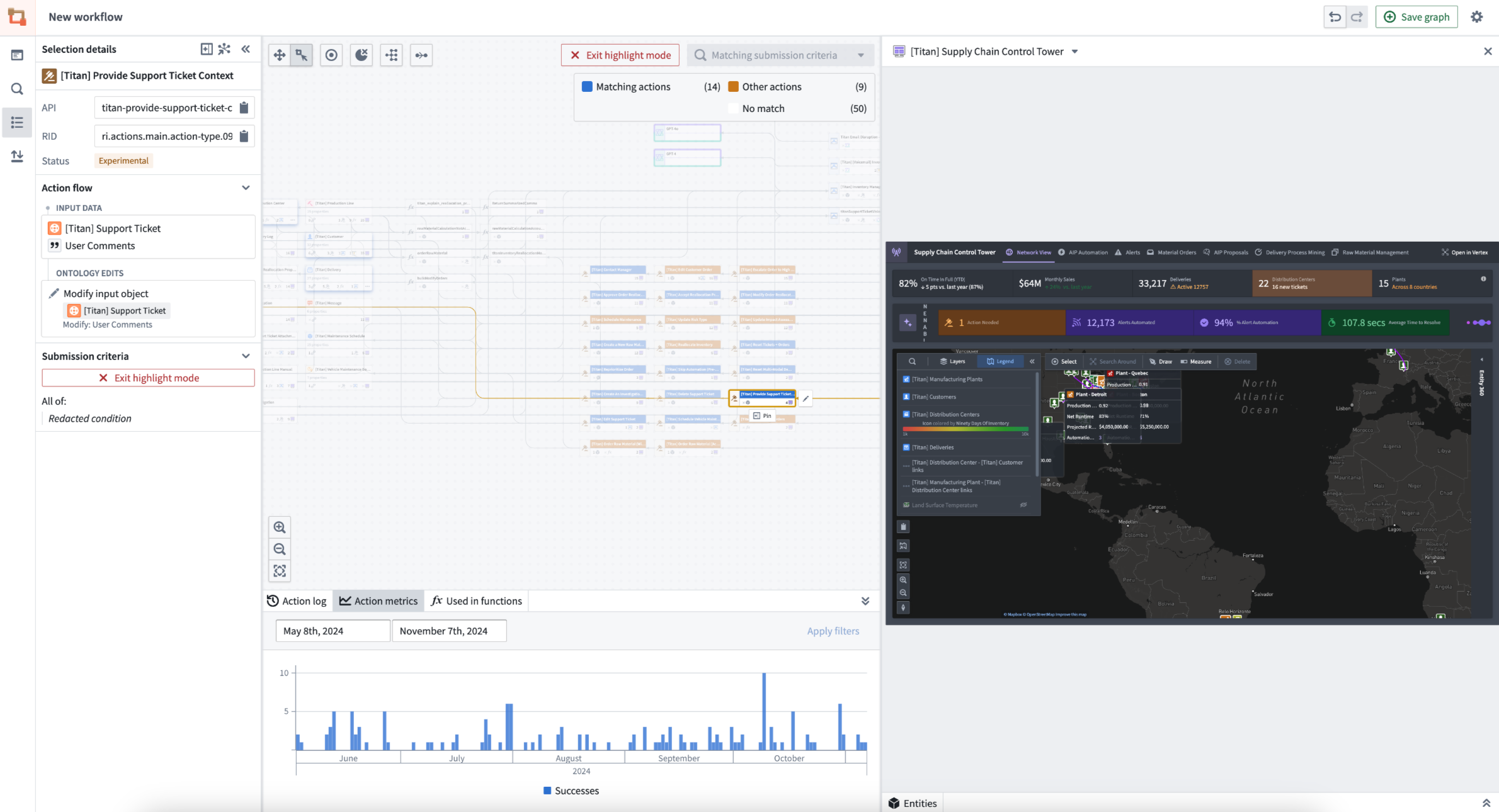 Actions that match the submission criteria rule are highlighted in one color, with a chart of Action metrics at the bottom.
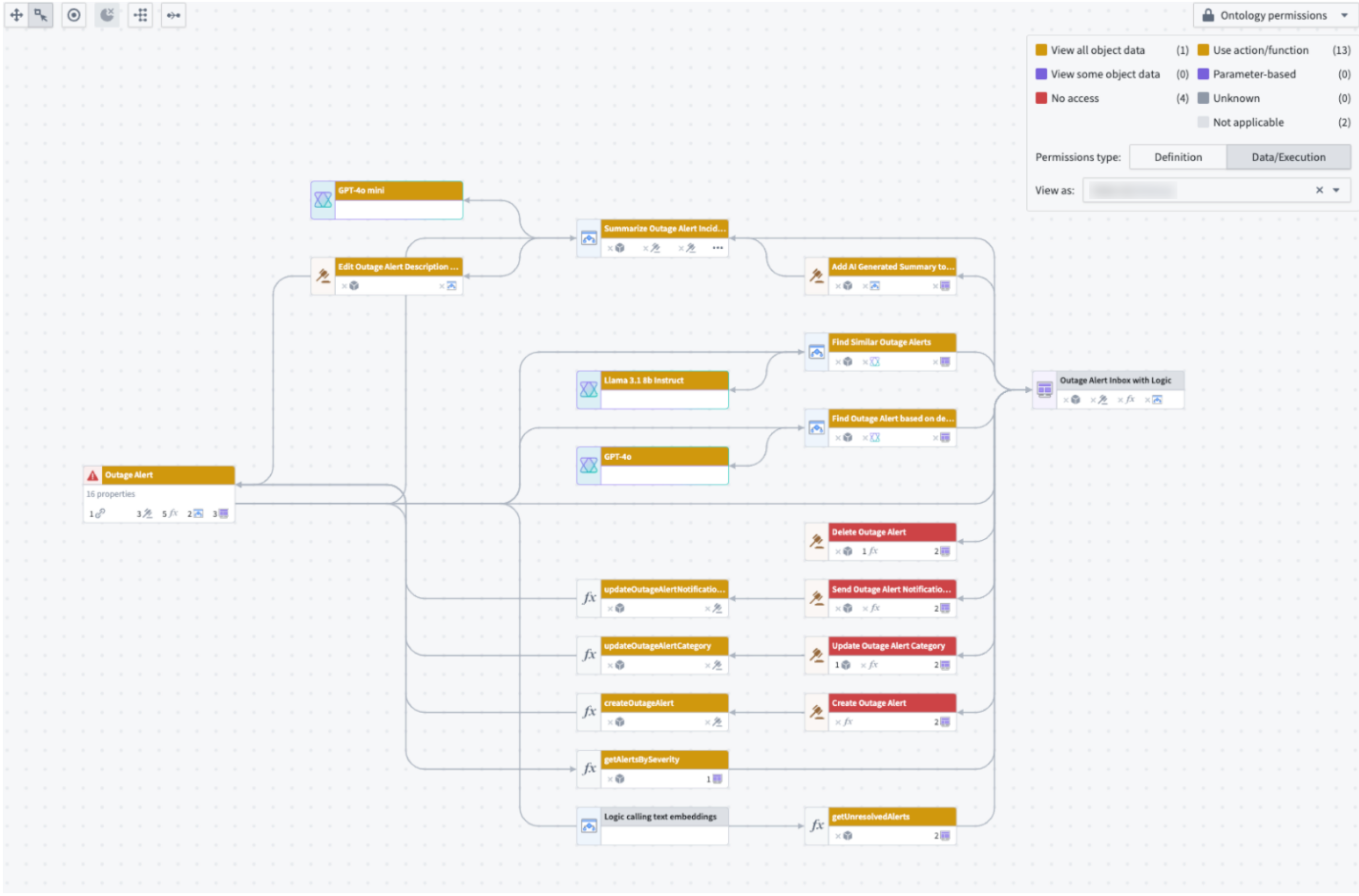 When a user is selected under "View as", the Ontology permissions color legend will show which Actions they have access to.
 - Explore the nuances in your workflows: See details on objects, Actions, functions, large language models, and applications. Details include API names, inputs, Ontology edits, submission criteria, and even code snippets.
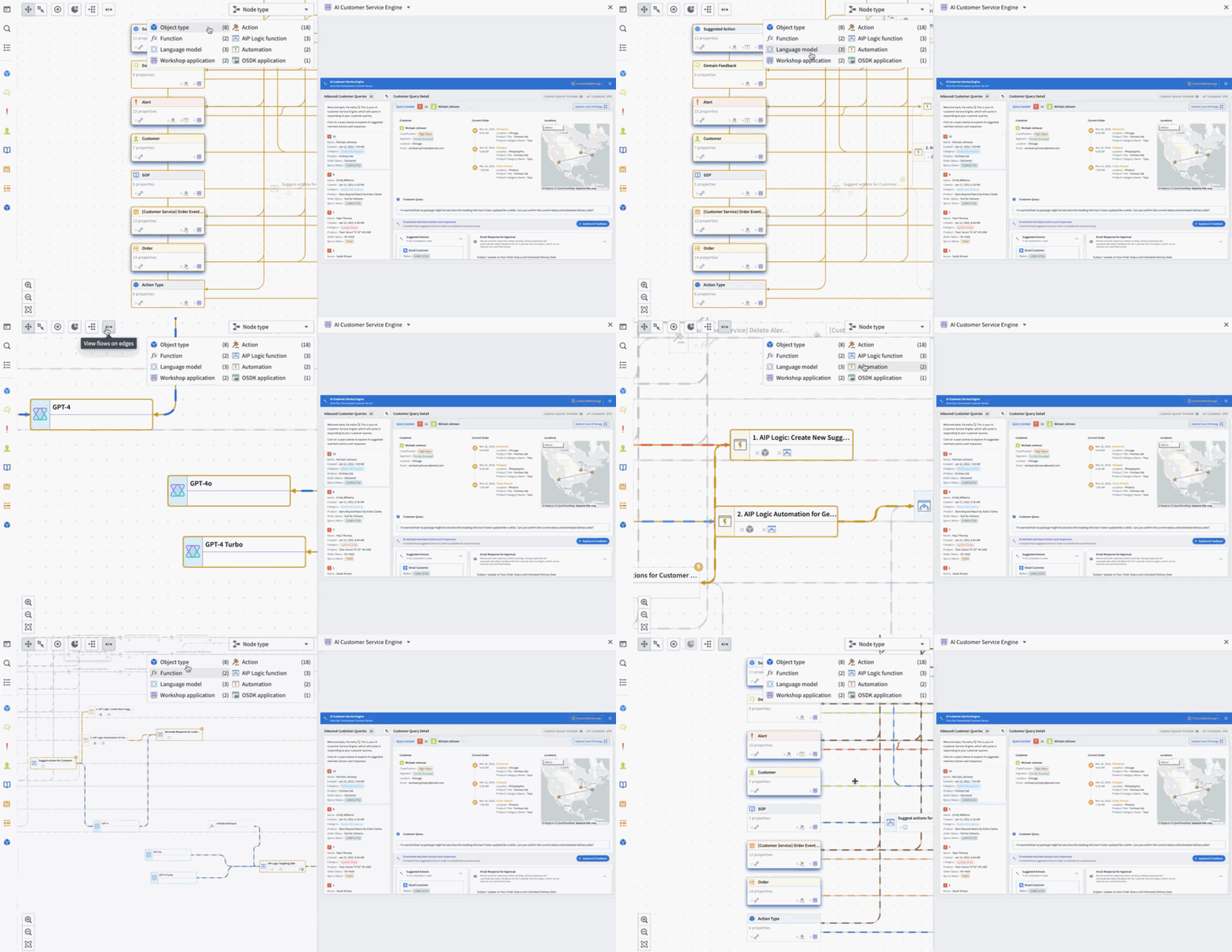
Use the legend to navigate Workflow Lineage with ease.
To immediately get started with Workflow Lineage, navigate to any Workshop application and use the keyboard shortcut CMD + i to open a Workflow Lineage graph with the specified Workshop application showing the relevant objects, actions, and Functions that back it.
Zoom around Workflow Lineage with keyboard shortcuts
- Open Workflow Lineage:
CMD + i(macOS) orCTRL + i(Windows) from within a Workshop application - Layout nodes in cluster by node type formation:
Option + L(macOS) orAlt + L(Windows).CMD + A(macOS) orCtrl + A(Windows) to select all. - Navigate by legend when selecting each of the legend types.
For more information on Workflow Lineage, review the public documentation.
Configure Code Repositories settings in Control Panel [GA]
Date published: 2024-11-07
You can now configure many Organization-wide Code Repositories settings within Control Panel. To modify these settings, you will need the User experience administrator role in your Organization, also configurable in Control Panel under Organization permissions.
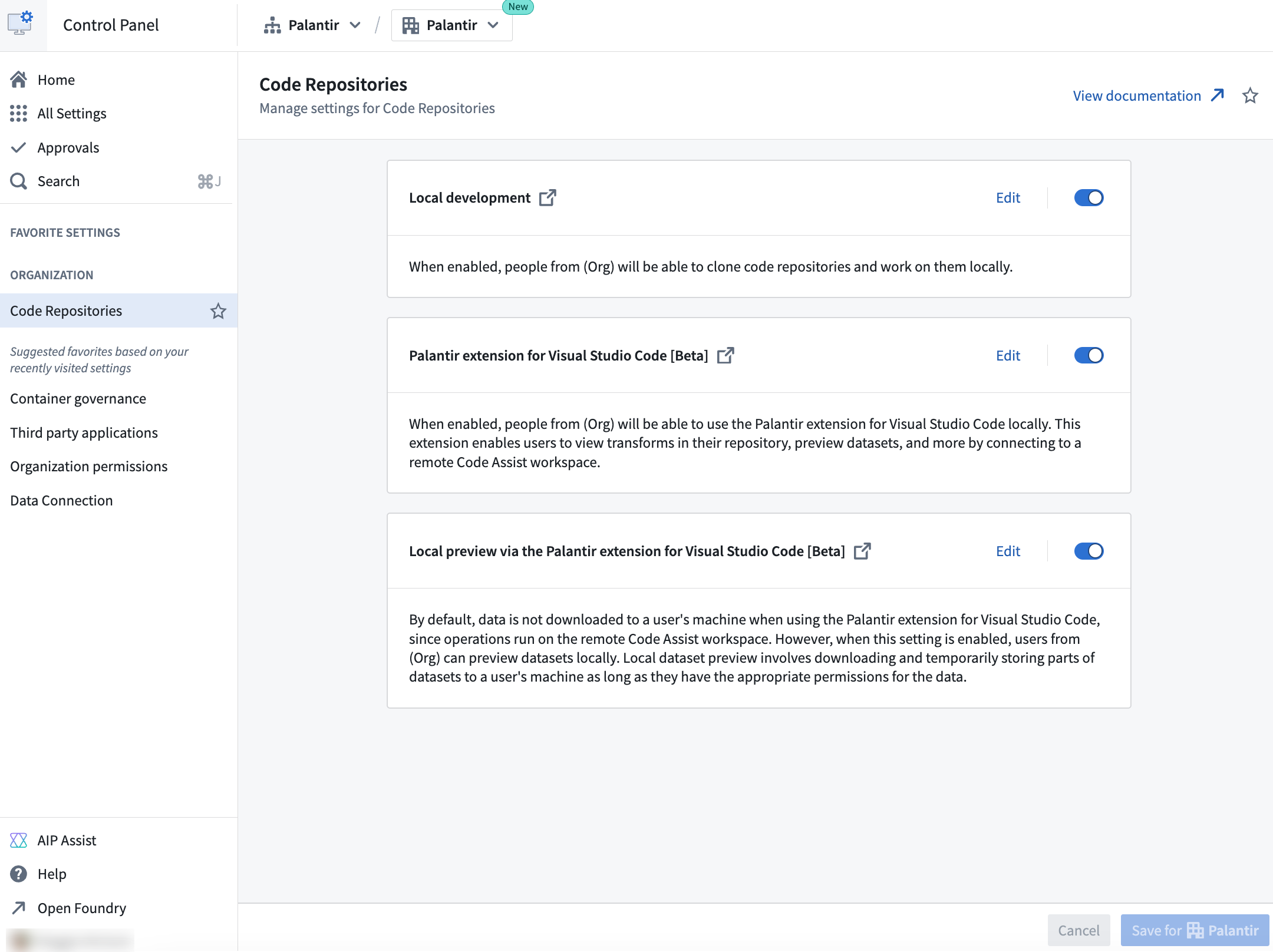
The Code Repositories settings available to configure in Control Panel.
With Code Repositories configurable in Control Panel, platform administrators can manage and track all users in an Organization who have access to local development, allowing for easier access customization and more usage transparency. Available configurations for Code Repositories in Control Panel include the following:
Local development: Enabled by default, you can allow users in your Organization to clone code repositories and work on them locally in their own code environments
Palantir extension for Visual Studio Code: Also enabled by default, you can allow users in your Organization to use the Palantir extension for Visual Studio Code in their local environment. This extension connects to a remote Code Assist workspace, letting users view transforms in their repository, preview datasets, and more.
Note that the Palantir extension for Visual Studio Code is in a beta state and only available to certain users for local development. The settings related to the extension will only apply to users who have access to the extension. For other users, these settings will have no effect. Contact Palantir Support to enable local development with the Palantir extensions for Visual Studio Code.
Local preview through the Palantir extension for Visual Studio Code: Allow users in your Organization to preview datasets locally. Local dataset preview involves downloading and temporarily storing parts of datasets to a local machine, provided users have appropriate permissions for the data. This setting is disabled by default.
For more information about Control Panel and its various configuration, review our documentation.
Introducing Python compute modules in VS Code workspaces [Beta]
Date published: 2024-11-07
We are excited to announce that you can now develop Python compute modules directly in VS Code workspaces, available by default in all Organizations where Code Workspaces is enabled.
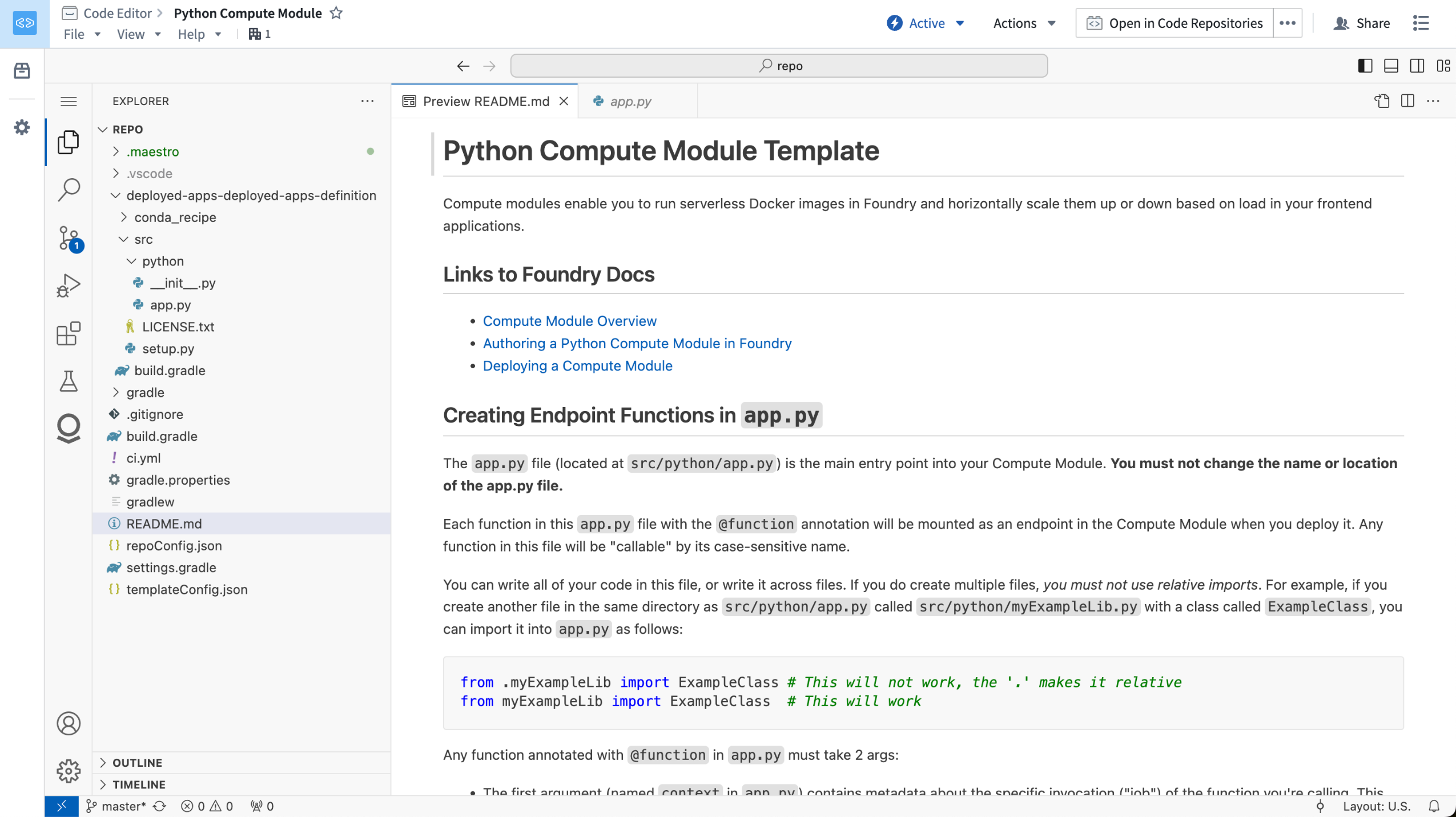
A Python compute module repository, opened in a VS Code workspace.
This feature allows you to use the powerful developer capabilities provided by VS Code to build your Python compute module. The Palantir extension for Visual Studio Code will automatically set up your Python development environment, allowing you to interactively run and debug your Python code.
To get started, first open your Python compute module in the Code Repositories application. From here, select Open in VS Code in the top right corner of the screen, which will take you to a VS Code workspace where you can start developing your compute module.
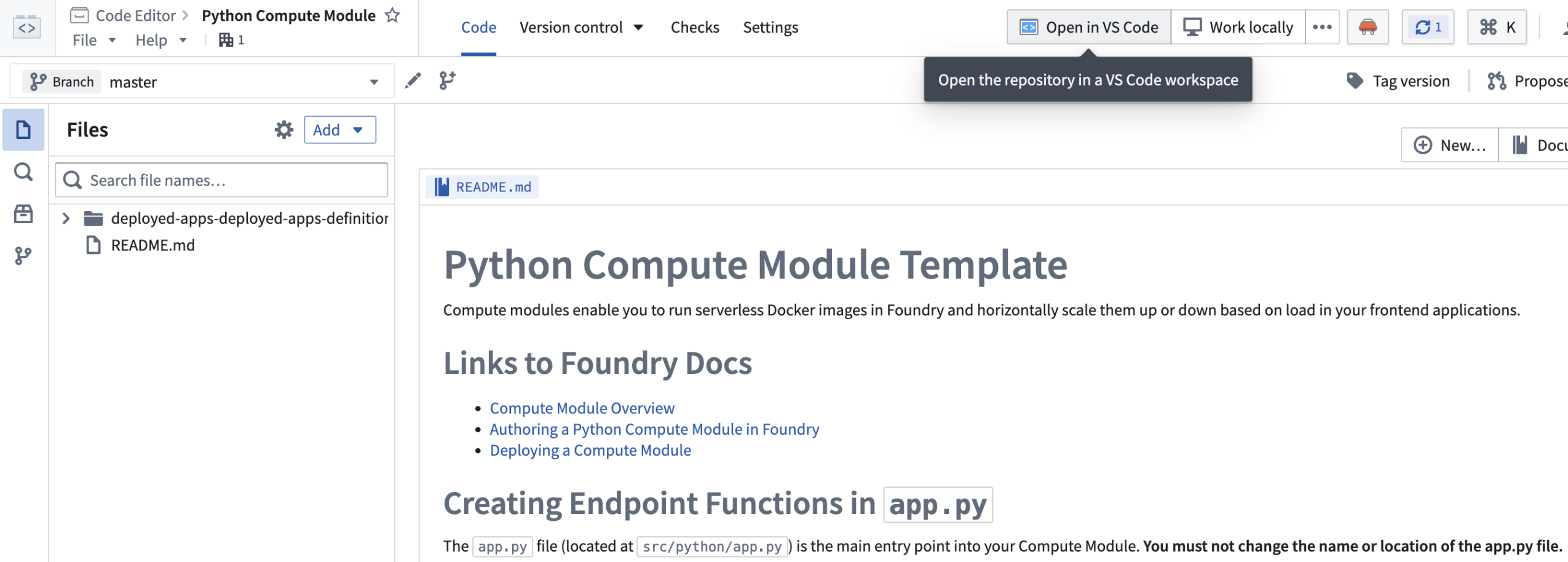
A Python compute module in the Code Repositories application, with the option to open in a VS Code workspace.
What's next in the development roadmap?
In the coming weeks, we plan to release VS Code workspaces for Python transforms, also available in a beta state.
Build OSDK React applications using VS Code workspaces [Beta]
Date published: 2024-11-07
VS Code workspaces now support OSDK React applications. With this new feature, you can now develop and deploy your OSDK React applications entirely within the Palantir platform using the familiar and powerful VS Code environment. This integration allows you to leverage the Ontology SDK to build sophisticated React applications, taking full advantage of Foundry’s robust capabilities for high-scale queries granular governance controls, and seamless data interactions.
To start building, navigate to Applications > Developer Console on your workspace navigation bar.
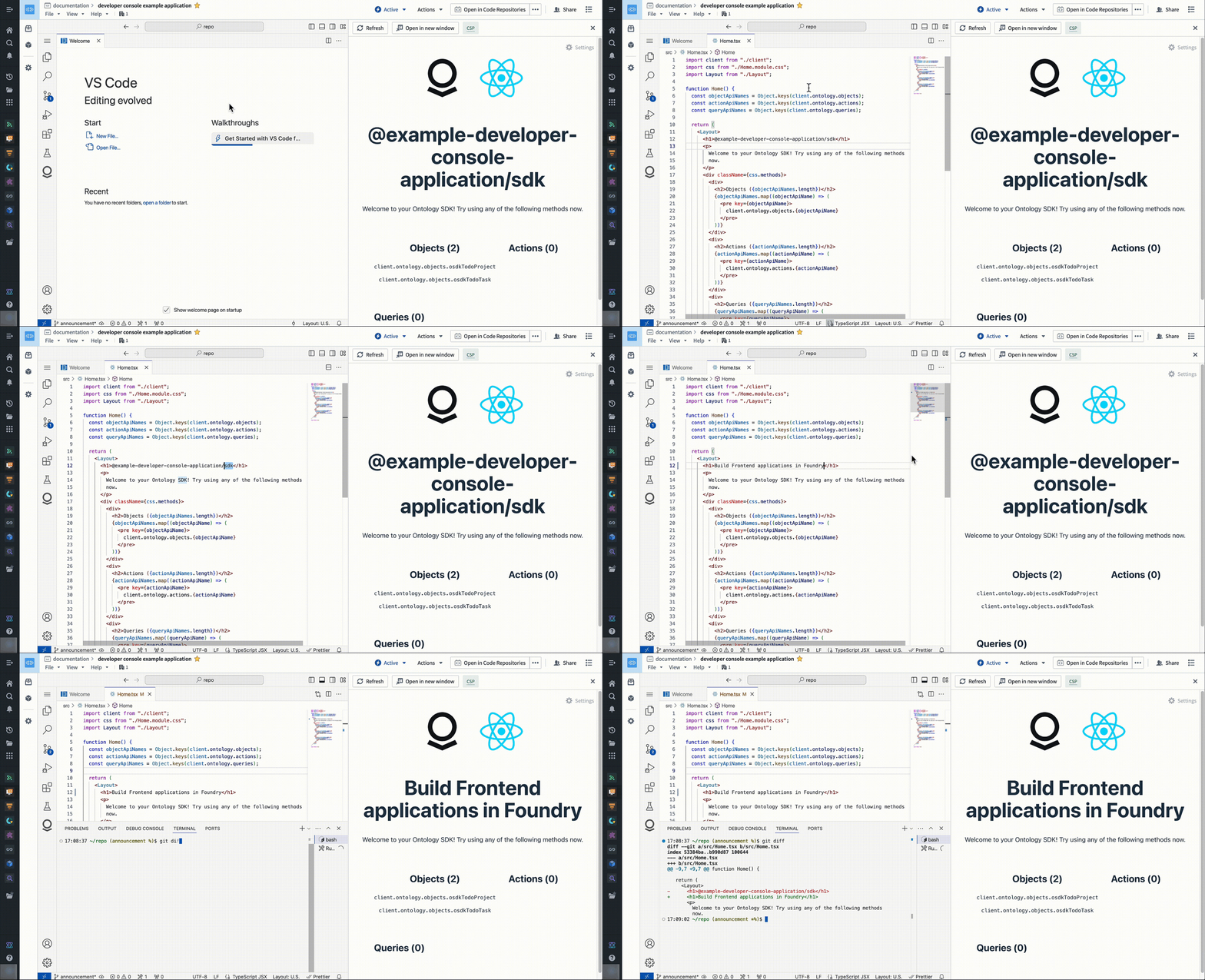
Access a familiar and powerful VS Code environment directly from within the Palantir platform.
Use the new file template configuration wizard in Code Repositories to create transforms with ease
Date published: 2024-11-07
Instead of modifying an example file when configuring new Python transforms in Code Repositories, you can now use our new file template configuration wizard for an immediate output that fits your needs. Use the configuration wizard by creating a new Python Transforms repository, or by selecting Add > New file from template using the Files side panel.
This new feature facilitates the personalization of the default file in new repositories by enabling you to choose the transformation type along with necessary inputs and outputs.

Starting configuration in the new file template wizard.
To start, select a transform type from the available options which matches your use-case. Next, provide values required by the selected transform type. Changing any of the values in the configurator will automatically update the code displayed in the preview section.

You can review the output transform code snippet immediately after supplying the file template wizard with inputs and outputs.
Once all values are valid for the selected transform type, select Generate file to create a new file with the code snippet displayed in the preview section. This will create a new file in your repository with the provided contents that can later be committed to save your changes.
Accelerate your newly-made repository to an active Python transform with our new file template wizard.
Explore new Agent details panel for configuration insight in AIP Agent Studio [Beta]
Date published: 2024-11-07
Note: As of the week of April 27, 2026, AIP Agent Studio was renamed AIP Chatbot Studio. All existing features and functionalities remain unchanged.
AIP Agent Studio now features an Agent details panel to the right of the conversation window which provides insight into the chosen model, prompting strategy, available resources, retrieval context, and reasoning methods of an agent deployed in AIP Threads or Workshop. The panel aims to provide additional transparency to help users obtain the clarity necessary to configure and best leverage their agent.

The Agent details right-hand panel provides extensive insight into the agent's configuration.
The Overview tab displays details like the agent's backing model and parameters it references for analytical context, such as a set of documents or a filtered object set. The Tools tab lists artifacts, such as Ontology types and actions, which the agent may also leverage as it responds to user prompts.

The Tools tab lists artifacts an agent may access to respond to user prompts.
Users can view the Reasoning tab through the right side panel or by selecting the light bulb icon in the top right corner of an agent's response. AIP Agent Studio automatically selects the latest response to view within the Reasoning panel.

The Reasoning tab outlines Agent logic and is accessible through the right side panel or the response's light bulb icon.
When in edit mode in AIP Agent Studio, users can view the Prompt used to inform the agent's query response logic to streamline troubleshooting or debugging efforts when investigating unexpected agent behavior.
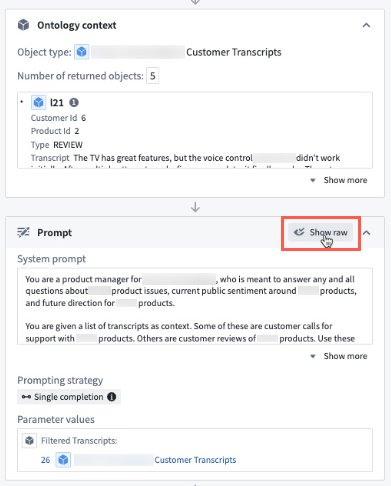
Users can view the prompt provided to the Agent when in edit mode in AIP Agent Studio.
Additionally, users can view the agent's chain-of-thought reasoning for each tool call in the Reasoning section to help understand why an agent may not respond as intended in the context of having a tool available.

The Reasoning tab's Object query section displays an agent's chain-of-thought reasoning.
Need support?
AIP Agent Studio's documentation contains additional detail regarding agent parameters, tools, and retrieval context. To obtain access to AIP Agent Studio on your enrollment, contact your Palantir representative for enablement.
Improved developer support with context-aware attachments in Code Repositories [Beta]
Date published: 2024-11-07
A new integration between Code Repositories and AIP Assist will be available in a beta state the week of November 11th. This integration introduces context-aware attachments for AIP Assist that allow users to attach existing code snippets, files, and even entire repositories to conversations. This provides context that enriches AIP Assist knowledge of user workflows, allowing Assist to respond to code-specific questions more accurately and with greater detail.
Start by attaching an entire repository, one or multiple files, or a highlighted snippet of code to have AIP Assist:
- Explain the relationship between different files.
- Optimize code snippets.
- Search for particular code across the repository.
- Summarize or explain snippets, files, or the entire repository.

Context-aware attachments in the AIP Assist sidebar in Code Repositories.
Once attached, AIP Assist will have access to the code and related metadata, allowing Assist to aid users with code related tasks.

An example of AIP Assist providing optimized code.
AIP Assist will also have access to the metadata of referenced datasets and objects in attachments, enabling users to ask specific questions about Ontology objects and input or output datasets.
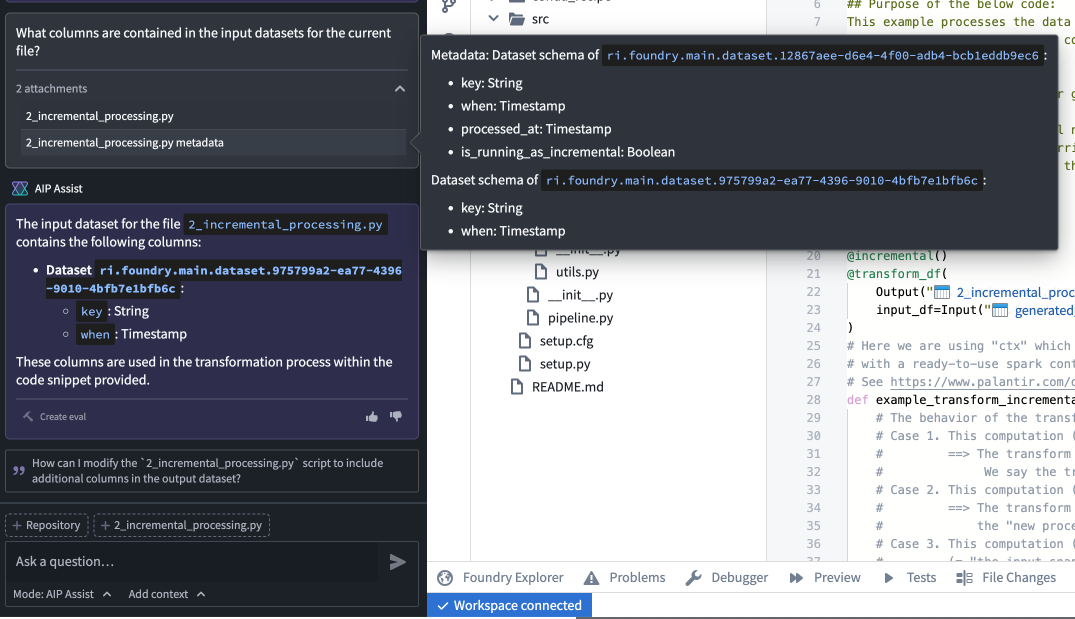
A sample question about input dataset metadata, and AIP Assist's response.
With context-aware attachments, developers will benefit from improved support that provides immediate, customized answers to their coding questions and aids the development process.
Learn more about context-aware attachments and other AIP Assist application integrations.
Note: AIP feature availability is subject to change and may differ between customers.
Performance and usability improvements in AIP Assist
Date published: 2024-11-07
An enhanced AIP Assist user experience will be generally available starting the week of November 11th. This update brings performance and usability upgrades designed to improve the overall AIP Assist experience. With this new release, you can look forward to improved product behaviors and new features, like the ability to extend the sidebar, improved keyboard navigation, and real-time synchronization across tabs.
Performance enhancements
- Improved loading behavior: Experience more controlled and predictable loading times for Agents, citations, and suggested actions. This means no more unexpected delays or rapid loads; just consistent performance.
- Cross-tab synchronization: AIP Assist now shares context across multiple tabs, updating in real-time to ensure you never lose sync. This feature enhances your ability to work seamlessly across different parts of the platform.
Usability upgrades
-
Updated mode and Agent selector: The mode and Agent selector has been relocated, and is now under the prompt text field. When selected, a pop-up window will allow users to switch between modes and Agents, and a message will be displayed in the chat after switching.

The updated mode and Agent selector under the prompt text field. -
Cycle through suggested questions: Suggested questions are now displayed in a smaller panel that allows users to cycle through available questions. Suggestions are automatically updated every 30 seconds, providing users with relevant questions as the conversation progresses.

The new suggestion questions interface, featuring arrows for cycling through questions. -
Auto-scroll with new messages: Stay focused on the latest information with automatic scrolling when new messages arrive.
-
Increased sidebar size: The AIP Assist sidebar can now extend wider, providing a better view of your input window and results. The input fields will automatically resize when you adjust the sidebar, ensuring optimal readability.
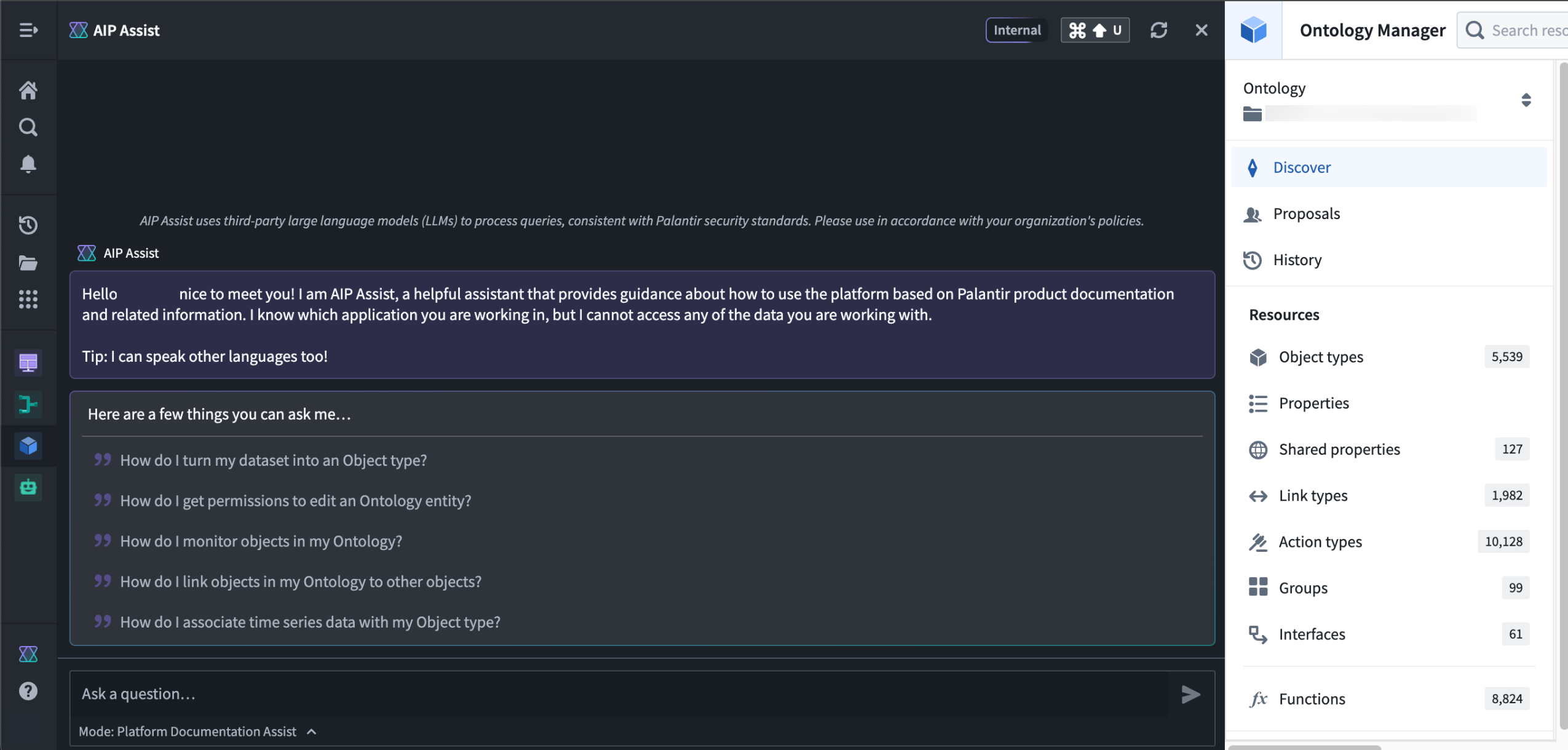
The updated AIP Assist sidebar that now extends wider. -
Keyboard navigation: Navigate your message history effortlessly with the up and down arrow keys, allowing for quick access to previous messages.
-
Improved copying: Copy messages smoothly without cursor jumps, making it easier to share information.
We invite you to explore these updates and experience the improvements firsthand. Learn more about how you can leverage AIP Assist to generate value from the Palantir platform.
Note: AIP feature availability is subject to change and may differ between customers.
The Palantir platform is now a fully fledged development ecosystem
Date published: 2024-11-04
The Palantir platform is the Ontology-powered operating system for the modern enterprise, and it now comes with powerful developer tools that allow users to interact with the platform programmatically. Along with existing generally available features, APIs, and SDKs, we have released new beta functionality and will continue to expand our suite of developer tools in the coming weeks and months as part of our commitment to a development ecosystem tailored to your business and operational needs.
Ontology APIs and SDKs
The Palantir platform's foundation as a development ecosystem is the Ontology. With the Ontology, you don’t need to maintain a mental model of tables or data sources; instead, you can think in terms of the real-world objects and concepts that are essential to your operations. This enables a development ecosystem where the objects and methods are your business’s operations, and you can read and write to the Ontology with minimal code.
To leverage the Ontology's robust ability to perform high-scale queries and granular governance controls, we offer Ontology APIs and SDKs that put your organization’s concepts front and center. If you need to manage landing slots at airports, for example, add an Airport object and a landingSlots link to your Ontology, and our SDKs will generate types and functions based on your specific Ontology that can be used in your applications across the platform.
New Palantir platform APIs and SDKs
We have heard substantial feedback from users whose work relies on the Palantir platform, and we are investing heavily in developer tooling to support these users and create new ways to build with the Palantir platform. To facilitate these user workflows, we now offer APIs that enable programmatic management of platform access and the data backing your Ontology, along with existing Ontology APIs.
These APIs include:
Beta platform SDKs are also available for Python ↗ and Typescript ↗. These are usable alongside Ontology SDKs with the same Palantir platform clients, but require a Developer Console application that is not bound to an Ontology. Documentation for these beta SDKs is forthcoming; for now, early adopters can use the READMEs in each repository to get started.
On-demand developer support from AIP Assist
AIP Assist is equipped with Developer Assist, a mode designed to provide immediate, tailored assistance to support development initiatives. Starting the week of November 11th, Developer Assist will provide in-depth explanations and examples directly from platform API reference documentation to help developers make the most of our features and APIs. Developer Assist includes AIP Assist's features for accelerating your workflow, including multi-language support, a user-friendly interface, and iterative improvements powered by user feedback.
Modular developer tools
In addition to APIs and SDKs, we offer modular developer tools that will provide you with everything you need to build powerful applications that leverage the Ontology and other Palantir platform features:
- Developer Console: helps users develop applications that leverage the Palantir platform using our SDKs and OAuth clients.
- Web hosting: Allows developers to host frontend-only applications built with our SDKs on the Palantir platform, removing the need for an additional hosting infrastructure.
- Application-specific documentation: Each Ontology SDK application comes with custom API documentation tailored to the SDK content.
- Hosted Git repositories: The Code Repositories application provides a web-based integrated development environment (IDE) for writing and collaborating on production-ready code with a user-friendly way to interact with the underlying Git repository.
- Hosted Visual Studio Code: VS Code Workspaces provides an IDE for writing and collaborating on production-ready code in the Palantir platform.
The modular nature of these developer tools allows users to use what they need and combine it with existing tools and workflows, providing flexibility and promoting seamless integration.
Development roadmap
In the coming months, we are committed to expanding these APIs and SDKs, as well as the tooling surrounding them. Some features coming up in our development roadmap include:
- Developer Console support for managing granular OAuth2 scopes for Platform APIs and Ontology resources.
- An AIP Agents API that will allow users to programmatically build and deploy interactive assistants.
- A Connectivity API to create connections to external systems and set up data imports and exports.
- A Streams API for low-latency use cases, to create streaming datasets and publish records to streams.
To get started with development on the Palantir platform, refer to the Ontology SDK and platform API reference documentation.
API and feature availability is subject to change and may differ between customers.
Introducing cover pages for discoverable sensitive projects [GA]
Date published: 2024-11-04
We are excited to announce the GA release of Project cover pages, available now on all enrollments. The Project Cover Page section offers a Markdown-based rich-text editor for writing comprehensive documentation about the Project.
Cover pages can be configured to be discoverable by all users in the Project's Organization, even in cases when a Project has markings applied to it. Users without access to the Project and its files can still discover and view its cover page. This can be useful for Projects containing sensitive data and applications that should still be discoverable so that relevant users can request access to them.
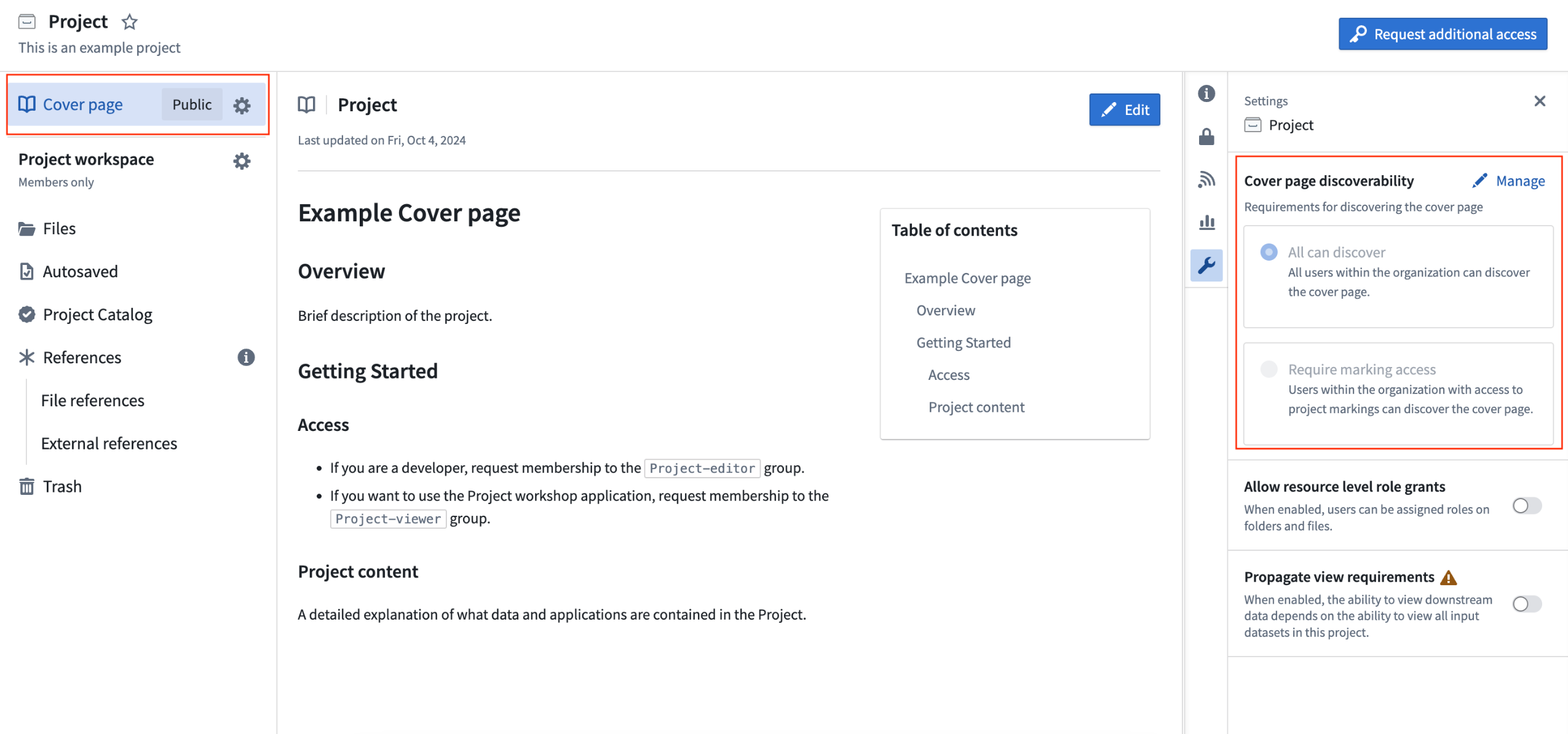
An example of a cover page for a Project.
中文翻译
公告
提醒: 请注册订阅 Foundry 新闻通讯(Newsletter),即可直接在收件箱中接收关于新功能、产品特性及平台改进的摘要信息。有关如何订阅的更多信息,请参阅 Foundry 新闻通讯与产品反馈渠道公告。
欢迎在我们的 开发者社区论坛 ↗ 分享您对这些公告的看法。
在 Pipeline Builder 中查看原始提示词(Prompts)与输出(Outputs)
发布日期:2024-11-26
我们很高兴地宣布,您现在可以在 Pipeline Builder 的 使用 LLM 节点(Use LLM node) 中查看原始提示词(Prompts)与输出(Outputs)。要使用此新功能,请导航至"使用 LLM 节点"中的试运行(Trial run)部分,并为您要分析的特定试运行选择 \</> 图标。
此项增强功能提高了发送至大语言模型(LLM)的数据的可见性,提升了透明度,并使调试 LLM 运行变得更加容易。
选择 \</> 图标以查看使用 LLM 节点中的原始提示词与输出。
使用 LLM 节点现在会显示:
- 初始提示词(Initial Prompt): 发送给模型的确切提示词,包括 Pipeline Builder 所做的任何修改或添加。
- 中间 LLM 输出(Intermediate LLM Outputs): LLM 的所有输出,包括任何失败的输出。
- 修正(Corrections): 针对任何失败所做的修正详情。
- 最终输出(Final Output): LLM 提供的最终结果。
使用 LLM 节点显示的示例原始提示词与输出。
使用 Walkthroughs 创建自定义平台内教程 [Beta]
发布日期:2024-11-26
此功能现已正式发布(GA);请阅读最新公告。
将任何外部 LLM 注册为专门的 TypeScript 函数并在 Logic 中使用 [GA]
发布日期:2024-11-21
现在,集成您自己的 LLM 并在 Palantir 平台中使用变得更加容易。您现在可以通过从实现了新的函数接口(Function Interface) 原语的专门 TypeScript 函数外部查询它们,从而在 AIP Logic 的 useLLM 面板中使用您的模型。
ChatCompletion 函数视图。
新模型的快速集成: 越来越多的模型被发布,它们针对特定工作流和用例更快、更便宜。尽管 Palantir 将继续为来自 OpenAI、Anthropic 和 Gemini 等提供商的一流模型提供快速支持,但我们希望您能够在任何新 LLM 发布后立即进行试验。借助此功能,您可以在不到 15 分钟内将新的 LLM 连接到 Palantir 平台。
跨 Palantir 平台的一流可访问性: 外部模型源不再局限于代码仓库(Code Repositories)。使用此功能注册的 LLM 可立即在 Logic 的 useLLM 中使用。此外,在 Builder 的 useLLM 面板和 AIP Agent Studio 中访问这些模型的支持目前处于测试阶段(Beta),将于明年初正式发布(GA)。如果您想在 Pipeline Builder 中试用此新功能,请联系您的 Palantir 代表。
改进的创作体验: TypeScript 代码创作环境简化了您在统一但可定制的 API 下注册外部 LLM 所需的工作。只需使用提供的类型实现函数接口,并调用您选择的外部源即可。
现在在 AIP Logic 中使用您的自定义模型更加容易。从下拉菜单中选择您的模型开始。
使用 Cipher 中的视觉混淆算法(Visual Obfuscation Algorithm)保护敏感图像数据 [GA]
发布日期:2024-11-21
当您创建 Cipher 通道(Channel) 以可逆地混淆图像部分时,视觉混淆(Visual Obfuscation) 算法现已正式发布(GA)。作为 Foundry 核心安全与治理服务,Cipher 使用户能够通过通道(Channels) 管理的加密操作来混淆数据,通道描述了加密框架的特定协议。与传统的图像编辑不同,视觉混淆算法是可交换的、可逆的,并通过打乱图像的 RGB 像素值来模糊图像的部分内容。用户可以使用适当的 Cipher 许可证(Licenses) 来加密和解密图像,这些许可证控制使用通道中定义的加密操作的权限。此外,您可以在 Python 转换(Python transforms) 中使用视觉混淆算法来编辑整个图像或包含敏感内容的部分。
创建新的 Cipher 通道时,视觉混淆算法现已正式发布(GA)。
媒体集(Media sets) 是驱动各种 Foundry 工作流的关键数据资产。媒体集中包含的图像,类似于基于表格的文本数据,通常需要通过细粒度的数据治理来严格保护其可能敏感的内容。视觉混淆的可逆性为图像的敏感内容提供了额外级别的数据最小化和权限管理,因为拥有通过 Cipher 解密许可证(Cipher decryption license) 授予的必要访问权限的用户可以恢复图像的混淆部分。用户可以将图像作为单一数据资产跨不同访问组共享以进行分析——一个组中的用户可能能够查看图像的原始内容,而另一个组中的用户默认只能查看敏感区域被混淆的图像。
应用视觉混淆以提升图像安全性与访问控制
管理员可以配置视觉混淆解密许可证,以对解密频率施加限制。管理员还可能要求用户提交检查点(Checkpoint) 作为查看敏感图像的理由,这会收集图像交互记录。
例如,一个接受过标记汽车损坏区域培训的用户,可以通过查看汽车图像(其敏感区域如车牌和显示内部的窗户已被混淆)来完成其工作流。另一个接受过提供客户支持培训的用户可以访问同一张图像并解密车牌区域,以确认该车辆属于特定客户。此外,管理员可以验证客户支持用户的交互是否符合解密许可证规定的数据治理策略。
用户可以应用视觉混淆算法来模糊图像中可能敏感的区域。图片来源:Car Parts and Car Damages ↗ 根据 CC0 许可证提供。
如何使用及何时使用视觉混淆
自测试版发布以来,Foundry 用户已将视觉混淆与目标检测模型结合使用,在人工访问之前识别和模糊图像中的个人身份属性,从而减少分析工作流中的偏见。您应该使用 PNG 文件,因为其他图像文件类型可能不支持加密和解密期间的像素打乱。
您可以使用视觉混淆来:
- 在将图像提供给 OCR(光学字符识别)或文本提取模型之前,编辑包含 PII(个人身份信息)或 PHI(受保护健康信息)的图像部分。
- 通过选择性地混淆某些部分来降低图像的敏感级别,以扩大用户访问权限以支持分析。
- 隐藏可能在工作流中引入偏见的部分图像,并要求提供理由才能显示混淆部分。
- 为可能的数据泄露或权限配置错误增加额外的保护层。
- [Beta] 使用 Workshop 中的图像显示小部件(Image Display widget) 与混淆图像进行交互,如下所示。
已视觉混淆的窗口区域被选中,并使用 Workshop 中的测试版图像显示小部件进行解密。
如果您的 Foundry 实例上当前未安装视觉混淆功能,请联系您的 Palantir 代表进行安装。
有关更多信息,请查看 Cipher 的视觉混淆文档。
引入 Portfolios,一种组织项目(Projects)的新方式 [GA]
发布日期:2024-11-21
我们很高兴地介绍 Portfolios,这是一种组织项目(Projects)的新方式。空间(Spaces)的编辑者可以将项目添加到 Portfolio 中,以创建数据集、应用程序和其他重要资源的一站式目录。这对于拥有许多项目的实例(Enrollments)尤其有用,因为管理员可以策划一些 Portfolio 供用户导航,而不是管理数百个项目。
Portfolios 可以通过多种方式对项目进行分组。管理员可以策划 Portfolios 来表示:
- 一个业务单元或部门。该团队监督下的所有资源都分组在一起,使用户易于导航和发现。
- 一个特定的产品或工作流。该产品或工作流的所有资源都被整合到一个单一视图中,同时尊重分别处理数据集成、分析和操作应用程序的项目的关注点分离。
不同用例的 Portfolios 示例。
每个 Portfolio 包含许多项目,但每个项目最多属于一个 Portfolio。任何有权访问空间的用户都可以查看其 Portfolios,但用户仍然需要单独的权限才能查看 Portfolio 内的项目。
包含四个项目的 Portfolio 示例。
已添加到项目目录或集合中的重要资源会出现在 Portfolio 目录中,以便于访问。
Portfolios 的主要特性
- 用户可以轻松发现并导航到其工作领域中的项目。
- 用户可以按 Portfolio 查看项目,不再需要一次浏览整个项目列表。
- Portfolios 为构成工作区的所有项目提供单一窗格视图。
有关更多信息,请参阅 Portfolios 文档。
通过接收表单(Intake Forms)进行身份验证和用户管理 [GA]
发布日期:2024-11-21
接收表单(Intake forms)于 2024 年 11 月 18 日当周正式发布(GA)。
平台管理员可以从 Foundry 的控制面板(Control Panel) 创建身份验证接收表单,以捕获、审查和补充其身份提供商集成未提供的用户信息。接收表单可用于收集和增强平台访问管理所需的用户数据,特别是在某些信息可能无法从身份提供商处获得的情况下。
通过接收表单捕获的用户属性需要经过审查和批准,然后才能分配给用户。此外,接收表单还可以在获得适当批准之前限制对平台的访问。
在控制面板中创建的用户接收表单补充了未从身份提供商继承的身份验证信息。
平台管理员发布接收表单后,用户将在首次登录时填写该表单,并在获得批准后获得平台访问权限。提交后,用户可以查看其接收表单的状态,并在必要时重新提交新表单。
用户可以查看其接收表单的审核状态或重新提交新表单以获得平台访问权限。
自推出以来,接收表单已与基于用户属性的自动组分配(Group Assignment) 结合使用,以简化有效的授权管理。
Palantir 的平台身份验证文档 提供了有关接收表单的更多详细信息。
在 Pipeline Builder 中创建、配置源(Source)和数据同步(Data Sync)
发布日期:2024-11-18
我们非常激动地宣布,您现在可以在所有实例(Enrollments)的 Pipeline Builder 用户界面中直接创建和配置源(Source)并同步数据集。
两种导入源的新方式
您现在可以轻松地将任何数据连接(Data Connection)源导入到您的 Pipeline Builder 管道中。有两种方法可以做到这一点:如果您的输入数据是从数据连接同步创建的,您可以通过选择输入数据节点并使用将源添加到图形(Add source to graph)选项,将源添加到 Pipeline Builder 图形中。
将源添加到图形(Add source to graph) 选项使导入任何数据连接源变得容易。
或者,您可以使用添加数据(Add data)工具栏按钮或将数据导入 Foundry(Import data to Foundry)操作来搜索、导入或创建源。选择将数据导入 Foundry,然后选择要创建的新源类型,或搜索要连接的现有源。
从一系列选项中选择,将您的数据导入 Foundry。
总的来说,这增强了集成各种数据源的便捷性。这确保您可以快速连接到您的数据并加以利用,无需冗长的配置过程,使您的数据操作更高效并减少设置时间。
直接输入源配置
导入源后,您可以直接在 Pipeline Builder 中对其进行配置。在配置源(Configure source)部分下,您可以指定所需的源特定配置。Pipeline Builder 支持 Foundry 支持的 JDBC 源,这些源仅需要必填字段。
使用“配置源”部分输入源特定配置。
这通过将所有必要的配置与数据管道逻辑集中在一起,简化了源创建,确保了最佳的数据流。
通过集成同步创建实现更高专注度
直接在 Pipeline Builder 中探索源并为批处理数据集创建同步的能力显著增强了您的数据管理能力。此功能允许您轻松识别和同步所需的数据,提高数据可访问性,并确保您的数据集保持最新。简化的同步过程意味着您可以专注于利用数据,而不是管理数据。
利用探索源(Explore source)视图来利用您的数据。
使用计算模块(Compute Modules)运行无服务器 Docker 镜像 [Beta]
发布日期:2024-11-11
我们很高兴推出计算模块(Compute Modules),这是一种以开发人员为中心的方式,用于在 Foundry 中运行无服务器 Docker 镜像。使用计算模块,您可以根据负载动态扩展 Docker 容器。此外,您可以引入自己的逻辑,而无需用 Foundry 支持的语言重写它,同时增强 Palantir 平台的能力。
计算模块(Compute Modules)应用程序现已处于测试版(Beta)状态。请联系 Palantir 支持以在您的实例中启用计算模块。
配置(Configure)页面上的计算模块应用程序。
主要特性
计算模块旨在直接满足开发人员的需求,提供多种重要功能,以便在使用您自己的逻辑和首选语言的同时,充分利用 Foundry 的功能:
- 自定义 API 和函数: 设置您自己的 API 和函数,以便在 Workshop、Slate、本体论 SDK(Ontology SDK) 应用程序以及其他 Foundry 环境中无缝使用。
- 动态和预测性水平扩展: 如果您预计要处理不同数量的请求,计算模块可以通过根据当前和历史负载上下调整可用副本数量来确保更高的可用性。
- 内部连接: 使用 Foundry API 端点,跨产品创建复杂的 Foundry 编排,包括数据集、本体论资源、调度和构建。
- 外部连接: 编写自定义逻辑,使用这些系统支持的任何协议(例如 REST、WebSockets 和 SSE)创建与外部系统的程序化连接。
- 无停机升级: 更新计算模块而无需任何停机时间。
- Marketplace 兼容: 计算模块可以发布到 Marketplace,以便其他人可以利用您的工作。
实际应用
一旦您开始使用计算模块,就可以用它来扩展您关键工作流的潜力:
- 实时数据流: 连接到任意数据源,并实时将数据摄取到流、数据集或媒体集中。
- 快速代码集成: 以任何语言引入关键业务代码,无需翻译。使用此代码支持管道、Workshop 模块、AIP Logic 函数或自定义本体论 SDK 应用程序。
- 模型部署: 托管来自 Hugging Face ↗ 等平台的自定义或开源模型;在管道中或作为函数调用它们。
- 第三方集成: 从其他公司引入必要的专有逻辑,并让他们有机会在 Marketplace 中销售其产品。
有关开始使用计算模块的更多信息,请查看我们的公共文档,或导航至计算模块应用程序中的平台文档。
引入工作流血缘(Workflow Lineage),一个用于理解您工作流的交互式工作区
发布日期:2024-11-09
工作流血缘(Workflow Lineage) 是一个新的应用程序,旨在帮助构建、调试和管理工作流。该功能于 11 月 11 日当周在所有实例中可用,您可以将本体论资源——对象、LLM、模型、操作、函数、应用程序——添加到图形中,并通过逻辑引用扩展到其他资源。
工作流血缘图是自动生成的——只需在查看任何 Workshop 应用程序时使用键盘快捷键 CMD + i(macOS)或 Ctrl + i(Windows)即可立即开始使用。
工作流血缘是一个用于理解和管理应用程序的交互式工作区。
优化您的工作流管理
查看对象中特定列的所有下游使用情况:包括依赖的操作、函数和 Workshop 应用程序。
- 查看对象中特定列的所有下游使用情况: 包括依赖的操作、函数和 Workshop 应用程序。
选定对象的属性列表,包含特定属性的所有应用程序以及支持函数的预览。
- 批量更新操作: 轻松选择由函数支持但已过时的操作,并一次性将这些函数更新到特定版本。
批量选择由函数支持的过时操作,以完成对函数的更新。
- 使用新的颜色图例审查本体论安全权限: 查看所有操作中具有匹配提交条件的操作、Workshop 应用程序视图等。
匹配提交条件规则的操作以某种颜色突出显示,底部显示操作指标图表。
当在“查看为”下选择用户时,本体论权限颜色图例将显示他们有权访问哪些操作。
- 探索工作流中的细微差别: 查看对象、操作、函数、大语言模型和应用程序的详细信息。详细信息包括 API 名称、输入、本体论编辑、提交条件,甚至代码片段。
使用图例轻松导航工作流血缘。
要立即开始使用工作流血缘,请导航至任何 Workshop 应用程序,并使用键盘快捷键 CMD + i 打开一个工作流血缘图,其中将显示指定的 Workshop 应用程序及其支持的相关对象、操作和函数。
使用键盘快捷键在工作流血缘中快速导航
- 打开工作流血缘:在 Workshop 应用程序内按
CMD + i(macOS)或CTRL + i(Windows) - 按节点类型聚类布局节点:
Option + L(macOS)或Alt + L(Windows)。按CMD + A(macOS)或Ctrl + A(Windows)全选。 - 在选择每种图例类型时,通过图例进行导航。
有关工作流血缘的更多信息,请查看公共文档。
在控制面板(Control Panel)中配置代码仓库(Code Repositories)设置 [GA]
发布日期:2024-11-07
您现在可以在控制面板(Control Panel) 中配置许多组织范围的代码仓库设置。要修改这些设置,您需要在您的组织中拥有用户体验管理员(User experience administrator)角色,该角色也可以在控制面板的组织权限(Organization permissions)下进行配置。
可在控制面板中配置的代码仓库设置。
通过可在控制面板中配置的代码仓库,平台管理员可以管理和跟踪组织中所有有权进行本地开发的用户,从而实现更轻松的访问定制和更高的使用透明度。控制面板中代码仓库的可用配置包括以下内容:
本地开发(Local development): 默认启用,您可以允许组织中的用户克隆代码仓库并在他们自己的代码环境中进行本地开发。
适用于 Visual Studio Code 的 Palantir 扩展(Palantir extension for Visual Studio Code): 也默认启用,您可以允许组织中的用户在其本地环境中使用适用于 Visual Studio Code 的 Palantir 扩展。此扩展连接到远程 Code Assist 工作区,允许用户查看其仓库中的转换、预览数据集等。
请注意,适用于 Visual Studio Code 的 Palantir 扩展处于测试版状态,仅对特定用户可用于本地开发。与该扩展相关的设置仅适用于有权访问该扩展的用户。对于其他用户,这些设置将不起作用。请联系 Palantir 支持以启用使用适用于 Visual Studio Code 的 Palantir 扩展进行本地开发。
通过适用于 Visual Studio Code 的 Palantir 扩展进行本地预览(Local preview through the Palantir extension for Visual Studio Code): 允许组织中的用户在本地预览数据集。本地数据集预览涉及将部分数据集下载并临时存储到本地计算机,前提是用户拥有适当的数据权限。此设置默认禁用。
有关控制面板及其各种配置的更多信息,请查看我们的文档。
在 VS Code 工作区中引入 Python 计算模块 [Beta]
发布日期:2024-11-07
我们很高兴地宣布,您现在可以直接在 VS Code 工作区 中开发 Python 计算模块,该功能在启用了代码工作区(Code Workspaces) 的所有组织中默认可用。
在 VS Code 工作区中打开的 Python 计算模块仓库。
此功能允许您利用 VS Code 提供的强大开发人员能力来构建您的 Python 计算模块。适用于 Visual Studio Code 的 Palantir 扩展 将自动设置您的 Python 开发环境,允许您交互式地运行和调试您的 Python 代码。
要开始使用,首先在代码仓库(Code Repositories)应用程序中打开您的 Python 计算模块。然后,点击屏幕右上角的在 VS Code 中打开(Open in VS Code)选项,这将带您进入一个 VS Code 工作区,您可以在其中开始开发您的计算模块。
代码仓库应用程序中的 Python 计算模块,带有在 VS Code 工作区中打开的选项。
开发路线图的下一步是什么?
在未来几周内,我们计划发布用于 Python 转换的 VS Code 工作区,该功能也将以测试版状态提供。
使用 VS Code 工作区构建 OSDK React 应用程序 [Beta]
发布日期:2024-11-07
VS Code 工作区现在支持 OSDK React 应用程序。 借助这一新功能,您现在可以在 Palantir 平台内,使用熟悉且强大的 VS Code 环境,完全开发和部署您的 OSDK React 应用程序。此集成允许您利用本体论 SDK(Ontology SDK) 构建复杂的 React 应用程序,充分利用 Foundry 强大的大规模查询、细粒度治理控制和无缝数据交互能力。
要开始构建,请导航至工作区导航栏上的应用程序(Applications) > 开发者控制台(Developer Console)。
直接从 Palantir 平台内部访问熟悉且强大的 VS Code 环境。
在代码仓库中使用新的文件模板配置向导轻松创建转换
发布日期:2024-11-07
现在,您无需在代码仓库中配置新的 Python 转换时修改示例文件,而是可以使用我们新的文件模板配置向导,立即获得满足您需求的输出。通过创建新的 Python 转换仓库,或使用文件侧面板选择添加(Add) > 从模板新建文件(New file from template),即可使用配置向导。
此新功能通过允许您选择转换类型以及必要的输入和输出,简化了新仓库中默认文件的个性化设置。
新文件模板向导中的起始配置。
首先,从可用选项中选择一个符合您用例的转换类型。接下来,提供所选转换类型所需的值。更改配置器中的任何值都会自动更新预览部分中显示的代码。
向文件模板向导提供输入和输出后,您可以立即查看输出的转换代码片段。
一旦所选转换类型的所有值都有效,选择生成文件(Generate file)以创建一个包含预览部分中显示的代码片段的新文件。这将在您的仓库中创建一个包含所提供内容的新文件,稍后可以提交以保存您的更改。
使用我们新的文件模板向导,将您新创建的仓库加速转变为活跃的 Python 转换。
在 AIP Agent Studio 中探索新的代理详情面板以获取配置洞察 [Beta]
发布日期:2024-11-07
注意: 自 2026 年 4 月 27 日当周起,AIP Agent Studio 已更名为 AIP Chatbot Studio。所有现有特性和功能保持不变。
AIP Agent Studio 现在在对话窗口右侧新增了一个代理详情(Agent details)面板,该面板提供了关于部署在 AIP Threads 或 Workshop 中的代理所选用模型、提示策略、可用资源、检索上下文和推理方法的洞察。该面板旨在提供额外的透明度,帮助用户获得必要的清晰度,以配置并最佳地利用其代理。
代理详情(Agent details)右侧面板提供了对代理配置的广泛洞察。
概述(Overview)选项卡显示代理的后台模型及其为分析上下文引用的参数(例如一组文档或一个过滤后的对象集)等详细信息。工具(Tools)选项卡列出了代理在响应用户提示时可能利用的工件,例如本体论类型和操作(Ontology types and actions)。
工具(Tools)选项卡列出了代理可能访问以响应用户提示的工件。
用户可以通过右侧面板或点击代理响应右上角的灯泡图标来查看推理(Reasoning)选项卡。AIP Agent Studio 会自动选择最新的响应在推理面板中查看。
推理(Reasoning)选项卡概述了代理逻辑,可通过右侧面板或响应的灯泡图标访问。
在 AIP Agent Studio 的编辑模式下,用户可以查看用于告知代理查询响应逻辑的提示(Prompt),以便在调查意外代理行为时简化故障排除或调试工作。
在 AIP Agent Studio 的编辑模式下,用户可以查看提供给代理的提示。
此外,用户可以在推理部分查看代理每次工具调用的思维链推理,以帮助理解为什么代理在拥有可用工具的上下文中可能无法按预期响应。
推理(Reasoning)*选项卡的对象查询(Object query)*部分显示了代理的思维链推理。
需要支持?
AIP Agent Studio 的文档 包含有关代理参数、工具和检索上下文的更多详细信息。要在您的实例上获得 AIP Agent Studio 的访问权限,请联系您的 Palantir 代表进行启用。
通过代码仓库中的上下文感知附件(Context-Aware Attachments)改进开发者支持 [Beta]
发布日期:2024-11-07
代码仓库(Code Repositories)与 AIP Assist 之间的新集成将于 11 月 11 日当周以测试版状态提供。此集成为 AIP Assist 引入了上下文感知附件,允许用户将现有的代码片段、文件甚至整个仓库附加到对话中。这提供了丰富的上下文,增强了 AIP Assist 对用户工作流的了解,使 Assist 能够更准确、更详细地回答与代码相关的问题。
首先,附加整个仓库、一个或多个文件,或高亮显示的代码片段,让 AIP Assist 能够:
- 解释不同文件之间的关系。
- 优化代码片段。
- 在仓库中搜索特定代码。
- 总结或解释代码片段、文件或整个仓库。
代码仓库中 AIP Assist 侧边栏中的上下文感知附件。
一旦附加,AIP Assist 将能够访问代码和相关元数据,从而帮助用户完成与代码相关的任务。
AIP Assist 提供优化代码的示例。
AIP Assist 还将能够访问附件中引用的数据集和对象的元数据,使用户能够就本体论对象以及输入或输出数据集提出具体问题。
关于输入数据集元数据的示例问题,以及 AIP Assist 的响应。
借助上下文感知附件,开发者将受益于改进的支持,这些支持为其编码问题提供即时、定制的答案,并辅助开发过程。
了解有关上下文感知附件和其他 AIP Assist 应用程序集成的更多信息。
注意:AIP 功能的可用性可能会发生变化,并且可能因客户而异。
AIP Assist 的性能和可用性改进
发布日期:2024-11-07
增强的 AIP Assist 用户体验将于 11 月 11 日当周正式发布(GA)。此更新带来了旨在改善整体 AIP Assist 体验的性能和可用性升级。通过此新版本,您可以期待改进的产品行为和新功能,例如扩展侧边栏的能力、改进的键盘导航以及跨标签页的实时同步。
性能增强
- 改进的加载行为: 体验更可控、更可预测的代理、