Announcements(公告)
REMINDER: Sign up for the Foundry Newsletter to receive a summary of new products, features, and improvements across the platform directly to your inbox. For more information on how to subscribe, see the Foundry Newsletter and Product Feedback channels announcement.
Share your thoughts about these announcements in our Developer Community Forum ↗.
Find and replace is now available in Pipeline Builder
Date published: 2025-03-27
Pipeline Builder's new find and replace feature allows users to search over a pipeline graph to identify nodes and quickly replace columns. Users can search by name, description, column, parameter referenced, and more. With the Replace columns option, users can replace a group, a single instance, or all instances of a column name.
Get started
Access the Find feature by using the magnifying glass icon to search your pipelines by various parameters, such as node names and column references. You can customize search by selecting or unselecting specific criteria.

The Find option, accessible using the magnifying glass icon on the left toolbar.
Save time on column name updates by replacing all instances of a column name simultaneously. The Replace columns option can be accessed from the dropdown next to the search input, where you can enter a replacement term and preview changes before applying. Here, you can customize your replacement strategy and replace column names individually or all at once.

The replace columns interface, displaying search results and the option to Replace and Replace all.
These enhancements improve pipeline management efficiency by enabling bulk updates to expedite tasks and minimize manual errors. For more details, visit the documentation.
Your feedback matters
We want to hear about your experiences with Pipeline Builder and welcome your feedback. Share your thoughts with Palantir Support channels or on our Developer Community ↗ using the pipeline-builder tag ↗.
Enhancements to model experiments
Date published: 2025-03-27
We are excited to announce three new enhancements to experiments in the Palantir platform: MLflow ↗ integration, image logging, and a parallel coordinate chart view.
Beginning the week of March 24, we are introducing a new MLflow ↗ integration allow users to use MLflow in the Palantir platform for model training metrics tracking, image logging in experiments to better support computer vision workflows and custom charts, and a parallel coordinate chart view to get a better understanding of how different parameters impact the performance of a model.
MLflow integration
The experiments framework in palantir_models now includes a first class integration with MLflow ↗. You can use MLFlow ↗ in the Palantir platform for model training metrics tracking. MLflow provides:
- Out-of-the-box integrations with numerous open source machine learning frameworks.
- Auto-logging functionality.
- Callbacks that can be added when training more complex models in libraries, such as PyTorch or TensorFlow.
To get started, install MLflow, create an experiment, and register it as the current in progress MLflow run:
import mlflow

experiment = model_output.create_experiment("my-experiment")

with experiment.as_mlflow_run():
    # This example model is a keras model
    model.fit(
        x_train,
        y_train,
        batch_size=32,
        epochs=5,
        validation_split=0.1,
        callbacks=[mlflow.keras.MlflowCallback()],
    )
Any logs written to MLflow in the as_mlflow_run block will be routed to the corresponding experiment, and can be published alongside the model version at the end of the training job.
Image logging
When developing a computer vision model, it can be useful to test the model against a fixed set of validation images during the training job. The experiments framework now allows users to log images at runtime. This allows you to visualize how well a computer vision model is converging over time.
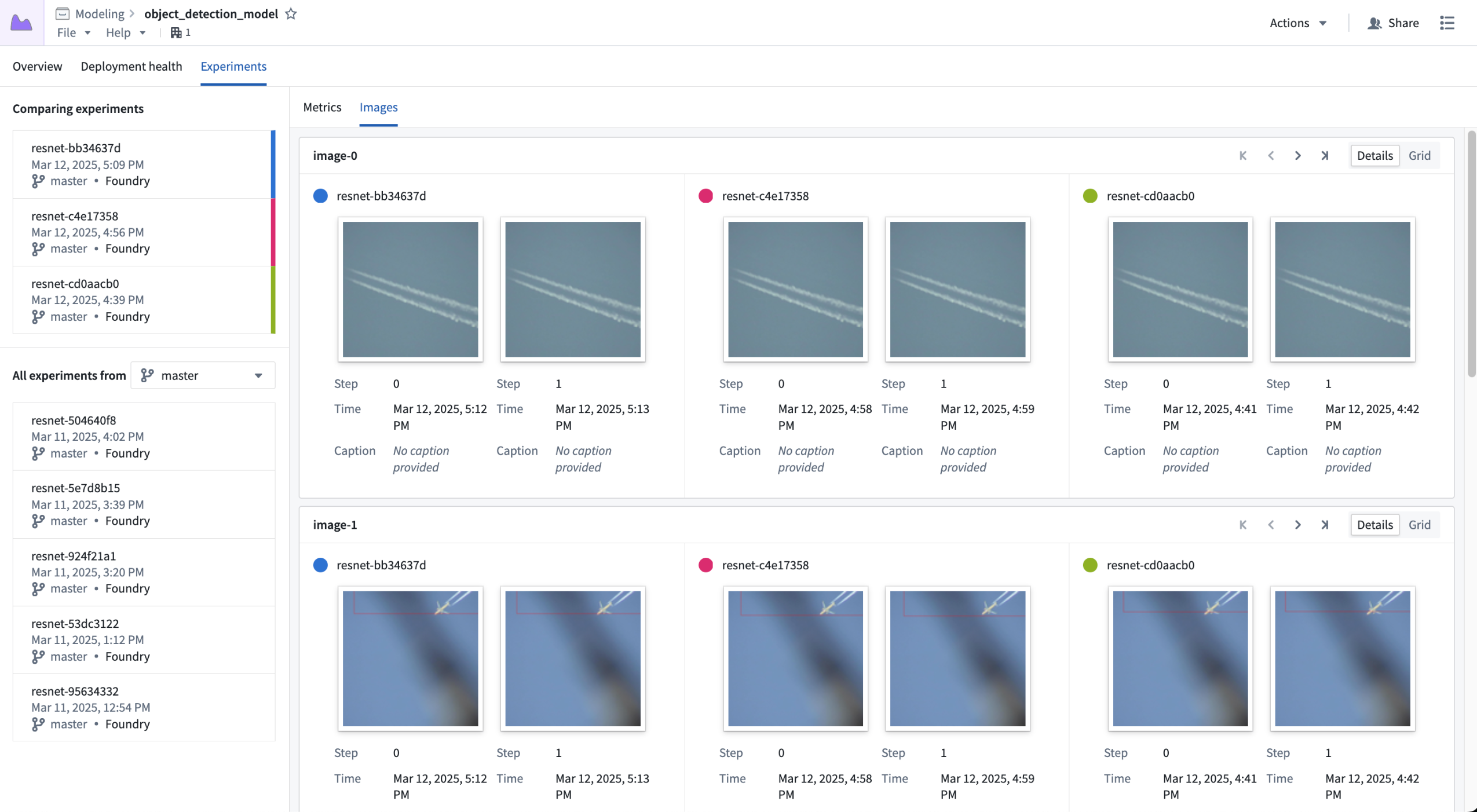
Visualizing the "image-0" and "image-1" series across three experiments.
Image logging also offers the ability to log user-generated charts as images. This feature opens up support for creating any type of chart a user may find valuable, such as ROC curves, confusion matrices, and more.
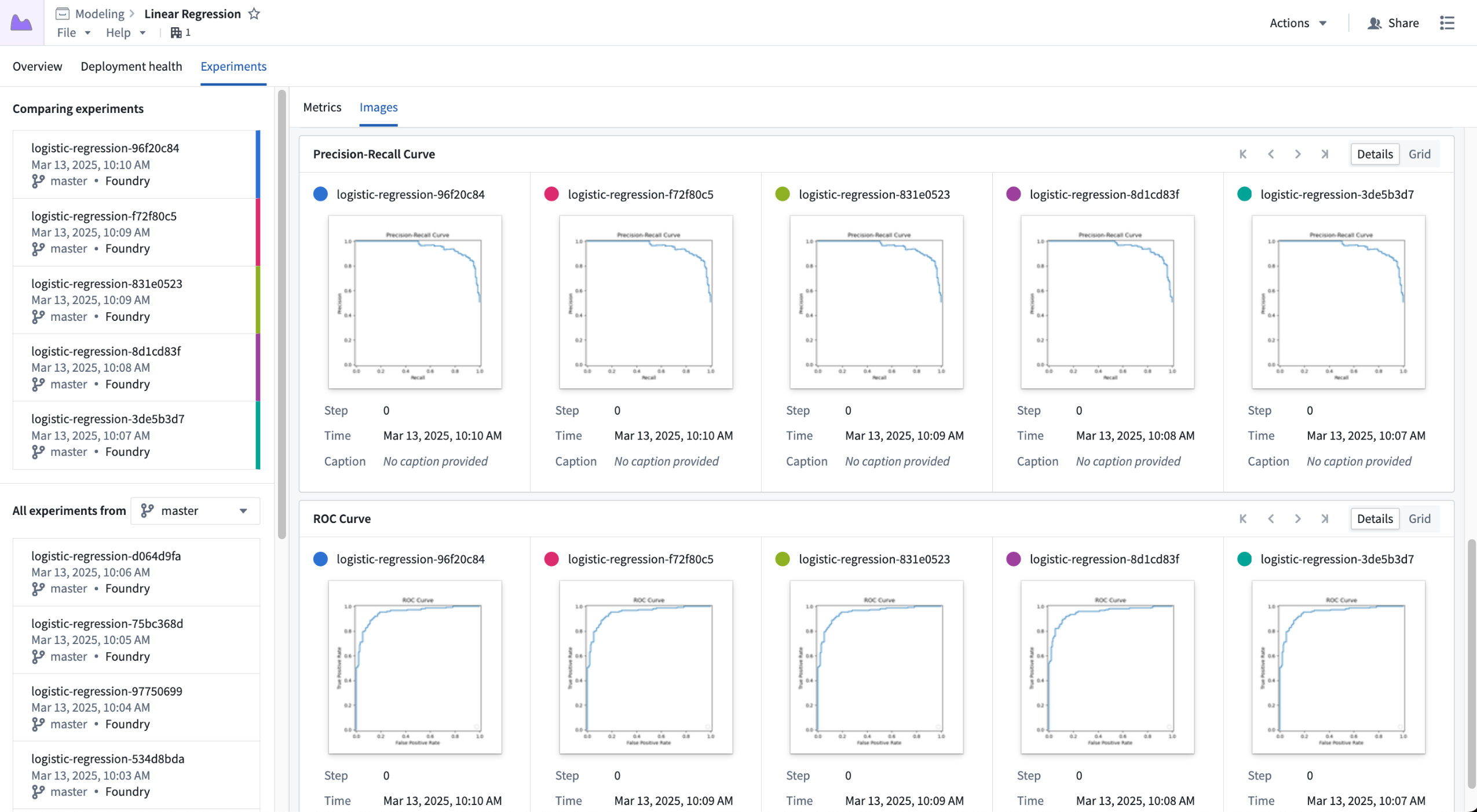
Storing custom charts in image series, shown across five experiments.
Parallel coordinate chart
It can be difficult to get a full understanding of how different parameters impact the outcome of model training. To help users get a better idea of how parameters impact a metric value, we are introducing the ability to view a parallel coordinate chart. This allows users to better understand how a set of parameters impact some aggregated metric value.
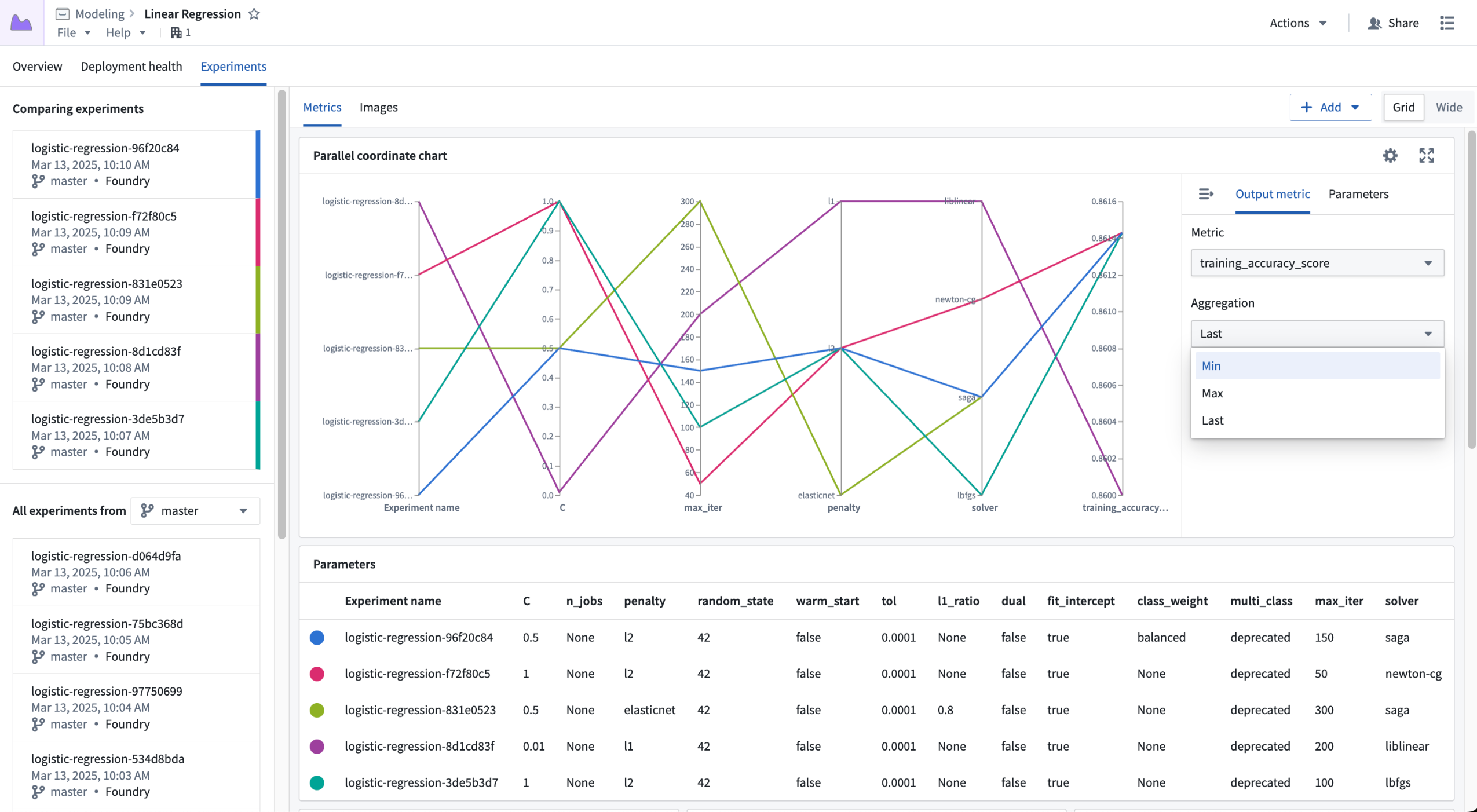
Configuring the output metric for a parallel coordinate chart.
What's next for experiments?
Over the next few months we will continue to make further enhancements to model experiments, including:
- First class support for logging charts from charting libraries like Matplotlib, Plotly, and more.
- Better searching and filtering of experiments for comparison.
- New dashboarding capabilities.
Explore the documentation to get started with model experiments.
Bulk delete objects and actions in Workflow Lineage
Date published: 2025-03-25
Workflow Lineage users can now bulk delete objects and actions in the workflow graph. When performing bulk deletions, users will be able to create proposals and see a detailed list of the selected objects, actions, and any corresponding object links slated for deletion.
Key features
- Intuitive selection: Select the nodes you wish to delete on the graph, then right-click and choose Delete resources.
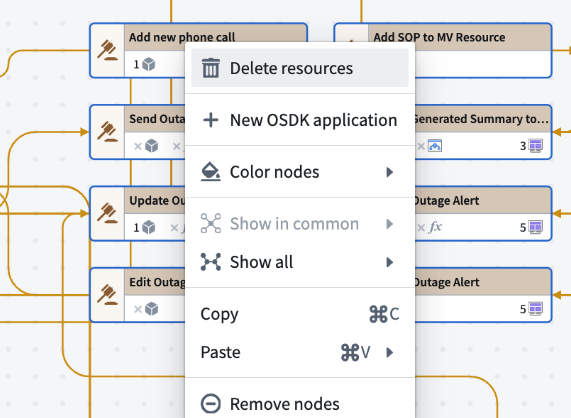
The context menu in Workflow Lineage, with the option to Delete resources.**
- Comprehensive deletion proposal: Upon initiating a bulk deletion, you will be prompted to create a proposal. This proposal will detail the number of link types associated with the objects slated for deletion, as well as the total number of objects and actions being deleted.

The list of resources that will be deleted following a bulk deletion.
- Seamless integration with Ontology Manager: Merge your deletion proposal using Ontology Manager, ensuring that your Ontology remains up to date and accurate.
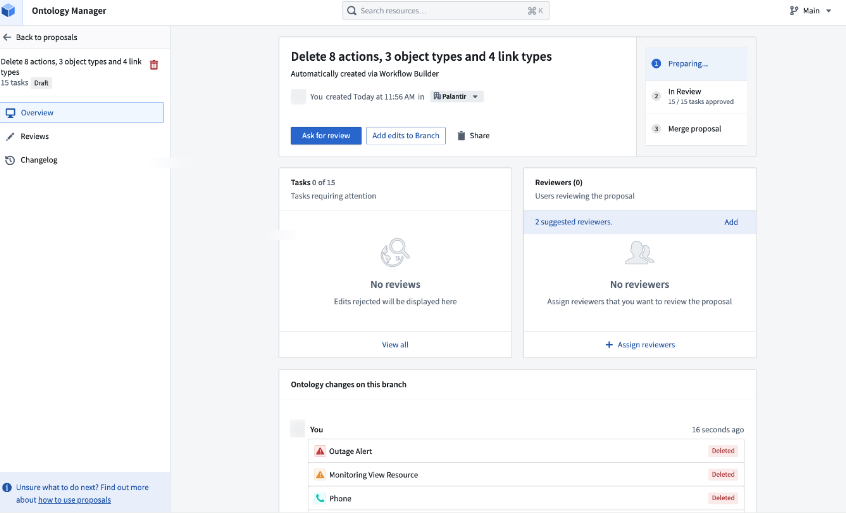
A sample proposal in Ontology Manager.
Workflow Lineage's bulk delete feature helps you maintain an organized workflow, ensuring your data remains relevant and manageable. Learn more about making changes to your workflows in Workflow Lineage.
Share your feedback
We want to hear what you think about our updates to Workflow Lineage. Send your feedback to our Palantir Support teams, or share in our Developer Community ↗.
Agent change history is now available
Date published: 2025-03-25
Data Connection agents now display the history of configuration changes and restarts, offering transparency into agent actions to better diagnose connection issues. Agent change history is now available in beta and enabled by default on all enrollments.
Data connections are typically facilitated through a direct connection (without an agent), but some organizations may choose to use agents to create a security boundary between Foundry and a data source that lives in their network. To follow proper agent hygiene, these organizations should use maintenance windows and practice frequent restarts; however, these events were previously not captured in a historical record. Therefore, critical actions taken against an agent were difficult to reference when debugging a failing data connection. With agent change history, we solve this issue by providing a historical list of actions related to agent health. This insight into change history is particularly helpful in circumstances where many users have access to an agent, since you can now view the users associated with each agent event.
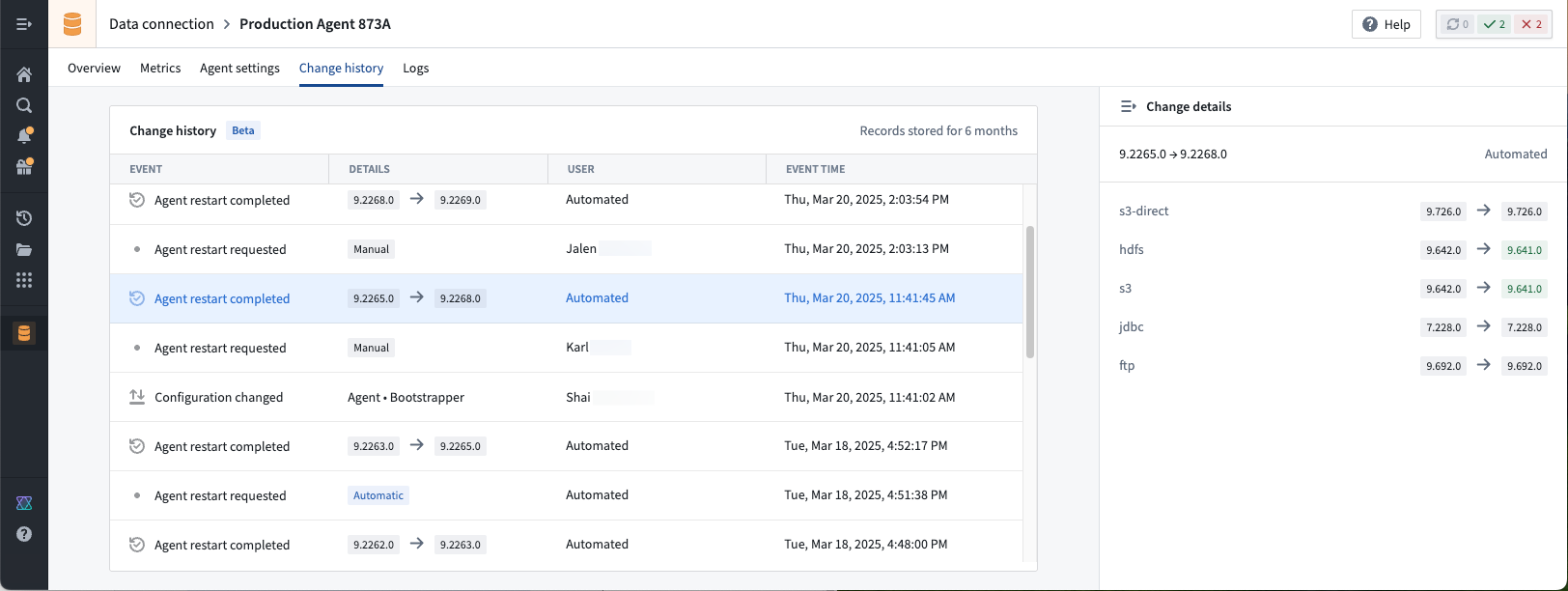
In this example, several teammates made changes to the agent's configuration. If any managed plug-in versions changed upon agent restart, we can view the user associated with the change.
In our first release, we capture agent configuration changes, restart requests, and successful restarts. With our ongoing work, we anticipate adding more event types to capture a greater variety of actions associated with agents.
As a reminder, agents should only be used when a direct connection is not possible.
We want to hear from you
Share your feedback about agent change history by contacting our Palantir Support teams, or let us know in our Developer Community ↗ using the data-connection tag ↗.
AI coding for Python transforms and OSDK now available in VS Code Workspaces
Date published: 2025-03-25
VS Code Workspaces now ships with the Continue ↗ open-source extension preinstalled and preconfigured to work with Palantir-provided models. Continue offers many features for AI code generation, including chat ↗, making inline edits ↗, codebase indexing ↗, custom context selection ↗, and more.
In the Palantir platform, Continue is configured to have knowledge about Palantir SDKs for Python transforms and TypeScript OSDK repositories. This contextual understanding of your data structures, Ontology, and organization allows Continue to generate more accurate and relevant code.
For more details, review our AI development tools documentation.
Python transforms repositories
In Python transforms repositories, Continue has knowledge of your dataset metadata alongside Python transforms SDKs.
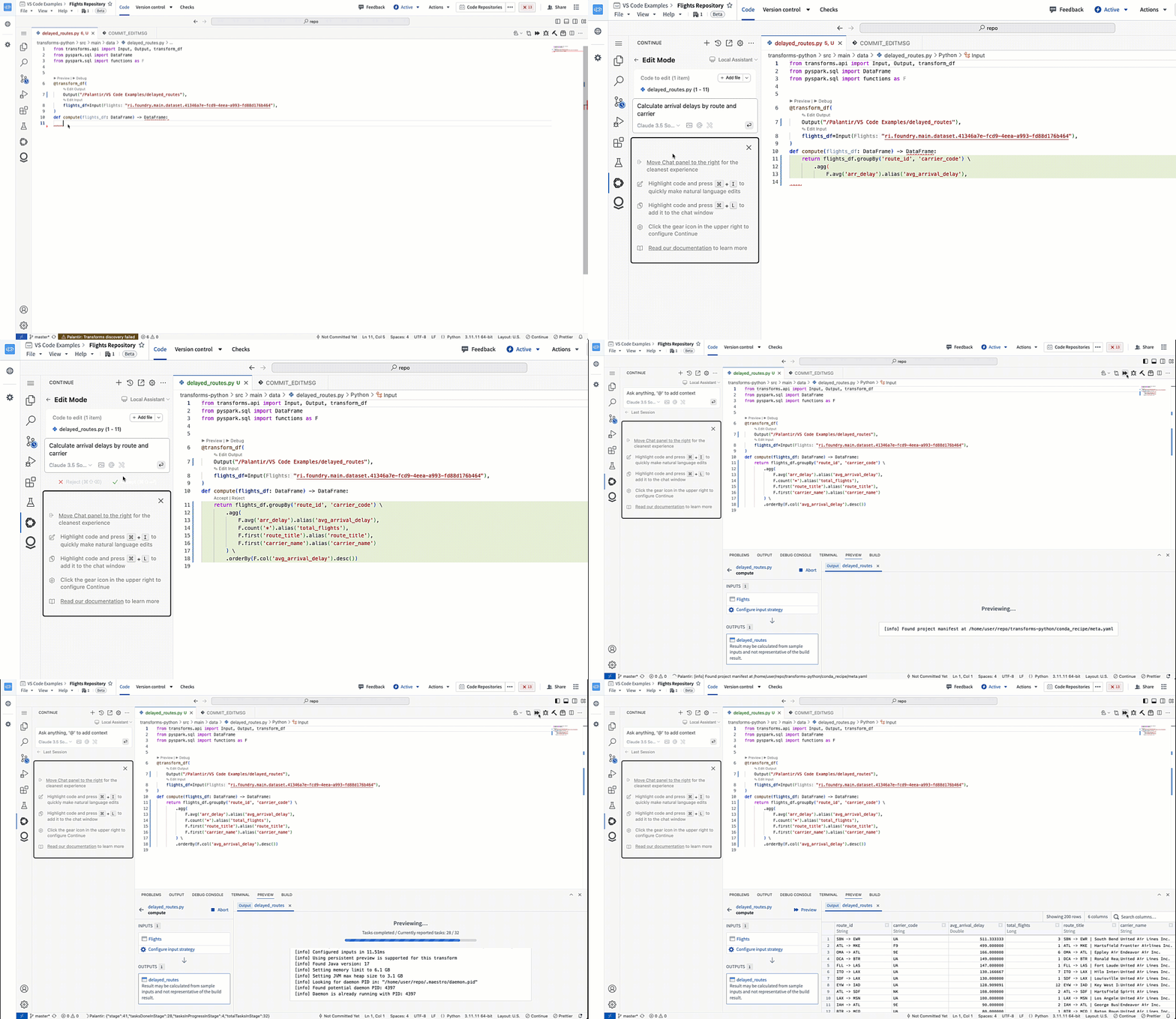
Generating a Python transform with Continue in VS Code Workspaces.
TypeScript OSDK repositories
In TypeScript OSDK repositories, Continue has full context on your OSDK, including Ontology objects, properties, links, actions, and imported functions.
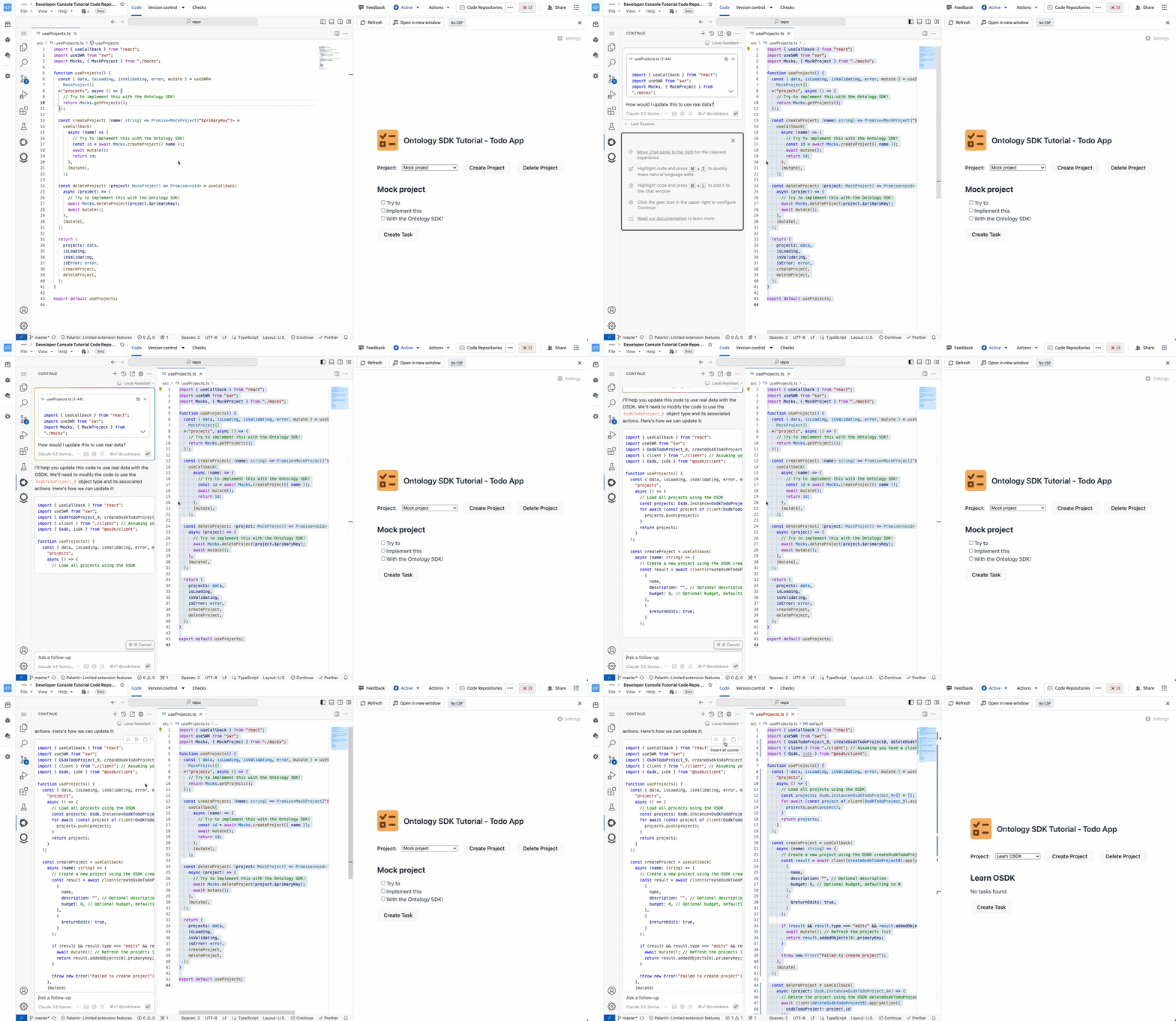
Editing a TypeScript OSDK application with Continue in VS Code Workspaces.
Your feedback matters
Your insights are crucial in helping us understand how we can improve VS Code Workspaces. Share your feedback through Palantir Support channels and our Developer Community ↗ using the vscode tag ↗.
Improved performance and support for actionable resources in admin view
Date published: 2025-03-25
Admin view now supports individual resource viewing, assignment, and status-setting. This change is coupled with new admin view performance improvements for faster navigation of resources and intervention statistics.
The new functionality can be accessed by maintenance operators through the Admin view toggle in the Upgrade Assistant home page, and navigating to the desired intervention. There, a panel presenting resources split by organizations is available for maintenance operators to navigate through, leading to a table of actionable resources.
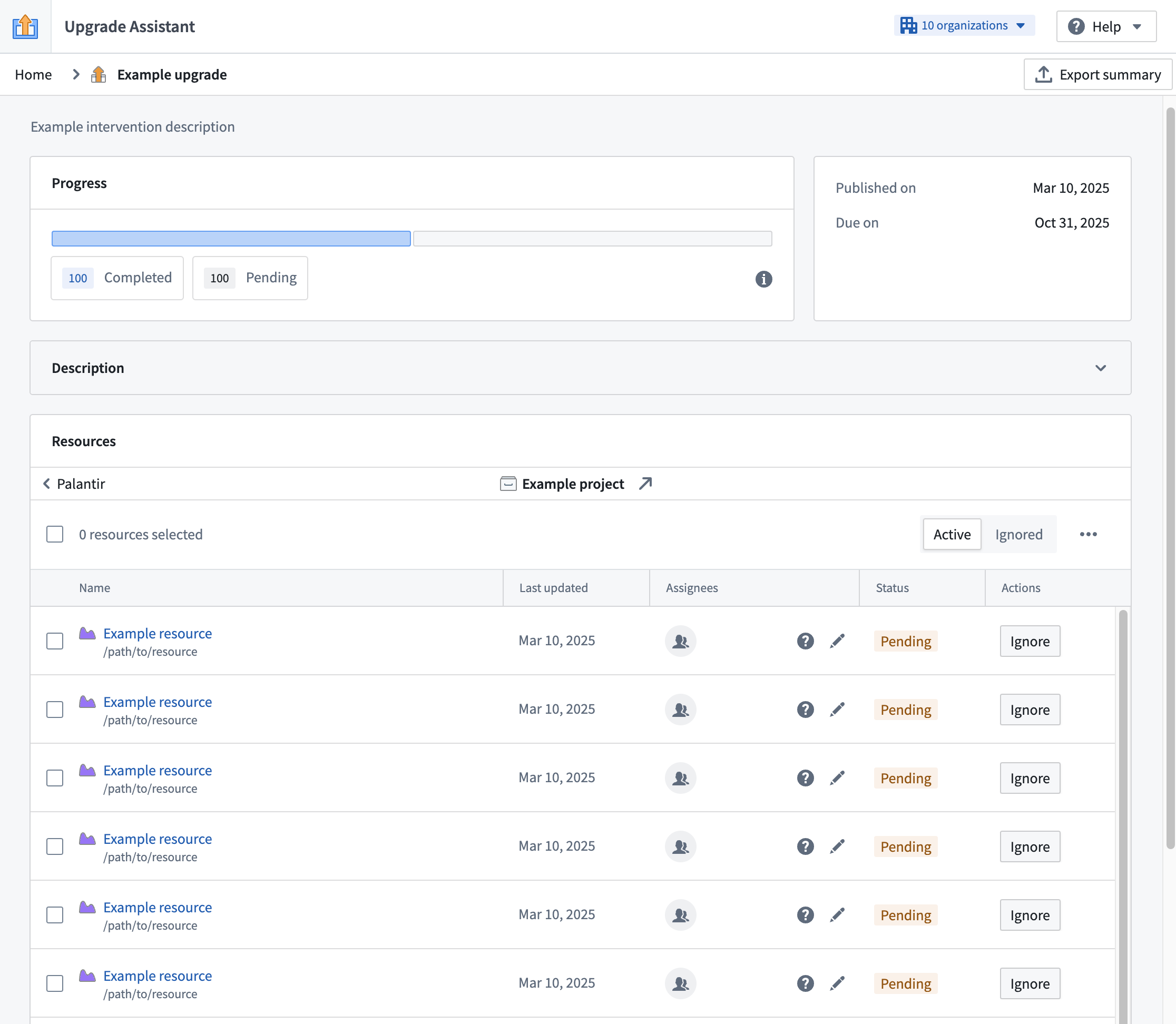
New admin view of an example intervention.
From our work in optimizing the performance, the loading of resources in admin view should now be significantly faster, streamlining workflows for our maintenance operators on Palantir platforms.
New and improved derived series creation and management features are now available
Date published: 2025-03-20
We are excited to announce a variety of features for derived series: a new discovery space in Time Series Catalog, a new derived series type, a streamlined creation flow, and a Workshop widget.
What are derived series?
Derived series allow you to save and replicate calculations and transformations applied to time series in the Ontology. Once in the Ontology, derived series behave like any other time series property but are calculated on an adhoc basis, eliminating the need to manage or store derived data or duplicate those calculations across the platform.
Time Series Catalog
The recently released Time Series Catalog acts as a splash page and home for multiple time series resource types, including derived series. Time Series Catalog allows you to create new time series in a no-code environment and manage derived series in the Ontology.
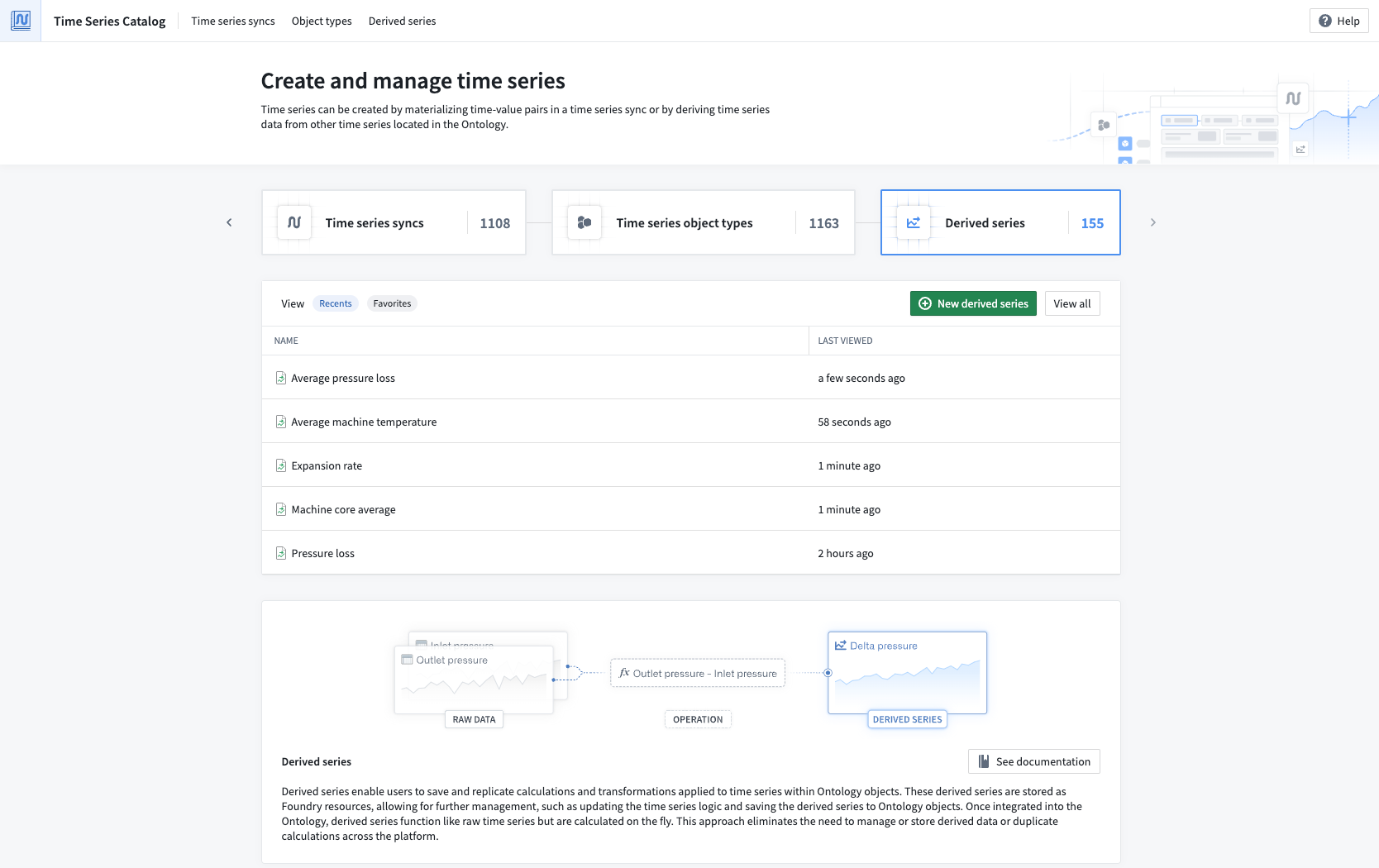
The Time Series Catalog. Navigate to the Derived Series tab to view all available derived series.
Single derived series
With our new Time Series Catalog, you can now configure single derived series in addition to templated derived series. Single derived series allow you to create logic that is not constrained to all inputs coming from one object. Instead, single derived series are not templated and can operate on many objects. You can also choose to enable automatic Ontology saving for single derived series rather than resorting to manual saving, allowing you to manage your derived series with ease.
Streamlined creation flow
Previously, you would have to create derived series from a Quiver analysis. Using Quiver offers the ability to promote the results of some time series analysis into a derived series. However, due to the large amount of available operations, it can be easy to construct logic in Quiver that is not actually supported in derived series.
Now, you can access a new, streamlined creation flow from the Time Series Catalog. This flow guides you through the entire creation process, starting from the first step of choosing the derived series type you would like to make.
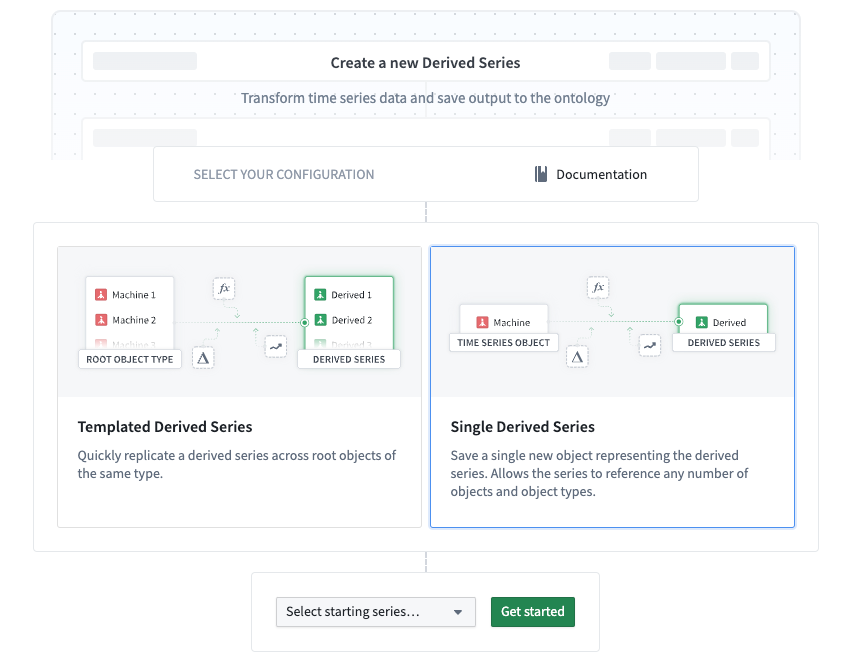
The first step of the derived series creation flow in Time Series Catalog, allowing you to choose a derived series type.
After selecting a type, you will be brought to a time series logic editing view. Here, only operations that are supported for derived series are available to use on your time series data.
Derived series Workshop widget
Finally, we are excited to announce the Derived Series widget in Workshop. With the widget, you can embed the creation and management details and capabilities of a derived series belonging to an object type, then use the widget within a Workshop module.
The Derived Series widget offers a user-friendly platform for managing derived series, focusing on constructing the time series logic. With the Derived Series widget, users can view a simplified version of derived series management options rather than the advanced configurations used in the standard creation flow.
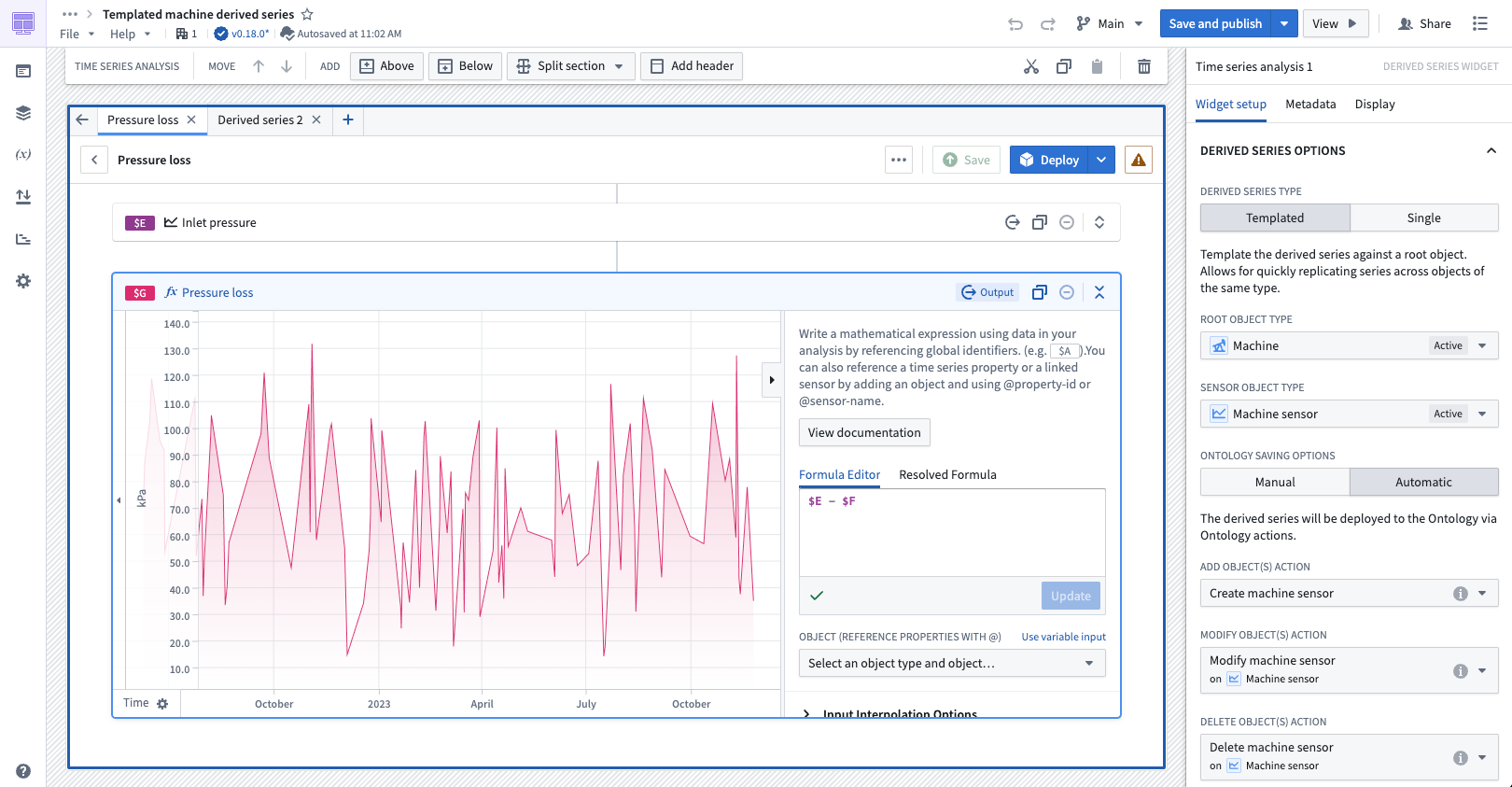
The Derived Series widget in Workshop, displaying templated derived series details for the Machine object type.
Share your feedback
We want to hear what you think about our updates for derived series and Time Series Catalog. Send your feedback to our Palantir Support teams, or share in our Developer Community ↗ using the time-series ↗ tag.
Enrollment-level branch protection now available in Pipeline Builder
Date published: 2025-03-20
Administrators can now enable default branch protection for the Main branch of all new Pipeline Builder pipelines on an enrollment. Branch protection enhances the security and integrity of your pipelines by requiring proposals to be approved before any changes can be made to protected branches.
Enable default branch protection
To enable branch protection for Main branches by default, navigate to Control Panel and access Pipeline Builder settings. Then, toggle the option to Enable branch protection by default for new pipelines. This will make Main branches on new pipelines protected branches, so they will require proposals before changes can be merged.
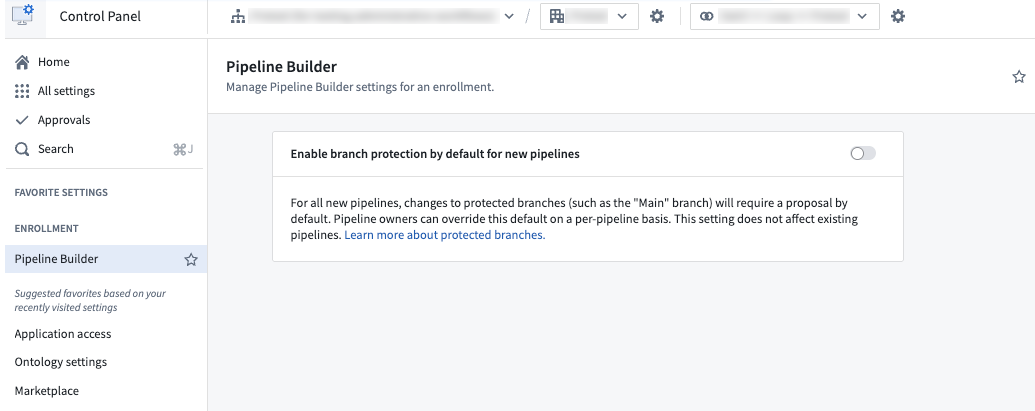
The option to enable default branch protection in Control Panel.
Note that enabling enrollment-level branch protection will not affect existing pipelines. To change branch protection settings on existing pipelines, or to mark new branches as protected, refer to the documentation on how to protect branches.
Learn more about protected branches in Pipeline Builder.
Bulk publish Workshop modules in Workflow Lineage
Date published: 2025-03-20
We are excited to announce that you can now bulk publish Workshop modules in Workflow Lineage. This feature allows you to publish multiple Workshop modules at once, streamlining your workflow and saving time by eliminating the need to update each module individually.
Get started
With the bulk publish feature, you can simultaneously publish updates to Workshop modules that do not automatically publish the latest versions. To get started, navigate to Workflow Lineage and select the Workshop nodes you want to publish, right click, and select Publish from the context menu.
Upon initiating a bulk publish, a dialog will display the status of your Workshop modules with the following tags:
- Latest published: Indicates that the Workshop application is set to automatically publish the latest version.
- Published: Indicates that even though the Workshop application is not configured to automatically update, it currently holds the latest version.

The Publish Workshop modules dialog in Workflow Lineage, displaying the Latest published and Published* tags.
Workshop modules not marked with these tags have not published the latest available versions, and will be eligible for selection in the bulk publish dialog. You can then select Publish entities to publish the latest versions of your chosen Workshop modules.
Seamless integration with Function updates
Along with publishing the latest available version of a Workshop module, you can update the Functions in a module and publish those modules directly from Workflow Lineage. After updating Functions, select Continue to publish to open the Publish Workshop modules dialog, where you can select Publish entities to bulk publish your chosen Workshop modules.

The Upgrade functions in Workshop modules dialog, with the option to Continue to publish.
Leverage the convenience and efficiency of bulk publishing in Workflow Lineage to keep your Workshop modules up to date. Identify modules with unpublished versions, publish multiple modules simultaneously, and update Functions as needed; all from a single, centralized location.
Learn more about bulk publishing Workshop modules in Workflow Lineage.
Discover time series capabilities in the Time Series Catalog application
Date published: 2025-03-13
The Time Series Catalog, available this week across all enrollments, is your starting point and home for creating, managing, and discovering time series in the Palantir platform. Time series are a sequence of data points over a period of time that can help you understand trends and patterns for your specific use case. The Time Series Catalog is designed to facilitate your work with time series syncs, time series object types and derived series.
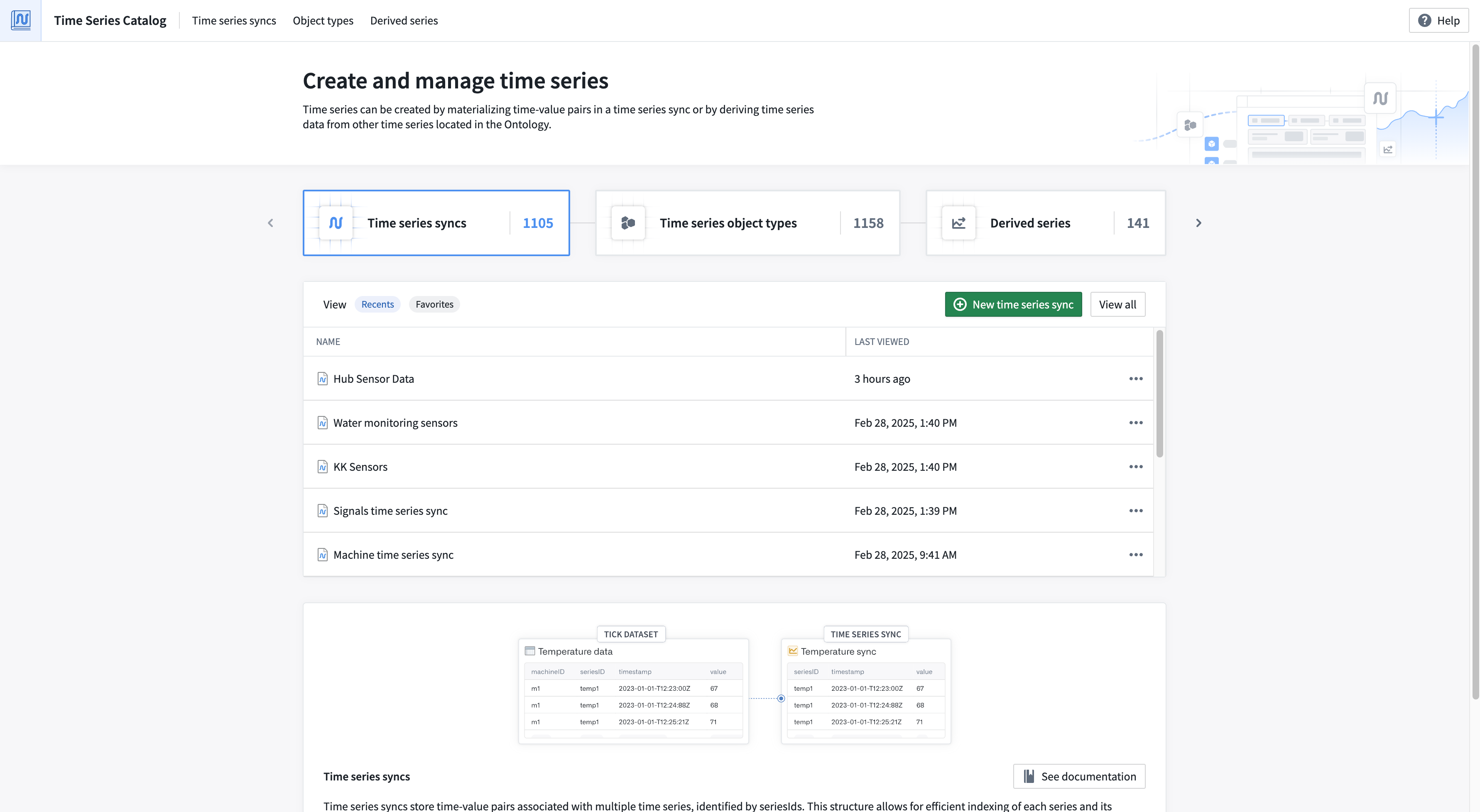
From the Time Series Catalog, you can view recently accessed time series syncs and derived series, your saved "favorite" time series syncs and derived series, and the "most viewed" time series object types. Navigate to each resource type's associated tab to explore all resources of that type.
Learn more about the Time Series Catalog.
A reminder on existing resources types that can be explored in the Time Series Catalog
You can use the improved Time Series Catalog to review the following existing resource types:
Time series syncs
Time series syncs store time-value pairs associated with multiple time series, identified by seriesIds. You can access time series syncs directly through code or in no-code applications like the time series sync resource viewer, or Quiver.
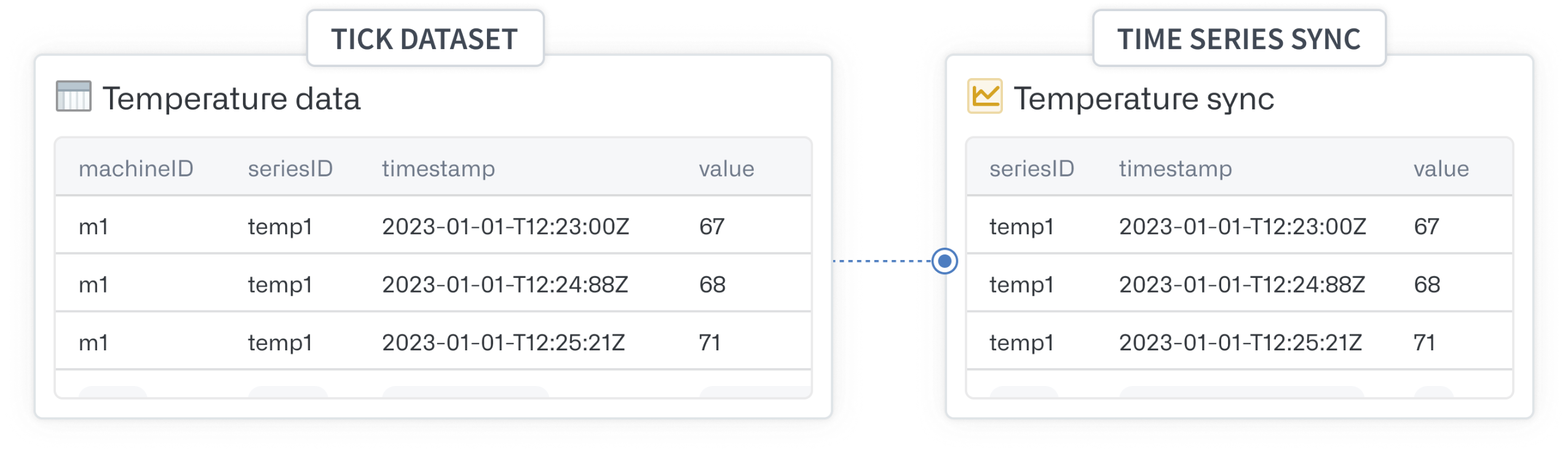
Time series syncs are backed by datasets or streams and require mapping three columns: series identifier, time and value.
Learn more about time series syncs.
Time series object types
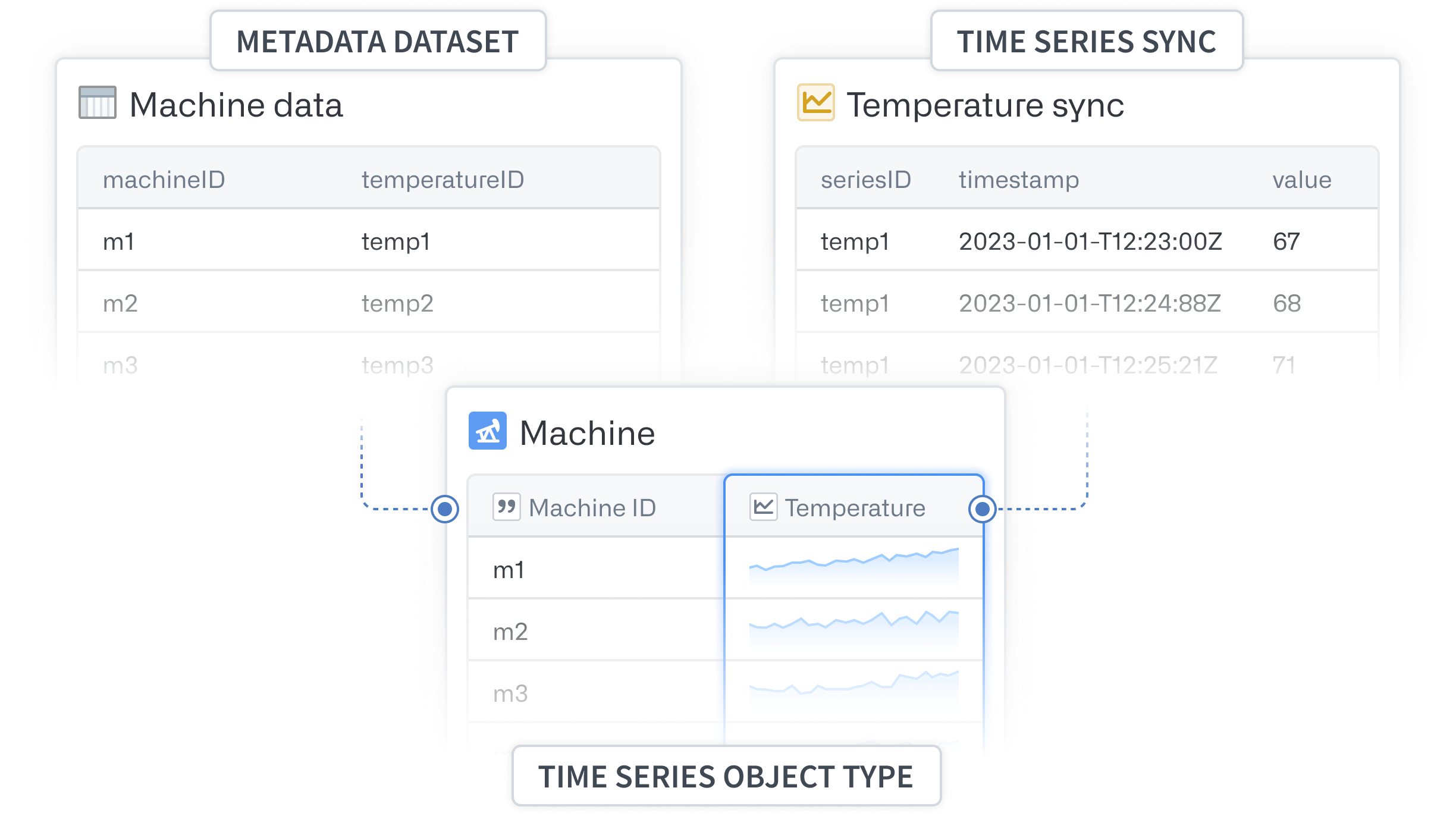
Time series object types are object types with time series functionality enabled via time series properties. In applications that consume Ontology objects, time series property values are displayed as plots. The backing datasource of a time series property is a time series sync.
Derived series
Derived series enable users to save and replicate calculations and transformations applied to time series within Ontology objects. These derived series are stored as Foundry resources, allowing for further management, such as updating the time series logic and saving the derived series to Ontology objects. Once integrated into the Ontology, derived series function like raw time series but are calculated on the fly.

Derived series enable you to save and replicate calculations and transformations applied to time series within Ontology objects.
Learn more about derived series.
Introducing the Palantir Extension for Visual Studio Code for Python transforms
Date published: 2025-03-13
We are excited to announce that you can now develop Python transforms locally inside your own instance of Visual Studio Code. This feature is available to all users who have been granted permissions through Control Panel. The Palantir extension bridges VS Code and Foundry, allowing you to perform and use Python transform operations (such as transform previews, debugging, and the library panel) natively in VS Code.
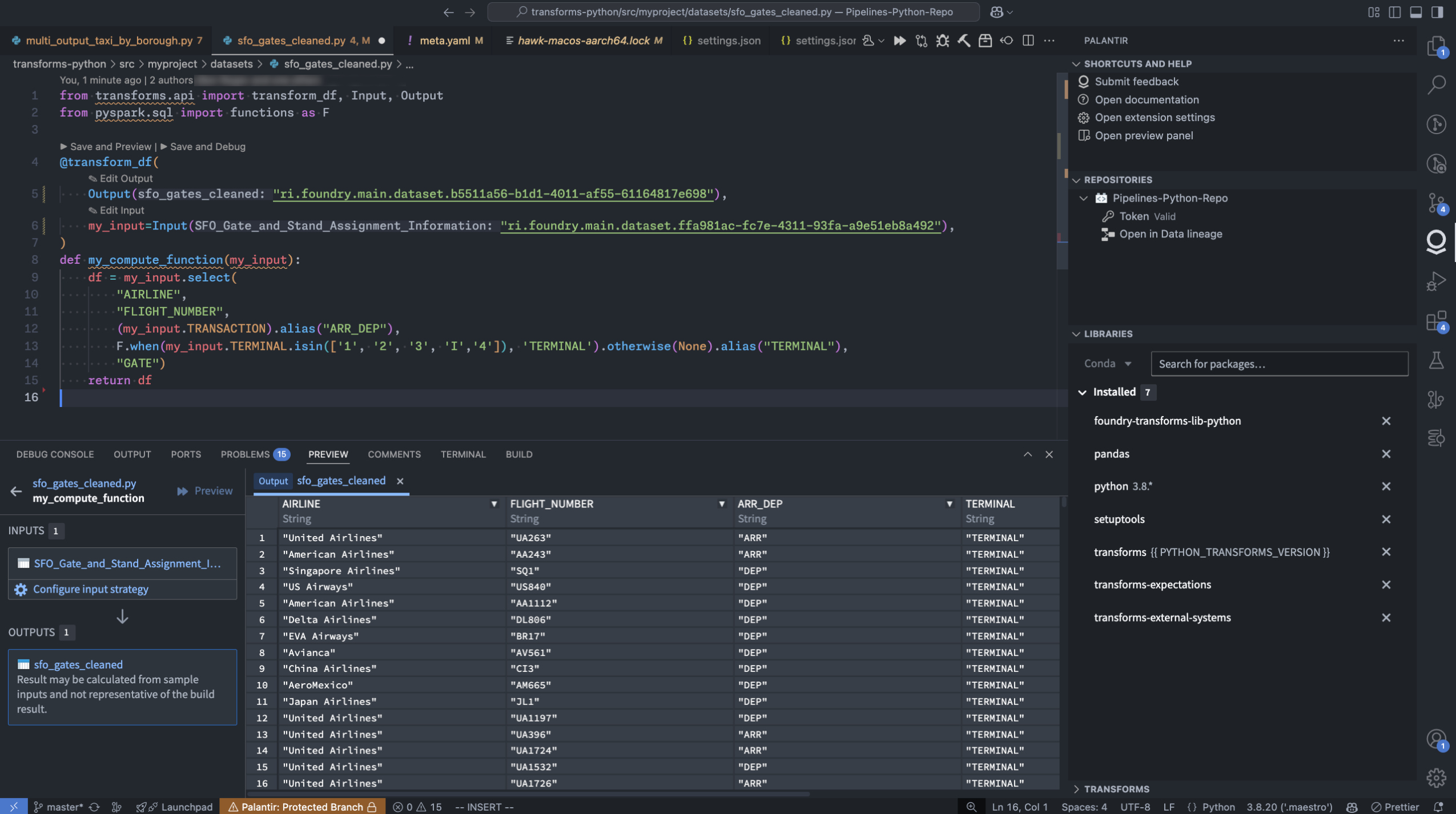
The Palantir extension for Visual Studio Code within a local VS Code instance.
Extension features
- Preview your Python transforms directly from your local Visual Studio Code environment. Additionally, the Palantir extension for Visual Studio Code supports full dataset (sample-less preview), so you can preview with the full datasets and not lose any precision. Note: To run previews locally, you will need your platform administrators to enable local preview through the Control Panel.
- Initiate a build directly from the comfort of your own code editor.
- Debug your code and run tests directly from the editor.
- Leverage the library panel to add libraries.
- Use Palantir’s latest high-performance environment management tool to set up your Python environment quickly and efficiently.
Get started
To start using the Palantir extension for Visual Studio Code, open your transforms repository in the Code Repositories application. From here, select the settings icon next to the VS Code button in the top right corner of your screen. Choose Local VS Code to change the default button language. Select the updated Local VS Code button and follow the instructions in the pop-up window to download the extension.
Note: You only need to download the extension once.

The VS Code button in Code Repositories, with the option to configure the button to open in Local VS Code.
Current limitations
- The Palantir extension for Visual Studio Code is not yet listed in the Visual Studio Code Marketplace. It is currently available for download exclusively through the Palantir platform.
- As this is a new feature, some transform preview components are still being developed. We are continually working to improve support for these components. For more information, consult our documentation.
Your feedback matters
Your insights are crucial in helping us understand how this extension impacts your workflow and where we can concentrate our enhancement efforts. Share your feedback through Palantir Support channels and our Developer Community ↗ forum using the vscode ↗ tag.
Publish AIP Agents as Functions for increased platform integration
Date published: 2025-03-13
Note: As of the week of April 27, 2026, AIP Agent Studio was renamed AIP Chatbot Studio. All existing features and functionalities remain unchanged.
AIP Agents can now be published as Functions, allowing them to be used anywhere in the platform where Functions can be executed. With agents as Functions, builders can evaluate agents in AIP Evals, automate agent workflows with Automate, and use agents in Code Repositories, among other use cases. This also enables using agent Functions in AIP Agent Studio, enabling agent to call other agent as tools.
Publish an agent as a Function
To publish an agent as a Function, select the publish settings icon to the right of the Publish option in Agent Studio. This will open the Publish settings dialog, where you can enable or disable Function publishing, name your Function, and configure version settings.
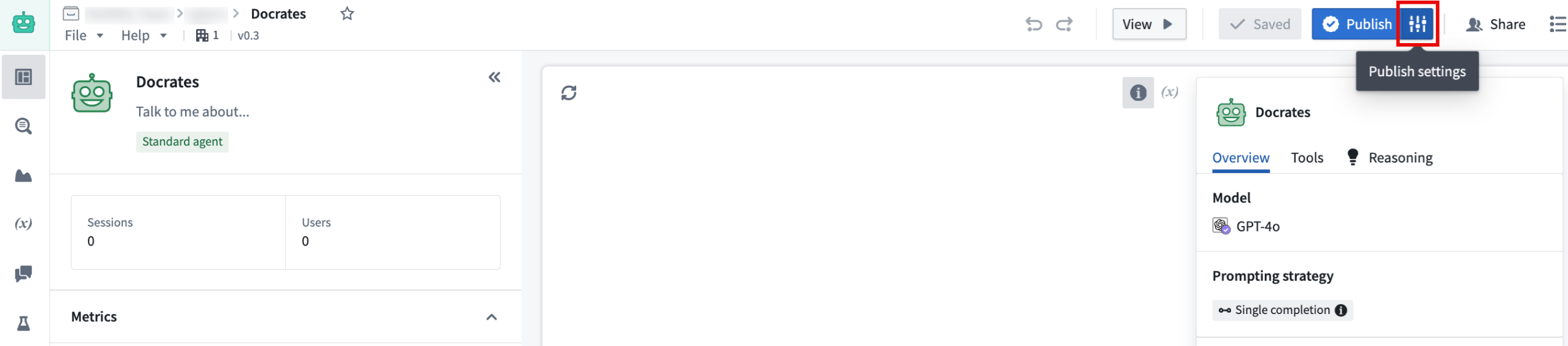
The publish settings in AIP Agent Studio, next to the Publish button.
Evaluate Agents with AIP Evals
Once an agent has been published as a Function, you can use AIP Evals to assess agent performance and iteratively improve outcomes. With AIP Evals, you can define test cases and evaluation criteria for agent performance, as well as compare the performance of different models. These evaluations can help build confidence in your AIP agents.
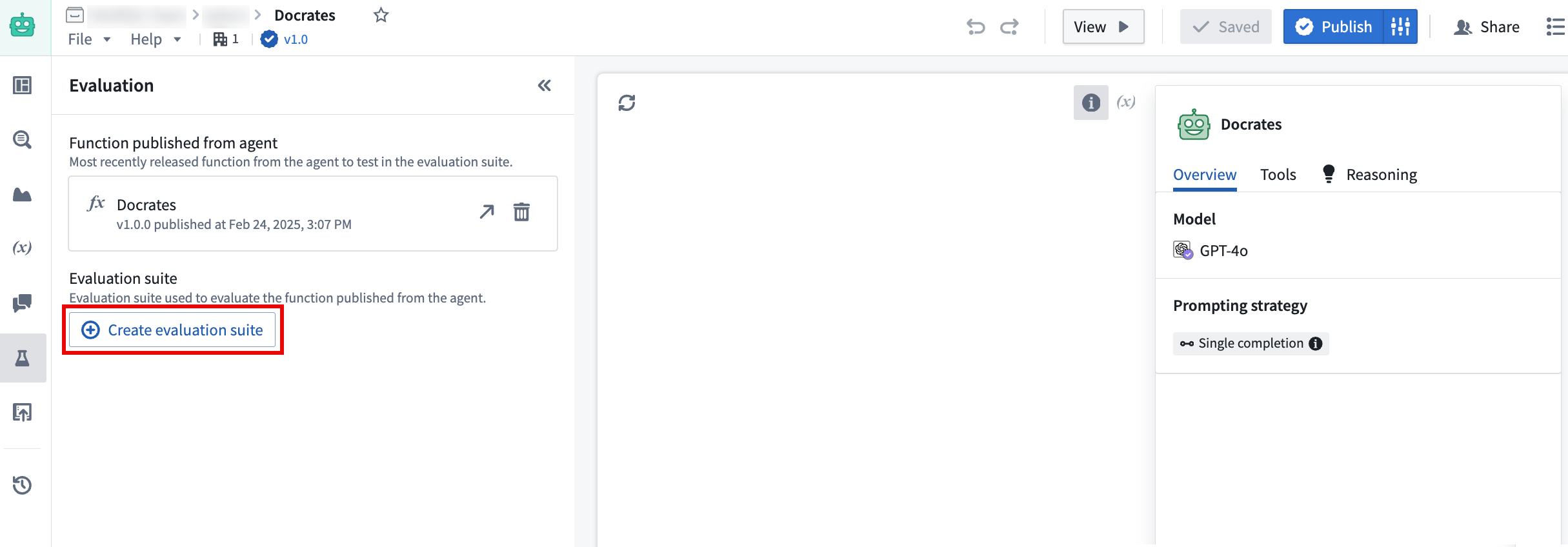
The Create evaluation suite option in AIP Agent Studio.
Evaluation suites can now be created directly from Agent Studio in the Evaluation tab on the left toolbar, allowing for a continuous workflow that leads from agent creation to evaluation.
Leverage this new feature to enhance agent versatility and facilitate seamless integration into a wide range of workflows. With agent evaluation in Evals, you can confidently deploy agents in production and customize agent use to align with your operational requirements.
Learn more about publishing AIP Agents as Functions.
Introducing new LLMs to AIP
Date published: 2025-03-13
New large language models (LLMs) have been added to the Palantir platform's Language Modeling Service, giving AIP enrollments access to some of the latest and most powerful models available for your use case needs.
New Anthropic models
- Claude 3.7 Sonnet
- Claude 3.5 Haiku
- Claude 3.5 Sonnet v2
To learn more about these models, visit the official AWS website ↗.
New Google Gemini models
- Gemini Flash 2.0
To learn more about these models, visit the official Google website ↗.
New Azure OpenAI models
- o1-preview
- o1-mini
To learn more about these models, visit the official Microsoft Azure website ↗.
New open-source Palantir-hosted models
- Llama3.3 70B
To learn more about these models, visit the official Hugging Face website ↗.
Higher efficiency models for every use case
These new releases deliver major leaps in multimodal and natural language processing, empowering teams to handle more complex document workflows with enhanced vision-based parsing, entity extraction, summarization, and semantic chunking. Containing substantial improvements in reasoning and natural language understanding, these models support large context windows for processing large amounts of data in fewer calls than many models in use today. Users can experience improvements in use cases while benefiting from improved accuracy, scalability, efficiency, and speed.
| Model name | Context window | Input token cost (USD price per 1M tokens) | Output token cost (USD price per 1M tokens) | Capability | Latest training data date |
|---|---|---|---|---|---|
| Claude 3.7 Sonnet | 200k tokens | $3 | $15 | Text, Vision | November 2024 |
| Claude 3.5 Haiku | 200k tokens | $0.80 | $4 | Text | July 2024 |
| Claude 3.5 Sonnet v2 | 200k tokens | $3 | $15 | Text, Vision | April 2024 |
| Gemini 2.0 Flash | 1M tokens | $0.10 | $0.40 | Text, Vision | June 2024 |
| o1-preview | 128k tokens | $15 | $60 | Text, Vision | October 2023 |
| o1-mini | 128k tokens | $1.10 | $4.40 | Text, Vision | October 2023 |
| Llama3.3 70B | 128k tokens | $0.23 | $0.40 | Text | December 2023 |
Model availability by region
Each of these new supported models is available in global, or non geo-restricted enrollments by default. In addition, these models can service requests from a subset of geo-restricted regions. For more detailed information on geographic restrictions, review our documentation.
| Model | United States | European Union | United Kingdom | Canada | Australia | Japan |
|---|---|---|---|---|---|---|
| Claude 3.7 Sonnet | ✅ | |||||
| Claude 3.5 Haiku | ✅ | |||||
| Claude 3.5 Sonnet v2 | ✅ | ✅ | ||||
| Gemini 2.0 Flash | ✅ | ✅ | ||||
| o1-preview | ✅ | ✅ | ||||
| o1-mini | ✅ | ✅ | ||||
| Llama3.3 70B | ✅ | ✅ | ✅ | ✅ | ✅ |
Enable a model provider to use respective models
To use these models, the respective model provider (Amazon Bedrock, Google Vertex AI, Microsoft Azure, Llama-3.1 - 3.3) must first be enabled by an enrollment administrator in Control Panel. Once the provider has been enabled, the model will be ready for use.
If you believe a model provider should be enabled for your enrollment but were unable to configure it in Control Panel, contact your Palantir representative for assistance.
Weigh in on our Developer Community
We are always working on bringing support for the latest LLMs, and welcome your feedback on how we can improve your LLM experience. Share your thoughts with Palantir Support channels or our Developer Community ↗ and use the language model service ↗ tag.
Multilingual speech to text now available in AIP Assist
Date published: 2025-03-11
AIP Assist now supports speech to text, allowing users to save time by asking questions using voice input. This feature enables users to speak into their device's microphone and receive a real-time speech transcription, which can then be sent as input to AIP Assist. Audio transcription provides an alternative input method for users who may have difficulty typing, and allows users to communicate in their preferred language, including Spanish, Japanese, Korean, French, and more.
Use speech-to-text in AIP Assist
To access speech to text in AIP Assist, open the AIP Assist sidebar and select the microphone icon in the chat input field. Note that the microphone icon is only visible when the chat input field is empty. Select the microphone icon, start speaking, and select the stop icon when you are done.
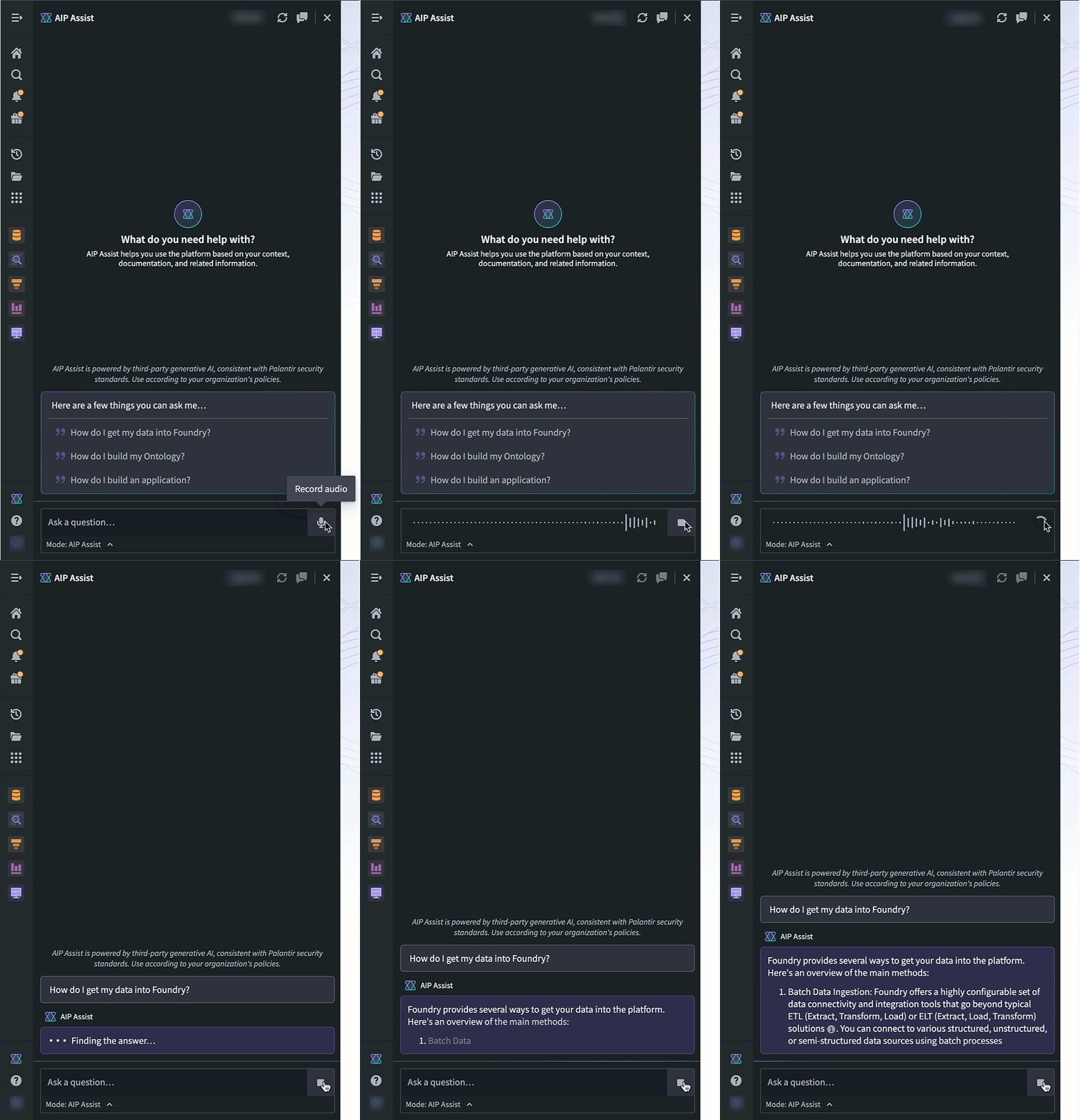
The microphone icon in the AIP Assist input field is used to record and generate an audio transcription.
The transcription will now appear in the chat input box, making it faster and easier to send lengthy inputs, and providing accessible speech-to-text transcription anywhere on the platform.
Learn more about AIP Assist capabilities.
Note: AIP feature availability is subject to change and may differ between customers.
Project templates now support Markings and Project constraints
Date published: 2025-03-11
We are excited to announce that Project templates now supports Markings, Project constraints, and group management. These enhancements increase the configurability available for Project templates and expand what can be encoded and mandated for all new Projects.
Markings
Project templates can now be configured with existing or new Markings in the Markings section of the creation wizard. These markings will be applied to the Project upon creation.
Learn more about applying Markings to Project templates.
Project constraints
Project constraints allow Project owners to set limits on which Markings may or may not be applied on files within a Project. Project constraints prevent users from saving violating files to a Project.
When creating a Project template, you can apply Project constraints by toggling on Marking constraints. You can then choose one of the following settings:
- Allowed Markings: Allows only resources with the specified Markings to be added to the Project.
- Prohibited Markings: Prohibits resources with the specified Markings from being added to the Project.
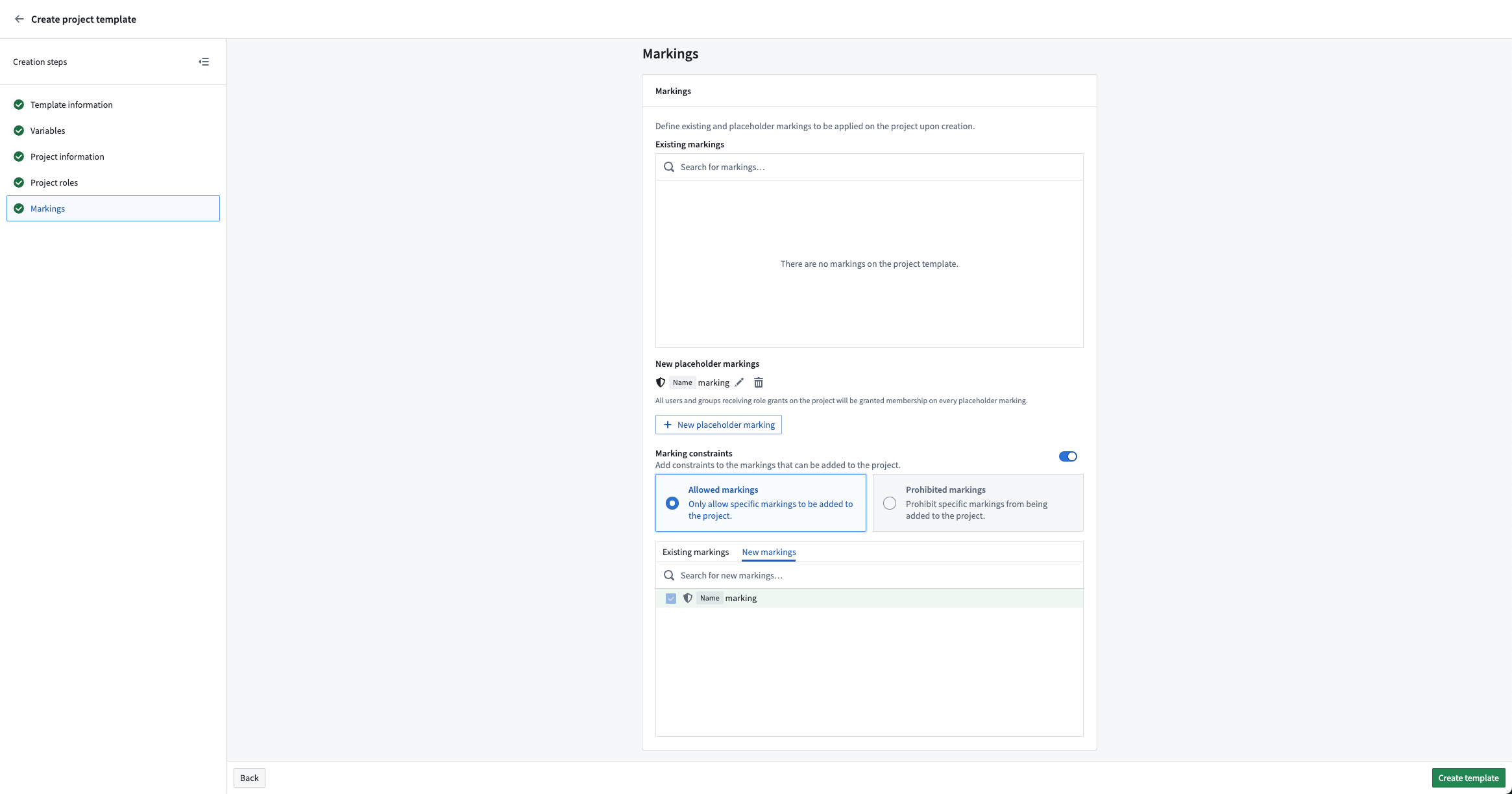
Example of configuring a new marking to be an allowed Project constraint.
Group management
A common setup is to create viewer, editor, and owner groups with each project. These groups can now be configured in the Project roles section. This allows the owner group to have the owner role on the Project and be able to manage membership to the editor and viewer groups.
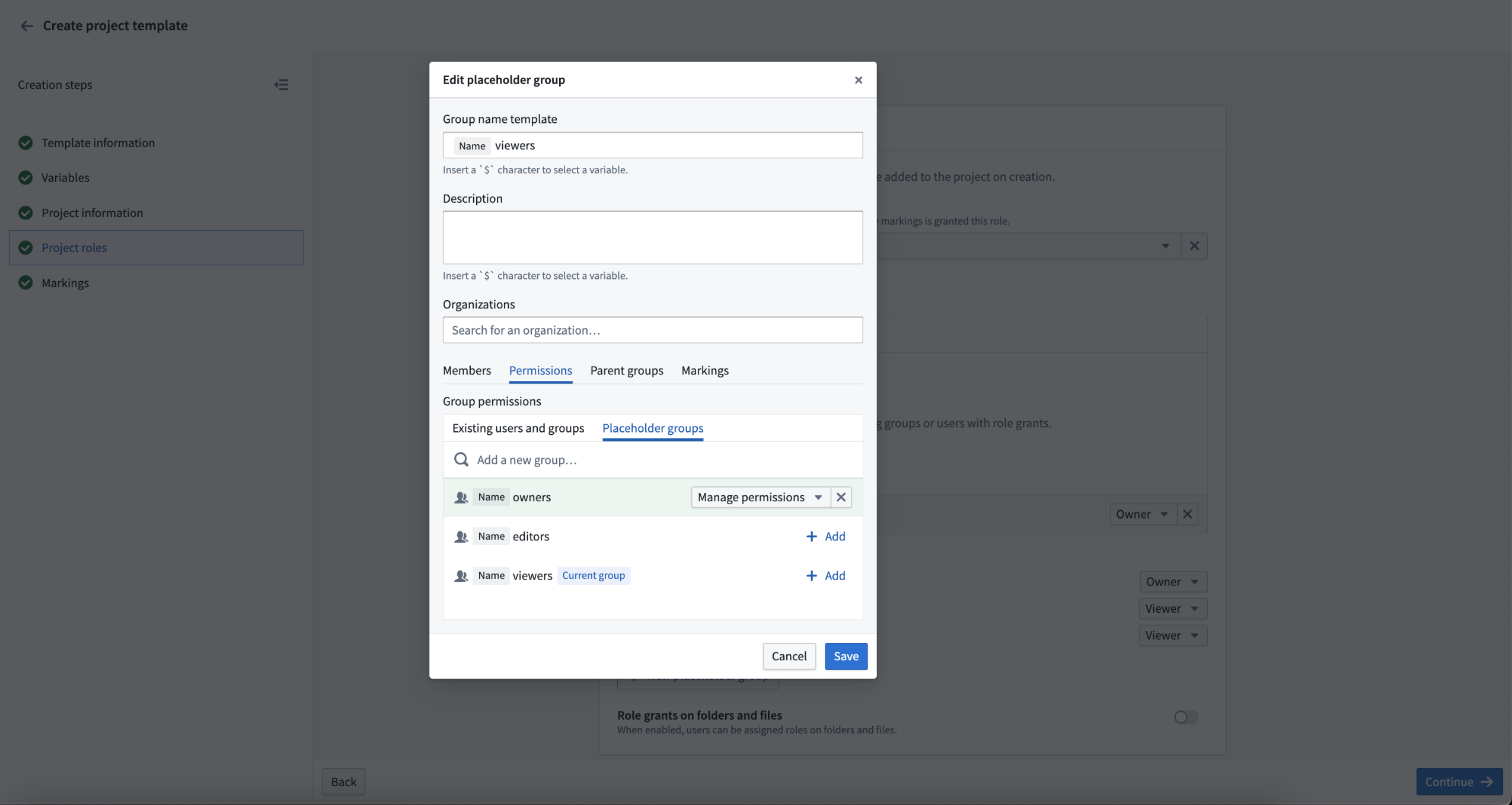
Example of a new group being granted manage permissions of a different new group.
Foundry Connector 2.0 for SAP Applications v2.33.0 (SP33) is now available
Date published: 2025-03-11
Version 2.33.0 (SP33) of the Foundry Connector 2.0 for SAP Applications add-on, used to connect Foundry to SAP systems, is now available for download from within the Palantir platform.
This latest release features bug fixes and minor enhancements, including:
- Improved housekeeping job performance
- Fixed remote decompression and empty schema content issues
We recommend sharing this notice with your organization's SAP Basis team.
For more on downloading the latest add-on version, review our documentation.
Add a point of contact for your object types
Date published: 2025-03-11
We are happy to announce you can now assign a point of contact for object types in Ontology Manager. By setting a point of contact, users can identify the subject-matter expert to reach out to with questions or report issues regarding the particular resource. For example, if a user needs to understand more about recent changes to an Alert object type, they will be able to view the name and/or contact details of the knowledgeable user who is best suited to answer such questions.
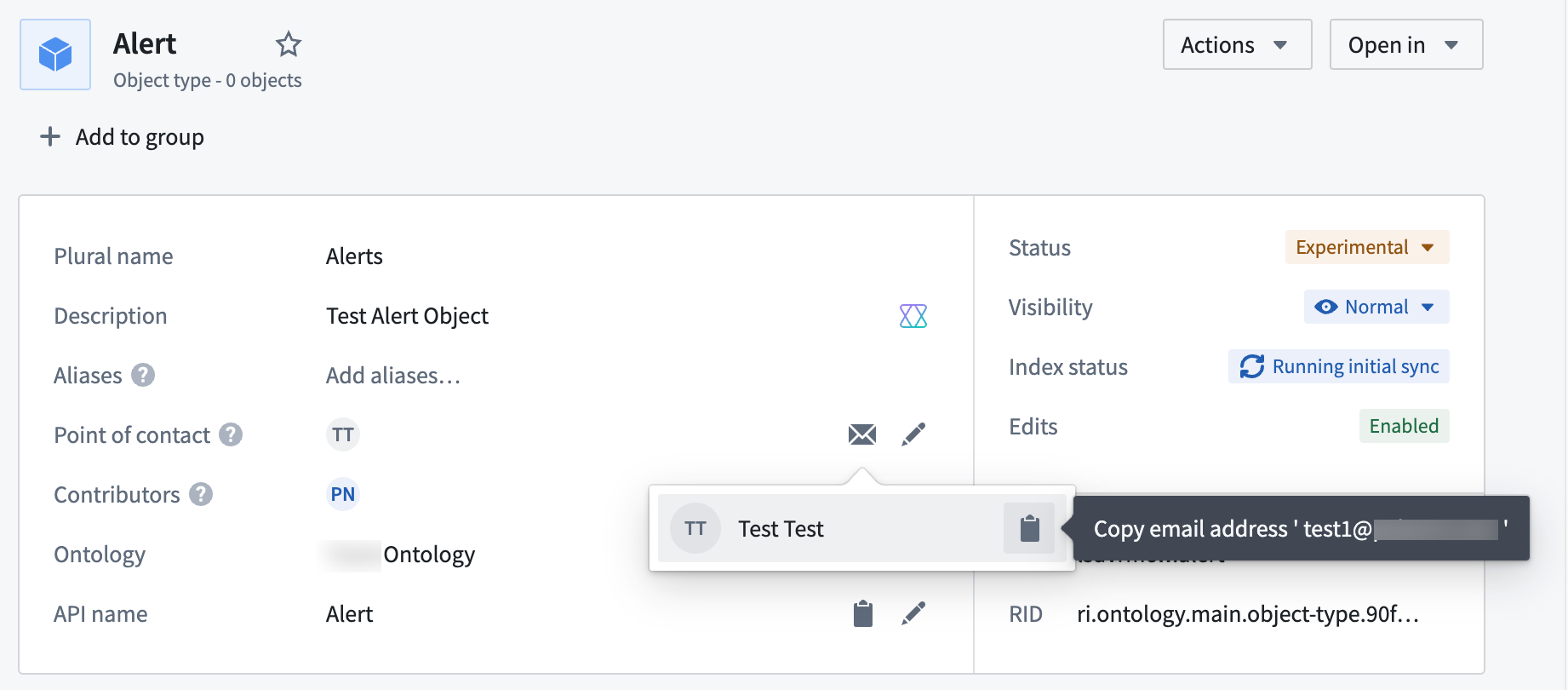
An individual point of contact is set for the Alert object type, displaying the user's name and email.
The point of contact for an object type is typically the user associated with the Project containing the object type's data source and can be either an individual user or a user group.
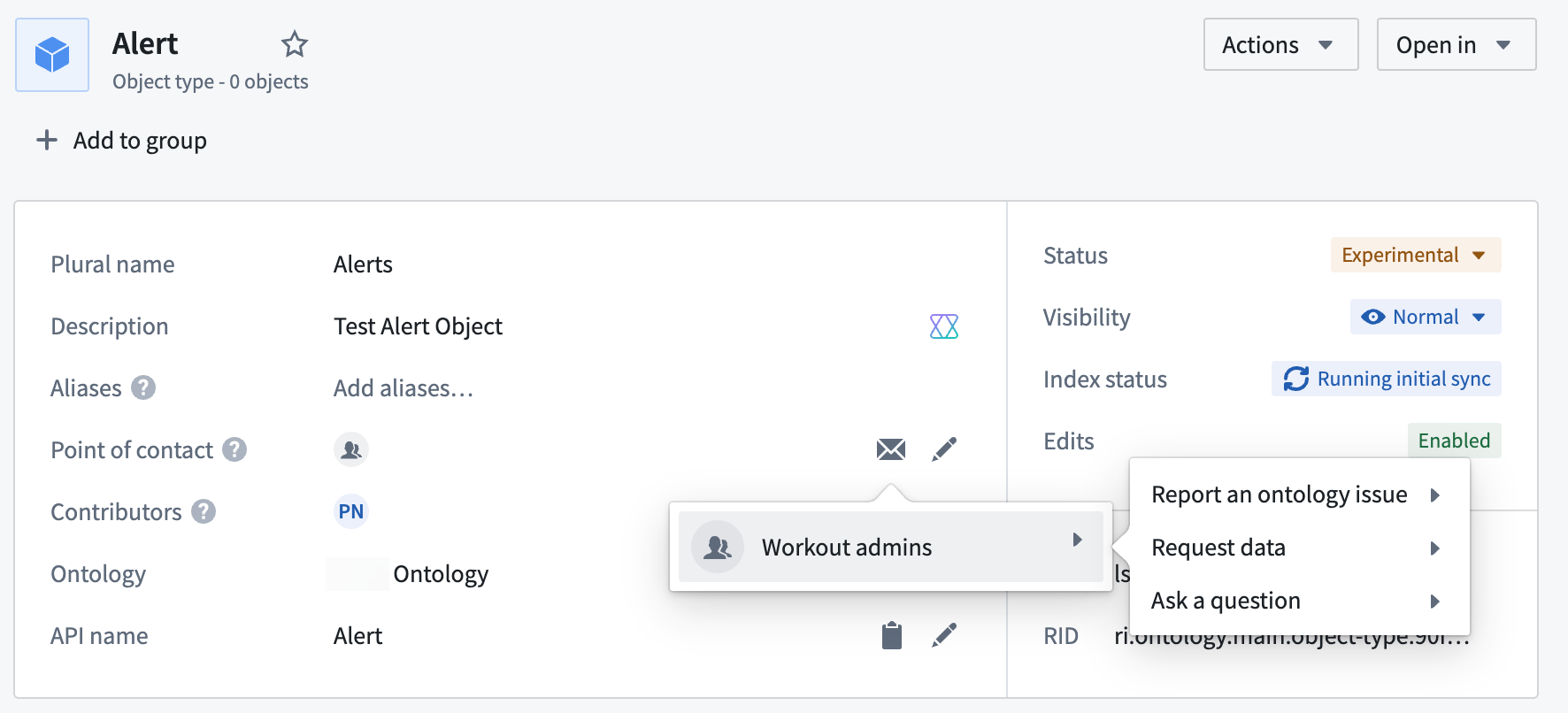
In this notional example, the Workout admins user group is assigned as the point of contact for the Alert object type.
If an object type comprises multiple data sources from multiple Projects, the object type can have multiple point of contacts (one per Project).
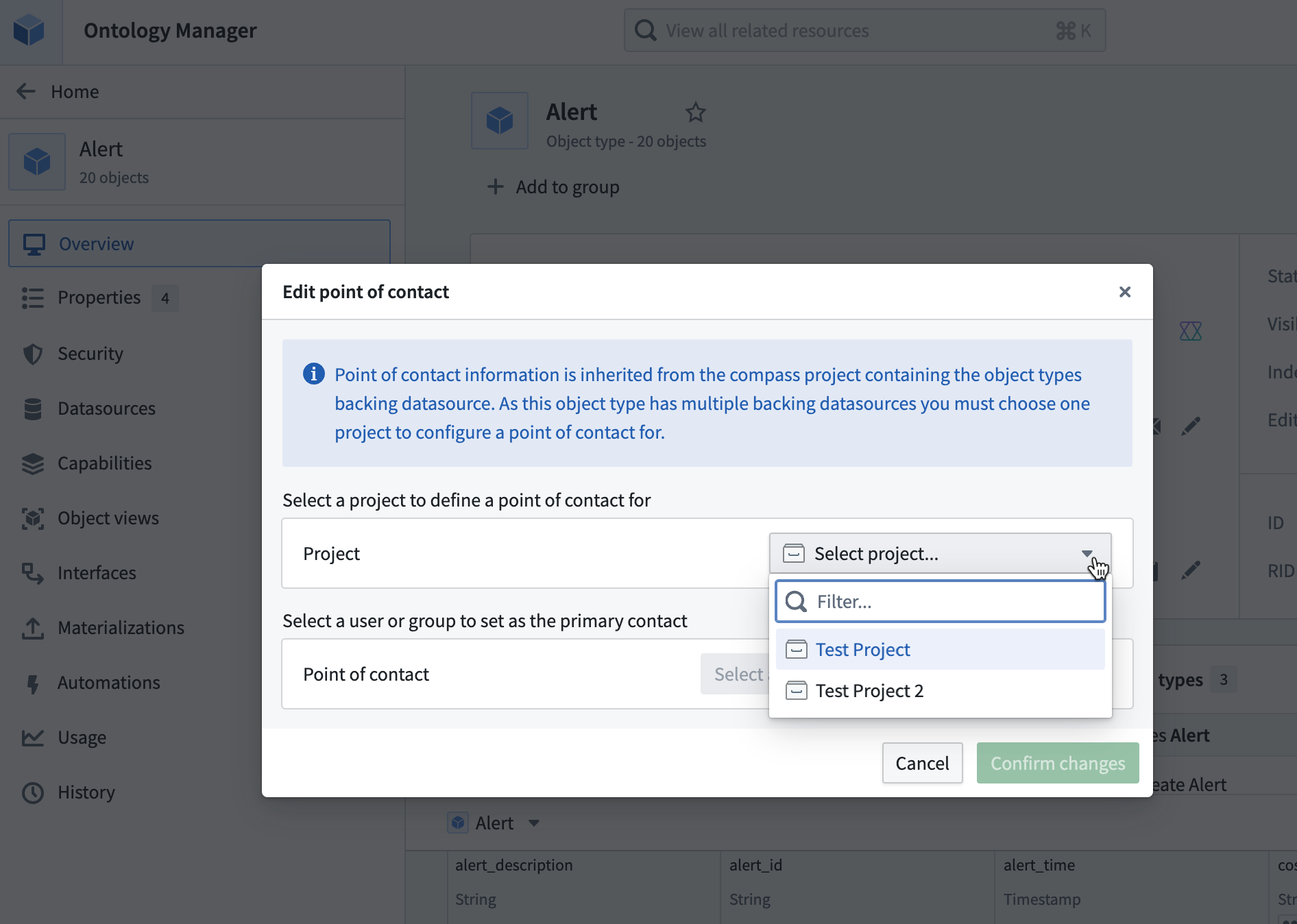
The Edit Point of Contact dialog in Ontology Manager, where you can set a primary contact for each Project that contains a data source for a given object type.
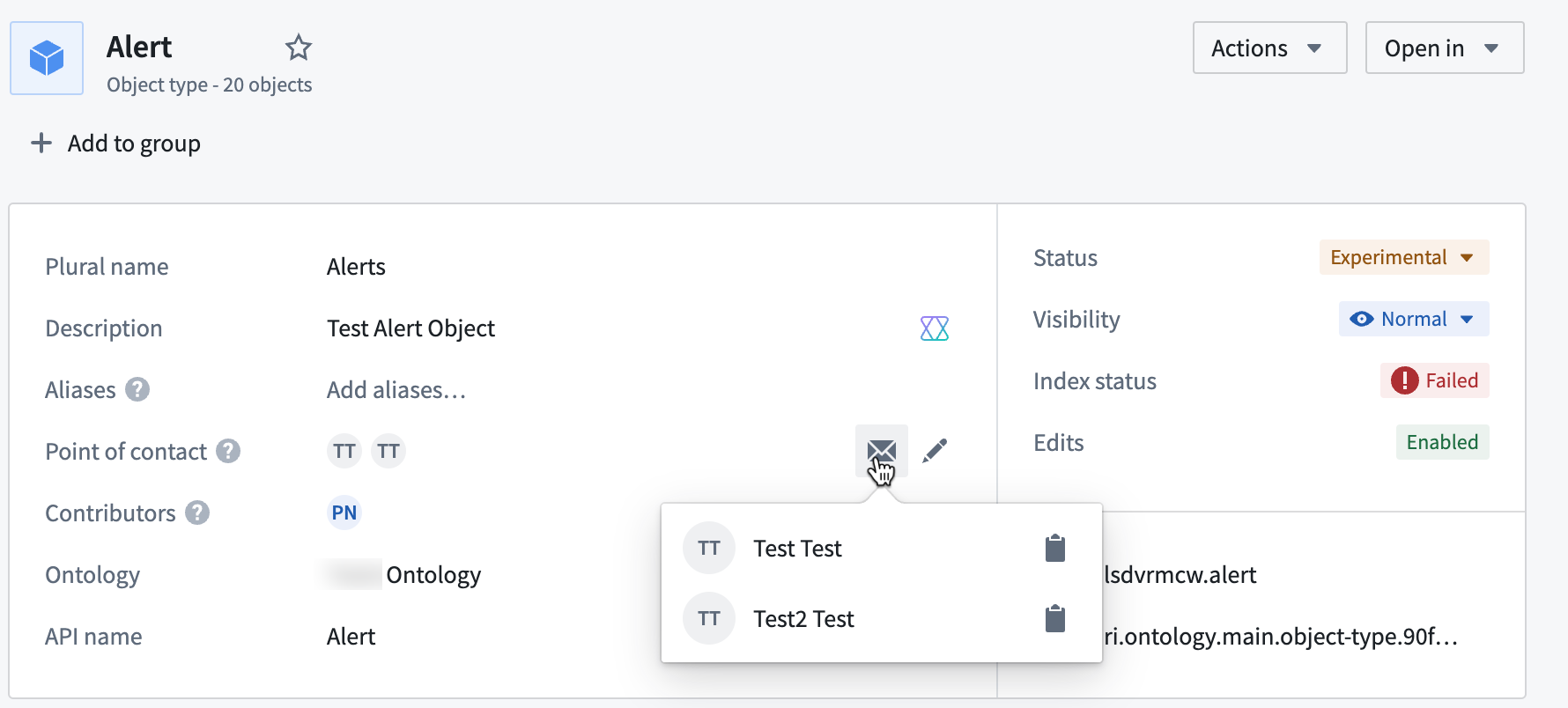
Multiple users set as points of contact for the Tree object type.
You can modify the point of contact directly within Ontology Manager, and any updates will be reflected in the corresponding Project. The assigned user(s) or group point of contact will also be automatically suggested as a reviewer for proposals or interventions that modify the object type, streamlining the review process and allowing for faster updates to your Ontology.
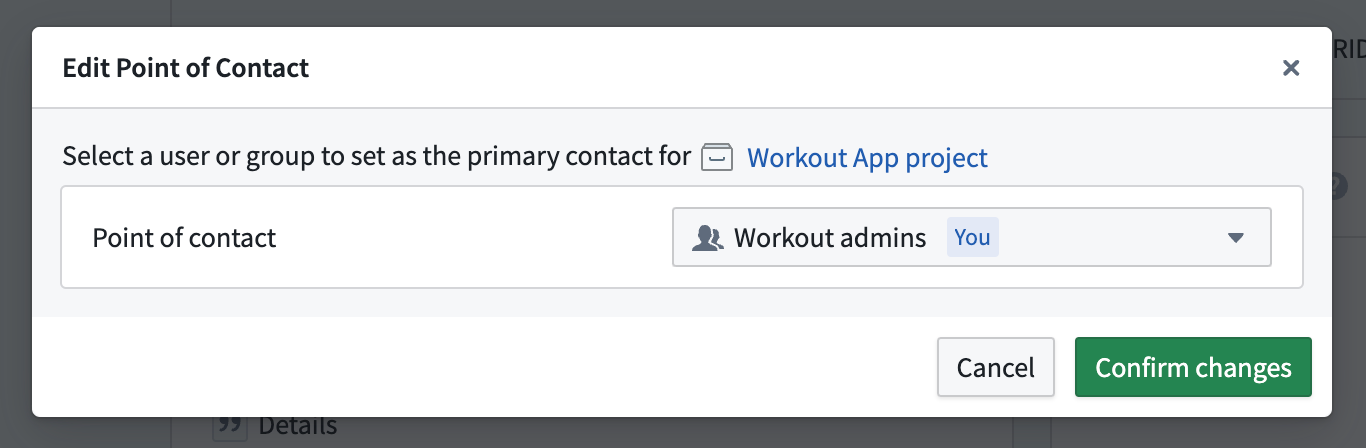
The Edit Point of Contact dialog in Ontology Manger, indicating the set point of contact group will also be the primary contact for the notional Workout App project.
Share your thoughts
We want to hear what you think about our updates in Ontology Manager. Send your feedback to our Palantir Support teams, or share in our Developer Community ↗ using the ontology-management ↗ tag.
Create interactive tutorials with Walkthroughs
Date published: 2025-03-06
Walkthroughs will be generally available the week of March 17th, enabling users to generate targeted in-platform tutorials that guide audiences through an application or workflow. With Walkthroughs, you can offer personalized, on-demand resources that improve learning experiences and meet the specific needs of your organization. Walkthroughs will be enabled by default and can be disabled for all users or a subset of users in Control Panel.
Key features
- Guidance across applications: Walkthroughs are not limited to one application; a walkthrough can guide users to complete workflows that span multiple applications on the Palantir platform.
- Customizable content: Create tailored tutorials that address use cases and workflows that are specific to your operational needs.
- Rich media integration: Enhance your tutorials with images, videos, and interactive elements.
- Progress tracking: Walkthroughs tracks progress across steps, allowing users to come back later and continue where they left off.
As part of this release, we are also introducing two new features:
- Walkthrough metrics: see how users are interacting with your walkthrough.
- Advanced Workshop integration: Highlight specific widgets in Workshop modules during a walkthrough.
Create and access walkthroughs
You can create a walkthrough in the Walkthroughs application by selecting New walkthrough in the upper right corner. To access published walkthroughs, users must have viewer permissions to the walkthrough and related resources. The Walkthroughs option will appear in the side panel when a user is viewing a resource with an associated walkthrough, allowing those users to easily access tutorials when available.
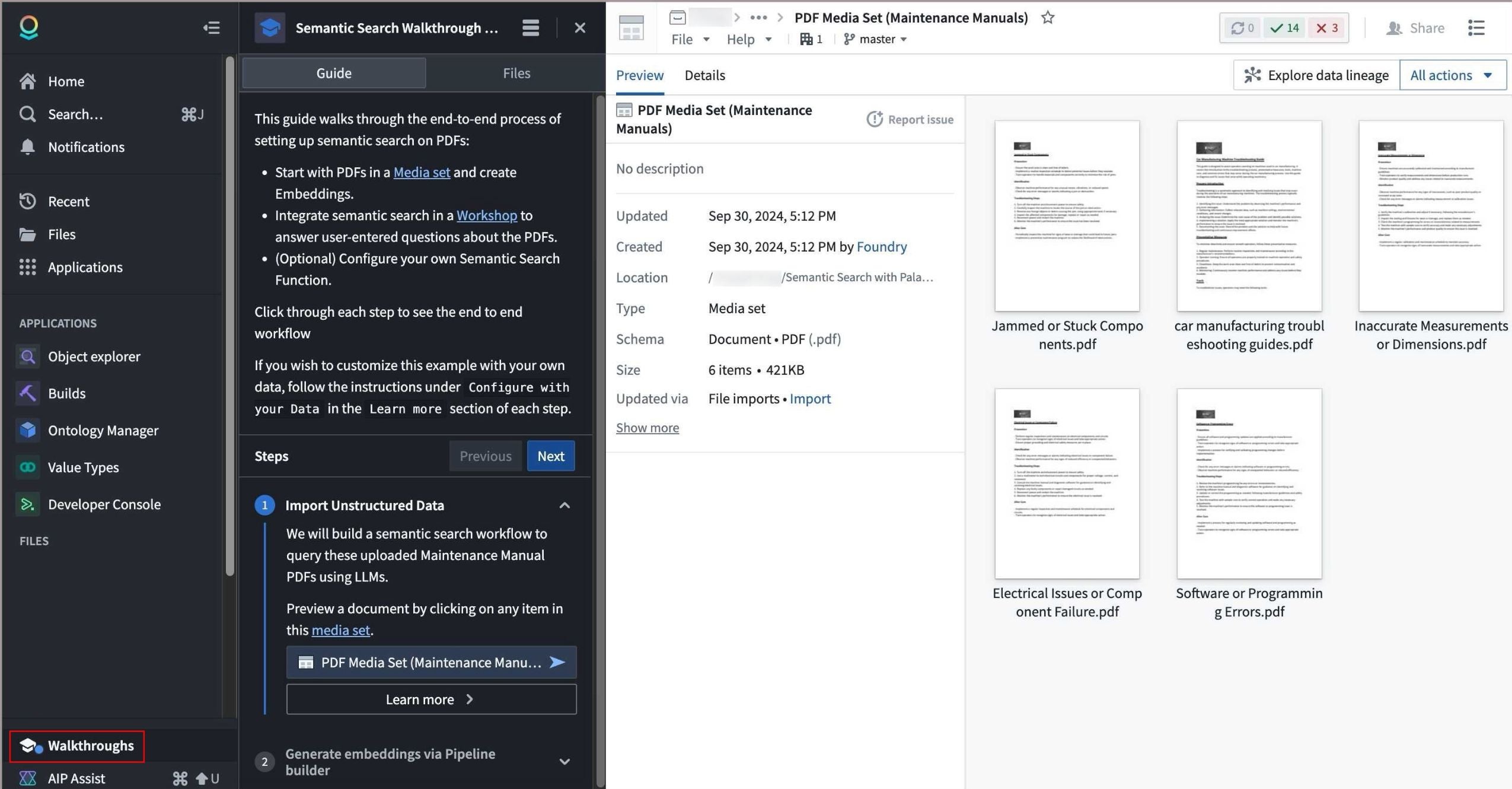
The Walkthroughs option in the workspace side panel visible when viewing a media set, and the associated tutorial on semantic search for PDFs.
Leverage walkthroughs to share knowledge across your organization and provide targeted, on-demand support for workflows and use cases, making the most of Palantir offerings.
Learn more about Walkthroughs.
Review LLM usage metrics for your workflow in Workflow Lineage
Date published: 2025-03-06
Workflow Lineage now has AIP usage metrics designed to provide deeper insights and transparency into the LLM usage of your workflow. You can view which resources are using the most tokens, how often they are getting rate limited, and more.
Model usage coloring for easy visualization
Dig deeper into your model's usage with our new model usage color legend option. There are a few types of model usage colors; for each one, you can specify whether you want to view the metrics associated with the total attempted model usage, only successful usage, or only rate-limited model usage.
- Model requests: Identify the total number of specified requests on model nodes within your Workflow Lineage. Specify whether you want to view the total number of model requests across the entire enrollment or only requests from models visible on the graph.
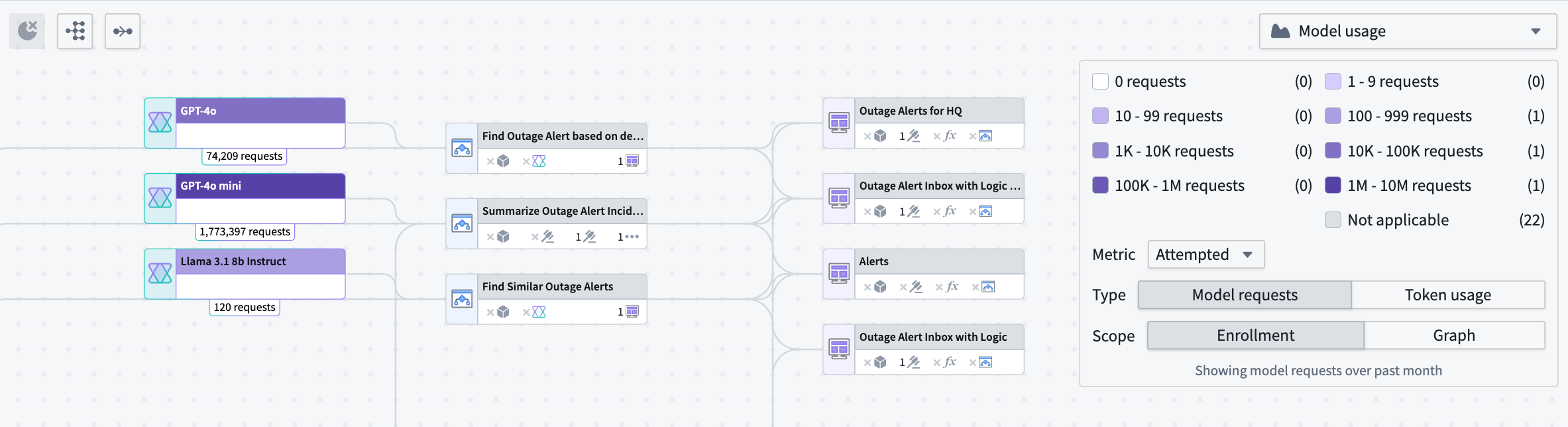
An example breakdown of the number of attempted model requests at an enrollment level for model nodes on your Workflow Lineage graph.
- Token usage coloring: Visualize the number of tokens used across Workshop applications, Automations, or third-party OSDK applications. Note that the token counts on Logic nodes reflect only the usage in the Logic application debugger.
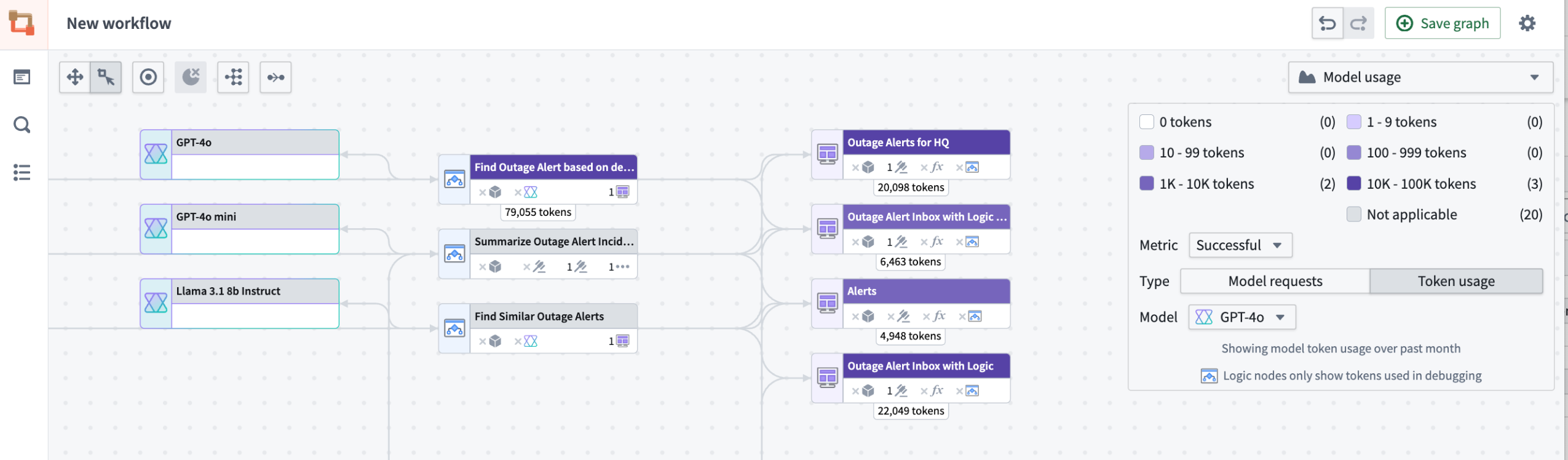
Example of the number of tokens used across Workshop applications and one Logic Function's debugger token usage.
Model usage charts to track model activity over time
Model usage charts are a powerful visualization tool that allows you to track your model's activity over time:
- Line charts: Observe token usage or model requests over time for Workshop applications, Automations, and third-party applications (Ontology SDK applications).
- Interactive graphs: Hover over the graph to view specific values for particular resources.
- Customizable filters: Use the same filters from the color legend to tailor your view in the charts panel.

You can visualize usage through a chart, with the availability to track specific token usage and model requests for particular resources.
Our new features are designed to provide you a more comprehensive understanding of your LLM usage and AI used in your workflows. Learn more about these AIP model metrics in the documentation.
Tell us what you think
As we continue to develop Workflow Lineage, we want to hear about your experiences and welcome your feedback. Share your thoughts with Palantir Support channels or our Developer Community ↗.
Configure a custom domain for your enrollment using self-service setup in Control Panel
Date published: 2025-03-06
We are happy to announce that the Palantir platform can now be accessed from your own custom domain through self-service configuration. Enrollment administrators can directly specify the domain used for the Palantir platform and manage certificates from within Control Panel.
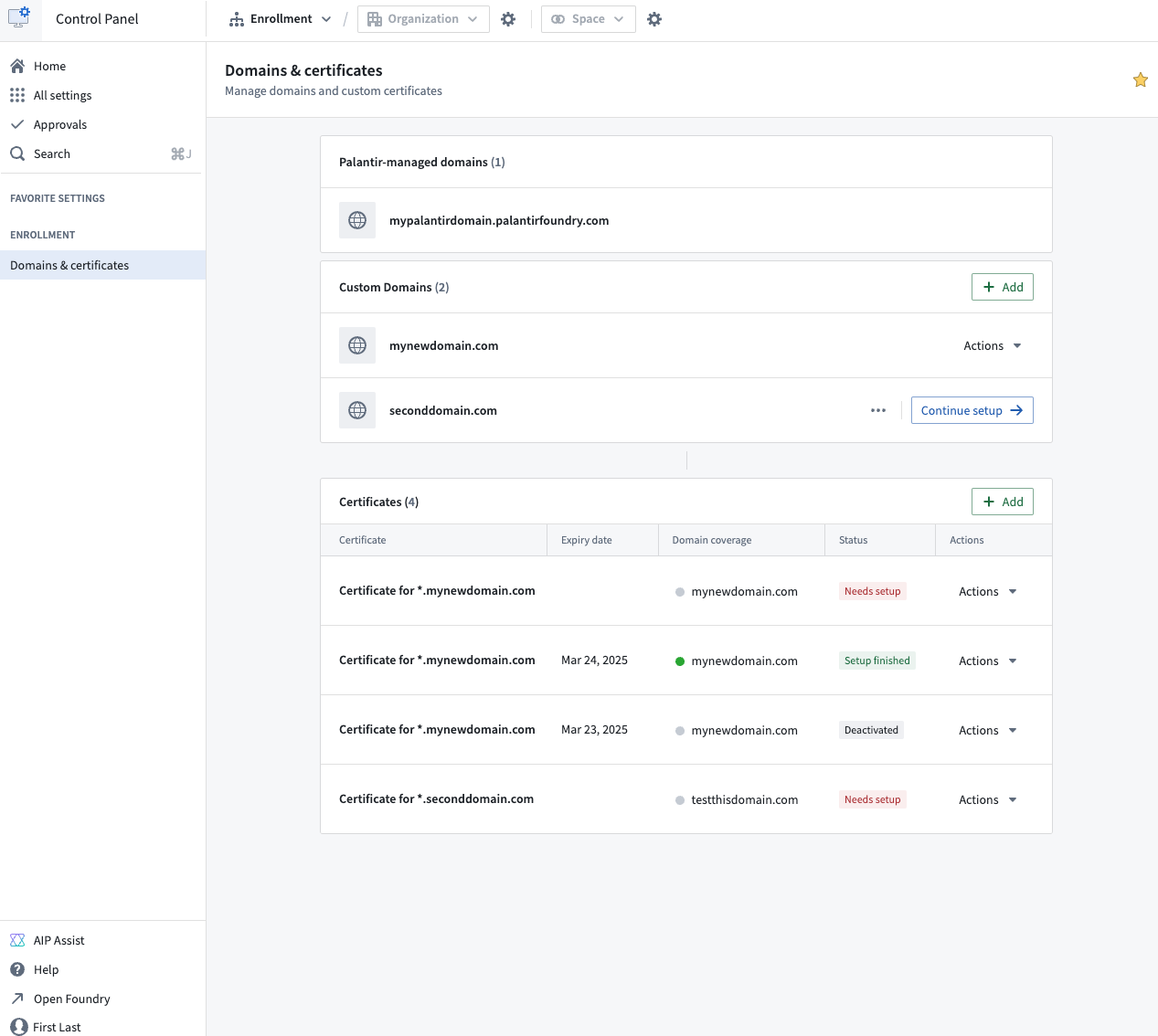
Configure your custom domain through the Domains & certificates configuration page in Control Panel.
Note that if a custom domain for your Palantir platform enrollment was set up by our team before February 2025, self-service configuration is not yet available on your enrollment. You will need to contact Palantir Support to make changes to domains or renew your certificates.
To learn more about these updates and how they can be configured, review the domains and certificates documentation.
Tell us your thoughts
We want to hear about your experiences with Control Panel and welcome your feedback. Share your thoughts with Palantir Support channels or on our Developer Community ↗ using the control-panel ↗ tag.
Choose the best model for your workflow with AIP Model Selector
Date published: 2025-03-04
AIP's new Model Selector makes it easier for you to choose and deploy the best-suited AI models for your workflows. To help guide your choice of model, the Model Selector provides comprehensive information about model performance indicators (such as model class, cost, speed, and availability) and other key metadata. The model selector is now available on all enrollments as of the week of March 3, 2025.
Model metadata to help you decide a suitable model for your use case
To enable quick selection of a model that meets your specific criteria and needs, the Model Selector provides data on each model's capabilities, context window, and training data.
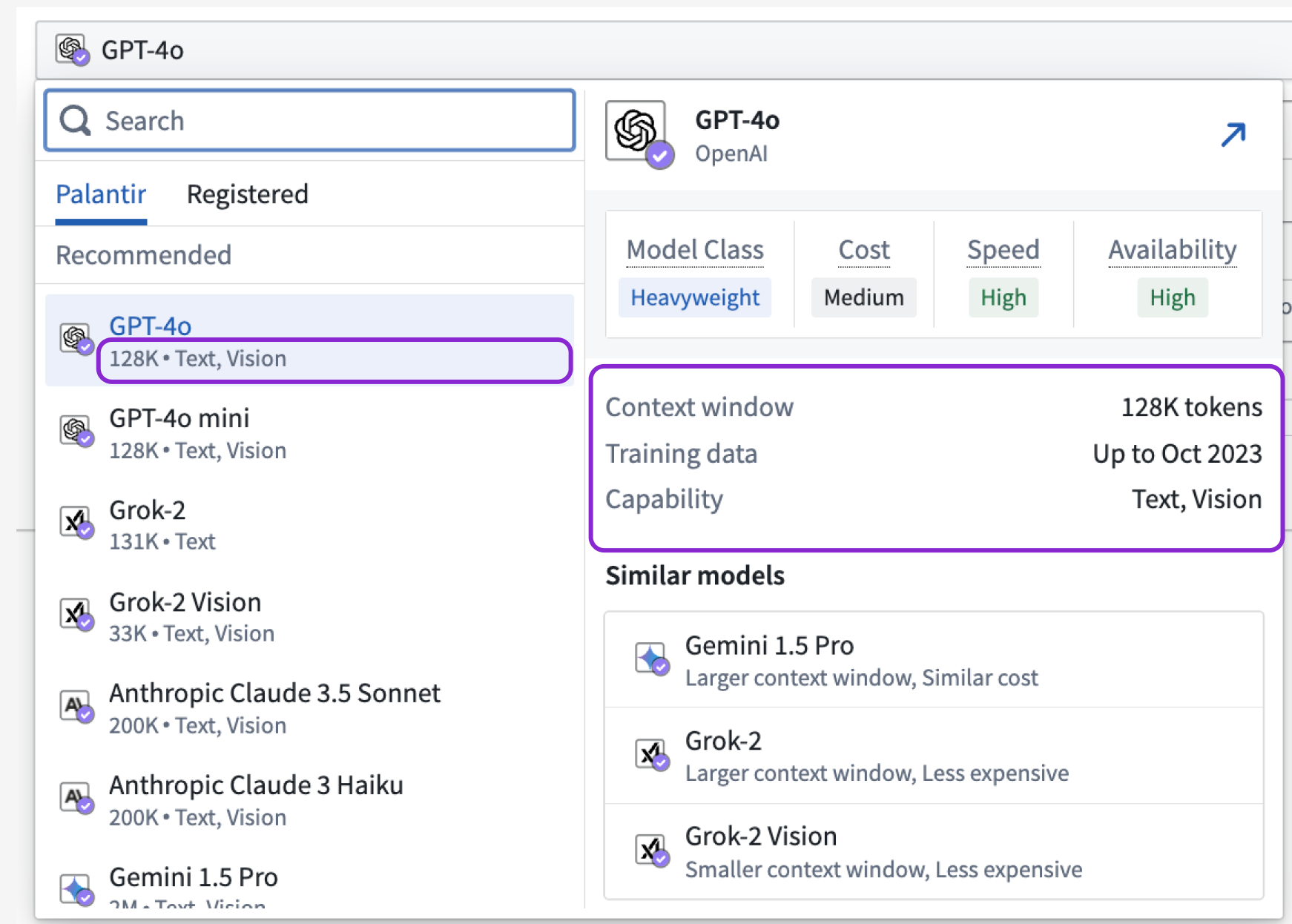
The Model Selector shows you model metadata at a glance when you hover over a LLM selection.
Model relational attributes to help you compare between available models
Model relational attributes are performance indicators designed to help you analyze and compare models in order to identify the best-suited models for your specific use cases.
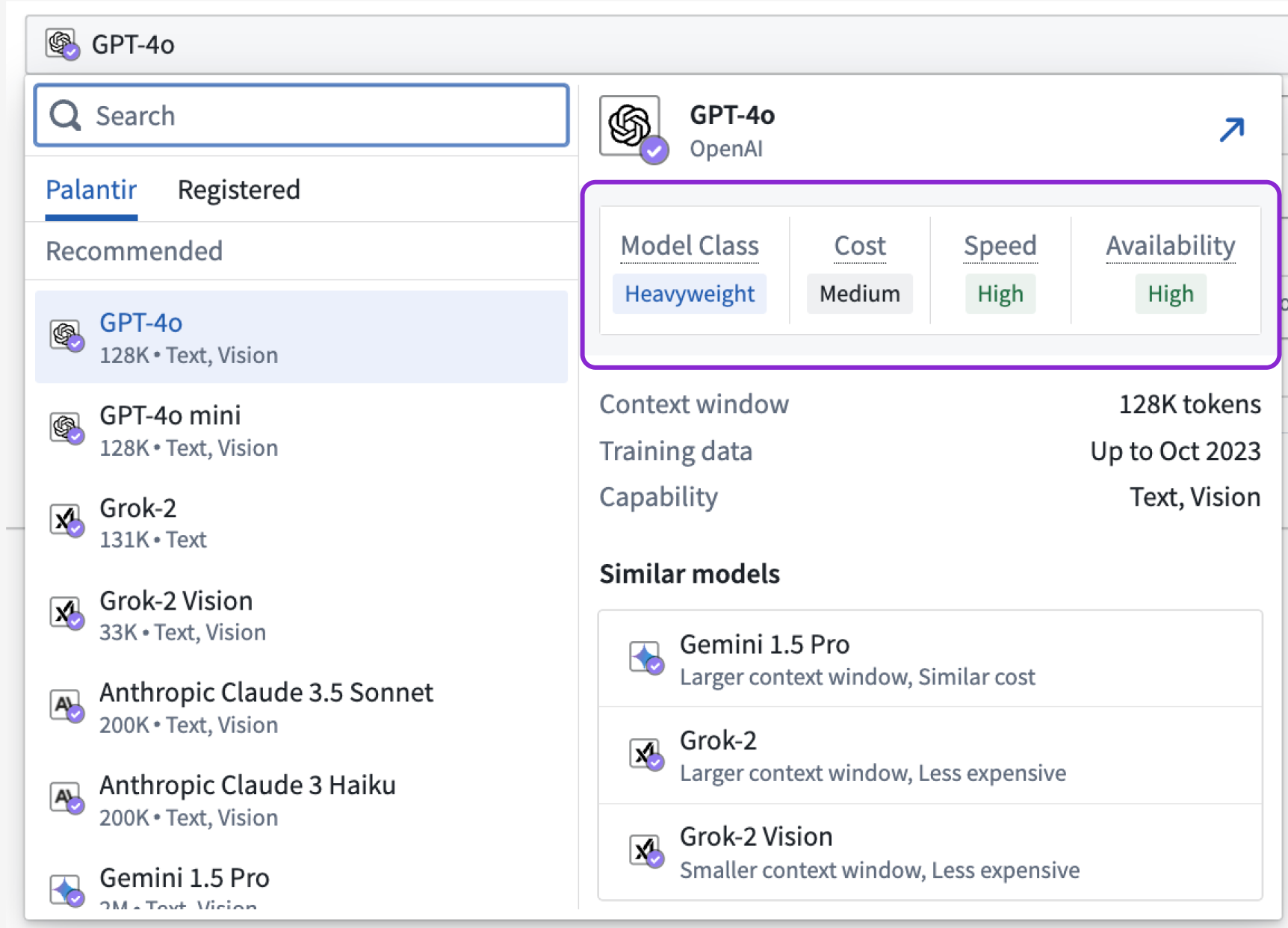
From within the Model Selector, you can view model relational attributes that help you compare between models using class, cost, speed, and availability considerations.
Model class
Each model class serves distinct purposes, balancing trade-offs between performance, resource consumption, and task complexity. A Lightweight model is typically characterized by faster and less intensive computation, making lightweight models ideal for smaller tasks. In contrast, a Heavyweight model is designed to handle complex tasks with a higher degree of accuracy and depth, at the cost of being more resource-intensive. A Reasoning model is specialized for tasks that require logical inference and decision-making capabilities, excelling in applications that demand understanding and manipulation of complex relationships and abstract concepts.
Cost
The cost attribute measures the average expense of processing input and generating output tokens. Lower-cost models will have a value of Low while more expensive models will have a value of High.
Speed
The speed attribute measures the time it takes a model on average to generate output tokens back to the user. Faster models will have a value of High while slower models will have a value of Low.
Availability
The availability attribute reflects the capacity and readiness of a model to handle requests, directly derived from its enrollment limit sizes. Availability is determined by comparing the maximum tokens per minute (TPM) and requests per minute (RPM) that each model can utilize without running into rate limits. High availability signifies that a model can consume large amounts of TPM/RPM, making it suitable for high-demand scenarios, while Low availability indicates a more limited capacity. For detailed information on each model's specific enrollment limit sizes, refer to documentation on LLM capacity management.
Similar models highlighted to provide you more options
Building on the model relational attributes, the Similar models section aggregates insights and lists models with the most similar attributes, helping you find other model options quickly.
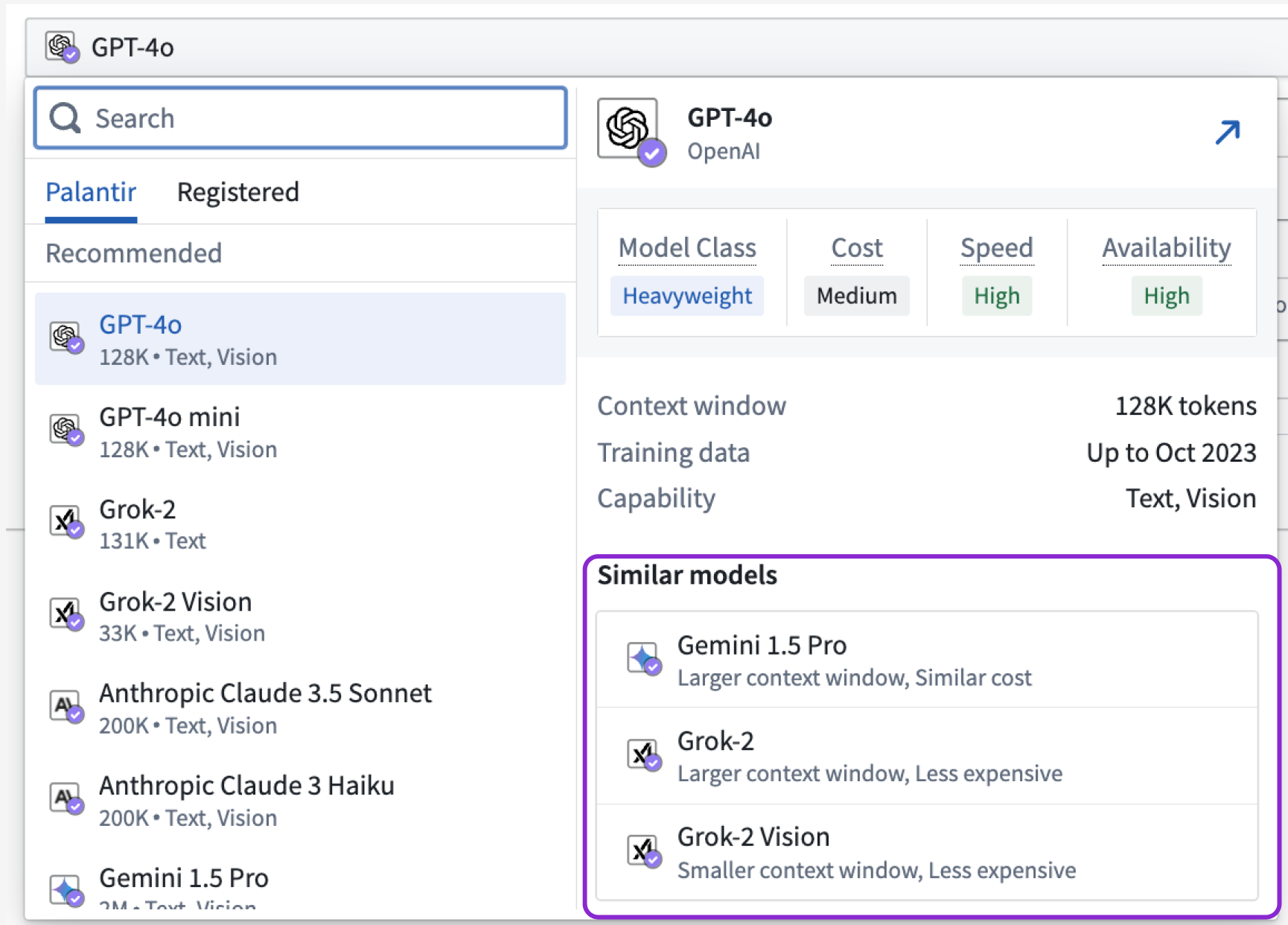
Review the Similar models section to understand what other models are within range of the attributes held by the LLM you are currently considering.
Learn more about the models available in the platform.
Let us know what you think
We want to hear about your experiences with our language model service and welcome your feedback. Share your thoughts with Palantir Support channels or on our Developer Community ↗ using the control-panel ↗ tag.
Introducing the ability to bulk update submission criteria for workflow Actions in Workflow Lineage
Date published: 2025-03-04
We are thrilled to announce a new feature in Workflow Lineage designed to streamline your action submission criteria management process. You can now bulk update the submission criteria on multiple Actions in Workflow Lineage, instead of doing so one-by-one.
Introducing a more efficient way to manage your workflow Actions
To update the submission criteria, start by selecting the Actions you wish to update within the Workflow Lineage graph. Once you have chosen the desired actions, navigate to the bottom panel and select Update submission criteria.
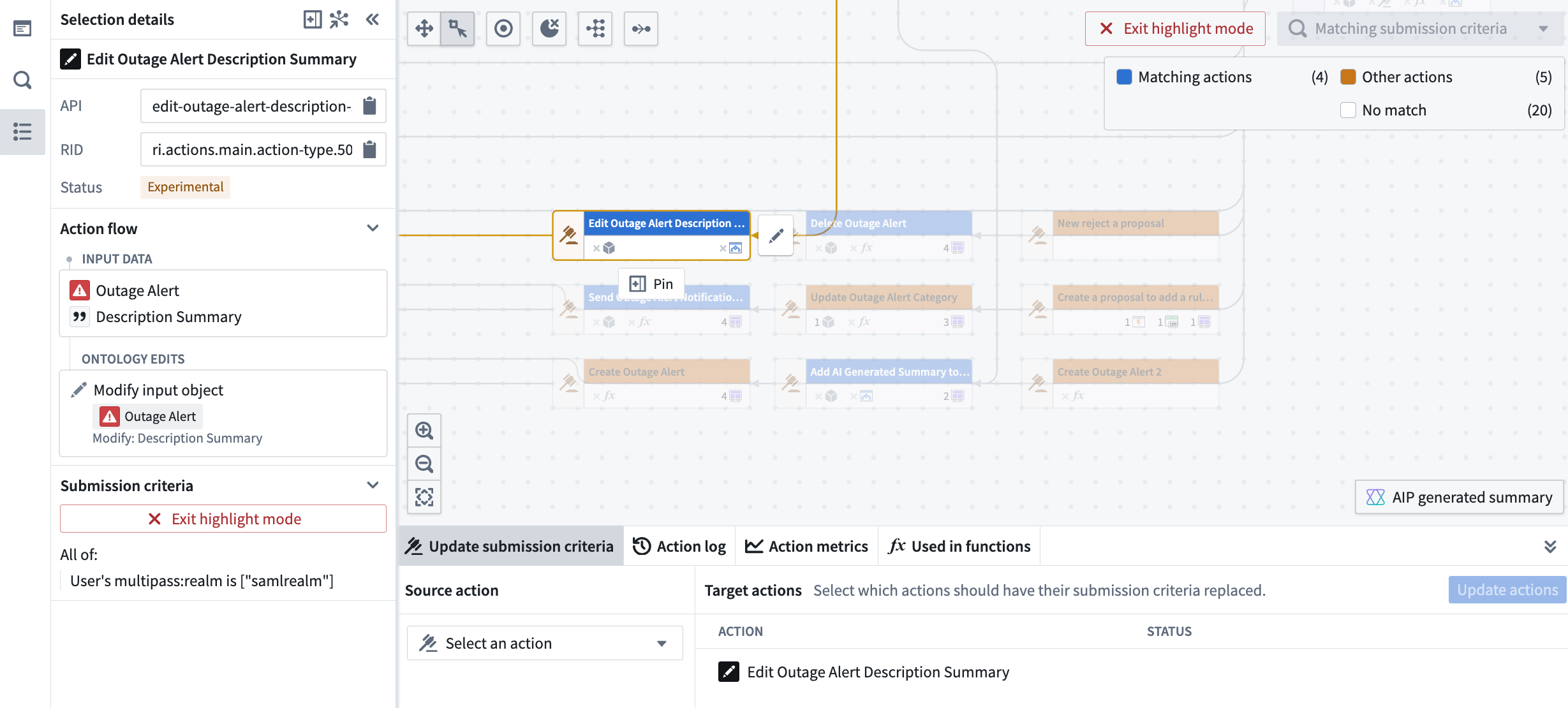
The Update submission criteria pane located at the bottom of Workflow Lineage allows you to update submission criteria for multiple Actions at once.
Here, you can choose the source Action that has the submission criteria you want to apply to the selected Actions. After reviewing the proposed updates, simply approve and submit them to ensure the changes take effect seamlessly.

Review the proposed changes to your submission criteria and then you can update them all at once.
This new feature is designed to enhance your productivity and streamline your workflow management, allowing you to focus on driving results.
Share your feedback with us
As we continue to develop Workflow Lineage, we want to hear about your experiences and welcome your feedback. Share your thoughts with Palantir Support channels or our Developer Community ↗.
中文翻译
公告
提醒: 请注册 Foundry 新闻通讯(Foundry Newsletter),即可直接在收件箱中收到关于平台新产品、功能和改进的摘要。有关如何订阅的更多信息,请参阅 Foundry 新闻通讯和产品反馈渠道公告。
欢迎在我们的开发者社区论坛 ↗分享您对这些公告的看法。
Pipeline Builder 现已支持查找和替换功能
发布日期:2025-03-27
Pipeline Builder 新增的查找和替换(find and replace)功能允许用户搜索管道图(pipeline graph)以识别节点并快速替换列。用户可按名称、描述、列、引用的参数等进行搜索。通过替换列(Replace columns)选项,用户可以替换一组、单个实例或所有实例的列名。
开始使用
使用放大镜图标访问查找(Find)功能,通过节点名称和列引用等各种参数搜索管道。您可以通过选择或取消选择特定条件来自定义搜索。
可通过左侧工具栏上的放大镜图标访问的查找(Find)选项。
通过同时替换列名的所有实例来节省更新列名的时间。替换列(Replace columns)选项可从搜索输入框旁边的下拉菜单中访问,您可以在其中输入替换词并在应用前预览更改。在此处,您可以自定义替换策略,单独或一次性替换列名。
替换列界面,显示搜索结果以及替换(Replace)和全部替换(Replace all)选项。
这些增强功能通过支持批量更新来加快任务执行并减少手动错误,从而提高了管道管理效率。更多详情,请访问文档。
您的反馈很重要
我们期待了解您使用 Pipeline Builder 的体验,欢迎您提供反馈。请通过 Palantir 支持渠道或在我们的开发者社区 ↗中使用 pipeline-builder 标签 ↗分享您的想法。
模型实验(model experiments)增强功能
发布日期:2025-03-27
我们很高兴地宣布 Palantir 平台上的实验(experiments)新增三项增强功能:MLflow ↗集成、图像记录(image logging)和平行坐标图(parallel coordinate chart)视图。
自 3 月 24 日起,我们推出了新的 MLflow ↗ 集成,允许用户在 Palantir 平台上使用 MLflow 进行模型训练指标跟踪;在实验中记录图像以更好地支持计算机视觉工作流和自定义图表;以及平行坐标图视图,帮助用户更好地理解不同参数如何影响模型性能。
MLflow 集成
palantir_models 中的实验框架现在包含与 MLflow ↗ 的一流集成。您可以在 Palantir 平台上使用 MLFlow ↗ 进行模型训练指标跟踪。MLflow 提供:
- 与众多开源机器学习框架的开箱即用集成。
- 自动记录(auto-logging)功能。
- 在 PyTorch 或 TensorFlow 等库中训练更复杂模型时可添加的回调(callbacks)。
要开始使用,请安装 MLflow,创建实验,并将其注册为当前正在进行的 MLflow 运行:
import mlflow

experiment = model_output.create_experiment("my-experiment")

with experiment.as_mlflow_run():
    # 此示例模型为 keras 模型
    model.fit(
        x_train,
        y_train,
        batch_size=32,
        epochs=5,
        validation_split=0.1,
        callbacks=[mlflow.keras.MlflowCallback()],
    )
在 as_mlflow_run 块中写入 MLflow 的任何日志都将路由到相应的实验,并可在训练作业结束时随模型版本一起发布。
图像记录
在开发计算机视觉模型时,在训练作业期间针对一组固定的验证图像测试模型非常有用。实验框架现在允许用户在运行时记录图像。这使您可以直观地了解计算机视觉模型随时间收敛的效果。
跨三个实验可视化"image-0"和"image-1"系列。
图像记录还支持将用户生成的图表作为图像记录。此功能支持创建用户认为有价值的任何类型的图表,例如 ROC 曲线、混淆矩阵等。
在五个实验中显示图像系列中存储的自定义图表。
平行坐标图
要全面了解不同参数如何影响模型训练的结果可能很困难。为了帮助用户更好地了解参数如何影响指标值,我们引入了查看平行坐标图的功能。这使用户能够更好地理解一组参数如何影响某个聚合指标值。
配置平行坐标图的输出指标。
实验的下一步计划是什么?
在接下来的几个月中,我们将继续对模型实验进行进一步增强,包括:
- 对来自 Matplotlib、Plotly 等图表库的图表记录提供一流支持。
- 更好的实验搜索和筛选功能以进行比较。
- 新的仪表板功能。
Workflow Lineage 中的批量删除对象和操作
发布日期:2025-03-25
Workflow Lineage 用户现在可以在工作流图中批量删除对象和操作。执行批量删除时,用户将能够创建提案(proposal),并查看所选对象、操作以及任何相应对象链接的详细列表。
主要功能
- 直观的选择: 在图上选择要删除的节点,然后右键单击并选择删除资源(Delete resources)。
Workflow Lineage 中的上下文菜单,包含删除资源(Delete resources)选项。
- 全面的删除提案: 启动批量删除后,系统将提示您创建提案。该提案将详细说明与待删除对象关联的链接类型数量,以及正在删除的对象和操作的总数。
批量删除后将删除的资源列表。
- 与 Ontology Manager 无缝集成: 使用 Ontology Manager 合并您的删除提案,确保您的 Ontology 保持最新和准确。
Ontology Manager 中的示例提案。
Workflow Lineage 的批量删除功能可帮助您维护有序的工作流,确保数据保持相关性和可管理性。了解有关在 Workflow Lineage 中对工作流进行更改的更多信息。
分享您的反馈
我们期待听到您对 Workflow Lineage 更新的看法。请将您的反馈发送给我们的 Palantir 支持团队,或在我们的开发者社区 ↗中分享。
代理变更历史(Agent change history)现已可用
发布日期:2025-03-25
数据连接(Data Connection)代理(agents)现在显示配置更改和重启的历史记录,提供代理操作的透明度,以便更好地诊断连接问题。代理变更历史现已以 beta 版本提供,并在所有注册(enrollment)中默认启用。
数据连接通常通过直接连接(direct connection)(无需代理)实现,但某些组织可能选择使用代理在 Foundry 和位于其网络中的数据源之间创建安全边界。为遵循适当的代理维护规范,这些组织应使用维护窗口并定期重启;然而,这些事件以前并未记录在历史记录中。因此,在调试失败的数据连接时,难以参考对代理执行的关键操作。通过代理变更历史,我们通过提供与代理健康相关的操作历史列表来解决此问题。这种对变更历史的洞察在多个用户有权访问代理的情况下尤其有用,因为您现在可以查看与每个代理事件关联的用户。
在此示例中,几位团队成员对代理的配置进行了更改。如果在代理重启时任何受管理的插件版本发生变化,我们可以查看与该更改关联的用户。
在我们的首次发布中,我们捕获代理配置更改、重启请求和成功重启。随着我们持续工作,我们预计将添加更多事件类型,以捕获与代理相关的更多种类操作。
提醒:仅当直接连接不可用时才应使用代理。
我们期待您的反馈
请通过联系我们的 Palantir 支持团队分享您对代理变更历史的反馈,或在我们的开发者社区 ↗中使用 data-connection 标签 ↗告诉我们。
VS Code Workspaces 中现已提供 Python 转换和 OSDK 的 AI 编码功能
发布日期:2025-03-25
VS Code Workspaces 现在预装了 Continue ↗ 开源扩展,并已预先配置为与 Palantir 提供的模型配合使用。Continue 提供多种 AI 代码生成功能,包括聊天(chat)↗、内联编辑(inline edits)↗、代码库索引(codebase indexing)↗、自定义上下文选择(custom context selection)↗等。
在 Palantir 平台上,Continue 已配置为了解关于 Python 转换和 TypeScript OSDK 仓库的 Palantir SDK 知识。这种对数据结构、Ontology 和组织的上下文理解使 Continue 能够生成更准确和相关的代码。
Python 转换仓库
在 Python 转换仓库中,Continue 了解您的数据集元数据以及 Python 转换 SDK。
在 VS Code Workspaces 中使用 Continue 生成 Python 转换。
TypeScript OSDK 仓库
在 TypeScript OSDK 仓库中,Continue 拥有 OSDK 的完整上下文,包括 Ontology 对象、属性、链接、操作和导入的函数。
在 VS Code Workspaces 中使用 Continue 编辑 TypeScript OSDK 应用程序。
您的反馈很重要
您的见解对于帮助我们了解如何改进 VS Code Workspaces 至关重要。请通过 Palantir 支持渠道和我们的开发者社区 ↗使用 vscode 标签 ↗分享您的反馈。
管理视图(admin view)中可操作资源的性能改进和支持
发布日期:2025-03-25
管理视图现在支持单个资源查看、分配和状态设置。此更改伴随着新的管理视图性能改进,可更快地导航资源和干预统计信息。
维护操作员可以通过升级助手(Upgrade Assistant)主页中的管理视图(Admin view)切换开关访问新功能,并导航到所需的干预。在那里,维护操作员可以浏览按组织划分的资源面板,从而进入可操作资源表。
示例干预的新管理视图。
通过我们在优化性能方面的工作,管理视图中资源的加载现在应该显著加快,为 Palantir 平台上的维护操作员简化工作流。
新的和改进的派生序列(derived series)创建和管理功能现已可用
发布日期:2025-03-20
我们很高兴地宣布派生序列(derived series)的多种功能:时间序列目录(Time Series Catalog)中的新发现空间、新的派生序列类型、简化的创建流程以及 Workshop 小部件。
什么是派生序列?
派生序列允许您保存和复制应用于 Ontology 中时间序列的计算和转换。一旦进入 Ontology,派生序列的行为与任何其他时间序列属性类似,但按需计算,无需管理或存储派生数据或在平台上重复这些计算。
时间序列目录
最近发布的时间序列目录(Time Series Catalog)作为多种时间序列资源类型(包括派生序列)的启动页面和主页。时间序列目录允许您在无代码环境中创建新的时间序列,并在 Ontology 中管理派生序列。
时间序列目录。导航到派生序列(Derived Series)选项卡以查看所有可用的派生序列。
单一派生序列
通过我们新的时间序列目录,您现在可以配置单一派生序列(single derived series),以及模板化派生序列(templated derived series)。单一派生序列允许您创建不受所有输入来自一个对象约束的逻辑。相反,单一派生序列不是模板化的,可以在多个对象上操作。您还可以选择为单一派生序列启用自动 Ontology 保存(automatic Ontology saving),而不是手动保存,从而轻松管理派生序列。
简化的创建流程
以前,您必须从 Quiver 分析创建派生序列。使用 Quiver 可以将某些时间序列分析的结果提升为派生序列。然而,由于可用操作数量庞大,很容易在 Quiver 中构建派生序列实际上不支持的逻辑。
现在,您可以从时间序列目录访问新的简化创建流程。此流程引导您完成整个创建过程,从选择要创建的派生序列类型的第一步开始。
时间序列目录中派生序列创建流程的第一步,允许您选择派生序列类型。
选择类型后,您将进入时间序列逻辑编辑视图。在此处,只有派生序列支持的操作可用于您的时间序列数据。
派生序列 Workshop 小部件
最后,我们很高兴地宣布 Workshop 中的派生序列小部件(Derived Series widget)。使用此小部件,您可以嵌入属于某个对象类型的派生序列的创建和管理详情及功能,然后在 Workshop 模块中使用该小部件。
派生序列小部件提供了一个用户友好的平台来管理派生序列,专注于构建时间序列逻辑。使用派生序列小部件,用户可以查看派生序列管理选项的简化版本,而不是标准创建流程中使用的高级配置。
Workshop 中的派生序列小部件,显示 Machine 对象类型的模板化派生序列详情。
分享您的反馈
我们期待听到您对派生序列和时间序列目录更新的看法。请将您的反馈发送给我们的 Palantir 支持团队,或在我们的开发者社区 ↗中使用 time-series ↗标签分享。
Pipeline Builder 中现已提供注册级别分支保护(Enrollment-level branch protection)
发布日期:2025-03-20
管理员现在可以为注册中所有新 Pipeline Builder 管道的 Main 分支启用默认分支保护。分支保护通过要求在对受保护分支进行任何更改之前批准提案,增强了管道的安全性和完整性。
启用默认分支保护
要为 Main 分支默认启用分支保护,请导航到控制面板(Control Panel)并访问 Pipeline Builder 设置。然后,切换为新管道默认启用分支保护(Enable branch protection by default for new pipelines)选项。这将使新管道上的 Main 分支成为受保护分支,因此在合并更改之前需要提案。
控制面板中启用默认分支保护的选项。
请注意,启用注册级别分支保护不会影响现有管道。要更改现有管道的分支保护设置,或将新分支标记为受保护,请参阅关于如何保护分支的文档。
了解有关 Pipeline Builder 中受保护分支的更多信息。
在 Workflow Lineage 中批量发布 Workshop 模块
发布日期:2025-03-20
我们很高兴地宣布,您现在可以在 Workflow Lineage 中批量发布 Workshop 模块。此功能允许您一次发布多个 Workshop 模块,通过无需单独更新每个模块来简化工作流并节省时间。
开始使用
使用批量发布功能,您可以同时发布不会自动发布最新版本的 Workshop 模块的更新。要开始使用,请导航到 Workflow Lineage,选择要发布的 Workshop 节点,右键单击,然后从上下文菜单中选择发布(Publish)。
启动批量发布后,将显示一个对话框,其中包含您的 Workshop 模块的状态,并带有以下标签:
- 已发布最新版本(Latest published): 表示 Workshop 应用程序设置为自动发布最新版本。
- 已发布(Published): 表示即使 Workshop 应用程序未配置为自动更新,它当前也持有最新版本。
Workflow Lineage 中的发布 Workshop 模块(Publish Workshop modules)对话框,显示已发布最新版本(Latest published)和已发布(Published)标签。
未标记这些标签的 Workshop 模块尚未发布最新的可用版本,并且将有资格在批量发布对话框中选择。然后,您可以选择发布实体(Publish entities)来发布所选 Workshop 模块的最新版本。
与函数更新的无缝集成
除了发布 Workshop 模块的最新可用版本外,您还可以更新模块中的函数(Functions)并直接从 Workflow Lineage 发布这些模块。更新函数后,选择继续发布(Continue to publish)以打开发布 Workshop 模块对话框,您可以在其中选择发布实体(Publish entities)来批量发布您选择的 Workshop 模块。
升级 Workshop 模块中的函数(Upgrade functions in Workshop modules)对话框,包含继续发布(Continue to publish)选项。
利用 Workflow Lineage 中批量发布的便利性和效率,使您的 Workshop 模块保持最新。识别包含未发布版本的模块,同时发布多个模块,并根据需要更新函数——所有这些都在一个集中位置完成。
了解有关在 Workflow Lineage 中批量发布 Workshop 模块的更多信息。
在时间序列目录应用程序中发现时间序列功能
发布日期:2025-03-13
时间序列目录(Time Series Catalog)本周在所有注册中可用,是您在 Palantir 平台上创建、管理和发现时间序列的起点和主页。时间序列是一段时间内的数据点序列,可以帮助您了解特定用例的趋势和模式。时间序列目录旨在促进您处理时间序列同步(time series syncs)、时间序列对象类型(time series object types)和派生序列(derived series)的工作。
从时间序列目录中,您可以查看最近访问的时间序列同步和派生序列、您保存的"收藏"时间序列同步和派生序列,以及"查看次数最多"的时间序列对象类型。导航到每个资源类型关联的选项卡以探索该类型的所有资源。
关于可在时间序列目录中探索的现有资源类型的提醒
您可以使用改进后的时间序列目录查看以下现有资源类型:
时间序列同步
时间序列同步存储与多个时间序列关联的时间-值对,由 seriesIds 标识。您可以直接通过代码或在无代码应用程序(如时间序列同步资源查看器或 Quiver)中访问时间序列同步。
时间序列同步由数据集或流支持,需要映射三列:序列标识符、时间和值。
时间序列对象类型
时间序列对象类型是通过时间序列属性启用时间序列功能的对象类型。在消费 Ontology 对象的应用程序中,时间序列属性值显示为图表。时间序列属性的支持数据源是时间序列同步。
派生序列
派生序列使用户能够保存和复制应用于 Ontology 对象内时间序列的计算和转换。这些派生序列作为 Foundry 资源存储,允许进一步管理,例如更新时间序列逻辑并将派生序列保存到 Ontology 对象。一旦集成到 Ontology 中,派生序列的功能类似于原始时间序列,但按需计算。
派生序列使您能够保存和复制应用于 Ontology 对象内时间序列的计算和转换。
推出适用于 Python 转换的 Palantir Visual Studio Code 扩展
发布日期:2025-03-13
我们很高兴地宣布,您现在可以在自己的 Visual Studio Code 实例中本地开发 Python 转换。此功能适用于所有已通过控制面板(Control Panel)获得权限的用户。Palantir 扩展桥接了 VS Code 和 Foundry,允许您在 VS Code 中原生执行和使用 Python 转换操作(如转换预览、调试和库面板)。
本地 VS Code 实例中的 Palantir Visual Studio Code 扩展。
扩展功能
- 预览您的 Python 转换直接从本地 Visual Studio Code 环境进行。此外,Palantir Visual Studio Code 扩展支持完整数据集(无样本预览),因此您可以使用完整数据集进行预览,不会丢失任何精度。注意:要在本地运行预览,您需要让平台管理员通过控制面板(Control Panel)启用本地预览。
- 启动构建(build)直接从您自己的代码编辑器中进行。
- 调试代码并直接从编辑器运行测试。
- 利用库面板(library panel)添加库。
- 使用 Palantir 最新的高性能环境管理工具快速高效地设置 Python 环境。
开始使用
要开始使用 Palantir Visual Studio Code 扩展,请在代码仓库(Code Repositories)应用程序中打开您的转换仓库。然后,选择屏幕右上角 VS Code 按钮旁边的设置图标。选择本地 VS Code(Local VS Code)以更改默认按钮语言。选择更新后的本地 VS Code 按钮,并按照弹出窗口中的说明下载扩展。
注意:您只需下载扩展一次。
代码仓库中的VS Code按钮,包含配置按钮以在本地 VS Code(Local VS Code)中打开的选项。
当前限制
- Palantir Visual Studio Code 扩展尚未在 Visual Studio Code Marketplace 中列出。目前仅可通过 Palantir 平台下载。
- 由于这是一项新功能,某些转换预览组件仍在开发中。我们持续努力改进对这些组件的支持。有关更多信息,请查阅我们的文档。
您的反馈很重要
您的见解对于帮助我们了解此扩展如何影响您的工作流以及我们应该集中精力进行改进的领域至关重要。请通过 Palantir 支持渠道和我们的开发者社区 ↗论坛使用 vscode ↗ 标签分享您的反馈。
将 AIP 代理(AIP Agents)发布为函数(Functions)以增强平台集成
发布日期:2025-03-13
注意: 自 2026 年 4 月 27 日起,AIP Agent Studio 已更名为 AIP Chatbot Studio。所有现有功能保持不变。
AIP 代理现在可以发布为函数(Functions),允许它们在平台上任何可以执行函数的地方使用。通过将代理作为函数,构建者可以在 AIP Evals 中评估代理,使用 Automate 自动化代理工作流,以及在代码仓库(Code Repositories)中使用代理等。这还允许在 AIP Agent Studio 中使用代理函数,使代理能够调用其他代理作为工具。
将代理发布为函数
要将代理发布为函数,请选择 Agent Studio 中发布(Publish)选项右侧的发布设置图标。这将打开发布设置(Publish settings)对话框,您可以在其中启用或禁用函数发布、命名函数以及配置版本设置。
AIP Agent Studio 中发布(Publish)按钮旁边的发布设置。
使用 AIP Evals 评估代理
一旦代理被发布为函数,您可以使用 AIP Evals 评估代理性能并迭代改进结果。使用 AIP Evals,您可以定义代理性能的测试用例和评估标准,以及比较不同模型的性能。这些评估可以帮助建立对您的 AIP 代理的信心。
AIP Agent Studio 中的创建评估套件(Create evaluation suite)选项。
现在可以直接从 Agent Studio 左侧工具栏的评估(Evaluation)选项卡创建评估套件,从而实现从代理创建到评估的连续工作流。
利用此新功能增强代理的多功能性,并促进无缝集成到广泛的工作流中。通过 Evals 中的代理评估,您可以自信地在生产环境中部署代理,并根据运营需求定制代理使用。
向 AIP 引入新的 LLM
发布日期:2025-03-13
新的语言大模型(LLMs)已添加到 Palantir 平台的语言模型服务(Language Modeling Service)中,使 AIP 注册能够访问一些最新和最强大的模型,以满足您的用例需求。
新的 Anthropic 模型
- Claude 3.7 Sonnet
- Claude 3.5 Haiku
- Claude 3.5 Sonnet v2
要了解有关这些模型的更多信息,请访问 AWS 官方网站 ↗。
新的 Google Gemini 模型
- Gemini Flash 2.0
要了解有关这些模型的更多信息,请访问 Google 官方网站 ↗。
新的 Azure OpenAI 模型
- o1-preview
- o1-mini
要了解有关这些模型的更多信息,请访问 Microsoft Azure 官方网站 ↗。
新的开源 Palantir 托管模型
- Llama3.3 70B
要了解有关这些模型的更多信息,请访问 Hugging Face 官方网站 ↗。
适用于每个用例的更高效率模型
这些新版本在多模态和自然语言处理方面实现了重大飞跃,使团队能够通过增强的基于视觉的解析、实体提取、摘要和语义分块来处理更复杂的文档工作流。这些模型在推理和自然语言理解方面包含实质性改进,支持大上下文窗口,与当今使用的许多模型相比,可以用更少的调用处理大量数据。用户可以在体验用例改进的同时,受益于更高的准确性、可扩展性、效率和速度。
| 模型名称 | 上下文窗口 | 输入令牌成本(每百万令牌美元价格) | 输出令牌成本(每百万令牌美元价格) | 能力 | 最新训练数据日期 |
|---|---|---|---|---|---|
| Claude 3.7 Sonnet | 200k 令牌 | $3 | $15 | 文本、视觉 | 2024 年 11 月 |
| Claude 3.5 Haiku | 200k 令牌 | $0.80 | $4 | 文本 | 2024 年 7 月 |
| Claude 3.5 Sonnet v2 | 200k 令牌 | $3 | $15 | 文本、视觉 | 2024 年 4 月 |
| Gemini 2.0 Flash | 1M 令牌 | $0.10 | $0.40 | 文本、视觉 | 2024 年 6 月 |
| o1-preview | 128k 令牌 | $15 | $60 | 文本、视觉 | 2023 年 10 月 |
| o1-mini | 128k 令牌 | $1.10 | $4.40 | 文本、视觉 | 2023 年 10 月 |
| Llama3.3 70B | 128k 令牌 | $0.23 | $0.40 | 文本 | 2023 年 12 月 |
按地区划分的模型可用性
每个新支持的模型默认在全局或非地理限制的注册中可用。此外,这些模型可以服务来自部分地理限制区域的请求。有关地理限制的更多详细信息,请查看我们的文档。
| 模型 | 美国 | 欧盟 | 英国 |