Announcements(公告)
REMINDER: Sign up for the Foundry Newsletter to receive a summary of new products, features, and improvements across the platform directly to your inbox. For more information on how to subscribe, see the Foundry Newsletter and Product Feedback channels announcement.
Share your thoughts about these announcements in our Developer Community Forum ↗.
Access the most relevant Workshop modules directly from the new Workflow Lineage landing page
Date published: 2025-06-26
An improved experience is now available when creating new or empty graphs in Workflow Lineage. In addition to using the keyboard shortcuts Cmd + i (macOS) or Ctrl + i (Windows) from a Workshop module, function repository, or, newly, an ontology object to jump into Workflow Lineage, there is now another convenient way to select the most relevant Workshop modules directly from the application. From Workflow Lineage's landing page, you can now see a list of the most recent or the most viewed Workshop modules.
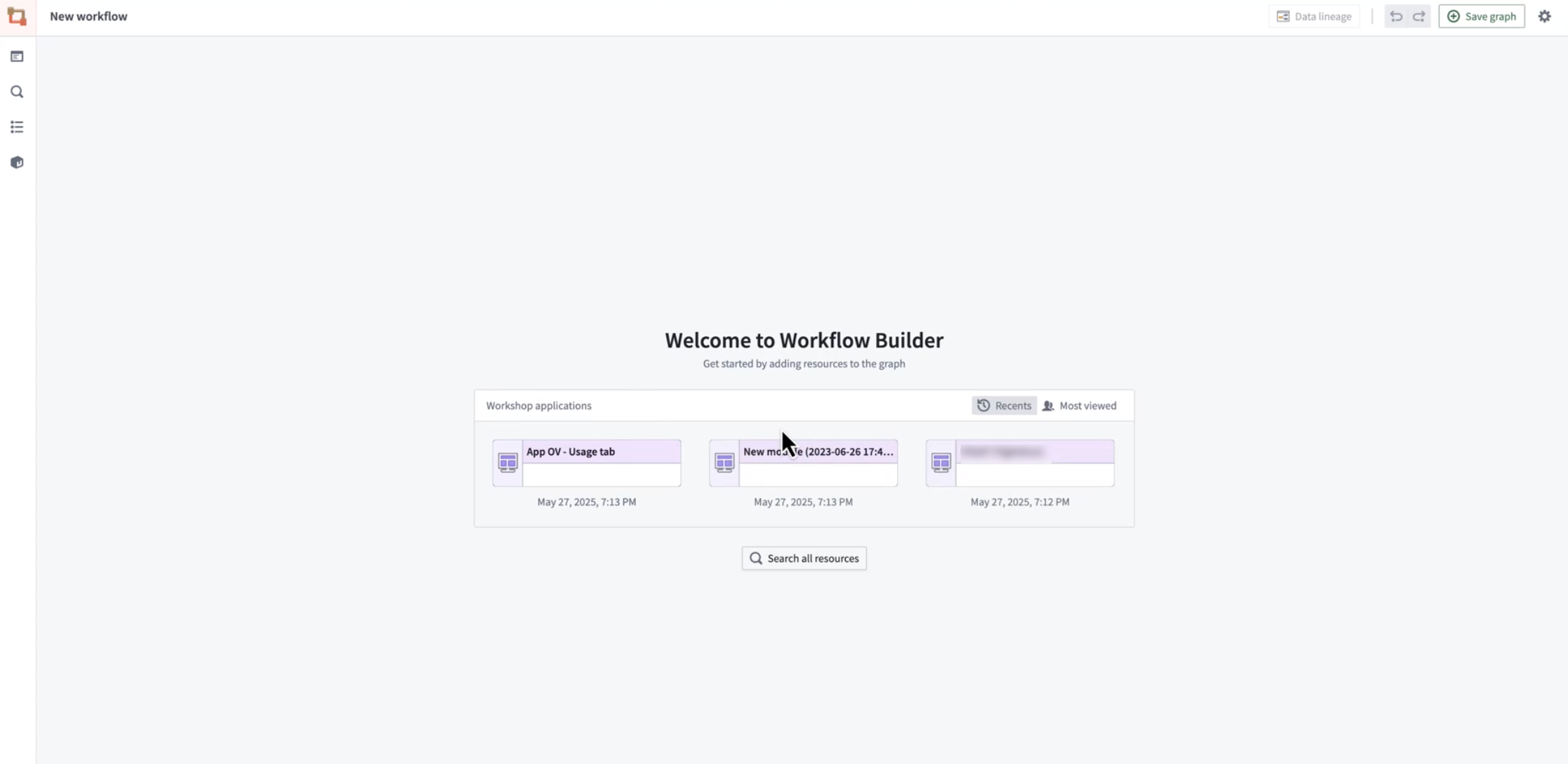
You can now access the most relevant Workshop modules directly from the new Workflow Lineage landing page.
What’s New?
When you open a new or empty graph, you will now see:
- The most recent Workshop applications: Quickly access the most recently opened Workshop applications in your workspace.
- The most viewed Workshop applications: Instantly discover the most popular and impactful workflows being used by your team. This option shows the most viewed Workshop applications in the last 30 days by all users.
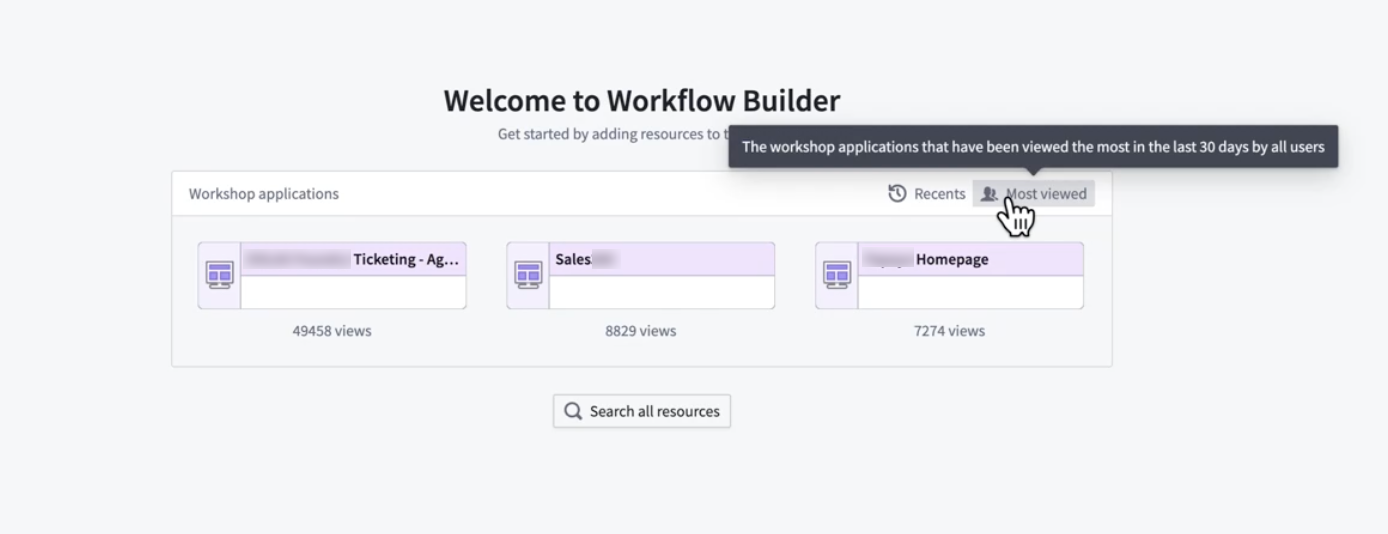
Select from the most viewed Workshop modules.
When you select a Workshop application, Workflow Lineage will automatically populate the Workflow Lineage graph with the backing resources, similar to how it populates the graph when a user uses the Cmd + i keyboard combination directly from a Workshop module.
This update makes it easier than ever to get started; explore, learn, and build with the most important workflows at your fingertips.
Learn more about Workflow Lineage features in the documentation.
We want to hear from you
Share your feedback with us through Palantir Support or our Developer Community ↗.
Version range dependencies for functions
Date published: 2025-06-26
Previously, Foundry applications could only depend on functions at pinned versions. With the introduction of version range dependencies for functions, applications like Workshop, Actions, and Automate can now depend on functions at version ranges. This enables automatic upgrades at runtime, saving you time in your development cycle and ensuring deployed functions upgrade with zero downtime.
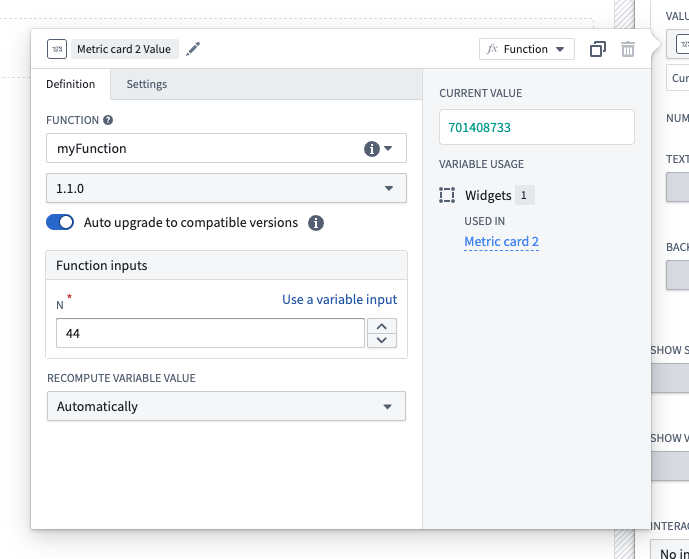
Configure a version range dependency for a function-backed widget in Workshop using the new Auto upgrade toggle.
Versioning your functions
The introduction of version range dependencies makes proper release versioning more critical than ever. To help you in this process, new backward compatibility checks are now available when tagging your functions.
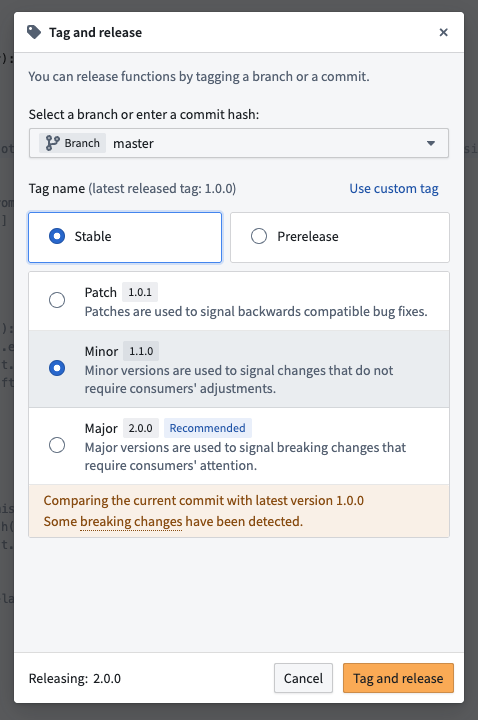
Backward compatibility checks run automatically when you tag a new version of your functions in Code Repositories.
Learn how to properly version your functions to ensure that you provide function consumers with a stable and reliable experience.
Your feedback matters
We want to hear about your experience with functions and welcome your feedback. Share your thoughts with Palantir Support channels or on our Developer Community ↗ using the functions tag ↗.
Python 3.12 support in Code Repositories and VS Code Workspaces now available
Date published: 2025-06-26
Python 3.12 support in Code Repositories and VS Code Workspaces is now available across all enrollments, adding Python startup time improvements, optimized comprehensions, reduced memory footprint, and other new features. This version is available across all Python environments, including during preview, checks, and builds for Python transform operations.
Highlights from Python 3.12 include:
- Faster startup: Reduced interpreter initialization time (10-15% improvement in all Python process startup times)
- Memory optimization: Lower memory usage overall
- Improved multithreading: Enhanced performance with subinterpreters
- Inlined comprehensions: Significantly faster Python comprehensions
To benefit from the latest performance improvements and essential security fixes, upgrade your repositories and set your Python environment to recommended version or explicitly select Python 3.12.
Build an advanced to-do application with OSDK, now available in VS Code workspaces
Date published: 2025-06-24
The advanced to-do application, available through VS Code workspaces, demonstrates how to use advanced features of the Ontology SDK (OSDK) and Platform SDK by building a to-do application as a practical example. You will learn about many OSDK features, including the following:
- Ontology interfaces: Use ontology interfaces to interact seamlessly with backend services.
- Media content handling with media sets: Handle media content efficiently within your to-do application.
- Runtime-derived properties: Leverage runtime-derived properties for dynamic data handling and real-time updates.
- Platform SDKs: Integrate with the platform SDK for enhanced application functionality.
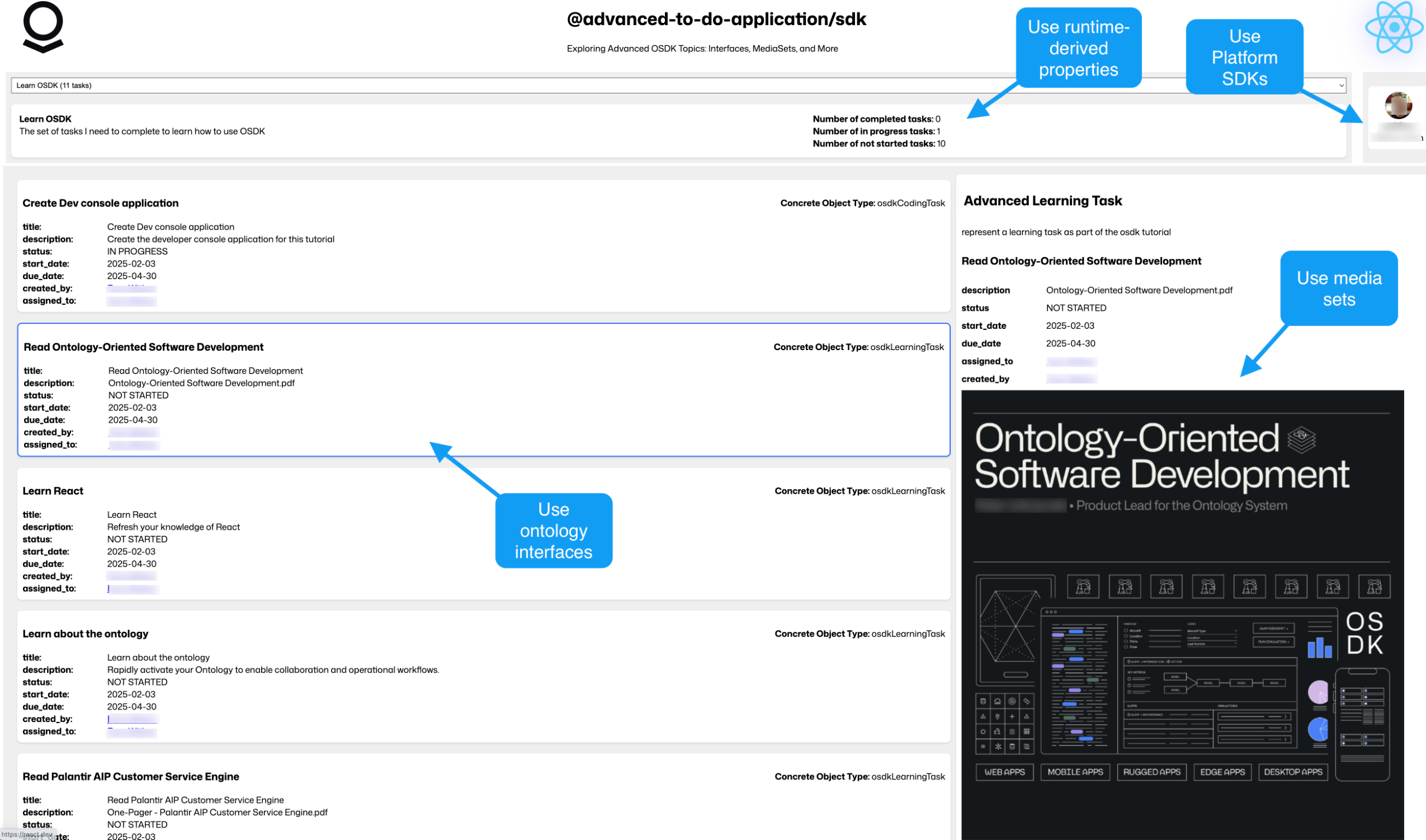
The advanced to-do application, with annotations where advanced OSDK features are used.
Get started
To access and install the advanced to-do application example, open the Code Workspaces application and choose to create a + New Workspace. Then, select VS Code > Applications and find the application in the curated examples list.
You can also search for the application in the platform Examples (Build with AIP), or by searching the Ontology SDK reference examples in Developer Console.
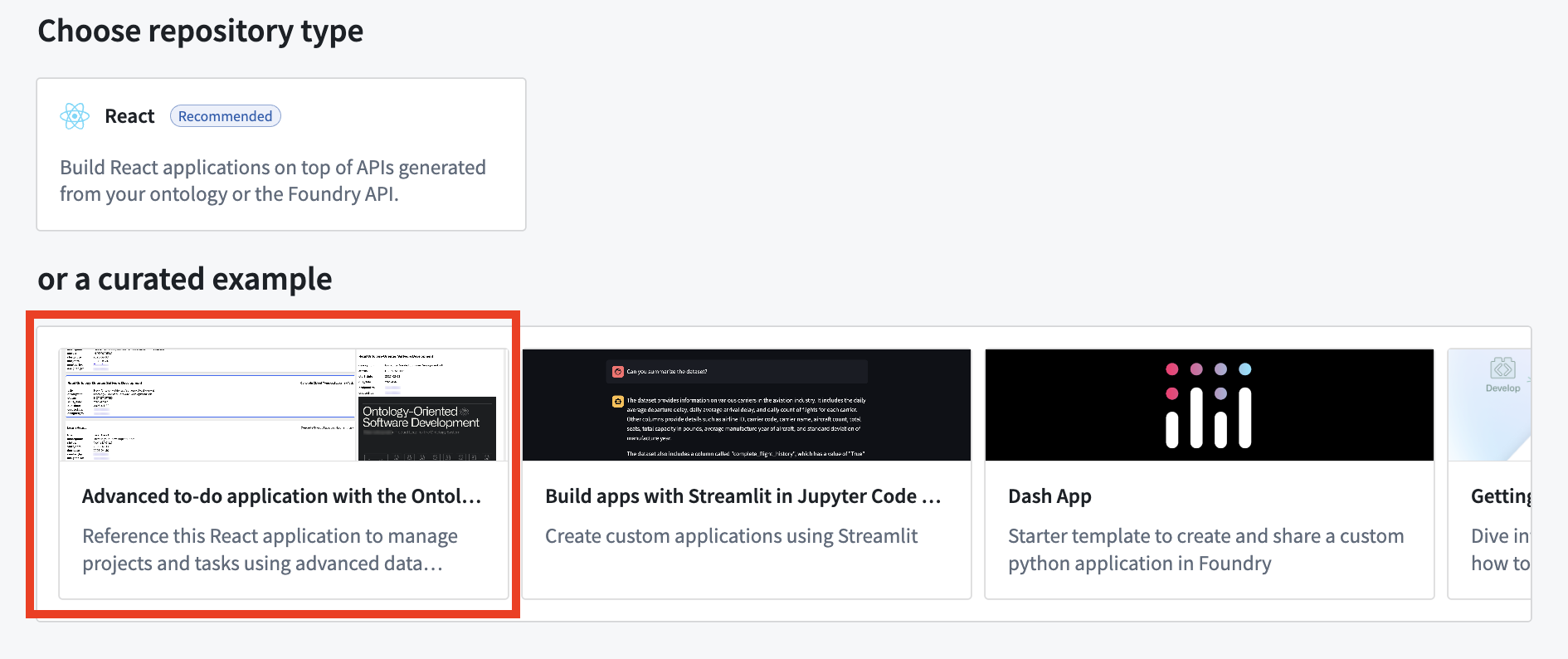
Create an application in a VS Code workspace to choose the advanced to-do application example.
The advanced to-do application application will then be installed through Marketplace.
What's included in this example?
When you first install the example, it will include the Advanced to-do application ontology, an ontology that can be installed only once in each space to ensure API names remain unique and constant. After installation, be sure that all objects were synced to the ontology before you run the application; you can verify this by opening the Advanced to-do object types in Object Explorer. After syncing, the data from the ontology should automatically appear when you open the example.
The installed example will open the code repository and run the application in a VS Code workspace using the Palantir extension for Visual Studio Code. Review the included Markdown documents to learn more about the project and detailed explanations for data services. You can also explore our public documentation to learn more about the architecture and configuration of the application and the custom React hooks used.
What's next?
We are currently working on more examples to demonstrate other features available with the OSDK, including write operations with ontology interfaces and other advanced filtering patterns. Share your feedback with Palantir Support or our Developer Community using the ontology-sdk tag ↗ if you have ideas for more examples and tutorials that you would like to see.
Introducing metric objectives for AIP Evals
Date published: 2025-06-19
Metric objectives are now available in AIP Evals, giving you more control over how your evaluation results are measured and interpreted. Previously, users could see raw metric values for each test case. However, it was difficult to determine at a glance whether a model’s output truly met expectations, especially when dealing with multiple metrics or large suites.
With metric objectives, you can now define what success looks like for each metric in your evaluation suite. For Boolean metrics, you can choose whether true or false indicates a passing result. For numeric metrics, you can select whether higher or lower values are better, and optionally set a threshold for passing. This makes it easier to enforce standards and quickly identify regressions or improvements in your models.

Pass/fail configurations configured for Boolean and numerical metrics.
When you run an evaluation suite, AIP Evals will automatically determine and display the pass/fail status for each metric and test case based on your configured objectives. The run results dialog now clearly visualizes which metrics and test cases passed or failed according to your criteria, making it easier to track quality and communicate results.

Pass/fail status for metrics and test cases in the run results dialog.
Learn more about metric objectives in AIP Evals.
For additional assistance with metric objectives for AIP Evals, contact Palantir Support or visit our Community Forum ↗.
Introducing multi-type retrieval context support for AIP Agents
Date published: 2025-06-19
Note: As of the week of April 27, 2026, AIP Agent Studio was renamed AIP Chatbot Studio. All existing features and functionalities remain unchanged.
AIP Agents now support multiple types within the retrieval context. This means that you can provide multiple object sets, functions, and documents simultaneously as retrieval context. Each context is resolved to a string prompt in the order the types were added to the agent, on each new user message. Multiple contexts of the same type are supported, enabling semantic search on one document collection and full-text extraction on another within the same retrieval context prompt.

You can now provide your agent additional retrieval context using multiple types.
Citation configuration for agents is now centralized in order to support multiple context types. Previously, citation configuration was nested within individual retrieval context configurations such as document, ontology, or function RAG. As all existing citation configurations have been migrated to the new centralized citation settings, no further user action is required to benefit from multi-type retrieval context.

Configure custom citation behavior per object type in the AIP Agent Studio sidebar.
Finally, citations can now be enabled or disabled globally for all retrieval contexts. Citation settings allow configuration of overrides for ontology citations, with each object type mapped to its own citation override. For example, a citation from object type A can be configured to open an external link, while a citation from object type B can be configured to open a media item.


Enable citations to allow users to see the information source used by the AIP Agent.
Share feedback with us
We want to hear about your experiences and welcome your feedback. Share your thoughts with Palantir Support channels or our Developer Community ↗ and use the aip-agent-studio ↗ tag.
Introducing use_sidecar: Run models in dedicated containers within Python transforms
Date published: 2025-06-12
Starting from palantir_models version 0.1673.0, the ModelInput class exposes a use_sidecar parameter in Python transforms. When use_sidecar is set to True, the model is run in a separate container provisioned on top of the machines running the Spark transform itself, thereby ensuring easy, portable and reliable production usage of models across the platform. This feature prevents dependency conflicts that can occur when importing models built in a different repositories or code workspaces into Python transforms for inference. Furthermore, this guarantees that your models operate with the exact dependencies with which they were built, protecting users from unexpected behavior or runtime failures.
Note that use_sidecar is not supported in lightweight transforms, and previewing transforms with a sidecar ModelInput is also not supported.
Key features and benefits
- Dependency isolation:
use_sidecarensures your model runs in a controlled environment with its original dependencies, preventing conflicts with your transform's libraries. - Guaranteed reproducibility: Execute your models with the assurance that they are using the identical library versions with which they were trained and validated for consistency and reliability.
- Simplified cross-repository and multiple model usage: When employing models built in a different repository or a Code Workspace,
use_sidecarautomatically manages the loading of the correct model adapter code. This removes the need to manually update dependencies in your transform's repository and run checks if the adapter code or dependencies changed with a new model version, and allows you to import multiple models into the same repository without worrying about clashes. - Customizable resources: Specify CPU, memory, and GPU resources for the sidecar container via the
sidecar_resourcesparameter.
How to use
To load the model in a container, simply set use_sidecar=True. No other code changes are necessary.
from transforms.api import Input, Output, transform, TransformInput, TransformOutput
from palantir_models.transforms import ModelInput, ModelAdapter

@transform(
    out=Output('path/to/output'),
    model_input=ModelInput(
        "path/to/my/model",
        use_sidecar=True,
        sidecar_resources={
            "cpus": 2.0,
            "memory_gb": 4.0,
            "gpus": 1
        }
    ),
    data_in=Input("path/to/input")
)

def my_transform(out: TransformOutput, model_input: ModelAdapter, data_in: TransformInput) -> None:
    inference_outputs = model_input.transform(data_in)
    out.write_pandas(inference_outputs.output_df)
To learn more, review the ModelInput class reference documentation.
Configure custom enrollment roles in Control Panel
Date published: 2025-06-10
You can now create custom roles to grant granular enrollment-level workflows from the Enrollment permissions page in Control Panel.
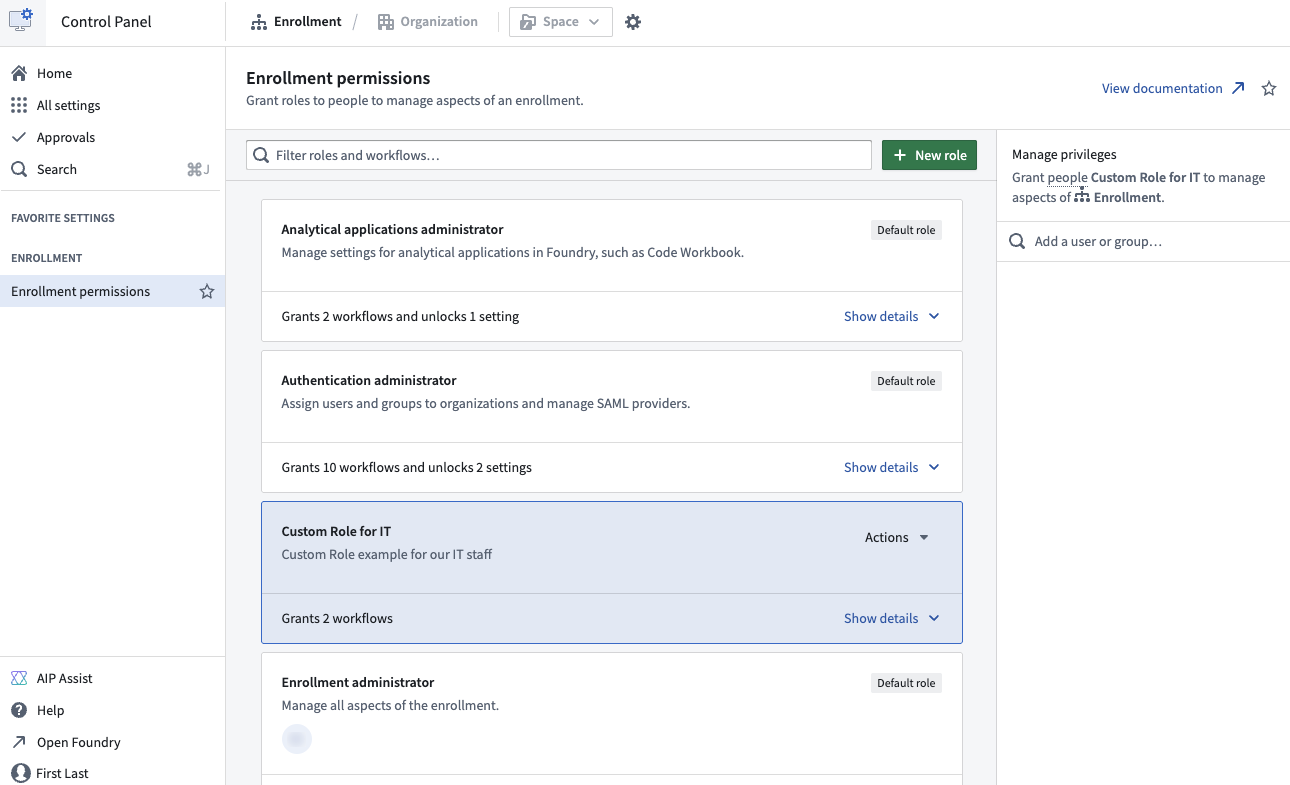
Configure your enrollment custom roles through the Enrollment permissions configuration page in Control Panel.
Custom roles are useful in situations when users or groups require permissions for particular workflows that do not match existing default roles. For example, by creating a custom IT group, you can allow permissions for that group to add or modify domains without granting permissions to change ingress or egress settings.
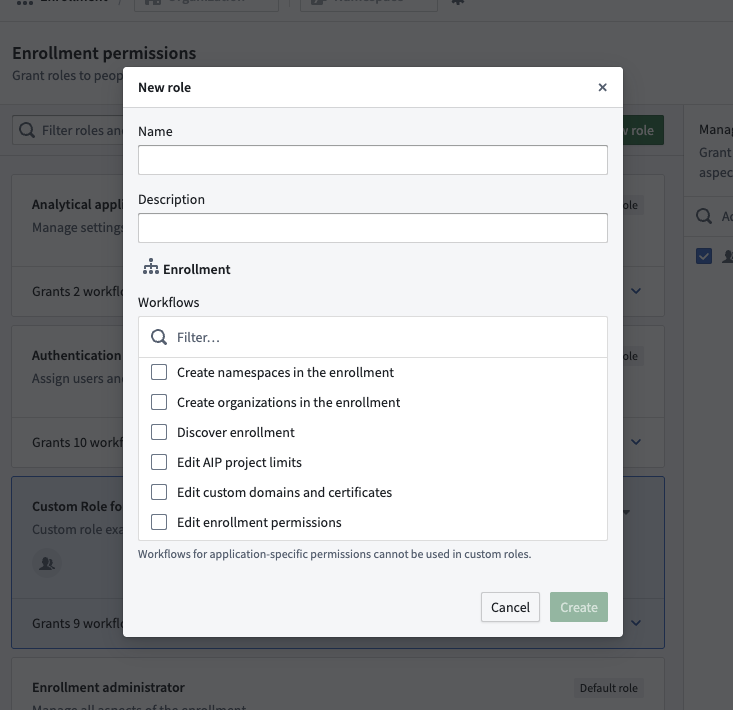
Select the individual workflows to grant to members of a new custom role.
To get started creating custom roles, navigate to Enrollment Permissions settings in Control Panel, or learn more in our public documentation.
For additional assistance with custom roles, contact Palantir Support or visit our Community Forum ↗.
Announcing Machinery, for building, automating, and optimizing processes
Date published: 2025-06-05
Machinery is an application for modeling real-world events, such as healthcare procedures, insurance assessments, and government operations, as processes that can be explored in real-time through custom AI-powered applications tailored to your needs. As of the first week of June, Machinery is now generally available across all enrollments.
Use Machinery to mine or implement a process, identify unwanted behaviors, and make measured progress towards achieving desired outcomes. Additionally, facilitate human intervention to reduce inefficiencies and improve your process performance over time.

Implement a process from scratch, review, and optimize with Machinery.
Common workflows for Machinery include:
- Resolving process inefficiencies with the help of AIP and automation
- Managing an AIP use case end-to-end by orchestrating several AI agents
- Building operational applications to supervise AIP workflows with real-time human intervention
- Mining an ongoing process from external event logs to gain visibility into an existing process
- Defining and monitoring performance metrics and expectations to identify process bottlenecks
Optimize your process with automation and AIP
Implementing a process in the Palantir platform involves many individual resources, such as object types, actions, and automations. Machinery now provides a comprehensive view for all these components and lets you define an ordered flow of automations and manual actions. Its unique state-centric perspective allows you to make incremental progress towards desired outcomes while handling and resolving the edge cases of your organization. Value types and submission criteria can then provide an additional layer of conformance guarantees.

Automation nodes can be built into a Machinery graph.
Machinery boasts a custom layout algorithm with the auto-layout feature allowing for visually appealing graphs without need of manual manipulation. Users can also disable this feature and freely move elements, allowing for customized adjustments tailored to individual preferences.
Multiple object type modeling in a single Machinery graph
Create subprocesses and parallel processes to benefit from greater flexibility and control over workflows. Subprocesses allow you to create nested processes within your main Machinery process, providing a structured way to manage complex tasks and enabling seamless integration into the larger workflow. This modular approach also supports parallel processes, allowing multiple processes to run concurrently, thereby enhancing efficiency and reducing bottlenecks.
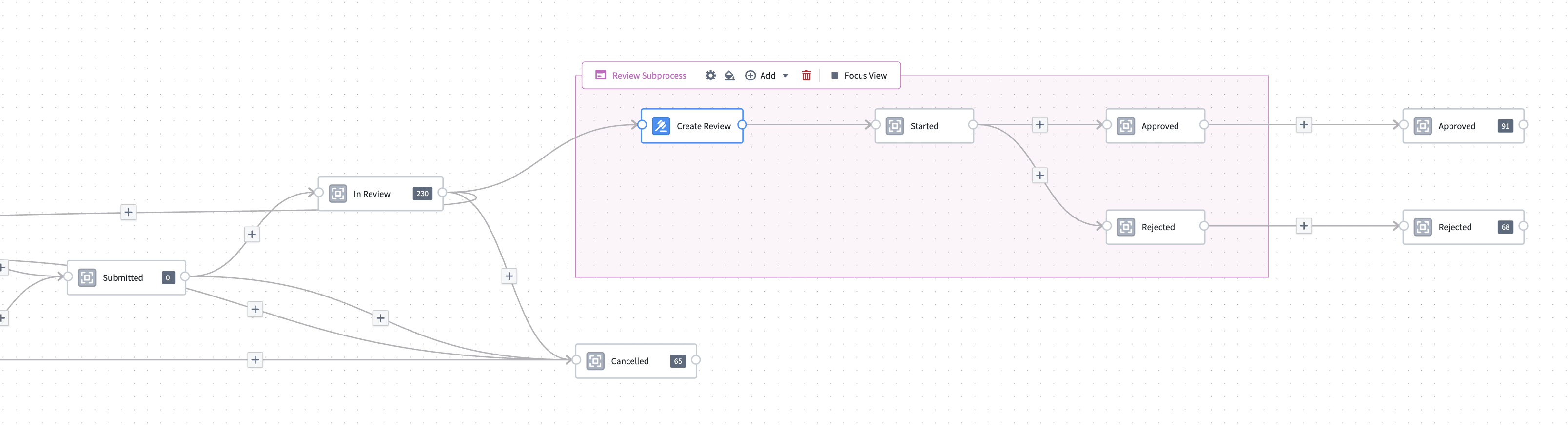
You can now build multiple linked processes in Machinery, allowing you to model processes acting across your whole organization.
The focus view feature further elevates user experience by allowing users to zoom in on specific subprocesses, providing a detailed view that simplifies navigation and management of intricate workflows. With these capabilities, users can manage complexity across the organization for a higher level of process automation, ultimately leading to improved productivity and streamlined operations.
Mining mode
After configuring the log ontology, users can enter mining mode, which presents a distinct graph highlighting both existing states and potential edits in sepia color. Users can exclude certain states from mining, effectively reducing noise and focusing on relevant data. Use the transition frequency slider to filter out less important nodes, ensuring that only the most critical transitions are highlighted while benefiting from the clean auto-layout graph.
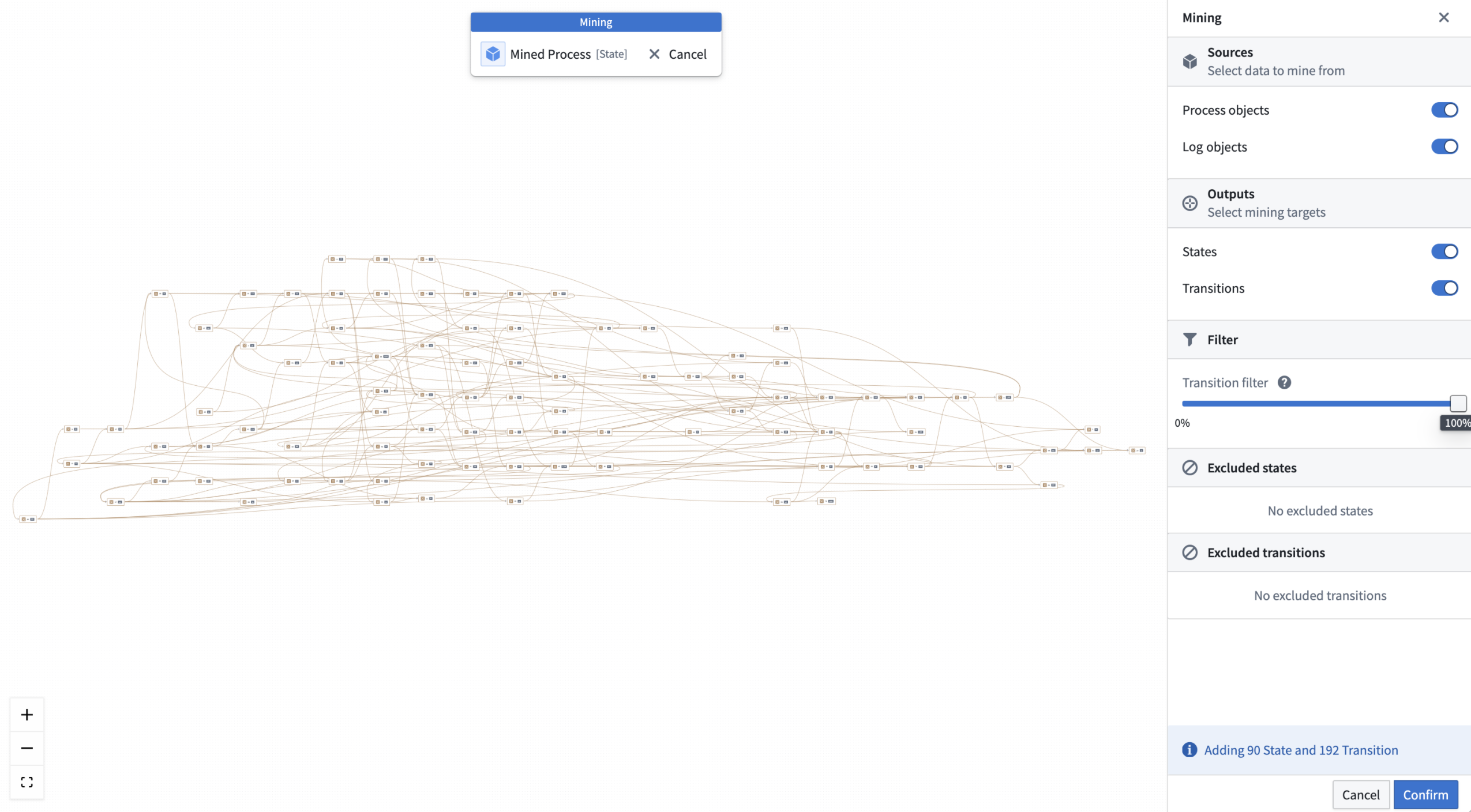
Mining an entire process in Machinery mining mode.

Machinery mining mode, with a transition filter to filter out nodes that have less than 71.5% objects passing through.
Bootstrap your development by generating a Workshop module
To operationalize your process in the Palantir platform, you can quickly bootstrap a Workshop module ("Machinery Express application") with a single click to initiate your application development. The express application serves as a dynamic playground where you can conduct analysis and intervene with your agentic workflows in real-time. Then, jump back into Machinery to refine, update, or optimize your processes with actions, automations, and AIP logic functions.
Whether you choose to use Machinery Express as a ready-to-use analysis tool or as a foundation to build your own applications, it facilitates a fluid interaction between process exploration and refinement. Additionally, the Machinery Express application enables you to immediately share this process with your operational users, providing them with the necessary context to effectively engage with the system in real time.
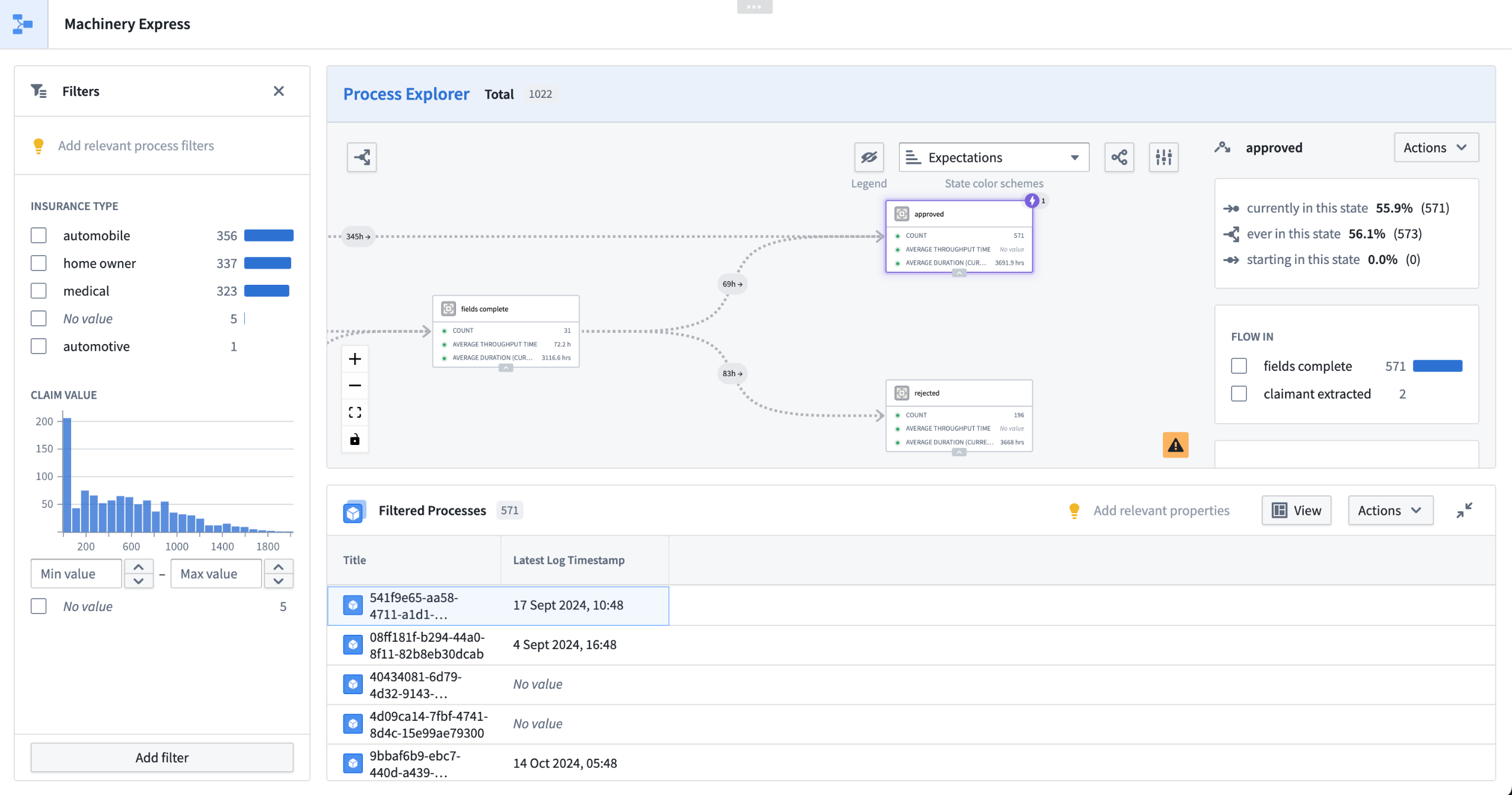
Generate a Machinery Express application to help get you started on application development in Workshop.
If you prefer to build a new application from scratch or add Machinery to an existing Workshop module, you may add a Machinery Process Overview widget in Workshop.
For more information on Machinery, review the documentation.
We want to hear from you
We want to hear about your experiences and welcome your feedback. Share your thoughts with Palantir Support channels or our Developer Community ↗ and use the machinery ↗ tag.
Databricks enhanced connectivity and compute pushdown now available
Date published: 2025-06-05

As part of Palantir’s partnership with Databricks ↗, enhanced connectivity options offer a range of capabilities on top of data, compute, and models for a more seamless integration of the Palantir and Databricks platforms. In particular, virtual tables, compute pushdown, and external models are now generally available.
| Capability | Status |
|---|---|
| Exploration | 🟢 Generally available |
| Bulk import | 🟢 Generally available |
| Incremental | 🟢 Generally available |
| Virtual tables | 🟢 Generally available |
| Compute pushdown | 🟢 Generally available |
| External models | 🟢 Generally available |
For detailed guides, see Palantir’s updated Databricks documentation.
Virtual tables
Palantir now offers enhanced virtual table capabilities on top of data in Databricks, including:
- Spark and JDBC-based connectivity from a single unified connector
- Enhanced functionality exposes the features of Delta Lake and Apache Iceberg
- Palantir can now access tables using the Unity REST API and Iceberg REST catalog, and read and write data in the underlying storage locations using vended credentials from Unity Catalog
- Bulk and automatic registration of virtual tables
- Virtual table inputs in Contour, Code Repositories, and Pipeline Builder
- Virtual table outputs in Code Repositories and Pipeline Builder
- Incremental pipelines
See the Databricks virtual tables documentation for more details on registering and using virtual tables from Databricks.
Compute pushdown
The ability to push down compute to Databricks is now available. When using virtual tables as inputs and outputs to a pipeline that are registered to the same Databricks source, it is possible to fully federate the compute to Databricks. This capability leverages Databricks Connect ↗ and is currently available in Python transforms.
See the Databricks compute pushdown documentation for syntax details and a quickstart example.
External models
Databricks models registered in Unity Catalog can be integrated into the Palantir platform via externally-hosted models and external transforms. This allows Databricks models to be leveraged operationally by Palantir users, pipelines, and workflow applications.
For more details, see the Databricks external models documentation.
Share your feedback
Share your feedback about Palantir’s Databricks integration by contacting our Palantir Support teams, or let us know in our Developer Community ↗ using the databricks tag ↗.
Introducing virtual table outputs in data transformations
Date published: 2025-06-05
Virtual table outputs are now supported in Pipeline Builder and Code Repositories as a beta feature. A virtual table acts as a pointer to a table in a source system outside the Palantir platform, and allows you to use that data in-platform without ingesting it. Virtual tables were previously only available as inputs to Foundry data transformations, meaning any output datasets would be stored in Foundry. Now you can orchestrate entire pipelines with logic authored in Foundry, and data stored externally.
You can add virtual table outputs as you would any other Pipeline Builder output. Select a node and choose the new virtual table output type.
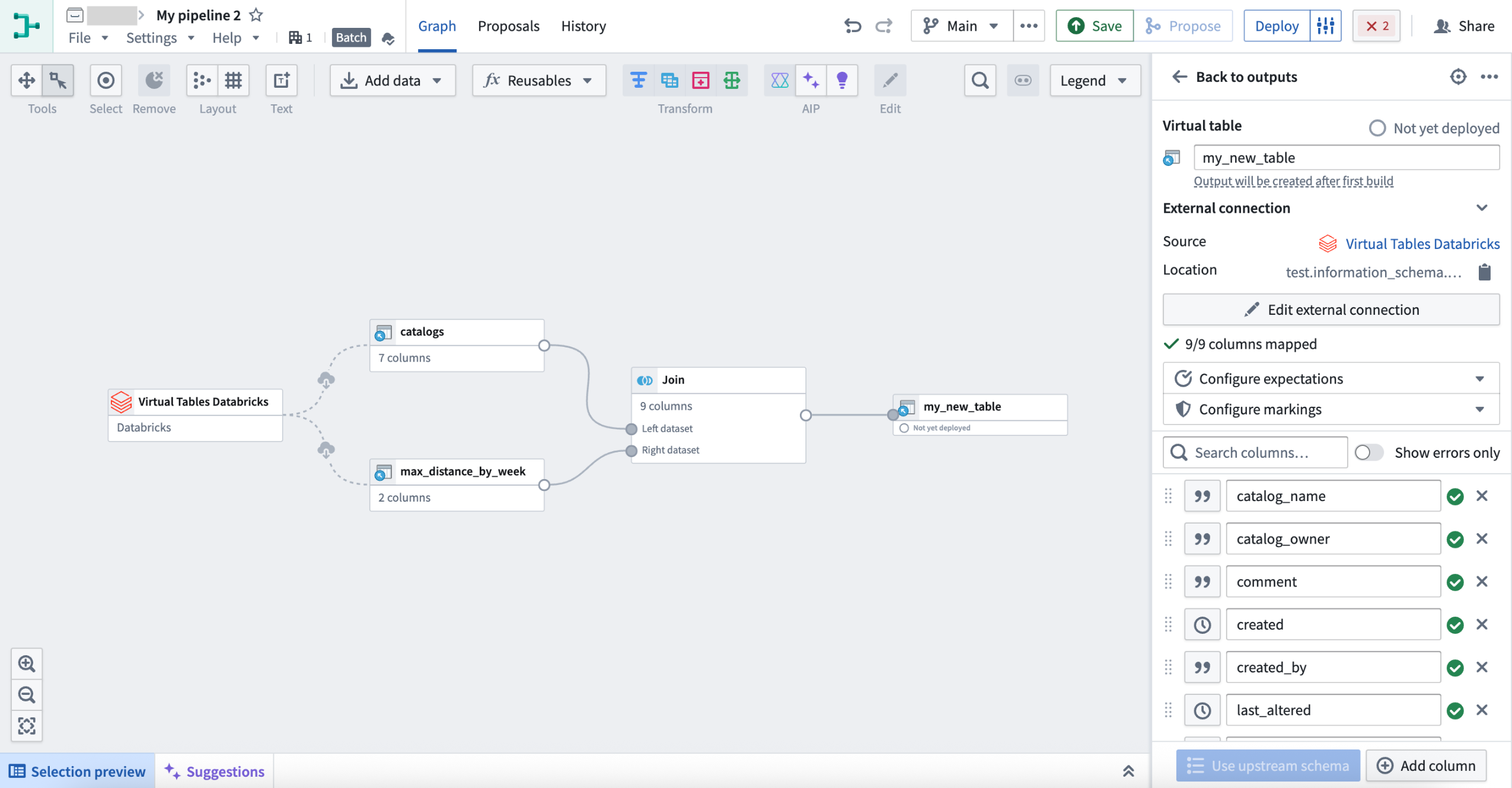
A virtual table output in Pipeline Builder.
When configuring your output in Code Repositories, select the new virtual table type. You will then be prompted to configure your output source.
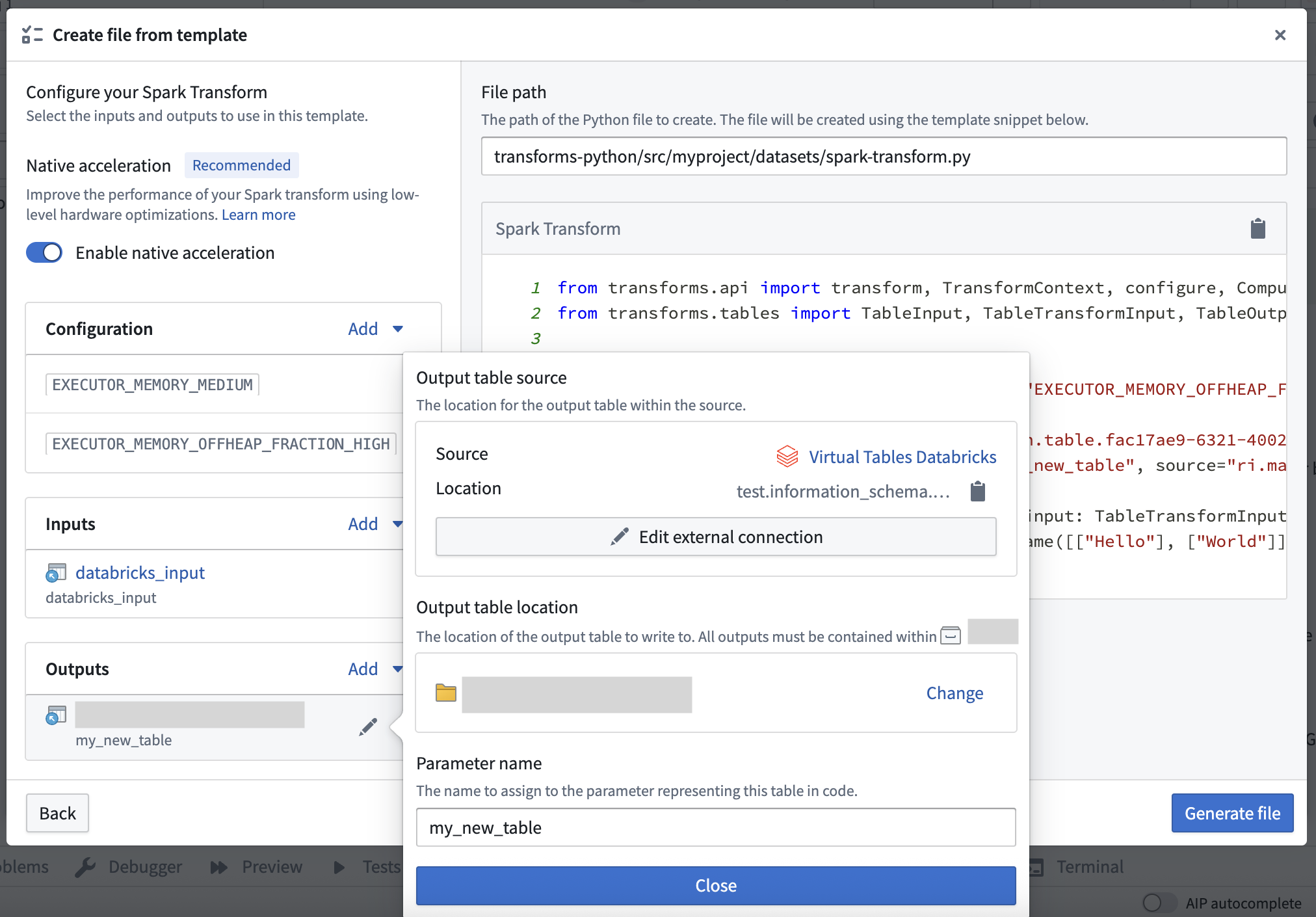
Configuring a virtual table output in Code Repositories file templates.
Note that query compute may be split between Foundry and the source system for:
- All queries in Pipeline Builder
- Transformations in Code Repositories that do not explicitly use compute pushdown. Full compute pushdown outside of lightweight transforms is not yet available.
What's next
Table support is improving across the Palantir platform. Upcoming work includes:
- Virtual tables in Code Workspaces.
- Support for Foundry-native Iceberg tables as inputs and outputs.
Share your feedback
Share your feedback about virtual table outputs by contacting our Palantir Support teams Palantir Support teams, or let us know in our Developer Community ↗ using the virtual-tables tag ↗.
Virtual table bulk registration now available
Date published: 2025-06-05
Virtual tables can now be created in bulk for tabular source types, such as Databricks, BigQuery, and Snowflake. Select Create virtual table, and you will now be able to create one or more virtual tables at once for supported sources.

Creating a new virtual table.
To bulk register virtual tables in Data Connection, select external tables in the left panel, and choose where to save your new virtual tables in Foundry in the right panel.
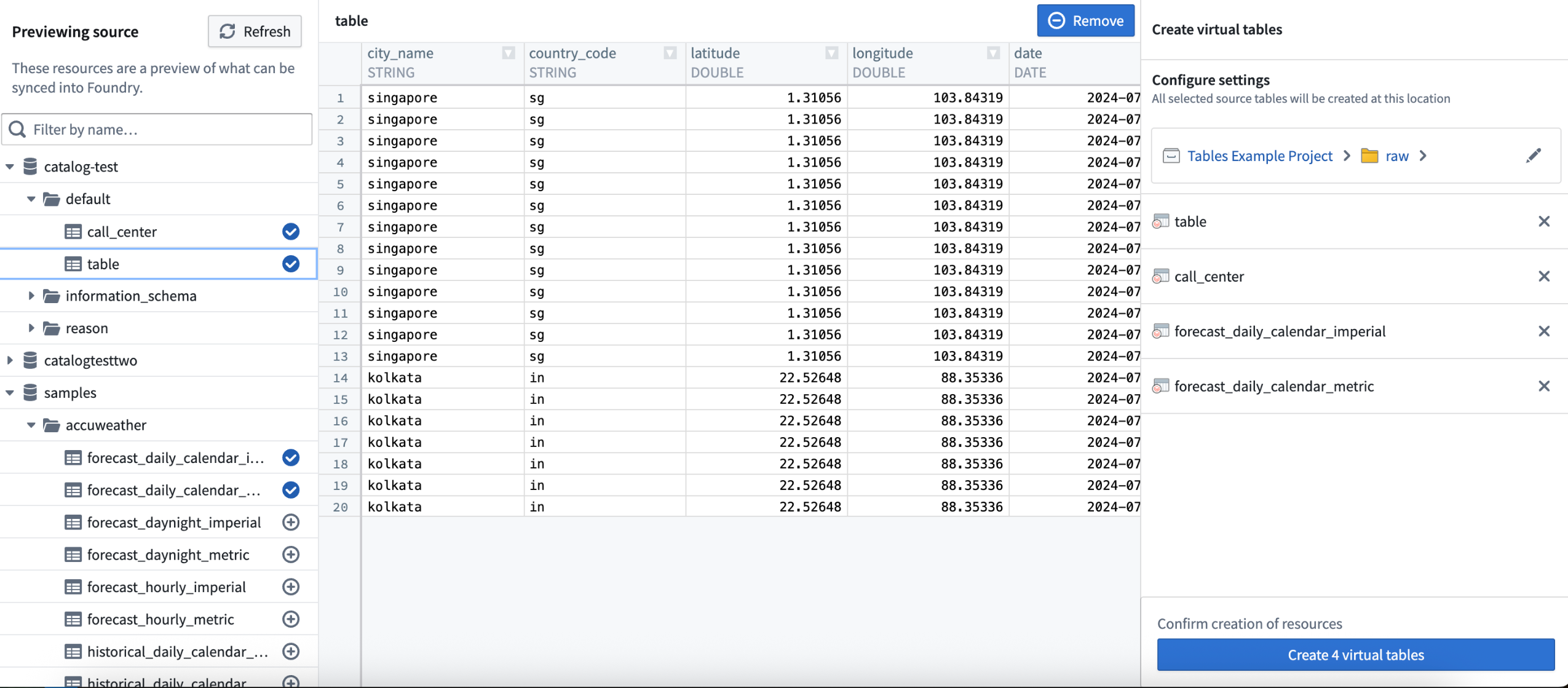
An example of virtual table bulk registration in Data Connection.
Learn more about bulk registering virtual tables.
Share your feedback
Share your feedback about virtual table outputs by contacting Palantir Support, or let us know in our Developer Community ↗ using the virtual-tables tag ↗.
Streamline vision LLM-based PDF extraction with new transform input types
Date published: 2025-06-03
New transform input types are now available to simplify the creation of transforms for vision LLM-based extraction workflows. These transform input types abstract common logic and enable users to select their desired level of customization. Writing transforms to convert PDF content into Markdown is now more efficient, while maintaining flexibility for users that want to customize their workflows.
What is vision LLM-based extraction?
Vision LLMs can extract information from complex documents with mixed content, such as tables, figures, and charts, with high accuracy. To implement these vision LLM-based workflows, custom logic needs to be written in transforms that are applied to media sets containing PDF documents. Previously, multiple complex steps had to be implemented, such as image conversion and encoding. We now provide transform input types that simplify and expedite this process.
The following transform input types are now available:
VisionLLMDocumentsExtractorInput: Processes PDF media sets by taking each media item and splitting it into individual pages. These pages are converted into images and sent to the vision LLM. This option is recommended for cases where custom image processing is not necessary, and a solution that handles every step of the process is preferred.VisionLLMDocumentPageExtractorInput: Processes individual pages of a PDF document. This option is recommended in cases where users want more flexibility and control over the extraction process. For example, users can apply custom image processing, or handle splitting PDF pages with custom logic.
These new transform inputs abstract common document extraction logic, including image conversion, resizing, encoding, and a default prompt that is carefully tuned for document extraction. In addition to a simplified interface, users have the option to provide a custom prompt, and can customize image processing as needed with the VisionLLMDocumentPageExtractorInput type.
Below is a sample implementation, demonstrating a significantly shorter and simplified Python transform:
from transforms.api import Output, transform
from transforms.mediasets import MediaSetInput
from palantir_models.transforms import VisionLLMDocumentsExtractorInput

@transform(
    output=Output("ri.foundry.main.dataset.abc"),
    input=MediaSetInput("ri.mio.main.media-set.abc"),
    extractor=VisionLLMDocumentsExtractorInput(
        "ri.language-model-service.language-model.anthropic-claude-3-7-sonnet")
)

def compute(ctx, input, output, extractor):
    extracted_data = extractor.create_extraction(input, with_ocr=False)
    output.write_dataframe(
        extracted_data,
        column_typeclasses={
            "mediaReference": [{"kind": "reference", "name": "media_reference"}]
        },
    )
A Python transform implementation using the new VisionLLMDocumentsExtractorInput.
Vision LLM-based document extraction and parsing has become one of the most prevalent workflows in Foundry, and creating transforms for these workflows is now more efficient than ever before. To learn more, review the vision LLM-based extraction documentation.
Your feedback matters
We want to hear about your experiences with transforms, and welcome your feedback. Share your thoughts with Palantir Support channels or on our Developer Community ↗ using the transforms-python ↗ and language-model-service ↗ tags.
Manage platform SDK access in Developer Console
Date published: 2025-06-03
The Platform SDK Resources page is now available in Developer Console, allowing developers to manage application access to Foundry resources. Developers can now configure application access to projects, define client-allowed operations, and control access to designated API namespaces. The Platform SDK Resources page offers comprehensive security and compliance settings to help ensure that integrations align with organizational policies, while facilitating secure and seamless interactions with Foundry resources.
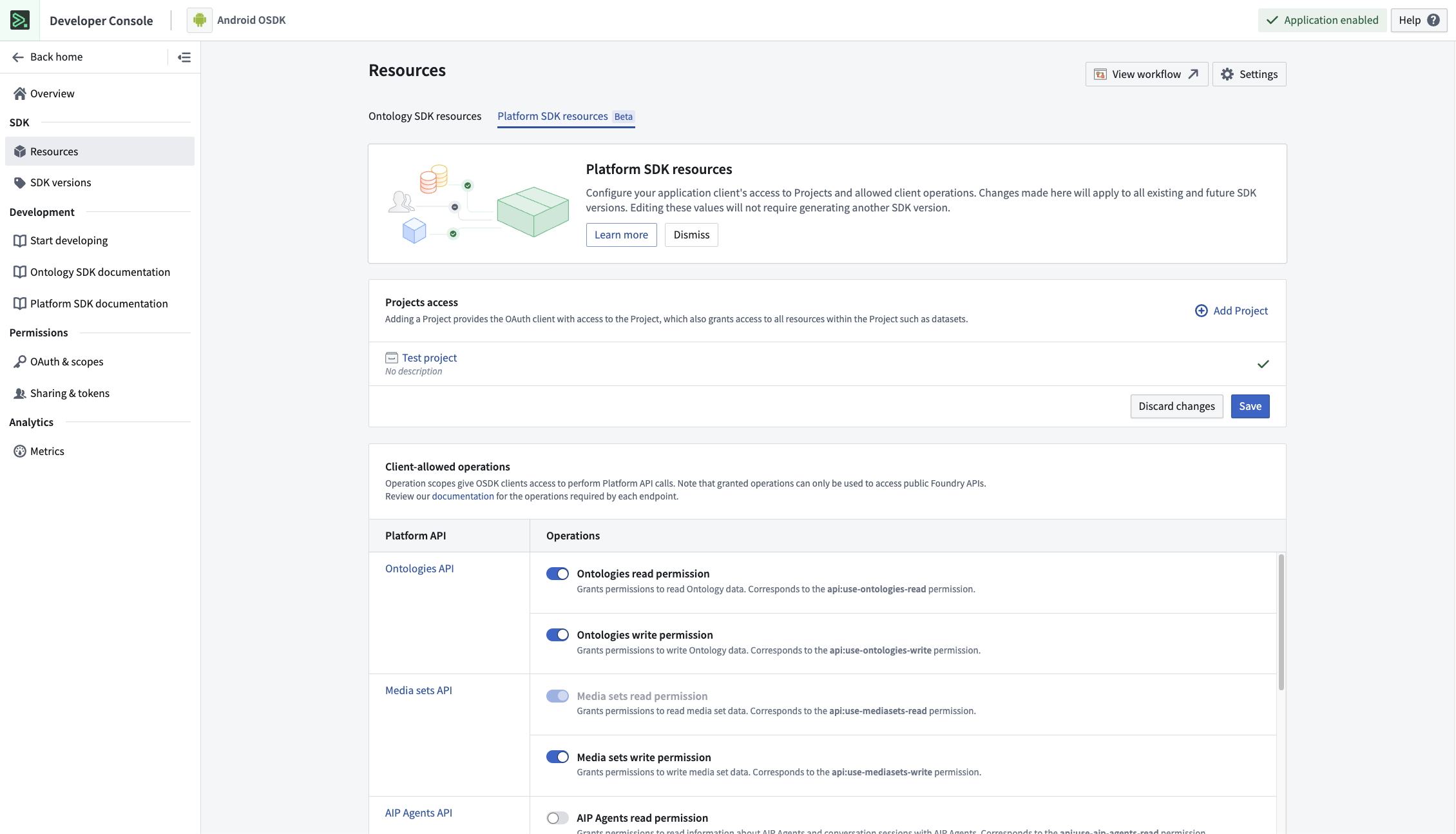
The new Platform SDK Resources page, displaying the Project access and Client-allowed operations sections.
In the example shown above, the Project access section allows developers to choose the projects that an application can interact with, while the Client-allowed operations section allows developers to choose the methods that can be used to interact with the selected projects.
API-level security for client-allowed operations
As of Spring 2025, new Developer Console applications enforce API-level security for scoped applications, ensuring that every endpoint called by these applications is explicitly added to the client-allowed operations in the Platform SDK resources page.
With this new level of security, access is only granted to API namespaces, ensuring that application administrators can control the actions that applications take in their organization. Prior to these changes, granting an API namespace scope provided access to the namespace's endpoints as well as any dependent endpoints in other namespaces. These new, more secure API scopes are isolated, providing access only to the endpoints shown in the Client-allowed operations section.
This new level of security applies to all new Developer Console applications; to benefit from these new security features, migrate your application by following our step-by-step guide.
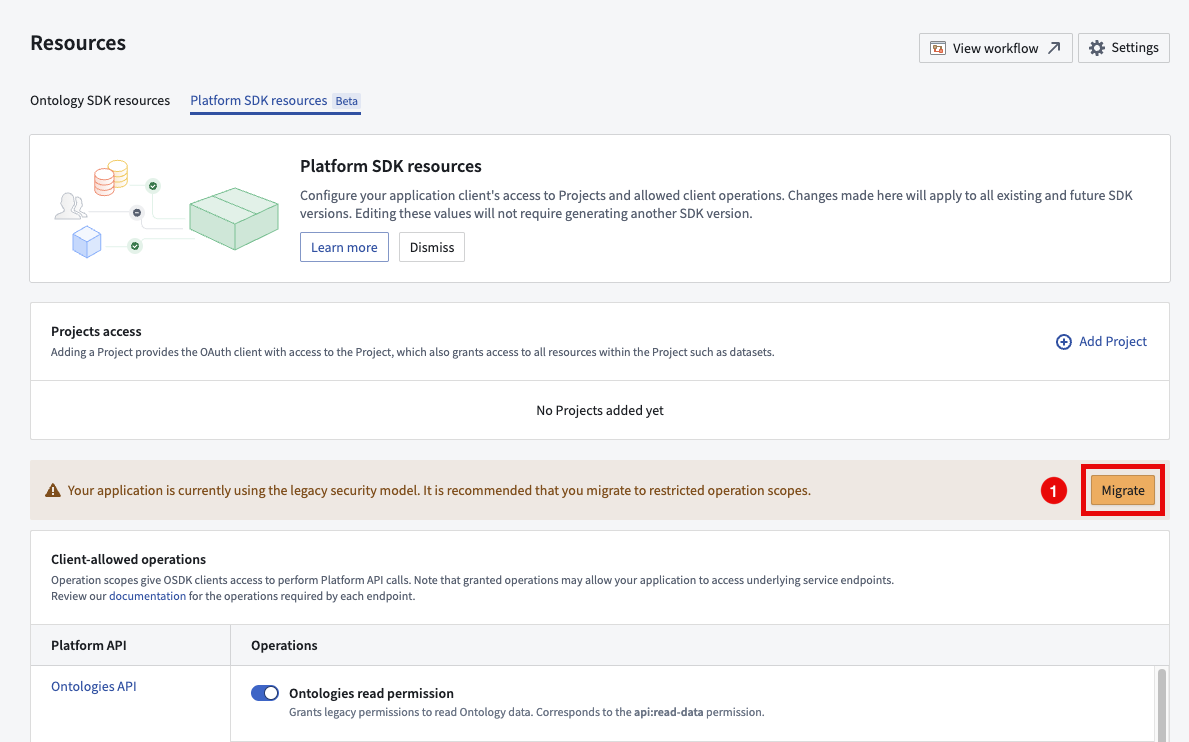
The migration callout for legacy Developer Console applications.
Get started
To get started with the Platform SDK Resources page, navigate to the SDK section of your Developer Console application and select Resources > Platform SDK Resources.
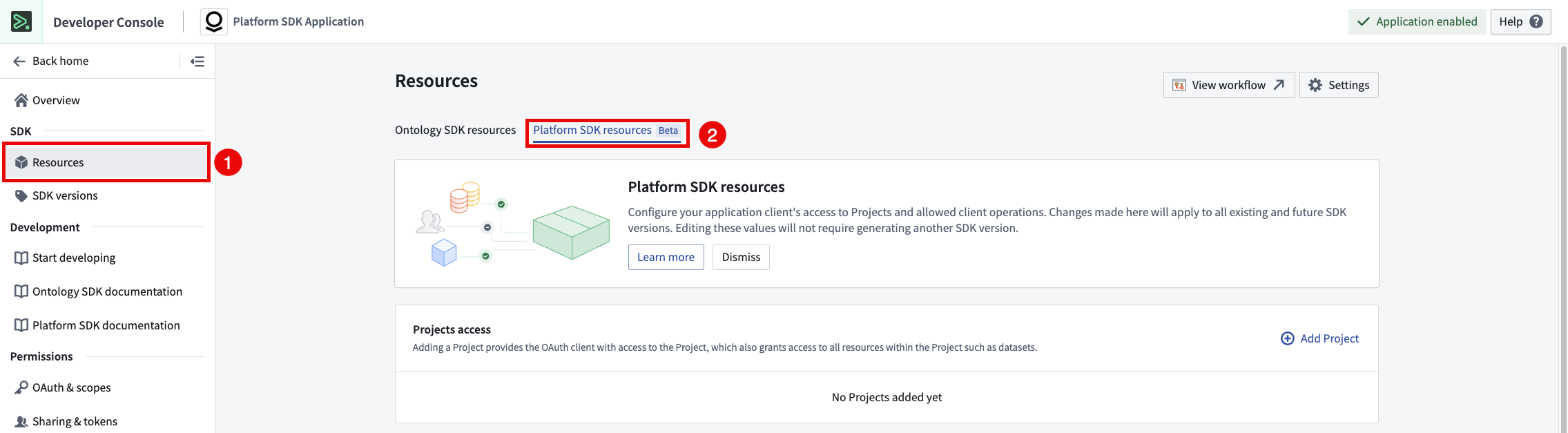
Navigating to the Platform SDK resources page in Developer Console.
On the Platform SDK Resources page, you can manage the resources and operations that your application client has access to. To add additional resources to the client, select Add Project and choose the project you want to add the client's scope. After saving, your application will have access to the resources in the project.
To modify the operations that can be performed by the client, navigate to the Client-allowed operations section and use the toggle to define the operations that your application has access to. When you make a change in this section it will apply to all existing SDK versions without the need to generate a new SDK.
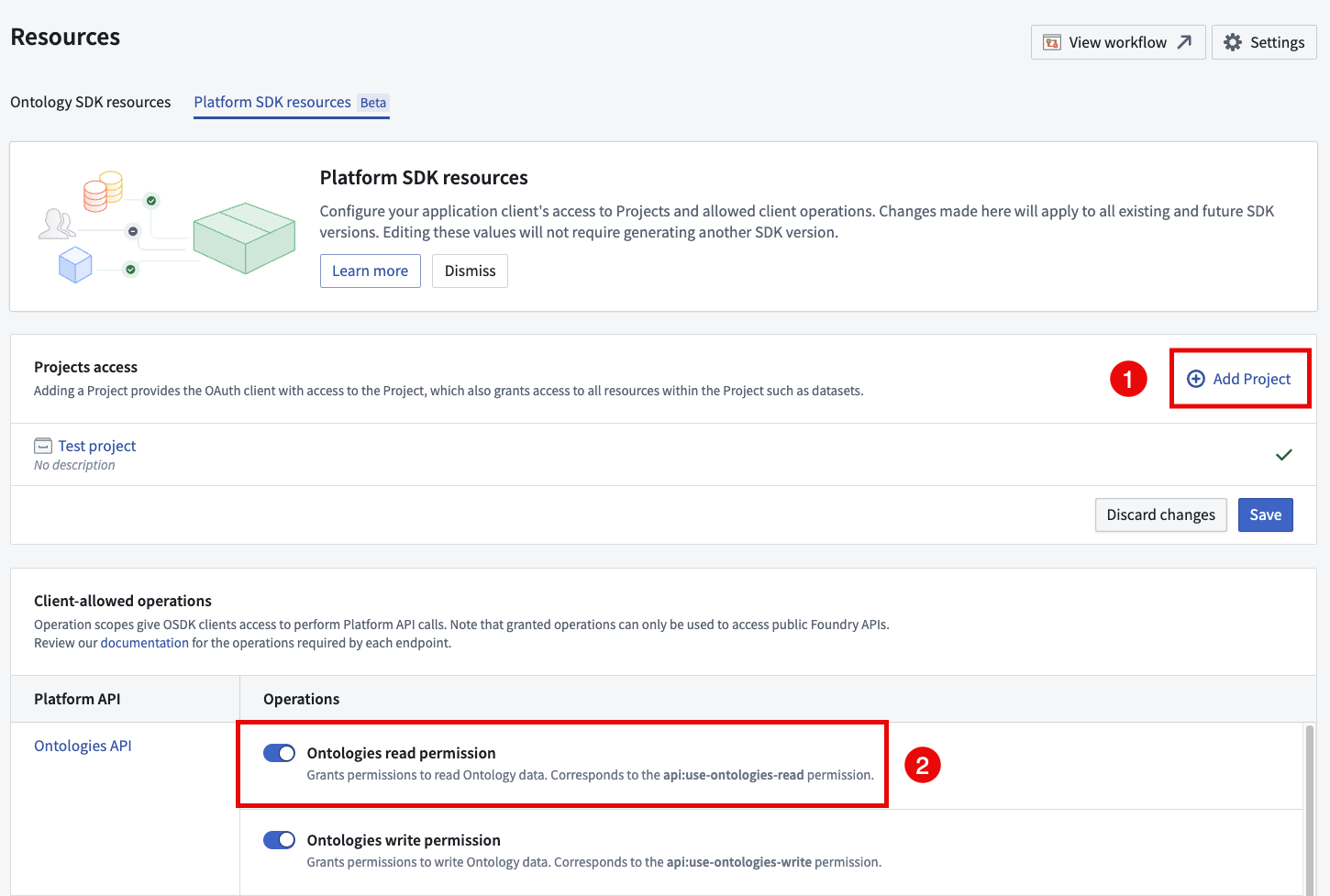
Using the Platform SDK Resources page to modify the resources and operations available to the application client.
What's next?
We are currently working on documentation for our TypeScript, Python, and Java platform SDKs, in addition to enhancing the application client creation flow to improve the developer experience.
Need support?
We are always happy to engage with you in our Developer Community ↗. Share your thoughts and questions about the OSDK and Developer Console with Palantir Support channels or on our Developer Community using the ontology-sdk ↗ tag.
For more information, refer to the operation restrictions and API security and migration documentation.
中文翻译
公告
提醒: 请注册 Foundry 新闻通讯(Foundry Newsletter),即可直接在收件箱中收到平台新产品、功能及改进的摘要。有关如何订阅的更多信息,请参阅 Foundry 新闻通讯与产品反馈渠道公告。
欢迎在我们的 开发者社区论坛 ↗ 分享您对这些公告的看法。
从新的工作流血缘(Workflow Lineage)着陆页直接访问最相关的 Workshop 模块
发布日期:2025-06-26
在 Workflow Lineage 中创建新的或空白图表时,现已提供改进的体验。除了使用键盘快捷键 Cmd + i(macOS)或 Ctrl + i(Windows)从 Workshop 模块、函数仓库或(新增)本体对象跳转到 Workflow Lineage 之外,现在还有另一种便捷方式,可直接从应用程序中选择最相关的 Workshop 模块。从 Workflow Lineage 的着陆页,您现在可以看到最近使用或浏览次数最多的 Workshop 模块列表。
您现在可以直接从新的 Workflow Lineage 着陆页访问最相关的 Workshop 模块。
新增功能
当您打开一个新的或空白图表时,您现在将看到:
- 最近的 Workshop 应用程序: 快速访问您工作区中最近打开的 Workshop 应用程序。
- 浏览次数最多的 Workshop 应用程序: 即时发现您的团队正在使用的最流行、最具影响力的工作流。此选项显示过去 30 天内所有用户浏览次数最多的 Workshop 应用程序。
从浏览次数最多的 Workshop 模块中进行选择。
当您选择一个 Workshop 应用程序时,Workflow Lineage 将自动使用其底层资源填充 Workflow Lineage 图表,这与用户直接在 Workshop 模块中使用 Cmd + i 键盘组合时填充图表的方式类似。
此更新使入门比以往任何时候都更容易;让您触手可及地探索、学习并构建最重要的工作流。
在文档中了解有关 Workflow Lineage 功能的更多信息。
期待您的反馈
请通过 Palantir 支持或我们的 开发者社区 ↗ 与我们分享您的反馈。
函数的版本范围依赖(Version range dependencies for functions)
发布日期:2025-06-26
以前,Foundry 应用程序只能依赖于固定版本的函数。随着函数版本范围依赖的引入,Workshop、Actions 和 Automate 等应用程序现在可以依赖于版本范围内的函数。这可以在运行时实现自动升级,从而节省您的开发周期时间,并确保已部署的函数实现零停机升级。
在 Workshop 中使用新的 自动升级 开关为函数支持的小部件配置版本范围依赖。
为您的函数进行版本控制
版本范围依赖的引入使得正确的发布版本控制比以往任何时候都更加重要。为了帮助您完成此过程,在标记您的函数时,现在提供了新的向后兼容性检查。
当您在代码仓库中标记函数的新版本时,向后兼容性检查会自动运行。
了解如何正确地为您的函数进行版本控制,以确保为函数使用者提供稳定可靠的体验。
您的反馈很重要
我们想了解您使用函数的体验,并欢迎您的反馈。请通过 Palantir 支持渠道或在我们的 开发者社区 ↗ 中使用 functions 标签 ↗ 分享您的想法。
代码仓库和 VS Code 工作区现已支持 Python 3.12
发布日期:2025-06-26
代码仓库和 VS Code 工作区现已支持 Python 3.12,适用于所有注册(enrollment),新增了 Python 启动时间改进、优化的推导式、减少的内存占用以及其他新功能。此版本在所有 Python 环境中均可用,包括 Python 转换操作(transform)的预览、检查和构建阶段。
Python 3.12 的亮点包括:
- 更快的启动速度: 减少了解释器初始化时间(所有 Python 进程启动时间提升 10-15%)
- 内存优化: 整体内存使用量降低
- 改进的多线程: 子解释器性能增强
- 内联推导式: Python 推导式速度显著提升
要受益于最新的性能改进和关键安全修复,请升级您的仓库并将 Python 环境设置为 推荐版本 或显式选择 Python 3.12。
使用 OSDK 构建高级待办事项应用程序,现已在 VS Code 工作区中可用
发布日期:2025-06-24
高级待办事项应用程序(advanced to-do application)通过 VS Code 工作区 提供,演示了如何使用本体 SDK(OSDK)和平台 SDK(Platform SDK)的高级功能,以构建待办事项应用程序作为实践示例。您将了解许多 OSDK 功能,包括以下内容:
- 本体接口: 使用本体接口与后端服务无缝交互。
- 使用媒体集处理媒体内容: 在您的待办事项应用程序中高效处理媒体内容。
- 运行时派生属性: 利用运行时派生属性实现动态数据处理和实时更新。
- 平台 SDK: 与平台 SDK 集成以增强应用程序功能。
高级待办事项应用程序,标注了使用高级 OSDK 功能的位置。
开始使用
要访问并安装高级待办事项应用程序示例,请打开 Code Workspaces 应用程序并选择创建 + 新工作区。然后,选择 VS Code > 应用程序 并在 精选示例列表 中找到该应用程序。
您也可以在平台的 示例(使用 AIP 构建) 中搜索该应用程序,或在 Developer Console 中搜索 本体 SDK 参考示例。
在 VS Code 工作区中创建应用程序以选择高级待办事项应用程序示例。
然后,该高级待办事项应用程序将通过 Marketplace 安装。
此示例包含什么?
当您首次安装该示例时,它将包含 Advanced to-do application ontology,这是一个在每个空间中只能安装一次的本体,以确保 API 名称保持唯一和恒定。安装后,请确保在运行应用程序之前所有对象都已同步到本体;您可以通过在 Object Explorer 中打开 Advanced to-do 对象类型来验证。同步后,当您打开示例时,本体中的数据应自动显示。
安装的示例将打开代码仓库,并使用适用于 Visual Studio Code 的 Palantir 扩展在 VS Code 工作区 中运行应用程序。查看随附的 Markdown 文档以了解有关项目的更多信息以及数据服务的详细说明。您也可以探索我们的公共文档,以了解有关应用程序架构和配置以及所使用的自定义 React hooks 的更多信息。
下一步是什么?
我们目前正在开发更多示例,以演示 OSDK 提供的其他功能,包括使用本体接口的写入操作和其他高级过滤模式。如果您有希望看到的更多示例和教程的想法,请通过 Palantir 支持或我们的 开发者社区使用 ontology-sdk 标签 ↗ 分享您的反馈。
为 AIP Evals 引入指标目标(Metric objectives)
发布日期:2025-06-19
指标目标(metric objectives)现已在 AIP Evals 中可用,让您能更精确地控制评估结果的衡量和解读方式。以前,用户可以看到每个测试用例的原始指标值。然而,当处理多个指标或大型测试套件时,很难一眼判断模型的输出是否真正达到预期。
借助指标目标,您现在可以为评估套件中的每个指标定义成功的标准。对于布尔型指标,您可以选择 true 或 false 表示通过结果。对于数值型指标,您可以选择较高值还是较低值更好,并可选择设置通过阈值。这使得强制执行标准以及快速识别模型中的回归或改进变得更加容易。
为布尔型和数值型指标配置的通过/失败配置。
当您运行评估套件时,AIP Evals 将根据您配置的目标自动确定并显示每个指标和测试用例的通过/失败状态。运行结果对话框现在根据您的标准清晰地可视化哪些指标和测试用例通过或失败,从而更容易跟踪质量并沟通结果。
运行结果对话框中指标和测试用例的通过/失败状态。
如需有关 AIP Evals 指标目标的更多帮助,请联系 Palantir 支持或访问我们的 社区论坛 ↗。
为 AIP Agents 引入多类型检索上下文支持(Multi-type retrieval context support)
发布日期:2025-06-19
注意: 自 2026 年 4 月 27 日那周起,AIP Agent Studio 已更名为 AIP Chatbot Studio。所有现有特性和功能保持不变。
AIP Agents 现在支持检索上下文中的多种类型。这意味着您可以同时提供多个对象集、函数和文档作为检索上下文。在每条新用户消息中,每个上下文都会按照类型添加到代理的顺序解析为字符串提示。支持同一类型的多个上下文,从而可以在同一检索上下文提示中,对一个文档集合进行语义搜索,对另一个文档集合进行全文提取。
您现在可以使用多种类型为您的代理提供额外的检索上下文。
为了支持多种上下文类型,代理的引文配置现已集中化。以前,引文配置嵌套在单独的检索上下文配置中,例如文档、本体或函数 RAG。由于所有现有的引文配置都已迁移到新的集中式引文设置,因此用户无需执行任何进一步操作即可受益于多类型检索上下文。
在 AIP Agent Studio 侧边栏中为每个对象类型配置自定义引文行为。
最后,现在可以全局启用或禁用所有检索上下文的引文。引文设置允许为本体引文配置覆盖,每个对象类型映射到其自己的引文覆盖。例如,来自 对象类型 A 的引文可以配置为打开外部链接,而来自 对象类型 B 的引文可以配置为打开媒体项。
启用引文以允许用户查看 AIP Agent 使用的信息来源。
与我们分享反馈
我们想了解您的体验并欢迎您的反馈。请通过 Palantir 支持渠道或我们的 开发者社区 ↗ 分享您的想法,并使用 aip-agent-studio ↗ 标签。
引入 use_sidecar:在 Python 转换中的专用容器内运行模型
发布日期:2025-06-12
从 palantir_models 版本 0.1673.0 开始,ModelInput 类在 Python 转换中公开了一个 use_sidecar 参数。当 use_sidecar 设置为 True 时,模型将在运行 Spark 转换本身的机器之上配置的单独容器中运行,从而确保模型在平台上的生产使用简单、可移植且可靠。此功能可防止在将不同仓库或代码工作区中构建的模型导入 Python 转换进行推理时可能发生的依赖冲突。此外,这保证了您的模型使用其构建时的确切依赖项运行,保护用户免受意外行为或运行时故障的影响。
请注意,use_sidecar 在轻量级转换(lightweight transforms)中不受支持,并且预览带有 sidecar ModelInput 的转换也不受支持。
主要特性和优势
- 依赖隔离:
use_sidecar确保您的模型在其原始依赖项的控制环境中运行,防止与您的转换库发生冲突。 - 保证的可重现性: 执行您的模型时,确保它们使用的是与训练和验证时相同的库版本,以实现一致性和可靠性。
- 简化的跨仓库和多模型使用: 当使用在不同仓库或代码工作区中构建的模型时,
use_sidecar会自动管理正确模型适配器代码的加载。这消除了在适配器代码或依赖项随新模型版本更改时,手动更新转换仓库中的依赖项并运行检查的需要,并允许您将多个模型导入同一仓库而无需担心冲突。 - 可定制的资源: 通过
sidecar_resources参数为 sidecar 容器指定 CPU、内存和 GPU 资源。
如何使用
要加载容器中的模型,只需设置 use_sidecar=True。无需其他代码更改。
from transforms.api import Input, Output, transform, TransformInput, TransformOutput
from palantir_models.transforms import ModelInput, ModelAdapter

@transform(
    out=Output('path/to/output'),
    model_input=ModelInput(
        "path/to/my/model",
        use_sidecar=True,
        sidecar_resources={
            "cpus": 2.0,
            "memory_gb": 4.0,
            "gpus": 1
        }
    ),
    data_in=Input("path/to/input")
)

def my_transform(out: TransformOutput, model_input: ModelAdapter, data_in: TransformInput) -> None:
    inference_outputs = model_input.transform(data_in)
    out.write_pandas(inference_outputs.output_df)
在控制面板中配置自定义注册角色(Custom enrollment roles)
发布日期:2025-06-10
您现在可以从 控制面板 的 注册权限 页面创建自定义角色,以授予细粒度的注册级工作流。
通过控制面板中的 注册权限 配置页面配置您的注册自定义角色。
当用户或组需要与现有默认角色不匹配的特定工作流权限时,自定义角色非常有用。例如,通过创建自定义 IT 组,您可以允许该组添加或修改域的权限,而无需授予更改入站或出站设置的权限。
选择要授予新自定义角色成员的各个工作流。
要开始创建自定义角色,请导航至控制面板中的 注册权限 设置,或在我们的 公共文档 中了解更多信息。
如需有关自定义角色的更多帮助,请联系 Palantir 支持或访问我们的 社区论坛 ↗。
宣布推出 Machinery,用于构建、自动化和优化流程
发布日期:2025-06-05
Machinery 是一款应用程序,用于将现实世界事件(例如医疗保健程序、保险评估和政府运营)建模为流程,这些流程可以通过根据您的需求量身定制的、由 AI 驱动的自定义应用程序进行实时探索。自 6 月第一周起,Machinery 现已面向所有注册全面可用。
使用 Machinery 挖掘或实施流程,识别不良行为,并在实现预期结果方面取得可衡量的进展。此外,促进人工干预以减少低效率并随着时间的推移提高流程性能。
使用 Machinery 从头开始实施、审查和优化流程。
Machinery 的常见工作流包括:
- 借助 AIP 和自动化解决流程低效率问题
- 通过编排多个 AI 代理来端到端管理 AIP 用例
- 构建运营应用程序以通过实时人工干预监督 AIP 工作流
- 从外部事件日志中挖掘正在进行的流程,以深入了解现有流程
- 定义和监控性能指标和期望,以识别流程瓶颈
通过自动化和 AIP 优化您的流程
在 Palantir 平台中实施流程涉及许多单独的资源,例如对象类型、操作和自动化。Machinery 现在为所有这些组件提供了全面视图,并允许您定义自动化和手动操作的有序流程。其独特的以状态为中心的视角使您能够朝着期望的结果逐步取得进展,同时处理和解决您组织的边缘情况。值类型 和 提交标准 随后可以提供额外的合规性保证层。
自动化节点可以构建到 Machinery 图中。
Machinery 拥有自定义布局算法,其自动布局功能允许创建视觉上吸引人的图表,而无需手动操作。用户也可以禁用此功能并自由移动元素,从而允许根据个人偏好进行自定义调整。
在单个 Machinery 图中对多种对象类型进行建模
创建子流程和并行流程,以受益于更大的灵活性和对工作流的控制。子流程允许您在主要 Machinery 流程中创建嵌套流程,提供了一种结构化的方式来管理复杂任务,并实现与更大工作流的无缝集成。这种模块化方法还支持并行流程,允许多个流程同时运行,从而提高效率并减少瓶颈。
您现在可以在 Machinery 中构建多个链接的流程,从而允许您对跨整个组织运作的流程进行建模。
焦点视图功能进一步提升了用户体验,允许用户放大特定的子流程,提供简化复杂工作流导航和管理的详细视图。借助这些功能,用户可以在整个组织中管理复杂性,以实现更高级别的流程自动化,最终提高生产力并简化运营。
挖掘模式
配置日志本体后,用户可以进入挖掘模式,该模式呈现一个独特的图表,以棕褐色突出显示现有状态和可能的编辑。用户可以排除某些状态进行挖掘,从而有效减少噪音并专注于相关数据。使用转换频率滑块过滤掉不太重要的节点,确保只突出显示最关键的转换,同时受益于清晰的自动布局图表。
在 Machinery 挖掘模式下挖掘整个流程。
Machinery 挖掘模式,带有转换过滤器,用于过滤掉通过对象少于 71.5% 的节点。
通过生成 Workshop 模块来引导您的开发
为了在 Palantir 平台中使您的流程可操作化,您可以通过单击快速引导一个 Workshop 模块(“Machinery Express 应用程序”)来启动您的应用程序开发。Express 应用程序作为一个动态试验场,您可以在其中进行分析并实时干预您的代理工作流。然后,跳回 Machinery 以使用操作、自动化和 AIP 逻辑函数来优化、更新或优化您的流程。
无论您选择将 Machinery Express 用作即用型分析工具,还是作为构建自己应用程序的基础,它都促进了流程探索和优化之间的流畅交互。此外,Machinery Express 应用程序使您能够立即与您的运营用户共享此流程,为他们提供必要的上下文,以便实时有效地与系统交互。
生成 Machinery Express 应用程序,帮助您开始在 Workshop 中进行应用程序开发。
如果您希望从头开始构建新应用程序或将 Machinery 添加到现有的 Workshop 模块,您可以在 Workshop 中添加 Machinery 流程概览小部件。
期待您的反馈
我们想了解您的体验并欢迎您的反馈。请通过 Palantir 支持渠道或我们的 开发者社区 ↗ 分享您的想法,并使用 machinery ↗ 标签。
Databricks 增强连接性和计算下推(Compute pushdown)现已可用
发布日期:2025-06-05
作为 Palantir 与 Databricks 合作 ↗ 的一部分,增强的连接选项在数据、计算和模型之上提供了一系列功能,以实现 Palantir 和 Databricks 平台更无缝的集成。特别是,虚拟表(virtual tables)、计算下推(compute pushdown)和外部模型(external models)现已全面可用。
| 功能 | 状态 |
|---|---|
| 探索 | 🟢 全面可用 |
| 批量导入 | 🟢 全面可用 |
| 增量 | 🟢 全面可用 |
| 虚拟表 | 🟢 全面可用 |
| 计算下推 | 🟢 全面可用 |
| 外部模型 | 🟢 全面可用 |
有关详细指南,请参阅 Palantir 更新的 Databricks 文档。
虚拟表
Palantir 现在在 Databricks 中的数据之上提供增强的虚拟表功能,包括:
- 基于 Spark 和 JDBC 的连接,来自单个统一连接器
- 增强功能暴露了 Delta Lake 和 Apache Iceberg 的特性
- Palantir 现在可以使用 Unity REST API 和 Iceberg REST 目录访问表,并使用 Unity Catalog 提供的凭据在底层存储位置读写数据
- 虚拟表的批量自动注册
- Contour、代码仓库和 Pipeline Builder 中的虚拟表输入
- 代码仓库和 Pipeline Builder 中的虚拟表输出
- 增量管道
有关注册和使用 Databricks 虚拟表的更多详细信息,请参阅 Databricks 虚拟表文档。
计算下推
将计算下推到 Databricks 的功能现已可用。当使用注册到同一 Databricks 源的虚拟表作为管道的输入和输出时,可以将计算完全联合到 Databricks。此功能利用 Databricks Connect ↗,目前可在 Python 转换中使用。
有关语法详细信息和快速入门示例,请参阅 Databricks 计算下推文档。
外部模型
在 Unity Catalog 中注册的 Databricks 模型可以通过外部托管模型和外部转换集成到 Palantir 平台中。这允许 Palantir 用户、管道和工作流应用程序在操作上利用 Databricks 模型。
有关更多详细信息,请参阅 Databricks 外部模型文档。
分享您的反馈
通过联系我们的 Palantir 支持团队分享您对 Palantir Databricks 集成的反馈,或在我们的 开发者社区 ↗ 中使用 databricks 标签 ↗ 告诉我们。
在数据转换中引入虚拟表输出(Virtual table outputs)
发布日期:2025-06-05
虚拟表输出现在作为测试版功能在 Pipeline Builder 和 代码仓库 中得到支持。虚拟表 充当指向 Palantir 平台外部源系统中表的指针,并允许您在不摄取数据的情况下在平台内使用该数据。以前,虚拟表仅作为 Foundry 数据转换的输入可用,这意味着任何输出数据集都将存储在 Foundry 中。现在,您可以使用在 Foundry 中创作的逻辑来编排整个管道,并将数据存储在外部。
您可以像添加任何其他 Pipeline Builder 输出一样添加虚拟表输出。选择一个节点并选择新的虚拟表输出类型。
Pipeline Builder 中的虚拟表输出。
在代码仓库中配置输出时,选择新的虚拟表类型。然后系统会提示您配置输出源。
在代码仓库文件模板中配置虚拟表输出。
请注意,对于以下情况,查询计算 可能会在 Foundry 和源系统之间拆分:
下一步是什么
Palantir 平台中的表支持正在改进。即将开展的工作包括:
- Code Workspaces 中的虚拟表。
- 支持 Foundry 原生 Iceberg 表作为输入和输出。
分享您的反馈
通过联系我们的 Palantir 支持团队分享您对虚拟表输出的反馈,或在我们的 开发者社区 ↗ 中使用 virtual-tables 标签 ↗ 告诉我们。
虚拟表批量注册(Virtual table bulk registration)现已可用
发布日期:2025-06-05
现在可以为表格源类型(例如 Databricks、BigQuery 和 Snowflake)批量创建虚拟表。选择 创建虚拟表,您现在可以为支持的源一次创建一个或多个虚拟表。
创建新的虚拟表。
要在 Data Connection 中批量注册虚拟表,请在左侧面板中选择外部表,然后在右侧面板中选择要在 Foundry 中保存新虚拟表的位置。
Data Connection 中虚拟表批量注册的示例。
分享您的反馈
通过联系 Palantir 支持分享您对虚拟表输出的反馈,或在我们的 开发者社区 ↗ 中使用 virtual-tables 标签 ↗ 告诉我们。
使用新的转换输入类型简化基于视觉 LLM 的 PDF 提取
发布日期:2025-06-03
新的转换输入类型现已可用,以简化基于视觉 LLM 提取工作流的转换创建。这些转换输入类型抽象了通用逻辑,并允许用户选择他们想要的定制级别。编写转换以将 PDF 内容转换为 Markdown 现在更加高效,同时为希望自定义工作流的用户保持了灵活性。
什么是基于视觉 LLM 的提取?
视觉 LLM 可以从包含混合内容(例如表格、图形和图表)的复杂文档中高精度地提取信息。为了实现这些基于视觉 LLM 的工作流,需要在应用于包含 PDF 文档的媒体集的转换中编写自定义逻辑。以前,必须实现多个复杂步骤,例如图像转换和编码。我们现在提供简化并加速此过程的转换输入类型。
以下转换输入类型现已可用:
VisionLLMDocumentsExtractorInput: 处理 PDF 媒体集,方法是获取每个媒体项并将其拆分为单独的页面。这些页面被转换为图像并发送到视觉 LLM。对于不需要自定义图像处理,并且首选处理流程每个步骤的解决方案的情况,推荐使用此选项。VisionLLMDocumentPageExtractorInput: 处理 PDF 文档的单个页面。对于用户希望获得更大灵活性和对提取过程进行更多控制的情况,推荐使用此选项。例如,用户可以应用自定义图像处理,或使用自定义逻辑处理拆分 PDF 页面。
这些新的转换输入抽象了常见的文档提取逻辑,包括图像转换、调整大小、编码以及一个经过精心调整用于文档提取的默认提示。除了简化的接口外,用户还可以选择提供自定义提示,并可以根据需要使用 VisionLLMDocumentPageExtractorInput 类型自定义图像处理。
以下是一个示例实现,演示了一个显著缩短和简化的 Python 转换:
from transforms.api import Output, transform
from transforms.mediasets import MediaSetInput
from palantir_models.transforms import VisionLLMDocumentsExtractorInput

@transform(
    output=Output("ri.foundry.main.dataset.abc"),
    input=MediaSetInput("ri.mio.main.media-set.abc"),
    extractor=VisionLLMDocumentsExtractorInput(
        "ri.language-model-service.language-model.anthropic-claude-3-7-sonnet")
)

def compute(ctx, input, output, extractor):
    extracted_data = extractor.create_extraction(input, with_ocr=False)
    output.write_dataframe(
        extracted_data,
        column_typeclasses={
            "mediaReference": [{"kind": "reference", "name": "media_reference"}]
        },
    )
使用新的 VisionLLMDocumentsExtractorInput 的 Python 转换实现。
基于视觉 LLM 的文档提取和解析已成为 Foundry 中最普遍的工作流之一,为这些工作流创建转换现在比以往任何时候都更加高效。要了解更多信息,请查看基于视觉 LLM 的提取文档。
您的反馈很重要
我们想了解您使用转换的体验,并欢迎您的反馈。请通过 Palantir 支持渠道或在我们的 开发者社区 ↗ 中使用 transforms-python ↗ 和 language-model-service ↗ 标签分享您的想法。
在 Developer Console 中管理平台 SDK 访问权限
发布日期:2025-06-03
平台 SDK 资源 页面现已在 Developer Console 中可用,允许开发者管理应用程序对 Foundry 资源的访问权限。开发者现在可以配置应用程序对项目的访问权限、定义客户端允许的操作,以及控制对指定 API 命名空间的访问。平台 SDK 资源 页面提供全面的安全和合规设置,以帮助确保集成符合组织策略,同时促进与 Foundry 资源的安全无缝交互。
新的 平台 SDK 资源 页面,显示 项目访问 和 客户端允许的操作 部分。
在上面的示例中,项目访问 部分允许开发者选择应用程序可以与之交互的项目,而 客户端允许的操作 部分允许开发者选择可用于与所选项目交互的方法。
客户端允许操作的 API 级安全
自 2025 年春季起