Announcements(公告)
REMINDER: Sign up for the Foundry Newsletter to receive a summary of new products, features, and improvements across the platform directly to your inbox. For more information on how to subscribe, see the Foundry Newsletter and Product Feedback channels announcement.
Share your thoughts about these announcements in our Developer Community Forum ↗.
Configure Palantir for consumer mode and build external-facing applications
Date published: 2025-08-28
Optimize your Palantir environment for external users by configuring consumer mode in Foundry. Consumer mode is a powerful capability that enables organizations to deliver secure, scalable applications to external users. With consumer mode, you can build consumer-facing applications, including B2C and B2B solutions, while containing users within specific applications without broader platform access. Consumer mode configurations eliminate the need to grant extensive platform permissions to consumer users, allowing you to build external-facing applications backed by the Ontology without needing to manage infrastructure outside Foundry.
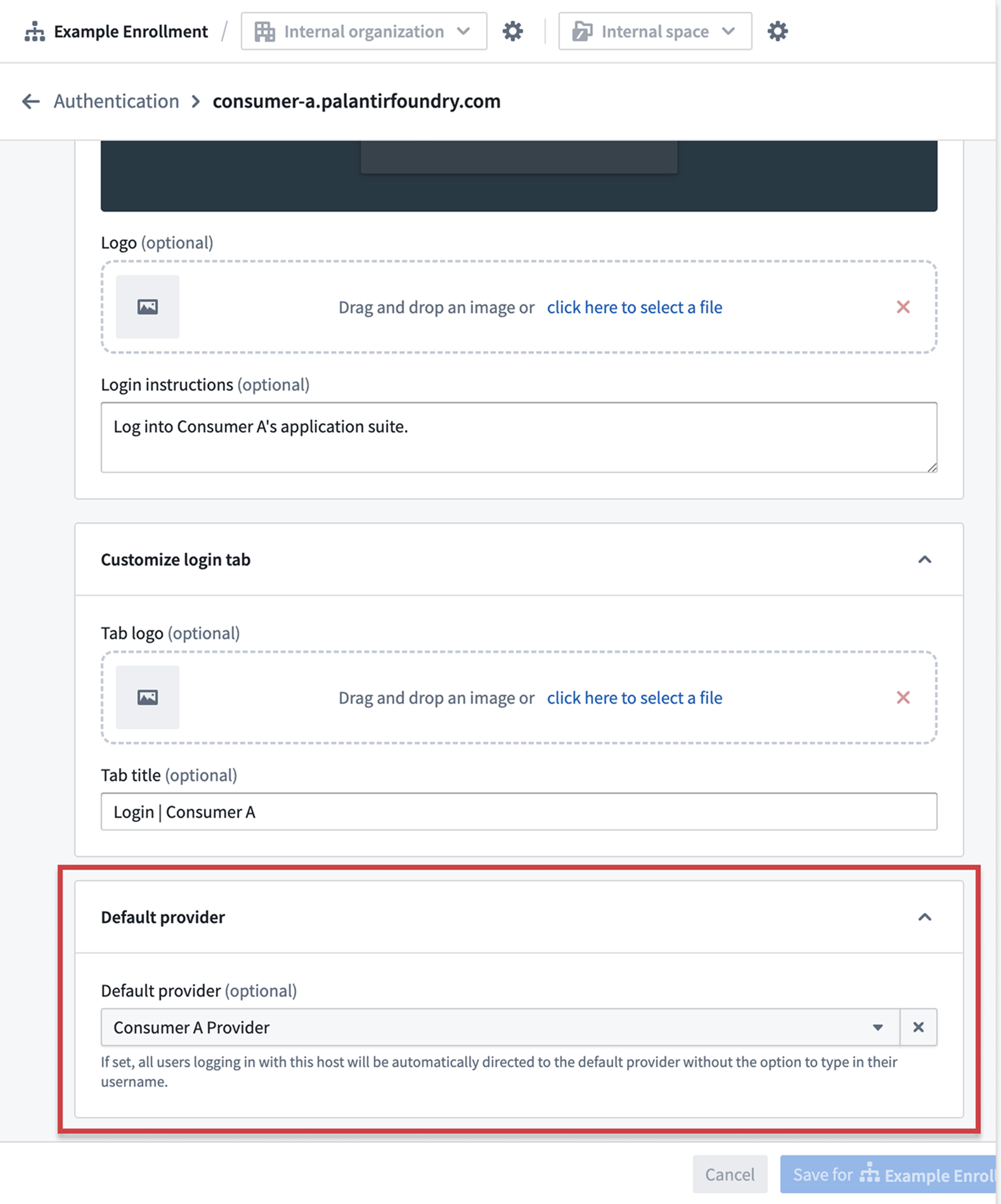
Set a default provider for user login when accessing the platform in consumer mode.
To get started, follow the documentation on how to configure Foundry for consumer mode. You will create dedicated consumer organizations and spaces, set up consumer authentication providers with automatic organization triaging, and configure restricted platform access.
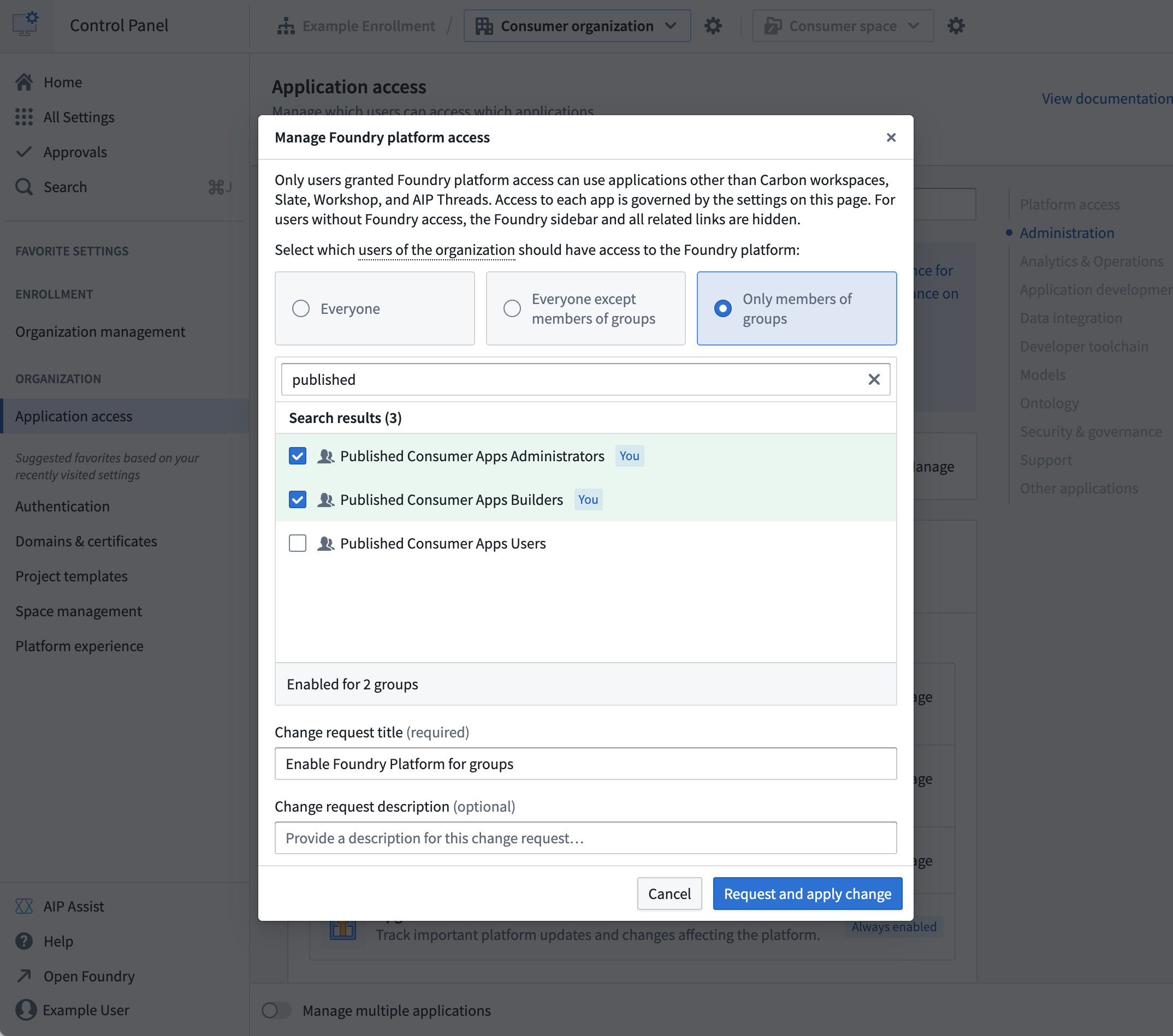
Manage platform access for consumer users in Control Panel.
Once Foundry is configured to use consumer mode, review three example deployment patterns for consumer applications to build and share with external users:
- In-platform applications using Workshop, Slate, or Carbon for rapid development.
- OAuth applications hosted on Foundry subdomains for pro-code solutions.
- Client credentials applications for externally-hosted services requiring maximum scale. The system enforces security through application access restrictions, minimal API permissions, and user isolation within private organizations.
Share your feedback
We want to hear about your experience using consumer mode to host external-facing applications. Let us know in our Foundry Support channels, or leave a post in our Developer Community ↗ using the control-panel ↗ tag.
GPT-5, GPT-5 mini, GPT-5 nano (Azure, Direct OpenAI) and Opus 4.1 (Google Vertex, Amazon Bedrock) are now available in AIP
Date published: 2025-08-21
GPT-5, GPT-5 mini, GPT-5 nano from OpenAI are now available for general use in AIP for enrollments with Azure and/or Direct OpenAI enabled in the US, EU, or non geo-restricted regions. GPT-5 is best suited for complex, real-world tasks across coding, writing, health, and multimodal reasoning, delivering expert-level intelligence, reduced hallucinations, and advanced instruction following. GPT-5 mini is the faster, more cost-efficient version of GPT-5 which is great for well-defined tasks and precise prompts. GPT-5 nano is ideal for summarization and classification tasks. Comparisons between the GPT-5 series models can be found in OpenAI's documentation↗.
Claude Opus 4.1 is Anthropic’s leading hybrid reasoning model, designed for demanding coding, agentic search, and AI agent tasks. With a 200K context window and advanced step-by-step reasoning, Opus 4.1 excels at complex, multi-step engineering and business challenges, offering superior code generation, long-horizon task management, and highly accurate, human-like writing. Enrollments with either Amazon Bedrock or Google Vertex enabled can start to use the Opus 4.1 model through AIP. Comparisons between Opus 4.1 and other models in the Anthropic family can be found in the Anthropic documentation↗.
As with all new models, use-case-specific evaluations are the best way to benchmark performance on your task.
For a list of all the models available in AIP, review the documentation.
Other recently added models to AIP
Google Vertex
- Gemini 2.5
- Gemini 2.5 Flash
- Gemini 2.5 Flash Lite
xAI
- Grok-4
Your feedback matters
We want to hear about your experiences using language models in the Palantir platform and welcome your feedback. Share your thoughts with Palantir Support channels or on our Developer Community ↗ using the language-model-service tag ↗.
Expanded checkpoint strategy support in Pipeline Builder
Date published: 2025-08-21
Pipeline Builder now supports three checkpoints strategies, giving you flexible ways to save intermediate results within your pipeline. A checkpoint allows shared logic to be computed just once, even when multiple outputs rely on it. Therefore, using checkpoints can significantly reduce build times and improve efficiency for complex pipelines.
Checkpoint strategies:
-
Save in short-term disk (Default): Stores every output on disk temporarily. This is the default strategy for nodes marked as checkpoints.
-
Save in memory (Fastest): Stores results temporarily in memory for faster access; this is especially useful for small datasets. Note that this option may fail for larger datasets due to memory limitations.
-
Save as output data: Saves the latest transaction of the checkpoint in a dedicated dataset. The dataset is created upon the first deployment of the checkpoint.
You can now choose the checkpointing method that best fits your workflow and data requirements.
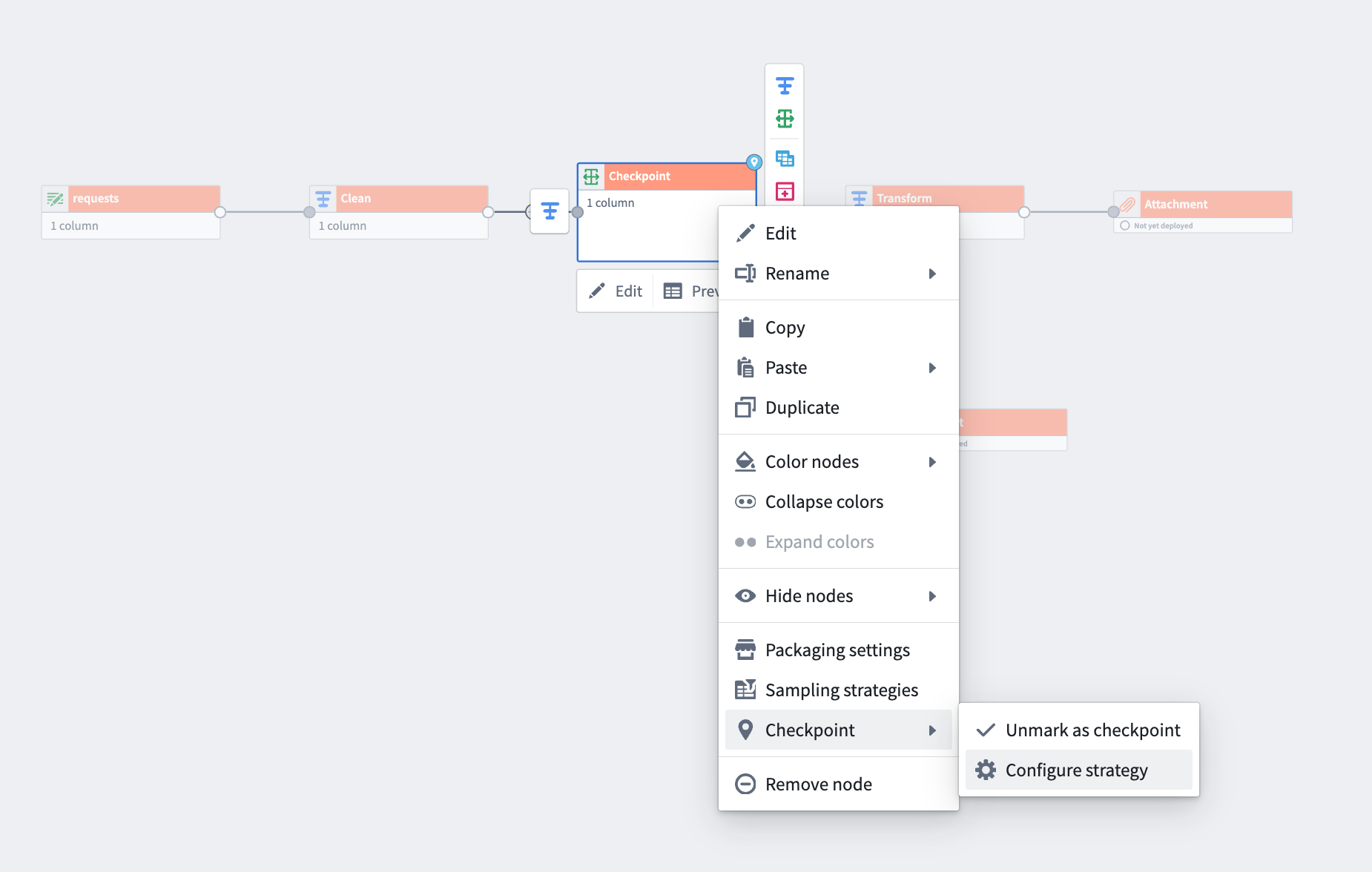
Right-click a transform node, select Checkpoint > Mark as checkpoint and then Configure strategy.
How to select a checkpoint strategy:
-
Right-click any transform node and select Mark as checkpoint.
-
From the same menu, use Configure strategy to choose your preferred checkpoint storage method for each output.
For nodes with multiple outputs, you can select a different strategy for each one.
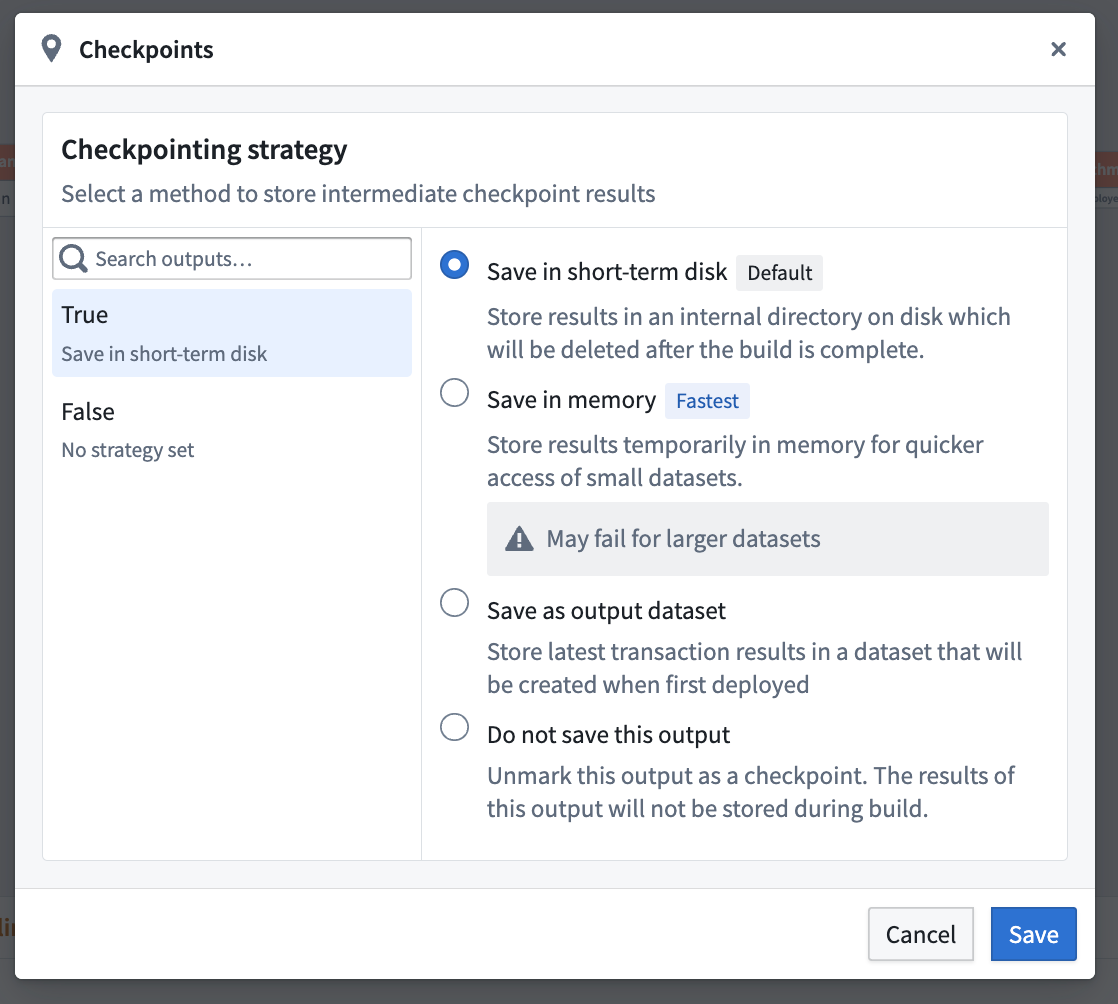
Select one of three strategies to either save in short-term disk, memory, or as output dataset.
Explore these new checkpoint options in Pipeline Builder today. Learn more about using checkpoints in Pipeline Builder.
Your feedback matters
We want to hear about your experiences with Pipeline Builder and welcome your feedback. Share your thoughts with Palantir Support channels or on our Developer Community ↗ using the pipeline-builder tag ↗.
Enforce stable version restrictions in function repositories
Date published: 2025-08-21
You can now restrict the release of stable versions of your functions by only allowing stable versions to be tagged from protected branches. This provides enhanced control over new stable version releases, ensuring that all changes being released in a stable version are required to go through code review to be merged into a protected branch first. This encourages safer practices, because new stable version releases are immediately picked up by downstream applications that are configured to automatically accept upgrades.
To enforce stable version tagging restrictions, navigate to the Protected branches setting and toggle on the Only allow stable versions to be tagged from protected branches option.
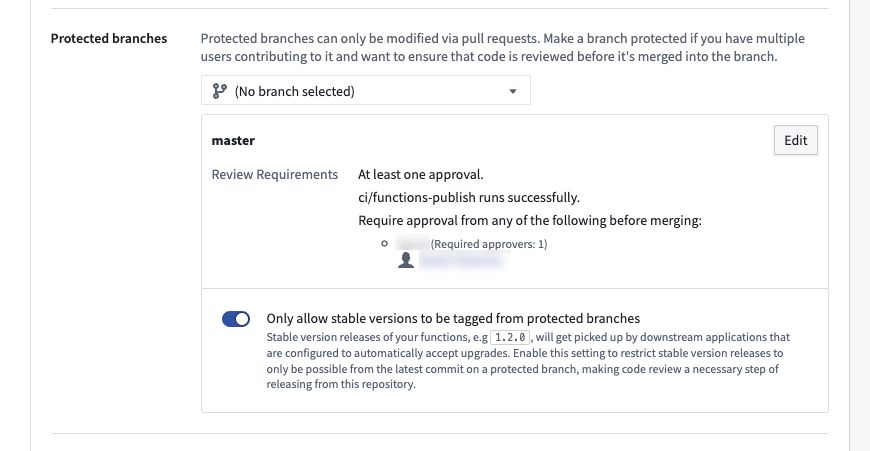
Enable stable release version restrictions in the protected branch settings.
When enabled, tagging from feature branches (non-protected branches) of the repository will block users from being able to submit a stable semantic version string. For example, 1.2.3 is a stable semantic version and is only allowed from protected branches, while 1.2.3-rc1 denotes a prerelease version that will be allowed from feature branches.
Learn more about how to protect stable function releases in the branch settings documentation.
Extend Workshop module development with custom widgets
Date published: 2025-08-21
Custom widgets allow technical users to write custom frontend code to be securely rendered into Workshop. By building with code when necessary, these users can raise the development ceiling of typical low-code Workshop applications. Custom widgets will be generally available across enrollments in the coming weeks.
Users can build custom widgets to display complex visualizations and workflows, including the following examples:
- Custom chart visualizations, such a candlestick charts.
- Industry-specific views of an ontology object, like a flight plan
- Signature entry widgets

A custom widget in developer mode, offering a dedicated development environment for testing widgets.
Benefits of custom widgets
- Security: When you build custom frontend code, it is securely rendered and isolated from the main Foundry page.
- First-class developer tooling: Custom widgets offer advanced tooling for developers, including CLIs, a dedicated developer mode, and new libraries, so building widgets feels easy and natural.
- Indexing: Custom widgets are indexed so users can discover them through search for reuse across multiple applications.
When should I use custom widgets?
Currently, you can embed a website built in Developer Console through a Workshop iframe widget. Custom widgets improve this workflow by reducing the complexity of requiring OAuth and subdomain registration, while adding advanced developer tooling. However, you should continue to use iframe widgets to host Developer Console websites for standalone custom applications where a dedicated application subdomain, full control of the page, and advanced features like a customizable Content Security Policy (CSP) are required.
What's next?
We are currently working on several improvements to custom widgets that we plan to release soon:
- Marketplace integration
- Ability to use object set parameter types
- Developer mode improvements
- Widget startup performance
What do you think?
We welcome your feedback on your experience using custom widgets in your enrollment. Contact our Palantir Support channels, or create a post in our Developer Community ↗ using the custom-widgets↗ tag.
Easily drag and drop to reorder objects in the Object List widget
Date published: 2025-08-21
Workshop builders can now drag and drop object cards to reorder items within a single Object List widget. This new feature allows you to manually apply your own ordering of objects.
The reordering of objects in the widget is backed by an array of the primary keys of the sorted objects. The ordering of these primary keys in the array determines the display order of these objects in the sorted section of the widget. Any objects with primary keys not in the array are displayed in the Unsorted List section of the widget, located below the sorted objects.
Builders can choose to update the primary key array variable on reorder, or configure an action to trigger on each reorder.
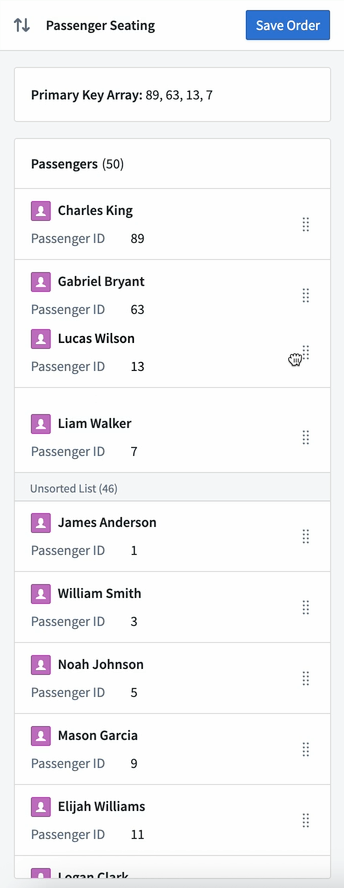
An Object List widget with reordering enabled, a Markdown widget displaying the primary key array backing the sort order, and a Button Group widget with a configured Action to save the updated primary key array’s values.
To learn more about how reordering configuration, its current limitations, and additional information, review our documentation.
New array variable transform operations are available in Workshop
Date published: 2025-08-21
We are excited to introduce new array variable transform operations for building in Workshop. These new operations offer Workshop builders even more ways to pull information from data to use in Workshop modules.
Is subset of
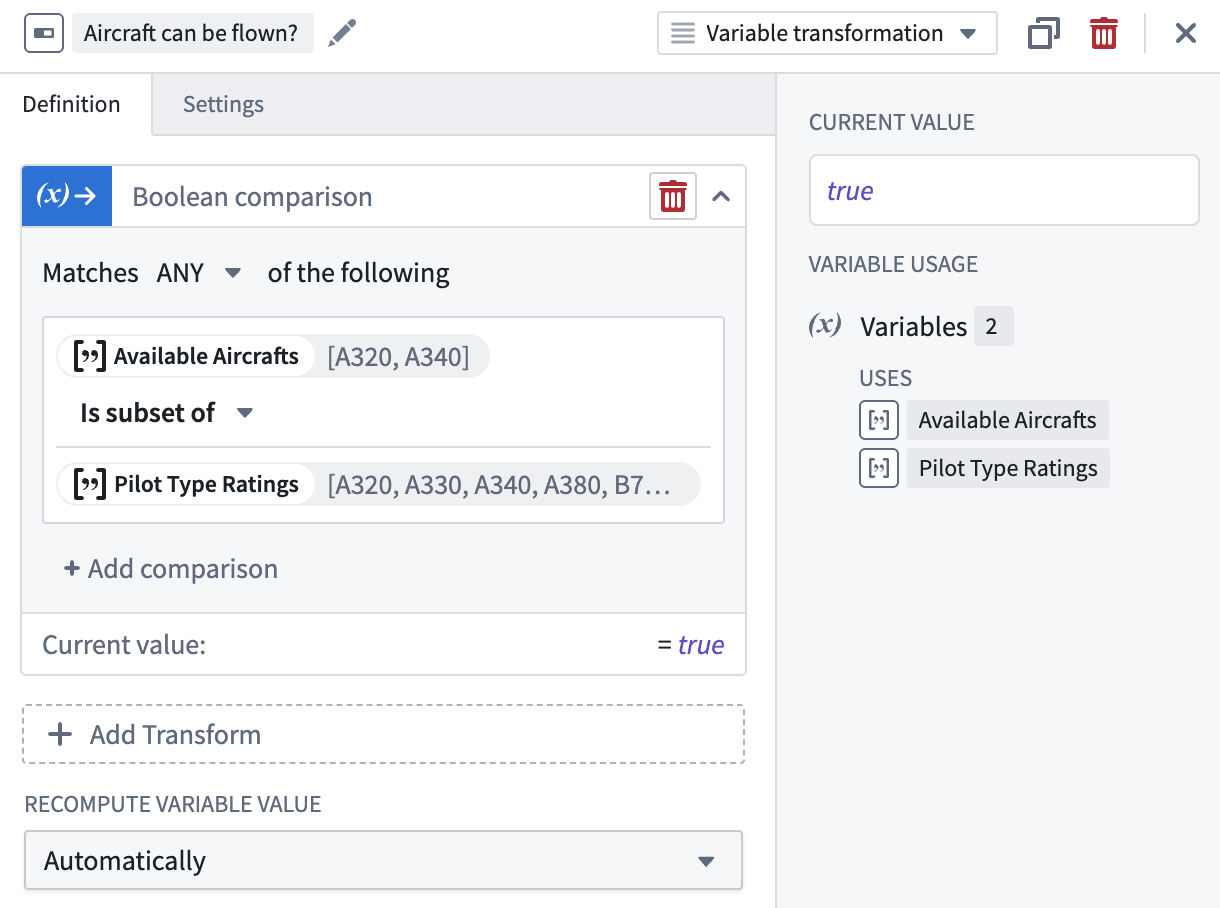
Use the Is subset of operation to check if a given array is a subset of another given array. A Boolean value will be returned.
Length
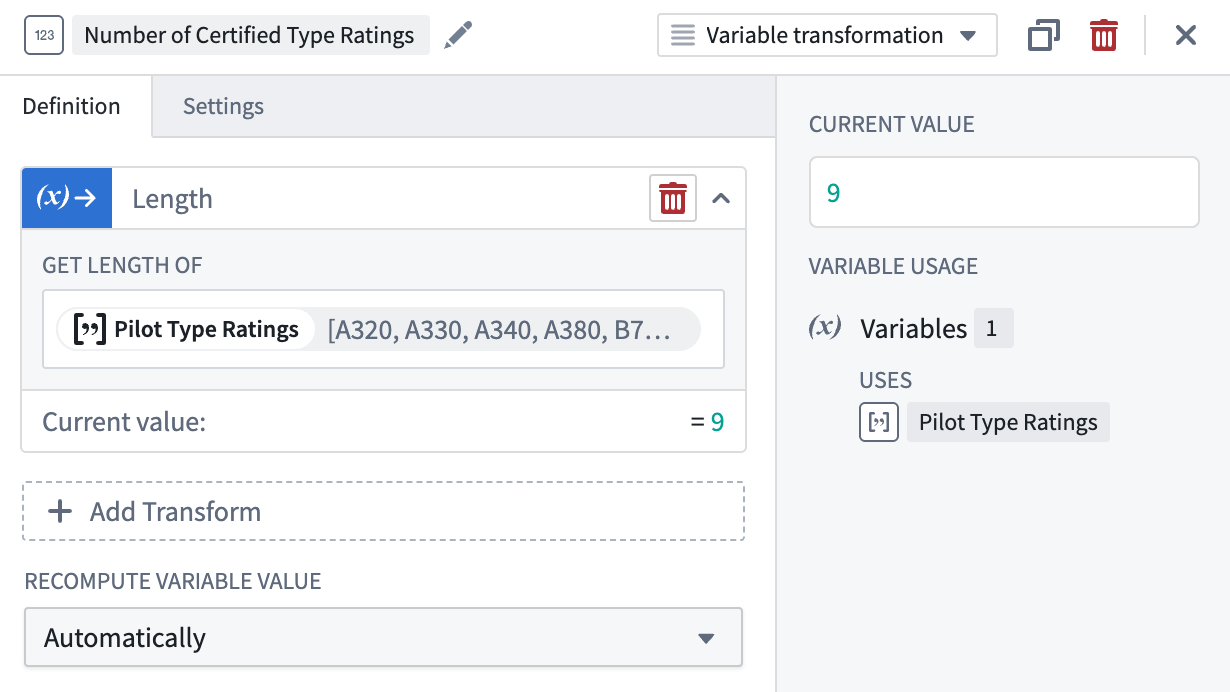
The Length operation easily returns the length of an array. The returned numeric value represents the number of elements within the array.
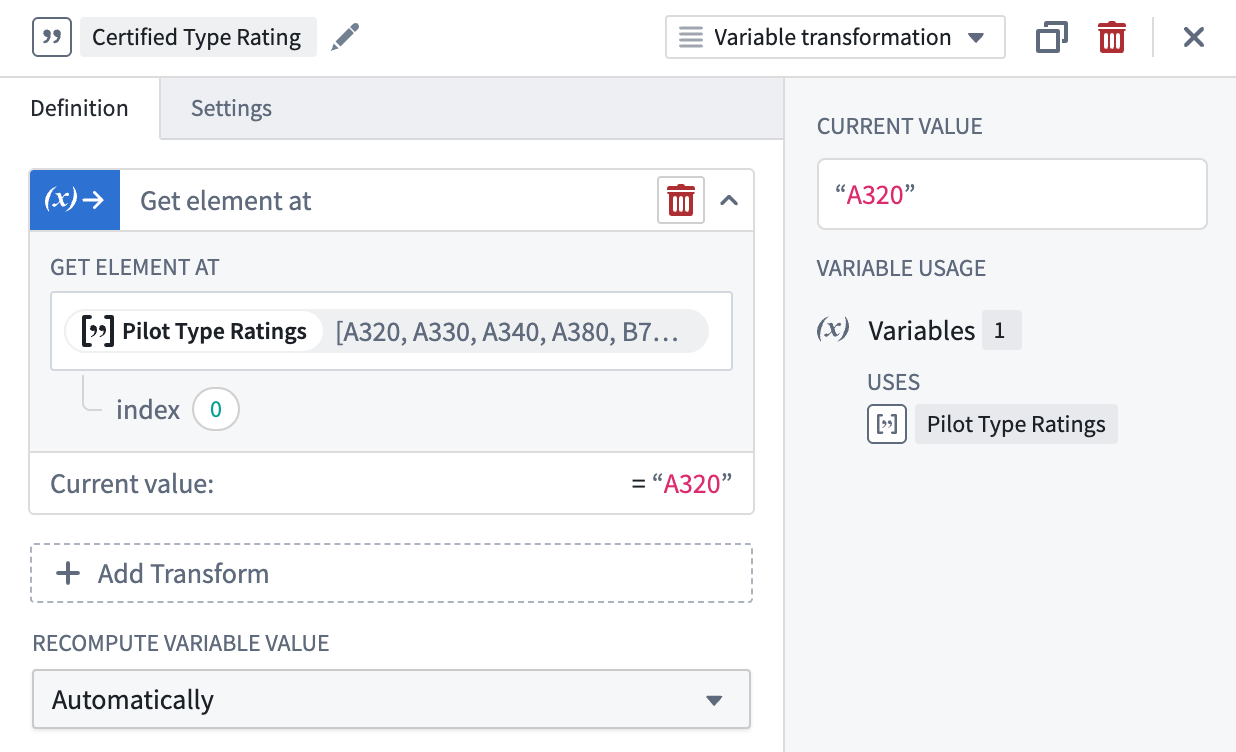
Get element at
Use the Get element at operation to grab an element within an array by specifying an index representing the element’s position in the array. A value matching the inputted array’s type will be returned.
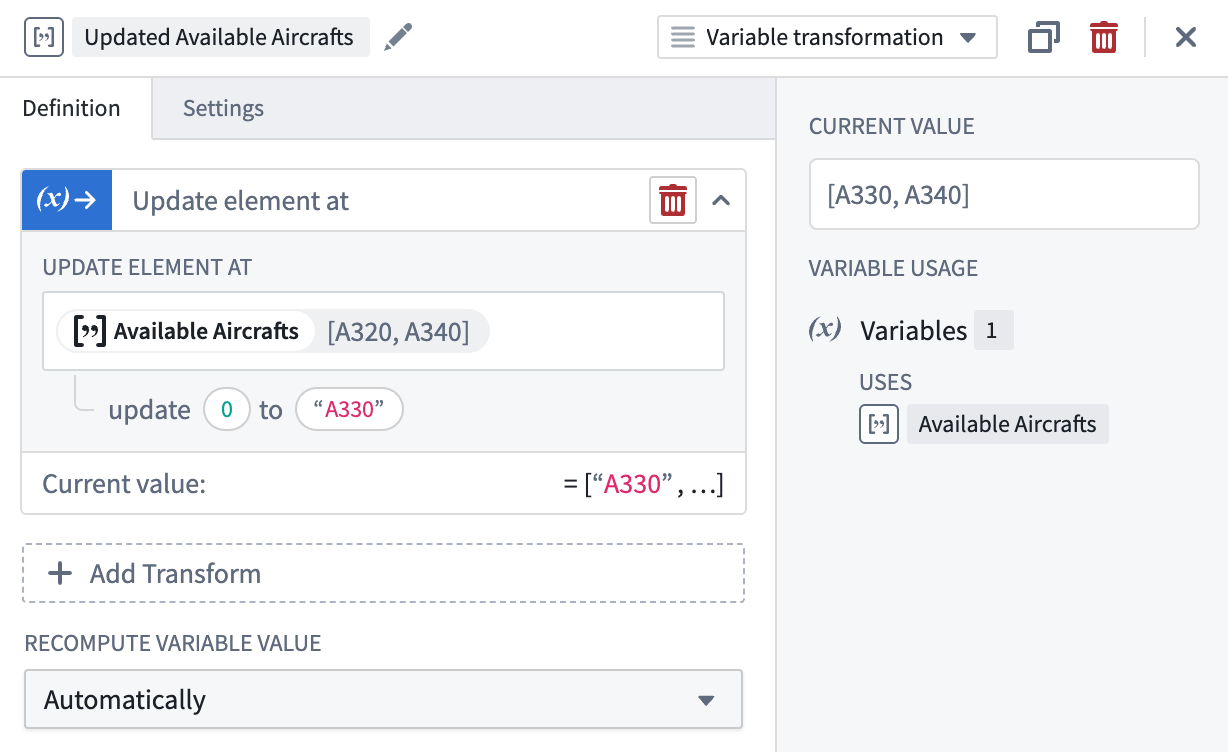
Update element at
The Update element at operation updates a specific element within the array by specifying an index representing the element’s position and a new entry matching the array’s type. The returned updated array matches the inputted array’s type.
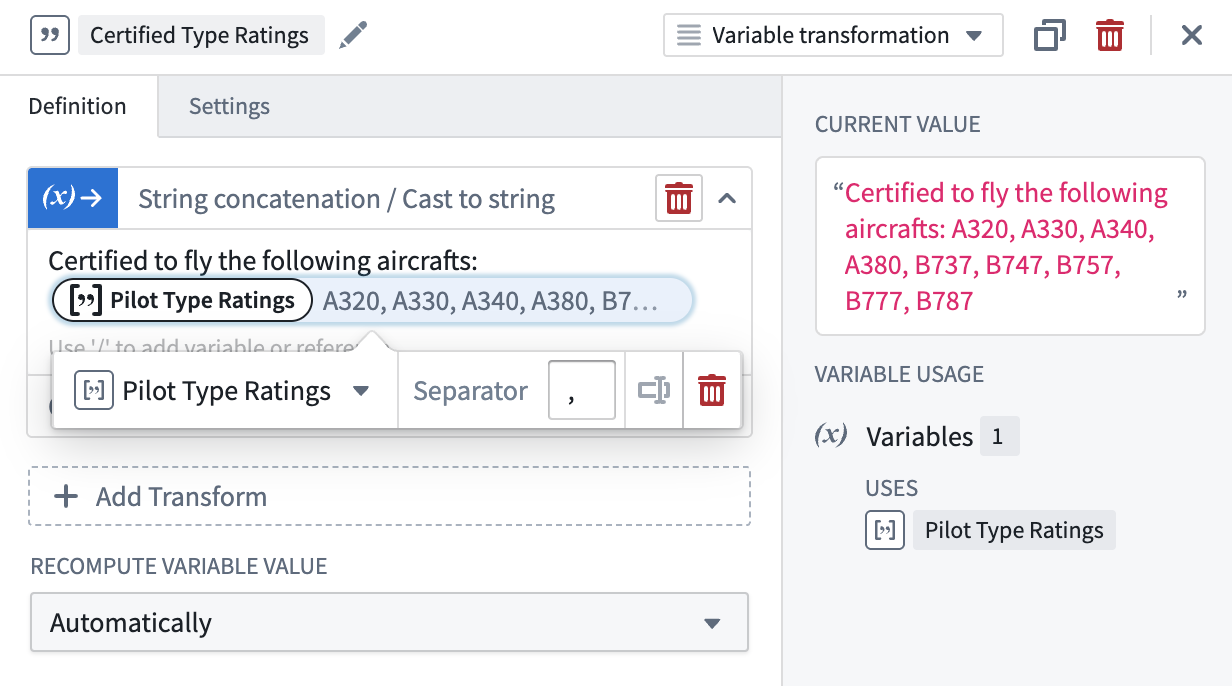
String concatenation/Cast to string
The String concatenation/cast to string operation can concatenate and cast elements within an array into a string, with an optional separator input added between elements.
Share your feedback
Let us know what you think about our new array variable transform operations by contacting our Palantir Support channels or posting your feedback in our Developer Community ↗ using the workshop ↗ tag
Foundry DevOps will be generally available the first week of September
Date published: 2025-08-19
Foundry DevOps is an application for packaging and deploying data-backed workflows built in Foundry as distributable products. Package any combination of your organization's ontology, AI models, pipelines, data connections, or end-to-end use cases for seamless deployment across teams and environments. As of the first week of September, Foundry DevOps will be generally available across all enrollments and will be on by default.
Products packaged in Foundry DevOps can be distributed throughout your organization or the broader Palantir platform community via Marketplace. Through Marketplace, users can install these solutions across multiple different spaces.
Common workflows for Foundry DevOps include:
- Distributing templated solutions across multiple teams, subsidiaries, or customer environments
- Managing release cycles with automated version control and dependency management across development environments
- Building organizational ecosystems where each participant receives customized installations with their own input data
- Bootstrapping new implementations by providing proven workflows as starting points for custom use cases
Creating a Marketplace store in DevOps
The first step to using DevOps is to create a store, which holds a collection of products. DevOps stores inherit permissions from their containing projects, ensuring that anyone with edit access can create and modify products, while users with view access can install available products.
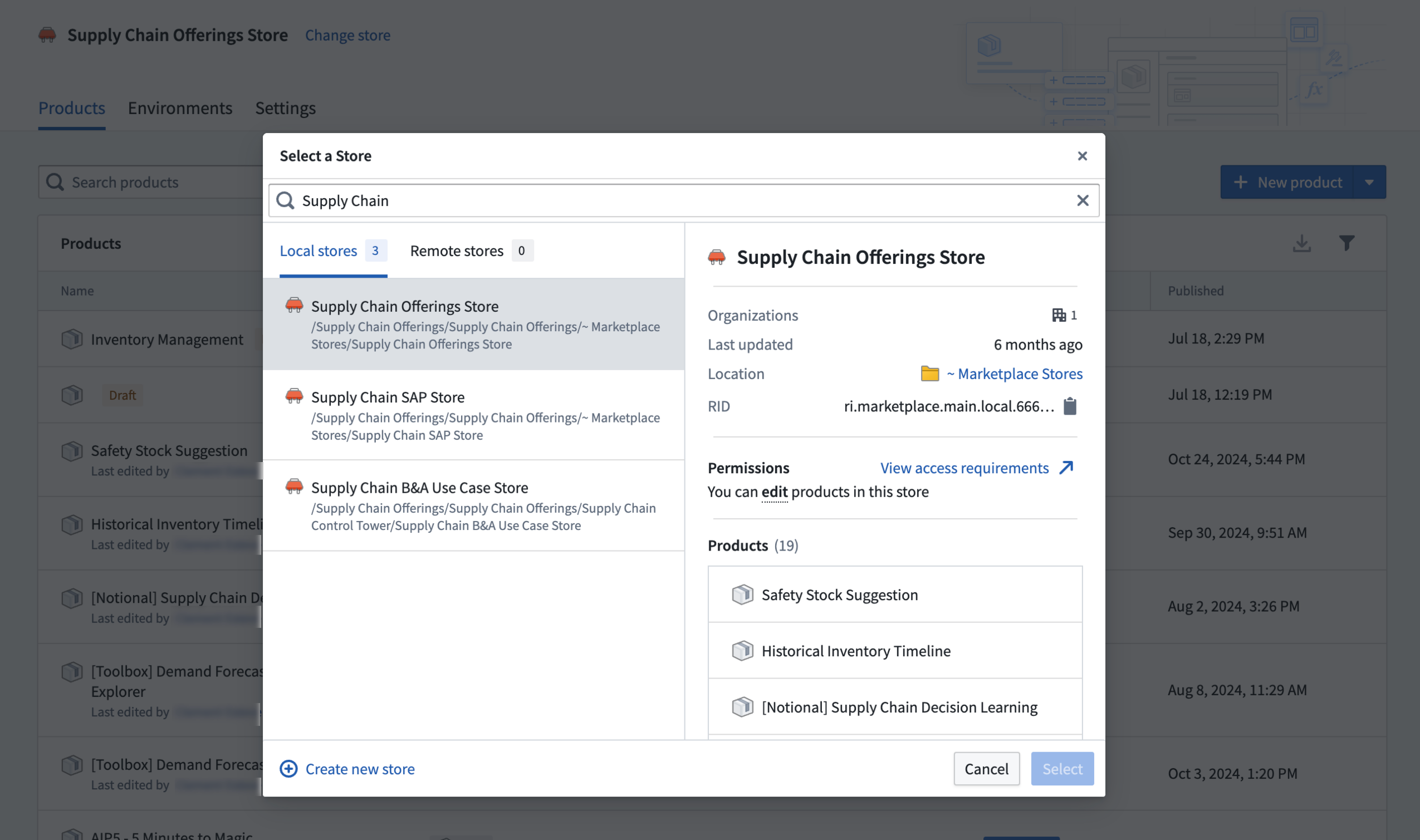
Create a Marketplace store in DevOps.
Package complex Foundry workflows in DevOps
Creating products in Foundry DevOps involves packaging your individual Foundry resources such as object types, datasets, Workshop applications, and pipelines into a comprehensive product. DevOps automatically identifies resource dependencies and allows you to iteratively build your product based on an entire workflow. Alternatively, options are provided for bulk adding all resources from a folder.

Use DevOps to package complex workflows into re-usable products.
Manage product versions and release channels
In the product overview page, you can start new versions of existing products, review previous versions, and view the latest product version for each stage of release. A preview of the latest version is shown on the product overview page.
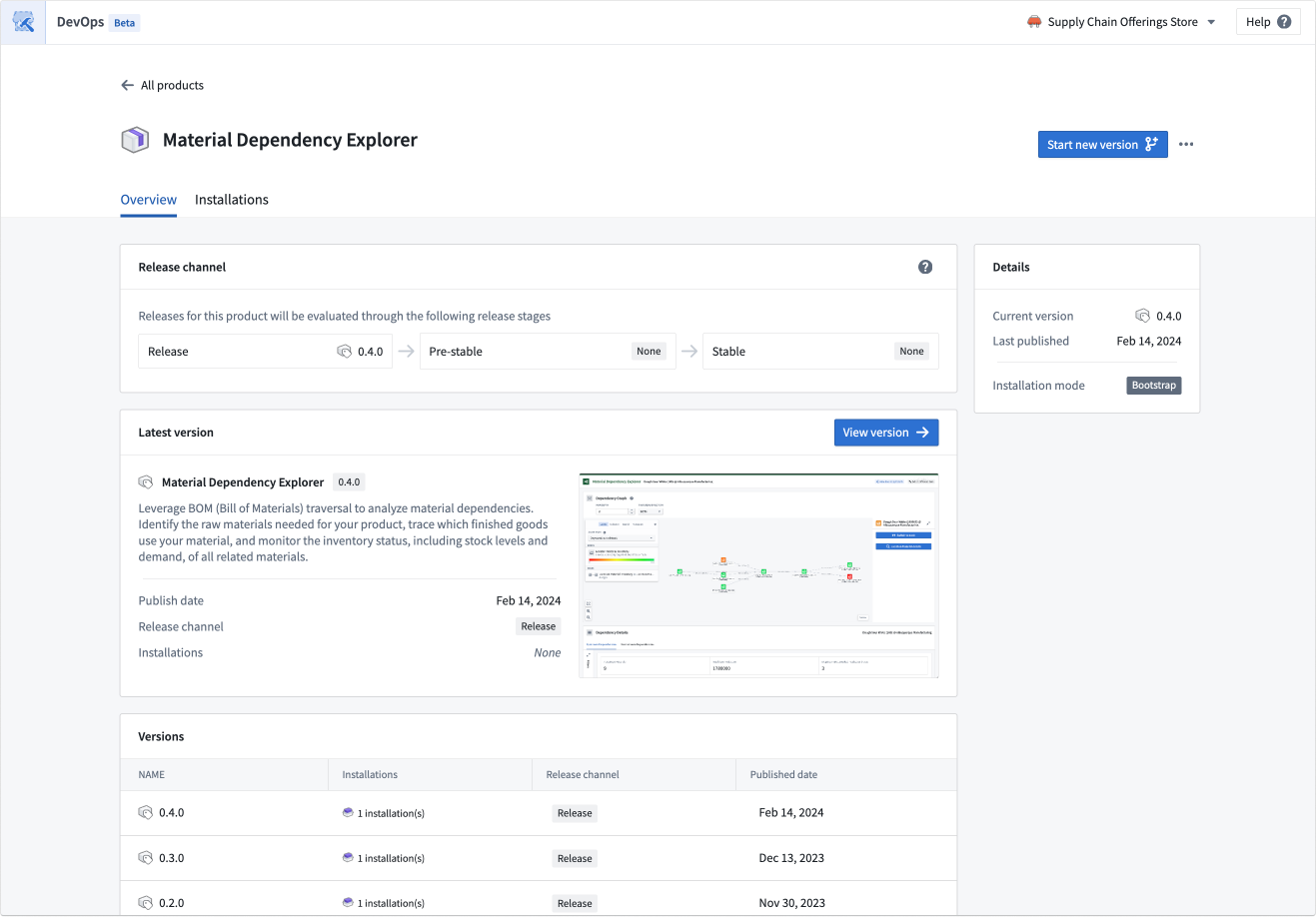
The product overview page allows you to create new versions and review previous versions.
Release management across environments
Create and manage multiple installations of your products across different environments. Release channels enable controlled rollouts, ensuring new versions only reach qualifying installations.
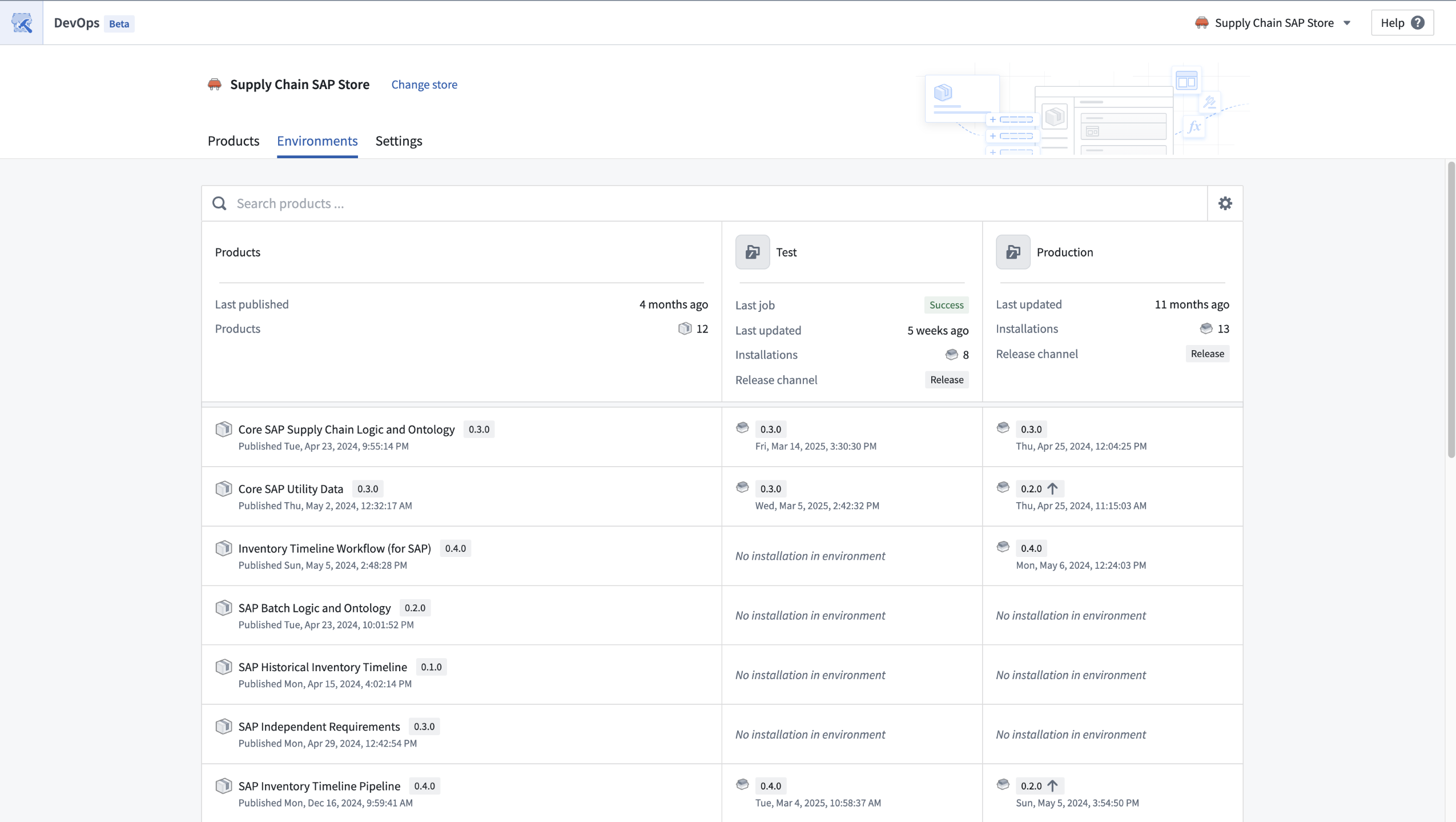
Installations of products can be managed across multiple environments.
Tell us what you think
Share your thoughts with Palantir Support, or let us know in our Developer Community ↗ forum using the devops ↗ tag.
Override per-model rate limits for projects in Resource Management
Date published: 2025-08-14
Enrollment managers are now able to configure AIP rate limits in Resource Management to override model-specific capacity allocations within a project. By manually configuring these allocations, you can set percentage-based limits for individual LLMs that override the base project limit. These overrides only apply to the projects included in that specific project limit (or for the default limit, all projects not assigned to any other manually created project limit).
The model override feature enables more granular capacity management so you can create model "allowlists". To do this, set the base project limit to 0%, add only the models you approve for use, then set an override with a specific capacity percentage. You can also explicitly disallow certain models by setting their override limit percentage to 0%.
For example, the steps below explain how to restrict projects in a project limit to only use Claude 4 Sonnet and GPT-4.1:
-
Set the base Max limit per project to 0%.
-
Add a model override for Claude 4 Sonnet at 30%.
-
Add a model override for GPT-4.1 at 25%.
-
Select Update limit to apply your changes.
Resources and users in all projects included in this project limit will only be able to access the specified models within their allocated capacity limits.

An example of an LLM rate limit override configuration for a project limit using Claude 4 Sonnet and GPT-4.1 models.
Learn more about managing LLM capacity in our documentation.
Share your thoughts
Let us know about your experience with this new feature and any feedback or questions you might have. Contact our Palantir Support channels, or create a post in our Developer Community ↗ using the language-model-service tag ↗.
Native tool calling mode now available in AIP Agent Studio
Date published: 2025-08-05
Native tool calling mode is now available in AIP Agent Studio, allowing agents to leverage built-in tool calling capabilities of supported models for improved speed and performance. Previously, agents with tools were limited to Prompted tool calling mode, which used additional prompt instructions and allowed only one tool call at a time.
You can now select the Native tool calling tool mode under the Tools settings for an AIP Agent.
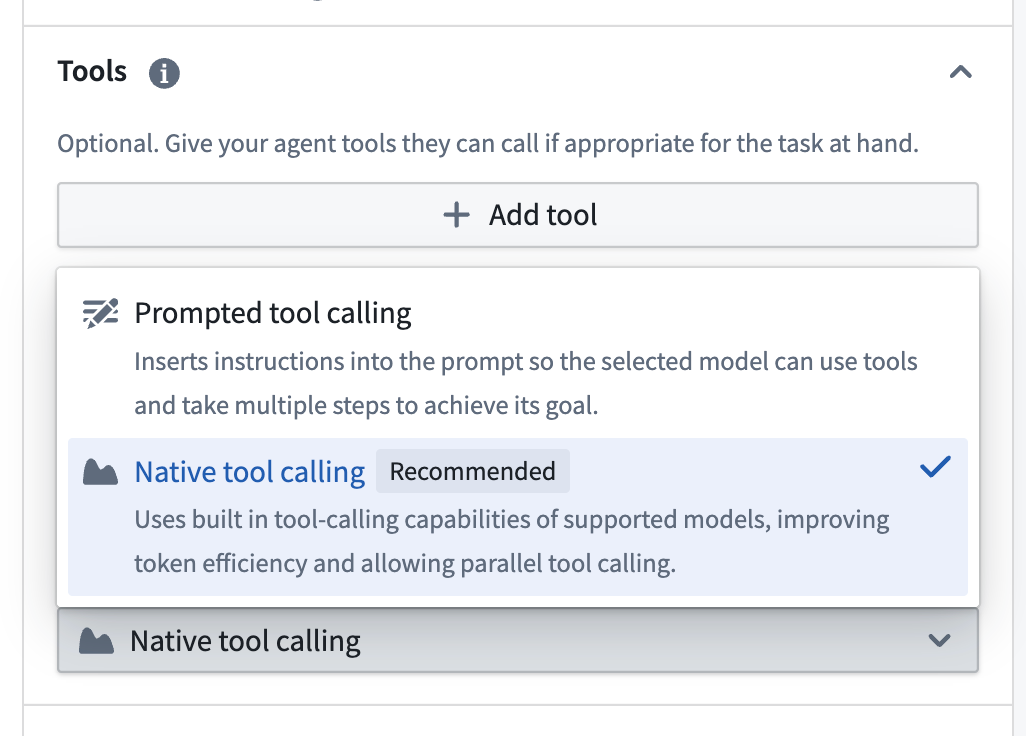
Tool settings in AIP Agent Studio with Prompted tool calling and Native tool calling tool modes available for selection.
Parallel tool call support
Native tool calling uses the built-in capabilities of supported models to improve tool calling speed and performance, offering more efficient token use and support for parallel tool calls. Parallel tool calling reduces the time required for an agent to answer complex queries that require multiple tool calls by allowing several tool calls to be made simultaneously.
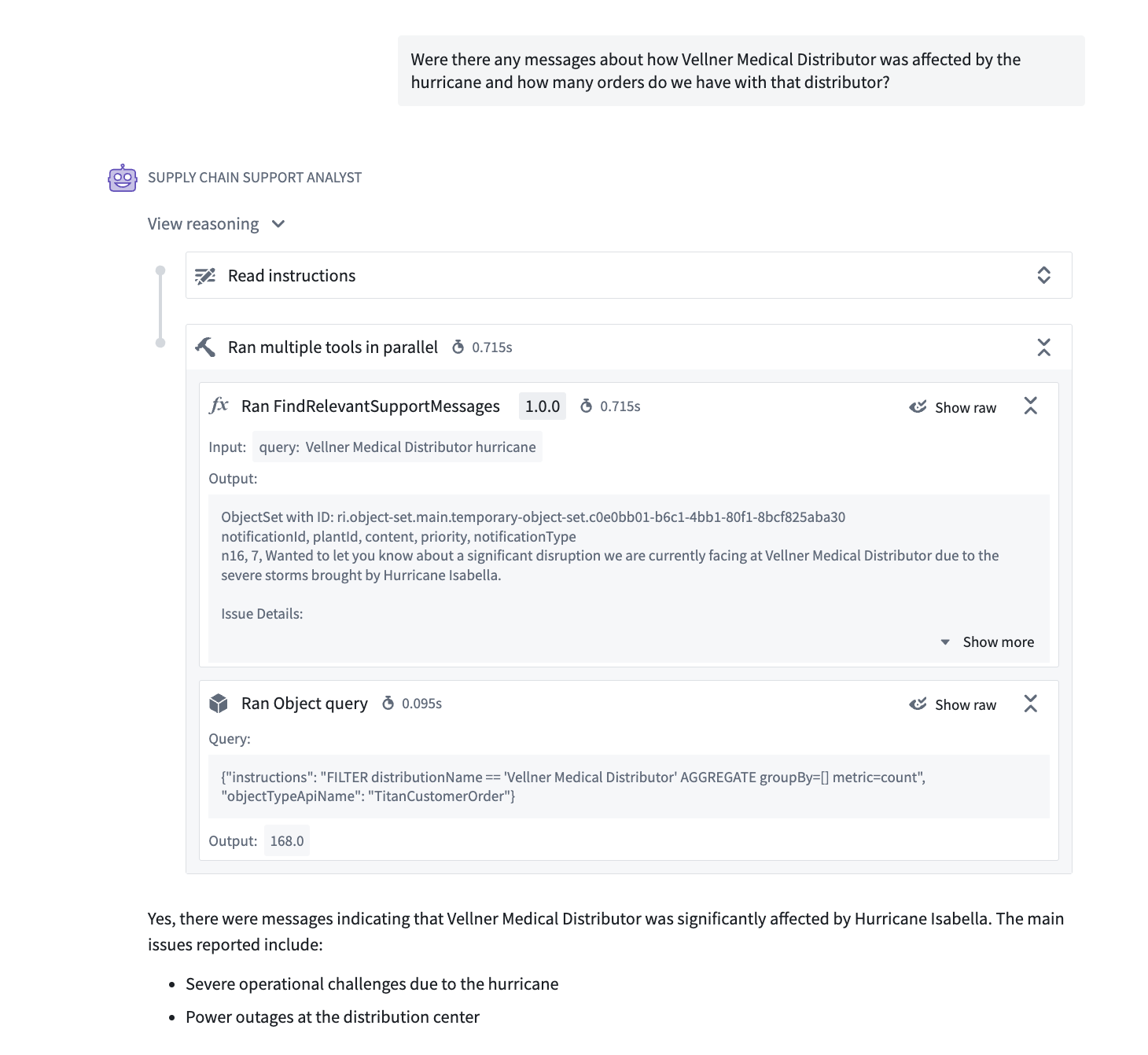
Parallel tool calls for an AIP Agent using Native tool calling mode.
Improve efficiency by reusing previous tool results
Agents in native tool calling mode can access tool calls from earlier exchanges in a conversation, enabling them to reuse previous results for more efficient responses.
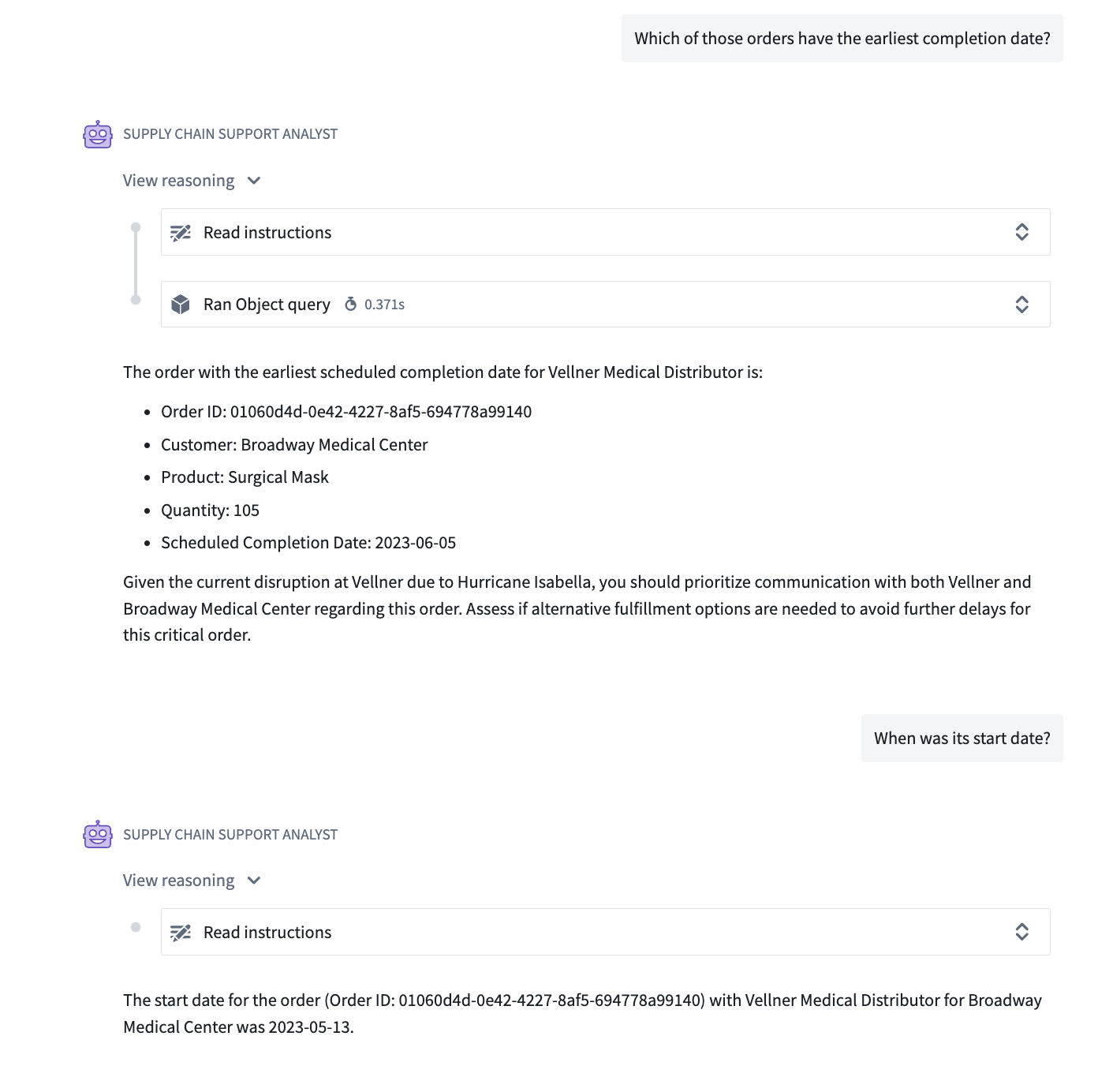
A native tool calling agent reusing a previous tool result in a conversation.
Supported models and tools
Native tool calling is currently available for use with a subset of Palantir-provided models only, and with the following tools:
- Apply action
- Call function
- Object query
- Update application variable
To view the list of supported models, select Native tool calling mode under the Tools settings for your AIP Agent, then open the Model settings. For agents with unsupported models and tools at this time, continue to use Prompted tool calling mode.
For more information, review the AIP Agent Studio documentation on tools.
Your feedback matters
We want to hear about your experiences with AIP Agent Studio and welcome your feedback. Share your thoughts with Palantir Support channels or on our Developer Community ↗ using the aip-agent-studio tag ↗.
Gemini 2.5 series (Google Vertex) and Grok-4 (xAI) are now available in AIP
Date published: 2025-08-05
Gemini 2.5 Pro, Gemini 2.5 Flash, and Gemini 2.5 Flash Lite from Google Vertex are now available for general use in AIP. Gemini 2.5 Pro is Google's flagship model for complex, reasoning-heavy tasks, while Gemini 2.5 Flash provides a balance between speed, cost, and performance. Gemini 2.5 Flash Lite is the most efficient model offered. Comparisons between the Gemini 2.5 series models can be found in on Google's documentation↗.
Grok-4 is xAI's flagship model for deep reasoning and computationally intensive tasks. It offers significant improvements over Grok-3 for complex, multi-step problem solving and heavy-duty analysis, making it ideal for users who require robust logic and advanced deduction. Comparisons between Grok-4 and other models in the xAI family can be found in the xAI documentation↗.
As with all new models, use-case-specific evaluations are the best way to benchmark performance on your task.
You can use these new models in enrollments where the enrollment administrator has enabled the model family.
For a list of all the models available in AIP, review the documentation.
Additional recently models added to AIP
OpenAI (Direct or on Azure)
- GPT-4.1
- GPT-4.1 mini
- GPT-4.1 nano
- o3
- o4-mini
Amazon Bedrock
- Claude 4 Sonnet
Your feedback matters
We want to hear about your experiences using language models in the Palantir platform and welcome your feedback. Share your thoughts with Palantir Support channels or on our Developer Community ↗ using the language-model-service tag ↗.
中文翻译
公告
提醒: 请注册 Foundry 新闻通讯(Foundry Newsletter),即可直接在收件箱中收到平台新产品、功能及改进的摘要。有关如何订阅的更多信息,请参阅 Foundry 新闻通讯与产品反馈渠道公告。
欢迎在我们的开发者社区论坛 ↗ 分享您对这些公告的看法。
配置 Palantir 以支持消费者模式并构建面向外部的应用程序
发布日期:2025-08-28
通过配置 Foundry 中的消费者模式(consumer mode),为外部用户优化您的 Palantir 环境。消费者模式是一项强大的功能,使组织能够向外部用户交付安全、可扩展的应用程序。借助消费者模式,您可以构建面向消费者的应用程序,包括 B2C 和 B2B 解决方案,同时将用户限制在特定应用程序内,不授予更广泛的平台访问权限。消费者模式配置消除了向消费者用户授予广泛平台权限的需要,使您能够构建由 Ontology 支持的面向外部应用程序,而无需管理 Foundry 之外的基础设施。
设置用户在消费者模式下访问平台时的默认登录提供商。
要开始使用,请按照有关如何为消费者模式配置 Foundry 的文档进行操作。您将创建专用的消费者组织(organizations)和空间(spaces),设置具有自动组织分类功能的消费者身份验证提供商(authentication providers),并配置受限的平台访问权限。
在控制面板中管理消费者用户的平台访问权限。
一旦 Foundry 配置为使用消费者模式,请查看三种消费者应用程序的示例部署模式,以便构建并与外部用户共享:
- 平台内应用程序:使用 Workshop、Slate 或 Carbon 进行快速开发。
- OAuth 应用程序:托管在 Foundry 子域上,适用于专业代码解决方案。
- 客户端凭证应用程序:适用于需要最大规模的外部托管服务。系统通过应用程序访问限制、最小 API 权限以及私有组织内的用户隔离来强制执行安全性。
分享您的反馈
我们期待了解您使用消费者模式托管面向外部应用程序的体验。请通过我们的 Foundry 支持渠道告知我们,或在我们的开发者社区 ↗ 中使用 control-panel ↗ 标签 发帖。
GPT-5、GPT-5 mini、GPT-5 nano(Azure、Direct OpenAI)和 Opus 4.1(Google Vertex、Amazon Bedrock)现已在 AIP 中可用
发布日期:2025-08-21
来自 OpenAI 的 GPT-5、GPT-5 mini、GPT-5 nano 现已在 AIP 中全面可用,适用于在美国、欧盟或非地理限制区域启用了 Azure 和/或 Direct OpenAI 的注册环境。GPT-5 最适合处理编码、写作、健康和多模态推理等复杂的现实世界任务,提供专家级智能、减少幻觉并具备高级指令遵循能力。GPT-5 mini 是 GPT-5 更快、更具成本效益的版本,非常适合定义明确的任务和精确提示。GPT-5 nano 是摘要和分类任务的理想选择。GPT-5 系列模型之间的比较可在 OpenAI 的文档↗ 中找到。
Claude Opus 4.1 是 Anthropic 领先的混合推理模型,专为要求苛刻的编码、智能体搜索和 AI 智能体任务而设计。凭借 200K 上下文窗口和高级逐步推理能力,Opus 4.1 在复杂的多步骤工程和业务挑战中表现出色,提供卓越的代码生成、长期任务管理以及高度准确、类人的写作能力。启用了 Amazon Bedrock 或 Google Vertex 的注册环境可以通过 AIP 开始使用 Opus 4.1 模型。Opus 4.1 与 Anthropic 系列中其他模型的比较可在 Anthropic 文档↗ 中找到。
与所有新模型一样,针对特定用例的评估是衡量任务性能的最佳方式。
近期添加到 AIP 的其他模型
Google Vertex
- Gemini 2.5
- Gemini 2.5 Flash
- Gemini 2.5 Flash Lite
xAI
- Grok-4
您的反馈很重要
我们期待了解您在 Palantir 平台上使用语言模型的体验,并欢迎您的反馈。请通过 Palantir 支持渠道或在我们的开发者社区 ↗ 中使用 language-model-service 标签 ↗ 分享您的想法。
Pipeline Builder 中扩展的检查点策略支持
发布日期:2025-08-21
Pipeline Builder 现在支持三种检查点策略,为您提供了灵活的方式来保存管道中的中间结果。检查点(checkpoint)允许共享逻辑仅计算一次,即使多个输出依赖于它。因此,使用检查点可以显著减少构建时间并提高复杂管道的效率。
检查点策略:
-
保存到短期磁盘(默认): 将每个输出临时存储在磁盘上。这是标记为检查点的节点的默认策略。
-
保存到内存(最快): 将结果临时存储在内存中以实现更快的访问;这对于小型数据集特别有用。请注意,对于较大的数据集,此选项可能因内存限制而失败。
-
保存为输出数据: 将检查点的最新事务保存到专用数据集中。该数据集在首次部署检查点时创建。
您现在可以选择最适合您工作流和数据需求的检查点方法。
右键单击转换节点,选择 检查点 > 标记为检查点,然后 配置策略。
如何选择检查点策略:
-
右键单击任何转换节点,然后选择 标记为检查点。
-
从同一菜单中,使用 配置策略 为每个输出选择您偏好的检查点存储方法。
对于具有多个输出的节点,您可以为每个输出选择不同的策略。
选择三种策略之一,保存到短期磁盘、内存或输出数据集。
立即在 Pipeline Builder 中探索这些新的检查点选项。详细了解如何在 Pipeline Builder 中使用检查点。
您的反馈很重要
我们期待了解您使用 Pipeline Builder 的体验,并欢迎您的反馈。请通过 Palantir 支持渠道或在我们的开发者社区 ↗ 中使用 pipeline-builder 标签 ↗ 分享您的想法。
在函数仓库中强制实施稳定版本限制
发布日期:2025-08-21
您现在可以限制函数稳定版本的发布,仅允许从受保护分支(protected branches)标记稳定版本。这增强了对新稳定版本发布的控制,确保所有在稳定版本中发布的更改都必须先通过代码审查合并到受保护分支中。这鼓励了更安全的实践,因为新稳定版本发布后,配置为自动接受升级的下游应用程序会立即获取更新。
要强制实施稳定版本标记限制,请导航至 受保护分支 设置,并切换 仅允许从受保护分支标记稳定版本 选项。
在受保护分支设置中启用稳定发布版本限制。
启用后,从仓库的功能分支(非受保护分支)标记将阻止用户提交稳定的语义版本字符串。例如,1.2.3 是一个稳定的语义版本,仅允许从受保护分支提交,而 1.2.3-rc1 表示预发布版本,允许从功能分支提交。
在分支设置文档中了解有关如何保护稳定函数发布的更多信息。
使用自定义小部件扩展 Workshop 模块开发
发布日期:2025-08-21
自定义小部件允许技术用户编写自定义前端代码,这些代码可以安全地渲染到 Workshop 中。通过在必要时使用代码进行构建,这些用户可以提高典型低代码 Workshop 应用程序的开发上限。自定义小部件将在未来几周内在所有注册环境中全面可用。
用户可以构建自定义小部件来显示复杂的可视化和工作流,包括以下示例:
- 自定义图表可视化,例如 K 线图。
- 特定行业的 Ontology 对象视图,例如飞行计划。
- 签名输入小部件。
处于开发者模式的自定义小部件,提供专用的开发环境用于测试小部件。
自定义小部件的优势
- 安全性: 当您构建自定义前端代码时,它会安全地渲染并与主 Foundry 页面隔离。
- 一流的开发者工具: 自定义小部件为开发者提供高级工具,包括 CLI、专用开发者模式和新库,使构建小部件变得简单自然。
- 索引: 自定义小部件会被索引,以便用户可以通过搜索发现它们并在多个应用程序中重复使用。
何时应使用自定义小部件?
目前,您可以通过 Workshop iframe 小部件 嵌入在 Developer Console 中构建的网站。自定义小部件通过减少对 OAuth 和子域注册的复杂性要求,同时添加高级开发者工具,改进了此工作流。但是,对于需要专用应用程序子域、对页面的完全控制以及可自定义内容安全策略(CSP)等高级功能的独立自定义应用程序,您应继续使用 iframe 小部件来托管 Developer Console 网站。
下一步计划?
我们目前正在对自定义小部件进行多项改进,并计划很快发布:
- Marketplace 集成
- 能够使用对象集参数类型
- 开发者模式改进
- 小部件启动性能
您怎么看?
我们欢迎您就在注册环境中使用自定义小部件的体验提供反馈。请联系我们的 Palantir 支持渠道,或在我们的开发者社区 ↗ 中使用 custom-widgets ↗ 标签 发帖。
轻松拖放以在对象列表小部件中重新排序对象
发布日期:2025-08-21
Workshop 构建者现在可以拖放对象卡片以在单个对象列表(Object List)小部件中重新排序项目。此新功能允许您手动应用自己的对象排序。
小部件中对象的重新排序由一个包含已排序对象主键的数组支持。数组中这些主键的顺序决定了这些对象在小部件已排序部分中的显示顺序。主键不在数组中的任何对象将显示在小部件的未排序列表部分,位于已排序对象下方。
构建者可以选择在重新排序时更新主键数组变量,或配置一个在每次重新排序时触发的操作。
一个启用了重新排序的对象列表小部件,一个显示支持排序顺序的主键数组的 Markdown 小部件,以及一个配置了保存更新后主键数组值的操作的按钮组小部件。
要了解有关重新排序配置、其当前限制和更多信息的更多信息,请查看我们的文档。
Workshop 中提供新的数组变量转换操作
发布日期:2025-08-21
我们很高兴地介绍在 Workshop 中构建时可用的新数组变量转换操作。这些新操作为 Workshop 构建者提供了更多从数据中提取信息以在 Workshop 模块中使用的方法。
是子集
使用 Is subset of 操作检查给定数组是否是另一个给定数组的子集。将返回一个布尔值。
长度
Length 操作轻松返回数组的长度。返回的数值表示数组中元素的数量。
获取元素
使用 Get element at 操作通过指定表示元素在数组中位置的索引来获取数组中的元素。将返回与输入数组类型匹配的值。
更新元素
Update element at 操作通过指定表示元素位置的索引和与数组类型匹配的新条目来更新数组中的特定元素。返回的更新后数组与输入数组的类型匹配。
字符串连接/转换为字符串
String concatenation/cast to string 操作可以连接数组中的元素并将其转换为字符串,并可在元素之间添加可选的分隔符输入。
分享您的反馈
请通过联系我们的 Palantir 支持渠道或在我们的开发者社区 ↗ 中使用 workshop ↗ 标签发布您的反馈,告诉我们您对我们新的数组变量转换操作的看法。
Foundry DevOps 将于 9 月第一周全面可用
发布日期:2025-08-19
Foundry DevOps 是一个用于将 Foundry 中构建的数据驱动工作流打包和部署为可分发产品的应用程序。打包您组织的 Ontology、AI 模型、管道、数据连接或端到端用例的任意组合,以便在团队和环境之间无缝部署。从 9 月第一周开始,Foundry DevOps 将在所有注册环境中全面可用并默认开启。
在 Foundry DevOps 中打包的产品可以通过 Marketplace 在整个组织或更广泛的 Palantir 平台社区中分发。通过 Marketplace,用户可以在多个不同空间中安装这些解决方案。
Foundry DevOps 的常见工作流包括:
- 分发模板化解决方案 到多个团队、子公司或客户环境
- 管理发布周期,跨开发环境实现自动化版本控制和依赖管理
- 构建组织生态系统,每个参与者都能获得包含其自身输入数据的定制化安装
- 引导新实施,通过提供经过验证的工作流作为自定义用例的起点
在 DevOps 中创建 Marketplace 商店
使用 DevOps 的第一步是创建一个商店,用于存放产品集合。DevOps 商店继承其所在项目的权限,确保任何具有编辑权限的人都可以创建和修改产品,而具有查看权限的用户可以安装可用产品。
在 DevOps 中创建 Marketplace 商店。
在 DevOps 中打包复杂的 Foundry 工作流
在 Foundry DevOps 中创建产品涉及将您的单个 Foundry 资源(如对象类型、数据集、Workshop 应用程序和管道)打包成一个全面的产品。DevOps 会自动识别资源依赖关系,并允许您基于整个工作流迭代构建产品。此外,还提供了从文件夹批量添加所有资源的选项。
使用 DevOps 将复杂工作流打包成可重复使用的产品。
管理产品版本和发布渠道
在产品概览页面中,您可以启动现有产品的新版本、查看以前的版本,并查看每个发布阶段的最新产品版本。产品概览页面上会显示最新版本的预览。
产品概览页面允许您创建新版本并查看以前的版本。
跨环境发布管理
创建并管理产品在不同环境中的多个安装。发布渠道支持受控发布,确保新版本仅到达符合条件的安装。
产品的安装可以在多个环境中进行管理。
告诉我们您的想法
请通过 Palantir 支持分享您的想法,或在我们的开发者社区 ↗ 论坛中使用 devops ↗ 标签告知我们。
在资源管理中覆盖项目级别的每模型速率限制
发布日期:2025-08-14
注册管理员现在可以在资源管理(Resource Management)中配置 AIP 速率限制,以覆盖项目内特定模型的容量分配。通过手动配置这些分配,您可以设置单个 LLM 的基于百分比的限制,这些限制会覆盖基本项目限制。这些覆盖仅适用于该特定项目限制中包含的项目(或对于默认限制,适用于未分配给任何其他手动创建的项目限制的所有项目)。
模型覆盖功能支持更精细的容量管理,以便您可以创建模型“允许列表”。为此,请将基本项目限制设置为 0%,仅添加您批准使用的模型,然后设置具有特定容量百分比的覆盖。您还可以通过将某些模型的覆盖限制百分比设置为 0% 来明确禁止它们。
例如,以下步骤说明了如何将项目限制中的项目限制为仅使用 Claude 4 Sonnet 和 GPT-4.1:
-
将基本 每个项目的最大限制 设置为 0%。
-
为 Claude 4 Sonnet 添加 30% 的模型覆盖。
-
为 GPT-4.1 添加 25% 的模型覆盖。
-
选择 更新限制 以应用您的更改。
此项目限制中包含的所有项目中的资源和用户将只能在其分配的容量限制内访问指定的模型。
一个使用 Claude 4 Sonnet 和 GPT-4.1 模型的项目限制的 LLM 速率限制覆盖配置示例。
在我们的文档中了解有关管理 LLM 容量的更多信息。
分享您的想法
请告诉我们您使用此新功能的体验以及您可能有的任何反馈或问题。请联系我们的 Palantir 支持渠道,或在我们的开发者社区 ↗ 中使用 language-model-service 标签 ↗ 发帖。
AIP Agent Studio 中现已提供原生工具调用模式
发布日期:2025-08-05
原生工具调用模式现已在 AIP Agent Studio 中可用,允许智能体利用受支持模型的内置工具调用能力来提高速度和性能。以前,带有工具的智能体仅限于提示工具调用模式,该模式使用额外的提示指令,并且一次只允许进行一次工具调用。
您现在可以在 AIP Agent 的工具设置下选择原生工具调用工具模式。
AIP Agent Studio 中的工具设置,可选择提示工具调用和原生工具调用工具模式。
原生工具调用模式可用于下面详述的部分 Palantir 提供的模型。
并行工具调用支持
原生工具调用使用受支持模型的内置能力来提高工具调用的速度和性能,提供更高效的令牌使用并支持并行工具调用。并行工具调用通过允许同时进行多个工具调用,减少了智能体回答需要多次工具调用的复杂查询所需的时间。
使用原生工具调用模式的 AIP Agent 的并行工具调用。
通过重用先前的工具结果提高效率
处于原生工具调用模式的智能体可以访问对话中早期交换中的工具调用,使它们能够重用先前的结果以实现更高效的响应。
一个原生工具调用智能体在对话中重用先前的工具结果。
受支持的模型和工具
原生工具调用目前仅可用于部分 Palantir 提供的模型,以及以下工具:
- 应用操作
- 调用函数
- 对象查询
- 更新应用程序变量
要查看受支持模型的列表,请在您的 AIP Agent 的工具设置下选择原生工具调用模式,然后打开模型设置。对于当前使用不受支持模型和工具的智能体,请继续使用提示工具调用模式。
有关更多信息,请查看 AIP Agent Studio 关于工具的文档。
您的反馈很重要
我们期待了解您使用 AIP Agent Studio 的体验,并欢迎您的反馈。请通过 Palantir 支持渠道或在我们的开发者社区 ↗ 中使用 aip-agent-studio 标签 ↗ 分享您的想法。
Gemini 2.5 系列(Google Vertex)和 Grok-4(xAI)现已在 AIP 中可用
发布日期:2025-08-05
来自 Google Vertex 的 Gemini 2.5 Pro、Gemini 2.5 Flash 和 Gemini 2.5 Flash Lite 现已在 AIP 中全面可用。Gemini 2.5 Pro 是 Google 的旗舰模型,适用于复杂的、需要大量推理的任务,而 Gemini 2.5 Flash 在速度、成本和性能之间取得了平衡。Gemini 2.5 Flash Lite 是提供的最高效的模型。Gemini 2.5 系列模型之间的比较可在 Google 的文档↗ 中找到。
Grok-4 是 xAI 的旗舰模型,适用于深度推理和计算密集型任务。与 Grok-3 相比,它在复杂的多步骤问题解决和繁重分析方面有显著改进,使其成为需要强大逻辑和高级推理能力的用户的理想选择。Grok-4 与 xAI 系列中其他模型的比较可在 xAI 文档↗ 中找到。
与所有新模型一样,针对特定用例的评估是衡量任务性能的最佳方式。
您可以在注册管理员已启用该模型系列的注册环境中使用这些新模型。
近期添加到 AIP 的其他模型
OpenAI(直接或通过 Azure)
- GPT-4.1
- GPT-4.1 mini
- GPT-4.1 nano
- o3
- o4-mini
Amazon Bedrock
- Claude 4 Sonnet
您的反馈很重要
我们期待了解您在 Palantir 平台上使用语言模型的体验,并欢迎您的反馈。请通过 Palantir 支持渠道或在我们的开发者社区 ↗ 中使用 language-model-service 标签 ↗ 分享您的想法。