Announcements(公告)
REMINDER: Sign up for the Foundry Newsletter to receive a summary of new products, features, and improvements across the platform directly to your inbox. For more information on how to subscribe, see the Foundry Newsletter and Product Feedback channels announcement.
Share your thoughts about these announcements in our Developer Community Forum ↗.
Agent proxy egress policies are now generally available
Date published: 2025-09-30
Previously, connecting Foundry to systems that cannot be accessed directly from Foundry (on-premise systems, in most cases) meant sacrificing scalability. While "direct connection" egress policies worked well for resources accessible from Foundry (such as most internet-facing systems), private networks required workloads to run directly on local data connection agents, limiting your ability to leverage Foundry's full computational power.
What's new?
Agent proxy egress policies address this limitation by allowing data connection agents to act as secure bridges between Foundry's scalable compute environment and your private, on-premise systems. This means you can do the following:
- Run demanding workloads at scale while accessing on-premise data.
- Use advanced Foundry capabilities like pro-code transforms, external functions, compute modules, and virtual tables that were previously limited to internet-accessible systems.
Real-world impact
You can now author custom transforms that read and write to SFTP servers, process large datasets from private databases using Foundry's full compute power, and build sophisticated data pipelines that seamlessly bridge cloud and on-premise environments.
The new standard
Agent proxy egress policies with a Foundry worker are now our recommended approach for connecting to systems on separate networks, replacing the previous agent worker method. They also supersede agent proxy runtime (which only supported REST sources and will be sunset soon).
Getting started
Setting up is straightforward:
- Navigate to the Network egress settings in Control Panel, then choose Request network egress policy.
- Specify the domain and port (just like with direct connections).
- Assign one or more agents with connectivity to your target systems. These agents must have inbound connectivity to the domain and port that this policy allows.
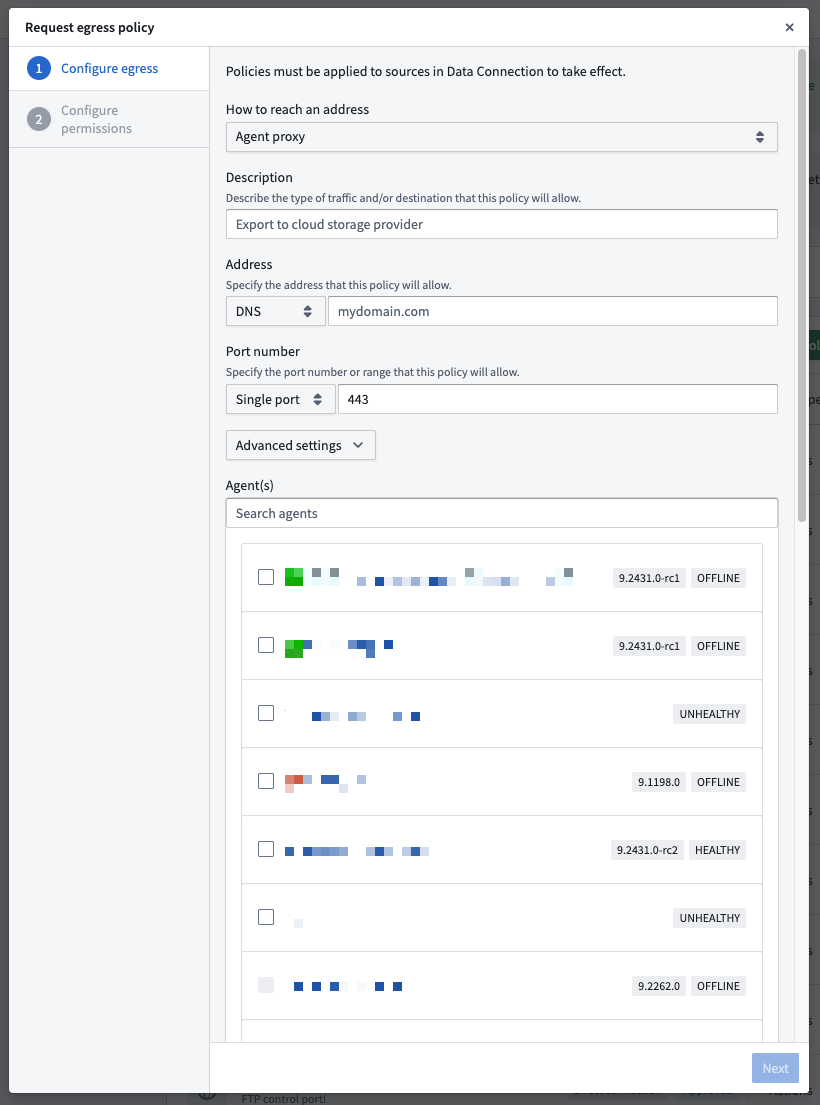
The agent proxy egress policy configuration dialog in Control Panel.
We want to hear from you
As we continue to develop new connectivity features and improvements, we want to hear about your experiences and welcome your feedback. Share your thoughts with Palantir Support channels or our Developer Community ↗ using the data-connection ↗ tag.
Typescript v1 functions are now supported by Foundry Branching
Date published: 2025-09-30
You can now develop, publish, and consume Typescript v1 functions on a Foundry branch. This feature, currently in beta, enables the development of functions that depend on changes made to resources on your Foundry branch, such as newly-created or modified ontology entities. Additionally, prototype and test function changes on the branch before deploying all changes together.
On your Foundry branch, publish pre-release versions of your function that are only accessible from that branch. Select that pre-release version to depend on it in actions or Workshop modules. When you merge your branch, the function publishes on Main and usages that depended on the branched pre-release automatically switch to the stable version published from Main.
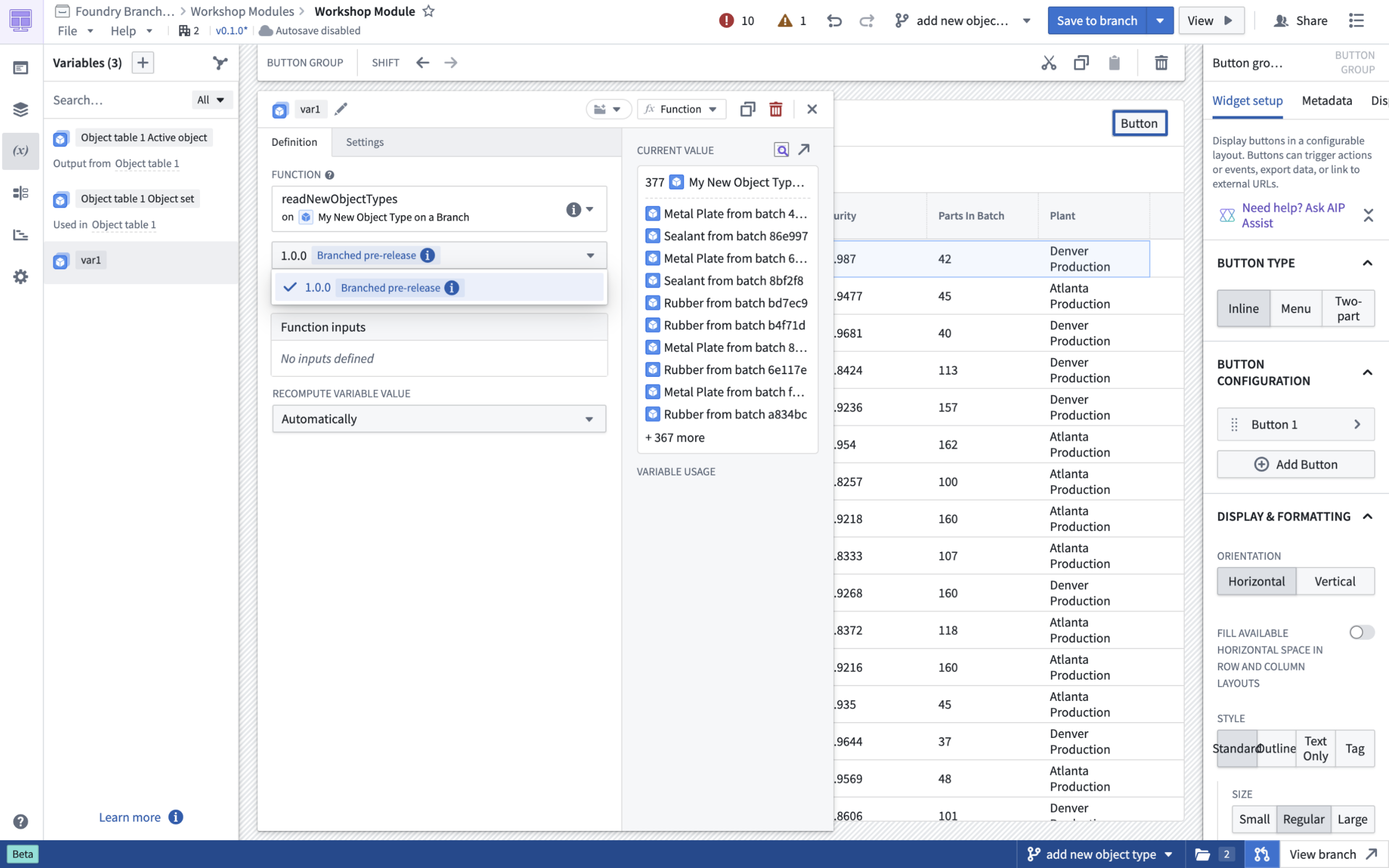
Select a pre-release version of your function to test function changes.
Currently, supported functionality includes depending on the branched pre-release version in actions or Workshop. Depending on branched pre-release functions in other code repositories is not yet supported. To get started, take a look at the Foundry Branching documentation and create or check out a Foundry branch from your Typescript functions v1 code repository.
We want to hear from you
As we continue to develop new features for Foundry Branching, we want to hear about your experiences and welcome your feedback. Share your thoughts with Palantir Support channels or our Developer Community ↗ and use the foundry-branching ↗ tag.
Automatically generate test cases and evaluators for AIP Logic function
Date published: 2025-09-11
AIP Logic users can now automatically generate test cases and evaluators for functions using the new AIP Evals Generate evals feature. This feature, currently in beta, makes it easier for users to get started with evaluating and improving AI functions by generating useful test cases, evaluators, and metrics instead of creating evaluation suites from scratch.
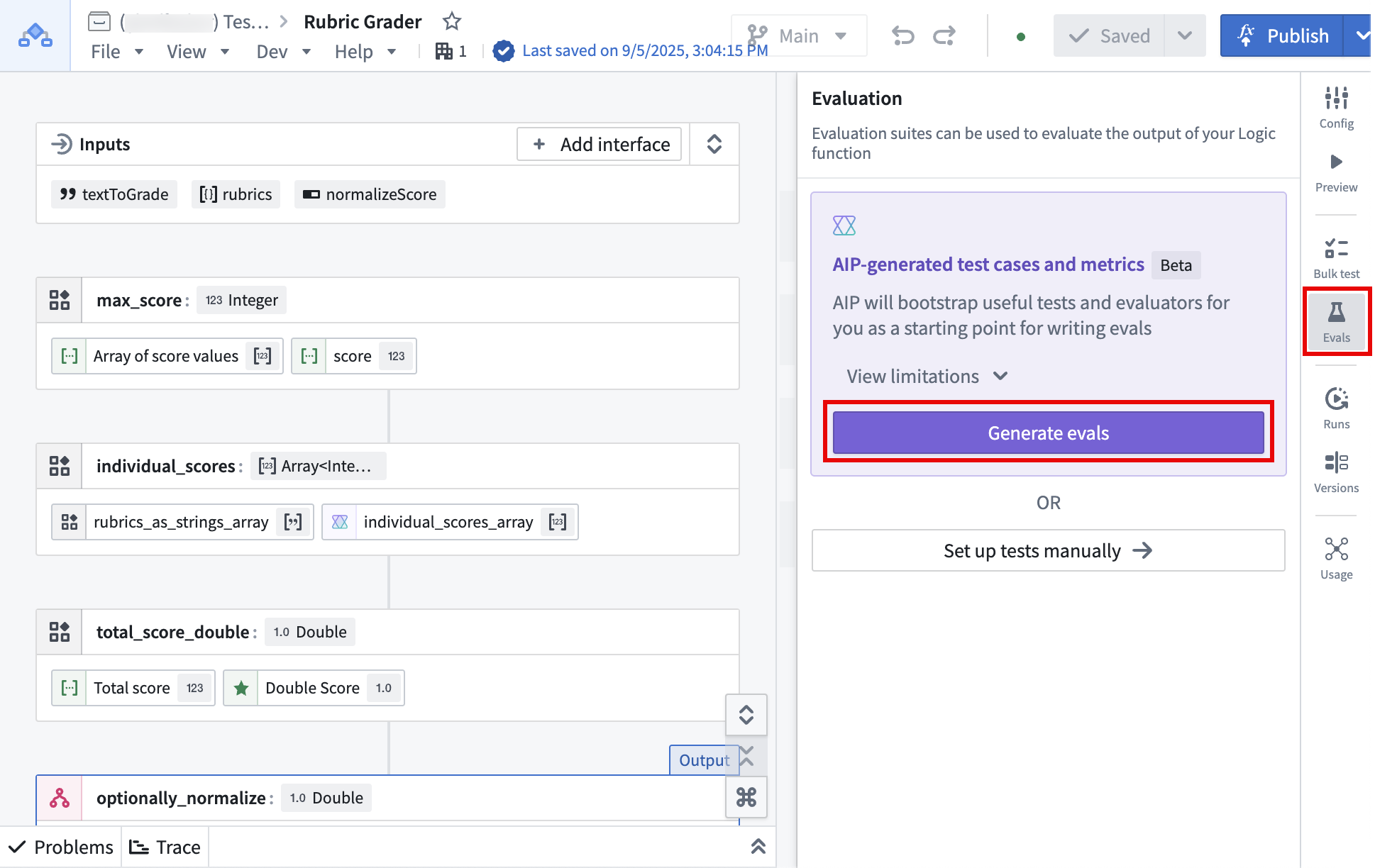
The Generate evals option, found in the Evals tab in the right toolbar.
To generate an evaluation suite, AIP will analyze your logic, select and configure the appropriate evaluators, and create test cases. You then can modify and refine generated test cases and evaluators as needed.
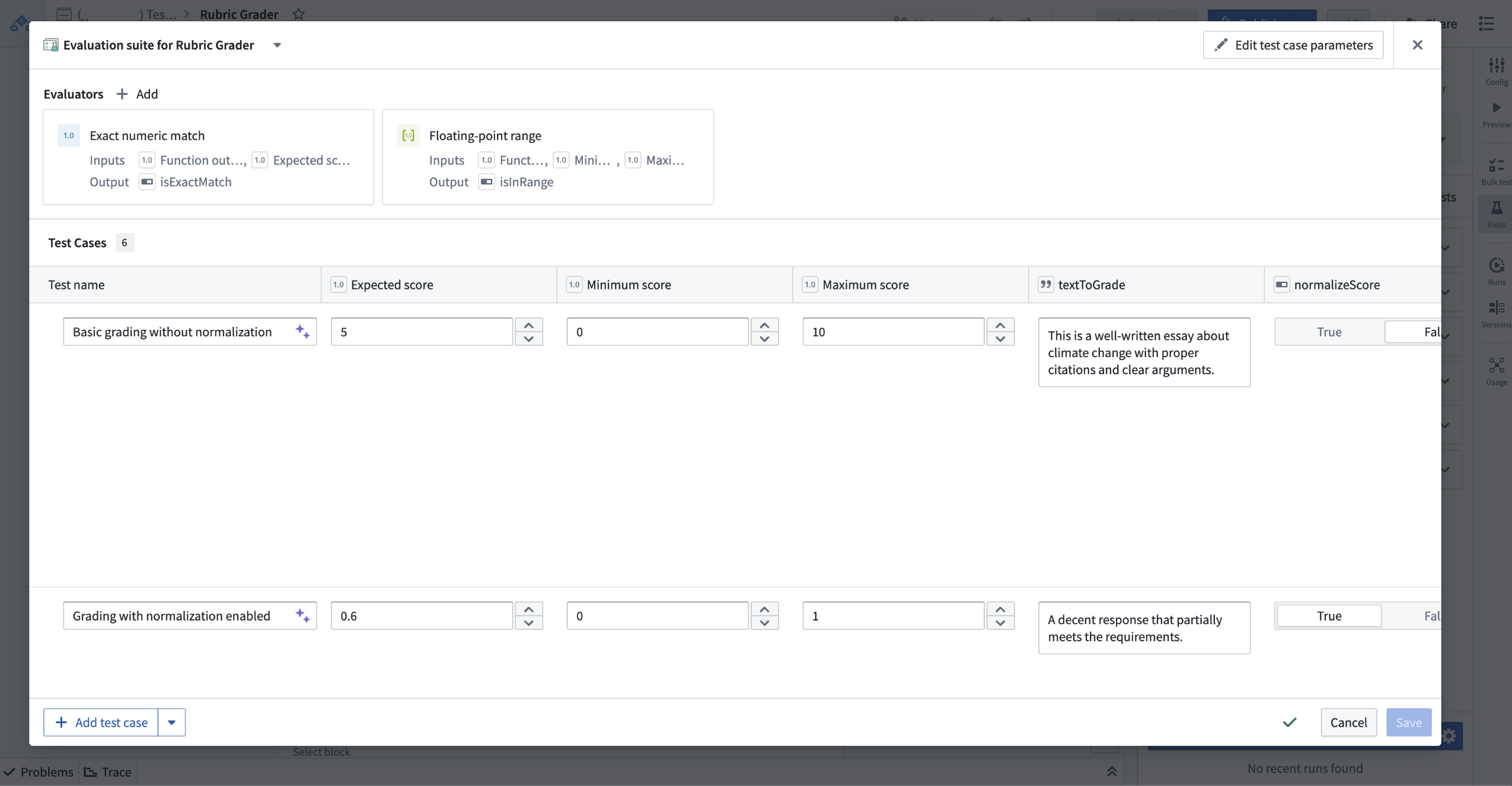
Test cases in an evaluation suite can be edited after generation.
What's next?
To further improve your experience with AIP Evals, we are working on expanding support for more complex Logic functions, improving generation intelligence and capabilities, and adding support for AIP-assisted editing of evaluation suites.
Your feedback matters
We want to hear about your experience with AIP Evals and welcome your feedback. Share your thoughts with Palantir Support channels, or on our Developer Community ↗ using the aip-evals tag ↗.
Ontology Manager now supports virtual table and Iceberg table-backed object creation
Date published: 2025-09-11
You can now create table-backed objects directly in Ontology Manager. This is supported for both virtual tables and Iceberg tables.
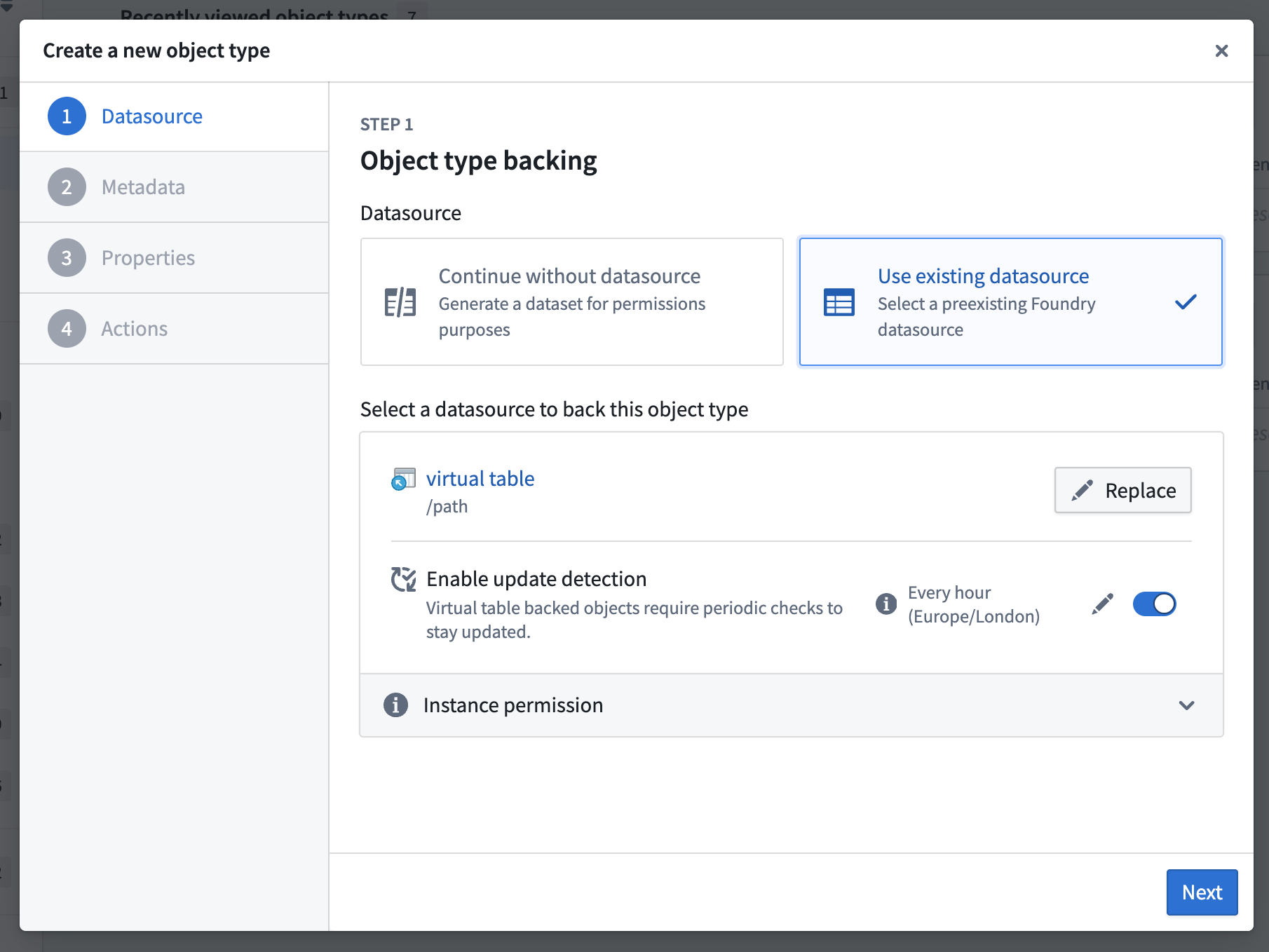
Configuring an object backed by a virtual table in Ontology Manager.
For objects backed by virtual tables, you can automate reindexing by enabling update detection to keep your objects up to date with changes in the the source system. For objects backed by managed Iceberg tables or managed virtual tables (Foundry pipeline outputs), Foundry will automatically trigger object reindexing, as with dataset-backed objects.
We want to hear from you
As we continue to develop new features for virtual tables and Ontology Manager, we want to hear about your experiences and welcome your feedback. Share your thoughts with Palantir Support channels or our Developer Community ↗ using the virtual-tables ↗ and ontology-management ↗ tags.
Configure and monitor Foundry peering with Peer Manager
Date published: 2025-09-09
Peer Manager is available in beta starting the week of September 8.
What is peering?
Peering enables organizations to establish secure, real-time Ontology resource sharing across distinct Foundry enrollments. Peer Manager enables space administrators to view peer connections, monitor peering jobs, and configure peering all in one central place after a peer relationship's creation in Control Panel.
Use Peer Manager to create, view, and monitor peer connections
Peer Manager's home page provides information about all peer connections configured between your enrollment and other enrollments. Peer connections support the import and export of Foundry objects, object sets configured in Object Explorer, and Artifacts.
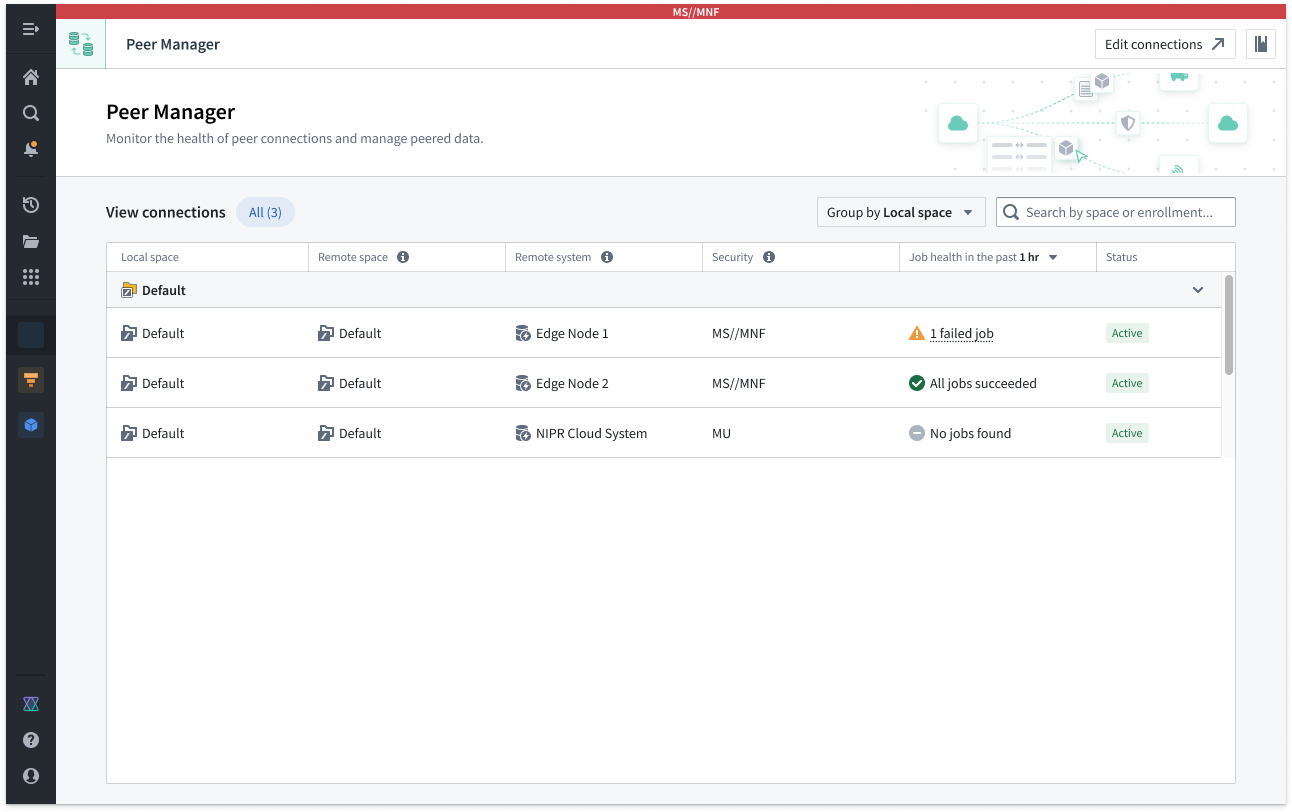
The Peer Manager home page provides an overview of all configured Peer Connections.
Select a connection to launch its Overview window, where you can track the health of each peer connection by viewing the status of individual peering jobs.
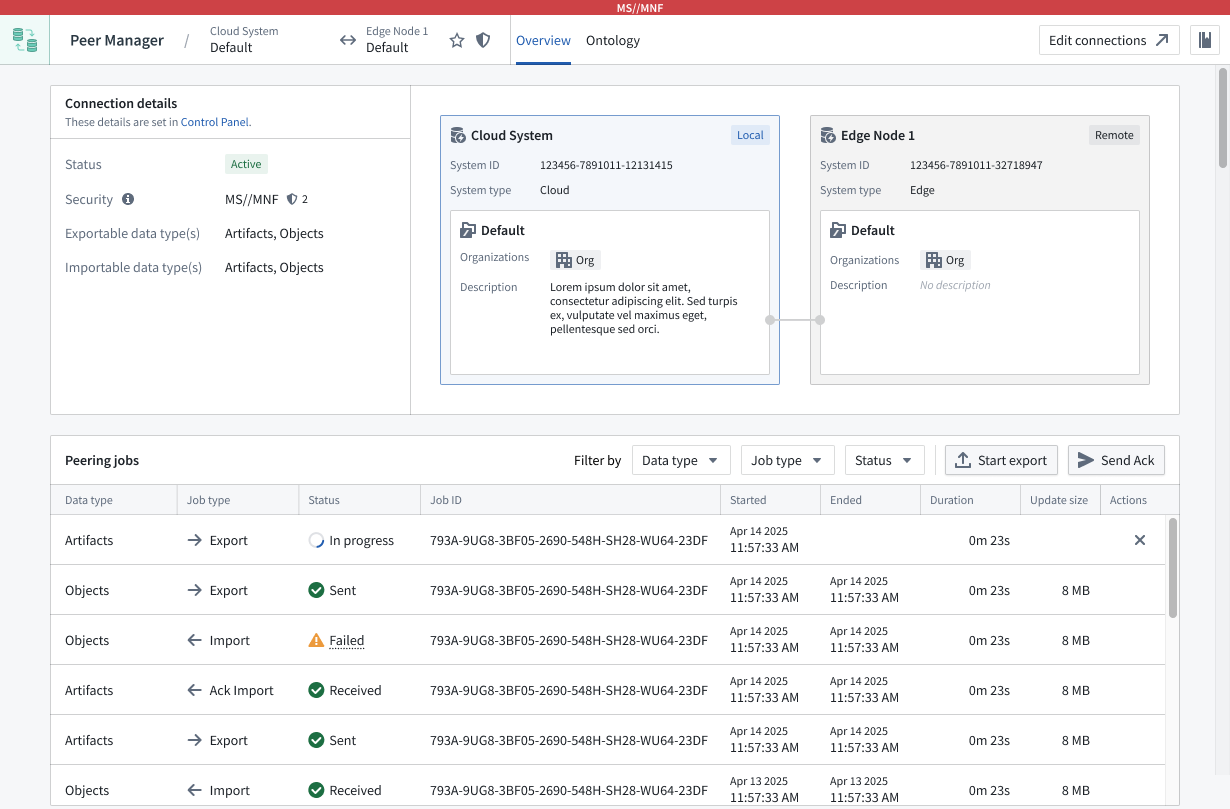
Peer Manager's Overview window offers a unified view of the status and health of peering jobs within a connection.
Select Ontology from the top ribbon to peer objects across an established connection, where Peer Manager enables you to peer all or a selection of properties on the object. Learn more about object peering in Peer Manager.
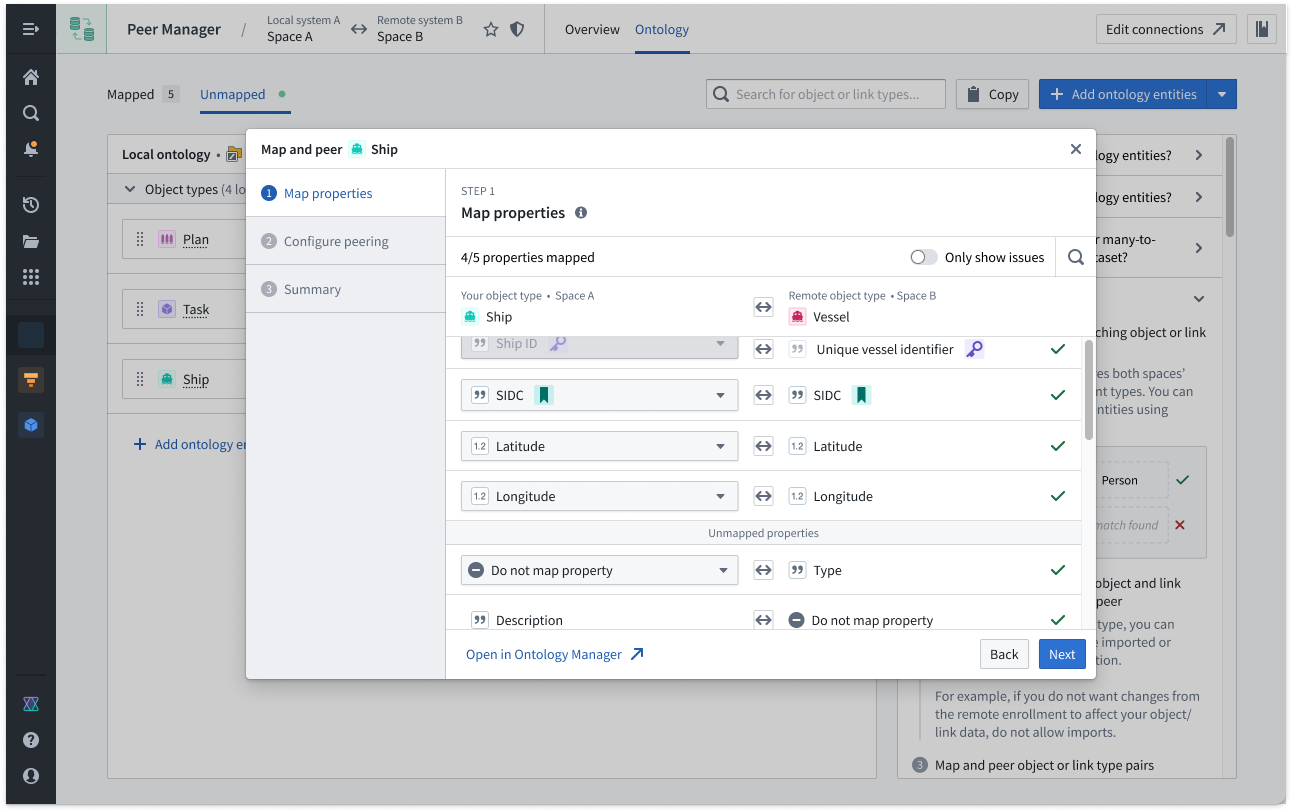
Peer Manager's Ontology window enables you to peer object types across a peer connection.
Next on the development roadmap for Peer Manager is support for Artifact peering configuration, which will be available in beta by the end of 2025. Contact Palantir Support with questions about Peer Manager's availability on your enrollment.
Lightweight Python transforms enhanced with expanded features, better performance, and updated API
Date published: 2025-09-09
Improvements have been made to lightweight Python transforms including expanded feature coverage, increased performance and scalability, and an updated API. When you create a new Python transform, lightweight is now recommended as the default compute option for most use cases, with Spark available for large-scale distributed data processing.
Lightweight allows you to use non-Spark compute engines with Python transforms. This means you can run jobs using single-node (for example, non-distributed) compute and enjoy reduced costs and improved performance. Lightweight transforms are built on open, industry-standard protocols and support multiple engines with a current focus on Polars ↗ and pandas ↗.
Lightweight transforms are composable with Spark transforms in Foundry pipelines, meaning you can build multi-engine, multi-language data pipelines, leveraging the exact right compute at every step along the way.
Some recent improvements and updates to lightweight transforms that are worth checking out:
- Enhanced scalability and performance: Lightweight transforms work well for arbitrary transforms with input data of up to 200 million rows or 50 GB uncompressed data. Additionally, for the right shapes of transforms, lightweight can process even terabyte-scale multi-billion row inputs on a single node. Review our documentation on choosing the right engine for more details.
- Increased feature coverage in Foundry: Lightweight now supports most key transforms functionality, including incremental, media sets, external transforms, and models. See feature support comparison.
- Improved memory usage: Lightweight transforms now require less memory than before, and it is easier to monitor memory usage on jobs with the new metrics telemetry view.
- Updated default lightweight API: With the
transforms.using(...)syntax. - Updated documentation with lightweight as default, including tabbed code examples for Polars, pandas, and PySpark.
- Python transforms overview
- Getting started
- Guidance on compute engine selection
- Optimizations using Polars lazy API
You can also learn more in a recent demo video with a Palantir developer ↗, who converted a fraud detection pipeline from Spark to Polars, with a 10x improvement on compute consumption.
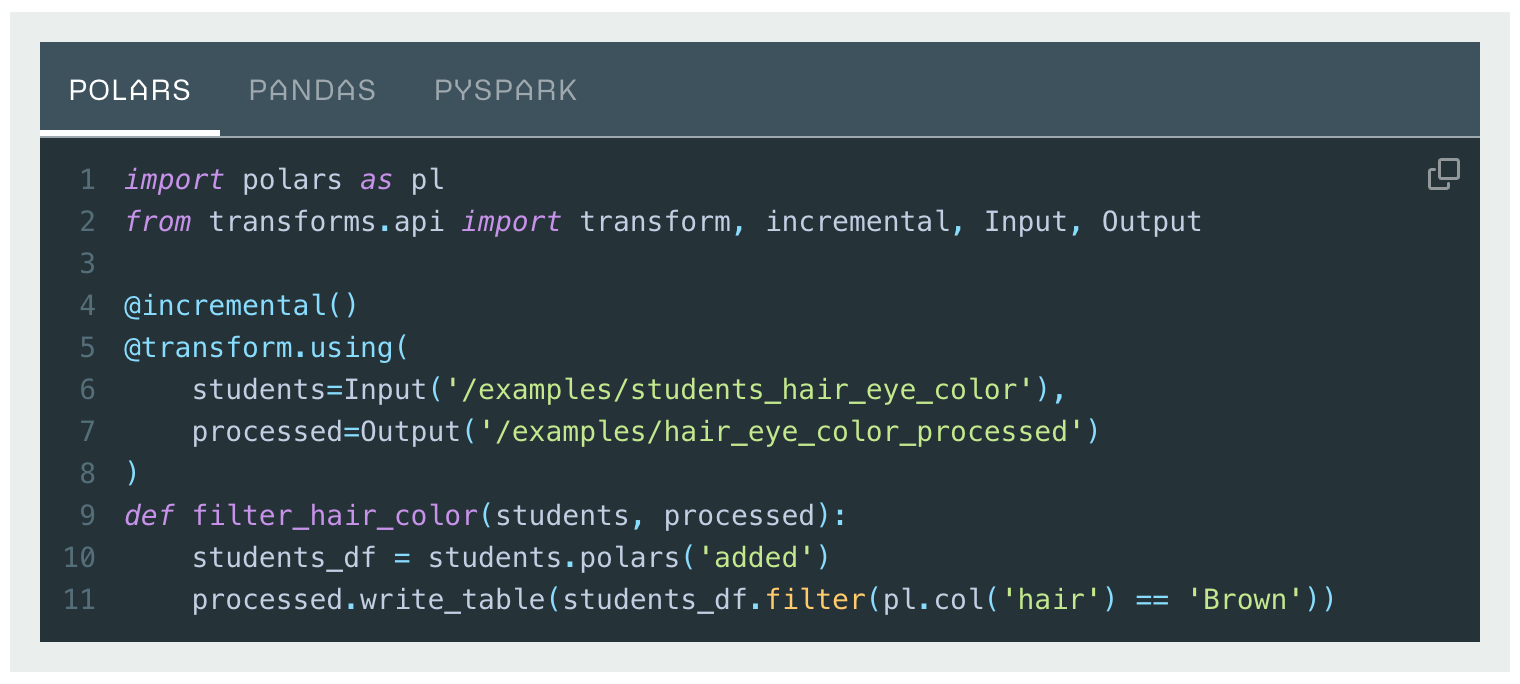
Incremental tabbed code example using the updated API.
Share your feedback
We want to hear about your experience using lightweight Python transforms. Let us know in our Palantir Support channels, or leave a post in our Developer Community ↗ using the transforms-python ↗ tag.
New styling options in the Workshop Pivot Table widget
Date published: 2025-09-09
Workshop’s Pivot Table widget now has new styling options allowing builders to customize the formatting and display of the widget within their applications.
- Layout styling: Further customize how information is displayed in the table with a new "Stacked" layout styling option which merges all configured row groupings into a single column, providing a more compact view of the table.
- Table styling: Customize the styling applied to the cells within the table with two new table styling options including an "Outlined" option which adds an outline above and below each top level row grouping, and a "Banded row" option which additionally adds a light grey background to each alternating row in the table.
- Color styling: Customize the color of the table’s header by applying a custom color in either a minimal or prominent shade.
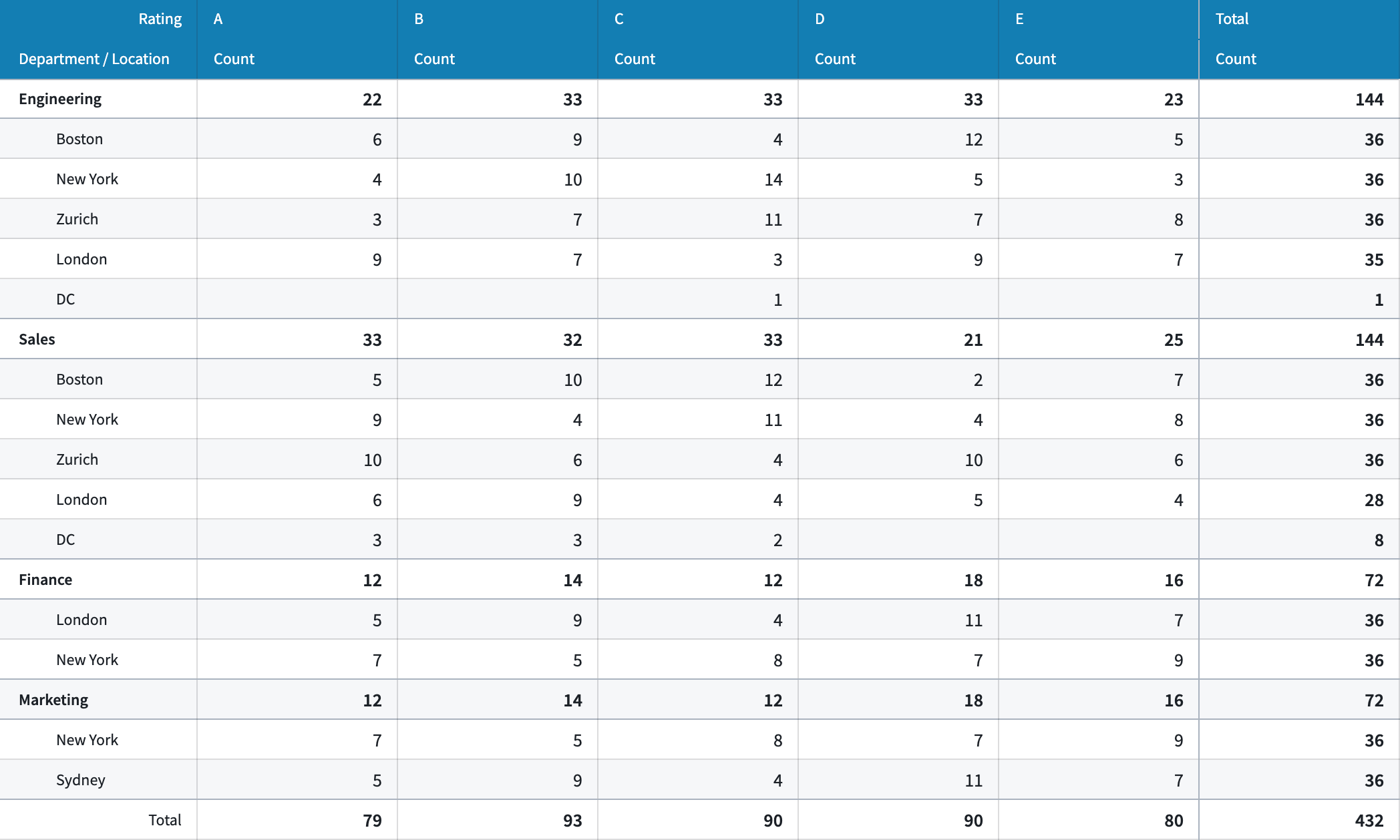
Example of a Pivot Table widget with a custom header color, stacked layout, and banded rows styling options applied.
We want to hear from you
As we continue to develop on Workshop, we want to hear about your experiences and welcome your feedback. Share your thoughts with Palantir Support channels or our Developer Community ↗ and use the workshop ↗ tag.
Automatically scan your code for vulnerabilities with Code Scanning in Jemma CI
Date published: 2025-09-02
Code Scanning in Jemma CI, now available on all enrollments, automatically analyzes code repositories for vulnerabilities, code smells, and coding standard violations across multiple languages and file types. Comprehensive security and quality insights appear directly in the Checks tab.
Getting started
An enrollment admin can activate code scanning for repositories in an enrollment by visiting Control Panel > All Settings > Security & Governance > Code scanning.
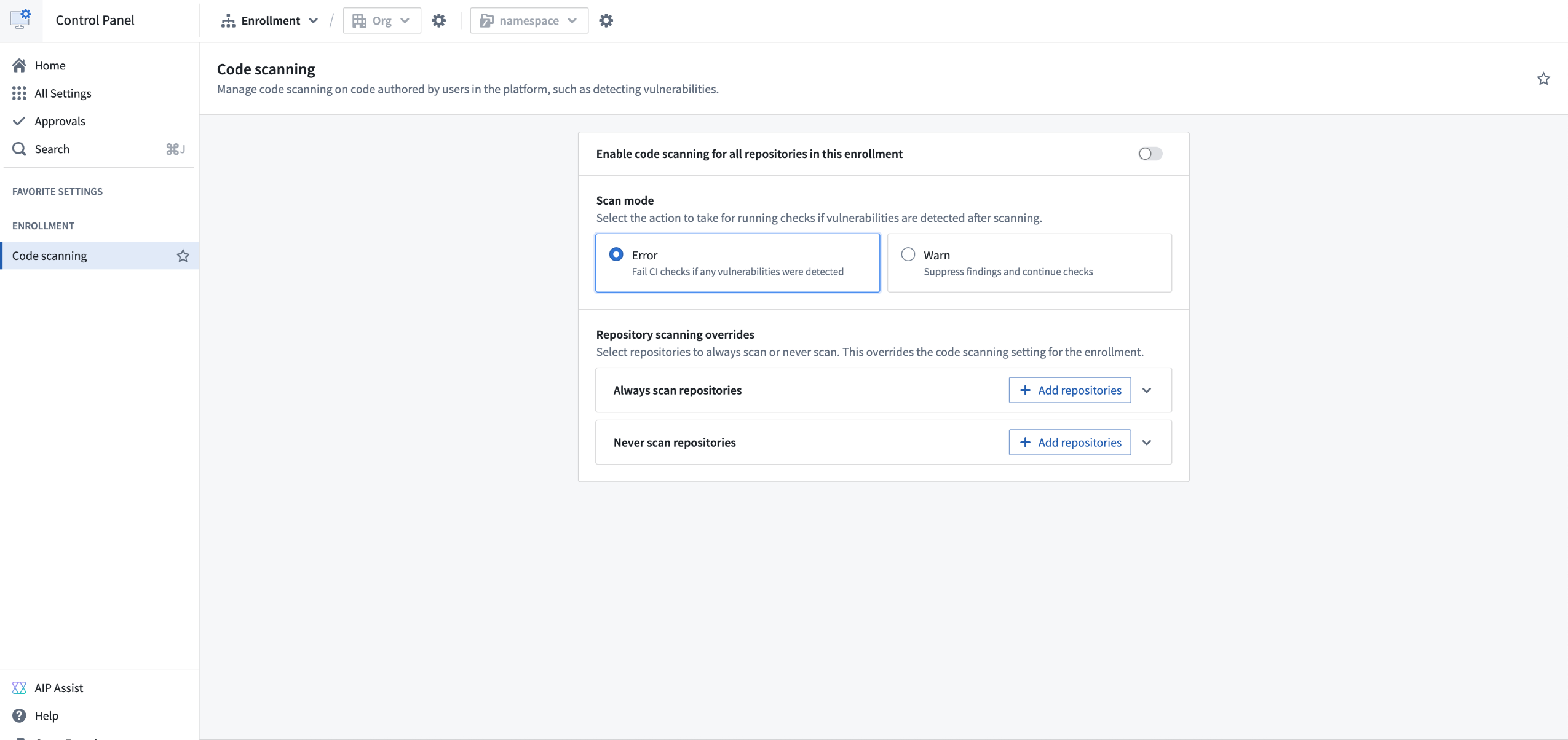
Navigate to the Code scanning page in Control Panel to manage code scanning for an enrollment.
If enabled by your enrollment administrator, every commit in a repository will trigger a code scan. This code scan will analyze the codebase for potential vulnerabilities and code quality issues. Any findings will be displayed in Checks, and a downloadable report will be generated.
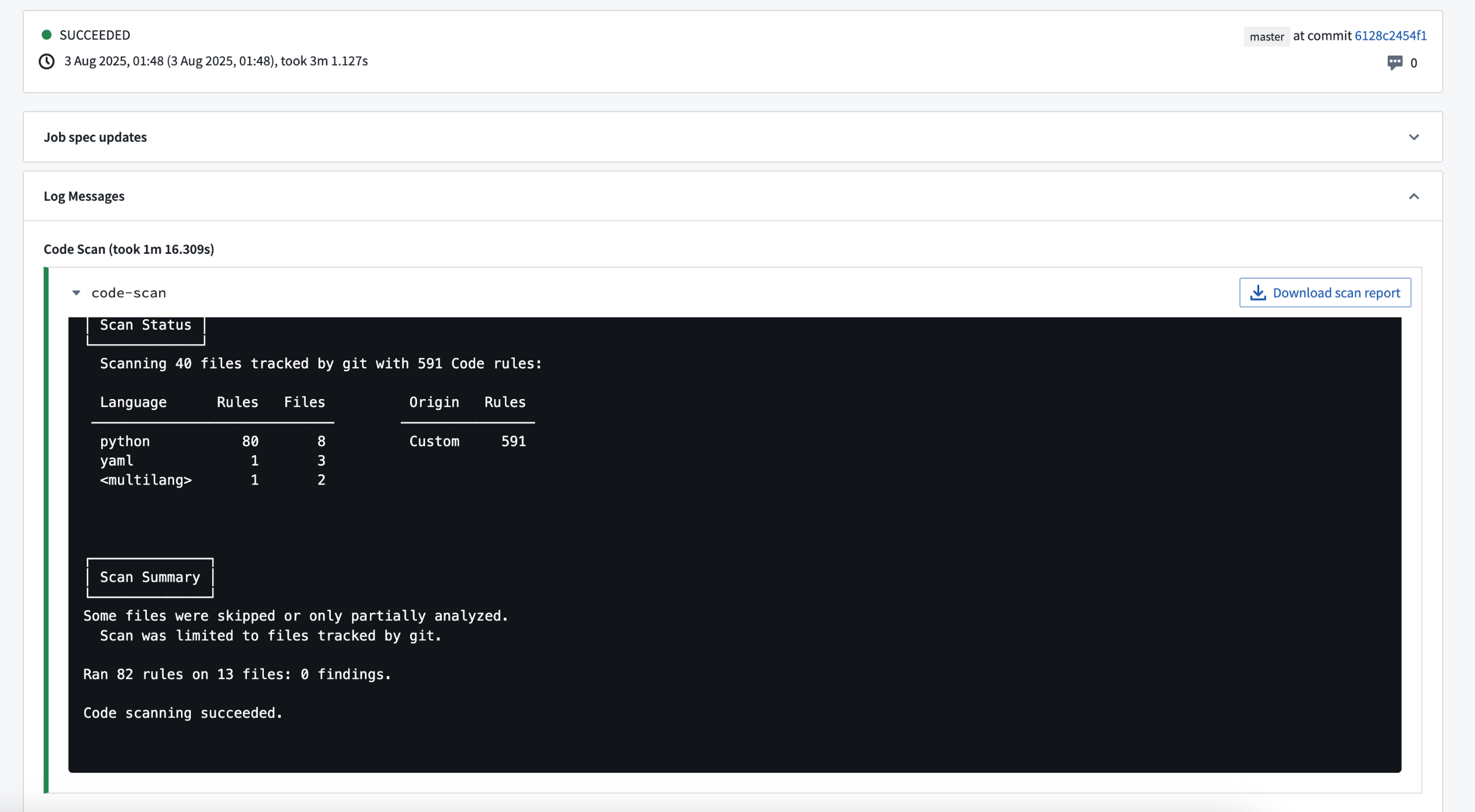
Checks page with the results of a code scan.
After a scan is run, Jemma will continue running checks on the commit if no findings are detected; otherwise, the checks will fail. An enrollment administrator can change this behavior so that findings will result only in a warning, and checks will proceed. For more information on code scanning, visit our documentation.
Share your feedback
Let us know what you think about this code scanning feature by posting your feedback in our Developer Community ↗.
Scan sensitive images, documents, and audio files using Sensitive Data Scanner's media set scanning feature
Date published: 2025-09-02
Media set scanning is now generally available in Sensitive Data Scanner the week of September 1. This capability enables you to scan images, documents, and audio files within media sets for sensitive data that requires heightened protection controls, such as personally identifiable information (PII) or personal health information (PHI). Within Sensitive Data Scanner, Data Governance Officers and administrators can apply uniform data protection policies across both tabular and unstructured data, improving the consistency and comprehensiveness of data protection on multi-modal datasources.
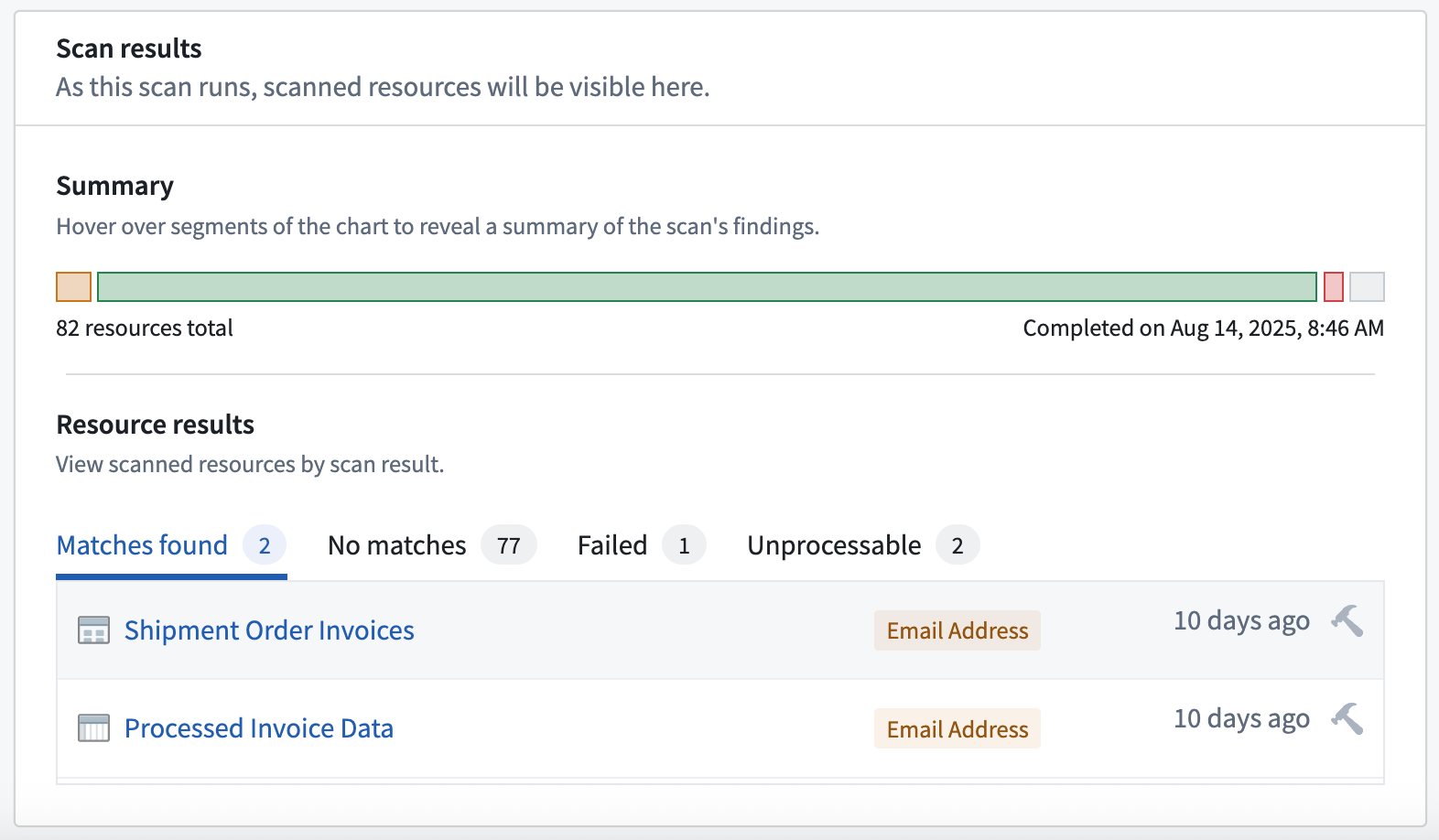
Scan results display Email Address matches in both a media set of documents and a tabular dataset.
When to use media set scanning
Use media set scanning when sensitive content may appear in unstructured data you ingest into Foundry. Existing sensitive data scans need to opt into scanning media set resources, which you can do by editing your scans and selecting the relevant media set resource types. Scanning entire media sets can be computationally expensive, so we recommend using media set scanning in either one-time scans or non-continuous recurring scans, such as those scheduled on a daily, weekly, or monthly basis.
Media set scanning can help improve your organizations's data protection posture by indicating when new unstructured data sources contain media with sensitive data. This will also ensure that platform administrators better understand which unstructured data sources may require Markings to indicate that some of its items contain sensitive data. Additionally, you can further protect sensitive image data using Cipher's Visual Obfuscation capability.
Apply regular expression-based match conditions on media
Sensitive Data Scanner now enables users to apply regular expression-based match conditions against image, document, and audio files in media sets. For image and document files, Sensitive Data Scanner applies Optical Character Recognition (OCR) to convert the unstructured data to text before scanning for the match conditions you configure. For audio files, Sensitive Data Scanner applies a transcription model to extract their text before scanning the files for those match conditions. For more details on these text extraction steps, see the documentation on media set scanning with Sensitive Data Scanner.
We want to hear from you!
Use the sensitive-data-scanner tag in Palantir's Developer Community ↗ forum or contact Palantir Support to share your experience with and feedback for the media set scanning feature in Sensitive Data Scanner.
New geo-variables and geo-transforms in Workshop
Date published: 2025-09-02
Builders can now capture, display, and interact with geographic data in Workshop using new geopoint and geoshape variables. Builders can interact with them using variable transform operations including:
- Geopoint ↔ String: Cast geopoints to strings and geopoint formatted strings to geopoints.
- Geoshape ↔ String: Cast geoshape to strings and geoshape-formatted strings to geoshapes.
- Geohash from geopoint: Converts a geopoint into a geohash value as a string.
- Latitude from geopoint: Returns the numeric latitude value from a given geopoint.
- Longitude from geopoint: Returns the numeric longitude value from a given geopoint.
- MGRS from geopoint: Converts a given geopoint into a MGRS value as a string.
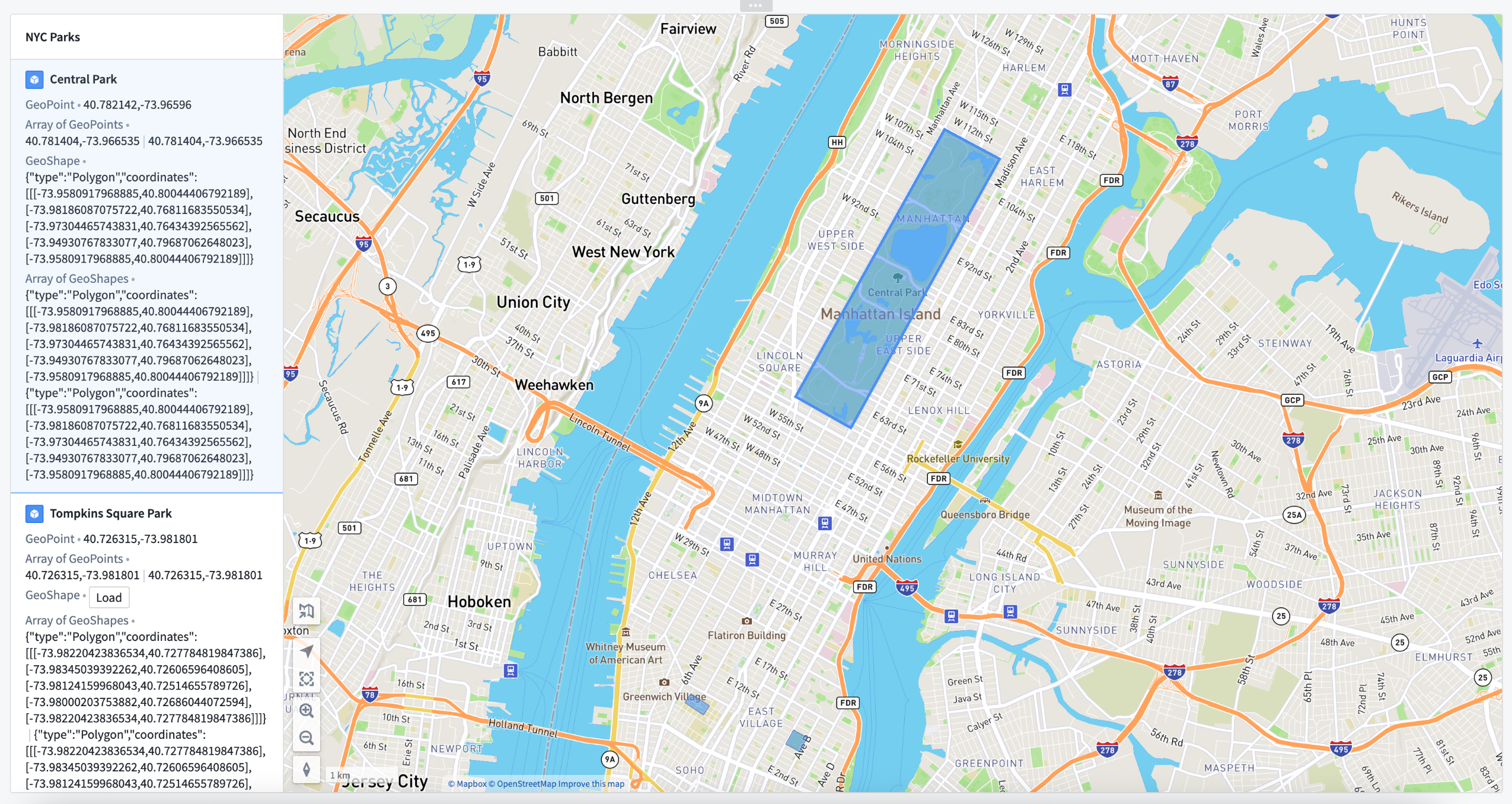
An example of geopoints and geoshapes in use in a Workshop application.
We want to hear from you
As we continue to develop new features for Workshop, we want to hear about your experiences and welcome your feedback. Share your thoughts with Palantir Support channels or our Developer Community ↗ and use the workshop ↗ tag.
中文翻译
公告
提醒: 订阅 Foundry 新闻通讯(Foundry Newsletter),即可直接在收件箱中收到平台新产品、功能及改进的摘要。有关订阅方式的更多信息,请参阅 Foundry 新闻通讯与产品反馈渠道公告。
欢迎在我们的开发者社区论坛 ↗ 分享您对这些公告的看法。
Agent 代理出站策略(Agent proxy egress policies)现已正式发布
发布日期:2025-09-30
此前,将 Foundry 连接到无法直接从 Foundry 访问的系统(大多数情况下为本地系统)意味着需要牺牲可扩展性。虽然"直接连接"出站策略适用于可从 Foundry 访问的资源(例如大多数面向互联网的系统),但私有网络要求工作负载直接在本地数据连接代理(data connection agents)上运行,从而限制了您利用 Foundry 全部计算能力的能力。
新增功能
Agent 代理出站策略通过允许数据连接代理充当 Foundry 可扩展计算环境与您的私有本地系统之间的安全桥梁,解决了这一限制。这意味着您可以执行以下操作:
- 大规模运行高要求工作负载,同时访问本地数据。
- 使用 Foundry 的高级功能,例如专业代码转换(pro-code transforms)、外部函数(external functions)、计算模块(compute modules)和虚拟表(virtual tables),这些功能以前仅限于可互联网访问的系统。
实际影响
您现在可以编写自定义转换,对 SFTP 服务器进行读写操作;利用 Foundry 的全部计算能力处理来自私有数据库的大型数据集;并构建能够无缝桥接云环境和本地环境的复杂数据管道。
新标准
使用 Foundry Worker 的 Agent 代理出站策略现在是我们推荐的连接不同网络上系统的方法,取代了之前的 Agent Worker 方法。它们也取代了 Agent 代理运行时(仅支持 REST 源,并将很快停用)。
开始使用
设置过程很简单:
- 导航至控制面板(Control Panel)中的 网络出站(Network egress) 设置,然后选择 请求网络出站策略(Request network egress policy)。
- 指定域名和端口(就像直接连接一样)。
- 分配一个或多个能够连接到目标系统的代理。这些代理必须具有到该策略允许的域名和端口的入站连接。
控制面板中的 Agent 代理出站策略配置对话框。
期待您的反馈
在我们继续开发新的连接功能和改进时,我们希望了解您的体验并欢迎您的反馈。请通过 Palantir 支持渠道或我们的开发者社区 ↗(使用 data-connection ↗ 标签)分享您的想法。
Foundry 分支(Foundry Branching)现已支持 Typescript v1 函数
发布日期:2025-09-30
您现在可以在 Foundry 分支上开发、发布和使用 Typescript v1 函数。此功能目前处于测试阶段,支持开发依赖于 Foundry 分支上资源变更的函数,例如新创建或修改的本体实体(ontology entities)。此外,您还可以在分支上对函数更改进行原型设计和测试,然后再一起部署所有更改。
在您的 Foundry 分支上,发布函数的预发布版本,这些版本仅可从该分支访问。选择该预发布版本以在操作(actions)或 Workshop 模块中依赖它。当您合并分支时,该函数将在 Main 上发布,并且之前依赖分支预发布版本的使用将自动切换到从 Main 发布的稳定版本。
选择函数的预发布版本以测试函数更改。
目前,支持的功能包括在操作或 Workshop 中依赖分支预发布版本。尚不支持在其他代码仓库中依赖分支预发布函数。要开始使用,请查看 Foundry 分支文档,并从您的 Typescript 函数 v1 代码仓库创建或检出 Foundry 分支。
期待您的反馈
在我们继续为 Foundry 分支开发新功能时,我们希望了解您的体验并欢迎您的反馈。请通过 Palantir 支持渠道或我们的开发者社区 ↗(使用 foundry-branching ↗ 标签)分享您的想法。
为 AIP Logic 函数自动生成测试用例和评估器(evaluators)
发布日期:2025-09-11
AIP Logic 用户现在可以使用新的 AIP Evals 生成评估(Generate evals) 功能,为函数自动生成测试用例和评估器。此功能目前处于测试阶段,通过生成有用的测试用例、评估器和指标,使用户更容易开始评估和改进 AI 函数,而无需从头开始创建评估套件。
在右侧工具栏的 Evals 选项卡中找到的 Generate evals 选项。
要生成评估套件,AIP 将分析您的逻辑,选择并配置适当的评估器,并创建测试用例。然后,您可以根据需要修改和完善生成的测试用例和评估器。
评估套件中的测试用例可以在生成后进行编辑。
下一步计划
为了进一步改善您使用 AIP Evals 的体验,我们正在努力扩展对更复杂 Logic 函数的支持,提高生成智能和能力,并增加对 AIP 辅助编辑评估套件的支持。
您的反馈至关重要
我们希望了解您使用 AIP Evals 的体验,并欢迎您的反馈。请通过 Palantir 支持渠道,或使用 aip-evals 标签 ↗ 在我们的开发者社区 ↗ 上分享您的想法。
Ontology Manager 现在支持创建虚拟表和 Iceberg 表支持的对象
发布日期:2025-09-11
您现在可以直接在 Ontology Manager 中创建表支持的对象(table-backed objects)。这同时支持虚拟表和 Iceberg 表。
在 Ontology Manager 中配置由虚拟表支持的对象。
对于由虚拟表支持的对象,您可以通过启用更新检测来自动重新索引,使您的对象与源系统的更改保持同步。对于由托管 Iceberg 表或托管虚拟表(Foundry 管道输出)支持的对象,Foundry 将自动触发对象重新索引,就像数据集支持的对象一样。
期待您的反馈
在我们继续为虚拟表和 Ontology Manager 开发新功能时,我们希望了解您的体验并欢迎您的反馈。请通过 Palantir 支持渠道或我们的开发者社区 ↗(使用 virtual-tables ↗ 和 ontology-management ↗ 标签)分享您的想法。
使用 Peer Manager 配置和监控 Foundry 对等连接(peering)
发布日期:2025-09-09
Peer Manager 自 9 月 8 日那周起提供测试版。
什么是对等连接?
对等连接使组织能够在不同的 Foundry 注册(enrollments)之间建立安全的、实时的本体资源(Ontology resource)共享。Peer Manager 使空间(space)管理员能够在控制面板中创建对等关系后,在一个中心位置查看对等连接、监控对等工作并配置对等连接。
使用 Peer Manager 创建、查看和监控对等连接
Peer Manager 的主页提供有关在您的注册与其他注册之间配置的所有对等连接的信息。对等连接支持导入和导出 Foundry 对象、在对象浏览器(Object Explorer)中配置的对象集以及工件(Artifacts)。
Peer Manager 主页提供所有已配置对等连接的概览。
选择一个连接以启动其 概览(Overview) 窗口,您可以在其中通过查看各个对等作业的状态来跟踪每个对等连接的健康状况。
Peer Manager 的 Overview 窗口提供对等连接内作业状态和健康状况的统一视图。
从顶部功能区选择 本体(Ontology) 以在已建立的连接上对等对象,Peer Manager 使您能够对等对象上的全部或选定属性。了解有关在 Peer Manager 中进行对象对等的更多信息。
Peer Manager 的 Ontology 窗口使您能够跨对等连接对等对象类型。
Peer Manager 开发路线图上的下一步是支持工件对等配置,该功能将在 2025 年底前提供测试版。有关 Peer Manager 在您注册中的可用性问题,请联系 Palantir 支持。
要开始使用,请查看现有文档,了解如何在 Peer Manager 中创建和监控对等连接。
轻量级 Python 转换(Lightweight Python transforms)增强:扩展功能、提升性能并更新 API
发布日期:2025-09-09
轻量级 Python 转换已得到改进,包括扩展的功能覆盖范围、更高的性能和可扩展性以及更新的 API。当您创建新的 Python 转换时,对于大多数用例,轻量级现在被推荐为默认计算选项,而 Spark 可用于大规模分布式数据处理。
轻量级允许您将非 Spark 计算引擎与 Python 转换一起使用。这意味着您可以使用单节点(例如,非分布式)计算运行作业,并享受更低的成本和更高的性能。轻量级转换建立在开放的、行业标准协议之上,并支持多种引擎,目前主要关注 Polars ↗ 和 pandas ↗。
轻量级转换在 Foundry 管道中可与 Spark 转换组合使用,这意味着您可以构建多引擎、多语言的数据管道,在每一步都利用完全合适的计算资源。
以下是一些值得关注的轻量级转换的最新改进和更新:
- 增强的可扩展性和性能: 轻量级转换适用于输入数据最多达 2 亿行或 50 GB 未压缩数据的任意转换。此外,对于形状合适的转换,轻量级甚至可以在单个节点上处理 TB 级、数十亿行的输入。请查阅我们关于选择正确引擎的文档以了解更多详情。
- Foundry 中功能覆盖范围增加: 轻量级现在支持大多数关键的转换功能,包括增量(incremental)、媒体集(media sets)、外部转换(external transforms)和模型(models)。请参阅功能支持比较。
- 改进的内存使用: 轻量级转换现在需要的内存比以前更少,并且通过新的指标遥测视图可以更轻松地监控作业的内存使用情况。
- 更新的默认轻量级 API: 使用
transforms.using(...)语法。 - 更新的文档以轻量级为默认选项,包括 Polars、pandas 和 PySpark 的选项卡式代码示例。
- Python 转换概述
- 开始使用
- 计算引擎选择指南
- 使用 Polars 惰性 API 进行优化
您还可以在最近的一个与 Palantir 开发者的演示视频 ↗ 中了解更多信息,该视频将欺诈检测管道从 Spark 转换为 Polars,计算消耗降低了 10 倍。
使用更新 API 的增量选项卡式代码示例。
分享您的反馈
我们希望了解您使用轻量级 Python 转换的体验。请通过我们的 Palantir 支持渠道告知我们,或使用 transforms-python 标签 ↗ 在我们的开发者社区 ↗ 中发帖。
Workshop 数据透视表(Pivot Table)组件的新样式选项
发布日期:2025-09-09
Workshop 的数据透视表组件现在具有新的样式选项,允许构建者自定义其应用程序中组件的格式和显示。
- 布局样式: 使用新的"堆叠(Stacked)"布局样式选项进一步自定义表格中信息的显示方式,该选项将所有配置的行分组合并到单个列中,提供更紧凑的表格视图。
- 表格样式: 使用两种新的表格样式选项自定义表格内单元格的样式,包括"轮廓(Outlined)"选项(在每个顶层行分组的上方和下方添加轮廓线)和"斑马行(Banded row)"选项(额外为表格中的每隔一行添加浅灰色背景)。
- 颜色样式: 通过应用自定义颜色(以最小或突出色调)来自定义表格标题的颜色。
应用了自定义标题颜色、堆叠布局和斑马行样式选项的数据透视表示例。
期待您的反馈
在我们继续开发 Workshop 时,我们希望了解您的体验并欢迎您的反馈。请通过 Palantir 支持渠道或我们的开发者社区 ↗(使用 workshop ↗ 标签)分享您的想法。
使用 Jemma CI 中的代码扫描(Code Scanning)自动扫描代码漏洞
发布日期:2025-09-02
Jemma CI 中的代码扫描功能现已适用于所有注册,可自动分析代码仓库中的漏洞、代码异味(code smells)以及跨多种语言和文件类型的编码标准违规情况。全面的安全性和质量洞察直接显示在 检查(Checks) 选项卡中。
开始使用
注册管理员可以通过访问 控制面板 > 所有设置 > 安全与治理 > 代码扫描 来激活注册中仓库的代码扫描。
导航至控制面板中的 Code scanning 页面以管理注册的代码扫描。
如果您的注册管理员启用了此功能,仓库中的每次提交都将触发代码扫描。此代码扫描将分析代码库以查找潜在漏洞和代码质量问题。任何发现都将显示在 检查 中,并生成可下载的报告。
显示代码扫描结果的 Checks 页面。
扫描运行后,如果未检测到任何发现,Jemma 将继续对提交运行检查;否则,检查将失败。注册管理员可以更改此行为,使发现仅导致警告,而检查将继续进行。有关代码扫描的更多信息,请访问我们的文档。
分享您的反馈
请在我们的开发者社区 ↗ 中发布您的反馈,告诉我们您对此代码扫描功能的看法。
使用敏感数据扫描器(Sensitive Data Scanner)的媒体集扫描功能扫描敏感图像、文档和音频文件
发布日期:2025-09-02
媒体集扫描 自 9 月 1 日那周起在敏感数据扫描器中正式可用。此功能使您能够扫描媒体集中的图像、文档和音频文件,以查找需要加强保护控制的敏感数据,例如个人身份信息(PII)或个人健康信息(PHI)。在敏感数据扫描器中,数据治理官和管理员可以对表格数据和非结构化数据应用统一的数据保护策略,从而提高多模态数据源上数据保护的一致性和全面性。
扫描结果显示 Email Address 在文档媒体集和表格数据集中均匹配到。
何时使用媒体集扫描
当敏感内容可能出现在您摄入到 Foundry 的非结构化数据中时,请使用媒体集扫描。现有的敏感数据扫描需要选择加入扫描媒体集资源,您可以通过编辑扫描并选择相关的媒体集资源类型来实现。扫描整个媒体集可能计算成本高昂,因此我们建议在一次性扫描或非连续定期扫描(例如按日、周或月计划执行的扫描)中使用媒体集扫描。
媒体集扫描可以通过指示新的非结构化数据源何时包含包含敏感数据的媒体,来帮助改善您组织的数据保护态势。这也将确保平台管理员更好地了解哪些非结构化数据源可能需要标记(Markings)来指示其某些项目包含敏感数据。此外,您还可以使用 Cipher 的视觉混淆(Visual Obfuscation)功能进一步保护敏感图像数据。
对媒体应用基于正则表达式的匹配条件
敏感数据扫描器现在使用户能够对媒体集中的图像、文档和音频文件应用基于正则表达式的匹配条件。对于图像和文档文件,敏感数据扫描器应用光学字符识别(OCR)将非结构化数据转换为文本,然后扫描您配置的匹配条件。对于音频文件,敏感数据扫描器应用转录模型提取其文本,然后扫描文件以查找这些匹配条件。有关这些文本提取步骤的更多详细信息,请参阅使用敏感数据扫描器进行媒体集扫描的文档。
期待您的反馈!
请在 Palantir 的开发者社区 ↗ 论坛中使用 sensitive-data-scanner 标签,或联系 Palantir 支持,分享您对敏感数据扫描器中媒体集扫描功能的体验和反馈。
Workshop 中的新地理变量(geo-variables)和地理转换(geo-transforms)
发布日期:2025-09-02
构建者现在可以使用新的地理点(geopoint)和地理形状(geoshape)变量在 Workshop 中捕获、显示和交互地理数据。他们可以使用变量转换操作与这些变量进行交互,包括:
- 地理点 ↔ 字符串: 将地理点转换为字符串,并将地理点格式的字符串转换为地理点。
- 地理形状 ↔ 字符串: 将地理形状转换为字符串,并将地理形状格式的字符串转换为地理形状。
- 从地理点获取地理哈希(Geohash): 将地理点转换为字符串形式的地理哈希值。
- 从地理点获取纬度: 返回给定地理点的数值纬度值。
- 从地理点获取经度: 返回给定地理点的数值经度值。
- 从地理点获取 MGRS: 将给定的地理点转换为字符串形式的 MGRS 值。
Workshop 应用程序中使用地理点和地理形状的示例。
期待您的反馈
在我们继续为 Workshop 开发新功能时,我们希望了解您的体验并欢迎您的反馈。请通过 Palantir 支持渠道或我们的开发者社区 ↗(使用 workshop ↗ 标签)分享您的想法。