Announcements(公告)
REMINDER: Sign up for the Foundry Newsletter to receive a summary of new products, features, and improvements across the platform directly to your inbox. For more information on how to subscribe, see the Foundry Newsletter and Product Feedback channels announcement.
Share your thoughts about these announcements in our Developer Community Forum ↗.

Date published: 2026-01-29
Develop and test object views safely with Foundry Branching
Object views are now supported in Foundry Branching, enabling you to develop and test object view changes in isolation before deploying them to production.
Object views are critical interfaces between your ontology and end users. Branching enables safer iteration by allowing you to test changes in isolation, collaborate with multiple teams without conflicts, and ensure quality before deployment—using the same workflows you already use for Workshop modules and Ontology resources.
Key features:
- Branch-based development: Add, remove, and modify object views on branches to safely iterate on structural changes (tabs, visibility conditions) and content changes (Workshop modules) without affecting production.
- Cross-application testing: Embed branched object views in Workshop applications and preview them in Ontology Manager to validate changes before merging.
- Conflict resolution: Rebase your object views when changes occur on
main, with an intuitive dialog that automatically resolves non-conflicting changes and guides you through resolving conflicts.
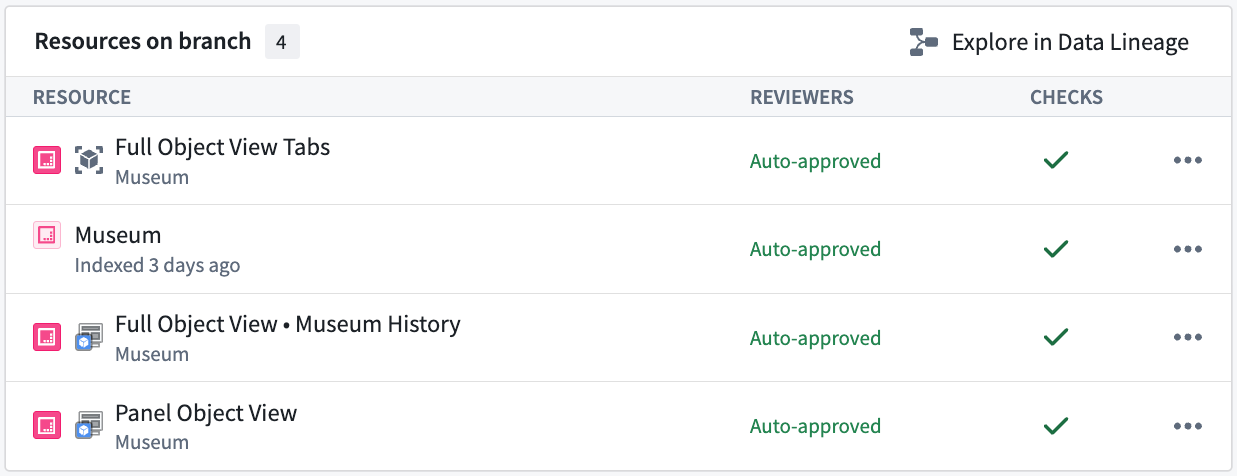
Example of object views and their associated (modified) Workshop modules on a Foundry branch. Here we have a single Object Type named "Museum" modified on the branch. The "Full Object View Tabs" resource represents structural changes to the object view itself. The "Full Object View • Museum History" and "Panel Object View" resources represent changes to Workshop modules used by the object view.
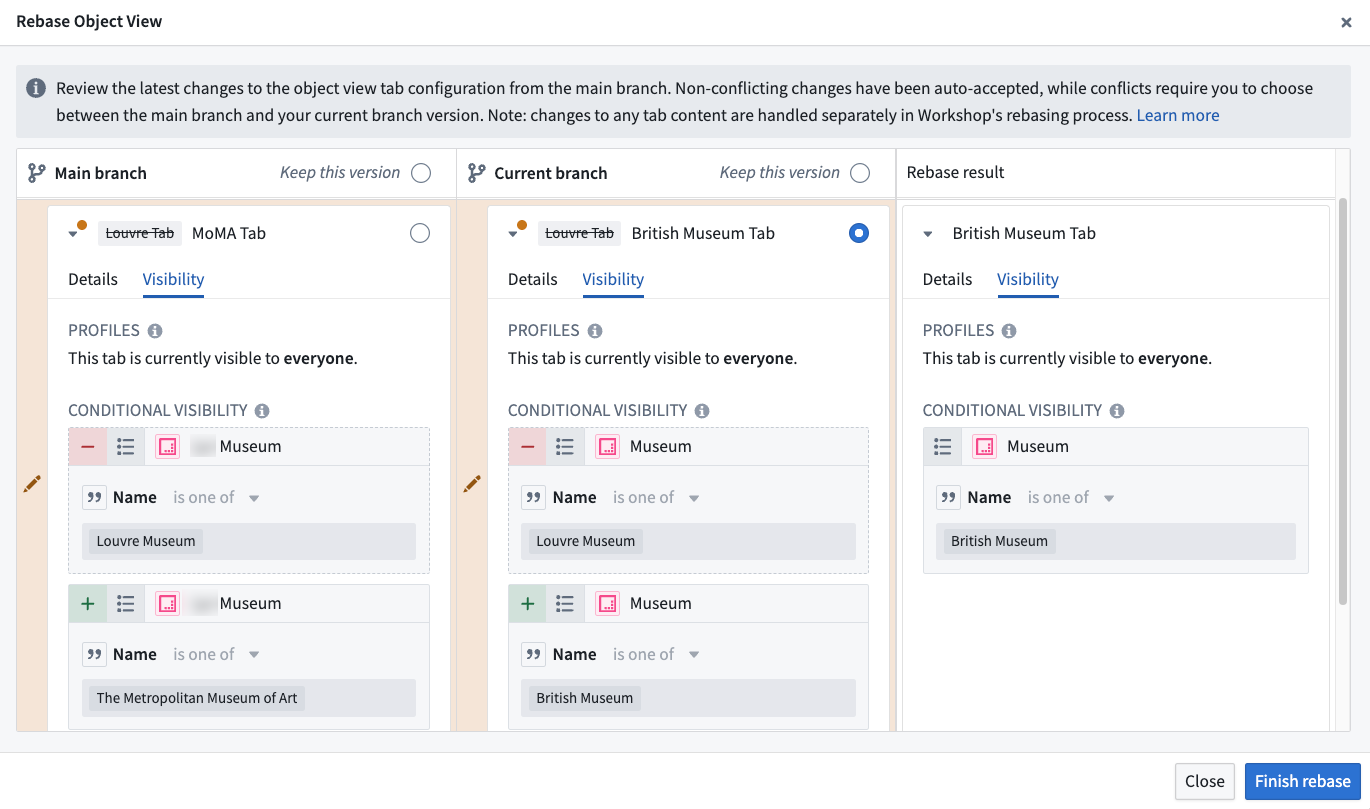
When conflicts are detected between your branch and main , you will be prompted to rebase and be shown this dialog to resolve any conflicts.
Known limitations:
- Approvals are not yet supported, so all object view changes on branches are automatically approved.
- Legacy object view tabs cannot be edited on branches.
Getting started
To add an object view to a branch, save an object view version while on a branch in the Object View editor, accessed through the Ontology Manager. For detailed guidance on working with branched object views, refer to the documentation.
What's next in the development roadmap?
Full approvals integration with reviewers, policies, and resource protection on the main branch.
New run history filtering in Workflow Lineage
Date published: 2026-01-29
You can now filter run history in Workflow Lineage to quickly find specific executions of functions, actions, automations, and logic. The Run history tab provides a complete view of all executions over the past seven days, and filtering by multiple criteria makes it faster to debug issues or audit workflows in high-volume environments.
Available filters
Filter run history by any combination of the following criteria:
- Status: Successful or failed executions
- Timestamp range: Executions within a specified date range
- User: Executions triggered by a specific user
- Run time range: Executions within a specified duration range
- Version: Executions for a specified version (functions only)
- Caller: Executions originating from a specified resource
- Failure type: Executions that failed for a specific reason
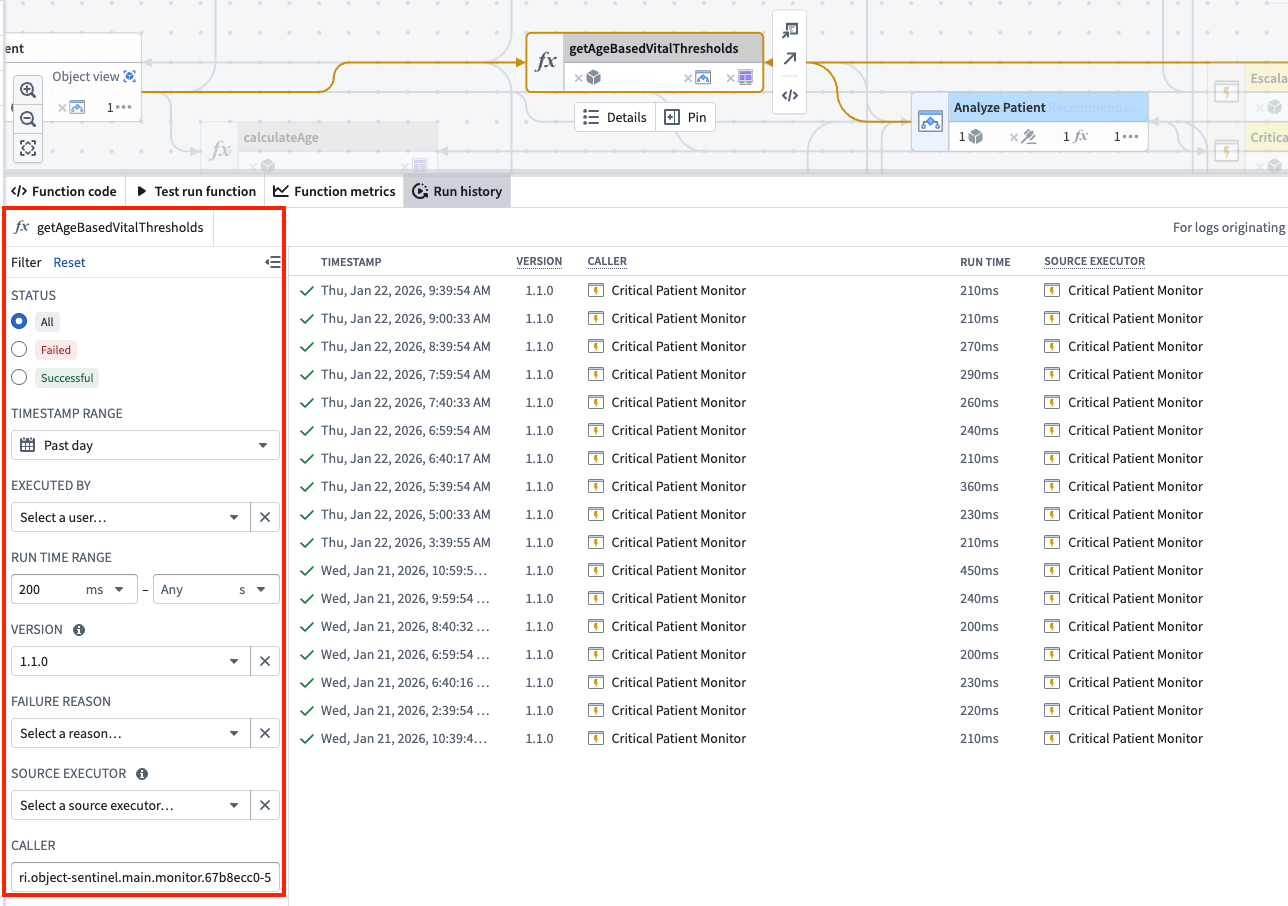
The run history for a function execution filtered by timestamp, runtime, and caller RID.
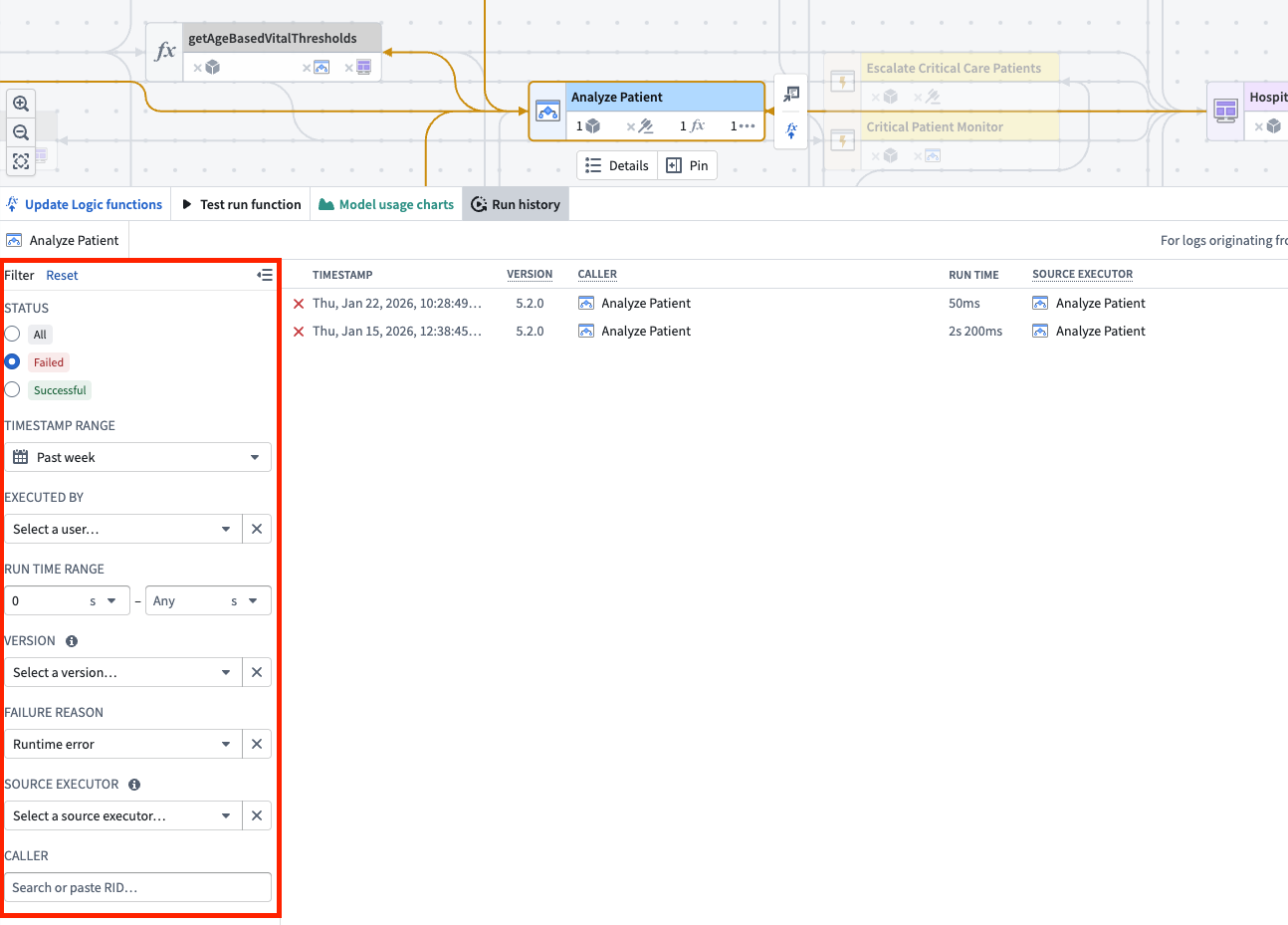
The run history for a logic execution filtered by status and failure reason.
When you specify multiple filters, results will include only executions that match all specified filters. For example, find failed executions triggered by a specific user within the last 24 hours, or identify long-running executions that exceeded a certain duration threshold.
This feature is available across all enrollments. Review the documentation for more information on filtering run history.
Automatically package resources in DevOps by tracking a source folder
Date published: 2026-01-29
Tracking a source folder in DevOps allows you to automatically package all resources within a Compass project or folder. Instead of manually maintaining individual resources, DevOps will automatically include resources from the source folder every time you release a new version.
Tracking a source folder is useful for streamlining releases of new products when you have a well-defined project that reflects the resources you want to include in your product.
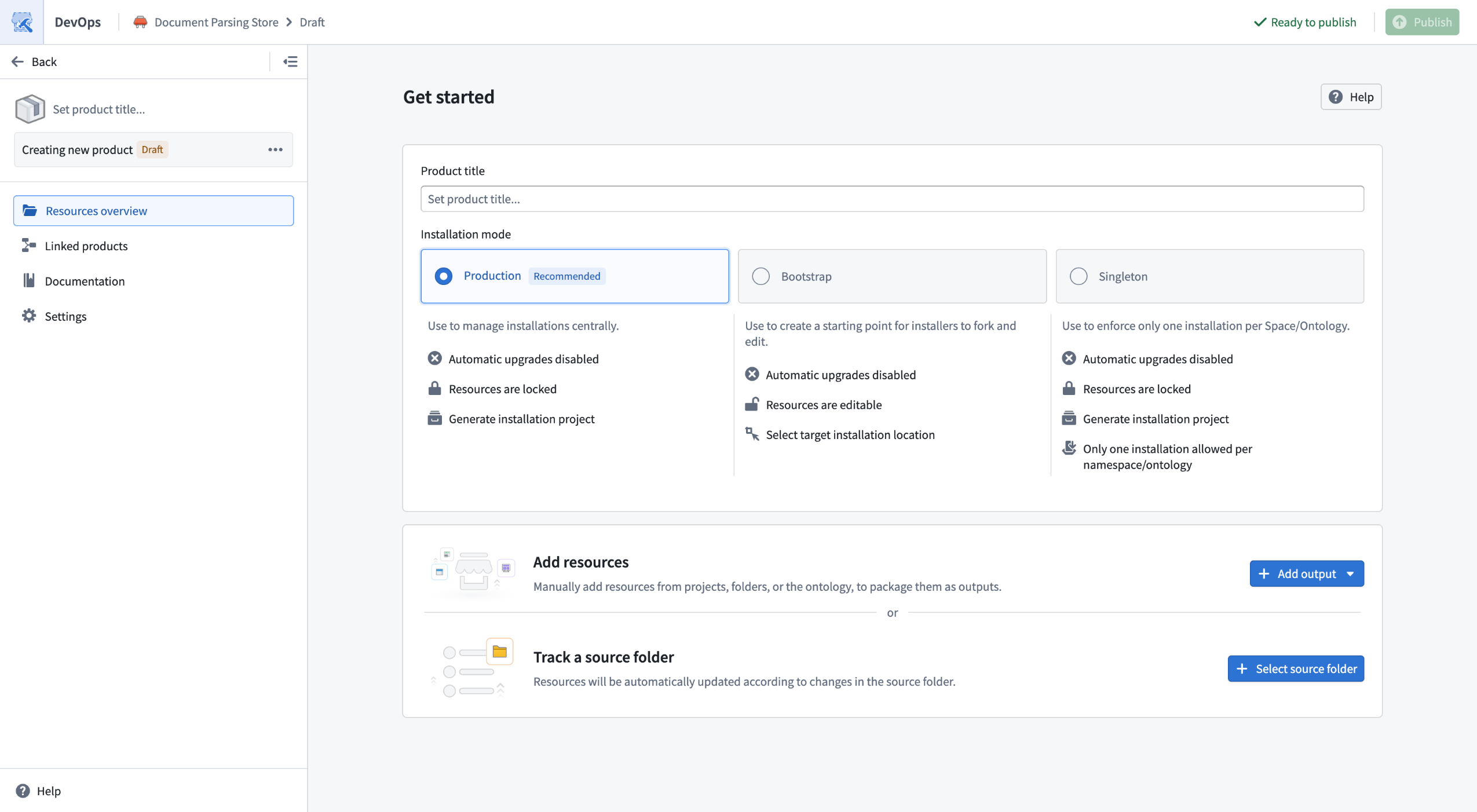
DevOps new product landing page now gives the option to track a source folder.
Configurations options
For files that are not present in the Compass filesystem, you can use folder settings to additionally track related resources. For example, you can track all health checks that exist on datasets in the folder or functions that are defined in Code Repositories in the folder. You can also exclude resources by configuring ignored sub-folders for outputs that should not be packaged, such as experimental work.
For added flexibility, you can combine both manually added outputs and folder tracked outputs. This allows you to manually add resources that do not exist within the Compass filesystem and are not covered by settings.
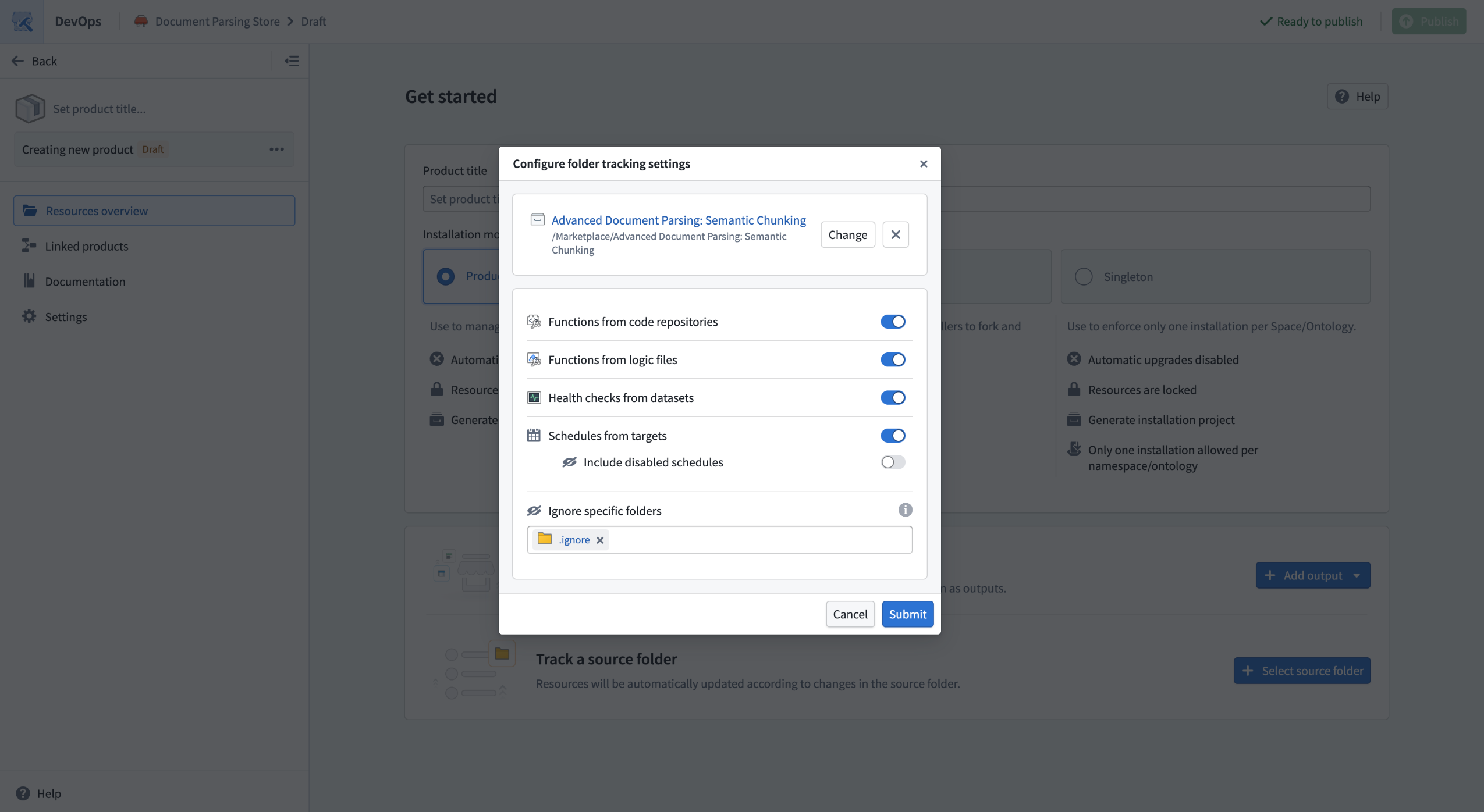
Several configuration settings are available when tracking a source folder.
Migrate an existing product to track a source folder
If you have an existing product where resources were added manually, you can perform a one-time migration to configure your product to track a source folder, if your resources share a common Compass project. The migration dialog will show you a preview including resources that will now be tracked as part of the folder, as well as resources that will continue to be manually tracked because they are not within the Compass filesystem or brought in by folder tracking settings.
If you decide that folder tracking is no longer suitable for your product, you can switch back to manual output management using the Disable folder tracking option.
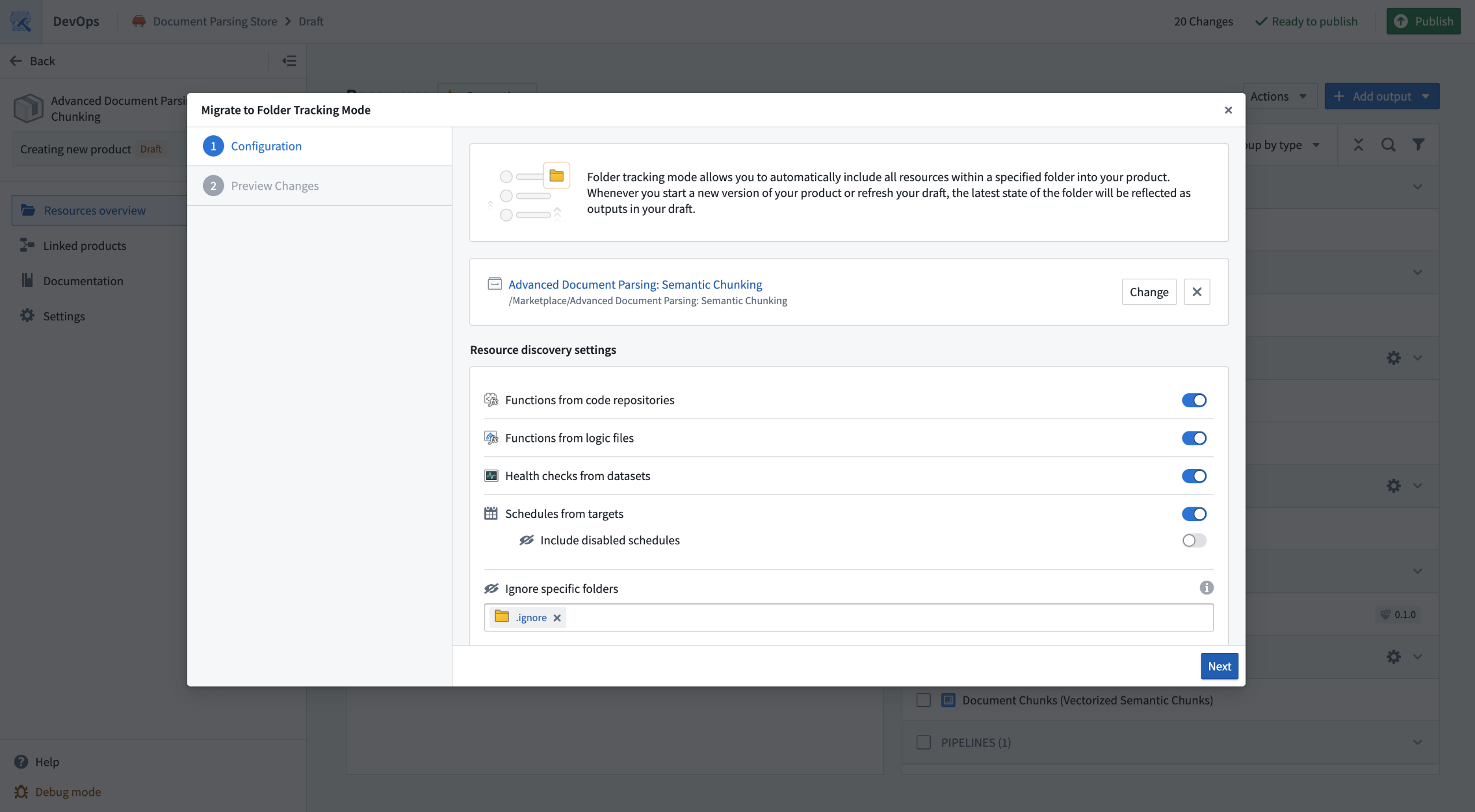
The folder tracking migration modal allows you to migrate existing products to track a source folder.
Learn more about tracking a source folder in DevOps.
Monitor usage with rate limit hit tracking in Resource Management
Date published: 2026-01-27
The Resource Management application now includes rate limit hit tracking in the AIP usage and limits view. Rate limit hits provide visibility into when users, projects, or applications reach their assigned rate limits in Foundry. This feature enables administrators to proactively monitor usage, identify capacity constraints, and troubleshoot issues related to rate limiting.
Key benefits
- Proactive capacity management: Identify where and when rate limits are being reached across resources.
- Faster troubleshooting: Quickly pinpoint usage bottlenecks and root causes of failures related to model consumption.
- Improved planning: Make informed decisions about capacity requests and model usage based on real-time data.
Access rate limit hits
To view rate limit hit information, navigate to Resource Management > AIP usage and limits > View usage. Select the model, project, or resource, and view the associated rate limit hits in the table. If rate limit hits are not visible, the feature may not yet be available in your environment.
Your feedback matters
We want to hear about your experiences using reserved capacity in the Palantir platform and welcome your feedback. Share your thoughts with Palantir Support channels or on our Developer Community ↗ using the language-model-service tag ↗.
GPT-4.1 mini now available in additional regions
Date published: 2026-01-27
GPT-4.1 mini is now available from Azure OpenAI for georestricted enrollments in Australia, Canada, Japan, and the United Kingdom.
Model overviews
GPT-4.1 mini ↗ is a lightweight alternative to the GPT-4.1 model from OpenAI, with faster and cheaper responses on average.
- Context window: 1,000,000 tokens
- Knowledge cutoff: June 2024
- Modalities: Text, image
- Capabilities: Tool calling, structured outputs
Getting started
To use these models:
- Confirm that your enrollment administrator has enabled the relevant model family.
- Review token costs and pricing.
- See the complete list of all models available in AIP.
Your feedback matters
We want to hear about your experiences using language models in the Palantir platform and welcome your feedback. Share your thoughts with Palantir Support channels or on our Developer Community ↗ using the language-model-service ↗ tag.
Active preview for Python transforms
Date published: 2026-01-27
Active preview is now available for users of the Palantir extension for Visual Studio Code, enabling automatic updates to Python transform previews every time code is saved. Active preview eliminates the need to manually trigger previews after each code change, so your preview panel maintains synchronization and provides continuous feedback during development. Intelligent caching keeps subsequent previews fast by reusing code-defined filter results, project resources, and dependencies.
When to use active preview
Active preview is ideal for iterative development workflows with frequent changes to transform logic. It is particularly effective when working with code-defined filters, as cached filter results significantly accelerate the preview process.
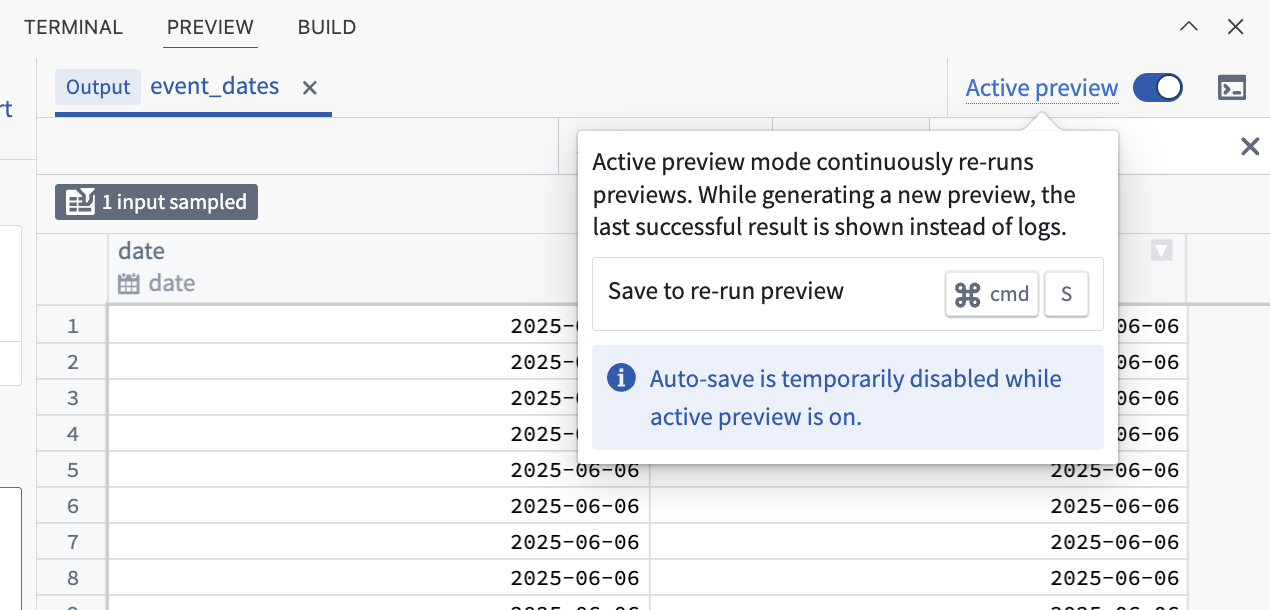
The Active preview toggle in the Preview tab.
After initiating a preview, you can enable active preview using the toggle in the Preview panel. Use active preview for continuous feedback, faster preview times, and more efficient iteration.
Learn more about active preview.
Reserved capacity available for LLMs in AIP
Date published: 2026-01-22
Reserved capacity is now available by default on many LLMs for non-georestricted enrollments and some US/EU georestricted enrollments. Reserved capacity helps ensure uninterrupted operations by protecting critical production workflows from shared project or enrollment limits on tokens and requests.
What is reserved capacity?
Reserved capacity allows you to reserve dedicated tokens per minute (TPM) and requests per minute (RPM) on LLMs for critical production workflows, ensuring they are not impacted by shared project or enrollment limits. Learn more about this feature in the documentation.
There is no additional cost to use reserved capacity.
How to view your reserved capacity
To view all reserved capacity offerings on an enrollment:
- Navigate to Resource Management > AIP usage & limits > Reserved capacity.
- Select the model from the dropdown to see available capacity.
- If the Reserved capacity tab is not present, it means reserved capacity is not currently available for your environment.
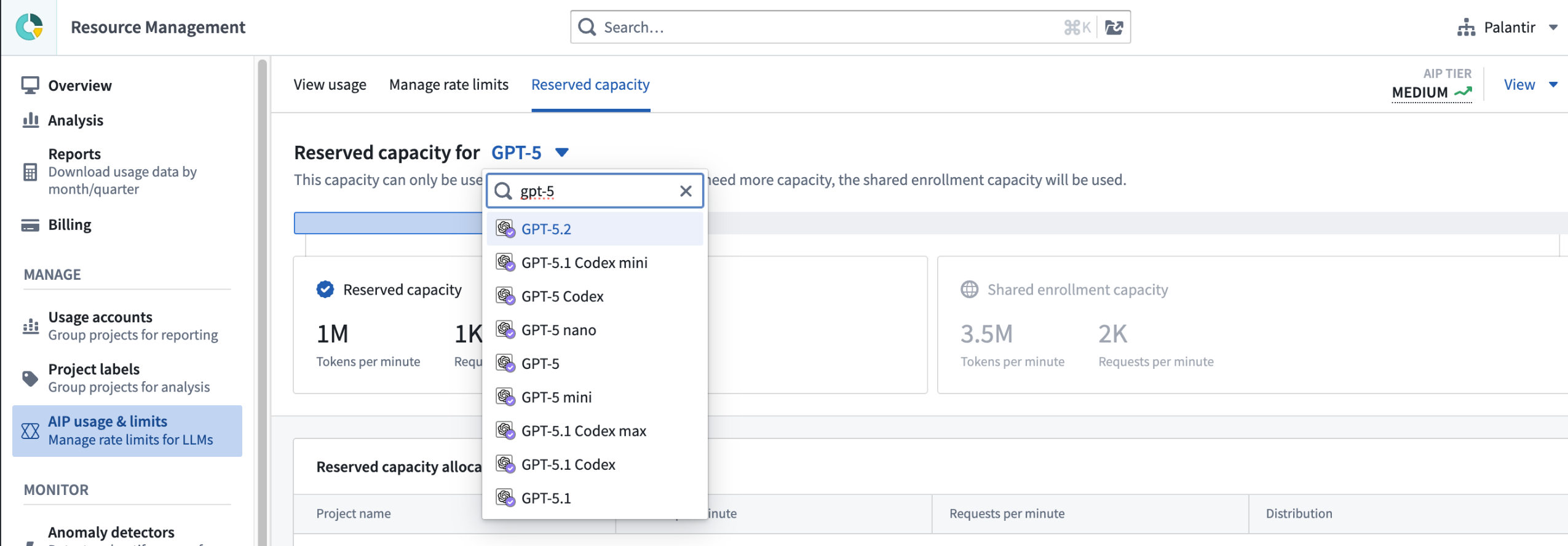
You can view reserved capacity in Resource Management.
When a project reaches its reserved capacity limit, that project will seamlessly continue operating by using the standard project and enrollment limits. Reserved capacity provides extra throughput on top of your existing limits and is available only for projects specifically enabled by an enrollment administrator.
Your feedback matters
We want to hear about your experiences using reserved capacity in the Palantir platform and welcome your feedback. Share your thoughts with Palantir Support channels or on our Developer Community ↗ using the language-model-service tag ↗.
Configurable markings now available on media reference properties
Date published: 2026-01-22
Managing data access and compliance for media sets often requires precise control over how markings are inherited and applied across your ontology. Configurable markings for media reference properties in Ontology Manager are now available on all Foundry enrollments. This capability allows you to define which markings are inherited per media source when configuring media reference properties.
The markings configuration is accessible through a multi-step dialog in the Capabilities tab of Ontology Manager when adding or editing a media reference property.
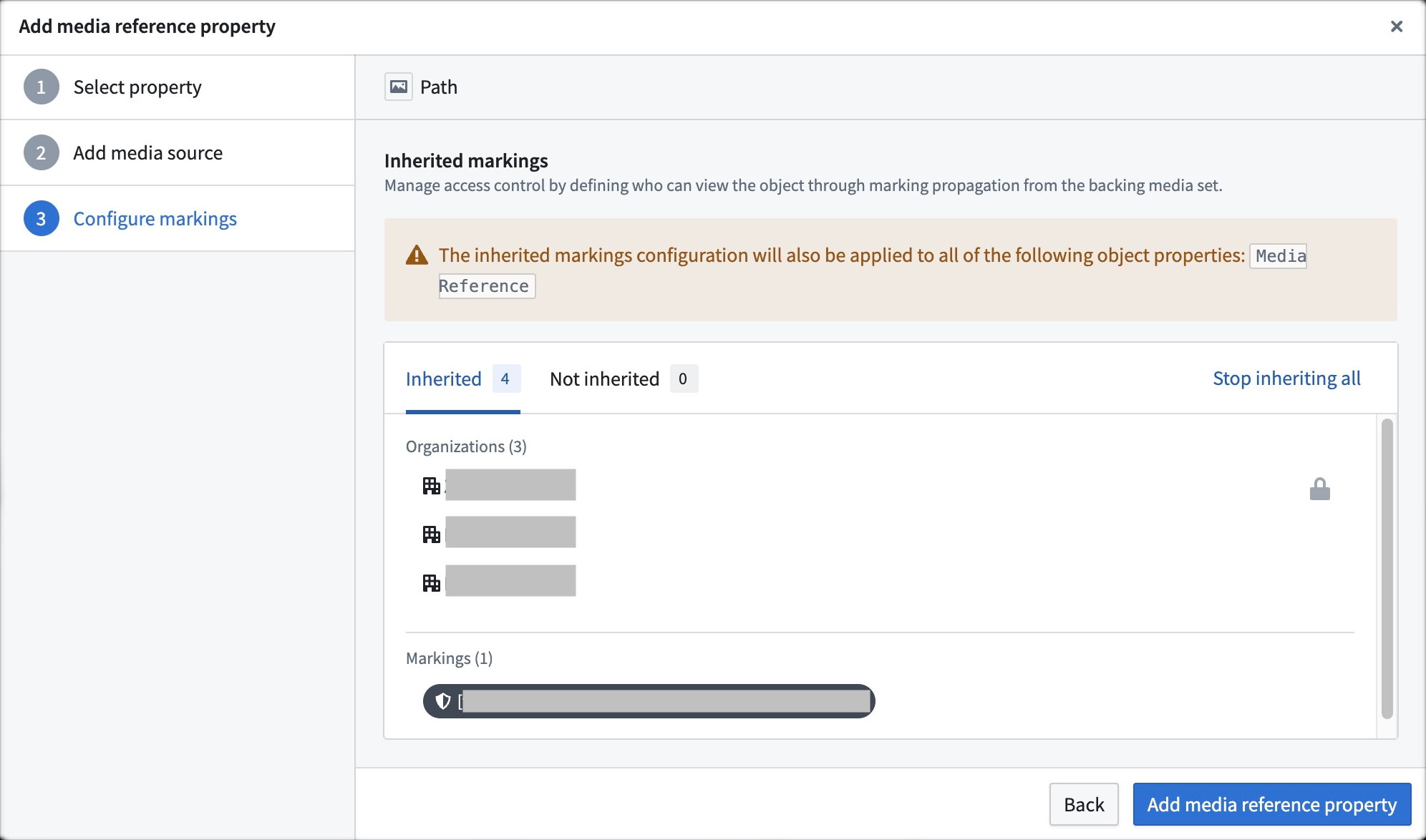
Inherited markings configuration dialog of a media reference property.
Your feedback matters
We want to hear about your experiences with ontology management and welcome your feedback. Share your thoughts through Palantir Support channels or our Developer Community ↗ using the ontology-management ↗ tag.
The VertexAI model family can now be enabled on IL2 enrollments
Date published: 2026-01-15
Google Cloud Platform's VertexAI models are now available to be enabled in AIP on IL2 enrollments.
Model overviews
VertexAI enabled IL2 enrollments will be able to use Google’s best in class Gemini models. The Gemini 2.5 series delivers advanced reasoning, coding, and multimodal capabilities across a range of powerful models. Each variant is tailored for different performance needs, from high-complexity workloads to fast, lightweight tasks.
- Gemini 2.5 Pro↗ is Google's most powerful model, best at complex reasoning, coding, and large contexts.
- Gemini 2.5 Flash↗ is Google's middle weight model, which generate fast, context-aware responses. It is optimized for quick tasks.
- Gemini 2.5 Flash Lite↗ is Google's lightweight model, which is efficient for lower-compute tasks, yet is still strong at reasoning.
Additionally, IL2 enrollments with the VertexAI model family enabled will gain access to the Anthropic Claude 4.5 and Claude 4 model families. These models deliver cutting-edge intelligence, advanced coding, and robust agentic capabilities across a range of performance and efficiency levels.
- Claude Opus 4.5↗ is Anthropic’s most powerful model, designed for complex reasoning, coding, agentic workflows, creative problem-solving, and long-running research tasks.
- Claude Sonnet 4.5↗ is a versatile and accurate model, ideal for agents, software development, business analysis, and extended reasoning with a large context window.
- Claude Haiku 4.5↗ is a lightweight and fast model, delivering near-frontier coding and computer use performance with exceptional efficiency and lower costs.
- Claude Sonnet 4↗ offers a strong balance of performance, speed, and cost, making it well-suited for high-volume tasks such as customer service AI, content generation, and efficient code development.
Getting started
To use these models:
- Confirm that your enrollment administrator has enabled the relevant model family.
- Review token costs and pricing.
- See the complete list of all models available in AIP.
Your feedback matters
We want to hear about your experiences using language models in the Palantir platform and welcome your feedback. Share your thoughts with Palantir Support channels or on our Developer Community ↗ using the language-model-service tag ↗.
Gemini 3 Pro and Gemini 3 Flash now available via VertexAI
Date published: 2026-01-15
Gemini 3 series models are now available from VertexAI on commercial, non-georestricted enrollments.
Model overviews
Gemini 3 Pro ↗ is Google's most powerful model to date, best suited for agentic tasks, advanced coding, long context understanding, multimodal understanding, and algorithmic development.
Gemini 3 Flash ↗ is Google's most efficient model to date, best suited for every day tasks, agentic coding, advanced reasoning, multimodal understanding, and long context understanding.
Both models share the following specifications:
- Context window: 1,000,000 tokens
- Knowledge cutoff: January 2025
- Modalities: Text, image
- Capabilities: Function calling, structured output
Note that Gemini 3 Pro and Gemini 3 Flash are still in preview status from GCP. Within AIP, Gemini 3 Pro and Gemini 3 Flash have all of the characteristics and behavior of a generally available AIP model.
Getting started
To use these models:
- Confirm that your enrollment administrator has enabled the relevant model family.
- Review token costs and pricing.
- See the complete list of all models available in AIP.
Your feedback matters
We want to hear about your experiences using language models in the Palantir platform and welcome your feedback. Share your thoughts with Palantir Support channels or on our Developer Community ↗ using the language-model-service tag ↗.
Communicate between Foundry instances with the Foundry connector
Date published: 2026-01-15
A new connector is now generally available in Data Connection for all enrollments, allowing Foundry instances to interface with each other. Users can now benefit from first class support for communication between Foundry instances, in addition to existing support for communication between Foundry and systems like PostgreSQL, AWS S3, Snowflake, and hundreds more.
The Foundry connector works with both direct connections and agent workers, supports batch, incremental, and streaming ingests, and is designed to accommodate multiple forms of authentication. By enabling a Foundry instance to treat another as a source, the Foundry connector makes sensitive data transfers and migrations between instances a seamless experience.
Learn more about the Foundry connector.
Resources can now be pinned to the top of the Files page in Compass
Date published: 2026-01-15
In Compass, you can now pin important files like documentation, user guides, and frequently used resources to the top of the Files page for quick access.
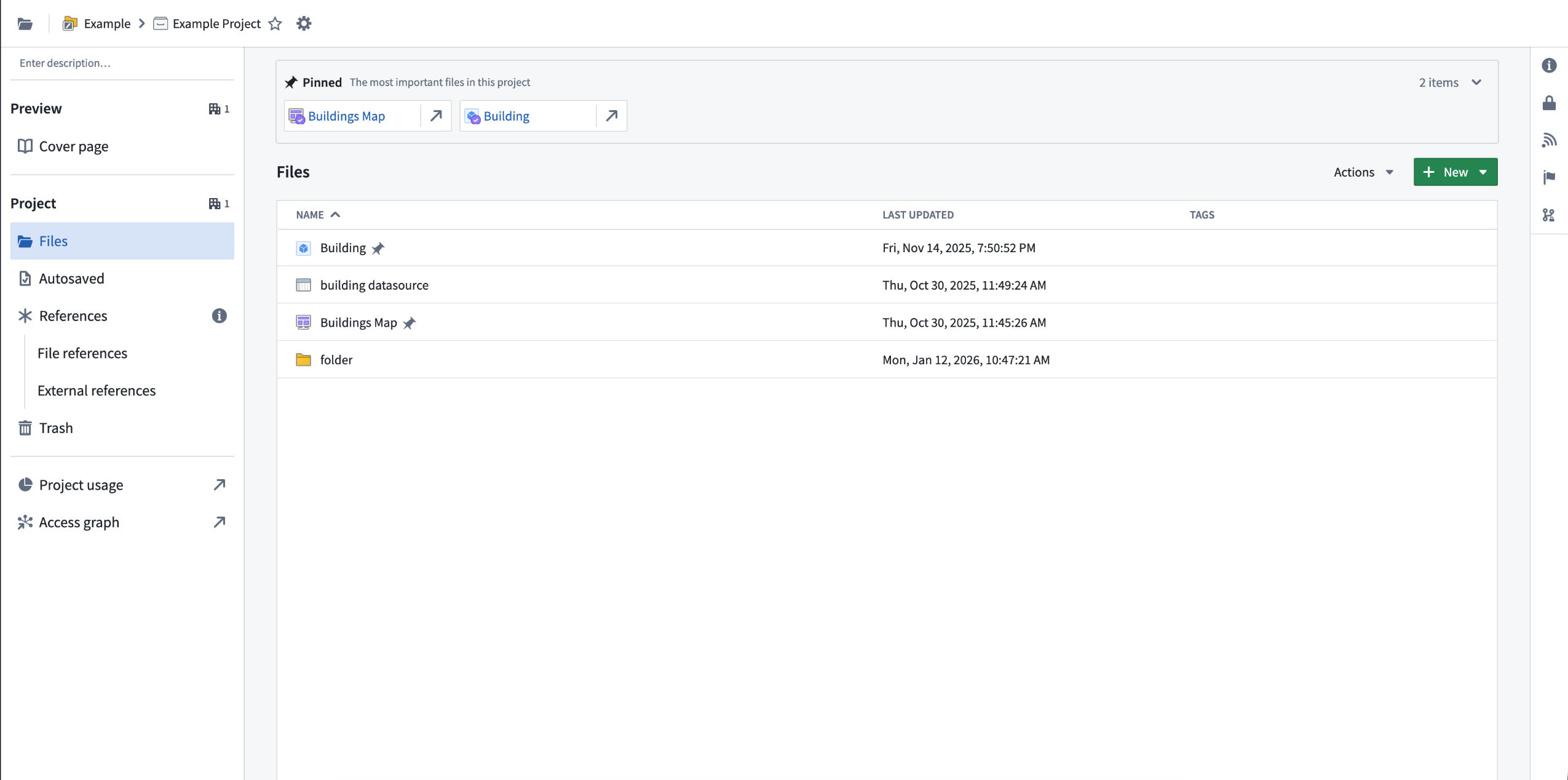
In Compass, you can now pin resources to appear at the top of the Files tab page.
This feature replaces the previous Project Catalog tab. By bringing pinned resources directly into the Files tab, your most important materials are now front and center where you naturally look first.
To pin a resource, select it and use the Pin in project option:
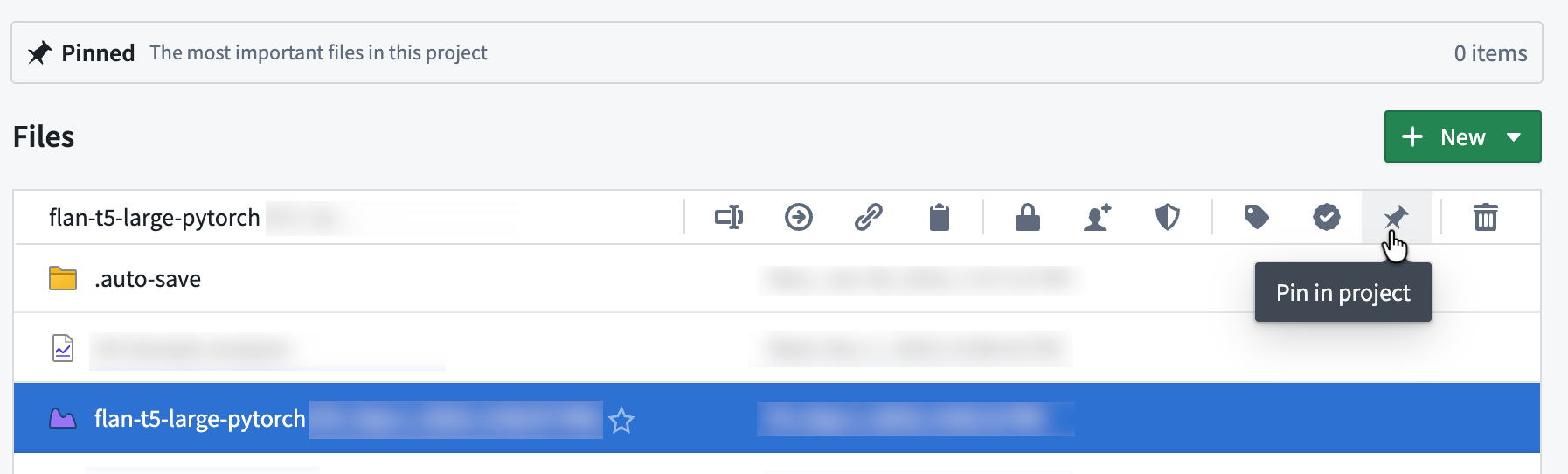
Pin a resource using the Pin the project icon or right click the selected file for the same option.
Portfolio Catalogs remain an aggregation of all pinned resources across the contained projects.
Tell us what you think
Let us know about your experience using Compass. Leave feedback with our Palantir Support channels or in our Developer Community ↗ using the compass tag ↗.
Manage custom space roles in Control Panel
Date published: 2026-01-15
Administrators can now manage space roles and workflow permissions from the Space permissions page in Control Panel. Each space comes with a set of default roles and the ability to create custom roles for greater flexibility in managing permissions. For each role, you can open the workflows dropdown menu to view the permissions granted with the role. Select a role to view the role grants in the panel on the right, where you can add or remove users.
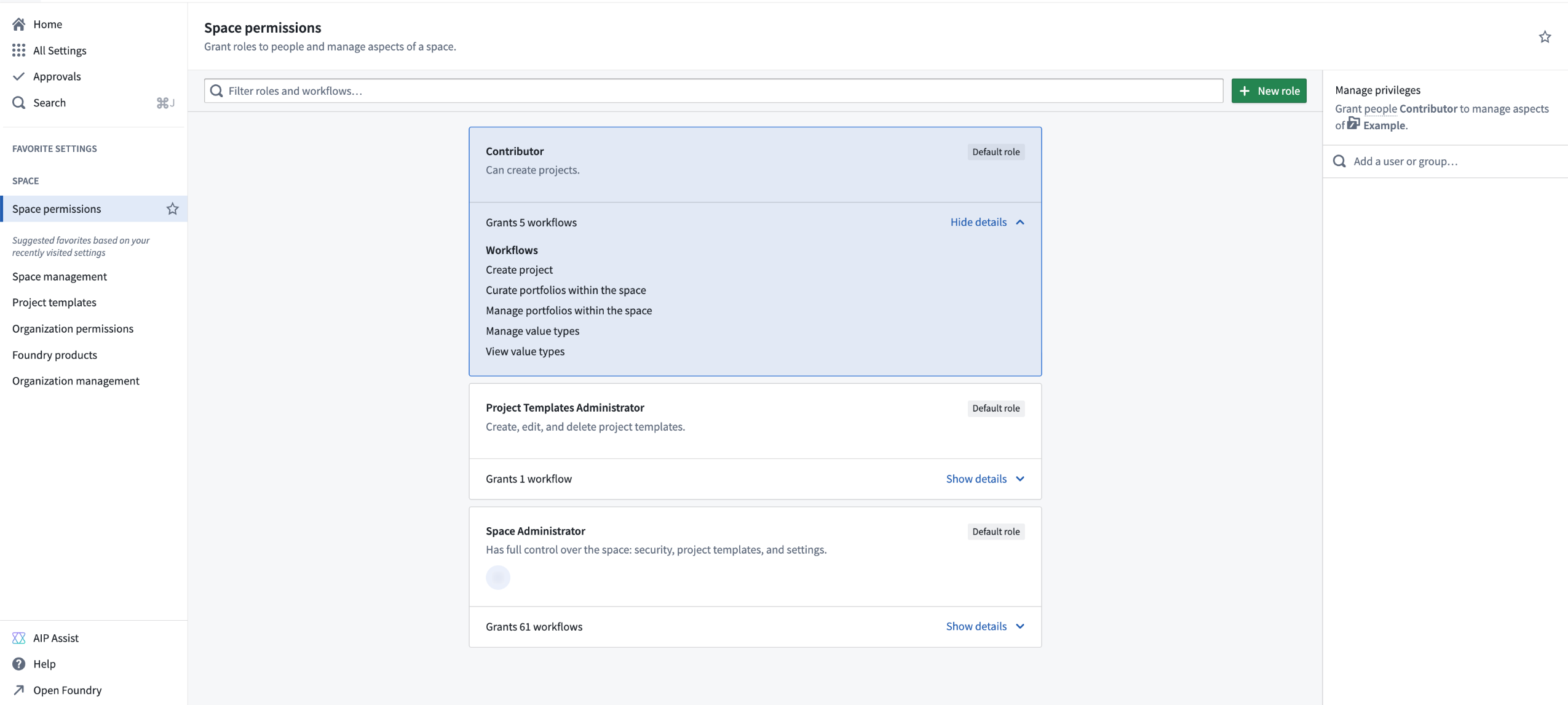
The Space permissions page in Control Panel, showing the various workflows granted with the Contributor role.
To create a custom role, select + New role in the top right of the page, then select the workflows to include with this role. After creating the custom role, you can grant that role to users the same way you would for other roles. Custom roles can be edited or deleted through the Actions menu in the top right of each custom role.
Note that custom roles are "frozen", meaning that new workflows added to default roles will not automatically apply to custom roles. To include new workflows in a custom role, select Edit role and add them manually.
For more information on space and organization management, review our documentation.
New ontologies will now use project permissions
Date published: 2026-01-15
All ontologies created after Wednesday, January 21, will use the project permissions system by default. With project-based permissions, the ability to view, edit, and manage ontology resources is managed through Compass, the Palantir platform's filesystem. This is the same permissions system other resource types use.
This project-based permissions approach replaces the previous permission models: ontology roles and datasource-derived permissions.
Key benefits of the project permissions system
The project-based permission model offers multiple benefits:
- Unified permission model: Ontology resources now use the same permission system as other resource types, so you only need to learn and manage permissions in one place.
- Bulk management: Set permissions at the folder or project level to control access across multiple resources at once, eliminating the need to set permissions on individual items.
- Clearer visibility: The Security tab and sidebar now display permissions and project context for all resources, including ontologies.
- Increased functionality: As project resources, ontologies gain access to Compass features like folders, access requests, markings, and tags.
To migrate existing Ontology resources to project-based permissions, review migration guidance.
Opting out of this change
To continue the use of a legacy permissions system for new ontologies instead, navigate to the Configuration tab in Ontology Manager and turn off New ontology resources will be saved in a project.
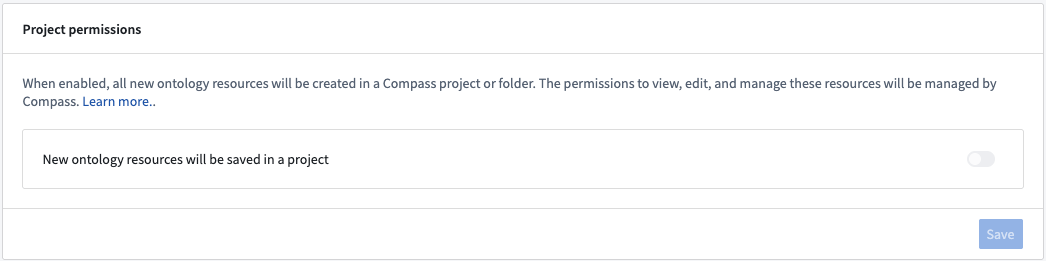
To prevent newly-created ontologies from defaulting to the project-based permissions system, navigate to the Configuration tab in Ontology Manager and turn off the New ontology resources will be saved in a project setting.
Current limitations
Project permissions for the ontology are not available yet with classification-based access controls (CBAC) or default ontologies.
We want to hear from you
We hope these enhancements improve and simplify your permission workflows. Share your thoughts through Palantir Support channels or on our Developer Community ↗ or post using the Ontology management tag ↗.
Connect AI agents to your Ontology using Model Context Protocol (MCP)
Date published: 2026-01-13
Ontology MCP enables developers to expose Developer Console applications to AI agents through the Model Context Protocol (MCP), an open standard for connecting agents to data sources. Resources in your Developer Console application (including objects, actions, and queries) become tools that agents can discover and use. This works with pro-code frameworks (LangChain, CrewAI, custom Python/TypeScript) and low-code platforms (Copilot Studio, other agent builders). Ontology MCP will be available in beta for all users with Developer Console access by the end of January 2026.
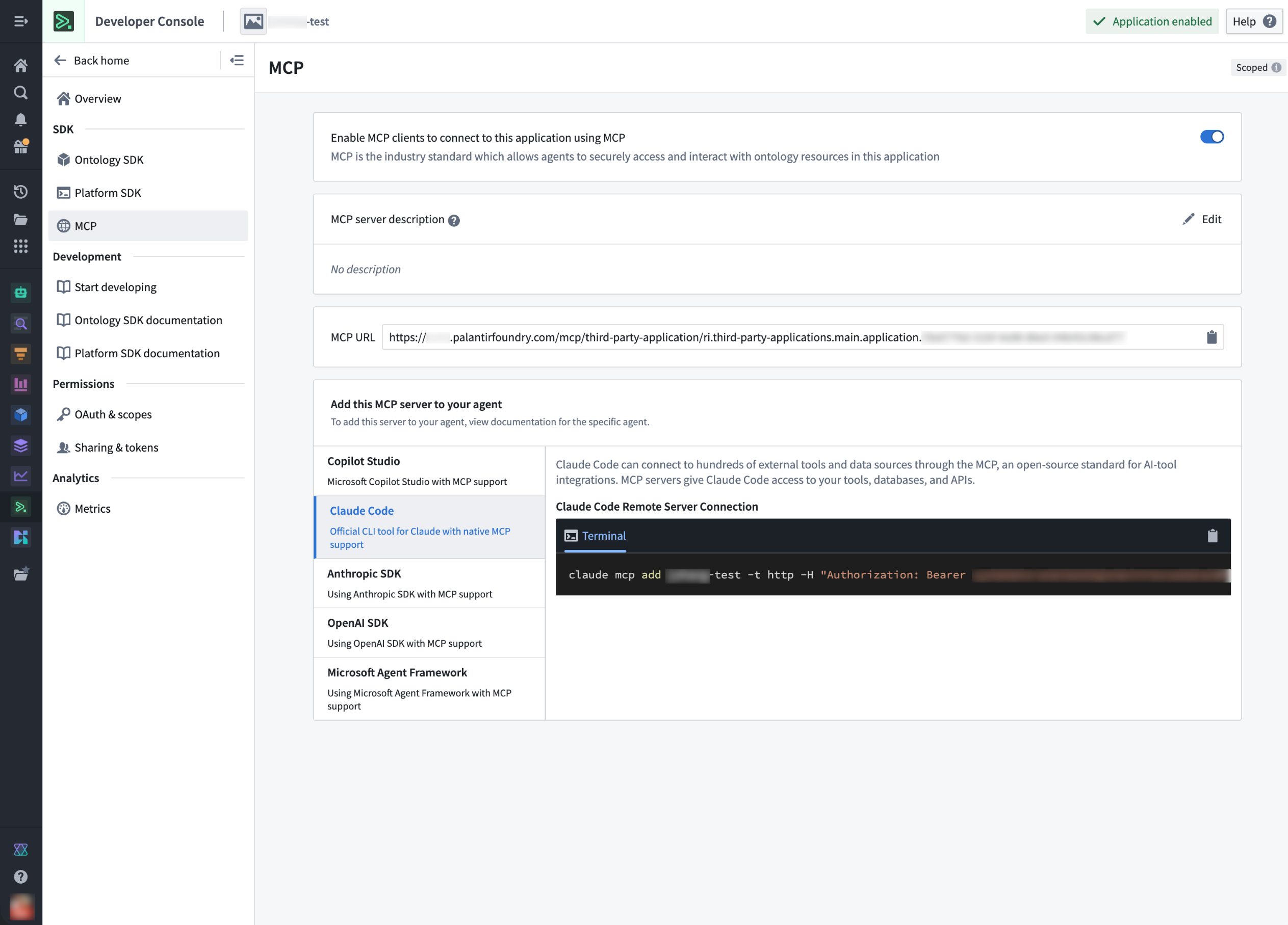
The Ontology MCP configuration page in Developer Console with the Claude Code agent selected.
What's new?
Previously, connecting AI agents to the Ontology required building custom integrations for each source system and agent framework, requiring deep knowledge of both the framework's API patterns and Foundry's SDK. With Ontology MCP, you can configure your MCP server once and connect any compatible agent framework. The MCP protocol handles authentication, tool discovery, and execution. Your Developer Console application defines which resources agents can access, and MCP ensures agents can only interact with the resources you have explicitly exposed.
When to use Ontology MCP
- You are building AI agents that need to interact with Ontology data or actions
- You want to support multiple agent frameworks without maintaining separate integrations
- You need to enable teams with different development preferences to access the same Ontology resources
- You need fine-grained control over which Ontology resources agents can access
Getting started
To start using Ontology MCP, open your Developer Console application and navigate to the MCP tab on the left. Choose to Enable MCP clients to connect to this application using MCP, and add a Markdown-supported description for the MCP server. Then, select your agent framework from the list to view framework-specific installation instructions
Ontology MCP and AIP Agents
Ontology MCP extends Ontology access to external agent frameworks. AIP Agents provide native agent-building capabilities within the platform. Use AIP Agents for in-platform workflows and Ontology MCP when connecting external frameworks to your Ontology.
For more information about Ontology MCP and how to use agents in Foundry and your Developer Console applications, watch the YouTube video ↗ from our DevCon 4 presentation.
Introducing listeners in Data Connection for capturing inbound webhooks
Date published: 2026-01-08
Listeners, a new Data Connection feature, enables you to receive inbound webhook events directly into the Palantir platform. This feature will be released in public beta the week of January 5th. Integrating real-time events from external systems into Foundry has traditionally been challenging when those systems lack OAuth 2.0 authentication support or cannot format payloads to match standard Foundry API endpoints. Listeners address this gap by provisioning URL endpoints that implement system-specific message signing and verification schemes—agnostic to data shape—providing a simple, low-latency mechanism to accept event streams from external sources.
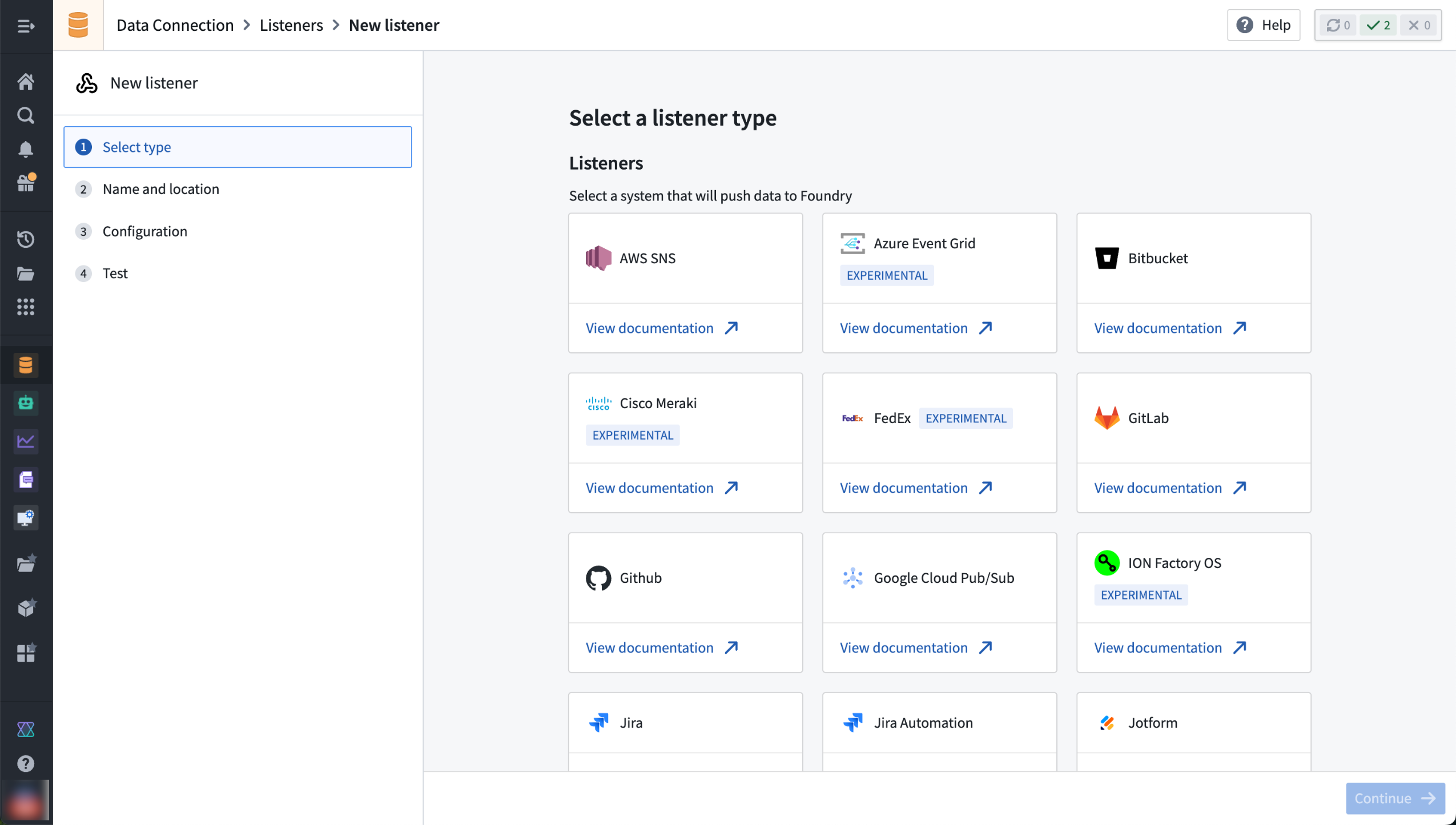
Select from Data Connection's supported listeners to configure and receive inbound webhook events.
How listeners work
To accept inbound events from external systems, Data Connection listeners provision a URL endpoint, implement the specific message signing or other verification schemes for specific external systems, and allow a simple and low-latency mechanism to receive event streams into the Palantir platform. Leverage the listener output stream with streaming pipelines, automations, or batch analysis to create powerful event-processing workflows.
Subdomain configuration and zero-downtime endpoint rotation
You can generate a subdomain for your listener to establish a distinct ingress point with a wider range of network ingress compared to the rest of your Foundry enrollment. This isolates webhook traffic from other platform operations, provides additional control over external system connections, and enables unified governance with additional security benefits.
Listeners also come with an endpoint rotation capability that provides protection if a listener endpoint is compromised. Migrate to a new endpoint with zero downtime if the URL is accidentally exposed. When rotating your endpoint, you can set an expiration date for seamless zero-downtime transitions, or delete the old endpoint immediately if faster action is required. Once an endpoint expires, it will no longer process events.
Data Connection listeners expand Foundry's integration capabilities by removing authentication and payload formatting barriers that previously prevented real-time event ingestion from external systems.
For more information, see the listener subdomains documentation.
Get started with listeners
Enrollment administrators can enable listeners by toggling the feature on in the Data Connection page under Control Panel.
Once enabled, users can access the Listeners tab from within the Data Connection application to connect the Palantir platform to external systems and workflows.
Supported listeners
The Palantir platform currently provides support for the following listeners:
- AWS SNS ↗
- Azure Event Hub ↗
- Bitbucket ↗
- Cisco Meraki ↗
- FedEx ↗
- GitLab ↗
- GitHub ↗
- Google Cloud Pub/Sub ↗
- ION Factory OS ↗
- Jira ↗ and Jira Automation ↗
- Jotform ↗
- Microsoft Bot Framework ↗
- PagerDuty ↗
- PandaDoc ↗
- project44 ↗
- ShipStation ↗
- Shopify ↗
- Skydio ↗
- Slack ↗
- Stripe ↗
- Twilio ↗
- Zendesk ↗
All product names, logos, and brands mentioned are trademarks of their respective owners. All company, product, and service names used in this document are for identification purposes only.
中文翻译
公告
提醒: 订阅 Foundry 新闻通讯(Foundry Newsletter),即可直接在收件箱中收到平台新产品、功能及改进的摘要。有关如何订阅的更多信息,请参阅 Foundry 新闻通讯与产品反馈渠道公告。
欢迎在我们的开发者社区论坛 ↗ 分享您对这些公告的看法。

发布日期:2026-01-29
使用 Foundry 分支(Branching)安全地开发和测试对象视图(Object Views)
对象视图现已支持 Foundry 分支功能,使您能够在隔离环境中开发和测试对象视图的更改,然后再部署到生产环境。
对象视图是本体(Ontology)与最终用户之间的关键接口。分支功能通过允许您在隔离环境中测试更改、与多个团队无冲突协作,并在部署前确保质量,从而实现更安全的迭代——这些操作均使用您已在 Workshop 模块和本体资源中使用的工作流程。
主要特性:
- 基于分支的开发: 在分支上添加、删除和修改对象视图,以安全地迭代结构更改(选项卡、可见性条件)和内容更改(Workshop 模块),而不会影响生产环境。
- 跨应用测试: 在 Workshop 应用中嵌入分支上的对象视图,并在 Ontology Manager 中预览,以在合并前验证更改。
- 冲突解决: 当
main分支发生更改时,可对您的对象视图进行变基(Rebase),并通过直观的对话框自动解决非冲突更改,并引导您解决冲突。
Foundry 分支上对象视图及其关联的(已修改)Workshop 模块示例。此处,我们在分支上修改了一个名为 "Museum" 的对象类型。"Full Object View Tabs" 资源表示对象视图本身的结构更改。"Full Object View • Museum History" 和 "Panel Object View" 资源表示对象视图所使用的 Workshop 模块的更改。
当在您的分支与 main 之间检测到冲突时,系统将提示您进行变基,并显示此对话框以解决任何冲突。
已知限制:
- 尚不支持审批,因此分支上的所有对象视图更改将自动获得批准。
- 无法在分支上编辑旧版对象视图选项卡。
开始使用
要将对象视图添加到分支,请在 Ontology Manager 中访问对象视图编辑器,并在分支上保存一个对象视图版本。有关处理分支对象视图的详细指导,请参阅文档。
开发路线图下一步是什么?
完全集成审批功能,包括审查者、策略以及 main 分支上的资源保护。
工作流谱系(Workflow Lineage)中新增运行历史过滤功能
发布日期:2026-01-29
您现在可以在工作流谱系中过滤运行历史,以快速查找函数、操作、自动化和逻辑的特定执行记录。运行历史选项卡提供了过去七天内所有执行的完整视图,通过多条件过滤,可以更快地在高流量环境中调试问题或审计工作流。
可用过滤器
可按以下任意条件组合过滤运行历史:
- 状态:成功或失败的执行
- 时间戳范围:指定日期范围内的执行
- 用户:由特定用户触发的执行
- 运行时间范围:指定持续时间范围内的执行
- 版本:指定版本的执行(仅限函数)
- 调用者:源自指定资源的执行
- 失败类型:因特定原因失败的执行
按时间戳、运行时间和调用者 RID 过滤的函数执行运行历史。
按状态和失败原因过滤的逻辑执行运行历史。
当您指定多个过滤器时,结果将仅包含符合所有指定条件的执行。例如,查找过去 24 小时内由特定用户触发的失败执行,或识别超过特定持续时间阈值的长时间运行执行。
此功能在所有注册(Enrollment)中均可用。有关过滤运行历史的更多信息,请查阅文档。
通过跟踪源文件夹在 DevOps 中自动打包资源
发布日期:2026-01-29
在 DevOps 中跟踪源文件夹允许您自动打包 Compass 项目或文件夹内的所有资源。无需手动维护单个资源,DevOps 将在您每次发布新版本时自动包含源文件夹中的资源。
当您拥有一个定义明确、能够反映您希望在产品中包含哪些资源的项目时,跟踪源文件夹有助于简化新产品的发布流程。
DevOps 新产品登录页面现在提供跟踪源文件夹的选项。
配置选项
对于 Compass 文件系统中不存在的文件,您可以使用文件夹设置来额外跟踪相关资源。例如,您可以跟踪文件夹中数据集上的所有健康检查,或文件夹中代码仓库(Code Repository)内定义的函数。您还可以通过配置忽略的子文件夹来排除不应打包的资源,例如实验性工作。
为增加灵活性,您可以结合使用手动添加的输出和文件夹跟踪的输出。这允许您手动添加那些不在 Compass 文件系统中且未被设置覆盖的资源。
跟踪源文件夹时,有多个配置设置可用。
迁移现有产品以跟踪源文件夹
如果您有一个现有产品,其资源是手动添加的,并且这些资源共享一个公共的 Compass 项目,您可以执行一次性迁移,将产品配置为跟踪源文件夹。迁移对话框将显示预览,包括现在将作为文件夹一部分被跟踪的资源,以及由于不在 Compass 文件系统中或未通过文件夹跟踪设置引入而将继续手动跟踪的资源。
如果您认为文件夹跟踪不再适合您的产品,您可以使用禁用文件夹跟踪选项切换回手动输出管理。
文件夹跟踪迁移模态框允许您迁移现有产品以跟踪源文件夹。
在资源管理(Resource Management)中通过速率限制命中跟踪监控使用情况
发布日期:2026-01-27
资源管理应用现在在 AIP 使用情况和限制视图中包含了速率限制命中跟踪。速率限制命中提供了用户、项目或应用在 Foundry 中达到其分配速率限制时的可见性。此功能使管理员能够主动监控使用情况、识别容量限制,并排查与速率限制相关的问题。
主要优势
- 主动容量管理: 识别资源在何处以及何时达到速率限制。
- 更快的故障排除: 快速定位使用瓶颈和与模型消耗相关的失败根本原因。
- 改进规划: 基于实时数据,就容量请求和模型使用做出明智决策。
访问速率限制命中
要查看速率限制命中信息,请导航至资源管理 > AIP 使用情况和限制 > 查看使用情况。选择模型、项目或资源,然后在表格中查看相关的速率限制命中。如果速率限制命中不可见,则该功能可能尚未在您的环境中可用。
期待您的反馈
我们希望能听到您在使用 Palantir 平台预留容量方面的经验,并欢迎您的反馈。请通过 Palantir 支持渠道或在我们的开发者社区 ↗ 上使用 language-model-service 标签 ↗ 分享您的想法。
GPT-4.1 mini 现已在更多区域可用
发布日期:2026-01-27
GPT-4.1 mini 现已通过 Azure OpenAI 向澳大利亚、加拿大、日本和英国的地理限制注册(Georestricted Enrollment)提供。
模型概述
GPT-4.1 mini ↗ 是 OpenAI 的 GPT-4.1 模型的轻量级替代品,平均响应速度更快、成本更低。
- 上下文窗口: 1,000,000 个令牌(Token)
- 知识截止日期: 2024 年 6 月
- 模态: 文本、图像
- 能力: 工具调用、结构化输出
开始使用
要使用这些模型:
- 确认您的注册管理员已启用相关模型系列。
- 查看令牌成本与定价。
- 查看 AIP 中所有可用模型的完整列表。
期待您的反馈
我们希望能听到您在使用 Palantir 平台语言模型方面的经验,并欢迎您的反馈。请通过 Palantir 支持渠道或在我们的开发者社区 ↗ 上使用 language-model-service ↗ 标签分享您的想法。
Python 转换(Transform)的主动预览(Active Preview)
发布日期:2026-01-27
Palantir Visual Studio Code 扩展的用户现在可以使用主动预览功能,该功能可在每次保存代码时自动更新 Python 转换预览。主动预览消除了每次代码更改后手动触发预览的需要,因此您的预览面板保持同步,并在开发过程中提供持续反馈。智能缓存通过重用代码定义的过滤器结果、项目资源和依赖项,使后续预览保持快速。
何时使用主动预览
主动预览非常适合需要频繁更改转换逻辑的迭代开发工作流。当使用代码定义的过滤器时,它特别有效,因为缓存的过滤器结果能显著加速预览过程。
预览选项卡中的 主动预览 切换开关。
启动预览后,您可以使用 预览 面板中的切换开关启用主动预览。使用主动预览可获得持续反馈、更快的预览时间和更高效的迭代。
AIP 中 LLM 的预留容量(Reserved Capacity)现已可用
发布日期:2026-01-22
对于非地理限制注册以及部分美国/欧盟地理限制注册,许多 LLM 现在默认提供预留容量。预留容量通过保护关键生产工作流免受共享项目或注册的令牌和请求限制影响,有助于确保操作不中断。
什么是预留容量?
预留容量允许您为关键生产工作流在 LLM 上预留专用的每分钟令牌数(TPM)和每分钟请求数(RPM),确保它们不受共享项目或注册限制的影响。在文档中了解有关此功能的更多信息。
使用预留容量无需额外费用。
如何查看您的预留容量
要查看注册上的所有预留容量产品:
- 导航至资源管理 > AIP 使用情况和限制 > 预留容量。
- 从下拉菜单中选择模型以查看可用容量。
- 如果预留容量选项卡不存在,则表示预留容量当前在您的环境中不可用。
您可以在资源管理中查看预留容量。
当项目达到其预留容量限制时,该项目将通过使用标准的项目和注册限制无缝地继续运行。预留容量在您现有限制的基础上提供额外的吞吐量,并且仅对由注册管理员专门启用的项目可用。
期待您的反馈
我们希望能听到您在使用 Palantir 平台预留容量方面的经验,并欢迎您的反馈。请通过 Palantir 支持渠道或在我们的开发者社区 ↗ 上使用 language-model-service 标签 ↗ 分享您的想法。
媒体引用属性(Media Reference Properties)现可配置标记(Markings)
发布日期:2026-01-22
管理媒体集的数据访问和合规性通常需要精确控制标记如何在本体中继承和应用。Ontology Manager 中媒体引用属性的可配置标记现已在所有 Foundry 注册中可用。此功能允许您在配置媒体引用属性时,定义每个媒体源继承哪些标记。
标记配置可通过 Ontology Manager 的能力选项卡中的多步骤对话框进行访问,该对话框在添加或编辑媒体引用属性时出现。
媒体引用属性的继承标记配置对话框。
期待您的反馈
我们希望能听到您在使用本体管理方面的经验,并欢迎您的反馈。请通过 Palantir 支持渠道或在我们的开发者社区 ↗ 上使用 ontology-management ↗ 标签 分享您的想法。
VertexAI 模型系列现可在 IL2 注册上启用
发布日期:2026-01-15
Google Cloud Platform 的 VertexAI 模型现可在 IL2 注册上的 AIP 中启用。
模型概述
启用了 VertexAI 的 IL2 注册将能够使用 Google 同类最佳的 Gemini 模型。Gemini 2.5 系列在一系列强大模型中提供了先进的推理、编码和多模态能力。每个变体都针对不同的性能需求进行了定制,从高复杂度工作负载到快速、轻量级任务。
- Gemini 2.5 Pro ↗ 是 Google 最强大的模型,最擅长复杂推理、编码和大上下文。
- Gemini 2.5 Flash ↗ 是 Google 的中等重量模型,可生成快速、上下文感知的响应。它针对快速任务进行了优化。
- Gemini 2.5 Flash Lite ↗ 是 Google 的轻量级模型,对于低计算任务效率高,但在推理方面仍然强大。
此外,启用了 VertexAI 模型系列的 IL2 注册将获得 Anthropic Claude 4.5 和 Claude 4 模型系列。这些模型在一系列性能和效率水平上提供了尖端智能、高级编码和强大的代理能力。
- Claude Opus 4.5 ↗ 是 Anthropic 最强大的模型,专为复杂推理、编码、代理工作流、创造性问题解决和长期研究任务而设计。
- Claude Sonnet 4.5 ↗ 是一个多功能且准确的模型,非常适合代理、软件开发、业务分析以及具有大上下文窗口的扩展推理。
- Claude Haiku 4.5 ↗ 是一个轻量级且快速的模型,以卓越的效率和更低的成本提供接近前沿的编码和计算机使用性能。
- Claude Sonnet 4 ↗ 在性能、速度和成本之间提供了良好的平衡,使其非常适合高容量任务,如客户服务 AI、内容生成和高效代码开发。
开始使用
要使用这些模型:
- 确认您的注册管理员已启用相关模型系列。
- 查看令牌成本与定价。
- 查看 AIP 中所有可用模型的完整列表。
期待您的反馈
我们希望能听到您在使用 Palantir 平台语言模型方面的经验,并欢迎您的反馈。请通过 Palantir 支持渠道或在我们的开发者社区 ↗ 上使用 language-model-service 标签 ↗ 分享您的想法。
Gemini 3 Pro 和 Gemini 3 Flash 现可通过 VertexAI 获取
发布日期:2026-01-15
Gemini 3 系列模型现已通过 VertexAI 在商业、非地理限制注册中提供。
模型概述
Gemini 3 Pro ↗ 是 Google 迄今为止最强大的模型,最适合代理任务、高级编码、长上下文理解、多模态理解和算法开发。
Gemini 3 Flash ↗ 是 Google 迄今为止最高效的模型,最适合日常任务、代理编码、高级推理、多模态理解和长上下文理解。
两个模型共享以下规格:
- 上下文窗口: 1,000,000 个令牌
- 知识截止日期: 2025 年 1 月
- 模态: 文本、图像
- 能力: 函数调用、结构化输出
请注意,Gemini 3 Pro 和 Gemini 3 Flash 在 GCP 中仍处于预览状态。在 AIP 中,Gemini 3 Pro 和 Gemini 3 Flash 具有正式发布(GA)的 AIP 模型的所有特性和行为。
开始使用
要使用这些模型:
- 确认您的注册管理员已启用相关模型系列。
- 查看令牌成本与定价。
- 查看 AIP 中所有可用模型的完整列表。
期待您的反馈
我们希望能听到您在使用 Palantir 平台语言模型方面的经验,并欢迎您的反馈。请通过 Palantir 支持渠道或在我们的开发者社区 ↗ 上使用 language-model-service 标签 ↗ 分享您的想法。
使用 Foundry 连接器(Connector)在 Foundry 实例间通信
发布日期:2026-01-15
Data Connection 中现已为所有注册正式发布(GA)了一个新连接器,允许 Foundry 实例相互连接。除了现有对 Foundry 与 PostgreSQL、AWS S3、Snowflake 等数百个系统之间通信的支持外,用户现在还可以受益于对 Foundry 实例间通信的一流支持。
Foundry 连接器支持直接连接和代理工作器(Agent Worker),支持批量、增量(Incremental)和流式(Streaming)摄取,并设计为适应多种身份验证形式。通过允许一个 Foundry 实例将另一个视为源,Foundry 连接器使实例之间的敏感数据传输和迁移成为一种无缝体验。
资源现在可以固定在 Compass 文件页面的顶部
发布日期:2026-01-15
在 Compass 中,您现在可以将重要文件(如文档、用户指南和常用资源)固定在文件页面的顶部,以便快速访问。
在 Compass 中,您现在可以将资源固定,使其显示在文件选项卡页面的顶部。
此功能取代了之前的项目目录选项卡。通过将固定资源直接引入文件选项卡,您最重要的材料现在位于您自然首先查看的前端和中心位置。
要固定资源,请选择它并使用在项目中固定选项:
使用固定项目图标固定资源,或右键单击所选文件以获取相同选项。
项目组合目录(Portfolio Catalogs)仍然是所有包含项目中固定资源的聚合。
告诉我们您的想法
请告诉我们您使用 Compass 的体验。通过我们的 Palantir 支持渠道或在我们的开发者社区 ↗ 上使用 compass 标签 ↗ 留下反馈。
在控制面板(Control Panel)中管理自定义空间角色
发布日期:2026-01-15
管理员现在可以从控制面板的空间权限页面管理空间角色和工作流权限。每个空间都带有一组默认角色,并且能够创建自定义角色,以便更灵活地管理权限。对于每个角色,您可以打开工作流下拉菜单以查看该角色授予的权限。选择一个角色以在右侧面板中查看角色授权,您可以在其中添加或删除用户。
控制面板中的空间权限页面,显示了 Contributor 角色授予的各种工作流。
要创建自定义角色,请选择页面右上角的 + 新角色,然后选择要包含在此角色中的工作流。创建自定义角色后,您可以像为其他角色一样将该角色授予用户。自定义角色可以通过每个自定义角色右上角的操作菜单进行编辑或删除。
请注意,自定义角色是“冻结的”,这意味着添加到默认角色的新工作流不会自动应用于自定义角色。要将新工作流包含在自定义角色中,请选择编辑角色并手动添加它们。
有关空间和组织管理的更多信息,请查阅我们的文档。
新本体现在将使用项目权限
发布日期:2026-01-15
所有在 1 月 21 日(星期三)之后创建的本体将默认使用项目权限系统。使用基于项目的权限,查看、编辑和管理本体资源的能力通过 Palantir 平台的文件系统 Compass 进行管理。这与其它资源类型使用的权限系统相同。
这种基于项目的权限方法取代了之前的权限模型:本体角色和数据源派生权限。
项目权限系统的主要优势
基于项目的权限模型提供了多项优势:
- 统一的权限模型: 本体资源现在使用与其他资源类型相同的权限系统,因此您只需在一个地方学习和管理权限。
- 批量管理: 在文件夹或项目级别设置权限,以一次控制对多个资源的访问,无需在单个项目上设置权限。
- 更清晰的可见性: 安全选项卡和侧边栏现在显示所有资源(包括本体)的权限和项目上下文。
- 增强的功能: 作为项目资源,本体获得了对 Compass 功能(如文件夹、访问请求、标记和标签)的访问权限。
要将现有本体资源迁移到基于项目的权限,请查阅迁移指南。
选择退出此更改
要继续为新本体使用旧版权限系统,请导航至 Ontology Manager 中的配置选项卡,并关闭新的本体资源将保存在项目中。
要防止新创建的本体默认使用基于项目的权限系统,请导航至 Ontology Manager 中的配置选项卡,并关闭新的本体资源将保存在项目中设置。
当前限制
本体的项目权限尚不适用于基于分类的访问控制(CBAC)或默认本体。
我们期待您的反馈
我们希望这些增强功能能够改进并简化您的权限工作流。请通过 Palantir 支持渠道或在我们的开发者社区 ↗ 上分享您的想法,或使用 Ontology management 标签 ↗ 发帖。
使用模型上下文协议(MCP)将 AI 代理连接到您的本体
发布日期:2026-01-13
本体 MCP 使开发者能够通过模型上下文协议(MCP)将开发者控制台(Developer Console)应用暴露给 AI 代理,MCP 是一个用于将代理连接到数据源的开放标准。您开发者控制台应用中的资源(包括对象、操作和查询)将成为代理可以发现和使用的工具。这适用于专业代码框架(LangChain、CrewAI、自定义 Python/TypeScript)和低代码平台(Copilot Studio、其他代理构建器)。本体 MCP 将于 2026 年 1 月底前向所有拥有开发者控制台访问权限的用户提供 Beta 版本。
开发者控制台中的本体 MCP 配置页面,已选择 Claude Code 代理。
新增功能?
以前,将 AI 代理连接到本体需要为每个源系统和代理框架构建自定义集成,这需要深入了解框架的 API 模式和 Foundry 的 SDK。使用本体 MCP,您可以配置一次 MCP 服务器,然后连接任何兼容的代理框架。MCP 协议处理身份验证、工具发现和执行。您的开发者控制台应用定义了代理可以访问哪些资源,MCP 确保代理只能与您明确暴露的资源进行交互。
何时使用本体 MCP
- 您正在构建需要与本体数据或操作交互的 AI 代理
- 您希望支持多个代理框架,而无需维护单独的集成
- 您需要让具有不同开发偏好的团队能够访问相同的本体资源
- 您需要对代理可以访问的本体资源进行细粒度控制
开始使用
要开始使用本体 MCP,请打开您的开发者控制台应用,导航至左侧的 MCP 选项卡。选择启用 MCP 客户端使用 MCP 连接到此应用,并为 MCP 服务器添加 Markdown 支持的描述。然后,从列表中选择您的代理框架,以查看特定于框架的安装说明。
本体 MCP 和 AIP 代理
本体 MCP 将本体访问扩展到外部代理框架。AIP 代理 在平台内提供原生代理构建能力。对于平台内工作流,请使用 AIP 代理;在将外部框架连接到您的本体时,请使用本体 MCP。
有关本体 MCP 以及如何在 Foundry 和您的开发者控制台应用中使用代理的更多信息,请观看我们 DevCon 4 演示中的 YouTube 视频 ↗。
Data Connection 中引入监听器(Listeners)用于捕获入站 Webhook
发布日期:2026-01-08
监听器是 Data Connection 的一项新功能,使您能够直接将入站 Webhook 事件接收到 Palantir 平台。此功能将于 1 月 5 日那周以公开 Beta 版本发布。将来自外部系统的实时事件集成到 Foundry 中,传统上在以下情况下具有挑战性:这些系统缺乏 OAuth 2.0 身份验证支持,或者无法将有效负载格式化为匹配标准 Foundry API 端点。监听器通过提供实现特定于系统的消息签名和验证方案(与数据形状无关)的 URL 端点来解决这一差距,提供了一种简单、低延迟的机制来接受来自外部源的事件流。
有关更多信息,包括支持的监听器列表和设置指南,请查阅监听器文档。
从 Data Connection 支持的监听器中选择以配置和接收入站 Webhook 事件。
监听器的工作原理
为了接受来自外部系统的入站事件,Data Connection 监听器会提供一个 URL 端点,实现针对特定外部系统的特定消息签名或其他验证方案,并提供一种简单且低延迟的机制来将事件流接收到 Palantir 平台。利用监听器输出流与流式管道、自动化或批量分析相结合,创建强大的事件处理工作流。
子域配置和零停机端点轮换
您可以为监听器生成一个子域,以建立一个与您的 Foundry 注册其余部分相比具有更广泛网络入口的独特入口点。这将 Webhook 流量与其他平台操作隔离开来,提供对外部系统连接的额外控制,并通过额外的安全优势实现统一治理。
监听器还带有端点轮换功能,可在监听器端点受损时提供保护。如果 URL 意外暴露,可以零停机迁移到新端点。轮换端点时,您可以设置过期日期以实现无缝的零停机过渡,或者如果需要更快采取行动,则立即删除旧端点。一旦端点过期,它将不再处理事件。
Data Connection 监听器通过消除以前阻止从外部系统实时摄取事件的认证和有效负载格式障碍,扩展了 Foundry 的集成能力。
开始使用监听器
注册管理员可以通过在控制面板下的 Data Connection 页面中切换功能开关来启用监听器。
启用后,用户可以从 Data Connection 应用内部访问监听器选项卡,以将 Palantir 平台连接到外部系统和工作流。
支持的监听器
Palantir 平台目前支持以下监听器:
- AWS SNS ↗
- Azure Event Hub ↗
- Bitbucket ↗
- Cisco Meraki ↗
- FedEx ↗
- GitLab ↗
- GitHub ↗
- Google Cloud Pub/Sub ↗
- ION Factory OS ↗
- Jira ↗ 和 Jira Automation ↗
- Jotform ↗
- Microsoft Bot Framework ↗
- PagerDuty ↗
- PandaDoc ↗
- project44 ↗
- ShipStation ↗
- Shopify ↗
- Skydio ↗
- Slack ↗
- Stripe ↗
- Twilio ↗
- Zendesk ↗
本文提及的所有产品名称、徽标和品牌均为其各自所有者的商标。本文档中使用的所有公司、产品和服务名称仅用于标识目的。