Announcements(公告)
REMINDER: Sign up for the Foundry Newsletter to receive a summary of new products, features, and improvements across the platform directly to your inbox. For more information on how to subscribe, see the Foundry Newsletter and Product Feedback channels announcement.
Share your thoughts about these announcements in our Developer Community Forum ↗.
View AIP usage for projects
Date published: 2026-04-30
AIP usage history for projects is now available in Resource Management to users with project view permissions. The dashboard shows a breakdown of a project's AIP usage at minute-level granularity, with filters to further break down usage by model or resource for up to two weeks prior. You can also isolate usage by batch versus interactive queries and by token versus request volume.
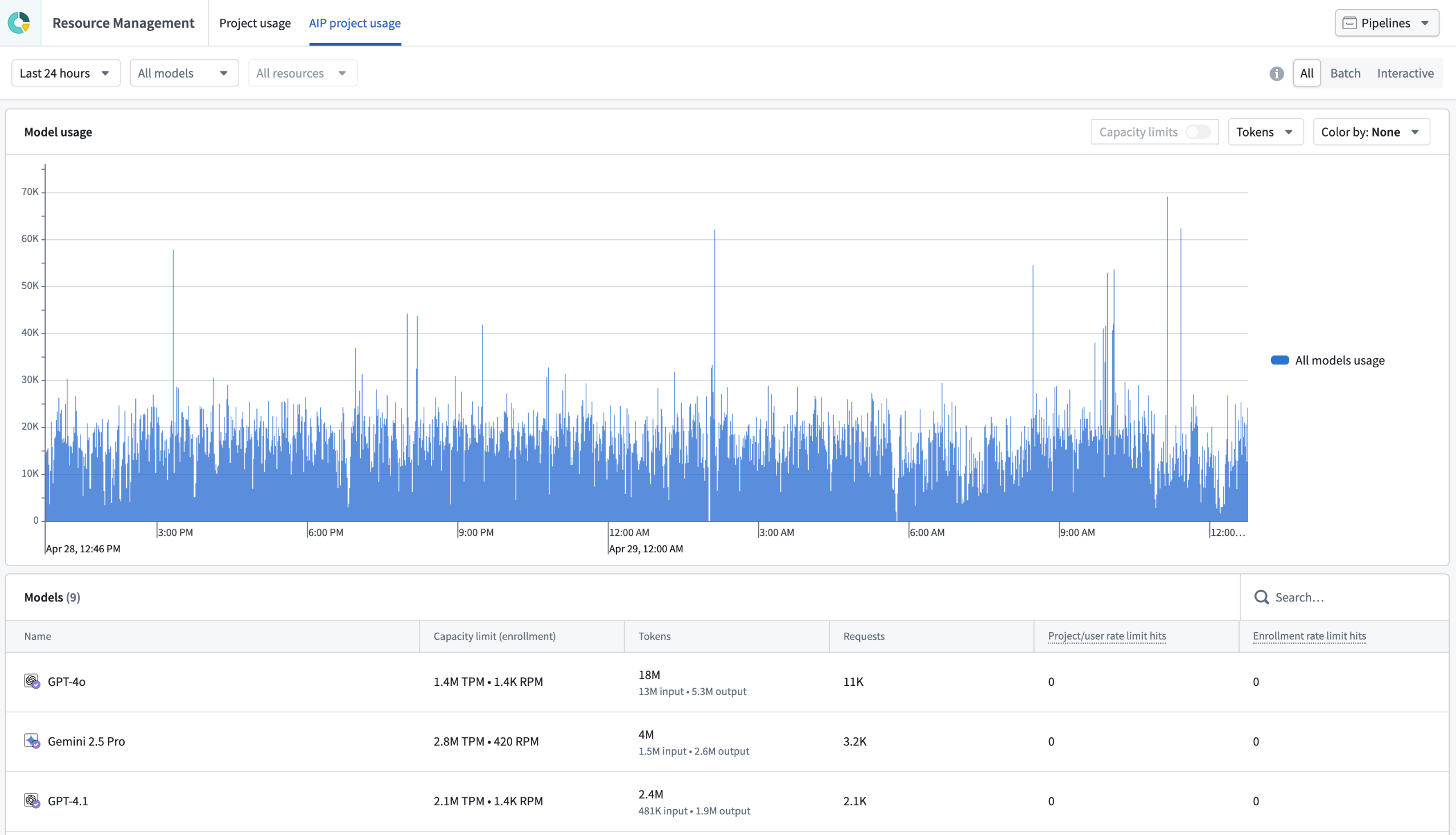
The AIP project usage tab in Resource Management, displaying a dashboard with a chart and metrics of usage activity.
Rate limit hits
The dashboard highlights when a project's AIP usage surpasses the capacity limits set by enrollment admins, also known as rate limit hits. Rate limit hits appear by default in the last two columns of the dashboard table. Toggle Capacity limits at the top of the chart to overlay the current capacity limit.
View AIP project usage
To view AIP usage for a project you have view permissions for:
- Navigate to the Compass overview of a project.
- Select Project usage from the left sidebar to open the usage dashboard in Resource Management.
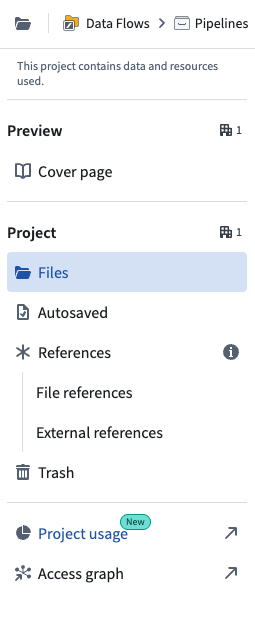
The Project usage option from a Compass project overview sidebar.
If you have manage access to a project, the Project usage tab takes you directly to the Project usage tab in Resource Management. Select the AIP project usage tab in the top navigation bar to view AIP-specific usage.
If you have view access to other projects, select them from the project selector in the top right of Resource Management.
Your feedback matters
We want to hear about your experiences managing AIP project usage in the Palantir platform. Share your thoughts with Palantir Support or in our Developer Community ↗ using the language-model-service tag ↗.
Object and property security policies are now generally available
Date published: 2026-04-23
You can now configure object and property security policies in Ontology Manager to define permissions directly on object types backed by batch or streaming pipelines. Now generally available across Foundry enrollments, object and property security policies provide a unified, first-class configuration experience for managing both row- and column-level security independent of the permissions on the object type's backing data source. Ensure users only see the data they are permitted to access by configuring object and property security policies to:
- Control access at the object level (row-level security) by configuring security policies directly on the object type.
- Restrict visibility at the property level (column-level security) by configuring security policies on select properties after creating an object security policy.
- Achieve cell-level security by combining object and property security policies.
Object and property security policies are comprised of granular policies and mandatory controls. By default, a policy inherits all mandatory controls from its data sources, including marking, organization, or classification controls. You can add new or remove inherited mandatory controls to further customize your security policies.
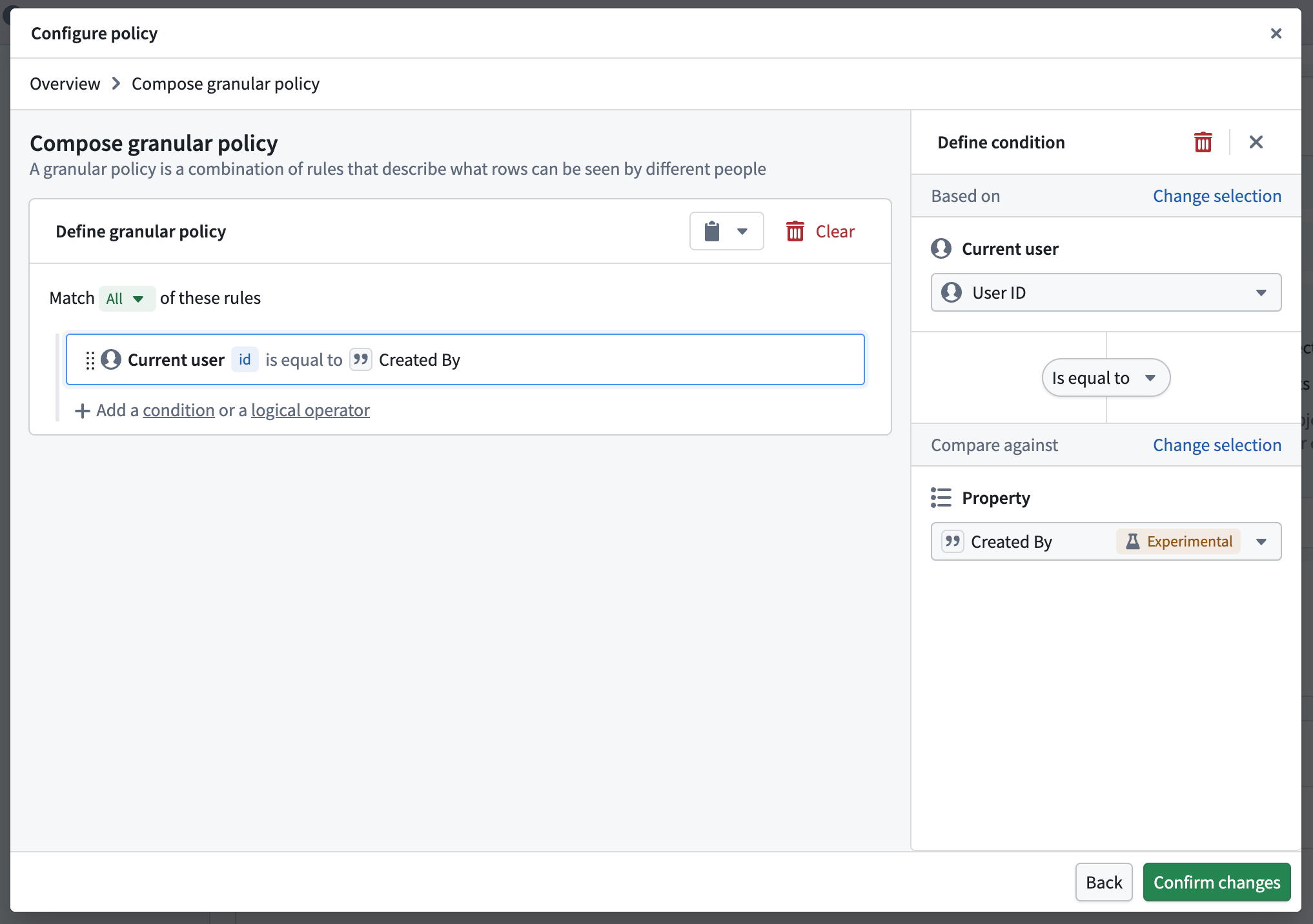
Compose granular object security policies in Ontology Manager to determine which objects can be seen by different users.
Once you create an object security policy, you can configure a property security policy using any property except for the object type's primary key. The configuration settings for property security policies are identical to object security policies.
Use object and property security policies instead of restricted views
If your object type is currently backed by a restricted view that is not used outside of your ontology, then you should consider enforcing row- and column-level security through object and property security policies by reviewing the migration guide.
Learn more about the benefits of object and property security policies.
AIP Agent Studio is now AIP Chatbot Studio
Date published: 2026-04-22
Starting the week of April 27, AIP Agent Studio will be rebranded as AIP Chatbot Studio, better reflecting its role as a dedicated builder for interactive, multi-turn assistants equipped with enterprise-specific information and tools. AIP Agents will be rebranded as AIP Chatbots across the platform, and the AIP Agent widget in Workshop will be rebranded as the AIP Chatbot widget.
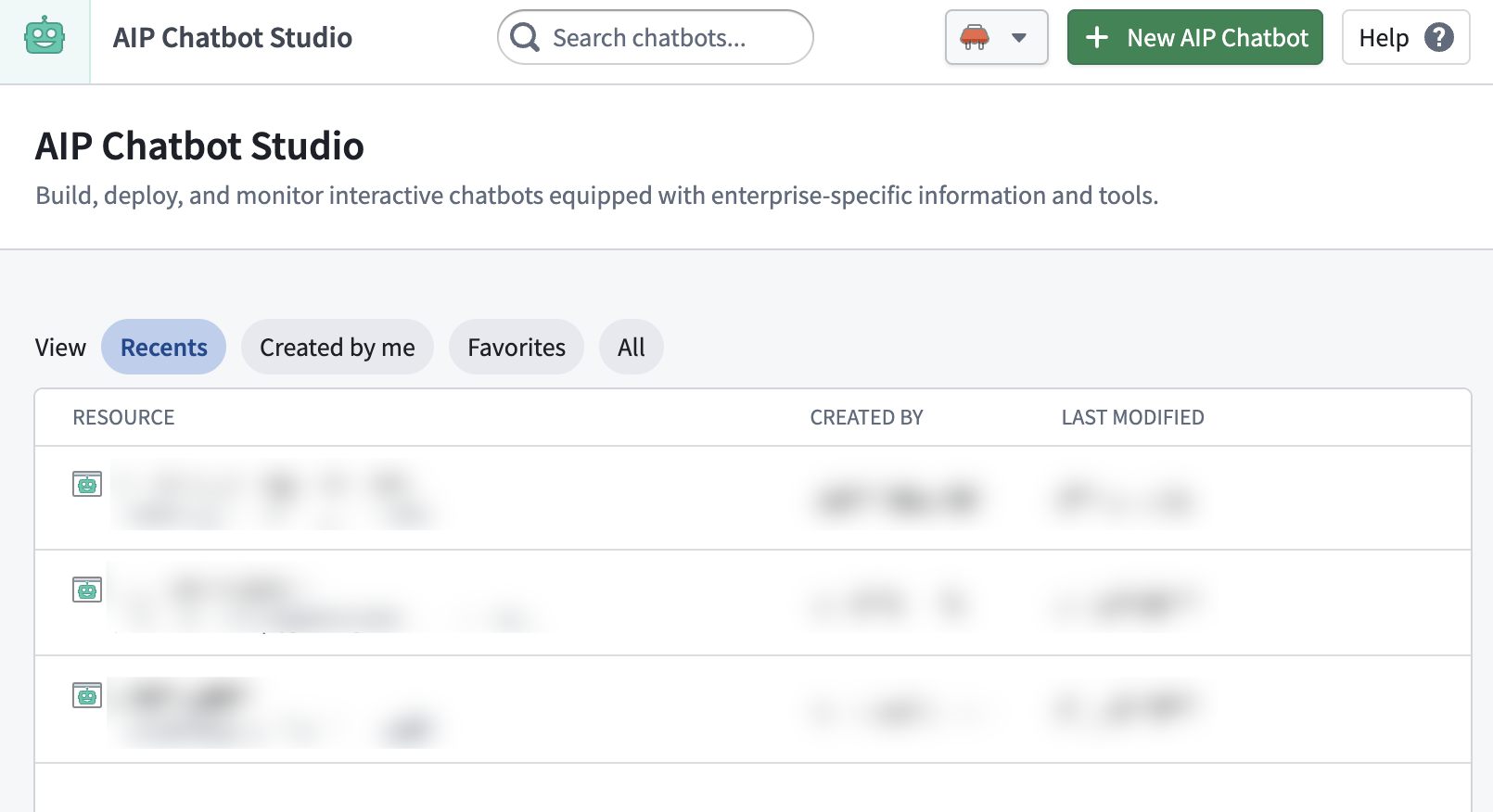
The newly renamed AIP Chatbot Studio homepage.
Impact on users
All existing features and functionalities remain unchanged, and you can continue to use AIP Chatbot Studio as usual. You can continue to embed AIP Chatbots into custom applications using the Palantir API through the existing AIP Agent endpoints, which preserve the existing API naming convention for backwards compatibility.
You should see the new names reflected across Foundry and platform communications. If you have any questions about this change, share them with Palantir Support channels or on our Developer Community ↗.
Learn more about AIP Chatbot Studio.
LLM capacity now autoscales up to 2× by default for eligible Foundry enrollments powered by AIP
Date published: 2026-04-21
Autoscaling capacity is now available and enabled by default for specific models and for eligible enrollments in specific geo-regions and compliance levels. Autoscaling will increase the enrollment capacity limits — up to twice the current allocation. This expanded capacity is available where Palantir has validated that there is sufficient capacity to reliably support higher limits. They will still be subject to ongoing stability checks to ensure consistent performance and reliability.
Find out more about autoscaling in the documentation.
Key benefits:
- Higher capacity ceiling: Eligible enrollments and models will have higher headroom for their workloads, reducing the chances of hitting rate limits during normal usage.
- Automatically enabled for projects: Projects automatically access additional capacity when available.
- Protected enrollment tier limits: Autoscaling will only increase the capacity limits, protecting the already allocated capacity for your enrollment tier.
Currently autoscaling will only affect the models listed below.
- GPT-5
- GPT-5 mini
- GPT-5 nano
- GPT-4.1
- GPT-4.1 mini
- GPT-4.1 nano
Project autoscaling overrides
If you need per-project control, enable the Project autoscaling overrides setting. This setting is only available when autoscaling is enabled. With project autoscaling overrides, you can choose which project rate limits have autoscaling enabled and which do not. User folder rate limits cannot be autoscaled.
How to manage autoscaling capacity
You can enable or disable autoscaling at any time from the Resource Management application:
- Navigate to Resource Management > AIP usage & limits > Autoscaling in the top right of the Resource Management application.
- Toggle the autoscaling setting on or off as needed.
- If you require per-project control, enable Project autoscaling overrides and configure autoscaling for individual project rate limits.
When autoscaling is turned off, all projects will revert to their standard capacity limits. Ineligible enrollments will not see this setting in the application.
Your feedback matters
We want to hear about your experiences using reserved capacity in the Palantir platform and welcome your feedback. Share your thoughts with Palantir Support channels or on our Developer Community ↗ using the language-model-service tag ↗.
Claude Opus 4.7 now available from Anthropic, AWS Bedrock, and Google Vertex
Date published: 2026-04-21
Claude Opus 4.7 is now available from Anthropic, AWS Bedrock, and Google Vertex on non-georestricted enrollments. For US and EU non-georestricted enrollments, the model is available from AWS Bedrock and Google Vertex.
Model overview
Claude Opus 4.7 is Anthropic's most capable generally available model to date. It supports long-horizon agentic workflows, knowledge work, vision tasks, and memory tasks. For more information, review Anthropic's model documentation ↗.
- Context window: 1,000,000 tokens
- Modalities: Text, image
- Capabilities: Extended thinking, function calling
Getting started
To use this model:
- Confirm that your enrollment administrator has enabled the relevant model family.
- Review token costs and pricing.
- See the complete list of all available models in AIP.
Your feedback matters
We want to hear about your experiences using language models in the Palantir platform and welcome your feedback. Share your thoughts with Palantir Support channels or on our Developer Community ↗ using the language-model-service tag ↗.
Media item version history and path-based retention policy
Date published: 2026-04-15
Media sets now display version history for media items uploaded with the same path, and a new retention policy enables permanent deletion of overwritten items.
Media item path version history
When multiple media items are uploaded to the same path in a media set, only the most recent item is displayed in the media set. You can now view the version history of a media item to see all previous uploads at a specific path, providing visibility into overwritten items that may still be processed in builds.
To view version history, select a media item and choose Version History in the Metadata panel. Learn more in our documentation.
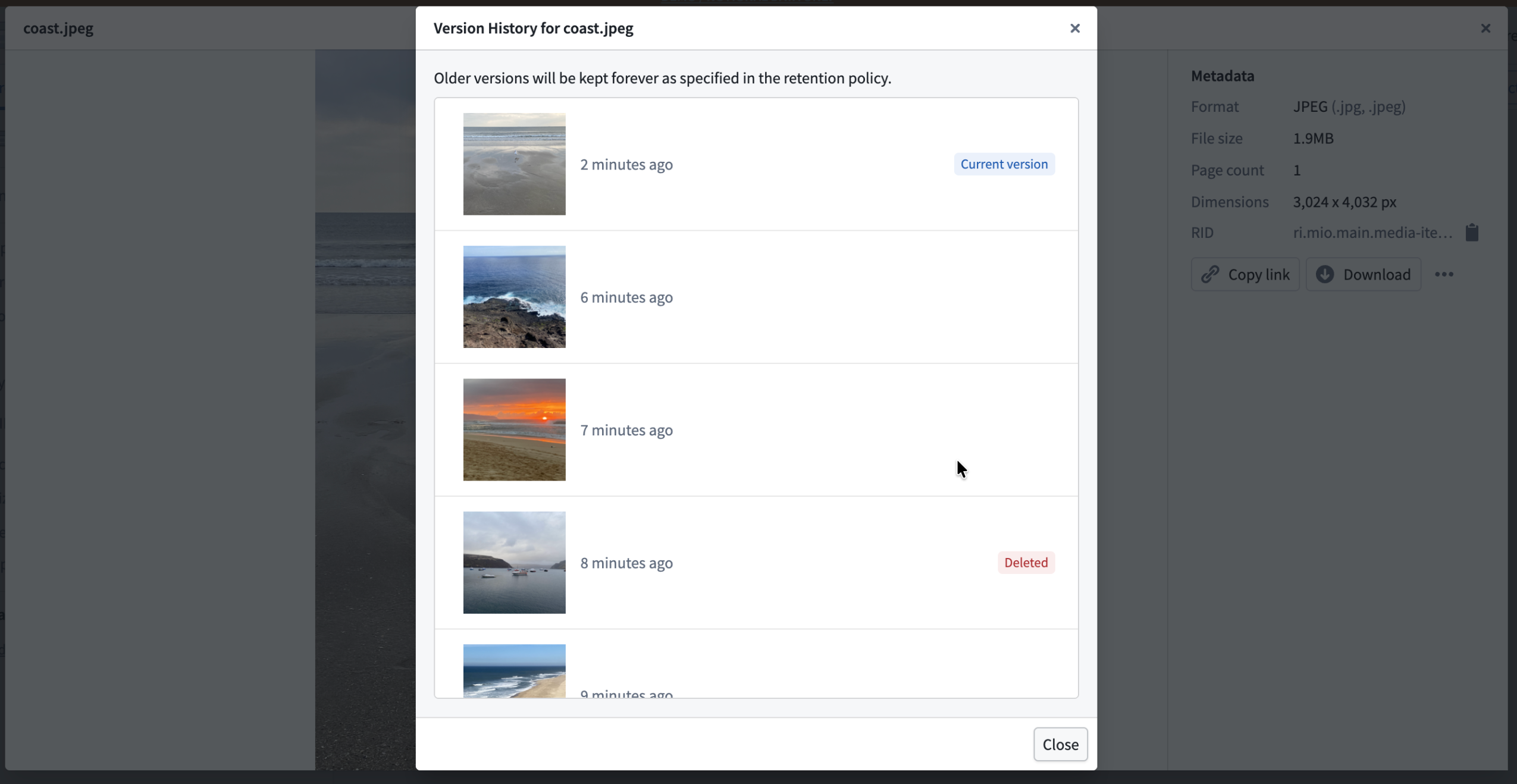
The version history panel showing previous uploads at a media item path.
Retention policy for overwritten and deleted items
A new retention policy option allows you to permanently delete overwritten items after a specified period. An overwritten item is one that has been replaced by a newer upload at the same path or has been soft deleted in the media set. The most recent media item at each path remains accessible until it is overwritten.
To configure this policy, open the media set Details tab and set a retention period for Permanently delete any media items that have been overwritten or deleted after. Learn more about media set retention policies.
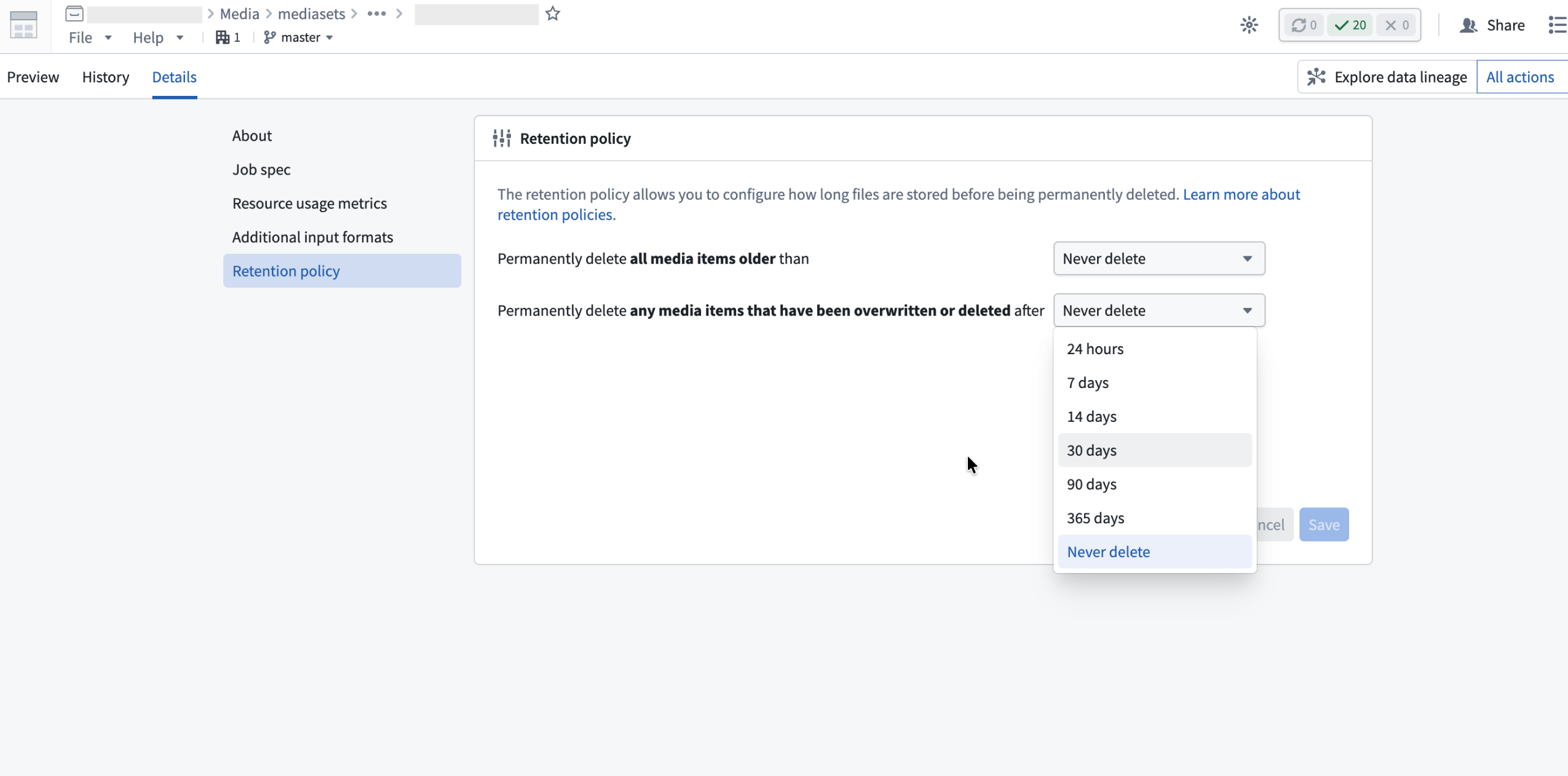
The retention policy configuration in media set details.
Your feedback matters
We want to hear about your experience with media sets and welcome your feedback. Share your thoughts with Palantir Support channels or on our Developer Community ↗ using the media-sets tag ↗.
Evaluate and ship directly with AIP Evals in AI FDE
Date published: 2026-04-14
AI FDE now supports a full workflow with AIP Evals, allowing you to author evaluation suites, run them, and review results without leaving the agent. When tests fail, AI FDE can read the results, diagnose the issue, update the function or suite, and rerun until they pass.
Getting started
Open AI FDE's Write functions mode and enable the Include Evals tools toggle. With automatic mode switching enabled, AI FDE will turn this on for you. You can also find individual AIP Evals tools via the tool icon or search bar.
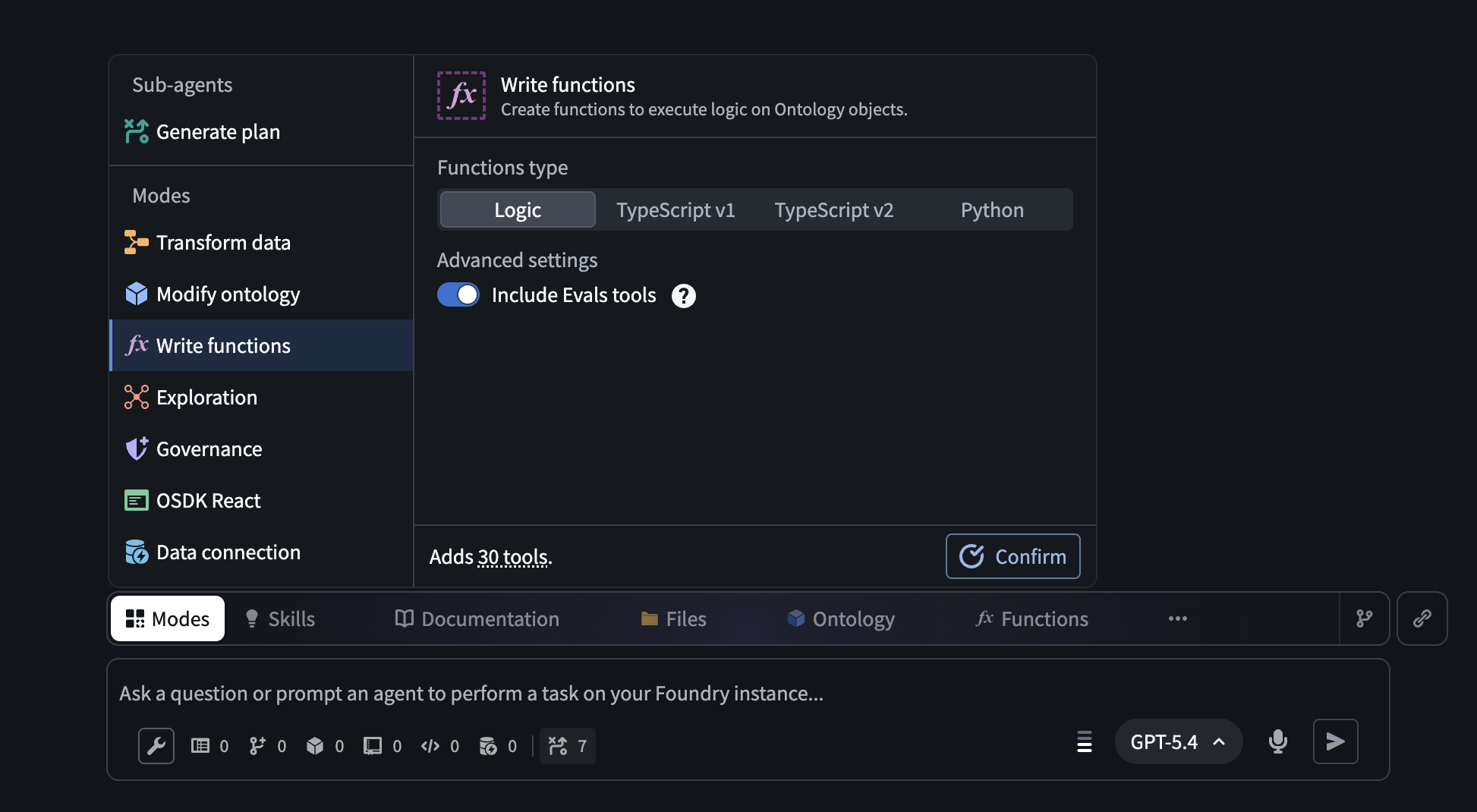
The Write functions mode in AI FDE, with the option to turn on Evals tools.
Key capabilities
- Full evals workflow: Author evaluation suites, run them, and review results without leaving AI FDE. When tests fail, AI FDE can diagnose the issue, update the suite, and rerun until they pass.
- Manual test cases: Supports primitive, array, struct, model, object, and object set types.
- Nineteen built-in evaluators: Includes exact match, regex, ranges, Levenshtein distance, keyword checker, and LLM-as-a-judge, plus function-backed custom evaluators.
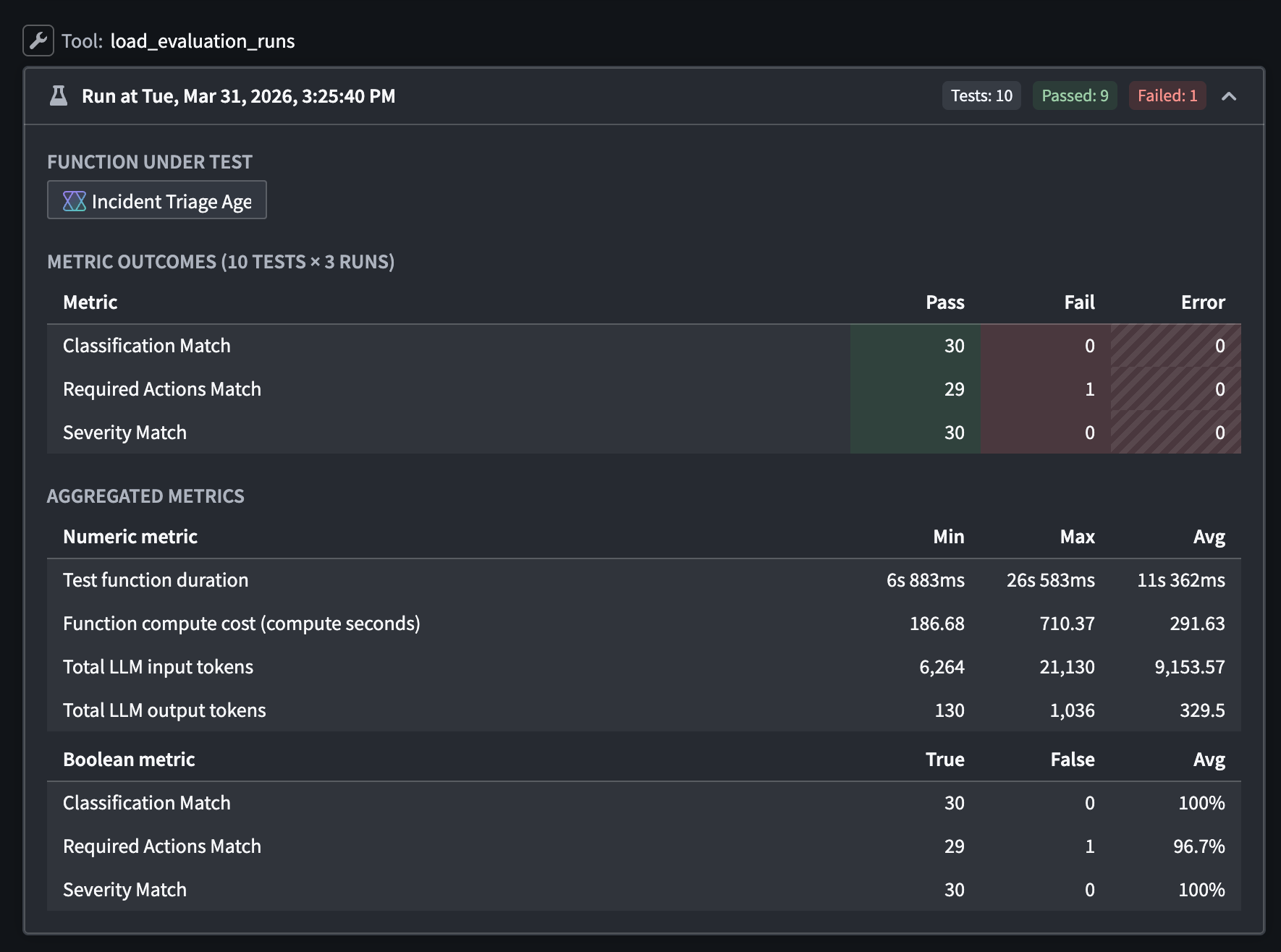
Results from an evaluation suite run in AI FDE, reporting a failure in the Required Actions Match metric.
Current limitations
Object set-backed test cases, multi-target suites, run datasets, and Marketplace evaluators (such as Rubric Grader, Contains Key Details, and ROUGE) are not yet supported in AI FDE.
What's next
Support for the above features are actively in development.
For more information on AI FDE, view our DevCon 5 keynote demo (16 min) on Youtube ↗.
We want to hear from you
Share your experiences using AI FDE and AIP Evals by contacting our Palantir Support channels or joining the conversation in our Developer Community.
GPT-5.1 now available on Azure OpenAI-enabled IL2, IL4, and IL5 enrollments
Date published: 2026-04-14
GPT-5.1 is now available from Azure OpenAI for IL2, IL4, IL5 enrollments.
Model overview
GPT-5.1 balances intelligence and speed by dynamically adapting how much time the model spends thinking based on the complexity of the task. It also features a "no reasoning" mode to respond faster on tasks that does not require deep thinking. For more information, review OpenAI’s documentation on the model ↗, and their GPT-5.1 prompting guide ↗.
- Context window: 400,000 tokens
- Modalities: Text, image
- Capabilities: Structured outputs, function calling, reasoning effort
Getting started
To use these models:
- Confirm your enrollment administrator has enabled relevant model family or families
- Review token costs and pricing
- See the complete list of all the models available in AIP
Your feedback matters
We want to hear about your experiences using language models in the Palantir platform and welcome your feedback. Share your thoughts with Palantir Support channels or on our Developer Community ↗ using the language-model-service tag ↗.
Quiver redesigned graph mode
Date published: 2026-04-14
Quiver's redesigned graph mode is generally available for all enrollments starting from the week of April 13. The redesigned graph mode improves performance and introduces new tools for navigating and organizing large analyses. The redesign replaces inline node previews with a compact node design, adds features for organizing complex analyses, and uses a more space-efficient left-to-right layout. When first opening the redesigned graph mode, you will see an option to reposition your existing nodes for the new layout.
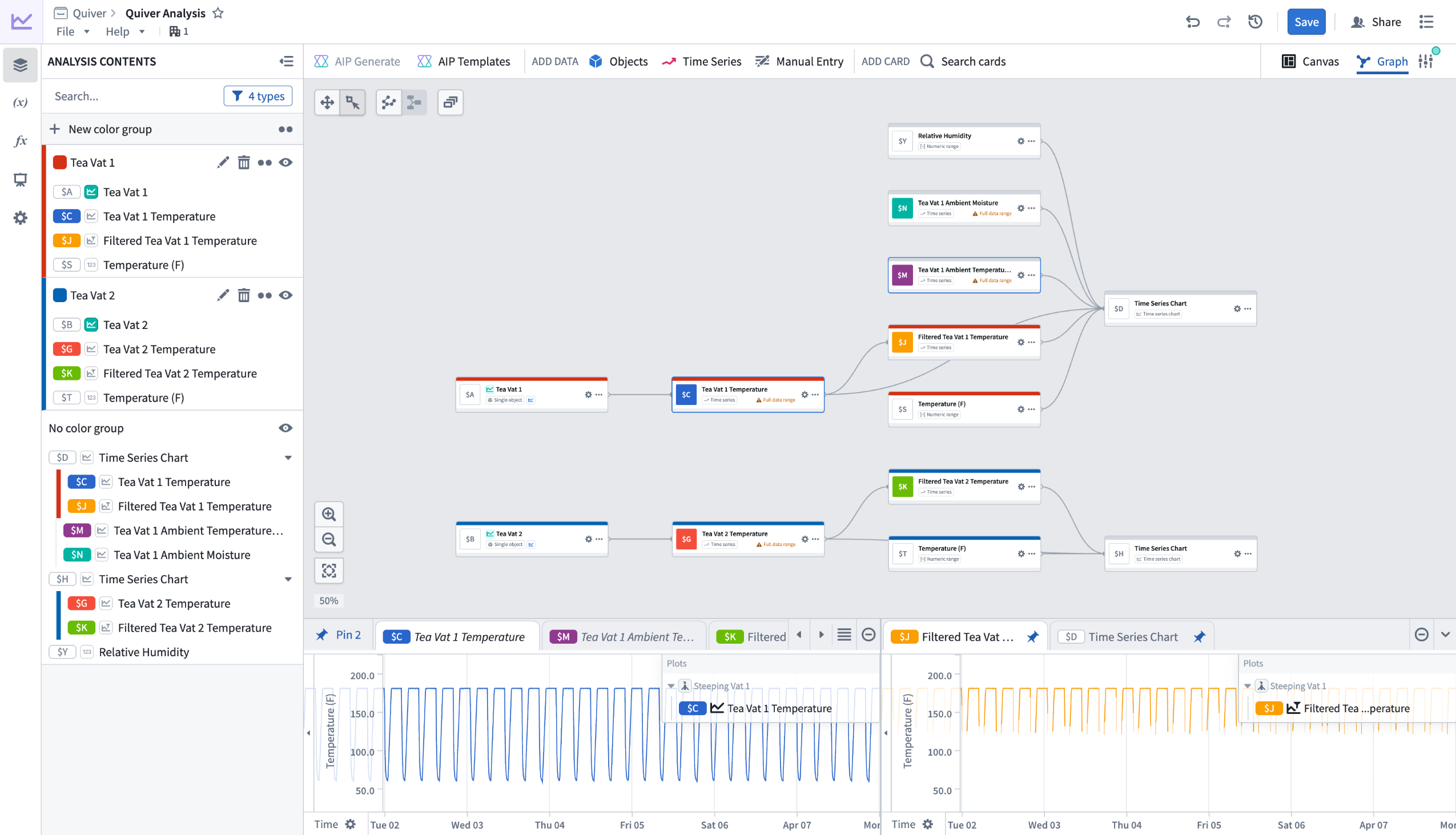
Preview of redesigned graph mode in Quiver.
What's new?
- Compact nodes with a dedicated preview panel: Instead of rendering full content inline, nodes display a summary of title, identifier, type, and basic actions. Selecting a node shows its output in a dedicated bottom panel. Previews can be pinned to stay visible as you navigate the graph, or viewed side by side in a split-screen layout.
- Color groups: Assign colors to related nodes to visually distinguish sections of your analysis. For example, color all nodes downstream of one object blue and those downstream of another red to make the graph readable at a glance.
- Collapse and hide: Collapse entire color groups into a single node to reduce visual clutter, or hide individual nodes and groups to focus on a specific part of the graph. Expand or unhide them when you need to see the full picture.
- Filtering: The Analysis Contents panel includes filters to control which nodes are visible in the graph. Filter by node type, or narrow down to nodes present on a particular canvas, dashboard, or function. This makes it possible to focus on one area of your analysis without losing the broader context.
- Bulk actions: Switch to selection mode and drag to select multiple nodes. Then add them to a color group, hide them, manage their canvas placement, or delete them.
- Graph and canvas isolation: Nodes added in graph mode are no longer placed on a canvas by default. You can add or remove nodes from a canvas at any time through a node's actions menu. In canvas mode, deleting a card gives you the option to remove it from just the canvas or from the analysis entirely.
- Input selection from graph: When configuring a node in graph mode, you can select its inputs by picking nodes directly from the graph instead of searching through a list.
Your feedback matters
We want to hear about your experiences using Quiver's redesigned graph mode and welcome your feedback. Share your thoughts with our Palantir Support channels or Developer Community using the quiver tag.
Scale compute resources with managed profiles in Pipeline Builder
Date published: 2026-04-14
Pipeline Builder now features a managed profile strategy for compute resources. When you select this strategy, Pipeline Builder analyzes the resource usage of your last five builds and adjusts your compute resources if those builds used fewer resources than your current selection.
For example, if you selected a large profile but your last five builds used significantly fewer resources, Pipeline Builder will automatically scale down your compute resources to match your actual usage.
Learn more about profile management strategies in Pipeline Builder.
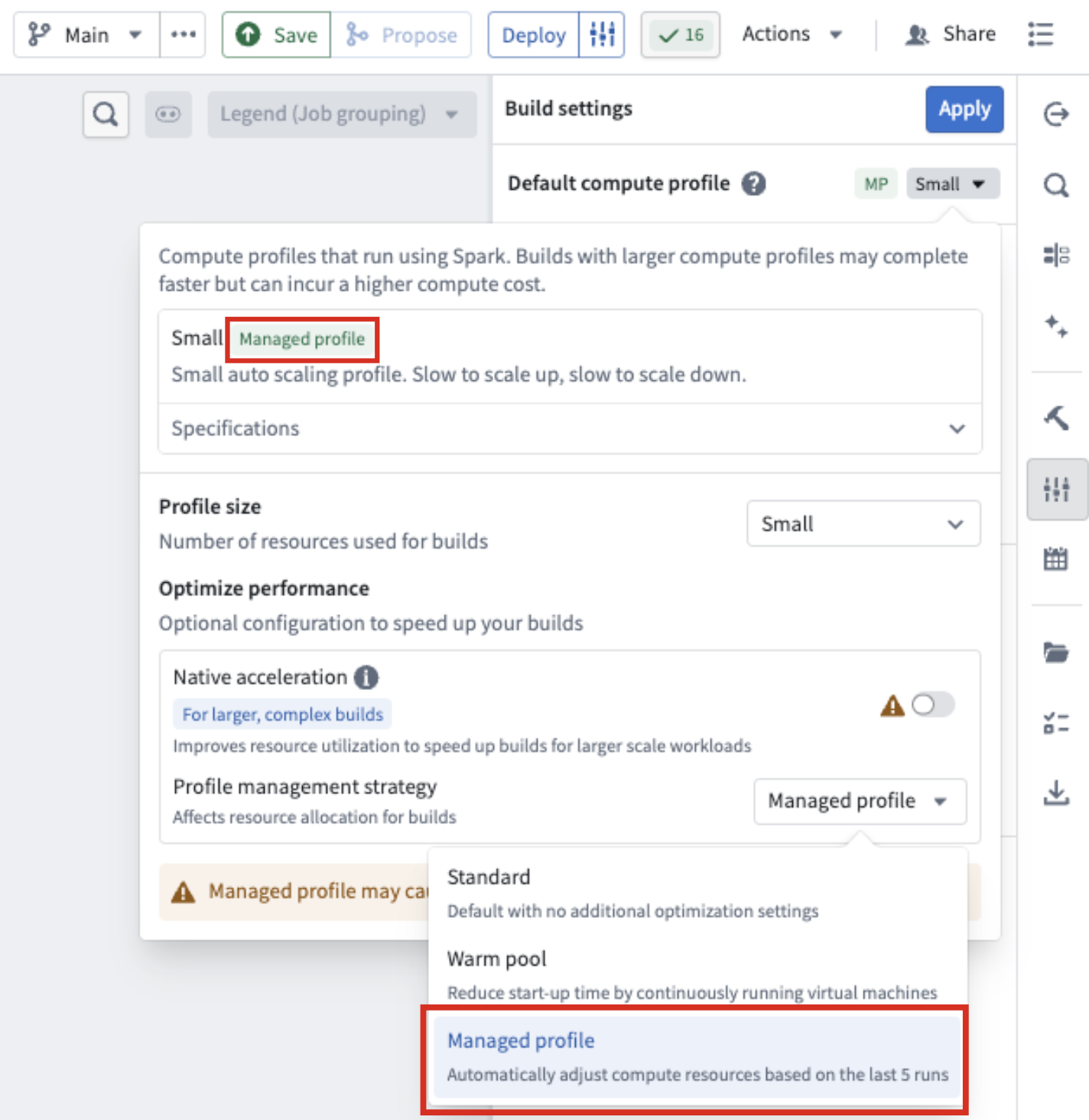
The Managed profile option under Profile management strategy in Build settings.
How to turn on the managed profile feature
- Go to Build settings in the right-hand panel.
- Open the Default compute profile.
- Under Profile management strategy, select Managed profile from the drop-down menu.
The profile management strategy appears as a tag next to your build profile type at the top of the build compute profile panel.
Additional notes about the feature
- Managed profile will only scale down; it will not scale above your originally selected profile.
- Builds may fail if your data size or workload changes drastically between builds, because the managed profile bases its scaling on previous usage.
- Managed profiles in Pipeline Builder are not currently supported for native acceleration builds.
We want to hear from you
To share feedback or tell us about your experience using this feature, contact us through our Palantir Support channels or join the conversation in our Developer Community using the pipeline-builder tag ↗ .
Migrate from legacy mode of the AIP Agent widget to Agent Studio
Date published: 2026-04-09
Note: As of the week of April 27, 2026, AIP Agent Studio was renamed AIP Chatbot Studio. All existing features and functionalities remain unchanged.
On May 1 2026, the legacy mode of the AIP Agent widget (formerly the AIP Interactive widget) in Workshop will be fully deprecated and deleted from Foundry.
Legacy mode has been marked as deprecated in Workshop since January 2025. It has not received new features since work on AIP Agent Studio began over two years ago, and removing it is necessary to support the architectural changes required to deliver the next generation of AIP Agents.
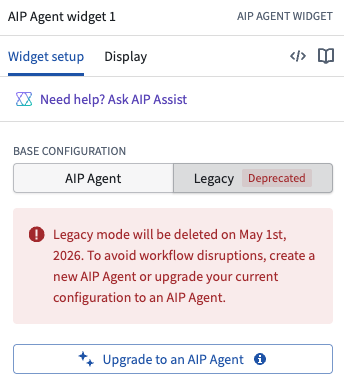
The deprecated legacy configuration of the AIP Agent widget in Workshop.
The most recent LLMs supported in legacy mode are GPT-4o and Claude 3 Haiku, compared to the latest models and additional feature development available in AIP Agent Studio.
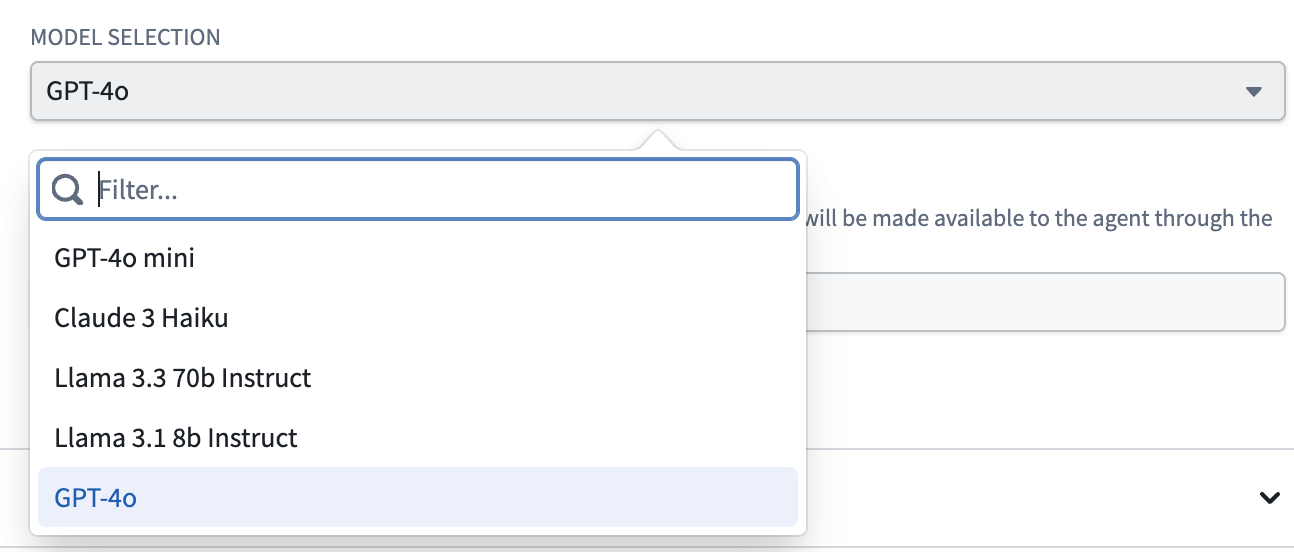
The available LLMs in legacy mode of the AIP Agent widget.
Review the AIP Agent Studio documentation and AIP Agent widget documentation for more information.
Required action
If you are still using legacy mode in your Workshops, select Upgrade to an AIP Agent in the Legacy tab of the widget's configuration panel or create a new AIP Agent before May 1 to avoid disruptions.
Ingest and transform emails with media sets
Date published: 2026-04-09
The ability to upload, preview, and transform email (.eml) files directly within media sets is now generally available across Foundry enrollments, enabling you to parse email content at scale.
What are email media sets?
Email media sets allow you to work with .eml files as first-class media items in Foundry. They are particularly useful when you need to extract and process attachments from emails—such as spreadsheets, documents, or images—while also retaining access to email metadata and body content for downstream processing.
Key capabilities
- Upload and preview content: Upload
.emlfiles to media sets and view interactive previews that render email content directly in Foundry, such as within a Workshop module's Media Preview widget. The preview displays message headers, content, metadata, and a list of attachments.
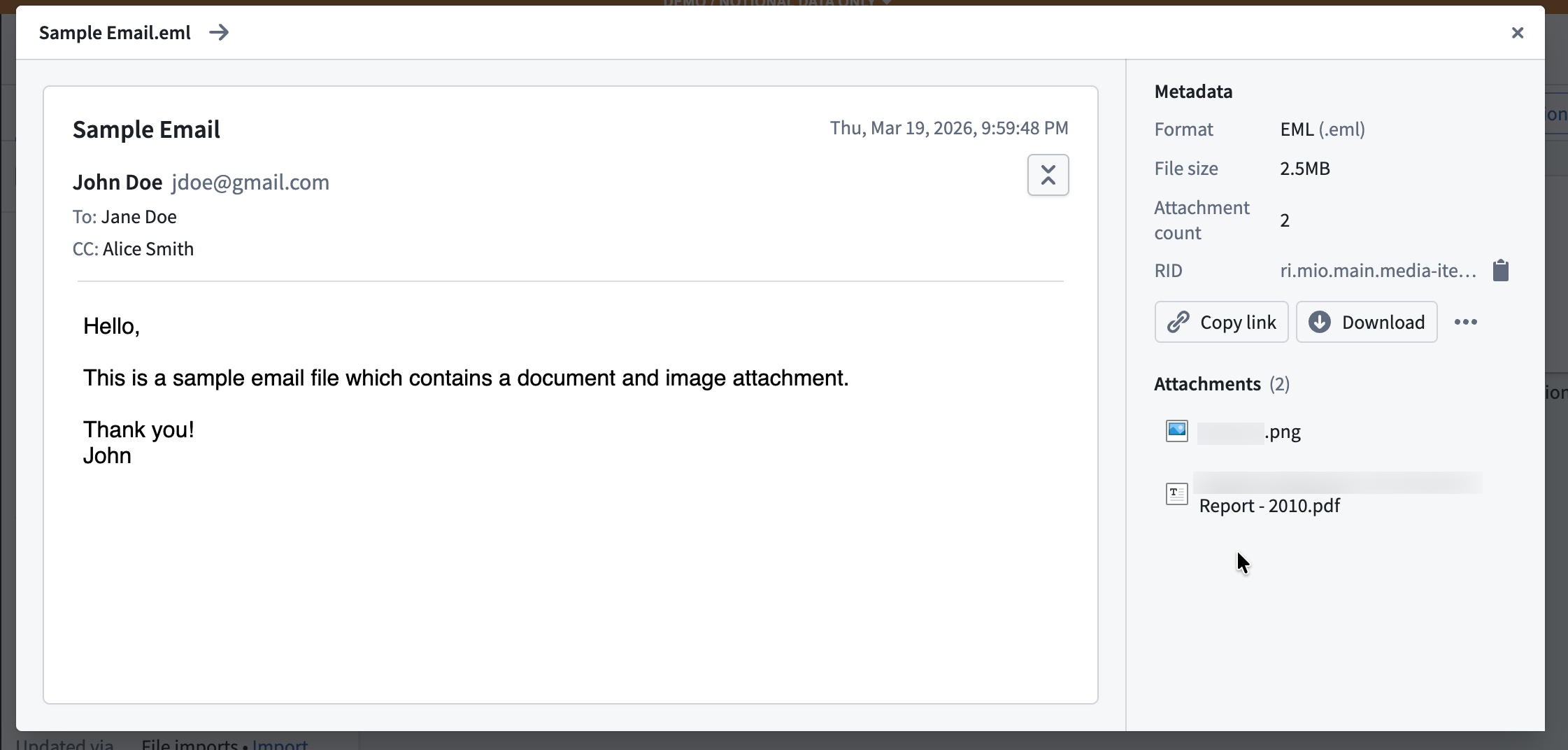
A preview of an email uploaded to a media set.
- Preview and download attachments: View attachment previews directly within the email preview for any supported media format. You can download unsupported attachment file types.
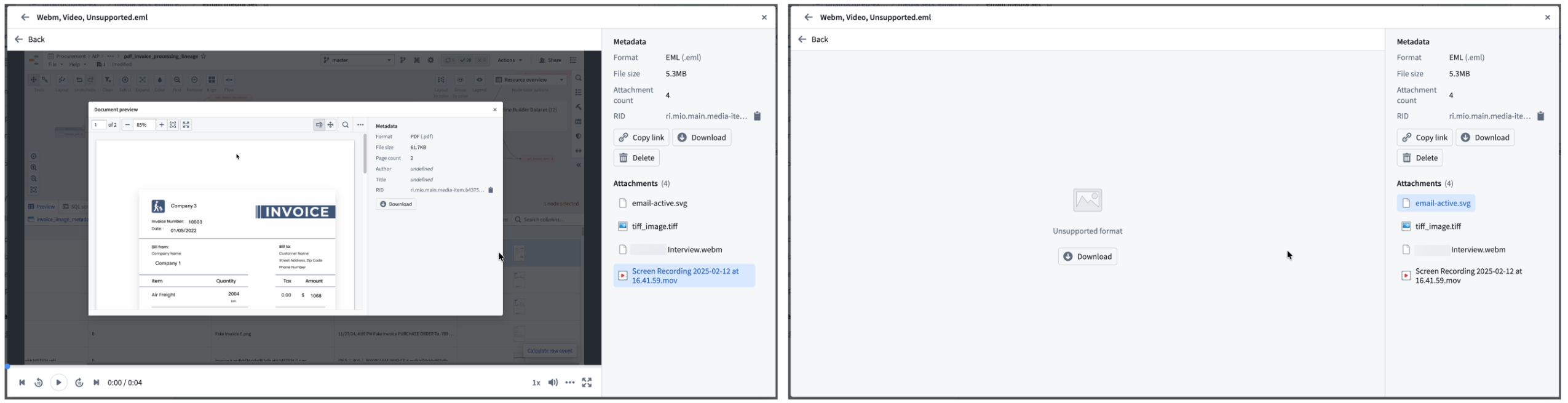
View attachment previews for supported media formats or download unsupported attachment file types.
- Process email files downstream: Use Pipeline Builder expressions or Python transforms in Code Workspaces to:
- Extract and output email attachments to other media sets for further processing.
- Extract email content as plain text or HTML for use in LLM-powered workflows.
Your feedback matters
We want to hear about your experience with email media sets and welcome your feedback. Share your thoughts with Palantir Support channels or on our Developer Community ↗ using the media-sets tag ↗.
Grok 4.20 from xAI is now available in AIP
Date published: 2026-04-07
Grok 4.20 (Reasoning) and Grok 4.20 (Non-Reasoning) are now available for enrollments with xAI enabled in the US and other supported regions.
Model overviews
Grok 4.20 (Reasoning) is designed for complex, multi-step logic, high-accuracy tasks, and deep analysis.
Grok 4.20 (Non-Reasoning) is focused on high-speed, efficient responses for straightforward queries, simple summarization, and other lightweight tasks as part of agentic workflows.
Getting started
To use these models:
- Confirm your enrollment administrator has enabled the xAI model family.
- Review token costs and pricing.
- See the complete list of all the models available in AIP.
Your feedback matters
We want to hear about your experiences using language models in the Palantir platform and welcome your feedback. Share your thoughts with Palantir Support channels or on our Developer Community ↗ using the language-model-service tag ↗.
Nvidia Nemotron 3 models are now available in AIP
Date published: 2026-04-07
Nvidia's Nemotron 3 Super 120B and Nemotron 3 Nano 30B models hosted by AWS Bedrock are now available for enablement in AIP on non-georestricted enrollments as well as enrollments georestricted in select regions.
Model overviews
Nvidia Nemotron 3 Super 120B ↗ is Nvidia's leading model for coding, reasoning, math, and long context tasks suitable for high-volume enterprise automation, multi-agent collaboration, and advanced coding tasks. Currently available on non-georestricted enrollments as well as enrollments georestricted in the US, EU, UK, and JP regions.
Nvidia Nemotron 3 Nano 30B ↗ is Nvidia's model optimized for high-throughput, low-latency, and low-cost deployments. Optimized for single-agent tasks and fast inference, it is most effective for chatbots, local edge deployment, summarization, and data extraction tasks. Currently available on non-georestricted enrollments and enrollments georestricted in the US.
Getting started
To use these models:
- Confirm that your enrollment administrator has enabled the Nvidia | AWS Bedrock model family in Control Panel.
- Review token costs and pricing.
- See the complete list of all models available in AIP.
Share your feedback
We want to hear about your experiences using language models in the Palantir platform and welcome your feedback. Share your thoughts with Palantir Support channels or on our Developer Community ↗ using the language-model-service ↗ tag.
Incremental media set inputs now available in Pipeline Builder
Date published: 2026-04-07
Pipeline Builder now supports incremental processing for media set inputs. Select a media set input node and choose Incremental to enable this feature. By leveraging the build history of the media set, incremental computation avoids the need to recompute the entire output every time a transform is run, saving time and compute costs.
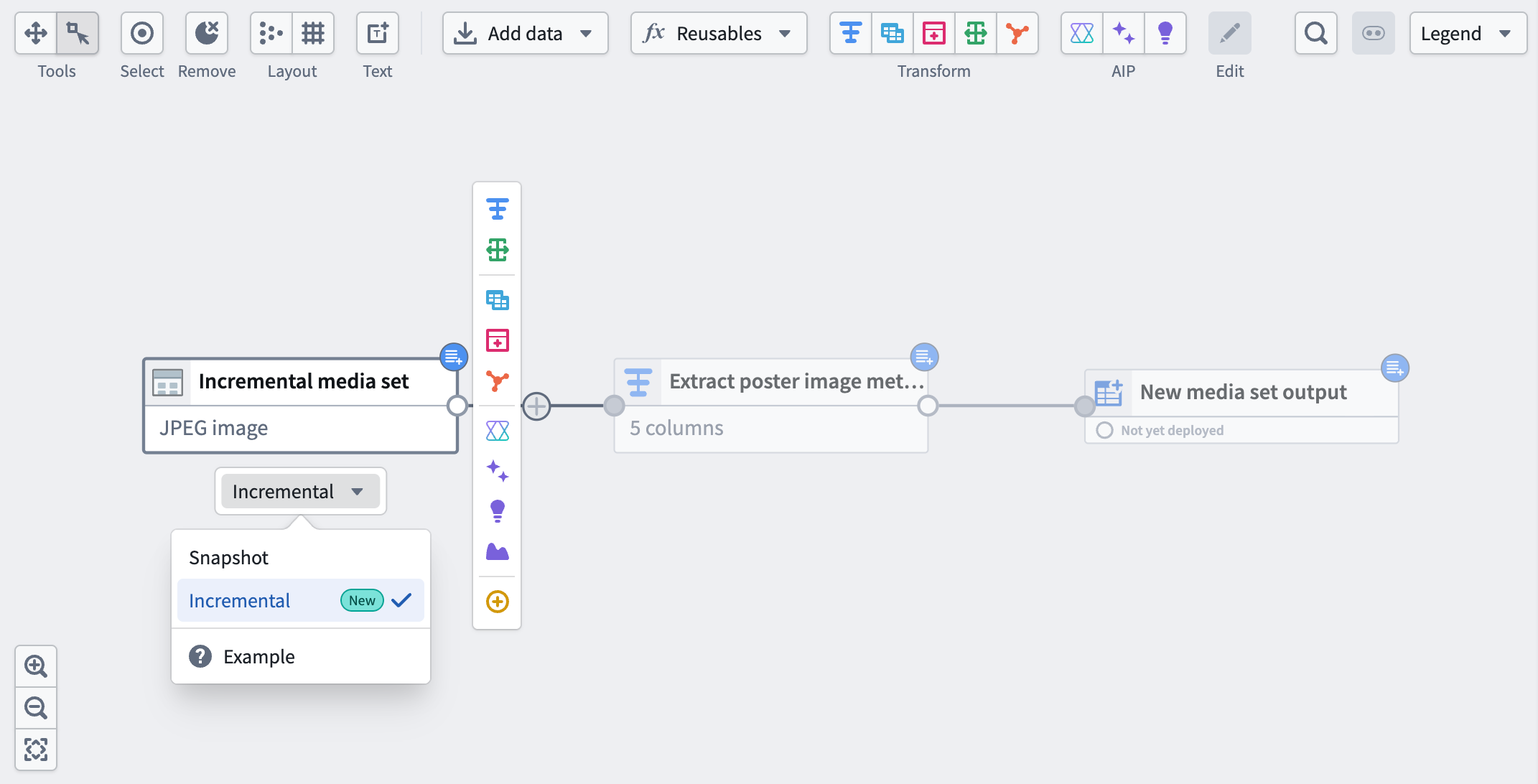
A media set input with the incremental option selected.
How it works
- First build: Pipeline Builder will process your entire media set as usual.
- Subsequent builds: Only new or changed data since the last build will be processed, saving you time and compute costs.
What’s next?
- Mix incremental dataset and media set Inputs: Combining incremental media sets and incremental datasets within the same pipeline is not yet supported. The team is actively working to make it possible in a future update.
- Incremental media set outputs: Support for incremental processing with media set outputs is also on the way.
Your feedback matters
Share your feedback through Palantir Support channels or our Developer Community ↗ using the pipeline-builder tag ↗.
Introducing Models in Pipeline Builder: No-Code Model Inference
Date published: 2026-04-02
Users can now use machine learning models for inference directly in Pipeline Builder — no code required. By bringing models into Pipeline Builder, we have significantly lowered the barrier to building and iterating on inference workflows. Together with Model Studio, this enables a fully no-code path from model training to production inference.
Only Spark (batch) pipelines are supported. Streaming and Lightweight pipelines are not yet available. Models must have exactly one tabular input and one tabular output, and time series models are not yet fully supported.
Key features
- Faster iteration: Make changes to your inference pipeline and run builds immediately — no CI checks to wait on, no code to debug. Pipeline Builder makes it easy to validate results and iterate quickly.
- Branch-aware auto-upgrades: At build time, pipelines automatically resolve the latest published model version from the current branch of your build. If no version exists on that branch, resolution falls back to your configured fallback branches. If no fallback branches are configured, it defaults to master. This ensures your inference pipelines always use the most recent trained version of your model without manual intervention.
- Resource configuration: Models run as isolated sidecar processes alongside your Spark executors, each with dedicated compute resources. Configure CPU, memory, and GPU for model sidecars independently from your pipeline's compute profile, ensuring even resource-intensive models run reliably.
Getting started
1. Configure your pipeline: Ensure you are working with a Spark (batch) pipeline and that warm pool is turned off.
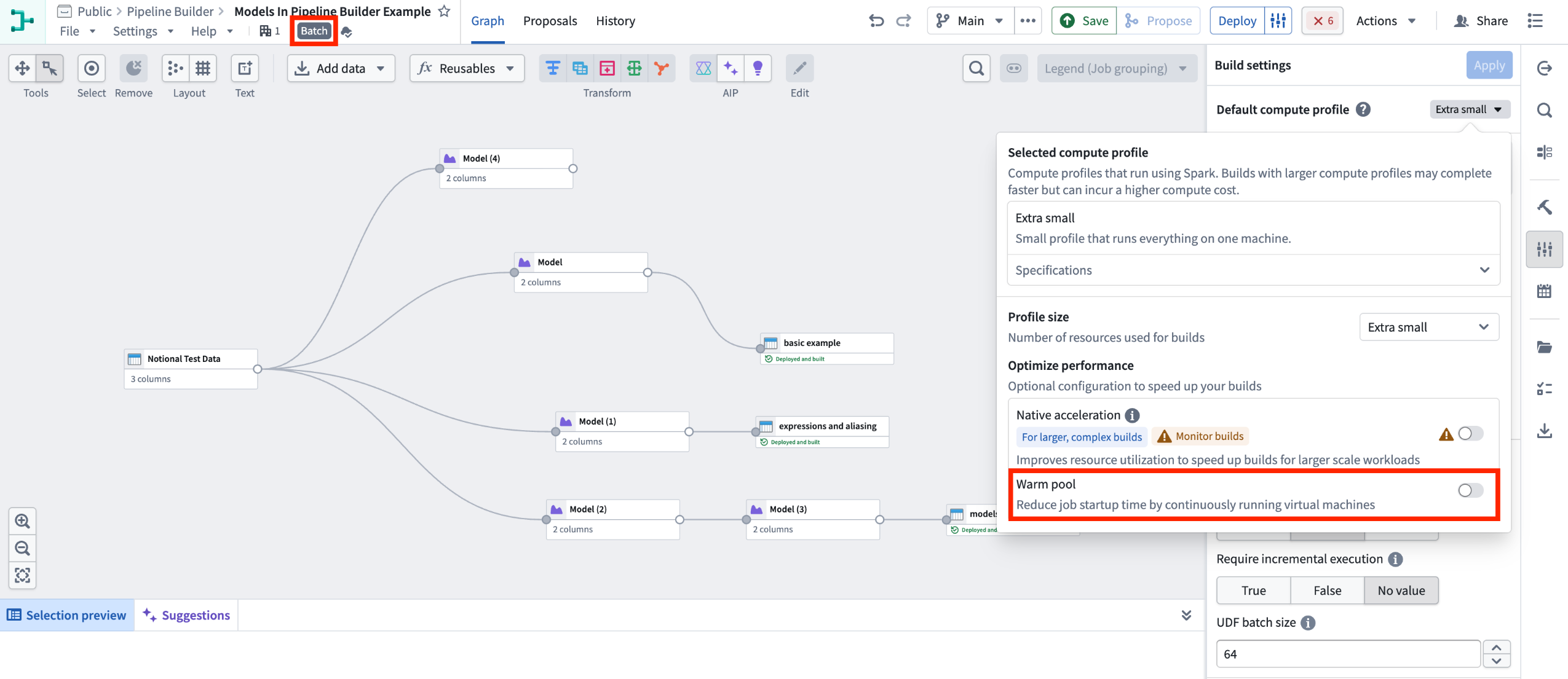
Batch Pipeline Builder with warm pool turned off.
2. Import your model: Navigate to Reusables > Trained models in the import menu and follow the resource import flow to make your model available to the pipeline.
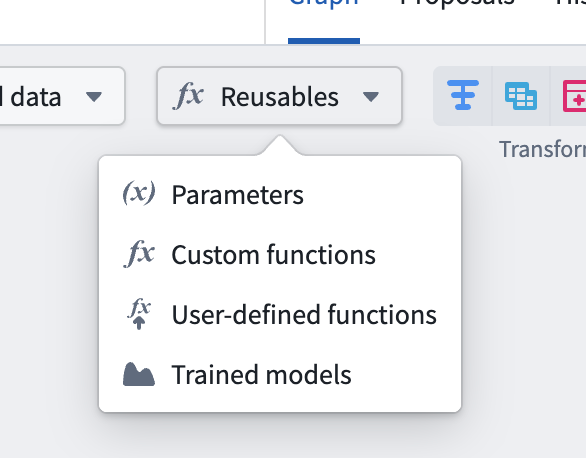
Reusable logic selector.
3. Add the model node: Select a node in your pipeline canvas and select Trained model to insert it.
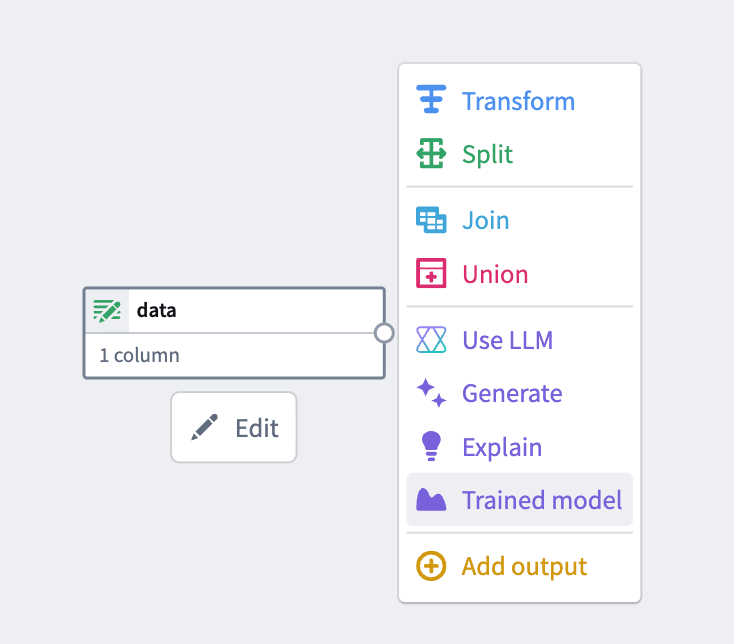
From the available options, select Trained model.
4.Configure inputs and outputs: Map your input and output columns to the model's expected API schema.
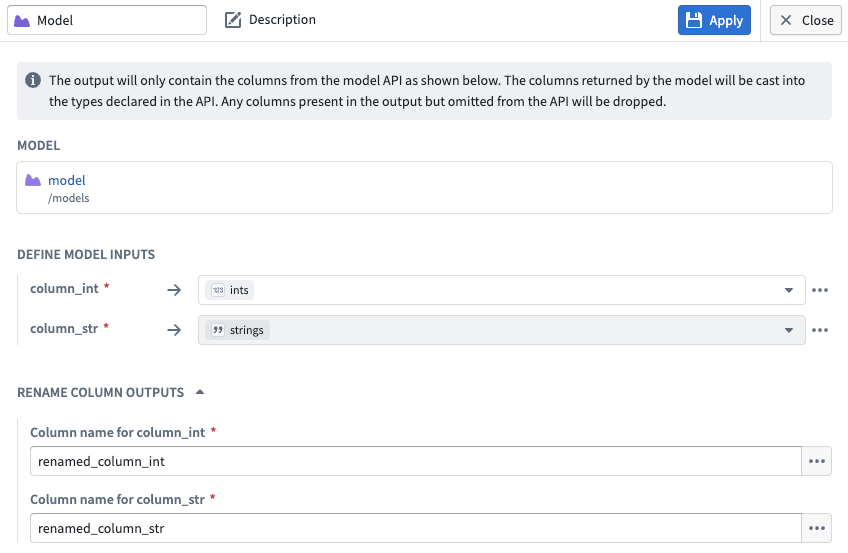
Input and output configuration for a model node in Pipeline Builder.
What’s next?
Preview and streaming support are coming soon. We are actively working on adding Lightweight support, additional input types, time series support, and Marketplace integration.
To learn more, review the Pipeline Builder documentation on Trained models.
We want to hear from you
To share feedback or tell us about your modeling use case, contact our Palantir Support channels or join the conversation in our Developer Community using the modeling tag ↗ .
中文翻译
公告
提醒: 请注册 Foundry 新闻通讯,即可直接在收件箱中收到平台新产品、功能和改进的摘要。有关如何订阅的更多信息,请参阅 Foundry 新闻通讯和产品反馈渠道公告。
在我们的开发者社区论坛 ↗ 分享您对这些公告的看法。
查看项目的 AIP 使用情况
发布日期:2026-04-30
现在,拥有项目查看权限的用户可以在资源管理中查看项目的 AIP 使用历史记录。该仪表板以分钟级粒度显示项目 AIP 使用情况的细分,并可通过过滤器按模型或资源进一步细分最多两周前的使用情况。您还可以按批量查询与交互式查询、令牌数与请求数来隔离使用情况。
资源管理中的 AIP 项目使用情况 选项卡,显示包含使用活动图表和指标的仪表板。
速率限制命中
当项目的 AIP 使用量超过注册管理员设定的容量限制(即速率限制命中)时,仪表板会高亮显示。速率限制命中默认显示在仪表板表格的最后两列。切换图表顶部的 容量限制 可叠加显示当前容量限制。
查看 AIP 项目使用情况
要查看您拥有查看权限的项目的 AIP 使用情况:
- 导航到项目的 Compass 概览页面。
- 从左侧边栏选择 项目使用情况 以在资源管理中打开使用情况仪表板。
Compass 项目概览侧边栏中的 项目使用情况 选项。
如果您对项目具有管理访问权限,项目使用情况 选项卡将直接带您进入资源管理中的 项目使用情况 选项卡。选择顶部导航栏中的 AIP 项目使用情况 选项卡以查看 AIP 特定的使用情况。
如果您对其他项目具有查看权限,请从资源管理右上角的项目选择器中选择它们。
您的反馈很重要
我们想听听您在 Palantir 平台上管理 AIP 项目使用情况的体验。请通过 Palantir 支持或我们的开发者社区 ↗(使用 language-model-service 标签 ↗)分享您的想法。
对象和属性安全策略现已正式发布
发布日期:2026-04-23
您现在可以在本体管理器中配置对象和属性安全策略,以直接定义基于批量或流式管道的对象类型上的权限。对象和属性安全策略现已在所有 Foundry 注册中正式发布,提供统一的一流配置体验,用于管理行级和列级安全性,且独立于对象类型底层数据源的权限。 通过配置对象和属性安全策略,确保用户只能看到他们被允许访问的数据:
- 在对象级别控制访问(行级安全):直接在对象类型上配置安全策略。
- 在属性级别限制可见性(列级安全):在创建对象安全策略后,对选定属性配置安全策略。
- 实现单元格级安全:结合使用对象和属性安全策略。
对象和属性安全策略由细粒度策略和强制性控制组成。默认情况下,策略会从其数据源继承所有强制性控制,包括标记、组织或分类控制。您可以添加新的或移除继承的强制性控制,以进一步自定义您的安全策略。
在本体管理器中编写细粒度的对象安全策略,以确定不同用户可以看到哪些对象。
一旦您创建了对象安全策略,您就可以使用除对象类型主键之外的任何属性来配置属性安全策略。属性安全策略的配置设置与对象安全策略相同。
使用对象和属性安全策略替代受限视图
如果您的对象类型当前由受限视图支持,且该视图未在本体之外使用,那么您应考虑通过查看迁移指南来通过对象和属性安全策略实施行级和列级安全性。
AIP Agent Studio 现已更名为 AIP Chatbot Studio
发布日期:2026-04-22
自 4 月 27 日那周起,AIP Agent Studio 将更名为 AIP Chatbot Studio,以更好地反映其作为专用构建器的角色,用于构建配备企业特定信息和工具的交互式、多轮对话助手。AIP Agents 将在整个平台中更名为 AIP Chatbots,Workshop 中的 AIP Agent 小部件将更名为 AIP Chatbot 小部件。
新更名的 AIP Chatbot Studio 主页。
对用户的影响
所有现有特性和功能保持不变,您可以像往常一样继续使用 AIP Chatbot Studio。您可以继续通过现有的 AIP Agent 端点使用 Palantir API 将 AIP Chatbots 嵌入到自定义应用程序中,这些端点保留了现有的 API 命名约定以实现向后兼容。
您应该会在 Foundry 和平台通信中看到新名称。如果您对此更改有任何疑问,请通过 Palantir 支持渠道或我们的开发者社区 ↗分享。
了解更多关于 AIP Chatbot Studio 的信息。
符合条件的、由 AIP 驱动的 Foundry 注册的 LLM 容量现在默认自动扩展至 2 倍
发布日期:2026-04-21
自动扩展容量现已可用,并默认对特定模型以及特定地理区域和合规级别的符合条件的注册启用。自动扩展将增加注册容量限制——最高可达当前分配的两倍。此扩展容量在 Palantir 已验证有足够容量可靠支持更高限制的地方可用。它们仍将接受持续的稳定性检查,以确保一致的性能和可靠性。
主要优势:
- 更高的容量上限: 符合条件的注册和模型将为其工作负载提供更高的余量,减少正常使用期间达到速率限制的机会。
- 自动为项目启用: 项目在可用时自动访问额外容量。
- 受保护的注册层级限制: 自动扩展只会增加容量限制,保护您注册层级已分配的容量。
目前,自动扩展仅影响下面列出的模型。
- GPT-5
- GPT-5 mini
- GPT-5 nano
- GPT-4.1
- GPT-4.1 mini
- GPT-4.1 nano
项目自动扩展覆盖
如果您需要按项目控制,请启用 项目自动扩展覆盖 设置。此设置仅在自动扩展启用时可用。通过项目自动扩展覆盖,您可以选择哪些项目速率限制启用自动扩展,哪些不启用。用户文件夹速率限制无法自动扩展。
如何管理自动扩展容量
您可以随时从资源管理应用程序启用或禁用自动扩展:
- 导航到资源管理应用程序右上角的 资源管理 > AIP 使用情况和限制 > 自动扩展。
- 根据需要打开或关闭自动扩展设置。
- 如果您需要按项目控制,请启用 项目自动扩展覆盖 并为单个项目速率限制配置自动扩展。
当自动扩展关闭时,所有项目将恢复为其标准容量限制。不符合条件的注册将不会在应用程序中看到此设置。
您的反馈很重要
我们想听听您在 Palantir 平台上使用预留容量的体验,并欢迎您的反馈。请通过 Palantir 支持渠道或我们的开发者社区 ↗(使用 language-model-service 标签 ↗)分享您的想法。
Claude Opus 4.7 现已在 Anthropic、AWS Bedrock 和 Google Vertex 上可用
发布日期:2026-04-21
Claude Opus 4.7 现已在非地理限制注册中通过 Anthropic、AWS Bedrock 和 Google Vertex 提供。对于美国和欧盟的非地理限制注册,该模型可通过 AWS Bedrock 和 Google Vertex 使用。
模型概述
Claude Opus 4.7 是 Anthropic 迄今为止最强大的正式可用模型。它支持长周期代理工作流、知识工作、视觉任务和记忆任务。有关更多信息,请查看 Anthropic 的模型文档 ↗。
- 上下文窗口: 1,000,000 个令牌
- 模态: 文本、图像
- 能力: 扩展思考、函数调用
开始使用
要使用此模型:
- 确认您的注册管理员已启用相关模型系列。
- 查看令牌成本和定价。
- 查看 AIP 中所有可用模型的完整列表。
您的反馈很重要
我们想听听您在 Palantir 平台上使用语言模型的体验,并欢迎您的反馈。请通过 Palantir 支持渠道或我们的开发者社区 ↗(使用 language-model-service 标签 ↗)分享您的想法。
媒体项版本历史和基于路径的保留策略
发布日期:2026-04-15
媒体集现在会显示以相同路径上传的媒体项的版本历史,并且一项新的保留策略支持永久删除被覆盖的项。
媒体项路径版本历史
当多个媒体项上传到媒体集中的同一路径时,媒体集中仅显示最新的项。您现在可以查看媒体项的版本历史,以查看特定路径上的所有先前上传,从而了解可能仍在构建中处理的被覆盖项。
要查看版本历史,请选择一个媒体项,然后在元数据面板中选择 版本历史。在我们的文档中了解更多信息。
显示媒体项路径上先前上传的版本历史面板。
被覆盖和已删除项的保留策略
一个新的保留策略选项允许您在指定时间段后永久删除被覆盖的项。被覆盖的项是指已被同一路径上的较新上传替换或在媒体集中被软删除的项。每个路径上的最新媒体项在被覆盖之前保持可访问。
要配置此策略,请打开媒体集 详细信息 选项卡,并为 永久删除任何已被覆盖或删除超过 的媒体项设置保留期限。了解更多关于媒体集保留策略的信息。
媒体集详细信息中的保留策略配置。
您的反馈很重要
我们想听听您对媒体集的使用体验,并欢迎您的反馈。请通过 Palantir 支持渠道或我们的开发者社区 ↗(使用 media-sets 标签 ↗)分享您的想法。
在 AI FDE 中直接使用 AIP Evals 进行评估和发布
发布日期:2026-04-14
AI FDE 现在支持与 AIP Evals 的完整工作流,允许您编写评估套件、运行它们并查看结果,而无需离开代理。当测试失败时,AI FDE 可以读取结果、诊断问题、更新函数或套件,并重新运行直到通过。
开始使用
打开 AI FDE 的 编写函数 模式并启用 包含 Evals 工具 切换开关。启用自动模式切换后,AI FDE 会为您打开此功能。您也可以通过工具图标或搜索栏找到单个 AIP Evals 工具。
AI FDE 中的 编写函数 模式,带有打开 Evals 工具的选项。
关键能力
- 完整的评估工作流: 编写评估套件、运行它们并查看结果,无需离开 AI FDE。当测试失败时,AI FDE 可以诊断问题、更新套件并重新运行直到通过。
- 手动测试用例: 支持原始类型、数组、结构体、模型、对象和对象集类型。
- 十九个内置评估器: 包括精确匹配、正则表达式、范围、Levenshtein 距离、关键词检查器和 LLM 作为评判者,以及函数支持的自定义评估器。
AI FDE 中评估套件运行的结果,报告 Required Actions Match 指标失败。
当前限制
AI FDE 尚不支持基于对象集的测试用例、多目标套件、运行数据集和市场评估器(例如 Rubric Grader、Contains Key Details 和 ROUGE)。
下一步计划
上述功能的支持正在积极开发中。
有关 AI FDE 的更多信息,请观看我们在 Youtube 上的 DevCon 5 主题演讲演示(16 分钟)↗。
我们期待您的反馈
通过联系我们的 Palantir 支持渠道或加入我们开发者社区的讨论,分享您使用 AI FDE 和 AIP Evals 的体验。
GPT-5.1 现已在支持 Azure OpenAI 的 IL2、IL4 和 IL5 注册中可用
发布日期:2026-04-14
GPT-5.1 现已在 IL2、IL4、IL5 注册中通过 Azure OpenAI 提供。
模型概述
GPT-5.1 通过根据任务的复杂性动态调整模型思考所花费的时间,在智能和速度之间取得平衡。它还具备“无推理”模式,可以在不需要深度思考的任务上更快地响应。有关更多信息,请查看 OpenAI 关于该模型的文档 ↗ 及其 GPT-5.1 提示指南 ↗。
- 上下文窗口: 400,000 个令牌
- 模态: 文本、图像
- 能力: 结构化输出、函数调用、推理努力
开始使用
要使用这些模型:
- 确认您的注册管理员已启用相关模型系列
- 查看令牌成本和定价
- 查看 AIP 中所有可用模型的完整列表
您的反馈很重要
我们想听听您在 Palantir 平台上使用语言模型的体验,并欢迎您的反馈。请通过 Palantir 支持渠道或我们的开发者社区 ↗(使用 language-model-service 标签 ↗)分享您的想法。
Quiver 重新设计的图形模式
发布日期:2026-04-14
Quiver 重新设计的图形模式自 4 月 13 日那周起对所有注册正式发布。重新设计的图形模式提高了性能,并引入了用于导航和组织大型分析的新工具。重新设计用紧凑的节点设计替换了内联节点预览,增加了组织复杂分析的功能,并采用了更节省空间的从左到右布局。首次打开重新设计的图形模式时,您将看到一个选项,可以将现有节点重新定位到新布局。
Quiver 中重新设计的图形模式预览。
新增功能?
- 带有专用预览面板的紧凑节点: 节点不再呈现完整内容,而是显示标题、标识符、类型和基本操作的摘要。选择一个节点会在专用的底部面板中显示其输出。预览可以固定,以便在浏览图形时保持可见,也可以在分屏布局中并排查看。
- 颜色组: 为相关节点分配颜色,以直观地区分分析的不同部分。例如,将一个对象下游的所有节点着色为蓝色,将另一个对象下游的所有节点着色为红色,使图形一目了然。
- 折叠和隐藏: 将整个颜色组折叠成一个节点以减少视觉混乱,或隐藏单个节点和组以专注于图形的特定部分。当您需要查看全貌时,可以展开或取消隐藏它们。
- 过滤: 分析内容面板包含过滤器,用于控制图形中哪些节点可见。按节点类型过滤,或缩小到特定画布、仪表板或函数上存在的节点。这使得可以专注于分析的一个领域,而不会丢失更广泛的上下文。
- 批量操作: 切换到选择模式并拖动以选择多个节点。然后可以将它们添加到颜色组、隐藏、管理其画布位置或删除。
- 图形和画布隔离: 在图形模式下添加的节点默认不再放置在画布上。您可以随时通过节点的操作菜单将节点添加到画布或从画布中移除。在画布模式下,删除卡片时,您可以选择仅从画布中移除它,还是从分析中完全移除。
- 从图形中选择输入: 在图形模式下配置节点时,您可以直接从图形中选择节点作为输入,而无需在列表中搜索。
您的反馈很重要
我们想听听您使用 Quiver 重新设计的图形模式的体验,并欢迎您的反馈。请通过我们的 Palantir 支持渠道或开发者社区(使用 quiver 标签)分享您的想法。
在 Pipeline Builder 中使用托管配置文件扩展计算资源
发布日期:2026-04-14
Pipeline Builder 现在为计算资源提供了一种托管配置文件策略。当您选择此策略时,Pipeline Builder 会分析您最近五次构建的资源使用情况,如果这些构建使用的资源少于您当前的选择,则会调整您的计算资源。
例如,如果您选择了 large 配置文件,但您最近五次构建使用的资源明显更少,Pipeline Builder 将自动缩减您的计算资源以匹配您的实际使用情况。
在 Pipeline Builder 中了解更多关于配置文件管理策略的信息。
构建设置中配置文件管理策略下的托管配置文件选项。
如何开启托管配置文件功能
- 转到右侧面板中的 构建设置。
- 打开 默认计算配置文件。
- 在 配置文件管理策略 下,从下拉菜单中选择 托管配置文件。
配置文件管理策略会作为标签显示在构建计算配置文件面板顶部的构建配置文件类型旁边。
关于该功能的附加说明
- 托管配置文件只会缩减;它不会扩展到您最初选择的配置文件之上。
- 如果您的数据大小或工作负载在构建之间发生剧烈变化,构建可能会失败,因为托管配置文件基于先前的使用情况进行扩展。
- Pipeline Builder 中的托管配置文件目前不支持原生加速构建。
我们期待您的反馈
要分享反馈或告诉我们您使用此功能的体验,请通过我们的 Palantir 支持渠道联系我们,或使用 pipeline-builder 标签 ↗ 加入我们开发者社区的讨论。
从 AIP Agent 小部件的旧版模式迁移到 Agent Studio
发布日期:2026-04-09
注意: 自 2026 年 4 月 27 日那周起,AIP Agent Studio 已更名为 AIP Chatbot Studio。所有现有特性和功能保持不变。
2026 年 5 月 1 日,Workshop 中 AIP Agent 小部件(原 AIP Interactive 小部件)的旧版模式将被完全弃用并从 Foundry 中删除。
自 2025 年 1 月起,旧版模式已在 Workshop 中被标记为弃用。自两年前开始开发 AIP Agent Studio 以来,它就没有获得新功能,移除它是支持交付下一代 AIP Agents 所需的架构更改所必需的。
Workshop 中 AIP Agent 小部件已弃用的旧版配置。
旧版模式支持的最新 LLM 是 GPT-4o 和 Claude 3 Haiku,而 AIP Agent Studio 中提供了最新模型和额外的功能开发。
AIP Agent 小部件旧版模式中可用的 LLM。
查看 AIP Agent Studio 文档和 AIP Agent 小部件文档以获取更多信息。
需要采取的行动
如果您仍在 Workshop 中使用旧版模式,请在小部件配置面板的 旧版 选项卡中选择 升级到 AIP Agent,或在 5 月 1 日之前创建一个新的 AIP Agent,以避免中断。
使用媒体集摄取和转换电子邮件
发布日期:2026-04-09
直接在媒体集中上传、预览和转换电子邮件 (.eml) 文件的功能现已在所有 Foundry 注册中正式发布,使您能够大规模解析电子邮件内容。
什么是电子邮件媒体集?
电子邮件媒体集允许您在 Foundry 中将 .eml 文件作为一等媒体项进行处理。当您需要从电子邮件中提取和处理附件(如电子表格、文档或图像),同时保留对电子邮件元数据和正文内容的访问以进行下游处理时,它们特别有用。
关键能力
- 上传和预览内容: 将
.eml文件上传到媒体集,并查看交互式预览,这些预览直接在 Foundry 中呈现电子邮件内容,例如在 Workshop 模块的媒体预览小部件中。预览显示消息头、内容、元数据和附件列表。
上传到媒体集的电子邮件预览。
- 预览和下载附件: 直接在电子邮件预览中查看任何支持的媒体格式的附件预览。您可以下载不支持的附件文件类型。
查看支持媒体格式的附件预览或下载不支持的附件文件类型。
- 下游处理电子邮件文件: 使用代码工作区中的 Pipeline Builder 表达式或 Python 转换来:
- 提取电子邮件附件并将其输出到其他媒体集以进行进一步处理。
- 将电子邮件内容提取为纯文本或 HTML,以用于 LLM 驱动的工作流。
您的反馈很重要
我们想听听您对电子邮件媒体集的使用体验,并欢迎您的反馈。请通过 Palantir 支持渠道或我们的开发者社区 ↗(使用 media-sets 标签 ↗)分享您的想法。
xAI 的 Grok 4.20 现已在 AIP 中可用
发布日期:2026-04-07
Grok 4.20(推理)和 Grok 4.20(非推理)现已在启用 xAI 的美国和其他支持地区的注册中可用。
模型概述
Grok 4.20(推理)专为复杂的多步骤逻辑、高精度任务和深度分析而设计。
Grok 4.20(非推理)专注于为简单查询、简单摘要以及代理工作流中的其他轻量级任务提供高速、高效的响应。
开始使用
要使用这些模型:
- 确认您的注册管理员已启用 xAI 模型系列。
- 查看令牌成本和定价。
- 查看 AIP 中所有可用模型的完整列表。
您的反馈很重要
我们想听听您在 Palantir 平台上使用语言模型的体验,并欢迎您的反馈。请通过 Palantir 支持渠道或我们的开发者社区 ↗(使用 language-model-service 标签 ↗)分享您的想法。
Nvidia Nemotron 3 模型现已在 AIP 中可用
发布日期:2026-04-07
由 AWS Bedrock 托管的 Nvidia Nemotron 3 Super 120B 和 Nemotron 3 Nano 30B 模型现已在非地理限制注册以及选定区域的地理限制注册中可在 AIP 中启用。
模型概述
Nvidia Nemotron 3 Super 120B ↗ 是 Nvidia 在编码、推理、数学和长上下文任务方面的领先模型,适用于高容量企业自动化、多代理协作和高级编码任务。目前可在非地理限制注册以及美国、欧盟、英国和日本地区的地理限制注册中使用。
Nvidia Nemotron 3 Nano 30B ↗ 是 Nvidia 针对高吞吐量、低延迟和低成本部署优化的模型。针对单代理任务和快速推理进行了优化,在聊天机器人、本地边缘部署、摘要和数据提取任务中最为有效。目前可在非地理限制注册和美国的地理限制注册中使用。
开始使用
要使用这些模型:
- 确认您的注册管理员已在控制面板中启用 Nvidia | AWS Bedrock 模型系列。
- 查看令牌成本和定价。
- 查看 AIP 中所有可用模型的完整列表。
分享您的反馈
我们想听听您在 Palantir 平台上使用语言模型的体验,并欢迎您的反馈。请通过 Palantir 支持渠道或我们的开发者社区 ↗(使用 language-model-service 标签 ↗)分享您的想法。
Pipeline Builder 中现已提供增量媒体集输入
发布日期:2026-04-07
Pipeline Builder 现在支持媒体集输入的增量处理。选择一个媒体集输入节点并选择 增量 以启用此功能。通过利用媒体集的构建历史,增量计算避免了每次运行转换时重新计算整个输出的需要,从而节省了时间和计算成本。
选择了增量选项的媒体集输入。
工作原理
- 首次构建: Pipeline Builder 将照常处理您的整个媒体集。
- 后续构建: 仅处理自上次构建以来的新数据或更改数据,从而节省您的时间和计算成本。
下一步计划?
- 混合增量数据集和媒体集输入: 在同一管道中组合增量媒体集和增量数据集尚不支持。团队正在积极努力在未来的更新中实现这一点。
- 增量媒体集输出: 对媒体集输出的增量处理支持也即将推出。
您的反馈很重要
通过 Palantir 支持渠道或我们的开发者社区 ↗(使用 pipeline-builder 标签 ↗)分享您的反馈。
在 Pipeline Builder 中引入模型:无代码模型推理
发布日期:2026-04-02
用户现在可以直接在 Pipeline Builder 中使用机器学习模型进行推理——无需编写代码。通过将模型引入 Pipeline Builder,我们显著降低了构建和迭代推理工作流的门槛。与 Model Studio 结合,这实现了从模型训练到生产推理的完全无代码路径。
仅支持 Spark(批量)管道。尚不支持流式和轻量级管道。模型必须恰好有一个表格输入和一个表格输出,时间序列模型尚未完全支持。
关键特性
- 更快的迭代: 对推理管道进行更改并立即运行构建——无需等待 CI 检查,无需调试代码。Pipeline Builder 使验证结果和快速迭代变得容易。
- 分支感知的自动升级: 在构建时,管道会自动解析来自构建当前分支的最新已发布模型版本。如果该分支上不存在版本,则解析会回退到您配置的回退分支。如果未配置回退分支,则默认为 master。这确保了您的推理管道始终使用最新训练的模型版本,无需手动干预。
- 资源配置: 模型作为与 Spark 执行器隔离的 sidecar 进程运行,每个进程都有专用的计算资源。独立于管道的计算配置文件为模型 sidecar 配置 CPU、内存和 GPU,确保即使是资源密集型模型也能可靠运行。
开始使用
1. 配置您的管道: 确保您正在使用 Spark(批量)管道,并且热池已关闭。
关闭热池的批量 Pipeline Builder。
2. 导入您的模型: 导航到导入菜单中的 可重用项 > 已训练模型,并按照资源导入流程使您的模型可用于管道。
可重用逻辑选择器。
3. 添加模型节点: 在管道画布中选择一个节点,然后选择 已训练模型 以插入它。
从可用选项中选择已训练模型。
4. 配置输入和输出: 将您的输入和输出列映射到模型预期的 API 模式。
Pipeline Builder 中模型节点的输入和输出配置。
下一步计划?
预览和流式支持即将推出。我们正在积极致力于添加轻量级支持、其他输入类型、时间序列支持和市场集成。
要了解更多信息,请查看关于已训练模型的 Pipeline Builder 文档。
我们期待您的反馈
要分享反馈或告诉我们您的建模用例,请联系我们的 Palantir 支持渠道,或使用 modeling 标签 ↗ 加入我们开发者社区的讨论。