Announcements(公告)
REMINDER: Sign up for the Foundry Newsletter to receive a summary of new products, features, and improvements across the platform directly to your inbox. For more information on how to subscribe, see the Foundry Newsletter and Product Feedback channels announcement.
Share your thoughts about these announcements in our Developer Community Forum ↗.
AIP token usage data now available as an internal dataset export
Date published: 2026-05-28
Enrollment administrators can now export a new AIP Token Usage dataset to analyze LLM cost drivers across their enrollment. The dataset provides daily breakdowns of token consumption by model and resource, with corresponding compute and currency usage.
Input tokens, output tokens, and cache reads and writes are reported as separate metrics, so administrators can attribute costs to specific consumption patterns. After export, the dataset works with Foundry tools such as Contour to perform in-depth investigations and Workshop to build custom dashboards.
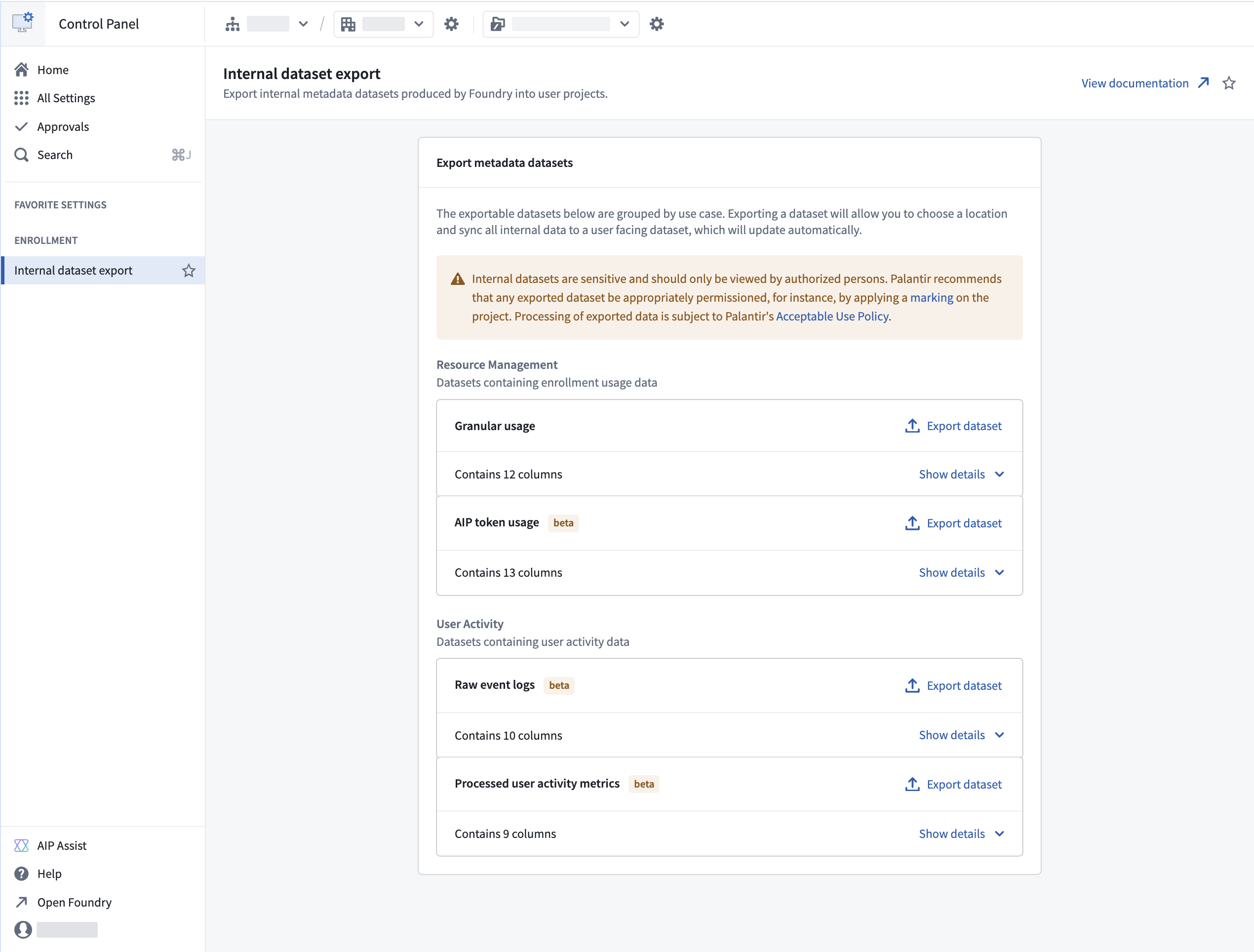
The AIP Token Usage dataset in the Internal dataset export section of Control Panel.
To export the dataset, navigate to Control Panel > Internal dataset export and select AIP Token Usage under the Resource Management group. The exported dataset updates automatically with new data for your enrollment.
Users with the Resource Management Administrator role can export this dataset. As with other internal dataset exports, permission the exported dataset appropriately after export.
For more information, see the Internal dataset export and Compute usage with AIP documentation.
Work with global branches from within Data Lineage
Date published: 2026-05-26
You can now view and interact with your entities on a global branch directly from Data Lineage. Select a branch from the new Global branches tab in the branch selector to see branch-specific details on graph nodes including datasets and ontology entities, and the links between them. Data from the branch will be reflected in the graph, search, node details, and colorings.
Key features
- Branch selector in both the page header and taskbar: Use the dropdown menu to switch between global branches or dataset branches for the nodes on the graph.
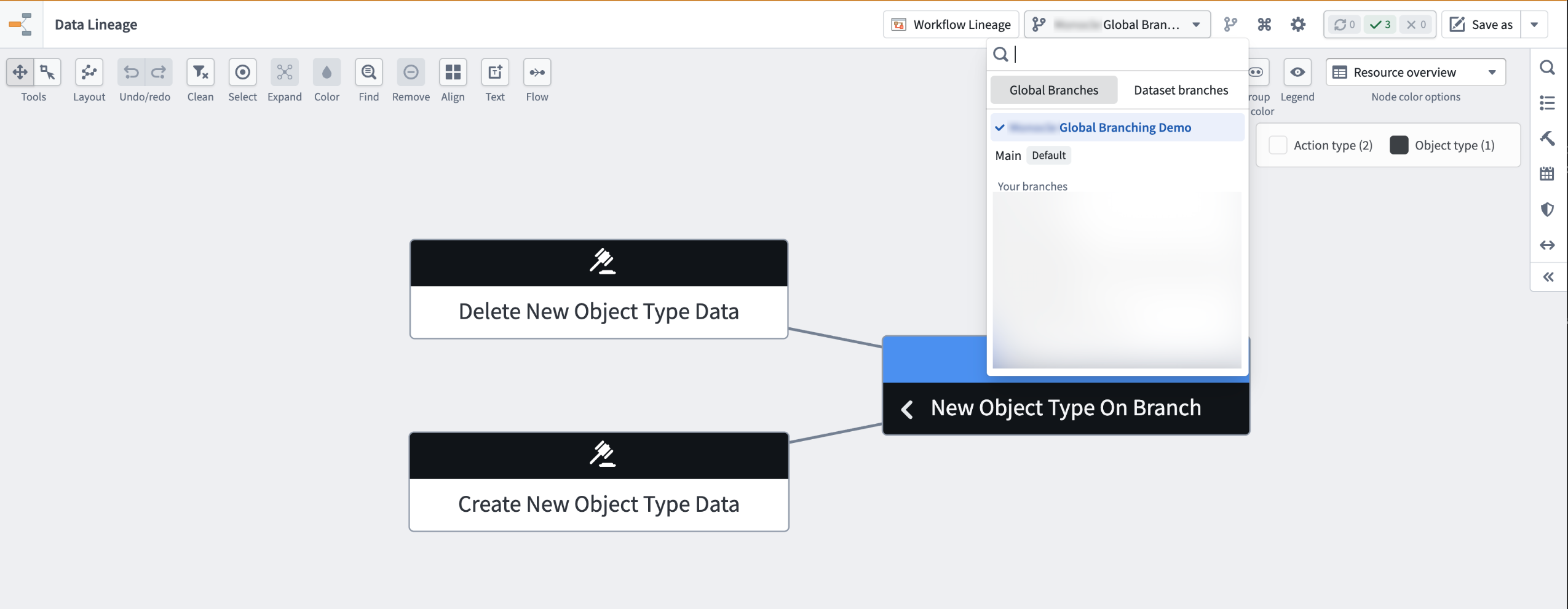
The Global branches tab in the branch selector, with Global Branching Demo selected.
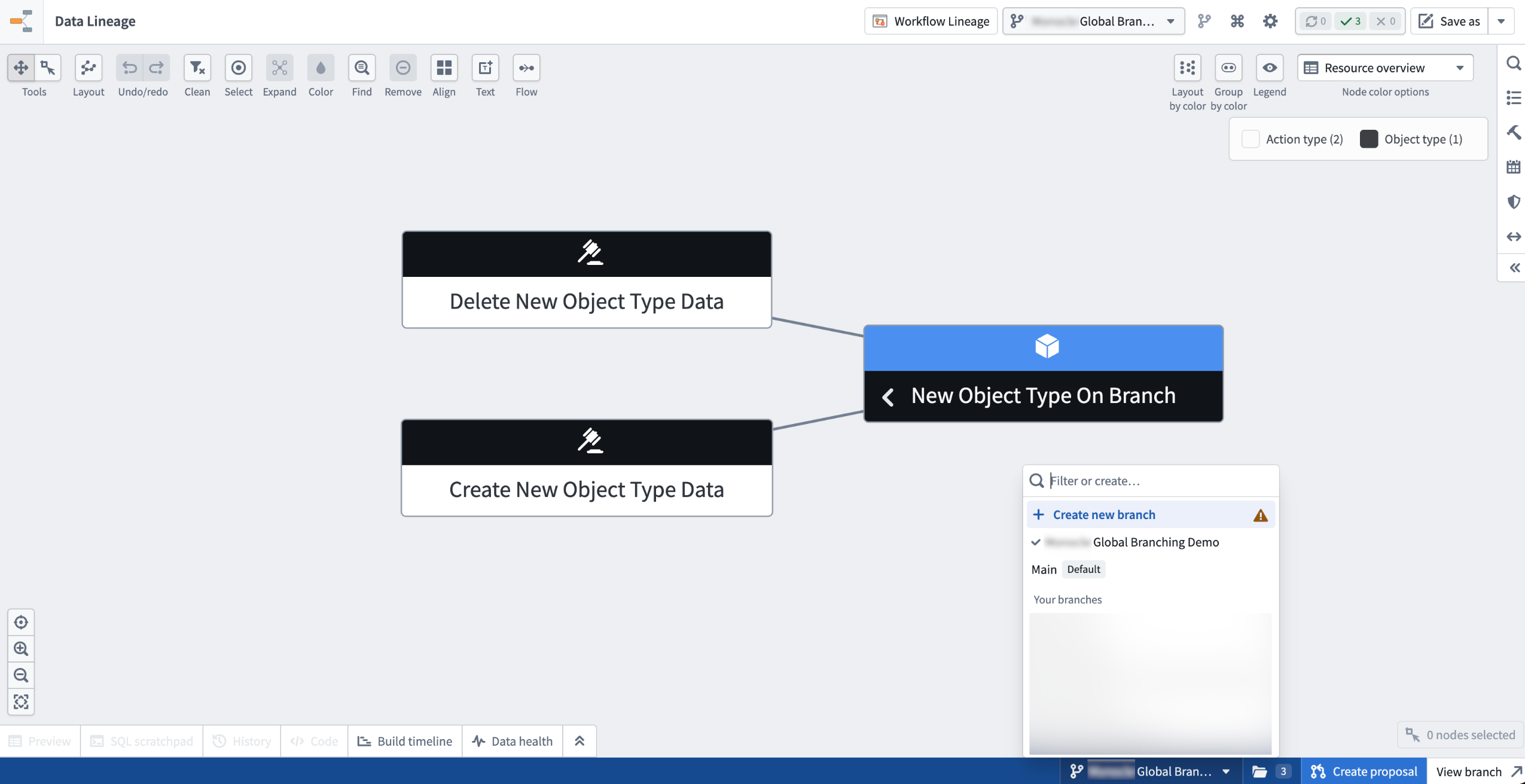
The branch taskbar at the bottom of Data Lineage also features a branch selector. The selector shows the active branch and the taskbar itself provides quick access to Create proposal and View branch actions.
- Branch-aware search surfaces entities that exist only on your branch
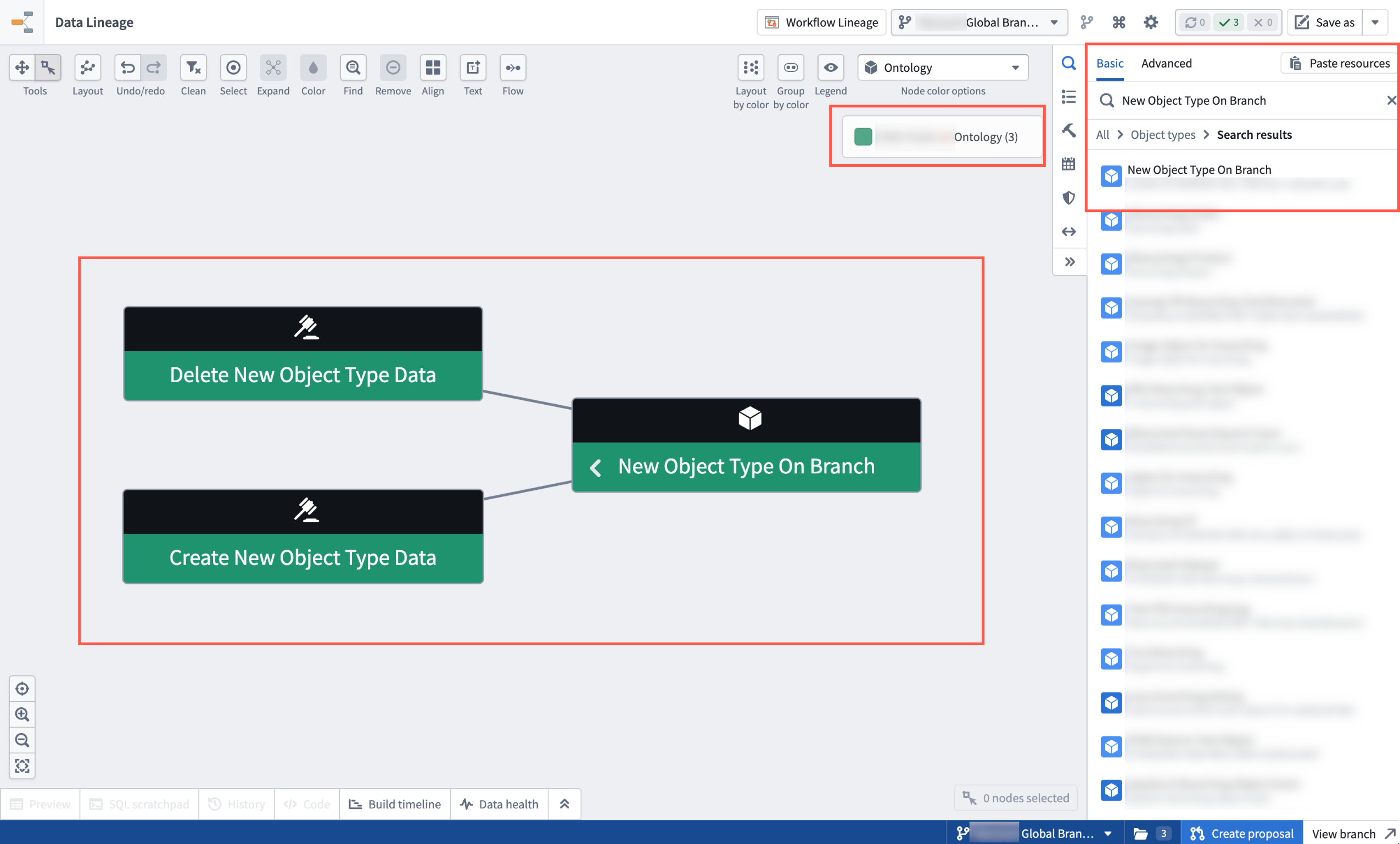
The graph, search results, node details, and colorings reflect data from the selected branch for easy reference.
- One-click add to graph. A message in the search panel allows you to add every modified entity on your branch to the graph in a single action.
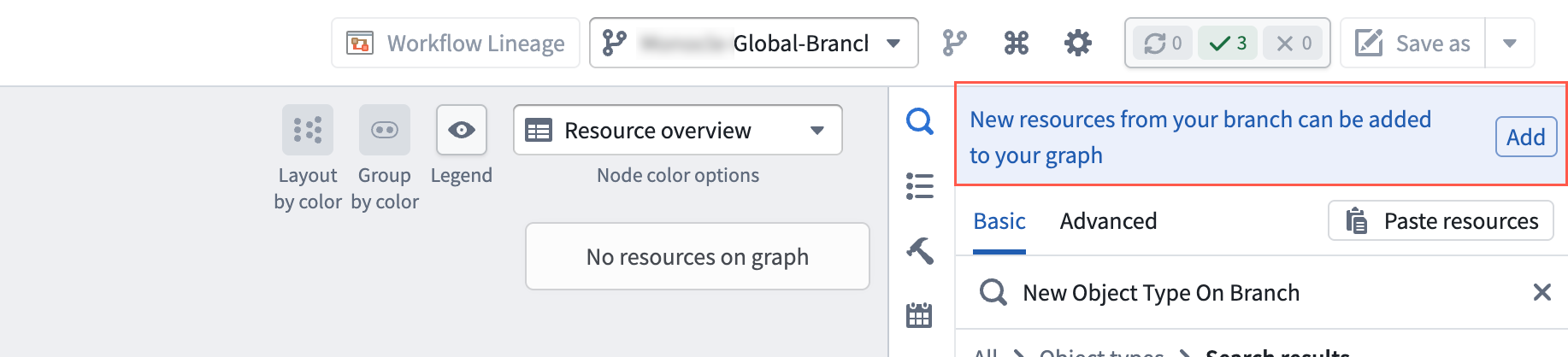
Use the Add option in the search panel to add every modified entity on your branch to the graph.
- Preserved branch context in saved graphs. Saved graphs retain the branch context for you and collaborators who open them. Note that while Data Lineage shows data from branches, the graph is not a branched resource, and therefore cannot be merged back to
main.
Your feedback matters
We welcome your feedback about Data Lineage. Share your thoughts with Palantir Support channels or on our Developer Community ↗ using the data-lineage tag ↗.
Migrate standalone OAuth clients into full Developer Console applications
Date published: 2026-05-26
In January 2026, the ability to create standalone OAuth clients in Developer Console was removed. Existing standalone OAuth clients can now be migrated to Developer Console applications, which include the following features:
- Ontology and Platform SDKs
- Website hosting
- Application restrictions
- DevOps support
- Metrics
How to migrate standalone OAuth clients
- Open your existing standalone OAuth client.
- Select Migrate to Developer Console application.
- Select a location and maximum classification, if applicable, in the migration wizard.
- Review user permissions for the Developer Console application.
- Submit migration.
After migration, the newly created application will appear in the selected location. You can now perform actions on the application like those on any other Developer Console application. Existing workflows using your client remain unaffected and will not break.
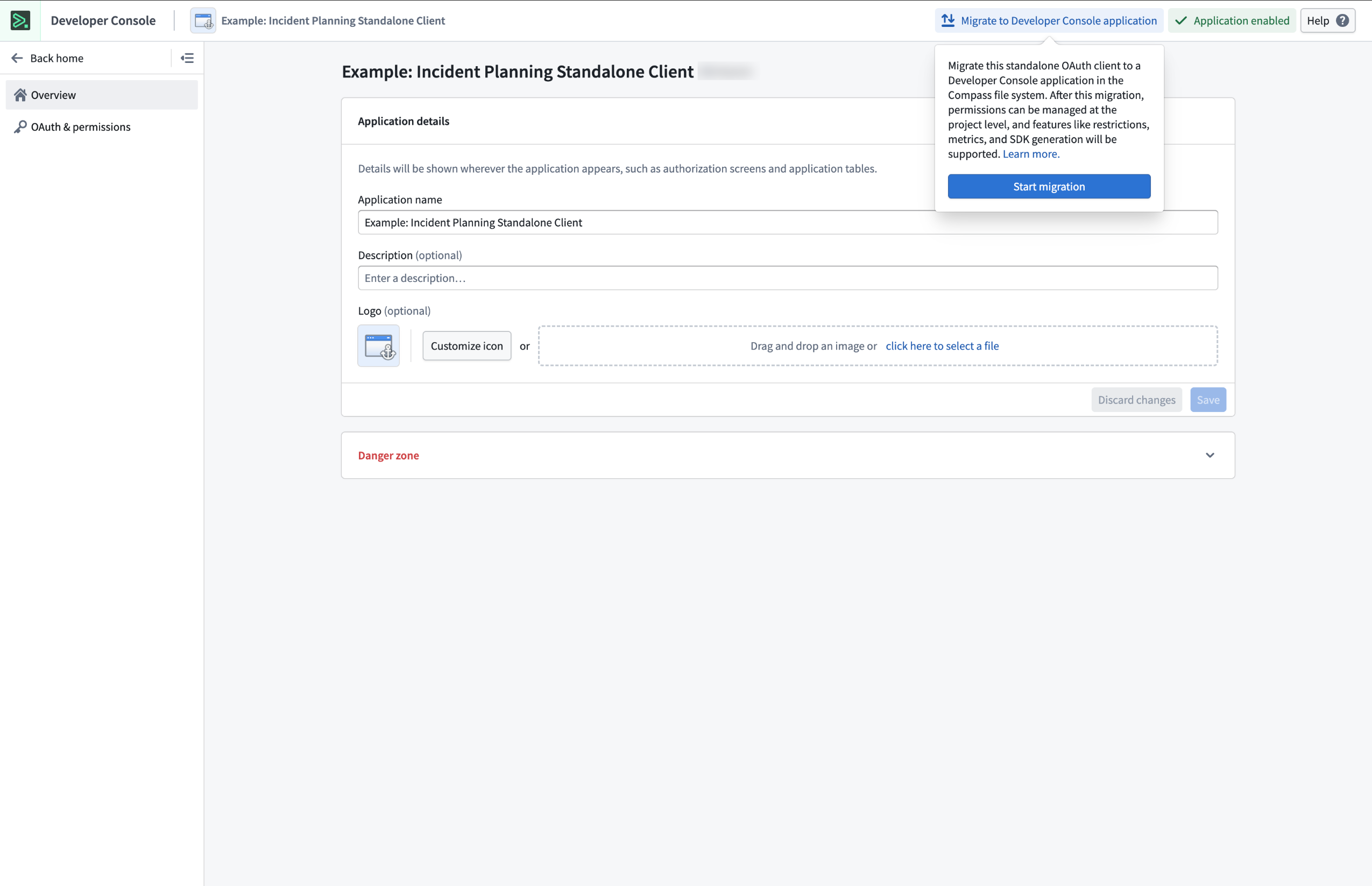
The migration prompt for legacy standalone OAuth clients located in the top right of the screen.
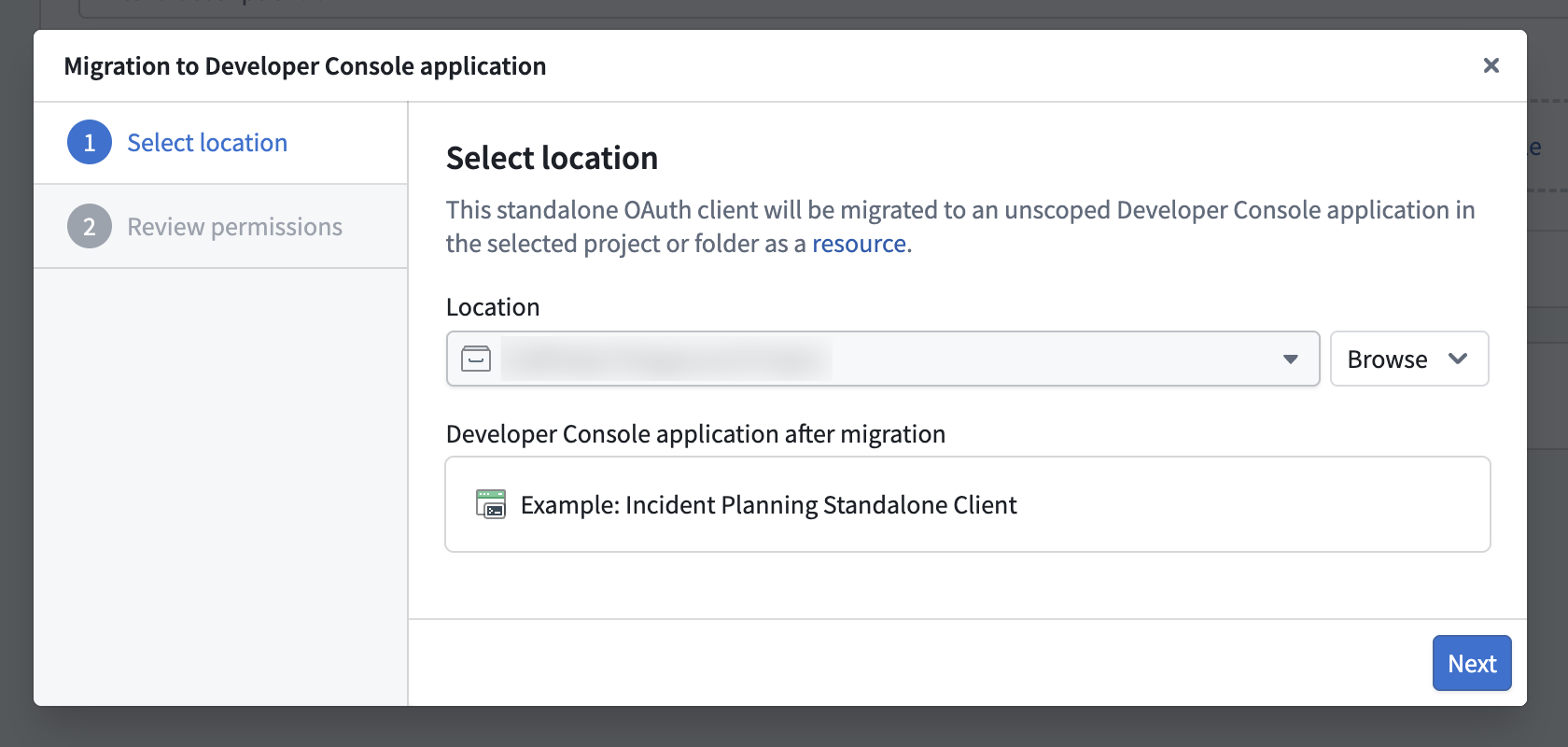
Step 1: Select a location for your Developer Console application.
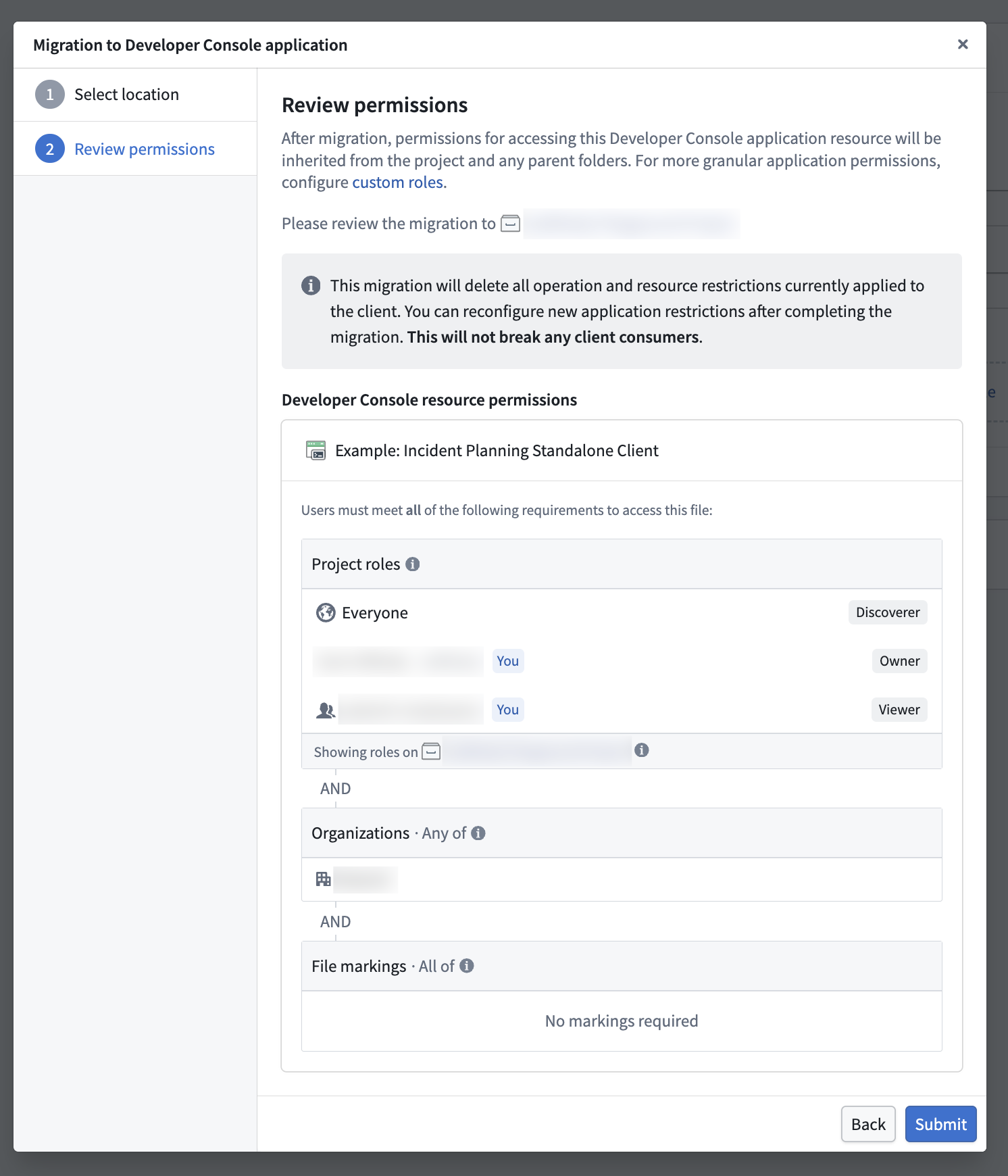
Step 2: Review permissions for accessing the Developer Console application resource.
Your feedback matters
We want to hear about your experiences using Developer Console and welcome your feedback. Share your thoughts through Palantir Support channels or on our Developer Community ↗.
Use the new bring your own model implementation instead of function interfaces to register models in AIP
Date published: 2026-05-21
A new implementation of bring-your-own-model (BYOM), also known as registered models, is now generally available, providing a streamlined integration optimized for the most common and standard model provider APIs. Through registered models, you can connect your own LLMs or accounts to AIP across Palantir developer products, such as AI FDE, AIP Analyst, AIP Chatbot Studio, AIP Logic, Workshop, and more. Instead of using function interfaces, you register a model once in Control Panel for it to flow natively through AIP. Once registered, the model appears in the model selector across applications and respects the same rate limits, permissions, and observability as Palantir-provided models.
What's new?
The new implementation replaces the previous function interface method of registering a large language model (LLM). Compared to the legacy function interface approach, registered models are:
- Easier to set up: Enrollment administrators register a model once in Control Panel, with no TypeScript function or webhook to author and maintain.
- Supported across more AIP applications: The new registered models BYOM implementation supports multiple AIP and Foundry applications and provides infrastructure tooling in Control Panel and Resource Management.
- Supported across more model capabilities: Registered models provide support for tool calling, reasoning, structured outputs, vision input, and streaming.
- Integrated with AIP infrastructure: View LLM rate limits at the enrollment, project, and user levels; usage observability in the Resource Management application; permissions and enablement in Control Panel; and access your model through the shared model selector across AIP applications.
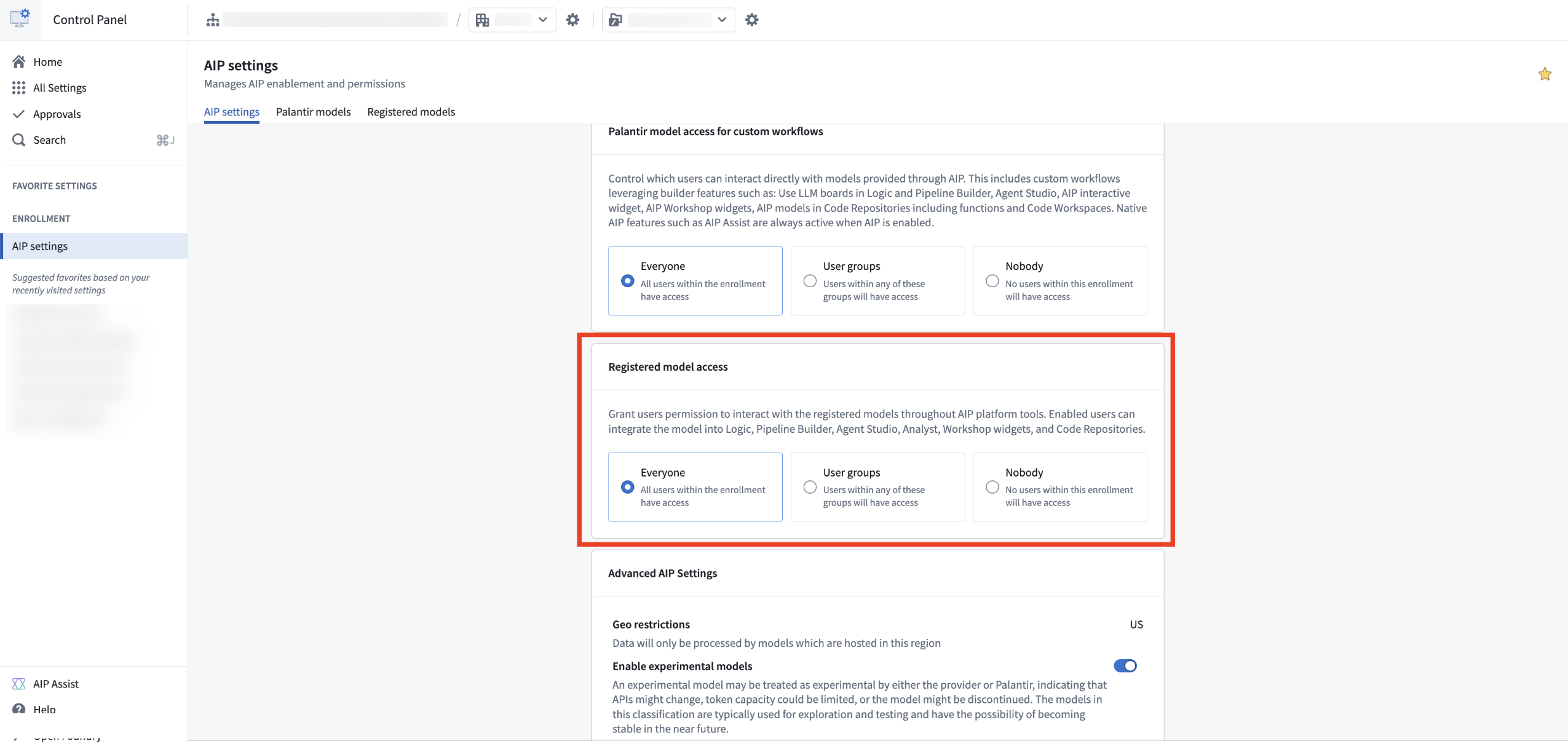
Provision access to your registered models in the AIP settings extension in Control Panel.
When should I use registered models?
Based on LLM support and viability, we generally recommend using Palantir-provided models from model providers (such as Anthropic or OpenAI) or self-hosted open-source models by Palantir (such as Llama models). However, you may prefer to bring your own models or accounts to AIP. We recommend using registered models only when you cannot use Palantir-provided models for legal and compliance reasons, or when you have your own fine-tuned or otherwise unique LLM that you would like to leverage in AIP.
The legacy function interface method remains available for existing integrations but is no longer recommended for new use cases. Contact Palantir Support if you have a use case that is not well addressed by registered models.
Learn more
Review the registered models documentation to get started.
Gemini 3.5 Flash from VertexAI is now available in AIP for commercial, IL2, and IL4 enrollments
Date published: 2026-05-21
Gemini 3.5 Flash is now available for commercial enrollments with VertexAI enabled in the US and EU for non-georestricted regions and for IL2 and IL4 enrollments.
Model overview
Gemini 3.5 Flash is Google's strongest agentic and coding model yet, outperforming Gemini 3.1 Pro on various coding and agentic benchmarks with improved speed and efficiency.
For more information, review Google's model documentation ↗.
Getting started
To use these models:
- Confirm your enrollment administrator has enabled the relevant model family.
- Review token costs and pricing.
- See the complete list of all the models available in AIP.
Your feedback matters
We want to hear about your experiences using language models in the Palantir platform and welcome your feedback. Share your thoughts with Palantir Support channels or on our Developer Community ↗ using the language-model-service tag ↗.
Discover and manage Ontology MCP servers in MCP Hub
Date published: 2026-05-21
Ontology MCP (OMCP) servers are now discoverable through MCP Hub, giving you a central place to view and manage the MCP servers configured across your enrollment.
Ontology MCP turns your Developer Console application into an MCP server. External AI agents connect as MCP clients and can read object types, execute predefined action types, and run query functions, scoped to the permissions you configure. It uses the Model Context Protocol ↗, an open standard for connecting AI systems to external tools and data sources.
Explore your servers in MCP Hub
Open MCP Hub and navigate to the Ontology MCP tab to view a list of all MCP servers configured on your enrollment. Select any row to view the full configuration details for that server, including the tools and ontology resources it exposes. From there, you can jump directly into the corresponding Developer Console application to add or modify resources.
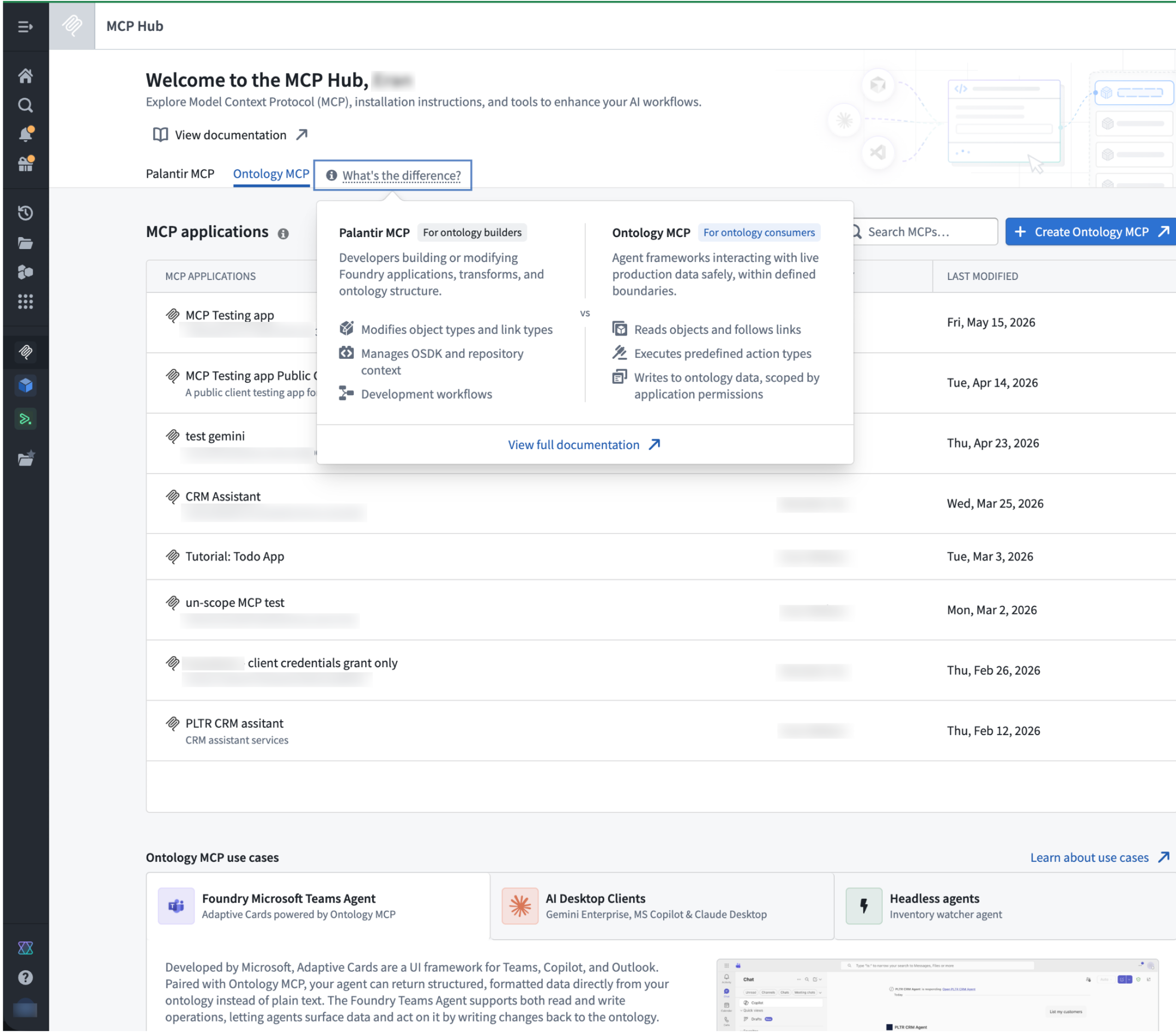
The MCP Hub application in Foundry, displaying a list of MCP servers.
Data governance
Enabling Ontology MCP makes your ontology resources available to an external MCP client. Before enabling it, verify that this is compliant with your organization's data governance and security policies. Use application scopes and permissions to restrict which resources are exposed.
What's next
- Detailed tools view: a per-server breakdown of every tool exposed, directly in MCP Hub.
- Tool configuration: enable or disable individual tools, and customize tool descriptions and annotations without touching application code.
- Pro-code agent support: Ontology MCP without the need for a Developer Console application, bringing MCP server capabilities directly to code-first agent workflows.
Get started
To enable Ontology MCP and connect your first agent, review the Ontology MCP documentation.
We want to hear from you
How was your experience using Ontology MCP in Foundry? Share your thoughts with Palantir Support or the Developer Community ↗.
CBAC enrollments can now store ontology resources in Compass projects
Date published: 2026-05-21
Classification-based access controls (CBAC)now apply to ontology resources, letting you configure who can view, edit, and manage them through Compass, the Palantir platform's filesystem. To use, this capability must first be enabled by an ontology owner.
When the capability is enabled, users must save ontology resources into a project. The selected location determines view, edit, and manage permissions. This project-based permissions approach replaces the previous ontology permission models: ontology roles and datasource-derived permissions. Key benefits include the following:
- Unified permission model: Ontology resources now use the same permission system as other resource types.
- Bulk management: Set permissions at the project or folder level to control access across multiple resources at once.
- Permissions explainability: The Security tab displays the required permissions to view and edit an object type, and the required permissions to see instances or run actions.
- Additional privacy controls: Hide sensitive ontology resources by applying a marking or by placing them in a project where the user lacks a role grant.
- Compass curation primitives: Users can use portfolios, tags to organize Ontology resources, and role grants or markings to hide irrelevant resources from users.
Permissions to see objects continue to require permissions on the object type and the datasource. Migrating to projects does not change who has access to the datasource.
When using ontology in projects with CBAC, users must specify a file classification at file creation. The classification must be equal to or lower than the maximum allowed classification. Object type materializations fail if no classification is specified.
This capability is enabled for new ontologies. For existing ontologies, it must be enabled manually, and existing ontology resources will require migration.
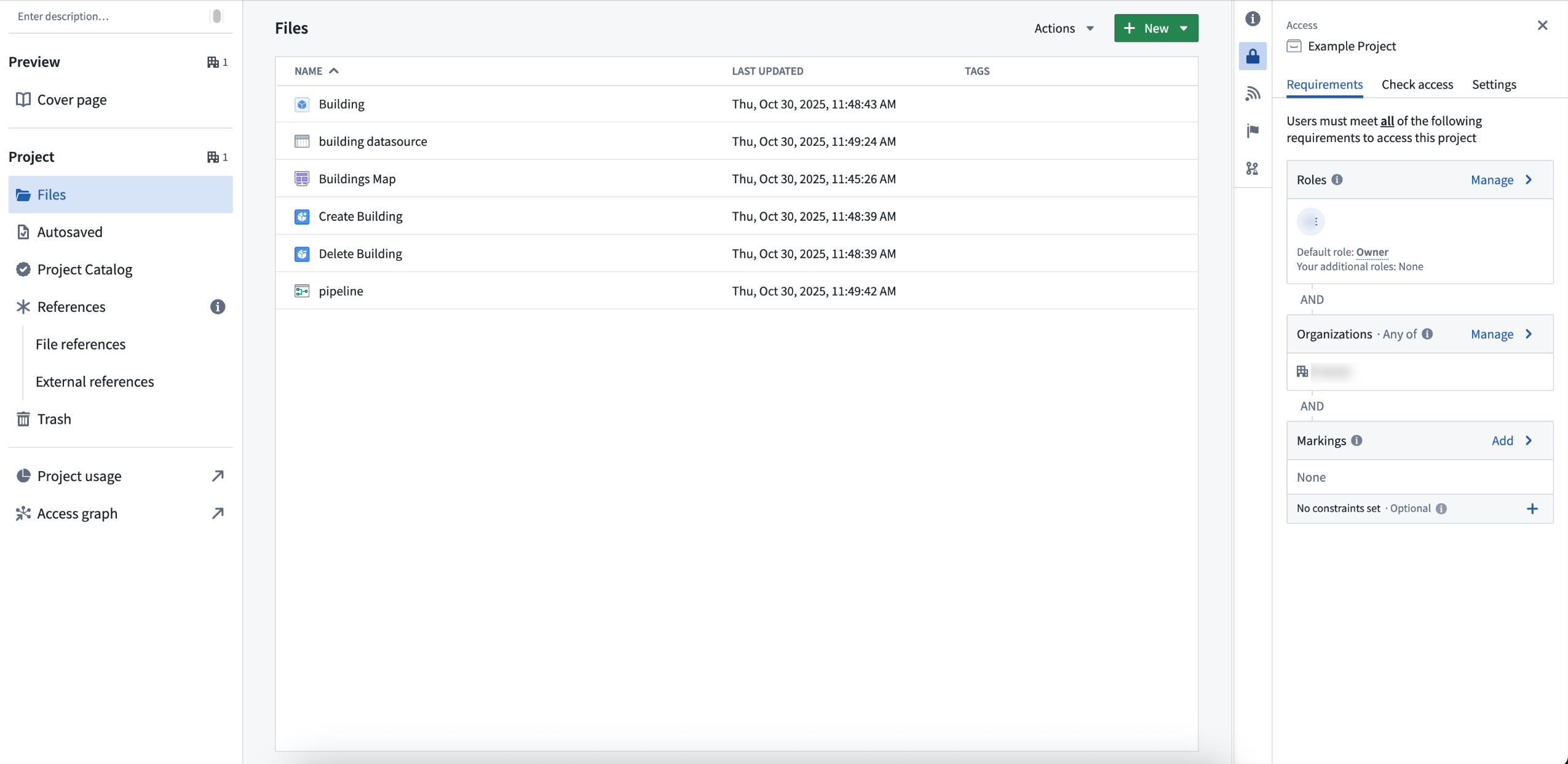
Ontology resources in a Compass project, with access requirements managed at the project level.
We want to hear from you
As we continue to develop Compass, we want to hear about your experiences and welcome your feedback. Share your thoughts with Palantir Support channels or our Developer Community ↗ using the compass ↗ tag.
Apply inherited role grants to all projects in a space
Date published: 2026-05-21
Space administrators can now configure role grants that are inherited by every project in a space. This ensures that critical roles, like an admin group's Owner permissions or all users' Discover access, are always present on every project in the space.
Project templates help you set up projects consistently, but project settings can be changed after creation. This can leave projects orphaned if the original owner leaves the company or misconfigured when standard access is accidentally removed. Inherited role grants prevent these gaps by guaranteeing certain role grants are always present.
Inherited role grants are configured per space in Control Panel for regular projects and locked Marketplace projects, which use different role sets. Each project type has its own picker so administrators can grant the appropriate role.
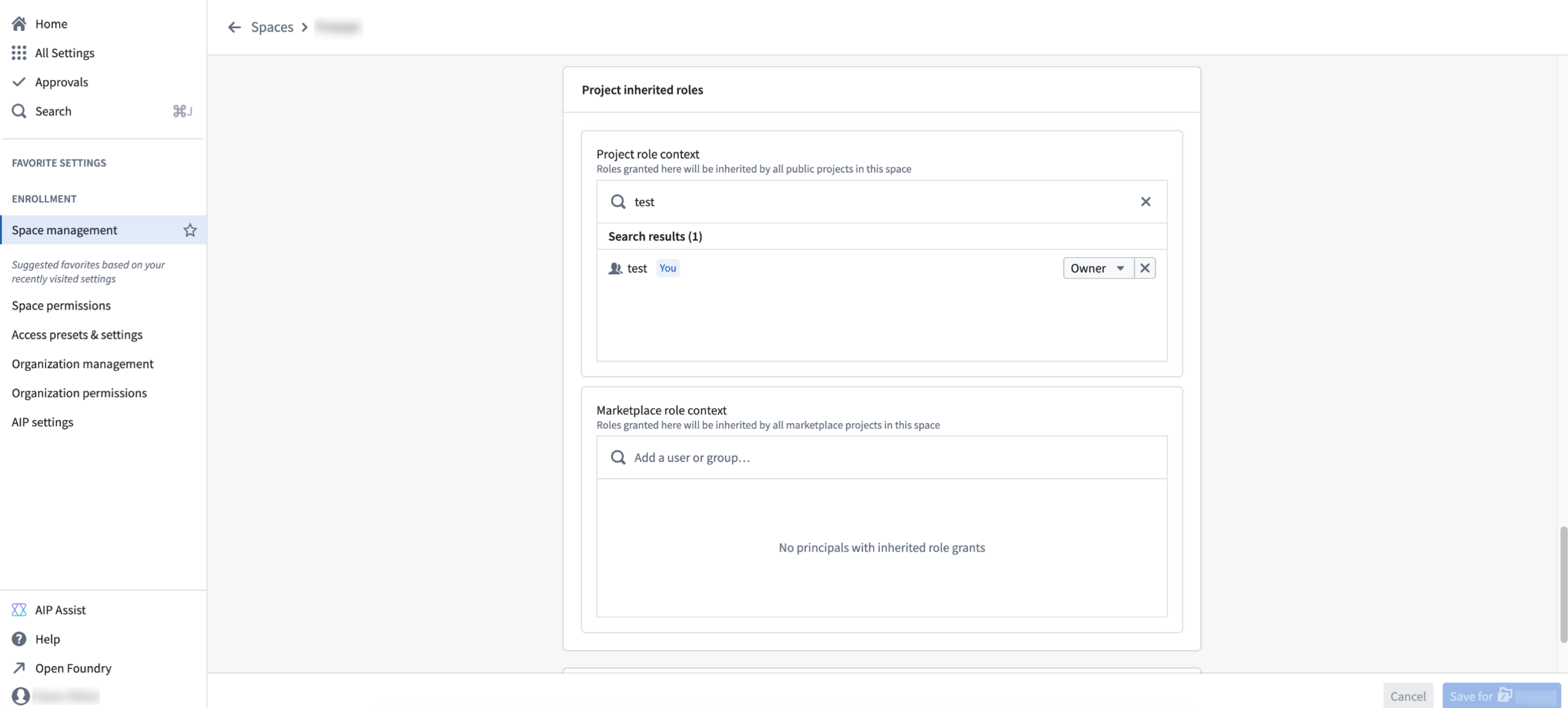
The Space management page in Control Panel where you can view the roles granted to a space.
Accessing a project or its resources requires both a role grant and the appropriate markings. Inherited role grants do not bypass marking requirements.
Inherited role grants appear in the Compass side panel under a new Inherited role grants section.
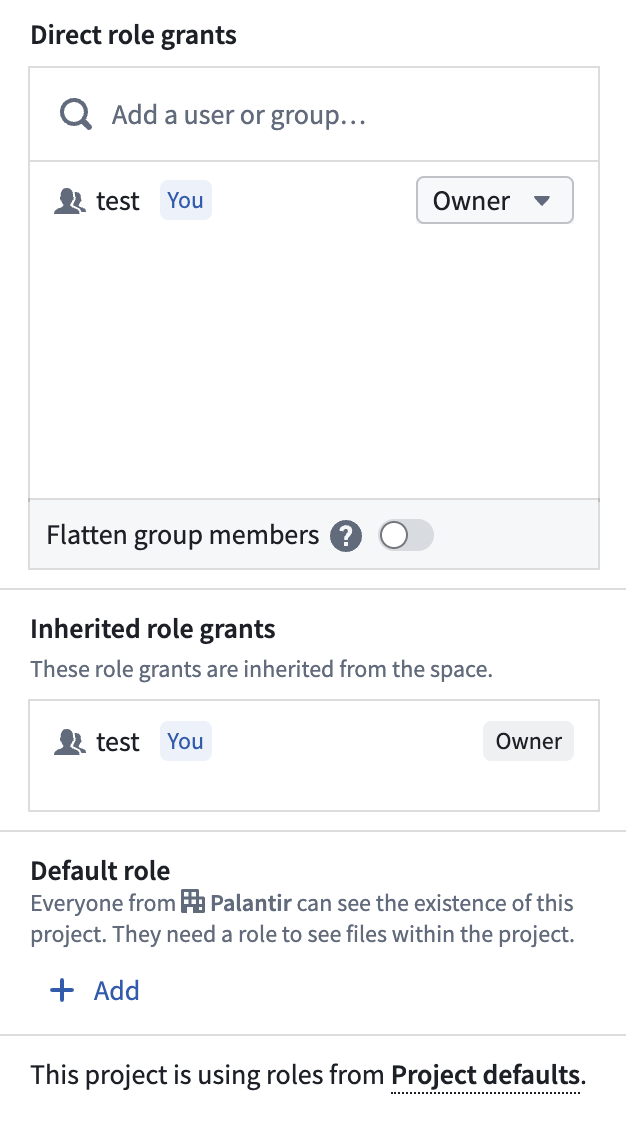
The Inherited role grants panel in Compass.
To get started with inherited role grants, review the space management documentation.
Upgrade Extract Text from PDF boards in Pipeline Builder for improved performance
Date published: 2026-05-19
Pipeline Builder now includes a v2 version of the Extract Text from PDF board, built on PyMuPDF. The v2 board replaces the v1 board's Tesseract and Docling backends with a single PyMuPDF-based extraction path. In internal benchmarks against the v1 Tesseract and Docling pipeline, PyMuPDF produced higher extraction accuracy on electronic (embedded-text) PDFs and processed documents approximately 10x faster. The v2 board also handles larger batch sizes than v1, which was constrained by the Docling-backed layout model.
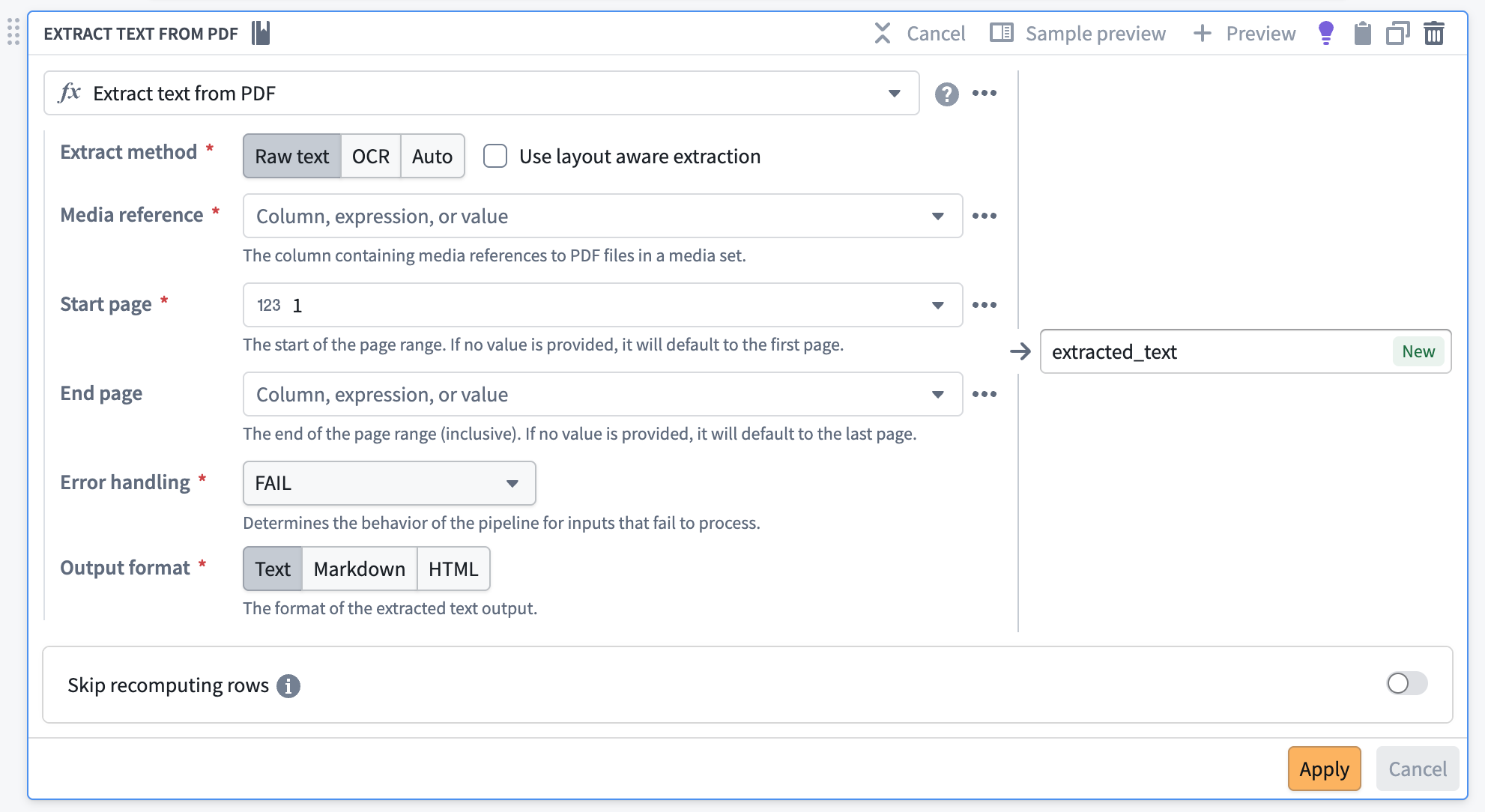
The Extract Text From PDF transform in Pipeline Builder.
What’s new?
- Flexible output formats: Export extracted content in Markdown or HTML in addition to plain text, making it easier than ever to integrate with downstream LLM applications.
- Automatic PDF type detection: The system intelligently selects the optimal extraction method for each document, maximizing accuracy and speed.
- Document understanding: Benefit from advanced layout analysis powered by a hybrid Graph Neural Network (GNN) approach (PyMuPDF-layout), enabling precise identification of document elements—titles, paragraphs, tables, and figures.
- CPU execution: All extraction methods—raw text and OCR—are now handled by PyMuPDF, ensuring consistent results and improved performance, all while running efficiently on CPUs.
How to upgrade
- Enable the feature flag Enable extract text v2 expressions in Pipeline Builder to start creating v2 boards by default.
- Open the Warnings tab (bottom panel) to list every v1 Extract Text from PDF board in your pipeline.
- Navigate to each board and select Upgrade.
- Save and deploy your pipeline.
Share your feedback
To share feedback on this feature, contact us through our Palantir Support channels or join the conversation in our Developer Community using the pipeline-builder tag ↗ .
View property security markings in select Workshop widgets
Date published: 2026-05-19
Now generally available across Foundry enrollments, property security markings enable you to display the markings and Classification-based Access Controls (CBAC) values configured through object and property security policies when you view or select a property in the following Workshop widgets:
Displayed strictly for informational purposes, property security markings render as a condensed gray pill with an expanded window view on hover or selection.
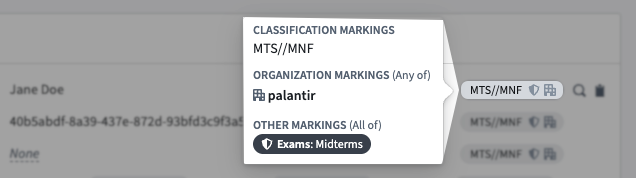
Hover over a property security marking's gray pill for a detailed view of property value-specific markings and CBAC values.
Property security markings abstract away certain complexities about the requirements necessary to view the property's data. As an example, a property marked with the Mock Unclassified CBAC marking within an object with the Mock Secret CBAC marking will be displayed as Mock Unclassified in the object view. However, users must have access to the Mock Secret CBAC marking to view the property's data.
Enable property security markings in Workshop
Toggle on Show security markings in the Widget setup tab when configuring a Property List, Object List, or Object Table widget in Workshop. Configure the display setting for a property security marking using the following options:
- Responsive: Displays the full security marking when space permits and a truncated tag to fit available space. Foundry displays the full marking in a tooltip upon hover. This option is not available for the Object Table widget.
- Full Tag: Displays the full security marking at all times, line-wrapping at small widths.
- Icon Only: Displays the marking icon and the full security marking only upon hover.
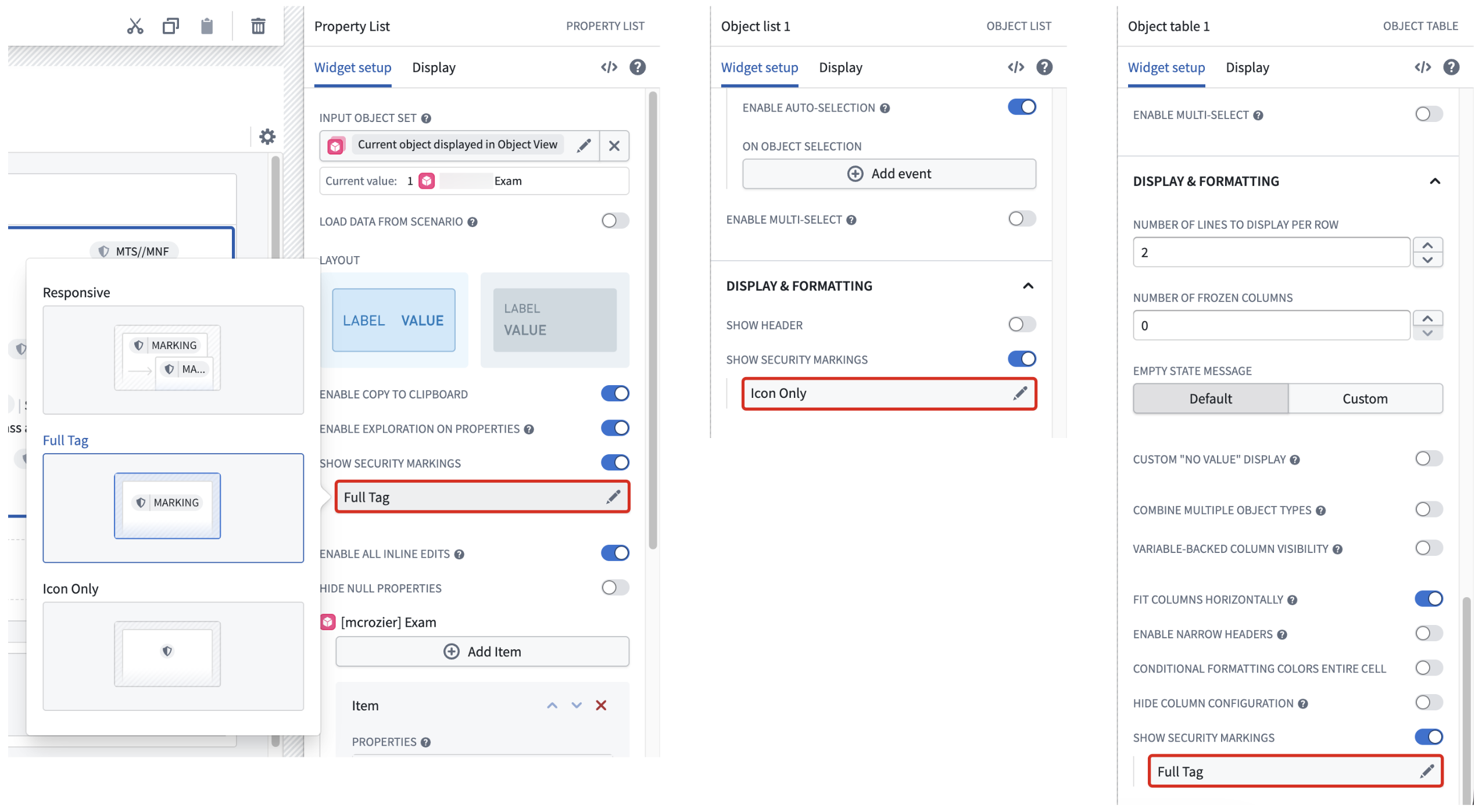
Toggle on Show security markings in the Widget setup tab when configuring a Property List, Object List, or Object Table widget in Workshop.
Foundry verifies each property against its security markings to ensure all users with the appropriate access can view its value, even if you toggle the pill's visibility off in any of its supported widgets.
What's next
Moving forward, the ability to view property security markings will extend to additional Workshop widgets and other Foundry applications.
Learn more about property security markings in Foundry.
Grok 4.3 from xAI is now available in AIP
Date published: 2026-05-14
Grok 4.3 is now available for enrollments with xAI enabled in the US and other supported regions.
Model overview
xAI's fastest, most intelligent model to date, Grok-4.3 is effective at agentic tool calling and instruction following. The model is particularly effective in use cases involving case law and corporate finance. Supports low, medium, and high reasoning efforts and a one million token context window.
For more information, review xAI's model documentation ↗.
Getting started
To use these models:
- Confirm your enrollment administrator has enabled the xAI model family.
- Review token costs and pricing.
- See the complete list of all the models available in AIP.
Your feedback matters
We want to hear about your experiences using language models in the Palantir platform and welcome your feedback. Share your thoughts with Palantir Support channels or on our Developer Community ↗ using the language-model-service tag ↗.
Use parameters in Python transforms and run schedules via actions
Date published: 2026-05-14
The ability to parameterize schedules of Python transforms and configure a schedule rule on an action type is now available in beta.
Use parameterization to declare type parameters in your Python transforms whose values are set on a schedule.
In standard mode, the schedule sets the values directly, enabling use cases like periodic compactions for incremental transforms. In parallelized mode, the schedule manages many independent run setups, each with its own parameter values, enabling use cases like high-scale scenario simulations by running transforms in parallel.
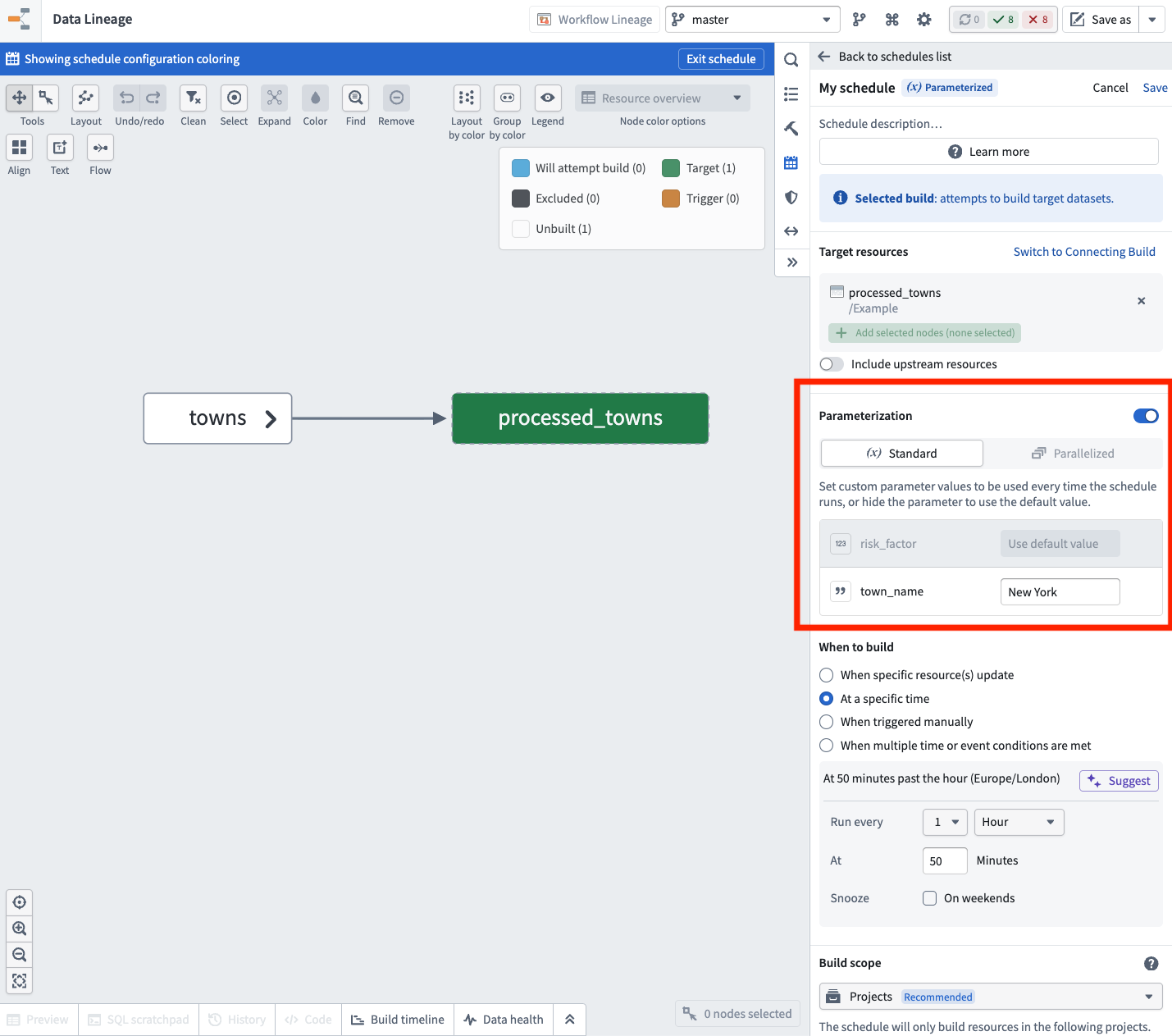
Create a parameterized schedule and select values for the parameters declared on the target dataset's transform.
With a schedule rule on action types, you can trigger a build of a referenced schedule when an action is applied, forwarding the action's parameter values to the underlying transforms. This enables recomputing datasets directly within operational applications or as part of action effects in Automate.
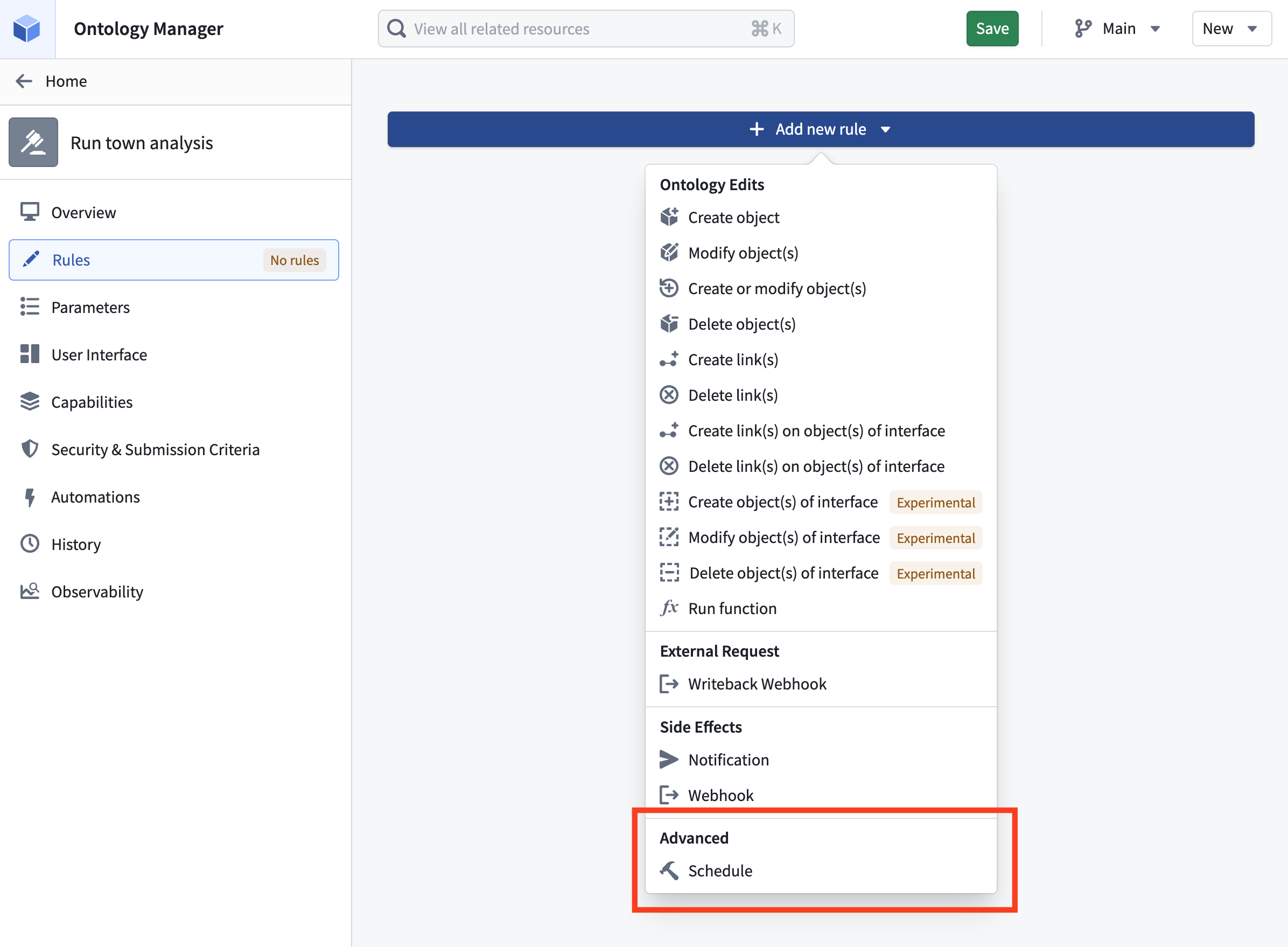
Configure a schedule rule on an action type in Ontology Manager.
Share your feedback
We want to hear about your experiences using schedules and parameterized transforms in the Palantir platform and welcome your feedback. Share your thoughts with Palantir Support channels or on our Developer Community ↗ using the scheduler ↗ tag.
Claude Opus 4.7, Opus 4.6, and Sonnet 4.6 are now available from Anthropic on commercial US georestricted enrollments
Date published: 2026-05-12
Claude Opus 4.7, Claude Opus 4.6, and Claude Sonnet 4.6 are now available from Anthropic Direct on commercial US georestricted enrollments. This is in addition to the models previously made available for enrollments via AWS Bedrock and Google Vertex AI.
Benefits of enabling Anthropic Direct in addition to Bedrock and Vertex AI include:
- Higher capacity: Additional enrollment capacity is granted for each enabled model provider, increasing an enrollment's total available capacity.
- Greater stability: If one provider experiences disruption, traffic can continue flowing through other enabled providers, improving overall reliability.
- Faster access to new features: Anthropic Direct typically receives new model capabilities — such as extended thinking improvements and updated tool use — ahead of hosted providers, so enrollments with Anthropic Direct enabled are first in line to receive those enhancements.
Getting started
To use these models:
- Confirm that your enrollment administrator has enabled the relevant model family.
- Review token costs and pricing.
- See the complete list of all available models in AIP.
Your feedback matters
We want to hear about your experiences using language models in the Palantir platform and welcome your feedback. Share your thoughts with Palantir Support channels or on our Developer Community ↗ using the language-model-service tag ↗.
Additional Gemini and Claude models are now available on IL2 and IL4 enrollments via Google Vertex
Date published: 2026-05-12
Additional models from the Google Gemini and Anthropic Claude model families are now accessible from AIP applications in IL2 and IL4 enrollments via Google Vertex.
Frontier models
You can access the following frontier models via Google Vertex after your enrollment administrator enables each model family:
- Google Gemini
- Gemini 3.1 Pro ↗
- Gemini 3 Flash ↗
- Anthropic Claude
- Claude Opus 4.7 ↗
- Claude Sonnet 4.6 ↗
- Claude Haiku 4.5 ↗
Legacy models
Additionally, you can access the following legacy models via Google Vertex after your enrollment administrator enables each model family:
- Google Gemini
- Gemini 2.5 Pro ↗
- Gemini 2.5 Flash ↗
- Gemini 2.5 Flash Lite ↗
- Anthropic Claude
- Claude Opus 4.6 ↗
Getting started
To use these models:
- Confirm that your enrollment administrator has enabled the relevant model family.
- Review token costs and pricing.
- See the complete list of all models available in AIP.
Your feedback matters
We want to hear about your experiences using language models in the Palantir platform and welcome your feedback. Share your thoughts with Palantir Support channels or on our Developer Community ↗ using the language-model-service tag ↗.
Develop OSDK React applications using Palantir's @osdk/react library
Date published: 2026-05-12
You can now develop OSDK React applications in an idiomatic, React-first way using Palantir's @osdk/react library ↗. Generally available as of the week of May 11, the library provides React hooks and built-in performance optimizations, such as global caching, optimistic updates, and more to make it easier to build frontend OSDK applications that interact with Foundry.
Library benefits
Use @osdk/react when your application primarily consumes data through the OSDK to streamline how you query data and execute actions in your ontology. The library provides the following benefits to enhance your development experience:
- Normalized object caching: The library stores every object once. When you call an action to edit an object, every list, link, and view referencing the object updates automatically.
- Action-driven invalidation: Action responses specify which objects were added, modified, or deleted. Lists are re-evaluated against their
whereclauses without manual invalidation. - Optimistic updates with automatic rollback: Immediately update the local cache before the server responds after creating, editing, or deleting an object. The optimistic changes are applied to a temporary store layer and automatically roll back if the action fails.
- Cross-component deduplication: Two components running the same query share one network request and one cache entry.
To improve development simplicity, the library also provides idiomatic React hooks for every Ontology primitive, platform APIs you can use with OSDK React hooks, and default guidance for LLMs through an AGENTS.md file.
Learn more about the development benefits gained through the @osdk/react library ↗.
Get started and migrate from the beta version
To begin using the @osdk/react library, review the installation and setup guide ↗. Additionally, Developer Console provides React code snippets you can copy and paste for your generated SDK.
You can migrate from the beta version by importing @osdk/react instead of @osdk/react/experimental. The @osdk/react/experimental paths still resolve as @deprecated backwards-compatible re-exports, so you can upgrade incrementally before they are removed in a future release.
Contribute to the library
Review the contribution guide ↗ to add new features to the @osdk/react library.
Workflow Lineage now supports Global Branching
Date published: 2026-05-12
Workflow Lineage now supports Global Branching. You can use a global branch to manage, edit, and collaborate on workflow resources, and to develop and test end-to-end workflows in the Palantir platform before merging changes into a live production environment. For more information on branching in Workflow Lineage, review the documentation.
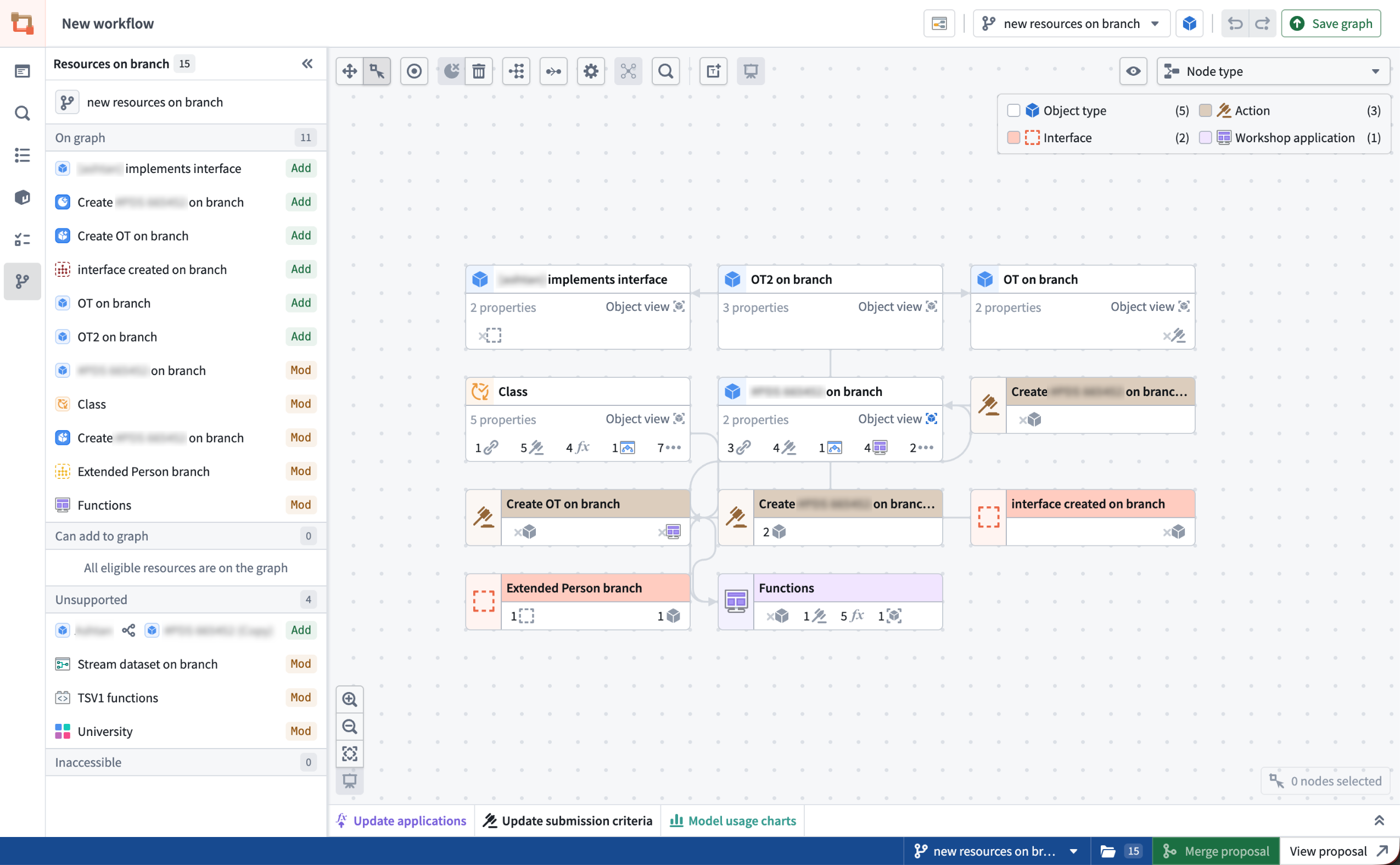
A Workflow Lineage graph on the "new resources on branch" global branch with the Resources on branch side panel.
Additionally, the new branch side panel allows you to view all modified resources on the graph, add modified resources that are not yet displayed, and navigate to relevant apps for unsupported Workflow Lineage resource nodes.
Bulk edits on a global branch
Global Branching introduces several new capabilities in Workflow Lineage. You can now perform bulk edits on a global branch, including bulk upgrading function versions for action types and Workshop modules, bulk updating submission criteria for action types, and bulk deleting ontology resources.
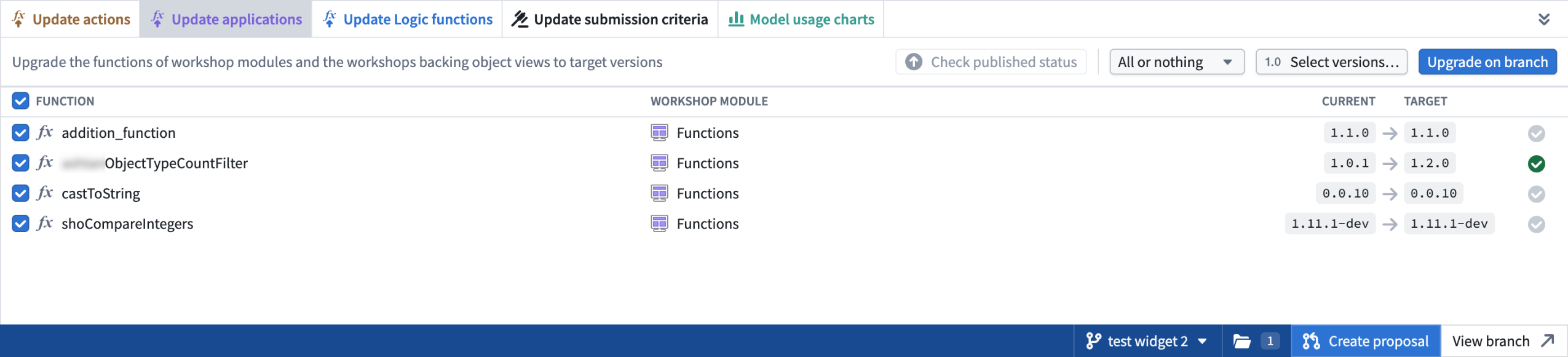
Example of the update application panel where you can bulk update functions in Workshop on a global branch.
Branch navigation shortcuts
When viewing a resource on a branch, use Cmd + I on Mac or Ctrl + I on Windows to open a new Workflow Lineage tab on that branch. The shortcut works in Workshop, Ontology Manager, Logic, and Pipeline Builder object outputs.
Global branches can also be opened from external apps, including AI FDE, through right-click actions on global branch tags or when selecting a global branch context, as well as from the branch bottom bar, branch page, and proposal page. Workflow Lineage automatically places eligible nodes on the graph and opens the sidebar panel to provide additional context.
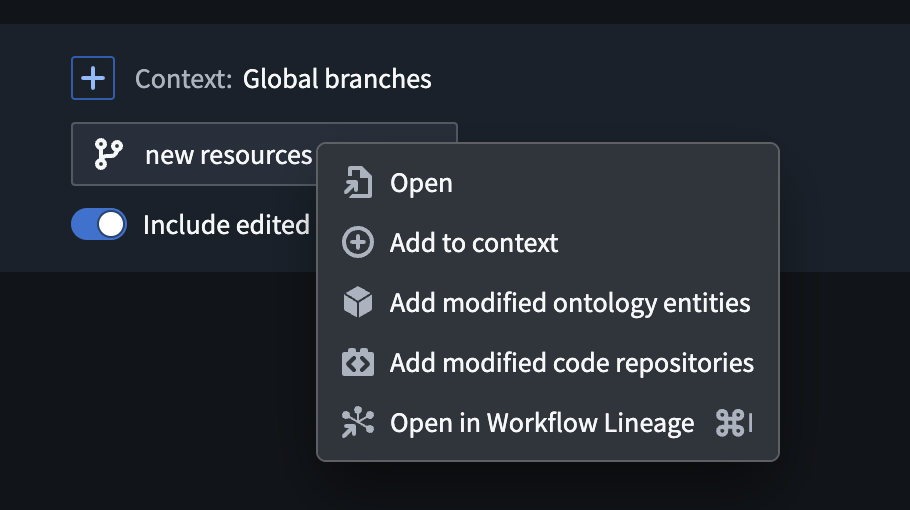
Open in Workflow Lineage option in AI FDE.
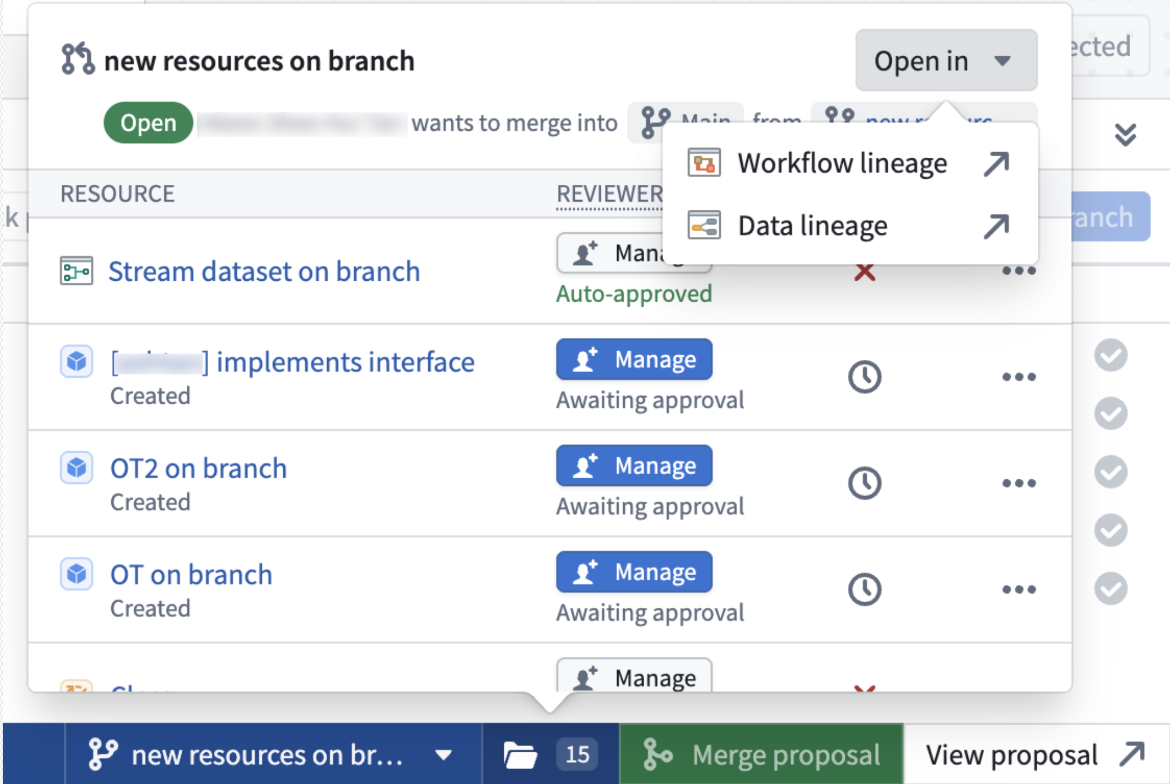
Open Workflow Lineage option from the bottom branch picker.
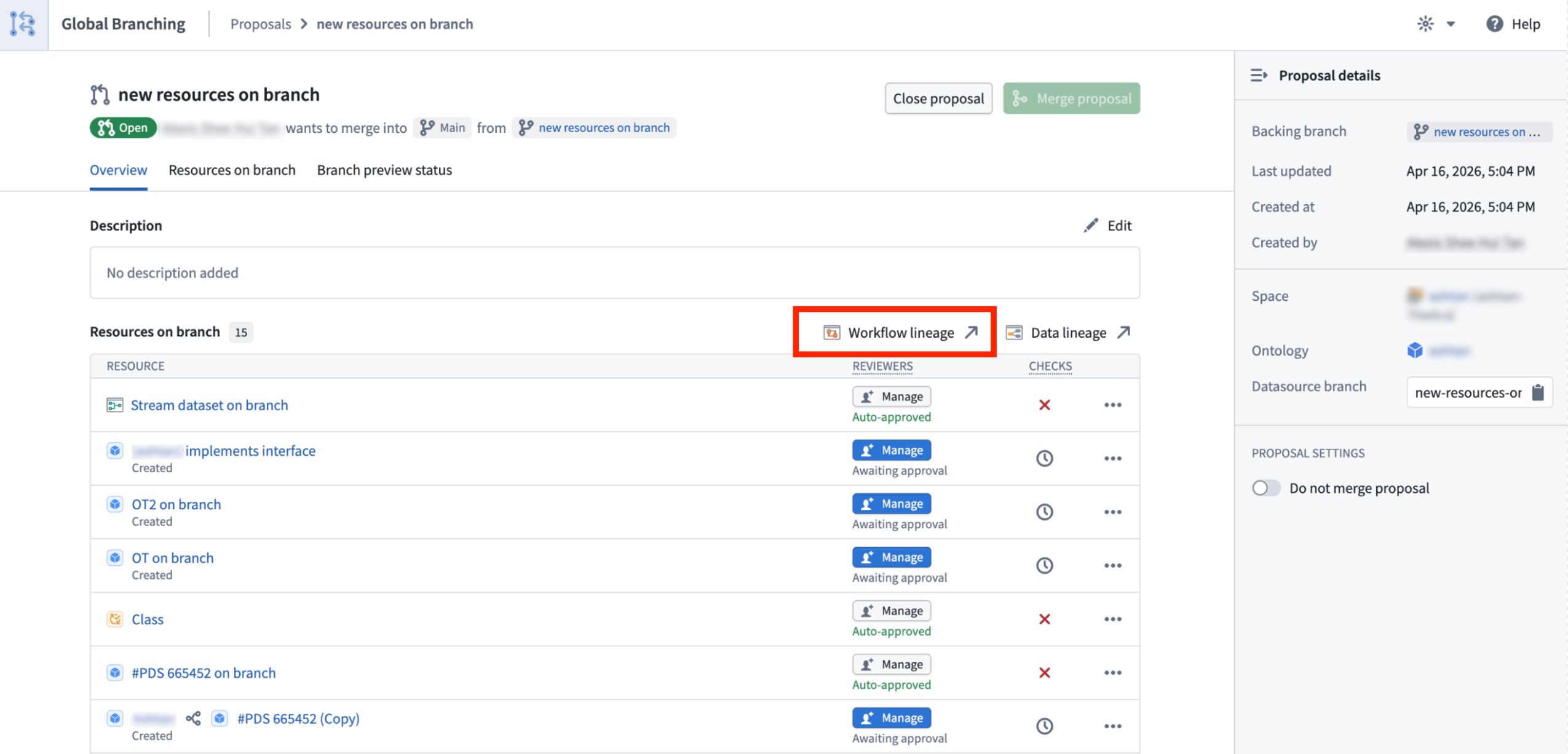
The Workflow Lineage option on a proposal page.
Color modes on global branches
Global branches now support color modes, including functions repository, action rule, ontology status, usages, and out-of-date dependencies color modes.
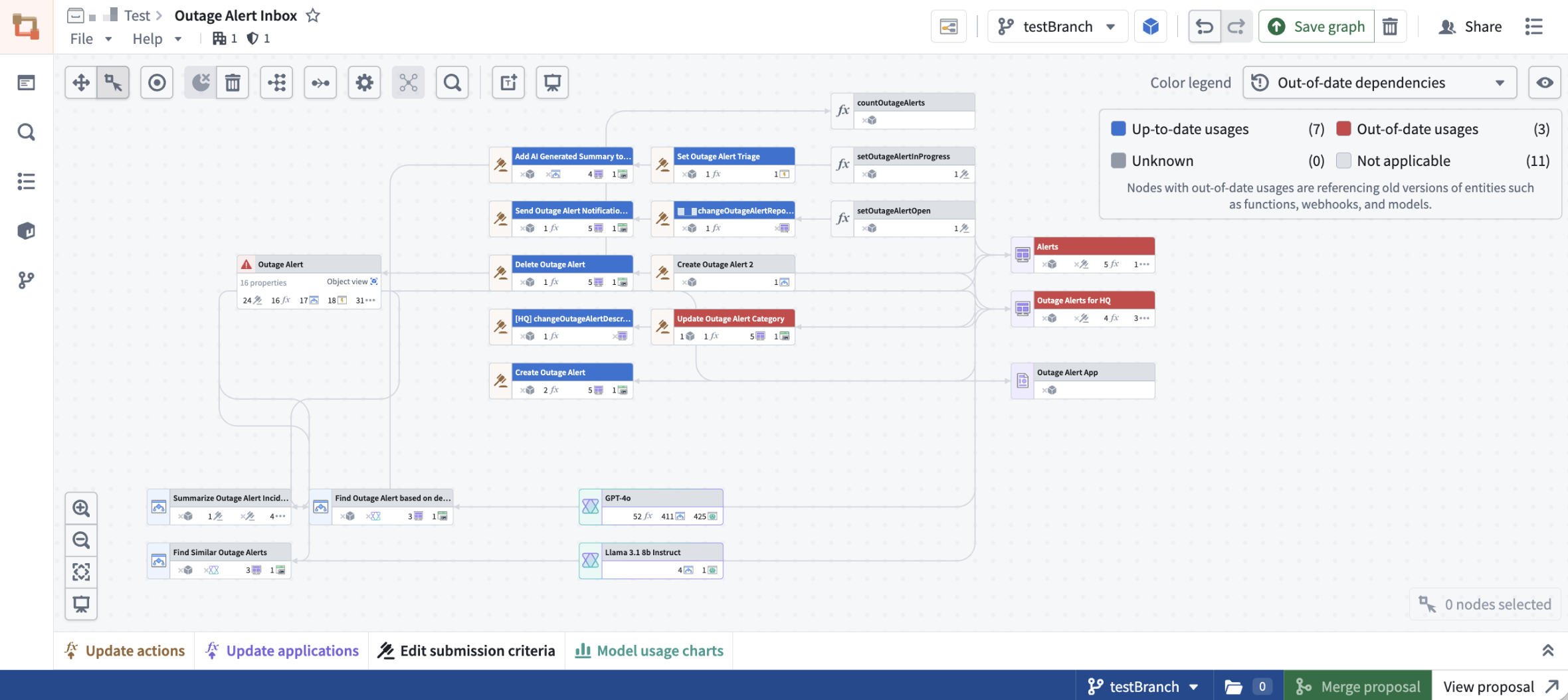
Out-of-date-dependencies coloring on the testBranch global branch.
We want to hear from you
As we continue to develop Workflow Lineage, we want to hear about your experiences and welcome your feedback. Share your thoughts with Palantir Support channels or our Developer Community ↗ using the Workflow-lineage ↗ tag.
Learn more about Workflow Lineage.
Introducing SQL Studio, Foundry's dedicated SQL application
Date published: 2026-05-07
Update: As of the week of June 15, 2026, this product is now generally available.
SQL Studio, Foundry's dedicated application for writing and running SQL queries, is now available in beta. SQL Studio brings interactive SQL analysis to Foundry across both tabular data and ontology object types, backed by purpose-built SQL engines and AI-assisted query writing.
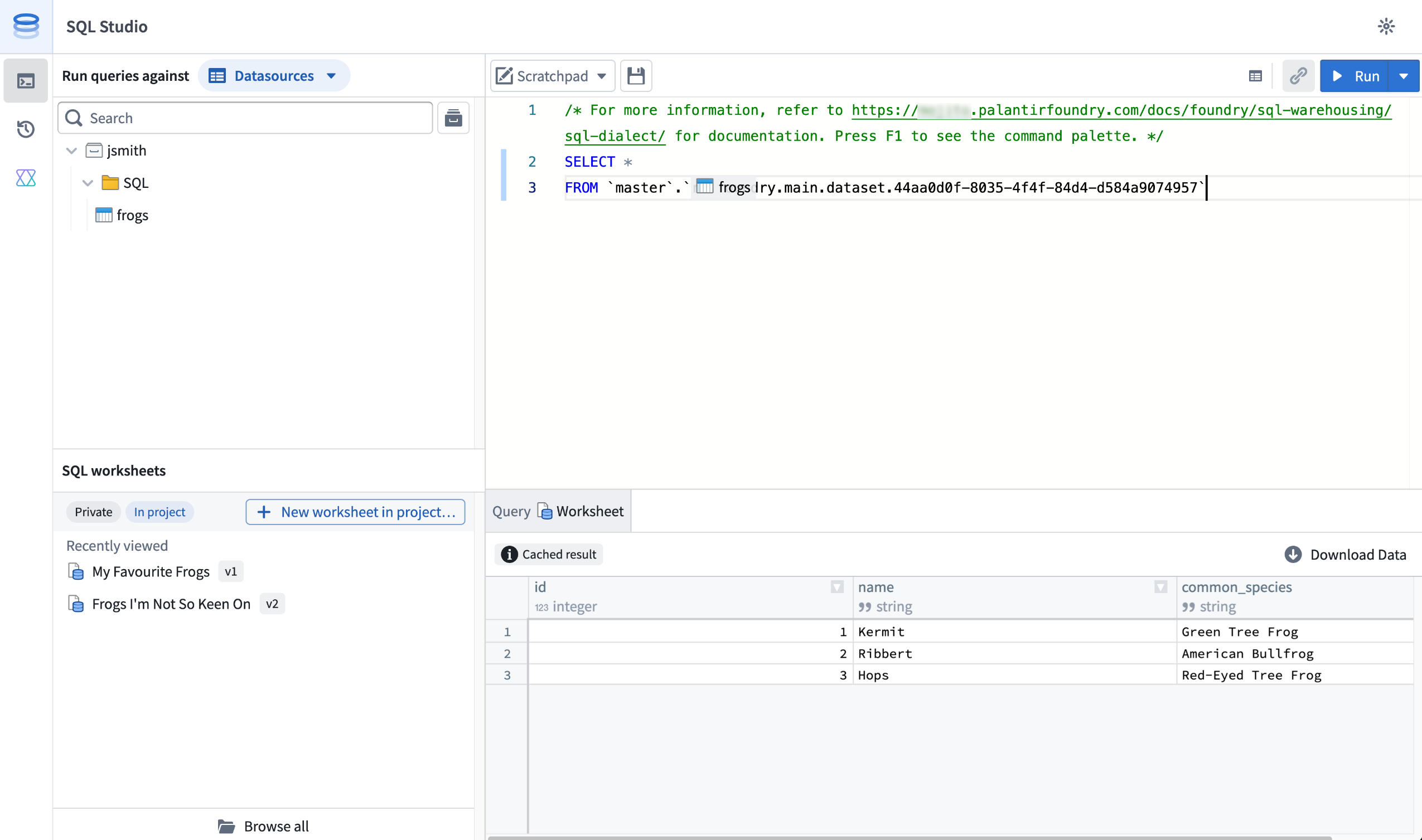
SQL Studio provides an interactive, AI-assisted interface for SQL analysis of tabular data and Ontology objects.
SQL Studio builds on the contextual SQL console embedded in applications such as Dataset Preview, Data Lineage, and Ontology Manager, now providing a dedicated application with read and write SQL support for tabular data, read support for ontology object types, and the ability to publish reusable Ontology SQL functions.
Powered by Ontology SQL and Furnace
SQL Studio is built on two Foundry SQL engines that share a common Spark SQL dialect: Ontology SQL for querying ontology object types, and Furnace for querying tabular data.
Ontology SQL is Foundry's SQL engine for querying ontology object types and many-to-many links. Queries execute directly against object storage using an in-memory compute path for fast response times on supported query shapes, with more complex queries automatically routed to Spark.
Furnace is Foundry's SQL engine for tabular data. It dynamically routes queries between Trino and Spark, delivering meaningfully faster query times for the right workloads. Furnace supports both read and write operations.
Key features
SQL Studio brings together a complete SQL analysis experience in one place:
- Unified data and object querying: Query tabular data and ontology object types from a single application, switching between data mode and object mode, while using a common Spark SQL dialect.
- Low-latency, interactive analysis: SQL Studio is built for iterative, interactive development workflows. Queries are dynamically routed to the most appropriate compute engine, including faster non-Spark options for supported query shapes, and run on warm, fully managed compute.
- AI-assisted code generation: A conversational AIP side panel helps you write, explain, and debug queries. It understands Foundry's supported SQL dialect and has visibility into your editor, including the current code and schemas for any referenced datasets, tables, object types.
- Preview results as tables or charts: View query results as tabular output or visualize them with built-in line and bar charts. Result limits are configurable, with the option to return up to 10,000 rows per query rather than the default 1,000-row preview for users with the appropriate permissions.
- Save and share SQL worksheets: Use the scratchpad for one-off analyses, or save your work as a SQL worksheet. Worksheets can be saved privately for personal reuse or in a project to share with colleagues. Saving creates a new version that you can review and restore later; unsaved changes are auto-staged so a user’s in-progress work persists between sessions.
- Read and write support: In addition to
SELECTqueries, SQL Studio supportsCREATE TABLEoperations on datasets andCREATE,INSERT,UPDATE, andDELETEoperations on Iceberg tables. - Ontology SQL functions (Beta): Define reusable, parameterized SQL queries over object types and publish them as SQL functions. Supported query shapes can execute with low latency on the same in-memory path as Ontology SQL queries. Use them across Foundry, including in Workshop, Actions, Automate, and the Ontology SDK. SQL functions are experimental and are not enabled on all Foundry environments, contact your Palantir representative to enroll.
Getting started
To get started with SQL Studio, Foundry administrators should enable the application from the Application access page of Control Panel. Once enabled, SQL Studio is directly accessible from the Applications menu.
For information about SQL Studio features, see the SQL Studio documentation. For syntax guidance, refer to the SQL dialect documentation. To learn more about the underlying engines, see the Furnace and Ontology SQL overviews.
What's coming next
SQL Studio is under active development, and several capabilities are on the near-term roadmap, including:
- Global branching and Marketplace packaging support for SQL worksheets.
- Application usability improvements, such as multiple editor tabs, improved query history, and more chart type options.
- Integration with Foundry's production pipeline tooling and Git-based CI/CD development workflows.
We want to hear from you
As we continue to develop SQL Studio, we want to hear about your experiences and welcome your feedback, both about the SQL Studio application and the broader SQL experience in Foundry. Share your thoughts with Palantir Support channels or our Developer Community ↗.
Replace language models used by AIP Logic functions in bulk from Workflow Lineage
Date published: 2026-05-07
You can now replace a language model used by multiple AIP Logic functions in a single action from Workflow Lineage instead of opening each function and updating the model individually. The ability to bulk replace models is now generally available across Foundry enrollments, making it easier to migrate workflows off deprecated models and evaluate new models across an entire workflow.
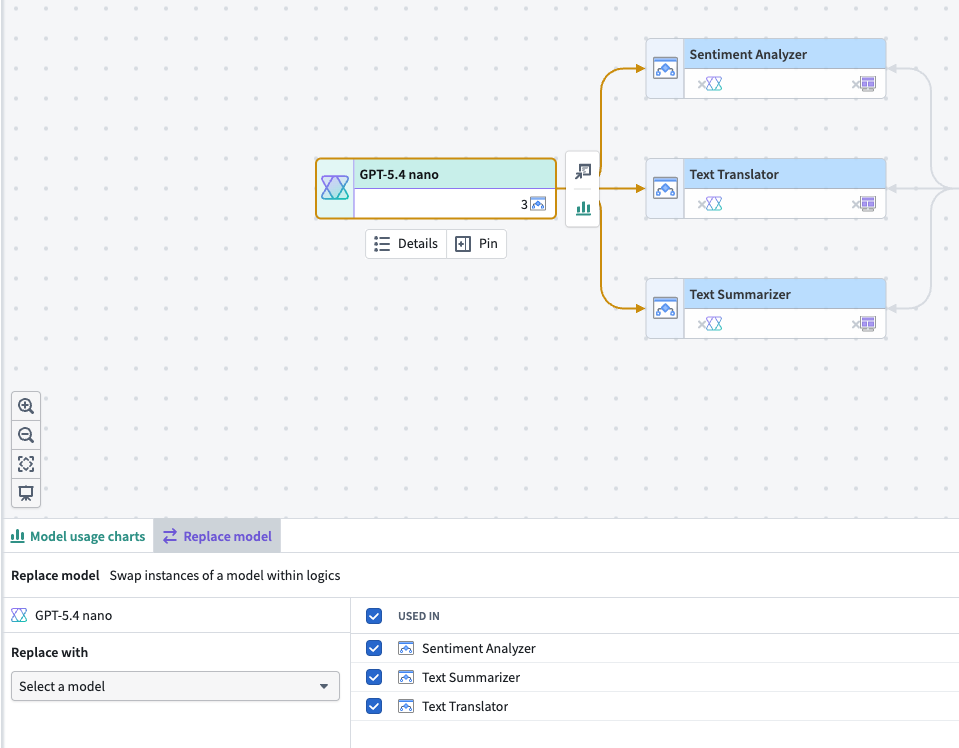
Choose an existing language model node on a Workflow Lineage graph to swap models in multiple AIP Logic functions.
Follow the instructions in the Workflow Lineage documentation to bulk replace models backing your AIP Logic functions with any model provided by Palantir. Support for bulk model replacement with additional resource types beyond AIP Logic functions is in development.
To migrate off deprecated models, review the model deprecation guide.
Your feedback matters
We want to hear about your experience using the Replace model feature in Workflow Lineage. Share your thoughts with Palantir Support channels or on our Developer Community ↗ using the workflow-lineage tag ↗.
GPT-5.5 is now available in AIP
Date published: 2026-05-05
GPT-5.5 is now available from Azure on US and EU georestricted, and non-georestricted enrollments. The model is available from OpenAI on US georestricted and non-georestricted enrollments.
Model overview
GPT-5.5 is OpenAI's newest model, excelling at agentic coding, debugging, research, tool calling, and a wide range of other tasks. For more information, review OpenAI's model documentation ↗.
- Context window: 1,050,000 tokens
- Knowledge cutoff: December 1, 2025
- Modalities: Text, image
- Capabilities: Reasoning tokens, function calling, structured outputs
Getting started
To use this model:
- Confirm that your enrollment administrator has enabled the relevant model family.
- Review token costs and pricing.
- See the complete list of all available models in AIP.
Your feedback matters
We want to hear about your experiences using language models in the Palantir platform and welcome your feedback. Share your thoughts with Palantir Support channels or on our Developer Community ↗ using the language-model-service tag ↗.
Global Branching is generally available May 18: branch, test, and merge across applications
Date published: 2026-05-05
Starting the week of May 18, 2026, Global Branching (formerly Foundry Branching) will be generally available to all users on all enrollments. Global Branching provides a shared workflow to make changes across multiple applications on a single branch, test those changes end-to-end without disrupting production workflows, and merge them back into Main. Consult the Global Branching documentation to learn more.
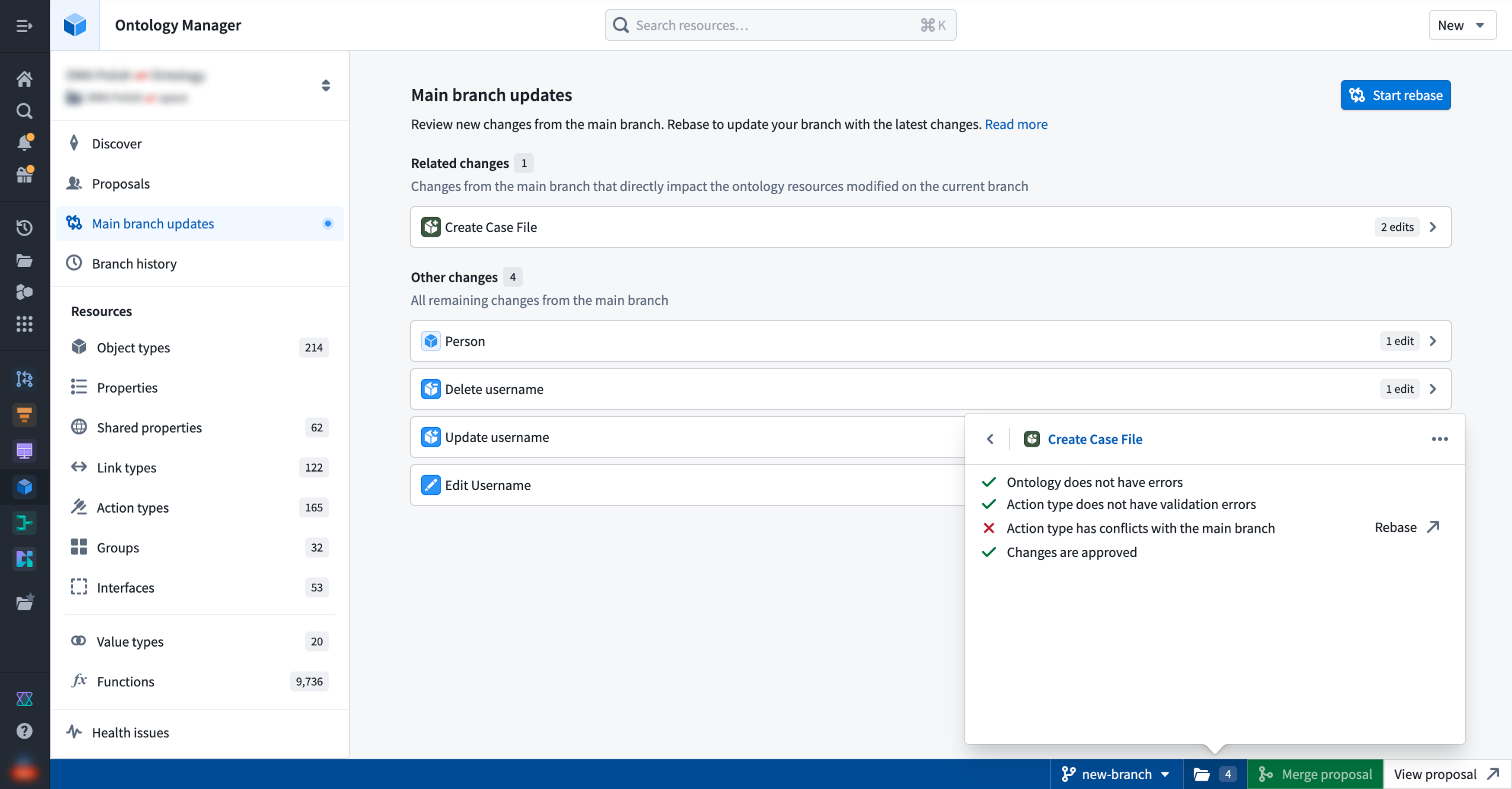
Reviewing main branch updates and resource check status in Ontology Manager.
Supported applications and workflows
Global Branching is available for transforms and TypeScript v1 functions repositories, Pipeline Builder, the Ontology, Workshop, AIP Logic, and Object Views.
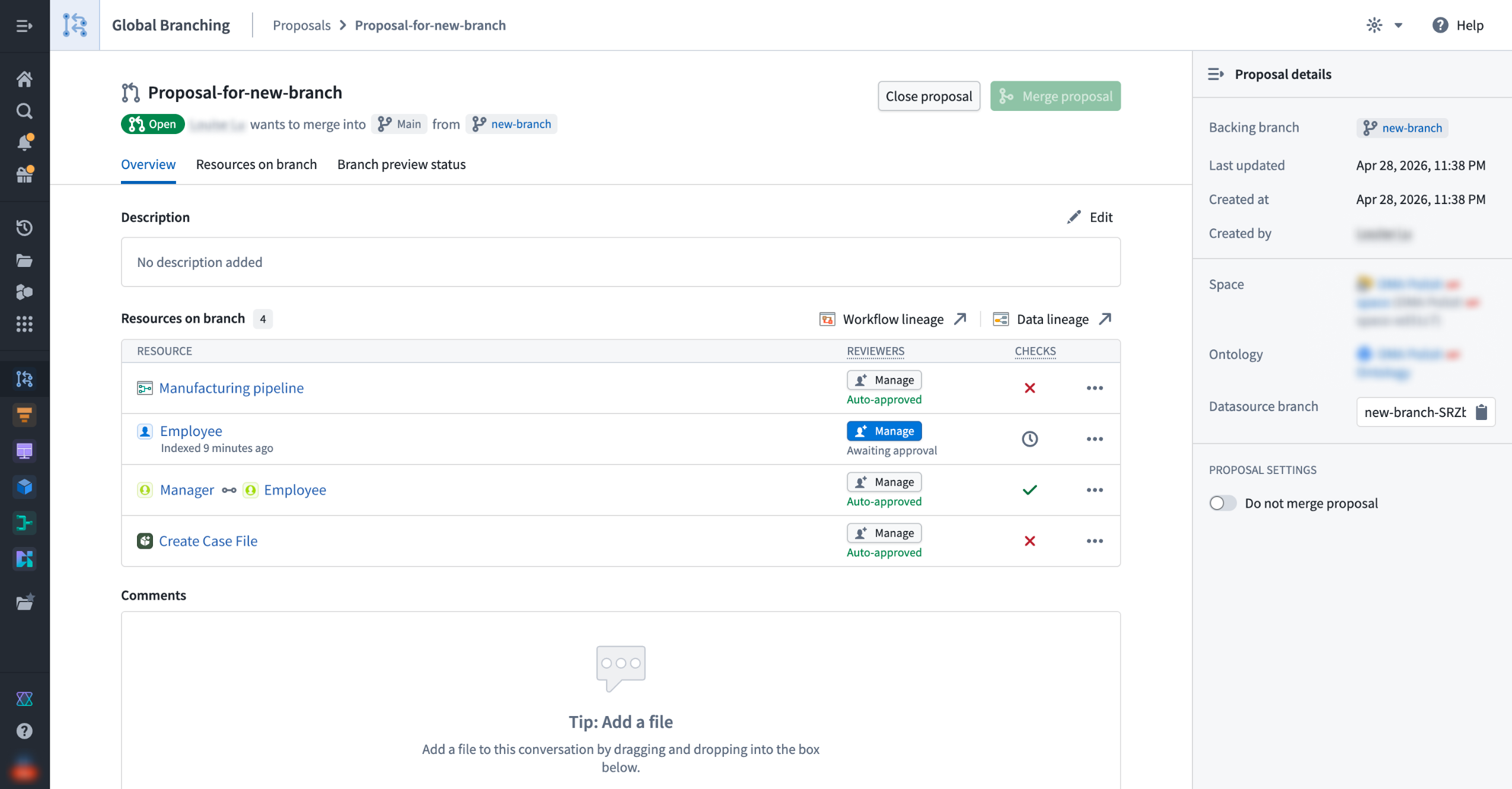
A proposal overview showing resources, approval status, and the "Do not merge proposal" setting.
For these applications, the following workflows are supported:
- Branch and modify resources: Create or access a branch, and make changes to resources without affecting the
Mainbranch. - Remove resources: Remove a resource from a branch to reset it to its state on the
Mainbranch. - Include new updates from
Mainand resolve conflicts: Rebase your branched resource to update it with the latest changes from theMainbranch. If conflicts exist, you will be redirected to the appropriate application to resolve them. - Protect resources: Resource owners can protect resources so that changes must go through a branch and receive approval before merging.
- Define approval policies: Project owners define approval policies specifying eligible reviewers, required approvals, and whether contributors can self-approve. For Code Repositories and Pipeline Builder, you define policies within the resource itself.
- View branched resources: Use Data Lineage to inspect the branched state of your resources and trace how changes propagate.
- Clear all checks and merge changes: When a proposal is created, the system runs checks on each resource to surface issues such as conflicts or missing approvals. Once all checks pass, you can merge your proposal.
Updated security model and branch lifecycle
The security model updates ship with Global Branching GA. Branch lifecycle changes follow in the coming weeks.
- Merge permissions (available with GA): Merging no longer requires a dedicated branch role. Any user who can view a proposal can merge it once all approvals and checks pass. A new Do not merge setting lets branch owners block merges until they are ready.
- Branch lifecycle (coming in the next few weeks): When a branch becomes inactive, the system will de-index its ontology resources and eventually delete its data; all logic will be preserved. Branches will no longer close automatically and instead, you will be able to archive and restore them manually at any time.
Restricted Views, Automate, and what's ahead
Restricted Views and Automate are now available in beta. The core branching workflow is functional, but some GA-level features — such as approval integration and removing a resource from a branch — are not yet available. Contact Palantir Support to enable, and consult the application-specific documentation to learn more about each application's current scope.
Beyond these two applications, we are actively working to expand branching support across the Palantir platform, starting with OSDK, TypeScript v2 and Python functions, and Developer Console.
Your feedback matters
Have thoughts on Global Branching? Let us know through Palantir Support channels and our Developer Community using the global-branching tag ↗.
中文翻译
公告
提醒: 订阅 Foundry 新闻通讯(Newsletter),即可直接在收件箱中接收关于新产品、功能及平台改进的摘要。有关如何订阅的更多信息,请参阅 Foundry 新闻通讯与产品反馈渠道公告。
欢迎在我们的 开发者社区论坛 ↗ 分享您对这些公告的看法。
AIP 令牌使用数据现可作为内部数据集导出
发布日期:2026-05-28
注册管理员(Enrollment administrators)现在可以导出新的 AIP 令牌使用(AIP Token Usage) 数据集,以分析其注册环境中的 LLM 成本驱动因素。该数据集按模型和资源提供了令牌消耗的每日细分,并包含相应的计算和货币使用量。
输入令牌(Input tokens)、输出令牌(Output tokens)以及缓存读取和写入(Cache reads and writes)作为单独的指标进行报告,因此管理员可以将成本归因于特定的消耗模式。导出后,该数据集可与 Contour 等 Foundry 工具配合使用进行深入调查,也可与 Workshop 配合使用构建自定义仪表板。
控制面板内部数据集导出部分中的 AIP 令牌使用数据集。
要导出该数据集,请导航至 控制面板(Control Panel) > 内部数据集导出(Internal dataset export),然后在资源管理(Resource Management)组下选择 AIP 令牌使用(AIP Token Usage)。导出的数据集会自动更新,以包含您注册环境的新数据。
拥有 资源管理员(Resource Management Administrator) 角色的用户可以导出此数据集。与其他内部数据集导出一样,导出后请适当设置导出数据集的权限。
有关更多信息,请参阅内部数据集导出和使用 AIP 的计算用量文档。
在数据沿袭中处理全局分支
发布日期:2026-05-26
您现在可以直接从数据沿袭(Data Lineage)中查看和操作全局分支(global branch)上的实体。在分支选择器的新 全局分支(Global branches) 选项卡中选择一个分支,即可查看图形节点(包括数据集和本体论实体)以及它们之间链接的分支特定详细信息。来自该分支的数据将反映在图形、搜索、节点详情和着色中。
主要功能
- 页面标题和任务栏中均设有分支选择器: 使用下拉菜单在图形节点的全局分支或数据集分支之间切换。
分支选择器中的全局分支选项卡,已选择 Global Branching Demo。
数据沿袭底部的分支任务栏也设有分支选择器。选择器显示活动分支,任务栏本身提供对 创建提案(Create proposal) 和 查看分支(View branch) 操作的快速访问。
- 分支感知搜索(Branch-aware search) 可显示仅存在于您分支上的实体
图形、搜索结果、节点详情和着色反映了所选分支的数据,便于参考。
- 一键添加到图形。 搜索面板中的一条消息允许您通过一次操作将分支上所有已修改的实体添加到图形中。
使用搜索面板中的添加选项,将分支上所有已修改的实体添加到图形中。
- 保存的图形中保留分支上下文。 保存的图形会为您和打开它们的协作者保留分支上下文。请注意,虽然数据沿袭显示来自分支的数据,但图形本身不是分支资源,因此无法合并回
main。
您的反馈很重要
我们欢迎您对数据沿袭提出反馈。请通过 Palantir 支持渠道或使用 data-lineage 标签 ↗ 在我们的 开发者社区 ↗ 上分享您的想法。
将独立的 OAuth 客户端迁移到完整的开发者控制台应用程序
发布日期:2026-05-26
自 2026 年 1 月起,在开发者控制台(Developer Console)中创建独立 OAuth 客户端(standalone OAuth clients)的功能已被移除。现有的独立 OAuth 客户端现在可以迁移到开发者控制台应用程序(Developer Console applications),后者包含以下功能:
- 本体论和平台 SDK (Ontology and Platform SDKs)
- 网站托管 (Website hosting)
- 应用程序限制 (Application restrictions)
- DevOps 支持 (DevOps support)
- 指标 (Metrics)
如何迁移独立 OAuth 客户端
- 打开您现有的独立 OAuth 客户端。
- 选择 迁移到开发者控制台应用程序(Migrate to Developer Console application)。
- 在迁移向导中选择一个位置和(如适用)最高分类。
- 审查开发者控制台应用程序的用户权限。
- 提交(Submit) 迁移。
迁移后,新创建的应用程序将出现在所选位置。您现在可以像操作任何其他开发者控制台应用程序一样对该应用程序执行操作。使用您客户端的现有工作流不受影响,不会中断。
位于屏幕右上角的旧版独立 OAuth 客户端的迁移提示。
步骤 1:为您的开发者控制台应用程序选择位置。
步骤 2:审查访问开发者控制台应用程序资源的权限。
您的反馈很重要
我们想了解您使用开发者控制台的体验,并欢迎您的反馈。请通过 Palantir 支持渠道或我们的 开发者社区 ↗ 分享您的想法。
使用新的自带模型实现而非函数接口在 AIP 中注册模型
发布日期:2026-05-21
一种新的自带模型(BYOM)实现(也称为注册模型(registered models))现已全面可用,它提供了针对最常见和标准模型提供商 API 优化的简化集成。通过注册模型,您可以将自己的 LLM 或账户连接到 AIP,并跨 Palantir 开发者产品(如 AI FDE、AIP Analyst、AIP Chatbot Studio、AIP Logic、Workshop 等)使用。与使用函数接口(function interfaces)不同,您在控制面板(Control Panel)中注册一次模型,它就能原生地流经 AIP。注册后,该模型会出现在跨应用程序的模型选择器中,并遵循与 Palantir 提供的模型相同的速率限制、权限和可观测性。
有什么新功能?
新的实现取代了先前注册大语言模型(LLM)的函数接口方法。与旧的函数接口方法相比,注册模型具有以下特点:
- 更易于设置: 注册管理员在控制面板中注册一次模型,无需编写和维护 TypeScript 函数或 webhook。
- 支持更多 AIP 应用程序: 新的注册模型 BYOM 实现支持多种 AIP 和 Foundry 应用程序,并在控制面板和资源管理中提供基础设施工具。
- 支持更多模型能力: 注册模型支持工具调用(Tool calling)、推理(Reasoning)、结构化输出(Structured outputs)、视觉输入(Vision input)和流式传输(Streaming)。
- 与 AIP 基础设施集成: 在注册、项目和用户级别查看 LLM 速率限制;在资源管理(Resource Management)应用程序中查看使用可观测性;在控制面板中管理权限和启用;并通过跨 AIP 应用程序的共享模型选择器访问您的模型。
在控制面板的 AIP 设置(AIP settings) 扩展中配置对您注册模型的访问权限。
何时应使用注册模型?
基于 LLM 支持和可行性,我们通常建议使用来自模型提供商(如 Anthropic 或 OpenAI)的 Palantir 提供模型,或由 Palantir 自托管的开源模型(如 Llama 模型)。但是,您可能更倾向于将自有模型或账户引入 AIP。我们建议仅在因法律和合规原因无法使用 Palantir 提供模型,或者您拥有自己的微调或其他独特 LLM 并希望在 AIP 中利用它时,才使用注册模型。
旧的函数接口方法仍可用于现有集成,但不再推荐用于新的用例。如果您有注册模型无法很好解决的用例,请联系 Palantir 支持。
了解更多
请查阅注册模型文档以开始使用。
来自 VertexAI 的 Gemini 3.5 Flash 现已在 AIP 中可用于商业、IL2 和 IL4 注册环境
发布日期:2026-05-21
Gemini 3.5 Flash 现已在启用了 VertexAI 的美国及欧盟非地理限制区域的商业注册环境,以及 IL2 和 IL4 注册环境中可用。
模型概述
Gemini 3.5 Flash 是谷歌迄今为止最强的智能体和编码模型,在各种编码和智能体基准测试中均优于 Gemini 3.1 Pro,同时速度和效率更高。
有关更多信息,请查阅谷歌的模型文档 ↗。
开始使用
要使用这些模型:
- 确认您的注册管理员已启用相关模型系列。
- 查看令牌成本和定价。
- 查看 AIP 中所有可用模型的完整列表。
您的反馈很重要
我们想了解您在 Palantir 平台上使用语言模型的体验,并欢迎您的反馈。请通过 Palantir 支持渠道或使用 language-model-service 标签 ↗ 在我们的 开发者社区 ↗ 上分享您的想法。
在 MCP Hub 中发现和管理本体论 MCP 服务器
发布日期:2026-05-21
本体论 MCP (OMCP) 服务器现在可以通过 MCP Hub 发现,为您提供一个集中查看和管理跨注册环境配置的 MCP 服务器的位置。
本体论 MCP 将您的开发者控制台应用程序转变为 MCP 服务器。外部 AI 代理作为 MCP 客户端连接,可以读取对象类型、执行预定义的操作类型以及运行查询函数,其范围限定为您配置的权限。它使用模型上下文协议(Model Context Protocol) ↗,这是一个用于将 AI 系统连接到外部工具和数据源开放标准。
在 MCP Hub 中探索您的服务器
打开 MCP Hub 并导航至 本体论 MCP (Ontology MCP) 选项卡,查看您注册环境中配置的所有 MCP 服务器列表。选择任意行以查看该服务器的完整配置详情,包括其公开的工具和本体论资源。从那里,您可以直接跳转到相应的开发者控制台应用程序以添加或修改资源。
Foundry 中的 MCP Hub 应用程序,显示 MCP 服务器列表。
数据治理
启用本体论 MCP 会使您的本体论资源对外部 MCP 客户端可用。在启用之前,请验证这符合您组织的数据治理和安全策略。使用应用程序作用域(application scopes)和权限(permissions)来限制公开的资源。
后续计划
- 详细的工具视图:直接在 MCP Hub 中,按服务器细分每个公开的工具。
- 工具配置:启用或禁用单个工具,并自定义工具描述和注释,无需接触应用程序代码。
- 专业代码代理支持:无需开发者控制台应用程序即可使用本体论 MCP,将 MCP 服务器能力直接带给代码优先的代理工作流。
开始使用
要启用本体论 MCP 并连接您的第一个代理,请查阅本体论 MCP 文档。
我们期待您的反馈
您在 Foundry 中使用本体论 MCP 的体验如何?请通过 Palantir 支持或开发者社区 ↗分享您的想法。
CBAC 注册环境现在可以将本体论资源存储在 Compass 项目中
发布日期:2026-05-21
基于分类的访问控制(CBAC) 现在适用于本体论资源,允许您通过 Compass(Palantir 平台的文件系统) 配置谁可以查看、编辑和管理它们。要使用此功能,必须首先由本体论所有者启用。
启用该功能后,用户必须将本体论资源保存到项目中。所选位置决定了查看、编辑和管理权限。这种基于项目的权限方法取代了先前的本体论权限模型:本体论角色和数据源派生权限。主要优势包括:
- 统一的权限模型: 本体论资源现在使用与其他资源类型相同的权限系统。
- 批量管理: 在项目或文件夹级别设置权限,以一次控制对多个资源的访问。
- 权限可解释性: 安全(Security) 选项卡显示查看和编辑对象类型所需的权限,以及查看实例或运行操作所需的权限。
- 额外的隐私控制: 通过应用标记或将敏感本体论资源放置在用户缺乏角色授权的项目中来隐藏它们。
- Compass 整理原语: 用户可以使用投资组合、标签来组织本体论资源,并使用角色授权或标记向用户隐藏不相关的资源。
查看对象的权限继续需要对对象类型和数据源拥有权限。迁移到项目不会改变谁有权访问数据源。
在启用了 CBAC 的项目中使用本体论时,用户必须在创建文件时指定文件分类。该分类必须等于或低于最高允许分类。如果未指定分类,对象类型物化将失败。
此功能对新本体论默认启用。对于现有本体论,需要手动启用,并且现有本体论资源将需要迁移。
Compass 项目中的本体论资源,访问要求在项目级别管理。
我们期待您的反馈
在我们继续开发 Compass 的过程中,我们想了解您的体验并欢迎您的反馈。请通过 Palantir 支持渠道或使用 compass ↗ 标签在我们的 开发者社区 ↗ 上分享您的想法。
将继承的角色授权应用于空间中的所有项目
发布日期:2026-05-21
空间管理员现在可以配置角色授权,这些授权将被空间中的每个项目继承。这确保了关键角色(例如管理员组的拥有者权限或所有用户的发现访问权限)始终存在于空间中的每个项目上。
项目模板(Project templates) 帮助您一致地设置项目,但项目设置可能在创建后被更改。如果原始所有者离开公司,这可能导致项目成为孤儿,或者当标准访问被意外移除时导致配置错误。继承的角色授权通过保证某些角色授权始终存在来防止这些缺口。
继承的角色授权在控制面板中按空间配置,适用于常规项目和锁定的 Marketplace 项目,它们使用不同的角色集。每种项目类型都有其自己的选择器,以便管理员授予适当的角色。
控制面板中的 空间管理(Space management) 页面,您可以在此查看授予空间的角色。
访问项目或其资源需要同时拥有角色授权和适当的标记。继承的角色授权不会绕过标记要求。
继承的角色授权会出现在 Compass 侧面板的新 继承的角色授权(Inherited role grants) 部分下。
Compass 中的 继承的角色授权(Inherited role grants) 面板。
要开始使用继承的角色授权,请查阅空间管理文档。
升级 Pipeline Builder 中的从 PDF 提取文本面板以提高性能
发布日期:2026-05-19
Pipeline Builder 现在包含基于 PyMuPDF 构建的 v2 版本的从 PDF 提取文本(Extract Text from PDF)面板。v2 面板用单一的基于 PyMuPDF 的提取路径取代了 v1 面板的 Tesseract 和 Docling 后端。在与 v1 Tesseract 和 Docling 管道的内部基准测试中,PyMuPDF 在电子(嵌入式文本)PDF 上产生了更高的提取精度,并且处理文档速度大约快 10 倍。v2 面板还能处理比 v1 更大的批次大小,v1 受限于 Docling 支持的布局模型。
Pipeline Builder 中的从 PDF 提取文本转换。
有什么新功能?
- 灵活的输出格式: 除了纯文本,还可以将提取的内容导出为 Markdown 或 HTML,使其比以往更容易与下游 LLM 应用程序集成。
- 自动 PDF 类型检测: 系统智能地为每个文档选择最佳的提取方法,最大化准确性和速度。
- 文档理解: 受益于由混合图神经网络(GNN)方法(PyMuPDF-layout)驱动的先进布局分析,能够精确识别文档元素——标题、段落、表格和图形。
- CPU 执行: 所有提取方法——原始文本和 OCR——现在都由 PyMuPDF 处理,确保一致的结果和更高的性能,同时高效地在 CPU 上运行。
如何升级
- 启用功能标志 在 Pipeline Builder 中启用提取文本 v2 表达式(Enable extract text v2 expressions in Pipeline Builder) 以默认开始创建 v2 面板。
- 打开 警告(Warnings) 选项卡(底部面板)以列出您管道中每个 v1 的从 PDF 提取文本面板。
- 导航到每个面板并选择 升级(Upgrade)。
- 保存并部署(Save and deploy) 您的管道。
分享您的反馈
要分享对此功能的反馈,请通过我们的 Palantir 支持渠道联系我们,或使用 pipeline-builder 标签 ↗ 在我们的 开发者社区 中加入讨论。
在选定的 Workshop 小部件中查看属性安全标记
发布日期:2026-05-19
属性安全标记(Property security markings)现已在 Foundry 注册环境中全面可用,当您在以下 Workshop 小部件中查看或选择属性时,它们允许您显示通过对象和属性安全策略配置的标记(markings)和基于分类的访问控制(CBAC)值:
属性安全标记严格用于信息目的,呈现为紧凑的灰色药丸形状,悬停或选择时会展开窗口视图。
悬停在属性安全标记的灰色药丸上,可查看属性值特定标记和 CBAC 值的详细视图。
属性安全标记抽象了查看属性数据所需要求的某些复杂性。例如,在一个具有 Mock Secret CBAC 标记的对象中,一个标记为 Mock Unclassified CBAC 标记的属性将在对象视图中显示为 Mock Unclassified。但是,用户必须拥有 Mock Secret CBAC 标记的访问权限才能查看该属性的数据。
在 Workshop 中启用属性安全标记
在 Workshop 中配置属性列表、对象列表或对象表格小部件时,在 小部件设置(Widget setup) 选项卡中切换 显示安全标记(Show security markings)。使用以下选项配置属性安全标记的显示设置:
- 响应式(Responsive): 当空间允许时显示完整的安全标记,否则显示截断的标签以适应可用空间。Foundry 在悬停时在工具提示中显示完整标记。此选项不适用于对象表格小部件。
- 完整标签(Full Tag): 始终显示完整的安全标记,在宽度较小时自动换行。
- 仅图标(Icon Only): 仅显示标记图标,仅在悬停时显示完整的安全标记。
在 Workshop 中配置属性列表、对象列表或对象表格小部件时,在 小部件设置(Widget setup) 选项卡中切换 显示安全标记(Show security markings)。
Foundry 会根据其安全标记验证每个属性,以确保所有具有适当访问权限的用户都能查看其值,即使您在其任何支持的小部件中关闭了药丸的可见性。
后续计划
展望未来,查看属性安全标记的能力将扩展到更多 Workshop 小部件和其他 Foundry 应用程序。
来自 xAI 的 Grok 4.3 现已在 AIP 中可用
发布日期:2026-05-14
Grok 4.3 现已在启用了 xAI 的美国和其他支持区域的注册环境中可用。
模型概述
xAI 迄今为止最快、最智能的模型,Grok-4.3 在智能体工具调用和指令遵循方面表现出色。该模型在涉及判例法和公司金融的用例中特别有效。支持低、中、高推理努力级别和一百万个令牌的上下文窗口。
有关更多信息,请查阅 xAI 的模型文档 ↗。
开始使用
要使用这些模型:
- 确认您的注册管理员已启用 xAI 模型系列。
- 查看令牌成本和定价。
- 查看 AIP 中所有可用模型的完整列表。
您的反馈很重要
我们想了解您在 Palantir 平台上使用语言模型的体验,并欢迎您的反馈。请通过 Palantir 支持渠道或使用 language-model-service 标签 ↗ 在我们的 开发者社区 ↗ 上分享您的想法。
在 Python 转换中使用参数并通过操作运行计划
发布日期:2026-05-14
参数化 Python 转换(Python transforms) 的计划以及在操作类型上配置计划规则(schedule rule on an action type) 的功能现已进入测试版。
使用参数化(parameterization) 在您的 Python 转换中声明类型参数,其值在计划(schedule)上设置。
在标准模式(standard mode)中,计划直接设置值,支持诸如增量转换的定期压缩等用例。在并行化模式(parallelized mode)中,计划管理许多独立的运行设置,每个设置都有自己的参数值,支持通过并行运行转换来实现大规模场景模拟等用例。
创建参数化计划并为目标数据集转换上声明的参数选择值。
通过操作类型上的计划规则(schedule rule on action types),您可以在应用操作时触发对引用计划的构建,将操作的参数值转发到底层转换。这使得能够在运营应用程序(operational applications)中直接重新计算数据集,或作为 Automate 中操作效果的一部分。
在本体论管理器中为操作类型配置计划规则。
分享您的反馈
我们想了解您在 Palantir 平台上使用计划和参数化转换的体验,并欢迎您的反馈。请通过 Palantir 支持渠道或使用 scheduler ↗ 标签在我们的 开发者社区 ↗ 上分享您的想法。
来自 Anthropic 的 Claude Opus 4.7、Opus 4.6 和 Sonnet 4.6 现已在商业美国地理限制注册环境中可用
发布日期:2026-05-12
Claude Opus 4.7、Claude Opus 4.6 和 Claude Sonnet 4.6 现可通过 Anthropic Direct 在商业美国地理限制注册环境中使用。这是在先前通过 AWS Bedrock 和 Google Vertex AI 为注册环境提供的模型之外的补充。
除了 Bedrock 和 Vertex AI 之外,启用 Anthropic Direct 的好处包括:
- 更高容量: 每个启用的模型提供商都会获得额外的注册容量,从而增加注册环境的总可用容量。
- 更高稳定性: 如果一个提供商遇到中断,流量可以继续通过其他已启用的提供商流动,从而提高整体可靠性。
- 更快访问新功能: Anthropic Direct 通常比托管提供商更早收到新的模型能力(例如扩展思考改进和更新的工具使用),因此启用了 Anthropic Direct 的注册环境将首先获得这些增强功能。
开始使用
要使用这些模型:
- 确认您的注册管理员已启用相关模型系列。
- 查看令牌成本和定价。
- 查看 AIP 中所有可用模型的完整列表。
您的反馈很重要
我们想了解您在 Palantir 平台上使用语言模型的体验,并欢迎您的反馈。请通过 Palantir 支持渠道或使用 language-model-service 标签 ↗ 在我们的 开发者社区 ↗ 上分享您的想法。
更多 Gemini 和 Claude 模型现可通过 Google Vertex 在 IL2 和 IL4 注册环境中使用
发布日期:2026-05-12
来自 Google Gemini 和 Anthropic Claude 模型系列的更多模型现在可以通过 Google Vertex 从 IL2 和 IL4 注册环境中的 AIP 应用程序访问。
前沿模型
在您的注册管理员启用每个模型系列后,您可以通过 Google Vertex 访问以下前沿模型:
- Google Gemini
- Gemini 3.1 Pro ↗
- Gemini 3 Flash ↗
- Anthropic Claude
- Claude Opus 4.7 ↗
- Claude Sonnet 4.6 ↗
- Claude Haiku 4.5 ↗
旧版模型
此外,在您的注册管理员启用每个模型系列后,您可以通过 Google Vertex 访问以下旧版模型:
- Google Gemini
- Gemini 2.5 Pro ↗
- Gemini 2.5 Flash ↗
- Gemini 2.5 Flash Lite ↗
- Anthropic Claude
- Claude Opus 4.6 ↗
开始使用
要使用这些模型:
- 确认您的注册管理员已启用相关模型系列。
- 查看令牌成本和定价。
- 查看 AIP 中所有可用模型的完整列表。
您的反馈很重要
我们想了解您在 Palantir 平台上使用语言模型的体验,并欢迎您的反馈。请通过 Palantir 支持渠道或使用 language-model-service 标签 ↗ 在我们的 开发者社区 ↗ 上分享您的想法。
使用 Palantir 的 @osdk/react 库开发 OSDK React 应用程序
发布日期:2026-05-12
您现在可以使用 Palantir 的 @osdk/react 库 ↗ 以惯用的、React 优先的方式开发 OSDK React 应用程序。该库自 5 月 11 日那周起全面可用,提供了 React hooks 和内置性能优化,例如全局缓存、乐观更新等,使构建与 Foundry 交互的前端 OSDK 应用程序更加容易。
库的优势
当您的应用程序主要通过 OSDK 消费数据时,使用 @osdk/react 来简化您在本体论中查询数据和执行操作的方式。该库提供以下优势来增强您的开发体验:
- 规范化对象缓存: 该库将每个对象存储一次。当您调用操作编辑一个对象时,引用该对象的每个列表、链接和视图都会自动更新。
- 操作驱动的失效: 操作响应指定了哪些对象被添加、修改或删除。列表会根据其
where子句重新评估,无需手动失效。 - 带自动回滚的乐观更新: 在创建、编辑或删除对象后,服务器响应之前立即更新本地缓存。乐观更改应用于临时存储层,如果操作失败,则会自动回滚。
- 跨组件去重: 运行相同查询的两个组件共享一个网络请求和一个缓存条目。
为了提高开发简洁性,该库还为每个本体论原语提供了惯用的 React hooks、可与 OSDK React hooks 一起使用的平台 API,以及通过 AGENTS.md 文件为 LLM 提供的默认指导。
[了解有关通过 @osdk/react