Announcements(公告)
REMINDER: Sign up for the Foundry Newsletter to receive a summary of new products, features, and improvements across the platform directly to your inbox. For more information on how to subscribe, see the Foundry Newsletter and Product Feedback channels announcement.
Share your thoughts about these announcements in our Developer Community Forum ↗.
Anthropic Claude models are now available through Azure in AIP
Date published: 2026-06-25
We are excited to announce that Anthropic Claude models served through Azure are now available in AIP. These models provide strong reasoning, coding, agentic workflow, and enterprise AI capabilities across a range of performance and efficiency tiers.
The following Claude models are now available through Azure:
- Claude Opus 4.8 ↗
- Claude Opus 4.7 ↗
- Claude Opus 4.6 ↗
- Claude Sonnet 4.6 ↗
- Claude Opus 4.5 ↗
- Claude Sonnet 4.5 ↗
- Claude Haiku 4.5 ↗
Enabling Claude models through Azure provides the following benefits:
- Capacity: Claude models in AIP will gain capacity when this family is enabled.
- Stability: Requests to Claude models can be routed through Azure when other providers experience outages.
Note that this model family is currently only available for commercial, non-georestricted enrollments.
Getting started
To use Anthropic Claude models through Azure:
- Confirm that your enrollment administrator has enabled the "Anthropic Claude" through "Microsoft Azure" Model Family.
- Review token costs and pricing.
- See the complete list of all models available in AIP.
Your feedback matters
We want to hear about your experiences using language models in the Palantir platform and welcome your feedback. Share your thoughts with Palantir Support channels or on our Developer Community ↗ using the language-model-service ↗ tag.
Palantir MCP is now generally available
Date published: 2026-06-25
Beginning the week of June 22, Palantir MCP will be available across all Foundry enrollments. Palantir MCP enables AI IDEs and AI agents to autonomously design, build, edit, and review end-to-end applications within the Palantir platform. An implementation of Model Context Protocol ↗, Palantir MCP supports everything from data integration to ontology configuration and application development, all performed within the platform.
Key capabilities of Palantir MCP
Vibe code production applications: Enables developers to use AI to produce production-grade applications on top of the ontology while following Palantir's security best practices.
Data integration: Powers Python transforms generation by enabling AI IDEs to get context from Compass, dataset schemas, and execute SQL commands entirely locally.
Ontology configuration: Allows developers to configure their ontology locally without leaving the IDE.
Application development: Integrates with your OSDK to enable the development of TypeScript applications on top of your ontology.
Start using Palantir MCP
The Palantir MCP documentation contains installation steps, a getting started guide, and example MCP workflows. We strongly encourage all local developers to install and regularly update the Palantir MCP to take advantage of the latest changes and tool releases.
Your feedback matters
Have thoughts on Palantir MCP? Let us know through Palantir Support channels and our Developer Community ↗ using the foundry-``mcp tag ↗.
Ontology MCP is now generally available
Date published: 2026-06-25
Ontology MCP is now generally available. Beginning the week of June 16, Ontology MCP will be available across all Foundry enrollments.
AI agent frameworks are increasingly built around the Model Context Protocol (MCP) as a standard interface for connecting agents to external data and actions. Ontology MCP exposes your application's existing Ontology resources — object types, action types, and functions — as MCP tools, allowing any MCP-compatible agent or framework to query Foundry data and trigger workflows without additional integration code.
Getting started with Ontology MCP
You can enable or disable Ontology MCP on the MCP page in Developer Console. From the MCP tab, you can browse all enabled Ontology MCP servers.
Ontology MCP authentication uses Foundry's standard OAuth 2.0 flow, so every tool call runs under the authenticated user's existing Foundry permissions.
To get started, navigate to your application in Developer Console, open the MCP page, and enable the resources you want to expose. See the Ontology MCP documentation for a full overview, getting started guide, and agent configuration examples.
Your feedback matters
Have thoughts on Ontology MCP? Let us know through Palantir Support channels and our Developer Community ↗ using the foundry-mcp tag ↗.
Python transform editing in Code Repositories is now legacy
Date published: 2026-06-23
Editing Python transforms in Code Repositories is now in the legacy phase of development. VS Code workspaces are the recommended environment for editing Python transforms, offering AI-powered coding assistance, full dataset preview, an optimized language server, and an integrated terminal.
The Code Repositories editor will remain supported and available, with future feature development focused on VS Code workspaces. Code Repositories remains the recommended editor for other repository types, including Java and SQL transforms.
If VS Code workspaces are unavailable on your enrollment, Code Repositories remains the recommended way to author Python transforms.
Getting started
To get started with VS Code workspaces for Python transforms, we recommend reviewing the following documentation:
- VS Code workspaces: Overview
- Reference: VS Code workspaces vs. Code Repositories
- Benefits of VS Code workspaces
Develop on global branches in VS Code workspaces
Date published: 2026-06-23
You can now create, check out, and develop on global branches directly in VS Code workspaces and in local VS Code for Python transforms repositories and TypeScript v1 function repositories.
The tabbed branch selector in the Palantir extension for Visual Studio Code lets you create and check out both branch types from one place in the VS Code sidebar. You can also create or check out a branch from the Command Palette or the branch taskbar, which appears as a blue bar at the bottom of the editor in VS Code workspaces.
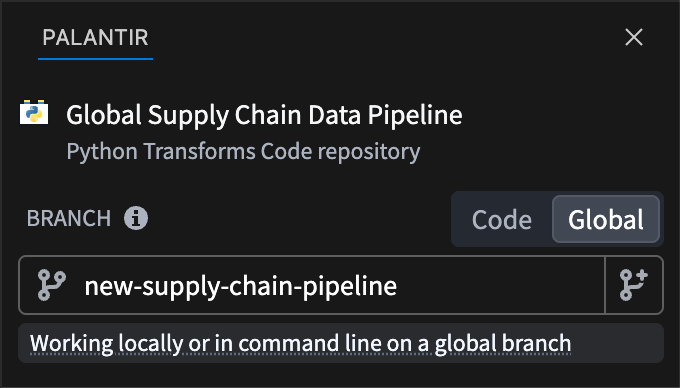
The tabbed branch selector in the Palantir panel of the VS Code sidebar, with the global branch tab selected.
Once you are on a global branch, your development tools run against it. For Python transforms, the preview and build panels run against the branch you have checked out. For TypeScript v1 functions, all development panels operate against the branch.
Learn more about Global Branching in VS Code workspaces, and view a complete list of resource types that support Global Branching.
Your feedback matters
We want to hear about your experiences with Foundry Branching in the Palantir platform and welcome your feedback. Share your thoughts with Palantir Support channels or on our Developer Community ↗ using the global-branching ↗ and vscode ↗ tags.
Introducing new lifecycle features for Global Branches
Date published: 2026-06-23
Global branches can now be in one of four states: active, inactive, merged, and archived (previously named "closed").
- Active: an open branch you are actively working on.
- Inactive: an open branch with no recent activity.
- Merged: a branch whose changes have been integrated into a target branch.
- Archived: a branch you have manually taken out of use. Replaces the former "closed" state.
Two branching behaviors changed with this feature release. Branches are no longer closed automatically; a branch with no recent activity now becomes inactive instead. You can also restore branches that were archived after this release, returning them to an active state.
Inactive branches
A branch becomes inactive automatically after a period with no activity. In this state, the platform de-indexes ontology resources and deletes data after a set period. Builds of resources on an inactive branch fail immediately. When a branch becomes inactive, you receive an email notification and an in-platform notification. You can reactivate the branch to continue working.
Archived branches
You archive branches manually; archiving is always manual. When you archive a branch, you receive an email notification and an in-platform notification. De-indexing, build failure, and data deletion work the same way as on inactive branches. The platform retains metadata, such as previously modified resources, so you can restore archived branches. Archived branches don't appear in the branch selector. You can open and restore them in the Global Branching application.
Retention policy
The time periods for data deletion and branch inactivity can be modified in Control Panel, under Global Branch retention policy.
- Branch inactivity: the period an open branch can go without activity before it's marked inactive. Default: 35 days.
- Branch data deletion: the period data that exists only on inactive or archived branches is kept before it's deleted. Default: 7 days.
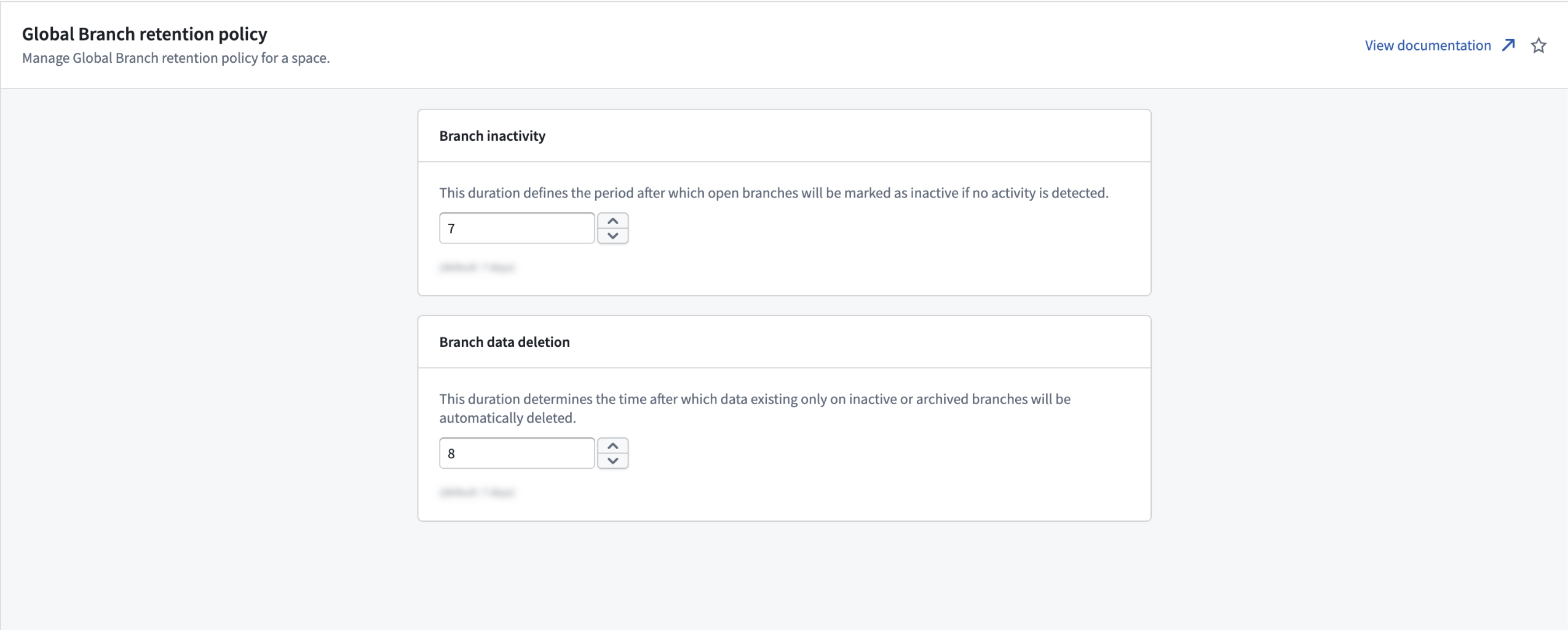
The Global Branch retention policy page in Control Panel, where you set two periods (in days): how long an open branch stays without activity before it is marked inactive, and how long data that exists only on inactive or archived branches is kept before it is deleted.
Your feedback matters
We want to hear about your experiences with Global Branching in the Palantir platform and welcome your feedback. Share your thoughts with Palantir Support channels or on our Developer Community ↗ using the global-branching tag ↗.
Grok Build 0.1 from xAI is now available in AIP
Date published: 2026-06-16
Grok Build 0.1 is now available for enrollments with xAI enabled in the US and other supported regions.
Model overview
Grok Build 0.1 is xAI's coding model trained for agentic coding tasks, including web development and debugging, with MCP support. xAI positions the model as a fast, low-cost option for general-purpose agentic and tool-calling use cases.
For more information, review xAI's model documentation ↗.
Getting started
To use this model:
- Confirm your enrollment administrator has enabled the xAI model family.
- Review token costs and pricing.
- See the complete list of models available in AIP.
Your feedback matters
We want to hear about your experience using language models in the Palantir platform. Share your thoughts through Palantir Support channels or on our Developer Community ↗ using the language-model-service tag ↗.
SQL Studio, Foundry's dedicated SQL application, is now generally available
Date published: 2026-06-16
SQL Studio, Foundry's dedicated application for writing and running SQL queries, is now generally available as of the week of June 15. SQL Studio brings interactive SQL analysis to Foundry across both tabular data and ontology object types, backed by purpose-built SQL engines and AI-assisted query writing.
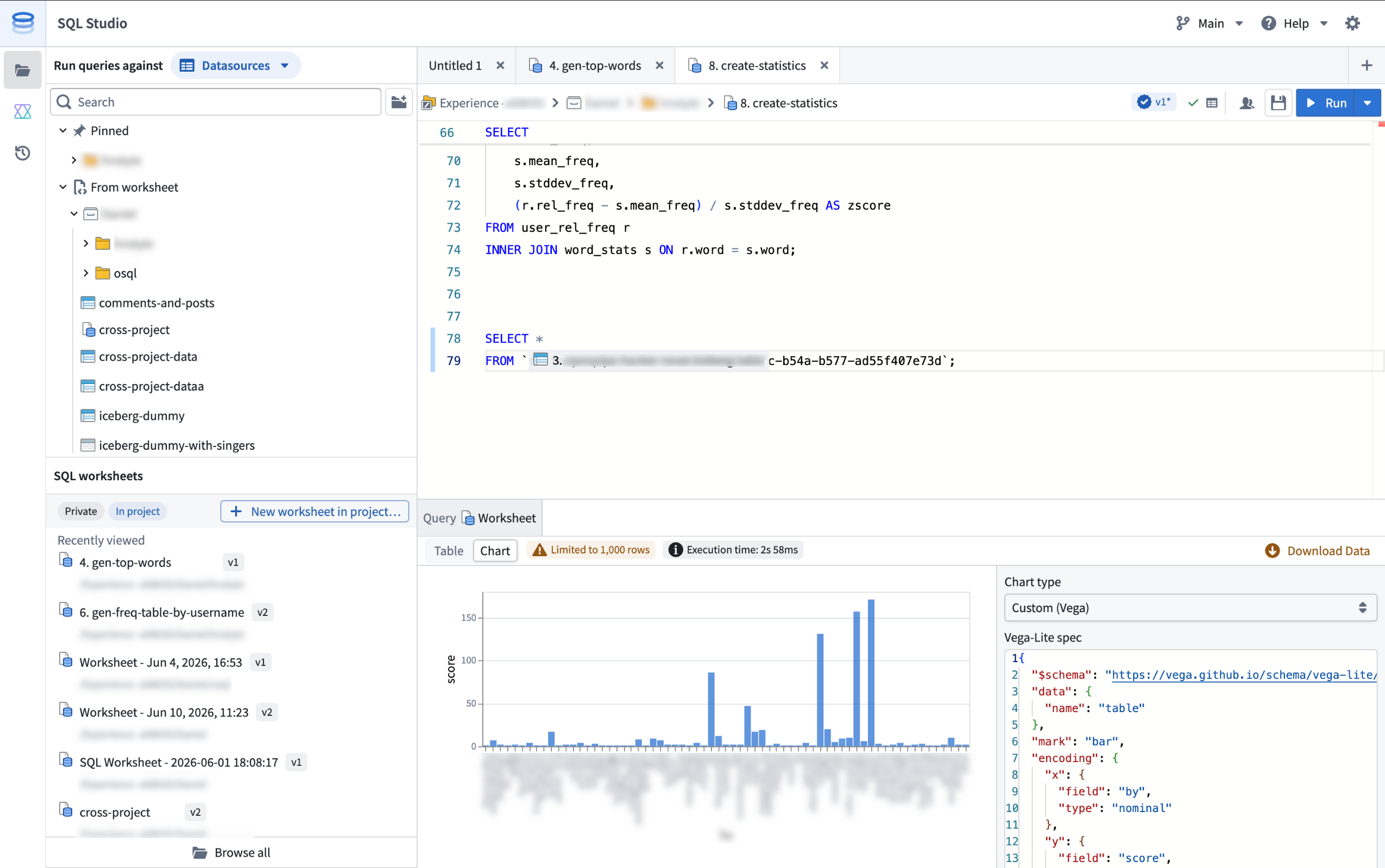
SQL Studio provides an interactive, AI-assisted interface for SQL analysis of tabular data and Ontology objects.
SQL Studio builds on the contextual SQL console embedded in applications such as Dataset Preview, Data Lineage, and Ontology Manager, now providing a dedicated application with read and write SQL support for tabular data, read support for ontology object types, and the ability to publish reusable Ontology SQL functions.
Powered by Ontology SQL and Furnace
SQL Studio is built on two Foundry SQL engines that share a common Spark SQL dialect: Ontology SQL for querying ontology object types, and Furnace for querying tabular data.
Ontology SQL is Foundry's SQL engine for querying ontology object types and many-to-many links. Queries execute directly against object storage using an in-memory compute path for fast response times on supported query shapes, with more complex queries automatically routed to Spark.
Furnace is Foundry's SQL engine for tabular data. It dynamically routes queries between Trino and Spark based on the workload, and supports both read and write operations.
Key features
SQL Studio brings together a complete SQL analysis experience in one place:
- Unified data and object querying: Query tabular data and ontology object types from a single application, switching between data mode and object mode, while using a common Spark SQL dialect.
- Low-latency, interactive analysis: SQL Studio is built for iterative development workflows. Queries are dynamically routed to the most appropriate compute engine, including faster non-Spark options for supported query shapes, and run on warm, fully managed compute.
- AI-assisted code generation: A conversational AIP side panel helps you write, explain, and debug queries. It understands Foundry's supported SQL dialect and has visibility into your editor, including the current code and the schemas of any referenced datasets, tables, and object types.
- Preview results as tables or charts: View query results as tabular output, visualize them with built-in chart types (line, bar, scatter, pie, and histogram), or create a custom chart powered by Vega. Result limits are configurable: queries return a 1,000-row preview by default, and users with the appropriate permissions can return up to 10,000 rows per query.
- Save and share SQL worksheets: Use a scratchpad for one-off analyses, or save your work as a SQL worksheet. Save worksheets privately for personal reuse or in a project to share with colleagues. Each save creates a new version that you can review and restore later, and unsaved changes are auto-staged so your in-progress work persists between sessions. SQL Studio supports multiple editor tabs, so you can work on several worksheets at the same time.
- Read and write support: In addition to
SELECTqueries, SQL Studio supportsCREATE TABLEoperations on datasets;CREATE,INSERT,UPDATE, andDELETEoperations on Iceberg tables; and theSHOW FUNCTIONSmeta-operation, which lists the supported SQL functions and their schemas. - Ontology SQL functions (beta): Define reusable, parameterized SQL queries over object types and publish them as SQL functions. Supported query shapes can execute with low latency on the same in-memory path as Ontology SQL queries. Use them across Foundry, including in Workshop, Actions, Automate, and the Ontology SDK. SQL functions are in beta and are not enabled on all Foundry environments; contact your Palantir representative to enroll.
Getting started
SQL Studio is available from the Applications menu.
For information about SQL Studio features, see the SQL Studio documentation. For syntax guidance, refer to the SQL dialect documentation. To learn more about the underlying engines, see the Furnace and Ontology SQL overviews.
If necessary, enrollment administrators can turn off SQL Studio for an enrollment from the Application access page of Control Panel.
What's coming next
SQL Studio is under active development, and several capabilities are on the near-term roadmap, including:
- Global Branching and Marketplace packaging support for SQL worksheets.
- Integration with Foundry's production pipeline tooling and Git-based CI/CD development workflows.
- Reusable SQL stored procedures that can be shared across queries and worksheets.
We want to hear from you
As we continue to develop SQL Studio, we welcome your feedback about both the SQL Studio application and the broader SQL experience in Foundry. Share your thoughts with Palantir Support channels or our Developer Community ↗.
Package multiple products simultaneously in Foundry DevOps
Date published: 2026-06-16
Foundry DevOps now supports packaging multiple products simultaneously within the same draft group. Previously, teams had to manually sequence each product to resolve cross-product dependencies. DevOps now handles this automatically, guaranteeing linked products are packaged in the correct dependency order.
To get started, navigate to the Products tab of your store. From the Drafts section, select Create new group and choose to add existing products to a draft group or create new products.
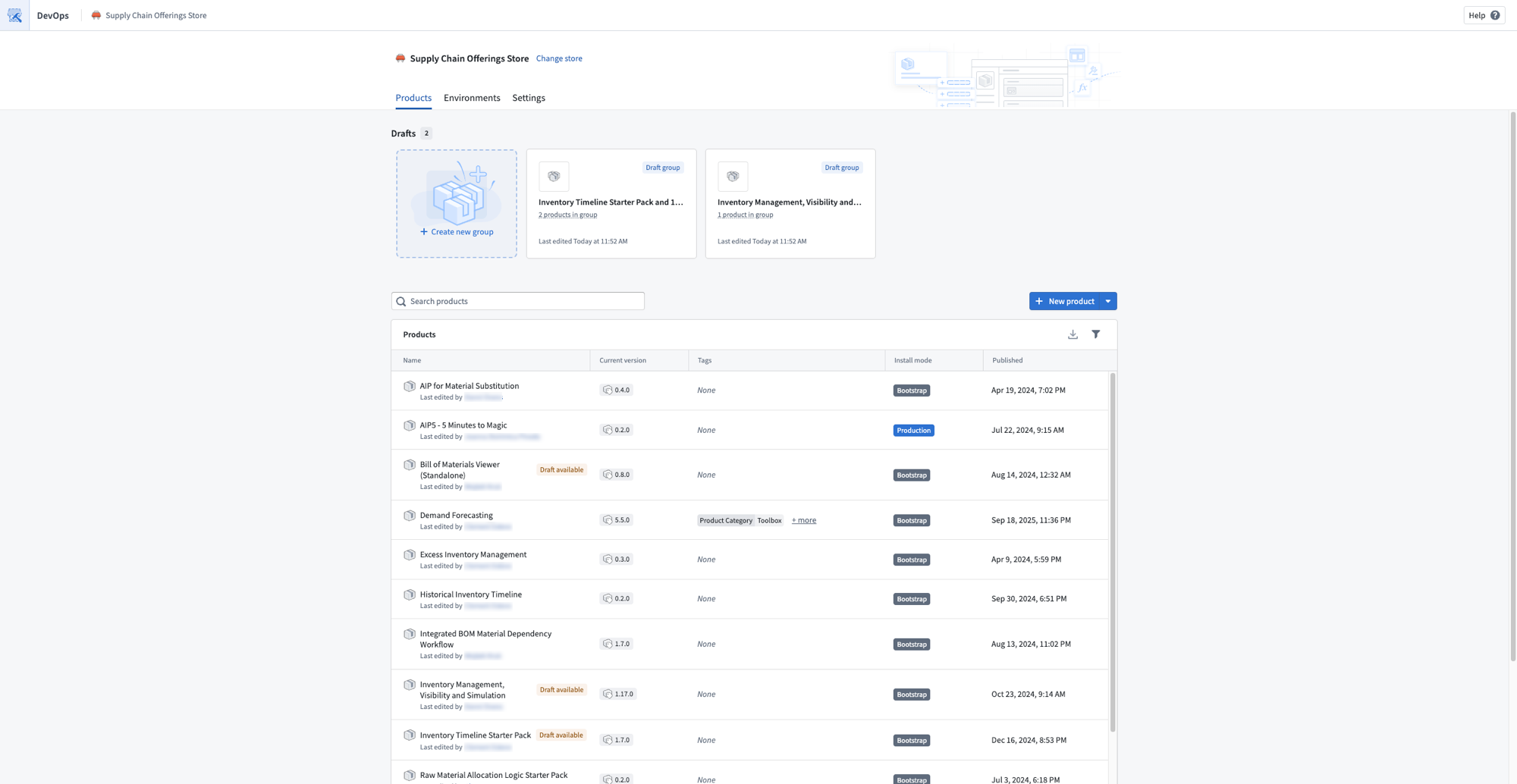
A store Products page showing draft groups that contain multiple products.
The linked products graph on the Overview page visualizes all products in your draft alongside their upstream and downstream dependencies. Select any product to add dependencies, remove it from the graph, or create a new draft. The graph also surfaces warnings for broken linked product relationships so you can resolve them before publishing.
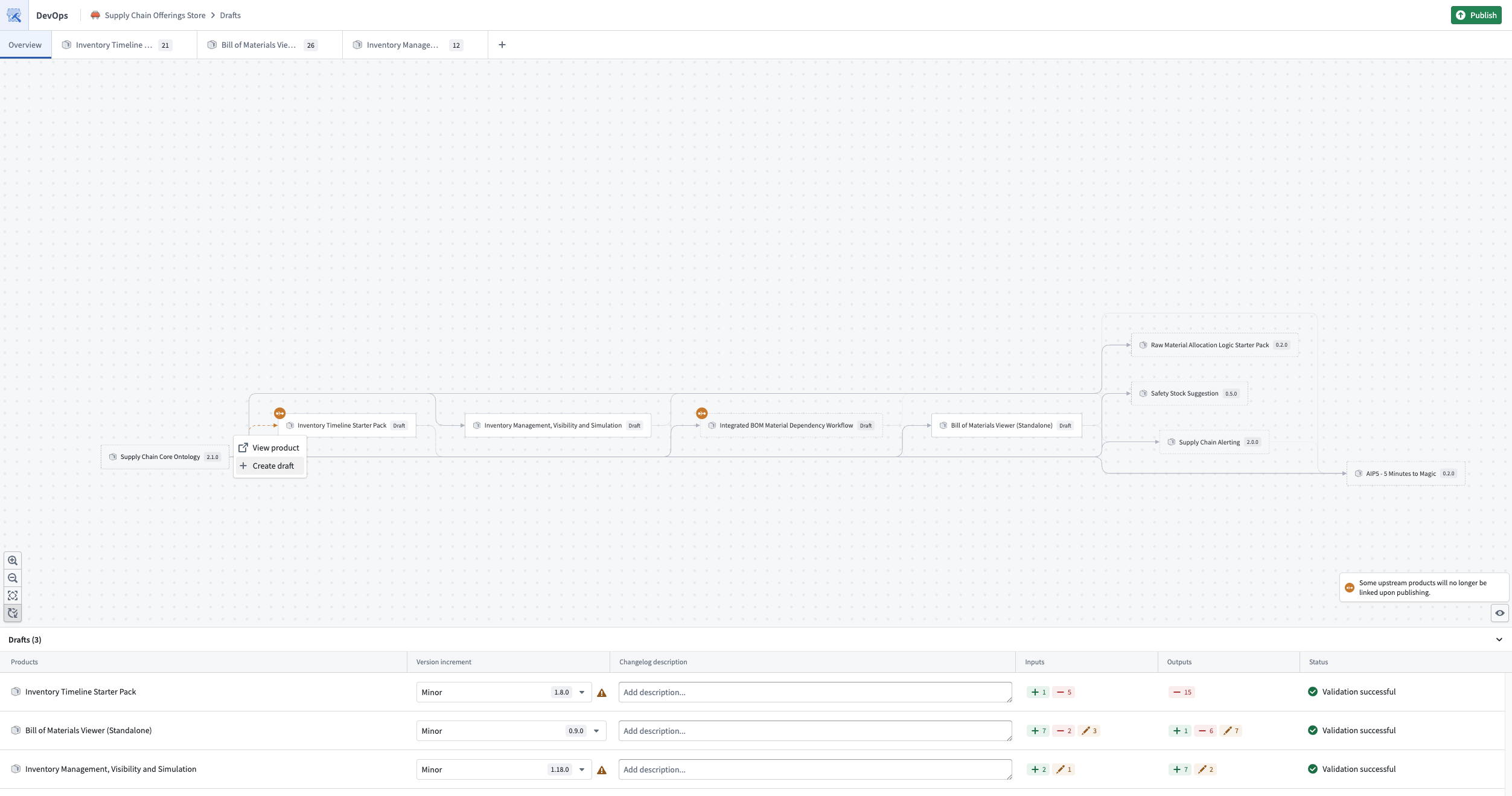
The linked products graph, visualizing all products in the draft and their dependencies.
Use the Add to other draft bulk action to move inputs between drafts within the same group, so one product's outputs can fulfill another product's inputs.
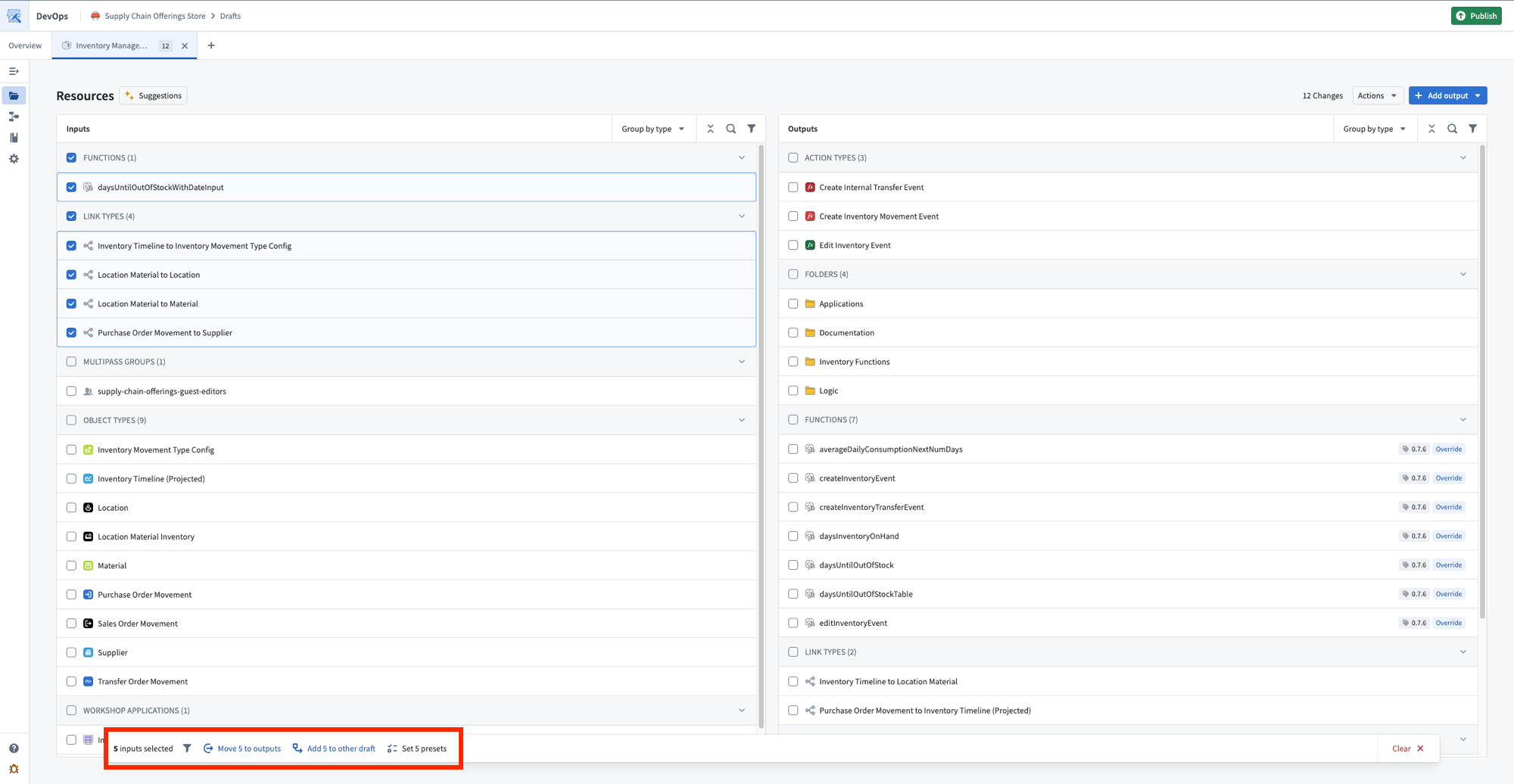
The bulk actions toolbar, with options to move inputs to outputs or add them to another draft.
Select Publish to release all products in dependency order, ensuring linked products are available before any that depend on them.
Share your feedback
We want to hear about your experiences with Foundry DevOps. Share your thoughts with Palantir Support channels or on our Developer Community ↗ using the devops ↗ tag.
Observability for your automation events in Autopilot
Date published: 2026-06-16
The new Automation events tab provides observability into all automation events across your workbench, replacing the previous Object executions tab. Monitor system performance, investigate failures from the automation down to the logic block, and understand how automations are processing objects over time.
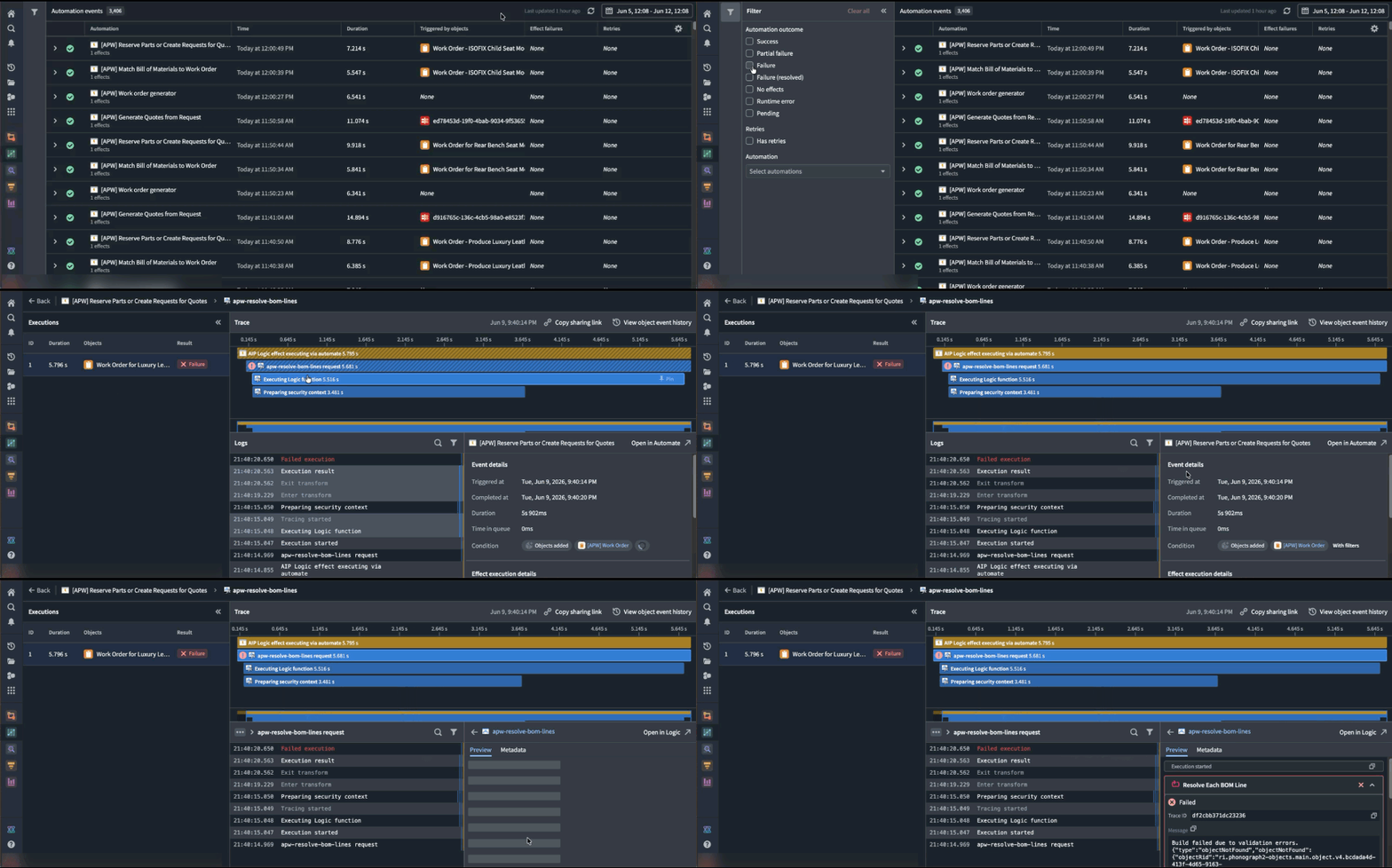
Use the Automation events tab to better understand observability into the automation events across your workbench.
What's in each event
Each event entry displays the automation name, effect and fallback action (if applicable), event details, outcome (success, failure, or fallback triggered), and triggering objects.
Executions are grouped by batches, aligned with the Automate history view, so you can see each execution alongside the individual objects within the run.
Select any event to view trace logs for each object execution, including step-by-step details, inline links to related resources, error messages and stack traces for failures, and timing information to spot performance bottlenecks.
How to troubleshoot failures
- Filter to failed events to find what broke in the automation path.
- Select a failed event to read the trace logs and error messages.
- Go to the affected object to view its full history across all automations.
- Compare failed and successful events of the same automation to spot patterns.
- Follow inline resource links to the automations, functions, and objects involved.
Share your feedback
As we continue to add features to Autopilot, we want to hear about your experiences and welcome your feedback. Share your thoughts with Palantir Support channels or our Developer Community ↗ using the aip-autopilot tag ↗.
Pipeline Builder: Media sets now supported in Faster pipelines
Date published: 2026-06-09
Faster pipelines now accept media sets as inputs. You can process PDFs, images, and audio files in a Faster pipeline and convert them into structured data for downstream extraction, classification, analysis, or review.
For more information, see the media sets documentation.
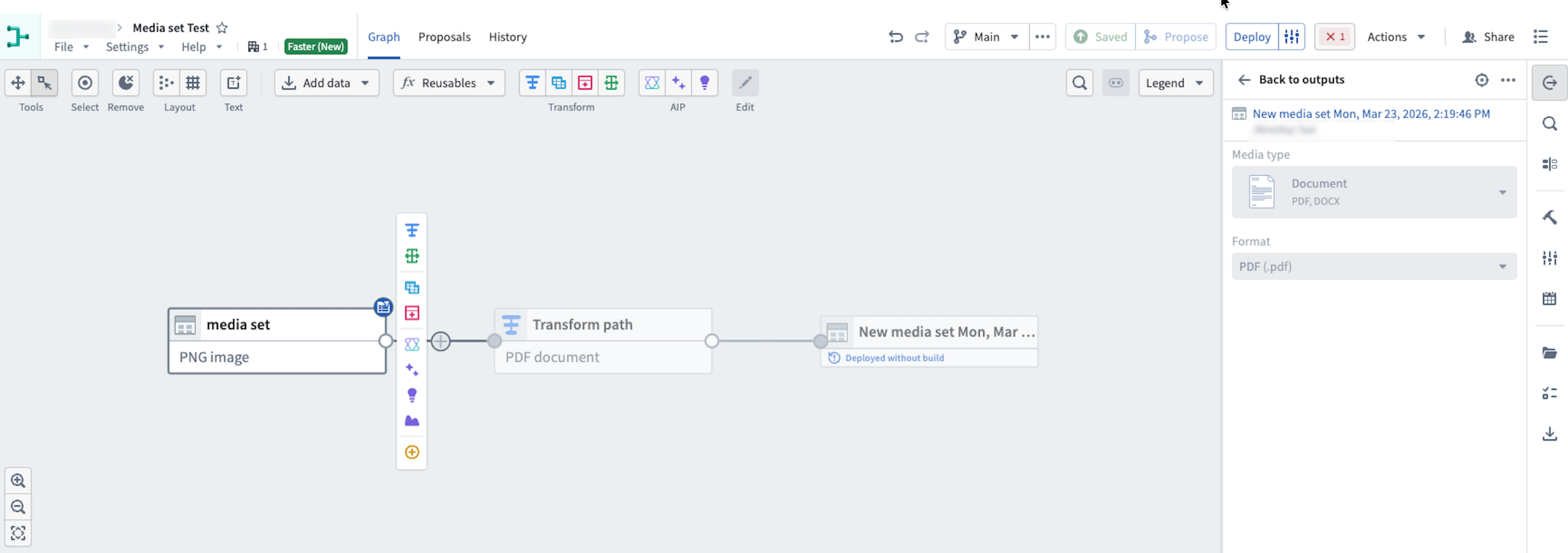
Use media sets in Faster pipelines to transform media file inputs.
Supported inputs
With media set support in Faster pipelines, you can now build pipeline workflows that take PDFs, images, and audio files as direct inputs. Supported use cases include:
- PDF and image OCR: Transform PDF and image files into structured data for further extraction or classification.
- PDF text extraction: Extract key text strings from PDFs to classify, summarize, or validate data.
- Audio transcription: Convert spoken conversations from audio files into structured text data.
Add a media set to a Faster pipeline
- Create a new pipeline and select Faster.
- Add media to your pipeline by selecting existing Foundry media, uploading new media to Foundry, or uploading new media directly to the Faster pipeline from your computer.
- Select the Write mode. You can choose between Transactionless (recommended) and Transactional.
Ensure your media files are uploaded to a new media set.
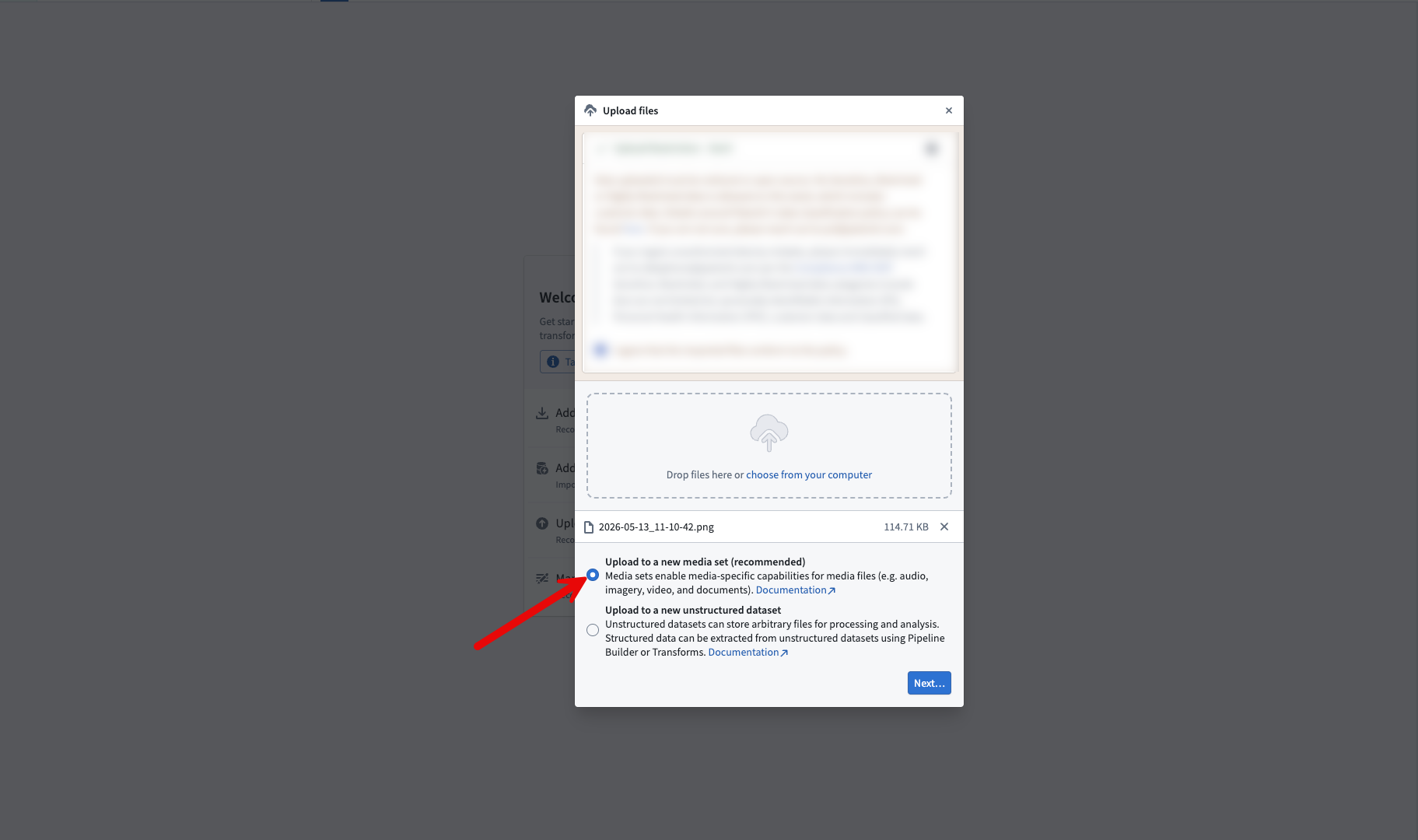
Select the upload to a new media set option when uploading media files
Share your feedback
As we continue to add features to Pipeline Builder, we want to hear about your experiences and welcome your feedback. Share your thoughts with Palantir Support channels or our Developer Community ↗ using the pipeline-builder tag ↗.
Python transform editing in Code Repositories will soon be legacy
Date published: 2026-06-04
Starting the week of June 22, editing Python transforms in Code Repositories will move to the legacy phase of development. VS Code workspaces are the recommended environment for editing Python transforms, offering AI-powered coding assistance, full dataset preview, an optimized language server, and an integrated terminal.
The Code Repositories editor will remain supported and available, with future feature development focused on VS Code workspaces. Code Repositories remains the recommended editor for other repository types, including Java and SQL transforms.
If VS Code workspaces are unavailable on your enrollment, Code Repositories remains the recommended way to author Python transforms.
Getting started
To get started with VS Code workspaces for Python transforms, we recommend reviewing the following documentation:
- VS Code workspaces: Overview
- Reference: VS Code workspaces vs. Code Repositories
- Benefits of VS Code workspaces
Pipeline Builder: GeoExpressions now supported in Faster pipelines
Date published: 2026-06-04
Faster pipelines in Pipeline Builder now support more than 25 built-in GeoExpressions for cleaning, transforming, and visualizing geospatial data without needing to leave the platform or write custom code. Supported operations include geometry intersections, GeoJSON parsing, GeoPoint conversions, and more.
To learn more, see GeoExpressions in Pipeline Builder.
The team is actively adding more GeoExpressions which will automatically become available for your Faster pipelines.
Use GeoExpressions in Faster pipeline
- Create a new Transform board in the graph view.
- In the Transform board menu, search for the expression or select Geospatial from the left panel.
- Select the GeoExpression to apply to your data.
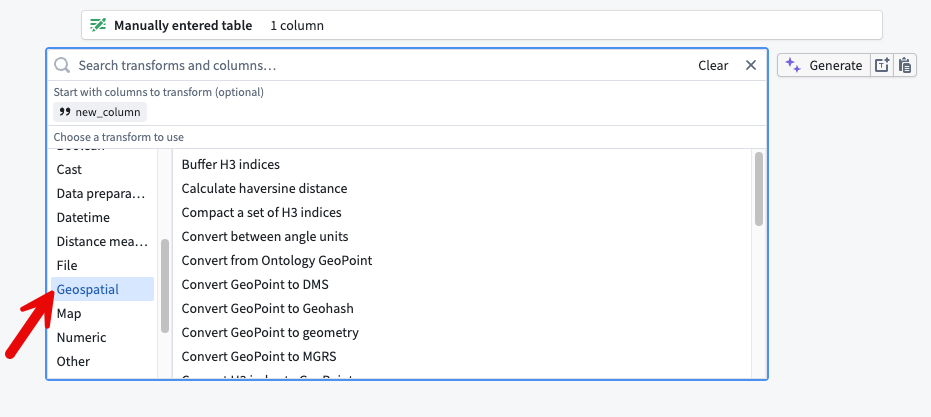
The Geospatial option from the Transform board menu.
Use Geo Preview in a Faster pipeline
- After transforming your data, open the preview pane.
- Select the cells you want to view on a map. The cells must be from columns with a supported geospatial logical type.
- Right-click the selected cells, then choose Open Geo Preview. The selected cells appear plotted on a map in a new tab.
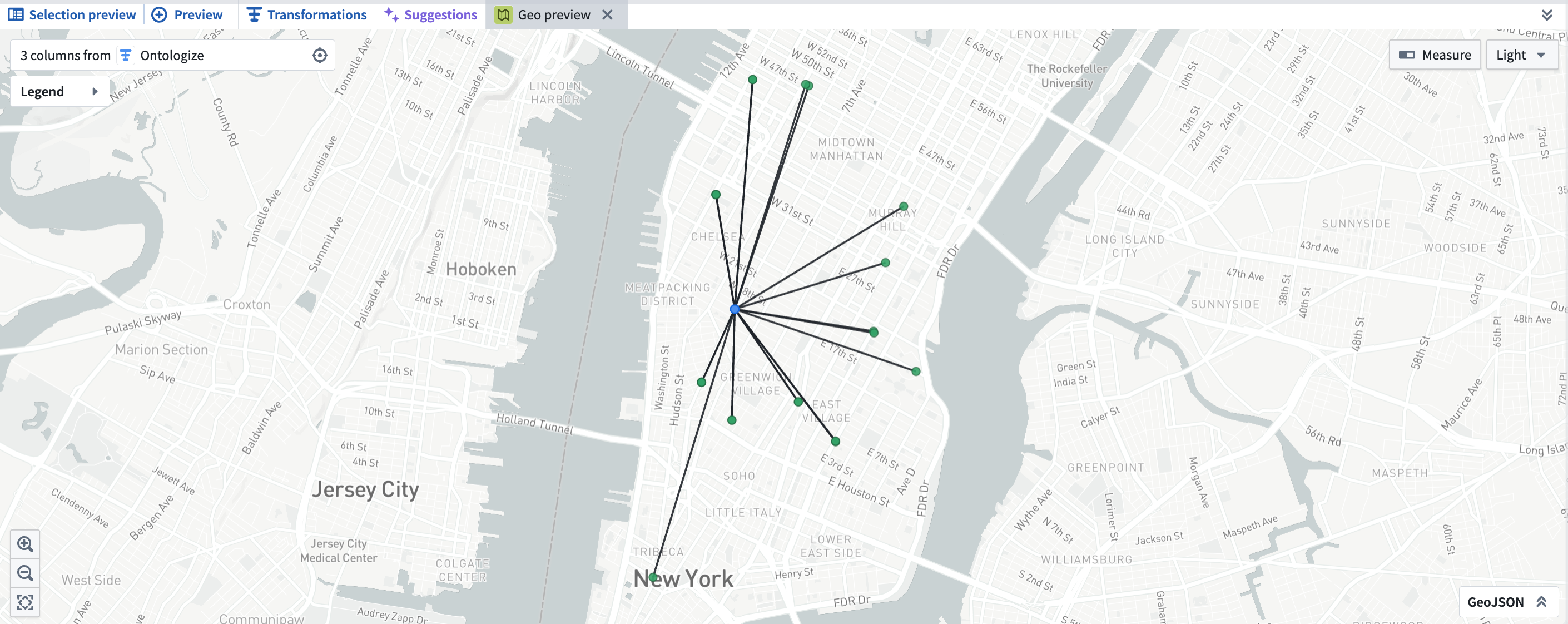
Geo Preview in Pipeline Builder.
Compatibility and downstream behavior
- Builder geometry column types in Faster pipelines are compatible with the Ontology
geoshapetype. To learn more, see using geospatial data with the Ontology. - Geospatial type data is persisted on output datasets from Faster Pipelines. Downstream Builder pipelines created from these datasets will preserve logical and geospatial types.
- GeoPoint and geometry columns can be mapped to a geotemporal series sync output to render points and geometries in downstream applications. To learn more, see using geospatial data with the Ontology.
Commonly used GeoExpressions include:
- Convert MGRS to GeoPoint
- Is valid GeoJSON
- Parse well known text as geometry
- Parse GeoJSON from a non-WGS 84 coordinate system
- Simplify geometry
- Geometries have intersection
- Geometry intersection
- Get the convex hull of a geometry
- Convert linestring to polygon
- Geometry array (unary) union
We want to hear from you
Send feedback through Palantir Support or the Developer Community using the pipeline-builder tag.
Claude Opus 4.8 now available from Anthropic, AWS Bedrock, and Google Vertex
Date published: 2026-06-02
Claude Opus 4.8 is now available on non-georestricted enrollments from Anthropic, AWS Bedrock, and Google Vertex. For US, EU, and non-georestricted enrollments, the model is available from AWS Bedrock and Google Vertex. For JP georestricted enrollments, the model is available from AWS Bedrock.
Model overview
Claude Opus 4.8 adds improvements in coding, long-running autonomous agents, and reasoning on complex enterprise problems. For more information, review Anthropic's model documentation ↗.
- Context window: 1,000,000 tokens
- Modalities: Text, image
- Capabilities: Extended thinking, function calling
Getting started
To use this model:
- Confirm that your enrollment administrator has enabled the relevant model family.
- Review token costs and pricing.
- See the complete list of all available models in AIP.
Your feedback matters
We want to hear about your experiences using language models in the Palantir platform and welcome your feedback. Share your thoughts with Palantir Support channels or on our Developer Community ↗ using the language-model-service tag ↗.
Visualize Workshop modules with the new variable lineage graph
Date published: 2026-06-01
The Variable lineage graph is now generally available in Workshop. The graph replaces the previous variable dependency graph with a redesigned visualization for tracing how variables and widgets in a module depend on one another. Use it to debug recompute behavior, find which widgets read or write a given variable, and better understand complex relationships between your application's components.
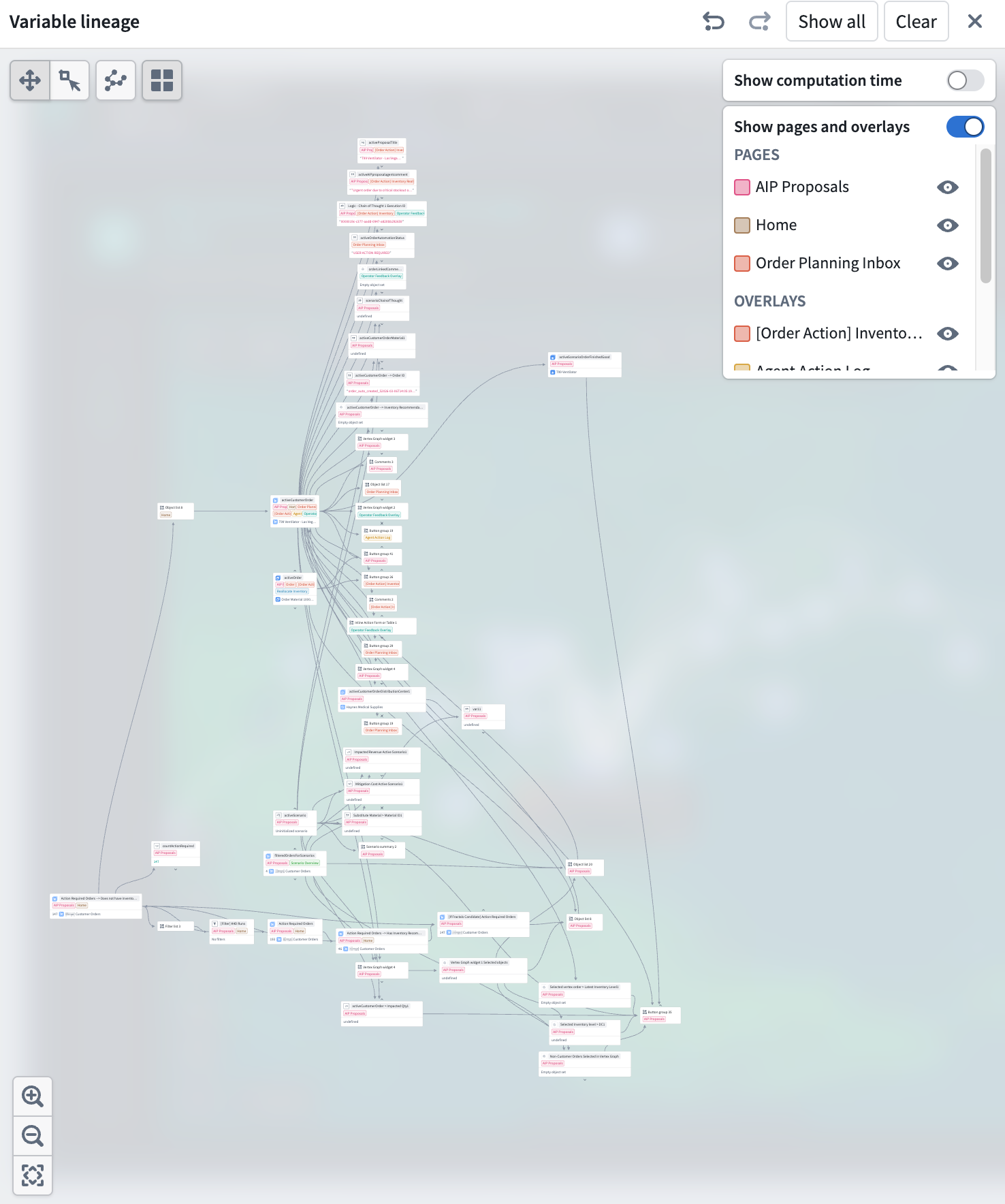
The Variable lineage graph mode shows variables, widgets, and their dependencies.
Expand the graph one node at a time
To open the new variable lineage panel, select the Graph button on the top right of the Variables panel in any Workshop module's edit mode.
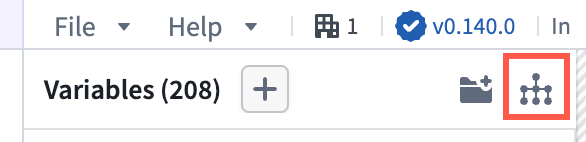
Use the Graph button, highlighted in red, to open the variable lineage panel.
Each node on the graph represents a variable or widget. Nodes with dependencies now have chevron arrows on its top and bottom edges. Selecting an arrow expands a node's parents or children to trace a chain of dependencies through a large module. Show all and Clear actions in the header let you expand to the full application graph or remove all nodes. Undo and redo buttons in the header step backward and forward through expand, collapse, and selection actions.
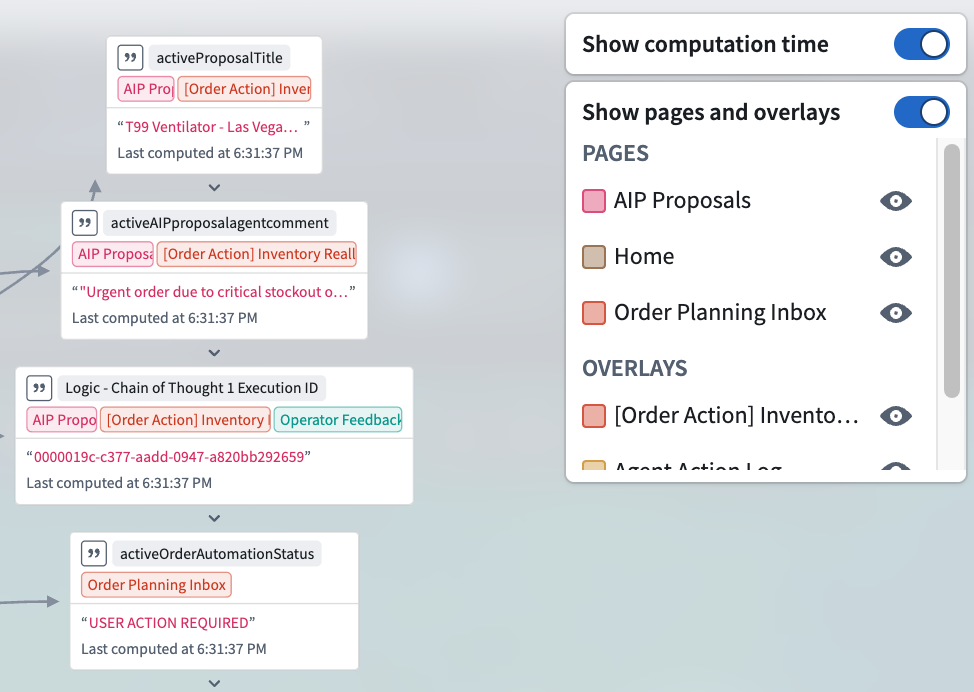
A detailed view of variable usage and computation time.
See where variables are referenced
Variable nodes are tagged with the pages and overlays where they are used. Toggle Show pages and overlays in the header to open a legend that lists each referenced page and overlay, alphabetized and split into separate sections. The legend only includes pages and overlays that appear on visible nodes so the list stays scoped to what you can actually see in the graph.
Identify expensive variables
Toggle Show computation time in the header to display per-variable timing information. Variables that take longer to recompute may be candidates for restructuring: for example, splitting a complex function-backed variable into smaller pieces or changing the recompute behavior on upstream variables to avoid unnecessary work.
To read more about the variable lineage graph, see Workshop's documentation on variables.
Share your feedback
We want to hear about your experiences using Workshop in the Palantir platform and welcome your feedback. Share your thoughts through Palantir Support channels or on our Developer Community ↗ using the workshop tag ↗.
中文翻译
公告
提醒: 请注册 Foundry 新闻通讯(Foundry Newsletter),即可直接在收件箱中收到平台新产品、功能和改进的摘要。有关如何订阅的更多信息,请参阅 Foundry 新闻通讯与产品反馈渠道公告。
欢迎在我们的开发者社区论坛 ↗ 分享您对这些公告的看法。
Anthropic Claude 模型现可通过 Azure 在 AIP 中使用
发布日期:2026-06-25
我们很高兴地宣布,通过 Azure 提供的 Anthropic Claude 模型现已在 AIP 中可用。这些模型在一系列性能和效率层级上提供了强大的推理、编码、智能体工作流(agentic workflow)和企业 AI 能力。
以下 Claude 模型现可通过 Azure 使用:
- Claude Opus 4.8 ↗
- Claude Opus 4.7 ↗
- Claude Opus 4.6 ↗
- Claude Sonnet 4.6 ↗
- Claude Opus 4.5 ↗
- Claude Sonnet 4.5 ↗
- Claude Haiku 4.5 ↗
通过 Azure 启用 Claude 模型具有以下优势:
- 容量(Capacity): 启用该模型系列后,AIP 中的 Claude 模型将获得更多容量。
- 稳定性(Stability): 当其他提供商出现故障时,对 Claude 模型的请求可通过 Azure 路由。
请注意,此模型系列目前仅适用于商业、非地理限制(commercial, non-georestricted) 的注册环境。
开始使用
要通过 Azure 使用 Anthropic Claude 模型:
您的反馈很重要
我们期待听到您在 Palantir 平台上使用语言模型的体验,欢迎您提供反馈。请通过 Palantir 支持渠道或我们的开发者社区 ↗(使用 language-model-service ↗ 标签)分享您的想法。
Palantir MCP 现已正式发布
发布日期:2026-06-25
自 6 月 22 日起,Palantir MCP 将在所有 Foundry 注册环境中可用。Palantir MCP 使 AI IDE 和 AI 智能体(AI agents)能够在 Palantir 平台内自主设计、构建、编辑和审查端到端应用程序。作为 Model Context Protocol ↗ 的一种实现,Palantir MCP 支持从数据集成到本体配置和应用程序开发的所有操作,所有这些都在平台内完成。
Palantir MCP 的关键能力
Vibe 编码生产级应用: 使开发者能够使用 AI 在本体之上生成生产级应用程序,同时遵循 Palantir 的安全最佳实践。
数据集成: 通过使 AI IDE 能够从 Compass 获取上下文、数据集模式(dataset schemas)以及完全在本地执行 SQL 命令,为 Python 转换(Python transforms)生成提供支持。
本体配置: 允许开发者在不离开 IDE 的情况下在本地配置本体。
应用程序开发: 与您的 OSDK 集成,支持在本体之上开发 TypeScript 应用程序。
开始使用 Palantir MCP
Palantir MCP 文档包含安装步骤、入门指南和MCP 工作流示例。我们强烈建议所有本地开发者安装并定期更新 Palantir MCP,以利用最新的变更和工具版本。
您的反馈很重要
对 Palantir MCP 有想法?请通过 Palantir 支持渠道和我们的开发者社区 ↗(使用 foundry-mcp 标签 ↗)告诉我们。
Ontology MCP 现已正式发布
发布日期:2026-06-25
Ontology MCP 现已正式发布。自 6 月 16 日起,Ontology MCP 将在所有 Foundry 注册环境中可用。
AI 智能体框架(AI agent frameworks)越来越多地围绕 Model Context Protocol (MCP) 构建,将其作为连接智能体与外部数据和操作的标准接口。Ontology MCP 将您应用程序现有的本体资源(Ontology resources)——对象类型(object types)、操作类型(action types)和函数(functions)——暴露为 MCP 工具,允许任何兼容 MCP 的智能体或框架查询 Foundry 数据并触发工作流,而无需额外的集成代码。
开始使用 Ontology MCP
您可以在开发者控制台(Developer Console)的 MCP 页面上启用或禁用 Ontology MCP。在 MCP 选项卡中,您可以浏览所有已启用的 Ontology MCP 服务器。
Ontology MCP 身份验证使用 Foundry 的标准 OAuth 2.0 流程,因此每个工具调用都在已验证用户的现有 Foundry 权限下运行。
要开始使用,请导航到开发者控制台中的应用程序,打开 MCP 页面,并启用您想要暴露的资源。请参阅 Ontology MCP 文档了解完整概述、入门指南和智能体配置示例。
您的反馈很重要
对 Ontology MCP 有想法?请通过 Palantir 支持渠道和我们的开发者社区 ↗(使用 foundry-mcp 标签 ↗)告诉我们。
代码仓库中的 Python 转换编辑现已进入遗留阶段
发布日期:2026-06-23
在代码仓库(Code Repositories)中编辑 Python 转换现已进入开发生命周期中的遗留阶段(legacy phase)。VS Code 工作区(VS Code workspaces)是编辑 Python 转换的推荐环境,提供 AI 辅助编码、完整数据集预览、优化的语言服务器(language server)和集成终端(integrated terminal)。
代码仓库编辑器将继续得到支持和可用,未来的功能开发将集中在 VS Code 工作区上。代码仓库仍然是其他仓库类型(包括 Java 和 SQL 转换)的推荐编辑器。
如果您的注册环境中无法使用 VS Code 工作区,代码仓库仍然是编写 Python 转换的推荐方式。
开始使用
要开始使用 VS Code 工作区进行 Python 转换,我们建议查看以下文档:
在 VS Code 工作区中开发全局分支
发布日期:2026-06-23
您现在可以直接在 VS Code 工作区以及本地 VS Code 中为 Python 转换仓库和 TypeScript v1 函数仓库创建、检出和开发全局分支(global branches)。
Palantir Visual Studio Code 扩展中的选项卡式分支选择器(tabbed branch selector)允许您在 VS Code 侧边栏的一个位置创建和检出两种分支类型。您还可以通过命令面板(Command Palette)或分支任务栏(branch taskbar)创建或检出分支,分支任务栏在 VS Code 工作区中显示为编辑器底部的蓝色条。
VS Code 侧边栏 Palantir 面板中的选项卡式分支选择器,已选中全局分支选项卡。
一旦您位于全局分支上,您的开发工具将针对该分支运行。对于 Python 转换,预览和构建面板针对您已检出的分支运行。对于 TypeScript v1 函数,所有开发面板都针对该分支运行。
了解有关 VS Code 工作区中的全局分支的更多信息,并查看支持全局分支的资源类型完整列表。
您的反馈很重要
我们期待听到您在 Palantir 平台上使用 Foundry 分支的体验,欢迎您提供反馈。请通过 Palantir 支持渠道或我们的开发者社区 ↗(使用 global-branching ↗ 和 vscode ↗ 标签)分享您的想法。
全局分支引入新的生命周期功能
发布日期:2026-06-23
全局分支现在可以处于四种状态之一:活跃(active)、不活跃(inactive)、已合并(merged)和已归档(archived,以前称为"已关闭"closed)。
- 活跃: 您正在积极处理的一个开放分支。
- 不活跃: 一个没有近期活动的开放分支。
- 已合并: 其更改已集成到目标分支中的分支。
- 已归档: 您手动停止使用的分支。取代了以前的"已关闭"状态。
此功能发布更改了两种分支行为。分支不再自动关闭;没有近期活动的分支现在变为不活跃状态。您还可以恢复在此版本之后归档的分支,使其恢复到活跃状态。
不活跃分支
分支在一段时间没有活动后会自动变为不活跃状态。在此状态下,平台会取消索引本体资源(de-indexes ontology resources),并在设定时间后删除数据。不活跃分支上的资源构建会立即失败。当分支变为不活跃时,您会收到电子邮件通知和平台内通知。您可以重新激活该分支以继续工作。
已归档分支
您手动归档分支;归档始终是手动的。当您归档分支时,您会收到电子邮件通知和平台内通知。取消索引、构建失败和数据删除的工作方式与不活跃分支相同。平台会保留元数据(例如先前修改的资源),以便您可以恢复已归档的分支。已归档的分支不会出现在分支选择器中。您可以在全局分支应用程序中打开和恢复它们。
保留策略
数据删除和分支不活跃的时间段可以在控制面板(Control Panel)的全局分支保留策略(Global Branch retention policy) 下修改。
- 分支不活跃期:一个开放分支在标记为不活跃之前可以没有活动的时间段。默认值:35 天。
- 分支数据删除期:仅存在于不活跃或已归档分支上的数据在删除前保留的时间段。默认值:7 天。
控制面板中的全局分支保留策略页面,您可以在其中设置两个时间段(以天为单位):一个开放分支在标记为不活跃之前可以保持无活动状态的时间,以及仅存在于不活跃或已归档分支上的数据在删除前保留的时间。
您的反馈很重要
我们期待听到您在 Palantir 平台上使用全局分支的体验,欢迎您提供反馈。请通过 Palantir 支持渠道或我们的开发者社区 ↗(使用 global-branching 标签 ↗)分享您的想法。
xAI 的 Grok Build 0.1 现已在 AIP 中可用
发布日期:2026-06-16
Grok Build 0.1 现已适用于在美国和其他支持区域启用了 xAI 的注册环境。
模型概述
Grok Build 0.1 是 xAI 的编码模型,专为智能体编码任务(包括 Web 开发和调试)而训练,并支持 MCP。xAI 将该模型定位为通用智能体和工具调用用例的快速、低成本选项。
有关更多信息,请查看 xAI 的模型文档 ↗。
开始使用
要使用此模型:
- 确认您的注册管理员已启用 xAI 模型系列。
- 查看令牌成本与定价。
- 查看 AIP 中可用的模型完整列表。
您的反馈很重要
我们期待听到您在 Palantir 平台上使用语言模型的体验。请通过 Palantir 支持渠道或我们的开发者社区 ↗(使用 language-model-service 标签 ↗)分享您的想法。
SQL Studio——Foundry 专用 SQL 应用程序——现已正式发布
发布日期:2026-06-16
SQL Studio 是 Foundry 用于编写和运行 SQL 查询的专用应用程序,自 6 月 15 日起正式发布。SQL Studio 将交互式 SQL 分析引入 Foundry,涵盖表格数据和本体对象类型,并由专用 SQL 引擎和 AI 辅助查询编写提供支持。
SQL Studio 提供了一个交互式 AI 辅助界面,用于对表格数据和本体对象进行 SQL 分析。
SQL Studio 建立在嵌入在数据集预览(Dataset Preview)、数据沿袭(Data Lineage)和本体管理器(Ontology Manager)等应用程序中的上下文 SQL 控制台(SQL console) 之上,现在提供了一个专用应用程序,支持对表格数据进行读写 SQL 操作,支持对本体对象类型进行读取操作,以及发布可重用的本体 SQL 函数(Ontology SQL functions)的能力。
由 Ontology SQL 和 Furnace 提供支持
SQL Studio 建立在两个共享通用 Spark SQL 方言(Spark SQL dialect) 的 Foundry SQL 引擎之上:用于查询本体对象类型的 Ontology SQL,以及用于查询表格数据的 Furnace。
Ontology SQL 是 Foundry 用于查询本体对象类型和多对多链接的 SQL 引擎。查询直接针对对象存储执行,使用内存计算路径(in-memory compute path)在支持的查询形状上实现快速响应时间,更复杂的查询会自动路由到 Spark。
Furnace 是 Foundry 用于表格数据的 SQL 引擎。它根据工作负载在 Trino 和 Spark 之间动态路由查询,并支持读写操作。
关键特性
SQL Studio 在一个地方汇集了完整的 SQL 分析体验:
- 统一的数据和对象查询: 从单个应用程序查询表格数据和本体对象类型,在数据模式(data mode)和对象模式(object mode)之间切换,同时使用通用的 Spark SQL 方言。
- 低延迟、交互式分析: SQL Studio 专为迭代开发工作流而构建。查询被动态路由到最合适的计算引擎,包括针对支持的查询形状的更快非 Spark 选项,并在预热、完全托管的计算资源上运行。
- AI 辅助代码生成: 一个对话式 AIP 侧面板帮助您编写、解释和调试查询。它了解 Foundry 支持的 SQL 方言,并能查看您的编辑器,包括当前代码以及任何引用的数据集、表和对象类型的模式。
- 预览结果为表格或图表: 将查询结果查看为表格输出,使用内置图表类型(折线图、柱状图、散点图、饼图和直方图)进行可视化,或创建由 Vega 驱动的自定义图表。结果限制是可配置的:默认情况下,查询返回 1,000 行预览,具有适当权限的用户每次查询最多可返回 10,000 行。
- 保存和共享 SQL 工作表: 使用草稿本进行一次性分析,或将您的工作保存为 SQL 工作表。私下保存工作表以供个人重复使用,或保存在项目中与同事共享。每次保存都会创建一个新版本,您可以稍后查看和恢复,未保存的更改会自动暂存,以便您进行中的工作可以在会话之间持续存在。SQL Studio 支持多个编辑器选项卡,因此您可以同时处理多个工作表。
- 读写支持: 除了
SELECT查询外,SQL Studio 还支持对数据集进行CREATE TABLE操作;对 Iceberg 表进行CREATE、INSERT、UPDATE和DELETE操作;以及SHOW FUNCTIONS元操作,该操作列出支持的 SQL 函数及其模式。 - 本体 SQL 函数(测试版): 定义可重用的、参数化的对象类型 SQL 查询,并将其发布为 SQL 函数。支持的查询形状可以在与 Ontology SQL 查询相同的内存路径上以低延迟执行。在 Foundry 各处使用它们,包括 Workshop、操作(Actions)、自动化(Automate)和 Ontology SDK。SQL 函数处于测试阶段,并非在所有 Foundry 环境中都启用;请联系您的 Palantir 代表进行注册。
开始使用
SQL Studio 可从应用程序菜单中访问。
有关 SQL Studio 特性的信息,请参阅 SQL Studio 文档。有关语法指导,请参考 SQL 方言文档。要了解底层引擎的更多信息,请参阅 Furnace 和 Ontology SQL 概述。
如有必要,注册管理员可以从控制面板的应用程序访问页面关闭 SQL Studio。
即将推出的功能
SQL Studio 正在积极开发中,近期路线图中包含多项功能,包括:
- 对 SQL 工作表的全局分支和市场打包支持。
- 与 Foundry 的生产管道工具和基于 Git 的 CI/CD 开发工作流集成。
- 可在查询和工作表之间共享的可重用 SQL 存储过程(SQL stored procedures)。
我们期待听到您的意见
在我们继续开发 SQL Studio 的过程中,我们欢迎您对 SQL Studio 应用程序以及 Foundry 中更广泛的 SQL 体验提供反馈。请通过 Palantir 支持渠道或我们的开发者社区 ↗分享您的想法。
在 Foundry DevOps 中同时打包多个产品
发布日期:2026-06-16
Foundry DevOps 现在支持在同一草稿组(draft group)内同时打包多个产品。以前,团队必须手动排序每个产品以解决跨产品依赖关系。DevOps 现在自动处理此问题,保证链接的产品按正确的依赖顺序打包。
要开始使用,请导航到您商店的产品(Products) 选项卡。从草稿(Drafts) 部分,选择创建新组(Create new group),然后选择将现有产品添加到草稿组或创建新产品。
一个商店产品页面,显示包含多个产品的草稿组。
概述(Overview) 页面上的链接产品图(linked products graph)可视化了草稿中的所有产品及其上游和下游依赖关系。选择任何产品以添加依赖关系、将其从图中移除或创建新草稿。该图还会显示已损坏的链接产品关系的警告,以便您在发布前解决它们。
链接产品图,可视化草稿中的所有产品及其依赖关系。
使用添加到其他草稿(Add to other draft) 批量操作在同一组内的草稿之间移动输入,以便一个产品的输出可以满足另一个产品的输入。
批量操作工具栏,包含将输入移动到输出或将其添加到另一个草稿的选项。
选择发布(Publish) 以按依赖顺序发布所有产品,确保链接的产品在任何依赖它们的产品之前可用。
分享您的反馈
我们期待听到您对 Foundry DevOps 的体验。请通过 Palantir 支持渠道或我们的开发者社区 ↗(使用 devops ↗ 标签)分享您的想法。
Autopilot 中自动化事件的可观测性
发布日期:2026-06-16
新的自动化事件(Automation events) 选项卡提供了对工作台中所有自动化事件的可观测性,取代了以前的对象执行(Object executions) 选项卡。监控系统性能,从自动化级别向下到逻辑块调查故障,并了解自动化如何随时间处理对象。
使用自动化事件选项卡更好地了解工作台中自动化事件的可观测性。
每个事件包含的内容
每个事件条目显示自动化名称、效果和回退操作(如果适用)、事件详情、结果(成功、失败或触发了回退)以及触发对象。
执行按批次分组,与自动化历史视图对齐,因此您可以在运行中看到每个执行以及其中的各个对象。
选择任何事件以查看每个对象执行的跟踪日志,包括逐步详情、相关资源的内联链接、失败的错误消息和堆栈跟踪,以及用于发现性能瓶颈的时序信息。
如何排查故障
- 筛选到失败的事件,以找出自动化路径中出问题的地方。
- 选择失败的事件以读取跟踪日志和错误消息。
- 转到受影响的对象以查看其在所有自动化中的完整历史记录。
- 比较同一自动化的失败和成功事件以发现模式。
- 关注涉及到的自动化、函数和对象的内联资源链接。
分享您的反馈
在我们继续向 Autopilot 添加功能的过程中,我们期待听到您的体验并欢迎您的反馈。请通过 Palantir 支持渠道或我们的开发者社区 ↗(使用 aip-autopilot 标签 ↗)分享您的想法。
Pipeline Builder:Faster 管道现在支持媒体集
发布日期:2026-06-09
Faster 管道现在接受媒体集(media sets)作为输入。您可以在 Faster 管道中处理 PDF、图像和音频文件,并将它们转换为结构化数据,用于下游的提取、分类、分析或审查。
有关更多信息,请参阅媒体集文档。
在 Faster 管道中使用媒体集来转换媒体文件输入。
支持的输入
借助 Faster 管道中的媒体集支持,您现在可以构建将 PDF、图像和音频文件作为直接输入的管道工作流。支持的用例包括:
- PDF 和图像 OCR: 将 PDF 和图像文件转换为结构化数据,用于进一步的提取或分类。
- PDF 文本提取: 从 PDF 中提取关键文本字符串,以分类、总结或验证数据。
- 音频转录: 将音频文件中的口语对话转换为结构化文本数据。
向 Faster 管道添加媒体集
- 创建新管道并选择Faster。
- 通过选择现有的 Foundry 媒体、将新媒体上传到 Foundry,或直接从您的计算机将新媒体上传到 Faster 管道,将媒体添加到您的管道。
- 选择写入模式(Write mode)。您可以在无事务(Transactionless)(推荐)和事务性(Transactional) 之间选择。
确保您的媒体文件上传到新的媒体集。
上传媒体文件时选择上传到新媒体集的选项
分享您的反馈
在我们继续向 Pipeline Builder 添加功能的过程中,我们期待听到您的体验并欢迎您的反馈。请通过 Palantir 支持渠道或我们的开发者社区 ↗(使用 pipeline-builder 标签 ↗)分享您的想法。
代码仓库中的 Python 转换编辑即将进入遗留阶段
发布日期:2026-06-04
从 6 月 22 日起,在代码仓库中编辑 Python 转换将进入开发生命周期中的遗留阶段。VS Code 工作区是编辑 Python 转换的推荐环境,提供 AI 辅助编码、完整数据集预览、优化的语言服务器和集成终端。
代码仓库编辑器将继续得到支持和可用,未来的功能开发将集中在 VS Code 工作区上。代码仓库仍然是其他仓库类型(包括 Java 和 SQL 转换)的推荐编辑器。
如果您的注册环境中无法使用 VS Code 工作区,代码仓库仍然是编写 Python 转换的推荐方式。
开始使用
要开始使用 VS Code 工作区进行 Python 转换,我们建议查看以下文档:
Pipeline Builder:Faster 管道现在支持 GeoExpressions
发布日期:2026-06-04
Pipeline Builder 中的 Faster 管道现在支持超过 25 个内置的 GeoExpressions,用于清理、转换和可视化地理空间数据,无需离开平台或编写自定义代码。支持的操作包括几何相交(geometry intersections)、GeoJSON 解析、GeoPoint 转换等。
要了解更多信息,请参阅 Pipeline Builder 中的 GeoExpressions。
团队正在积极添加更多 GeoExpressions,这些表达式将自动在您的 Faster 管道中可用。
在 Faster 管道中使用 GeoExpressions
- 在图视图中创建一个新的转换板(Transform board)。
- 在转换板菜单中,搜索表达式或从左侧面板中选择地理空间(Geospatial)。
- 选择要应用于数据的 GeoExpression。
转换板菜单中的地理空间选项。
在 Faster 管道中使用地理预览(Geo Preview)
- 转换数据后,打开预览窗格。
- 选择您想要在地图上查看的单元格。这些单元格必须来自具有支持的地理空间逻辑类型的列。
- 右键单击选定的单元格,然后选择打开地理预览(Open Geo Preview)。选定的单元格将显示在新选项卡的地图上。
Pipeline Builder 中的地理预览。
兼容性和下游行为
- Faster 管道中的 Builder 几何列类型与本体
geoshape类型兼容。要了解更多信息,请参阅将地理空间数据与本体结合使用。 - 地理空间类型数据会持久保存在 Faster 管道的输出数据集中。从这些数据集创建的下游 Builder 管道将保留逻辑类型和地理空间类型。
- GeoPoint 和几何列可以映射到地理时间序列同步输出(geotemporal series sync output),以在下游应用程序中渲染点和几何图形。要了解更多信息,请参阅将地理空间数据与本体结合使用。
常用的 GeoExpressions 包括:
- 将 MGRS 转换为 GeoPoint
- 是否为有效的 GeoJSON
- 将知名文本解析为几何图形
- 从非 WGS 84 坐标系解析 GeoJSON
- 简化几何图形
- 几何图形是否有相交
- 几何图形相交
- 获取几何图形的凸包
- 将线串转换为多边形
- 几何图形数组(一元)并集
我们期待听到您的意见
通过 Palantir 支持或开发者社区(使用 pipeline-builder 标签)发送反馈。
Claude Opus 4.8 现可通过 Anthropic、AWS Bedrock 和 Google Vertex 使用
发布日期:2026-06-02
Claude Opus 4.8 现已在非地理限制注册环境中通过 Anthropic、AWS Bedrock 和 Google Vertex 提供。对于美国、欧盟和非地理限制注册环境,该模型可通过 AWS Bedrock 和 Google Vertex 使用。对于日本地理限制注册环境,该模型可通过 AWS Bedrock 使用。
模型概述
Claude Opus 4.8 在编码、长时间运行的自主智能体以及复杂企业问题的推理方面进行了改进。有关更多信息,请查看 Anthropic 的模型文档 ↗。
- 上下文窗口: 1,000,000 个令牌
- 模态: 文本、图像
- 能力: 扩展思考(Extended thinking)、函数调用(Function calling)
开始使用
要使用此模型:
- 确认您的注册管理员已启用相关的模型系列。
- 查看令牌成本与定价。
- 查看 AIP 中所有可用模型的完整列表。
您的反馈很重要
我们期待听到您在 Palantir 平台上使用语言模型的体验,欢迎您提供反馈。请通过 Palantir 支持渠道或我们的开发者社区 ↗(使用 language-model-service 标签 ↗)分享您的想法。
使用新的变量沿袭图可视化 Workshop 模块
发布日期:2026-06-01
变量沿袭图(Variable lineage graph) 现已在 Workshop 中正式发布。该图用重新设计的可视化取代了以前的变量依赖图,用于追踪模块中变量和小部件(widgets)之间的依赖关系。使用它来调试重新计算行为,查找哪些小部件读取或写入给定变量,并更好地理解应用程序组件之间的复杂关系。
变量沿袭 图模式显示变量、小部件及其依赖关系。
一次展开一个节点
要打开新的变量沿袭面板,请在任何 Workshop 模块的编辑模式下选择变量(Variables) 面板右上角的图(Graph) 按钮。
使用红色高亮显示的图按钮打开变量沿袭面板。
图上的每个节点代表一个变量或小部件。具有依赖关系的节点现在在其顶部和底部边缘有 V 形箭头。选择箭头会展开节点的父节点或子节点,以追踪通过大型模块的依赖链。标题中的显示全部(Show all) 和清除(Clear) 操作允许您展开完整的应用程序图或移除所有节点。标题中的撤消和重做按钮可以逐步前进和后退,执行展开、折叠和选择操作。
变量使用情况和计算时间的详细视图。
查看变量被引用的位置
变量节点标记有使用它们的页面和覆盖层(overlays)。切换标题中的显示页面和覆盖层(Show pages and overlays) 以打开一个图例,列出每个引用的页面和覆盖层