Architecture examples(架构示例)
Foundry worker with direct connection policies
:::callout{theme="neutral"} This type of connection can also be referred to as a "direct connection". :::
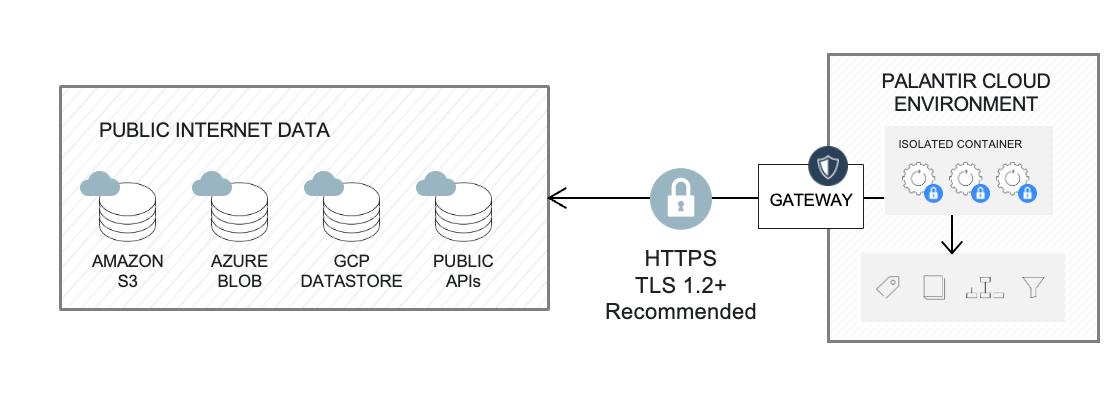
Foundry worker with direct connection policies is the recommended default for accessing external systems that accept inbound traffic from Foundry, such as REST APIs and cloud/SaaS systems.
In this scenario, data connections run in an isolated compute container called a Foundry worker, which handles authenticated encrypted network requests. The external system must accept inbound traffic from Foundry. Network egress from Foundry is managed and administered in-platform via direct connection egress policies.
External system credentials are stored with AES-256-GCM server-side encryption and can only be decrypted by containers triggered by authorized users.
To create a direct connection, follow instructions about setting up a source.
Foundry worker with agent proxy policy
:::callout{theme="neutral"} This type of connection can also be referred to as an "agent proxy" or an "agent thin mode" connection. :::
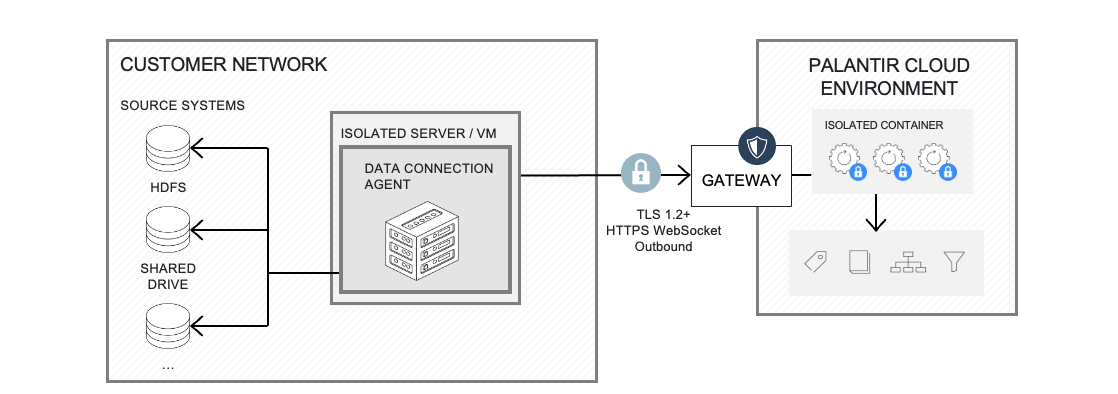
Foundry worker with agent proxy policies is the recommended architecture to access external systems hosted on private networks. It requires the use of a data connection agent.
In this scenario, the agent acts as a simple network tunnel without performing any data processing itself.
The agent initiates a network request with Foundry to establish a websocket connection. Learn more about network controls available on agents.
All data connection and computation capabilities are executed by a Foundry worker, an isolated container with scalable compute resources that processes data and communicates with external systems via the provided websocket.
The ability to use the agent as a proxy is granularly managed and administered in-platform via agent proxy egress policies.
Multiple agents can be used to load balance workloads across multiple external systems.
Like direct connections, external system credentials are stored using AES-256-GCM server-side encryption and can only be decrypted by the container triggered by authorized users.
To create an agent-proxy connection, you will need to:
- Set up an agent.
- Create one or many agent proxy policies.
- Set up a Foundry worker source using the policies above.
Legacy architecture: Agent worker
:::callout{theme="warning" title="Legacy"} Agent worker is in the legacy phase of development. We recommend Foundry worker with agent proxy for on-premise and privately hosted systems. See Foundry worker vs. agent worker for the comparison. :::
:::callout{theme="neutral"} This type of connection can also be referred to as "agent thick mode". :::
Agent worker connection is the historical architecture used to access external systems hosted on private networks from Foundry. It requires the use of a data connection agent. Learn more about agent worker known limitations.
To migrate an existing agent worker source to a Foundry worker, follow the migration guide.
In this scenario, the agent constantly polls Foundry via unidirectional outbound connections secured by HTTPS for new tasks to execute. Once received, the task is executed by the agent itself, also called agent worker and results are sent to Foundry over that same unidirectional connection. All the networking configuration required for the agent to be able to communicate with internal source systems is configured on the agent host itself.
External system credentials are stored on the platform using AES-128-GCM encryption with keys stored on the agent. During capability execution, the agent retrieves encrypted credentials from Foundry, decrypts them locally, and uses them for queries. Decrypted credentials are automatically deleted from memory after execution.
To create an agent worker connection, you will need to:
- Set up an agent.
- Configure it to be an agent worker.
- Set up an agent worker source and assign it that agent.

Summary
| Type of connection | Capability execution | Networking | System credentials |
|---|---|---|---|
| Direct connection | In Foundry | Direct from Foundry to source systems. | Stored encrypted in platform with encryption keys in platform. |
| Agent proxy | In Foundry | Outbound connection from agent to Foundry to establish a websocket and proxy traffic. | Stored encrypted in platform with encryption keys in platform. |
| Agent worker (legacy) | On agent host | Outbound connection from agent to Foundry to poll tasks. Inbound connection from agent to source systems. | Stored encrypted in platform with encryption keys on agent. |
中文翻译
架构示例
采用直连策略的 Foundry Worker
:::callout{theme="neutral"} 此类连接也可称为"直连"。 :::
采用直连策略的 Foundry Worker 是访问接受 Foundry 入站流量的外部系统(如 REST API 和云/SaaS 系统)的推荐默认方案。
在此场景中,数据连接运行在名为 Foundry Worker 的隔离计算容器中,该容器负责处理经过身份验证的加密网络请求。外部系统必须接受来自 Foundry 的入站流量。Foundry 的网络出站流量通过平台内的直连出站策略进行管理和配置。
外部系统凭证采用 AES-256-GCM 服务器端加密存储,仅可由授权用户触发的容器解密。
要创建直连,请按照设置数据源的说明操作。
采用代理策略的 Foundry Worker
:::callout{theme="neutral"} 此类连接也可称为"代理"或"代理精简模式"连接。 :::
采用代理策略的 Foundry Worker 是访问私有网络托管的外部系统的推荐架构。它需要使用数据连接代理。
在此场景中,代理充当简单的网络隧道,本身不执行任何数据处理。
代理向 Foundry 发起网络请求以建立 WebSocket 连接。了解更多关于代理可用网络控制的信息。
所有数据连接和计算能力均由 Foundry Worker 执行,这是一个具有可扩展计算资源的隔离容器,负责处理数据并通过提供的 WebSocket 与外部系统通信。
将代理用作代理的能力通过平台内的代理出站策略进行精细管理和配置。
可以使用多个代理来跨多个外部系统实现工作负载均衡。
与直连类似,外部系统凭证采用 AES-256-GCM 服务器端加密存储,仅可由授权用户触发的容器解密。
要创建代理连接,您需要:
- 设置代理。
- 创建一个或多个代理策略。
- 使用上述策略设置 Foundry Worker 数据源。
传统架构:Agent Worker
:::callout{theme="warning" title="传统"} Agent Worker 处于开发的传统阶段。对于本地部署和私有托管的系统,我们推荐使用采用代理策略的 Foundry Worker。请参阅 Foundry Worker 与 Agent Worker 对比了解详情。 :::
:::callout{theme="neutral"} 此类连接也可称为"代理厚模式"。 :::
Agent Worker 连接是从 Foundry 访问私有网络托管的外部系统的传统架构。它需要使用数据连接代理。了解更多关于 Agent Worker 已知限制的信息。
要将现有的 Agent Worker 数据源迁移到 Foundry Worker,请遵循迁移指南。
在此场景中,代理通过由 HTTPS 保护的单向出站连接持续轮询 Foundry,以获取待执行的新任务。收到任务后,由代理本身(也称为 Agent Worker)执行,并通过相同的单向连接将结果发送回 Foundry。代理与内部源系统通信所需的所有网络配置均在代理主机本身上完成。
外部系统凭证在平台上使用 AES-128-GCM 加密存储,密钥存储在代理上。在执行能力期间,代理从 Foundry 检索加密凭证,在本地解密,并用于查询。解密后的凭证在执行后会自动从内存中删除。
要创建 Agent Worker 连接,您需要:
- 设置代理。
- 将其配置为 Agent Worker。
- 设置 Agent Worker 数据源并将其分配给该代理。
总结
| 连接类型 | 能力执行 | 网络 | 系统凭证 |
|---|---|---|---|
| 直连 | 在 Foundry 中 | 从 Foundry 直接连接到源系统。 | 在平台中加密存储,加密密钥位于平台中。 |
| 代理 | 在 Foundry 中 | 从代理到 Foundry 的出站连接,用于建立 WebSocket 并代理流量。 | 在平台中加密存储,加密密钥位于平台中。 |
| Agent Worker(传统) | 在代理主机上 | 从代理到 Foundry 的出站连接,用于轮询任务。从代理到源系统的入站连接。 | 在平台中加密存储,加密密钥位于代理上。 |