Core concepts(核心概念)
This page describes the core concepts used throughout Data Connection.
Sources
A Source represents a single connection to an external system, including any configuration necessary to specify and locate the target system (typically a URL) and the credentials required to successfully authenticate. Sources must be configured with a particular worker defining where compute for any capabilities used with the source will be run. Note that the agent worker also controls the networking between the Palantir platform and the target system.
A source is set up based on a particular connector (also referred to as a source type). A broad range of connectors are available in the Palantir platform, designed to support the most common data systems across organizations. Depending on the connector and worker selected, different capabilities may be available.
For systems without a dedicated connector, the generic connector or REST API source may be used with code-based connectivity options such as external transforms, external functions, and compute modules.
Credentials
A credential is a secret value that is required to access a particular system; that is, credentials are used for authentication. Credentials can be passwords, tokens, API keys, or other secret values. In the Palantir platform, all credentials are encrypted and stored securely. Depending on the worker, secrets may be stored locally on a Data Connection agent, or directly in the platform.
Some sources are able to authenticate without storing any secrets, such as when using OpenID connect, outbound applications, or a cloud identity.
Workers
Worker defines where compute for capabilities is run, while networking defines how target systems are reached. See architecture diagrams for examples of how worker and networking work together.
Sources run on a Foundry worker. Agent worker is a legacy option retained for existing customers; see Foundry worker vs. agent worker for the comparison.
:::callout{theme="neutral"} Not all worker types are available for all source types. :::
Foundry worker
:::callout{theme="neutral"} Originally, Foundry worker only supported direct egress policies, so sources of that worker type were called "direct connection" sources. Now that these sources also support agent proxy policies, they have been renamed to "Foundry worker" sources to avoid confusion. :::
Foundry worker sources run compute for their source capabilities in Foundry. These sources benefit from Foundry's containerized and scalable job execution, improved stability, and do not incur the maintenance overhead associated with agents. All sources can be used in code.
Networking is configured through egress policies and enables direct connection and connections over an agent proxy.
Agent worker
:::callout{theme="warning" title="Legacy"} Agent worker is in the legacy phase of development. We recommend migrating existing agent worker sources to Foundry worker. See Foundry worker vs. agent worker for the operational reasons behind this recommendation. :::
Agent worker sources run compute for their source capabilities on a customer-provided host via an agent. Networking is configured manually on the agent host firewall and proxy settings; the host must have network access to the source systems it is connecting to.
Networking and egress policies
Networking defines how target systems are reached, while worker defines where capabilities compute are executed. See architecture diagrams for examples on how worker and networking are compatible with each other.
For Foundry worker sources, networking is configured via egress policies. They define at a granular level how each target system can be reached from Foundry, and which egress destinations are permitted.
Sources support two policy types:
- Direct connection policies: Used for systems directly accessible from Foundry. For cloud-hosted Foundry instances, this means the public Internet. For privately hosted Foundry, this means the network where Foundry is installed.
- Agent proxy policies: Used for accessing external systems hosted in a different network from Foundry. For cloud-hosted Foundry instances, this means external systems hosted on-premise. Requires the set up of an agent. The agent host itself must have its networking configured to reach the target systems. Agent proxy policies are only available on Foundry enrollments running on Rubix, Palantir's Kubernetes-based infrastructure.
:::callout{theme="neutral"} Both direct connection and agent proxy policies can be assigned to the same source for use cases requiring both network paths. An example of this would be use cases needing to retrieve credentials from an internet-hosted system, and using said credentials to authenticate with an on-premise system. :::
Learn more about egress policies.
For agent worker sources, networking is configured directly on the agent host.
Agents
An agent is a downloadable program installed within your organizational network and managed from Foundry's Data Connection interface. Agents have the ability to connect to different external systems within your organizational network and are used to power connections leveraging agent proxy policies and agent worker connections.
Read more about how to set up an agent.
Capabilities
Sources may support a variety of capabilities, where each capability represents some functionality that can run over the source connection. There are a wide range of supported capabilities for bringing data into Foundry, pushing data out of Foundry, virtualizing data stored outside of Foundry, and making interactive requests to other systems.
A summary of available capabilities is included in the following table. For more information about capabilities supported for a specific connector, refer to that connector's documentation page.
| Capability | Description |
|---|---|
| Batch syncs | Sync data from an external source to a dataset. |
| Streaming syncs | Sync data from an external message queue to a stream. |
| Change data capture (CDC) syncs | Sync data from a database to a stream with CDC metadata. |
| Media syncs | Sync data from an external source to a media set. |
| HyperAuto | Sync an entire system automatically. |
| File exports | Push data as files from a dataset to an external system. |
| Table exports | Push data with a schema from a dataset to an external database. |
| Streaming exports | Push data from a stream to an external message queue. |
| Webhooks | Make structured requests to an external system interactively. |
| Virtual tables | Register data from an external data warehouse to use as a virtual table. |
| Virtual media | Register unstructured media from an external system as a media set. |
| Exploration | Interactively explore the data and schema of an external system before using other capabilities. |
| Use in code | Use a source in code to extend or customize any functionality not covered by the point-and-click-configurable capabilities listed above. This is only available for Foundry worker sources. |
Additional capabilities are being developed, and capability coverage is regularly updated in the documentation for specific connectors.
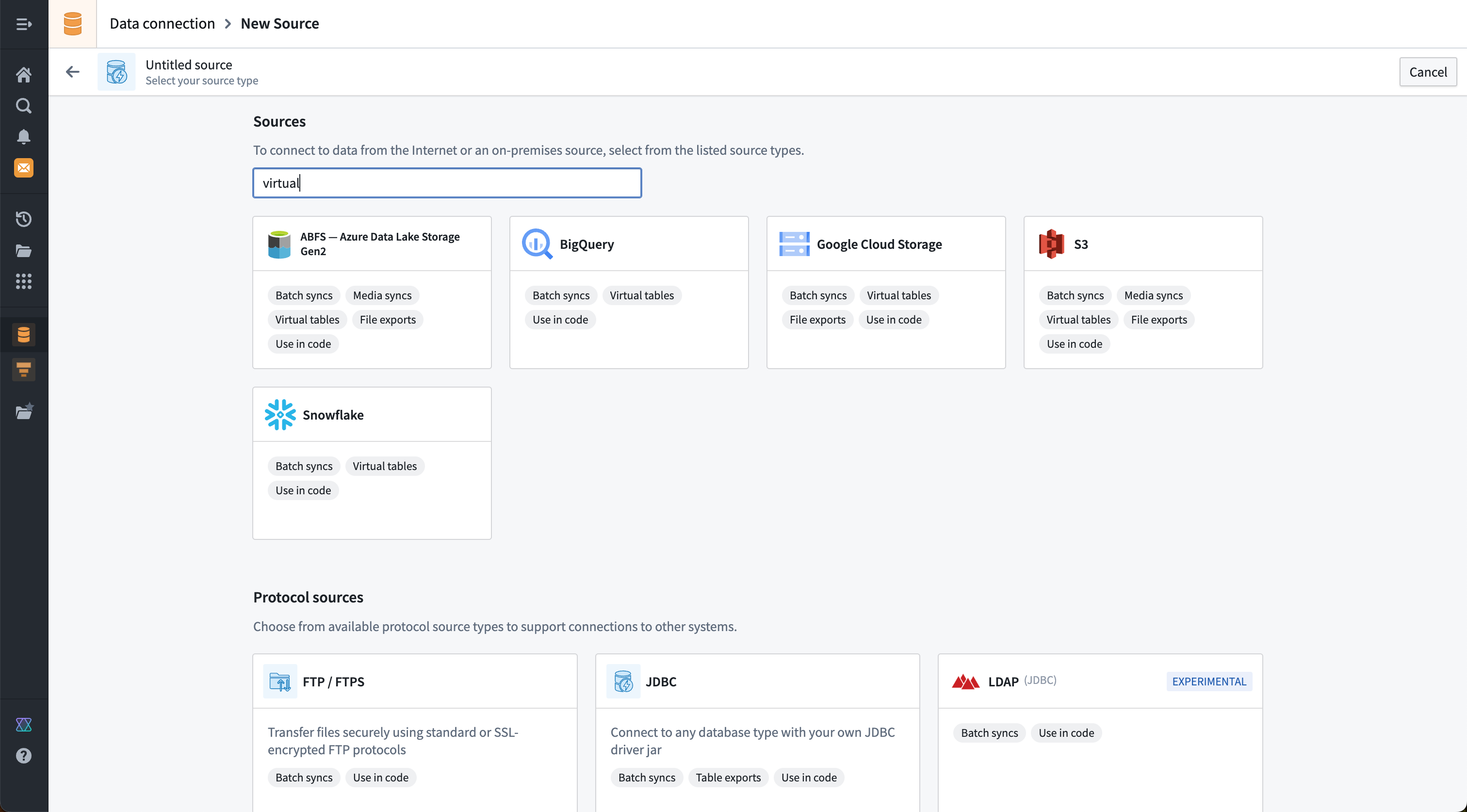
Supported capabilities for specific connectors are also displayed on the new source page in the Data Connection application. It is possible to search both by connector name and by capability. The example below shows the results of a search for sources that support a "virtual" option.
Batch syncs
Batch syncs read data from an external system and write it into a Foundry dataset. A batch sync defines what data should be read and which dataset to output into in Foundry. Batch syncs can be configured to sync data incrementally and allow syncing data both with and without a corresponding schema. Learn how to set up a sync.
Batch syncs are transactional. Each sync run writes data within a single transaction on the output dataset. If a sync fails at any point during execution, the transaction is aborted and no data from that run is committed. This means that a partial failure does not result in partial data; the output dataset remains unchanged from its state before the failed sync. The specific error depends on the cause of the failure. You can inspect the error message and full stack trace for a failed run on the sync's Runs tab. For common failure patterns, learn how to troubleshoot syncs.
In general, there are two main types of batch syncs:
- File batch syncs: Allows syncing files without a schema directly into a Foundry dataset. These files may then be accessed in downstream transforms; for example, using file-based transforms. The most common systems that support file batch syncs are filesystems and blob stores such as S3, ABFS, Google Cloud Storage, SMB, and Sharepoint online. Learn more about file batch syncs.
- Table batch syncs: Allows syncing data with a schema into a Foundry dataset. Part of the sync definition in this case also includes how to translate types between the external system schema and the supported Foundry schema options. The most common systems that support table batch syncs are databases and SaaS providers such as Microsoft SQL Server, Postgres, SAP, Salesforce, and Netsuite.
Streaming syncs
Streaming syncs provide the ability to stream data from systems that provide low latency data feeds. Data is delivered into a streaming dataset. Some examples of systems that support streaming syncs include Kafka, Amazon Kinesis, and Google Pub/Sub.
Learn more about streaming syncs.
Change data capture syncs
Change data capture (CDC) syncs are similar to streaming syncs, with additional changelog metadata automatically propagated to the streaming dataset where data is delivered. This type of sync is normally used for databases that support some form of low-latency replication. Learn more about change data capture syncs.
Media syncs
Media syncs allow importing media data into a media set. Media sets provide better tooling than standard datasets for ingesting, transforming, and consuming media data throughout Foundry. When dealing with PDFs, images, videos, and other media, we recommend using media sets over datasets. Learn more about media syncs.
HyperAuto
HyperAuto is a specialized capability that can dynamically discover the schema of your SAP system and automate syncs, pipelines, and creation of a corresponding ontology within Foundry. HyperAuto is currently only supported for SAP. Learn more about HyperAuto.
File exports
File exports are the opposite of file batch syncs. When doing a file export, data is taken directly from the underlying files contained within a Foundry dataset, which are written as-is to a filesystem location in the target system. Learn more about file exports.
Table exports
Table exports are the opposite of table batch syncs. When performing a table export, data is exported as rows from a Foundry dataset with a schema, which are then written to a table in the target system. Learn more about table exports.
Streaming exports
Streaming exports are the opposite of streaming syncs. When doing a streaming export, data is exported from a Foundry stream, and records are written to the specified streaming queue or topic in the target system. Learn more about streaming exports.
Webhooks
Webhooks represent a request to a source system outside of Foundry. Webhook requests can be flexibly defined in Data Connection to enable a broad range of connections to external systems. Learn more about webhooks.
Virtual tables
Virtual tables represent the ability to register tabular data from an external system into a virtual table resource in Foundry.
In addition to registering individual virtual tables, this capability also allows for dynamic discovery and automatic registration of all tables found in an external system.
Learn more about virtual tables.
Virtual media
Virtual media works similarly to media syncs, allowing media from an external system to be used in a media set but without copying the data into Foundry. Instead, media files contained in an external system can be registered as virtual media items in a specific media set.
Learn more about virtual media.
Exploration
The interactive exploration capability allows you to see what data is contained in an external system before performing syncs, exports, or other capabilities that interact with that system.
Exploration is most commonly used to check that a connection is working as intended and that the correct permissions and credentials are being used to connect.
Use in code
The ability to use connections from code is intended to allow developers to extend and customize connections from Foundry to other systems. Palantir's general principle is that anything possible in the platform using dedicated connectors and point-and-click configuration options should also be achievable by writing custom code. At any point, developers should be able to switch to code-based connectivity for more granular control over the functionality or performance of workflows that perform external connections.
Any connector may be used in code; in most cases, we recommend using either the REST API source or generic connector when connecting from code.
:::callout{theme="neutral"} Agent worker connections cannot be used in code. Also, some credential types such as cloud identity, outbound application, and OIDC may not currently be used from code. :::
| Use in code option | Description |
|---|---|
| External transforms | External transforms allow transforms written in Python to communicate with external systems. External transforms are a code-based alternative for file batch syncs, file exports, table batch syncs, table exports, and media syncs. External transforms may also be used to register data into virtual media sets and virtual tables. |
| External functions (webhooks) | External functions written in TypeScript support importing a source in order to invoke existing webhooks defined on that source. This allows existing webhook calls to be wrapped in custom typescript logic and error handling. |
| External functions (direct) | External functions now allow direct calls to external systems using fetch for TypeScript and requests for Python. External functions are a code-based alternative for webhooks. |
| Compute modules | Compute modules allow for long-running compute and writing connections in arbitrary languages. Compute modules may be used as a code-based alternative for streaming syncs, streaming exports, change data capture syncs, and webhooks. |
| External models | External models currently do not support importing sources. Instead, you must use network egress policies directly. |
| Code workspaces | Code workspaces currently do not support importing sources. Instead, you must use network egress policies directly. |
| Code workbooks | Code workbooks currently do not support external connections. |
Other concepts
Data connection also includes a variety of other concepts relevant for specific workflows. Some concepts were previously used and are now sunset, but are retained here for reference.
Syncs
Historically, the term Sync was used in a generic way to refer to bringing data into Foundry. Syncs are now separated into the more specific capabilities listed above. More details are available for each capability, such as batch syncs, streaming syncs, change data capture syncs, media syncs, and so on.
Tasks [Sunset]
:::callout{theme="warning" title="Sunset"} Tasks are in the sunset phase of development and will be deprecated at a future date. Full support remains available. We recommend migrating your workflows to code-based connectivity options. :::
The plugin framework used to implement connectors allows custom extensions called tasks. Tasks represent a unit of functionality configured by providing YAML and implemented in Java as part of the Data Connection plugin. Palantir has stopped developing new tasks, and all officially supported capabilities have migrated away from using tasks.
Direct connection
Connections running in Foundry originally only supported direct connections and were referred to as a "direct connection". These connections have now been incorporated into the Foundry worker concept.
中文翻译
核心概念
本文描述了数据连接(Data Connection)中使用的核心概念。
数据源(Source)
数据源(Source) 表示与外部系统的单一连接,包括指定和定位目标系统所需的配置(通常为URL)以及成功认证所需的凭证。数据源必须配置特定的工作节点(worker),用于定义与该数据源配合使用的任何功能(capabilities)的计算将在何处运行。请注意,代理工作节点(agent worker)还控制着Palantir平台与目标系统之间的网络连接。
数据源基于特定的连接器(connector)(也称为数据源类型(source type))进行设置。Palantir平台提供了广泛的连接器,旨在支持组织中常见的数据系统。根据所选连接器和工作节点的不同,可用的功能(capabilities)也会有所不同。
对于没有专用连接器的系统,可以使用通用连接器或REST API数据源,配合基于代码的连接选项,如外部转换(external transforms)、外部函数(external functions)和计算模块(compute modules)。
凭证(Credentials)
凭证(credential) 是访问特定系统所需的秘密值;也就是说,凭证用于身份认证。凭证可以是密码、令牌、API密钥或其他秘密值。在Palantir平台中,所有凭证都经过加密并安全存储。根据工作节点的不同,秘密值可以本地存储在数据连接代理(Data Connection agent)上,或直接存储在平台中。
某些数据源可以在不存储任何秘密值的情况下进行认证,例如使用OpenID连接、出站应用程序(outbound applications)或云身份(cloud identity)时。
工作节点(Workers)
工作节点(Worker)定义了功能(capabilities)的计算在何处运行,而网络连接则定义了如何访问目标系统。请参阅架构图了解工作节点和网络连接如何协同工作的示例。
数据源运行在Foundry工作节点(Foundry worker)上。代理工作节点(Agent worker)是为现有客户保留的旧版选项;请参阅Foundry工作节点与代理工作节点对比了解比较信息。
:::callout{theme="neutral"} 并非所有工作节点类型都适用于所有数据源类型。 :::
Foundry工作节点(Foundry worker)
:::callout{theme="neutral"} 最初,Foundry工作节点仅支持直接出站策略(direct egress policies),因此该工作节点类型的数据源被称为"直接连接"数据源。现在这些数据源也支持代理出站策略(agent proxy policies),因此已更名为"Foundry工作节点"数据源以避免混淆。 :::
Foundry工作节点数据源在Foundry中运行其数据源功能的计算。这些数据源受益于Foundry的容器化和可扩展作业执行、更高的稳定性,并且不会产生与代理(agents)相关的维护开销。所有数据源都可以在代码中使用。
网络连接通过出站策略(egress policies)进行配置,支持直接连接和通过代理(agent proxy)的连接。
代理工作节点(Agent worker)
:::callout{theme="warning" title="旧版(Legacy)"} 代理工作节点(Agent worker)处于开发阶段的旧版(legacy)阶段。我们建议将现有的代理工作节点数据源迁移到Foundry工作节点。请参阅Foundry工作节点与代理工作节点对比了解此建议背后的运营原因。 :::
代理工作节点数据源通过代理(agent)在客户提供的主机上运行其数据源功能的计算。网络连接在代理主机防火墙和代理设置上手动配置;主机必须具有与其连接的目标系统的网络访问权限。
网络连接与出站策略(Networking and egress policies)
网络连接定义了如何访问目标系统,而工作节点(worker)定义了功能(capabilities)的计算在何处执行。请参阅架构图了解工作节点和网络连接如何相互兼容的示例。
对于Foundry工作节点(Foundry worker)数据源,网络连接通过出站策略(egress policies)进行配置。它们以细粒度级别定义如何从Foundry访问每个目标系统,以及允许哪些出站目标。
数据源支持两种策略类型:
- 直接连接策略(Direct connection policies): 用于可从Foundry直接访问的系统。对于云托管的Foundry实例,这意味着公共互联网。对于私有托管的Foundry,这意味着安装Foundry的网络。
- 代理出站策略(Agent proxy policies): 用于访问托管在与Foundry不同网络中的外部系统。对于云托管的Foundry实例,这意味着本地部署的外部系统。需要设置代理(agent)。代理主机本身必须配置其网络连接以访问目标系统。代理出站策略仅适用于在Rubix(Palantir基于Kubernetes的基础设施)上运行的Foundry注册环境(enrollments)。
:::callout{theme="neutral"} 对于需要两种网络路径的用例,可以将直接连接策略和代理出站策略分配给同一数据源。例如,需要从互联网托管的系统检索凭证,然后使用该凭证对本地部署系统进行认证的用例。 :::
对于代理工作节点(agent worker)数据源,网络连接直接在代理主机上配置。
代理(Agents)
代理(agent) 是一个可下载的程序,安装在您的组织网络内,并通过Foundry的数据连接(Data Connection)界面进行管理。代理能够连接到您组织网络内的不同外部系统,用于支持利用代理出站策略(agent proxy policies)和代理工作节点连接(agent worker connections)的连接。
了解更多关于如何设置代理的信息。
功能(Capabilities)
数据源可能支持多种功能(capabilities),每个功能代表可以通过数据源连接运行的某些功能。支持的功能范围广泛,包括将数据导入Foundry、将数据推送出Foundry、虚拟化存储在Foundry外部的数据,以及向其他系统发出交互式请求。
下表总结了可用的功能。有关特定连接器支持的功能的更多信息,请参阅该连接器的文档页面。
| 功能 | 描述 |
|---|---|
| 批量同步(Batch syncs) | 将数据从外部源同步到数据集(dataset)。 |
| 流式同步(Streaming syncs) | 将数据从外部消息队列同步到流(stream)。 |
| 变更数据捕获同步(CDC syncs) | 将数据从数据库同步到带有CDC元数据的流(stream)。 |
| 媒体同步(Media syncs) | 将数据从外部源同步到媒体集(media set)。 |
| HyperAuto | 自动同步整个系统。 |
| 文件导出(File exports) | 将数据作为文件从数据集(dataset)推送到外部系统。 |
| 表导出(Table exports) | 将带有模式(schema)的数据从数据集(dataset)推送到外部数据库。 |
| 流式导出(Streaming exports) | 将数据从流(stream)推送到外部消息队列。 |
| Webhooks | 以交互方式向外部系统发出结构化请求。 |
| 虚拟表(Virtual tables) | 注册来自外部数据仓库的数据,用作虚拟表(virtual table)。 |
| 虚拟媒体(Virtual media) | 将来自外部系统的非结构化媒体注册为媒体集(media set)。 |
| 探索(Exploration) | 在使用其他功能之前,以交互方式探索外部系统的数据和模式(schema)。 |
| 在代码中使用(Use in code) | 在代码中使用数据源,以扩展或自定义上述可通过点击配置的功能未涵盖的任何功能。仅适用于Foundry工作节点(Foundry worker)数据源。 |
更多功能正在开发中,功能覆盖范围会定期在特定连接器的文档中更新。
特定连接器支持的功能也会显示在数据连接(Data Connection)应用程序的新建数据源页面上。可以按连接器名称和功能进行搜索。下面的示例显示了搜索支持"虚拟(virtual)"选项的数据源的结果。
批量同步(Batch syncs)
批量同步(Batch syncs) 从外部系统读取数据并将其写入Foundry数据集(dataset)。批量同步定义了应读取哪些数据以及输出到Foundry中的哪个数据集。批量同步可以配置为增量同步数据,并允许同步带有或不带有相应模式(schema)的数据。了解如何设置同步。
批量同步是事务性的(transactional)。每次同步运行都在输出数据集上的单个事务内写入数据。如果同步在执行过程中任何点失败,事务将被中止,并且该次运行的数据不会被提交。这意味着部分失败不会导致部分数据;输出数据集保持与失败同步之前的状态不变。具体错误取决于失败的原因。您可以在同步的运行(Runs) 选项卡上检查失败运行的错误消息和完整堆栈跟踪。对于常见的失败模式,了解如何排查同步问题。
一般来说,批量同步有两种主要类型:
- 文件批量同步(File batch syncs): 允许将没有模式(schema)的文件直接同步到Foundry数据集。这些文件随后可以在下游转换中访问;例如,使用基于文件的转换(file-based transforms)。支持文件批量同步的最常见系统是文件系统和对象存储,如S3、ABFS、Google Cloud Storage、SMB和Sharepoint online。了解更多关于文件批量同步的信息。
- 表批量同步(Table batch syncs): 允许将带有模式(schema)的数据同步到Foundry数据集。在这种情况下,同步定义的一部分还包括如何在外部系统模式和受支持的Foundry模式选项之间转换类型。支持表批量同步的最常见系统是数据库和SaaS提供商,如Microsoft SQL Server、Postgres、SAP、Salesforce和Netsuite。
流式同步(Streaming syncs)
流式同步(Streaming syncs) 提供了从提供低延迟数据馈送的系统流式传输数据的能力。数据被传送到流式数据集(streaming dataset)。支持流式同步的一些系统示例包括Kafka、Amazon Kinesis和Google Pub/Sub。
变更数据捕获同步(Change data capture syncs)
变更数据捕获同步(Change data capture syncs, CDC syncs) 与流式同步类似,但额外的变更日志元数据会自动传播到数据传送到的流式数据集。这种类型的同步通常用于支持某种形式的低延迟复制的数据库。了解更多关于变更数据捕获同步的信息。
媒体同步(Media syncs)
媒体同步(Media syncs) 允许将媒体数据导入媒体集(media set)。媒体集提供了比标准数据集更好的工具,用于在Foundry中摄取、转换和使用媒体数据。处理PDF、图像、视频和其他媒体时,我们建议使用媒体集而非数据集。了解更多关于媒体同步的信息。
HyperAuto
HyperAuto 是一种专门的功能,可以动态发现您的SAP系统的模式(schema),并自动在Foundry中创建同步、管道和相应的本体论(Ontology)。HyperAuto目前仅支持SAP。了解更多关于HyperAuto的信息。
文件导出(File exports)
文件导出(File exports) 是文件批量同步的逆操作。执行文件导出时,数据直接从Foundry数据集包含的底层文件中获取,并按原样写入目标系统中的文件系统位置。了解更多关于文件导出的信息。
表导出(Table exports)
表导出(Table exports) 是表批量同步的逆操作。执行表导出时,数据作为行从带有模式(schema)的Foundry数据集中导出,然后写入目标系统中的表。了解更多关于表导出的信息。
流式导出(Streaming exports)
流式导出(Streaming exports) 是流式同步的逆操作。执行流式导出时,数据从Foundry流中导出,记录被写入目标系统中指定的流式队列或主题。了解更多关于流式导出的信息。
Webhooks
Webhooks 表示向Foundry外部的源系统发出的请求。Webhook请求可以在数据连接(Data Connection)中灵活定义,以实现与外部系统的广泛连接。了解更多关于webhooks的信息。
虚拟表(Virtual tables)
虚拟表(Virtual tables) 表示将来自外部系统的表格数据注册到Foundry中的虚拟表资源的能力。
除了注册单个虚拟表外,此功能还允许动态发现并自动注册在外部系统中找到的所有表。
虚拟媒体(Virtual media)
虚拟媒体(Virtual media) 的工作方式类似于媒体同步(media syncs),允许使用来自外部系统的媒体到媒体集(media set)中,但无需将数据复制到Foundry。相反,可以将外部系统中包含的媒体文件注册为特定媒体集中的虚拟媒体项。
探索(Exploration)
交互式探索(exploration) 功能允许您在执行同步、导出或与该系统交互的其他功能之前,查看外部系统中包含的数据。
探索最常用于检查连接是否按预期工作,以及是否使用了正确的权限和凭证进行连接。
在代码中使用(Use in code)
从代码中使用连接的能力旨在允许开发人员扩展和自定义从Foundry到其他系统的连接。Palantir的一般原则是,在平台中使用专用连接器和点击配置选项可以实现的任何功能,也应该可以通过编写自定义代码来实现。在任何时候,开发人员都应该能够切换到基于代码的连接,以便对外部连接工作流的功能或性能进行更精细的控制。
任何连接器都可以在代码中使用;在大多数情况下,我们建议在从代码连接时使用REST API数据源或通用连接器(generic connector)。
:::callout{theme="neutral"} 代理工作节点(Agent worker)连接不能在代码中使用。此外,某些凭证类型(如云身份、出站应用程序和OIDC)目前可能无法从代码中使用。 :::
| 在代码中使用选项 | 描述 |
|---|---|
| 外部转换(External transforms) | 外部转换(External transforms)允许用Python编写的转换与外部系统通信。外部转换是文件批量同步、文件导出、表批量同步、表导出和媒体同步的基于代码的替代方案。外部转换也可用于将数据注册到虚拟媒体集和虚拟表中。 |
| 外部函数(Webhooks) | 用TypeScript编写的外部函数(External functions)支持导入数据源以调用该数据源上定义的现有webhooks。这允许将现有的webhook调用包装在自定义的TypeScript逻辑和错误处理中。 |
| 外部函数(直接) | 外部函数(External functions)现在允许使用TypeScript的fetch和Python的requests直接调用外部系统。外部函数是webhooks的基于代码的替代方案。 |
| 计算模块(Compute modules) | 计算模块(Compute modules)允许长时间运行的计算和用任意语言编写连接。计算模块可用作流式同步、流式导出、变更数据捕获同步和webhooks的基于代码的替代方案。 |
| 外部模型(External models) | 外部模型(External models)目前不支持导入数据源。相反,您必须直接使用网络出站策略。 |
| 代码工作空间(Code workspaces) | 代码工作空间(Code workspaces)目前不支持导入数据源。相反,您必须直接使用网络出站策略。 |
| 代码工作簿(Code workbooks) | 代码工作簿(Code workbooks)目前不支持外部连接。 |
其他概念
数据连接(Data connection)还包括与特定工作流相关的各种其他概念。某些概念以前使用过,现已停用,但在此保留以供参考。
同步(Syncs)
历史上,术语同步(Sync) 被泛泛地用于指代将数据导入Foundry。现在,同步被细分为上面列出的更具体的功能。每个功能都有更详细的说明,例如批量同步(batch syncs)、流式同步(streaming syncs)、变更数据捕获同步(change data capture syncs)、媒体同步(media syncs) 等。
任务(Tasks) [已停用(Sunset)]
:::callout{theme="warning" title="已停用(Sunset)"} 任务(Tasks)处于开发阶段的已停用(sunset)阶段,将在未来某个日期被弃用。目前仍提供完全支持。我们建议将您的工作流迁移到基于代码的连接选项。 :::
用于实现连接器的插件框架允许称为任务(tasks) 的自定义扩展。任务代表一个功能单元,通过提供YAML进行配置,并作为数据连接(Data Connection)插件的一部分用Java实现。Palantir已停止开发新任务,所有官方支持的功能都已迁移,不再使用任务。
直接连接(Direct connection)
在Foundry中运行的连接最初仅支持直接连接,并被称为"直接连接(direct connection)"。这些连接现已纳入Foundry工作节点(Foundry worker)的概念中。