External Functions(外部函数(External Functions))
External Functions allow you to call webhooks from a Function and use them to interact with external systems. You can call these systems from applications built using Workshop, Actions, and Functions.
To use a webhook in a Function, you must first configure a Data Connection source that supports the webhooks capability. Normally this will be a REST API source. Once you have a source with webhooks configured, you can import the source into your Functions repository and create Functions that call webhooks and other logic.
You can apply external Functions for a variety of use cases, including the following:
- Use a single function to make an HTTP request to an external server and create a record, then write a matching record to the Ontology.
- Wrap a webhook call with custom pre- and post-processing logic. This is particularly useful if custom logic is required to go from Function inputs to the desired webhook request input parameters, or if post-processing on the webhook response is required before making Ontology edits.
- Chain together multiple external webhook requests and Ontology edits with intermediate processing logic. A single webhook cannot perform a dynamic number of external requests, but this can be accomplished using external Functions.
- Query an external system using a read-only request to render data ephemerally in a Workshop application.
:::callout{theme="neutral"} External functions may not currently be used to make arbitrary API calls from TypeScript code without first defining the request as a webhook in Data Connection. :::
Concepts
- A Data Connection source represents a connection to an external system, including any configuration for how to reach that system (such as networking details), and securely stored credentials.
- Webhooks are a capability supported by some source types that allow you to build structured requests to run interactively and send requests to that system.
- An Ontology edit Function is a Function that can be later configured as a Function-backed Action to write back to an object. It is annotated with the
@OntologyEditFunction()decorator. - A query Function is a read-only Function that cannot have any side effects, like altering an external system. It is annotated with the
@Query()decorator.
Setup guide
In the following setup guide, we will walk through creating a webhook that calls a free public dictionary API ↗. If you already have an existing source with webhooks configured, proceed to external sources in functions for calling the webhooks from functions.
:::callout{theme="neutral"} The dictionary API illustrated here is unaffiliated with Palantir and may change at any time. This tutorial is not an endorsement, recommendation, or suggestion to use this API for production use cases. :::
Create a Data Connection source
To connect to an external system from Functions, you must have a REST API source that can connect to the desired external API. You can follow instructions below to configure a new REST API source.
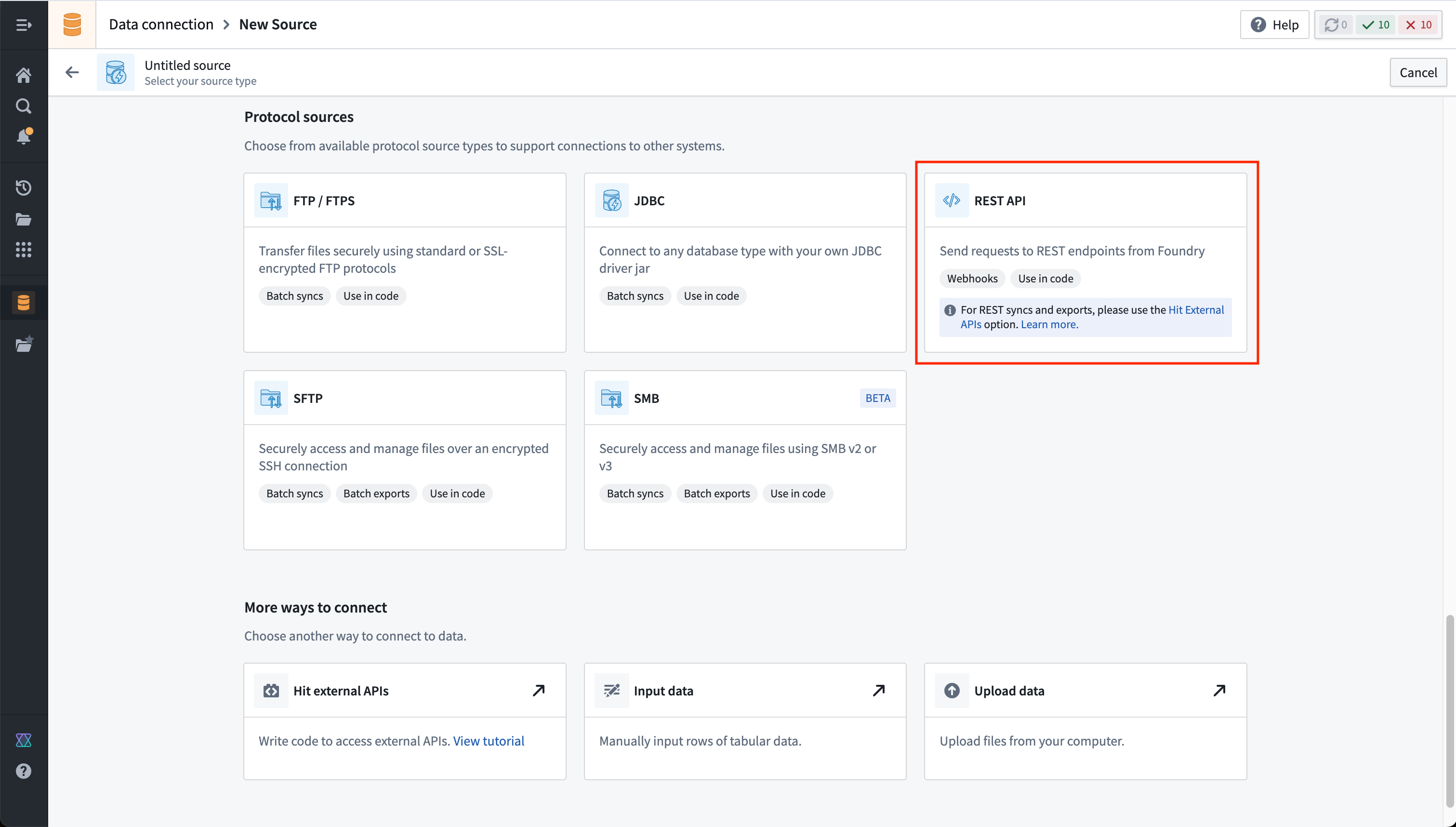
- Navigate to the Data Connection application within Foundry and choose New Source. From the list of options, select REST API.
-
Review the Overview page, then select Continue in the bottom right. You will be prompted to choose the connection runtime: a Foundry worker, an agent worker, or an agent proxy runtime (sunset). A Foundry worker is the preferred method when interacting with anything reachable from Foundry's network directly (via direct connection egress policies or anything hosted on a network different from Foundry's (via agent proxy egress policies. We will use a Foundry worker with a direct connection policy to connect to our free dictionary API.
-
Choose a name for your source, and select a project to which it should be saved.
-
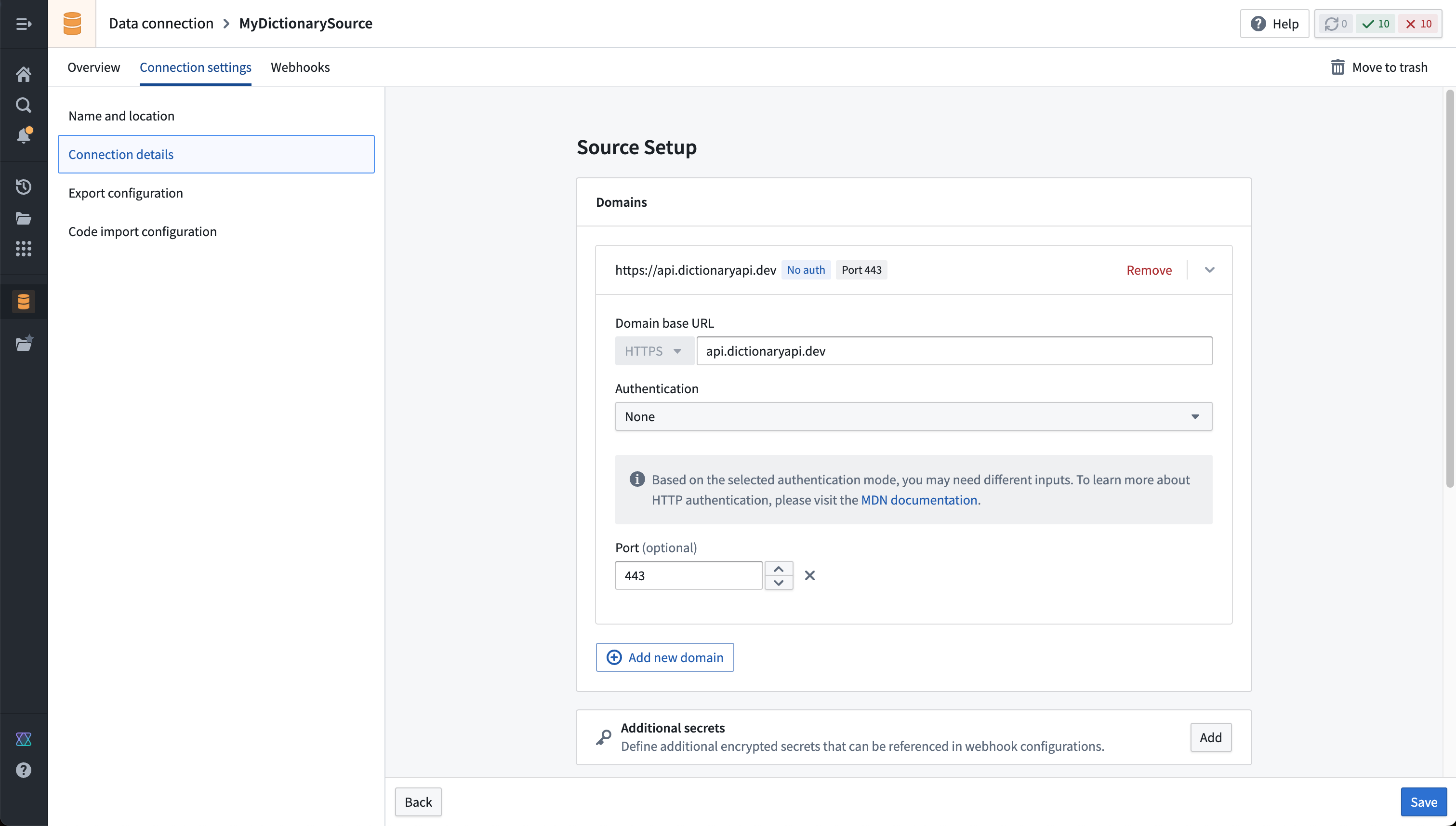
Fill out the Domains section with the connection information of the API source. The configuration for our free dictionary API example is shown below:
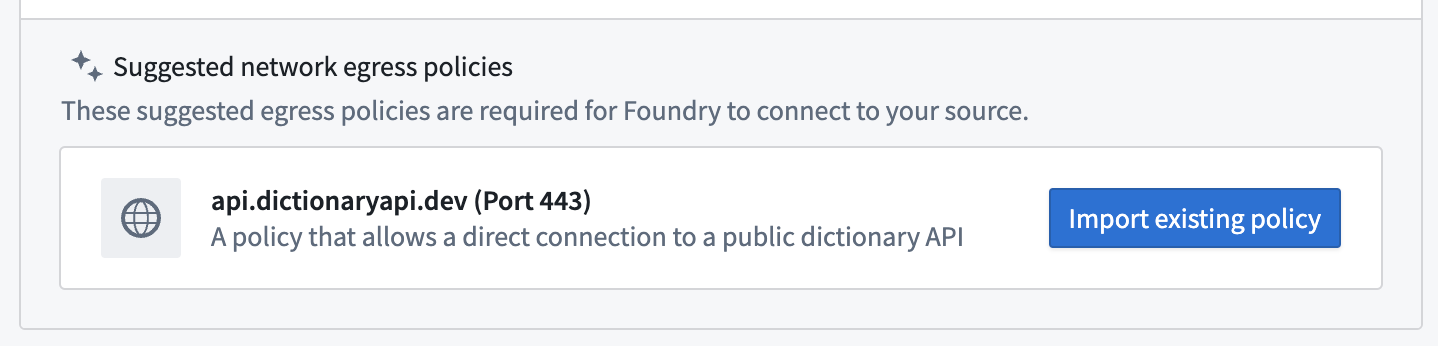
- For this example, we also need to create the necessary egress policy. The policy will be automatically suggested in the Network Connectivity section if you completed the previous step:
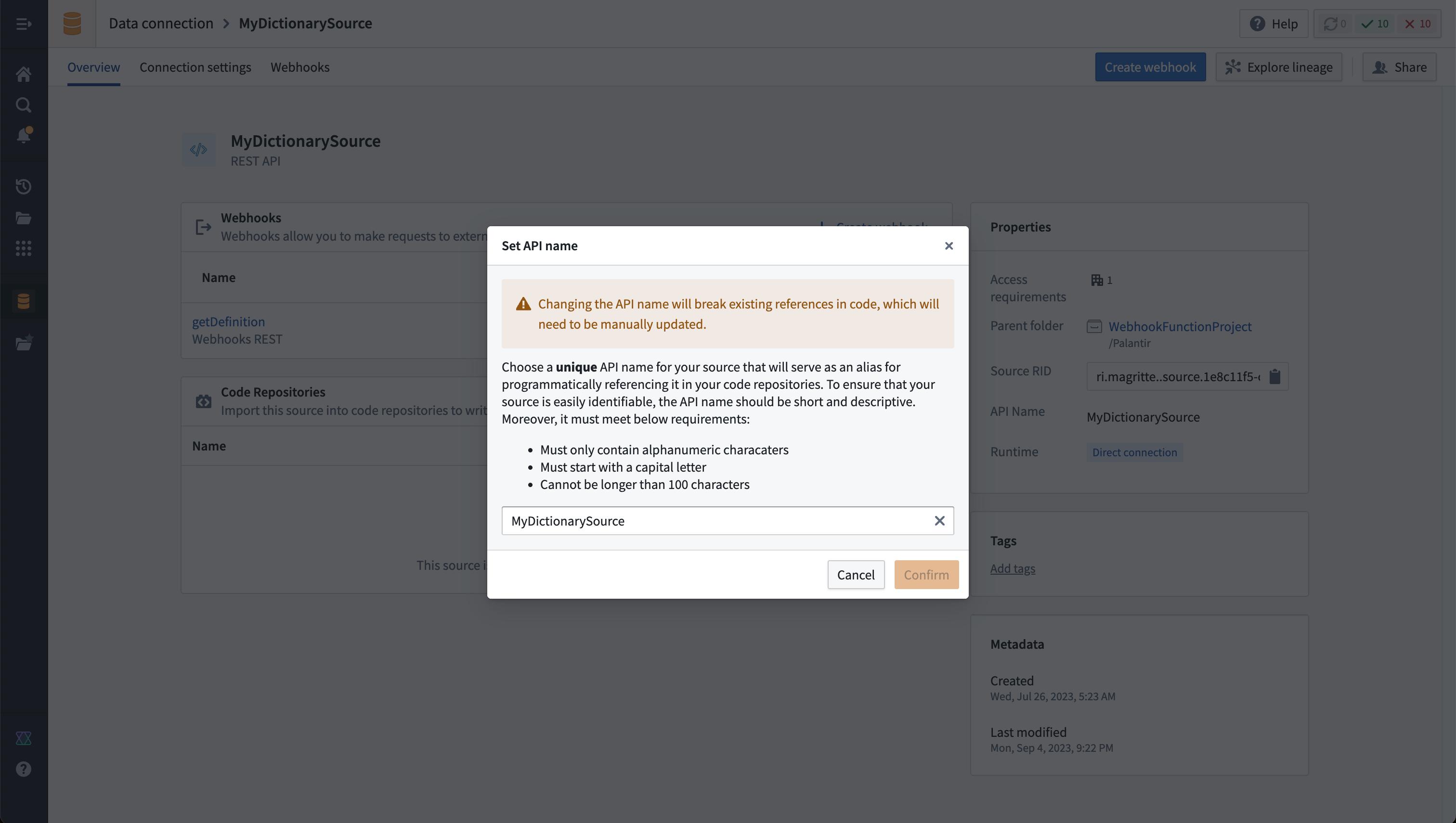
- Select Save, then choose Save and continue to complete the source setup. Before we configure a webhook to use on this source, navigate back to the source Overview page and ensure that an API name is set. This name is required to reference the source in code.
Create a webhook on a Data Connection source
Now, you must set up the webhook on the REST API source you configured in the previous step. Then, before you can call a webhook from a Function, you must configure the webhook and assign it an API name. A Data Connection source may have multiple webhooks associated with it. Note that your source API name should be unique within a namespace, and the webhook API name must be unique within the source.
Follow the steps below to configure a webhook that makes a request to the dictionary API to fetch the definition of a single word.
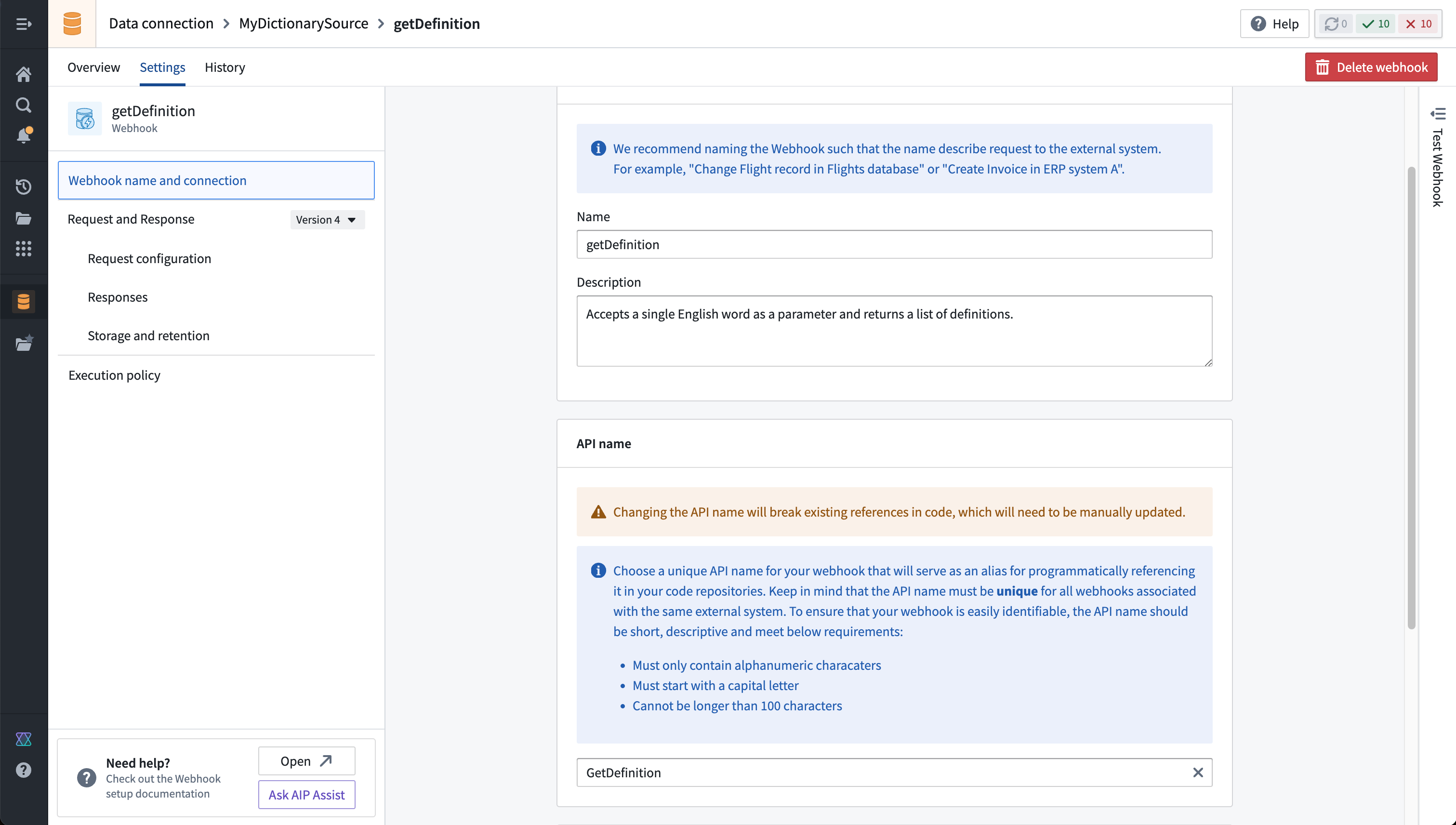
- On the Overview page for the source, choose Create webhook. Give the webhook a name, description, and API name. As with the API source, we will reference the webhook in code.
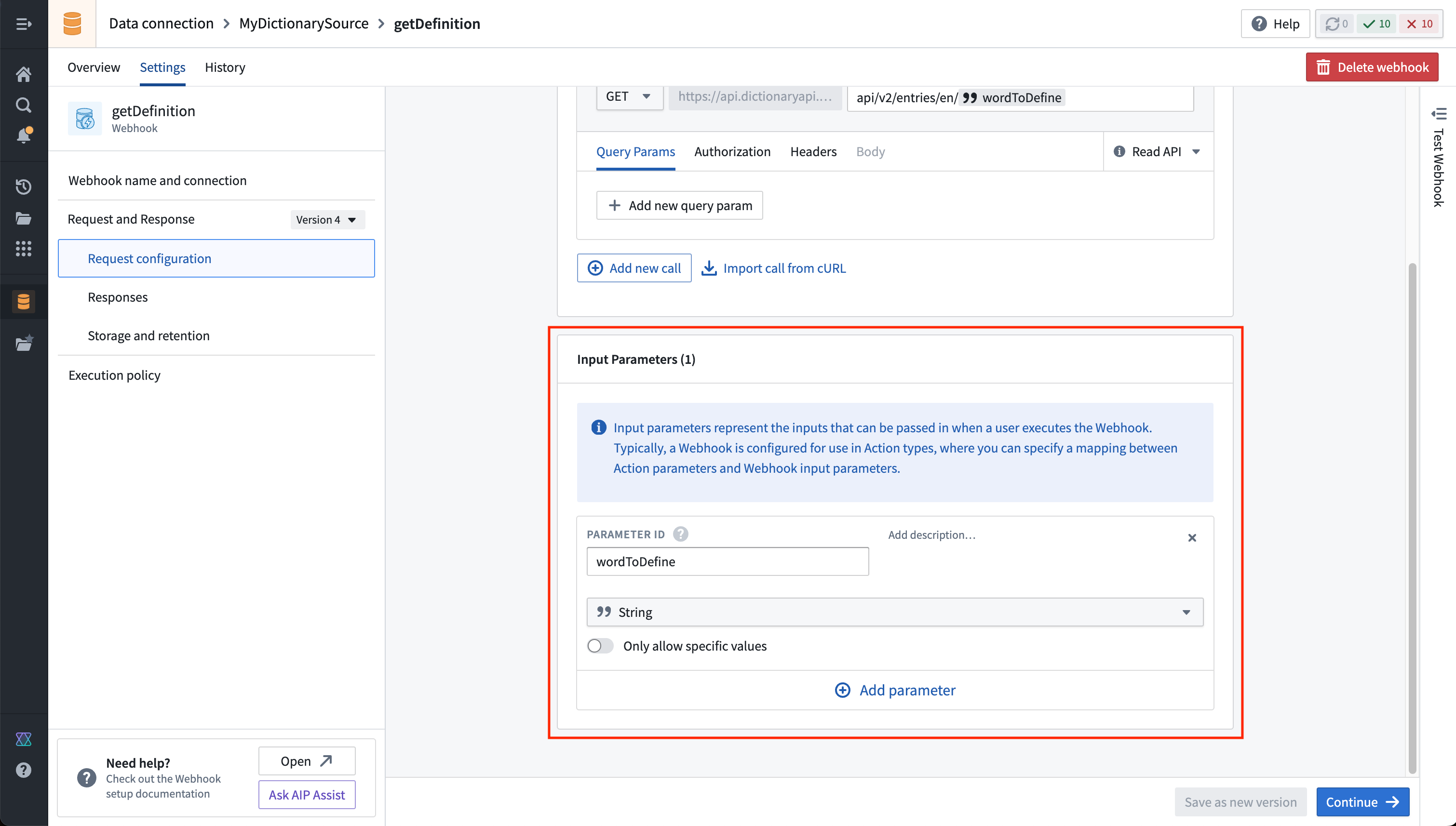
- Define a parameter to pass in when executing the webhook. In our example, we will use a single string input parameter,
wordToDefine.
- Now, fill in the dictionary resource path in the URL, with the input parameter referenced at the end as shown below:
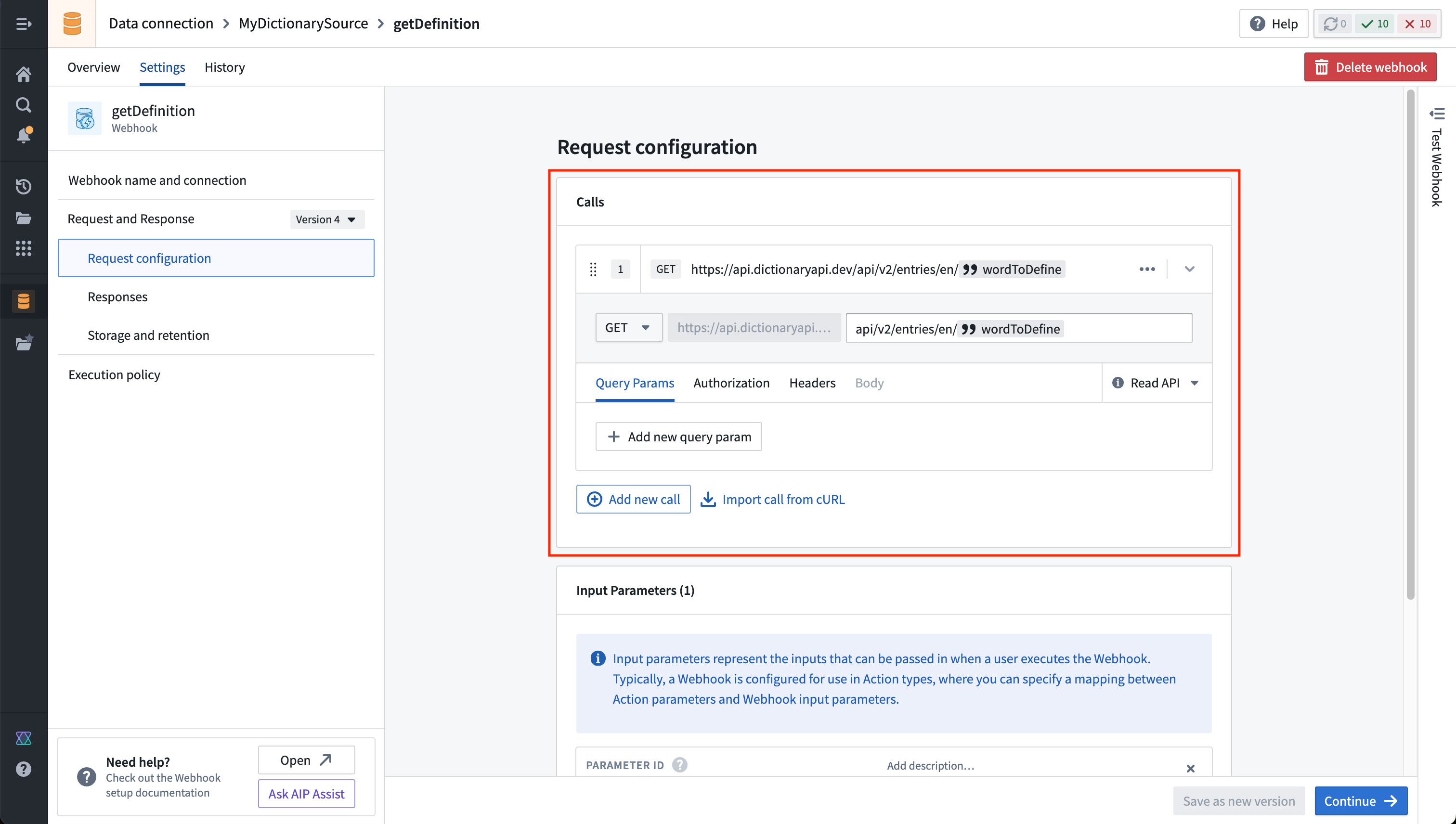
In our example, the API is a GET request that does not modify any data. Therefore, we will leave the default setting of Read API, allowing the webhook to be used in both types of Functions: @Query() and @OntologyEditFunction(). Webhooks marked with Write API may only be used in an @OntologyEditFunction().
- On the next page, you will see a panel that allows you to execute the webhook as currently configured. If you run the webhook, you will see an unparsed response:
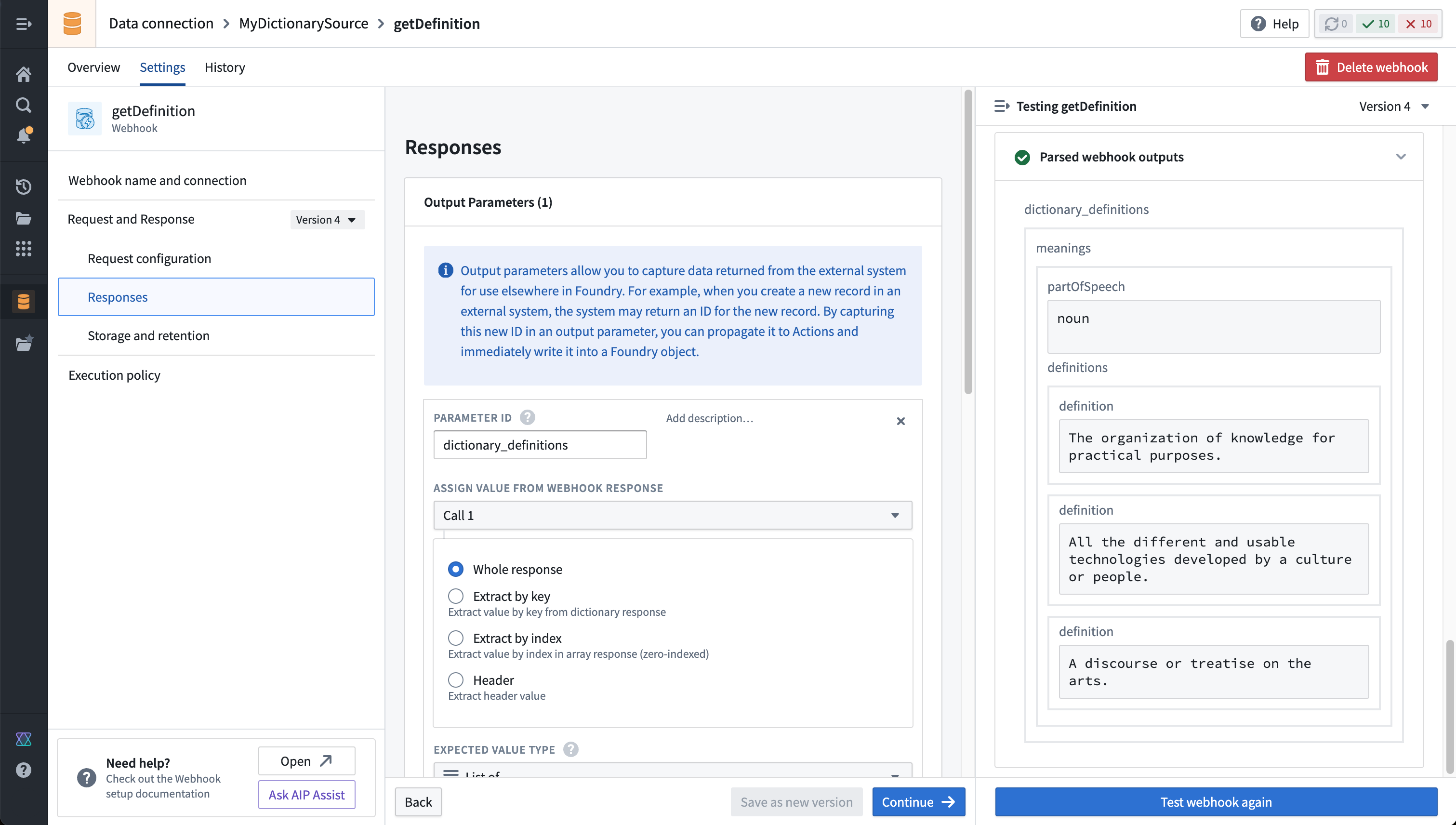
- Webhooks allow taking the response object returned from the external system and parsing fields according to a typed schema. For this example, we will extract a list of definitions for each returned part of speech. Run the webhook to ensure that some output is returned for a common word ("technology", for example).
Once the webhook is saved, it is usable across the platform.
Learn more about webhook configuration options and usage..
Next Steps
To begin using this source in a function, proceed to the guide on external sources in functions.
中文翻译
外部函数(External Functions)
外部函数(External Functions)允许您从函数(Function)中调用webhooks,并使用它们与外部系统进行交互。您可以从使用Workshop、操作(Actions)和函数(Functions)构建的应用程序中调用这些系统。
要在函数(Function)中使用webhook,您必须首先配置一个支持webhook功能的数据连接(Data Connection)源。通常这将是一个REST API源。一旦配置了带有webhook的源,您就可以将该源导入到您的函数仓库(Functions repository)中,并创建调用webhook和其他逻辑的函数(Function)。
您可以将外部函数(External Functions)应用于多种用例,包括以下场景:
- 使用单个函数向外部服务器发出HTTP请求并创建记录,然后将匹配的记录写入本体论(Ontology)。
- 使用自定义的前置和后置处理逻辑包装webhook调用。当需要从函数输入转换到所需的webhook请求输入参数,或者在编辑本体论(Ontology)之前需要对webhook响应进行后置处理时,这一点尤其有用。
- 将多个外部webhook请求和本体论(Ontology)编辑与中间处理逻辑串联起来。单个webhook无法执行动态数量的外部请求,但使用外部函数(External Functions)可以实现这一点。
- 使用只读请求查询外部系统,以在Workshop应用程序中临时渲染数据。
:::callout{theme="neutral"} 目前,如果不先在数据连接(Data Connection)中将请求定义为webhook,则不能使用外部函数从TypeScript代码进行任意的API调用。 :::
概念(Concepts)
- 数据连接(Data Connection)源表示与外部系统的连接,包括如何访问该系统的任何配置(如网络详细信息)以及安全存储的凭据。
- Webhooks是某些源类型支持的功能,允许您构建结构化请求以交互方式运行并向该系统发送请求。
- 本体论编辑函数(Ontology edit Function)是一种函数(Function),可以随后配置为函数支持的操作(Function-backed Action),用于写回对象。它使用
@OntologyEditFunction()装饰器进行注解。 - 查询函数(Query Function)是一种只读函数(Function),不能有任何副作用,例如更改外部系统。它使用
@Query()装饰器进行注解。
设置指南(Setup guide)
在以下设置指南中,我们将逐步创建一个调用免费公共词典API ↗的webhook。如果您已有配置了webhook的现有源,请跳转到函数中的外部源部分,了解如何从函数中调用webhook。
:::callout{theme="neutral"} 此处演示的词典API与Palantir无关,可能随时发生变化。本教程并非认可、推荐或建议在生产用例中使用此API。 :::
创建数据连接(Data Connection)源
要从函数(Functions)连接到外部系统,您必须拥有一个可以连接到所需外部API的REST API源。您可以按照以下说明配置新的REST API源。
- 在Foundry中导航到数据连接(Data Connection)应用程序,选择新建源(New Source)。从选项列表中,选择REST API。
-
查看概览(Overview)页面,然后选择右下角的继续(Continue)。系统将提示您选择连接运行时:一个Foundry工作节点(Foundry worker)、一个代理工作节点(agent worker)或一个代理代理运行时(已弃用)(agent proxy runtime (sunset))。当与可从Foundry网络直接访问的任何内容(通过直接连接出站策略(direct connection egress policies))或托管在与Foundry不同网络上的任何内容(通过代理代理出站策略(agent proxy egress policies))交互时,Foundry工作节点是首选方法。 我们将使用带有直接连接策略的Foundry工作节点来连接到我们的免费词典API。
-
为您的源选择一个名称,并选择要保存到的项目。
-
使用API源的连接信息填写域(Domains)部分。我们的免费词典API示例的配置如下所示:
- 对于此示例,我们还需要创建必要的出站策略。如果您完成了上一步,该策略将在网络连接(Network Connectivity)部分自动建议:
- 选择保存(Save),然后选择保存并继续(Save and continue)以完成源设置。在配置要在此源上使用的webhook之前,请导航回源概览(Overview)页面,确保已设置API名称。此名称是在代码中引用源所必需的。
在数据连接(Data Connection)源上创建webhook
现在,您必须在上一步配置的REST API源上设置webhook。然后,在从函数(Function)调用webhook之前,您必须配置webhook并为其分配API名称。一个数据连接(Data Connection)源可以有多个与之关联的webhook。请注意,您的源API名称在命名空间内应该是唯一的,而webhook API名称在源内必须是唯一的。
按照以下步骤配置一个webhook,该webhook向词典API发出请求以获取单个单词的定义。
- 在源的概览(Overview)页面上,选择创建webhook(Create webhook)。为webhook指定名称、描述和API名称。与API源一样,我们将在代码中引用webhook。
- 定义一个在执行webhook时传入的参数。在我们的示例中,我们将使用一个字符串输入参数
wordToDefine。
- 现在,在URL中填写词典资源路径,并在末尾引用输入参数,如下所示:
在我们的示例中,API是一个GET请求,不会修改任何数据。因此,我们将保留默认设置读取API(Read API),允许webhook在两种类型的函数(Function)中使用:@Query()和@OntologyEditFunction()。标记为写入API(Write API)的webhook只能在@OntologyEditFunction()中使用。
- 在下一页上,您将看到一个面板,允许您按当前配置执行webhook。如果您运行webhook,您将看到一个未解析的响应:
- Webhooks允许获取从外部系统返回的响应对象,并根据类型化模式解析字段。对于此示例,我们将为返回的每个词性提取一个定义列表。运行webhook以确保为常见单词(例如"technology")返回了一些输出。
保存webhook后,它就可以在整个平台上使用了。
后续步骤(Next Steps)
要开始在函数中使用此源,请继续阅读函数中的外部源指南。