Add virtual tables to a Marketplace product(向 Marketplace 产品添加虚拟表(Virtual Table))
Use Foundry DevOps to include your virtual table in a Marketplace product for other users to install and reuse. Learn how to create your first product.
Supported features
All virtual tables may be packaged and synced.
Currently, packaging an individual source is not supported, nor is packaging a source that has auto-registration of virtual tables enable.
Installers must ensure the destination source contains a table at the same location with the same schema as the original source to guarantee compatibility and functionality.
Adding virtual tables to products
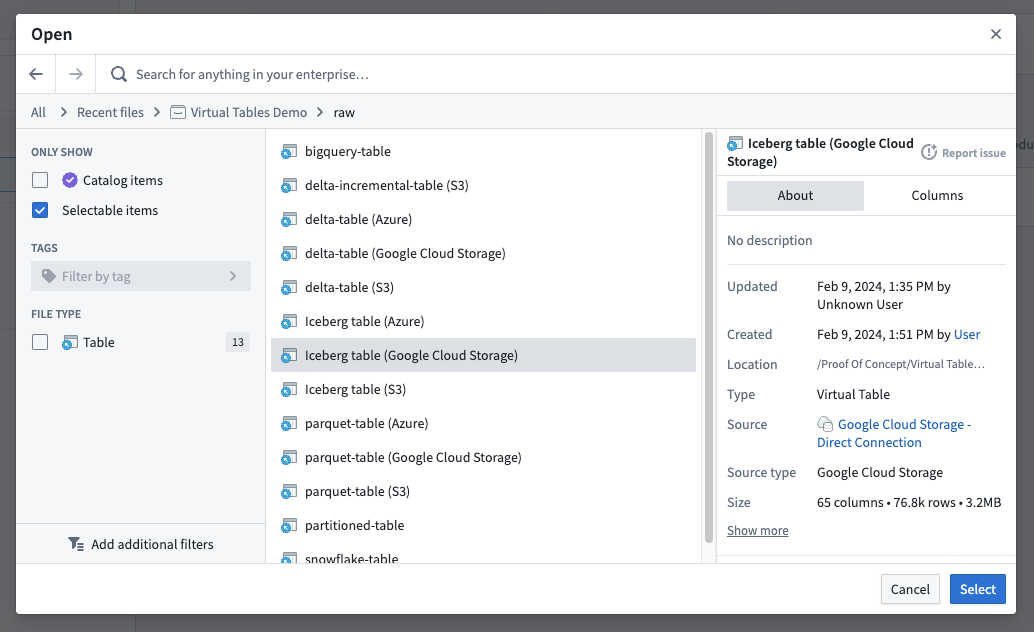
To add a virtual table to a product, first create a product, then add outputs. Choose the Add files option to navigate to the virtual table from within the Compass filesystem and add it to your product.
You can then select which virtual tables you would like to include in your product.
中文翻译
向 Marketplace 产品添加虚拟表(Virtual Table)
使用 Foundry DevOps 将您的虚拟表(Virtual Table)纳入 Marketplace 产品(Product)中,供其他用户安装和复用。了解如何创建您的第一个产品。
支持的功能(Supported Features)
所有虚拟表均可打包和同步。
目前,不支持打包单个数据源(Source),也不支持打包已启用虚拟表自动注册(Auto-registration)的数据源。
安装者必须确保目标数据源中包含与原始数据源位于相同位置且具有相同模式(Schema)的表,以保证兼容性和功能性。
向产品添加虚拟表
要向产品添加虚拟表,首先创建一个产品,然后添加输出(Outputs)。选择 添加文件(Add files) 选项,从 Compass 文件系统中导航到虚拟表,并将其添加到您的产品中。
然后,您可以选择要在产品中包含哪些虚拟表。