Optimize JDBC syncs(优化 JDBC 同步)
This guide provides tips to improve the speed and reliability of JDBC syncs.
:::callout{theme="warning" title="Warning"} If your sync is already working reliably, there is no need to take the actions described below. If you are setting up a new sync or your sync takes too long to complete or does not complete reliably, we recommend following this guide. :::
There are two primary methods for speeding up JDBC syncs. We recommend starting by making your sync incremental and only moving on to parallelizing the SQL query if the incremental sync is insufficient:
Incremental syncs
By default, batch syncs will sync all matching rows from the target table. Incremental syncs, by contrast, maintain state about the most recent sync and thus can be used to ingest only new matching rows from the target. This can improve sync performance dramatically for tables with a large number of rows. Incremental syncs work by adding data as an APPEND transaction to the synced dataset.
Below is an example configuration for an incremental batch sync:
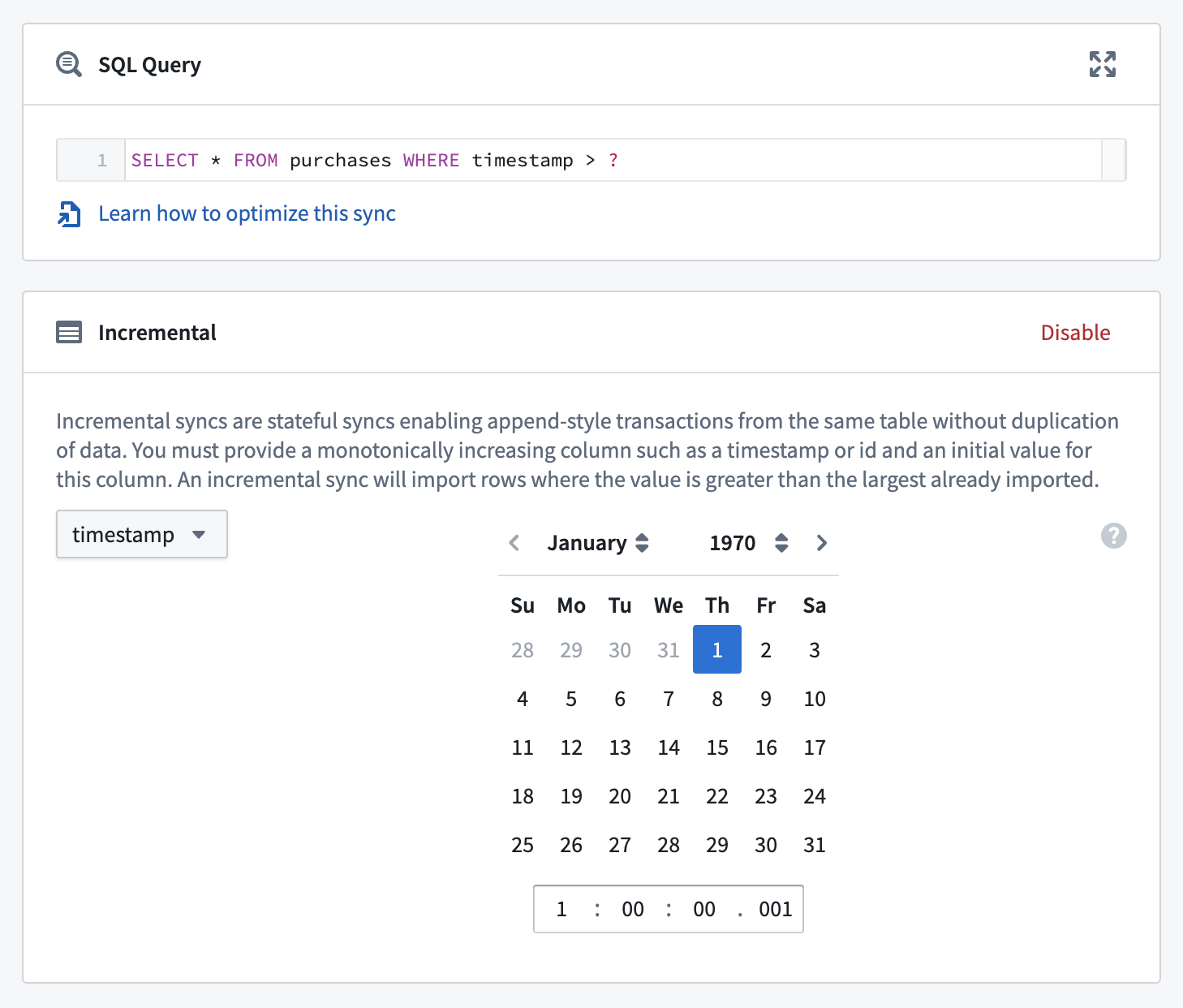
Perform the following steps to set up an incremental batch sync:
-
Navigate to the configuration page for the sync you want to convert, and ensure that the preview is working.
-
Set the transaction type to
APPEND. This is necessary to avoid overwriting rows from previous syncs. -
Select Enable in the Incremental box. Ensure that the preview has successfully run on this sync. With a working preview, the Incremental box will expand to allow you to configure the initial incremental state for the sync.
-
Configure the sync's incremental state. This state consists of an incremental column and an initial value, which can be configured in the user interface. Keep the following important considerations in mind when setting these values:
-
The incremental column must be strictly increasing between syncs. If your rows are immutable (i.e., existing rows cannot be updated in place), any consistently incrementing column (e.g., an auto-incrementing ID, or a timestamp indicating when the row was added) will be sufficient. If your rows are mutable (i.e., your table allows existing rows to be updated, as opposed to only allowing new rows to be inserted), you'll need a column that increases with every mutation of the data (e.g. an
update_timecolumn). - To avoid ingesting rows more than once, the initial value of the incremental column must be greater than that of all rows synced in previous runs. For example, if the most recent
SNAPSHOTsync brought in rows with values of an integeridcolumn ranging up to1999, you could set the initial value to2000.
:::callout{theme="neutral"}
When you ingest an updated version of an existing row, the Foundry dataset will still include previous versions of the row (remember, we're using the APPEND transaction type). If you want only the latest version of each row, you will need to use another tool in Foundry, such as Transforms, to clean the data. Refer to the guidance on incremental pipelines to learn more.
:::
- Finally, update the query to use the wildcard symbol
?. Exactly how you include the wildcard in the query depends on your query logic; see below for a simple example, and note the following: - In the first incremental run, this wildcard will be replaced by the initial value we specified in the previous step.
- In any subsequent run, the wildcard will be replaced with the maximum synced value of the incremental column from the previous run.
:::callout{theme="neutral"}
As mentioned above, the incremental state interface only works if a preview of the sync has run successfully. This means that if you are creating an incremental sync from scratch or duplicating an existing incremental sync, you will need to run a preview without the wildcard ? operator in your query.
:::
Example
Suppose you are ingesting a table called employees, with transaction type set to SNAPSHOT and the following simple SQL query:
SELECT
    *
FROM
    employees
At time T1, the table looks as follows:
| id | name | surname | update_time | insert_time |
|---|---|---|---|---|
1 |
Jane | Smith | 1478862205 |
1478862205 |
2 |
Erika | Mustermann | 1478862246 |
1478862246 |
And suppose this table is mutable, so that at a later time, T2, it looks like this:
| id | name | surname | update_time | insert_time |
|---|---|---|---|---|
1 |
Jane | Doe | 1478862452 |
1478862205 |
2 |
Erika | Mustermann | 1478862246 |
1478862246 |
3 |
Juan | Perez | 1478862438 |
1478862438 |
We want to convert this sync to be incremental, so we update the transaction type to APPEND.
What should we use as the incremental column? It's important to note that neither the id nor insert_time columns are appropriate to use as the incremental column because they will miss updates, like the change in the surname column of the Jane row. Instead, we should use update_time as the incremental column.
What we choose for the initial value depends on whether or not we've previously synced rows from this table. Supposing that we ran a SNAPSHOT sync at time T1 and have already synced rows with values of update_time as high as 1478862246; we should use 1478862247 as our initial value to avoid duplicates. If we never synced any rows from this table, we could use 0 (or 01/01/1970 if setting a date) as the initial value.
Finally, we change the SQL query to
SELECT
    *
FROM
    employees
WHERE
    update_time > ?
The conversion is now complete. Note that after running the sync incrementally, we will have multiple Jane rows in our dataset (one for each update). As mentioned previously, we'll have to handle these duplicates in our downstream logic—in Contour or Transforms, for example.
If you run into issues with incremental JDBC syncs, this section of the troubleshooting guide may be helpful.
Parallelize the SQL query
:::callout{theme="warning" title="Warning"} Because the parallel feature runs separate queries against the target database, carefully consider the case of live-updating tables being treated differently by slightly differently-timed queries. :::
The parallel feature allows you to easily split the SQL query into multiple smaller queries that will be executed in parallel by the agent.
In order to achieve this behavior you need to change your SQL statement to this structure:
SELECT
    /* FORCED_PARALLELISM_COLUMN({{column}}), FORCED_PARALLELISM_SIZE({{size}}) */
    column1,
    column2
FROM
    {{table_name}}
WHERE
    {{condition}}
    /* ALREADY_HAS_WHERE_CLAUSE(TRUE) */
The key parts of the query are:
FORCED_PARALLELISM_COLUMN({{column}})- This specifies the column on which the table will be divided.
- It should be a numeric column (or a column expression that yields a numeric column) with a distribution as even as possible.
FORCED_PARALLELISM_SIZE({{size}})- Specifies the degree of parallelism, e.g.
4would result in five simultaneous queries: four which split up the values for the specified parallelism column, plus a query for NULL values in the parallelism column. ALREADY_HAS_WHERE_CLAUSE(TRUE)- This specifies if there is already a
WHEREclause or if one needs to be generated. If this isFALSE,WHERE column%size = Xwill be added to each of the generated queries. If this isTRUE, this condition will instead be appended with anAND.
Example
Suppose you are syncing a table called employees that contains the following data:
| id | name | surname |
|---|---|---|
1 |
Jane | Smith |
2 |
Erika | Mustermann |
3 |
Juan | Perez |
NULL |
Mary | Watts |
The basic query will look like this:
SELECT
    id, name, surname
FROM
    employees
This will execute a single query in the database and attempt to retrieve all records from the table.
To leverage the parallel mechanism the query can be changed to the following:
SELECT
    /* FORCED_PARALLELISM_COLUMN(id), FORCED_PARALLELISM_SIZE(2) */
    id, name, surname
FROM
    employees
 /* ALREADY_HAS_WHERE_CLAUSE(FALSE) */
This will execute the following three queries in parallel:
SELECT
    id, name, surname
FROM
    employees
WHERE
    id % 2 = 1
Extracting:
| id | name | surname |
|---|---|---|
1 |
Jane | Smith |
3 |
Juan | Perez |
and
SELECT
    id, name, surname
FROM
    employees
WHERE
    id % 2 = 0
Extracting:
| id | name | surname |
|---|---|---|
2 |
Erika | Mustermann |
and
SELECT
    id, name, surname
FROM
    employees
WHERE
    id % 2 IS NULL
Extracting:
| id | name | surname |
|---|---|---|
NULL |
Mary | Watts |
Parallelisms with a WHERE clause that contains an OR condition
When using parallelism with a WHERE clause that contains an OR condition, you should wrap conditions in parentheses to indicate how the conditions should be evaluated. For instance, examine the sync provided below:
SELECT  /* FORCED_PARALLELISM_COLUMN(col1), FORCED_PARALLELISM_SIZE(32) */
col1,
col2
FROM tbl
WHERE
condition1 = TRUE OR condition2 = TRUE
/* ALREADY_HAS_WHERE_CLAUSE(TRUE) */
This example sync will be transformed to the following:
condition1 = TRUE OR condition2 = TRUE AND col1 % X = 0
However, that statement may be logically interpreted as condition1 = TRUE OR (condition2 = TRUE AND col1 % X = 0), rather than the desired (condition1 = TRUE OR condition2 = TRUE) AND col1 % X = 0. You can ensure the intended interpretation by wrapping the entire WHERE clause in parentheses. For the example above, this would mean:
SELECT  /* FORCED_PARALLELISM_COLUMN(col1), FORCED_PARALLELISM_SIZE(32) */
col1,
col2
FROM tbl
WHERE
(condition1 = TRUE OR condition2 = TRUE)
/* ALREADY_HAS_WHERE_CLAUSE(TRUE) */
中文翻译
优化 JDBC 同步
本指南提供了一些技巧,用于提升 JDBC 同步的速度和可靠性。
:::callout{theme="warning" title="警告"} 如果您的同步已经能够稳定运行,则无需执行以下操作。如果您正在设置新的同步,或者同步耗时过长或无法稳定完成,我们建议您遵循本指南。 :::
加速 JDBC 同步主要有两种方法。我们建议首先将同步设置为增量同步,仅在增量同步无法满足需求时,再考虑并行化 SQL 查询:
增量同步(Incremental syncs)
默认情况下,批量同步会同步目标表中的所有匹配行。相比之下,增量同步会维护最近一次同步的状态,因此可以仅从目标表中摄取新的匹配行。对于包含大量行的表,这可以显著提升同步性能。增量同步通过将数据作为 APPEND 事务 添加到同步数据集中来工作。
以下是增量批量同步的配置示例:
请执行以下步骤来设置增量批量同步:
-
导航到要转换的同步的配置页面,并确保预览功能正常工作。
-
将事务类型设置为
APPEND。这对于避免覆盖先前同步的行是必要的。 -
在增量框中,选择启用。确保预览已在此同步上成功运行。预览正常工作后,增量框将展开,允许您配置同步的初始增量状态。
-
配置同步的增量状态。此状态由一个增量列和一个初始值组成,可以在用户界面中进行配置。在设置这些值时,请牢记以下重要注意事项:
-
增量列在两次同步之间必须严格递增。如果您的行是不可变的(即,现有行不能原地更新),任何持续递增的列(例如,自动递增的 ID,或指示行添加时间的时间戳)都足够。如果您的行是可变的(即,您的表允许更新现有行,而不仅仅是插入新行),您将需要一个随着每次数据变更而递增的列(例如
update_time列)。 - 为避免多次摄取行,增量列的初始值必须大于先前运行中同步的所有行的值。例如,如果最近的
SNAPSHOT同步摄入了整数id列值最高为1999的行,您可以将初始值设置为2000。
:::callout{theme="neutral"}
当您摄取现有行的更新版本时,Foundry 数据集仍将包含该行的先前版本(请记住,我们使用的是 APPEND 事务类型)。如果您只想要每行的最新版本,则需要使用 Foundry 中的其他工具(例如 Transforms)来清理数据。请参阅关于增量管道的指南以了解更多信息。
:::
- 最后,更新查询以使用通配符
?。在查询中包含通配符的具体方式取决于您的查询逻辑;请参见下面的简单示例,并注意以下几点: - 在第一次增量运行时,此通配符将被我们在上一步中指定的初始值替换。
- 在任何后续运行中,通配符将被替换为上一次运行中增量列的最大同步值。
:::callout{theme="neutral"}
如上所述,增量状态界面仅在同步预览成功运行后才有效。这意味着,如果您从头开始创建增量同步或复制现有的增量同步,您需要在查询中不使用通配符 ? 运算符的情况下运行预览。
:::
示例
假设您正在摄取一个名为 employees 的表,事务类型设置为 SNAPSHOT,并使用以下简单的 SQL 查询:
SELECT
    *
FROM
    employees
在时间 T1,表内容如下:
| id | name | surname | update_time | insert_time |
|---|---|---|---|---|
1 |
Jane | Smith | 1478862205 |
1478862205 |
2 |
Erika | Mustermann | 1478862246 |
1478862246 |
假设此表是可变的,因此在稍后的时间 T2,它看起来像这样:
| id | name | surname | update_time | insert_time |
|---|---|---|---|---|
1 |
Jane | Doe | 1478862452 |
1478862205 |
2 |
Erika | Mustermann | 1478862246 |
1478862246 |
3 |
Juan | Perez | 1478862438 |
1478862438 |
我们想将此同步转换为增量同步,因此我们将事务类型更新为 APPEND。
我们应该使用什么作为增量列?需要注意的是,id 和 insert_time 列都不适合用作增量列,因为它们会遗漏更新,例如 Jane 行的 surname 列的变化。相反,我们应该使用 update_time 作为增量列。
我们选择的初始值取决于我们之前是否已从此表同步过行。假设我们在时间 T1 运行了一次 SNAPSHOT 同步,并且已经同步了 update_time 值最高为 1478862246 的行;我们应该使用 1478862247 作为初始值以避免重复。如果我们从未从此表同步过任何行,我们可以使用 0(如果设置日期则使用 01/01/1970)作为初始值。
最后,我们将 SQL 查询更改为:
SELECT
    *
FROM
    employees
WHERE
    update_time > ?
转换现已完成。请注意,在增量运行同步后,我们的数据集中将有多行 Jane(每次更新对应一行)。如前所述,我们必须在下游逻辑中处理这些重复项——例如在 Contour 或 Transforms 中。
如果您遇到增量 JDBC 同步的问题,此部分的故障排除指南可能会有所帮助。
并行化 SQL 查询(Parallelize the SQL query)
:::callout{theme="warning" title="警告"} 由于并行功能会针对目标数据库运行单独的查询,请仔细考虑实时更新表可能因查询时间略有不同而被区别对待的情况。 :::
并行功能允许您轻松地将 SQL 查询拆分为多个较小的查询,这些查询将由代理并行执行。
为了实现此行为,您需要将 SQL 语句更改为以下结构:
SELECT
    /* FORCED_PARALLELISM_COLUMN({{column}}), FORCED_PARALLELISM_SIZE({{size}}) */
    column1,
    column2
FROM
    {{table_name}}
WHERE
    {{condition}}
    /* ALREADY_HAS_WHERE_CLAUSE(TRUE) */
查询的关键部分包括:
FORCED_PARALLELISM_COLUMN({{column}})- 指定用于划分表的列。
- 应该是一个数值列(或产生数值列的列表达式),其分布应尽可能均匀。
FORCED_PARALLELISM_SIZE({{size}})- 指定并行度,例如
4将产生五个同时进行的查询:四个查询拆分指定并行列的值,外加一个查询处理并行列中的 NULL 值。 ALREADY_HAS_WHERE_CLAUSE(TRUE)- 指定是否已存在
WHERE子句,或者是否需要生成一个。如果为FALSE,则WHERE column%size = X将被添加到每个生成的查询中。如果为TRUE,则此条件将通过AND附加到现有条件之后。
示例
假设您正在同步一个名为 employees 的表,其中包含以下数据:
| id | name | surname |
|---|---|---|
1 |
Jane | Smith |
2 |
Erika | Mustermann |
3 |
Juan | Perez |
NULL |
Mary | Watts |
基本查询如下所示:
SELECT
    id, name, surname
FROM
    employees
这将在数据库中执行单个查询,并尝试检索表中的所有记录。
要利用并行机制,可以将查询更改为以下内容:
SELECT
    /* FORCED_PARALLELISM_COLUMN(id), FORCED_PARALLELISM_SIZE(2) */
    id, name, surname
FROM
    employees
 /* ALREADY_HAS_WHERE_CLAUSE(FALSE) */
这将并行执行以下三个查询:
SELECT
    id, name, surname
FROM
    employees
WHERE
    id % 2 = 1
提取:
| id | name | surname |
|---|---|---|
1 |
Jane | Smith |
3 |
Juan | Perez |
以及
SELECT
    id, name, surname
FROM
    employees
WHERE
    id % 2 = 0
提取:
| id | name | surname |
|---|---|---|
2 |
Erika | Mustermann |
以及
SELECT
    id, name, surname
FROM
    employees
WHERE
    id % 2 IS NULL
提取:
| id | name | surname |
|---|---|---|
NULL |
Mary | Watts |
包含 OR 条件的 WHERE 子句的并行化
当使用包含 OR 条件的 WHERE 子句进行并行化时,您应该将条件括在括号中,以指示应如何评估这些条件。例如,请查看下面提供的同步:
SELECT  /* FORCED_PARALLELISM_COLUMN(col1), FORCED_PARALLELISM_SIZE(32) */
col1,
col2
FROM tbl
WHERE
condition1 = TRUE OR condition2 = TRUE
/* ALREADY_HAS_WHERE_CLAUSE(TRUE) */
此示例同步将被转换为以下内容:
condition1 = TRUE OR condition2 = TRUE AND col1 % X = 0
然而,该语句在逻辑上可能被解释为 condition1 = TRUE OR (condition2 = TRUE AND col1 % X = 0),而不是期望的 (condition1 = TRUE OR condition2 = TRUE) AND col1 % X = 0。您可以通过将整个 WHERE 子句括在括号中来确保预期的解释。对于上面的示例,这意味着:
SELECT  /* FORCED_PARALLELISM_COLUMN(col1), FORCED_PARALLELISM_SIZE(32) */
col1,
col2
FROM tbl
WHERE
(condition1 = TRUE OR condition2 = TRUE)
/* ALREADY_HAS_WHERE_CLAUSE(TRUE) */