Sources in Python environments(Python 环境中的源(Sources))
Foundry provides the ability to connect to external systems in Python environments across the platform. These capabilities include source-based external transforms, external functions, and compute modules ↗. This page discusses common use cases and workflows for external systems in Python environments. For more information, visit Palantir's external-systems ↗ open source library.
:::callout{theme="neutral"} Source initialization is not included in any of the examples below, as this will vary between environments. To learn how to obtain an initialized source object, refer to the environment's (for example, a transforms repository, functions repository, compute module, etc.) relevant documentation on usage of sources. You may additionally find snippets in the source information panel side bar with instructions for usage. :::
HTTPS client
For REST-based sources, Palantir provides a preconfigured HTTPS client built on top of the Python requests library.
:::callout{theme="warning"}
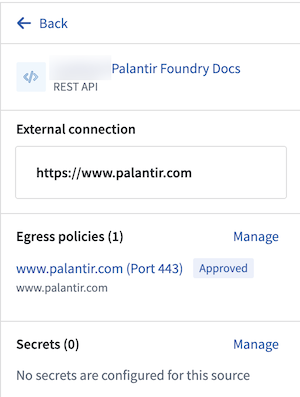
Note that sources must be initialized with only one HTTP connection; sources initialized with more or less than one HTTP connection are considered invalid and a preconfigured client will not be created.
If you attempt to create a connection with an invalid source connection configuration, you will receive an error Only single connection sources are supported.
To find out how many connections your source has, refer to the source's sidebar panel in the External connection section of your given environment, as seen in the example below:
 :::
:::
from external_systems.sources import Source, HttpsConnection
from requests import Session

my_source: Source = # Source is initialized differently based on the environment

https_connection: HttpsConnection = my_source.get_https_connection()

external_system_url: str = https_connection.url

http_client: Session = https_connection.get_client()

response = http_client.get(external_system_url + "/api/v1/example/", timeout=10)
:::callout{theme="warning"}
Changing the working directory (for example, using os.chdir()) before or during HTTPS client usage may break references to environment variables necessary for establishing secure connections.
:::
Secrets
Source secrets can be referenced using get_secret("<secret_name>") on the source.
from external_systems.sources import Source

my_source: Source = ...

my_secret: str = my_source.get_secret("SECRET_NAME")
Session credentials
A first-class method to retrieve and renew generated session credentials is available for some Foundry source types.
Supported source configurations
- S3: Cloud Identity, OIDC
- BigQuery: OIDC
- Snowflake: OIDC
Example: S3
import boto3

from external_systems.sources import AwsCredentials, Refreshable, Source, SourceCredentials

S3_BUCKET_REGION = <aws_region>
S3_BUCKET_NAME = <bucket_name>

s3_source: Source = ...

refreshable_credentials: Refreshable[SourceCredentials] = s3_source.get_session_credentials()

session_credentials: SourceCredentials = refreshable_credentials.get()

if not isinstance(session_credentials, AwsCredentials):
    raise ...

s3_client = boto3.client(
    "s3",
    region_name=S3_BUCKET_REGION,
    aws_access_key_id=session_credentials.access_key_id,
    aws_secret_access_key=session_credentials.secret_access_key,
    aws_session_token=session_credentials.session_token,
)

s3_response = s3_client.list_objects_v2(Bucket=S3_BUCKET_NAME)
Example: OIDC credentials
For sources configured with OIDC authentication, such as Snowflake, session credentials are returned as OauthCredentials. These contain a short-lived access_token and an expiration timestamp.
from external_systems.sources import OauthCredentials, Refreshable, Source, SourceCredentials

my_source: Source = ...

refreshable_credentials: Refreshable[SourceCredentials] = my_source.get_session_credentials()

session_credentials: SourceCredentials = refreshable_credentials.get()

if not isinstance(session_credentials, OauthCredentials):
    raise ...

access_token: str = session_credentials.access_token
On-premises connectivity with agent-proxy egress policies
Foundry worker with agent-proxy policy sources allow connections in code to be established to on-premise systems as if the connections were made over the open Internet. For more details on how this is configured, refer to the agent proxy documentation.
Socket connections
For non-HTTPS connections to external systems that require connections through Foundry's agent proxy, a preconfigured socket is provided. Below is an example of using this socket with an on-premise SFTP server connection.
On-premise SFTP server example
This example uses the Fabric ↗ library.
import fabric

from external_systems.sources import Source
from socket import socket

SFTP_HOST = <sftp_host>
SFTP_PORT = <sftp_port>

on_prem_sftp_server_source: Source = ...

username: str = on_prem_sftp_server_source.get_secret("username")
password: str = on_prem_sftp_server_source.get_secret("password")

proxy_socket: socket = on_prem_sftp_server_source.create_socket(SFTP_HOST, SFTP_PORT)

with fabric.Connection(
    SFTP_HOST,
    user=username,
    port=SFTP_PORT,
    connect_kwargs={
        "password": password,
        "sock": proxy_socket,
    },
) as sftp_conn:
    sftp_client = sftp_conn.sftp()
    file_list = sftp_client.listdir(".")
Authenticated proxy URI
For more granular use cases, a pre-authenticated proxy URI is provided to allow connections to on-premises external systems.
Non-requests library example
In cases where the requests library client is not sufficient, you may need to use another HTTP client. This example uses the HTTPX ↗ library.
import httpx

from external_systems.sources import Source
from typing import Optional

agent_proxy_source: Source = ...

authenticated_proxy_uri: Optional[str] = agent_proxy_source.get_https_proxy_uri()

source_url: str = agent_proxy_source.get_https_connection().url

with httpx.Client(proxy=authenticated_proxy_uri) as client:
    response = client.get(source_url + "/api/v1/example/", timeout=10.0)
Source properties
For source types that are available via the Foundry API, the configuration properties can also be directly accessed for use in code.
from external_systems.sources import Source

snowflake_source: Source = ...

account_id: str = snowflake_source.source_configuration.get("accountIdentifier")
中文翻译
Python 环境中的源(Sources)
Foundry 提供在平台各处的 Python 环境中连接外部系统的能力。这些能力包括基于源的外部转换(Source-based external transforms)、外部函数(External functions)以及计算模块(Compute modules) ↗。本页面讨论在 Python 环境中使用外部系统的常见用例和工作流程。更多信息,请访问 Palantir 的 external-systems ↗ 开源库。
:::callout{theme="neutral"} 以下所有示例均不包含源初始化(Source initialization),因为这会因环境而异。要了解如何获取已初始化的源对象,请参考相关环境(例如转换仓库、函数仓库、计算模块等)关于源使用的文档。您还可以在源信息面板侧边栏中找到包含使用说明的代码片段。 :::
HTTPS 客户端
对于基于 REST 的源,Palantir 提供了一个基于 Python requests 库构建的预配置 HTTPS 客户端。
:::callout{theme="warning"}
请注意,源必须仅使用一个 HTTP 连接进行初始化;使用多于或少于一个 HTTP 连接初始化的源被视为无效,且不会创建预配置的客户端。
如果您尝试使用无效的源连接配置创建连接,将会收到错误信息 Only single connection sources are supported.
要查看您的源有多少个连接,请参考给定环境中 External connection 部分的源侧边栏面板,如下例所示:
:::
from external_systems.sources import Source, HttpsConnection
from requests import Session

my_source: Source = # 源根据环境不同以不同方式初始化

https_connection: HttpsConnection = my_source.get_https_connection()

external_system_url: str = https_connection.url

http_client: Session = https_connection.get_client()

response = http_client.get(external_system_url + "/api/v1/example/", timeout=10)
:::callout{theme="warning"}
在 HTTPS 客户端使用之前或期间更改工作目录(例如使用 os.chdir())可能会破坏建立安全连接所需的环境变量引用。
:::
密钥(Secrets)
可以使用源上的 get_secret("<secret_name>") 来引用源密钥。
from external_systems.sources import Source

my_source: Source = ...

my_secret: str = my_source.get_secret("SECRET_NAME")
会话凭据(Session credentials)
对于某些 Foundry 源类型,提供了获取和更新生成的会话凭据的一流方法。
支持的源配置
- S3: Cloud Identity、OIDC
- BigQuery: OIDC
- Snowflake: OIDC
示例:S3
import boto3

from external_systems.sources import AwsCredentials, Refreshable, Source, SourceCredentials

S3_BUCKET_REGION = <aws_region>
S3_BUCKET_NAME = <bucket_name>

s3_source: Source = ...

refreshable_credentials: Refreshable[SourceCredentials] = s3_source.get_session_credentials()

session_credentials: SourceCredentials = refreshable_credentials.get()

if not isinstance(session_credentials, AwsCredentials):
    raise ...

s3_client = boto3.client(
    "s3",
    region_name=S3_BUCKET_REGION,
    aws_access_key_id=session_credentials.access_key_id,
    aws_secret_access_key=session_credentials.secret_access_key,
    aws_session_token=session_credentials.session_token,
)

s3_response = s3_client.list_objects_v2(Bucket=S3_BUCKET_NAME)
示例:OIDC 凭据
对于配置了 OIDC 认证的源,例如 Snowflake,会话凭据以 OauthCredentials 形式返回。这些凭据包含一个短期有效的 access_token 和一个 expiration 时间戳。
from external_systems.sources import OauthCredentials, Refreshable, Source, SourceCredentials

my_source: Source = ...

refreshable_credentials: Refreshable[SourceCredentials] = my_source.get_session_credentials()

session_credentials: SourceCredentials = refreshable_credentials.get()

if not isinstance(session_credentials, OauthCredentials):
    raise ...

access_token: str = session_credentials.access_token
通过代理出口策略(Agent-proxy egress policies)实现本地连接
配置了代理策略的 Foundry 工作节点(Foundry worker with agent-proxy policy) 源允许在代码中建立到本地系统的连接,就像通过开放互联网建立连接一样。有关如何配置的更多详细信息,请参考代理文档。
Socket 连接
对于需要通过 Foundry 代理连接到外部系统的非 HTTPS 连接,提供了一个预配置的 socket。以下是在本地 SFTP 服务器连接中使用此 socket 的示例。
本地 SFTP 服务器示例
此示例使用 Fabric ↗ 库。
import fabric

from external_systems.sources import Source
from socket import socket

SFTP_HOST = <sftp_host>
SFTP_PORT = <sftp_port>

on_prem_sftp_server_source: Source = ...

username: str = on_prem_sftp_server_source.get_secret("username")
password: str = on_prem_sftp_server_source.get_secret("password")

proxy_socket: socket = on_prem_sftp_server_source.create_socket(SFTP_HOST, SFTP_PORT)

with fabric.Connection(
    SFTP_HOST,
    user=username,
    port=SFTP_PORT,
    connect_kwargs={
        "password": password,
        "sock": proxy_socket,
    },
) as sftp_conn:
    sftp_client = sftp_conn.sftp()
    file_list = sftp_client.listdir(".")
已认证代理 URI(Authenticated proxy URI)
对于更细粒度的用例,提供了预认证的代理 URI,以允许连接到本地外部系统。
非 requests 库示例
在 requests 库客户端不够用的情况下,您可能需要使用其他 HTTP 客户端。此示例使用 HTTPX ↗ 库。
import httpx

from external_systems.sources import Source
from typing import Optional

agent_proxy_source: Source = ...

authenticated_proxy_uri: Optional[str] = agent_proxy_source.get_https_proxy_uri()

source_url: str = agent_proxy_source.get_https_connection().url

with httpx.Client(proxy=authenticated_proxy_uri) as client:
    response = client.get(source_url + "/api/v1/example/", timeout=10.0)
源属性(Source properties)
对于可通过 Foundry API 获取的源类型,其配置属性也可以直接在代码中访问。
from external_systems.sources import Source

snowflake_source: Source = ...

account_id: str = snowflake_source.source_configuration.get("accountIdentifier")