Set up a Webhook for the Microsoft Graph API(设置 Microsoft Graph API 的 Webhook)
This guide shows step-by-step how to configure a webhook for the Microsoft Graph API to access Microsoft Cloud service resources from Foundry.
Learn more about the Microsoft Graph API ↗.
Prerequisites
Prior to configuration, you must:
- Sign in to your Microsoft account by typing
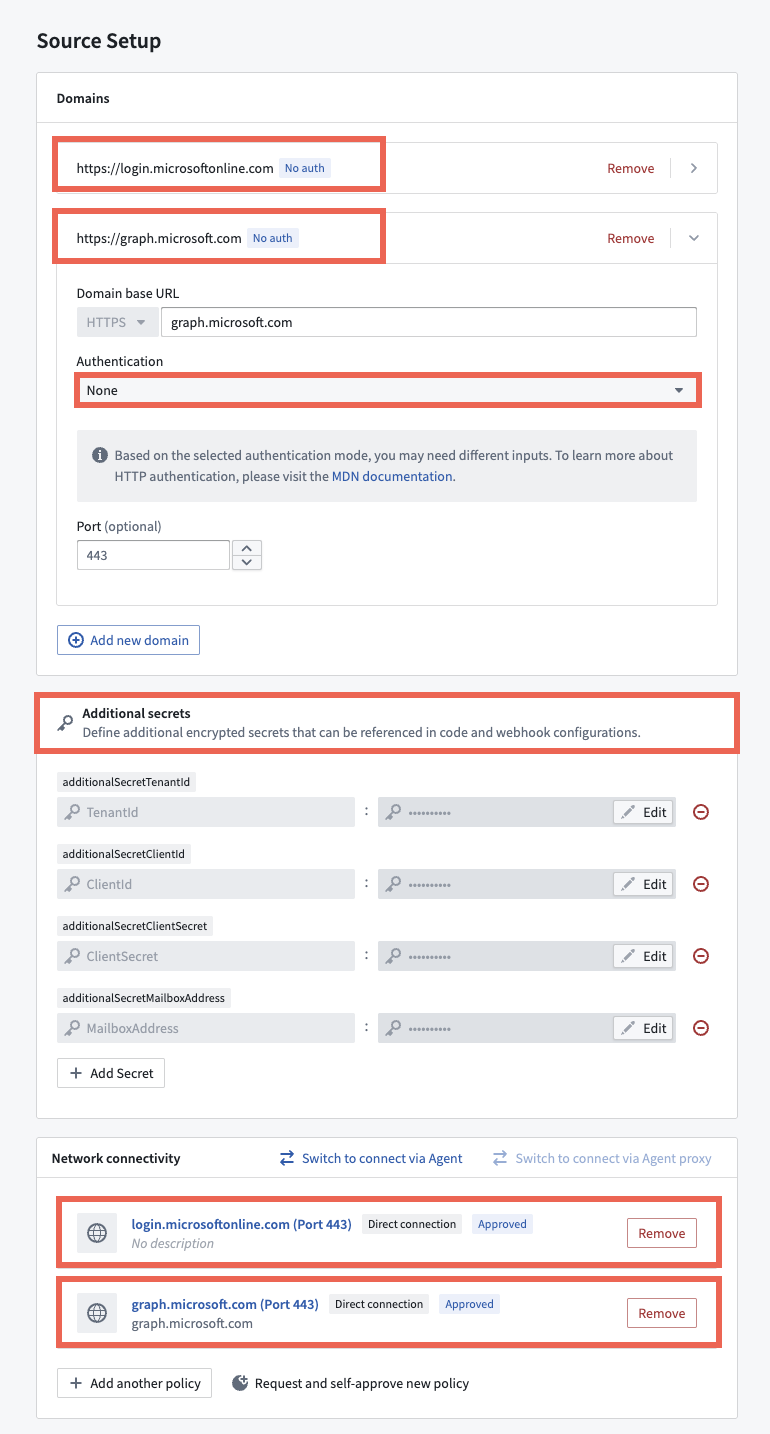
login.microsoftonline.cominto your browser to authenticate and generate an access token you can use to create the webhook. - Configure network egress policies for both
login.microsoftonline.comandgraph.microsoft.comto allow outbound connections from Foundry.
Instructions
- Create a REST API source for your webhook.
- Include
login.microsoftonline.comandgraph.microsoft.comas the source's Domains without any Authentication restraints. - Set any necessary Additional secrets, such as the
TenantId,ClientIdandClientSecretthat you will use to authenticate againstlogin.microsoftonline.com. You will find these after you register an application in Microsoft Entra ↗. - Add the network egress policies you created above in the Network connectivity section before choosing Save and continue.
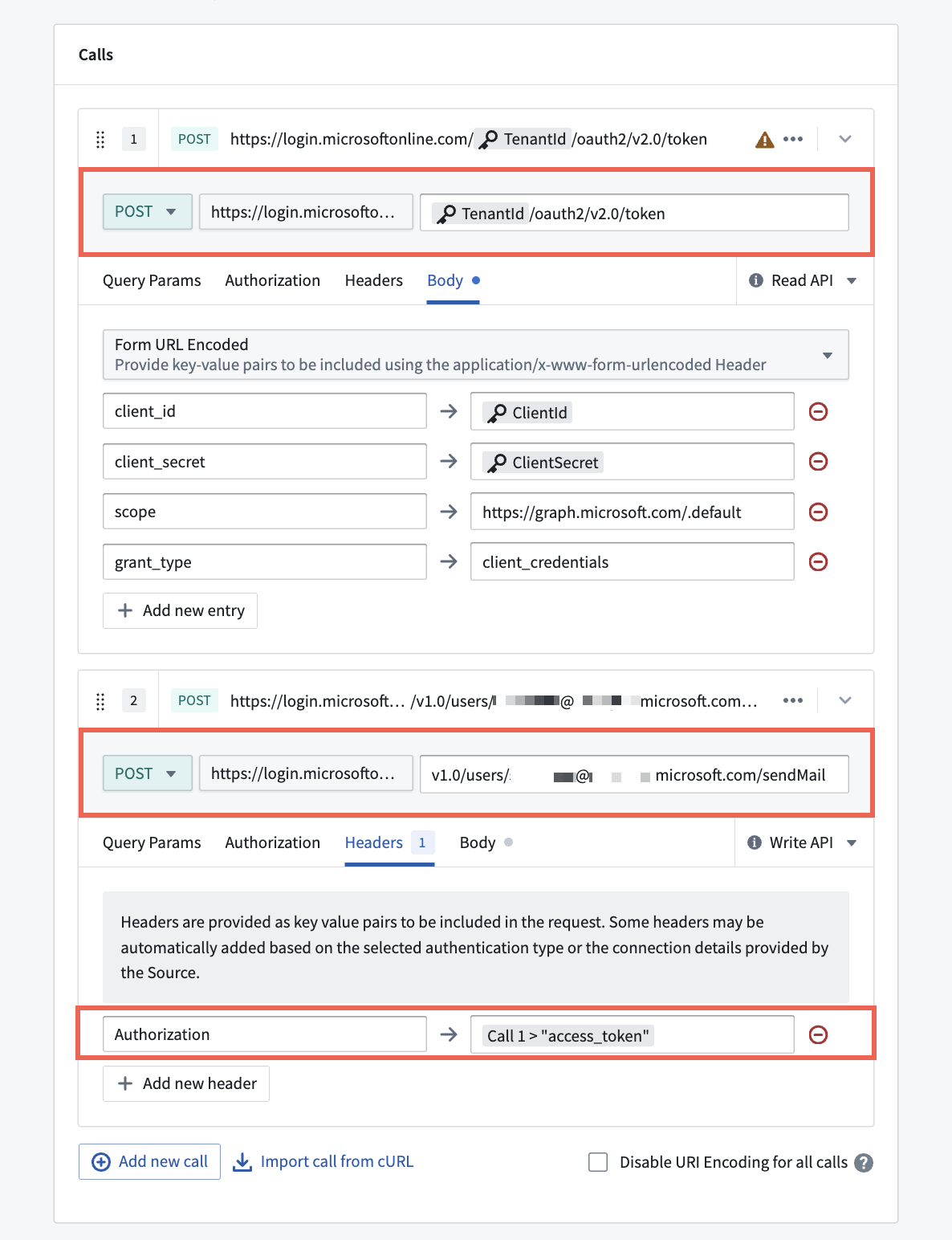
After you configure your REST API source, you will next configure your webhook to make two POST requests that:
- Login using the
login.microsoftonline.comcredentials created on the source to get a short-lived access token. - Make an API call to
graph.microsoft.comusing the access token in the response from the first call as the bearer token in the call's authentication header.
Learn more about configuring Webhooks in Data Connection.
中文翻译
设置 Microsoft Graph API 的 Webhook
本指南将逐步介绍如何为 Microsoft Graph API 配置 Webhook,以便从 Foundry 访问 Microsoft 云服务资源。
了解有关 Microsoft Graph API 的更多信息 ↗
前提条件
在配置之前,您必须:
- 通过在浏览器中输入
login.microsoftonline.com登录您的 Microsoft 账户,进行身份验证并生成可用于创建 Webhook 的访问令牌。 - 为
login.microsoftonline.com和graph.microsoft.com配置网络出口策略,以允许从 Foundry 建立出站连接。
操作说明
- 为您的 Webhook 创建 REST API 源。
- 将
login.microsoftonline.com和graph.microsoft.com添加为该源的域,且不设置任何身份验证限制。 - 设置必要的附加密钥,例如您将用于向
login.microsoftonline.com进行身份验证的TenantId、ClientId和ClientSecret。在向 Microsoft Entra 注册应用程序 ↗ 后,您将找到这些信息。 - 在网络连接部分添加您在上述步骤中创建的网络出口策略,然后选择保存并继续。
配置完 REST API 源后,接下来您需要配置 Webhook 以发起两个 POST 请求,分别用于:
- 使用在源上创建的
login.microsoftonline.com凭据登录,获取一个短期有效的访问令牌。 - 使用第一个调用响应中的访问令牌作为调用身份验证标头中的持有者令牌,向
graph.microsoft.com发起 API 调用。