Configuration reference(配置参考)
This page documents the detailed configuration options and permissions associated with Webhooks in Data Connection.
Configuring inputs and outputs
Each webhook can be configured flexibly to map input parameters into the request that will be made to the external system. Then, the response from the system can be captured as output parameters that can then be used elsewhere in Palantir Foundry.
Input parameters
Input parameters represent the inputs that can be passed in when a user executes the Webhook. Typically, a Webhook is configured for use in Action types, where you can specify a mapping between Action parameters and Webhook input parameters.
There are many data types and constraints available for Webhook input parameters:
- Boolean parameters can be
trueorfalse. - Integer, Long, and Double parameters represent numeric values.
- String parameters represent text values, and can be constrained to only allow specific values.
- Date and Timestamp parameters represent time-based data.
In addition to these basic types, several collection types are available:
- List parameters represent an ordered collection of inputs of a specific type.
- Record parameters enable passing in key/value pairs, and can be constrained to require specific keys with values of a specific type.
- Optional parameters represent inputs that may or may not be present.
:::callout{theme="neutral"}
If you want to use Functions on Objects to map from Action parameters to webhook inputs, you can also conditionally not fire the webhook at all if your function to map inputs returns undefined. For example, WebhookInput | undefined."
:::
Finally, an Attachment type may be used to pass a file that has been uploaded in an Action form. Note that this feature is not supported for agent worker sources.
Output parameters
Output parameters allow you to capture data returned from the external system for use elsewhere in Foundry. For example, when you create a new record in an external system, the system may return an ID for the new record. By capturing this new ID in an output parameter, you can propagate it to Actions and immediately write it into a Foundry object.
An example configuration for a single output parameter called unique_id is shown below in the Webhook setup wizard:

Alternatively, output parameters can also be directly accessed in the Webhook configuration step. An example is shown below where a webhook call uses a value from the response of the previous call. The first webhook call returns a response that looks like this:
{
  "results": {
    "unique_id": "ID4567"
  }
}
Configure the second webhook call. In the Headers tab, you can create inline references by typing @ that opens a menu where you can reference values from the response of the previous call.

Choose From a call and select the previous call that has the response to parse. There are three options available to extract the necessary value from the response:
- Whole response: Extract the whole response as string.
- Extract by key: Extract the required value using the keys in the response.
- Extract by index: Extract the required value from array response using index positions (zero-indexed).
As in the example below, select Extract by key and configure the keys: results followed by unique_id using the Add nested key option.

Select Add and you will be able to see the reference displayed in the header value field.

The output parameters that are captured depend on the task type you are using.
For convenience, the result of a Webhook task is automatically converted into an appropriate output parameter type in certain cases:
- If a String output parameter is configured and the Webhook task result is not a string, then the result will be converted to a JSON string.
- If a Record output parameter is configured and the Webhook task result is a string, then the Webhooks service will attempt to parse the string into JSON.
- If a Double output parameter is configured, then Webhook task results which are Integers or Longs will be converted automatically.
Output parameters may be configured using a response received from a request made via the "Test Connection" side panel. Once a successful test request has been made, suggested outputs parsed from the response will be automatically displayed when adding a new output parameter.

Task body
Some webhooks are implemented as Tasks. For these webhooks, the Task body represents the data that will be sent to the Task when the webhook is executed.
The structure of what each Task expects depends on the specific Task type that will be listed, if relevant, under the entry for that webhook type. A Task body should be defined using Handlebars ↗ syntax. Within the Task body, you can refer to any of the input parameters that you have defined for the webhook as documented above.
Webhook types
Each type of webhook supports different configuration options. This section documents the options available for various webhook types, and provides basic examples to help you get started.
REST API
The most common use of webhooks is to make HTTP requests to REST APIs. After configuring a REST API source, you can use the request builder interface to construct the request you wish to make.
Available options for the REST API source include:
| Option | Required | Description |
|---|---|---|
| Method | Yes | The HTTP method for the request. |
| Relative path | No | Specify the relative path for the request endpoint. This should be relative to one of the domains configured in the REST API source. |
| Query Params | No | Provide key-value pairs for any query params to be included in the request. Some query params may be included at runtime based on the source configuration. Those will be displayed here as read-only. |
| Authorization | No | Authorization details are based on the source configuration. Any edits should be done by navigating back to the source. |
| Headers | No | Provide key-value pairs for any headers to be included in the request. Some query params may be included at runtime based on the source configuration. Those will be displayed here as read-only. |
| Body | No | For requests that accept a body, you may include a body from the available types. These types include Raw JSON, Form Data, Form URL Encoded, binary File, XML, Plain Text, and HTML. |
Multiple requests
A single webhook may contain multiple requests. Requests may be chained together, with response values from a previous call referenced in subsequent calls.
REST API (legacy)
:::callout{theme="warning"}
The legacy REST API options documented here and using the magritte-rest-v2 plugin are for historical reference only. New workflows should be implemented using the REST API source.
:::
After setting up a magritte-rest-v2 Source, you can create REST Webhooks using the generic-rest-webhook-task.
For a REST Webhook, the structure of the Task body must be an array of calls, each representing a REST request that will be made to the external system.
:::callout{theme="neutral"}
The only supported type of call for webhooks is magritte-rest-call.
:::
Below is an example of a basic Task body template for a REST Webhook, representing a single HTTP call:
{
    "calls": [
        {
            "type": "magritte-rest-call",
            "method": "POST",
            "requestMimeType": "application/json",
            "path": "your/request/path",
            "body": { "text": {{json message}} }
        }
    ]
}
This Task body template will make a POST request to the your/request/path endpoint with a request body of { text: <message> }, where <message> is a String input parameter in the Webhook.
Extracting output parameters
There are two main ways to extract output parameters from a REST Webhook: 1) capturing top-level fields from a JSON response by name, 2) defining JSON extractors for more customized extraction logic, and explicitly listing which fields you want to output.
You may also choose to extract the full response JSON as a string output. This provides additional flexibility to traverse the response when performing subsequent edits or notification rendering using functions.
:::callout{theme="neutral"}
The REST plugin supports a wide variety of extractor types including JSON, XML, HTML, HTTP Status, and more. Webhooks require an external endpoint that returns JSON, so only the json extractor may be used in a webhook task configuration.
:::
For capturing top-level fields, suppose you've configured a REST call which returns the following response:
{
    "id": "c52fd6e4-6eb5-4da1-8908-4845e51c801b"
}
You can define output parameters with the same IDs as keys in your JSON response to capture them. In this example, you can add a string output parameter with a parameter ID of id, and this field will be captured from the response.
If you need to capture a nested field from the response, you can extract values by specifying extractors. Extracted values can be also used in subsequent calls to chain calls together. If you need to capture the full response, you can extract the entire response by specifying extractors with the root path as target: "result": "/".
Below is an example of a Task body template that makes two requests: one to a GET endpoint to retrieve some data, then one to a POST endpoint using data from the previous call.
{
    "calls": [
        {
            "type": "magritte-rest-call",
            "method": "GET",
            "path": "path/to/fetchData",
            "extractor": [
              {
                "type": "json",
                "assign": {
                  "request_output": "/json/path/to/output"
                }
              }
            ]
        },
        {
            "type": "magritte-rest-call",
            "method": "POST",
            "path": "your/request/path",
            "body": { "text": {%request_output%} },
            "extractor": [
              {
                "type": "json",
                "assign": {
                  "result": "/json/path/to/result"
                }
              }
            ]
        }
    ],
    "output": ["result"]
}
The first call makes a GET request to the endpoint at path/to/fetchData, then extracts data from the JSON Path of /json/path/to/output into a state variable called request_output. Then, the request_output state is used in the body of the second call. From the second call, we extract another field from the JSON response into a state variable called result. Finally, the "output" field in the configuration defines which extracted fields should be returned as output parameters.
Other options
In addition to specifying the calls and output, there are a few additional configuration options available for REST Webhook Tasks:
- If you are making multiple calls in a REST Webhook, only one call is allowed to use an unsafe HTTP method. An unsafe call is one which may modify state in an external system. By default, only
GET,OPTIONS, andHEADrequests are considered safe. You can override the safety of a different type of call (such asPOSTorPUT) by specifying"isHttpMethodSafe": trueas a field of the call. This can be useful if you are making multiple requests where one of the earlier requests is aPOST, and you are using its response in a subsequent request. - You can specify an array of
retryable-status-codeswhich represents HTTP status codes that can be retried. - For example, you could configure the Webhook to retry the external request when it receives a 503 response from the server. This option defaults to an empty list.
- You can specify an array of
external-system-not-changed-status-codesindicating that the server you are connecting to did not change any data despite a failing request. - This option defaults to all status codes from 400 to 431.
- When a Webhook is executed and fails, the indication of whether the external system may have been changed is captured to enable debugging of write failures.
Salesforce
:::callout{theme="warning"} We recommend using the REST API source to configure webhooks that interact with Salesforce. The legacy task-based webhook options described below are for historical reference only. Legacy Salesforce sources should be migrated to use the new configuration options. :::
The following task types are available for Salesforce webhooks:
create-record-salesforce-webhook-task: Creates a Salesforce record of the given type.update-record-salesforce-webhook-task: Updates a Salesforce record of the given type.delete-record-salesforce-webhook-task: Deletes a Salesforce record.composite-salesforce-webhook-task: Modifies Salesforce records by using a Salesforce composite request ↗.
Below are examples of the Task body for each Task type.
create-record-salesforce-webhook-task
This Task type corresponds to this Salesforce API ↗.
{
  "record-type-name": "Account",
  "data": {
    "Name": {{json name}},
    "Industry": {{json industry}},
    "BillingCountry": {{json country}}
  }
}
update-record-salesforce-webhook-task
This Task type corresponds to this Salesforce API ↗.
{
  "record-type-name": "Account",
  "record-id": {{json record-id}},
  "data": {
    "Name": {{json name}},
    "Industry": {{json industry}},
    "BillingCountry": {{json country}}
  }
}
delete-record-salesforce-webhook-task
This Task type corresponds to this Salesforce API ↗.
{
  "record-type-name": "Account",
  "record-id": {{json record-id}}
}
composite-salesforce-webhook-task
Information about the collateSubrequests option is available in the Salesforce documentation ↗.
In the example below, we use "@{createAccount.id}" to refer to the ID of the record created in the first subrequest. Learn more about dependent requests in the Salesforce documentation ↗.
{
  "request": {
    "collateSubrequests": true,
    "compositeRequest": {
      "createAccount": {
        "type": "createRecord",
        "createRecord": {
          "recordTypeName": "Account",
          "data": {
            "Name": {{json name}}
          }
        }
      },
      "updateId": {
        "type": "updateRecord",
        "updateRecord": {
          "recordTypeName": "Account",
          "data": {
            "Industry": {{json industry}}
          },
          "recordId": "@{createAccount.id}"
        }
      }
    }
  }
}
SAP
For SAP-specific webhook configuration, see the webhooks section of the SAP ERP connector documentation. We recommend running SAP webhooks on a Foundry worker in Foundry-managed cloud compute.
Limits
For each Webhook, you can set three types of limits that constrain how the Webhook can be executed: time limits, concurrency limits, and rate limits.
A time limit allows you to set the maximum duration a Webhook should execute for. This enables you to ensure that end-user applications remain responsive and show a timeout error when the external system to which you are connecting is taking too long to respond. The default timeout is 20 seconds if no value is provided. The maximum allowed timeout value is 180 seconds.
A concurrency limit specifies the maximum number of Webhook executions that run at a single time. This can be defined to avoid overwhelming an external system with too many concurrent requests.
A rate limit restricts how many times a Webhook can be executed within a time window that you specify. If you want to guarantee that a Webhook will only execute a specific number of times every second, minute, hour, or day, you can enable this type of limit.
Webhook functions
:::callout{theme="neutral" title="Beta"} Publishing a webhook as a function is in the beta phase of development. Functions published from webhooks cannot be packaged in Marketplace products. :::
Publishing a webhook as a function turns it into a reusable function for other applications. To publish, toggle on Function configuration when creating a webhook, or publish it directly from the Function configuration section on an existing webhook. All webhook versions created after function publishing is enabled will also be published as function versions. This operation is irreversible and the function published from the webhook cannot be deleted.
Webhook functions can be invoked from the same surfaces as other Ontology functions:
- Workshop modules
- TypeScript v2 functions and Python functions
- The Ontology SDK (OSDK)
- Function-backed actions
- Machinery and Automate
Permissions
Permissions to create, configure, and delete webhooks extend from the permissions on the associated source.
Learn more about Data Connection permissions and see more details about Webhook permissions.
Webhook history
The webhook history displays a timeline of when webhooks were triggered. The history metadata will always include the user ID who triggered the webhook, a timestamp, and the success or failure status of the execution, as shown below:
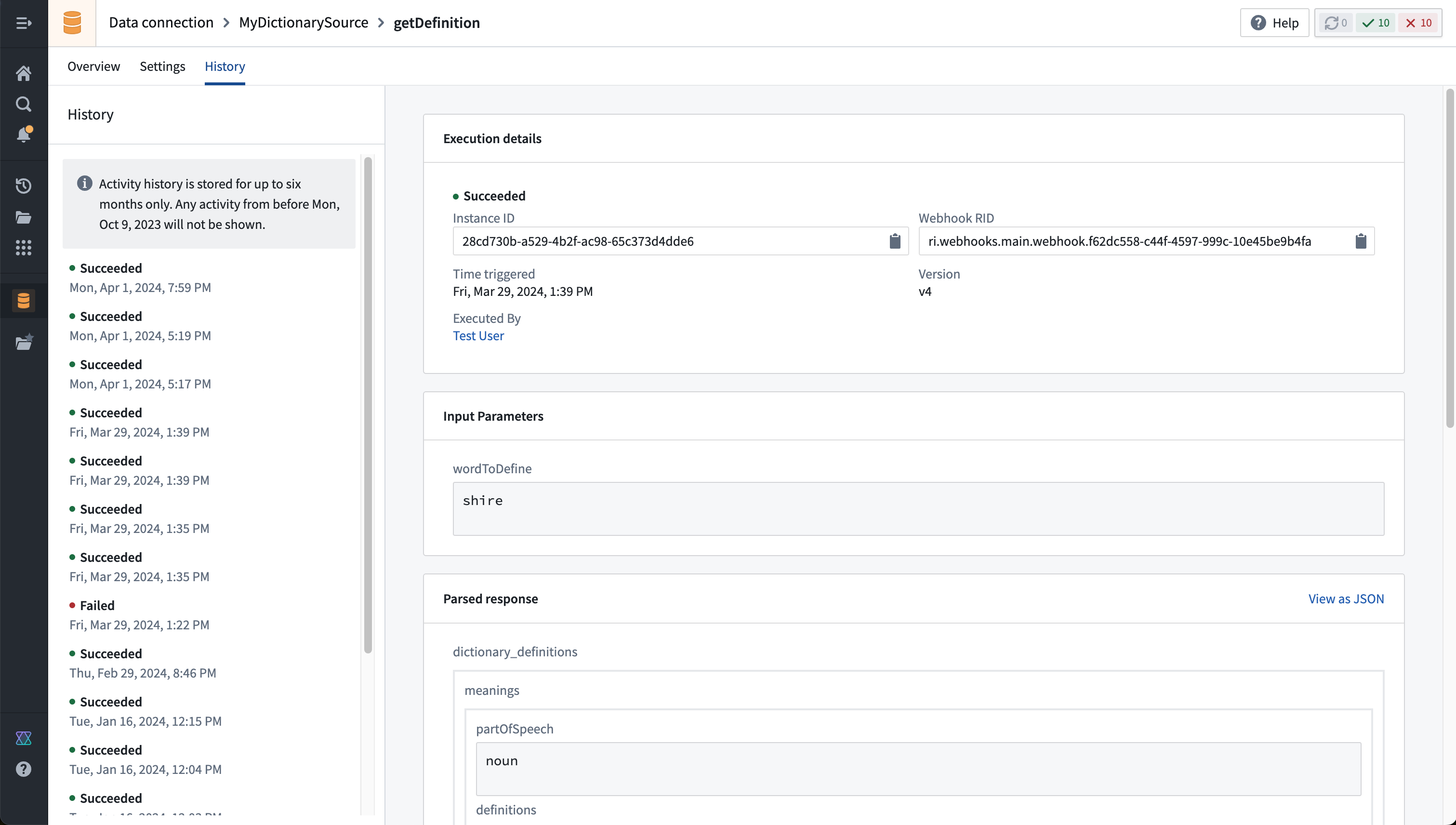
By default, inputs passed to the webhook and the full response will only be visible to the user who called the webhook. This protects any sensitive data passed in or returned from the webhook call. The webhooks:read-privileged-data permission will allow access to the full history, and is not granted to any users by default. A custom role with this permission is required to access the full history for a webhook.
Other options
Store responses
By default, webhook responses will be stored and displayed in the history view for six months. The full response will only be visible to the user who executed the webhook and any admin with the webhooks:read-privileged-data permission.
This option may be disabled entirely for a webhook that is known to return sensitive information that should not be stored in the webhook history.
OAuth 2.0 with Webhooks
Authorization code grant
Palantir Webhooks support calling endpoints using an OAuth 2.0 authorization code grant flow. This requires using an outbound application to define the interaction with the OAuth 2.0 server. Once configured, an outbound application may be used as the authentication for a REST API Webhook and will prompt individual users to authenticate with the OAuth server when attempting to execute the Webhook.
Client credentials grant
Webhooks may be used to perform an OAuth flow using client credentials. The client credentials grant flow normally uses a long-lived secret to retrieve a short-lived access token that may be used to perform actions against the target system. REST API Webhooks support chaining multiple API calls in a row and can be used to perform the client credentials handshake followed by the desired request as a single execution.
The following walkthrough explains how to configure a client credentials grant flow against a notional example system.
To proceed, you need the following information:
- The OAuth 2.0 server domain and path to the token endpoint. The token endpoint is used to retrieve a valid token for making a request to the resource domain.
- In many cases, the OAuth 2.0 server domain and resource domain are identical. For example, this is the case for the Foundry API when authenticating using a third-party application.
- The resource domain and path to the desired endpoint you wish to call using an Authorization header containing the bearer token retrieved from the OAuth 2.0 server.
- The client ID for the OAuth 2.0 server.
- The client secret for the OAuth 2.0 server.
:::callout{theme="neutral"} Not all OAuth 2.0 servers adhere precisely to the OAuth 2.0 standard. The Webhooks request builder interface is intended to be flexible enough to accommodate any non-standard configuration you may need to do to successfully authenticate. We recommend reviewing the documentation for the system you are connecting to before attempting to follow this tutorial. :::
Create a REST API source
First, choose to create a + New source in the Data Connection application, and select REST API as the source type. Learn more about the REST API source type.
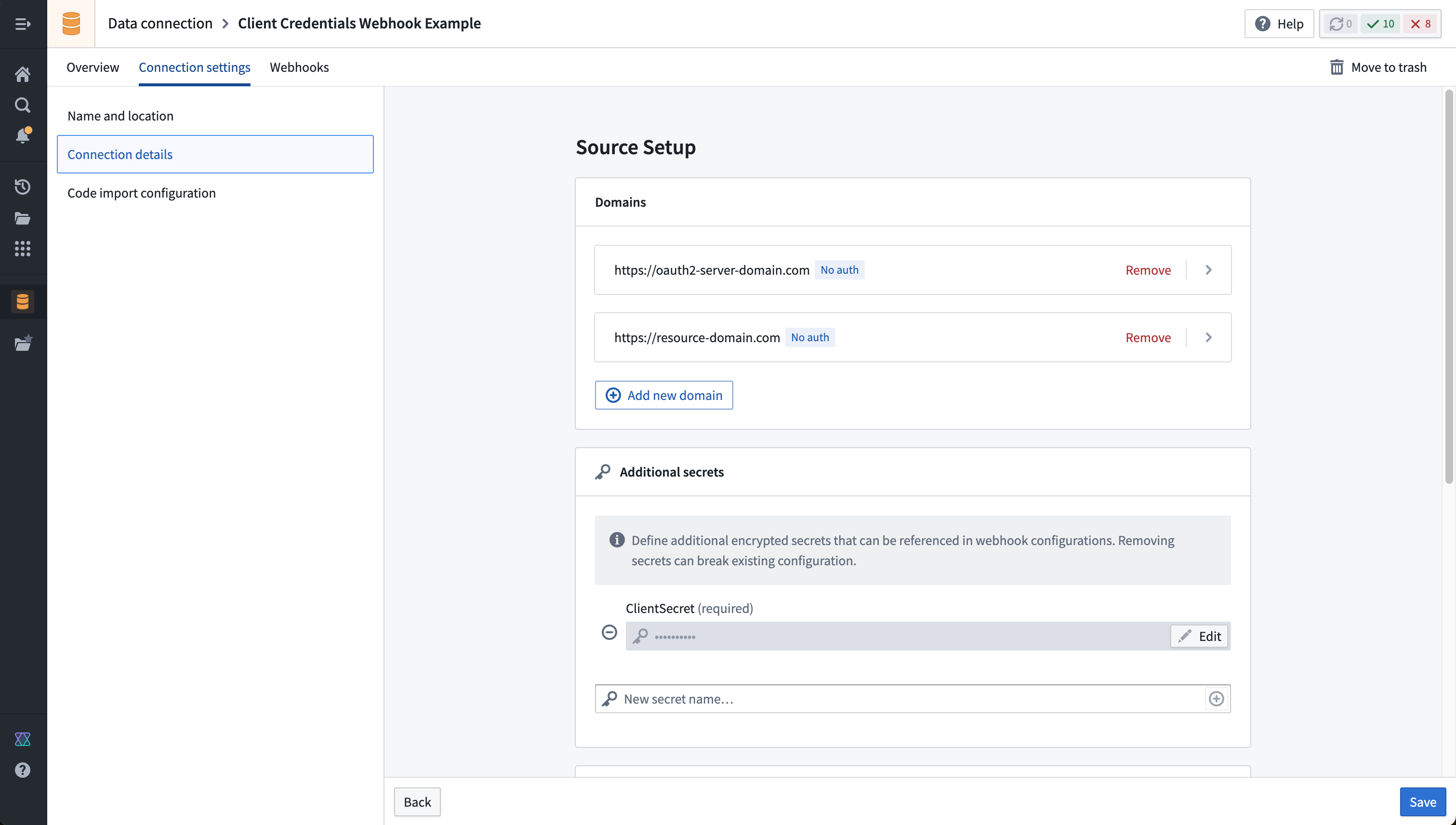
When configuring the source, add both the OAuth 2.0 server domain and the resource domain as shown below. Do not select any authentication option, since we will be manually performing the OAuth 2.0 handshake directly within the sequence of webhook calls.
In the section for Additional secrets, add a new secret and enter the ClientSecret that will be included when making requests to the token endpoint. We will reference this value when constructing our Webhook call; when entered here, the ClientSecret will be encrypted and never exposed, even to other editors or owners of the source in Foundry.
Build a Webhook that performs the client credentials handshake
Once the source is created, select the option to create a new Webhook.
The Webhook will consist of two chained calls:
- An initial call to the token endpoint to retrieve a valid bearer token
- A subsequent call that includes the parsed bearer token in a request to the desired endpoint on the resource domain.
An example of how to configure the first call is shown below:
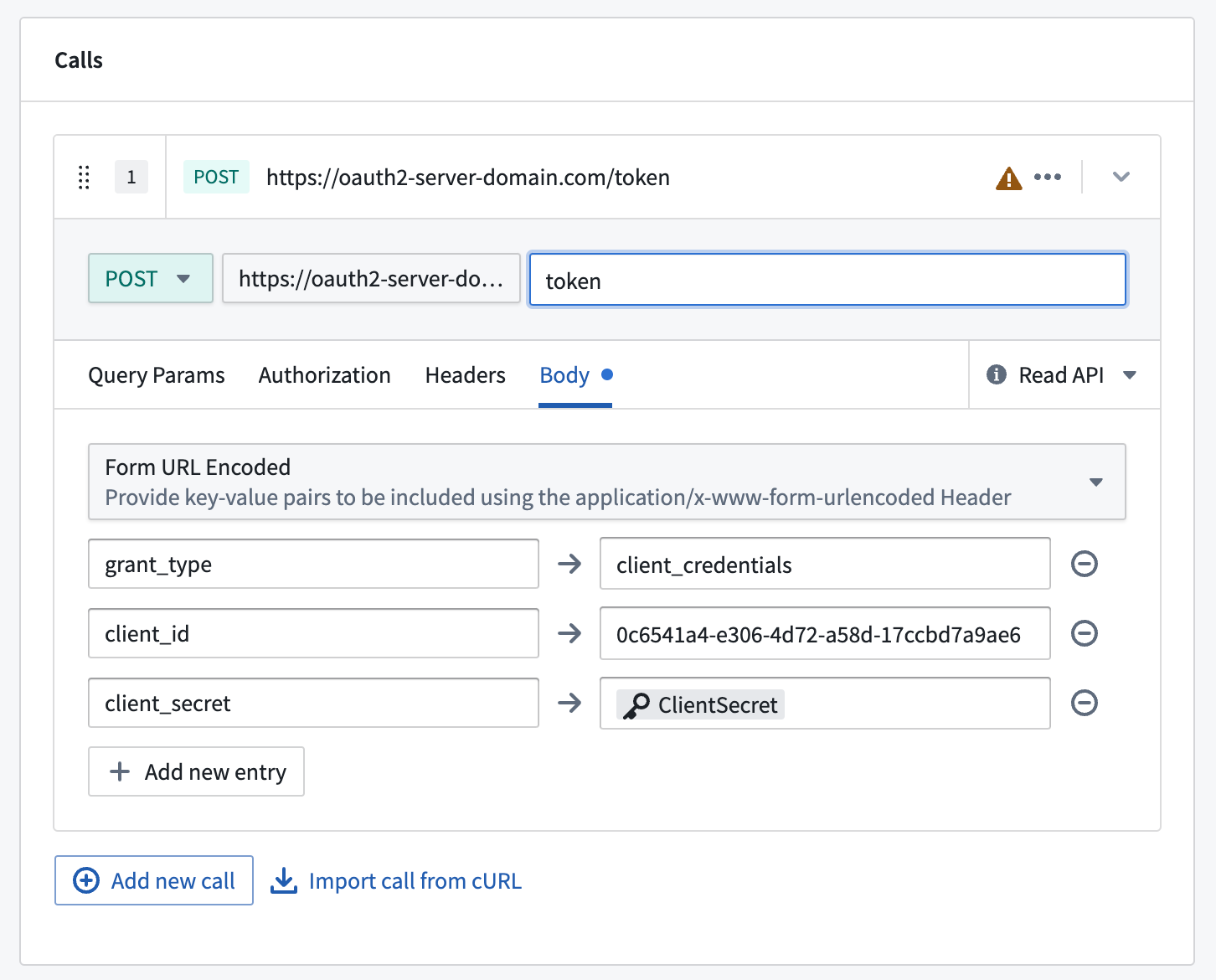
:::callout{theme="neutral"} The parameters shown above in the call to the token endpoint are standard for many systems that use OAuth 2.0. However, the names of the fields may vary, and other fields may be required. Consult the documentation of the system you are connecting to and construct a request that is compatible with the token endpoint provided by that system.
Often, the request type will need to be POST, which defaults to being a "write API" call. In fact, it is usually safe to perform repeated calls to the token endpoint, and you can mark this call as a "read API" call instead using the dropdown selector on the right side of the configuration block for that call. In general, Webhooks that perform multiple write API calls are not allowed, since transactionality across multiple requests cannot be guaranteed.
:::
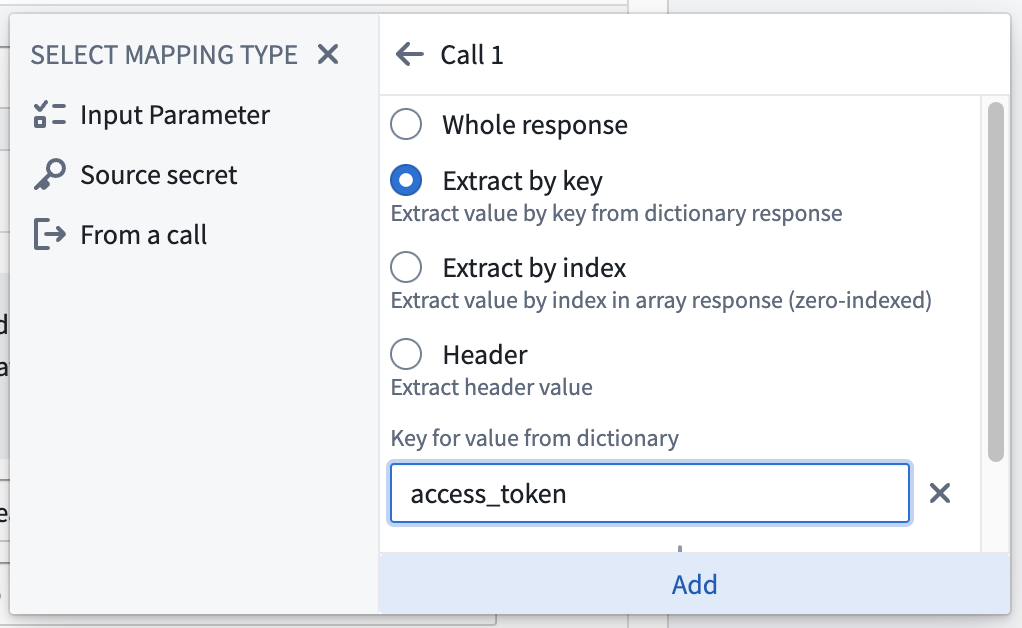
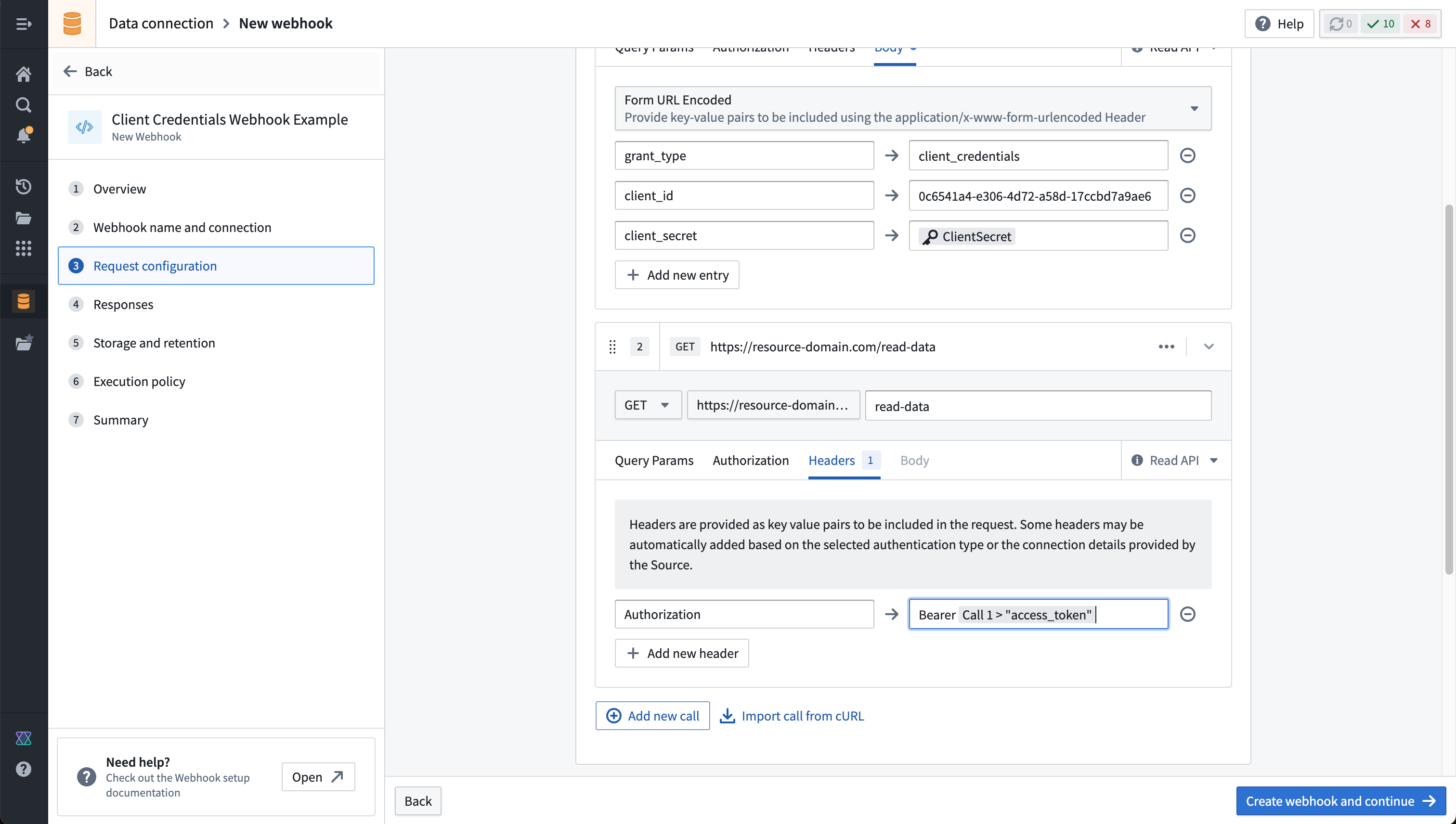
In the second call, build the desired request using the available configuration options. To inject the bearer token into an authorization header, go to the Headers section of the call configuration and add a header as shown in the example below . You can use @ to reference values from the previous call. Most OAuth 2.0 servers will return a JSON parameter called access_token or similar. Choose the option to add a value From a call, then select Extract by key and enter the value of the key you wish to extract from the response to the first call you made.
An example of how to select the bearer token from the first call is shown in the screenshot below:
Once configured, your completed Webhook with two chained calls should look similar to this example:
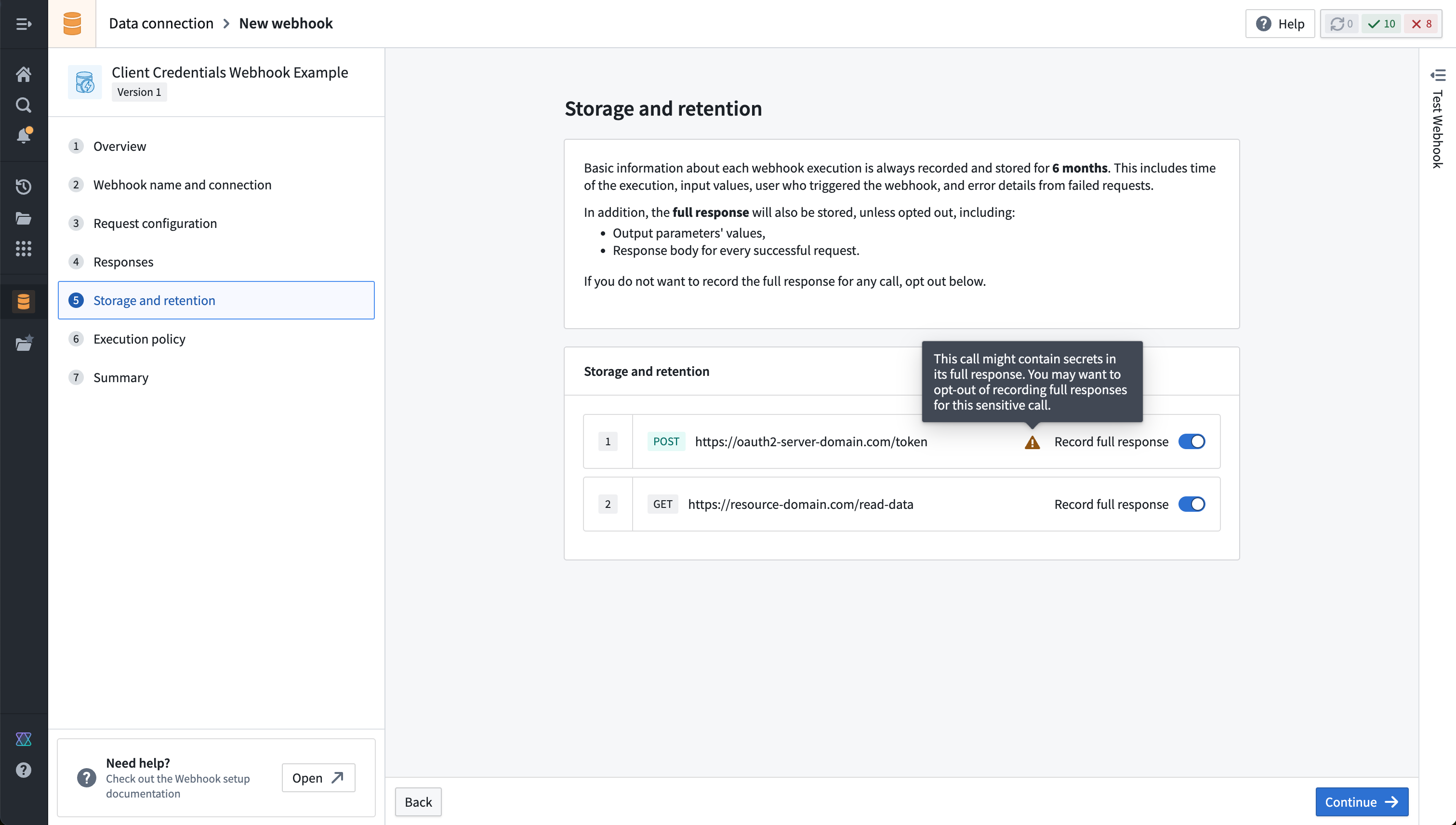
Finally, we highly recommended disabling storing full responses from the first call of the Webhook. If responses are stored, the bearer tokens contained in them may be visible to other users with permission to view full Webhook history. An automatic prompt will usually appear on the Storage and retention page of the Webhook configuration to disable storing history for requests to a token endpoint, as shown below:
中文翻译
配置参考
本文档详细介绍了与 Data Connection 中 Webhooks 相关的配置选项和权限。
配置输入和输出
每个 Webhook 都可以灵活配置,将输入参数(Input Parameters)映射到将发送给外部系统的请求中。然后,系统的响应可以作为输出参数(Output Parameters)被捕获,并可在 Palantir Foundry 的其他地方使用。
输入参数
输入参数(Input Parameters)代表用户在执行 Webhook 时可以传入的输入。通常,Webhook 被配置用于操作类型(Action types),您可以在其中指定操作参数(Action parameters)和Webhook 输入参数之间的映射。
Webhook 输入参数有多种数据类型和约束可用:
- 布尔(Boolean)参数可以是
true或false。 - 整数(Integer)、长整数(Long)和双精度浮点数(Double)参数表示数值。
- 字符串(String)参数表示文本值,并且可以限制为仅允许特定值。
- 日期(Date)和时间戳(Timestamp)参数表示基于时间的数据。
除了这些基本类型之外,还有几种集合类型可用:
- 列表(List)参数表示特定类型的输入的有序集合。
- 记录(Record)参数允许传入键/值对,并且可以限制为需要具有特定类型值的特定键。
- 可选(Optional)参数表示可能存在也可能不存在的输入。
:::callout{theme="neutral"}
如果您想使用对象函数(Functions on Objects)将操作参数映射到 Webhook 输入,您还可以有条件地完全不触发 Webhook,前提是您的映射输入函数返回 undefined。例如,WebhookInput | undefined。
:::
最后,附件(Attachment)类型可用于传递在操作表单中上传的文件。请注意,代理工作器(agent worker)源不支持此功能。
输出参数
输出参数(Output Parameters)允许您捕获从外部系统返回的数据,以便在 Foundry 的其他地方使用。例如,当您在外部系统中创建新记录时,系统可能会返回该记录的新 ID。通过将此新 ID 捕获到输出参数中,您可以将其传播到操作(Actions)并立即将其写入 Foundry 对象。
下面显示了 Webhook 设置向导中一个名为 unique_id 的单个输出参数的示例配置:
或者,也可以直接在 Webhook 配置步骤中访问输出参数。下面的示例显示了一个 Webhook 调用使用了前一次调用的响应中的值。第一次 Webhook 调用返回的响应如下所示:
{
  "results": {
    "unique_id": "ID4567"
  }
}
配置第二次 Webhook 调用。在标头(Headers)选项卡中,您可以通过输入 @ 来创建内联引用,这将打开一个菜单,您可以在其中引用前一次调用响应中的值。
选择来自调用(From a call),然后选择具有要解析的响应的前一次调用。有三个选项可用于从响应中提取所需的值:
- 整个响应(Whole response):将整个响应提取为字符串。
- 按键提取(Extract by key):使用响应中的键提取所需的值。
- 按索引提取(Extract by index):使用索引位置(从零开始)从数组响应中提取所需的值。
如下例所示,选择按键提取(Extract by key),并使用添加嵌套键(Add nested key)选项配置键:results 后跟 unique_id。
选择添加(Add),您将能够在标头值字段中看到显示的引用。
捕获的输出参数取决于您使用的任务类型。
了解有关如何从 REST Webhook 捕获输出参数并在操作中使用这些参数的更多信息。
为方便起见,在某些情况下,Webhook 任务的结果会自动转换为适当的输出参数类型:
- 如果配置了字符串(String)输出参数,但 Webhook 任务结果不是字符串,则结果将转换为 JSON 字符串。
- 如果配置了记录(Record)输出参数,但 Webhook 任务结果是字符串,则 Webhooks 服务将尝试将该字符串解析为 JSON。
- 如果配置了双精度浮点数(Double)输出参数,则整数或长整数类型的 Webhook 任务结果将自动转换。
可以使用通过"测试连接(Test Connection)"侧面板发出的请求收到的响应来配置输出参数。一旦成功的测试请求完成,从响应中解析出的建议输出将在添加新的输出参数时自动显示。
任务主体
某些 Webhook 是作为任务(Tasks)实现的。对于这些 Webhook,任务主体(Task body)代表在 Webhook 执行时将发送给任务的数据。
每个任务期望的结构取决于特定的任务类型,如果相关,将在该 Webhook 类型的条目下列出。任务主体应使用 Handlebars ↗ 语法定义。在任务主体中,您可以引用您为 Webhook 定义的任何输入参数,如上所述。
Webhook 类型
每种类型的 Webhook 支持不同的配置选项。本节记录了各种 Webhook 类型可用的选项,并提供了基本示例来帮助您入门。
REST API
Webhooks 最常见的用途是向 REST API 发出 HTTP 请求。配置 REST API 源后,您可以使用请求构建器界面来构建您想要发出的请求。
REST API 源的可用选项包括:
| 选项 | 必需 | 描述 |
|---|---|---|
| 方法(Method) | 是 | 请求的 HTTP 方法。 |
| 相对路径(Relative path) | 否 | 指定请求端点的相对路径。这应该是相对于 REST API 源中配置的域之一。 |
| 查询参数(Query Params) | 否 | 为要包含在请求中的任何查询参数提供键值对。某些查询参数可能会在运行时根据源配置包含在内。这些将在此处显示为只读。 |
| 授权(Authorization) | 否 | 授权详细信息基于源配置。任何编辑都应通过导航回源来完成。 |
| 标头(Headers) | 否 | 为要包含在请求中的任何标头提供键值对。某些查询参数可能会在运行时根据源配置包含在内。这些将在此处显示为只读。 |
| 主体(Body) | 否 | 对于接受主体的请求,您可以从可用类型中包含一个主体。这些类型包括 Raw JSON、Form Data、Form URL Encoded、二进制 File、XML、Plain Text 和 HTML。 |
多个请求
单个 Webhook 可能包含多个请求。请求可以链接在一起,前一次调用的响应值可以在后续调用中被引用。
REST API(旧版)
:::callout{theme="warning"}
此处记录的旧版 REST API 选项以及使用 magritte-rest-v2 插件仅用于历史参考。新工作流应使用 REST API 源实现。
:::
设置 magritte-rest-v2 源后,您可以使用 generic-rest-webhook-task 创建 REST Webhooks。
对于 REST Webhook,任务主体的结构必须是一个 calls 数组,每个元素代表一个将发送到外部系统的 REST 请求。
:::callout{theme="neutral"}
Webhooks 唯一支持的 call 类型是 magritte-rest-call。
:::
以下是 REST Webhook 的基本任务主体模板示例,代表单个 HTTP 调用:
{
    "calls": [
        {
            "type": "magritte-rest-call",
            "method": "POST",
            "requestMimeType": "application/json",
            "path": "your/request/path",
            "body": { "text": {{json message}} }
        }
    ]
}
此任务主体模板将向 your/request/path 端点发出 POST 请求,请求主体为 { text: <message> },其中 <message> 是 Webhook 中的字符串输入参数。
提取输出参数
从 REST Webhook 提取输出参数主要有两种方法:1) 按名称捕获 JSON 响应的顶级字段,2) 为更自定义的提取逻辑定义 JSON 提取器,并显式列出您想要输出的字段。
您也可以选择将完整的响应 JSON 提取为字符串输出。这提供了额外的灵活性,可以在使用函数执行后续编辑或通知渲染时遍历响应。
:::callout{theme="neutral"}
REST 插件支持多种提取器类型,包括 JSON、XML、HTML、HTTP 状态等。Webhooks 需要一个返回 JSON 的外部端点,因此在 Webhook 任务配置中只能使用 json 提取器。
:::
对于捕获顶级字段,假设您配置了一个 REST 调用,该调用返回以下响应:
{
    "id": "c52fd6e4-6eb5-4da1-8908-4845e51c801b"
}
您可以定义与 JSON 响应中的键具有相同 ID 的输出参数来捕获它们。在此示例中,您可以添加一个参数 ID 为 id 的字符串输出参数,该字段将从响应中被捕获。
如果您需要从响应中捕获嵌套字段,您可以通过指定 extractors 来提取值。提取的值也可以在后续调用中使用,以将调用链接在一起。如果您需要捕获完整的响应,您可以通过指定以根路径为目标的 extractors 来提取整个响应:"result": "/"。
下面是一个任务主体模板的示例,它发出两个请求:一个到 GET 端点以检索一些数据,然后一个到 POST 端点,使用前一次调用的数据。
{
    "calls": [
        {
            "type": "magritte-rest-call",
            "method": "GET",
            "path": "path/to/fetchData",
            "extractor": [
              {
                "type": "json",
                "assign": {
                  "request_output": "/json/path/to/output"
                }
              }
            ]
        },
        {
            "type": "magritte-rest-call",
            "method": "POST",
            "path": "your/request/path",
            "body": { "text": {%request_output%} },
            "extractor": [
              {
                "type": "json",
                "assign": {
                  "result": "/json/path/to/result"
                }
              }
            ]
        }
    ],
    "output": ["result"]
}
第一次调用向 path/to/fetchData 端点发出 GET 请求,然后将 JSON 路径 /json/path/to/output 的数据提取到一个名为 request_output 的状态变量中。然后,request_output 状态在第二次调用的主体中使用。从第二次调用中,我们将 JSON 响应中的另一个字段提取到一个名为 result 的状态变量中。最后,配置中的 "output" 字段定义了哪些提取的字段应作为输出参数返回。
其他选项
除了指定 calls 和 output 之外,REST Webhook 任务还有几个额外的配置选项:
- 如果您在 REST Webhook 中进行多次调用,则只允许一个调用使用不安全的 HTTP 方法。不安全的调用是指可能修改外部系统状态的调用。默认情况下,只有
GET、OPTIONS和HEAD请求被认为是安全的。您可以通过在调用字段中指定"isHttpMethodSafe": true来覆盖不同类型调用(例如POST或PUT)的安全性。如果您正在进行多个请求,其中一个较早的请求是POST,并且您在其后续请求中使用其响应,这将非常有用。 - 您可以指定一个
retryable-status-codes数组,表示可以重试的 HTTP 状态码。- 例如,您可以配置 Webhook 在收到服务器的 503 响应时重试外部请求。此选项默认为空列表。
- 您可以指定一个
external-system-not-changed-status-codes数组,指示您正在连接的服务器尽管请求失败,但未更改任何数据。- 此选项默认为 400 到 431 的所有状态码。
- 当 Webhook 执行并失败时,会捕获外部系统是否可能已更改的指示,以便调试写入失败。
Salesforce
:::callout{theme="warning"} 我们建议使用 REST API 源来配置与 Salesforce 交互的 Webhooks。下面描述的基于旧版任务的 Webhook 选项仅用于历史参考。旧版 Salesforce 源应迁移以使用新的配置选项。 :::
以下任务类型可用于 Salesforce Webhooks:
create-record-salesforce-webhook-task:创建给定类型的 Salesforce 记录。update-record-salesforce-webhook-task:更新给定类型的 Salesforce 记录。delete-record-salesforce-webhook-task:删除 Salesforce 记录。composite-salesforce-webhook-task:通过使用 Salesforce 复合请求(composite request) ↗ 修改 Salesforce 记录。
以下是每种任务类型的任务主体示例。
create-record-salesforce-webhook-task
此任务类型对应于 此 Salesforce API ↗。
{
  "record-type-name": "Account",
  "data": {
    "Name": {{json name}},
    "Industry": {{json industry}},
    "BillingCountry": {{json country}}
  }
}
update-record-salesforce-webhook-task
此任务类型对应于 此 Salesforce API ↗。
{
  "record-type-name": "Account",
  "record-id": {{json record-id}},
  "data": {
    "Name": {{json name}},
    "Industry": {{json industry}},
    "BillingCountry": {{json country}}
  }
}
delete-record-salesforce-webhook-task
此任务类型对应于 此 Salesforce API ↗。
{
  "record-type-name": "Account",
  "record-id": {{json record-id}}
}
composite-salesforce-webhook-task
有关 collateSubrequests 选项的信息可在 Salesforce 文档 ↗ 中找到。
在下面的示例中,我们使用 "@{createAccount.id}" 来引用在第一个子请求中创建的记录的 ID。在 Salesforce 文档 ↗ 中了解有关依赖请求的更多信息。
{
  "request": {
    "collateSubrequests": true,
    "compositeRequest": {
      "createAccount": {
        "type": "createRecord",
        "createRecord": {
          "recordTypeName": "Account",
          "data": {
            "Name": {{json name}}
          }
        }
      },
      "updateId": {
        "type": "updateRecord",
        "updateRecord": {
          "recordTypeName": "Account",
          "data": {
            "Industry": {{json industry}}
          },
          "recordId": "@{createAccount.id}"
        }
      }
    }
  }
}
SAP
有关特定于 SAP 的 Webhook 配置,请参阅 SAP ERP 连接器文档的 Webhooks 部分。我们建议在 Foundry 管理的云计算的 Foundry 工作器(Foundry worker) 上运行 SAP Webhooks。
限制
对于每个 Webhook,您可以设置三种类型的限制来约束 Webhook 的执行方式:时间限制、并发限制和速率限制。
时间限制(Time limit)允许您设置 Webhook 执行的最大持续时间。这使您能够确保最终用户应用程序保持响应,并在您连接的外部系统响应时间过长时显示超时错误。如果未提供值,默认超时为 20 秒。允许的最大超时值为 180 秒。
并发限制(Concurrency limit)指定同时运行的 Webhook 执行的最大数量。可以定义此限制以避免过多的并发请求压垮外部系统。
速率限制(Rate limit)限制在您指定的时间窗口内可以执行 Webhook 的次数。如果您想保证 Webhook 每秒、每分钟、每小时或每天只执行特定次数,您可以启用此类型的限制。
Webhook 函数
:::callout{theme="neutral" title="Beta"} 将 Webhook 发布为函数处于开发阶段的 beta 阶段。从 Webhooks 发布的函数不能打包到 Marketplace 产品中。 :::
将 Webhook 发布为函数会将其转换为其他应用程序可重用的函数。要发布,请在创建 Webhook 时打开函数配置(Function configuration)开关,或直接从现有 Webhook 的函数配置(Function configuration)部分发布。启用函数发布后创建的所有 Webhook 版本也将作为函数版本发布。此操作不可逆,并且无法删除从 Webhook 发布的函数。
Webhook 函数可以从与其他本体论(Ontology)函数相同的界面调用:
- Workshop 模块
- TypeScript v2 函数 和 Python 函数
- 本体论 SDK (OSDK)
- 函数支持的操作(Function-backed actions)
- Machinery 和 Automate
权限
创建、配置和删除 Webhooks 的权限源自关联源(source)的权限。
了解有关 Data Connection 权限的更多信息,并查看 有关 Webhook 权限的更多详细信息。
Webhook 历史记录
Webhook 历史记录显示 Webhook 何时被触发的时间线。历史记录元数据将始终包括触发 Webhook 的用户 ID、时间戳以及执行的成功或失败状态,如下所示:
默认情况下,传递给 Webhook 的输入和完整响应仅对调用 Webhook 的用户可见。这可以保护在 Webhook 调用中传入或返回的任何敏感数据。webhooks:read-privileged-data 权限将允许访问完整历史记录,并且默认情况下不授予任何用户。需要具有此权限的自定义角色才能访问 Webhook 的完整历史记录。
其他选项
存储响应
默认情况下,Webhook 响应将在历史记录视图中存储和显示六个月。完整响应仅对执行 Webhook 的用户以及任何具有 webhooks:read-privileged-data 权限的管理员可见。
对于已知会返回不应存储在 Webhook 历史记录中的敏感信息的 Webhook,可以完全禁用此选项。
使用 Webhooks 的 OAuth 2.0
授权码授权(Authorization code grant)
Palantir Webhooks 支持使用 OAuth 2.0 授权码授权流程调用端点。这需要使用出站应用程序(outbound application)来定义与 OAuth 2.0 服务器的交互。配置完成后,出站应用程序可用作 REST API Webhook 的身份验证,并在尝试执行 Webhook 时提示各个用户向 OAuth 服务器进行身份验证。
客户端凭证授权(Client credentials grant)
Webhooks 可用于使用客户端凭证执行 OAuth 流程。客户端凭证授权流程通常使用长期有效的密钥来检索短期有效的访问令牌,该令牌可用于对目标系统执行操作。REST API Webhooks 支持连续链接多个 API 调用,并且可用于将客户端凭证握手以及所需的请求作为单个执行来执行。
以下演练说明了如何针对一个假设的示例系统配置客户端凭证授权流程。
要继续,您需要以下信息:
- OAuth 2.0 服务器域和令牌端点(token endpoint)的路径。令牌端点用于检索有效的令牌,以便向资源域(resource domain)发出请求。
- 在许多情况下,OAuth 2.0 服务器域和资源域是相同的。例如,在使用第三方应用程序(third-party application)进行身份验证时,Foundry API 就是这种情况。
- 资源域(resource domain)和您希望使用包含从OAuth 2.0 服务器检索到的持有者令牌的授权标头调用的所需端点的路径。
- OAuth 2.0 服务器的客户端 ID (client ID)。
- OAuth 2.0 服务器的客户端密钥 (client secret)。
:::callout{theme="neutral"} 并非所有 OAuth 2.0 服务器都严格遵守 OAuth 2.0 标准。Webhooks 请求构建器界面旨在足够灵活,以适应您可能需要进行成功身份验证的任何非标准配置。我们建议在尝试遵循本教程之前,先查看您要连接的系统的文档。 :::
创建 REST API 源
首先,选择在 Data Connection 应用程序中创建 + 新源(+ New source),然后选择 REST API 作为源类型。了解有关 REST API 源类型的更多信息。
配置源时,添加OAuth 2.0 服务器域和资源域,如下所示。不要选择任何身份验证选项,因为我们将在 Webhook 调用序列中手动执行 OAuth 2.0 握手。
在附加密钥(Additional secrets)部分,添加一个新密钥,并输入在向令牌端点发出请求时将包含的 ClientSecret。在构建 Webhook 调用时,我们将引用此值;在此处输入时,ClientSecret 将被加密,并且永远不会暴露,即使对 Foundry 中源的其他编辑者或所有者也是如此。
构建执行客户端凭证握手的 Webhook
创建源后,选择创建新 Webhook 的选项。
Webhook 将由两个链接的调用组成:
- 对令牌端点的初始调用,以检索有效的持有者令牌
- 后续调用,将解析后的持有者令牌包含在对资源域上所需端点的请求中。
下面显示了如何配置第一个调用的示例:
:::callout{theme="neutral"} 上面在调用令牌端点时显示的参数对于许多使用 OAuth 2.0 的系统来说是标准的。但是,字段的名称可能会有所不同,并且可能需要其他字段。请查阅您要连接的系统的文档,并构建与该系统提供的令牌端点兼容的请求。
通常,请求类型需要是 POST,默认为"写入 API"调用。实际上,重复调用令牌端点通常是安全的,您可以使用该调用配置块右侧的下拉选择器将此调用标记为"读取 API"调用。通常,不允许执行多个写入 API 调用的 Webhooks,因为无法保证跨多个请求的事务性。
:::
在第二次调用中,使用可用的配置选项构建所需的请求。要将持有者令牌注入授权标头,请转到调用配置的标头(Headers)部分,并添加如下例所示的标头。您可以使用 @ 来引用前一次调用的值。大多数 OAuth 2.0 服务器将返回一个名为 access_token 或类似的 JSON 参数。选择添加值来自调用(From a call)的选项,然后选择按键提取(Extract by key)并输入您希望从第一次调用的响应中提取的键的值。
下面的屏幕截图显示了如何从第一次调用中选择持有者令牌的示例:
配置完成后,您包含两个链接调用的完整 Webhook 应类似于以下示例:
最后,我们强烈建议禁用存储 Webhook 第一次调用的完整响应。如果存储了响应,其中包含的持有者令牌可能对有权查看完整 Webhook 历史记录的其他用户可见。通常,Webhook 配置的存储和保留(Storage and retention)页面上会出现一个自动提示,建议禁用存储对令牌端点的请求的历史记录,如下所示: