Generic connector(通用连接器(Generic connector))
The generic connector can be used to represent connections to arbitrary external systems. As a connector, it does not directly support the standard set of capabilities available in other connectors. However, when used exclusively as a Use in code connector, it can be used to create code-based alternatives to these standard capabilities, including batch syncs, file and table exports, streaming syncs, streaming exports, media syncs, webhooks, and more.
By configuring the generic connector with the appropriate worker, credentials, and export controls, developers can use it to write code that connects to arbitrary external systems. When the source owner configures the networking, worker, credentials, and export controls together, they can ensure that credentials are only used with the specified external system, and export markings are enforced across the different code environments where connections are established.
Supported capabilities
| Capability | Status |
|---|---|
| Use in code | 🟢 Generally available |
Setup
The generic connector should be created from the New connection option in the side bar of code repository environments rather than through the Data Connection application. However, any configured generic connector will appear alongside other connectors in Data Connection.
Review our external transforms tutorial for more information on how to set up a generic connector directly from a code repository.
Networking
Since the generic connector must be used in code, only Foundry worker connections can be used, either with direct connection egress policies for systems that can accept inbound traffic from Palantir, or with agent proxy egress policies for systems that are in a private network that cannot accept inbound traffic from Palantir.
Configuration options
Conceptually, you can think of a generic connector as a collection of networking configurations, credentials, and exportable markings that are intended to be used together.
- Networking configurations specify what system should be reachable from code using this generic connector.
- Credentials specify secret values that must be available to successfully connect.
- Exportable markings specify which data is safe to leave the Palantir platform to the specified network destination.
To provide the above functionality, the following configuration options are available for the generic connector:
| Option | Required? | Description |
|---|---|---|
Networking |
Yes | A set of egress policies dictating what destination addresses or IPs should be reachable. |
Credentials |
No | A set of key value pairs may be used to store credentials. Currently, only secret values may be stored. Unencrypted values are not supported. |
Exportable control markings |
No | If the generic connector will be used along with Foundry data inputs, the setting to allow exports must be enabled and the set of exportable markings must be specified. For more information on export controls for data connections, refer to our documentation. |
Using a generic connector in code
This section provides additional information on how to use the generic connector from various code environments in Foundry.
| Code environment | Description |
|---|---|
| Python external transforms | Use the generic connector to connect to external systems from Python transforms repositories. |
| Compute modules | Use the generic connector to connect from long-running compute modules. Useful for streaming sync and export workflows, as well as bespoke writeback workflows. |
| TypeScript functions | Generally available. |
| Python functions | Generally available. |
Python external transforms
A generic connector can be imported into a code repository. Using this generic connector, you can write code to reach out to external systems and access credentials on the source.
Learn more about source-based external transforms.
Compute modules
A generic connector can be imported into a compute module. Using this generic connector, you can write compute modules that interact with external systems.
TypeScript functions
A generic connector can be imported into a TypeScript Functions code repository. Using this generic connector, you can make direct calls to external systems using fetch.
Python functions
A generic connector can be imported into a Python Functions code repository. Using this generic connector, you can make direct calls to external systems using Python's requests library.
Conversion of generic connectors
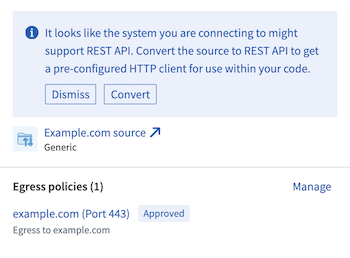
Generic connectors can be converted to the REST API source if there is only a single egress policy attached to the source for a DNS address with port 443.
Performing this conversion would give developers access to a built-in HTTP client for usage in code, allowing developers to immediately write code that interacts with the external system.
中文翻译
通用连接器(Generic connector)
通用连接器可用于表示与任意外部系统的连接。作为一种连接器,它不直接支持其他连接器中可用的标准功能集(capabilities)。然而,当专门用作在代码中使用(Use in code)连接器时,它可以用来创建这些标准功能的基于代码的替代方案,包括批量同步、文件和表格导出、流式同步、流式导出、媒体同步、网络钩子(webhooks)等。
通过使用适当的工作节点(worker)、凭证(credentials)和导出控制(export controls)配置通用连接器,开发人员可以编写代码连接到任意外部系统。当源所有者同时配置网络、工作节点、凭证和导出控制时,可以确保凭证仅用于指定的外部系统,并在建立连接的不同代码环境中强制执行导出标记。
支持的功能(Supported capabilities)
| 功能 | 状态 |
|---|---|
| 在代码中使用(Use in code) | 🟢 正式发布(Generally available) |
设置(Setup)
通用连接器应通过代码仓库环境侧边栏中的新建连接(New connection)选项创建,而非通过数据连接(Data Connection)应用程序。不过,任何已配置的通用连接器都会与数据连接中的其他连接器一同显示。
请查阅我们的外部转换教程,了解如何直接从代码仓库设置通用连接器的更多信息。
网络(Networking)
由于通用连接器必须在代码中使用,因此只能使用Foundry工作节点(Foundry worker)连接,对于可以接受来自Palantir入站流量的系统,可使用直接连接出口策略(direct connection egress policies);对于位于无法接受Palantir入站流量的私有网络中的系统,可使用代理出口策略(agent proxy egress policies)。
配置选项(Configuration options)
从概念上讲,您可以将通用连接器视为一组旨在协同使用的网络配置(networking configurations)、凭证(credentials)和可导出标记(exportable markings)。
- 网络配置指定使用此通用连接器时,代码应能访问哪些系统。
- 凭证指定成功连接所必需的秘密值。
- 可导出标记指定哪些数据可以安全地离开Palantir平台到达指定的网络目标。
为提供上述功能,通用连接器提供以下配置选项:
| 选项 | 是否必需 | 描述 |
|---|---|---|
网络(Networking) |
是 | 一组出口策略(egress policies),规定应可访问的目标地址或IP。 |
凭证(Credentials) |
否 | 一组键值对,可用于存储凭证。目前仅支持存储秘密值,不支持未加密的值。 |
可导出控制标记(Exportable control markings) |
否 | 如果通用连接器将与Foundry数据输入一起使用,则必须启用允许导出的设置,并指定可导出标记集。有关数据连接导出控制的更多信息,请参阅我们的文档。 |
在代码中使用通用连接器
本节提供有关如何在Foundry的各种代码环境中使用通用连接器的额外信息。
| 代码环境 | 描述 |
|---|---|
| Python外部转换(Python external transforms) | 使用通用连接器从Python转换(Python transforms)仓库连接到外部系统。 |
| 计算模块(Compute modules) | 使用通用连接器从长时间运行的计算模块进行连接。适用于流式同步和导出工作流,以及定制化写回工作流。 |
| TypeScript函数(TypeScript functions) | 正式发布(Generally available)。 |
| Python函数(Python functions) | 正式发布(Generally available)。 |
Python外部转换(Python external transforms)
通用连接器可以导入到代码仓库中。使用此通用连接器,您可以编写代码访问外部系统并获取源上的凭证。
计算模块(Compute modules)
通用连接器可以导入到计算模块(compute module)中。使用此通用连接器,您可以编写与外部系统交互的计算模块。
TypeScript函数(TypeScript functions)
通用连接器可以导入到TypeScript函数代码仓库(TypeScript Functions code repository)中。使用此通用连接器,您可以使用fetch直接调用外部系统。
Python函数(Python functions)
通用连接器可以导入到Python函数代码仓库(Python Functions code repository)中。使用此通用连接器,您可以使用Python的requests库直接调用外部系统。
通用连接器的转换(Conversion of generic connectors)
如果源上仅附加了一个针对端口443的DNS地址的出口策略,则通用连接器可以转换为REST API源(REST API source)。
执行此转换将为开发人员提供内置HTTP客户端(built-in HTTP client)用于代码中,使开发人员能够立即编写与外部系统交互的代码。