Kafka
Connect Foundry to Kafka to read data from a Kafka queue into a Foundry stream in realtime.
Supported capabilities
| Capability | Status |
|---|---|
| Exploration | 🟢 Generally available |
| Streaming syncs | 🟢 Generally available |
| Streaming exports | 🟢 Generally available |
Data model
| key (binary) | value (binary) |
|---|---|
| London | {"firstName": "John", "lastName": "Doe"} |
| Paris | {"firstName": "Jean", "lastName": "DuPont"} |
The Kafka connector does not parse message contents, and data of any type can be synced into Foundry. All content is uploaded, unparsed, under the value column. Use a downstream streaming transform (for example, parse_json in Pipeline Builder) to parse the data. The key column will display the key that was recorded in Kafka along with the message. If the message does not include a key, the value will be null.
Performance and limitations
The connector uses one consumer thread by default. You can configure additional threads to increase throughput, where each creates an independent Kafka consumer assigned a subset of the topic's partitions by the broker. Note that configuring more threads than partitions provides no added benefit, as the extra threads will remain idle.
Streaming syncs are meant to be consistent, long-running jobs. Any interruption to a streaming sync is a potential outage depending on expected outcomes.
Currently, streaming syncs have the following limitations:
- Jobs from agent connections restart during maintenance windows (typically once a week) to pick up upgrades. Expected downtime is less than five minutes.
- Jobs from direct connections restart at least once every 48 hours. Expected downtime is single-digit minutes (assuming resource availability allows jobs to restart immediately).
We recommend running streaming syncs on an agent connection for improved performance, bandwidth, and availability.
Setup
- Open the Data Connection application and select + New Source in the upper right corner of the screen.
- Select Kafka from the available connector types.
- Choose to use a direct connection over the Internet or to connect through an intermediary agent.
- We recommend connecting through two agents per source to successfully set up your Kafka connector and reduce downtime. Be sure the agents do not have overlapping maintenance windows.
- Follow the additional configuration prompts to continue the set up of your connector using the information in the sections below.
Learn more about setting up a connector in Foundry.
:::callout{theme="neutral"} If you do not see Kafka on the connector type page, contact Palantir Support to enable access. :::
Bootstrap servers
| Parameter | Required? | Default | Description |
|---|---|---|---|
| Bootstrap servers | Yes | No | Add Kafka broker servers in the format HOST:PORT, one per line. |
Authentication
Select a credential method to authenticate your Kafka connection: SSL, Username/Password, Azure AD, Kerberos, or NONE.
Configured credentials must allow the following operations:
Topicresource:Readfor streaming syncs and explorationWritefor streaming exports
SSL
SSL authentication corresponds to the standard Kafka SSL and SASL_SSLprotocols.
To authenticate with SSL, complete the following configuration options:
| Parameter | Required? | Default | Description |
|---|---|---|---|
| Endpoint identification algorithm | Yes | HTTPS | HTTPS: Verify that the broker host name matches the host name in the broker's certificate. NONE: Disable endpoint identification. |
| Custom client private key password (legacy) | No | Disabled | Applies only to legacy agent worker sources. Enable when your target requires mutual TLS and the password of the private key differs from the keystore password. |
| Use SASL | No | No | Enable SASL authentication. |
If your connection requires mutual TLS (two-way SSL) follow the steps to add your private key. If you require a custom client private key password, complete the following configuration options:
| Parameter | Required? | Default | Description |
|---|---|---|---|
| SSL key password | Yes | No | Password required to decrypt private key. |
If enabling SASL authentication, complete additional configuration:
| Parameter | Required? | Default | Description |
|---|---|---|---|
| SASL mechanism | No | No | Select the algorithm with which to encrypt credentials. |
| saslJaasConfigUsername | Yes | No | Username |
| SASL JAAS config password | Yes | No | Password |
| SASL client callback handler class | Yes | No | Shows the default callback handler for SASL clients. See the Java SASL API documentation ↗ for more information about SASL callback handlers. |
OAuth 2.0
OAuth authentication uses the OAuth 2.0 protocol. Only the Client Credentials Grant flow is currently supported.
To use the OAuth 2.0 protocol for authentication, complete the following configuration options:
| Parameter | Required? | Default | Description |
|---|---|---|---|
| Client ID | Yes | No | The ID of your application requesting authentication |
| Client Secret | Yes | No | The shared secret between the server and your application |
| Token Endpoint URI | Yes | No | The Uniform Resource Identifier (URI) of the server that grants access/ ID tokens |
| Scopes | No | No | Connecting via OAuth to Kafka, or specific Kafka topics, may require requesting a collection of scopes. Scopes are arbitrary string values configured in the authentication provider. For example, consumers may need to request one of (kafka-topics-read, kafka-topics-list) in their authentication request to determine the level of access to Kafka they receive. |
| SASL Extensions | No | No | Some Kafka servers, for example Confluent Cloud, may require SASL extensions ↗ to be configured, which would be key-value pairs specific to that server platform. |
Azure AD
The Azure AD authentication mode applies to the Kafka interface for Azure Event Hubs. This mode requires an Azure AD service principal. Review the Azure documentation ↗ to learn how to create a service principal and set up access to Event Hubs.
| Parameter | Required? | Default |
|---|---|---|
| Tenant ID | Yes | No |
| Client ID | Yes | No |
| Client secret | Yes | No |
The Kafka interface for Azure Event Hubs can also be accessed through a SAS Token ↗. To authenticate with a SAS token, select Username/Password authentication, with username $ConnectionString (no quotes) and password your EventHubs connection string.
None
Corresponds to Kafka's standard PLAINTEXT protocol.
:::callout{theme="danger"} We highly discourage configuring the connector without authentication or SSL as this will pass unencrypted data between the connector and the Kafka broker. Only use this configuration within secure networks. :::
Networking
The connector must have access to the host of the Kafka broker. If using a direct connection, create DNS egress policies for all bootstrap server hosts.
Certificates and private keys
You may need to configure additional client or server certificates and private keys for SSL and TLS.
SSL
SSL connections validate servers certificates. Normally, SSL validations occur through a certificate chain; by default, both agent and Foundry workers trust most standard certificate chains. However, if the server to which you are connecting has a self-signed certificate, or if hostname validation intercepts the connection, the connector must trust the certificate. Contact your Kafka administrator for the right certificate to use.
Learn more about using certificates in Data Connection.
Mutual TLS (mTLS)
Your Kafka cluster might require that both the server and client authenticate through mTLS. To enable mTLS, you must configure the following:
- Client certificate
- Server certificate
- Client private key
Follow the steps below to configure a client private key based on the connector run type.
Configure client private key for agents
If connecting via an agent, follow the instructions on how to add a private key
Configure client private key for direct connections
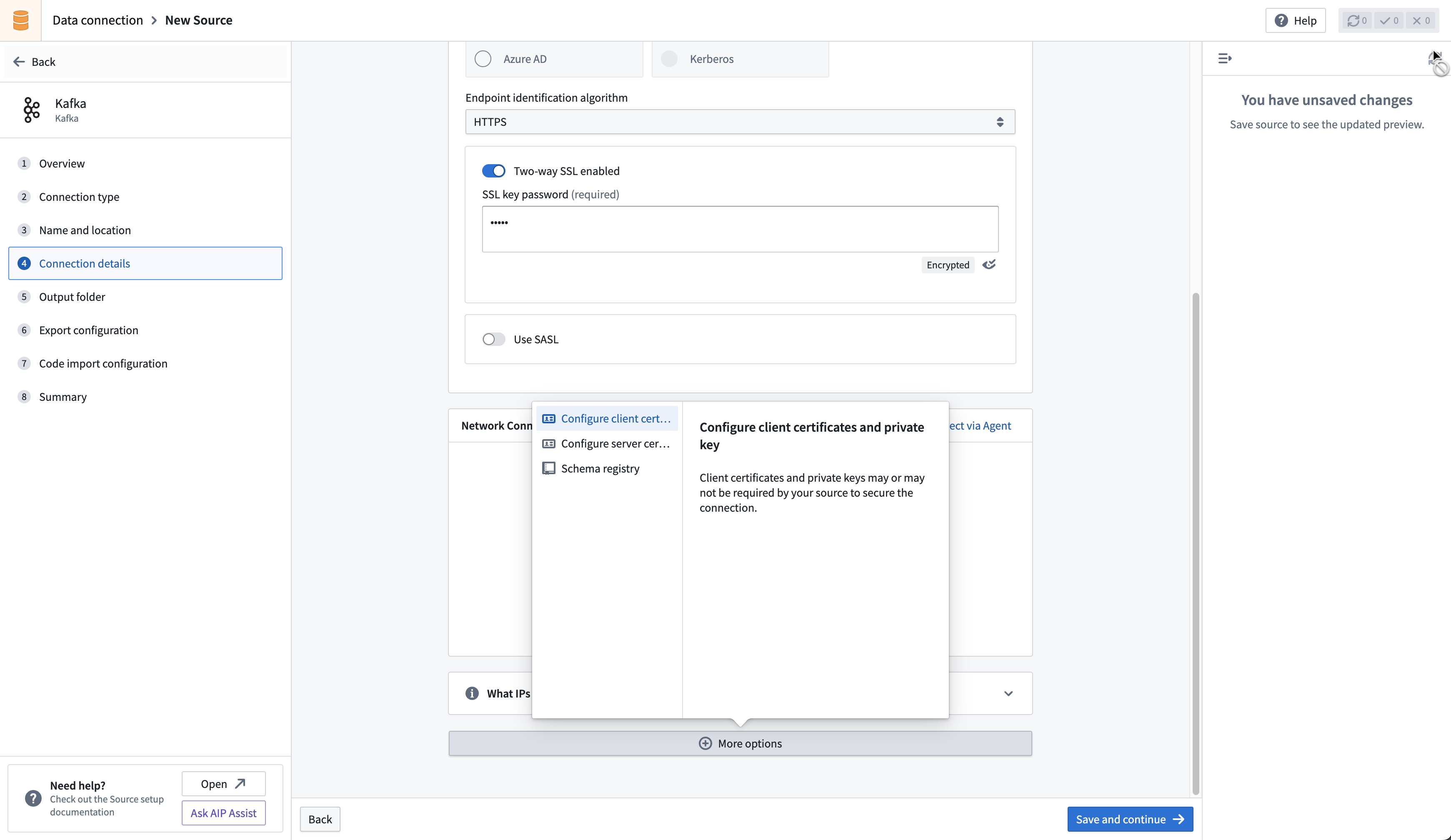
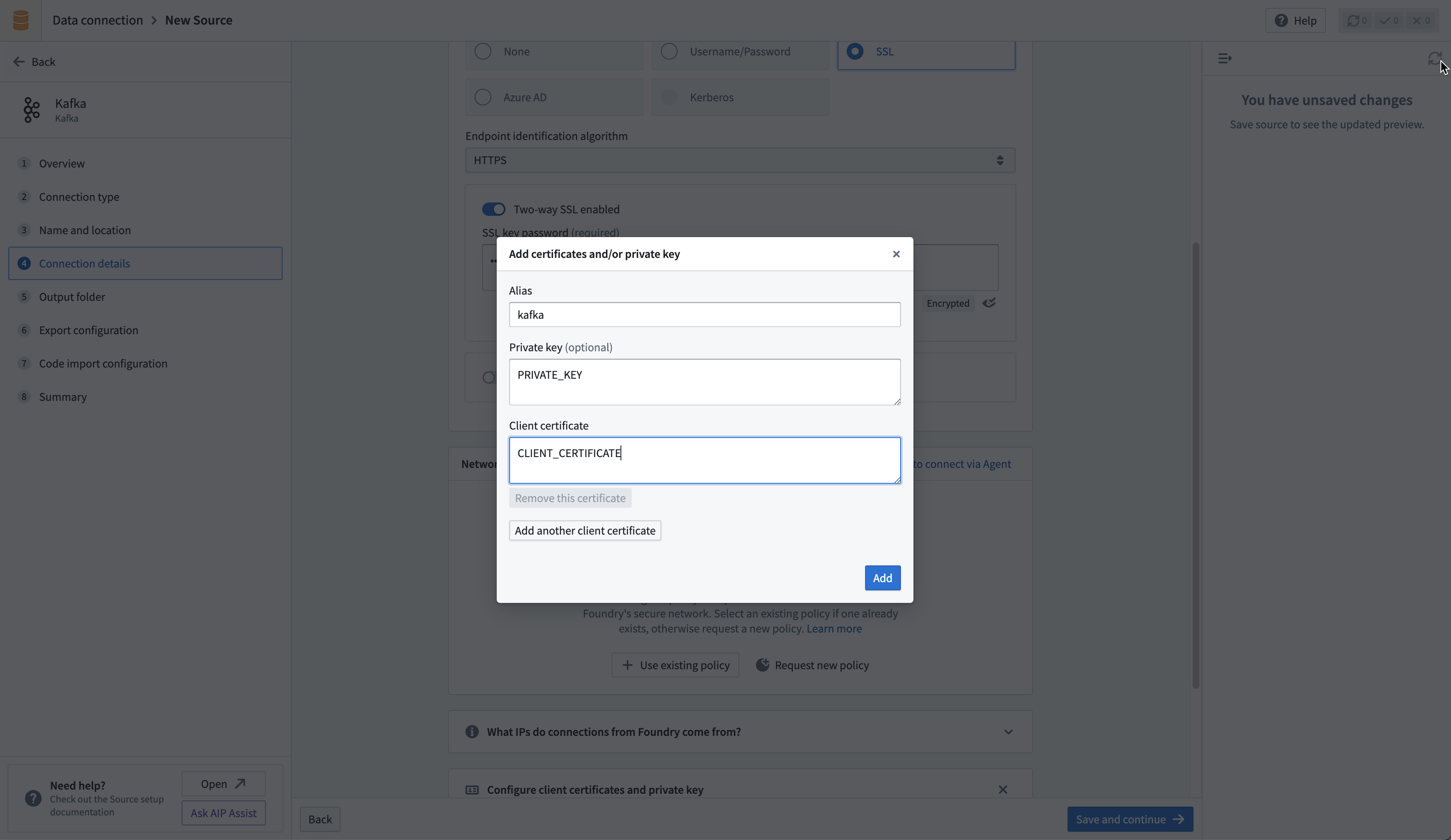
If connecting directly, upload your private key in the Configure client certificates and private key section of the connector configuration page. Use the alias kafka in the pop-up that appears, then add the private key and client certificate.
Sync data from Kafka
:::callout{theme="neutral"} For more complex scenarios, use pro-code alternatives. :::
Learn how to set up a sync with Kafka in the Set up a streaming sync tutorial.
Schema Registry integration
The Kafka Schema Registry functions as a centralized storage system, maintaining a versioned history of all schemas. The registry offers compatibility with Avro, Protobuf, and JSON schemas, and uses SerDes (Serializer/Deserializer) to facilitate conversions between schema formats and serialized data.
To leverage the Kafka Schema Registry effectively, it is necessary to register schemas for the relevant Kafka topics and append the Schema Registry URL to the source configuration. This adjustment enables the connector to transform raw bytes into corresponding data types.
For instance, a standard extraction would typically ingest raw bytes from Kafka into Foundry, as depicted below:
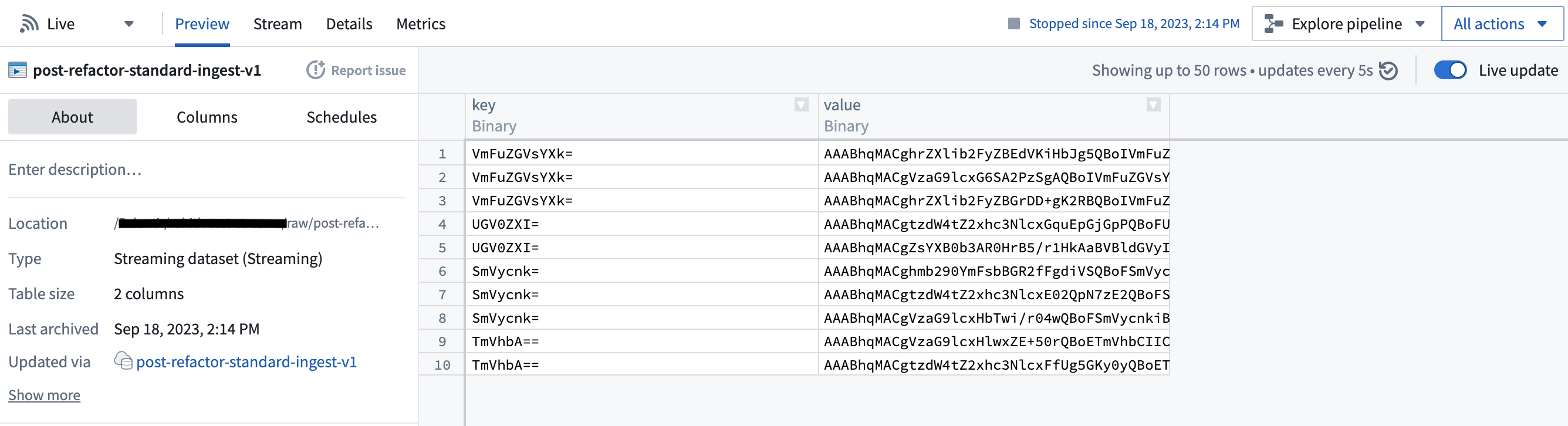
However, with the Schema Registry configured, the connector can discern the underlying schema of the bytes and transform them into first-class Foundry types, as shown here:
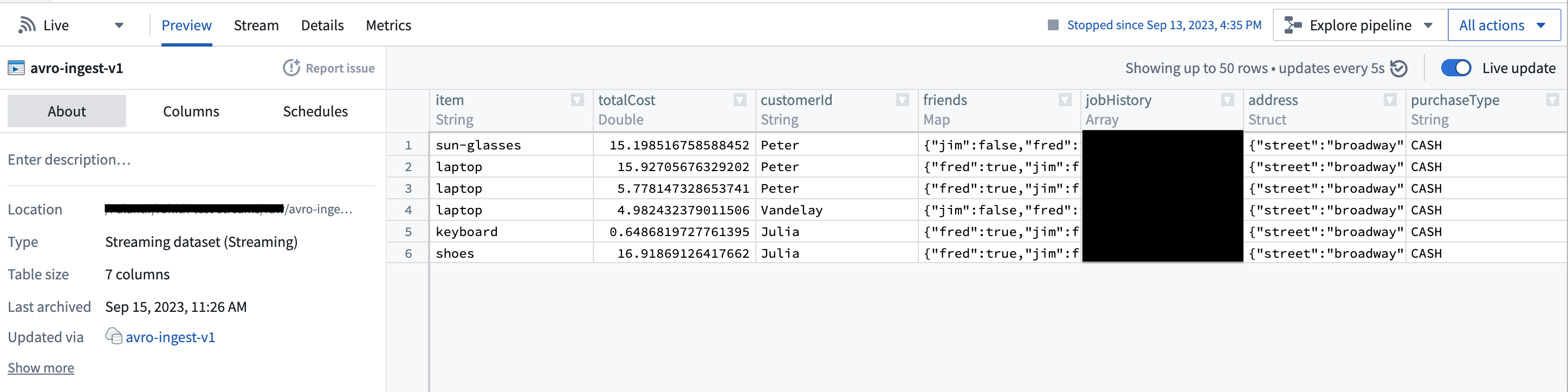
This feature can significantly streamline downstream pipelines by eliminating the need for cumbersome type conversion. Moreover, it elevates data consistency guarantees, given that the Schema Registry offers centralized schema management and compatibility checks as schemas evolve.
Export data to Kafka
:::callout{theme="neutral"} For more complex scenarios, use pro-code alternatives. :::
The connector supports exporting streams to external Kafka clusters via Data Connection.
To export to Kafka, first enable exports for your Kafka connector. Then, create a new export.
Export configuration options
| Option | Required? | Default | Description |
|---|---|---|---|
Topic |
Yes | N/A | The Kafka topic to which you want to export. |
Linger milliseconds |
Yes | 0 | The number of milliseconds to wait before sending records to Kafka. Records that accrue during the waiting time will be batched together when exported. This setting defaults to 0, meaning that records will be sent immediately. However, this default may result in more requests to your Kafka instance. |
Key column |
No | Undefined | The column from the Foundry stream that you wish to use as the Key when publishing records to Kafka. Null keys are not supported; ensure the selected column is populated for all records in the stream being exported. |
Value column |
No | Undefined | The column from the Foundry stream that you wish to export. If not specified, all fields from the row will be serialized as bytes and exported to Kafka in the body of the message. |
Header column |
No | Undefined | The column from the Foundry stream that you wish to use as the headers attached to a streaming record. This column must be of type struct, and all fields in your struct will be parsed as a string. If not specified or if the column is null, no headers will be attached. |
Enable Base64 Decode |
No | Disabled | Binary data in Foundry streams is Base64 encoded when stored internally. When enabled, this flag will result in binary data being decoded before exporting. This may only be enabled if both Key column and Value column are specified. |
Export task configuration (legacy)
:::callout{theme="warning"} We do not recommend exporting to Kafka through export tasks. If possible, existing export tasks should be migrated to use our recommended export capability. The documentation below is intended for historical reference. :::
To begin exporting data using export tasks, navigate to the Project folder that contains the Kafka connector to which you want to export. Right select on the connector name, then select Create Data Connection Task.
In the left side panel of the Data Connection view:
- Verify the
Sourcename matches the Kafka connector you want to use. - Add an
Inputcalleddatasetof typeStreaming dataset. The input dataset is the Foundry dataset being exported. - Add an
Outputcalleddatasetof typeStreaming export. The output dataset is used to run, schedule, and monitor the task. - Finally, add a YAML block in the text field to define the task configuration.
Use the following options when creating the YAML:
| Option | Required? | Default | Description |
|---|---|---|---|
maxParallelism |
Yes | No | The maximum allowed number of parallel threads used to export data. Actual number of threads is dictated by the number of partitions on the input Foundry stream (if lower than maxParallelism). |
topic |
Yes | No | The name of the topic to which data is pushed. |
clientId |
Yes | The identifier to use for the export task. The identifier maps to the Kafka client.id. Review the Kafka documentation ↗ for more information. |
|
batchOptions |
Yes | No | See batchOptions configuration below. |
keyColumn |
No | No | Name of a column in input streaming dataset. Values in this column are used as the key in exported messages. Omitting this property will export null values for the key. |
valueColumn |
No | No | Name of a column in input streaming dataset. Values in this column are used as the value in exported messages. Omitting this property will export all columns (as a stringified JSON object) under the value field. |
enableIdempotence |
No | true |
Review the Kafka documentation ↗ for more information. |
useDirectReaders |
Yes | No | Always set false. Configure per the example. |
transforms |
Yes | No | See the example configuration below. |
Configure batchOptionsusing the following options:
| Option | Required? | Default | Description |
|--- |--- |--- |--- |
| maxMilliseconds | Yes | No | The maximum duration (in milliseconds) to wait before writing available rows to the output topic. Lower this value to reduce latency, increase to reduce network overhead (number of requests). This value is used unless the batch hits the maxRecords limit first. |
| maxRecords | Yes | No | The maximum number of messages to buffer before writing to the output topic. Lower this value to reduce latency, increase to reduce network overhead (number of requests). This value is used unless the batch hits the maxMilliseconds limit first. |
The following shows an example export task configuration:
type: streaming-kafka-export-task
config:
  maxParallelism: 1
  topic: test-topic
  clientId: client-id
  keyColumn: key
  valueColumn: value
  batchOptions:
    maxMilliseconds: 5000
    maxRecords: 1000
transforms:
  transformType: test
  userCodeMavenCoords: []
useDirectReaders: false
After you configure the export task, select Save in the upper-right corner.
Use Kafka sources in code
Pro-code alternatives can be used to connect to Kafka sources for more complex scenarios. The examples below demonstrate how to connect to an Apache Kafka source using the Python client for Apache Kafka ↗, kafka-python in an external transform.
Read from Kafka with an external transform
This example reads messages from a given Kafka topic using incremental batch processing. It reads for one minute at a time, or up to 100 messages.
from transforms.api import Output, lightweight, incremental, transform_pandas
from transforms.external.systems import external_systems, Source, ResolvedSource
from datetime import timedelta, datetime
from kafka import KafkaConsumer
import json
import pandas as pd

@lightweight
@incremental()
@external_systems(
    kafka_source=Source("<source_rid>>")
)
@transform_pandas(
    Output("<output_dataset_rid>"),
)
def compute(kafka_source: ResolvedSource) -> pd.DataFrame:

    # 1. Set up the Kafka consumer
    USERNAME = kafka_source.get_secret("username")
    PASSWORD = kafka_source.get_secret("password")
    BOOTSTRAP_SERVER = "<server in the form host[:port]> " # Can also be a list of servers
    TOPIC = "<topic name>"
    CONSUMER_NAME = "<consumer name>" # Unique name for the consumer for committing offsets

    consumer = KafkaConsumer(
        TOPIC,
        bootstrap_servers=BOOTSTRAP_SERVER,
        security_protocol="SASL_SSL",
        sasl_mechanism="PLAIN",
        sasl_plain_username=USERNAME,
        sasl_plain_password=PASSWORD,
        group_id=CONSUMER_NAME,
        enable_auto_commit=True,  # Enable automatic offset commit
    )

    # 2. Define time and content limits for message reading
    MAX_BATCH_SIZE = 100
    TIMEOUT_MINUTES = 1
    END_TIME: datetime = datetime.now() + timedelta(minutes=TIMEOUT_MINUTES)

    # 3. Fetch and process messages
    events_received = []
    count = 0
    while datetime.now() < END_TIME and count < MAX_BATCH_SIZE:
        # Poll for messages (wait up to 1 second for new messages)
        msg_pack = consumer.poll(timeout_ms=1000)
        for _, messages in msg_pack.items():
            for message in messages:
                events_received.append(json.loads(message.value))
                count += 1
    consumer.close()

    # 4. Return the results
    return pd.DataFrame(events_received)
Read from Kafka with incremental offset tracking
The following example reads all available messages from a Kafka topic and persists offsets in a separate dataset so that subsequent runs resume where the previous run stopped. Unlike the basic example above, this approach does not rely on Kafka consumer group auto-commit. Instead, it manually assigns partitions, seeks to previously saved offsets, and polls until each partition's end offset is reached.
The transform produces two outputs:
records_output: The ingested Kafka recordsoffsets_output: A small dataset that stores the last consumed offset per partition, used on the next incremental run
import logging
from datetime import datetime, timedelta
from collections import defaultdict

import polars as pl
from kafka import KafkaConsumer

from transforms.api import (
    Output,
    transform,
    incremental,
    LightweightOutput,
    IncrementalLightweightOutput,
    IncrementalTransformContext,
)
from transforms.external.systems import external_systems, Source, ResolvedSource

logger = logging.getLogger(__name__)


def wait_for_partition_assignment(consumer, timeout_seconds=30):
    """Poll until the broker assigns partitions to this consumer."""
    deadline = datetime.now() + timedelta(seconds=timeout_seconds)
    while not consumer.assignment():
        consumer.poll(timeout_ms=100)
        if datetime.now() > deadline:
            raise TimeoutError(
                f"Partition assignment did not complete within {timeout_seconds} seconds."
            )


def read_offsets(offsets_output, ctx):
    """Read the offset map from the previous incremental run."""
    if not ctx.is_incremental:
        return {}
    offset_df = offsets_output.polars(mode="previous")
    result = defaultdict(dict)
    for row in offset_df.iter_rows(named=True):
        result[row["topic"]][row["partition"]] = row["offset"]
    return result


def write_offsets(offsets, offsets_output):
    """Persist the current offset map for the next incremental run."""
    rows = [
        {"topic": topic, "partition": partition, "offset": offset}
        for topic, partitions in offsets.items()
        for partition, offset in partitions.items()
    ]
    df = pl.DataFrame(rows, schema={"topic": pl.Utf8, "partition": pl.Int32, "offset": pl.Int64})
    offsets_output.set_mode("replace")
    offsets_output.write_table(df)


@external_systems(
    kafka_source=Source("<source_rid>")
)
@incremental()
@transform.using(
    records_output=Output("<records_dataset_rid>"),
    offsets_output=Output("<offsets_dataset_rid>"),
)
def compute(
    kafka_source: ResolvedSource,
    records_output: LightweightOutput,
    offsets_output: IncrementalLightweightOutput,
    ctx: IncrementalTransformContext,
):
    # 1. Create consumer with manual offset management
    consumer = KafkaConsumer(
        "<topic_name>",
        bootstrap_servers="<bootstrap_server>",
        security_protocol="SASL_SSL",
        sasl_mechanism="PLAIN",
        sasl_plain_username=kafka_source.get_secret("username"),
        sasl_plain_password=kafka_source.get_secret("password"),
        enable_auto_commit=False,
        auto_offset_reset="earliest",
        group_id="external-transform-consumer",
    )

    # 2. Wait for partition assignment and record end offsets as a stopping point
    wait_for_partition_assignment(consumer)
    end_offsets = {tp.partition: consumer.end_offsets([tp])[tp] for tp in consumer.assignment()}

    # 3. On incremental runs, seek each partition to its last saved offset + 1
    saved_offsets = read_offsets(offsets_output, ctx)
    topic_offsets = saved_offsets.get("<topic_name>", {})
    for tp in consumer.assignment():
        last_offset = topic_offsets.get(tp.partition)
        if last_offset is not None:
            consumer.seek(tp, last_offset + 1)

    # 4. Poll messages until end offsets are reached
    current_offsets = {}
    rows = []
    MAX_IDLE_POLLS = 5
    idle_count = 0

    while idle_count <= MAX_IDLE_POLLS:
        msg_pack = consumer.poll(timeout_ms=1000, max_records=1000)
        if not msg_pack:
            idle_count += 1
            continue
        idle_count = 0

        for tp, messages in msg_pack.items():
            for message in messages:
                rows.append({
                    "topic": message.topic,
                    "partition": message.partition,
                    "offset": message.offset,
                    "timestamp": message.timestamp,
                    "key": message.key.decode("utf-8") if message.key else None,
                    "value": message.value.decode("utf-8"),
                })
                current_offsets[tp.partition] = message.offset

        # Stop once every partition has reached its end offset
        if all(
            current_offsets.get(p, -1) >= end - 1
            for p, end in end_offsets.items()
        ):
            break

    consumer.close()

    # 5. Write records to the output dataset
    if rows:
        records_df = pl.DataFrame(rows)
        records_output.set_mode("replace")
        records_output.write_table(records_df)
    else:
        ctx.abort_job()
        return

    # 6. Persist offsets for the next run
    all_offsets = dict(saved_offsets)
    all_offsets["<topic_name>"] = current_offsets
    write_offsets(all_offsets, offsets_output)
Key differences from the basic example:
- No auto-commit: Offsets are stored in a Foundry dataset rather than committed to Kafka, giving you full control over processing semantics.
- Partition assignment: The
wait_for_partition_assignment()helper ensures the consumer has been assigned partitions before reading end offsets. - Incremental seeking: On subsequent runs, the transform reads the previous offsets dataset and seeks past already-consumed messages.
- End-offset stopping: The polling loop exits once every partition reaches its end offset, ensuring the transform processes all available messages without hanging indefinitely.
For high-volume topics where holding all rows in memory could cause out-of-memory errors, consider using the memory-aware buffered Parquet writer pattern to flush records to disk incrementally instead of collecting them all before writing.
Write to Kafka with an external transform
This example writes synthetic sensor data to a given Kafka topic every two seconds, for one minute.
from transforms.api import Output, transform_pandas, lightweight
from transforms.external.systems import external_systems, Source, ResolvedSource
from datetime import datetime, timedelta
import pandas as pd
from kafka import KafkaProducer
import time
import random
import json

@external_systems(
    kafka_source=Source("<source_rid>>")
)
@transform_pandas(
    Output("<output_dataset_rid>"),
)
def compute(kafka_source: ResolvedSource) -> pd.DataFrame:

    # 1. Set up the Kafka producer
    USERNAME = kafka_source.get_secret("username")
    PASSWORD = kafka_source.get_secret("password")
    BOOTSTRAP_SERVER = "<server in the form host[:port]> " # Can also be a list of servers
    TOPIC = "<topic name>"

    producer = KafkaProducer(
        bootstrap_servers=BOOTSTRAP_SERVER,
        security_protocol="SASL_SSL",
        sasl_mechanism="PLAIN",
        sasl_plain_username=USERNAME,
        sasl_plain_password=PASSWORD,
    )

    # 2. Define parameters for periodic data sending
    TIMEOUT_MINUTES = 1
    INTERVAL_SECONDS = 2
    END_TIME: datetime = datetime.now() + timedelta(minutes=TIMEOUT_MINUTES)

    # 3. Send sensor data
    events_sent = []
    while datetime.now() < END_TIME:
        data = get_random_sensor_data(datetime.now()) # This should be replaced with actual data
        producer.send(TOPIC, value=json.dumps(data).encode("utf-8"))
        events_sent.append(data)
        time.sleep(INTERVAL_SECONDS)
    producer.flush()
    producer.close()

    # 4. Return the results
    return pd.DataFrame(events_sent, columns=["timestamp", "temperature_c", "humidity_percent", "pressure_hpa", "status"])

def get_random_sensor_data(timestamp):
    """Generate random sensor data for a given timestamp. Should be replaced with actual data"""
    def random_sensor_status():
        # 90% OK, 8% WARN, 2% FAIL
        return random.choices(["OK", "WARN", "FAIL"], weights=[90, 8, 2], k=1)[0]

    return {
        "timestamp": timestamp.isoformat(),
        "temperature_c": round(random.gauss(22, 2), 2),  # mean=22C, std=2
        "humidity_percent": round(random.gauss(50, 10), 1),  # mean=50%, std=10
        "pressure_hpa": round(random.gauss(1013, 5), 1),  # mean=1013 hPa, std=5
        "status": random_sensor_status(),
    }
中文翻译
Kafka
将 Foundry 连接到 Kafka,以实时将 Kafka 队列中的数据读取到 Foundry 流(Stream)中。
支持的功能
| 功能 | 状态 |
|---|---|
| 探索(Exploration) | 🟢 正式发布(Generally available) |
| 流同步(Streaming syncs) | 🟢 正式发布(Generally available) |
| 流导出(Streaming exports) | 🟢 正式发布(Generally available) |
数据模型(Data model)
| 键(key) (binary) | 值(value) (binary) |
|---|---|
| London | {"firstName": "John", "lastName": "Doe"} |
| Paris | {"firstName": "Jean", "lastName": "DuPont"} |
Kafka 连接器(Connector)不会解析消息内容,任何类型的数据都可以同步到 Foundry 中。所有内容都会在 value 列下以未解析的形式上传。使用下游的流转换(Streaming transform)(例如,Pipeline Builder 中的 parse_json)来解析数据。key 列将显示 Kafka 中与消息一起记录的键。如果消息不包含键,则该值将为 null。
性能与限制(Performance and limitations)
连接器默认使用一个消费者线程。您可以配置更多线程来提高吞吐量,每个线程都会创建一个独立的 Kafka 消费者,由代理(Broker)分配主题分区的一个子集。请注意,配置的线程数超过分区数不会带来额外的好处,因为多余的线程将保持空闲状态。
流同步旨在成为一致、长期运行的作业。对流同步的任何中断都可能是潜在的故障,具体取决于预期结果。
目前,流同步存在以下限制:
- 来自代理连接(Agent connection)的作业会在维护窗口期间(通常每周一次)重启以获取升级。预期停机时间少于五分钟。
- 来自直接连接(Direct connection)的作业至少每 48 小时重启一次。预期停机时间为个位数分钟(假设资源可用性允许作业立即重启)。
我们建议在代理连接上运行流同步,以获得更好的性能、带宽和可用性。
设置(Setup)
- 打开 Data Connection 应用程序,然后选择屏幕右上角的 + New Source。
- 从可用的连接器类型中选择 Kafka。
- 选择通过互联网使用 直接连接(Direct connection),或者通过 中间代理(Intermediary agent) 进行连接。
- 我们建议每个源通过两个代理进行连接,以成功设置您的 Kafka 连接器并减少停机时间。请确保这些代理的维护窗口不重叠。
- 按照其他配置提示,使用以下部分中的信息继续设置您的连接器。
在 Foundry 中了解更多关于 设置连接器 的信息。
:::callout{theme="neutral"} 如果您在连接器类型页面上没有看到 Kafka,请联系 Palantir 支持以启用访问权限。 :::
引导服务器(Bootstrap servers)
| 参数 | 是否必需? | 默认值 | 描述 |
|---|---|---|---|
| Bootstrap servers | 是 | 无 | 以 HOST:PORT 格式添加 Kafka 代理服务器,每行一个。 |
身份验证(Authentication)
选择一种凭证方法来验证您的 Kafka 连接:SSL、用户名/密码、Azure AD、Kerberos 或 NONE。
配置的凭证必须允许以下操作:
Topic资源:- 流同步和探索的
Read操作 - 流导出的
Write操作
SSL
SSL 身份验证对应于标准的 Kafka SSL 和 SASL_SSL 协议。
要使用 SSL 进行身份验证,请完成以下配置选项:
| 参数 | 是否必需? | 默认值 | 描述 |
|---|---|---|---|
| Endpoint identification algorithm | 是 | HTTPS | HTTPS:验证代理主机名是否与代理证书中的主机名匹配。 NONE:禁用端点标识。 |
| Custom client private key password (legacy) | 否 | 禁用 | 仅适用于旧版 代理工作器(Agent worker) 源。当您的目标需要双向 TLS 并且私钥密码与密钥库密码不同时启用。 |
| Use SASL | 否 | 否 | 启用 SASL 身份验证。 |
如果您的连接需要双向 TLS(双向 SSL),请按照 添加私钥的步骤 进行操作。如果您需要自定义客户端私钥密码,请完成以下配置选项:
| 参数 | 是否必需? | 默认值 | 描述 |
|---|---|---|---|
| SSL key password | 是 | 无 | 解密私钥所需的密码。 |
如果启用 SASL 身份验证,请完成额外配置:
| 参数 | 是否必需? | 默认值 | 描述 |
|---|---|---|---|
| SASL mechanism | 否 | 无 | 选择用于加密凭据的算法。 |
| saslJaasConfigUsername | 是 | 无 | 用户名 |
| SASL JAAS config password | 是 | 无 | 密码 |
| SASL client callback handler class | 是 | 无 | 显示 SASL 客户端的默认回调处理器。有关 SASL 回调处理器的更多信息,请参阅 Java SASL API 文档 ↗。 |
OAuth 2.0
OAuth 身份验证使用 OAuth 2.0 协议。目前仅支持客户端凭证授权流程(Client Credentials Grant flow)。
要使用 OAuth 2.0 协议进行身份验证,请完成以下配置选项:
| 参数 | 是否必需? | 默认值 | 描述 |
|---|---|---|---|
| Client ID | 是 | 无 | 请求身份验证的应用程序的 ID |
| Client Secret | 是 | 无 | 服务器与您的应用程序之间的共享密钥 |
| Token Endpoint URI | 是 | 无 | 授予访问/ID 令牌的服务器的统一资源标识符(URI) |
| Scopes | 否 | 无 | 通过 OAuth 连接到 Kafka 或特定的 Kafka 主题可能需要请求一组作用域(Scopes)。作用域是在身份验证提供者中配置的任意字符串值。例如,消费者可能需要在身份验证请求中请求 (kafka-topics-read, kafka-topics-list) 之一,以确定他们获得的 Kafka 访问级别。 |
| SASL Extensions | 否 | 无 | 某些 Kafka 服务器(例如 Confluent Cloud)可能需要配置 SASL 扩展(SASL extensions) ↗,这些扩展是该服务器平台特定的键值对。 |
Azure AD
Azure AD 身份验证模式适用于 Azure 事件中心(Event Hubs)的 Kafka 接口。此模式需要 Azure AD 服务主体。请查阅 Azure 文档 ↗ 了解如何创建服务主体并设置对事件中心的访问权限。
| 参数 | 是否必需? | 默认值 |
|---|---|---|
| Tenant ID | 是 | 无 |
| Client ID | 是 | 无 |
| Client secret | 是 | 无 |
Azure 事件中心的 Kafka 接口也可以通过 SAS 令牌(SAS Token) ↗ 进行访问。要使用 SAS 令牌进行身份验证,请选择用户名/密码身份验证,用户名为 $ConnectionString(不带引号),密码为您的 EventHubs 连接字符串。
无(None)
对应于 Kafka 的标准 PLAINTEXT 协议。
:::callout{theme="danger"} 我们强烈建议不要在没有身份验证或 SSL 的情况下配置连接器,因为这将导致连接器和 Kafka 代理之间传输未加密的数据。仅在安全的网络中使用此配置。 :::
网络(Networking)
连接器必须能够访问 Kafka 代理的主机。如果使用直接连接,请为所有引导服务器主机创建 DNS 出站策略。
证书和私钥(Certificates and private keys)
您可能需要为 SSL 和 TLS 配置额外的客户端或服务器证书和私钥。
SSL
SSL 连接会验证服务器证书。通常,SSL 验证通过证书链进行;默认情况下,代理和 Foundry 工作器都信任大多数标准证书链。但是,如果您要连接的服务器具有自签名证书,或者主机名验证拦截了连接,则连接器必须信任该证书。请联系您的 Kafka 管理员以获取要使用的正确证书。
了解更多关于 在 Data Connection 中使用证书 的信息。
双向 TLS (Mutual TLS, mTLS)
您的 Kafka 集群可能要求服务器和客户端都通过 mTLS 进行身份验证。要启用 mTLS,您必须配置以下内容:
- 客户端证书(Client certificate)
- 服务器证书(Server certificate)
- 客户端私钥(Client private key)
根据连接器运行类型,按照以下步骤配置客户端私钥。
为代理配置客户端私钥
如果通过代理连接,请按照 如何添加私钥 的说明进行操作。
为直接连接配置客户端私钥
如果直接连接,请在连接器配置页面的 Configure client certificates and private key 部分上传您的私钥。在出现的弹出窗口中使用别名 kafka,然后添加私钥和客户端证书。
从 Kafka 同步数据(Sync data from Kafka)
:::callout{theme="neutral"} 对于更复杂的场景,请使用 专业代码替代方案。 :::
了解如何在 设置流同步(Set up a streaming sync) 教程中设置与 Kafka 的同步。
Schema Registry 集成(Schema Registry integration)
Kafka Schema Registry 作为一个集中式存储系统,维护所有模式的版本化历史。该注册表支持 Avro、Protobuf 和 JSON 模式,并使用 SerDes(序列化器/反序列化器)来促进模式格式和序列化数据之间的转换。
为了有效利用 Kafka Schema Registry,有必要为相关的 Kafka 主题注册模式,并将 Schema Registry URL 附加到源配置中。此调整使连接器能够将原始字节转换为相应的数据类型。
例如,标准提取通常会从 Kafka 将原始字节摄取到 Foundry,如下所示:
然而,配置了 Schema Registry 后,连接器可以识别字节的底层模式并将其转换为 Foundry 的一级类型,如下所示:
此功能可以通过消除繁琐的类型转换需求,显著简化下游管道。此外,它还提高了数据一致性保证,因为 Schema Registry 在模式演变时提供了集中式模式管理和兼容性检查。
将数据导出到 Kafka(Export data to Kafka)
:::callout{theme="neutral"} 对于更复杂的场景,请使用 专业代码替代方案。 :::
该连接器支持通过 Data Connection 将流导出到外部 Kafka 集群。
要导出到 Kafka,首先 为您的 Kafka 连接器启用导出。然后,创建一个新的导出。
导出配置选项(Export configuration options)
| 选项 | 是否必需? | 默认值 | 描述 |
|---|---|---|---|
Topic |
是 | 不适用 | 您要导出的 Kafka 主题。 |
Linger milliseconds |
是 | 0 | 在将记录发送到 Kafka 之前等待的毫秒数。在等待期间累积的记录将在导出时批量处理。此设置默认为 0,意味着记录将立即发送。但是,此默认值可能会导致对您的 Kafka 实例发出更多请求。 |
Key column |
否 | 未定义 | 您希望用作发布记录到 Kafka 时的键(Key)的 Foundry 流中的列。不支持空键;确保所选列在要导出的流中的所有记录中都有值。 |
Value column |
否 | 未定义 | 您希望导出的 Foundry 流中的列。如果未指定,行中的所有字段都将被序列化为字节并作为消息体导出到 Kafka。 |
Header column |
否 | 未定义 | 您希望用作附加到流记录的头部的 Foundry 流中的列。此列必须是结构体(struct)类型,并且结构体中的所有字段都将被解析为字符串。如果未指定或该列为空,则不会附加任何头部。 |
Enable Base64 Decode |
否 | 禁用 | Foundry 流中的二进制数据在内部存储时是 Base64 编码的。启用后,此标志将导致二进制数据在导出前被解码。仅当同时指定了 Key column 和 Value column 时才能启用此选项。 |
导出任务配置(旧版)(Export task configuration (legacy))
:::callout{theme="warning"} 我们不建议通过导出任务将数据导出到 Kafka。如果可能,应将现有的导出任务迁移为使用 我们推荐的导出功能。以下文档仅供历史参考。 :::
要开始使用导出任务导出数据,请导航到包含您要导出的 Kafka 连接器的项目文件夹。右键单击连接器名称,然后选择 Create Data Connection Task。
在 Data Connection 视图的左侧面板中:
- 验证
Source名称与您要使用的 Kafka 连接器匹配。 - 添加一个名为
dataset类型为Streaming dataset的Input。输入数据集 是要导出的 Foundry 数据集。 - 添加一个名为
dataset类型为Streaming export的Output。输出数据集 用于运行、调度和监控任务。 - 最后,在文本字段中添加一个 YAML 块来定义任务配置。
创建 YAML 时使用以下选项:
| 选项 | 是否必需? | 默认值 | 描述 |
|---|---|---|---|
maxParallelism |
是 | 无 | 用于导出数据的最大允许并行线程数。实际线程数由输入 Foundry 流上的分区数决定(如果低于 maxParallelism)。 |
topic |
是 | 无 | 数据推送到的主题名称。 |
clientId |
是 | 用于导出任务的标识符。该标识符映射到 Kafka 的 client.id。有关更多信息,请查阅 Kafka 文档 ↗。 |
|
batchOptions |
是 | 无 | 请参阅下面的 batchOptions 配置。 |
keyColumn |
否 | 无 | 输入流数据集中列的名称。此列中的值用作导出消息中的键。省略此属性将为键导出 null 值。 |
valueColumn |
否 | 无 | 输入流数据集中列的名称。此列中的值用作导出消息中的值。省略此属性将在 value 字段下导出所有列(作为字符串化的 JSON 对象)。 |
enableIdempotence |
否 | true |
有关更多信息,请查阅 Kafka 文档 ↗。 |
useDirectReaders |
是 | 无 | 始终设置为 false。按照示例进行配置。 |
transforms |
是 | 无 | 请参阅下面的示例配置。 |
使用以下选项配置 batchOptions:
| 选项 | 是否必需? | 默认值 | 描述 |
|--- |--- |--- |--- |
| maxMilliseconds | 是 | 无 | 在将可用行写入输出主题之前等待的最长时间(以毫秒为单位)。降低此值以减少延迟,增加以减少网络开销(请求数)。除非批次首先达到 maxRecords 限制,否则将使用此值。 |
| maxRecords | 是 | 无 | 在写入输出主题之前缓冲的最大消息数。降低此值以减少延迟,增加以减少网络开销(请求数)。除非批次首先达到 maxMilliseconds 限制,否则将使用此值。 |
以下是一个导出任务配置示例:
type: streaming-kafka-export-task
config:
  maxParallelism: 1
  topic: test-topic
  clientId: client-id
  keyColumn: key
  valueColumn: value
  batchOptions:
    maxMilliseconds: 5000
    maxRecords: 1000
transforms:
  transformType: test
  userCodeMavenCoords: []
useDirectReaders: false
配置导出任务后,选择右上角的 Save。
在代码中使用 Kafka 源(Use Kafka sources in code)
专业代码替代方案(Pro-code alternatives) 可用于连接 Kafka 源以处理更复杂的场景。以下示例演示了如何使用 Apache Kafka 的 Python 客户端 ↗ kafka-python 在 外部转换(External transform) 中连接到 Apache Kafka 源。
使用外部转换从 Kafka 读取(Read from Kafka with an external transform)
此示例使用增量批处理从给定的 Kafka 主题读取消息。它每次读取一分钟,或最多读取 100 条消息。
from transforms.api import Output, lightweight, incremental, transform_pandas
from transforms.external.systems import external_systems, Source, ResolvedSource
from datetime import timedelta, datetime
from kafka import KafkaConsumer
import json
import pandas as pd

@lightweight
@incremental()
@external_systems(
    kafka_source=Source("<source_rid>>")
)
@transform_pandas(
    Output("<output_dataset_rid>"),
)
def compute(kafka_source: ResolvedSource) -> pd.DataFrame:

    # 1. 设置 Kafka 消费者
    USERNAME = kafka_source.get_secret("username")
    PASSWORD = kafka_source.get_secret("password")
    BOOTSTRAP_SERVER = "<server in the form host[:port]> " # 也可以是服务器列表
    TOPIC = "<topic name>"
    CONSUMER_NAME = "<consumer name>" # 用于提交偏移量的消费者唯一名称

    consumer = KafkaConsumer(
        TOPIC,
        bootstrap_servers=BOOTSTRAP_SERVER,
        security_protocol="SASL_SSL",
        sasl_mechanism="PLAIN",
        sasl_plain_username=USERNAME,
        sasl_plain_password=PASSWORD,
        group_id=CONSUMER_NAME,
        enable_auto_commit=True,  # 启用自动偏移量提交
    )

    # 2. 定义消息读取的时间和内容限制
    MAX_BATCH_SIZE = 100
    TIMEOUT_MINUTES = 1
    END_TIME: datetime = datetime.now() + timedelta(minutes=TIMEOUT_MINUTES)

    # 3. 获取并处理消息
    events_received = []
    count = 0
    while datetime.now() < END_TIME and count < MAX_BATCH_SIZE:
        # 轮询消息(最多等待 1 秒以获取新消息)
        msg_pack = consumer.poll(timeout_ms=1000)
        for _, messages in msg_pack.items():
            for message in messages:
                events_received.append(json.loads(message.value))
                count += 1
    consumer.close()

    # 4. 返回结果
    return pd.DataFrame(events_received)
使用增量偏移量跟踪从 Kafka 读取(Read from Kafka with incremental offset tracking)
以下示例从 Kafka 主题读取所有可用消息,并将偏移量持久化到单独的数据集中,以便后续运行从上次停止的位置继续。与 上面的基本示例 不同,此方法不依赖 Kafka 消费者组自动提交。相反,它手动分配分区,查找到之前保存的偏移量,并轮询直到达到每个分区的结束偏移量。
该转换产生两个输出:
records_output:摄取的 Kafka 记录offsets_output:一个小的数据集,存储每个分区最后消费的偏移量,用于下一次增量运行
import logging
from datetime import datetime, timedelta
from collections import defaultdict

import polars as pl
from kafka import KafkaConsumer

from transforms.api import (
    Output,
    transform,
    incremental,
    LightweightOutput,
    IncrementalLightweightOutput,
    IncrementalTransformContext,
)
from transforms.external.systems import external_systems, Source, ResolvedSource

logger = logging.getLogger(__name__)


def wait_for_partition_assignment(consumer, timeout_seconds=30):
    """轮询直到代理为此消费者分配分区。"""
    deadline = datetime.now() + timedelta(seconds=timeout_seconds)
    while not consumer.assignment():
        consumer.poll(timeout_ms=100)
        if datetime.now() > deadline:
            raise TimeoutError(
                f"分区分配未在 {timeout_seconds} 秒内完成。"
            )


def read_offsets(offsets_output, ctx):
    """从上一次增量运行中读取偏移量映射。"""
    if not ctx.is_incremental:
        return {}
    offset_df = offsets_output.polars(mode="previous")
    result = defaultdict(dict)
    for row in offset_df.iter_rows(named=True):
        result[row["topic"]][row["partition"]] = row["offset"]
    return result


def write_offsets(offsets, offsets_output):
    """为下一次增量运行持久化当前偏移量映射。"""
    rows = [
        {"topic": topic, "partition": partition, "offset": offset}
        for topic, partitions in offsets.items()
        for partition, offset in partitions.items()
    ]
    df = pl.DataFrame(rows, schema={"topic": pl.Utf8, "partition": pl.Int32, "offset": pl.Int64})
    offsets_output.set_mode("replace")
    offsets_output.write_table(df)


@external_systems(
    kafka_source=Source("<source_rid>")
)
@incremental()
@transform.using(
    records_output=Output("<records_dataset_rid>"),
    offsets_output=Output("<offsets_dataset_rid>"),
)
def compute(
    kafka_source: ResolvedSource,
    records_output: LightweightOutput,
    offsets_output: IncrementalLightweightOutput,
    ctx: IncrementalTransformContext,
):
    # 1. 创建具有手动偏移量管理的消费者
    consumer = KafkaConsumer(
        "<topic_name>",
        bootstrap_servers="<bootstrap_server>",
        security_protocol="SASL_SSL",
        sasl_mechanism="PLAIN",
        sasl_plain_username=kafka_source.get_secret("username"),
        sasl_plain_password=kafka_source.get_secret("password"),
        enable_auto_commit=False,
        auto_offset_reset="earliest",
        group_id="external-transform-consumer",
    )

    # 2. 等待分区分配并记录结束偏移量作为停止点
    wait_for_partition_assignment(consumer)
    end_offsets = {tp.partition: consumer.end_offsets([tp])[tp] for tp in consumer.assignment()}

    # 3. 在增量运行时,将每个分区查找到最后保存的偏移量 + 1
    saved_offsets = read_offsets(offsets_output, ctx)
    topic_offsets = saved_offsets.get("<topic_name>", {})
    for tp in consumer.assignment():
        last_offset = topic_offsets.get(tp.partition)
        if last_offset is not None:
            consumer.seek(tp, last_offset + 1)

    # 4. 轮询消息直到达到结束偏移量
    current_offsets = {}
    rows = []
    MAX_IDLE_POLLS = 5
    idle_count = 0

    while idle_count <= MAX_IDLE_POLLS:
        msg_pack = consumer.poll(timeout_ms=1000, max_records=1000)
        if not msg_pack:
            idle_count += 1
            continue
        idle_count = 0

        for tp, messages in msg_pack.items():
            for message in messages:
                rows.append({
                    "topic": message.topic,
                    "partition": message.partition,
                    "offset": message.offset,
                    "timestamp": message.timestamp,
                    "key": message.key.decode("utf-8") if message.key else None,
                    "value": message.value.decode("utf-8"),
                })
                current_offsets[tp.partition] = message.offset

        # 一旦每个分区都达到其结束偏移量,就停止
        if all(
            current_offsets.get(p, -1) >= end - 1
            for p, end in end_offsets.items()
        ):
            break

    consumer.close()

    # 5. 将记录写入输出数据集
    if rows:
        records_df = pl.DataFrame(rows)
        records_output.set_mode("replace")
        records_output.write_table(records_df)
    else:
        ctx.abort_job()
        return

    # 6. 为下一次运行持久化偏移量
    all_offsets = dict(saved_offsets)
    all_offsets["<topic_name>"] = current_offsets
    write_offsets(all_offsets, offsets_output)
与基本示例的主要区别:
- 无自动提交: 偏移量存储在 Foundry 数据集中,而不是提交给 Kafka,让您完全控制处理语义。
- 分区分配:
wait_for_partition_assignment()辅助函数确保消费者在读取结束偏移量之前已被分配分区。 - 增量查找: 在后续运行时,转换会读取之前的偏移量数据集,并查找到已消费消息之后的位置。
- 结束偏移量停止: 轮询循环在每个分区都达到其结束偏移量时退出,确保转换处理所有可用消息而不会无限挂起。
对于高容量主题,将所有行保存在内存中可能导致内存不足错误,请考虑使用 内存感知缓冲 Parquet 写入器(Memory-aware buffered Parquet writer) 模式,以增量方式将记录刷新到磁盘,而不是在写入前全部收集。
使用外部转换写入 Kafka(Write to Kafka with an external transform)
此示例每两秒将合成的传感器数据写入给定的 Kafka 主题,持续一分钟。
from transforms.api import Output, transform_pandas, lightweight
from transforms.external.systems import external_systems, Source, ResolvedSource
from datetime import datetime, timedelta
import pandas as pd
from kafka import KafkaProducer
import time
import random
import json

@external_systems(
    kafka_source=Source("<source_rid>>")
)
@transform_pandas(
    Output("<output_dataset_rid>"),
)
def compute(kafka_source: ResolvedSource) -> pd.DataFrame:

    # 1. 设置 Kafka 生产者
    USERNAME = kafka_source.get_secret("username")
    PASSWORD = kafka_source.get_secret("password")
    BOOTSTRAP_SERVER = "<server in the form host[:port]> " # 也可以是服务器列表
    TOPIC = "<topic name>"

    producer = KafkaProducer(
        bootstrap_servers=BOOTSTRAP_SERVER,
        security_protocol="SASL_SSL",
        sasl_mechanism="PLAIN",
        sasl_plain_username=USERNAME,
        sasl_plain_password=PASSWORD,
    )

    # 2. 定义定期发送数据的参数
    TIMEOUT_MINUTES = 1
    INTERVAL_SECONDS = 2
    END_TIME: datetime = datetime.now() + timedelta(minutes=TIMEOUT_MINUTES)

    # 3. 发送传感器数据
    events_sent = []
    while datetime.now() < END_TIME:
        data = get_random_sensor_data(datetime.now()) # 这应替换为实际数据
        producer.send(TOPIC, value=json.dumps(data).encode("utf-8"))
        events_sent.append(data)
        time.sleep(INTERVAL_SECONDS)
    producer.flush()
    producer.close()

    # 4. 返回结果
    return pd.DataFrame(events_sent, columns=["timestamp", "temperature_c", "humidity_percent", "pressure_hpa", "status"])

def get_random_sensor_data(timestamp):
    """为给定的时间戳生成随机传感器数据。应替换为实际数据"""
    def random_sensor_status():
        # 90% OK, 8% WARN, 2% FAIL
        return random.choices(["OK", "WARN", "FAIL"], weights=[90, 8, 2], k=1)[0]

    return {
        "timestamp": timestamp.isoformat(),
        "temperature_c": round(random.gauss(22, 2), 2),  # 平均值=22C, 标准差=2
        "humidity_percent": round(random.gauss(50, 10), 1),  # 平均值=50%, 标准差=10
        "pressure_hpa": round(random.gauss(1013, 5), 1),  # 平均值=1013 hPa, 标准差=5
        "status": random_sensor_status(),
    }