Legacy REST API Plugin (magritte-rest-v2)(遗留 REST API 插件 (magritte-rest-v2))
:::callout{theme="danger"}
The legacy REST API options documented here using the custom magritte-rest-v2 source type are for historical reference only. This feature is no longer under active development and should not be used.
Use instead the REST API source type that supports:
- Webhooks
- Syncs and exports via external transforms
The REST API source type can also be used to connect to on-premise REST APIs using agent proxy egress policies. :::
Architecture
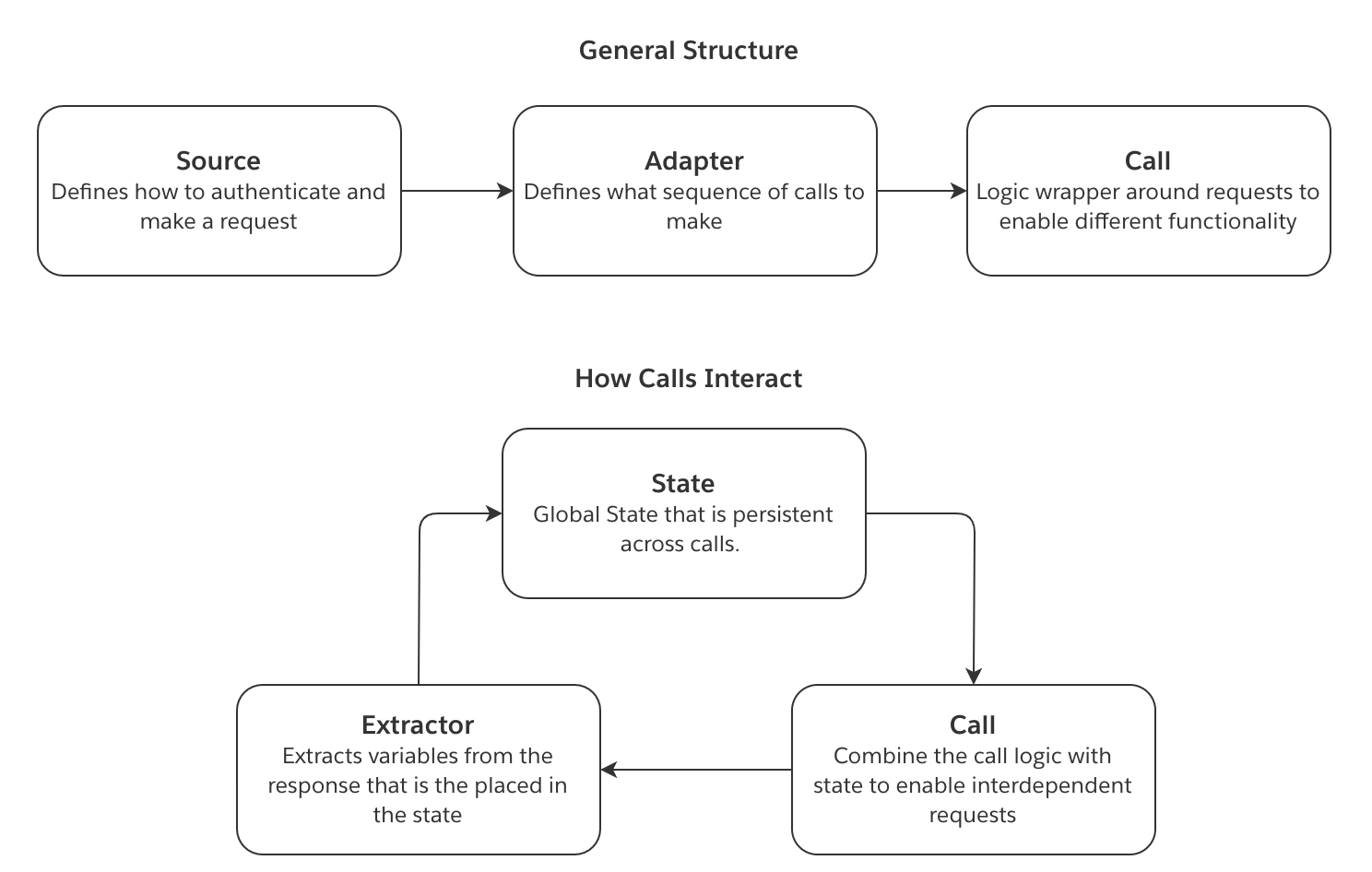
The following concepts illustrate the flow of information when using a magritte-rest-v2 source.
- The source defines how a connection is established. This includes how the request should authenticate.
- The sync consists of a list of calls. Each call defines what sort of request should be made and implements any required logic around this request. A call can be as simple as a single GET request or more complex such as a loop of requests for pagination.
- An extractor defines how to parse the response to both authentication calls and sync calls. For sync calls, it can save fields in the response to a state.
- The resulting state is passed on to the next call. The variables in this
statecan then be injected into the proceeding calls. This allows for interdependent requests.
This diagram illustrates how the above concepts interact:
Create a custom magritte-rest-v2 source
To create a magritte-rest-v2 source, select New source from the Sources tab of the Data Connection application. Then, select the option to Add Custom Source. The magritte-rest-v2 plugin is primarily configured via a YAML editor.
The following examples provide YAML code snippets necessary for configuration of different authentication types:
- Headers
- Username and password
- Body
- URL parameters
- Call
- Call to another domain
- Client certificate
- NTLM
This documentation also provides additional guidance on these topics:
Authentication
Headers
type: magritte-rest-v2
sourceMap:
  my_api:
    type: magritte-rest
    headers:
      Authorization: 'Bearer {{token}}'
    url: "https://some-api.com/"
Username and password
Also known as Basic authentication.
type: magritte-rest-v2
sourceMap:
  my_api:
    type: magritte-rest
    usernamePassword: '{{username}}:{{password}}'
    url: "https://some-api.com/"
Body
type: magritte-rest-v2
sourceMap:
  my_api:
    type: magritte-rest-auth-call-source
    url: "https://some-api.com/"
    requestMimeType: application/json
    body: '{"username": "{{username}}", "password": "{{password}}"}'
    authCalls: []
URL parameters
type: magritte-rest-v2
sourceMap:
  my_api:
    type: magritte-rest-auth-call-source
    url: "https://some-api.com/"
    parameters:
      username: "{{username}}"
      password: "{{password}}"
    authCalls: []
Call
The following configuration can be used to submit a URL-encoded form body to an /auth endpoint in order to use the returned token in a sync. You should only use formBody if your endpoint has a form type; otherwise use body.
type: magritte-rest-v2
sourceMap:
  my_api:
    type: magritte-rest-auth-call-source
    url: "https://some-api.com/"
    headers:
      Authorization: 'Bearer {%token%}'
    authCalls:
      - type: magritte-rest-call
        path: /auth
        method: POST
        formBody:
          username: '{{username}}'
          password: '{{password}}'
        extractor:
          - type: magritte-rest-json-extractor
            assign:
              token: /token
If the returned token regularly expires prior to the completion of your syncs, use the authExpiration parameter to specify how often the calls under authCalls should be retried. Set the value of authExpiration to be no longer than the validity period of the token returned by the /auth endpoint.
type: magritte-rest-v2
sourceMap:
  my_api:
    type: magritte-rest-auth-call-source
    url: "https://some-api.com/"
    authExpiration: 30m
    headers:
      Authorization: 'Bearer {%token%}'
    authCalls:
      - type: magritte-rest-call
        path: /auth
        method: POST
        formBody:
          username: '{{username}}'
          password: '{{password}}'
        extractor:
          - type: magritte-rest-json-extractor
            assign:
              token: /token
When your API uses security headers like subscription keys in order to log in successfully, you will have to add an additional header section underneath authCalls. This second header section is used specifically for the authentication call, and is entirely separate from the first header section; all other API calls (aside from the authentication call) use the first header section. Not having these header sections properly configured may result in 401 authentication failures. An example is given below.
type: magritte-rest-v2
sourceMap:
  my_api:
    type: magritte-rest-auth-call-source
    url: "https://some-api.com/"
    headers:
      X-service-identifier: SWN
      Authorization: 'Bearer {%token%}'
      Ocp-Apim-Subscription-Key: '{{subscriptionKey}}'
    authCalls:
      - type: magritte-rest-call
        path: /auth
        method: POST
        headers:
          X-service-identifier: SWN
          Ocp-Apim-Subscription-Key: '{{subscriptionKey}}'
        body:
          username: '{{username}}'
          password: '{{password}}'
        extractor:
          - type: magritte-rest-json-extractor
            assign:
              token: /token
Call to another domain
This enables authentication against one domain in order to use the token on another domain:
type: magritte-rest-v2
sourceMap:
  auth_api:
    type: magritte-rest
    url: "https://auth.api.com"
  data_api:
    type: magritte-rest-auth-call-source
    url: "https://data-api.com/"
    headers:
      Authorization: 'Bearer {%token%}'
    authCalls:
      - type: magritte-rest-call
        source: auth_api
        path: /auth
        method: POST
        formBody:
          username: '{{username}}'
          password: '{{password}}'
        extractor:
          - type: magritte-rest-json-extractor
            assign:
              token: /token
Client certificate
Sources support supplying a Java KeyStore (JKS) file for authentication:
type: magritte-rest-v2
sourceMap:
  my_api:
    type: magritte-rest
    url: "https://some-api.com/"
    keystorePath: "/my/keystore/keystore.jks"
    keystorePassword: "{{password}}"
NTLM
The following curl: curl -v http://example.com/do.asmx --ntlm -u DOMAIN\\username:password can be translated as:
type: magritte-rest-ntlm-source
url: http://example.com
user: "{{username}}"
password: "{{password}}"
domain: DOMAIN (optional)
workstation: (optional) the name of your machine as given by $(hostname)
Proxy
type: magritte-rest-v2
sourceMap:
  my_api:
    type: magritte-rest
    url: http://example.com
    proxy: 'http://my-proxy:8888/' # you can also pass an IP Address
You can also pass in proxy credentials in the config:
type: magritte-rest-v2
sourceMap:
  my_api:
    type: magritte-rest
    url: http://example.com
    proxy:
      url: 'http://my-proxy:8888/' # you can also pass an IP Address
      username: 'my-proxy-username'
      password: 'my-proxy-password'
Server certificate issues
If you see errors like javax.net.ssl.SSLHandshakeException you might need to add the server's certificate to agent's trust-store, following this guide.
For debugging purposes only, you might also disable checking of the certificate, which corresponds to running curl with the insecure -k flag (curl -k https://some-domain):
type: magritte-rest-v2
sourceMap:
  my_api:
    type: magritte-rest
    url: https://example.com
    insecure: true
TLS version
By default, the plugin will connect only over modern TLS versions (TLSv1.2 and TLSv1.3).
To use an older version, specify the TLS version in the config:
type: magritte-rest-v2
sourceMap:
  my_api:
    type: magritte-rest
    url: https://example.com
    tlsVersion: 'TLSv1.1'
Supported versions: TLSv1.3, TLSv1.2, TLSv1.1, TLSv1, SSLv3.
Create a sync
To create a sync, from the top of your magritte-rest-v2 Source click the "Create Sync" button. The Basic view will guide you through creating one or more calls to fetch data. The Advanced view will enable you to edit the YAML configuration directly. You can toggle between these views at the top right of the page.
A sync requires at least one call. In the basic view, you can create new calls by clicking the "Add" button under the "Perform calls in sequence" heading.
You can then specify if the call should be made once by selecting "Single Call" or multiple times based on a loop, a time range, a date range, a list, or by paging over results.
Each call requires a path which will be appended to the source URL when queried. For example, if the source has the url https://my-ap-source.com using a path of /api/v1/get-documents would result in the call querying https://my-ap-source.com/api/v1/get-documents.
This section presents a list of YAML configurations that address common scenarios:
- DateTime-based API
- Page-based API
- Offset-based API
- Next-Page link-based API
- Triggering and downloading a report
This documentation also provides additional guidance on these topics:
Common Scenarios
DateTime-based API
Assume an API that serves CSV reports for each date at /daily_data?date=2020-01-01. In this example, we would like to ingest these reports as they become available. To achieve this, we could schedule a daily sync that will remember the last date for which reports were synced, in order to automatically fetch the reports for unsynced dates up to today:
type: rest-source-adapter2
outputFileType: csv
incrementalStateVars:
  incremental_date_to_query: '2020-01-01'
initialStateVars:
  yesterday:
    type: magritte-rest-datetime-expression
    offset: '-P1D'
    timezone: UTC
    formatString: 'yyyy-MM-dd'
restCalls:
  - type: magritte-increasing-date-param-call
    checkConditionFirst: true
    paramToIncrease: date_to_query
    increaseBy: P1D
    initValue: '{%incremental_date_to_query%}'
    stopValue: '{%yesterday%}'
    format: 'yyyy-MM-dd'
    method: GET
    path: '/daily_data'
    parameters:
      date: '{%date_to_query%}'
    extractor:
      - type: magritte-rest-string-extractor
        fromStateVar: 'date_to_query'
        var: 'incremental_date_to_query'
You may find it helpful to compare the above configuration with an equivalent Python snippet.
import requests
from datetime import datetime, timedelta

incremental_state = load_incremental_state()
if incremental_state is None:
  incremental_state = {'incremental_date_to_query': '2020-01-01'}

yesterday = datetime.utcnow() - timedelta(days=1)

date_to_query = incremental_state['incremental_date_to_query']
date_to_query = datetime.strptime(date_to_query, '%Y-%m-%d')
while yesterday >= date_to_query:
  response = requests.get(source.url + '/daily_data', params={
    'date': date_to_query.strftime('%Y-%m-%d')
  })
  upload(response)
  date_to_query += timedelta(days=1)
  incremental_date_to_query = date_to_query

save_incremental_state({'incremental_date_to_query': incremental_date_to_query})
Page-based API
type: rest-source-adapter2
outputFileType: json
restCalls:
  - type: magritte-paging-inc-param-call
    paramToIncrease: page
    initValue: 0
    increaseBy: 1
    method: GET
    path: '/data'
    parameters:
      page: '{%page%}'
      entries_per_page: 1000
    extractor:
      - type: magritte-rest-json-extractor
        assign:
          page_items: '/items'
    condition:
      type: magritte-rest-non-empty-condition
      var: page_items
If you are a developer, you might find it easier to understand the above configuration by comparing it with an equivalent python snippet:
import requests

page = 0
while True:
  response = requests.get(source.url + '/data', params={
    'page': page,
    'entries_per_page': 1000
  })
  upload(response)

  page += 1
  page_items = response.json().get('items')
  if not page_items:
    break
Offset-based API
Here is an example ElasticSearch basic search API:
type: rest-source-adapter2
outputFileType: json
restCalls:
  - type: magritte-paging-inc-param-call
    paramToIncrease: offset
    initValue: 0
    increaseBy: 100
    method: POST
    path: '/_search'
    body: |-
      {
        "from": {%offset%},
        "size": 100
      }
    extractor:
      - type: magritte-rest-json-extractor
        assign:
          hits: '/hits'
    condition:
      type: magritte-rest-non-empty-condition
      var: hits
Next page link-based API
Next page tokens are also often known as cursor, continuation, or pagination tokens.
Here is an example ElasticSearch search and scrolling API:
type: rest-source-adapter2
outputFileType: json
restCalls:
  - type: magritte-rest-call
    method: GET
    path: /my-es-index/_search?scroll=1m
    parameters:
      scroll: 1m
    extractor:
      - type: json
        assign:
          scroll_id: /_scroll_id
  - type: magritte-do-while-call
    method: GET
    checkConditionFirst: true
    path: /_search/scroll
    parameters:
      scroll: 1m
      scroll_id: '{%scroll_id%}'
    extractor:
      - type: json
        assign:
          scroll_id: /_scroll_id
          hits: /hits
    timeBetweenCalls: 0s
    condition:
      type: magritte-rest-non-empty-condition
      var: hits
Here is an example AWS nextToken paginated API:
type: rest-source-adapter2
outputFileType: json
restCalls:
  - type: magritte-rest-call
    method: POST
    path: /findings/list
    extractor:
      - type: json
        assign:
          nextToken: /nextToken
        allowNull: false
        allowMissingField: true
    requestMimeType: application/json
    body: '{}'
  - type: magritte-do-while-call
    method: POST
    checkConditionFirst: true
    path: /findings/list
    extractor:
      - type: json
        assign:
          findings: /findings
          nextToken: /nextToken
        allowNull: false
        allowMissingField: true
    condition:
      type: magritte-rest-available-condition
      var: nextToken
    timeBetweenCalls: 0s
    requestMimeType: appliation/json
    body: '{"nextToken":"{%nextToken%}"}'
Triggering and downloading a report
The following sync is for an API that requires three interdependent steps.
- A body is posted to an endpoint that returns a response containing an ID.
- This ID needs to be used in the next endpoint to fetch a report. However, the report is not immediately ready, so the response contains a field named
statusdefining if the report is done. - Once the report is done, we can fetch the report from a third endpoint.
type: rest-source-adapter2
outputFileType: json
restCalls:
  - type: magritte-rest-call
    path: '/findRelevantId'
    method: POST
    requestMimeType: application/json
    extractor:
      - type: json
        assign:
          id: /id
    body: >
      body
    saveResponse: false
  - type: magritte-do-while-call
    path: '/reportReady'
    method: GET
    parameters:
      id: '{%id%}'
    extractor:
      - type: magritte-rest-json-extractor
        assign:
          status: /status
    condition:
      type: "magritte-rest-regex-condition"
      var: status
      matches: "(processing|queued)"
    timeBetweenCalls: 8s
    saveResponse: false
  - type: magritte-rest-call
    path: '/getReport/{%id%}'
    method: GET
    requestMimeType: application/json
The Extractor defines what fields to save in the state. Note that these variables are available in all following REST calls. To inject a saved variable, surround the variable name by {%%}. The second do-while call implements a loop that sends a request until the status variable is no longer queued or processing.
Some APIs do not have a status endpoint and instead require to poll the getReport endpoint, providing an empty response until the report is ready. The following config shows how to deal with such scenario:
type: rest-source-adapter2
outputFileType: json
restCalls:
  - type: magritte-do-while-call
    path: '/getReport/{%id%}'
    method: GET
    extractor:
      - type: magritte-rest-string-extractor
        var: response
    condition:
      type: magritte-rest-not-condition
      condition:
         type: magritte-rest-non-empty-condition
         var: response
    timeBetweenCalls: 8s
Or if the getReport endpoint would return a 204 status code until the report is ready, it could be handled as:
type: rest-source-adapter2
outputFileType: json
restCalls:
  - type: magritte-do-while-call
    path: '/getReport/{%id%}'
    method: GET
    extractor:
     -  type: magritte-rest-http-status-code-extractor
        assign: responseCode
    condition:
        type: magritte-rest-regex-condition
        var: responseCode
        matches: 204
    timeBetweenCalls: 8s
Incremental syncs
This plugin supports incremental Syncs. To do this, pick the variables from the state that you want to save as the Sync's incremental state by specifying incrementalStateVars:
type: rest-source-adapter2
incrementalStateVars:
  var_name: initial_value # Initial value used if no incremental metadata is found
type: rest-source-adapter2
incrementalStateVars:
  lastModifiedDate: 20190101
The saved incremental state will be used as the initial state when running a sync.
More detailed example:
type: rest-source-adapter2
outputFileType: json
incrementalStateVars:
  lastModifiedTime: 'Some initial start time'
initialStateVars:
# get the current time
  currentTime:
    type: magritte-rest-datetime-expression
    timezone: 'Some timezone, e.g. Europe/Paris'
    formatString: 'Some format string https://docs.oracle.com/javase/8/docs/api/ \
                     java/time/format/DateTimeFormatter.html'
restCalls:
  - type: magritte-rest-call
    path: /my/values
    method: GET
    parameters:
      from: '{%lastModifiedTime%}'
      until: '{%currentTime%}'
    extractor:
    # Update the last modified time to be the current time
      - type: magritte-rest-string-extractor
        var: lastModifiedTime
        fromStateVar: currentTime
Detailed documentation
If you add more than one API source, in each REST call you must specify the source you want to use with the source attribute.
Syncs
The sync config contains the following fields.
type: rest-source-adapter2
restCalls: [calls] # see documentation for Calls below
initialStateVars:
  {variableName}: {variableValue}
incrementalStateVars:
  {variableName}: {variableValue}
outputFileType: json # required for oneFilePerResponse
cacheToDisk: defaults to True
oneFilePerResponse: defaults to True; when set to True "outputFileType" is required
To set an output file type with outputFileType, oneFilePerResponse must be true, otherwise the responses will be saved as rows in a dataset. See Storing response below for recommended options based on your response type.
Storing response
Recommended for binary responses or total sum of response size > 100MB:
cacheToDisk: true
outputFileType: [any file format, e.g. txt, json, jpg]
oneFilePerResponse: true # default, don't need to specify
For non-binary responses up to couple of MB and a total sum of response size below 100MB, we recommend the following:
cacheToDisk: false
oneFilePerResponse: false
For a sync where the responses don't fit on disk, but the total sync time is low (under 3 minutes), we recommend the following:
cacheToDisk: false
oneFilePerResponse: true
outputFileType: [any file format, e.g. txt, json, jpg]
Calls
Core call fields
All calls inherit from a base RestCall object, which contains the following fields:
type: Rest call type
path: Endpoint
method: GET | POST | PUT | PATCH
# All below are optional
source: The API source to use for this call. # This is required if there are multiple api sources.
parameters: Map of parameters to pass with request # Defaults to empty map
saveResponse: Should the response be saved in foundry # Defaults to True
body: Body to post
formBody:
    # Map of parameters to use in a x-www-form-urlencoded post.
    # Optional, only use instead of body when hitting a x-www-form-urlencoded endpoint.
    param1: value1
requestMimeType: application/json
headers: Request headers, these append to the source headers, but replace matching headers
# validResponseCodes: optional, set of HTTP response codes for which the API caller does not terminate.
# If not set, valid HTTP response codes are 200, 201 and 204.
validResponseCodes:
   - 200
   - 201
   - 204
# retries: defaults to 0. Requests can fail due to cancellation, a connectivity problem or timeout.
# Enables setting the desired number of retries per request made by this call.
retries: 0
extractor: A list of extractor object, see Extractors
# Filename template e.g. 'data_{%page%}',
# otherwise the filename will be '[sourceName][path][parameters]'
filename: '<dont override if not necessary>'
addTimestampToFilename: Defaults to true, whether timestamp should be appended to filename
Inheriting calls can add additional fields to the ones above.
REST call
type: magritte-rest-call
Performs a single request. Uses the same YAML setup as the core call.
Incremental paging call
Performs the same request with an increasing parameter while some condition is met. Often used for paging. Note that the parameter that is being increased should have {%paramToIncrease%} as its value if included in either the path or in the parameters: section.
type: magritte-paging-inc-param-call
paramToIncrease: state key to param to increase.
checkConditionFirst: when set to "true", equivalent to a while loop. When "false" (default) equivalent to do-while loop.
initValue: Initial value of increasing parameter.
increaseBy: How much to increase the parameter by in each iteration.
onEach: List of calls to run in each iteration. Optional and used to do nested calls.
condition: Condition object that keeps requests going. As long as the condition is true,
         a new request is created. The condition is checked only after the first request,
         so this acts similarly to a do-while loop.
maxIterationsAllowed: How many iterations to run before throwing an error.
timeBetweenCalls: (optional) time to wait between requests
Incremental date call
Performs the same request with an increasing date parameter until some condition is met. Used for iterating through dates. This uses LocalDate and Period types, so the most granular increment available is one day. This only works for date-only matches. If you need to increment more granularly, see `magritte-increasing-time-param-call``.
type: magritte-increasing-date-param-call
paramToIncrease: state key to param to increase.
checkConditionFirst: when set to "true", equivalent to a while loop. When "false" (default) equivalent to do-while loop.
initValue: Initial value of increasing parameter.
increaseBy: How much to increase the parameter by in each iteration, parseable as a java.time.Period
stopValue: The last date which will be used, including this value if applicable.
format: The format (java.time.format.DateTimeFormatter) for the DateTime parameter in each call, the same
          as initValue and stopValue.
timeBetweenCalls: (optional) time to wait between requests
Incremental time call
Performs the same request with an increasing DateTime parameter until some condition is met. Used for iterating through DateTimes. Note, this uses OffsetDateTime and Duration types, in contrast to the magritte-incrementing-date-param-call. OffsetDateTime does not take into account any changes with Daylight Savings Time. Make sure this will not cause unexpected gaps with how the API handles DateTimes.
type: magritte-increasing-time-param-call
paramToIncrease: state key to param to increase.
checkConditionFirst: when set to "true", equivalent to a while loop. When "false" (default) equivalent to
                       do-while loop.
initValue: Initial value of increasing parameter.
increaseBy: How much to increase the parameter by in each iteration, parseable as a java.time.Duration
stopValue: The last DateTime which will be used, including this value if applicable.
format: The format (java.time.format.DateTimeFormatter) for the DateTime parameter in each call, the same
          as initValue and stopValue.
timeBetweenCalls: (optional) time to wait between requests
Do while
Performs a request til a specified condition is no longer met. In addition to the core call fields, two fields should be provided.
type: magritte-do-while-call
timeBetweenCalls: time to wait between requests
checkConditionFirst: when set to "true", equivalent to a while loop. When "false" (default) equivalent to do-while loop.
condition: Condition object that keeps requests going. As long as the condition is true,
             a new request is created.
maxIterationsAllowed: How many iterations to run before throwing an error. Defaults to 50.
Optionally, an initial state can be provided to bootstrap the first call.
For example:
initialState:
  nextPage: ""
In the case where an initial state and an incremental state conflict, the incremental state will override the initial State.
Iterable state Call
Performs a request for each element in a state element that is iterable.
type: magritte-iterable-state-call
timeBetweenCalls: 5s # Throttle the time between each call
iterableField: The state key to iterate over. This variable must be iterable.
iteratorExtractor: List of extractors to run on each element in the iterable.
onEach: List of calls to run in each iteration. Optional and used to do nested calls.
maxIterationsAllowed: How many iterations to run before throwing an error. Defaults to 50.
parallelism: Integer number of threads to use for the sync. Assumptions/limitations include no side effect in request,
             no guarantee as to order that calls are made or their responses update state, no time between calls.
             This field is optional and defaults to 1.
Extractors
An Extractor defines how to save variables from a response or a state variable into the State. You can reference a variable from state in URL, URL parameters, or in the request body as {%var_name_1%}.
The default behavior of Extractors is to extract values from the Response. Optionally you can add the fromStateVar config to extract from the State. This allows to run different Extractors one after the other, as an example:
type: rest-source-adapter2
outputFileType: csv
restCalls:
  - type: magritte-rest-call
    path: /my/path/index.html
    source: mysource
    method: GET
    extractor:
      - type: magritte-rest-json-extractor
        assign:
          full_name: /my/field/full_name
      - type: magritte-rest-regexp-extractor
        fromStateVar: full_name
        assign:
          names: '\w+'
All Extractors have a condition check built-in that can be used:
condition: Check whether the input state meets the given condition. If not, do not run the extractor.
JSON extractors
All the JSON Extractors use Jackson JsonNode ↗ and follow the same notation.
Quick guide on referencing fields:
Given the JSON {"id":1}:
- Using
"/id"will return1 - Using
"/"will return{"id":1}
Given a list, such as [1,2,3] or [{"id":1},{"id":2}]:
- Using
""will return the list.
Wildcards may be used to reference sub-indices or fields of all items in a list. For example:
Given a field containing nested lists, such as { "result": [[1], [2, 3, 4]] }:
- Using
"/result/*/0"will return[1,2].
Given a field containing a list of objects such as { "result": [{ "foo": 1}, {"foo": 2}]}:
- Using
"/result/*/foo"will return[1,2].
Assign JSON extractor
An Extractor that simply places a field in the response into the State. The YAML setup is map of variables to save. The left string is the name of the variable in the State, the right string is the path to the variable.
The JSON Extractor supports wildcards - given the JSON [{"id":1}, {"id":2}], using /*/id will return [1,2], while using "" (empty string) will return the full list.
type: json
assign:
  var_name_1: /field-name1
  var_name_2: /field_name2
By default, the call will fail if the extracted field has a null value or is not present.
To prevent the call from failing in these situations, the following flags are available:
allowMissingFieldto not fail when fields are not present or if a field has a null value.allowNullto not fail when a present field has a null value.allowUnescapedControlCharsto not fail when the JSON response contains unescaped control characters such as\n.
type: json
allowMissingField: true
assign:
  var_name_1: /field-name1
  var_name_2: /field_name2
Append JSON extractor
type: magritte-rest-append-json-extractor
appendFrom: /field in response that contains an array to append from
appendFromItem: /field per array element to extract # Optional
appendTo: variable name in state to append elements to.
If the response looks like:
{
  "things": [{"name": "dummy", "id": "1"},
             {"name": "dummy2", "id": "2"}]
}
then the YAML:
type: magritte-rest-append-json-extractor
appendFrom: /things
appendFromItem: /id
appendTo: var
would result in appending [1,2] to var.
Alternatively one could use:
type: magritte-rest-append-json-extractor
appendFrom: /things
appendTo: var
which would result in appending [{"name": "dummy", "id": "1"}, {"name": "dummy", "id": "2"}] to the state var.
Max JSON extractor
type: magritte-rest-max-json-extractor
list: /field in response that contains an array to max over.
item: /field per array element to extract
var: state variable to save the max value to.
previousVal: state variable to get the current max value from# Optional
If the response looks like:
{
  "things": [{"name": "dummy", "value": "1"},
             {"name": "dummy2", "value": "2"}]
}
then the YAML:
type: magritte-rest-max-json-extractor
list: /things
item: /id
var: max_value
would result in saving 2 to max_value.
Alternatively, assuming we already have the value 5 in max_value then:
type: magritte-rest-max-json-extractor
list: /things
item: /id
var: max_value
previousVal: max_value
would leave max_value equal to 5.
Streaming JSON last line extractor
An Extractor for the Streaming JSON (NDJSON) format where the response contains a JSON file at each line. Usually this format is used to return datasets, thus every line should have a JSON in the same format.
The Extractor supports extracting a variable from a path from the last line of the NDJSON file.
type: magritte-rest-last-streaming-json-extractor
nodePath: /id # if the json looks like {'value':'somevalue', 'id':1} this would extract the 1
varName: id # name of the variable in the state to save the value to
saveNulls: false # whether nulls should be saved to the var or skipped (default: false)
Streaming JSON append extractor
The Extractor supports extracting a variable from each line of the NDJSON file into an array as well as extracting the last encountered variable. Once the Extractor encounters a null (be it a missing line, a missing key or a null value under the key) it will stop looping.
type: magritte-rest-last-streaming-json-extractor
nodePath: /id # if the json looks like {'value':'somevalue', 'id':1} this would extract the 1
arrayVarName: ids # name of the variable in the state to save the array to
optional<lastVarName>: lastId # name of the variable in the state to save the last value of the array to
optional<limit>: 10 # limit the number of lines to parse, you can use this in addition to lastVarName and
                    # couple it with an iterableStateCall to limit the number of call per extract run
XML extractors
Assign XML extractor
An Extractor that simply places a field in the response into the State. The YAML setup is map of variables to save. The left string is the name of the variable in the State, the right string is the path to the variable using xpath notation.
type: magritte-rest-xml-extractor
assign:
  var_name_1: /top_level_tag/second_level_tag/text()
  var_name_2: /top_level_tag/text()
HTML extractor
Extracts from HTML by CSS selector (supported selector syntax ↗). An attribute may be specified for extraction; if left blank will return the selected Element(s)'s text. If first is true, the Extractor will attempt to return the first Element as a String or Number. This Extractor can also be used for ill-formed XML.
type: magritte-rest-html-extractor
var: 'links'
selector: "a[href$='pdf']"
attribute: href # Optional
first: false # Optional, defaults to false
The provided example will save all anchor tag hypermedia references ending in .pdf as an array of strings in the links variable.
String extractors
String extractor
Extracts a string and returns a new state with this string assigned to the variable defined.
type: magritte-rest-string-extractor
var: 'variable_name'
Substring extractor
Extracts a substring of a variable in the state and saves that to another state.
type: magritte-rest-substr-extractor
start: 2 # starting index of
length: 5 # Optional, length of substring (includes start index).
          # If not set, substring will be the entire string after the start index.
assign: var_to_save_substring_to
# var: state_variable_to_substring - DEPRECATED, use fromStateVar instead!
Regexp extractor
An Extractor that extract one or more regexp from a string. The yaml setup is map of variables to save. The left string is the name of the variable in the State, the right string is the regexp to match.
type: magritte-rest-regexp-extractor
assign:
  var_name_1: (1(.*)3|a(.*)c)
  var_name_2: (NotInString)
If the string in input is:
abcHelloWorld123
The response will look like that:
{
  "var_name_1": ["abc", "123"],
  "var_name_2": []
}
Here is a full example of use to extract a CSV link from an HTML and then get the CSV:
type: rest-source-adapter2
outputFileType: csv
restCalls:
  - type: magritte-rest-call
    path: /my/path/index.html
    source: mysource
    method: GET
    extractor:
      - type: magritte-rest-regexp-extractor
        assign:
          file_paths: '(?<=https://www\.mysite\.com)(.*filename.*csv)(?=\")'
    saveResponse: false
  - type: magritte-iterable-state-call
    source: mysource
    timeBetweenCalls: 1s
    iterableField: file_paths
    method: GET
    path: '{%path%}'
    saveResponse: true
    iteratorExtractor:
      - type: magritte-rest-string-extractor
        var: 'path'
Regexp replace extractor
An Extractor that replaces one regexp in a string, similar to the PySpark function pyspark.sql.functions.regexp_replace:
type: magritte-rest-regexp-replace-extractor
var: result # `state` variable that will be created or overriden with the result string
pattern: "[a]" # regex to look for
replacement: "A" # new string to put in place of the regex matches
Array manipulation
Append to or extend an array
The Append Array Extractor takes in a state variable and pushes it to the end of an array. This Extractor is useful in collecting paths to pass to an iterable state call.
type: magritte-rest-append-array-extractor
appendTo: target   # If the target uninitialized, the extractor will initialize an empty array.
fromStateVar: args # Accepts either a single argument (append) or a collection (extend)
Here is a full example:
type: rest-source-adapter2
restCalls:
  - type: magritte-paging-inc-param-call
    method: GET
    path: category
    paramToIncrease: page
    initValue: 0
    increaseBy: 100
    parameters:
      start_element: '{%page%}'
      num_elements: 100
    extractor:
      - type: magritte-rest-json-extractor
        assign:
          res: /response/categories
      - type: magritte-rest-append-array-extractor
        fromStateVar: res
        appendTo: categories
    until:
      type: magritte-rest-non-empty-condition
      var: res
  - type: magritte-iterable-state-call
    method: GET
    path: 'category/{%category%}'
    timeBetweenCalls: 5s
    iterableField: categories
    iteratorExtractor:
      - type: magritte-rest-string-extractor
        var: category
outputFileType: json
Other extractors
HTTP status code extractor
Extracts the HTTP status code from a response.
type: magritte-rest-http-status-code-extractor
assign: 'variable_name'
Set-Cookie response header extractor
Extracts cookies from the Set-Cookie header in a response.
type: magritte-rest-set-cookie-header-extractor
assign:
  var_name_1: cookie_name_in_set_cookie_header
Array element extractor
Extracts an element from a given array.
type: magritte-rest-array-element-extractor
fromStateVar: Array var to extract an element from.
index: The index of the element in the input array to extract.
toStateVar: Name of the variable to extract the element to.
The given index parameter can be negative to start at the end of the array, e.g. -1 to extract the last element.
Type cast extractor
An extractor that takes in a variable, casts the type of the variable using some pre-defined casting logic, and saves the result to a destination variable.
type: magritte-rest-typecast-extractor
fromStateVar: Input variable to the extractor.
toStateVar: Output variable of the extractor.
toType: Type of the output variable after casting.
The toType parameter must be a valid Java type within the 'java.lang.' package.
Examples of valid types include 'String', 'Integer' but also the full 'java.lang' package and name: 'java.lang.Double'.
For type casting to work, there must be a pre-defined method to cast the type of the input variable to the output type. This means that there must be code within the plugin to transform variables from and to the configured types.
Note: Casting a java.util.Arrays of 2 strings a and b into a String will give you [a, b], whereas casting a com.fasterxml.jackson.databind.node.ArrayNode of 2 strings a and b into a String will give you ["a","b"] as it is the string representation of a JSON array.
Conditions
The conditions work similar to ElasticSearch conditions. The current supported conditions are:
Regex
type: magritte-rest-regex-condition
var: a state variable key
matches: a valid regular expression
Example:
type: "magritte-rest-regex-condition"
var: my_state_variable
matches: '^\d+$'
Available condition
Checks if the given variable is available (whether it is assigned a non-null value).
type: magritte-rest-available-condition
var: a state variable key
Example:
type: magritte-rest-available-condition
var: my_state_variable
Non-empty condition
Check if the given variable is available and not empty.
type: magritte-rest-non-empty-condition
var: a state variable key
Example:
type: magritte-rest-non-empty-condition
var: my_array_state_variable
Not condition
Negates the given sub-condition.
type: magritte-rest-not-condition
condition: A condition to negate.
Example:
type: magritte-rest-not-condition
condition:
    type: magritte-rest-available-condition
    var: my_state_variable
And condition
Requires all the given sub-conditions to be true.
type: magritte-rest-and-condition
conditions: A list of conditions to AND over.
Example:
type: magritte-rest-and-condition
conditions:
- type: magritte-rest-available-condition
    var: my_state_variable
- type: magritte-rest-non-empty-condition
    var: my_array-state_variable
Binary condition
type: magritte-rest-binary-condition
toCompare:
    left: `state` key to compare on the left side of condition
    right: `state` key to compare on the right side of condition
op: One of the following "=", "<", ">", "<=", ">="
Example:
type: magritte-rest-binary-condition
toCompare:
    left: a_state_variable
    right: another_state_variable
op: <
Expressions
An expression can be used to compute certain values anywhere during a Magritte REST sync. In contrast to extractors, results of expressions are not dependent on the state of a sync.
DateTime expressions
An expression that will supply a certain date and/or time. Starts by taking the current date/time and adding the given offset(s).
Other parameters for this initial state variable (e.g. should be put in a top level initialStateVars: block):
type: magritte-rest-datetime-expression
offset: Optional. Time to add or substract from the current date/time. Can be negative.
timezone: Optional. Which timezone to calculate the date/time for. Defaults to UTC.
formatString: Optional. Output format of the calculated date and time.
                Defaults to ISO 8601 datetime with offset.
For valid offsets, see Java 8 Duration documentation ↗.
For valid timezones, see Java 8 ZoneId documentation ↗.
For valid output format strings, see Java 8 DateTimeFormatter ↗.
Literal expression
An expression that will provide a literal value.
The type of the literal will be automatically deduced and can be found by looking at the logs of the literal expression. Current supported types are strings, numbers, and lists.
type: magritte-rest-literal-expression
literalValue: Required.
Example:
type: magritte-rest-literal-expression
literalValue: 270
List example:
type: magritte-rest-literal-expression
literalValue: ["it's", "a", "kind", "of", "magic"]
Process JSON in Foundry
When ingesting JSON data:
{
    "response": {
        "size": 1000,
        "items": [
            { "item id": 1, "status": { "modifiedAt": "2020-02-11" }, "com.palantir.metadata": { ... } },
            { "item id": 2, "status": { "modifiedAt": "2020-02-12" }, "com.palantir.metadata": { ... } },
            { "item id": 3, "status": { "modifiedAt": "2020-02-13" }, "com.palantir.metadata": { ... } }
        ]
    }
}
With the magritte-rest-v2 plugin, each JSON response will be saved as a separate file in a dataset.
To easily process this data, put a schema on the raw dataset:
{
  "fieldSchemaList": [
    {
      "type": "STRING",
      "name": "row",
      "nullable": null,
      "userDefinedTypeClass": null,
      "customMetadata": {},
      "arraySubtype": null,
      "precision": null,
      "scale": null,
      "mapKeyType": null,
      "mapValueType": null,
      "subSchemas": null
    }
  ],
  "dataFrameReaderClass": "com.palantir.foundry.spark.input.DataSourceDataFrameReader",
  "customMetadata": {
    "format": "text",
    "options": {}
  }
}
To clean this dataset and have each item as a separate row in the dataset and item fields as columns, create a Python transforms repository.
Add the following snippet to a new utils/read_json.py file:
from pyspark.sql import functions as F
import json
import re


def flattenSchema(df, dontFlattenCols=[], jsonCols=[]):
    new_cols = []
    for col in df.schema:
        _flattenSchema(col, [], new_cols, dontFlattenCols + jsonCols, jsonCols)
    print(new_cols)
    return df.select(new_cols)


def _flattenSchema(field, path, cols, dontFlattenCols, jsonCols):
    curentPath = path + [field.name]
    currentPathStr = '.'.join(curentPath)
    if field.dataType.typeName() == 'struct' and currentPathStr not in dontFlattenCols:
        for field2 in field.dataType.fields:
            _flattenSchema(field2, curentPath, cols, dontFlattenCols, jsonCols)
    else:
        fullPath = '.'.join(['`{0}`'.format(col) for col in curentPath])
        newName = '_'.join(curentPath)
        sanitized = re.sub('[ ,;{}()\n\t\\.]', '_', newName)
        if currentPathStr in jsonCols:
            cols.append(F.to_json(fullPath).alias(sanitized))
        else:
            cols.append(F.col(fullPath).alias(sanitized))


def parse_json(df, node_path, spark):
    rdd = df.dataframe().rdd.flatMap(get_json_rows(node_path))
    df = spark.read.json(rdd)
    return df


def get_json_rows(node_path):
    def _get_json_object(row):
        parsed_json = json.loads(row[0])
        node = parsed_json
        for segment in node_path:
            node = node[segment]
        return [json.dumps(x) for x in node]
    return _get_json_object
You can then create a Python transform with code such as the following:
from transforms.api import transform, Input, Output
from utils import read_json

@transform(
    output=Output("/output"),
    json_raw=Input("/raw/json_files"),
)
def my_compute_function(json_raw, output, ctx):
    df = read_json.parse_json(json_raw, ['response', 'items'], ctx.spark_session)
    df = read_json.flattenSchema(df, jsonCols=['com.palantir.metadata'])
    output.write_dataframe(df)
It will create a dataset:
item_id | status_modifiedAt | com_palantir_metadata
      1 |      "2020-02-11" | "{ ... }"
      2 |      "2020-02-12" | "{ ... }"
      3 |      "2020-02-13" | "{ ... }"
中文翻译
遗留 REST API 插件 (magritte-rest-v2)
:::callout{theme="danger"}
本文档中描述的基于自定义 magritte-rest-v2 源类型的遗留 REST API 选项仅供历史参考。此功能已不再积极开发,不应继续使用。
请改用 REST API 源类型,该类型支持:
- Webhooks
- 通过外部转换(External Transforms)进行同步和导出
REST API 源类型还可用于通过代理代理出站策略(Agent Proxy Egress Policies)连接到本地 REST API。 :::
架构(Architecture)
以下概念说明了使用 magritte-rest-v2 源时的信息流。
- 源(Source) 定义了如何建立连接,包括请求应如何认证。
- 同步(Sync) 由一系列调用(Calls) 组成。每个调用定义了应发出何种类型的请求,并实现围绕该请求所需的任何逻辑。一个调用可以简单到单个 GET 请求,也可以复杂到用于分页的请求循环。
- 提取器(Extractor) 定义了如何解析认证调用和同步调用的响应。对于同步调用,它可以将响应中的字段保存到状态(State) 中。
- 生成的状态(State) 会传递给下一个调用。此
state中的变量可以注入到后续调用中,从而实现相互依赖的请求。
此图说明了上述概念如何交互:
创建自定义 magritte-rest-v2 源
要创建 magritte-rest-v2 源,请从数据连接(Data Connection)应用程序的源(Sources) 选项卡中选择新建源(New source)。然后,选择添加自定义源(Add Custom Source) 选项。magritte-rest-v2 插件主要通过 YAML 编辑器进行配置。
以下示例提供了配置不同认证类型所需的 YAML 代码片段:
- 请求头(Headers)
- 用户名和密码(Username and password)
- 请求体(Body)
- URL 参数(URL parameters)
- 调用(Call)
- 调用另一个域(Call to another domain)
- 客户端证书(Client certificate)
- NTLM
本文档还提供了以下主题的额外指导:
认证(Authentication)
请求头(Headers)
type: magritte-rest-v2
sourceMap:
  my_api:
    type: magritte-rest
    headers:
      Authorization: 'Bearer {{token}}'
    url: "https://some-api.com/"
用户名和密码(Username and password)
也称为 Basic 认证。
type: magritte-rest-v2
sourceMap:
  my_api:
    type: magritte-rest
    usernamePassword: '{{username}}:{{password}}'
    url: "https://some-api.com/"
请求体(Body)
type: magritte-rest-v2
sourceMap:
  my_api:
    type: magritte-rest-auth-call-source
    url: "https://some-api.com/"
    requestMimeType: application/json
    body: '{"username": "{{username}}", "password": "{{password}}"}'
    authCalls: []
URL 参数(URL parameters)
type: magritte-rest-v2
sourceMap:
  my_api:
    type: magritte-rest-auth-call-source
    url: "https://some-api.com/"
    parameters:
      username: "{{username}}"
      password: "{{password}}"
    authCalls: []
调用(Call)
以下配置可用于向 /auth 端点提交 URL 编码的表单体,以便在同步中使用返回的令牌。仅当端点具有表单类型时才应使用 formBody;否则请使用 body。
type: magritte-rest-v2
sourceMap:
  my_api:
    type: magritte-rest-auth-call-source
    url: "https://some-api.com/"
    headers:
      Authorization: 'Bearer {%token%}'
    authCalls:
      - type: magritte-rest-call
        path: /auth
        method: POST
        formBody:
          username: '{{username}}'
          password: '{{password}}'
        extractor:
          - type: magritte-rest-json-extractor
            assign:
              token: /token
如果返回的令牌在同步完成之前定期过期,请使用 authExpiration 参数指定应重试 authCalls 下调用的频率。将 authExpiration 的值设置为不超过 /auth 端点返回的令牌的有效期。
type: magritte-rest-v2
sourceMap:
  my_api:
    type: magritte-rest-auth-call-source
    url: "https://some-api.com/"
    authExpiration: 30m
    headers:
      Authorization: 'Bearer {%token%}'
    authCalls:
      - type: magritte-rest-call
        path: /auth
        method: POST
        formBody:
          username: '{{username}}'
          password: '{{password}}'
        extractor:
          - type: magritte-rest-json-extractor
            assign:
              token: /token
当您的 API 使用安全标头(如订阅密钥)来成功登录时,您必须在 authCalls 下添加一个额外的标头部分。这第二个标头部分专门用于认证调用,与第一个标头部分完全分开;所有其他 API 调用(认证调用除外)使用第一个标头部分。如果这些标头部分配置不当,可能会导致 401 认证失败。下面给出了一个示例。
type: magritte-rest-v2
sourceMap:
  my_api:
    type: magritte-rest-auth-call-source
    url: "https://some-api.com/"
    headers:
      X-service-identifier: SWN
      Authorization: 'Bearer {%token%}'
      Ocp-Apim-Subscription-Key: '{{subscriptionKey}}'
    authCalls:
      - type: magritte-rest-call
        path: /auth
        method: POST
        headers:
          X-service-identifier: SWN
          Ocp-Apim-Subscription-Key: '{{subscriptionKey}}'
        body:
          username: '{{username}}'
          password: '{{password}}'
        extractor:
          - type: magritte-rest-json-extractor
            assign:
              token: /token
调用另一个域(Call to another domain)
这允许针对一个域进行认证,以便在另一个域上使用令牌:
type: magritte-rest-v2
sourceMap:
  auth_api:
    type: magritte-rest
    url: "https://auth.api.com"
  data_api:
    type: magritte-rest-auth-call-source
    url: "https://data-api.com/"
    headers:
      Authorization: 'Bearer {%token%}'
    authCalls:
      - type: magritte-rest-call
        source: auth_api
        path: /auth
        method: POST
        formBody:
          username: '{{username}}'
          password: '{{password}}'
        extractor:
          - type: magritte-rest-json-extractor
            assign:
              token: /token
客户端证书(Client certificate)
源支持提供 Java KeyStore (JKS) 文件进行认证:
type: magritte-rest-v2
sourceMap:
  my_api:
    type: magritte-rest
    url: "https://some-api.com/"
    keystorePath: "/my/keystore/keystore.jks"
    keystorePassword: "{{password}}"
NTLM
以下 curl 命令:curl -v http://example.com/do.asmx --ntlm -u DOMAIN\\username:password 可以转换为:
type: magritte-rest-ntlm-source
url: http://example.com
user: "{{username}}"
password: "{{password}}"
domain: DOMAIN (可选)
workstation: (可选) 您的机器名称,由 $(hostname) 给出
代理(Proxy)
type: magritte-rest-v2
sourceMap:
  my_api:
    type: magritte-rest
    url: http://example.com
    proxy: 'http://my-proxy:8888/' # 也可以传入 IP 地址
您还可以在配置中传入代理凭据:
type: magritte-rest-v2
sourceMap:
  my_api:
    type: magritte-rest
    url: http://example.com
    proxy:
      url: 'http://my-proxy:8888/' # 也可以传入 IP 地址
      username: 'my-proxy-username'
      password: 'my-proxy-password'
服务器证书问题(Server certificate issues)
如果您看到类似 javax.net.ssl.SSLHandshakeException 的错误,您可能需要按照本指南将服务器的证书添加到代理的信任库(trust-store)中。
仅用于调试目的,您也可以禁用证书检查,这相当于使用不安全的 -k 标志运行 curl (curl -k https://some-domain):
type: magritte-rest-v2
sourceMap:
  my_api:
    type: magritte-rest
    url: https://example.com
    insecure: true
TLS 版本(TLS version)
默认情况下,该插件仅通过现代 TLS 版本(TLSv1.2 和 TLSv1.3)进行连接。
要使用较旧版本,请在配置中指定 TLS 版本:
type: magritte-rest-v2
sourceMap:
  my_api:
    type: magritte-rest
    url: https://example.com
    tlsVersion: 'TLSv1.1'
支持的版本:TLSv1.3、TLSv1.2、TLSv1.1、TLSv1、SSLv3。
创建同步(Create a sync)
要创建同步,请从 magritte-rest-v2 源的顶部单击"创建同步(Create Sync)"按钮。基本视图(Basic view)将引导您创建一个或多个调用来获取数据。高级视图(Advanced view)使您能够直接编辑 YAML 配置。您可以在页面右上角切换这些视图。
一个同步至少需要一个调用。在基本视图中,您可以通过单击"按顺序执行调用(Perform calls in sequence)"标题下的"添加(Add)"按钮来创建新的调用。
然后,您可以指定调用是应执行一次(选择"单次调用(Single Call)"),还是根据循环、时间范围、日期范围、列表或对结果进行分页来多次执行。
每个调用都需要一个路径,该路径将在查询时附加到源 URL。例如,如果源的 url 为 https://my-ap-source.com,使用路径 /api/v1/get-documents 将导致调用查询 https://my-ap-source.com/api/v1/get-documents。
本节介绍了一系列针对常见场景的 YAML 配置:
- 基于日期时间的 API (DateTime-based API)
- 基于页面的 API (Page-based API)
- 基于偏移量的 API (Offset-based API)
- 基于下一页链接的 API (Next-Page link-based API)
- 触发和下载报告(Triggering and downloading a report)
本文档还提供了以下主题的额外指导:
常见场景(Common Scenarios)
基于日期时间的 API (DateTime-based API)
假设一个 API 在 /daily_data?date=2020-01-01 为每个日期提供 CSV 报告。在此示例中,我们希望在这些报告可用时将其摄取。为此,我们可以安排一个每日同步,该同步将记住上次同步报告的日期,以便自动获取截至今天的未同步日期的报告:
type: rest-source-adapter2
outputFileType: csv
incrementalStateVars:
  incremental_date_to_query: '2020-01-01'
initialStateVars:
  yesterday:
    type: magritte-rest-datetime-expression
    offset: '-P1D'
    timezone: UTC
    formatString: 'yyyy-MM-dd'
restCalls:
  - type: magritte-increasing-date-param-call
    checkConditionFirst: true
    paramToIncrease: date_to_query
    increaseBy: P1D
    initValue: '{%incremental_date_to_query%}'
    stopValue: '{%yesterday%}'
    format: 'yyyy-MM-dd'
    method: GET
    path: '/daily_data'
    parameters:
      date: '{%date_to_query%}'
    extractor:
      - type: magritte-rest-string-extractor
        fromStateVar: 'date_to_query'
        var: 'incremental_date_to_query'
您可能会发现将上述配置与等效的 Python 代码片段进行比较会有所帮助。
import requests
from datetime import datetime, timedelta

incremental_state = load_incremental_state()
if incremental_state is None:
  incremental_state = {'incremental_date_to_query': '2020-01-01'}

yesterday = datetime.utcnow() - timedelta(days=1)

date_to_query = incremental_state['incremental_date_to_query']
date_to_query = datetime.strptime(date_to_query, '%Y-%m-%d')
while yesterday >= date_to_query:
  response = requests.get(source.url + '/daily_data', params={
    'date': date_to_query.strftime('%Y-%m-%d')
  })
  upload(response)
  date_to_query += timedelta(days=1)
  incremental_date_to_query = date_to_query

save_incremental_state({'incremental_date_to_query': incremental_date_to_query})
基于页面的 API (Page-based API)
type: rest-source-adapter2
outputFileType: json
restCalls:
  - type: magritte-paging-inc-param-call
    paramToIncrease: page
    initValue: 0
    increaseBy: 1
    method: GET
    path: '/data'
    parameters:
      page: '{%page%}'
      entries_per_page: 1000
    extractor:
      - type: magritte-rest-json-extractor
        assign:
          page_items: '/items'
    condition:
      type: magritte-rest-non-empty-condition
      var: page_items
如果您是开发人员,您可能会发现通过比较等效的 Python 代码片段更容易理解上述配置:
import requests

page = 0
while True:
  response = requests.get(source.url + '/data', params={
    'page': page,
    'entries_per_page': 1000
  })
  upload(response)

  page += 1
  page_items = response.json().get('items')
  if not page_items:
    break
基于偏移量的 API (Offset-based API)
以下是 ElasticSearch 基本搜索 API 的示例:
type: rest-source-adapter2
outputFileType: json
restCalls:
  - type: magritte-paging-inc-param-call
    paramToIncrease: offset
    initValue: 0
    increaseBy: 100
    method: POST
    path: '/_search'
    body: |-
      {
        "from": {%offset%},
        "size": 100
      }
    extractor:
      - type: magritte-rest-json-extractor
        assign:
          hits: '/hits'
    condition:
      type: magritte-rest-non-empty-condition
      var: hits
基于下一页链接的 API (Next page link-based API)
下一页令牌通常也称为游标(cursor)、延续(continuation)或分页(pagination)令牌。
以下是 ElasticSearch 搜索和滚动 API 的示例:
type: rest-source-adapter2
outputFileType: json
restCalls:
  - type: magritte-rest-call
    method: GET
    path: /my-es-index/_search?scroll=1m
    parameters:
      scroll: 1m
    extractor:
      - type: json
        assign:
          scroll_id: /_scroll_id
  - type: magritte-do-while-call
    method: GET
    checkConditionFirst: true
    path: /_search/scroll
    parameters:
      scroll: 1m
      scroll_id: '{%scroll_id%}'
    extractor:
      - type: json
        assign:
          scroll_id: /_scroll_id
          hits: /hits
    timeBetweenCalls: 0s
    condition:
      type: magritte-rest-non-empty-condition
      var: hits
以下是 AWS nextToken 分页 API 的示例:
type: rest-source-adapter2
outputFileType: json
restCalls:
  - type: magritte-rest-call
    method: POST
    path: /findings/list
    extractor:
      - type: json
        assign:
          nextToken: /nextToken
        allowNull: false
        allowMissingField: true
    requestMimeType: application/json
    body: '{}'
  - type: magritte-do-while-call
    method: POST
    checkConditionFirst: true
    path: /findings/list
    extractor:
      - type: json
        assign:
          findings: /findings
          nextToken: /nextToken
        allowNull: false
        allowMissingField: true
    condition:
      type: magritte-rest-available-condition
      var: nextToken
    timeBetweenCalls: 0s
    requestMimeType: appliation/json
    body: '{"nextToken":"{%nextToken%}"}'
触发和下载报告(Triggering and downloading a report)
以下 sync 适用于需要三个相互依赖步骤的 API。
- 向一个端点发送请求体,该端点返回包含 ID 的响应。
- 此 ID 需要在下一个端点中使用以获取报告。但是,报告不会立即可用,因此响应包含一个名为
status的字段,用于定义报告是否完成。 - 一旦报告完成,我们可以从第三个端点获取报告。
type: rest-source-adapter2
outputFileType: json
restCalls:
  - type: magritte-rest-call
    path: '/findRelevantId'
    method: POST
    requestMimeType: application/json
    extractor:
      - type: json
        assign:
          id: /id
    body: >
      body
    saveResponse: false
  - type: magritte-do-while-call
    path: '/reportReady'
    method: GET
    parameters:
      id: '{%id%}'
    extractor:
      - type: magritte-rest-json-extractor
        assign:
          status: /status
    condition:
      type: "magritte-rest-regex-condition"
      var: status
      matches: "(processing|queued)"
    timeBetweenCalls: 8s
    saveResponse: false
  - type: magritte-rest-call
    path: '/getReport/{%id%}'
    method: GET
    requestMimeType: application/json
提取器(Extractor)定义了要保存到状态中的字段。请注意,这些变量在所有后续 REST 调用中都是可用的。要注入已保存的变量,请用 {%%} 包围变量名。第二个 do-while 调用实现了一个循环,该循环发送请求,直到 status 变量不再是 queued 或 processing。
某些 API 没有 status 端点,而是需要轮询 getReport 端点,在报告准备好之前提供空响应。以下配置显示了如何处理此类场景:
type: rest-source-adapter2
outputFileType: json
restCalls:
  - type: magritte-do-while-call
    path: '/getReport/{%id%}'
    method: GET
    extractor:
      - type: magritte-rest-string-extractor
        var: response
    condition:
      type: magritte-rest-not-condition
      condition:
         type: magritte-rest-non-empty-condition
         var: response
    timeBetweenCalls: 8s
或者,如果 getReport 端点在报告准备好之前返回 204 状态码,则可以按如下方式处理:
type: rest-source-adapter2
outputFileType: json
restCalls:
  - type: magritte-do-while-call
    path: '/getReport/{%id%}'
    method: GET
    extractor:
     -  type: magritte-rest-http-status-code-extractor
        assign: responseCode
    condition:
        type: magritte-rest-regex-condition
        var: responseCode
        matches: 204
    timeBetweenCalls: 8s
增量同步(Incremental syncs)
此插件支持增量同步。为此,请从 state 中选择要保存为同步增量 state 的变量,通过指定 incrementalStateVars:
type: rest-source-adapter2
incrementalStateVars:
  var_name: initial_value # 如果未找到增量元数据,则使用的初始值
type: rest-source-adapter2
incrementalStateVars:
  lastModifiedDate: 20190101
保存的增量 state 将在运行同步时用作初始 state。
更详细的示例:
type: rest-source-adapter2
outputFileType: json
incrementalStateVars:
  lastModifiedTime: 'Some initial start time'
initialStateVars:
# 获取当前时间
  currentTime:
    type: magritte-rest-datetime-expression
    timezone: 'Some timezone, e.g. Europe/Paris'
    formatString: 'Some format string https://docs.oracle.com/javase/8/docs/api/ \
                     java/time/format/DateTimeFormatter.html'
restCalls:
  - type: magritte-rest-call
    path: /my/values
    method: GET
    parameters:
      from: '{%lastModifiedTime%}'
      until: '{%currentTime%}'
    extractor:
    # 将最后修改时间更新为当前时间
      - type: magritte-rest-string-extractor
        var: lastModifiedTime
        fromStateVar: currentTime
详细文档(Detailed documentation)
如果您添加了多个 API 源,则在每个 REST 调用中,您必须使用 source 属性指定要使用的源。
同步(Syncs)
同步配置包含以下字段。
type: rest-source-adapter2
restCalls: [calls] # 请参阅下面的调用文档
initialStateVars:
  {variableName}: {variableValue}
incrementalStateVars:
  {variableName}: {variableValue}
outputFileType: json # 对于 oneFilePerResponse 是必需的
cacheToDisk: defaults to True
oneFilePerResponse: defaults to True; 当设置为 True 时,"outputFileType" 是必需的
要使用 outputFileType 设置输出文件类型,oneFilePerResponse 必须为 true,否则响应将作为行保存到数据集中。请参阅下面的存储响应,根据您的响应类型获取推荐选项。
存储响应(Storing response)
推荐用于二进制响应或响应总大小 > 100MB:
cacheToDisk: true
outputFileType: [任何文件格式,例如 txt, json, jpg]
oneFilePerResponse: true # 默认值,无需指定
对于非二进制响应(大小不超过几 MB)且响应总大小低于 100MB,我们推荐以下配置:
cacheToDisk: false
oneFilePerResponse: false
对于响应无法放入磁盘但总同步时间较短(低于 3 分钟)的同步,我们推荐以下配置:
cacheToDisk: false
oneFilePerResponse: true
outputFileType: [任何文件格式,例如 txt, json, jpg]
调用(Calls)
核心调用字段(Core call fields)
所有调用都继承自一个基本的 RestCall 对象,该对象包含以下字段:
type: Rest 调用类型
path: 端点
method: GET | POST | PUT | PATCH
# 以下所有均为可选
source: 此调用要使用的 API 源。 # 如果有多个 API 源,则此项为必需。
parameters: 要与请求一起传递的参数映射 # 默认为空映射
saveResponse: 是否应将响应保存到 Foundry # 默认为 True
body: 要发送的请求体
formBody:
    # 用于 x-www-form-urlencoded 帖子中的参数映射。
    # 可选,仅在访问 x-www-form-urlencoded 端点时替代 body 使用。
    param1: value1
requestMimeType: application/json
headers: 请求标头,这些标头会附加到源标头,但会替换匹配的标头
# validResponseCodes: 可选,API 调用者不会终止的 HTTP 响应码集合。
# 如果未设置,有效的 HTTP 响应码为 200、201 和 204。
validResponseCodes:
   - 200
   - 201
   - 204
# retries: 默认为 0。请求可能因取消、连接问题或超时而失败。
# 允许设置此调用发出的每个请求所需的重试次数。
retries: 0
extractor: 提取器对象列表,请参阅提取器
# 文件名模板,例如 'data_{%page%}',
# 否则文件名将为 '[sourceName][path][parameters]'
filename: '<如果不需要,请不要覆盖>'
addTimestampToFilename: 默认为 true,是否应将时间戳附加到文件名
继承的调用可以在上述字段之外添加额外的字段。
REST 调用(REST call)
type: magritte-rest-call
执行单个请求。使用与核心调用相同的 YAML 设置。
增量分页调用(Incremental paging call)
在满足某个条件时,使用递增的参数执行相同的请求。通常用于分页。请注意,如果递增的参数包含在路径或 parameters: 部分中,则其值应为 {%paramToIncrease%}。
type: magritte-paging-inc-param-call
paramToIncrease: 要递增的参数的状态键。
checkConditionFirst: 当设置为 "true" 时,等同于 while 循环。当设置为 "false"(默认)时,等同于 do-while 循环。
initValue: 递增参数的初始值。
increaseBy: 每次迭代中参数递增的量。
onEach: 每次迭代中要运行的调用列表。可选,用于执行嵌套调用。
condition: 保持请求继续的条件对象。只要条件为真,
         就会创建新请求。条件仅在第一个请求之后检查,
         因此这类似于 do-while 循环。
maxIterationsAllowed: 在抛出错误之前要运行的迭代次数。
timeBetweenCalls: (可选) 请求之间的等待时间
增量日期调用(Incremental date call)
在满足某个条件时,使用递增的日期参数执行相同的请求。用于遍历日期。这使用 LocalDate 和 Period 类型,因此最细粒度的增量是一天。这仅适用于仅日期的匹配。如果您需要更细粒度地递增,请参阅 magritte-increasing-time-param-call。
type: magritte-increasing-date-param-call
paramToIncrease: 要递增的参数的状态键。
checkConditionFirst: 当设置为 "true" 时,等同于 while 循环。当设置为 "false"(默认)时,等同于 do-while 循环。
initValue: 递增参数的初始值。
increaseBy: 每次迭代中参数递增的量,可解析为 java.time.Period
stopValue: 将使用的最后一个日期,如果适用,包括此值。
format: 每次调用中 DateTime 参数的格式 (java.time.format.DateTimeFormatter),与
          initValue 和 stopValue 相同。
timeBetweenCalls: (可选) 请求之间的等待时间
增量时间调用(Incremental time call)
在满足某个条件时,使用递增的 DateTime 参数执行相同的请求。用于遍历 DateTimes。 请注意,这使用 OffsetDateTime 和 Duration 类型,与 magritte-incrementing-date-param-call 不同。 OffsetDateTime 不考虑夏令时的任何变化。请确保这不会导致 API 处理 DateTimes 时出现意外间隙。
type: magritte-increasing-time-param-call
paramToIncrease: 要递增的参数的状态键。
checkConditionFirst: 当设置为 "true" 时,等同于 while 循环。当设置为 "false"(默认)时,等同于
                       do-while 循环。
initValue: 递增参数的初始值。
increaseBy: 每次迭代中参数递增的量,可解析为 java.time.Duration
stopValue: 将使用的最后一个 DateTime,如果适用,包括此值。
format: 每次调用中 DateTime 参数的格式 (java.time.format.DateTimeFormatter),与
          initValue 和 stopValue 相同。
timeBetweenCalls: (可选) 请求之间的等待时间
Do while
执行请求,直到不再满足指定条件。 除了核心调用字段外,还应提供两个字段。
type: magritte-do-while-call
timeBetweenCalls: 请求之间的等待时间
checkConditionFirst: 当设置为 "true" 时,等同于 while 循环。当设置为 "false"(默认)时,等同于 do-while 循环。
condition: 保持请求继续的条件对象。只要条件为真,
             就会创建新请求。
maxIterationsAllowed: 在抛出错误之前要运行的迭代次数。默认为 50。
可选地,可以提供初始 state 来引导第一个调用。
例如:
initialState:
  nextPage: ""
如果初始 state 和增量 state 冲突,则增量 state 将覆盖初始 State。
可迭代状态调用(Iterable state Call)
为 state 元素中可迭代的每个元素执行一个请求。
type: magritte-iterable-state-call
timeBetweenCalls: 5s # 限制每次调用之间的时间
iterableField: 要迭代的状态键。此变量必须是可迭代的。
iteratorExtractor: 要在可迭代对象中的每个元素上运行的提取器列表。
onEach: 每次迭代中要运行的调用列表。可选,用于执行嵌套调用。
maxIterationsAllowed: 在抛出错误之前要运行的迭代次数。默认为 50。
parallelism: 用于同步的线程数(整数)。假设/限制包括请求中无副作用,
             不保证调用执行的顺序或其响应更新状态的顺序,调用之间无时间间隔。
             此字段为可选,默认为 1。
提取器(Extractors)
提取器定义了如何将响应或 state 变量中的变量保存到 State 中。您可以在 URL、URL 参数或请求体中引用 state 中的变量,格式为 {%var_name_1%}。
提取器的默认行为是从响应中提取值。可选地,您可以添加 fromStateVar 配置以从 State 中提取。这允许一个接一个地运行不同的提取器,例如:
type: rest-source-adapter2
outputFileType: csv
restCalls:
  - type: magritte-rest-call
    path: /my/path/index.html
    source: mysource
    method: GET
    extractor:
      - type: magritte-rest-json-extractor
        assign:
          full_name: /my/field/full_name
      - type: magritte-rest-regexp-extractor
        fromStateVar: full_name
        assign:
          names: '\w+'
所有提取器都内置了一个条件检查,可以使用:
condition: 检查输入状态是否满足给定条件。如果不满足,则不运行提取器。
JSON 提取器(JSON extractors)
所有 JSON 提取器都使用 Jackson JsonNode ↗ 并遵循相同的表示法。
引用字段的快速指南:
给定 JSON {"id":1}:
- 使用
"/id"将返回1 - 使用
"/"将返回{"id":1}
给定一个列表,例如 [1,2,3] 或 [{"id":1},{"id":2}]:
- 使用
""将返回该列表。
可以使用通配符来引用列表中所有项目的子索引或字段。例如:
给定一个包含嵌套列表的字段,例如 { "result": [[1], [2, 3, 4]] }:
- 使用
"/result/*/0"将返回[1,2]。
给定一个包含对象列表的字段,例如 { "result": [{ "foo": 1}, {"foo": 2}]}:
- 使用
"/result/*/foo"将返回[1,2]。
赋值 JSON 提取器(Assign JSON extractor)
一个简单的提取器,将响应中的字段放入 State 中。YAML 设置是要保存的变量映射。 左侧字符串是 State 中变量的名称,右侧字符串是变量的路径。
JSON 提取器支持通配符 - 给定 JSON [{"id":1}, {"id":2}],使用 /*/id 将返回 [1,2],而使用 ""(空字符串)将返回完整列表。
type: json
assign:
  var_name_1: /field-name1
  var_name_2: /field_name2
默认情况下,如果提取的字段具有空值或不存在,调用将失败。
为防止在这些情况下调用失败,可以使用以下标志:
allowMissingField:当字段不存在或字段具有空值时不会失败。allowNull:当存在的字段具有空值时不会失败。allowUnescapedControlChars:当 JSON 响应包含未转义的控制字符(例如\n)时不会失败。
type: json
allowMissingField: true
assign:
  var_name_1: /field-name1
  var_name_2: /field_name2
追加 JSON 提取器(Append JSON extractor)
type: magritte-rest-append-json-extractor
appendFrom: /响应中包含要从中追加的数组的字段
appendFromItem: /每个数组元素要提取的字段 # 可选
appendTo: 状态中要追加元素到的变量名
如果响应如下所示:
{
  "things": [{"name": "dummy", "id": "1"},
             {"name": "dummy2", "id": "2"}]
}
那么 YAML:
type: magritte-rest-append-json-extractor
appendFrom: /things
appendFromItem: /id
appendTo: var
将导致将 [1,2] 追加到 var。
或者,可以使用:
type: magritte-rest-append-json-extractor
appendFrom: /things
appendTo: var
这将导致将 [{"name": "dummy", "id": "1"}, {"name": "dummy", "id": "2"}] 追加到 state 变量。
最大值 JSON 提取器(Max JSON extractor)
type: magritte-rest-max-json-extractor
list: /响应中包含要取最大值的数组的字段。
item: /每个数组元素要提取的字段
var: 要保存最大值到的状态变量。
previousVal: 要从中获取当前最大值的状态变量 # 可选
如果响应如下所示:
{
  "things": [{"name": "dummy", "value": "1"},
             {"name": "dummy2", "value": "2"}]
}
那么 YAML:
type: magritte-rest-max-json-extractor
list: /things
item: /id
var: max_value
将导致将 2 保存到 max_value。
或者,假设我们在 max_value 中已经有值 5,那么:
type: magritte-rest-max-json-extractor
list: /things
item: /id
var: max_value
previousVal: max_value
将使 max_value 保持等于 5。
流式 JSON 最后一行提取器(Streaming JSON last line extractor)
用于流式 JSON (NDJSON) 格式的提取器,其中响应在每一行包含一个 JSON 文件。通常这种格式用于返回数据集,因此每一行应具有相同格式的 JSON。
该提取器支持从 NDJSON 文件的最后一行中的路径提取变量。
type: magritte-rest-last-streaming-json-extractor
nodePath: /id # 如果 json 看起来像 {'value':'somevalue', 'id':1},这将提取 1
varName: id # 状态中要保存值到的变量的名称
saveNulls: false # 是否应将 null 保存到变量或跳过(默认:false)
流式 JSON 追加提取器(Streaming JSON append extractor)
该提取器支持将 NDJSON 文件每一行中的变量提取到数组中,以及提取最后遇到的变量。一旦提取器遇到 null(无论是缺失行、缺失键还是键下的 null 值),它将停止循环。
type: magritte-rest-last-streaming-json-extractor
nodePath: /id # 如果 json 看起来像 {'value':'somevalue', 'id':1},这将提取 1
arrayVarName: ids # 状态中要保存数组到的变量的名称
optional<lastVarName>: lastId # 状态中要保存数组最后一个值到的变量的名称
optional<limit>: 10 # 限制要解析的行数,您可以将其与 lastVarName 结合使用,
                    # 并与 iterableStateCall 结合使用以限制每次提取运行的调用次数
XML 提取器(XML extractors)
赋值 XML 提取器(Assign XML extractor)
一个简单的提取器,将响应中的字段放入 State 中。YAML 设置是要保存的变量映射。左侧字符串是 State 中变量的名称,右侧字符串是使用 xpath 表示法的变量路径。
type: magritte-rest-xml-extractor
assign:
  var_name_1: /top_level_tag/second_level_tag/text()
  var_name_2: /top_level_tag/text()
HTML 提取器(HTML extractor)
通过 CSS 选择器从 HTML 中提取(支持的选择器语法 ↗)。可以指定一个属性进行提取;如果留空,将返回所选元素的文本。如果 first 为 true,提取器将尝试将第一个元素作为字符串或数字返回。此提取器也可用于格式不正确的 XML。
type: magritte-rest-html-extractor
var: 'links'
selector: "a[href$='pdf']"
attribute: href # 可选
first: false # 可选,默认为 false
提供的示例将把所有以 .pdf 结尾的锚标签超媒体引用保存为 links 变量中的字符串数组。
字符串提取器(String extractors)
字符串提取器(String extractor)
提取一个字符串并返回一个新的 state,其中此字符串分配给定义的变量。
type: magritte-rest-string-extractor
var: 'variable_name'
子字符串提取器(Substring extractor)
提取 state 中变量的子字符串并将其保存到另一个状态。
type: magritte-rest-substr-extractor
start: 2 # 起始索引
length: 5 # 可选,子字符串的长度(包括起始索引)。
          # 如果未设置,子字符串将是起始索引之后的整个字符串。
assign: var_to_save_substring_to
# var: state_variable_to_substring - 已弃用,请改用 fromStateVar!
正则表达式提取器(Regexp extractor)
一个从字符串中提取一个或多个正则表达式的提取器。YAML 设置是要保存的变量映射。左侧字符串是 State 中变量的名称,右侧字符串是要匹配的正则表达式。
type: magritte-rest-regexp-extractor
assign:
  var_name_1: (1(.*)3|a(.*)c)
  var_name_2: (NotInString)
如果输入的字符串是:
abcHelloWorld123
响应将如下所示:
{
  "var_name_1": ["abc", "123"],
  "var_name_2": []
}
以下是一个完整的用法示例,用于从 HTML 中提取 CSV 链接,然后获取 CSV:
type: rest-source-adapter2
outputFileType: csv
restCalls:
  - type: magritte-rest-call
    path: /my/path/index.html
    source: mysource
    method: GET
    extractor:
      - type: magritte-rest-regexp-extractor
        assign:
          file_paths: '(?<=https://www\.mysite\.com)(.*filename.*csv)(?=\")'
    saveResponse: false
  - type: magritte-iterable-state-call
    source: mysource
    timeBetweenCalls: 1s
    iterableField: file_paths
    method: GET
    path: '{%path%}'
    saveResponse: true
    iteratorExtractor:
      - type: magritte-rest-string-extractor
        var: 'path'
正则表达式替换提取器(Regexp replace extractor)
一个替换字符串中一个正则表达式的提取器,类似于 PySpark 函数 pyspark.sql.functions.regexp_replace:
type: magritte-rest-regexp-replace-extractor
var: result # 将使用结果字符串创建或覆盖的 `state` 变量
pattern: "[a]" # 要查找的正则表达式
replacement: "A" # 用于替换正则表达式匹配项的新字符串
数组操作(Array manipulation)
追加到数组或扩展数组(Append to or extend an array)
追加数组提取器(Append Array Extractor)接收一个 state 变量并将其推送到数组的末尾。此提取器在收集路径以传递给可迭代的 state 调用时非常有用。
type: magritte-rest-append-array-extractor
appendTo: target   # 如果目标未初始化,提取器将初始化一个空数组。
fromStateVar: args # 接受单个参数(追加)或集合(扩展)
以下是一个完整示例:
type: rest-source-adapter2
restCalls:
  - type: magritte-paging-inc-param-call
    method: GET
    path: category
    paramToIncrease: page
    initValue: 0
    increaseBy: 100
    parameters:
      start_element: '{%page%}'
      num_elements: 100
    extractor:
      - type: magritte-rest-json-extractor
        assign:
          res: /response/categories
      - type: magritte-rest-append-array-extractor
        fromStateVar: res
        appendTo: categories
    until:
      type: magritte-rest-non-empty-condition
      var: res
  - type: magritte-iterable-state-call
    method: GET
    path: 'category/{%category%}'
    timeBetweenCalls: 5s
    iterableField: categories
    iteratorExtractor:
      - type: magritte-rest-string-extractor
        var: category
outputFileType: json
其他提取器(Other extractors)
HTTP 状态码提取器(HTTP status code extractor)
从响应中提取 HTTP 状态码。
type: magritte-rest-http-status-code-extractor
assign: 'variable_name'
Set-Cookie 响应标头提取器(Set-Cookie response header extractor)
从响应中的 Set-Cookie 标头中提取 cookie。
type: magritte-rest-set-cookie-header-extractor
assign:
  var_name_1: cookie_name_in_set_cookie_header
数组元素提取器(Array element extractor)
从给定数组中提取一个元素。
type: magritte-rest-array-element-extractor
fromStateVar: 要从中提取元素的数组变量。
index: 输入数组中要提取的元素的索引。
toStateVar: 要将元素提取到的变量名。
给定的索引参数可以为负数,以从数组末尾开始,例如 -1 表示提取最后一个元素。
类型转换提取器(Type cast extractor)
一个提取器,它接收一个变量,使用一些预定义的转换逻辑转换变量的类型, 并将结果保存到目标变量。
type: magritte-rest-typecast-extractor
fromStateVar: 提取器的输入变量。
toStateVar: 提取器的输出变量。
toType: 转换后输出变量的类型。
toType 参数必须是 'java.lang.' 包内的有效 Java 类型。
有效类型的示例包括 'String'、'Integer',以及完整的 'java.lang' 包和名称:'java.lang.Double'。
要使类型转换生效,必须有一个预定义的方法来将输入变量的类型转换为输出类型。 这意味着插件中必须有代码来在配置的类型之间转换变量。
注意:将包含两个字符串 a 和 b 的 java.util.Arrays 转换为 String 将得到 [a, b],而将包含两个字符串 a 和 b 的 com.fasterxml.jackson.databind.node.ArrayNode 转换为 String 将得到 ["a","b"],因为它是 JSON 数组的字符串表示形式。
条件(Conditions)
条件的工作方式类似于 ElasticSearch 条件。当前支持的条件有:
正则表达式(Regex)
type: magritte-rest-regex-condition
var: 一个状态变量键
matches: 一个有效的正则表达式
示例:
type: "magritte-rest-regex-condition"
var: my_state_variable
matches: '^\d+$'
可用条件(Available condition)
检查给定变量是否可用(是否分配了非空值)。
type: magritte-rest-available-condition
var: 一个状态变量键
示例:
type: magritte-rest-available-condition
var: my_state_variable
非空条件(Non-empty condition)
检查给定变量是否可用且不为空。
type: magritte-rest-non-empty-condition
var: 一个状态变量键
示例:
type: magritte-rest-non-empty-condition
var: my_array_state_variable
非条件(Not condition)
否定给定的子条件。
type: magritte-rest-not-condition
condition: 要否定的条件。
示例:
type: magritte-rest-not-condition
condition:
    type: magritte-rest-available-condition
    var: my_state_variable
与条件(And condition)
要求所有给定的子条件都为真。
type: magritte-rest-and-condition
conditions: 要进行 AND 运算的条件列表。
示例:
type: magritte-rest-and-condition
conditions:
- type: magritte-rest-available-condition
    var: my_state_variable
- type: magritte-rest-non-empty-condition
    var: my_array-state_variable
二元条件(Binary condition)
type: magritte-rest-binary-condition
toCompare:
    left: 条件左侧要比较的 `state` 键
    right: 条件右侧要比较的 `state` 键
op: 以下之一 "=", "<", ">", "<=", ">="
示例:
type: magritte-rest-binary-condition
toCompare:
    left: a_state_variable
    right: another_state_variable
op: <
表达式(Expressions)
表达式可用于在 Magritte REST 同步期间的任何位置计算某些值。与提取器不同,表达式的结果不依赖于同步的 state。
日期时间表达式(DateTime expressions)
一个将提供特定日期和/或时间的表达式。首先获取当前日期/时间并添加给定的偏移量。
此初始 state 变量的其他参数(例如,应放在顶层的 initialStateVars: 块中):
type: magritte-rest-datetime-expression
offset: 可选。要从当前日期/时间添加或减去的时间。可以为负数。
timezone: 可选。要计算日期/时间的时区。默认为 UTC。
formatString: 可选。计算出的日期和时间的输出格式。
                默认为带偏移量的 ISO 8601 日期时间。
有关有效偏移量,请参阅 Java 8 Duration 文档 ↗。
有关有效时区,请参阅 Java 8 ZoneId 文档 ↗。
有关有效的输出格式字符串,请参阅 Java 8 DateTimeFormatter ↗。
字面量表达式(Literal expression)
一个将提供字面量值的表达式。
字面量的类型将自动推断,可以通过查看字面量表达式的日志来找到。当前支持的类型有字符串、数字和列表。
type: magritte-rest-literal-expression
literalValue: 必需。
示例:
type: magritte-rest-literal-expression
literalValue: 270
列表示例:
type: magritte-rest-literal-expression
literalValue: ["it's", "a", "kind", "of", "magic"]
在 Foundry 中处理 JSON (Process JSON in Foundry)
当摄取 JSON 数据时:
{
    "response": {
        "size": 1000,
        "items": [
            { "item id": 1, "status": { "modifiedAt": "2020-02-11" }, "com.palantir.metadata": { ... } },
            { "item id": 2, "status": { "modifiedAt": "2020-02-12" }, "com.palantir.metadata": { ... } },
            { "item id": 3, "status": { "modifiedAt": "2020-02-13" }, "com.palantir.metadata": { ... } }
        ]
    }
}
使用 magritte-rest-v2 插件,每个 JSON 响应将作为单独的文件保存到数据集中。
为了轻松处理这些数据,请在原始数据集上放置一个模式:
{
  "fieldSchemaList": [
    {
      "type": "STRING",
      "name": "row",
      "nullable": null,
      "userDefinedTypeClass": null,
      "customMetadata": {},
      "arraySubtype": null,
      "precision": null,
      "scale": null,
      "mapKeyType": null,
      "mapValueType": null,
      "subSchemas": null
    }
  ],
  "dataFrameReaderClass": "com.palantir.foundry.spark.input.DataSourceDataFrameReader",
  "customMetadata": {
    "format": "text",
    "options": {}
  }
}
要清理此数据集并将每个 item 作为数据集中的单独行以及 item 字段作为列,请创建一个 Python 转换仓库。
将以下代码片段添加到新的 utils/read_json.py 文件中:
from pyspark.sql import functions as F
import json
import re


def flattenSchema(df, dontFlattenCols=[], jsonCols=[]):
    new_cols = []
    for col in df.schema:
        _flattenSchema(col, [], new_cols, dontFlattenCols + jsonCols, jsonCols)
    print(new_cols)
    return df.select(new_cols)


def _flattenSchema(field, path, cols, dontFlattenCols, jsonCols):
    curentPath = path + [field.name]
    currentPathStr = '.'.join(curentPath)
    if field.dataType.typeName() == 'struct' and currentPathStr not in dontFlattenCols:
        for field2 in field.dataType.fields:
            _flattenSchema(field2, curentPath, cols, dontFlattenCols, jsonCols)
    else:
        fullPath = '.'.join(['`{0}`'.format(col) for col in curentPath])
        newName = '_'.join(curentPath)
        sanitized = re.sub('[ ,;{}()\n\t\\.]', '_', newName)
        if currentPathStr in jsonCols:
            cols.append(F.to_json(fullPath).alias(sanitized))
        else:
            cols.append(F.col(fullPath).alias(sanitized))


def parse_json(df, node_path, spark):
    rdd = df.dataframe().rdd.flatMap(get_json_rows(node_path))
    df = spark.read.json(rdd)
    return df


def get_json_rows(node_path):
    def _get_json_object(row):
        parsed_json = json.loads(row[0])
        node = parsed_json
        for segment in node_path:
            node = node[segment]
        return [json.dumps(x) for x in node]
    return _get_json_object
然后,您可以使用如下代码创建一个 Python 转换:
from transforms.api import transform, Input, Output
from utils import read_json

@transform(
    output=Output("/output"),
    json_raw=Input("/raw/json_files"),
)
def my_compute_function(json_raw, output, ctx):
    df = read_json.parse_json(json_raw, ['response', 'items'], ctx.spark_session)
    df = read_json.flattenSchema(df, jsonCols=['com.palantir.metadata'])
    output.write_dataframe(df)
它将创建一个数据集:
item_id | status_modifiedAt | com_palantir_metadata
      1 |      "2020-02-11" | "{ ... }"
      2 |      "2020-02-12" | "{ ... }"
      3 |      "2020-02-13" | "{ ... }"