AVEVA PI System (formerly OSIsoft PI)(AVEVA PI System(原名 OSIsoft PI))
Connect Foundry to Aveva PI System (formerly known as OSIsoft PI Server) to read data.
Supported capabilities
| Capability | Status |
|---|---|
| Exploration | 🟡 Beta |
| Bulk import | 🟡 Beta |
| Incremental | 🟡 Beta |
| Streaming | 🟡 Beta |
| Export tasks | 🟡 Beta |
Interfacing
This connector leverages the PI Web API ↗.
Setup
- Open the Data Connection application and select + New Source in the upper right corner of the screen.
- Select AVEVA PI from the available connector types.
- Follow the additional configuration prompts to continue the setup of your connector using the information in the sections below.
Learn more about setting up a connector in Foundry.
Authentication
You can authenticate to PI System in the following ways:
- Username and password: Provide a username and password. We recommend the use of service credentials rather than individual user credentials.
- Kerberos: Provide the Kerberos configuration. (Only available if connecting through an intermediary agent)
Networking
The connector (for instance, the agent when connecting through an agent) needs to have access to the Web API of the PI server. This is usually a connection over HTTPS (default port 443) to the provided URL.
Data model
The PI System connector works through the web API ↗ and follows the concepts of streams and values ↗, unifying the data retrieval from attributes ↗ with a data reference and PI points ↗. Each row in the target dataset will be a value with metadata (name, path, webID, and so on) from the associated stream.
Additionally, the PI System connector's use of the web API means that the value of an attribute backed by static input (as opposed to backed by tag data) cannot be retrieve through streaming or bulk retrieval with temporal value target, but can be retrieved via a latest value bulk sync.
You can choose from four different target location types to specify which stream should be synced:
- Attribute filter: A dynamic filter crawling through the Asset Framework ↗ hierarchy from a provided path and filtering on additional patterns.
- Tag name filter: A dynamic filter on PI Point ↗ names on a specific Data Server ↗.
- Tag names list: A static list of PI Point ↗ identified by their names on a specific Data Server ↗.
- WebIDs list: A static list of WebIDs ↗ that can reference either attributes ↗ or PI Points ↗.
Batch functionalities
Incremental behavior
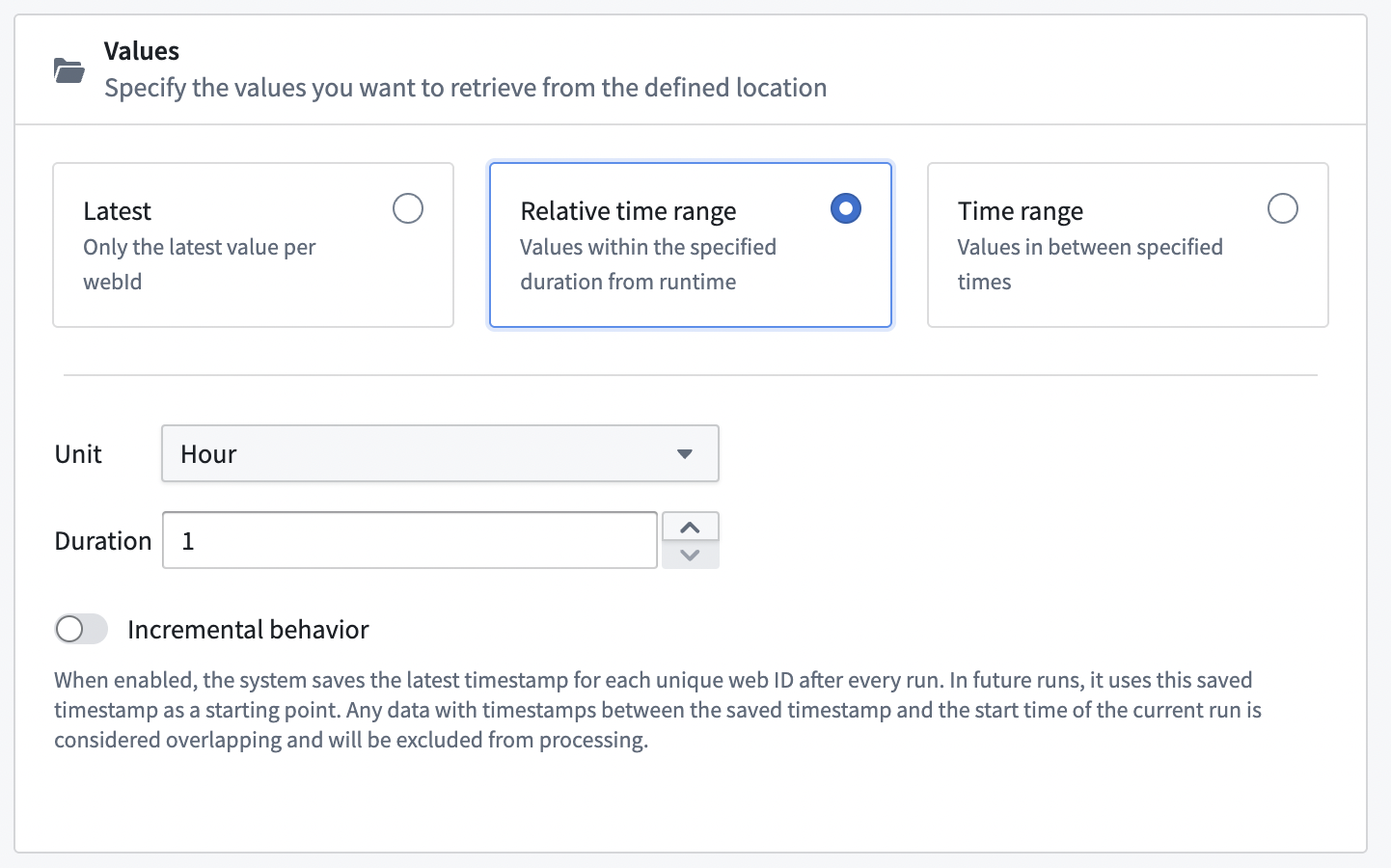
Incremental configuration is available when retrieving values over an absolute or relative time window. When enabled, the system saves the latest timestamp for each unique WebID after each run. In future runs, the system uses this saved timestamp as a starting point. Data with timestamps between the saved timestamp and the start time of the current run are considered overlapping and will be excluded from processing.
File partitioning
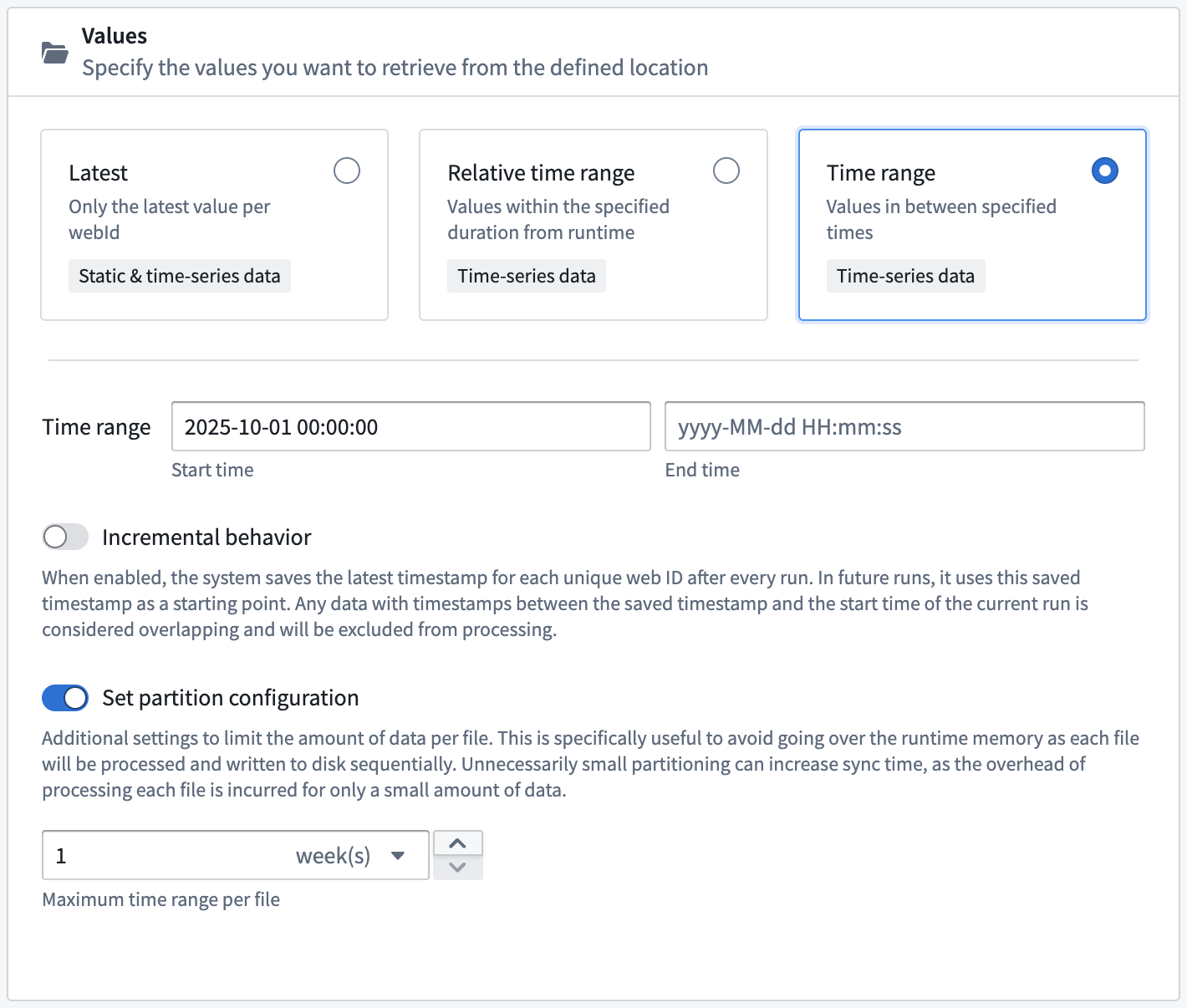
You can set a partition configuration when retrieving values from an absolute or relative time window. When Set partition configuration is enabled, the PI System retrieves data within the configured window and sequentially writes the data to disk to avoid eclipsing runtime memory.
Web ID caching
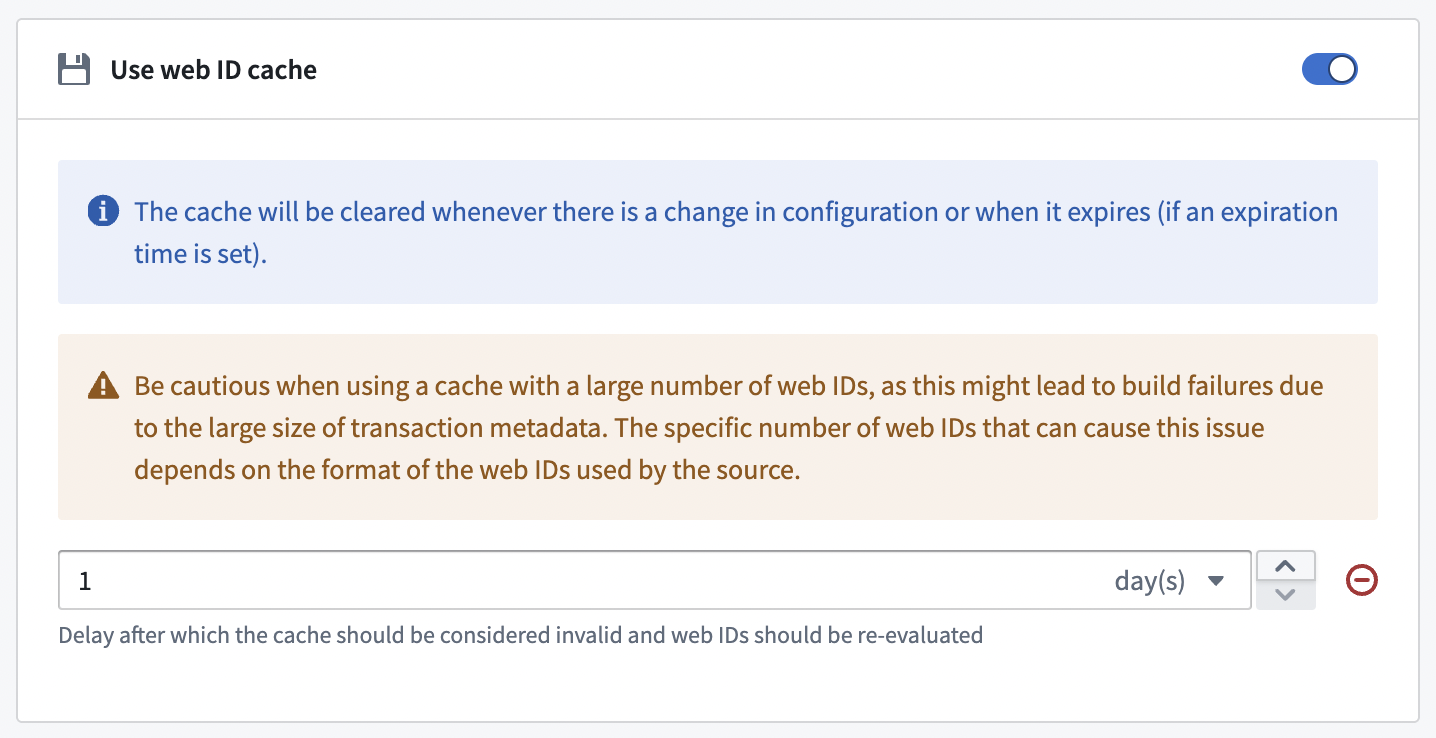
As described in the data model above, the first step is to resolve WebIDs ↗. This operation can be time consuming and repetitive if there were no changes on the PI server side. To speed up recurrent syncs, users can enable WebID caching to store resolved WebIDs and potentially re-use this cache on their next run.
There are two mechanisms to keep the cache up-to-date:
- Invalidate the cache on any sync configuration.
- An optional expiration delay, after which the cache should be considered outdated.
Streaming functionalities
Streaming syncs use channels ↗ to get timely updates from the server.
Liveness check
In order to confirm that the connection with the server is still active, the connector performs a liveness check on a regular basis to verify that an actual message or an empty message sent by the server (a "heartbeat") has been received recently. This allows the stream to be restarted, otherwise a new connection must be established if the previous one was silently closed.
Web ID cache and target re-evaluation
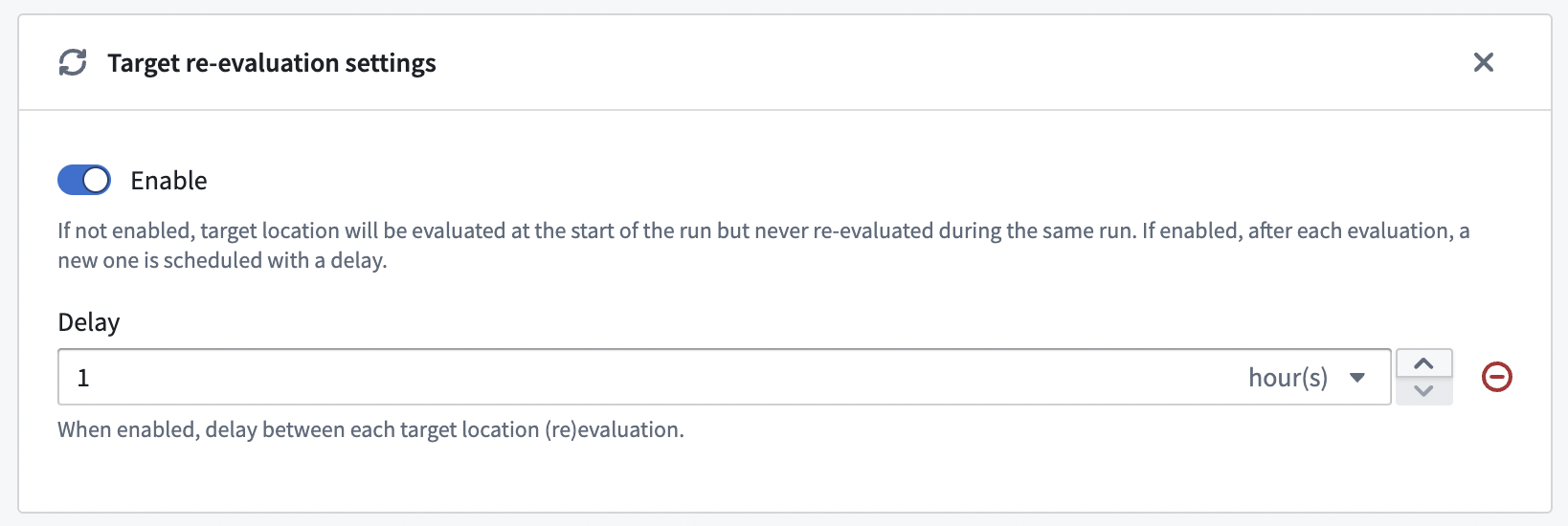
On initial start, the connector will resolve WebIDs and store them in a cache. This cache will be used at restart in order to quickly restore the connection to the server. This cache is also re-evaluated periodically to get an up-to-date list of WebIDs. Users can disable this periodic re-evaluation or change its frequency.
Backlog configuration
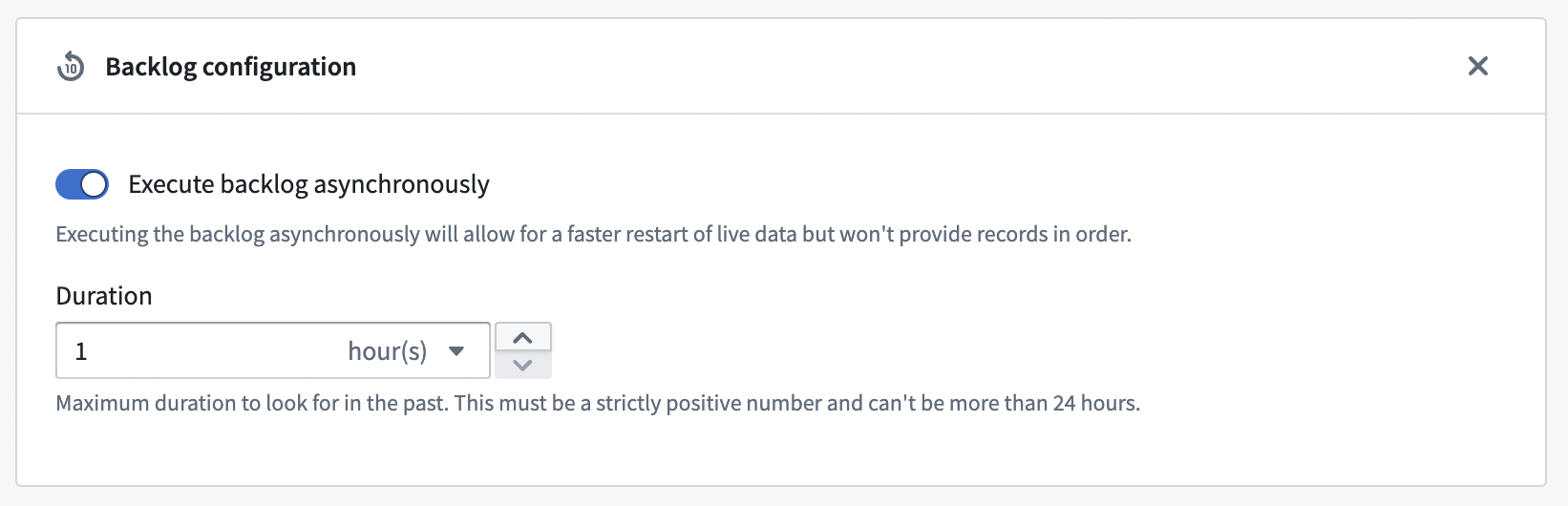
Streams can stop and restart for multiple reasons, such as agent restart, lost connections, and manual cancellation. In these cases, there may be a small period of time before the connection is re-established. To avoid data gaps, users can enable a backlog to capture any data that was missed during this gap.
PI connector vs. REST API connector
While the REST API connector may offer more flexibility in some cases, below are some advantages of using the PI connector.
-
User-friendly interface: The PI connector offers a point-and-click interface that only requires knowledge of PI concepts. In contrast, the REST API connector requires knowledge of the web API, different endpoints, and query formats to retrieve data for external transforms or regular syncs.
-
Ready-to-use data: PI connector syncs output tabular data that is already parsed and ready to use. The REST API outputs a JSON object that needs to be to parsed before use in downstream transforms. This requires additional knowledge of the response format.
-
Streaming syncs: The PI connector allows users to set up streaming syncs, which is not possible with the REST API.
-
"Smart" out-of-the-box functionality: As described in the batch functionalities section, the functionalities included in the PI connector allow users to perform operations that would otherwise require complex orchestration. The PI connector implicitly provides functionalities that can help users avoid common pitfalls, allowing for several levels of pagination and bucketing to efficiently and dynamically retrieve data. This is valuable for retrieving high volumes of data without hitting API rate limits, and is especially useful considering that the REST API's batch endpoint is likely to hit rate limits and silently fail.
中文翻译
AVEVA PI System(原名 OSIsoft PI)
将 Foundry 连接到 Aveva PI System(原名 OSIsoft PI Server)以读取数据。
支持的功能
| 功能 | 状态 |
|---|---|
| 探索(Exploration) | 🟡 Beta |
| 批量导入(Bulk import) | 🟡 Beta |
| 增量同步(Incremental) | 🟡 Beta |
| 流式同步(Streaming) | 🟡 Beta |
| 导出任务(Export tasks) | 🟡 Beta |
接口对接
此连接器利用 PI Web API ↗。
设置步骤
- 打开 数据连接(Data Connection) 应用程序,在屏幕右上角选择 + 新建数据源(+ New Source)。
- 从可用的连接器类型中选择 AVEVA PI。
- 按照后续配置提示,使用以下各节中的信息完成连接器的设置。
了解更多关于在 Foundry 中 设置连接器 的信息。
身份验证(Authentication)
您可以通过以下方式对 PI System 进行身份验证:
- 用户名和密码(Username and password): 提供用户名和密码。我们建议使用服务凭据而非个人用户凭据。
- Kerberos: 提供 Kerberos 配置。(仅当通过 中间代理连接 时可用)
网络配置(Networking)
连接器(例如,通过代理连接时的代理)需要能够访问 PI 服务器的 Web API。这通常是通过 HTTPS(默认端口 443)连接到提供的 URL。
数据模型(Data model)
PI System 连接器通过 Web API ↗ 工作,遵循 流和值(streams and values) ↗ 的概念,统一了从带有数据引用的 属性(attributes) ↗ 和 PI 点(PI points) ↗ 的数据检索。目标数据集中的每一行都将是一个带有来自关联流的元数据(名称、路径、WebID 等)的值。
此外,PI System 连接器对 Web API 的使用意味着,由静态输入支持的属性值(而非由标签数据支持)无法通过流式同步或带时间值目标的批量检索获取,但可以通过最新值批量同步获取。
您可以从四种不同的目标位置类型中选择,以指定应同步哪个流:
- 属性过滤器(Attribute filter): 从提供的路径开始,通过 资产框架(Asset Framework) ↗ 层级结构进行动态筛选,并根据附加模式进行过滤。
- 标签名称过滤器(Tag name filter): 对特定 数据服务器(Data Server) ↗ 上的 PI 点(PI Point) ↗ 名称进行动态过滤。
- 标签名称列表(Tag names list): 一个静态列表,包含特定 数据服务器(Data Server) ↗ 上通过名称标识的 PI 点(PI Point) ↗。
- WebID 列表(WebIDs list): 一个静态列表,包含可引用 属性(attributes) ↗ 或 PI 点(PI Points) ↗ 的 WebID ↗。
批量功能(Batch functionalities)
增量行为(Incremental behavior)
在基于绝对或相对时间窗口检索值时,可配置增量同步。启用后,系统会在每次运行后保存每个唯一 WebID 的最新时间戳。在后续运行中,系统会使用此保存的时间戳作为起始点。时间戳介于保存的时间戳和当前运行开始时间之间的数据被视为重叠数据,将被排除在处理之外。
文件分区(File partitioning)
在基于绝对或相对时间窗口检索值时,您可以设置分区配置。当启用 设置分区配置(Set partition configuration) 时,PI System 会在配置的时间窗口内检索数据,并顺序将数据写入磁盘,以避免占用运行时内存。
Web ID 缓存(Web ID caching)
如上文 数据模型 所述,第一步是解析 WebID ↗。如果 PI 服务器端没有变化,此操作可能耗时且重复。为加快重复同步速度,用户可以启用 WebID 缓存来存储已解析的 WebID,并在下次运行时可能重用此缓存。
有两种机制可以保持缓存更新:
- 在任何同步配置更改时使缓存失效。
- 设置可选的过期延迟时间,超过该时间后缓存应被视为过期。
流式功能(Streaming functionalities)
流式同步使用 通道(channels) ↗ 从服务器获取实时更新。
存活检查(Liveness check)
为确认与服务器的连接仍然活跃,连接器会定期执行存活检查,以验证最近是否收到了服务器发送的实际消息或空消息("心跳")。这允许流式连接重新启动,否则如果之前的连接被静默关闭,则必须建立新连接。
Web ID 缓存与目标重新评估(Web ID cache and target re-evaluation)
在初始启动时,连接器会解析 WebID 并将其存储在缓存中。此缓存将在重启时用于快速恢复与服务器的连接。此缓存还会定期重新评估,以获取最新的 WebID 列表。用户可以禁用此定期重新评估或更改其频率。
积压配置(Backlog configuration)
流式连接可能因多种原因停止并重新启动,例如代理重启、连接丢失和手动取消。在这些情况下,在连接重新建立之前可能会有一小段时间间隔。为避免数据缺失,用户可以启用积压功能来捕获此间隔期间遗漏的任何数据。
PI 连接器与 REST API 连接器对比
虽然 REST API 连接器在某些情况下可能提供更大的灵活性,但以下是使用 PI 连接器的一些优势。
-
用户友好界面: PI 连接器提供即点即用的界面,只需了解 PI 概念即可。相比之下,REST API 连接器需要了解 Web API、不同的端点和查询格式,才能为外部转换或常规同步检索数据。
-
即用型数据: PI 连接器同步输出已解析且可直接使用的表格数据。REST API 输出 JSON 对象,需要先解析才能在下游转换中使用。这需要额外了解响应格式。
-
流式同步: PI 连接器允许用户设置流式同步,而 REST API 无法实现此功能。
-
"智能"开箱即用功能: 如 批量功能 部分所述,PI 连接器包含的功能允许用户执行原本需要复杂编排的操作。 PI 连接器隐式提供了可帮助用户避免常见陷阱的功能,支持多级分页和分桶,以高效、动态地检索数据。这对于在不触及 API 速率限制的情况下检索大量数据非常有价值,尤其考虑到 REST API 的批量端点很可能触及速率限制并静默失败。