SAP ERP
The SAP ERP connector allows you to connect Foundry to SAP's on-premise ERP Central Component (ECC) and S/4 HANA (on-premise and Cloud Private Edition ↗). The SAP ERP connector enables Foundry to interact with various types of SAP data, including:
- SAP Application Tables
- SAP CDS Views
- SAP HANA Information Views
- SAP BW Content Extractors (remote connections only)
- SAP Transaction Codes and ABAP Reports
- SAP Function Modules
- SAP Media (DMS documents)
:::callout{theme="warning"} Using the SAP ERP source requires the installation of the Palantir Foundry Connector 2.0 for SAP Applications add-on on the target SAP application layer. :::
On this page
| Section | What it covers |
|---|---|
| Setup | Creating the source and configuring the connection type. |
| Authentication | Supported authentication methods. |
| Networking and connectivity | Egress policies and certificates. |
| Batch syncs | SAP object types, incremental syncs, and sync parameters. |
| Media sets | Ingesting media files from SAP's Document Management System. |
| Webhooks | Writing data back to SAP via BAPIs. |
| Use in code repositories | Calling the SAP add-on REST API directly from external transforms or functions. |
Supported capabilities
| Capability | Status |
|---|---|
| Exploration | 🟢 Generally available |
| Batch syncs | 🟢 Generally available |
| Incremental | 🟢 Generally available |
| Media sets | 🟡 Beta |
| Webhooks | 🟢 Generally available |
| Use in code repositories | 🟢 Generally available |
Setup
- Open the Data Connection application and select + New Source in the upper right corner of the screen.
- Select SAP ERP from the available connector types.
- Follow the additional configuration prompts to continue the setup of your connector using the information in the sections below.
Learn more about setting up a connector in Foundry.
Connection type
The SAP ERP connector supports two connection types:
| Connection type | Description |
|---|---|
| Direct | Connects directly to the SAP system. This is the default. |
| Remote (via Gateway) | Connects to a remote SAP system through a gateway. Enable the Connect via Gateway toggle and provide a Context value to identify the remote system. |
The connection type determines which SAP object types are available. Learn more about remote connections and remote agent configuration.
Authentication
The SAP ERP connector supports the following authentication methods:
| Authentication method | Description |
|---|---|
| Basic Auth | Provide the username and password of the technical user created when installing the Connector. |
| Authentication token | Provide a token to authenticate. |
| Custom authentication header | Provide a custom authentication header. |
| No authentication | Use this option if authentication is set up on the agent machine via certificates. |
Networking and connectivity
Make sure to properly configure egress policies to allow Foundry to reach the SAP system. For on-premises SAP environments, agent proxy policies are typically required to route traffic correctly.
Many SAP systems use custom-signed certificates, which can cause SSL handshake exceptions when configuring the connection for the first time. Make sure you have the correct custom certificates from your system and add them to the source.
Batch syncs
Create a sync
- From the source overview page, select + New next to batch sync.
- Configure the standard settings: name, target dataset, and schedule.
- Set Transaction type to one of the following:
- APPEND — for incremental updates. See Incremental syncs for details.
- SNAPSHOT — for a full load.
- Select an SAP object type from the dropdown (see SAP object types below).
- Enter the Object name. As you type, the field suggests matching objects based on the selected object type.
- Optionally, configure additional parameters in the Extras tab.
SAP object types
The available object types depend on the connection type configured on the source.
| Object type | Direct | Remote (via Gateway) | Description |
|---|---|---|---|
| ERP Table | ✓ | ✓ | Extracts data from any ERP table or view in the SAP ABAP data dictionary, including cluster, pool, and custom Z* tables. |
| CDS View | ✓ | Extracts data from ABAP CDS (Core Data Services) Views, including views declared with WITH PARAMETERS. See CDS view parameters below. |
|
| HANA View | ✓ | Extracts data from HANA Views enabled in the SAP application layer. See Ingest HANA views from SAP for prerequisites. | |
| BW Content Extractor | ✓ | Runs an ERP Business Content extractor. Only appears in the object type dropdown when Connect via Gateway is enabled and a Context value is set on the source. Use APPEND for extractors that support delta extraction. See Configure extractors. |
|
| Transaction Code | ✓ | ✓ | Runs an SAP transaction code or ABAP report and ingests the rendered output. See Transaction Code parameters below. |
| Function Module | ✓ | ✓ | Calls an SAP function module (such as a BAPI) and ingests the structured response. See Function module parameters below. |
Incremental syncs
Incremental syncs enable append-style transactions from the same table. To enable incremental syncs, set Transaction type to APPEND.
The available incremental modes depend on the object type:
| Incremental mode | ERP Table | CDS View | HANA View | BW Content Extractor |
|---|---|---|---|---|
| Multiple fields | ✓ | ✓ | ✓ | |
| Concatenate fields | ✓ | ✓ | ✓ | |
| Change document table | ✓ | |||
| Twin table | ✓ | |||
| SAP built-in delta | ✓ |
- Multiple fields: Import rows where any of the specified fields is greater than or equal to the largest value already imported. Separate fields with a comma.
- Concatenate fields: Same as multiple fields, but concatenates field values together rather than combining with OR.
- Change document table: Import rows based on updates in SAP's change document tables. Two sub-modes are available: CDPOS only or CDHDR and CDPOS.
- Twin table: Import rows from the target table when a field in a separate "twin" table meets the incremental condition.
- SAP built-in delta: Uses the extractor's native change data capture mechanism.
The incremental field should ideally be a monotonically increasing value. The system uses a "greater than or equal to" comparison to avoid missing data if a sync runs midway through a given date. Duplicate values may appear in the Foundry dataset and should be removed as a first step in the transformation pipeline.
The Transaction Code and Function Module object types do not support incremental syncs; they always run as snapshots.
For table-type incremental syncs, the Max rows per sync setting bounds the approximate number of rows returned per run. Use it to split the initial sync of a large table into a series of smaller, more resilient runs if intermittent issues (such as network failures) disrupt long-running syncs.
Twin table configuration
When using Twin table as the incremental mode, the Incremental Twin Table setting names the twin table and the Incremental Twin Mapping setting defines the join conditions between the primary and twin tables. Mapping entries use the form:
{PRIMARY_TABLE_NAME}-{FIELD_NAME}={TWIN_TABLE_NAME}-{FIELD_NAME}
Combine multiple join conditions with a semicolon (AND operator).
Reset incremental state
To force a full reload and re-initialize incremental ingest, enable the Reset incremental state toggle on the sync. This performs a full snapshot of the data from SAP, replacing all files in the dataset. After the sync completes, disable the toggle so that subsequent syncs resume incremental appends.
Reset incremental state is supported for ERP Table, CDS View, HANA View, and BW Content Extractor object types.
Sync parameters
The following parameters are available when configuring a sync.
General parameters
| Parameter | Applicable to | Description |
|---|---|---|
| Filter | ERP Table, CDS View, HANA View, BW Content Extractor | Refines the data extracted from SAP using a condition builder. |
| Drop columns | ERP Table, CDS View, HANA View, BW Content Extractor | Excludes selected columns before extraction. Improves performance and prevents ingestion of sensitive or unnecessary fields. |
| Timestamp | All | Adds /PALANTIR/TIMESTAMP (sync run time) and /PALANTIR/ROWNO (record order) columns. Useful for removing duplicate records downstream. |
| Fetch option | BW Content Extractor | Controls the data fetch method. |
| Allow schema changes | All | Controls whether the output schema is allowed to change between sync runs. |
Filters
Add condition groups, then configure field, operator, and value rows within each group. All field names must match the SAP data dictionary.
- For date columns, use the format
YYYYMMDD(for example,20210101for January 1, 2021). - The
is likeandis not likeoperators support the*wildcard (for example,A*12*matches any string starting withAand containing12). - Filter values can also use dynamic filter keywords and date calculation functions.
Dynamic filters
Dynamic filter values use special keywords and date calculation functions for more flexible filter expressions. Available from add-on version SP26 and later. Use them anywhere a filter value is accepted.
Fixed keywords
| Keyword | Description |
|---|---|
[CURRENTYEAR] |
Current year in YYYY format. |
[TODAY] |
Today's date in YYYYMMDD format. |
[LASTDAYOFMONTH] |
Last day of the current month in YYYYMMDD format. |
[LASTDAYOFLASTMONTH] |
Last day of the previous month in YYYYMMDD format. |
[FIRSTDAYOFMONTH] |
First day of the current month in YYYYMMDD format. |
[FIRSTDAYOFLASTMONTH] |
First day of the previous month in YYYYMMDD format. |
Date calculation functions
| Function | Description |
|---|---|
[ADDDAY] |
Adds days to the selected date. Example: [ADDDAY(22102022,1)] → 23102022. |
[ADDMONTH] |
Adds months to the selected date. |
[ADDYEAR] |
Adds years to the selected date. |
[GETMONTH] |
Returns the month of the selected date as a 2-digit value (01–12). |
[GETDAY] |
Returns the day of the month as a 2-digit value. |
[GETYEAR] |
Returns the year of the selected date. |
Functions can be used directly with fixed keywords or nested. For example, [ADDDAY([TODAY], 1)] or [GETDAY([ADDDAY([FIRSTDAYOFMONTH], -1)])].
Transaction Code parameters
When the object type is Transaction Code, the object name refers to either an SAP transaction code or an Advanced Business Application Programming (ABAP) report, and the following additional fields are available:
| Parameter | Description |
|---|---|
| Program type | Specifies whether the object name refers to a transaction code or an ABAP report. Required. |
| Selection variant | Name of an SAP selection variant to apply before running the transaction or report. |
| Output variant | Name of an SAP output variant (layout) to control the structure of the result list. |
| Use spool ingestion | When enabled, captures the report output from the SAP spool system rather than from runtime memory. Required when the report output exceeds 2 GB. |
| Hide subtotal and summary rows | When enabled, drops aggregate subtotal and summary rows from the ingested data. |
CDS view parameters
Core Data Services (CDS) views declared with the WITH PARAMETERS clause require their parameters to be supplied at sync time. When the object type is CDS View, the CDS view parameters optional property accepts rows of parameter name and parameter value pairs. Parameter names must match the names declared on the CDS view; unknown or missing parameters cause the sync to fail. Empty rows are discarded on save.
Function module parameters
When the object type is Function Module, the object name refers to a function module, typically a Business Application Programming Interface (BAPI). The following additional fields are available:
| Parameter | Description |
|---|---|
| Function input parameters | Rows of parameter name and parameter value pairs that are passed as the function module's IMPORTING parameters. Required for most BAPIs. |
| Commit after function call | When enabled, issues a COMMIT WORK statement after the function call. Required for standard BAPIs that rely on a commit to persist their changes. Off by default. |
Advanced settings
The following settings appear under Advanced settings on each sync. Some are also configurable at the source level.
| Setting | Description |
|---|---|
| Max file size | Maximum size of each output Parquet file. Defaults to 50,000 rows per file. |
| Clean field names for Avro | Sanitizes field names so they conform to the Avro ↗ schema rules used by Foundry streams. Required if the dataset will be used in a streaming pipeline. |
| Ignore unexpected values | When enabled, date or number values that fail to parse are written as null and a summary of parse exceptions is logged at the end of the sync. |
| Convert dates to strings | Ingests date fields as strings. Useful when SAP date fields contain unparseable values that hold a special meaning and need to be handled downstream. |
| Page size | Rows returned per page when retrieving data from SAP. Defaults to 50,000. Minimum 5,000. |
| Parallel paging threads | Number of SAP work processes used to generate page data. |
| Plugin worker threads | Number of Data Connection agent threads used to retrieve page data. |
| Serialization engine | Serialization method used for data transfer. |
| Retries and timeouts | Retry count, retry delay, and request timeouts. |
| Resource checks | Memory and CPU checks during extraction. Disabling can put excess load on the SAP system. |
| Debug settings | Trace logging and debug logging. Debug logging starts a background process in SAP — use with caution. |
Media sets
The SAP ERP connector supports media sets for ingesting media files and documents stored in SAP's Document Management System (DMS).
To create a new media ingest:
- Navigate to the source overview page.
- Select + New next to Media set syncs.
- Define your media set format. Providing a specific format will enable you to use transformation steps specific to that format in downstream data transformation. Read more about media set formats.
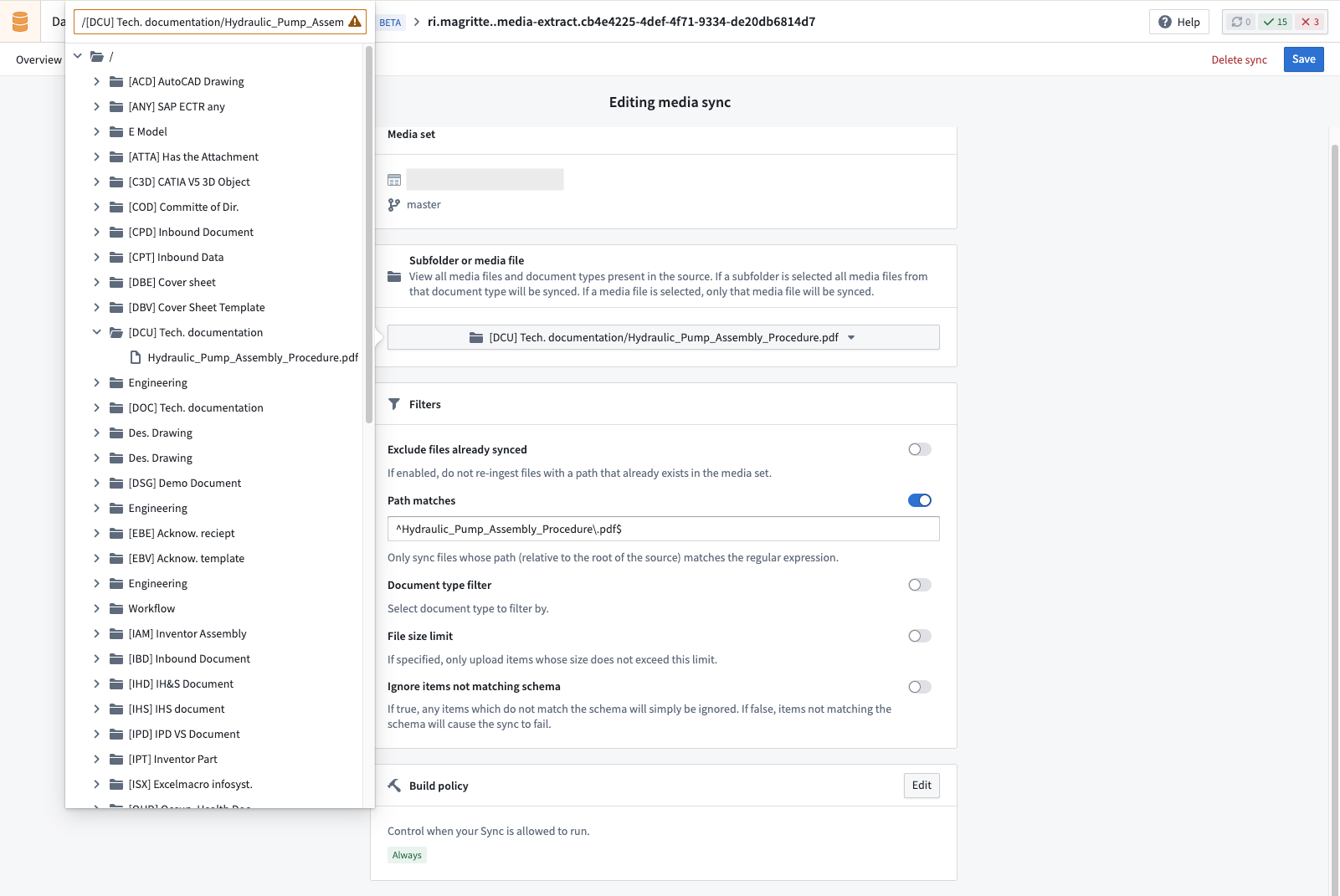
- Use the source exploration tool, which organizes files per document types, to select the files you want to ingest, or define your own filters directly in the Filters section.
Exploration
When you select Subfolder or media file, you can either select a specific Document Type (like CPD) to ingest all associated documents, or select a single document to ingest only that specific file.
Media filters
The following filters can be applied to media set syncs:
| Filter | Description |
|---|---|
| Exclude files already synced | Skips files whose path already exists in the media set. |
| Path matches | Only syncs files matching a regular expression pattern. Defaults to .pdf. |
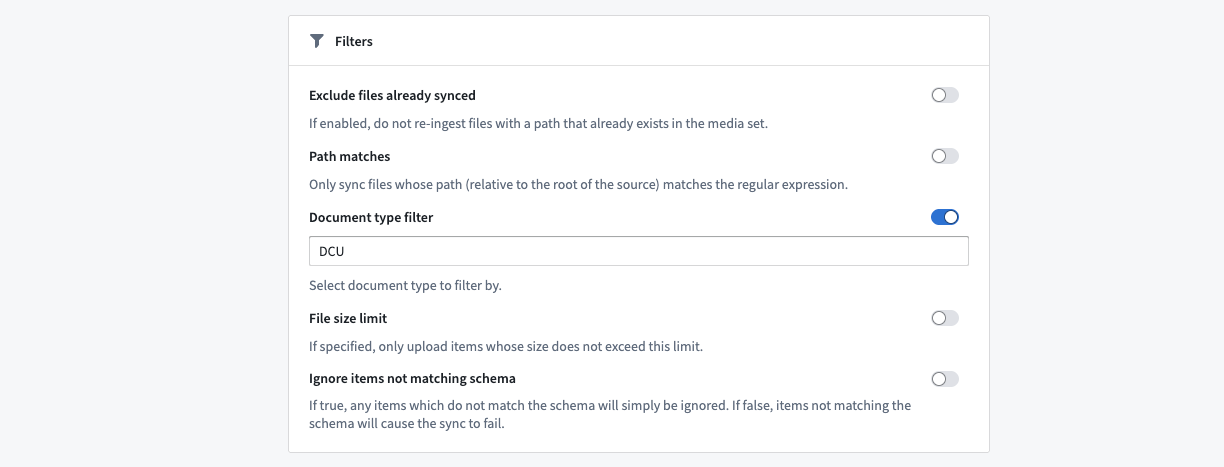
| Document type | Filters by SAP document type. |
| File size limit | Only syncs files within the specified size limit (in bytes). |
Example: Select a Document Type
SAP Media Document Types are designated by an acronym and a plain English description of their purpose. When filtering by Document Type, you can use the acronym representation to narrow the scope of the media ingest.
Webhooks
SAP webhooks allow you to write data back to SAP by invoking BAPIs (Business APIs) from Foundry. See Webhooks for an overview of how to set up a webhook.
:::callout{theme="success"} SAP webhooks support Foundry worker connections in Foundry-managed cloud compute. We recommend this runtime for SAP webhooks instead of executing them through a data connection agent. Existing SAP sources configured on a Foundry worker automatically benefit from cloud execution with no migration required; SAP sources running on a data connection agent should be switched to a Foundry worker to take advantage of cloud-executed webhooks. :::
The only task type available for SAP webhooks is sap-run-function-webhook-task-v0. The following example invokes BAPI_SALESORDER_CHANGE to modify the purchase date for a given sales document:
{
    "function-name": "BAPI_SALESORDER_CHANGE",
    "inputs": {
        "SALESDOCUMENT": {{json sales-doc-id}},
        "ORDER_HEADER_IN": {
            "PURCH_DATE": {{json purchase-date}}
        },
        "ORDER_HEADER_INX": {
            "UPDATEFLAG": "U",
            "PURCH_DATE": "X"
        }
    },
    "output": "RETURN"
}
To target a remote SAP system, add a remote field to the task body:
{
    ...
    "output": "RETURN",
    "remote": {
        "context": "<SAP_CONTEXT_NAME>"
    }
}
Use in code repositories
SAP ERP sources can be imported into Python external transforms or functions, giving your code direct access to the SAP add-on's REST API. Use this when batch syncs, media set syncs, or webhooks do not provide enough control. For example, to invoke a BAPI synchronously from a Workshop action, loop over a large input dataset and call a BAPI per row, fetch specific DMS documents based on Foundry-side data, or chain multiple SAP calls in a single build.
The endpoints exposed by the add-on are defined in the foundry-sap-connector ↗ repository. The examples below use the following endpoints, all relative to the source URL (https://<host>:<port>/sap/palantir):
| Endpoint | Purpose |
|---|---|
POST /v2/function/{functionName}/writeback |
Synchronously invoke a single function module (BAPI). |
POST /v2/function/{functionName}/parallel_writeback |
Synchronously invoke a function module with bulk input, parallelized server-side. |
GET /v2/get_documents |
List DMS documents, optionally filtered by document type, file format, file name, or object link. |
GET /v2/get_document |
Download a single DMS document by ID. |
Before using these examples, import the SAP ERP source into your repository:
- For transforms, follow Set up external transforms and use the
external_systemsdecorator. - For functions, follow Make API calls from functions and declare the source in the
@function(sources=[...])decorator.
Example: Writeback to SAP via BAPI (transform)
The following external transform invokes BAPI_SALESORDER_CHANGE once per row of an input dataset to update the purchase date on each sales document, and records the SAP RETURN table in an output dataset for review.
from transforms.api import Input, Output, transform
from transforms.external.systems import external_systems, Source, ResolvedSource


@external_systems(
    sap_source=Source("<source_rid>"),
)
@transform(
    sales_order_updates=Input("<input_dataset_rid>"),  # columns: sales_doc_id, purchase_date (YYYYMMDD)
    writeback_results=Output("<output_dataset_rid>"),
)
def update_purchase_dates(ctx, sap_source: ResolvedSource, sales_order_updates, writeback_results):
    base_url = sap_source.get_https_connection().url
    client = sap_source.get_https_connection().get_client()

    results = []
    for row in sales_order_updates.dataframe().collect():
        response = client.post(
            f"{base_url}/v2/function/BAPI_SALESORDER_CHANGE/writeback",
            json={
                "commit": True,
                "input": {
                    "SALESDOCUMENT": row.sales_doc_id,
                    "ORDER_HEADER_IN": {"PURCH_DATE": row.purchase_date},
                    "ORDER_HEADER_INX": {"UPDATEFLAG": "U", "PURCH_DATE": "X"},
                },
                "output": ["RETURN"],
            },
        )
        response.raise_for_status()
        results.append({
            "sales_doc_id": row.sales_doc_id,
            "purchase_date": row.purchase_date,
            "status_code": response.status_code,
            "sap_return": str(response.json().get("RETURN", [])),
        })

    writeback_results.write_dataframe(ctx.spark_session.createDataFrame(results))
Set "commit": true for standard BAPIs that require a commit statement to persist their changes. Use the metadata endpoint (GET /v2/function/{functionName}/metadata) to discover the expected input and output structure of a function before calling it.
Example: Writeback to SAP via BAPI (function)
To invoke a BAPI synchronously from a Workshop action, an Ontology action backend, or any other caller of a Foundry function, expose the writeback as a Python function with a source. The function takes typed inputs and returns the SAP RETURN structure to the caller.
from functions.api import function
from functions.sources import get_source


@function(sources=["sap_source"])
def update_sales_order_purchase_date(sales_doc_id: str, purchase_date: str) -> str:
    """Updates the purchase date on a sales order via BAPI_SALESORDER_CHANGE.

    Args:
        sales_doc_id: SAP sales document number.
        purchase_date: New purchase date in YYYYMMDD format.

    Returns:
        A string representation of the SAP RETURN table, useful for surfacing
        any error or warning messages back to the caller.
    """
    source = get_source("sap_source")
    base_url = source.get_https_connection().url
    client = source.get_https_connection().get_client()

    response = client.post(
        f"{base_url}/v2/function/BAPI_SALESORDER_CHANGE/writeback",
        json={
            "commit": True,
            "input": {
                "SALESDOCUMENT": sales_doc_id,
                "ORDER_HEADER_IN": {"PURCH_DATE": purchase_date},
                "ORDER_HEADER_INX": {"UPDATEFLAG": "U", "PURCH_DATE": "X"},
            },
            "output": ["RETURN"],
        },
        timeout=30,
    )
    response.raise_for_status()
    return str(response.json().get("RETURN", []))
The source must have code import enabled and exports enabled for functions to use it. Surface SAP RETURN messages with a non-zero severity as user-facing errors so callers can react to them.
Example: Parallel writeback (transform)
Use the parallel_writeback endpoint from an external transform to send many BAPI calls in a single request. The SAP system spawns multiple background jobs and distributes the calls across them, which is significantly faster than sequential writeback calls for large batches.
from transforms.api import Input, Output, transform
from transforms.external.systems import external_systems, Source, ResolvedSource


@external_systems(
    sap_source=Source("<source_rid>"),
)
@transform(
    sales_order_updates=Input("<input_dataset_rid>"),
    writeback_results=Output("<output_dataset_rid>"),
)
def update_purchase_dates_parallel(
    ctx, sap_source: ResolvedSource, sales_order_updates, writeback_results
):
    base_url = sap_source.get_https_connection().url
    client = sap_source.get_https_connection().get_client()

    bulkinput = [
        {
            "SALESDOCUMENT": row.sales_doc_id,
            "ORDER_HEADER_IN": {"PURCH_DATE": row.purchase_date},
            "ORDER_HEADER_INX": {"UPDATEFLAG": "U", "PURCH_DATE": "X"},
        }
        for row in sales_order_updates.dataframe().collect()
    ]

    response = client.post(
        f"{base_url}/v2/function/BAPI_SALESORDER_CHANGE/parallel_writeback",
        json={
            "commit": True,
            "output": ["RETURN"],
            "bulkinput": bulkinput,
            "parallel": True,
            "paralleljobs": 5,
            "functioncallperjob": 10,
        },
    )
    response.raise_for_status()

    results = [
        {"index": i, "result": str(r)} for i, r in enumerate(response.json())
    ]
    writeback_results.write_dataframe(ctx.spark_session.createDataFrame(results))
Tune paralleljobs (background jobs spawned in SAP) and functioncallperjob (calls handled per job) based on the workload and the available capacity on the SAP system. Set "parallel": false to fall back to sequential execution while still using a single bulk request.
Example: Fetch DMS documents to a media set (transform)
The following external transform combines the DMS list and download endpoints to fetch documents from SAP's Document Management System and write them to a media set. Use this pattern when the built-in media set sync does not provide enough control, for example, when document selection depends on Foundry-side data, or when you need to combine multiple filters before downloading.
import io
from transforms.api import transform
from transforms.external.systems import external_systems, Source, ResolvedSource
from transforms.mediasets import MediaSetOutput


@external_systems(
    sap_source=Source("<source_rid>"),
)
@transform(
    documents=MediaSetOutput("<media_set_rid>"),
)
def fetch_dms_documents(ctx, sap_source: ResolvedSource, documents):
    base_url = sap_source.get_https_connection().url
    client = sap_source.get_https_connection().get_client()

    # List documents in DMS, filtered by document type and file format.
    list_response = client.get(
        f"{base_url}/v2/get_documents",
        params={"DOCUMENTTYPE": "CPT", "FILEFORMAT": "pdf"},
    )
    list_response.raise_for_status()

    for doc in list_response.json():
        document_id = doc["DOCUMENT_ID"]
        document_name = doc["DOCUMENT_NAME"]

        download_response = client.get(
            f"{base_url}/v2/get_document",
            params={"DOCUMENT_ID": document_id},
        )
        download_response.raise_for_status()

        documents.put_media_item(io.BytesIO(download_response.content), document_name)
To drive ingestion from a Foundry input dataset, for example, fetching only the documents referenced by a list of EBELN (purchase order) values, call /v2/get_documents with an OBJECTLINK filter, or pass each DOCUMENT_ID directly to /v2/get_document from the input rows.
Related how-to guides
The following guides cover workflows that involve both SAP-side and Foundry-side configuration:
- Extract long text from SAP: Decompress and ingest long texts from the
STXLtable. - Configure custom authorizations and role management: Set up custom authorization roles for the SAP add-on.
- Configure extractors: Configure SAP BW Business Content extractors.
- Ingest HANA views from SAP: Publish and ingest HANA external views.
- User-attributed SAP writeback with OAuth 2.0: Configure OAuth 2.0 for named-user writeback to SAP.
中文翻译
SAP ERP
SAP ERP 连接器允许您将 Foundry 连接到 SAP 本地 ERP 中央组件(ECC)和 S/4 HANA(本地版和云私有版 ↗)。SAP ERP 连接器使 Foundry 能够与各种类型的 SAP 数据进行交互,包括:
- SAP 应用表(SAP Application Tables)
- SAP CDS 视图(SAP CDS Views)
- SAP HANA 信息视图(SAP HANA Information Views)
- SAP BW 内容提取器(SAP BW Content Extractors)(仅限远程连接)
- SAP 事务代码和 ABAP 报表(SAP Transaction Codes and ABAP Reports)
- SAP 功能模块(SAP Function Modules)
- SAP 媒体(SAP Media)(DMS 文档)
:::callout{theme="warning"} 使用 SAP ERP 数据源需要在目标 SAP 应用层安装 Palantir Foundry Connector 2.0 for SAP Applications 插件。 :::
本页内容
| 章节 | 内容说明 |
|---|---|
| 设置 | 创建数据源并配置连接类型。 |
| 身份验证 | 支持的身份验证方法。 |
| 网络与连接 | 出站策略和证书。 |
| 批量同步 | SAP 对象类型、增量同步和同步参数。 |
| 媒体集 | 从 SAP 文档管理系统摄取媒体文件。 |
| Webhooks | 通过 BAPI 将数据写回 SAP。 |
| 在代码仓库中使用 | 直接从外部转换或函数调用 SAP 插件 REST API。 |
支持的功能
| 功能 | 状态 |
|---|---|
| 探索(Exploration) | 🟢 正式可用 |
| 批量同步(Batch syncs) | 🟢 正式可用 |
| 增量同步(Incremental) | 🟢 正式可用 |
| 媒体集(Media sets) | 🟡 Beta 版 |
| Webhooks | 🟢 正式可用 |
| 在代码仓库中使用 | 🟢 正式可用 |
设置
- 打开 Data Connection 应用,选择屏幕右上角的 + New Source。
- 从可用的连接器类型中选择 SAP ERP。
- 按照额外的配置提示,使用以下各节中的信息继续设置连接器。
了解更多关于在 Foundry 中设置连接器的信息。
连接类型
SAP ERP 连接器支持两种连接类型:
| 连接类型 | 描述 |
|---|---|
| 直接连接(Direct) | 直接连接到 SAP 系统。此为默认选项。 |
| 远程连接(通过网关)(Remote via Gateway) | 通过网关连接到远程 SAP 系统。启用 Connect via Gateway 开关并提供 Context 值以标识远程系统。 |
连接类型决定了哪些 SAP 对象类型可用。了解更多关于远程连接和远程代理配置的信息。
身份验证
SAP ERP 连接器支持以下身份验证方法:
| 身份验证方法 | 描述 |
|---|---|
| 基本认证(Basic Auth) | 提供安装连接器时创建的技术用户的用户名和密码。 |
| 认证令牌(Authentication token) | 提供令牌进行身份验证。 |
| 自定义认证头(Custom authentication header) | 提供自定义认证头。 |
| 无认证(No authentication) | 如果通过证书在代理机器上设置了身份验证,则使用此选项。 |
网络与连接
确保正确配置出站策略,以允许 Foundry 访问 SAP 系统。对于本地 SAP 环境,通常需要代理策略来正确路由流量。
许多 SAP 系统使用自定义签名证书,这可能在首次配置连接时导致 SSL 握手异常。请确保从您的系统中获取正确的自定义证书,并将其添加到数据源。
批量同步
创建同步
- 在数据源概览页面上,选择批量同步旁边的 + New。
- 配置标准设置:名称、目标数据集和调度。
- 将 Transaction type 设置为以下之一:
- APPEND — 用于增量更新。详见增量同步。
- SNAPSHOT — 用于全量加载。
- 从下拉菜单中选择一个 SAP object type(参见下面的 SAP 对象类型)。
- 输入 Object name。输入时,该字段会根据所选对象类型建议匹配的对象。
- 可选地,在 Extras 选项卡中配置其他参数。
SAP 对象类型
可用的对象类型取决于数据源上配置的连接类型。
| 对象类型 | 直接连接 | 远程连接(通过网关) | 描述 |
|---|---|---|---|
| ERP 表(ERP Table) | ✓ | ✓ | 从 SAP ABAP 数据字典中的任何 ERP 表或视图中提取数据,包括集群表、池表和自定义 Z* 表。 |
| CDS 视图(CDS View) | ✓ | 从 ABAP CDS(核心数据服务)视图中提取数据,包括使用 WITH PARAMETERS 声明的视图。参见下面的 CDS 视图参数。 |
|
| HANA 视图(HANA View) | ✓ | 从 SAP 应用层启用的 HANA 视图中提取数据。有关先决条件,请参见从 SAP 摄取 HANA 视图。 | |
| BW 内容提取器(BW Content Extractor) | ✓ | 运行 ERP 业务内容提取器。仅在数据源上启用了 Connect via Gateway 并设置了 Context 值时,才会出现在对象类型下拉菜单中。对于支持增量提取的提取器,使用 APPEND。参见配置提取器。 |
|
| 事务代码(Transaction Code) | ✓ | ✓ | 运行 SAP 事务代码或 ABAP 报表,并摄取渲染后的输出。参见下面的事务代码参数。 |
| 功能模块(Function Module) | ✓ | ✓ | 调用 SAP 功能模块(如 BAPI)并摄取结构化响应。参见下面的功能模块参数。 |
增量同步
增量同步支持对同一表进行追加类型的事务。要启用增量同步,请将 Transaction type 设置为 APPEND。
可用的增量模式取决于对象类型:
| 增量模式 | ERP 表 | CDS 视图 | HANA 视图 | BW 内容提取器 |
|---|---|---|---|---|
| 多字段(Multiple fields) | ✓ | ✓ | ✓ | |
| 字段拼接(Concatenate fields) | ✓ | ✓ | ✓ | |
| 变更文档表(Change document table) | ✓ | |||
| 双表(Twin table) | ✓ | |||
| SAP 内置增量(SAP built-in delta) | ✓ |
- 多字段(Multiple fields): 导入任何指定字段大于或等于已导入最大值的行。字段之间用逗号分隔。
- 字段拼接(Concatenate fields): 与多字段相同,但将字段值拼接在一起,而不是使用 OR 组合。
- 变更文档表(Change document table): 基于 SAP 变更文档表中的更新导入行。有两种子模式可用:仅 CDPOS 或 CDHDR 和 CDPOS。
- 双表(Twin table): 当单独"双表"中的字段满足增量条件时,从目标表导入行。
- SAP 内置增量(SAP built-in delta): 使用提取器的原生变更数据捕获机制。
增量字段理想情况下应为单调递增的值。系统使用"大于或等于"比较,以避免在同步运行到某个日期中途时丢失数据。Foundry 数据集中可能出现重复值,应在转换管线的第一步将其删除。
事务代码和功能模块对象类型不支持增量同步;它们始终作为快照运行。
对于表类型的增量同步,Max rows per sync 设置限制了每次运行返回的大致行数。如果间歇性问题(如网络故障)中断了长时间运行的同步,可以使用此设置将大型表的初始同步拆分为一系列更小、更具弹性的运行。
双表配置
当使用 Twin table 作为增量模式时,Incremental Twin Table 设置命名双表,Incremental Twin Mapping 设置定义主表和双表之间的连接条件。映射条目使用以下格式:
{PRIMARY_TABLE_NAME}-{FIELD_NAME}={TWIN_TABLE_NAME}-{FIELD_NAME}
使用分号(AND 运算符)组合多个连接条件。
重置增量状态
要强制完全重新加载并重新初始化增量摄取,请在同步上启用 Reset incremental state 开关。这将执行来自 SAP 的数据的完整快照,替换数据集中的所有文件。同步完成后,禁用该开关,以便后续同步恢复增量追加。
ERP 表、CDS 视图、HANA 视图和 BW 内容提取器对象类型支持重置增量状态。
同步参数
以下参数在配置同步时可用。
通用参数
| 参数 | 适用对象 | 描述 |
|---|---|---|
| 筛选器(Filter) | ERP 表、CDS 视图、HANA 视图、BW 内容提取器 | 使用条件构建器细化从 SAP 提取的数据。 |
| 删除列(Drop columns) | ERP 表、CDS 视图、HANA 视图、BW 内容提取器 | 在提取前排除选定的列。提高性能并防止摄取敏感或不必要的字段。 |
| 时间戳(Timestamp) | 全部 | 添加 /PALANTIR/TIMESTAMP(同步运行时间)和 /PALANTIR/ROWNO(记录顺序)列。有助于在下游删除重复记录。 |
| 获取选项(Fetch option) | BW 内容提取器 | 控制数据获取方法。 |
| 允许模式更改(Allow schema changes) | 全部 | 控制是否允许输出模式在同步运行之间更改。 |
筛选器
添加条件组,然后在每个组内配置字段、运算符和值行。所有字段名称必须与 SAP 数据字典匹配。
- 对于日期列,使用格式
YYYYMMDD(例如,20210101表示 2021 年 1 月 1 日)。 is like和is not like运算符支持*通配符(例如,A*12*匹配任何以A开头并包含12的字符串)。- 筛选值也可以使用动态筛选器关键字和日期计算函数。
动态筛选器
动态筛选器值使用特殊关键字和日期计算函数,以实现更灵活的筛选表达式。从插件版本 SP26 及更高版本可用。在筛选器值被接受的任何地方使用它们。
固定关键字
| 关键字 | 描述 |
|---|---|
[CURRENTYEAR] |
当前年份,格式为 YYYY。 |
[TODAY] |
今天的日期,格式为 YYYYMMDD。 |
[LASTDAYOFMONTH] |
当前月份的最后一天,格式为 YYYYMMDD。 |
[LASTDAYOFLASTMONTH] |
上个月的最后一天,格式为 YYYYMMDD。 |
[FIRSTDAYOFMONTH] |
当前月份的第一天,格式为 YYYYMMDD。 |
[FIRSTDAYOFLASTMONTH] |
上个月的第一天,格式为 YYYYMMDD。 |
日期计算函数
| 函数 | 描述 |
|---|---|
[ADDDAY] |
向选定日期添加天数。示例:[ADDDAY(22102022,1)] → 23102022。 |
[ADDMONTH] |
向选定日期添加月数。 |
[ADDYEAR] |
向选定日期添加年数。 |
[GETMONTH] |
返回选定日期的月份,为 2 位数值(01–12)。 |
[GETDAY] |
返回月份中的日期,为 2 位数值。 |
[GETYEAR] |
返回选定日期的年份。 |
函数可以直接与固定关键字一起使用,也可以嵌套使用。例如,[ADDDAY([TODAY], 1)] 或 [GETDAY([ADDDAY([FIRSTDAYOFMONTH], -1)])]。
事务代码参数
当对象类型为 Transaction Code 时,对象名称指的是 SAP 事务代码或高级业务应用编程(ABAP)报表,并且以下附加字段可用:
| 参数 | 描述 |
|---|---|
| 程序类型(Program type) | 指定对象名称指的是事务代码还是 ABAP 报表。必填。 |
| 选择变式(Selection variant) | 在运行事务或报表之前应用的 SAP 选择变式的名称。 |
| 输出变式(Output variant) | SAP 输出变式(布局)的名称,用于控制结果列表的结构。 |
| 使用假脱机摄取(Use spool ingestion) | 启用后,从 SAP 假脱机系统而不是运行时内存捕获报表输出。当报表输出超过 2 GB 时必需。 |
| 隐藏小计和汇总行(Hide subtotal and summary rows) | 启用后,从摄取的数据中删除聚合小计和汇总行。 |
CDS 视图参数
使用 WITH PARAMETERS 子句声明的核心数据服务(CDS)视图需要在同步时提供其参数。当对象类型为 CDS View 时,CDS view parameters 可选属性接受 parameter name 和 parameter value 对的行。参数名称必须与 CDS 视图上声明的名称匹配;未知或缺失的参数会导致同步失败。保存时会丢弃空行。
功能模块参数
当对象类型为 Function Module 时,对象名称指的是一个功能模块,通常是业务应用编程接口(BAPI)。以下附加字段可用:
| 参数 | 描述 |
|---|---|
| 功能输入参数(Function input parameters) | parameter name 和 parameter value 对的行,作为功能模块的 IMPORTING 参数传递。大多数 BAPI 都需要。 |
| 函数调用后提交(Commit after function call) | 启用后,在函数调用后发出 COMMIT WORK 语句。对于依赖提交来持久化更改的标准 BAPI 是必需的。默认关闭。 |
高级设置
以下设置出现在每个同步的 Advanced settings 下。有些也可以在数据源级别配置。
| 设置 | 描述 |
|---|---|
| 最大文件大小(Max file size) | 每个输出 Parquet 文件的最大大小。默认为每个文件 50,000 行。 |
| 清理 Avro 字段名称(Clean field names for Avro) | 清理字段名称,使其符合 Foundry 流使用的 Avro ↗ 模式规则。如果数据集将在流式管线中使用,则必需。 |
| 忽略意外值(Ignore unexpected values) | 启用后,无法解析的日期或数值将写入为 null,并在同步结束时记录解析异常的摘要。 |
| 将日期转换为字符串(Convert dates to strings) | 将日期字段作为字符串摄取。当 SAP 日期字段包含具有特殊含义且需要在下游处理的不可解析值时很有用。 |
| 页面大小(Page size) | 从 SAP 检索数据时每页返回的行数。默认为 50,000。最小值为 5,000。 |
| 并行分页线程(Parallel paging threads) | 用于生成页面数据的 SAP 工作进程数。 |
| 插件工作线程(Plugin worker threads) | 用于检索页面数据的 Data Connection 代理线程数。 |
| 序列化引擎(Serialization engine) | 用于数据传输的序列化方法。 |
| 重试和超时(Retries and timeouts) | 重试次数、重试延迟和请求超时。 |
| 资源检查(Resource checks) | 提取期间的内存和 CPU 检查。禁用可能会给 SAP 系统带来过多负载。 |
| 调试设置(Debug settings) | 跟踪日志记录和调试日志记录。调试日志记录会在 SAP 中启动后台进程——请谨慎使用。 |
媒体集
SAP ERP 连接器支持媒体集,用于摄取存储在 SAP 文档管理系统(DMS)中的媒体文件和文档。
要创建新的媒体摄取:
- 导航到数据源概览页面。
- 选择 Media set syncs 旁边的 + New。
- 定义您的媒体集格式。提供特定格式将使您能够在下游数据转换中使用特定于该格式的转换步骤。了解更多关于媒体集格式的信息。
- 使用源探索工具(该工具按文档类型组织文件)选择要摄取的文件,或直接在 Filters 部分定义您自己的筛选器。
探索
当您选择 Subfolder or media file 时,您可以选择一个特定的文档类型(如 CPD)来摄取所有关联的文档,或者选择一个单独的文档来仅摄取该特定文件。
媒体筛选器
以下筛选器可以应用于媒体集同步:
| 筛选器 | 描述 |
|---|---|
| 排除已同步的文件(Exclude files already synced) | 跳过路径已存在于媒体集中的文件。 |
| 路径匹配(Path matches) | 仅同步与正则表达式模式匹配的文件。默认为 .pdf。 |
| 文档类型(Document type) | 按 SAP 文档类型筛选。 |
| 文件大小限制(File size limit) | 仅同步指定大小限制(以字节为单位)内的文件。 |
示例:选择文档类型
SAP 媒体文档类型由缩写和对其用途的简单英文描述来指定。按文档类型筛选时,您可以使用缩写表示法来缩小媒体摄取的范围。
Webhooks
SAP webhooks 允许您通过从 Foundry 调用 BAPI(业务 API)将数据写回 SAP。请参阅 Webhooks 了解如何设置 webhook 的概述。
:::callout{theme="success"} SAP webhooks 支持 Foundry 管理的云计算中的 Foundry worker 连接。我们建议将这种运行时用于 SAP webhooks,而不是通过数据连接代理执行它们。在 Foundry worker 上配置的现有 SAP 数据源会自动受益于云执行,无需迁移;在数据连接代理上运行的 SAP 数据源应切换到 Foundry worker,以利用云执行的 webhooks。 :::
SAP webhooks 唯一可用的任务类型是 sap-run-function-webhook-task-v0。以下示例调用 BAPI_SALESORDER_CHANGE 来修改给定销售文档的采购日期:
{
    "function-name": "BAPI_SALESORDER_CHANGE",
    "inputs": {
        "SALESDOCUMENT": {{json sales-doc-id}},
        "ORDER_HEADER_IN": {
            "PURCH_DATE": {{json purchase-date}}
        },
        "ORDER_HEADER_INX": {
            "UPDATEFLAG": "U",
            "PURCH_DATE": "X"
        }
    },
    "output": "RETURN"
}
要定位远程 SAP 系统,请在任务主体中添加一个 remote 字段:
{
    ...
    "output": "RETURN",
    "remote": {
        "context": "<SAP_CONTEXT_NAME>"
    }
}
在代码仓库中使用
SAP ERP 数据源可以导入到 Python 外部转换或函数中,使您的代码能够直接访问 SAP 插件的 REST API。当批量同步、媒体集同步或 webhooks 无法提供足够的控制时,可以使用此功能。例如,从 Workshop 操作同步调用 BAPI、遍历大型输入数据集并为每一行调用 BAPI、基于 Foundry 端数据获取特定的 DMS 文档,或在单个构建中链接多个 SAP 调用。
插件公开的端点定义在 foundry-sap-connector ↗ 仓库中。以下示例使用以下端点,所有端点都相对于源 URL(https://<host>:<port>/sap/palantir):
| 端点 | 用途 |
|---|---|
POST /v2/function/{functionName}/writeback |
同步调用单个功能模块(BAPI)。 |
POST /v2/function/{functionName}/parallel_writeback |
使用批量输入同步调用功能模块,在服务器端并行化。 |
GET /v2/get_documents |
列出 DMS 文档,可选地按文档类型、文件格式、文件名或对象链接筛选。 |
GET /v2/get_document |
按 ID 下载单个 DMS 文档。 |
在使用这些示例之前,请将 SAP ERP 数据源导入到您的仓库中:
- 对于转换,请遵循设置外部转换并使用
external_systems装饰器。 - 对于函数,请遵循从函数进行 API 调用并在
@function(sources=[...])装饰器中声明数据源。
示例:通过 BAPI 写回 SAP(转换)
以下外部转换为输入数据集的每一行调用 BAPI_SALESORDER_CHANGE,以更新每个销售文档的采购日期,并将 SAP RETURN 表记录到输出数据集中以供审查。
from transforms.api import Input, Output, transform
from transforms.external.systems import external_systems, Source, ResolvedSource


@external_systems(
    sap_source=Source("<source_rid>"),
)
@transform(
    sales_order_updates=Input("<input_dataset_rid>"),  # columns: sales_doc_id, purchase_date (YYYYMMDD)
    writeback_results=Output("<output_dataset_rid>"),
)
def update_purchase_dates(ctx, sap_source: ResolvedSource, sales_order_updates, writeback_results):
    base_url = sap_source.get_https_connection().url
    client = sap_source.get_https_connection().get_client()

    results = []
    for row in sales_order_updates.dataframe().collect():
        response = client.post(
            f"{base_url}/v2/function/BAPI_SALESORDER_CHANGE/writeback",
            json={
                "commit": True,
                "input": {
                    "SALESDOCUMENT": row.sales_doc_id,
                    "ORDER_HEADER_IN": {"PURCH_DATE": row.purchase_date},
                    "ORDER_HEADER_INX": {"UPDATEFLAG": "U", "PURCH_DATE": "X"},
                },
                "output": ["RETURN"],
            },
        )
        response.raise_for_status()
        results.append({
            "sales_doc_id": row.sales_doc_id,
            "purchase_date": row.purchase_date,
            "status_code": response.status_code,
            "sap_return": str(response.json().get("RETURN", [])),
        })

    writeback_results.write_dataframe(ctx.spark_session.createDataFrame(results))
对于需要提交语句来持久化更改的标准 BAPI,请设置 "commit": true。在调用函数之前,使用 metadata 端点(GET /v2/function/{functionName}/metadata)来发现函数的预期输入和输出结构。
示例:通过 BAPI 写回 SAP(函数)
要从 Workshop 操作、本体操作后端或任何其他 Foundry 函数的调用者同步调用 BAPI,请将写回功能公开为带有数据源的 Python 函数。该函数接受类型化输入并将 SAP RETURN 结构返回给调用者。
from functions.api import function
from functions.sources import get_source


@function(sources=["sap_source"])
def update_sales_order_purchase_date(sales_doc_id: str, purchase_date: str) -> str:
    """Updates the purchase date on a sales order via BAPI_SALESORDER_CHANGE.

    Args:
        sales_doc_id: SAP sales document number.
        purchase_date: New purchase date in YYYYMMDD format.

    Returns:
        A string representation of the SAP RETURN table, useful for surfacing
        any error or warning messages back to the caller.
    """
    source = get_source("sap_source")
    base_url = source.get_https_connection().url
    client = source.get_https_connection().get_client()

    response = client.post(
        f"{base_url}/v2/function/BAPI_SALESORDER_CHANGE/writeback",
        json={
            "commit": True,
            "input": {
                "SALESDOCUMENT": sales_doc_id,
                "ORDER_HEADER_IN": {"PURCH_DATE": purchase_date},
                "ORDER_HEADER_INX": {"UPDATEFLAG": "U", "PURCH_DATE": "X"},
            },
            "output": ["RETURN"],
        },
        timeout=30,
    )
    response.raise_for_status()
    return str(response.json().get("RETURN", []))
数据源必须启用代码导入和导出,函数才能使用它。将具有非零严重级别的 SAP RETURN 消息作为面向用户的错误呈现,以便调用者能够对其做出反应。
示例:并行写回(转换)
从外部转换中使用 parallel_writeback 端点,在单个请求中发送多个 BAPI 调用。SAP 系统会生成多个后台作业并将调用分布到这些作业中,对于大批量操作,这比顺序 writeback 调用要快得多。
from transforms.api import Input, Output, transform
from transforms.external.systems import external_systems, Source, ResolvedSource


@external_systems(
    sap_source=Source("<source_rid>"),
)
@transform(
    sales_order_updates=Input("<input_dataset_rid>"),
    writeback_results=Output("<output_dataset_rid>"),
)
def update_purchase_dates_parallel(
    ctx, sap_source: ResolvedSource, sales_order_updates, writeback_results
):
    base_url = sap_source.get_https_connection().url
    client = sap_source.get_https_connection().get_client()

    bulkinput = [
        {
            "SALESDOCUMENT": row.sales_doc_id,
            "ORDER_HEADER_IN": {"PURCH_DATE": row.purchase_date},
            "ORDER_HEADER_INX": {"UPDATEFLAG": "U", "PURCH_DATE": "X"},
        }
        for row in sales_order_updates.dataframe().collect()
    ]

    response = client.post(
        f"{base_url}/v2/function/BAPI_SALESORDER_CHANGE/parallel_writeback",
        json={
            "commit": True,
            "output": ["RETURN"],
            "bulkinput": bulkinput,
            "parallel": True,
            "paralleljobs": 5,
            "functioncallperjob": 10,
        },
    )
    response.raise_for_status()

    results = [
        {"index": i, "result": str(r)} for i, r in enumerate(response.json())
    ]
    writeback_results.write_dataframe(ctx.spark_session.createDataFrame(results))
根据工作负载和 SAP 系统上的可用容量调整 paralleljobs(在 SAP 中生成的后台作业数)和 functioncallperjob(每个作业处理的调用数)。设置 "parallel": false 以回退到顺序执行,同时仍然使用单个批量请求。
示例:将 DMS 文档获取到媒体集(转换)
以下外部转换结合了 DMS 列表和下载端点,从 SAP 的文档管理系统中获取文档,并将其写入媒体集。当内置的媒体集同步无法提供足够的控制时(例如,当文档选择依赖于 Foundry 端数据,或者需要在下载前组合多个筛选器时),请使用此模式。
import io
from transforms.api import transform
from transforms.external.systems import external_systems, Source, ResolvedSource
from transforms.mediasets import MediaSetOutput


@external_systems(
    sap_source=Source("<source_rid>"),
)
@transform(
    documents=MediaSetOutput("<media_set_rid>"),
)
def fetch_dms_documents(ctx, sap_source: ResolvedSource, documents):
    base_url = sap_source.get_https_connection().url
    client = sap_source.get_https_connection().get_client()

    # List documents in DMS, filtered by document type and file format.
    list_response = client.get(
        f"{base_url}/v2/get_documents",
        params={"DOCUMENTTYPE": "CPT", "FILEFORMAT": "pdf"},
    )
    list_response.raise_for_status()

    for doc in list_response.json():
        document_id = doc["DOCUMENT_ID"]
        document_name = doc["DOCUMENT_NAME"]

        download_response = client.get(
            f"{base_url}/v2/get_document",
            params={"DOCUMENT_ID": document_id},
        )
        download_response.raise_for_status()

        documents.put_media_item(io.BytesIO(download_response.content), document_name)
要从 Foundry 输入数据集驱动摄取(例如,仅获取由 EBELN(采购订单)值列表引用的文档),请使用 OBJECTLINK 筛选器调用 /v2/get_documents,或者从输入行中将每个 DOCUMENT_ID 直接传递给 /v2/get_document。
相关操作指南
以下指南涵盖了涉及 SAP 端和 Foundry 端配置的工作流程:
- 从 SAP 提取长文本:解压缩并从
STXL表摄取长文本。 - 配置自定义授权和角色管理:为 SAP 插件设置自定义授权角色。
- 配置提取器:配置 SAP BW 业务内容提取器。
- 从 SAP 摄取 HANA 视图:发布和摄取 HANA 外部视图。
- 使用 OAuth 2.0 的用户属性 SAP 写回:为命名用户写回 SAP 配置 OAuth 2.0。