SAP SLT
The SAP SLT connector allows you to connect Foundry to SAP systems via an SAP Landscape Transformation (SLT) Replication Server. Data is replicated from source SAP ERP systems to corresponding Operational Delta Queues (ODQ) in the SLT system based on database triggers. The SAP SLT connector enables Foundry to interact with:
- SLT Replication Server tables replicated from source ERP systems
- Local tables within the SLT Replication Server system
:::callout{theme="warning"} Using the SAP SLT source requires the installation of the Palantir Foundry Connector 2.0 for SAP Applications add-on on the SAP SLT Replication Server. Learn more about connecting via SLT. :::
Supported capabilities
| Capability | Status |
|---|---|
| Exploration | 🟢 Generally available |
| Batch syncs | 🟢 Generally available |
| Incremental | 🟢 Generally available |
| Streaming syncs | 🟢 Generally available |
| Use in code repositories | 🟢 Generally available |
Setup
- Open the Data Connection application and select + New Source in the upper right corner of the screen.
- Select SAP SLT from the available connector types.
- Choose to run the source capabilities on a Foundry worker or on an agent worker.
- Follow the additional configuration prompts to continue the setup of your connector using the information in the sections below.
Learn more about setting up a connector in Foundry.
Remote context
The SAP SLT connector requires a Remote context value, which is the unique identifier of the RFC connection between the SLT Replication Server and the source ERP system. Learn more about configuring this in the SLT configuration guide and about SLT connections.
Authentication
The SAP SLT connector supports the following authentication methods:
| Authentication method | Description |
|---|---|
| Basic Auth | Provide the username and password of the technical user created when installing the Connector. |
| Authentication token | Provide a token to authenticate. |
| Custom authentication header | Provide a custom authentication header. |
| No authentication | An option used if authentication is set up on the agent machine via certificates. |
Networking and connectivity
You must properly configure egress policies (if using a Foundry worker) or your agent networking (if using an agent worker) to make sure your SAP SLT system can communicate with Foundry.
Many SAP systems use custom-signed certificates which can cause SSL handshake exceptions when configuring the connection for the first time. Make sure you have the correct custom certificates from your system and add them to the source (if using a Foundry worker) or to the agent directly (if using an agent worker).
Sync data from SAP SLT
Use the exploration view to create syncs for SAP SLT tables. From the source overview page, select + New next to batch sync, then choose your desired object type from the dropdown:
- SLT Replication Server: Data from a source system is replicated via the SLT Replication Server using database triggers on the source ERP system.
- Local table: Data is read directly from a table within the SLT Replication Server system itself.
Sync parameters
For batch syncs, the following settings appear under Advanced settings. Some are also configurable at the source level.
| Setting | Description |
|---|---|
| Max file size | Maximum size of each output Parquet file. Defaults to 50,000 rows per file. |
| Clean field names for Avro | Sanitizes field names so they conform to the Avro ↗ schema rules used by Foundry streams. Required if the dataset will be used in a streaming pipeline. |
| Ignore unexpected values | When enabled, date or number values that fail to parse are written as null and a summary of parse exceptions is logged at the end of the sync. |
| Convert dates to strings | Ingests date fields as strings. Useful when SAP date fields contain unparseable values that hold a special meaning and need to be handled downstream. |
| Page size | Rows returned per page when retrieving data from SAP. Defaults to 50,000. Minimum 5,000. |
| Parallel paging threads | Number of SAP work processes used to generate page data. Applies to legacy ODP syncs only; not applied to OData syncs. |
| Plugin worker threads | Number of Data Connection agent threads used to retrieve page data. |
| Remote context | RFC connection identifier to the source system. If set, the initial load bypasses the SLT Replication Server queue and consumes data over RFC instead. Not applicable to OData syncs. |
| Serialization engine | Serialization method used for data transfer. |
| Retries and timeouts | Retry count, retry delay, and request timeouts. |
| Resource checks | Memory and CPU checks during extraction. Disabling can put excess load on the SAP system. |
| Debug settings | Trace logging and debug logging. Debug logging starts a background process in SAP — use with caution. |
For incremental batch syncs, the Max rows per sync setting bounds the approximate number of rows returned per run. Use it to split the initial sync of a large table into a series of smaller, more resilient runs if intermittent issues (such as network failures) disrupt long-running syncs.
Streaming syncs
The SAP SLT connector supports streaming syncs for real-time data replication. To create a streaming sync, select + New next to Streaming sync from the source overview page.
Force snapshot
The Force snapshot toggle controls whether the stream starts by reading the full table before polling for incremental updates. Enable this setting when:
- The database trigger on the source ERP system has been reset or corrupted.
- The pointer in the SLT Replication Server has been lost.
After the full table has been streamed to Foundry, disable this setting and save so that subsequent streaming only polls for updates.
API version
:::callout{theme="warning"} Per SAP Note 3255746 ↗ (Version 11, April 2026), use of the ODP Data Replication API via RFC (ODP-RFC) by non-SAP applications is prohibited in both on-premises and private cloud environments. A SAP security patch released in June 2026 technically blocks unauthorized ODP-RFC calls. Migrate any syncs still using the legacy ODP API to the OData API before applying the patch. :::
With add-on version 2.34 (SP34) or higher, SAP SLT syncs can use the OData API. This is based on ODP-based data extraction via OData ↗, as recommended by SAP. The legacy ODP API is no longer permitted by SAP.
Using the OData API requires:
- The
PALODATAadd-on component to be installed on the SLT system. - SAP NetWeaver version 7.50 SP09 or higher. Learn more about the prerequisites and configuration.
| API | Description |
|---|---|
| OData | Only one active subscription per table is allowed. If a sync already exists for a table, any new sync targeting the same table will fail unless the existing subscription is released first. Does not include remote context or parallel paging. |
| ODP (legacy) | Allows multiple subscriptions per table, enabling different syncs to ingest the same table independently. Includes remote context and parallel paging. No longer permitted by SAP. |
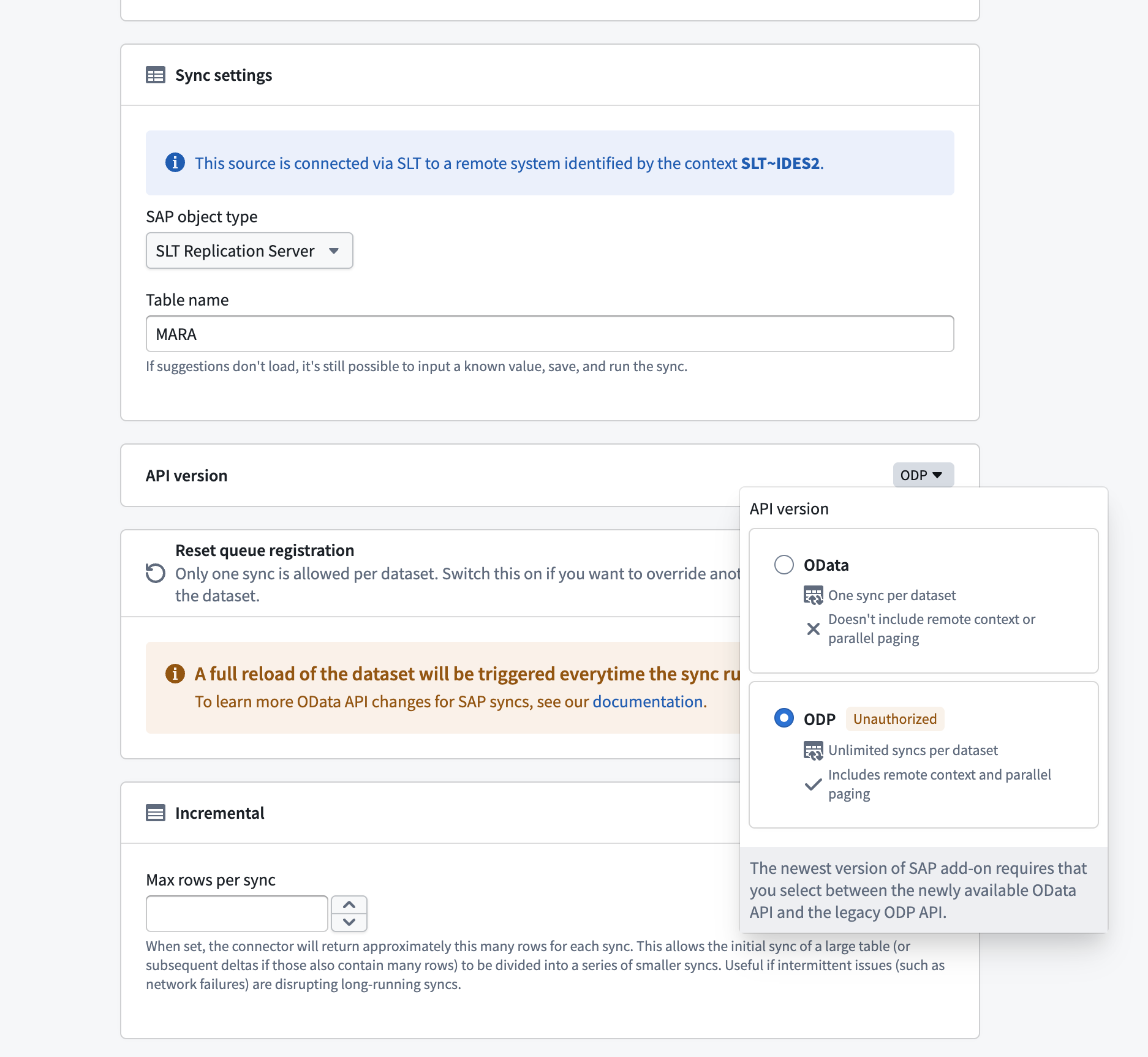
Reset queue registration
When using the OData API, the first sync configured for a table claims the active subscription. If you need to replace that sync with a different configuration, enable Reset queue registration to release the existing subscription and assign it to the current sync.
:::callout{theme="warning"} Enabling reset queue registration triggers a full reload of the dataset every time the sync runs. Disable this setting after the subscription has been reassigned to avoid repeated full reloads. :::
中文翻译
SAP SLT
SAP SLT连接器允许您通过SAP景观转换(SAP Landscape Transformation, SLT)复制服务器将Foundry连接到SAP系统。数据基于数据库触发器从源SAP ERP系统复制到SLT系统中相应的操作增量队列(Operational Delta Queues, ODQ)。SAP SLT连接器使Foundry能够与以下内容交互:
- 从源ERP系统复制的SLT复制服务器表
- SLT复制服务器系统中的本地表
:::callout{theme="warning"} 使用SAP SLT源需要在SAP SLT复制服务器上安装Palantir Foundry Connector 2.0 for SAP Applications插件。了解更多关于通过SLT连接的信息。 :::
支持的功能
| 功能 | 状态 |
|---|---|
| 探索(Exploration) | 🟢 正式发布(Generally available) |
| 批量同步(Batch syncs) | 🟢 正式发布(Generally available) |
| 增量同步(Incremental) | 🟢 正式发布(Generally available) |
| 流式同步(Streaming syncs) | 🟢 正式发布(Generally available) |
| 在代码仓库中使用 | 🟢 正式发布(Generally available) |
设置
- 打开数据连接(Data Connection)应用程序,在屏幕右上角选择+ 新建源(+ New Source)。
- 从可用的连接器类型中选择SAP SLT。
- 选择在Foundry工作节点(Foundry worker)或代理工作节点(agent worker)上运行源功能。
- 按照其他配置提示,使用以下部分的信息继续设置连接器。
了解更多关于在Foundry中设置连接器的信息。
远程上下文(Remote context)
SAP SLT连接器需要一个远程上下文(Remote context)值,该值是SLT复制服务器与源ERP系统之间RFC连接的唯一标识符。了解更多关于在SLT配置指南中配置此内容以及关于SLT连接的信息。
身份验证(Authentication)
SAP SLT连接器支持以下身份验证方法:
| 身份验证方法 | 描述 |
|---|---|
| 基本身份验证(Basic Auth) | 提供安装连接器时创建的技术用户的用户名和密码。 |
| 身份验证令牌(Authentication token) | 提供用于身份验证的令牌。 |
| 自定义身份验证头(Custom authentication header) | 提供自定义身份验证头。 |
| 无身份验证(No authentication) | 如果通过证书在代理机器上设置了身份验证,则使用此选项。 |
网络与连接
您必须正确配置出口策略(如果使用Foundry工作节点)或代理网络(如果使用代理工作节点),以确保您的SAP SLT系统能够与Foundry通信。
许多SAP系统使用自定义签名证书,这可能在首次配置连接时导致SSL握手异常。请确保您拥有系统中正确的自定义证书,并将其添加到源(如果使用Foundry工作节点)或直接添加到代理(如果使用代理工作节点)。
从SAP SLT同步数据
使用探索视图(exploration view)为SAP SLT表创建同步。从源概览页面,选择批量同步旁边的+ 新建(+ New),然后从下拉菜单中选择所需的对象类型:
- SLT复制服务器(SLT Replication Server): 来自源系统的数据通过SLT复制服务器使用源ERP系统上的数据库触发器进行复制。
- 本地表(Local table): 直接从SLT复制服务器系统本身的表中读取数据。
同步参数
对于批量同步,以下设置出现在高级设置(Advanced settings)下。部分设置也可以在源级别进行配置。
| 设置 | 描述 |
|---|---|
| 最大文件大小(Max file size) | 每个输出Parquet文件的最大大小。默认为每个文件50,000行。 |
| 清理Avro字段名(Clean field names for Avro) | 清理字段名称,使其符合Foundry流使用的Avro ↗模式规则。如果数据集将用于流式管道,则必须启用此选项。 |
| 忽略意外值(Ignore unexpected values) | 启用后,无法解析的日期或数值将写为null,并在同步结束时记录解析异常摘要。 |
| 将日期转换为字符串(Convert dates to strings) | 将日期字段作为字符串摄取。当SAP日期字段包含无法解析的值(这些值具有特殊含义并需要在下游处理)时,此选项非常有用。 |
| 页面大小(Page size) | 从SAP检索数据时每页返回的行数。默认为50,000。最小值为5,000。 |
| 并行分页线程(Parallel paging threads) | 用于生成页面数据的SAP工作进程数。仅适用于旧版ODP同步;不适用于OData同步。 |
| 插件工作线程(Plugin worker threads) | 用于检索页面数据的数据连接代理线程数。 |
| 远程上下文(Remote context) | 源系统的RFC连接标识符。如果设置,初始加载将绕过SLT复制服务器队列,并通过RFC直接消费数据。不适用于OData同步。 |
| 序列化引擎(Serialization engine) | 用于数据传输的序列化方法。 |
| 重试和超时(Retries and timeouts) | 重试次数、重试延迟和请求超时。 |
| 资源检查(Resource checks) | 提取期间的内存和CPU检查。禁用可能会给SAP系统带来过多负载。 |
| 调试设置(Debug settings) | 跟踪日志记录和调试日志记录。调试日志记录会在SAP中启动后台进程——请谨慎使用。 |
对于增量批量同步,每次同步最大行数(Max rows per sync)设置限制了每次运行返回的大致行数。如果间歇性问题(如网络故障)中断了长时间运行的同步,可以使用此设置将大型表的初始同步拆分为一系列更小、更具弹性的运行。
流式同步(Streaming syncs)
SAP SLT连接器支持用于实时数据复制的流式同步。要创建流式同步,请从源概览页面选择流式同步(Streaming sync)旁边的+ 新建(+ New)。
强制快照(Force snapshot)
强制快照(Force snapshot)开关控制流是否在轮询增量更新之前从读取完整表开始。在以下情况下启用此设置:
- 源ERP系统上的数据库触发器已被重置或损坏。
- SLT复制服务器中的指针已丢失。
在完整表流式传输到Foundry后,禁用此设置并保存,以便后续流式传输仅轮询更新。
API版本(API version)
:::callout{theme="warning"} 根据SAP注释3255746 ↗(第11版,2026年4月),非SAP应用程序禁止在本地和私有云环境中通过RFC使用ODP数据复制API(ODP-RFC)。2026年6月发布的SAP安全补丁在技术上阻止了未经授权的ODP-RFC调用。在应用补丁之前,请将仍在使用旧版ODP API的任何同步迁移到OData API。 :::
使用插件版本2.34(SP34)或更高版本,SAP SLT同步可以使用OData API。这基于通过OData进行基于ODP的数据提取 ↗,这是SAP推荐的。SAP不再允许使用旧版ODP API。
使用OData API需要:
| API | 描述 |
|---|---|
| OData | 每个表只允许一个活动订阅。如果某个表已存在同步,则针对同一表的任何新同步都将失败,除非先释放现有订阅。不包括远程上下文或并行分页。 |
| ODP(旧版) | 允许每个表有多个订阅,使不同的同步能够独立摄取同一表。包括远程上下文和并行分页。SAP不再允许使用。 |
重置队列注册(Reset queue registration)
使用OData API时,为表配置的第一个同步会声明活动订阅。如果您需要用不同的配置替换该同步,请启用重置队列注册(Reset queue registration)以释放现有订阅并将其分配给当前同步。
:::callout{theme="warning"} 启用重置队列注册会导致每次同步运行时触发数据集的完整重新加载。在订阅重新分配后禁用此设置,以避免重复的完整重新加载。 :::